Milestone
Deliverables
The Hands-On Approach
To Implementing
Table of Contents 2
Table of Contents
Forward... 3
Chapter 1: Introduction... 5
The Emotional Curve... 5
The Right Stuff... 7
Chapter 2: Project Teams... 10
The Core Team ... 11
Functional Teams ... 11
Responsibility and Authority ... 12
The Steering Committee... 12
Chapter 3: Implementation of the Milestone Deliverables Process ... 14
Overview of the Phases... 14
Overview of the Tasks and Milestone Deliverables... 18
Phases, Tasks and Milestone Deliverables ... 22
The Planning Phase ... 22
The Core Team Training Phase... 28
The Mapping Phase... 35
The Walkthrough Phase ... 54
The Conference Room Pilot Phase ... 59
The Departmental Pilot Phase ... 72
The Integrated Pilot Phase... 76
The End User Training Phase... 79
The Migration Phase... 83
The Customizations, Interfaces, and Special Projects Phase... 91
The IT Infrastructure Phase... 100
The Cutover Phase ... 112
The Optimization Phase ... 118
Chapter 4: Summary... 121
Planning, Training, and Mapping... 122
Piloting... 123
End User Training, IT, Migration, Cutover, and Optimization... 124
Chapter 5: Project Meetings... 125
Meeting Format and Minutes ... 125
Kickoff Meeting ... 128
Steering Committee Meeting ... 130
Core Team Meeting... 131
Functional Team Meeting ... 132
Cutover Meeting... 133
Chapter 6: Miscellaneous Topics... 134
The War Room... 134
Rapid ERP Implementations... 134
Hints for Outside Consultants ... 137
About the Author... 139
List of Figures... 140
Chapter 3: Implementation of the Milestone Deliverables
Process
Milestone Deliverables ERP implementation project is made up a “lucky thirteen” basic phases. However, these phases can be expanded upon and further broken down into smaller and smaller components. In fact, that is exactly what is needed to link tangible deliveries to achievable tasks.
Phases are made up of tasks and deliverables, and some cannot start until their predecessors complete. The deliverables are strategically associated with key milestones; ultimately when all tasks and deliverables are completed, the project is technically over.
Overview of the Phases
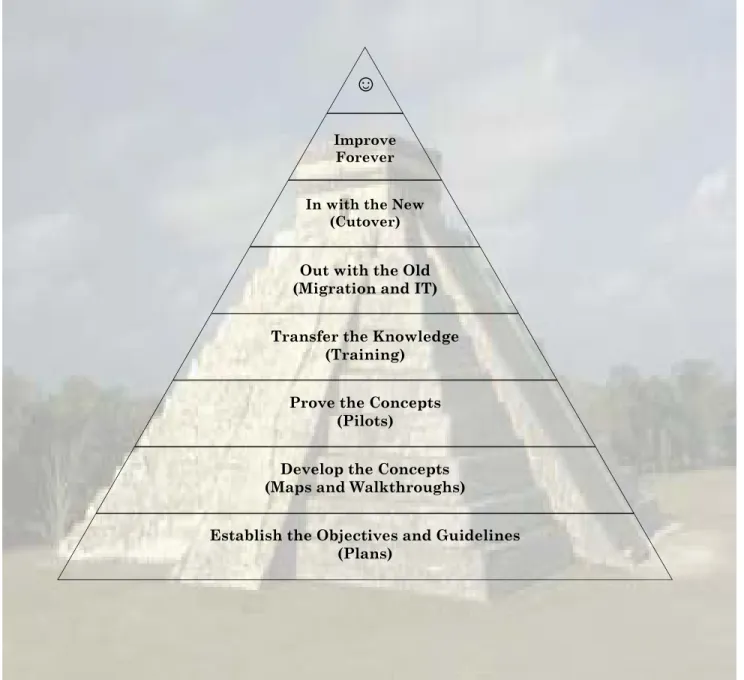
Like the pyramid in Figure 1, the phases build on a foundation of solid planning. They then move to the development of concepts; proving concepts; transferring the knowledge learned; and taking the data used in the old systems and transferring it to the new.
The logical order of the phases enable the deliverables to evolve naturally, and incrementally, as the team’s understanding of the ERP application software improves.
Establish the Objectives and Guidelines (Planning Phase)
The first stage of any project is to define the scope, set expectations, prepare high-level plans, estimate costs, and develop timelines.
Develop the Concepts (Key User Training, Mapping, and Walkthrough Phases)
Then, learn the new systems, revise the business processes, and ensure (in theory) that they work seamlessly across the organization.
Prove the Concepts (Conference Room Pilot, Departmental Pilot, and Integrated Pilot Phases)
Pilot several layers of testing to prove that the theories can be put into practice on the new ERP software.
Transfer the Knowledge (End User Training Phase)
Enhance worker skills and train the end users to run the business on the new system.
Out with the Old (Migration, Customizations, Interfaces, Special Projects, IT Infrastructure Phases)
Bring the data from the old systems to the new, adapt and develop ancillary systems. Construct the appropriate IT infrastructure.
In with the New (Cutover Phase)
Close down the old, and fire up the new ERP system.
Improve Forever (Optimization Phase)
Never stop improving the ways of conducting business.
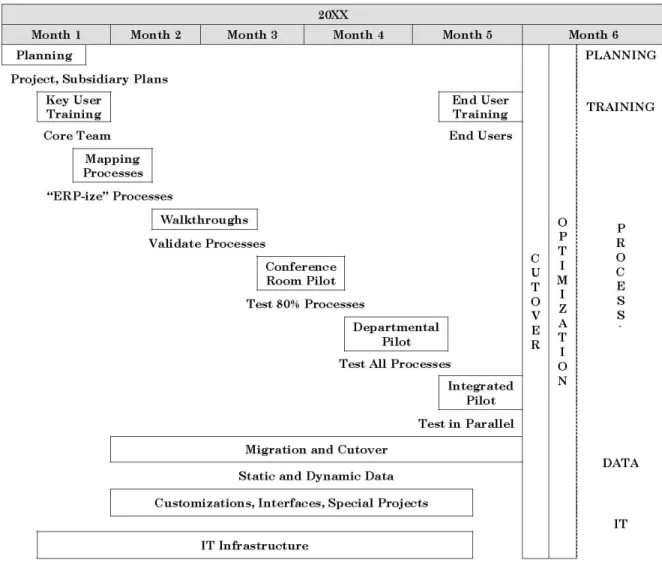
Figure 2 (page 4) shows a view of the time-line of the relationship of these phases. In the sample, a six-month start-to-finish duration is used for reasons of brevity and simplicity.
Each of the thirteen phases, their tasks, and associated deliverables is covered later in this chapter.
Figure 1 - The Phase Pyramid
A solid foundation, built from the bottom up, ensures the project will not crumble under its own weight.
☺
Improve Forever In with the New
(Cutover)
Out with the Old (Migration and IT) Transfer the Knowledge
(Training) Prove the Concepts
(Pilots)
Develop the Concepts (Maps and Walkthroughs)
Establish the Objectives and Guidelines (Plans)
Figure 2 - The Phases
Overview of the Tasks and Milestone Deliverables
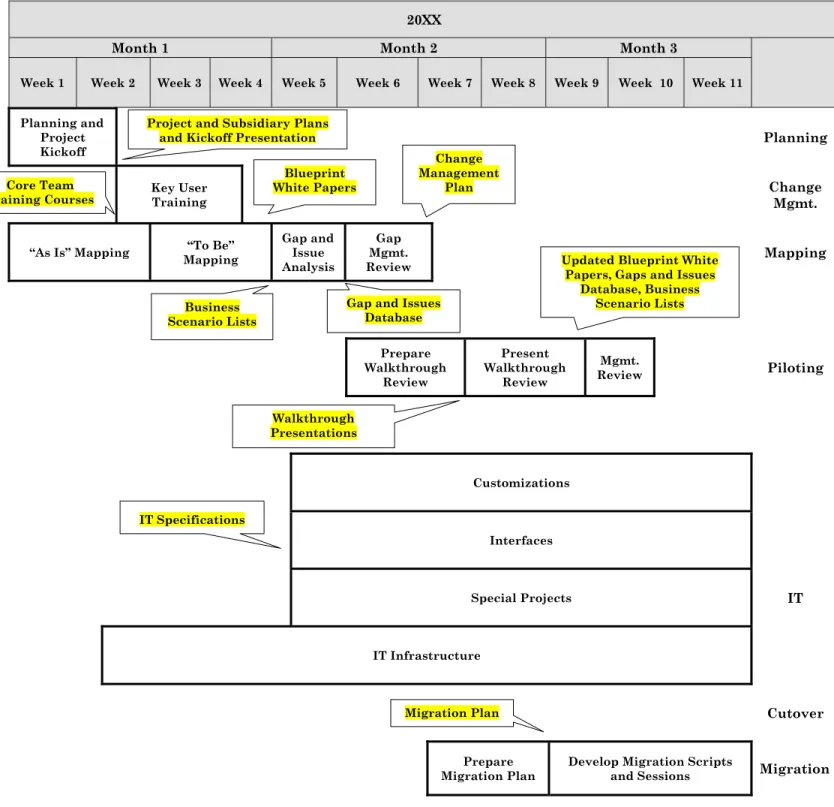
The project tasks are accompanied by fourteen tangible deliverables, strategically sprinkled throughout the project’s phases. Completing a deliverable signifies the completion of a particular milestone. And this completion often is a prerequisite to the start of the next phase.
Figure 3 and Figure 4 illustrate the further breakdown of the major phases described in the previous section. The high-level tasks and associated Milestone Deliverables completion points are also shown on the chart.
Each “bubble” ( ) contains a description of the deliverable and points to the milestone event after which the deliverable must be completed. Note that the same deliverable can appear several times since many deliverables repeat; deliverables are constantly improving while being revised over the life of the project.
The format of these deliverables is not set in stone. In fact, this methodology does not intend to limit the choice of software for word processing, spreadsheets, project management or databases, nor does it intend to suggest using the sample report formats without modification. What is important is to be faithful to the concept of using this methodology to manage the team to produce high-quality, tangible results in a timely fashion.
The Milestone Deliverables are:
1. Project and Subsidiary Plans to list project objectives and scope 2. Kickoff Presentation to signal the start of implementation execution 3. Core Team Training Courses to teach ERP overviews and details 4. Business Scenario Liststo list each department’s processes
5. Blueprint White Papers to document each department’s operations
6. Gaps and Issues Databaseto assist tracking and reporting gaps and issues 7. Change Management Plan to lay out end users’ skills upgrades
8. Walkthrough Presentations to present each department’s business processes 9. 80% and 20% Scenario Scripts to detail user instructions for each business scenario 10. User Training Courses to teach the new operating methods and ERP application details 11. User Documentation to combine the many deliverables into a complete document 12. IT Specifications to detail customizations, interfaces, and special projects
13. Migration Plan to map out tasks for conversion and entry of legacy data 14. Cutover Plan to document the project final weeks’ tasks
20XX
Month 1 Month 2 Month 3
Week 1 Week 2 Week 3 Week 4 Week 5 Week 6 Week 7 Week 8 Week 9 Week 10 Week 11 Planning and
Project
Kickoff Planning Key User
Training Change Mgmt.
“As Is” Mapping Mapping “To Be” Gap and Issue Analysis
Gap Mgmt.
Review Mapping Prepare Walkthrough Review Present Walkthrough Review Mgmt.
Review Piloting
Customizations
Interfaces Special Projects IT
IT Infrastructure
Cutover
Prepare
Migration Plan Develop Migration Scripts and Sessions Migration
Figure 3 – High-level Tasks and Milestone Deliverables
Gap and Issues Database
Walkthrough Presentations IT Specifications
Migration Plan Project and Subsidiary Plans
and Kickoff Presentation Blueprint White Papers Core Team
Training Courses
Updated Blueprint White Papers, Gaps and Issues
Database, Business Scenario Lists Business Scenario Lists Change Management Plan
Figure 4 – High-level Tasks and Milestones Deliverables (Continued)
20XX
Month 3 Month 4 Month 5 Month 6
Week
12 Week 13 Week 14 Week 15 Week 16 Week 17 Week 18 Week 19 Week 20 Week 21 Week 22 Balance
C U T O V E R T O L I V E Optimization Planning Complete Training Manuals End User
Training Change Mgmt. Mapping Develop CRP Scenarios/ Scripts (80%) Enter CRP Test Data Perform CRP Develop Dept. Pilot Scripts (20%)
Perform DP Integrated Pilot Piloting
Customizations Interfaces Special Projects IT
IT Infrastructure Prepare Cutover
Plan Cutover Test Migration Scripts and Sessions
Full Static Migration into Live (Dual Entry) Long-term and Short-term Dynamic Data Entry Migration 20% Business Scenario Scripts User Documentation and
Training Courses Cutover Plan 80% Business Scenario Scripts Updated User Document-ation Updated User Document-ation Updated Blueprint White
Papers, Gaps and Issues Database, 80% Business
Scenarios and Scripts
Updated Blueprint White Papers, Gaps and Issues Database, 80% and 20% Business Scenarios and
The Project Schedule Overview
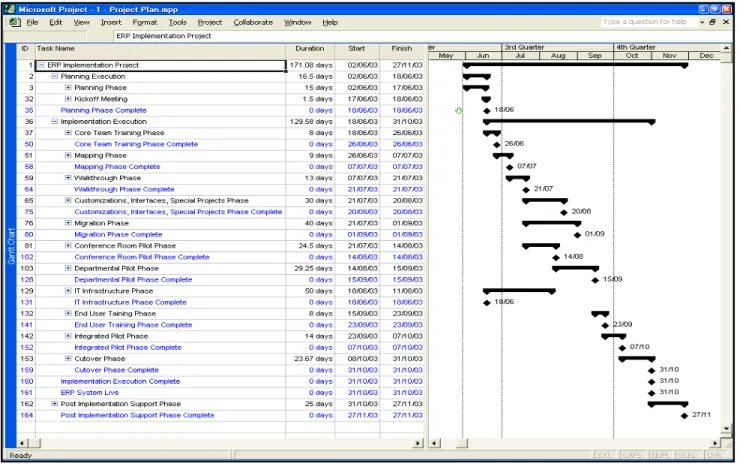
In the samples, we have used an elapsed six-month project timetable for the sake of simplicity. In fact, full-scale ERP projects can vary in length from brief 4 ½-month implementations to larger undertakings lasting from one to several years.
Figure 5 shows the collapsed view of all the project phases. In this example, the first task starts in early June and the final Optimization Phase completes just less than six months later.
The Migration Phase
Bad data is one of the three primary causes of ERP project failures. Bad data cannot be tolerated.
In other words, “Garbage in, garbage out.”
Migration refers to the automatic or manual transfer and cleansing of any existing data into the files needed by the new ERP application to function. Sources for this data include the legacy system files, manual documents, spreadsheets, and so on.
The Timetable
The Migration Phase starts immediately after the core team is trained on the new ERP application and continues right through the final cutover weekend. It functions in parallel with the process phases of the implementation.
What This Phase Accomplishes
At this point, two definitions are required:
a) Static data is data that has a tendency to change infrequently. It can be migrated early in the implementation cycle to ease any last-minute rush, and to provide test data for piloting. b) Dynamic data is data that is volatile. It should be migrated at the last possible moment to
reflect its most up-to-date state.
Some examples of static data include: Tables, Parameters, and Master Data
• Logistic, finance, and tax tables
• Application module parameters
• Non-volatile master data (order types, numbering series, user profiles, etc.)
Operating Data
• Business partners (customers, suppliers, etc.)
• Engineering master items, coding systems
• Engineering bills of materials, routings, etc.
• Employees
• Price books
Financial Data
• Charts of account
• Inter-module integrations (mappings)
• Financial budgets
Some examples of dynamic data include: Operating Data
• Sales orders
• Purchase orders
• Shop work orders
• Inventory balances
Financial Data
• A/R open items
• A/P open items
• G/L balances
Dynamic data can be further sub-divided into: a) Long-term dynamic data
b) Short-term dynamic data
Long-term dynamic data are those elements that are not expected to change between the time they are entered and the date the new system goes live. Examples are: sales and purchase order lines not scheduled for delivery or receipt until after cutover; shop work orders not scheduled to start before cutover.
Short-term dynamic data are those elements likely to change up to the final moments before final cutover. Examples include: sales order lines scheduled to ship before cutover; invoices with pending payments; costing files; and inventory balances.
Data cleansing strategies
The new system should start with a clean bill of health for all data. The data to be transferred to the new ERP application must be reviewed carefully to correct errors and redundancies. Any unnecessary or duplicate information must be removed.
There are at least three opportunities to cleanse data:
1. It can be cleansed prior to migration, using existing sessions on the legacy system itself.
2. It can be downloaded into an intermediate format (such as an Excel spreadsheet or Access
database) and cleansed there before being transferred into the new ERP application files.
3. It can be cleansed after migration using the new ERP application sessions themselves.
Automated and manual conversion
Programs can be written to migrate data with little or no user intervention. The volume of data to be transferred and the compatibility of the legacy and the new ERP application record elements often determine whether fully automated routines can be used.
When coding automated migration routines, programmers must use rules to create structurally correct ERP application records that won’t jeopardize the integrity of the file system.
A full re-migration of the static data can occur as often as necessary as long as no related operating data has been entered in the interim.
Maintaining data correctness
By definition, static data is cleansed and migrated to the ERP application files early in the final phases of the implementation cycle. Dynamic data is migrated as late as possible. However, the
Identifying long and short-term dynamic data
Clearly, it will be necessary to get a head start on entering dynamic data since the last days before cutover will be exceedingly busy. This dynamic data must be prioritized to indicate which elements are long-term and which are short-term. The long-term dynamic data, by definition, should be entered before the short-term data since its contents are not as susceptible to change.
Print reports from the legacy system to list the data elements that should not change between their entry into the new ERP system and the cutover date; these should be ordered from most- to least-current date sequence. If these are available from the legacy system, include sufficient details to enable complete data entry from this report. If unavailable, print the location of the source documents.
Automated data migrations of both long- and short-term dynamic data need not be run as early in the cycle. An exception to this rule is for high-volume data that may force the migration routines to run over several days or weeks.
As the final cutover approaches, ship, receive, and close as many transactions as possible in the legacy systems to minimize the last-minute, short-term data entry. Once the legacy system is closed, enter the final open legacy data elements into the new ERP application. Print the legacy and new ERP application backlog reports to crosscheck and balance the two systems.
Attrition and converted data sets
It may be beneficial to leave some data on the legacy system to disappear by attrition depending on the volume of data to convert, its longevity, the compatibility of the legacy and the new ERP application file definitions and the ease of maintaining two systems and two sets of business procedures.
The Tasks
1) Prepare the Migration Plan
2) Execute the Migration Plan
a) Populate the static data files in the test environment for the departmental and integrated
pilots and in the production files for final cutover
Figure 6 - Migration Tasks
The Deliverables
The Thirteenth Deliverable: The Migration Plan
Migration Plan
Prepare Migration Plan
A sample Migration Plan Table of Contents includes:
a) Introduction
b) Sandbox, QA, and Production Companies
c) Migration Strategies
(1) General approach
1. Locating data
2. Data cleansing
3. Maintaining correctness
4. Automatic versus manual migration
(2) Static data
1. Parameters, master data
2. Business partners
3. Item master records
4. Employees
5. Bills of materials
6. Routings
(3) Dynamic data
1. Open sales order lines
2. Open purchase order lines
3. Open work order lines
4. Open service order lines
5. Open warehouse order lines
6. Inventory details
7. Finance open items
8. Costing elements
9. Trial balance opening entries
d) Timetables
(1) Static data
(2) Long-term dynamic data
(3) Short-term dynamic data
The migration plan must address the methods used to transfer data into the new ERP application files.
Migration Strategies
a) Identify each ERP Application file to be populated, its source, and specify when it is to be
done: early for static data; later for long-term dynamic data; or at the last minute for short-term dynamic data.
b) Determine the method of cleansing the data
(1) In the legacy system
(2) In an intermediate file using a secondary process such as Excel, Access, etc.
(3) In the new ERP Application sessions, once transferred
c) Choose the migration method: automatic or manual entry
(1) Re-migration
(2) Dual legacy and ERP application manual update
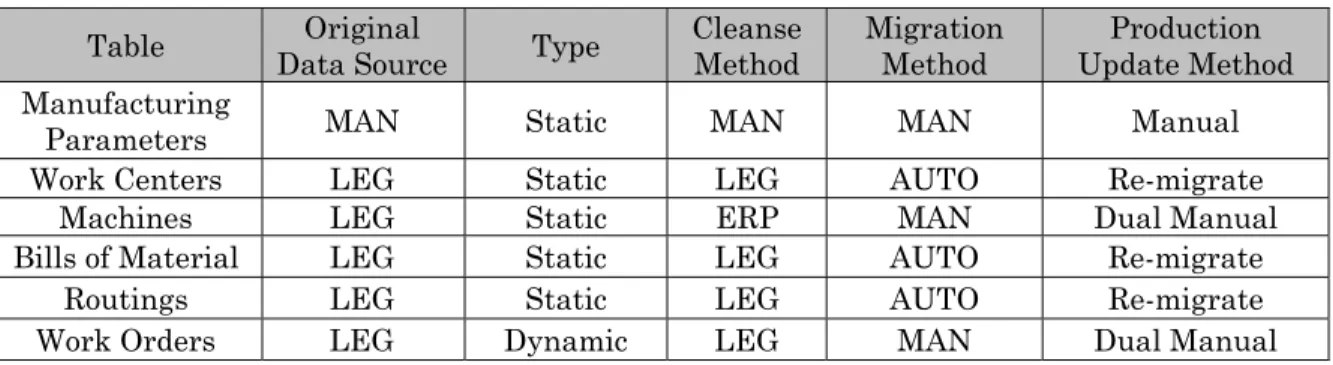
Track the migration progress in a tabular matrix such as the one presented below.
Table Data Source Original Type Cleanse Method Migration Method Update Method Production
Manufacturing
Parameters MAN Static MAN MAN Manual
Work Centers LEG Static LEG AUTO Re-migrate
Machines LEG Static ERP MAN Dual Manual
Bills of Material LEG Static LEG AUTO Re-migrate
Routings LEG Static LEG AUTO Re-migrate
Work Orders LEG Dynamic LEG MAN Dual Manual
Sandbox, QA, and Production Companies
The IT environment for the ERP implementation must adhere to a set of quality control standards established at the project outset. With this methodology, we do not intend to suggest a single approach. Based on what has worked well in the past, we propose working within a simple framework of one or more instances or companies: Virgin, Sandbox, Development, Quality Assurance (QA), Migration, and Production.
The Virgin Companies preserve the parameters and master data settings and are maintained and kept up-to-date as any changes to these files occur. All the pilot testing occurs in the Sandbox Companies, and the quantity of these Sandboxes varies according to the piloting needs. Sandbox Companies are refreshed (as required from the Virgin Companies) via data entry or using automated migration routines.
ERP application version patches and IT-developed customizations are tested in Development Companies and selectively moved to QA Companies for pre-production testing and quality assurance. When final approval is given to the customizations, the updates are moved to the Production Companies, keeping the QA and Production Companies in close synchronization.
Migration scripts and programs are tested in Migration Companies. These relationships are illustrated in Figure 7.
Figure 7 - Migration Environment
Work within a simple framework of one or more companies: Virgin, Sandbox, Development, Quality Assurance (QA), Migration, and Production.
Sandbox Companies
Test Data for Training, Walkthroughs, and
Piloting
“Virgin” Companies
Latest Parameters and Master Data Training And Walkthroughs QA Companies Well-controlled Sandbox Tested Patches and
Customizations
Development Companies
Sandbox Ongoing Patches and
Customizations Conference Room,
Departmental, Integrated Piloting
Refreshed at Start of Phase
Kept in Sync. When Changed
Automated
Static Data Migration Companies Migration Test Data for Automated Migrations Re-migrate for
Final DP Test Phase and Integrated Pilot
Tests
Kept in Sync.
When Approved When Changed Kept in Sync.
Code to be Tested
Production Companies
Live Data and Latest Approved Patches and
Kept in Sync. When Approved
Re-migrate for Static and Dynamic
Data Entry
Static, Dynamic Data Entry, Cutover, and
Live
Refreshed at Start of Static Migration and
Data Entry
IT
LIVE TEST