Harmonized
Processes for
Section 508
Testing:
Baseline Tests for
Software & Web
Accessibility
Document status, review comments, and feedback
The current version is 1.0.6 approved for distribution by DHS and by SSA.For more information on the baseline tests and links to published streamlined test processes, training and certification programs, visit:
Contents:
Document status, review comments, and feedback ... 1
Introduction ... 4
Baseline tests ... 4
Background ... 4
How the baseline tests are structured ... 6
Use of the baseline tests by federal agencies and other groups ... 8
Agency issues beyond the test process ... 9
Developing a streamlined test process from this baseline—a primer ... 11
Examine example test processes first ... 11
Examine the advisory notes on each baseline test... 11
Target audiences, requirement and test instruction wording ... 11
Test Process requirements ... 12
Modifications to the baseline tests ... 12
Test tool instructions ... 13
Reporting results ... 14
The Baseline Tests (#1 - #28) ... 15
Attachment A - Cross-Reference Tables ... 76
Baseline tests (cross-reference table) ... 77
Section 508 (cross-reference table) ... 80
WCAG 2.0 (cross-reference table) ... 83
Attachment B - Flashing content test advisory notes... 86
Why to include a flashing content test in a test process ... 86
Why there is no baseline test for flashing ... 86
Requirement, and draft rationale ... 87
How to report on flashing content ... 87
Attachment C - Baseline Test Report Checklists ... 88
Software-only test ... 89
Web-only test ... 90
Web+Software test ... 91
Summary of failures ... 92
Contents: The Baseline Tests (#1 - #28)
1. Keyboard navigation ... 16
2. Focus (visible) ... 19
3. Focus (order) ... 21
4. Focus (Revealing hidden content) ... 23
5. Skip links ... 25
6. Multi-state components ... 27
7. Images ... 30
8. Color (meaning) ... 34
9. Color (contrast) ... 36
10. Flashing (reserved) ... 38
11. Forms (associated instructions) ... 39
12. Page Titles ... 43
13. Data Tables (headers)... 44
14. Data Tables (cell-header association) ... 46
15. Headings ... 48
16. Links and User controls ... 50
17. Language ... 53
18. Audio (transcripts) ... 55
19. Video (descriptions) ... 57
20. Synchronized media (captions) ... 59
21. Synchronized media (descriptions) ... 61
22. Style-sheet non-dependence... 63
23. Frames ... 65
24. Alternate pages ... 66
25. Time outs ... 68
26. Image maps ... 70
27. Plug-in Links ... 71
Introduction
Baseline tests
This document contains accessibility design requirements and validation tests for software and Web accessibility. These tests are for measuring compliance with Section 508 of the Rehabilitation Act of 1973, as amended (29 U.S.C. 794d)1.
This publication contains baseline tests that have been agreed upon and adopted by representatives of federal agencies as part of an effort to harmonize their testing processes for Section 508.
These baseline tests establish the minimum steps required to determine whether an application passes or fails applicable Section 508 technical and functional performance requirements. Federal agencies are encouraged to adopt the baseline to establish a consistent, shared, government-wide test approach.
Federal agencies and other groups are at liberty to develop their own test processes, incorporating the baseline tests and any additional test criteria specific to their needs. Although agencies may add some unique tests in their processes, all agency test processes will include the baseline test elements. A unified approach for 508 testing will provide consistency across government and confidence in test results shared between agencies.
Background
When Section 508 came into effect in 2001, it was up to individual federal agencies to develop their own responses to the requirements (interpretations of standards, development of test and governance processes, etc.). Some agencies do not test as part of their compliance efforts, lacking resources and/or expertise. Instead, they may rely on vendor claims of conformance with the Section 508 standards. A number of agencies do test, however, and have developed their own processes for evaluating Commercial-Off-The-Shelf (COTS) products, and internally developed software applications and Web sites. Because each agency developed its own test processes independently, there are inevitable differences in testing approaches and associated compliance determinations. Such differences have resulted in different testing outcomes for the same products: agency "a" would test COTS product "x", finding it 508 compliant, then agency "b" would find product "x" non-compliant. Without consistent testing, vendors receive mixed or conflicting messages from different federal agencies on the compliance of their products and services, and multiple agencies tend to test the same products due to a lack of trust with one another's test results.
In an effort to improve Section 508 testing across government, the "Harmonized Testing Process for Section 508 Compliance: Baseline Tests for Software and Web Accessibility" was developed as part of a collaborative project between accessibility teams at the US Department of Homeland Security (DHS) and the US Social Security Administration (SSA).
Prior to this project, SSA and DHS evaluated software and Web accessibility against Section 508 requirements using very different approaches. DHS evaluated against the requirements
1
Section 508 is an act that requires all federal departments and agencies to ensure that their electronic information & technology (EIT) is accessible to people with disabilities. The specific standards for compliance with Section 508 are published at Section508.gov.
Page 4
using code inspection tools to examine source code without the use of Assistive Technology (AT). SSA, on the other hand, used an AT-intensive approach, testing Web sites with assistive technologies most commonly used by SSA employees with disabilities. While the two approaches were radically different, they both had one thing in common: each strived to accurately evaluate software and Web accessibility for Section 508 compliance. Consolidating and harmonizing the two approaches was not easy, but for many reasons DHS and SSA felt it was necessary.
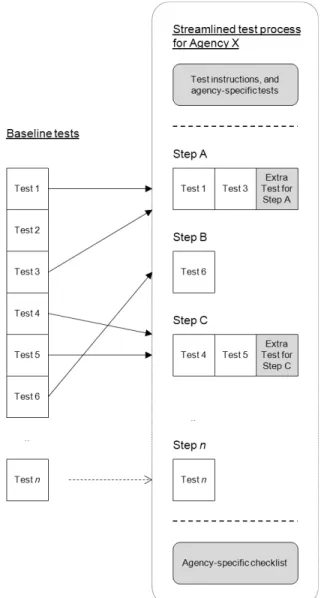
The result of this project is an agreed upon, harmonized core or 'baseline' set of tests that agencies can use to develop their own test processes. Test processes should incorporate the baseline as the minimum, and agencies have the option to streamline/enhance their testing processes to include more than the baseline if needed (Figure 1).
Figure 1 - Developing a streamlined test process incorporating the baseline tests
The baseline tests in this document have been developed to cover Section 508 technical requirements for Software, Web, and Functional Performance Criteria (FPC) that apply to all Electronic and Information Technology (E&IT).2 The government's Section 508 standards are, at the time of writing, under a revision process. While not definite, it is likely that the revised Section 508 standards will follow closely the World Wide Web Consortium (W3C) Web Content Accessibility Guidelines 2.0 (WCAG 2.0).3 It was therefore decided to develop the 508 baseline tests to include, or at least align with4 most of the WCAG 2.0 success criteria, in preparation for the upcoming Section 508 refresh. A cross reference to show how the baseline tests map to Section 508 and to WCAG 2.0 in the attachment starting on page 76.
Given the trend for technologies to converge, WCAG 2.0 requirements were developed to accommodate inevitable future technology changes, and the language used in those guidelines is necessarily at a high level. The experiences testers at both SSA and DHS had, following WCAG 2.0 to the letter, were problematic. Some tests led to inconclusive results, and some were considered too subjective in nature. The development of the new baseline tests is the result of an attempt to reduce ambiguity, increase consistency of results, and emphasize the methods and techniques that can reliably meet the Section 508 requirements, given the current state and compatibility of underlying technologies.5
The result of the collaboration between SSA and DHS is reflected in the current document: a set of baseline tests that cover the current Section 508 standards, that align with applicable WCAG 2.0 Level AA success criteria, and that can be incorporated in separate, practical, systematic test processes for software application and Web accessibility.6 Additional WCAG harmonization may be explored in the future as the Section 508 refresh process continues and testing tools and techniques mature.
How the baseline tests are structured
The selection criteria for including requirements and baseline tests against those requirements was:
• Standards based: The requirement must be firmly rooted in standards (both current and emerging), or is there to address specific, documented, high-risk accessibility issue (complaints are documented in an area that the standards did not anticipate).
• Validated: Tests were validated by SSA and DHS, and are known to produce reliable and repeatable results. In future updates, validation tests must be conducted by more than one agency.
• Usable: Validated Baseline tests were adapted into a practical formal test process that was tested to verify usability.
The tests have been developed to contain sufficient information and instruction to make a consistent and unambiguous measurement of the accessibility of interface components,
2
E&IT is more widely referred to as ICT (Information and Communications Technologies). 3
Web Content Accessibility Guidelines (WCAG) 2.0, W3C Recommendation 11 December 2008. Available: http://www.w3.org/TR/WCAG20/
4
Note that "aligns with" does not imply "conforms to". For conformance with WCAG 2.0, a WCAG 2.0 test process should be followed, rather than the Baseline.
5
For example, HTML (Hyper Text Markup Language), ARIA (Accessible Rich Internet Applications), platform APIs (Application Programming Interfaces), browsers, and assistive technologies.
6
The baseline tests herein are aligned with the WCAG Level A and Level AA success criteria. WCAG comments on the more stringent AAA: "It is not recommended that Level AAA conformance be required as a general policy for entire sites because it is not possible to satisfy all Level AAA Success Criteria for some content." http://www.w3.org/TR/WCAG20/#cc1
Page 6
independently of the other tests. However, doing all of these tests in sequence is not recommended. Instead, testers should follow a streamlined, practical test process that incorporates these baseline tests (Figure 1).
Platform, browser and tools
The baseline tests have been established using Microsoft Internet Explorer version 8, version 9 and version 11, and Microsoft Windows version 7.
The tools used in the baseline tests have been chosen based on several factors including ease of use, ease of teaching, and accuracy of results. They are also free to use.
• "Inspect" from Microsoft Corporation. This tool reveals the accessibility properties (Name, Role, Value and State) of Windows software components.7
• URL: http://www.microsoft.com/en-us/download/details.aspx?id=8279
• "Java Ferret" from Oracle Corporation. This tool reveals the accessibility properties (Name, Role, Value and State) of Java software components.8
• URL: http://www.oracle.com/technetwork/java/javase/tech/index-jsp-136191.html
• "Web Accessibility Toolbar 2012 For IE" from the Web Accessibility Tools Consortium. This adds a toolbar to Internet Explorer to aid manual inspection of accessibility properties of components on web pages.
• URL: http://section508testing.org/tools/wat2012.zip
• Bookmarklets/Favelets These tools are JavaScript testing functions that are activated in the browser.
• URL: http://section508testing.org/tools/S508TrustedTesterBookmarklets.zip • “ARIA Markup Favelet” reveals ARIA attributes on web pages.
• “Named Anchors Bookmarklet” reveals anchor tags on web pages • “Frames Favelet” reveals frame and iframe properties on web pages
While there are other platforms, browsers and tools available, those used herein have been technically validated for accurate and repeatable results. Agencies that use other technologies are encouraged to develop an equivalent process for their specific test environments. Contact the authors (see contact details at the front of this document) to verify use of those technologies. Once use and adjustments have been verified, results of modified product test processes may be shared.
Agency-specific software installation and use guides should be included in streamlined test processes based on these tests.
7
Inspect is a component of the installation of Microsoft Windows SDK for Windows 7 and .NET
Framework 4, Version 7.1. The tool must be used in the User Interface Automation (UIA) mode, which includes the Microsoft Accessibility Architecture (MSAA) properties.
8
Java Ferret is a component of the installation of Java Access Bridge 2.0.2.
Baseline Tests
There are 28 separate requirements with associated tests, covering all relevant components for software applications and Web sites. Each test contains the following information:
• Numbered Requirement: In plain English, how the component(s) should function in order to meet the related standards. Note that the numbers are arbitrary, and do not infer a practical test sequence
• Rationale: In plain English, an explanation of why this test is important, and why the test methods are appropriate, with particular regard to the type(s) of disability-related problems being addressed.
• Related Standards: Which of the Section 508 standards are addressed by this test. Also, which of the relevant WCAG 2.0 success criteria this test aligns with. A given 508 standard or WCAG criteria may be addressed by multiple baseline tests.9
• Tools Necessary: Testing technologies used in this test.
• Test Instruction 1 - Finding Applicable Components: How a tester would find the components that need to be tested.
• Test Instruction 2 - Inspecting/Using Components: How a tester would determine whether the components found in Instruction 1 meet the requirement. This is achieved using inspection tools, and using human judgment.
• Test Instruction 3 - Failure conditions: A list of possible outcomes from Instruction 2, along with what to mark on a test report for this particular test.
• 3a - Section 508 Failure Conditions: The technical requirements and/or functional performance criteria that should be marked as failures in test results. Only failure conditions are given for Section 508.10
• 3b - WCAG2 Failure Conditions: The A or AA criteria that should be marked as failures in test results.
• 3c - Baseline Requirement Test Results: This includes a complete list of conditions that must be fulfilled in order to pass the baseline requirement, and conditions under which the baseline requirement is not applicable. Note that any failure in 3a means that the baseline requirement fails.11
Appended to each test are an advisory notes entitled "Tips for streamlined test processes".
These tips provide additional information, specific to the current test, that support the generic information provided in the primer section of this document.
Use of the baseline tests by federal agencies and other groups
Federal agencies and other groups are encouraged to adopt these baseline tests, and either develop their own test processes, or follow a test process developed by another agency.12
When developing test processes, and reporting results from such test processes, agencies must take note of the following:
• Test results for each baseline requirement must be reported. As such. each baseline requirement must be incorporated into the test process to be considered an acceptable test process.
9
Cross-reference tables are provided at the back of this document. 10
Streamlined test processes may include statements of when to mark Section 508 standards as compliant, or as not applicable.
11
For sharing test results between agencies, the results of 3a and 3c must be reported. 12
The baseline tests should not be re-published without citation, nor should they be modified from the content herein, which has been agreed upon and adopted by several government agencies.
Page 8
• Results of tests that incorporate the baseline tests are considered repeatable. A conclusion as the result of such a process can say that it is on the agreed-upon baseline. • Test processes that do not include all baseline requirements are not considered to be
following the baseline. Results of these test processes will not be accepted by agencies that have adopted the baseline tests..
• Results of tests that incorporate the baseline but also go beyond the baseline with additional test requirements (see also Figure 1), must clearly separate out in the report the results that refer to the baseline, and the results that refer to additional agency-specific tests.
Agency issues beyond the test process
It should be noted that use of a test process that incorporates the baseline tests is affected by other contextual issues that accompany any Section 508 program in a federal agency. Some examples of related issues to consider are:
• This document does not address the policies or organizational disciplines necessary to develop a Section 508 program or outline the processes needed for acceptance of vendor deliverables.
• Our goal is to clearly document the accessibility of the evaluated content against the Section 508 technical and functional performance requirements that are applicable to software and web. While the baseline provides a more predictable and reliable way of evaluating content, the test results can be regarded as one factor that goes into making a Section 508 compliance determination (the choice of an agency to adopt an application or not). Other factors to consider in making compliance determinations include, but are not limited to legal issues related to acquisition13, technical issues of compatibility with existing systems, and business needs. The output of a test process incorporating the baseline test will provide results that can assist in making compliance determinations and acceptance decisions of contract deliverables. The results may also be used to notify vendors and teams of defects, and plan for / prioritize ongoing test and remediation tasks.
• This document does not address how to handle coding mistakes. Problems may be found during testing that impact accessibility, but are simply coding errors. Included here would be things like links that lead to the wrong target website, use of Heading <H> tags for style instead of structure, and using both an ALT and a TITLE attribute on an image where the two clearly contradict each other. A tester may be responsible for notifying a developer if that is agency good practice, but these issues are usually not considered Baseline test results.
• The baseline test methodology does not include tests with assistive technology. Agencies must decide the role assistive technology will play in their internal testing program and Section 508 compliance determinations. Compatibility and usability of content with assistive technology plays an important role in assuring people with disabilities have comparable access to technology, information, and systems.14 Because AT testing can result in false-positives and false-negatives, defects must always be confirmed with the baseline methods herein. Additional testing with AT may reveal conclusive insights, but caution is urged: experience shows that such additional AT testing is proficient only with experienced, well-trained testers.
13
Federal Acquisition Regulation (FAR 39.2) https://www.acquisition.gov/far/html/Subpart%2039_2.html 14
Some content (e.g. dynamically generated content such as use of AJAX and ARIA) may produce passes and fails, the impact of which cannot be determined without testing with assistive technology.
• Section 508 puts Federal Agencies and some entities that receive federal funds at both business and legal risk if they do not comply with the law. The developers of the baseline (at DHS and SSA) recognize that a well implemented Section 508 program manages risks and knowingly takes on some risks. For example, an agency may deem it acceptable to use this baseline to document minor deficiencies and allow content to be published and applications to be pushed to production. However, when evaluating COTS products, the severity of the impact of a given defect or set of defects should be up to the implementing agency (and not another agency or vendor). If results are generated outside of the implementing agency (e.g. another trusted agency or vendors), they should ignore any severity levels. In summary, agencies should not accept outside entities evaluating their exposure to risk.
Developing a streamlined test process from this
baseline—a primer
The baseline test tables in this document are not intended to be followed in a linear fashion, and should be enhanced to form streamlined test processes for given audiences (see also Figure 1, page 5). The following notes give a primer on issues to consider while developing a streamlined testing process.
Examine example test processes first
Other federal groups have developed streamlined test processes. The work you are planning may already have been done. Agencies publishing their test processes usually allow other agencies to adopt and use them.15
Examine the advisory notes on each baseline test
Each baseline test table in this document has a row entitled "Advisory: Tips for streamlined test processes". These are tips on how tests may be combined, how tests might easily be enhanced, and so forth. These notes should always be consulted when creating a test process, although they are advisory in nature.
Target audiences, requirement and test instruction wording
The baseline tests have been produced with the assumption that testers have training / skills in accessibility, and have a basic understanding of HTML and the construction of Web pages. Testers must also have knowledge of the content or application that they are testing, or they must be able to follow an informed test plan.
It is also assumed that testers have necessary skills to evaluate subjective information in context (e.g., the suitability of alternate text for images). Any agency adopting the baseline tests and producing their own streamlined process (or adopting a published process) must ensure that testers are given proper documentation, test plans, demonstrations, and access to developers for clarifications and explanations, as appropriate. Any test process incorporating these baseline tests must therefore be tailored to the specific needs of its developers and/or testers.
The baseline tests could be written for an audience of developers, an audience of testers, or an audience of both. The requirements in each of the baseline tables have been presented in a neutral tone that is component-specific (e.g., "Links and/or user controls must have meaningful names"). It may be desirable to reword the requirements and instructions targeting developers (e.g., "Provide meaningful names for all links and/or user controls"). Alternatively, it may be that the process will be used only by testers, and so the language might be changed to reflect that (e.g., "Check that links and/or user controls have meaningful names").
15
Note any copying or editing restrictions etc. given in each published process.
Test Process requirements
The test process contains all instructions that a tester needs to follow the process completely to test a product and report on the product’s test results. Test processes derived from the baseline tests should include a mapping to each baseline test and each Section 508 requirement. Test processes should include the following:
1. Testing Tools
a. Where to obtain testing tools
b. How to set up of tools to ensure consistent test results between testers c. How to use the tools
d. Non-baseline tools must be identified and results from these tools are not to be used to determine baseline test results.
2. Testing instructions
a. All baseline tests must be included (including an agency method for Test #10 Flashing)
b. Advisory tips for streamlined test processes may be incorporated.
c. Agency-specific, non-baseline tests must be identified and not affect baseline test results
d. Test instructions (methods and use of tools for testing) e. Define failure conditions
f. Define the 508 standard(s) and Baseline Tests that are being tested
Modifications to the baseline tests
Given the nature of the baseline tests, they are not intended to be used for testing 'as-is'. Creation of a streamlined test requires some amount of modification to the baseline. The following provides guidance on what to do, and what not to do when modifying the baseline content.
Test order
Baseline tests included in this document are not intended to be used in a linear fashion. The order with which tests are conducted may be changed from the order herein (the numbers of each baseline test are for reference only). Tests may be combined for efficiency. For example, keyboard and focus tests can usually be done at the same time.
Always include the baseline, enhance as needed
Agencies that adopt the baseline tests agree to always incorporate each baseline test listed herein in their streamlined test processes. "Modification" in this sense does not allow for dropping any of the baseline tests.
To adopt the baseline, the content in each of the following table cells of the baseline must be represented somewhere in the streamlined test process (as a minimum):
• Numbered Requirement • Rationale
• Test Instruction 1 - Finding Applicable Components • Test Instruction 2 - Inspecting/Using Components • Test Instruction 3a - Section 508 Failure Conditions • Test instruction 3c - Baseline Requirement Test Results
Additional agency-specific tests (see below) must be identified as agency-specific testing (for example, by means of a cross-reference table appended to the test process document).
Wording changes, yes; Meaning changes, no
It may be desirable to change wording from the baseline. For example. it may be desirable to change passive voice to active voice. Wording changes to create a smooth-flowing, easy to read document are acceptable. However, care should be taken to ensure that the meaning remains the same even though the words used are different. A reviewer of any streamlined test should be able to compare the content to the baseline and conclude that the meaning and results that would come from a test remain the same. Any errors or suggested improvements to the baseline should be submitted to the address on page 1 of this document.
Separating out seldom used information
Each baseline test contains a rationale and a list of the necessary tools. Testers need to learn this sort of information once, and then have it available for quick reference. It is perfectly acceptable to separate such seldom-used information into a separate section, but this information must stay with any published test process (or be available to access from any online streamlined test tool incorporating these baseline tests).
Additional agency tests beyond the baseline
Agencies have the option to enhance their test processes to include more than the baseline if needed (see also Figure 1 on page 5). For example, there is a test in the baseline that
headings, where used, are programmatically marked up so that they are accessible to screen reader users. Any agency may decide to create a policy that "reports and memos over 1500 words long must include headings, to enhance readability and enhance accessibility". In this case, the test becomes (a) whether headings exist to break up text over 1500 words long, and (b) whether existing headings programmatically marked. When it comes to creating such a streamlined test, and when it comes to sharing the results of such a test between agencies, the agency-specific test (a) should be omitted (or at least clearly marked as a non-baseline test); and the baseline test (b) should always be included in the same manner as for the other baseline results.
An agency may also create a streamlined process that includes guidance to their accessibility test teams and other personnel on when a given baseline test failure does not result in an agency compliance determination failure. As stated earlier (page 9), test results are only one factor in making internal compliance determinations. An agency policy that accepts a certain baseline failure is the decision of that agency only. While the streamlined process may include such information and guidance for an agency's own internal use, results from it should similarly be separated out from reports when sharing baseline test results between agencies (in other words, report against the baseline; not against the compliance determination).
Test tool instructions
Each baseline test lists the tool(s) used in that test. The test instructions provide the high-level instruction on which part of the tool to use (normally a menu choice). Instructions on how to use each testing tool are not included in this document, but should be provided to testers, either as part of a streamlined test process, or its accompanying documentation.
It may be useful to visually differentiate test results, HTML and other code in the streamlined process. For example:
In the Baseline:
Use WAT (Tables – Show Data Tables). Each row and column header must have either a SCOPE="col/row"; or a ID="x". If ID is used, data cells must refer to the associated header cell's ID in order for the header to pass this test.
In a streamlined process:
WAT > Tables > Show Data Tables.
• Each row and column header must have either • SCOPE="col/row"; or
• ID="x".
• If ID is used, data cells must refer to the associated header cell's ID in order for the header to pass this test.
Reporting results
Each baseline test includes an instruction (#3) for test results. Results are presented in terms of a clause, followed by, (3a) failures of Section 508, (3b) Failures of WCAG 2.0, and (3c) failures or passes of the Baseline Requirements. The results of 3a and 3c must be reported, and 3b may optionally be reported.
The method used in the baseline is to give certain clauses and then the standard, guideline or requirement that is impacted by that clause. An agency developing a streamlined test process can present failures in a way that meets their testing needs. For example, a clause and failure is given in the baseline as:
[Web only] The purpose and/or function of a non-decorative image is not properly conveyed in descriptive text (1194.22(a): Equivalent text descriptions)
This could be written in a streamlined process as:
[W] Purpose and/or function of non-decorative image not properly conveyed in descriptive text. Fail 22a
Failures must be explained in the report. Reports will generally include things like the type of failure, the location of the failure, and supporting screen captures with test tool results. Reports may also describe any peer review process used.
When sharing reports between agencies, a checklist should be included. Checklists for software-only, web-only, and software plus web combined, are included at the back of this document, starting on page 88.
It is not required that the compliance determinations16 that follow on from test results be included in any test reports that are shared between agencies. Including such information is not discouraged, however.
16
Compliance determination may be based on the test results, as well as many other applicable factors (see advice in Agency issues beyond the test process, page 9).
Page 14
1. Keyboard navigation
Requirement
1. Keyboard access and control must be available for all interactiveinterface components and frames that can be accessed or controlled with a mouse. Where non-standard keyboard commands are employed, notify users of the existence and use of Alternate keyboard commands through the interface, application help, and/or documentation.
Rationale
Interactive interface components include navigation controls (links, buttons etc.), and editable content (selectable text, data input etc.).Wherever users are expected to interact with components, it must be possible for users to get to those components or perform those functions using only the keyboard, because (i) using a mouse is not possible when the user has no sight, and (ii) using a mouse is not possible when the user does not have the physical capability / dexterity to effectively control a pointing device.
Keyboard access is defined as use with physical keyboard that is attached to the computer, either separately (desktop PC) or integrated (laptop PC, kiosk).
Ideally, interfaces use standard keyboard commands (TAB, Space Bar, Enter, Escape, etc.), making their use easy and efficient. On occasions, an interface may be designed to expand on the basic set of standard keyboard commands; and/or remap standard keys. In both of these cases, users must learn the non-standard keys. In order to be aware of non-standard key commands, users must be notified of their existence and correct use.
Note:
• Access must be via a physical keyboard. Specifically excluded from this test is the use of an on-screen keyboard, or using the Mouse-Keys feature in Windows.
• At this time the baseline tests herein cover use of software and Web sites on PCs (i.e., desktops and laptops) that have a keyboard as a primary input device. Tablet PCs and software running on other portable devices are not addressed in the baseline tests.
Related Standards
508 1194.21(a): Keyboard AccessibilityWCAG2: 2.1.1 Keyboard
WCAG2: 2.1.2 No Keyboard Trap WCAG2: 1.3.1 Info and relationships
Tools Necessary
Physical system keyboard and pointing device (e.g., mouse), WATTest Instruction 1:
Finding Applicable
Components
a. Find all visible and hidden interactive interface components (links, form fields, drop down menus, show/hide content, tree views, pop ups/light boxes, frames, iframes, etc.) using a mouse (hover and/or click). b. Use WAT (Doc Info-Show Titles) to reveal information that will be
revealed by mouseover through the TITLE attribute.
Test Instruction 2:
Inspecting/Using
Components
a. Use the standard keyboard commands (Tab, [Shift+Tab], Space bar, ALT, arrow keys, Enter, etc.) to navigate through each interactive interface component (including form drop-down lists and form fields), reveal hidden content, and activate all interface components.
b. Inspect any help (contextual help, or application help) and documentation for notification of available Alternate keyboard commands (e.g., non-standard keyboard controls for all users, or access keys, hotkeys). Where standard keyboard commands do not work, there must be instructions for (i) extending standard keyboard command operations (e.g., getting out of a keyboard "trap"), and/or (ii) remapped/ alternate keys. Verify that non-standard keyboard
commands they can be used to address deficiencies found in step a. c. Inspect the information provided through the TITLE attribute on all
interactive components (including images that are interactive). If the TITLE information in the TITLE attribute cannot be revealed by keyboard, it must be conveyed through screen text or visual context.
Notes:
• If a "trap" disrupts keyboard navigation, note the failure and use a mouse to regain control beyond the trap to continue testing. • The test of whether an interactive interface component cannot be
accessed and/or activated by the keyboard can be satisfied by either step a, or by step b .
• Non-standard keyboard access methods or shortcut keys must be documented in a help section or be apparent on the screen (hotkeys become visible when pressing the Alt key, underlined letter, etc.). • [Web only] Skip link keyboard navigability is a part of this test. • [Web only] If using the keyboard reveals the TITLE attribute's
information (e.g., through scripts), then it is not necessary to have that information on the page.
Test Instruction 3a:
Section 508 Failure
Conditions
• An interactive interface component or function cannot be accessed by the keyboard.
o Fails 1194.21(a): Keyboard Accessibility.
• An interactive interface component or function cannot be activated by the keyboard.
o Fails 1194.21(a): Keyboard Accessibility. • A "trap" disrupts keyboard navigation.
o Fails 1194.21(a): Keyboard Accessibility.
• Information provided by the TITLE attribute is not revealed by the keyboard and is not permanently shown on screen
o Fails 1194.21(a): Keyboard Accessibility.
• Interactive interface components and functions can be accessed AND/OR activated by the keyboard BUT non-standard/Alternative commands are undocumented.
Test Instruction 3b:
WCAG2 Failure
Conditions
• An interactive interface component or function cannot be accessed by the keyboard.
o Fails 2.1.1 Keyboard
• An interactive interface component or function cannot be activated by the keyboard.
o Fails 2.1.1 Keyboard • A "trap" disrupts keyboard navigation.
o Fails 2.1.2 No Keyboard Trap
• Information provided by the TITLE attribute is not revealed by the keyboard and is not permanently shown on screen
o Fails 2.1.1 Keyboard
• Interactive interface components and functions can be accessed AND/OR activated by the keyboard BUT non-standard/Alternative commands are undocumented.
o Fails 1.3.1 Info and relationships
Test Instruction 3c:
Baseline Requirement
Test Results
• Any failure in 3a
o Fails Baseline Requirement #1
• All interactive interface components and functions can be accessed AND activated by the keyboard, AND any non-standard/ Alternative commands are documented.
o Passes Baseline Requirement #1
Advisory: Tips for
streamlined test
processes
• This test may be combined with tests for focus.
• It may be useful to separate out a test for keyboard use, and then have a separate test for documentation of non-standard commands.
• Tips and techniques for finding hidden content may be useful for testers.
• It may be useful to provide a Windows keyboard reference guide to testers.
2. Focus (visible)
Requirement
2. There must be a visible indication of the currently focused interactive component.Rationale
Some software applications, and Web browsers by default, indicate focus, but this can be disrupted by the application of custom programming, styles, style sheets, and scripting. However, such programming can also be used to enhance visual indications of focus to help users who have low vision. When controlling the interface with keyboard only, if there is no visual differentiation between the current focused item and the rest of the interface / content, then it is not possible to tell where in the interface you are. Therefore, a visual indication of focus is necessary.Related Standards
508 1194.21(c): Visual Focus WCAG2: 2.4.7 Focus VisibleTools Necessary
Physical system keyboardTest Instruction 1:
Finding Applicable
Components
a. Find all visible and hidden interactive interface components (links, form fields, drop down menus, show/hide content, tree views, pop ups/light boxes, etc.) using a mouse (hover and/or click).
Test Instruction 2:
Inspecting/Using
Components
a. Using the keyboard, navigate to each interactive component and look for a visible indication of focus (usually an outline around the
component).
Notes:
• The clarity of visible focus is subjective and the minimum level is the browser’s (or OS platform) default display setting for indicating focus. • Some components that are not normally considered interactive may
actually be in the tab order, and therefore interactive (e.g., screen text for form filling instructions). Such components should receive a visible indication of focus when tabbed to.
• [Web only] Skip link visual focus is a part of this test.
• [Web only] Loss of focus should not occur while manually shifting focus through the page (using the TAB or arrow keys). However, when a function that moves the focus is executed (such as an internal page link or hidden content is revealed), it may be necessary to manually shift focus once with the keyboard before focus becomes visible again. This is not considered a failure.
Test Instruction 3a:
Section 508 Failure
Conditions
• An interface component does not give a visible indication when it receives focus.
o Fails 1194.21(c): Visual Focus.
• A visual indication of focus occurs somewhere other than on the component that has focus
o Fails 1194.21(c): Visual Focus.
Test Instruction 3b:
WCAG2 Failure
Conditions
• An interface component does not give a visible indication when it receives focus.
o Fails 2.4.7 Focus Visible.
• A visual indication of focus occurs somewhere other than on the component that has focus
Test Instruction 3c:
Baseline Requirement
Test Results
• Any failure in 3a
o Fails Baseline Requirement #2
• All interface components give a visible indication when they receive focus.
o Passes Baseline Requirement #2
Advisory: Tips for
streamlined test
processes
• Explain how to determine the browser's (or OS platform) default behavior for indicating focus.
3. Focus (order)
Requirement
3. When the sequence of interface components has meaning or requires an order of operation, the focus/TAB order must logically flow with theapplication/content.
Rationale
A logical order and groupings of interface components is normally a given in the design of software applications and Web content. Groupings and order are usually visually apparent. Logical arrangements are used to aid visual appeal and improve usability. However, when the focus/TAB order does not follow the logical order, users can become confused, make errors, and may not understand the contextual meaning of components. This is especially true for people who have no vision, or who have low vision, and are relying on AT.Related Standards
508 1194.31(a): Use without vision 508 1194.31(b): Use with low vision WCAG2: 2.4.3 Focus OrderWCAG2: 3.2.3 Consistent Navigation
Tools Necessary
Physical system keyboardTest Instruction 1:
Finding Applicable
Components
a. Examine the interface to determine the groupings and logical order. b. Find components that repeat on multiple pages or software screens
(e.g., navigation menus).
Test Instruction 2:
Inspecting/Using
Components
a. Use the keyboard to navigate through the components. Be careful to address any hidden content. Note any instances where the order deviates from logical groupings, and logical order between individual components.
b. Where components are repeated on multiple pages or software screens, note any changes to the relative order of the repeated components.
Test Instruction 3a:
Section 508 Failure
Conditions
• There are mismatches between the TAB order and the logical order.
o Fails 1194.31(a): Use without vision.
o Fails 1194.31(b): Use with low vision.
• The relative order of repeated components changes between pages / software screens .
o Fails 1194.31(a): Use without vision.
o Fails 1194.31(b): Use with low vision.
Test Instruction 3b:
WCAG2 Failure
Conditions
• There are mismatches between the TAB order and the logical order.
o Fails 2.4.3 Focus Order
• The relative order of repeated components changes between pages / software screens .
o Fails 2.4.3 Focus Order
o Fails 3.2.3 Consistent Navigation
Test Instruction 3c:
Baseline Requirement
Test Results
• Any failure in 3a
o Fails Baseline Requirement #3
• The TAB order matches the logical order and the order of repeated components remains constant between pages.
Advisory: Tips for
streamlined test
processes
• This test is for interactive interface components, excluding forms which are covered by the forms test.
• To get to all components, it may require more than simply TABbing between items. For example, it may be necessary to tab to a set of components then use the arrow keys to get focus on individual components.
• Tab order may be application specific—reflecting business logic—so it may be helpful to ask developers whether a seemingly non-logical order was intentional. It may be useful to verify order discrepancies using the Tab Index attribute, if it is present (Although a Tab Index is not required). A Tab Index Favelet is available from the same source as the ARIA Markup Favelet. It is also possible to Tab through
components to see if there is a visual focus on static text.
• For web content that is in layout tables, it is possible to produce a linearized representation that may be useful in determining whether a logical order is used. To linearize table content, use WAT (Tables - Linearize).
4. Focus (Revealing hidden content)
Requirement
4. Components that reveal hidden content (dialog boxes, light boxes, pop-ups, content accordions, drop-down menus etc.) must either (i) shift focus to the content they reveal, or (ii) the component must describe that a change to the content will occur if selected.Rationale
Some components on web content and software screens are intentionally hidden to reduce visual clutter. Other components only appear as part of a procedure, such as an error notification .It is possible to reveal content with interface components in an inaccessible manner, by requiring user vision and/or requiring the use of a mouse. Keyboard users need to be able to get to the information and controls that are revealed, and users without vision, or with low vision, need to know that new content has appeared.
Related Standards
508 1194.21(c): Visual Focus 508 1194.31(a): Use without vision 508 1194.31(b): Use with low vision WCAG2: 2.4.3 Focus OrderWCAG2: 3.2.2 On Input
Tools Necessary
Physical system keyboard, WAT, Inspect, Java FerretTest Instruction 1:
Finding Applicable
Components
a. Find instances of interface components that reveal hidden content, such as dialog boxes, light boxes, pup-ups, content accordions, drop-down menus.
Test Instruction 2:
Inspecting/Using
Components
a. Move the focus to the control that reveals hidden content, activate the control with the keyboard, and then determine whether focus is in the revealed content. It may be necessary to TAB once to find the focus. Continue to move through the revealed content using the keyboard. b. If focus does not shift to the revealed content, an accurate description
of the content change event must be provided.
• [Web only] Use the WAT (Doc Info - Titles, Images - Show Images) to examine the control's name, title and any adjacent screen text or ALT text.
• [SW only] Use Inspect/Java Ferret to examine the control's Name and description.
Note:
• Without exception, focus must shift to modal dialog boxes (must meet step a, above) and remain within the dialog box until the box is closed by the user.
Test Instruction 3a:
Section 508 Failure
Conditions
• A modal dialog box does not receive focus when it is opened.
o Fails 1194.21(c): Visual Focus.
• A modal dialog box allows focus to move off the dialog box before the box is closed by a user's actions.
o Fails 1194.21(c): Visual Focus.
• Focus does not move to revealed content, and no description of the content change is provided.
o Fails 1194.31(a): Use without vision.
Test Instruction 3b:
WCAG2 Failure
Conditions
• A modal dialog box does not receive focus when it is opened.
o Fails 2.4.3 Focus Order
• A modal dialog box allows focus to move off the dialog box before the box is closed by a user's actions.
o Fails 2.4.3 Focus Order
• Focus does not move to revealed content, or instructions/status are not provided when focus does not move to revealed content.
o Fails 2.4.3 Focus Order
o Fails 3.2.2 On Input
Test Instruction 3c:
Baseline Requirement
Test Results
• Any failure in 3a
o Fails Baseline Requirement #4
• Focus moves to the revealed content, or instructions/status are provided when focus does not move to hidden content.
o Passes Baseline Requirement #4 • There is no hidden content.
o Not applicable (Baseline Requirement #4)
Advisory: Tips for
streamlined test
processes
• It may be useful to remind testers that keyboard access and visible focus should be tested also during this test.
• Instructions on what "modal dialog boxes" are and how they should behave should be included.
• Instructions for the use of Inspect / Java Ferret for identifying focusable content should be included for testers.
5. Skip links
Requirement
5. [Web only] A method must be provided to skip blocks of repeated content or links on pages, allowing a user to move directly to page-specific content.Rationale
Groups of navigation links are usually provided along the top and/or left of multiple pages to provide quick navigation to other areas of a Web site. In addition, some groups of pages may repeat blocks of content (other than navigational controls).For users who can see and use a mouse, skipping over navigation links and other blocks of content is simply a mouse movement followed by a click. However, for users who cannot use a mouse, repetitive links can be a serious impediment to productivity. If a site has forty repetitive links, a keyboard user must complete forty keystrokes just to get to the information they need to use on each and every page.
To enable equitable use by keyboard only users, there must be a method to skip past repetitive content. This can be provided by adding internal links to bypass repetitive content. Similarly, for screen reader users, if they must read content that is repeated on each page and cannot skip past it, their experience on the page can be very frustrating.
Note:
• Like other controls, the skip-navigation link must be keyboard navigable and receive visible focus.
Related Standards
508 1194.22(o): Method to Skip Repetitive Links WCAG2: 2.4.1 Bypass BlocksTools Necessary
WATTest Instruction 1:
Finding Applicable
Components
a. Find repeated blocks of content and/or repetitive navigation links (menus, for example).
Test Instruction 2:
Inspecting/Using
Components
a. Use the WAT (Doc Info - Skip Link) to reveal instances of skip links and their targets.
b. Test the functionality of the Skip link: TAB to the link, activate it with the ENTER key, TAB again. Determine if the focus was moved past the repeated content to an interactive element.
Notes:
• If Skip links are there but they are not working properly, this is a failure. • If there is a need for multiple skip links on a page, each skip link must
describe its purpose to comply with the links requirement (#16). For example, a page with repetitive links should have a skip link to jump past these links. If there is also repetitive content, this should have a separate skip link.
• Repeated content that is contained in its own separate frame is not included in this test.
Test Instruction 3a:
Section 508 Failure
Conditions
• There is no method to skip past repeated blocks of content or links.
Test Instruction 3b:
WCAG2 Failure
Conditions
• There is no method to skip past repeated blocks of content or links.
o Fails 2.4.1 Bypass Blocks
Test Instruction 3c:
Baseline Requirement
Test Results
• Any failure in 3a
o Fails Baseline Requirement #5
• There are repeated blocks of content or links and there are skip-links.
o Passes Baseline Requirement #5 • There are no repeated blocks of content or links.
o Not applicable (Baseline Requirement #5)
Advisory: Tips for
streamlined test
processes
• If Skip-navigation links are there but the keyboard cannot be used to shift the focus, this is a failure of the Keyboard test (#1).
• If Skip-navigation links are there but they are not visible when focused, this is a failure of the Focus (visible) test (#2).
6. Multi-state components
Requirement
6. Components that can change their state must reveal their current state and function to Assistive Technology.Rationale
Certain components in an interface can change their state. States include such things as closed/open, ascending-order/descending-order,collapsed/expanded. Dynamic values can also be shown on components (e.g., "34 characters remaining", "Alert Priority 5"). The current state and function of interface components is usually visually apparent. However, these characteristics of the component must be provided and discoverable by assistive technology for users without vision or with low vision (including without color perception).
Related Standards
508 1194.21(d): Name, Role, State. 508 1194.31(a): Use without vision 508 1194.31(b): Use with low vision WCAG 1.3.1. Info and Relationships WCAG2: 3.2.1 On FocusWCAG2: 3.2.2 On Input
WCAG2: 4.1.2 Name, Role, Value
Tools Necessary
WAT, ARIA Markup Favelet, Inspect/Java FerretTest Instruction 1:
Finding Applicable
Components
a. Find components that indicate status or can change their state. Examples include images, tree navigation, data table sort functions.
Note:
• It may be necessary to use the mouse to determine whether state changes occur on hover, or on click.
Test Instruction 2:
Inspecting/Using
Components
a. Inspect components to find associated information using the following methods (either in combination or singularly):
• Read Screen Text on a component
• [Web only] Use WAT to reveal Titles (Doc Info - Show Titles)
• [Web only] Use WAT to reveal ALT attributes (Images – Show Images) • [Web only] Use ARIA Markup Favelet to reveal ARIA attributes. The
ARIA attribute may contain the text description or reference text on the page.
• [SW only] Use Inspect/Java Ferret to examine the Name, Role and State of components.
b. Determine whether the current State and function are correct. Consider the following test criteria:
• Sometimes information might be combined (e.g., Name and State are provided together, such as "tree view expanded", or the function and State are the same, such as "34 characters remaining")
• The component must unambiguously give its current state, rather than what its state would be after a change is activated (e.g., "Submenu, closed" is unambiguous, whereas "Close Submenu" sounds like an instruction). It may be necessary to change the state of components to check that this is working properly.
• Complete status information is required. If a data table offers multiple sort options (for example, sortable by date, last name, and city), the data table’s current status must include which column is the primary sort option and how that column is sorted. It is not required that a single component provide the complete status for a component (e.g., an asterisk can indicate the column that is the primary sort and a down arrow can indicate that it is sorted alphabetically A to Z).
Test Instruction 3a:
Section 508 Failure
Conditions
• [SW only] A multi-state component does not reveal its current information (Name, Role, and/or State).
o Fails 1194.21(d): Name, Role, State.
• [Web only] A multi-state component does not reveal its current information (ALT, TITLE, ARIA attributes).
o Fails 1194.31(a): Use without vision.
o Fails 1194.31(b): Use with low vision.
Test Instruction 3b:
WCAG2 Failure
Conditions
• A multi-state component does not reveal its current information (Name, Role, and/or State).
o Fails 1.3.1 Info and Relationships
o Fails 3.2.1 On Focus
o Fails 3.2.2 On Input
o Fails 4.1.2 Name, Role, Value
Test Instruction 3c:
Baseline Requirement
Test Results
• Any failure in 3a
o Fails Baseline Requirement #6
• Multi-state components reveal their current information (Name, Role, and/or State).
o Passes Baseline Requirement #6
• There are no components that can change their state.
o Not applicable (Baseline Requirement #6)
Advisory: Tips for
streamlined test
processes
• Addressing content that updates somewhere on the web page or software screen other than the current area of focus (i.e., non-user-initiated state change) is not addressed in the baseline tests. It may be worth examining/addressing.
• [Web only] For images, the preferred method is ALT text (unless input fields or links), but TITLE is allowed in this baseline test.
• [Web only] A user guide for ARIA states may be helpful. In some cases, the state may flip when using the ARIA Markup Favelet. • If ARIA attributes other than 'labeled-by', 'described-by', and
‘required=true’ are used, further testing with a screen reader may be needed to provide conclusive results.
7. Images
Requirement
7. All images must have associated text describing the purpose and/or function of the image. Decorative images do not require a description.Rationale
Screen reader software cannot interpret images. The software will,however, read text that has been associated with images. The
interpretation (meaning) of an image must therefore be conveyed textually in the interface programming.
The meaning of visual information is inherently contextual. For example, a picture of a person running on a page about athletics is contextually different to the same picture of a person running on a page about data connection speeds. Therefore, instead of just describing a picture ("person running") a description is needed in context ("Come join the athletics team" versus "With our network speeds, you'll be ahead of the race").
Images of text are sometimes used instead of screen text to achieve an artistic effect. When text is rendered as an image, the Alternate text should be the same words verbatim.
Images that are used a number of times throughout an application (e.g., icons on navigation controls) must have a consistent meaning and text description throughout the application. For example, if an icon of a blank piece of paper means "new document" on most screens, the same icon cannot be used elsewhere to mean "reformat document". Consistency aids users with cognitive disabilities.
Some images and animations are decorative and convey no information. Decorative components do not need a description, but they do need a tag to affirm to the user that there is no content in the image.
Note:
• [Web only] The description is most often provided as Alternate text ("ALT text") attribute on an image. It is also acceptable to use a TITLE attribute for the description. If both ALT and TITLE are provided for an image, the review of the ALT should take precedence.
Related Standards
508 1194.21(d): Name, Role, State 508 1194.21(e): Bitmap images508 1194.22(a): Equivalent text descriptions WCAG2: 1.1.1 Non-text Content
WCAG2: 3.2.4 Consistent Identification
Tools Necessary
WAT, Inspect/Java FerretTest Instruction 1:
Finding Applicable
Components
a. Reveal where images have been used:
• [Web only] Use the WAT (Select Images – Show Images) to on the page. Some components may not look like images, but they will show up in the WAT output.
• [SW only] Look for components that appear to be images. b. Determine whether images are decorative. An image may be
considered decorative if it is purely artistic, or if it is redundant with the text information next to it (e.g., the caption includes the purpose and/or the function of the image).
Test Instruction 2:
Inspecting/Using
Components
a. Reveal descriptive text on images:
• [Web only] Use the WAT (Select Images – Show Images) to reveal the ALT content and (Select Doc Info – Show Titles) to reveal descriptive title attributes.
• [SW only] Use Inspect/Java Ferret Name property to check for an equivalent text description.
b. Examine the descriptive text to determine whether the purpose and/or function of the image has been conveyed for all non-decorative images. It may be necessary to check the surrounding text and other content to determine whether the descriptive text makes sense in context.
c. Examine the descriptive text on text rendered as an image to check whether the texts match verbatim.
d. Examine the descriptive text on all decorative images:
• [Web only] There must be a null ALT on each decorative image (ALT="")
• [SW only] The Name should equal 'None' on each decorative image found with Inspect (decorative images not found with Inspect may be safely ignored)..
e. If there are any CAPTCHA images, the descriptive text should describe the purpose of the image, not the text of the CAPTCHA.
f. Examine instances where the same image is used multiple times. Check that the meaning of the image (conveyed through visual appearance as well as descriptive text) is consistent throughout the application.
Note:
• If data charts contain a great deal of detail, the image may be
supported by a data table underneath the chart, or linked to underneath the chart. The ALT on the chart can then be the name of the chart, the pertinent trends displayed in the chart (see also the surrounding text for context), or a combination of both.
Test Instruction 3a:
Section 508 Failure
Conditions
• CAPTCHA descriptive text does not contains the purpose of the CAPTCHA.
o Fails 1194.22(a): Equivalent text descriptions.
• Inconsistent meaning (visual appearance and/or descriptive text) on images used multiple times.
o Fails 1194.21(e): Bitmap images.
• The descriptive text on text rendered as an image does not match verbatim
o Fails 1194.22(a): Equivalent text descriptions.
• [Web only] The purpose and/or function of a non-decorative image is not properly conveyed in descriptive text.
o Fails 1194.22(a): Equivalent text descriptions.
• [Web only] Missing ALT text or TITLE on a non-decorative image.
o Fails 1194.22(a): Equivalent text descriptions. • [Web only] Missing ALT="" on a decorative image.
o Fails 1194.22(a): Equivalent text descriptions.
• [Web only] ALT containing a description on a decorative image.
o Fails 1194.22(a): Equivalent text descriptions.
• [SW only] The purpose and/or function of a non-decorative image is not properly conveyed in the Name property
o Fails 1194.21(d): Name, Role, State.
• [SW only] Decorative images found by Inspect have do not have a 'None' Name property.
o Fails 1194.21(d): Name, Role, State.
Test Instruction 3b:
WCAG2 Failure
Conditions
• CAPTCHA descriptive text does not contains the purpose of the CAPTCHA.
o Fails 1.1.1 Non-text Content.
• Inconsistent descriptive text on images used multiple times.
o Fails 3.2.4 Consistent Identification
• The descriptive text on text rendered as an image does not match verbatim
o Fails 1.1.1 Non-text Content.
• The purpose and/or function of a non-decorative image is not properly conveyed in descriptive text.
o Fails 1.1.1 Non-text Content.
• Missing ALT text or TITLE on a non-decorative image.
o Fails 1.1.1 Non-text Content. • Missing ALT="" on a decorative image.
o Fails 1.1.1 Non-text Content.
• ALT containing a description on a decorative image.
o Fails 1.1.1 Non-text Content.
Test Instruction 3c:
Baseline Requirement
Test Results
• Any failure in 3a
o Fails Baseline Requirement #7
• Images have an ALT-Text or Title attribute AND the meaning, and/or purpose of the image is sufficiently described, AND the meaning of images used multiple times is consistent.
o Passes Baseline Requirement #7 • There are no images.
o Not applicable (Baseline Requirement #7)
Advisory: Tips for
streamlined test
processes
• Images are prime candidates for providing extensive guidance and examples on how to provide alternate/descriptive text. It is a subjective task, requiring consideration of a number of factors. There are
numerous common mistakes to watch out for.
• If the WAT (Select Images – Show Images) command does not mark an image on a web page, it may be that the image is generated via CSS, which would be covered under Baseline Test #22.
• Advice on handling CAPTCHA images can cover the descriptive text for the CAPTCHA, and add that the function on the CAPTCHA should still be accessible (by following other Baseline tests as required).
• [Web only] The description is more often provided as Alternate text, and is preferable to using the TITLE attribute (although the use of either or both is allowed).