IBM Tivoli Storage Manager for Databases
Version 6.3
Data Protection for Microsoft SQL
Server
Installation and User's Guide
IBM Tivoli Storage Manager for Databases
Version 6.3
Data Protection for Microsoft SQL
Server
Installation and User's Guide
Note
Before using this information and the product it supports, read the information in “Notices” on page 249.
This edition applies to Version 6.3 of IBM Tivoli Storage Manager for Databases: Data Protection for Microsoft SQL Server (product number 5608-E04) and to all subsequent releases and modifications until otherwise indicated in new editions.
© Copyright IBM Corporation 1997, 2011.
Contents
Tables . . . vii
Preface . . . ix
Who should read this guide . . . ix
Publications . . . x
Tivoli Storage Manager publications . . . x
Tivoli Storage FlashCopy Manager publications xiii Support information . . . xiii
Getting technical training . . . xiii
Searching knowledge bases . . . xiv
Contacting IBM Software Support . . . xvi
Conventions used in this book . . . xvii
Typeface conventions . . . xviii
Reading syntax diagrams . . . xviii
New in Version 6.3 . . . xxi
Additional Data Protection for SQL features . . . xxi
Chapter 1. Data Protection for SQL
Overview . . . 1
Backup overview . . . 1
Legacy Backup . . . 1
VSS Backup . . . 1
Restore methods . . . 7
Legacy Restore . . . 7
VSS Restore. . . 7
VSS Fast Restore . . . 8
VSS Instant Restore . . . 8
Restore types . . . 9
SAN Volume Controller and Storwize V7000 FlashCopy support . . . 10
Chapter 2. Planning for Data Protection
for Microsoft SQL Server operations . . 19
How Tivoli Storage Manager server policy affects Data Protection for SQL . . . 19
Security . . . 21
Backup strategies . . . 21
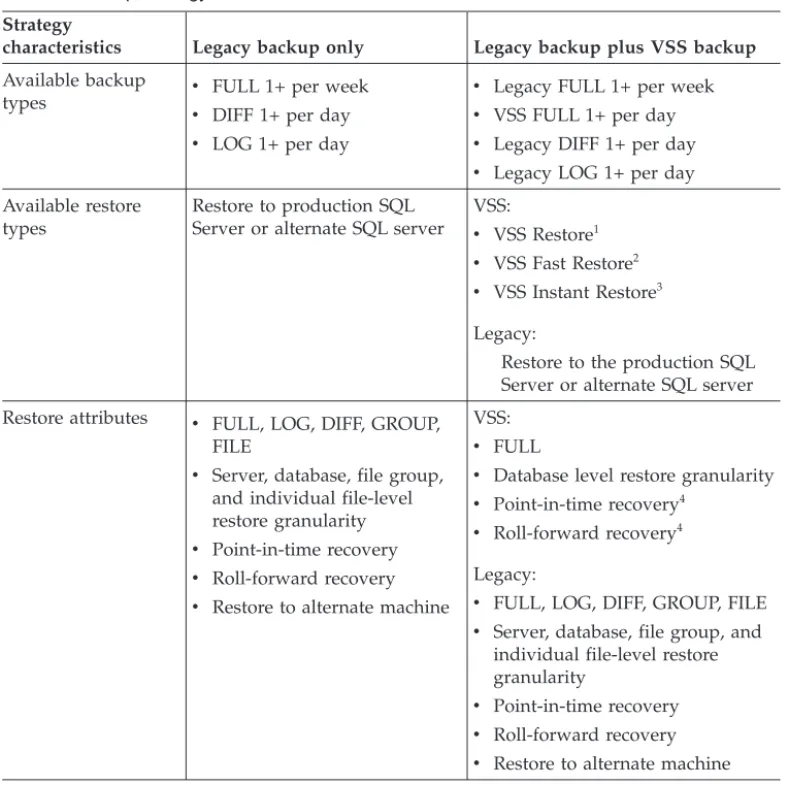
Using VSS and Legacy Backups together . . . 24
Using VSS operations in a SQL Server Failover Cluster environment . . . 25
Using Data Protection for SQL in a Microsoft Windows Failover Clustering environment . . . 27
Using Data Protection for SQL in a Veritas Cluster Server environment . . . 28
Back up to Tivoli Storage Manager storage versus back up to local shadow volumes . . . 28
VSS operations in DS, SAN Volume Controller, and Storwize V7000 environments . . . 29
VSS operations in IBM N-series and NetApp environments . . . 30
Recommended Tivoli Storage Manager policy settings . . . 31
Domain. . . 31
Policy Set . . . 31
Management Class . . . 32
Copy Group . . . 32
Storage Pool . . . 34
Data Protection for SQL node name: Recommended settings . . . 34
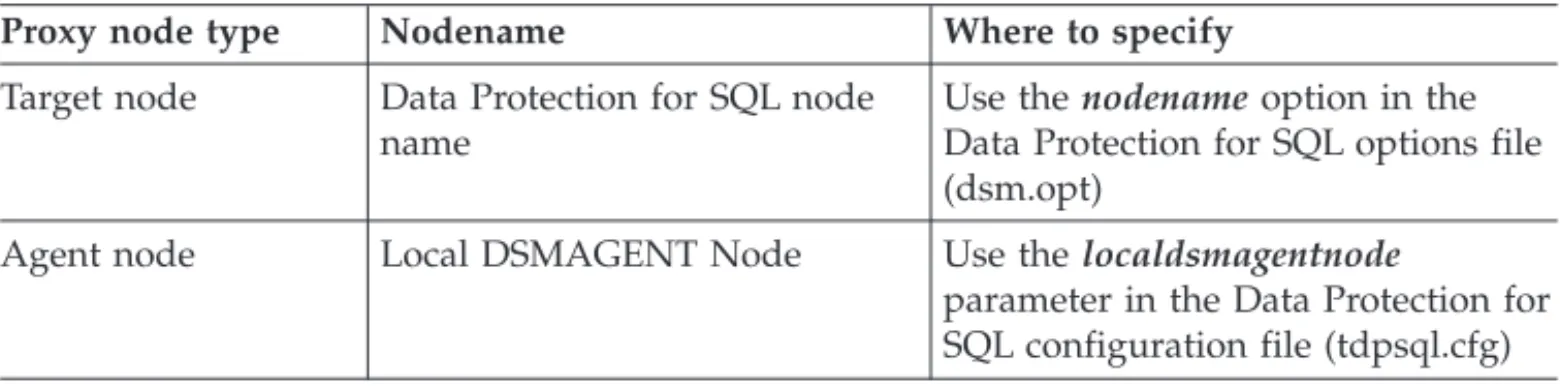
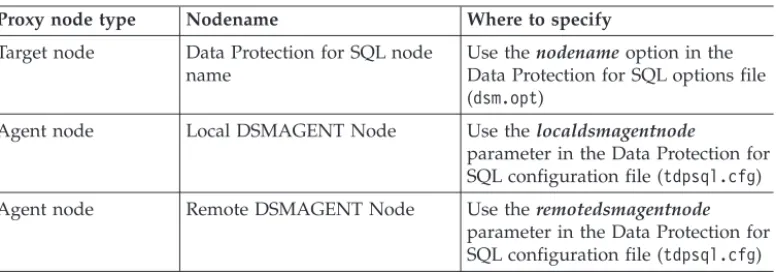
Proxy node definitions (VSS Backups) . . . 35
Required node names for basic VSS operations 35 Required node names for VSS off-loaded backups 36 Specifying Data Protection for SQL options . . . . 37
Specifying Data Protection for SQL preferences . . 40
Setting automatic expiration (VSS and Legacy) . . 41
Chapter 3. Installing Data Protection for
SQL Server . . . 45
Quick installation and configuration . . . 45
Installation prerequisites . . . 47
Minimum hardware requirements . . . 47
Minimum software and operating system requirements . . . 48
Virtualization support . . . 49
Install Data Protection for SQL on a local system . . 49
Installing Tivoli Storage FlashCopy Manager . . . 50
Installing Data Protection for SQL in an MSCS or VCS environment . . . 50
Install the language packs for Data Protection for SQL . . . 50
Installing Data Protection for SQL silently . . . . 52
Silently installing Data Protection for SQL with the setup program . . . 54
Silently installing Data Protection for SQL with MSI (msiexec.exe) . . . 55
Installation problems: capturing a log of the installation . . . 57
Creating the package on a DVD or a file server 58 Playing back the silent installation. . . 58
Setup error messages . . . 59
Chapter 4. Configuring Data Protection
for SQL . . . 61
Manual configuration . . . 61
1. Configure Data Protection for SQL manually 62 2. Configure the Tivoli Storage Manager server manually . . . 63
3. Perform these tasks on the machine running the offloaded backups . . . 63
4. Perform these tasks to verify your configuration . . . 64
Chapter 5. Protecting Microsoft SQL
Server data . . . 67
Setting user preferences . . . 67
Data Protection Properties . . . 67
Policy binding statements . . . 76
How backups expire based on policy . . . 76
Binding backups to a policy . . . 77
Determining managed storage capacity . . . 77
Using the Task Manager . . . 78
Backing up SQL databases and files . . . 78
Security . . . 79
Backup types . . . 79
Backing up SQL databases by using the VSS method . . . 80
Backing up SQL databases by using the Legacy method . . . 81
Backing up SQL groups or files by using the Legacy method . . . 83
Restoring SQL databases and files . . . 83
Restoring SQL server data . . . 83
VSS Restore considerations . . . 85
Restoring SQL file groups and files from Legacy backups . . . 85
Restoring to an alternate machine . . . 86
Restoring the master database . . . 87
Restore options . . . 88
Inactivating SQL databases (Legacy only) . . . . 90
Inactivate tree and list . . . 91
Deleting SQL Server Backups . . . 91
Using the Tivoli Storage Manager scheduler . . . 91
Example scheduler procedure . . . 92
Scheduler guidelines . . . 97
Setting user mode . . . 98
Automating tasks . . . 99
Additional automation methods . . . 99
Viewing, printing, and saving reports . . . 100
Chapter 6. Troubleshooting Data
Protection for SQL with VSS
backup-restore support . . . 101
Problem determination assistance. . . 101
Resolving errors during Data Protection for SQL processing . . . 102
Determining if the problem is a Tivoli Storage Manager or SQL issue . . . 102
Determining if the problem is a Data Protection for SQL issue or a general VSS issue . . . 103
Tracing the Data Protection client when using SQL VSS technology. . . 106
Gathering SQL with VSS information before calling IBM . . . 106
Gathering files from SQL with VSS before calling IBM . . . 107
Troubleshooting Data Protection for SQL VSS and SAN Volume Controller, Storwize V7000, or DS6000/DS8000 . . . 108
Installation Problems: Creating an installation-log file . . . 110
Emailing support files . . . 110
Online IBM support . . . 111
Viewing system information . . . 111
Viewing trace and log files . . . 112
Chapter 7. Performance . . . 115
Chapter 8. Data Protection for
Microsoft SQL Server reference
. . . 117
Command overview . . . 117
Command line parameter characteristics . . . 118
Backup command . . . 121
Backup syntax . . . 121
Backup positional parameters . . . 124
Backup optional parameters . . . 127
Legacy Backup output examples . . . 134
VSS Backup output examples . . . 143
Query command . . . 146
Query syntax . . . 147
Query positional parameters . . . 149
Query optional parameters . . . 151
Query output examples . . . 156
Query Managedcapacity command . . . 167
Restore command . . . 168
VSS Restore command-line considerations . . . 169
Restore syntax . . . 170
Restore positional parameters . . . 173
Restore optional parameters . . . 175
Legacy Restore output examples . . . 189
VSS Restore output examples . . . 196
Restorefilescommand . . . . . . . . . . 199
Restorefiles syntax. . . 200
Restorefiles positional parameters . . . 201
Restorefiles optional parameters . . . 201
Restorefiles examples . . . 204
Delete Backup command . . . 204
Delete Backup syntax. . . 204
Delete Backup positional parameters . . . . 205
Delete Backup optional parameters . . . 205
Delete Backup example . . . 208
Inactivate command (Legacy only) . . . 208
Inactivate syntax . . . 208
Inactivate positional parameters . . . 210
Inactivate optional parameters . . . 211
Inactivate output examples . . . 214
Help command. . . 218
Help syntax . . . 218
Help positional parameters . . . 219
Help output examples . . . 219
Set command . . . 222
Set syntax . . . 223
Set positional parameters . . . 223
Set optional parameters . . . 229
Set output examples . . . 229
Changetsmpassword command . . . 230
Changetsmpassword . . . 230
Changetsmpassword positional parameters . . 230
Changetsmpassword optional parameters . . . 231
Changetsmpassword output examples . . . . 233
Query Policy command . . . 233
Examples of Tivoli Storage Manager policy binding using include/exclude and VSSPOLICY statements. 233 Transitioning SQL Server backups from Tivoli Storage FlashCopy Manager to Tivoli Storage Manager . . . 237
Using the Tivoli Storage Manager server wizard 237 Implement these tasks on the Tivoli Storage Manager server. . . 237
Implement these tasks on the workstation
running the SQL Server . . . 238
Appendix A. Frequently asked
questions . . . 241
Appendix B. Accessibility features for
Data Protection for SQL . . . 247
Notices . . . 249
Trademarks . . . 250
Glossary . . . 251
Tables
1. Tivoli Storage Manager server publications x 2. Tivoli Storage Manager storage agent
publications . . . xi 3. Tivoli Storage Manager client publications xi 4. Tivoli Storage Manager data protection
publications . . . xi 5. IBM Tivoli Storage Manager troubleshooting
and tuning publications . . . xii 6. Tivoli Storage FlashCopy Manager
publications . . . xiii 7. Configuration scenarios for Data Protection for
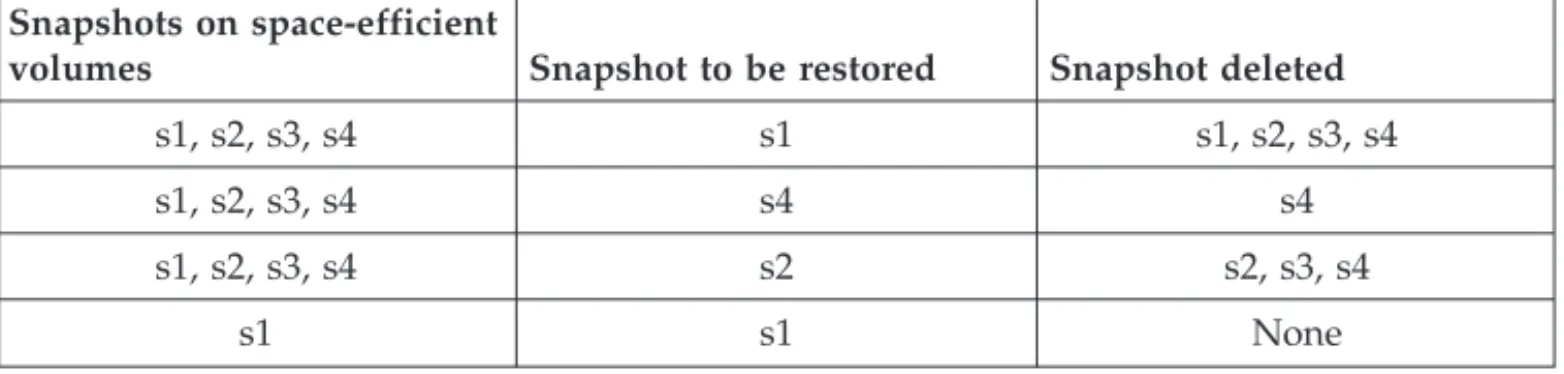
SQL and SAN Volume Controller and Storwize V7000 . . . 13 8. Snapshot restore and delete behavior on SAN
Volume Controller and Storwize V7000
space-efficient target volumes . . . 15
9. Backup strategy characteristics . . . 25 10. Required node names for basic VSS operations 35 11. Required node names for VSS off-loaded
backups . . . 36 12. Silent installation options . . . 52 13. Silent installation features (base client only) 53 14. Silent installation features (Language Packages
only) . . . 53 15. Silent installation transforms . . . 53 16. Commands for creating an installation package 58 17. Available property pages for SQL Server
workloads . . . 68 18. Diagnostics modes and their usage. . . 70 19. Data Protection for SQL commands . . . . 118 20. Data Protection for SQL optional parameters 119
Preface
The subject of this publication is Data Protection for SQL, a component of the IBM®Tivoli®Storage Manager for Databases product.
Data Protection for SQL is a comprehensive storage management software product. This book explains how to install, configure, and administer Data Protection for SQL.
Data Protection for SQL performs online backups of Microsoft SQL Server databases to Tivoli Storage Manager storage.
Tivoli Storage Manager is a client-server licensed product that provides storage management services in a multi-platform computer environment.
Throughout this document, the termWindows(unless otherwise specified) refers to the following operating systems:
v Windows Server 2003 v Windows Server 2003 R2 v Windows Server 2008 v Windows Server 2008 R2
Throughout this document, the term SQL Server (unless otherwise specified) refers to the following products:
v SQL Server 2005 (32-bit and x64) v SQL Server 2008 (32-bit and x64) v SQL Server 2008 R2 (32-bit and x64)
Throughout this document, the termWindows VSS System Provider(unless otherwise specified) refers to the standard Windows System provider.
Who should read this guide
This publication is intended for system installers, system users, Tivoli Storage Manager administrators, and system administrators.
In this book, it is assumed that you have an understanding of the following applications:
v Microsoft SQL Server
v Tivoli Storage Manager server
v Tivoli Storage Manager backup-archive client
v Tivoli Storage Manager Application Programming Interface
It is also assumed that you have an understanding of one of the following operating systems:
v Windows Server 2003 v Windows Server 2003 R2 v Windows Server 2008 v Windows Server 2008 R2
It is also assumed that you have an understanding of the following IBM storage system used for the database:
v IBM System Storage®Disk Storage Models DS3000, DS4000®, and DS5000 v IBM System Storage SAN Volume Controller (SVC)
v IBM Storwize® V7000 Disk System v IBM XIV®Storage System
v IBM System Storage DS8000®(DS8100, DS8300, or DS8700)
v Any storage devices that implement the VSS provider interface. See “VSS Backup” on page 1 for more information.
Publications
Publications for the IBM Tivoli Storage Manager family of products are available online. The IBM Tivoli Storage Manager product family includes IBM Tivoli Storage FlashCopy®Manager, IBM Tivoli Storage Manager for Space Management, IBM Tivoli Storage Manager for Databases, and several other storage management products from IBM Tivoli.
To search all publications, go to the Tivoli Storage Manager information center at http://publib.boulder.ibm.com/infocenter/tsminfo/v6r3.
You can download PDF versions of publications from the Tivoli Storage Manager information center or from the IBM Publications Center at http://www.ibm.com/ shop/publications/order/.
Go to Tivoli Documentation Central to find information centers that contain official product documentation for current and previous versions of Tivoli products, including the Tivoli Storage Manager product family. You can find Tivoli
Documentation Central at https://www.ibm.com/developerworks/wikis/display/ tivolidoccentral/Home.
You can also order some related publications from the IBM Publications Center website. The website provides information about ordering publications from countries other than the United States. In the United States, you can order publications by calling 1-800-879-2755.
Tivoli Storage Manager publications
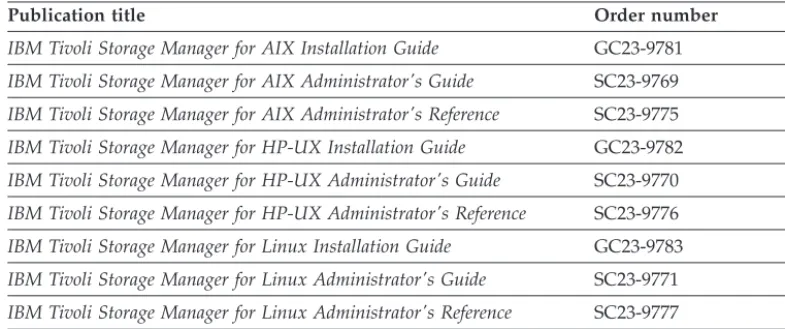
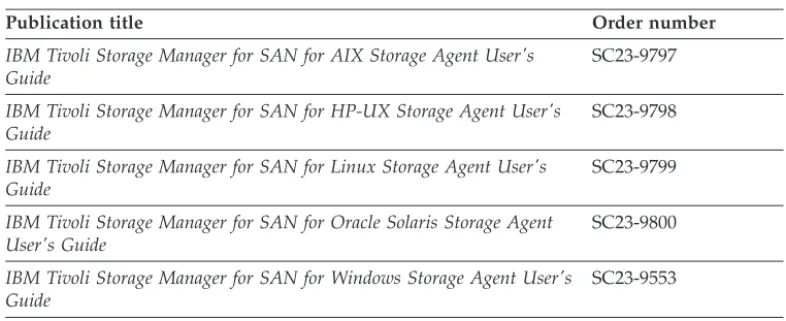
The following tables list the publications that make up the Tivoli Storage Manager library.
Table 1. Tivoli Storage Manager server publications
Publication title Order number
IBM Tivoli Storage Manager for AIX Installation Guide GC23-9781
IBM Tivoli Storage Manager for AIX Administrator's Guide SC23-9769
IBM Tivoli Storage Manager for AIX Administrator's Reference SC23-9775
IBM Tivoli Storage Manager for HP-UX Installation Guide GC23-9782
IBM Tivoli Storage Manager for HP-UX Administrator's Guide SC23-9770
IBM Tivoli Storage Manager for HP-UX Administrator's Reference SC23-9776
IBM Tivoli Storage Manager for Linux Installation Guide GC23-9783
IBM Tivoli Storage Manager for Linux Administrator's Guide SC23-9771
Table 1. Tivoli Storage Manager server publications (continued)
Publication title Order number
IBM Tivoli Storage Manager for Oracle Solaris Installation Guide GC23-9784
IBM Tivoli Storage Manager for Oracle Solaris Administrator's Guide SC23-9772
IBM Tivoli Storage Manager for Oracle Solaris Administrator's Reference SC23-9778
IBM Tivoli Storage Manager for Windows Installation Guide GC23-9785
IBM Tivoli Storage Manager for Windows Administrator's Guide SC23-9773
IBM Tivoli Storage Manager for Windows Administrator's Reference SC23-9779
IBM Tivoli Storage Manager for z/OS Media Installation and User's Guide
SC27-4018
IBM Tivoli Storage Manager Upgrade and Migration Guide for V5 Servers
GC27-4017
IBM Tivoli Storage Manager Integration Guide for Tivoli Storage
Manager FastBack® SC27-2828
Table 2. Tivoli Storage Manager storage agent publications
Publication title Order number
IBM Tivoli Storage Manager for SAN for AIX Storage Agent User's Guide
SC23-9797
IBM Tivoli Storage Manager for SAN for HP-UX Storage Agent User's Guide
SC23-9798
IBM Tivoli Storage Manager for SAN for Linux Storage Agent User's Guide
SC23-9799
IBM Tivoli Storage Manager for SAN for Oracle Solaris Storage Agent User's Guide
SC23-9800
IBM Tivoli Storage Manager for SAN for Windows Storage Agent User's Guide
SC23-9553
Table 3. Tivoli Storage Manager client publications
Publication title Order number
IBM Tivoli Storage Manager for UNIX and Linux: Backup-Archive Clients Installation and User's Guide
SC23-9791
IBM Tivoli Storage Manager for Windows: Backup-Archive Clients Installation and User's Guide
SC23-9792
IBM Tivoli Storage Manager Using the Application Programming Interface
SC23-9793
IBM Tivoli Storage Manager for Space Management for UNIX and Linux: User’s Guide
SC23-9794
IBM Tivoli Storage Manager HSM for Windows Administration Guide SC23-9795
Table 4. Tivoli Storage Manager data protection publications
Publication title Order number
IBM Tivoli Storage Manager for Databases: Data Protection for Microsoft SQL Server Installation and User’s Guide
GC27-4010
IBM Tivoli Storage Manager for Databases: Data Protection for Oracle for UNIX and Linux Installation and User’s Guide
Table 4. Tivoli Storage Manager data protection publications (continued)
Publication title Order number
IBM Tivoli Storage Manager for Databases: Data Protection for Oracle for Windows Installation and User’s Guide
SC27-4020
IBM Tivoli Storage Manager for Mail: Data Protection for Microsoft Exchange Server Installation and User’s Guide
GC27-4009
IBM Tivoli Storage Manager for Mail: Data Protection for Lotus Domino® UNIX and Linux Installation and User’s Guide
SC27-4021
IBM Tivoli Storage Manager for Mail: Data Protection for Lotus Domino for Windows Installation and User’s Guide
SC27-4022
IBM Tivoli Storage Manager for Enterprise Resource Planning: Data Protection for SAP Installation and User’s Guide for DB2
SC33-6341
IBM Tivoli Storage Manager for Enterprise Resource Planning: Data Protection for SAP Installation and User’s Guide for Oracle
SC33-6340
IBM Tivoli Storage Manager for Virtual Environments Installation and User’s Guide
SC27-2898
IBM Tivoli Storage Manager for Microsoft SharePoint Guide N/A
Table 5. IBM Tivoli Storage Manager troubleshooting and tuning publications
Publication title Order number
IBM Tivoli Storage Manager Problem Determination Guide GC23-9789
IBM Tivoli Storage Manager Performance Tuning Guide GC23-9788
IBM Tivoli Storage Manager Client Messages and Application Programming Interface Return Codes
SC27-2878
IBM Tivoli Storage Manager Server Messages and Error Codes SC27-2877
IBM Tivoli Storage Manager for Mail: Data Protection for Microsoft Exchange Server Messages
GC27-4011
IBM Tivoli Storage Manager for Databases: Data Protection for Microsoft SQL Server Messages
GC27-4012
IBM Tivoli Storage Manager for Databases: Data Protection for Oracle Messages
SC27-4014
IBM Tivoli Storage Manager for Mail: Data Protection for Lotus Domino Messages
SC27-4015
IBM Tivoli Storage Manager for Enterprise Resource Planning: Data Protection for SAP Messages
SC27-4016
Note: You can find information about IBM System Storage Archive Manager at http://publib.boulder.ibm.com/infocenter/tsminfo/v6r3/
Tivoli Storage FlashCopy Manager publications
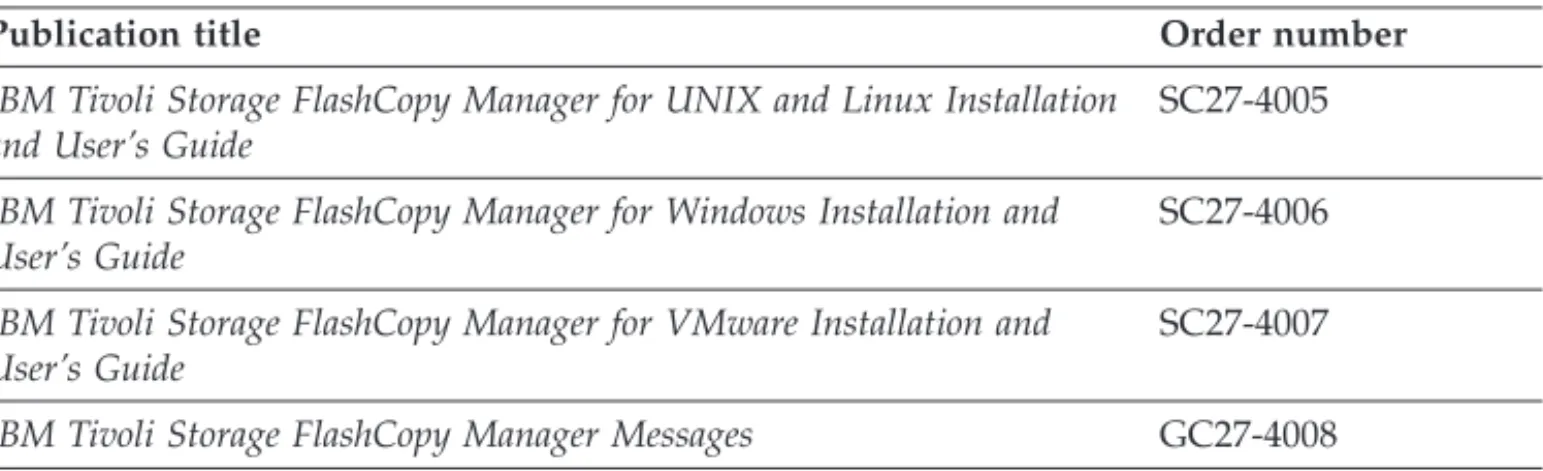
The following table lists the publications that make up the Tivoli Storage FlashCopy Manager library.
Table 6. Tivoli Storage FlashCopy Manager publications
Publication title Order number
IBM Tivoli Storage FlashCopy Manager for UNIX and Linux Installation and User’s Guide
SC27-4005
IBM Tivoli Storage FlashCopy Manager for Windows Installation and User’s Guide
SC27-4006
IBM Tivoli Storage FlashCopy Manager for VMware Installation and User’s Guide
SC27-4007
IBM Tivoli Storage FlashCopy Manager Messages GC27-4008
Support information
You can find support information for IBM products from various sources.
Start at the IBM Support Portal: http://www.ibm.com/support/entry/portal/. You can select the products that you are interested in and search for a wide variety of relevant information.
Getting technical training
Information about Tivoli technical training courses is available online.
Go to the following websites to sign up for training, ask questions, and interact with others who use IBM storage products.
Tivoli software training and certification
Choose from instructor led, online classroom training, self-paced Web classes, Tivoli certification preparation, and other training options at http://www.ibm.com/software/tivoli/education/
Tivoli Support Technical Exchange
Technical experts share their knowledge and answer your questions in webcasts at http://www.ibm.com/software/sysmgmt/products/support/ supp_tech_exch.html.
Storage Management community
Interact with others who use IBM storage management products at http://www.ibm.com/developerworks/servicemanagement/sm/ index.html
Global Tivoli User Community
Share information and learn from other Tivoli users throughout the world at http://www.tivoli-ug.org/.
IBM Education Assistant
View short "how to" recordings designed to help you use IBM software products more effectively at http://publib.boulder.ibm.com/infocenter/ ieduasst/tivv1r0/index.jsp
Searching knowledge bases
If you have a problem with your Tivoli Storage Manager family product, there are several knowledge bases that you can search.
Begin by searching the Tivoli Storage Manager Information Center at
http://publib.boulder.ibm.com/infocenter/tsminfo/v6r3. From this website, you can search the current Tivoli Storage Manager documentation.
Searching the Internet
If you cannot find an answer to your question in the IBM Tivoli Storage Manager information center, search the Internet for the information that might help you resolve your problem.
To search multiple Internet resources, go to the IBM support website at http://www.ibm.com/support/entry/portal/.
You can search for information without signing in. Sign in using your IBM ID and password if you want to customize the site based on your product usage and information needs. If you do not already have an IBM ID and password, click Sign in at the top of the page and follow the instructions to register.
From the support website, you can search various resources including: v IBM technotes
v IBM downloads
v IBM Redbooks®publications
v IBM Authorized Program Analysis Reports (APARs)
Select the product and clickDownloadsto search the APAR list.
If you still cannot find a solution to the problem, you can search forums and newsgroups on the Internet for the latest information that might help you find problem resolution.
An independent user discussion list, ADSM-L, is hosted by Marist College. You can subscribe by sending an email to [email protected]. The body of the message must contain the following text: SUBSCRIBE ADSM-Lyour_first_name
your_family_name.
To share your experiences and learn from others in the Tivoli Storage Manager and Tivoli Storage FlashCopy Manager user communities, go to the following wikis:
Tivoli Storage Manager wiki
http://www.ibm.com/developerworks/wikis/display/ tivolistoragemanager
Tivoli Storage FlashCopy Manager wiki
https://www.ibm.com/developerworks/mydeveloperworks/wikis/home/ wiki/Tivoli Storage FlashCopy Manager
Using IBM Support Assistant
IBM Support Assistant is a complimentary software product that can help you with problem determination. It is available for some Tivoli Storage Manager and Tivoli Storage FlashCopy Manager products.
To learn about which products are supported, go to the IBM Support Assistant download web page at http://www.ibm.com/software/support/isa/
download.html.
IBM Support Assistant helps you gather support information when you must open a problem management record (PMR), which you can then use to track the
problem. The product-specific plug-in modules provide you with the following resources:
v Support links v Education links
v Ability to submit problem management reports
You can find more information at the IBM Support Assistant website: http://www.ibm.com/software/support/isa/
You can also install the stand-alone IBM Support Assistant application on any workstation. You can then enhance the application by installing product-specific plug-in modules for the IBM products that you use. Find add-ons for specific products at http://www.ibm.com/support/docview.wss?uid=swg27012689.
Finding product fixes
A product fix to resolve your problem might be available from the IBM software support website.
You can determine what fixes are available by checking the IBM software support website at http://www.ibm.com/support/entry/portal/.
v If you previously customized the site based on your product usage:
1. Click the link for your product, or a component for which you want to find a fix.
2. Click Downloads, and then clickFixes by version.
v If you have not customized the site based on your product usage, click
Downloadsand search for your product.
Receiving notification of product fixes
You can receive notifications about fixes, flashes, upgrades, and other news about IBM products.
To sign up to receive notifications about IBM products, follow these steps: 1. From the support page at http://www.ibm.com/support/entry/portal/, click
Sign in to create, manage, or view your subscriptionsin theNotifications
pane.
2. Sign in using your IBM ID and password. If you do not have an ID and password, clickregister nowand complete the registration process. 3. ClickManage all my subscriptions in theNotificationspane. 4. Click theSubscribetab and then clickTivoli.
5. Select the products for which you want to receive notifications and click
6. Specify your notification preferences and clickSubmit.
Contacting IBM Software Support
You can contact IBM Software Support if you have an active IBM subscription and support contract and if you are authorized to submit problems to IBM.
To obtain help from IBM Software Support, complete the following steps: 1. Ensure that you have completed the following prerequisites:
a. Set up a subscription and support contract. b. Determine the business impact of your problem.
c. Describe your problem and gather background information.
2. Follow the instructions in “Submitting the problem to IBM Software Support” on page xvii.
Setting up a subscription and support contract
Set up a subscription and support contract. The type of contract that you need depends on the type of product you have.
For IBM distributed software products (including, but not limited to, IBM Tivoli, Lotus®, and Rational®products, as well as IBM DB2®and IBM WebSphere®
products that run on Microsoft Windows or on operating systems such as AIX or Linux), enroll in IBM Passport Advantage®in one of the following ways:
v Online:Go to the Passport Advantage website at http://www.ibm.com/ software/lotus/passportadvantage/, clickHow to enroll, and follow the instructions.
v By telephone:You can call 1-800-IBMSERV (1-800-426-7378) in the United States. For the telephone number to call in your country, go to the IBM Software Support Handbook web page at http://www14.software.ibm.com/webapp/ set2/sas/f/handbook/home.html and clickContacts.
Determining the business impact
When you report a problem to IBM, you are asked to supply a severity level. Therefore, you must understand and assess the business impact of the problem you are reporting.
Severity 1 Criticalbusiness impact: You are unable to use the program, resulting in a critical impact on operations. This condition requires an immediate solution.
Severity 2 Significantbusiness impact: The program is usable but is severely limited.
Severity 3 Somebusiness impact: The program is usable with less significant features (not critical to operations) unavailable.
Severity 4 Minimalbusiness impact: The problem causes little impact on operations, or a reasonable circumvention to the problem has been implemented.
Describing the problem and gathering background information
When explaining a problem to IBM, it is helpful to be as specific as possible. Include all relevant background information so that IBM Software Support specialists can help you solve the problem efficiently.
To save time, know the answers to these questions:
v What software versions were you running when the problem occurred? v Do you have logs, traces, and messages that are related to the problem
symptoms? IBM Software Support is likely to ask for this information. v Can the problem be re-created? If so, what steps led to the failure?
v Have any changes been made to the system? For example, hardware, operating system, networking software, and so on.
v Are you using a workaround for this problem? If so, be prepared to explain it when you report the problem.
Submitting the problem to IBM Software Support
You can submit the problem to IBM Software Support online or by telephone.
Online
Go to the IBM Software Support website at http://www.ibm.com/ support/entry/portal/Open_service_request/Software/
Software_support_(general). Sign in to access IBM Service Requests and enter your information into the problem submission tool.
By telephone
For the telephone number to call in your country, go to the IBM Software Support Handbook at http://www14.software.ibm.com/webapp/set2/sas/ f/handbook/home.html and clickContacts.
Conventions used in this book
This guide uses several conventions for special terms and actions, operating system-dependent commands and paths.
This guide uses the following typeface conventions:
Bold
v Commands, keywords, authorization roles, or other information that you must use.
v Example: Log on to the server asroot user. italics
v Values or variables that you must provide. v Emphasized words and phrases.
v Example: The node name of theproduction nodeandbackup node must not be the same.
bold italics
v Options and parameters.
v Example: Specify the value for the compressionoption.
monospace
v Directories, parameters, URLs, and output examples. v Example: The product is installed in theC:\program
UPPER CASE
v Environment variables associated with Tivoli Storage Manager, operating systems, or SQL Server.
v Example: Make sure the DSM_DIR environment variable is set correctly.
Typeface conventions
Reading syntax diagrams
This section describes how to read the syntax diagrams used in this book. To read a syntax diagram, follow the path of the line. Read from left to right, and top to bottom.
v The───symbol indicates the beginning of a syntax diagram.
v The───symbol at the end of a line indicates the syntax diagram continues on the next line.
v The───symbol at the beginning of a line indicates a syntax diagram continues from the previous line.
v The───symbol indicates the end of a syntax diagram. Syntax items, such as a keyword or variable, can be: v On the line (required element)
v Above the line (default element) v Below the line (optional element).
Syntax Diagram Description Example
Abbreviations:
Uppercase letters denote the shortest acceptable truncation. If an item appears entirely in uppercase letters, it cannot be truncated.
You can type the item in any combination of uppercase or lowercase letters.
In this example, you can enter KEYWO, KEYWORD, or KEYWOrd.
KEYWOrd
Symbols:
Enter these symbols exactly as they appear in the syntax diagram.
* Asterisk
{ } Braces
: Colon
, Comma
= Equal Sign
- Hyphen
() Parentheses
. Period Space
Syntax Diagram Description Example Variables:
Italicized lowercase items (var_name) denote variables.
In this example, you can specify avar_name
when you enter the KEYWORD command.
KEYWOrd var_name
Repetition:
An arrow returning to the left means you can repeat the item.
A character or space within the arrow means you must separate repeated items with that character or space.
A footnote by the arrow references the number of times you can repeat the item.
repeat , repeat (1) repeat Notes:
1 Specifyrepeatas many as 5 times.
Required Choices:
When two or more items are in a stack and one of them is on the line, youmustspecify one item.
In this example, youmustchoose A, B, or C.
A
B C
Optional Choice:
When an item is below the line, that item is optional. In the first example, you can choose A or nothing at all.
When two or more items are in a stack below the line, all of them are optional. In the second example, you can choose A, B, C, or nothing at all.
A A B C Defaults:
Defaults are above the line. The default is selected unless you override it. You can override the default by including an option from the stack below the line.
In this example, A is the default. You can override A by choosing B or C. You can also specify the default explicitly.
A B C Repeatable Choices:
A stack of items followed by an arrow returning to the left means you can select more than one item or, in some cases, repeat a single item.
In this example, you can choose any combination of A, B, or C.
A
B C
Syntax Diagram Description Example Syntax Fragments:
Some diagrams, because of their length, must fragment the syntax. The fragment name appears between vertical bars in the diagram. The expanded fragment appears between vertical bars in the diagram after a heading with the same fragment name.
The fragment name
The fragment name:
A B C
New in Version 6.3
The following features are new for Data Protection for SQL Version 6.3:
New MMC GUI
A new MMC GUI that enhances the user experience of Data Protection for SQL is available. The following features are available in the new MMC GUI:
v A new backup and restore interface with MMC GUI integration. v Added filtering and refresh options.
v A new Task Manager to process query, backup, and restore operations as individual tasks. Multiple tasks can be submitted simultaneously.
v New configuration wizards to assist with setting up Data Protection for SQL.
v A new integrated interface for configuration properties.
v New dashboard views that provide graphical views of Data Protection for SQL activities.
v New local scheduling capabilities such as the schedule mode, in addition to default interactive mode. By using the schedule mode you can
schedule operations as easily as interactively issuing the command in the MMC GUI.
Restore VSS backups to flat files
Use therestorefilescommand to restore VSS backups to flat files without involving the SQL Server.
Data Protection for Microsoft SQL Server 2008 backup support
v Specify SQL native backup compression from the SQL Properties window.
v From the command line, useSQLCOMPresssionto set SQL native backup compression.
v On the MMC GUI, the SQL Workload column on the Recover tab shows the SQL compression status for legacy backups.
Enhanced Statistics
v The backup and restore statistics have been enhanced to include compression, LAN-free and client-side deduplication information v The query backup commands have been enhanced to display
information regarding backup encryption, compression and client-side deduplication status.
Additional Data Protection for SQL features
With Data Protection for SQL, you can back up and restore Microsoft SQL Server online databases to Tivoli Storage Manager server storage by using either the command-line or graphical user interface (GUI).
Data Protection for SQL helps you protect and manage SQL Server data with these tasks:
v Legacy full backups, differential backups, and transaction log backups of SQL Server databases.
v Legacy individual file group backups, individual file backups, and set backups (containing sets of file groups and files) of SQL Server data.
v Full VSS snapshot backups of SQL Server databases running on Windows Server. v Full VSS offloaded snapshot backups of SQL Server databases running on
Windows Server.
v Legacy restores of full, differential, and transaction log backups of SQL Server databases.
v Legacy restores of individual file groups, individual files, and set backups (containing sets of file groups and files) of SQL Server data.
v Partial Legacy restores of specific database file groups.
v VSS Restores of full snapshot backups of SQL Server databases (running on Windows Server) from Tivoli Storage Manager server storage or local VSS disks. v Protect multiple SQL Server instances on the same system.
Note: You can access only one SQL Server per execution of Data Protection for SQL from the command line.
v Legacy backups that use data striping in parallel threads by using parallel sessions.
v Automate scheduled backups.
v Perform expanded restore operations on backup objects such as relocating, restoring to named marks, and partially restoring full backups.
v Restore Legacy backups for a point in time.
v Restore Legacy database backups to a different SQL Server.
v Retain, with a Legacy backup, the information required to recreate or move SQL databases or files, such as sort order, code page, and Unicode information, or file group and file logical and physical names. The meta object information is
retained on the Tivoli Storage Manager server separately from the backup data objects.
v Inactivate all active Legacy backup objects, all objects of a particular Legacy backup type, or specific objects.
v Inactivate Legacy backup objects older than a specified number of days. v Set automatic expiration of backup objects based on version limit and retention
period. See “Recommended Tivoli Storage Manager policy settings” on page 31. v Query any local SQL Server or any connected Tivoli Storage Manager server for
database, status, and configuration information.
v Monitor results through the Data Protection for SQL activity log and automatically prune the activity log.
v Set Tivoli Storage Manager connection information options to Tivoli Storage Manager servers.
v Set Tivoli Storage Manager security and performance options.
v Participate in Microsoft Windows Failover Clustering (previously MSCS) and Veritas Cluster Server (VCS) failover clusters.
v Apply failover clustering without unclustering. Failover clustering is useful for both maintenance of and restoration of the master database.
v Obtain online context-sensitive task, and concept help. v Globalization Support.
v Use therestorefilescommand to restore VSS backups to flat files without involving the SQL Server.
v SQL Server refers to SQL Server 2005, SQL Server 2008, or SQL Server 2008 R2. v Windows Server refers to Windows Server 2003, Windows Server 2003 R2,
Chapter 1. Data Protection for SQL Overview
Product overview information related to new features, backup methods, backup types, restore methods, restore types, performance, security, and available documentation is provided for Data Protection for SQL 6.3.
Backup overview
Data Protection for SQL provides several methods of backing up SQL Server data.
Legacy Backup
A Legacy Backup creates a copy of all or part of a SQL database or logs on Tivoli Storage Manager storage media.
Data Protection for SQL provides selection mechanisms and the logic that are required to back up and restore SQL data. For example, when you initiate a backup operation, Data Protection for SQL:
1. Starts a session with a Tivoli Storage Manager server using the Tivoli Storage Manager API and information contained in a client options file.
2. Starts a session with the SQL Server using the SQL-SMO interface.
3. Instructs the SQL Server using the SQL VDI interface to begin a backup of the selected database objects.
4. Receives data from the SQL Server and sends it to the Tivoli Storage Manager server.
5. Ends the Tivoli Storage Manager and SQL Server sessions.
Note:
1. Data Protection for SQL can compress SQL data before sending it to the Tivoli Storage Manager server.
2. Metadata:
When a backup is performed, Data Protection for SQL retains information about the SQL Server and database. This information is available for query and restore operations after the backup is completed. The information about the names and sizes of the database file groups and files is stored along with the database data, as a sub-object. This sub-object is referred to as metadata.
VSS Backup
A VSS Backup uses Microsoft Volume Shadow Copy Service technology to produce an online snapshot (point-in-time consistent copy) of SQL data.
A VSS Backup uses Microsoft Volume Shadow Copy Service technology to produce an online snapshot (point-in-time consistent copy) of SQL data that can be stored on local shadow volumes or on Tivoli Storage Manager server storage. Both of these storage destinations require that sufficient space be available for the snapshot. A VSS Backup means the SQL server is not in "backup mode" for an extended period of time because the length of time to perform the snapshot is usually measured in seconds and not hours. In addition, a VSS Backup allows a snapshot of large amounts of data at one time since the snapshot works at the volume level.
Optionally, VSS Backups can be stored locally on VSS shadow volumes that are directly accessible by the SQL system, as long as sufficient space is available for the snapshot. These types of backups are fast because data is not placed into Tivoli Storage Manager server storage. Restoring these backups is also fast because the SQL data is not transferred from Tivoli Storage Manager server storage over the network.
When performing VSS Backups and moving data to Tivoli Storage Manager server storage, sufficient space on local snapshot volumes is still required to hold the snapshot. For SQL data backed up to Tivoli Storage Manager server storage, the SQL data on the snapshot volume is sent to the Tivoli Storage Manager server. Once the data transfer to the server is complete, the snapshot volume is made available for reuse. If you are storing VSS Backups locally and the maximum number of local backup versions to be maintained (as specified by the Tivoli Storage Manager policy) is reached, the oldest backup version is expired in order to create the snapshot for the backup to Tivoli Storage Manager server storage. See “How Tivoli Storage Manager server policy affects Data Protection for SQL” on page 19 for details regarding how Tivoli Storage Manager proceeds in this situation.
For SQL data backed up to local shadow volumes, the snapshot backup resides on the shadow copy volume.
For SQL data backed up to both destinations, a local snapshot backup is performed and the SQL data on the local snapshot volume is sent to the Tivoli Storage
Manager server. The local snapshot volume is retained as a local backup. For local VSS backups, you must have a licensed version of Tivoli Storage FlashCopy Manager installed on your system.
Characteristics of VSS Backups
The following characteristics are true of VSS Backup:
v Full backups only are supported. Log, differential, file, group, and set backup types are not supported. However, Legacy differential and Legacy log backups can be applied after a full VSS Backup has been restored.
v Backup granularity is at the database level only.
v Backups are managed through Tivoli Storage Manager server policy.
v Backups can be stored on local shadow volumes, Tivoli Storage Manager server storage, or both locations.
v Different policy settings can be defined for each storage location and backup method.
v Backups to Tivoli Storage Manager server storage can be off-loaded to an alternate machine as resource relief for production servers.
v Backups can be performed in a Microsoft Windows Failover Clustering or Veritas Cluster Server environment.
Planning requirements for VSS Backups
Consider the following requirements when planning for VSS Backups:
v When running VSS operations, make sure you have at least 200 megabytes of free disk space on your Windows System Drive. This space is used to hold the metadata files for Data Protection for SQL.
v Make sure you have a well-defined and tested recovery plan that meets your service level objectives.
v Use single hardware LUNs for each database or group of databases that will be backed up and restored together as a unit.
v Use basic disks.
v If you plan to keep some VSS snapshot backups on local shadow volumes only, make sure to consider the VSS provider-specific implementation and
configuration options when setting up your strategy. For example, if your VSS hardware provider supports a full-copy snapshot versus a copy-on-write (COW) snapshot mechanism, be aware that full-copy type implementations have greater disk storage requirements but are less risky because they do not rely on the original volume to restore the data. COW implementations require much less disk storage but rely completely on the original volume to perform a restore. Since these implementations are entirely controlled by the VSS provider and not Data Protection for SQL, make sure to consult your VSS provider documentation for a complete understanding of your VSS implementation.
v If you must perform parallel VSS Backups, make sure to stagger the start of the backups for at least ten minutes. This action ensures the snapshot operations do not overlap. Failure to stagger the snapshots can result in errors.
v Do not place multiple volumes on the same LUN. Microsoft recommends that you configure a single volume/single partition/single LUN as 1 to 1 to 1. v Do not set theASNODENAMEoption in thedsm.optfile when using Data Protection
for Microsoft SQL Server. SettingASNODENAMEcan cause VSS backups and VSS restores to fail.
VSS Service overview
The VSS Service manages and directs three VSS software applications that are used during VSS operations.
VSS Writer
The VSS Writer is the Microsoft SQL Server. It is installed with the SQL Server software.
VSS Requestor
The VSS Requestor is Tivoli Storage Manager.
VSS Provider
The VSS provider manages the volumes where the SQL data resides. Configuration requirements are based upon the type of VSS provider used in your environment. For example:
v If you are using the standard Windows System provider (referred to as the Windows VSS System Provider throughout this book), no
configuration is required.
v If you are using a VSS software provider, consult the documentation provided with your VSS software provider.
v If your SQL storage is configured on a disk storage subsystem and you want to leverage the hardware to manage the snapshots, you must install a VSS hardware provider.
v If you plan to perform VSS Instant Restores, be aware that IBM System Storage SAN Volume Controller, DS6000™, DS8000, Storwize V7000, and
IBM XIV Storage System are the only storage subsystems that support VSS Instant Restores and require a VSS provider. Therefore, if you use IBM System Storage SAN Volume Controller, DS6000, DS8000, or Storwize V7000, you must install and configure IBM System Storage Support for Microsoft Virtual Disk and Volume Shadow Copy Services.
VSS provider support and documentation for IBM System Storage disk storage subsystems is available at the following Web site:
https://www.ibm.com/support/docview.wss?q1=ssg1*&dc=D400 &rs=1114&uid=ssg1S4000372&context=HW2C2
If you use IBM XIV Storage System or later, you must install and configure IBM XIV Provider for Microsoft Windows Volume Shadow Copy Service. VSS provider support and documentation for IBM XIV Provider for Microsoft Windows Volume Shadow Copy Service is available by going to this website: http://www.ibm.com/support/ fixcentral/. Then, search for an XIV VSS hardware provider that is suitable for the XIV storage system model that the Tivoli Storage Manager client uses. For example, specify the following values in these fields:
Product Group: Storage Systems Product Family: Disk Systems Product: XIV Storage System
Installed Version: 10.2.? or 11.0.0 Platform: Windows
For more information about VSS technology, see the Microsoft Technical Reference document "How Volume Shadow Copy Service Works" at the following website: http://technet.microsoft.com/en-us/library/cc785914(WS.10).aspx
VSS System Provider:
A system provider assists with creating and maintaining copies on local shadow volumes. The VSS System Provider refers to the default VSS provider that is available with Windows Server.
If you are using the Windows VSS System Provider, no configuration tasks are required to perform VSS operations.
VSS Software or Hardware Provider:
A software or hardware provider (that is not the default Windows System provider) requires these configuration settings when planning for VSS Backups. v If you use XIV, youmustinstall and configure IBM XIV Provider for Microsoft
Windows Volume Shadow Copy Service (xProv) 2.3.0.
v If a hardware provider is used, you must configure the disks that store SQL data and log files as basic files.
v Place databases files for each database or group of databases that will be backed up and restored together as a unit on their own dedicated logical volume. v Place logs for each database on their own logical volume.
v Do not place non-SQL data on storage volumes that are dedicated to SQL. v When using hardware snapshot providers, do not share database LUNs with
other databases or applications.
v Make sure to read and follow specific installation and configuration instructions in the documentation provided by your VSS provider vendor.
Backup types:
Data Protection for SQL offers an expanded range of backup types that allows flexibility for your environment and processing needs.
Data Protection for SQL provides six types of backup:
Full database backup (Legacy and VSS)
Data Protection for SQL backs up an entire SQL Server database and the portion of the transaction log necessary to provide a consistent database state. With both full and differential backups, the copy includes enough information from any
associated transaction logs to make a backup consistent with itself. The portion of the log included contains only the transactions that occur from the beginning of the backup until its completion.
Note: Legacy backups are a stream of bytes that Data Protection for SQL stores on the Tivoli Storage Manager server. VSS Backups differ since they are at the volume and file-level. In a situation where a SQL Server database is not fully allocated, a Legacy backup might transfer a smaller amount of data for a Tivoli Storage Manager backup than for a VSS Backup since a VSS Backup transfers the entire file, regardless of its allocation.
Differential backup (Legacy only)
Data Protection for SQL backs up only the data pages in a SQL Server database instance that have changed since the last full backup and a portion of the
transaction log. This is equivalent to an incremental backup on the Tivoli Storage Manager backup-archive client.
Log backup (Legacy only)
Data Protection for SQL backs up only the contents of a SQL Server database transaction log since the last successful log backup. To do the first log backup, you need to have done a full backup or its equivalent first. Log backups normally follow full backups. The portion of the log included in full and differential backups is not equivalent to a log backup. Additionally, in full and differential backups, the log is not truncated as it is during a log backup. However, a log backup following a full or differential backup will include the same transactions as a full or
differential. Log backups are not cumulative as are differential; they must be applied against a base backup and in the correct order.
Note: A log backup in SQL Server terms is not equivalent to an incremental backup in Tivoli Storage Manager terms.
File backup (Legacy only)
Data Protection for SQL backs up only the contents of a specified SQL Server logical file. This can ease the scheduling for backing up very large databases by allowing you to back up different sets of files during different scheduled backups. File, group, and set backups must be followed by a log backup, but a full is not required.
Group backup (Legacy only)
Data Protection for SQL backs up only the contents of a specified SQL Server file group. This allows you to back up just the set of database tables and indexes within a specific group of files.
Set backup (Legacy only)
Data Protection for SQL backs up the contents of specified SQL Server file groups and files as a unit.
Examples
See “Legacy Backup output examples” on page 134 for samples of various backup types using the command line interface. Also, planning information regarding choosing the best strategy for your backup requirements is available in “Backup strategies” on page 21.
DS6000, DS8000, SAN Volume Controller, XIV, and Storwize V7000 requirements:
DS6000, DS8000, SAN Volume Controller, XIV, and Storwize V7000 require these configuration settings when planning for VSS Backups.
v Place databases files for each database or group of databases that will be backed up and restored together as a unit on their own dedicated logical volume. v Place logs for each database or group of databases that will be backed up and
restored together as a unit on their own logical volume.
v Do not place non-SQL data on storage volumes that are dedicated to SQL. v When using hardware snapshot providers, do not share database LUNs with
other databases or applications.
v If you delete a LOCAL snapshot that is stored on a SAN Volume Controller or Storwize V7000 Space Efficient volume (SEV) that has multiple dependent targets, you must delete them in the same order in which you created them. That is, you must delete the oldest one first, followed by the second oldest, and so on. Failure to delete them in this order can cause removal of other snapshots of the same source.
v (DS8000 only): In order to use incremental FlashCopy, the following two applications are also required for DS8000:
– Tivoli Storage Manager backup-archive client Version 6.3 (or later)
– IBM System Storage Support for Microsoft Virtual Disk and Volume Shadow Copy Services Version 4.1 (or later)
Note: You cannot restore from multiple Space-Efficient targets on DS8000.
Offloaded VSS Backup
An offloaded backup uses another machine to move the data to the Tivoli Storage Manager server.
This type of backup shifts the backup load from the production machine to another machine. This frees the production system to serve the SQL server. This requires that a VSS hardware provider that supports transportable shadow copy volumes is installed on the production and secondary machines.
Offloaded VSS backups require a Tivoli Storage FlashCopy Manager license.
Restore methods
Data Protection for SQL provides several methods of restoring SQL Server data.
Legacy Restore
A Data Protection for SQL Legacy Restore obtains backup copies of all or part of one or more SQL databases and returns them to the SQL Server.
A complete restore of a database involves restoring a full backup or the equivalent thereof (from group, file, or set backups) and restoringalltransaction logs since the last full backup.
For a Legacy Restore, Data Protection for SQL:
1. Starts a session with a Tivoli Storage Manager server using the Tivoli Storage Manager API and information contained in a client options file.
2. Starts a session with the SQL Server using the SQL-SMO interface. 3. Queries the Tivoli Storage Manager server for a list of database backups. 4. Instructs the SQL Server using the SQL VDI interface to begin a restore of the
selected database objects.
5. Receives data from the Tivoli Storage Manager server and forwards it to the SQL Server.
6. Ends the Tivoli Storage Manager and SQL Server sessions.
VSS Restore
A VSS Restore restores VSS Backups (SQL database files and log files) that reside on Tivoli Storage Manager server storage to their original location or to an alternate location.
The following characteristics are true of VSS Restores:
v You can only restore SQL Server VSS Backups to the same SQL Server instance. v Only full backup types can be restored. Differential, individual file groups,
individual files, and set backups are not supported by VSS and therefore, cannot be restored. However, Legacy differential and Legacy log backups can be
applied after a full VSS Backup has been restored. v Restore granularity is at the database level.
v Supports restoring one (or more) databases from a VSS snapshot backup located on Tivoli Storage Manager server storage.
v Supports restoring VSS Backups to an alternate location using the/relocatedir option.
v Restores can be performed in a Microsoft Windows Failover Clustering or Veritas Cluster Server environment.
VSS Fast Restore
A VSS Fast Restore restores VSS Backups that reside on local shadow volumes. In general, restore processing can conclude within minutes instead of hours in this situation. The following characteristics are true of VSS Fast Restore restores: v Full backup types only can be restored. Differential, individual file groups,
individual files, and set backups are not supported by VSS and therefore, cannot be restored. However, Legacy differential and Legacy log backups can be
applied after a full VSS Backup has been restored.
v You can only restore SQL Server VSS Backups to the same SQL Server instance. v Restore granularity is at the database level.
v VSS backups can be restored to an alternate location by using the/relocatedir option.
v Restores can be performed in a Microsoft Windows Failover Clustering or Veritas Cluster Server environment.
VSS Instant Restore
A VSS Instant Restore is when a set of target volumes (that contain a valid snapshot) are copied back to the original source volumes using hardware-assisted volume-level copy mechanisms. The application can return to normal operations as soon as the hardware-assisted volume-level copy has been started and the log replay is complete.
Be aware that a VSS Instant Restore is only possible when all of the data (from the database specified for restore) resides on storage subsystems supported by the VSS Instant Restore. If part of the data being restored (including the log files and full-text index files, if present) resides on a local disk, a VSS Instant Restore of this data is not supported. In this situation, a VSS Fast Restore is performed. In
addition, you must make sure that any previous background copies (that involve the volumes being restored) are completed prior to initiating the VSS Instant Restore.
Although VSS Instant Restore is the default restore method when all SQL data specified for restore resides on storage subsystems supported by the VSS Instant Restore, a failover to VSS Fast Restore can occur when an error is detected early enough in the VSS Instant Restore process to trigger the failover. In this situation, an error is logged in the dsmerror.log file used by the DSMAGENT. However, a failover to VSS Fast Restore may not always be possible. For example, if an error occurs later in the restore process (such as a pending background copy on the storage subsystem, a failure to start the FlashCopy operation on the snapshot provider system, or other hardware error), VSS Instant Restore processing fails without a failover to VSS Fast Restore.
You can only restore SQL Server VSS Backups to the same SQL Server instance. Although VSS only supports full backups, Legacy differential and Legacy log backups can be applied after a full VSS Backup has been restored.
Be aware of the following considerations when planning for VSS Instant Restore: v Requires IBM System Storage Support for Microsoft Volume Shadow Copy
Service software.
v Backups must reside on the same DS6000, DS8000, SAN Volume Controller, XIV, or Storwize V7000 storage subsystem to which they are restored.
v Do not use version 2.2.2 of the IBM XIV Provider for Microsoft Windows Volume Shadow Copy Service with Tivoli Storage Manager. There are defects in that specific version that prevent VSS Instant Restore from working properly.
Restore types
Data Protection for SQL offers an expanded range of restore types that allows flexibility for your environment and processing needs.
Data Protection for SQL provides the same range of object types for restore as for backup. The following list contains descriptions of the available restore types:
Full database restore (Legacy and VSS)
The full database backup objects for the specified SQL databases are restored.
Differential restore (Legacy only)
Only the differential database backup objects for specified SQL databases are restored. Restore time is reduced as only the latest differential backup is restored (after its associated full backup is restored).
Log restore (Legacy only)
Log backup objects for the specified SQL databases are restored.
File restore (Legacy only)
The file backup objects needed from a full backup, file group backup, a file backup, or a set backup for the specified SQL databases are restored.
Group restore (Legacy only)
Only the group backup objects needed from a full backup, file group backup, a file backup, or a set backup for the specified SQL databases are restored.
Set restore (Legacy only)
Only set backup objects for the specified SQL databases are restored. Depending on the backup strategy you choose, restoring a SQL database might involve restoring multiple backup objects from the Tivoli Storage Manager server. See “Backup strategies” on page 21.
Relocating files and other restores
In support of current SQL Server restore capabilities, Data Protection for SQL also provides the ability to relocate files during restore and to perform point-in-time restores, named-marks restores, or partial restores:
relocate
Allows you to move individual database files to a new location without having to first create the files.
point-in-time
Allows you to restore a transaction log backup to a specific SQL transaction date and time.
named-marks
Allows you to restore a transaction log backup to or before a named point, possibly after a specified point in time, and recover multiple related databases to the same named mark.
partial Allows you to restore just enough of a database into a temporary location to copy a specific table to the active database.
relocate dir
Allows you to move backed up SQL databases, logs, and SQL Server full-text index files to an alternate location.
Further Data Protection for SQL restore functions include the following: v Restore a backup using the same number of data stripes used to create the
backup, or fewer stripes.
v Restore with no recovery until the last restore with recovery.
v Restore from any available backup version created by Data Protection for SQL Version 5.5
v Replace an existing database with the restored database (or replace by relocating the restored database).
v Legacy restore to a different SQL Server or to a standby SQL Server.
v Automatically restore all backup objects needed to make a restore complete by usingsmart selectionin the GUI.
Examples
See “Legacy Restore output examples” on page 189 for samples of various restore types using the command line interface.
SAN Volume Controller and Storwize V7000 FlashCopy
support
Thin provisioning or the ability to allocate less physical storage than the declared size of a logical storage volume is available with SAN Volume Controller and Storwize V7000. A thinly provisioned volume is referred to as a space-efficient (SE) volume.
For more information about thinly provisioned volumes, see this website: http://publib.boulder.ibm.com/infocenter/svc/ic/topic/
com.ibm.storage.svc.console.doc/svc_spaceefficentvdisks_3r7ayd.html
Important: References to SAN Volume Controller in this section are referring to the following versions:
v 5.1.x (or later) v 6.1.x (or later) v 6.2.x (or later)
SAN Volume Controller and Storwize V7000 provide FlashCopy restore from SE target volumes as well as from fully allocated target volumes for which the background copy of the VSS backup has not yet completed. It is now possible to retain multiple FlashCopy images of a source volume as backup generations at a much reduced storage cost, since it is not necessary to allocate the full size of the source volume for each backup generation, while still maintaining the ability to do instant restore using FlashCopy from the SE target volumes.
SAN Volume Controller and Storwize V7000 minimize the demands required to maintain multiple snapshots of the same source volume by putting the target volumes into a cascade where each target is dependent on changes recorded in target volumes of subsequent snapshots. For example, if four VSS snapshots are created of a source volume, where S is the source and T1 through T4 are the targets, with T1 being the first chronologically and T4 the last, the following cascade occurs: