RS
MDMCenter
and EAI
Integration
2009
This document provides the details about RS MDMCenter coexistence with EAI systems and the different approaches for enterprise integration. A pro
2
Copyright 2001-2009 Riversand Technologies, Inc. All rights reserved.
Any technical documentation made available by Riversand Technologies, Inc is the copyright work of Riversand Technologies, Inc and owned by Riversand Technologies, Inc.
TRADEMARKS
Riversand, the Riversand logo, and Riversand ProductCenter are U.S. trademarks or registered trademarks of Riversand Technologies, Inc. Other brands and product names mentioned in this guide are trademarks or registered trademarks of their respective owners and hereby acknowledged.
DISCLAIMER
NO WARRANTY. The technical documentation is being delivered to you AS-IS, and Riversand Technologies, Inc makes no warranty as to its accuracy or use. Any use of the technical documentation or the information contained therein is at the risk of the user. Documentation may include technical or other inaccuracies or typographical errors. Riversand Technologies, Inc reserves the right to make changes without prior notice.
No part of this publication may be copied without the express written permission of Riversand Technologies Inc., 9800 Richmond Ave, Suite #140, Houston, TX-77042, U.S.A.
TECHNICAL SUPPORT
The Technical Support group’s primary role is to respond to specific questions on product features/functions, installation, and configuration. Our support provides rapid response and up-to-the-minute information. When Contacting the Technical Support group, please have the following information:
Product release/version level Hardware information
Available memory, disk space, NIC information Problem description
o Error messages/log files
o Troubleshooting performed prior to contacting Riversand Technologies, Inc o Recent software configuration changes and/or network changes
3
Support from Riversand Technologies, Inc is available by telephone, fax or mail in a variety of languages.
Mail: Riversand Technologies Inc., 9800 Richmond Ave, Suite #140, Houston, TX-77042, U.S.A.
Telephone: 713.934.8899
Fax: 713.934.8845
email: [email protected] CUSTOMER SERVICE
To contact Riversand Technologies, Inc. Customer Service, please call 713.934.8899 or mail to Riversand Technologies, Inc, 9800 Richmond Ave, Suite #140, Houston, TX-77042, U.S.A. Customer Service is available to assist with the following types of issues:
Questions regarding product licensing
Product registration updates such as address or name changes
General product information (features, language availability, local sales personnel) Latest information on product updates and upgrades
Advice on Riversand’s technical support options Non-technical pre-sales questions
SEND YOUR COMMENTS
Riversand welcomes your comments and suggestions on the quality and usefulness of this document. Your input is an important part of the information used for revision.
If you find any errors or have any other suggestions for improvement, please indicate the chapter, section, and page number (if available). Send comments using any of the technical support options. If you would like a reply, please provide your name, address, and telephone number.
COMPANY INFORMATION
4
Contents
Master Data Management System Integration ... 5
Enterprise Application Integration (EAI) ... 5
MDM Integration with EAI ... 6
RS MDM Integration without EAI Systems ... 8
Comparison of the two Integration approaches ... 9
RS MDM Integration ... 9
5
Coexistence of EAI and MDM Systems
The goal of MDM systems is to permeate a unified view of master data across the organization and provide a centralized system that other systems can refer or inquire to get a certified and trusted master record of entity information. Given the ubiquity of disparate systems in the enterprise, integration between systems has been the long time problem that plagues successful implementation of new systems or modifications to existing systems. Therefore, integration has been fundamental aspect of working and competing in today’s fluid marketplace.
Master Data Management System Integration
In the unified view of the enterprise, the single Source-of-Truth in the enterprise for master data resides with an MDM system that provides certified and consistent data to other applications. As a centralized repository, the MDM system serves as a central point for aggregation of data from multiple sources in various formats and syndication of data to multiple destinations in the formats required by these systems. Depending on the budget / Scope of the project, Enterprise Integration with MDM can be implemented with or without EAI system.
Enterprise Application Integration (EAI)
The goals of Enterprise Application Integration include flexible architectures, integration with existing applications, service integration, and state-of-the-art composite application development. EAI makes applications to work together in a coordinated manner to provide value to the underlying customer. Enterprise Application Integration can be used for two different integration purposes:
1. Data Integration: also known as EII (Enterprise Information Integration). a. File Transfer
b. Shared Database
c. Remote Procedure Invocation d. Messaging
2. Process Integration: Linking business processes across applications. a. Business Process Management (BPM)
6
To integrate business processes across heterogeneous applications, EAI uses business process
management (BPM), a practice that models an organizational structure, defines the business processes, and shows the interactions between them. BPM is important in discovering, analyzing, and creating repeatable processes that the Enterprise Integration effort can encode in a repeatable, value added process. EAI uses the results of BPM to orchestrate applications that support a business process-based workflow.
Enterprise Integration is comprised of four technical patterns: 1. Enterprise Service Bus Architecture (ESB)
2. Service Oriented Architecture (SOA): Hub-and-Spoke 3. Event Driven Architecture (EDA): Publish-Subscribe 4. Point-to-point (mesh/network)
MDM Integration with EAI
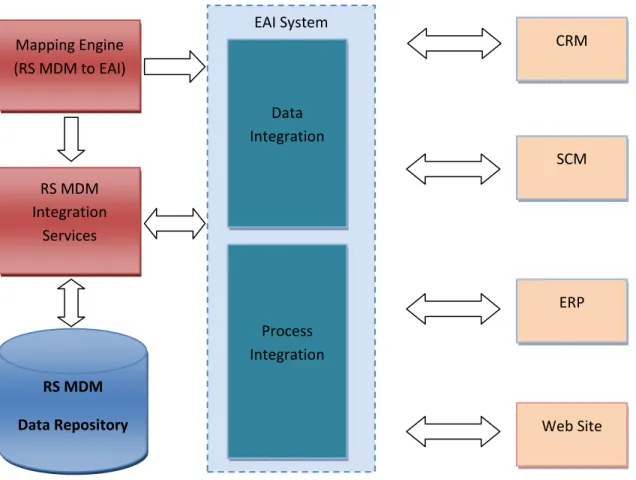
If the Enterprise Application Integration system is implemented, Bus (ESB) or Hub (EDA) connects to MDM through a set of adapters (also referred to as connectors). These are programs that know how to interact between an underlying business application & MDM system. The adapter could reside in the same process space as the bus/hub or execute in a remote location and interact with the hub/bus through service calls (SOA).
To avoid every adapter having to convert Master Data to/from every other applications' formats, EAI systems usually stipulate an application-independent (or common) data format. The EAI system usually provides a data transformation service as well to help convert between application-specific and
common formats. This is done in two steps: the adapter converts information from the application's format to the bus's common format. Then, semantic transformations are applied on this (converting zip codes to city names, splitting/merging objects from one application into objects in the other
7
Fig. 1: RS MDM with EAI Systems
When used for process integration, the EAI system also provides transactional consistency across applications by executing all integration operations across all applications in a single overarching distributed transaction (using two-phase commit protocols or compensating transactions).
RS MDM Integration Services RS MDM Data Repository Mapping Engine (RS MDM to EAI) SCM CRM EAI System ERP Web Site Process Integration Data Integration
8
RS MDM Integration without EAI Systems
If an EAI system does not currently exist in the Enterprise, Master Data Integration can be done through the MDM Integration Services. RS MDMCenter provides consolidated and normalized master data to other applications (CRM, SCM, EAP, etc) in the enterprise. If needed, process integration can managed using the BPM system.
Through its Service Oriented Architecture (SOA), RS MDMCenter provides out-of-box generic data connection through web services calls. Master Data is made available in the format of exposed object models or standard XML (SOAP). Connectors to common applications (SAP, Oracle etc) are also provided.
Publish-Subscribe model (EDA) is also supported. Applications can subscribe to Master Data transactions and MDMCenter will publish subscribed content to proper subscribers.
Security/Access Control is another functionality provided by Riversand MDM solution. Extensive system-to-system, entity-to-entity, attribute-to-attribute mapping are utilized to administrate data integration. External applications control data flow through comprehensive integration profiles.
RS MDM Integration Services RS MDM Data Repository Mapping Engine (RS MDM to External System) SCM CRM RS MDM Adapters ERP Web Site Process Integration Data Integration
9
Comparison of the two Integration approaches
Each type of integration approach has its own benefits and drawbacks. Below is the comparison chart between two approaches.
RS MDM integration with EAI
RS MDM integration
EAI System Required Yes No
Support Data Integration Yes Yes
Common Data Format Yes Yes
Support Data Transformation Yes Yes
Data transferred outside MDM Yes No
Amount of Data Transferred High Low
Support Publish/Subscribe Model Yes Yes
Security / Access Control Yes Yes
SOA Architecture Support Yes Yes
EDA Architecture Support Yes Yes
Process Integration Across Apps Yes No
Cost High Low
From the chart above, we can see the pros and cons of these two approaches: RS MDM Integration
• Pros:
10
o Ability to enforce MDM policies at the integration point
o Less data transferred over the network due to distribution and transformation done in MDM.
o Lower hardware & network infrastructure cost. o Lower software cost.
o Lower administration cost. o Lower staff and training cost. • Cons
o Lack of full support of process integration across different applications at enterprise level.
MDM – EAI Integration • Pros:
o Supports integration of business processes across enterprise applications
o Provides enterprises ability to integrate between non MDM systems with the same infrastructure
• Cons:
o Higher volume of data transferred over the network due to distribution and
transformation done in EAI. All the data has to be transferred out of MDM to EAI before they can be integrated to other applications.
o Higher hardware & network infrastructure cost due to EAI implementation. o Higher software cost due to EAI implementation.
o Higher administration cost due to due to EAI implementation. o Higher staff and training cost due to EAI implementation.