Contents
1 Beginners Tutorial 1
1.1 Output . . . 7
1.2 Download the Source Code . . . 7
2 Gemfire Example 8 2.1 Download the Source Code . . . 12
3 Cassandra Example 13 3.1 Implementation . . . 13
3.2 Download the Source Code . . . 17
4 Redis Example 18 4.1 Implementation . . . 18
4.2 Download the Source Code . . . 24
5 MongoDB REST Example 25 5.1 Introduction . . . 25
5.2 Requirements . . . 25
5.3 Domain Model . . . 26
5.4 Repository. . . 27
5.5 MongoDB . . . 28
5.6 Boot Up . . . 28
5.7 Let See It In Action! . . . 28
5.8 Summary . . . 30
5.9 Download the Source Code . . . 30
6 Solr Example 31 6.1 Implementation . . . 31
6.2 Download the Source Code . . . 36
7 MongoDB Example 37 7.1 How to configure and manage a MongoDb using Spring Data . . . 37
8 REST Example 44
8.1 Download the Source Code . . . 51
9 Neo4j Example 52 9.1 Introduction . . . 52
9.2 Installation . . . 52
9.3 Project Set-up . . . 52
9.4 Implementation . . . 53
9.5 Download the Source Code . . . 60
10 Elasticsearch Example 61 10.1 Dependencies . . . 61
10.2 Start Elasticsearch Sever . . . 62
10.3 Elasticsearch Storage Structure . . . 62
10.4 Store and retrieve Data . . . 63
10.5 Employee Repository . . . 64
10.6 Spring Configuration . . . 65
10.7 Configuration using Annotation . . . 66
10.8 Run the Example . . . 66
10.9 Annotation based main class . . . 68
10.10Elasticsearch as RESTFul Server . . . 70
10.11Download the Eclipse Project. . . 71
11 JPA Example 72 11.1 Dependencies . . . 72
11.2 Entity Bean . . . 73
11.3 Initialization of Database . . . 74
11.4 Configure Entity Manager Factory and Transaction Manager . . . 74
11.5 Configure in Spring XML Context . . . 76
11.6 CRUD Repository. . . 77
11.7 Employee Repository . . . 78
11.8 CRUD Operations using Annotation Based Configuration . . . 78
11.9 CRUD Operations using XML Configured Context . . . 81
11.10Download the Eclipse Project. . . 86
12 Couchbase Example 87 12.1 What is CouchBase? . . . 87
12.2 Project Set-Up. . . 87
12.3 Implementation . . . 89
Copyright (c) Exelixis Media P.C., 2016
All rights reserved. Without limiting the rights under copyright reserved above, no part of this publication
Preface
Spring Data’s mission is to provide a familiar and consistent, Spring-based programming model for data access while still retaining the special traits of the underlying data store.
It makes it easy to use data access technologies, relational and non-relational databases, map-reduce frameworks, and cloud-based data services. This is an umbrella project which contains many subprojects that are specific to a given database. The projects are developed by working together with many of the companies and developers that are behind these exciting technologies. (Source: https://projects.spring.io/spring-data/)
About the Author
JCGs (Java Code Geeks) is an independent online community focused on creating the ultimate Java to Java developers resource center; targeted at the technical architect, technical team lead (senior developer), project manager and junior developers alike. JCGs serve the Java, SOA, Agile and Telecom communities with daily news written by domain experts, articles, tutorials, reviews, announcements, code snippets and open source projects.
Chapter 1
Beginners Tutorial
In this example, we shall demonstrate how to configure Spring Framework to communicate with database using JPA and Hiber-nate as the JPA vendor. The benefits of using Spring Data is that it removes a lot of boiler-plate code and provides a cleaner and more readable implementation ofDAOlayer. Also, it helps make the code loosely coupled and as such switching between different JPA vendors is a matter of configuration.
So let’s set-up the database for the example. We shall use the MySQL database for this demo. We create a table "employee" with 2 columns as shown:
CREATE TABLE ‘employee‘ (
‘employee_id‘ bigint(20) NOT NULL AUTO_INCREMENT, ‘employee_name‘ varchar(40) ,
PRIMARY KEY (‘employee_id‘) )
Now that the table is ready, let’s have a look at the libraries we will require for this demo :
• antlr-2.7.7 • aopalliance-1.0
• commons-collections-3.2 • commons-logging-1.1 • dom4j-1.6.1
• hibernate-commons-annotations-4.0.2.Final • hibernate-core-4.2.6.Final
• hibernate-entitymanager-4.2.6.Final • hibernate-jpa-2.0-api-1.0.1.Final • javaee-api-5.0-2
• javassist-3.15.0-GA • jboss-logging-3.1.0.GA • jta
• log4j-1.2.14
• slf4j-log4j12-1.5.6
• spring-aop-3.2.4.RELEASE • spring-beans-3.2.4.RELEASE • spring-context-3.2.4.RELEASE • spring-context-support-3.2.4.RELEASE • spring-core-3.2.4.RELEASE
• spring-expression-3.2.4.RELEASE • spring-jdbc-3.2.4.RELEASE • spring-orm-3.2.4.RELEASE • spring-tx-3.2.4.RELEASE
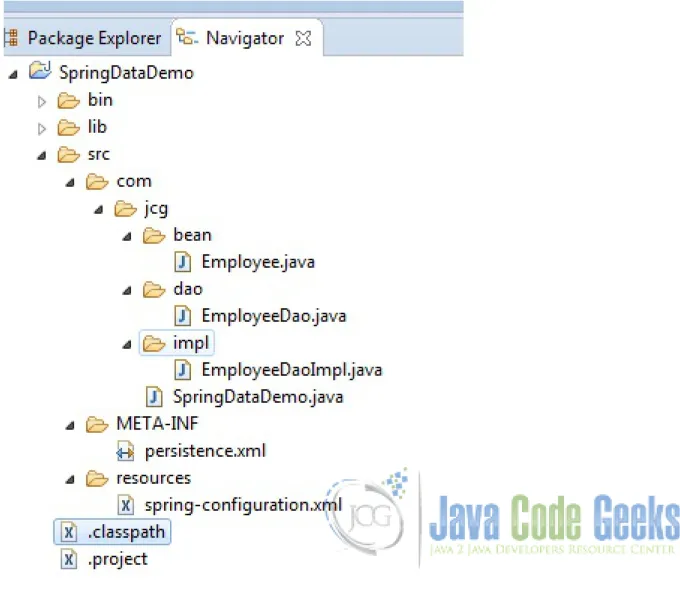
And here’s the project structure :
Figure 1.1: Project Structure
First of all, we create theEmployeeclass withemployeeIdandemployeeName. The Person class will be the entity that we will store and retrieve from the database using the JPA.
The@Entitymarks the class as the JPA Entity. We map the properties of the Employee class with the columns of the employee table and the entity with employee table itself using the@Tableannotation.
ThetoStringmethod is over-ridden so that we get a meaningful output when we print the instance of the class. Employee.java
package com.jcg.bean;
import javax.persistence.Column; import javax.persistence.Entity;
import javax.persistence.GeneratedValue; import javax.persistence.GenerationType; import javax.persistence.Id;
import javax.persistence.Table;
@Entity
@Table(name="employee") public class Employee {
@Id
@GeneratedValue(strategy=GenerationType.AUTO) @Column(name = "employee_id")
private long employeeId;
@Column(name="employee_name") private String employeeName;
public Employee() {
}
public Employee(String employeeName) {
this.employeeName = employeeName; }
public long getEmployeeId() {
return this.employeeId; }
public void setEmployeeId(long employeeId) {
this.employeeId = employeeId; }
public String getEmployeeName() {
return this.employeeName; }
public void setEmployeeName(String employeeName) {
this.employeeName = employeeName; }
@Override
{
return "Employee [employeeId=" + this.employeeId + ", employeeName=" + this ← -.employeeName + "]";
} }
Once the Entity is ready, we define the interface for the storage and retrieval of the entity i.e. we shall create a Data Access Interface.
EmployeeDao.java package com.jcg.dao;
import java.sql.SQLException;
import com.jcg.bean.Employee;
public interface EmployeeDao {
void save(Employee employee) throws SQLException;
Employee findByPrimaryKey(long id) throws SQLException; }
We will then, attempt to implement the Data Access Interface and create the actual Data Access Object which will modify the
Person Entity. EmployeeDaoImpl.java package com.jcg.impl;
import javax.persistence.EntityManager; import javax.persistence.PersistenceContext;
import org.springframework.stereotype.Repository;
import org.springframework.transaction.annotation.Propagation; import org.springframework.transaction.annotation.Transactional;
import com.jcg.bean.Employee; import com.jcg.dao.EmployeeDao;
@Repository("EmployeeDaoImpl")
@Transactional(propagation = Propagation.REQUIRED) public class EmployeeDaoImpl implements EmployeeDao {
@PersistenceContext
private EntityManager entityManager;
@Override
public void save(Employee employee) {
entityManager.persist(employee); }
@Override
public Employee findByPrimaryKey(long id) {
Employee employee = entityManager.find(Employee.class, id);
/**
* @return the entityManager */
public EntityManager getEntityManager() {
return entityManager; }
/**
* @param entityManager the entityManager to set */
public void setEntityManager(EntityManager entityManager) {
this.entityManager = entityManager; }
}
The DAO Implementation class is annotated with@Repositorywhich marks is as a Repository Bean and prompts the Spring Bean Factory to load the Bean.@Transactionalasks the container to provide a transaction to use the methods of this class.
Propagation.REQUIREDdenotes that the same transaction is used if one is available when multiple methods which require transaction are nested. The container creates a single Physical Transaction in the Database and multiple Logical transactions for each nested method. However, if a method fails to successfully complete a transaction, then the entire physical transaction is rolled back. One of the other options isPropagation.REQUIRES_NEW, wherein a new physical transaction is created for each method. There are other options which help in having a fine control over the transaction management.
The@PersistenceContextannotation tells the container to inject an instance ofentitymanagerin the DAO. The class implements thesaveandfindbyPkmethods which save and fetch the data using the instance ofEntityManagerinjected. Now we define our persistence Unit in thePersistence.xmlwhich is put in the META-INFfolder undersrc. We then mention the class whose instances are to be used Persisted. For this example, it is theEmployee Entitywe created earlier. persistence.xml
<?xml version="1.0" encoding="UTF-8"?>
<persistence xmlns="https://java.sun.com/xml/ns/persistence" version="1.0">
<persistence-unit name="jcgPersistence" transaction-type="RESOURCE_LOCAL" > <class>com.jcg.bean.Employee</class>
</persistence-unit> </persistence>
Now we configure the Spring Container using thespring-configuration.xmlfile. spring-configuration.xml
<?xml version="1.0" encoding="UTF-8"?>
<beans xmlns="https://www.springframework.org/schema/beans"
xmlns:xsi="https://www.w3.org/2001/XMLSchema-instance" xmlns:aop="https://www. ← -springframework.org/schema/aop"
xmlns:context="https://www.springframework.org/schema/context" xmlns:tx="https:// ←-www.springframework.org/schema/tx"
xsi:schemaLocation="https://www.springframework.org/schema/beans https://www.springframework.org/schema/beans/spring-beans-3.0.xsd
https://www.springframework.org/schema/aop
https://www.springframework.org/schema/aop/spring-aop-3.0.xsd https://www.springframework.org/schema/context
https://www.springframework.org/schema/context/spring-context-3.0.xsd https://www.springframework.org/schema/tx
https://www.springframework.org/schema/tx/spring-tx.xsd">
<context:component-scan base-package="com.jcg" />
class="org.springframework.jdbc.datasource.DriverManagerDataSource"> <property name="driverClassName" value="com.mysql.jdbc.Driver" /> <property name="url" value="jdbc:mysql://localhost:3306/jcg" /> <property name="username" value="root" />
<property name="password" value="toor" /> </bean>
<bean id="jpaDialect" class="org.springframework.orm.jpa.vendor.HibernateJpaDialect ←-" />
<bean id="entityManagerFactory"
class="org.springframework.orm.jpa.LocalContainerEntityManagerFactoryBean"> <property name="persistenceUnitName" value="jcgPersistence" />
<property name="dataSource" ref="dataSource" />
<property name="persistenceXmlLocation" value="META-INF/persistence.xml" /> <property name="jpaVendorAdapter" ref="jpaVendorAdapter" />
<property name="jpaDialect" ref="jpaDialect" /> <property name="jpaProperties">
<props>
<prop key="hibernate.hbm2ddl.auto">validate</prop>
<prop key="hibernate.dialect">org.hibernate.dialect.MySQL5Dialect</prop> </props>
</property> </bean>
<bean id="jpaVendorAdapter"
class="org.springframework.orm.jpa.vendor.HibernateJpaVendorAdapter"> </bean>
<bean id="txManager" class="org.springframework.orm.jpa.JpaTransactionManager"> <property name="entityManagerFactory" ref="entityManagerFactory" /> <property name="dataSource" ref="dataSource" />
<property name="jpaDialect" ref="jpaDialect" /> </bean>
<tx:annotation-driven transaction-manager="txManager" />
</beans>
We define the beans we need in thespring-configuration.xml. The datasource contains the basic configuration prop-erties like URL, user-name, password and the JDBC Driver class-name.
We create a EntityManagerFactoryusing theLocalContainerEntityManagerFactoryBean. The properties are provided like the datasource, persistenceUnitName, persistenceUnitLocation, dialect etc. The instance ofEntityManager
gets injected form thisFactoryBeaninto theEmployeeDaoImplinstance.
Line 51 in the above XML asks the Spring container to manage Transactions using the Spring Container. The TransactionMan-agerProvider Class is theJpaTransactionManagerClass.
Now that we have completed all the hard-work, its time to test the configuration:
TheSpringDataDemoclass extracts theEmployeeDaoImpland attempts to save an instance ofEmployeeto the em-ployee table and retrieve the same instance from the database.
SpringDataDemo.java package com.jcg;
import java.sql.SQLException;
import org.springframework.context.ConfigurableApplicationContext;
import org.springframework.context.support.ClassPathXmlApplicationContext;
import com.jcg.bean.Employee; import com.jcg.dao.EmployeeDao;
public class SpringDataDemo {
public static void main(String[] args) {
try {
ApplicationContext context = new ClassPathXmlApplicationContext(" ←-resources\\spring-configuration.xml");
//Fetch the DAO from Spring Bean Factory
EmployeeDao employeeDao = (EmployeeDao)context.getBean(" ← -EmployeeDaoImpl");
Employee employee = new Employee("Employee123");
//employee.setEmployeeId("1");
//Save an employee Object using the configured Data source
employeeDao.save(employee);
System.out.println("Employee Saved with EmployeeId "+employee. ← -getEmployeeId());
//find an object using Primary Key
Employee emp = employeeDao.findByPrimaryKey(employee.getEmployeeId ←-());
System.out.println(emp);
//Close the ApplicationContext
((ConfigurableApplicationContext)context).close(); }
catch (BeansException | SQLException e) {
e.printStackTrace(); }
} }
1.1
Output
log4j:WARN No appenders could be found for logger (org.springframework.core.env. ← -StandardEnvironment).
log4j:WARN Please initialize the log4j system properly. Employee Saved with EmployeeId 8
Employee [employeeId=8, employeeName=Employee123]
As you can see the employee gets saved and we are able to retrieve the employee Object we saved.
1.2
Download the Source Code
Chapter 2
Gemfire Example
In theprevious example, we demonstrated how we can connect to a Relational/SQL database with Spring using the Spring Data. In this example we will see how we can connect theGemfireusing the Spring Data.
Gemfire is a highly scalable, low-latency, in-memory data management platform which stores data in the key-value form. The data maybe persisted onto the disk. Gemfire provides it own set of tools for data management - gfsh, a command line utility tool. But it offers very limited set of control and maneuverability. Spring provides better control through Spring Gemfire module which simplify the Gemfire Data Grid configuration.
So let’s start with an example to see how we can achieve the same.
The first step is to setup theGemFire Cache. The Cache can be setup using cache.xml or with the help of Spring Data GemFire’s XML namespace. However, the preferred way is to use the Spring IoC as it offers a number of benefits from the configuration as well the ease of development point of view.The configuration advantages include SpringFactoryBeanpattern, modular XML configuration, property placeholders so that the configuration can be externalized etc. The development benefits include auto code completions, real time validations when using intelligent IDEs like eclipse and STS. Given the above benefits, we shall proceed with the example by bootstrapping the GemFire Data Grid through Spring Container.
So we proceed to define thegfshBean.xmlwhich contains the basic configuration information for the GemFire Data Grid. gfshBean.xml
<?xml version="1.0" encoding="UTF-8"?>
<beans xmlns="https://www.springframework.org/schema/beans"
xmlns:xsi="https://www.w3.org/2001/XMLSchema-instance" xmlns:context="https://www. ←-springframework.org/schema/context"
xmlns:gfe-data="https://www.springframework.org/schema/data/gemfire" xmlns:gfe="https://www.springframework.org/schema/gemfire"
xsi:schemaLocation="https://www.springframework.org/schema/context https://www. ← -springframework.org/schema/context/spring-context-3.0.xsd https://www.
←-springframework.org/schema/beans https://www.←-springframework.org/schema/beans/ ← -spring-beans-3.0.xsd https://www.springframework.org/schema/data/gemfire https: ← -//www.springframework.org/schema/data/gemfire/spring-data-gemfire.xsd https:// ← -www.springframework.org/schema/gemfire https://www.springframework.org/schema/ ← -gemfire/spring-gemfire.xsd">
<!--Spring Components Scan-->
<context:component-scan base-package="com.jcg.examples"></context:component-scan>
<!--GemFire Cache --> <gfe:cache />
<!--Region for being used by the Record Bean -->
<gfe:replicated-region persistent="true" id="record" />
<gfe-data:repositories base-package="com.jcg.examples" />
</beans>
• Line 11:Basic configuration to create a GemFireCache.
• Line 15:Create a GemFireRegionwith type asreplicated. Thepersistentmarks the data to be maintained on the disk as well. The default value is false. It needs to be written to disk when fail-safety is required.
• Line 18:Scan the packages for initializing GemFire Bean Repositories.
Now that the GemFire Data Grid is configured we can create a PoJo to map to the GemFireRegion. RecordBean.java
package com.jcg.examples.bean;
import java.io.Serializable;
import org.springframework.data.annotation.Id;
import org.springframework.data.annotation.PersistenceConstructor; import org.springframework.data.gemfire.mapping.Region;
@Region("record")
public class RecordBean implements Serializable {
private static final long serialVersionUID = 3209342518270638000L;
@Id
private String recordId;
private String recordString;
public RecordBean(){}
@PersistenceConstructor
public RecordBean(String recordId, String recordString) {
this.recordId = recordId;
this.recordString = recordString; }
public String getRecordId() {
return recordId; }
public void setRecordId(String recordId) {
this.recordId = recordId; }
public String getRecordString() {
public void setRecordString(String recordString) {
this.recordString = recordString; }
@Override
public String toString() {
return "RecordBean [Record Id=" + recordId + ", Record ← -String=" + recordString + "]";
}
}
The annotation@Region("record")is required to tell the Container as to which Region the PoJo maps to, same as we map a PoJo to a table in a relational Database.
The@Idannotation marks the property that is to be used as Cache Key for retrieving the values.
The@PersistenceConstructorconstructor tells the Spring Container as to whichconstructorshould be used for creation of entities. When the PoJo has only oneconstructorthe annotation is not required. ThetoStringmethod is used to display the bean properties.
Now that the PoJo is ready we need to create the DAO layer. TheRecordRepositoryinterface does the job of this. RecordRepository.java
package com.jcg.examples.repository;
import java.util.Collection;
import org.springframework.data.gemfire.repository.Query; import org.springframework.data.repository.CrudRepository; import org.springframework.stereotype.Repository;
import com.jcg.examples.bean.RecordBean;
/**
* @author Chandan Singh *
*/
@Repository
public interface RecordRepository extends CrudRepository<RecordBean, Integer> {
RecordBean findByRecordId(String recordId);
@Query("SELECT * FROM /record") Collection<RecordBean> myFindAll();
}
The Spring Data provides a number of inbuilt method for manipulating the Data. We need not write the queries for basic data manipulation and reading. It is achieved by extending theCrudRepositoryand declaring the properGenericsas per the PoJo.In case the Developer is not satisfied with the existing method, he can create his own method by specifying the Query using the@queryannotation.
The Spring IoC Container creates an instance of thisRepositoryand makes it available to be used as aBean.
Now that all is set, let’s run the application and test out the code! Here’s Application class that loads the XML file to instantiate the Spring Container and power up the GemFire Data Grid.
package com.jcg.examples.main;
import java.util.Iterator;
import org.springframework.context.support.ClassPathXmlApplicationContext; import org.springframework.core.io.ClassPathResource;
import com.jcg.examples.bean.RecordBean;
import com.jcg.examples.repository.RecordRepository;
public class Application {
public static void main(String[] args) {
ClassPathXmlApplicationContext context = new ← -ClassPathXmlApplicationContext();
context.setConfigLocation(new ClassPathResource("resources/gfshBean ←-.xml").getPath());
context.refresh();
RecordRepository recordRepository = context.getBean( ←-RecordRepository.class);
RecordBean recordBean = new RecordBean("1", "One"); recordRepository.save(recordBean);
System.out.println("Successful run!!");
RecordBean recordBeanFetched = recordRepository.findByRecordId("2") ←-;
System.out.println("The Fetched record bean is "+recordBeanFetched) ←-;
Iterable<RecordBean> recordCollection = recordRepository.myFindAll ←-();
System.out.println("RecordBeans List : ");
for (Iterator<RecordBean> iterator = recordCollection.iterator(); ←-iterator.hasNext();)
{
RecordBean recordBeannew = (RecordBean) iterator.next(); System.out.println(recordBeannew);
} }
}
We create instances of theRecordBean and save them using theRecordRepository we configured earlier. Then we proceed to fetch the saved data in various ways. The data gets persisted onto the disk, so even if we run the Application Class multiple times the record returns the data saved in the previous runs.
Here’s the sample output of the program : Successful run!!
The Fetched record bean is RecordBean [Record Id=2, Record String=Two] RecordBeans List :
RecordBean [Record Id=3, Record String=Three] RecordBean [Record Id=2, Record String=Two] RecordBean [Record Id=1, Record String=One]
2.1
Download the Source Code
Chapter 3
Cassandra Example
In the previous example, we demonstrated the configuration of Spring Data with GemFire, an in-memory NoSQL Database. So continuing on the same series, in this example we shall demonstrate how to connect Spring Data Application to Apache Cassandra, a Column based NoSql Database.
Cassandra is a Distributed Database Management System that can handle large amounts of data with data replication across multiple data-centres so that there is no single point of failure. It usesCQLas its query language which has syntax quite similar to its homonymSQL.
As Cassandra is a new technology, it has its own set of challenges and learning curve. To help with this,Spring Datahides the complexity of writing queries and other configuration stuff. Spring Data Cassandraoffers the users a familiar interface to those who have used Spring Data in the past.
3.1
Implementation
We need to install Cassandra Database Server, first. For Windows System, Cassandra can be downloaded fromplannetcassandra and for Linux System it can be downloaded from theApache Mirrors.
Once Cassandra is up and running, we need to create a key-space which corresponds to the schema in theRDBMSworld. We then create a column family in cassandra which can be colloquially referred to aRDMBSTable. Then, we need to have following JAR Files to connect to Cassandra Server:
• aopalliancejar
• cassandra-driver-core.jar • commons-logging.jar • guava.jar
• metrics-core.jar • slf4j-api.jar
• spring-aop-RELEASE.jar • spring-beans-RELEASE.jar • spring-context-RELEASE.jar • spring-core-RELEASE.jar • spring-cql-RELEASE.jar
• spring-data-commons-RELEASE.jar • spring-expression-RELEASE.jar • spring-tx-RELEASE.jar
Create a project in eclipse or any IDE and add the JAR files downloaded above. Now that the project is setup, we start with the coding phase :
We create a PoJo which maps the Column family and is the basic unit that is to be persisted in the Cassandra Database. Person.java
package com.jcg.examples.entity;
import org.springframework.data.cassandra.mapping.PrimaryKey; import org.springframework.data.cassandra.mapping.Table;
@Table("Person") public class Person {
@PrimaryKey
private Integer pId;
private String name;
public Integer getpId() {
return pId; }
public void setpId(Integer pId) {
this.pId = pId; }
public String getName() {
return name; }
public void setName(String name) {
this.name = name; }
@Override public String toString() {
return "Person [pId=" + pId + ", name=" + name + "]"; }
@Override public int hashCode() {
final int prime = 31; int result = 1;
result = prime * result + ((name == null) ? 0 : name.hashCode()); result = prime * result + ((pId == null) ? 0 : pId.hashCode()); return result;
}
public boolean equals(Object obj) {
if (this == obj)
return true; if (obj == null)
return false; if (getClass() != obj.getClass())
return false; Person other = (Person) obj; if (name == null)
{
if (other.name != null) return false; }
else if (!name.equals(other.name)) return false; if (pId == null)
{
if (other.pId != null)
return false; }
else if (!pId.equals(other.pId)) return false; return true;
}
}
We annotate the class with@Tableannotation to mark it as PoJo which is being mapped and thecolumn-familyname to which it should correspond in the Key-Space.@PrimaryKeysimply marks the property as the Primary key.
Now that the PoJo is ready we need to create the DAO layer. ThePersonRepointerface does the job of this. PersonRepo.java
package com.jcg.examples.repo;
import org.springframework.data.repository.CrudRepository;
import com.jcg.examples.entity.Person;
public interface PersonRepo extends CrudRepository<Person, String> {
@Query("Select * from person where pid=?0") public Person fetchByPId(int pid);
}
The Spring Data provides a number of inbuilt method for manipulating the Data. We need not write the queries for basic data manipulation and reading. It is achieved by extending theCrudRepositoryand declaring the proper Generics as per the PoJo, which in our case is thePerson, String. In case the Developer is not satisfied with the existing method, he can create his own method by specifying the Query using the@Queryannotation.
The Spring IoC Container creates an instance of thisRepositoryand makes it available to be used as aBean. The last and the most important part is to configure theSpring Containerusing thespring-config.xml: Spring-config.xml
<beans:beans xmlns:beans="https://www.springframework.org/schema/beans"
xmlns:xsi="https://www.w3.org/2001/XMLSchema-instance"
xsi:schemaLocation="https://www.springframework.org/schema/cql https://www. ← -springframework.org/schema/cql/spring-cql-1.0.xsd
https://www.springframework.org/schema/beans https://www.springframework.org/schema ←-/beans/spring-beans.xsd
https://www.springframework.org/schema/data/cassandra https://www.springframework. ←-org/schema/data/cassandra/spring-cassandra.xsd
https://www.springframework.org/schema/context https://www.springframework.org/ ← -schema/context/spring-context.xsd">
<cassandra:cluster id="cassandraCluster"
contact-points="127.0.0.1" port="9042" />
<cassandra:converter />
<cassandra:session id="cassandraSession" cluster-ref="cassandraCluster" keyspace-name="jcg" />
<cassandra:template id="cqlTemplate" />
<cassandra:repositories base-package="com.jcg.examples.repo" />
<cassandra:mapping entity-base-packages="com.jcg.examples.entity" />
</beans:beans>
• Line 11 :Configuring the Cassandra cluster. The default port in 9042.
• Line 14 :Cassandra Session can be colloquially referred to as a Sort of connection pool to connect to the cluster. We configure the cassandra session for thekey-space "jcg".
• Line 17 :Cassandra Template can be used to execute queries. But in this example we are creating only because it is dependency to create the Cassandra Repositories for the PoJos.
• Line 20 :Scan the packages for initializing Cassandra Repositories. • Line 22 :Declare Mapping for the PoJos.
Now that all is set, let’s run the application and test out the code! Here’s Application class that loads the XML file to instantiate the Spring Container and execute a few queries.
Application.java
package com.jcg.examples.test;
import java.util.List;
import org.springframework.context.support.ClassPathXmlApplicationContext; import org.springframework.core.io.ClassPathResource;
import com.jcg.examples.entity.Person; import com.jcg.examples.repo.PersonRepo;
public class Application {
{
ClassPathXmlApplicationContext context = new ←
-ClassPathXmlApplicationContext(new ClassPathResource("resources/ ← -spring-config.xml").getPath());
PersonRepo personRepo = context.getBean(PersonRepo.class); Person personAchilles = new Person();
personAchilles.setpId(1);
personAchilles.setName("Achilles"); personRepo.save(personAchilles); Person personHektor = new Person(); personHektor.setpId(2);
personHektor.setName("Hektor"); personRepo.save(personHektor);
Iterable<Person> personList = personRepo.findAll(); System.out.println("Person List : ");
for (Person person : personList) {
System.out.println(person); }
System.out.println("Person with Id 1 is "+personRepo.fetchByPId(1));
context.close();
} }
In the Application class we created two instances of Person class and persisted them to the Cassandra Database. We then fetch all the records in the Person Column family and print them on the screen. Then we executed a query via thepersonRepoobject to fetch the instance by specifying the Primary Key.
Here’s the sample output of the program :
Aug 02, 2015 2:56:27 AM org.springframework.context.support.ClassPathXmlApplicationContext ←-prepareRefresh
INFO: Refreshing org.springframework.context.support. ←
-ClassPathXmlApplicationContext@78221c75: startup date [Sun Aug 02 02:56:27 IST 2015]; ← -root of context hierarchy
Aug 02, 2015 2:56:27 AM org.springframework.beans.factory.xml.XmlBeanDefinitionReader ← -loadBeanDefinitions
INFO: Loading XML bean definitions from class path resource [resources/spring-config.xml] SLF4J: Failed to load class "org.slf4j.impl.StaticLoggerBinder".
SLF4J: Defaulting to no-operation (NOP) logger implementation
SLF4J: See https://www.slf4j.org/codes.html#StaticLoggerBinder for further details.
Person List :
Person [pId=1, name=Achilles] Person [pId=2, name=Hektor]
Person with Id 1 is Person [pId=1, name=Achilles]
Aug 02, 2015 2:56:28 AM org.springframework.context.support.ClassPathXmlApplicationContext ←-doClose
INFO: Closing org.springframework.context.support.ClassPathXmlApplicationContext@78221c75: ←-startup date [Sun Aug 02 02:56:27 IST 2015]; root of context hierarchy
3.2
Download the Source Code
Chapter 4
Redis Example
In the past fewexamples, we have been integrating Spring Data with the NoSql Databases. In this example, we shall integrate Spring Data with Redis, a key-value based NoSQL Database.
Spring Data offers a level of abstraction over the traditional way of executing query by exposing aRepository. As such, the user need not write queries and call specific methods, depending upon the underlying Database.
Redisemploys a key-store Data Structure to store data. It can be used to store complex data structure likeList,Set,Hashes
etc, which is why it is also referred to as Data-Structure Server. LikeGemfire, Redis too uses in-memorydatasetsfor quicker access.
4.1
Implementation
Redis can be downloaded fromherefor Linux systems. We are usingRedis 3.0.3for this demonstration. Once the Redis Server is up and running we can start connecting to it through Spring Data.
Then, we need to have following JAR Files to connect to Redis Server:
• commons-logging.jar • commons-pool.jar • jackson-core-asl.jar
• <span style="line-height: 1.5">jackson-mapper.jar</span> • jedis.jar
• spring-asm.jar • spring-beans.jar • spring-context.jar • spring-core.jar • spring-data-redis.jar • spring-expression.jar • spring-tx.jar
Create a project in eclipse or any IDE and add the JAR files downloaded above. Now that the project is setup, we start with the coding phase :
package com.jcg.examples.bean;
import java.io.Serializable;
public class Person implements Serializable {
private static final long serialVersionUID = -8243145429438016231L;
public enum Gender{Male, Female}
private String id;
private String name;
private Gender gender;
private int age;
public String getId() {
return id; }
public void setId(String id) {
this.id = id; }
public String getName() {
return name; }
public void setName(String name) {
this.name = name; }
public Gender getGender() {
return gender; }
public void setGender(Gender gender) {
this.gender = gender; }
public int getAge() {
return age; }
public void setAge(int age) {
this.age = age; }
@Override
{
final int prime = 31; int result = 1;
result = prime * result + age;
result = prime * result + ((gender == null) ? 0 : gender.hashCode() ←-);
result = prime * result + ((id == null) ? 0 : id.hashCode()); result = prime * result + ((name == null) ? 0 : name.hashCode()); return result;
}
@Override
public boolean equals(Object obj) {
if (this == obj)
return true; if (obj == null)
return false; if (getClass() != obj.getClass())
return false; Person other = (Person) obj; if (age != other.age)
return false; if (gender == null)
{
if (other.gender != null) return false; }
else if (!gender.equals(other.gender)) return false;
if (id == null) {
if (other.id != null)
return false; }
else if (!id.equals(other.id)) return false; if (name == null)
{
if (other.name != null) return false; }
else if (!name.equals(other.name)) return false; return true;
}
@Override
public String toString() {
return "Person [id=" + id + ", name=" + name + ", gender=" + gender ←-+ ", age=" + age + "]";
}
}
One difference here from the previous confgiuration of PoJos the reader will find is that there is no configuration information provided in the Entity. The Data-base simply serializes and stores the PoJo against the Key passed. That is why it is important to implement theSerializableinterface. Not implementingSerializableinterface leads to silly Serialization Exceptions at the time of persisting to the Database.
PersonRepo.java
package com.jcg.examples.repo;
import java.util.Map;
import com.jcg.examples.bean.Person;
public interface PersonRepo {
public void save(Person person);
public Person find(String id);
public Map<Object, Object> findAll();
public void delete(String id); }
Next, we implementPersonRepoin thePersonRepoImplclass: PersonRepoImpl.java
package com.jcg.examples.repo.impl;
import java.util.Map;
import org.springframework.data.redis.core.RedisTemplate;
import com.jcg.examples.bean.Person; import com.jcg.examples.repo.PersonRepo;
public class PersonRepoImpl implements PersonRepo {
private RedisTemplate<String, Person> redisTemplate;
private static String PERSON_KEY = "Person";
public RedisTemplate<String, Person> getRedisTemplate() {
return redisTemplate; }
public void setRedisTemplate(RedisTemplate<String, Person> redisTemplate) {
this.redisTemplate = redisTemplate; }
@Override
public void save(Person person) {
this.redisTemplate.opsForHash().put(PERSON_KEY, person.getId(), person); }
@Override
public Person find(String id) {
return (Person)this.redisTemplate.opsForHash().get(PERSON_KEY, id); }
@Override
{
return this.redisTemplate.opsForHash().entries(PERSON_KEY); }
@Override
public void delete(String id) {
this.redisTemplate.opsForHash().delete(PERSON_KEY,id); }
}
PersonRepoImpluses theRedisTemplateto communicate with the Redis Server. Since we are using Hash based Oper-ations, we are using theRedistemplate#opsForHash(). The method returns an instance ofHashOperationsclass. We use the methods in this class to store retrieve theKeys.
Next isXMLconfiguration. spring-config.xml
<?xml version="1.0" encoding="UTF-8"?>
<beans xmlns="https://www.springframework.org/schema/beans"
xmlns:context="https://www.springframework.org/schema/context" xmlns:xsi="https://www.w3.org/2001/XMLSchema-instance"
xmlns:tx="https://www.springframework.org/schema/tx", xmlns:p="https://www.springframework.org/schema/p"
xsi:schemaLocation="https://www.springframework.org/schema/beans https://www. ← -springframework.org/schema/beans/spring-beans.xsd
https://www.springframework.org/schema/context https://www.springframework. ←-org/schema/context/spring-context.xsd
https://www.springframework.org/schema/tx https://www.springframework.org/ ←-schema/tx/spring-tx.xsd">
<!-- Redis Connection Factory -->
<bean id="jedisConnFactory" class="org.springframework.data.redis.connection.jedis. ←-JedisConnectionFactory"
p:use-pool="true" />
<!-- Redis Template Configuration-->
<bean id="redisTemplate" class="org.springframework.data.redis.core.RedisTemplate" p:connection-factory-ref="jedisConnFactory" />
<bean id="personRepo" class="com.jcg.examples.repo.impl.PersonRepoImpl"> <property name="redisTemplate" ref="redisTemplate" />
</bean>
</beans>
The RedisTemplateinjected into the PersonRepoImplclass by the SpringBeanFactory. The RedisTemplate
requires theJedisConnectionFactoryinstance from theJedisJAR. Next we inject the RedisTemplateinstance into thePersonRepoImplbean as a reference. We can also use@Autowiredto configure the same and add the component-scan directive in the XML.
Now that all is set, let’s run the application and test out the code! Here’s Application class that loads the XML file to instantiate the Spring Container and runCRUDcommands on the server.
Application.java
package com.jcg.examples.test;
import org.springframework.context.support.ClassPathXmlApplicationContext; import org.springframework.core.io.ClassPathResource;
import com.jcg.examples.bean.Person;
import com.jcg.examples.bean.Person.Gender; import com.jcg.examples.repo.PersonRepo;
public class Application {
public static void main(String[] args) {
ClassPathXmlApplicationContext context = new ClassPathXmlApplicationContext ←-(new ClassPathResource("resources/spring-config.xml").getPath());
PersonRepo personRepo = (PersonRepo)context.getBean("personRepo");
Person person = new Person(); person.setId("1");
person.setAge(55);
person.setGender(Gender.Female); person.setName("Oracle");
personRepo.save(person);
Person person2 = new Person(); person2.setId("2");
person2.setAge(60);
person2.setGender(Gender.Male); person2.setName("TheArchitect");
personRepo.save(person2);
Person person3 = new Person(); person3.setId("3");
person3.setAge(25);
person3.setGender(Gender.Male); person3.setName("TheOne");
personRepo.save(person3);
System.out.println("Finding the One : "+personRepo.find("3"));
Map <Object,Object> personMatrixMap = personRepo.findAll();
System.out.println("Currently in the Redis Matrix");
System.out.println(personMatrixMap);
System.out.println("Deleting The Architect ");
personRepo.delete("2");
personMatrixMap = personRepo.findAll();
System.out.println("Remnants .. : ");
System.out.println(personMatrixMap);
context.close();
}
In Applicationclass, we are creating an instances of Person Class and save them into the Redis database. We can then retrieve and delete them.
Here’s the sample output of the program :
Aug 09, 2015 4:02:57 PM org.springframework.context.support.AbstractApplicationContext ← -prepareRefresh
INFO: Refreshing org.springframework.context.support. ←
-ClassPathXmlApplicationContext@42b1b290: startup date [Sun Aug 09 16:02:57 IST 2015]; ← -root of context hierarchy
Aug 09, 2015 4:02:57 PM org.springframework.beans.factory.xml.XmlBeanDefinitionReader ← -loadBeanDefinitions
INFO: Loading XML bean definitions from class path resource [resources/spring-config.xml] Aug 09, 2015 4:02:57 PM org.springframework.beans.factory.support. ←
-DefaultListableBeanFactory preInstantiateSingletons
INFO: Pre-instantiating singletons in org.springframework.beans.factory.support. ←
-DefaultListableBeanFactory@322558e: defining beans [jedisConnFactory,redisTemplate, ← -personRepo]; root of factory hierarchy
Finding the One : Person [id=3, name=TheOne, gender=Male, age=25] Currently in the Redis Matrix
{1=Person [id=1, name=Oracle, gender=Female, age=55], 3=Person [id=3, name=TheOne, gender= ←-Male, age=25], 2=Person [id=2, name=TheArchitect, gender=←-Male, age=60]}
Deleting The Architect Remnants .. :
{1=Person [id=1, name=Oracle, gender=Female, age=55], 3=Person [id=3, name=TheOne, gender= ←-Male, age=25]}
Aug 09, 2015 4:02:58 PM org.springframework.context.support.AbstractApplicationContext ← -doClose
INFO: Closing org.springframework.context.support.ClassPathXmlApplicationContext@42b1b290: ←-startup date [Sun Aug 09 16:02:57 IST 2015]; root of context hierarchy
Aug 09, 2015 4:02:58 PM org.springframework.beans.factory.support. ← -DefaultSingletonBeanRegistry destroySingletons
INFO: Destroying singletons in org.springframework.beans.factory.support. ←
-DefaultListableBeanFactory@322558e: defining beans [jedisConnFactory,redisTemplate, ← -personRepo]; root of factory hierarchy
4.2
Download the Source Code
Chapter 5
MongoDB REST Example
In this tutorial, I will show you how to develop a RESTful web application by using Spring and MongoDB without implementing boring uniform controllers.
5.1
Introduction
When it comes to RESTful application, we need an api that mainly handles CRUD operations. Let me give you example to clearify what I mean by sentence above. Let say that, you have a REST endpoint /productsthat allows you to perform product related operations likeProduct Create,Product Update,Product View,Product Delete,orProduct Search. The minimum code requirements for designing such an endpoint is nearly same for every resources like below:
• Design your domain model (Product) • Implement Repository
• Implement Controller
Quick TipYou will see the termresourcein this article frequently. It is one of the main components of the RESTful design and you can referhereto learn more about what a resource is.
By using above components, you can handle requests withcontrollers, validate and convert request toEntity, and finaly perform CRUD operation by usingServicethat useDAOclasses for each entity. In this situation, you need to code 4 endpoint for each resource(Product is a resource here). Let say that you have 10 resources in your project like User, Comment, History, etc.. You will have 10 x 4 endpoint needs to be implemented. Those endpoints are mainly same for all resources. What if we do not need to implement those CRUD enpoints for each resources? We will use Spring Data Rest project for lead to implement RESTful services by implementing only Repository and Domain Model.
5.2
Requirements
In this project, we will need following requirements;
• Maven 3.x • Spring Boot 1.2.5 • Valid MongoDB database
I have prefered Spring Boot for fast web development with Spring. If you have never heard about Spring Boot, you can have a look athere. I have specified the version according to current time, but you don’t need to do anything with versions, I will provide pom.xml for dependencies. You can see examplepom.xmlbelow;
<?xml version="1.0" encoding="UTF-8"?>
<project xmlns="https://maven.apache.org/POM/4.0.0" xmlns:xsi="https://www.w3.org/2001/ ← -XMLSchema-instance"
xsi:schemaLocation="https://maven.apache.org/POM/4.0.0 https://maven.apache.org/ ←-xsd/maven-4.0.0.xsd">
<modelVersion>4.0.0</modelVersion>
<groupId>huseyinbabal.net</groupId>
<artifactId>spring-mongodb-data-rest</artifactId> <version>0.1.0</version>
<parent>
<groupId>org.springframework.boot</groupId>
<artifactId>spring-boot-starter-parent</artifactId> <version>1.2.5.RELEASE</version>
</parent>
<properties>
<java.version>1.8</java.version> </properties>
<dependencies> <dependency>
<groupId>org.springframework.boot</groupId>
<artifactId>spring-boot-starter-data-rest</artifactId> </dependency>
<dependency>
<groupId>org.springframework.boot</groupId>
<artifactId>spring-boot-starter-data-mongodb</artifactId> </dependency>
</dependencies>
<build> <plugins>
<plugin>
<groupId>org.springframework.boot</groupId> <artifactId>spring-boot-maven-plugin</artifactId> </plugin>
</plugins> </build>
</project>
In above dependecy xml, we have only 2 dependecies for REST and MongoDB related operations. spring-boot-starter-parent is for minimum dependency for Spring Boot to allow us to develop web projects. spring-boot-maven-plugin is for running Spring Boot projects by using maven. Let see all of them in action with a demo application.
5.3
Domain Model
We will develop a RESTful service for Product related operations. Let’s create a domain object for Product. Product.java
package main.java.springmongodbdatarest;
import org.springframework.data.annotation.Id;
@Id
private String id;
private String name; private String title; private String description; private String imageUrl; private double price; public String getName() {
return name; }
public void setName(String name) { this.name = name;
}
public String getTitle() { return title; }
public void setTitle(String title) { this.title = title;
}
public String getDescription() { return description; }
public void setDescription(String description) { this.description = description;
}
public String getImageUrl() { return imageUrl; }
public void setImageUrl(String imageUrl) { this.imageUrl = imageUrl;
}
public double getPrice() { return price; }
public void setPrice(double price) { this.price = price;
} }
This object will be used to persist product data to MongoDB and also when we read a product data from MongoDB, it will be authomatically casted to this object. We will not do anything about persistence, Spring will handle all of the MongoDB operations. And@Idannotation in product model is for generating automatic id for MongoDB. Let’s continue with Repository.
5.4
Repository
We need a repository interface to make MongoDB related operations by using Product model. We can useProductReposit oryfor our case. You can see an example repository interface below.
ProductRepository.java
package main.java.springmongodbdatarest;
import org.springframework.data.mongodb.repository.MongoRepository;
import org.springframework.data.rest.core.annotation.RepositoryRestResource;
@RepositoryRestResource(collectionResourceRel = "products", path = "products") public interface ProductRepository extends MongoRepository<Product, String> {
As you can see, this simple interface will handle all of your db related operations, and it will also implement REST endpoints with some annotations. But, how?
We have spring-data-rest dependency and this will make an implementation of above interface at runtime. By using@Reposito ryRestResource, it will create an endpoint/products.collectionResourceRelis for MongoDB collection name, that means, when you create a product, it will be persisted to MongoDB database insideproductscollection as we stated with
collectionResourceRel. pathis for rest endpoint name for the product model. ProductRepository interface extends MongoRepository to inhert some DB related operations, so Spring will automatically usesave(),find(), etc.. kind methods for your model. Lastly, we have provided Product and String to MongoRepository and this means that this repository will make db operations throughProductmodel, and data type of primary id field of this model isString
5.5
MongoDB
In order to run your project successfully, you need valid MongoDB database. Spring Boot useslocalhost:27017/test
by default. If you want to override database properties, createapplication.propertiesinresourcesfolder and put following content in it.
MongoDB URL in property file
spring.data.mongodb.uri=mongodb://localhost:27017/test
You can also see example in sample project.
5.6
Boot Up
In order to make this REST service up, we will use following bootstrap class; Application.java
package main.java.springmongodbdatarest;
import org.springframework.boot.SpringApplication;
import org.springframework.boot.autoconfigure.SpringBootApplication;
@SpringBootApplication public class Application {
public static void main(String[] args) {
SpringApplication.run(Application.class, args); }
}
We are saying that, this is an SpringBootApplication and go get the dependencies and run required components. You can put all 3 classes inside same package.
In order to run project, go to project folder and runmvn spring-boot:run. This will run project and you will be able to access REST service endpoints on8080port.
5.7
Let See It In Action!
When you make a request to application root(In my case:https://localhost:8080) you will see the available endpoints for all resources like below
{
"_links": { "products": {
"href": "https://localhost:8080/products{?page,size,sort}", "templated": true
},
"profile": {
"href": "https://localhost:8080/alps" }
} }
As you can see, there is only one resourceproductsand you can see list of products by going url in thehref. Note that, you can manipulate product results by usingpage,size, andsort. Let’s add one product to the database.
Product model has 5 fields, and we will post that details in the request payload. Before proceeding data creation, HTTP methods has following roles in RESTful services.
• POST:Create • PUT:Total update • PATCH:Partial update • DELETE:Delete • GET:View
So, If we want to create a record, we can make aPOSTrequest tohttps://localhost:8080/productswith product payload. You can see example below:
Request Payload for Product Creation {
"name": "Glass",
"title": "Beatiful Glass",
"descriptions": "This is one of the greatest glass", "imageUrl": "https://img.com",
"price": "4$" }
When you make this request, you will get a response with status code 201(Created). We have a product data now, and you can list products now by going urlhttps://localhost:8080/products. The response will be like below
Product Detail Response {
"_links" : { "self" : {
"href" : "https://localhost:8080/products{?page,size,sort}", "templated" : true
} },
"_embedded" : { "products" : [ {
"name" : "Glass",
"title" : "Beatiful Glass", "description" : null,
"imageUrl" : "https://img.com", "price" : 4.0,
"href" : "https://localhost:8080/products/55cc79774568615d83f718be" }
} } ] },
"page" : { "size" : 20,
"totalElements" : 1, "totalPages" : 1, "number" : 0 }
}
As you can see, there is a url for each resource to make resource specific operations. For example, you can delete resource by performing DELETE request to https://localhost:8080/products/55cc79774568615d83f718be, you will get 204(No content). The record deleted and returned no content.
5.8
Summary
RESTful API needs to be designed very carefully. Spring Data Rest project handles RESTful API concepts very good. In this article, I have tried to explain you how to use Spring Data Rest within your projects. Hope this is helpful for you.
5.9
Download the Source Code
Here we demonstrated how to configure and manage a Redis Data Repository using Spring Data.
Chapter 6
Solr Example
In this example, we will demonstrate how to integrate Spring data withApache Solr.
Solris a search engine built on top of Apache Lucene library. It can be communicated with a REST like HTTP API because of which it can be easily be consumed as a REST-ful web-service irrespective of the underlying programming language used in the application which is calling the Solr Server. However, for the sake of this example we will be using Java as the programming language and Spring Data as the framework.
TheSpring Data Solris the module of Spring Data that provides support for Solr. As with the other examples in this series, this module supports both for derived queries(based on the method name) and the annotated query.
6.1
Implementation
Download the Apache Solr fromhere. The version at the time of publishing this blog was5.2.1. Unzip the downloaded file, change directory to location where Solrbinis unzipped and run the following commands :
solr start -p 8983
solr create -c jcg
The first command start the solr server, while the second command creates a core, an index. Verify if the server is up by hitting the URL :https://localhost:8983/solr. In version5.2of Solr, thesolrconfig.xmluses theManagedIndexSchemaFactory
as theschemaFactory. However, we will be using theClassicIndexSchemaFactory for this example. Make the following changes to do so:
• Go to $(Solr_Home)/server/solr/$(core_name)/conf and rename the managed-schema toschema.xml. • Comment out the existingschameFactorytag and add the following line :
<schemaFactory class="ClassicIndexSchemaFactory"/>
• Reload the core at the URL mentioned above in theCorestab
Now that the core is setup, we need to add our fields to theschema.xml.
<field name="id" type="string" indexed="true" stored="true" required="true" multiValued=" ←-false" />
<field name="title" type="string" indexed="true" stored="true" required="false" ← -multiValued="false" />
That’s all on the Solr side. The core is now up and ready to use. Let’s start coding on the Application side. We need to have following JAR Files to connect to Solr Server:
• aopalliance-1.0 • commons-io-1.3.2 • commons-lang3-3.4 • commons-logging-1.1.3 • httpclient-4.3.6
• httpcore-4.4.1 • httpmime-4.3.6 • noggit-0.7 • slf4j-api-1.7.5 • solr-solrj-4.10.3
• spring-aop-4.1.4.RELEASE • spring-beans-4.1.4.RELEASE • spring-core-4.1.4.RELEASE • spring-context-4.1.4.RELEASE
• spring-data-commons-1.10.2.RELEASE • spring-data-solr-1.4.2.RELEASE • spring-expression-4.2.0.RELEASE • spring-tx-3.1.1.RELEASE
Create a project in eclipse or any IDE and add the JAR files downloaded above. Now that the project is setup, we start with the coding phase :
First, we create an Entity that is to be persisted in theSolrfor searching later. Book.java
package com.jcg.examples.entity;
import java.io.Serializable;
import org.apache.solr.client.solrj.beans.Field; import org.springframework.data.annotation.Id;
public class Book implements Serializable {
private static final long serialVersionUID = -8243145429438016231L;
@Id @Field
private String id;
@Field
@Field
private String description;
public String getId() { return id; }
public void setId(String id) { this.id = id;
}
public String getTitle() {
return title; }
public void setTitle(String title) {
this.title = title; }
public String getDescription() {
return description; }
public void setDescription(String description) {
this.description = description; }
@Override
public int hashCode() {
final int prime = 31; int result = 1;
result = prime * result + ((description == null) ? 0 : ← -description.hashCode());
result = prime * result + ((id == null) ? 0 : id.hashCode() ←-);
result = prime * result + ((title == null) ? 0 : title. ← -hashCode());
return result; }
@Override
public boolean equals(Object obj) {
if (this == obj)
return true; if (obj == null)
return false; if (getClass() != obj.getClass())
return false; Book other = (Book) obj; if (description == null) {
}
else if (!description.equals(other.description)) return false;
if (id == null) {
if (other.id != null)
return false; }
else if (!id.equals(other.id)) return false; if (title == null)
{
if (other.title != null) return false; }
else if (!title.equals(other.title)) return false;
return true; }
@Override
public String toString() {
return "Book [id=" + id + ", title=" + title + ", ← -description=" + description + "]";
}
}
Theidfield is the unique/Primary field defined in theschema.xmland the same is annotated with@Id. The@Fieldis used to mark the other fields in the schema. In case the name of the field is different in theschema.xml, we pass the name of the field in the value attribute of the@Fieldannotation.
Next, we configure the repository which will help us in persisting theBookEntity to the Solr Server: BookRepo.java
package com.jcg.examples.repo;
import org.springframework.data.repository.CrudRepository; import org.springframework.data.solr.repository.Query;
import com.jcg.examples.entity.Book;
public interface BookRepo extends CrudRepository<Book, Long> {
@Query("title:?0")
public Book findByBookTitle(String name);
}
The Spring Data provides a number of inbuilt method for manipulating the Data. We need not write the queries for basic data manipulation and reading. It is achieved by extending the CrudRepository and declaring the proper Generics as per the Entity, which in our case is the <Book, Long>.
In case the Developer is not satisfied with the existing method, he can create his own method by specifying the Query using the@ Queryannotation. In theBookRepoclass, thefindByBookTitlemethod searches for the argument passed in thetitle
field of thejcgSolr Core.
spring-config.xml
<?xml version="1.0" encoding="UTF-8"?>
<beans xmlns="https://www.springframework.org/schema/beans" xmlns:xsi="https://www.w3.org/2001/XMLSchema-instance"
xmlns:context="https://www.springframework.org/schema/context" xmlns:solr="https://www.springframework.org/schema/data/solr"
xsi:schemaLocation="https://www.springframework.org/schema/beans https://www. ← -springframework.org/schema/beans/spring-beans.xsd
https://www.springframework.org/schema/context https://www.springframework.org/ ← -schema/context/spring-context-3.2.xsd https://www.springframework.org/schema/data ← -/solr https://www.springframework.org/schema/data-/solr/spring-solr.xsd">
<solr:repositories base-package="com.jcg.examples.repo"/>
<!-- Define HTTP Solr server -->
<solr:solr-server id="solrServer" url="https://localhost:8983/solr/jcg"/>
<!-- Define Solr template -->
<bean id="solrTemplate" class="org.springframework.data.solr.core.SolrTemplate"> <constructor-arg index="0" ref="solrServer"/>
</bean> </beans>
• Line 10:Scan the packages for initializing Cassandra Repositories.
• Line 13:Provide the port ,host and core for instance of Solr Server we wish to connect with the Application. • Line 16:reate an instance of SolrTemplate which will communicate with the Solr Server to execute the queries.
Now that all is set, let’s run the application and test out the code! Here’s Application class that loads the XML file to instantiate the Spring Container and execute a few queries.
Application.java
package com.jcg.examples.test;
import org.springframework.context.support.ClassPathXmlApplicationContext; import org.springframework.core.io.ClassPathResource;
import com.jcg.examples.entity.Book; import com.jcg.examples.repo.BookRepo;
public class Application {
public static void main(String[] args) {
ClassPathXmlApplicationContext context = new
←-ClassPathXmlApplicationContext(new ClassPathResource(" ← -resources/spring-config.xml").getPath());
BookRepo bookRepo = context.getBean(BookRepo.class);
Book rrs = new Book(); rrs.setId("1");
Book hobbit = new Book(); hobbit.setId("3");
hobbit.setTitle("Hobbit");
hobbit.setDescription("Prelude to LOTR"); bookRepo.save(hobbit);
System.out.println(bookRepo.findOne(1l));
System.out.println(bookRepo.findByBookTitle("Hobbit"));
context.close();
} }
In theApplicationclass we created two instances of Book class and persisted them to the Solr Server. We then fetch the record from the core by the unique key. Next we fetch the data by executing the explicit query in theBookRepoclass.
Here’s the sample output of the program:
Aug 17, 2015 12:56:56 AM org.springframework.context.support.ClassPathXmlApplicationContext ←-prepareRefresh
INFO: Refreshing org.springframework.context.support. ←
-ClassPathXmlApplicationContext@28fa1b85: startup date [Mon Aug 17 00:56:56 IST 2015]; ← -root of context hierarchy
Aug 17, 2015 12:56:56 AM org.springframework.beans.factory.xml.XmlBeanDefinitionReader ← -loadBeanDefinitions
INFO: Loading XML bean definitions from class path resource [resources/spring-config.xml] SLF4J: Failed to load class "org.slf4j.impl.StaticLoggerBinder".
SLF4J: Defaulting to no-operation (NOP) logger implementation
SLF4J: See https://www.slf4j.org/codes.html#StaticLoggerBinder for further details.
Book [id=1, title=Red Storm Rising, description=World War III] Book [id=3, title=Hobbit, description=Prelude to LOTR]
Aug 17, 2015 12:56:57 AM org.springframework.context.support.ClassPathXmlApplicationContext ←-doClose
INFO: Closing org.springframework.context.support.ClassPathXmlApplicationContext@28fa1b85: ←-startup date [Mon Aug 17 00:56:56 IST 2015]; root of context hierarchy
6.2
Download the Source Code
Chapter 7
MongoDB Example
In this example, we will demonstrate how to connect Spring Data withMongoDb. MongoDb is also a document based NoSql Database like Solr, which wedemonstrated past week.
Spring Data MongoDbis the module of Spring Data that provides support for MongoDb. As with the other modules demonstrated in this series, this module too provides supports both for derived queries(based on the method name) and the annotated query. Let’s get started with the setup:
7.1
How to configure and manage a MongoDb using Spring Data
Install Mongodb depending upon your system fromhere.
Point to thebinof the installed MongoDb, which isProgram Filesin Windows. Then run the following command: mongo --dbpath C:\MongoDb\Data
This command starts the MongoDb Server with the repository location at the path specified in the command above. However, the folders should already be present otherwise the server will throwInvalid Directoryerror. The default port for MongoDb is271017.
Now that theMongoserver is up and running, we will setup the application environment.
Create a simple Maven Project in eclipse IDE. We are using the belowpom.xmlto manage the dependencies for MongoDb from Spring data.
pom.xml
<project xmlns="https://maven.apache.org/POM/4.0.0" xmlns:xsi="https://www.w3.org/2001/ ← -XMLSchema-instance" xsi:schemaLocation="https://maven.apache.org/POM/4.0.0 https://maven ← -.apache.org/xsd/maven-4.0.0.xsd">
<modelVersion>4.0.0</modelVersion>
<groupId>SpringDataMongoDbExample</groupId> <artifactId>SpringDataMongoDbExample</artifactId> <version>0.0.1-SNAPSHOT</version>
<dependencies> <dependency>
<groupId>org.springframework.data</groupId> <artifactId>spring-data-mongodb</artifactId> <version>1.7.2.RELEASE</version>
</dependency> </dependencies>
Eclipse will download the required JAR files and add the dependencies in the project classpath. Now that the project is setup and dependencies imported, we can begin writing the actual code.
We start by creating the entities that will be persisted to the Mongo Database. Person.java
package com.jcg.examples.entity;
import java.util.ArrayList; import java.util.List;
import org.springframework.data.annotation.Id;
import org.springframework.data.annotation.PersistenceConstructor; import org.springframework.data.mongodb.core.mapping.DBRef;
import org.springframework.data.mongodb.core.mapping.Document;
@Document(collection="person") public class Person
{
@Id
private Long personId;
private String name;
private int age;
@DBRef(db="address")
private List<Address> addresses = new ArrayList<>();
public Person() {}
@PersistenceConstructor
public Person(Long personId, String name, int age) {
super();
this.personId = personId; this.name = name;
this.age = age; }
public Long getPersonId() {
return personId; }
public void setPersonId(Long personId) {
this.personId = personId; }
public String getName() {
return name; }
public void setName(String name) {