Migration of Oracle DB (on-premise) to AWS redshift DB (Cloud)
A.V.R.L Anji Prasad, Nagaratna P. Hegde Vasavi College of Engineering, Hyderabad
Abstract:“Migration of Oracle Db (On-permise) to AWS
redshift DB (Cloud)” is one of the solution for Database
Freedom Service initiated by AWS focused on accelerating enterprise migrations from commercial database engines (Oracle, SQL Server, Teradata etc.) to AWS native database services like Amazon Redshift, Amazon Aurora, Amazon DynamoDB and Amazon ElastiCache, their by saving overall cost spent by business in terms of database licenses.
The main objective of this project is to Assess and identify the challenges in migrating Oracle database to AWS redshift DB. Provide, implement and test the solution to overcome the challenges.
Index Terms: AWS,Oracle database, Redshift database
,oracle datapump, AWS SCT, AWS DMS
1. INTRODUCTION
“Migration of Oracle DB (on-premise) to AWS redshift DB
(Cloud)” is one of the solution for Database Freedom
Service initiated by AWS focused on accelerating enterprise migrations from commercial database engines (Oracle, SQL Server, Teradata etc.) to AWS native database services like Amazon Redshift, Amazon Aurora, Amazon DynamoDB and Amazon ElastiCache, their by saving overall cost spent by business in terms of database licenses.
With the current advancement in Cloud Services in terms of Flexibility, enhanced Security, High Availability, Reliability, Freedom Capital Investment on Infrastructure and Freedom from license cost due to the use of open source softwares, many enterprises are migrating their applications and databases to cloud to save the overall cost of Infrastructure and product license cost.
The expenditure on the cloud services are considered as operational cost in business as it is billed on the services consumed per month, this helps the enterprise not to worry on setting up and maintain the data center and IT infrastructure.
2. EXISTING SYSTEM
The existing system consists of the Oracle Enterprise database and Applications configured to run in the customer data center also called as on-premise, Applications uses the JDBC and ODBC adaptors to connect to the Oracle database.
Revised Manuscript received on January 25th , 2020 *Corresponding Author
A.V.R.L Anji Prasad
mail id- [email protected]
Oracle Enterprise database consists of various objects like Tables, Tables with partitions, Tables with blob segments, Clusters, Database links, Database triggers,
Dimensions, External procedure libraries, Indexes and index types, Java classes, Java resources, and Java sources, Materialized views and materialized view logs.
Database is enabled with archive log mode, weekly full database RMAN backup and daily incremental change RMAN backup is taken as a restore and recovery mechanism during case of disaster recovery.
Figure 1: On-Premises Database
2.1 Limitations of the Existing System:
Oracle database license renewal fee to be paid every year.
Additional storage to be purchased every year for the amount of data growth.
Regular database backup to be maintained and validated to address any hardware failure.
Database disaster management to be planned for high availability.3: PROPOSED SYSTEM
is customer Driven, data focused, and it is a Cloud-based accounting tool for small and medium businesses.
Figure 2
3.1 Benefits of Cloud migration:
Work from anywhere: With cloud computing, if users got
an internet connection they can be at work. And with most serious cloud services offering mobile apps, they are not restricted by which device they have got to hand.
Automatic software updates: The beauty of cloud
computing is that the servers are off-premise, out of sight and out of hair. Suppliers take care of them and roll out regular software updates including security updates, so
users don’t have to worry about wasting time, maintaining
the system. Leaving users free to focus on the things that matter, like growing their business.
Efficiency: Cloud technology improves efficiency in the
firm and eases the burden of software and hardware maintenance.
Increased collaboration: When teams can access, edit and
share documents anytime, from anywhere, they would able to do more together, and do better. Cloud-based workflow and file sharing apps help them make updates in real time and give them full visibility of their collaborations.
Security: To mitigate security risk, cloud providers offer a level of technical and staffing security that most firms can’t
maintain locally. Because the data is stored in the cloud, they can access it no matter what happens to their machine. And they can even remotely wipe data from lost laptops, so
it doesn’t get into the wrong hands.
Capital-expenditure Free: Cloud computing cuts out the
high cost of hardware. Users simply pay as they enjoy a subscription-based model that’s kind to their cash flow.
4: LITERATURE SURVEY
4.1 Oracle Enterprise database (on-premises):
Database is a collection of information that is organized so that it can be easily accessed, managed and updated. Oracle is the one of the leading database provider in the current market and it is available in different editions named standard edition, enterprise edition based on development and deployment scenarios(“Oracle”, “Database Concepts”,
2018). Oracle database stores the data in the form of tables and there are many other objects available in the database such as indexes, views, synonyms, sequences, partitions, stored procedures, packages, functions etc. to serve the business logic. Oracle offers the databases in two types of licenses, one is Processer based license where your license count is based on the number of CPU Sockets/Cores and the CPU Type for EE or the number of CPU Sockets for SE and the other type is a Named User License (“Oracle”, “Database Licensing Information User Manual”, 2019), where you buy a number of seats on the database instead of licensing it for unlimited users.
4.2 AWS databases (Cloud):
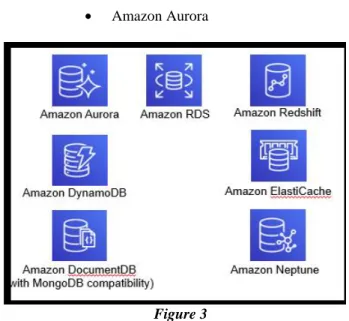
AWS offers a number of robust, scalable and secured database services which makes them an ideal substitute for on-premises databases (“Amazon Web Services”, “Overview of Amazon Web Services”, 2019). AWS provides both relational databases and NoSQL databases services(“Amazon Web Services”, “Database Solutions on AWS”, 2019). With these services, one don’t need to install,
configure and manage popular relational database systems like Oracle, Microsoft SQL Server, PostgreSQL, MariaDB or MySQL. AWS database services will provide us freedom from maintenance costs, software support costs, hardware costs etc. Below are the available Amazon database services:
AWS Relational Database Services (AWS RDS): Amazon’s RDSis a cloud service that makes it easy to set up, operate, and scale a relational database in the cloud. It provides cost-efficient and scalable capacity while handling time-consuming database management tasks, freeing you to focus on your applications and business.
The following AWS RDS are available:
Oracle
MS SQL Server
MySQL
MariaDB
Amazon Aurora
Figure 3
AWS database: DynamoDB
Amazon DynamoDB provides fast and flexible NoSQL database services for apps requiring consistent, low
latency at any scale. It’s fully managed and supports both
document and key-value data models.
Amazon ElastiCache
Amazon ElastiCache lets you deploy and scale a cloud-based in-memory cache. ElastiCache supports two caching engines: Memcached (distributed memory caching) and Redis (key-value cached and store). It Improves web application performance by reducing disk reads.
Amazon Redshift
Amazon Redshift is a petabyte-scale data warehouse service that can analyze data using existing business intelligence packages(“Amazon Web Services”, “Amazon Redshift”, 2019). Performs parallel queries across multiple nodes. Cost effective over traditional enterprise data warehouse solutions.
Amazon DocumentDB
Amazon DocumentDB (with MongoDB compatibility) is a fast, scalable, highly available, and fully managed document database service that supports MongoDB workloads.
Amazon Neptune
Amazon Neptune is a fast, reliable, fully managed graph database service that makes it easy to build and run applications that work with highly connected datasets.
4.3 AWS Database Migration Tools 4.3.1 AWS Schema Conversion Tool (SCT)
The AWS Schema Conversion Tool (AWS SCT) is used to convert your existing database schema from one database engine to another. If any object is not migrated due to datatype issues or unsupported object types, then AWS SCT provides guidance/path to create equivalent object in your target database (“Amazon Web Services”, “AWS Schema Conversion Tool”, 2019). AWS SCT provides detailed database migration assessment report for schema and code migrations.
We need to use data extraction agents or Database migration services to extract data from source DB to target DB. AWS SCT will manage these data extraction agents.
Only database of Oracle version 10 or later are supported to migrate to AWS redshift.
4.3.2 AWS Data Migration Service (DMS):
DMS is AWS provided service to migrate the data to and from various databases like Oracle, Postgres, SQL Server,
MYSQL, etc…, DMS is a one of efficient and secured
migration service (“Amazon Web Services”, “AWS Database Migration Service”, 2019). DMS will support both homogeneous and heterogeneous databases. DMS will support only if the source or target database must be on an AWS service. No application downtime is required while migrating the database using DMS.
5: CHALLENGES
5.1. MIGRATION CHALLEGES:
5.1.1 Large Size databases migration using AWS DMS:
Migration of large size databases in TB using AWS data migration service(DMS) is painful due to the limitation network bandwidth and requires more business downtime, maximum limit of database size that can be migrated using DMS is 6TB and there are various limitations like the distribution of data in source database and business of source system.
The following table lists the AWS DMS resources and their limitation per region.
Resource Default Limit
Replication instances 20
Total amount of storage 6 TB
Event subscriptions 20
Replication subnet
groups
20
Subnets per replication subnet group
20
Endpoints 100
Tasks 200
Endpoints per instance 20
5.1.2 Blob segment migration:
The source Oracle database contains tables with blob segments, there are different blob segments like images, PDF files, word documents and Excel spread sheet, but AWS Redshift database do not support blob data type. There is a need to find an alternative solution to store blob segments that are present in existing oracle database to maintain data consistency.
Figure 4
5.1.3 Limitations of AWS SCT:
AWS Schema Conversion Tool is used for conversion of the Oracle code to AWS Redshift, the tool will read the source database and provides a report of the stating the list of objects that it can migrate. SCT do not support migration of table definition.
The columns with blob data type are to be dropped from tables before using SCT for schema migration.
5.1.4 Limitations of AWS DMS:
AWS data migration service is used for migration of database from source database to target database in AWS, DMS do not support migration of table data having blob segments to redshift. The columns with blob data type are to be dropped from tables before using DMS for data migration
5.1.5 Post Migration Data Validation:
AWS do not provide any tools for data validation between the source database and target database after the migration.
6: AWS MIGRATION APPROACH
6.1. MIGRATION FLOW: 6.1.1 Define:
Discover and profile source database using the AWS SCT tools, assess each object in each schema in the database and capture metadata using SCT
6.1.2 Design:
Assess the source database and server work load by generating AWR, ASH, ADDM database reports and OS logs of the server. Estimate and configure target AWS Redshift Architecture
6.1.3 Move Data:
Initial data migration from on-premise to AWS is done using SCT DE, DMS, Snowball.
6.1.4 Move process:
Segregate BTEQ, ETL jobs and Retrofit or migrate to AWS ecosystems using Datometry, Glue Converter
6.1.4 Optimize:
Tune for cloud native functions and features using Optimizer
Figure 5
6.2. SOLUTION OVERVIEW:
Figure 6
6.2.1 Minimize business cut-over time:
Create and configure Oracle standby in AWS EC2 for on-premises primary Oracle DB using the RMAN use appropriate method below based on the size of the database:
RMAN Active Duplicate (dB size < 300GB)
RMAN backup & restore (dB size 300GB to 3TB)
Synchronize the latest data between the primary DB(on-premise) and standby DB (AWS EC2) by configuring Oracle dataguard for logfile shipping, validate the data synchronization between primary and standby DBs. Convert the standby database as primary by role switch-over method, actual business down time starts at this point.
6.2.2 Migrate BLOB segment to file system(S3):
As AWS Redshift database do not support migration of tables with BLOB segments, the BLOB segments from the tables are to be migrated to Amazon S3 using BLOB migration tool developed for this project. This automation tool connects to the Oracle source database, identifies all the tables with BLOB columns, migrates the BLOB segments to AWS S3 buckets, identifies the type of BLOB, added new column, updates the complete location of the file with correct file extension against the record in the table and drops the BLOB columns. This table now becomes compliant for AWS SCT and DMS tool for migration to AWS Redshift DB.
Figure 7
Figure 8
Figure 9
Figure 10
6.2.3 Launch AWS Redshift cluster:
Launch and configure AWS Redshift cluster for the database migration login to AWS
Figure 11
6.2.4 Migrate DB Schemas using AWS SCT:
Install AWS SCT in local windows machine and setup AWS SCT project by connecting to Oracle database (AWS EC2) and AWS Redshift, select the schema to migrate and generate the schema conversion assessment report. Analyze the assessment report for any challenges/issues.
Convert the Oracle database schema, code using AWS SCT and migrate the schema to AWS Redshift and validate schema conversion.
Figure 13
6.2.5 Migrate data using AWS DMS:
Migrate data from the Oracle database to Amazon Redshift using AWS DMS.
Step 1: Create the Replication instance.
Figure 14
Step2: Configure source Oracle database and target Redshift end points
Figure 15
Step3: Create data migrate task
Figure 16
Step4: Validate Data Migration Task Completed Successfully.
7: DATA VALIDATION AND TESTING
7.1 POST MIGRATION DATA VALIDATION TOOL(TAF)
TAF stands for Test Automation Framework is tool built for post migration data validation and testing, it is necessary to validate the data between source and target databases after the migration to check for data consistency.
7.2 TAF VALIDATES THE FOLLOWING TEST CASES
7.2.1 Validates tables in each schema
This test case validates the total number of tables in each schema between the source and target databases
7.2.2 Each Table structure validation
This test case validates the definition of each table in a particular schema between the source and target databases
7.2.3 Row count validation in each table
This test case validates the number records present in each table in a particular schema between the source and target databases
7.2.4 Each Row data validation
Figure 17
Figure 18
8: CONCLUSION
This paper proposes to migrate all possible databases and applications that are running in customer data center (on-premises) to AWS cloud, thereby gain the benefits of cloud computing such as cost reduction in managing and maintaining data centers (IT Systems), scale up or scale down your operation and storage needs quickly to suit your situation, disaster recovery for business continuity and access to automatic updates. AWS provides Amazon Redshift as a database solution specially designed for data warehouse systems and most suitable for analytical workloads. Migrating an expensive Oracle data warehouse to Amazon Redshift will help customer in increasing the application and database performance and also saving costs.
REFERENCES LIST:
[1] Oracle, Database Concepts, 2018
https://docs.oracle.com/en/database/oracle/or
acle-database/12.2/cncpt/database-concepts.pdf
[2] Oracle, Database Licensing Information User Manual, 2019
https://docs.oracle.com/en/database/oracle/or acle-database/12.2/dblic/database-licensing-information-user-manual.pdf
[3] Amazon Web Services, Overview of Amazon Web Services, 2019
https://d1.awsstatic.com/whitepapers/aws-overview.pdf
[4] Amazon Web Services, Database Solutions on AWS, 2019
https://d0.awsstatic.com/Marketplace/docum ents/AWSMP_Solution%20Overview_Datab ase.PDF
[5] Amazon Web Services, Amazon Redshift, 2019 https://docs.aws.amazon.com/redshift/latest/ mgmt/redshift-mgmt.pdf
[6] Amazon Web Services, AWS Schema Conversion Tool, 2019
https://docs.aws.amazon.com/SchemaConver
sionTool/latest/userguide/Schema-Conversion-Tool.pdf
[7] Amazon Web Services, AWS Database Migration Service, 2019
https://docs.aws.amazon.com/dms/latest/user guide/dms-ug.pdf
AUTHORS PROFILE
A.V.R. L Anji Prasad, is currently studying M.Tech in Computer Science Engineering at Department of Computer Science & Engineering, Vasavi College of Engineering, Hyderabad
Dr. Nagaratna P Hegde, is currently working as Professor, Department of Computer Science & Engineering, Vasavi College of Engineering, Hyderabad. She obtained her Bachelor of Engineering Degree and
her Master’s degree in Computer