Polling System using Android Platform
Aruj Kapoor Avantika Gupta
UG Student UG Student
Department of Computer Engineering Department of Computer Engineering Government College of Engineering and Technology, Jammu,
India
Government College of Engineering and Technology, Jammu, India
Pariksha Arora Bhawna Sharma
UG Student Assistant Professor
Department of Computer Engineering Department of Computer Engineering Government College of Engineering and Technology, Jammu,
India
Government College of Engineering and Technology, Jammu, India
Sheetal Gandotra
Assistant Professor
Department of Computer Engineering
Government College of Engineering and Technology, Jammu, India
Abstract
The paper presents an insight into the polling application, based on android. This application is built to be used for everyday polling activities, these activities range from polling for the class representative to polling for the winner of a show decided by audience votes; from polling for prom queen and king to polling for the president of an organization, a board or a society. The paper includes the introduction (involving primary purpose of the application), working, limitations and future scope for the project and the application.
Keywords: Android, Fingerprint Login, Polling using Smartphones, Security using MD5, Client Server Architecture ________________________________________________________________________________________________________
I. INTRODUCTION
Traditionally, the polling process used in daily activities, unlike the election voting, lacks any proper structure which results in ambiguity. Sometimes the votes are taken by the show of hands and other times it is done by using a ballot (taking votes on chits of paper). Due to lack of attention to the implementation, it is very common to witness wrong counting or even the use of ill tactics. The application strives to provide a well-defined structure and ease of use (with a minimum learning curve) for everyday polling activities. By using this application anyone can create a poll visible only to the restricted audience, candidates, and voters, decided by the one creating the poll.
The application includes features like security, unbiased results, limiting a voter to vote only once and even some extra features like promises made by the candidates, viewing candidates details before voting; which are often lacking in an unstructured polling event.
II. PREVIOUS WORK
There has been previous work in this field, starting with electronic ballot boxes (Electronic Voting machines) [1]. Then a novel way of voting was proposed, voting by SMS [2] though it was much easier, it had security issues which made it impossible to implement at a larger scale. Even the idea of e-voting using smartphone applications has been proposed [3], [4], this application improves the UI but still had the same flaw as SMS voting due to which it is not implemented for political elections till date.
The one factor lacking in both SMS voting and e-voting using smartphone application is that no user can create an election on his own, making it impossible to use these models for everyday polling activities. This paper focuses on an android application [5] that can be used for everyday polling activities and thus provide users with the ability to create a poll/ election on his will.
III. WORKING
Basic
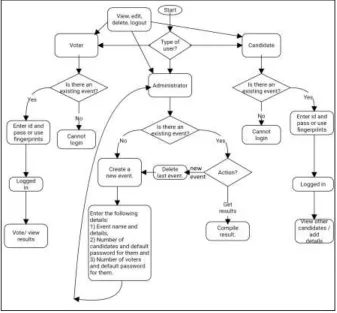
Administrator – This is the user that feels the need for a poll and creates one. He will fill in the details about the event, candidates, and voters. He also decides when to get the results of the election.
Candidate – This is the user that participates in the polling as a contestant, and can view or edit his details along being able to see his opponents and their details.
Voter – This is the user that votes for a candidate of his choice. There are 3 processes involved in one full polling event:
Creating a Poll
Administrator will create a poll, along defining various details about it. Details defined are: Event Name: it should be unique, and thus there can be no two events with the same name. Event Details: it is mentioned for the convenience of the candidates and voters
Number of Candidates and Voters: it is the job of the administrator to decide the number of candidates and voters that can participate in the polls. The number of Candidates and Voters also decide the user id range for both (example: If Number of Candidates were 5 Number of Voter were 20 then Candidate IDs would be from 1 to 5 and Voter IDs would be from 1 to 20). Default Password for Candidates and Voters: administrator decides the password that will be used by voters and candidates to
access their accounts for the first time. These passwords can be different for candidates and voters.
Fig. 1: Screens for creating a new polling event.
Executing a Poll
After creation of the poll by the administrator candidates and voters carry on the execution of the polls. When logging in for the first time the candidates and voters use Ids and the passwords given by the administrator.
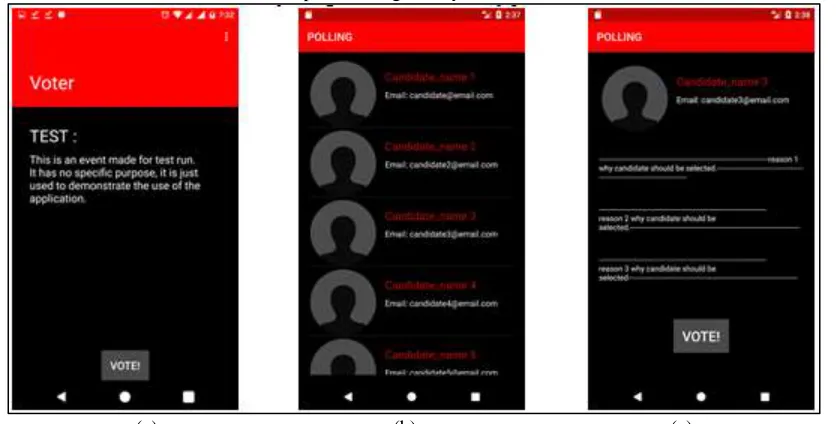
(a) (b) (c)
Candidate’s Work: the responsibility of a candidate is to log in and upload his details that include his name, email and three of his characteristics or promises (reasons why voters should vote for him) that he would like the voters to know. These details are visible to the all the other candidates and voters, also they are mandatory to fill because only a candidate with all the details filled will be able to collect votes. Candidate can add details by using the edit functionality provided
Voter’s Work: the work of the voter is to see the details of all the candidates and decide the candidate that he wants to vote and then, of course, vote. The voter can also upload his details but they will remain visible only to him.
3) Getting the result
Once the voters have voted the administrator gets the results of the election. But it is in the hands of the administrator to decide when to end the elections, it can be done even when no voter has voted (though it makes no sense). After the elections are over, i.e. administrator has ordered for results, administrator along with all the candidates and voters will be able to view the results.
Note: Results are shown on a screen like Fig. 2. (b) with candidates arranged in the order of votes received and the number o f votes written below the email of the candidate.
Fig. 3. Flowchart for user-application interaction
Technical
The project works on two aspects: client side and server side [6]. It uses a requests and response structure, based on JSON objects and arrays [7].
Client side
It involves the user interface provided by an android application. The layout is made using XML whereas the backend is made using java [5]. At the very start, the client gets to choose the type of user (Administrator, Candidate or Voter). Every client is provided with two options for logging in, they are: using id and password or using a fingerprint.
the device is sent to the server side where it is matched with the one already stored in the database. The limitation to this that one device can be linked to only one account.
Server Side
It involves the databases and the backend programming. For testing a server is created using Apache and Databases are stored on this server maintained and updated using My SQL and finally, the databases are linked to the server using PHP, which is also used to perform various high-level functions on the data from the databases [6]. Few functions used in the project, provided by either of the server-side programming languages are mentioned below:
Getting and Sending data: PHP facilitates the server to get and to send the data thus helping the server to communicate with the client.
Packaging data: It is the work of PHP to package data into a proper form for the network. Data are packaged into a string and this process is known as serialization. After serialization, the data are in the form a JSON string or a JSON array, made of strings. Key Value pairs are used in JSON [7]to make the use of the strings easier and more efficient.
Creating data entries: It is performed using My SQL. Whenever a new administrator is created, a new row in the administrator table is created specifying the details of the administrator, same happens in the candidate and voter table along with updating of event details in the administrator table when an event is created.
Updating data entries: My SQL is used for updating the row of a user with updated values for each column, this is required when a user edits his details.
Deleting data entries: It is another function performed by My SQL. When a user deletes his account the row/entry related to him is deleted from the table except when an administrator deletes his account, because during its deletion all the data entries related to the event created by him are deleted.
Securing data: The database consists of information which needs to be protected from any kind of misuse, in this project: password and IMEI number. This type of information is protected using MD5 encryption algorithm [12] and this done using PHP.
For the project, a database is already created with two tables, one for administrators and another for candidates and voters. Tables are managed according to the use of the application by the users. Details about the table are mentioned below:
a)Table for Administrator
Fig. 4: Figure showing the structure of Administrators’ table saved at the server.
id: acts as a primary key and is decided by the administrator at the time of account creation. password: also decided by the administrator at the time of account creation, saved in MD5 format.
IMEI: the unique number related to a device [10] is saved (in the MD5 format [12]) for fingerprint scanning as explained earlier.
event: event name, updated at the time of event creation. information: event details, updated at the time of event creation.
db: dirty bit tells whether the event is active (polling is in progress) or not (results are out). b)Table for Candidates and Voters
Fig. 5: Figure showing the structure of Candidates’ and Voters’ table saved at the server
type: takes ‘Candidate’ or ‘Voter’ as input.
event: event name, filled at the time of event creation. Used as a foreign key.
id: acts as a compound key along with type and event and is given in an order bounded by the number of voters or candidates (explained earlier).
password: default password is decided by the administrator at the time of event creation but it can be changed by the candidate or the voter. Saved in MD5 format.
IMEI: the unique number related to a device [10] is saved (in the MD5 format [12]) for fingerprint scanning as explained earlier.
email: also, a detail about the candidate or voter to be used in his profile.
C1, C2 & C3: only used in case of candidates, used for storing 3 features of a candidate or 3 promises by him. They are publicly visible.
imgsrc: used to store the location of the images, these images are placed on the same server as the database.
vote: in the case of the voter, stores the id of the candidate for whom the voter has voted. In the case of candidate, stores the total votes gathered by him, after the results are compiled.
db: dirty bit tells whether the event is active (polling is in progress) or not (results are out).
IV. CONCLUSION
The paper focuses on implementing the polling process through an android application. The application provides few differentiating features as compared to other android voting applications such as creating a poll according to your need, using the inbuilt fingerprint of an android device for easy login and showing reasons, why candidate thinks he should be selected.
The application has a widespread use from schools to offices where ever the polling process is needed. Furthermore, the intuitive interface and the security features of the application will help attract more users.
V. LIMITATIONS
The project is limited by the boundaries of android, server side, and networks. Few of the important limitations are mentioned below:
Scaling: the project cannot scale well (to a very large scale) resulting from the use of only a single server and limitation on the number of queries per sec. in My SQL. Though this could be easily solved by replication of the database [13] over multiple servers.
Security: though the application is made secure by using passwords and IMEI numbers [10] in MD5 [12] format, the network and the server are not secured enough to protect against any high-level attacks. This is applicable to any application or project working on an open network, therefore making it almost impossible to hold political elections from homes using our phones. (Note: thus, holding political elections is not the aim of this project). The solution to this issue lies in the hands of Internet Service Providers, only a highly secure network provided by the ISPs will be a promising solution.
Fingerprints: though android, or as a matter of fact many other mobile platforms, provides fingerprint verification but it is restricted for the use by any application or programmer keeping the security concerns in mind. There is dedicated hardware and software for the fingerprint scanner thus limiting the android OS from accessing images of the fingerprint [9]. Therefore, true fingerprint verification is not provided to the application user, but the use of IMEI number [10] brings it close to the original as the user is not burdened with filling the details and only needs to touch the fingerprint scanner with an already registered finger (in the security section of the android device). This has been explained earlier.
REFERENCES
[1] Wikipedia, “Voting Machine” or” Electronic Voting Machine”, https://en.wikipedia.org/wiki/Voting_machine
[2] Dinesh R. Gawade, Amardeep A. Shirolkar, and Sagar R. Patil, E-voting system using mobile SMS, IJRET e-ISSN: 2319-1163 | p-ISSN: 2321-7308. [3] P. Manivannan and K. Ramesh, E-voting system using android smartphones, IRJET e-ISSN: 2395-0056 p-ISSN: 2395-0072.
[4] Harshad Velapure, Saurabh Rai, Saransh Sharma, Preetam Naiknavre, Pranali Jadhav, and Kalyan Bamane, Android Based E-Voting, IJAFRC ISSN 2348 – 4853.
[5] Android Overview, Open handset alliance, http://www.openhandsetalliance.com/android_overview.html
[6] Introduction to Dynamic Web Content, https://www.safaribooksonline.com/library/view/learning-php-mysql/9781491906910/ch01.html [7] Introducing JSON, http://www.json.org/
[8] Adio Akinwale, Olusegun Folorunso and Adesina Sodiya, Derivation of database keys’ operations, Volume 8, 2011
[9] Joe Fedewa, fingerprints stored on nexus phones will never leave your device, http://phandroid.com/2015/09/30/nexus-fingerprint-security/ [10] Shamikh Faraz, Analysis of international numbers of a cellphone
[11] Android Developer, SharedPreferences https://developer.android.com/reference/android/content/SharedPreferences.html
[12] Alok Kumar Kasgar, Mukesh Kumar Dhariwal, Neeraj Tantubay and Hina Malviya. A Review Paper of Message Digest 5 (MD5), IJMEMR ISSN: 2320-9984 (Online)