PERFORMANCE COMPARISON BETWEEN LIGHT
WEIGHT VIRTUALIZATION USING DOCKER AND
HEAVY WEIGHT VIRTUALIZATION
Vipin Gupta
1, Karamjeet Kaur
2, Sukhveer Kaur
3 1U-Net Solutions, Moga, India
2,3Computer Science and Applications, AD College, Dharamkot, Moga, India
ABSTRACT
These days everything is shifting to cloud computing. Two of the major types of clouds are infrastructure as a service (IAAS) & Platform as a service (PAAS) cloud. Network engineers and administrators make use of IAAS instead of physical hardware for implementing servers. Software Developers use PAAS for programming purposes. Virtualization is the main base for implementing cloud computing. The main types of virtualizations are Type 1 (also called hypervisor), Type-2 (called virtualization) and light weight virtualization (called operating System level virtualization). The problem with virtualization and hypervisor is that large time required for booting of the virtual machine (VM), very high VM installation time, large storage space consumed. The CPU and RAM usage is high. On the other hand, light weight virtualization is very fast, consumes almost negligible resources, container creation and start up time is extremely fast. Here we are comparing the performance of Virtual Box with Docker. Docker is based on lightweight container technology whereas virtual box represents heavy weight virtualization. First section will deal with introduction to docker and Virtual Box, second section contains comparison, third section experimental setup, fourth deals with performance analysis & last contains conclusion.
Keywords
:
Hypervisor
,
Virtualization, Virtual Machine, Docker, Virtual Box
I. INTRODUCTION
Heavy weight virtualization means creating virtual machines containing independent operating system. Virtualization software isolates the execution of VM software from the underlying host hardware. We can install
any guest Operating systems such as Linux, Windows, Mac. Multiple VMs can share the same hardware resources. Thus providing efficiency and proper use of physical hardware resources. Before virtualization, if we have to implement 3 servers containing web server, ftp server & mail server then we used to purchase 3 physical servers & then individually implement those servers on the hardware. It was a sheer wastage of resources. Most
of the servers were underutilized. The more servers require more space and energy. With the advent of virtualization, everything got changed. Now we purchase only 1 physical server. We created 3 virtual machines
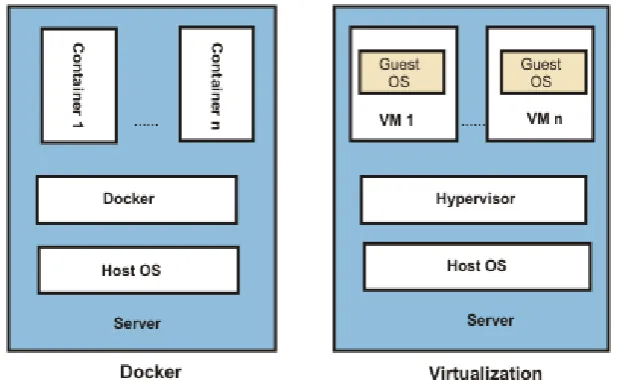
need Host OS which can be windows or linux to install these softwares. i.e we cannot directly install these software on bare metal hardware. So new type of virtualization called hypervisor came into picture. These hypervisors can be directly installed on hardware. These hypervisor represents type-1 virtualization as shown in
Fig. 1. The XenServer [6] and VMWare ESXi [7] are hypervisors.
But the problem with these virtualization software is that we have to install complete Guest OS. Suppose we need apache web server on 1 machine and elinks web browser on other machine, we need to install two complete guest machines containing full OS. That is complete wastage of resources. Virtual machines require lot of installation and booting time. Storage space, RAM usage and CPU usage is high.
Now the trend is shifting towards micro services architecture. Docker [8, 9] container just contains application and dependencies. Docker is a platform to build, distribute and run applications. It is also called lightweight container based virtualization as shown in Fig. 2. A docker container shares the kernel with host and contains self contained isolated execution environment. These containers are efficient and portable. Docker is open source platform which allow applications to be deployed as containers. These containers are portable and work on the principle that any application can be deployed anywhere on any type of servers including cloud.
II. DOCKER AND VIRTUAL MACHINE COMPARISON
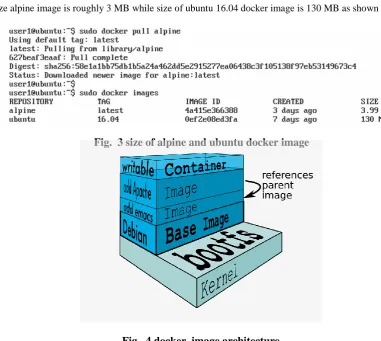
There are some fundamental difference between Heavy Weight Virtualization represented by Virtual Box and Light Weight virtualization represented by Docker. In Virtual Box, created machines are called VM while in docker created machines are called containers. Normally VMs are created using operating system iso. While containers are created using docker images. Normally the size of iso will vary from 100MB to 4GB while the size of docker images varies from 1MB to 200MB. Why the size of docker images is so small? It is due to the fact that it uses layered file system concept called union mount in which file systems are mounted on top of other instead of separately. Docker applications images use a parent image which is generally very small size. The size alpine image is roughly 3 MB while size of ubuntu 16.04 docker image is 130 MB as shown in Fig 3.
Apache web server will add another read only layer on parent image and so on. When we want to run apache web server, we will create container using docker image which will add writable layer on top of image as shown in Fig. 4. If a file needs to be changed from read only layer, first it gets copied into writable layer where changes are made. If we are going to remove the container, then all changes will get lost. If we want to persist with changes, then we need to create new docker images from running container by just simply using “docker commit” command along with container id plus name of the new docker image.
If we are creating VM using heavy virtualization, then suppose we have 1 GB RAM spare for creating virtual machine, then we will be able to create 1 VM or maximum 2. But on the other hands in 1 GB RAM, we can create hundreds of containers using docker.
Fig. 3 size of alpine and ubuntu docker image
III. EXPERIMENTAL SETUP & RESOURCE USAGE
For experimental purpose we download virtual box which is free available. Our host OS on laptop was window 7. We installed virtual box on windows 7, which took nearly 3 minutes to install. Then we created 1 VM using ubuntu 16.04 server. We allocated 1 GB ram, 10 GB space for creation of this machine. We noted down the time for installation. After installation, we noted the booting time when we start the VM. On same VM, we installed the docker engine which took about 1 minute. The docker engine installation time is dependent upon internet speed. Then we pulled docker ubuntu:16.04 and alpine images from hub.docker.com. Then we created the containers and noted the container creation time as shown in Fig. 5 .
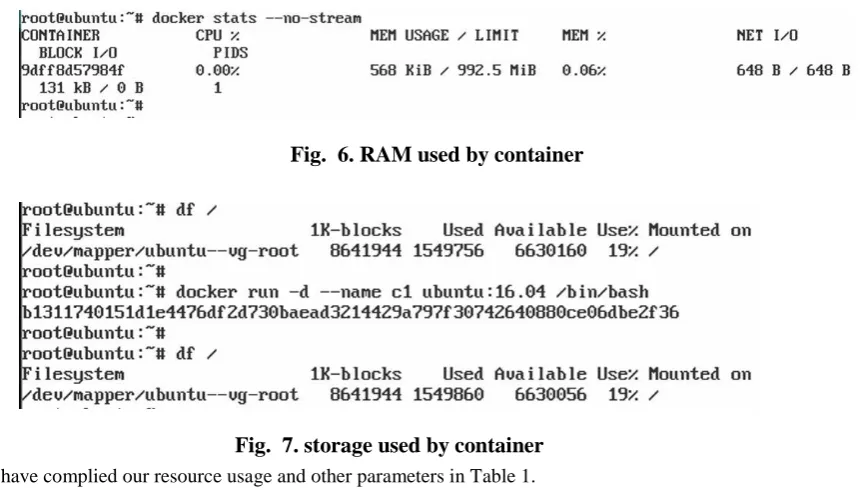
With “docker stats” command, we were able to find out the RAM used by the container as shown in Fig. 6. By running “df” command before container creation and after container creation, we were able to find out the storage used by container as shown in Fig. 7.
We have complied our resource usage and other parameters in Table 1.
Fig. 5. container creation time
Fig. 6. RAM used by container
Table 1 Resource Usage Comparison
Heavy Weight Virtualization (Virtual Box) Light Weight Virtualization (Docker)
iso size (ubuntu 16.04) 667MB image size (ubuntu 16.04) 130MB
RAM 1 GB RAM 568KB
Storage 10GB Storage 104KB
VM installation time 21 min Container creation time 0.9 sec
Virtual Box Software size 108MB Docker Engine Size 19.4MB
Boot time 35 sec Boot time < 1 sec
IV. PERFORMANCE ANALYSIS
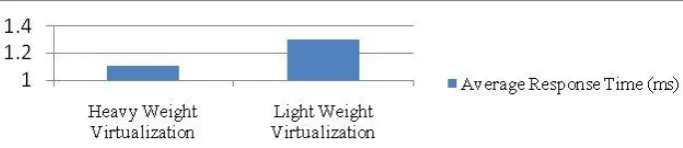
We also pulled “httpd” docker image from hub.docker.com. This image contains apache web server. We also installed apache web server on our VM. We first tested the response time of web server in VM. Then we launched the "web" container using “httpd” docker image. The response time was measured using "httping" [10]. As shown in Fig. 8 the response time was slightly better in VM as compared to Docker container. This is due to the fact that container is using almost negligible resources as compared to large resource used by VM.
V. CONCLUSION
The light weight virtualization is rapidly changing the cloud market. Now the 90 percent of PAAS are using Docker lightweight virtualization technology. As can be seen, Docker is better in almost in all the parameters. The boot time, ram required, storage required are almost negligible. Container creation time is again in seconds while VM takes minute for creation. The size of iso used for creating VM is very large as compared to very small size of docker images used for creating containers. The only drawback was that application response time was more in Docker than in VM. The further research could be security provided by both technologies. We did not compare both technologies on security parameters.
REFERENCES
[1] van Surksum, Kenneth. "Release: VMware Workstation 11 and VMware Player 7 Pro." Red 2016 (2017). [2] KivityLiu, Di, Yun Yong Zhang, Ni Zhang, and Kun Hu. "A research on KVM-based virtualization
security." In Applied Mechanics and Materials, vol. 543, pp. 3126-3129. Trans Tech Publications, 2014. [3] Masood, Anum, Muhammad Sharif, Mussarat Yasmin, and Mudassar Raza. "Virtualization tools and
techniques: Survey." Nepal Journal of Science and Technology 15, no. 2 (2015): 141-150.
[4] Manik, Varun Kumar, and Deepak Arora. "Performance comparison of commercial VMM: ESXI, XEN, HYPER-V & KVM." In Computing for Sustainable Global Development (INDIACom), 2016 3rd International Conference on, pp. 1771-1775. IEEE, 2016.
[5] Åsberg, Mikael, Nils Forsberg, Thomas Nolte, and Shinpei Kato. "Towards real-time scheduling of virtual machines without kernel modifications." In Emerging Technologies & Factory Automation (ETFA), 2011 IEEE 16th Conference on, pp. 1-4. IEEE, 2011.
[6] Mian, Adnan Noor, Ali Mamoon, Raees Khan, and Ashiq Anjum. "Effects of virtualization on network and processor performance using open vswitch and xen server." In Utility and Cloud Computing (UCC), 2014 IEEE/ACM 7th International Conference on, pp. 762-767. IEEE, 2014.
[7] Walters, John Paul, Andrew J. Younge, Dong In Kang, Ke Thia Yao, Mikyung Kang, Stephen P. Crago, and Geoffrey C. Fox. "GPU passthrough performance: A comparison of KVM, Xen, VMWare ESXi, and LXC for CUDA and OpenCL applications." In Cloud Computing (CLOUD), 2014 IEEE 7th International Conference on, pp. 636-643. IEEE, 2014.
[8] Merkel, Dirk. "Docker: lightweight linux containers for consistent development and deployment." Linux Journal 2014, no. 239 (2014): 2.
[9] Boettiger, Carl. "An introduction to Docker for reproducible research." ACM SIGOPS Operating Systems Review 49, no. 1 (2015): 71-79.