DESIGN AND IMPLEMENTATION OF ON-LINE
CHATTING APPLICATION USING ANDROID
Kavitha. R
1,
Rupali Wagh
2, Remona Yacoop
3, Deeksha S
4 1,2Assistant Professor, Department of Computer Science, Christ University, Bangalore, (India)
3,4
Christ University, Bangalore, (India)
ABSTRACT
The usage of Smartphone increased more in the last five years. Nowadays people are using a smartphone much
for chatting which help share the information between two or to the group. Presently there are lots of
applications available on the Android market for chatting and information sharing. All these just share the
message but won't provide any message status like the message is seen or not and if seen, it is accepted or not.
In this paper, we proposed a new application called as “Shary” an Android based application developed using
Android Kit Kat version 4.4. The main aim of this application is to share any last minute updated information to
a specific group and receive the status of the messages.
Keywords
:Android Application, Chatting
I. INTRODUCTION
Today the world is full of technologies; there are lots of inventions made to use the latest technologies. To be
specific on technology, Mobile phones have been a part of our everyday use where we share lots of information
through this communication channel. Now a day’s android system is becoming more popular, especially in the
Smartphone market. Because there are some of the development tools which is available free are used to
generate many applications in an android platform. The main reason for its popularity is, it also provides a very
convenient hardware platform for developers. In android, there are applications for SMS controller, SMS spam
and Auto-reply features [1]. Some of the android applications allow creating group between the family and
friends to share their messages and location [2]. Group scheduling feature is also implemented in some android
application to improve the response time [3]. In this paper section2 explain the related works of this application.
Section 3 explain the concept of the application relates to the implementation such as system architecture,
modules, functions to develop this application and its working principles. Section 4 conclude the overview of
the application along with the future enhancements.
II. RELATED WORKS
Few related applications which are developed for sharing information using an android platform is discussed in
this section. Today’s world has Server-less multi-user chat application which is implemented for group
communication [4]. And also there are various applications where the message is recorded and then converted
into SMS text message [5] which is basically known as speech recognition applications. There are also
applications which share the location and the message using the GPS facility available on the phone [6]. [7]
recipients, allows adding and managing scheduled SMSs, sent message stored for the later use enable to add
new groups and delete existing groups.
But these applications are allowed to add, only the contacts which are stored in the phone but not from even
phone Sim card, it has an implementation problem and there is no record of sent messages, and also it will not
communicate in two way i.e. between web server and device and vice versa.
III. IMPLEMENTATION
3.1
System Architecture
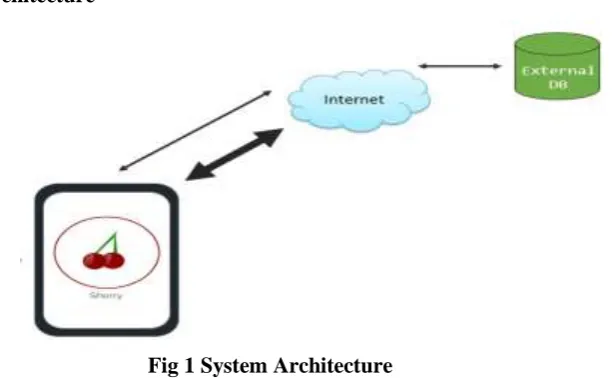
Fig 1 System Architecture
This application Shary stores all the information such as messages, group’s information in the external database
i.e. the online database via the server (internet). The server is connected to the database using PHP language.
The server tells the application for every new update. So that the message get stored into the database and it is
available for retrieval for any time. System architecture of the application is shown in Fig. 1.
3.2
System Modules
In this section working principles and the functions which are used in to implement this application are
explained. This application basically developed for two different users, one is for the Faculty and the other is
Student.
The Faculty can create the group by selecting the Students from different branches and can send the message to
the created group and view the status of the message either the Student viewed, accepted or declined. The
Student can respond the messages by selecting the option Accept or Declined.
User interface of Faculty has the following modules
Faculty login: - This module allows the faculty to login to the application using username and password.
By means of this login page, the application will provide security and access control by allowing only
registered faculties to access the app.
Faculty registration: -Faculty who have not registered can register with the app here by giving a code,
username, and password. Code will be different for Faculty so that the user will have secure access to the
application.
Create group: - After the Faculty is logged in, the application will direct to a new page to create a group or
to use existing group. The Faculty can add Student who are registered with the application and create their
Status of the message: - This module allows the Faculty to know the status whether the Student has
accepted, declined or kept pending to respond the messages.
User interface of Student consists of the following modules
Student login: - The Student can login if he has already registered with the app by giving a user name and
the password.
Student registration: - Registration form for Students allows the Student to register by giving a code,
username, branch, contact number, and password. Code will be different for Student so that the user will
have secure access to the application.
Notification: - The Students receives a notification via pop-ups in their mobile like a message alert when
the Faculty updates the message. Students receives the alert only if they are online or logged into the
application otherwise the message gets stored directly into the Students inbox, and it can be viewed when
he/she login to the application.
Student’s inbox: - In this inbox, all the messages received by the Student is stored and the messages which
are read is highlighted in different colour. Once the message is read they can respond by, a click on any one
of the buttons provided (got-it or decline), by this Faculty will get the response. If the Student doesn’t
respond it will be displayed as pending.
3.3 Functions Used
This section brief the eclipse inbuilt functions which are used to develop the application
3.3.1 Alarm manager
The Alarm Manager is intended for cases where the application code run at a specific time, even if the
application is not currently running. For normal timing operations (ticks, timeouts, etc.) it is easier and much
more efficient to use Handler.
In this application, alarm manager is used to notifying the Students if they receive any message from the
Faculty. The alarm screen appears on the Student’s phone with the information such as the admin name, subject
of the message, date and time of the message posted will appear on the alarm manager.
3.3.2 Httppost
The Httppost request method is designed to request a web server to accept the data enclosed in the request
message's body for storage.
In this application, Httppost is used to post the information from the application to the database via the server.
For example information such as message, date, time, group details are stored in the database.
3.3.3 Httpget
The Httpget method helps to retrieve information from the server. In this application, Httpget is used to get the
information from the database to the application via the server. For example information such as group, Faculty
name, Student name will be retrieved from the database to the application.
3.4 Working Principles
The home screen has two login buttons for two different users, Faculty and Student. New Faculty user should
register their detail with the application by giving their details such as code, username and password. Similarly,
new Student user should register with the application by giving their details such as code, username, branch and
If the Faculty login button is clicked. The Faculty can login to the application and the page will direct to a new
page where there are two buttons send message and message status. If the Faculty clicks on send message then
the Faculty can send message to an existing group or newly created group, Faculty can create a group using the
Student who ever has registered with the application. Once grouping is done the page will direct to a new page
where the Faculty can send a message to the group. In this page there is an option where the Faculty can type the
Messagetitle or can use Suggestedtitles.
After the Faculty sent the message to the group, all the Students under the specified group receives an alert on
their phone, then Students can open the message or can view it later. The Students can view the message along
with the Faculty’s name, date, time and message title. Now the Student can reply back to the Faculty by
selecting one of the two buttons Accept or Decline. Once the Student clicks on any of the button immediately
the status of the Student is updated. If the Student click on accept the status appear as accepted, if the Student
click on decline the status appears as declined, if the Student doesn’t reply back to the message the status is
assumed as pending. The status of the message is viewed in the Faculty’s profile. Once the Faculty is logged in
he/she can click on the message status button to view the status of the message.
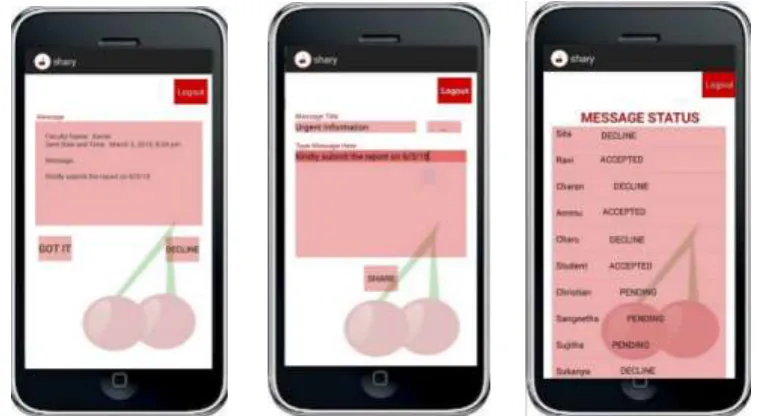
Fig 2. (a) Message entry by faculty Fig (b) Received Message by student Fig (c ) Message Status
The screen where there the faculty can type the message and share it with the selected list of Students who are in
the group is shown in fig 2(a).The Student receives the message with the date, time and the name of the Faculty
who sent the message is shown in fig 2(b). The Student replies back to the Faculty using any one of the button
gotit or decline the faculty can view the status of the message as shown in fig 2(c).
IV. CONCLUSION
This paper gives the overview of an android mobile application Shary. This application is developed to share an
important message which needs to reach Students within few minutes. It can be used by the different group of
people like trip advisor, Academic events etc. The future developments which can be added to the application
are, notify the Students immediately when a message is updated even when they are not logged into the
application and message sharing among the Students, between Faculties, and from Faculty to Student and vice
versa. This helps the entire group who registered with this application can be updated with the last minute
REFERENCES
[1] Umar ManzoorI, Matiullah KhanI, Abdullah QureshiI and Numair ul GhaniI, “Luxus SMS Controller for
Android based Smart Phones”, International Conference on Information Society i-Society, 2012.
[2] Alexandra-Mihaela Siriteanu and Adrian Iftene, “MeetYou – Social Networking on Android”, “Al. I. Cuza”
UniversityIasi, Romania.
[3] Zongwei Zhu, Beilei Sun, Xi Li and Xuehai Zhou, “Application-aware Group Scheduler for Android”,
University of Science and Technology of China (USTC).
[4] Robert N. Lass, Duc N. Nguyen, David W. Millar, and William C. Regli, “AnEvaluation of Serverless
Group Chat”, The 2011 Military CommunicationsConference - Track 4 - Middleware Services and
Applications.
[5] Sanja Primorac and Mladen Russo, “Android application for sending SMS messageswith speech
recognition interface”, MIPRO 2012, May 21-25,2012, Opatija, Croatia.
[6] Ramesh Shrestha and Yao Aihong, “Design of Secure Location and Message Sharing System for Android
Platform”, College of Computer Science & Technology Harbin Engineering University Harbin, P.R.China