Worcester Polytechnic Institute
Digital WPI
Major Qualifying Projects (All Years)
Major Qualifying Projects
April 2015
NVIDIA Bug Services: Synchronization &
Statistics
Joseph Richard Spicola
Worcester Polytechnic InstituteKristen Lee Brann
Worcester Polytechnic InstituteTushar Narayan
Worcester Polytechnic Institute
Follow this and additional works at:
https://digitalcommons.wpi.edu/mqp-all
This Unrestricted is brought to you for free and open access by the Major Qualifying Projects at Digital WPI. It has been accepted for inclusion in Major Qualifying Projects (All Years) by an authorized administrator of Digital WPI. For more information, please [email protected].
Repository Citation
Spicola, J. R., Brann, K. L., & Narayan, T. (2015).NVIDIA Bug Services: Synchronization & Statistics. Retrieved from https://digitalcommons.wpi.edu/mqp-all/2569
NVIDIA Bug Services:
Synchronization & Statistics
Kristen Brann, Tushar Narayan, Joseph Spicola
March 5, 2015
A Major Qualifying Project Report submitted to the Faculty
of the
WORCESTER POLYTECHNIC INSTITUTE in partial fulfillment of the requirements for the
Degree of Bachelor of Science by: Kristen Brann Tushar Narayan Joseph Spicola Date: March 2015 Approved:
Professor David Finkel, Advisor This report represents the work of one or more WPI undergraduate students.
Submitted to the faculty as evidence of completion of a degree requirement. WPI routinely publishes these reports on its web site without editorial or peer review.
2
Acknowledgements
We would like to thank the following individuals for their help and guidance during this project. Professor David Finkel, WPI
Mrs. DeAnn Finkel, WPI Hari Mudaliar, NVIDIA Andrew Chew, NVIDIA Christopher Freeman, NVIDIA Karthik Gopalakrishnan, NVIDIA
Brian Ty, NVIDIA Lawrence Robinson, NVIDIA Sumanta Chakraborty, NVIDIA
Silke Steurich, NVIDIA Wu-Hsuan Lee, NVIDIA
Kuang Heng Li, NVIDIA Leandro Awa, NVIDIA Matthew Jansen, NVIDIA
Eric Busto, NVIDIA Erik Welch, NVIDIA
3
Contents
Acknowledgements... 2
List of Figures ... 6
List of Tables ... 6
List of Code Fragments ... 7
1 Abstract ... 8
2 Introduction ... 9
2.1 NVIDIA ... 9
2.2 Partnership with Google ... 9
2.3 Problem Statement ... 10
2.3.1 Bug Synchronization Service ... 11
2.3.2 Bug Statistics Tool ... 12
3 Background ... 14
3.1 Bug Trackers ... 14
3.1.1 NVIDIA Bug Tracking ... 14
3.1.2 Google Partner Bugs ... 17
3.2 Email Protocols... 20 3.2.1 SMTP ... 20 3.2.2 POP3 ... 21 3.2.3 IMAP ... 21 3.3 Web Scraping ... 21 3.3.1 HTML ... 22
3.3.2 Google Project Hosting HTML Structure ... 22
3.3.3 Retrieving and Parsing HTML ... 23
4 3.4.1 Daemon ... 23 3.5 Security ... 25 3.5.1 Encryption ... 25 3.6 API Protocols ... 26 3.6.1 XML ... 26 3.6.2 SOAP... 27 3.6.3 WSDL ... 29 3.6.4 Unicode ... 29 3.7 Logging ... 30
3.7.1 The Python logging Module ... 30
3.7.2 Event Levels ... 30
3.7.3 The YAML Data Format ... 31
3.8 Statistics ... 32
3.8.1 ChromeOS Statistics ... 32
3.8.2 Generating Dynamic Charts with Microsoft Excel ... 35
4 Methodology ... 37
4.1 Integration with Google ... 37
4.1.1 Email Scraping ... 37
4.1.2 Web Scraping ... 40
4.1.3 Comparing Strategies ... 42
4.2 Integration with NVIDIA ... 43
4.2.1 Connecting to NVBugs ... 43
4.2.2 Using the Internal SOAP API ... 44
4.2.3 Using the Partner Bugs API ... 47
5
4.2.5 Tradeoffs around new Mapping Schema ... 52
4.3 Logging ... 54
4.3.1 The Logger Hierarchy ... 54
4.3.2 Classes and Objects ... 55
4.3.3 Configuration ... 57 4.3.4 Logging Tradeoffs ... 59 4.4 Deployment ... 61 4.4.1 Development ... 61 4.4.2 Testing ... 61 4.4.3 Deploying to Production ... 62 4.5 Statistics ... 63
4.5.1 Preparing the Environment ... 63
4.5.2 Connecting to the Gremlins Database ... 63
4.5.3 Automating SQL Connection with Visual Basic for Applications ... 64
4.5.4 Automating SQL Generation with Visual Basic for Applications ... 65
4.5.5 Creating a User Interface for the Project Managers ... 67
5 Results ... 70
5.1 Bug Synchronization Service ... 70
5.1.1 Extending the Bug Synchronization Service ... 71
5.2 Bug Statistics Tool ... 72
5.2.1 Extending the Bug Statistics Tool ... 72
6 Conclusion ... 73
7 Bibliography ... 74
8 Appendices ... 81
6
Appendix B Example of NVBugs Embedded Charts ... 85
Appendix C Information Retrieved from a Google Bug ... 86
Appendix D Example WSBug XML Object ... 87
Appendix E Bug Synchronization Architecture Overview ... 91
Appendix F Configuration File ... 93
Appendix G Deployment Instructions for Google Chrome Sync ... 95
Appendix H Documentation ... 101
Appendix I Bug Synchronization Statistics ... 109
List of Figures
Figure 1: “NVIDIA ChromeOS Bugs” Custom View on NVBugs ... 16Figure 2: Project Bug Velocity Chart ... 33
Figure 3: Project Bug Trend by Modules ... 34
Figure 4: Project Bug Trend by Engineer ... 34
Figure 5: Example WSBug XML Object... 45
Figure 6: Sample mapping of NVIDIA Bug to Google Bug using Synopsis field ... 50
Figure 7: Customer Information Section for an NVIDIA Bug ... 54
Figure 8: The User Interface of the Statistics Tool ... 68
Figure 9: UI for Generated Charts ... 69
Figure 10: Embedded Charts on NVBugs ... 85
Figure 11: Bug Synchronization Service Flow Diagram ... 91
List of Tables
Table 1: Predefined Logging Levels in Python's logging Module ... 31Table 2: Bug Synchronization Performance Statistics ... 70
7
List of Code Fragments
Code Fragment 1: The Paragraph HTML Element ... 22
Code Fragment 2: HTML Fragment from Google Project Hosting ... 22
Code Fragment 3: Sample XML Snippet ... 27
Code Fragment 4: Sample SOAP Message Skeleton ... 28
Code Fragment 5: Sample YAML File ... 31
Code Fragment 6: NVIDIA Partner Bug Audit Trail Notes ... 48
Code Fragment 7: Obtaining a logger object ... 55
Code Fragment 8: Configuration of Logging Formatter ... 57
Code Fragment 9: Sample Log Message ... 57
Code Fragment 10: Setup for a logger object ... 58
8
1
Abstract
The NVIDIA ChromeOS team works with NVIDIA’s internal bug database and Google’s partner bugs database. Project Managers currently manually copy-paste bugs from the Google database to the NVIDIA database so that NVIDIA engineers can work on those bugs. To track the progress of projects, NVIDIA’s Project Managers manually tabulate data and generate bug trend visualizations. Both these manual operations are time-intensive and prone to human error.
We developed a service to automate the synchronization of Google bugs, guaranteeing timely and automatic Google partner bug updates. We also developed a tool to automate the generation of bug statistics, providing an easy manner of periodically visualizing bug trends.
9
2
Introduction
2.1
NVIDIA
NVIDIA is a Visual Computing Company that was founded in 1993. In 1999, NVIDIA invented the graphics processing unit (GPU), which was a significant stride forward for the field of computing
graphics. NVIDIA targets markets including gaming, professional data visualization, scientific computing, and general high performance visual computing. NVIDIA invests in cloud services, notably the NVIDIA GRID cloud gaming technology that allows users to stream games [56].
NVIDIA has also entered market sectors that involve smart devices, and provides processor chips for various device types:
tablets: for example, the Google Nexus 9 [27] laptops: for example, the HP Chromebook [36] smartphones: for example, the HTC OneX+ [41]
NVIDIA’s current generation of mobile processor chip is named the NVIDIA Tegra X1 [58]. NVIDIA has defined a new market segment by releasing the Shield Portable [60], which is a crossover between a handheld gaming console and a tablet computer. In recent months, NVIDIA has also made strides in developing a Visual Computing Module (VCM) that is meant to integrate the NVIDIA Tegra processor into vehicles [62].
Serving these different market segments means that NVIDIA has to work with different partners within each particular market. NVIDIA’s partners include Audi [14], Google [26], Microsoft [47], Tesla [88], and many others [57].
2.2
Partnership with Google
In 2014, NVIDIA announced a partnership with Acer, to power their new Google Chromebooks with the NVIDIA Tegra K1 mobile processor [11]. Later that year, HP announced that it would also launch a Chromebook powered by the Tegra K1 [85]. Integrating the Tegra K1 into the Chromebooks
dramatically increased performance in battery life, processing speed, and graphics power [11]. NVIDIA’s Tegra K1 processor now powers many Google Chromebooks made by Acer and HP:
Acer Chromebook 13 CB5-311-T1UU [5] Acer Chromebook 13 CB5-311-T7NN [1] Acer Chromebook 13 CB5-311-T9B0 [6]
10 Acer Chromebook 13 CB5-311-T677 [7]
Acer Chromebook 13 CB5-311-T5BD [8] Acer Chromebook 13 CB5-311-T677 [3] Acer Chromebook 13 CB5-311-T5XO [4] Acer Chromebook 13 CB5-311-T9Y2 [2] Acer Chromebook 13 CB5-311P-T9AB [9] HP Chromebook – 14-x050nr Touch [40] HP Chromebook – 14-x040nr [39] HP Chromebook – 14-x030nr [38] HP Chromebook – 14-x010nr [37]
Chromebooks run Google’s Chrome Operating System (for more information on the Chrome Operating System, see [33]). Due to this relationship, NVIDIA has a team devoted to working specifically with mobile products that run ChromeOS. The ChromeOS team works closely with Google to ensure that the devices perform well with the Tegra K1 processor. This partnership often involves both Google and NVIDIA developers investigating and working on the same bugs.
2.3
Problem Statement
Project Managers (PMs) are employees whose job revolves around making sure that their company’s products launch on schedule. While the role of a PM can vary broadly depending on the company, PMs are generally responsible for translating company strategy into consumable products and services. PMs work with various stakeholders, including management, engineers, partners, and
customers to make sure that projects are delivered according to their deadlines.
PMs use a variety of statistics to track the progress of a project. One of the metrics the PMs rely on is the bugs related to a project. Tracking bugs has a dual purpose:
Engineers record the progress they are making on fixing a particular issue or developing new functionality on the bug. Bugs can thus provide a timeline of the issues
encountered, the steps taken to fix them, and the overall outcome.
The overall number of bugs per time can provide a view of the stability of the project. The change in bug numbers can be used to gain insight into engineer productivity,
11 effectiveness of developer code fixes, and the velocity with which engineers are
verifying code fixes.
NVIDIA partners with other companies to maintain its market position in supplying graphical processor chips for various device categories (Section 2.1). PMs therefore have an interest in both the bugs in the NVIDIA bug database and the bugs in the project partner's bug database. For NVIDIA engineers to work on bugs that project partners find, the bugs must be copied over from the project partner's database into the NVIDIA database.
Different teams at NVIDIA have different processes in place for copying over bugs from a partner’s database to the NVIDIA database. We will be working for the ChromeOS team (Section 2.2) at NVIDIA. The ChromeOS team does not have any automated process in place for copying over partner bugs to the NVBugs database. Consequently, ChromeOS Project Managers spend a lot of time doing manual data synchronization in order to make sure that the NVIDIA bug database is up to date with a partner's bug database.
ChromeOS Project Managers also spend quite some time doing manual data tabulation to generate the charts and trends that provide them insight into project development. Manual data manipulation is time-intensive and prone to error.
We have two solutions for this problem: an automated bug synchronization service, and a bug statistics tool.
2.3.1 Bug Synchronization Service
NVIDIA’s ChromeOS team has to work with two bug tracking databases: “Google Partner Bugs”, Google’s bug tracking database, and “NVBugs”, NVIDIA’s internal tracking database. A problem arises when changes such as the creation of new bugs or the addition of comments to existing bugs are made on the Google tracker. NVIDIA’s engineers need Google’s changes to be reflected in some manner on NVBugs as well, since the engineers use NVBugs to track the progress of each bug found in the company's products. NVIDIA needs a manner of synchronizing the changes made on Google Partner Bugs to NVBugs. These changes can include creation of new bugs, updates to existing bugs, or comments on existing bugs.
NVIDIA has synchronization services for other partners it works with, such as Microsoft, Apple, and Audi. The process of building a synchronization service starts with the team that works with the partner registering a request for a synchronization service. Once a request is made, the NVBugs
12 developer team works with the partner to find a “sponsor”; an employee of the partner who will devote some of their time to configuring the partner database to allow for data exchange with the NVBugs database. Once the databases are appropriately configured, the NVBugs team works in conjunction with the sponsor to develop any additional software layers necessary to establish two-way synchronization.
NVIDIA has tried several times in the past to establish a partner database synchronization with Google, but this has never worked because of an inability to find a sponsor from Google. NVIDIA’s Project Managers have had to devote a part of their workday to manually copying and pasting over any updates made on Google Partner Bugs to NVBugs in the absence of an automated system. This approach has several drawbacks:
It is not an efficient use of the Project Managers’ time. It has the potential for delaying updates.
It has the potential to be error-prone – an update could be missed during the copy-paste operation.
This copy-and-paste system provides a one-way synchronization from Google Partner Bugs to NVBugs. Though other partner synchronization projects provide two-way synchronization, the
ChromeOS team only requires the capability to synchronize bugs one-way – from Google Partner Bugs to NVBugs – and thus the unidirectional nature of the current copy-and-paste system is not considered among one of its drawbacks.
NVIDIA is looking for a way to create a synchronization service without the sponsorship of Google. The major features of this service would be:
One-way synchronization: all changes made on Google Partner Bugs that are assigned to NVIDIA are reflected in NVBugs.
Automated: the service requires little to no interaction with an administrator. Periodic: the service runs on pre-configured time intervals.
2.3.2 Bug Statistics Tool
Currently, NVIDIA’s PMs manually tabulate the data and generate the charts that provide them insight into a project’s status. This process involves running searches in NVBugs to find the bugs that they are interested in. They then examine each bug's status, and group the statuses by date to obtain a view of how the bug statuses are changing over time. They also note the engineer assigned to each bug to tabulate bugs per engineer. Once they have this data, they transcribe it into a format that a charting
13 application, such as Microsoft Excel, can use to generate charts. Finally, they configure the charting application to generate the charts that are required. This process is repeated each time fresh statistics are required. Manually generating these statistics is time-intensive and can lead to inconsistency in the charts generated for different projects.
NVIDIA is looking for a tool that would automate the generation of bug statistics, and would display the trends for different projects as determined by the user.
14
3
Background
3.1
Bug Trackers
NVIDIA has a wide portfolio, creating many products for various companies, such as Microsoft, Audi, Apple, Google, etc. (Section 2.1). Many teams are created to work on each of these products, and each of these teams needs to be able to track its progress from day to day, and across multiple
timezones. Many methods exist for tracking progress, whether through deliverables, deadlines, or simply keeping track of what is accomplished and what needs to be done. A separate way of tracking progress is through bug tracking.
Bugs are defects that exist in code or in hardware that someone will need to fix. Many project managers use bugs to track progress, as a product that is close to being in a deliverable state will have few bugs actively remaining.
Teams use bug trackers to keep track of bugs. These bug tracking databases contain bugs that are submitted by developers, Quality Assurance teams, or anyone who is testing the product. The database also keeps track of relevant bug information, such as a priority level, a description of the bug, who submitted the bug, and who is working on fixing the bug. The database enables development teams to keep track of all bugs that have been fixed, are being worked on, and still need to be looked at. Team members are able to estimate a product’s development status through perusing the database, and seeing how close to being near bug-free it is.
3.1.1 NVIDIA Bug Tracking
With NVIDIA's large product portfolio, there are many development teams working on different product development lines. NVIDIA developed an internal bug tracking database, NVBugs, to aid in bug tracking within each individual product development line. NVBugs is used across all of the departments NVIDIA consists of (Software, Hardware, System Engineers, Information Systems, and Platform
Software), with each department possessing their own division of the database. Each individual division is broken down into modules, with each team able to have their own module for their bugs. This allows users the simplicity of examining bugs only in a certain module. Bugs are able to be shared across multiple modules, allowing multiple teams to access the bug simultaneously. There is also a dedicated NVBugs team, whose job it is to update, manage, and test the NVBugs platform [61]. The NVBugs team
15 has created two SOAP APIs (Section 3.6.2) for programmatic interaction with NVBugs: an Internal API, and a Partner Integration API.
3.1.1.1 NVBugs SOAP APIs
NVBugs allows direct access to its database through custom SOAP APIs [55] (Section 3.6.2). These APIs allow users to write scripts that can query the database and create, edit, examine, or comment on bugs. Bugs are unable to be deleted through the SOAP APIs. The APIs use the SOAP protocol to send and receive bug objects to and from the database. There are two APIs, the Internal API and the Partner Integration API, and they differ mainly in the functionality they expose.
3.1.1.1.1 Internal API
The Internal API is meant to be used by NVIDIA engineers for quick modification of their bugs via scripts. The four main functions that the Internal API supports are:
GetBug: used to search for a specific bug using the bug’s unique ID, and will produce a bug object.
GetBugs: uses a raw XML query to search through the database for a set of bugs that match that query. GetBugs will return a list of bug objects that satisfy the query. Only the following fields are searchable using GetBugs: ApplicationDivision, BugID, Synopsis, Description, Requester, Engineer, QAEngineer, AnyEngineer, ARB, DevTech, BugType, BugAction, Disposition, Module, TimeSpan, and GTLTaskID.
SaveBug: saves a bug object to the database. If the bug object’s ID is zero, it will create a new bug and give it a unique ID. If the bug object’s ID is non-zero, it will update the existing bug with matching ID, using the given bug object’s information.
AddComment: adds a comment from a user to a bug in the database.
3.1.1.1.2 Partner Integration API
The Partner Integration API is meant to be used by the NVIDIA teams that work with both the NVIDIA bug database and a partner company's bug database (Section 3.1.1.3). The three main functions that the Partner Integration API supports are:
GetPartnerBugs: used to get NVIDIA partner bugs that have been modified since the last time they were synchronized with a partner.
16 SavePartnerBug: used to save a Partner Bug object to the database. A Partner Bug
object uses PartnerInformation tags that are specific to each partner (Section 4.2.3.1). The usage of these tags differentiates a Partner Bug from a normal bug object.
MarkBugsForExport: used to force the synchronization of an NVIDIA bug with a partner's database, even if the NVIDIA bug has not undergone any updates since the last time it was synchronized.
3.1.1.2 NVBugs User Interface
NVBugs has a front-facing user-interface (UI) that allows anyone with the proper credentials access to the database of bugs. The UI allows for people to interact with the NVBugs database without having to write scripts that interact with the SOAP API. The UI contains a “View” system that allows for very complex searches to be made. These Views will display all bugs that match the View’s search query. Users are able to create a custom View for quick access to bugs that pertain to them. Figure 1 shows a custom View named “NVIDIA ChromeOS Bugs” that displays all bugs in the NVIDIA database that are of interest to the ChromeOS team.
Figure 1: “NVIDIA ChromeOS Bugs” Custom View on NVBugs
17 The UI also includes a Buggle search bar, an internally developed search bar for NVBugs. This search bar is the UI equivalent of GetBug and GetBugs. If a user inputs a bug’s ID, the UI will display the bug with that ID. If a user inputs a search query, the UI will display a list of the bugs that match that query, similar to the GetBugs function.
Users can view individual bugs in the UI. The user can edit and add comments in this display, if the user has permissions to edit the bugs. Users can also create bugs using an empty template.
3.1.1.3 NVBugs Third-Party Integration
Many of NVIDIA’s teams work with third-party customers. These teams develop graphics cards, kernels, and other software and hardware for these customers, and need to track bugs during this production. Many of the customers have their own bug tracking database. The customer company's QA teams can submit bugs to these internal bug tracking databases. The NVIDIA team has access to the third-party bug tracker database to communicate with the customer’s QA team. However, the NVIDIA team also needs to port the bugs over to NVBugs, in order to discuss the actual fixes internally.
The NVBugs team used the SOAP API (Section 3.6.2) to create a third-party bug tracker integration tool [54]. The team finds a sponsor from the customer side (usually someone within their bug tracking database team), and works with the sponsor to create a synchronization tool that synchronizes any relevant bug from the customer’s database with the NVBugs database. The sponsor implements a method on their own database to send SOAP messages to the NVBugs. A SOAP message containing the bug information is created each time a bug is added or updated on the customer
database. The SOAP message is then sent to the NVBugs database, where the message is processed, and the relevant actions are executed. If the customer company does not produce a sponsor, the NVIDIA team will manually add and update the bugs, usually through copying and pasting directly from the customer’s database UI.
3.1.2 Google Partner Bugs
The ChromeOS team at NVIDIA works on the Tegra processor [59] that is used in Google’s Chromebooks [28]. Thus, a number of the bugs that are submitted to or found by Google have to be worked on by NVIDIA’s engineers. The bugs that are sent to the NVIDIA ChromeOS team from Google are referred to as Google Partner Bugs.
18
3.1.2.1 Google Project Hosting
Google provides the Google Project Hosting service for interacting with Google Partner Bugs via a web interface [32]. The Google Project Hosting web interface for Google Partner Bugs is not publicly accessible. However, Google Project Hosting also hosts other open-source projects, most of which are accessible to the public. We used the Chromium project to gain familiarity with the Google Project Hosting platform [31].
3.1.2.1.1 Chromium
The bugs for the Chromium open-source project are hosted on Google Project Hosting [30]. The web interface allows users to browse through the list of all bugs, referred to as “issues” in Google Project Hosting. Users can examine the details of an individual issue, including current status, comments, and activity.
We were primarily interested in the different methods available to export these bugs from the Google Project Hosting interface, so that we could then update the NVIDIA bug database accordingly. Google Project Hosting does not offer a SOAP API, at least not one that is publicly available or
documented. We found that the Chromium project offered three options for exporting bugs: an Atom feed, export to a comma-separated values (CSV) file, and email updates.
Atom Feed
3.1.2.1.1.1
Rich Site Summary (RSS) is a method of publishing news and updates in an automated fashion, by using Extensible Markup Language (XML) that is readable by computers. An RSS document, called a “feed”, contains text and metadata. Atom is a newer format of providing XML updates, with less restrictive licensing, support for XML namespaces, and some other minor differences [95][46].
The Chromium project offers an Atom feed that contains information about the latest changes or comments made to existing bugs, and also includes information about any new bugs that are filed. The feed contains complete information about these updates, and can thus be a viable manner of monitoring changes made to the Chromium Google Project. However, the feed displays just the last 20 updates made to the project’s bugs. Using the Atom feed would require that we track the time we query the feed and ensure that we do not lose any updates if there are multiple changes made within a short span of time.
19 Comma Separated Values File
3.1.2.1.1.2
Comma-separated Values (CSV) is a common file format for storing tabular data in plain-text form. A CSV file can contain any number of rows of a table, with each row separated by line breaks. Within each row, the data pertaining to different columns is separated using commas [43].
The Google Project Hosting interface allows the user to export bugs to a CSV file. However, this option comes with two caveats.
First, the CSV file generated is truncated to just the first 100 results. The final line in the file contains a link to another file with the next 100 results. This means that obtaining more than the first 100 bugs would require multiple queries and would result in multiple files.
Second, within the CSV file itself, we observed the following column headers [29]:
ID Pri M Week ReleaseBlock Cr Status Owner Summary AllLabels OS Modified ModifiedTimestamp
None of these columns included information about the comments made on the issue, which is a necessary piece of data to be synchronized. The CSV generator is a pre-made tool provided by Google Project Hosting, and does not provide any capability for modifying what data is exported.
Email Subscription
3.1.2.1.1.3
The third option for exporting bugs is the email subscription service. Google Project Hosting generates an email when an issue is created, updated, or commented on. The email is sent to each email
20 address that is listed under the "CC" field for that particular bug. The CC field can also include mailing lists.
An email address – either a personal email or a mailing list address – can also be added to the list of subscribers for the overall project. Project subscribers are automatically added to the CC list for every bug under that project.
The generated email contains the following information: the email of the author of the change
the content of the change, including both comments and other updates the Google issue ID
Email subscription offers an easy manner of getting updates for both new and existing bugs.
3.1.2.1.2 Export Options for Google Partner Bugs
The Google Partner Bugs project does not offer the Atom feed option for exporting bugs that was available using the Chromium project. However, the Google Partner Bugs project does support both CSV and email subscriptions. The limitations of CSV files observed in the Chromium project (Section 3.1.2.1.1.2) – not containing comment updates, and not displaying all bugs in a single file – also apply to the Google Partner Bugs project. The email subscription option exposes the same information as seen in the Chromium project. Exporting to CSV and email subscriptions are both viable options for what we are trying to accomplish.
3.2
Email Protocols
We investigated the email subscription service offered by Google Project Hosting as a way to track updates to issues in a project. Three standard protocols were researched as potential ways to interact with the emails generated by the subscription service: Simple Mail Transfer Protocol (SMTP), Post Office Protocol – Version 3 (POP3), and Internet Message Access Protocol (IMAP) [45].
3.2.1 SMTP
SMTP is a protocol used for sending emails between servers [80]. Python has a module, smtplib [71], which provides basic functionality to send email using the SMTP protocol. However, if we were to implement a solution using the Google Project Hosting email subscription service, we would need to be able to read incoming emails. Since SMTP cannot be used to read email, this protocol alone will not provide a viable solution to our problem.
21 A second Python module, smptd [70], defines functionality to implement a custom SMTP server. The smptd.SMTPServer object can be used to listen on a port for incoming emails. Using this object, we could receive emails from the subscription service and perform the corresponding updates to NVBugs in real time.
3.2.2 POP3
The POP3 protocol is used for email retrieval. A device using this protocol retrieves email waiting on a server and downloads it locally for offline management [64]. A downside to being able to manage email offline without constant connectivity to the internet is a loss in synchronicity with other devices. Once the mail has been downloaded, it is no longer kept in sync with the email server. If an email is deleted from one device’s inbox folder, the email will still be in the inbox when accessed on a different device. This lack of synchronicity is not suitable for systems with multiple devices accessing the same email. The POP3 protocol does provide the necessary ability to read incoming emails, making it a viable potential solution to our problem.
3.2.3 IMAP
IMAP is a protocol used for accessing and manipulating emails and mailboxes on a server [44]. The protocol is useful in situations when mail will be accessed and manipulated on multiple devices. Any change to the mailbox, such as deleting an email or renaming a folder, is reflected on the server and therefore on all devices accessing the mailbox. In addition, emails can be deleted without downloading the entire email first, which reduces usage of time and resources. However, this direct manipulation of the server requires a device to be constantly connected to the internet while working with the mailbox, which may not be feasible or practical. The IMAP protocol could be used as a viable solution for reading update emails from the Google Project Hosting subscription service.
3.3
Web Scraping
The Google Project Hosting user interface provides another potential source for data on Google Partner Bugs. The interface consists of many web pages composed of Hypertext Markup Language (HTML). “Web Scraping” is the practice of using computer programs to parse HTML pages and gather information [79].
22
3.3.1 HTML
HTML pages are structured text documents consisting of a hierarchy of elements, each containing a name, attributes, and content [87]. Most elements contain the name and attributes in a “start” tag, followed by the content, followed by an “end” tag:
<name attributes>content</name>
Each tag is marked by using surrounding angle brackets. End tags contain the name of the element prepended by a backslash. One commonly used HTML element is the “paragraph” element:
<p align=”right”>A paragraph is written here.</p>
Code Fragment 1: The Paragraph HTML Element
The name of the element is “p”, an attribute that it has is “align=‘right’”, and the content is “A paragraph is written here.”
Some attributes can provide extra information as to what the content will be. The “title” attribute, for example, is used to specify extra information which is often shown in a tooltip when the mouse hovers over the element [93]. Other attributes, such as “class” and “id”, are not specifically meant to provide information on the content, but humans can often infer what the content will be based on their names.
3.3.2 Google Project Hosting HTML Structure
The following is an HTML fragment from Google Project Hosting that defines a comment made on a bug:
1 <div class=”cursor_off vt issuecomment” id=”hc1”>
2 …
3 <span class=”date” title=”Tue Nov 25 15:23:41 2014”>
4 Nov 25, 2014
5 </span>
6 …
7 <pre>
8 Hi Ken,
9 We found out that the calculations in the driver… 10 </pre>
11 </div>
Code Fragment 2: HTML Fragment from Google Project Hosting
23 On line 1, one of the values of the “class” attribute is “issuecomment”, which implies that this tag starts a comment. Line 3 shows the date and time that the comment was made, again implied by the class attribute, and lines 7-10 contain the text of the comment that was entered by the user. These inferences about the HTML structure must be made by a human, but once the structure is determined it can be used to programmatically traverse and find specific data.
3.3.3 Retrieving and Parsing HTML
The HTML for web pages can be retrieved using simple HTTP GET requests. Each bug in Google Project Hosting has its own page of information. This organization means that at least one HTTP request needs to be made for each bug, adding complexity to the system. Once the HTML has been retrieved, there are many Python modules available that can be used to parse the data into different data structures.
3.4
Automation
Performing a task always has an associated cost. Companies perform a large number of tasks for different purposes according to their business strategy. Companies can increase the amount of tasks they complete if they minimize the cost associated with each task. One of the most pressing costs is time.
A common way of addressing the cost of time is through automation. Automation usually breaks down into two parts: actually performing the task, and repeatedly completing the task. In order to automate the actual performing of the task, the user will often write a program or script that will process ordered instructions and complete the task without input. The user then needs a way to repeatedly run this program: either the user manually starts the program each time, or has it automatically start on its own.
3.4.1 Daemon
A daemon is a computer program that runs as a process in the background of the computer, usually out of the view of the user [73]. Daemons are used to automate processes, such as starting programs after booting the computer, or checking for updates. Daemons are usually self-sufficient, meaning they start manually or automatically, run their instructions, and then close without input. Daemons split off processes from the main system, which allows for multiple daemons to run at the
24 same time. Daemons will not restart on their own if they fail, however, nor will they be able to start without being prompted from a different process.
3.4.1.1 Cron Jobs
A “cron” is a time-based software utility similar to a daemon that is used to schedule jobs [92]. “Cronjobs” run on a schedule based on the computer system’s time. The cronjob will perform its task every time it is scheduled to by the programmer. Cronjobs allow the automation of other tasks, enabling the tasks to run on a schedule and removing the need for a user to manually start the task each time. If a task prompted by a cronjob fails, the task will start again the next time the cronjob is scheduled.
3.4.1.2 Run-one
“Run-one” is an Ubuntu package that ensures only one instance of a command with specific arguments is running at a time [82]. When automating a process to run on a certain interval, like with Cron (Section 3.4.1.1), it is important to take into account the potential runtime of the process. If the runtime of the process is always the same, we can safely assume the length of the interval on which to run the process. For example, if the process always takes exactly 10 seconds to run and we would like to run the process as often as possible, we could specify an interval as short as 11 seconds. However, if the runtime of a process varies, the interval at which the process can be run is not as clear. If the interval is too short, there is risk of starting a second instance of the process before the first is done. This
overlapping of processes can cause unexpected behavior, especially if the process accesses or modifies external data.
The run-one command takes another command and set of arguments as its arguments. It checks if there is already a process running for the given command and arguments. If there is, run-one silently exits. If there is not, it allows the given command and arguments to be executed. Run-one can be used to prevent overlapping processes when automating a process with a variable runtime.
The run-one package is developed to be used with the Ubuntu operating system, however, we found that it was also compatible with the CentOS operating system. Ubuntu and CentOS are Linux distributions and therefore the systems are very similar (for information on the differences between CentOS and Ubuntu, see [19]). Software can be compatible with both, but will require different processes for packaging and installation [13]. We were able to install and use run-one on a CentOS machine with no changes to the program’s packaging or configuration.
25
3.5
Security
A new and pressing concern with the advent of computing is the concept of online security. In the past, security consisted of protecting physical assets. No thief could steal items as long as the thief never got access to restricted areas. No spy could steal ideas unless an employee purposefully exposed secrets. Security changed once the Internet was brought into use, as now someone could steal
important files from halfway across the world with a simple click.
3.5.1 Encryption
One of the biggest weaknesses a computer system can have is that users, at some point, will need to access it. A computer system is intended for only valid users to access it, by the user providing valid credentials. This prevents unknown users from using the system, as the unknown user will lack valid credentials. However, if the unknown user has the valid user’s credentials, then the unknown user will gain access to the system. The most secure way to deal with this weakness is to ensure that the unknown user can never get the valid user’s credentials.
A valid user wanting to automate a task (Section 3.4) may run into a problem when the automated process requires valid credentials to be entered. The valid user can get around this by manually entering the credentials each time, but this removes the usefulness of automation. The valid user can simply provide the automated task the valid credentials needed, but this runs a large security risk. If an unknown user gains access to the automation process’s files, the unknown user can view the valid user’s credentials, giving the unknown user access to the system.
A solution to an unknown user gaining access to valid credentials is encryption. The valid user can encrypt the credentials, and the automated program will decrypt and use the credentials as it runs. An unknown user viewing the encrypted credentials would not be able to decrypt the credentials and would be unable to access the system.
3.5.1.1 Gnu Privacy Guard
Gnu Privacy Guard (GPG) [24] is a free implementation of a two-key encryption service, Pretty Good Privacy (PGP) [10]. A key is a way of decoding an encrypted message. GPG works by having users generate their own private key, exchanging keys, and using the other’s key to encrypt and decrypt a message. GPG uses a simple step-by-step process:
26 User A encrypts his/her private key, and publishes the encrypted key on the Internet.
The published key can only be decrypted with User A’s private key. User B downloads User A’s encrypted key.
User B encrypts a message for User A using User A’s encrypted key, as well as User B’s own public key.
User B sends the encrypted message to User A.
User A first decrypts the message using User B’s public key, and then using User A’s own private key.
User A now has the decrypted message User B sent.
3.6
API Protocols
An Application Programming Interface (API) is a set of protocols and functions for interacting with software applications. An API should be platform-agnostic and language-agnostic to allow for maximum compatibility. To achieve this purpose, a number of industry standard protocols are used in the design of an API. An overview of each protocol we used is contained in this section.
3.6.1 XML
A number of the protocols we used are based off Extensible Markup Language (XML), so we start by providing an overview of what XML is.
XML is a document markup language. XML describes a set of rules used to encode documents in a format that can be read by humans, and parsed by computers [16]. An XML document is entirely textual in nature, and is represented by a string of characters.
27 <?xml version="1.0" encoding="UTF-8"?> <note> <to> Tove</to> <from>Jani</from> <heading>Reminder</heading>
<body>Don't forget me this weekend!</body> </note>
Code Fragment 3: Sample XML Snippet
Reference: [76]
XML is a manner of describing data, and supports different human languages via the use of Unicode (Section 3.6.4) [96]. Many document formats have been developed using XML formats,
including RSS/Atom (Section 3.1.2.1.1.1) and SOAP (Section 3.6.2). XML’s support for different languages and its prevalence as a format of machine-readable data interchange have led it to become a commonly used format for exchanging data over the Internet [89].
The tags used in an XML document are not predefined. There is also no constraint on what the tags can be. The author of an XML document can define his or her own arbitrary tags.
3.6.2 SOAP
Simple Object Access Protocol (SOAP) is a protocol used to access application services over the Internet. Different programs need to be able to communicate over the Internet with one another in order to accomplish their tasks. There are a number of factors to be considered when designing a protocol for allowing such communication:
The programs may be running on different operating systems.
The programs may be designed using various different programming languages. The programs may be written for different technologies and have different runtime
environments.
SOAP was created as a protocol that allowed communication between programs, taking all of the above factors into consideration. SOAP uses the Hypertext Transfer Protocol (HTTP) for
28 A SOAP message is an XML document, with the following elements:
Envelope: required; describes the document as a SOAP message
Header: optional; informs the recipient about how to process the message Body: required; contains the actual SOAP message for the recipient Fault: optional; holds information about errors
A sample SOAP message skeleton is:
<?xml version="1.0"?> <soap:Envelope xmlns:soap="http://www.w3.org/2001/12/soap-envelope" soap:encodingStyle="http://www.w3.org/2001/12/soap-encoding"> <soap:Header> … </soap:Header> <soap:Body> … <soap:Fault> … </soap:Fault> </soap:Body> </soap:Envelope>
Code Fragment 4: Sample SOAP Message Skeleton
Reference: [75]
29
3.6.3 WSDL
Web Service Definition Language (WSDL) is an XML language for describing Web services. A WSDL describes a Web service in terms of the messages it can send and receive. A WSDL is a contract – the service promises to accept and return messages that conform to its WSDL specification [18].
A WSDL can specify a range of interactions that are possible for the service. The client using the service can decide which of these interactions, if any, it wants to initiate. The WSDL describes how the interaction will occur once initiated by the client.
An example of a WSDL can be found in Appendix A. A Web API can expose its functionality by publishing the WSDL that it adheres to.
3.6.4 Unicode
Unicode is an industry standard for the encoding and representation of text in computing systems [42]. There are two major reasons as to why an industry standard for character encoding is important. First, there are many different languages used by humans across the world. Cumulatively, these languages encompass many thousands of characters and symbols. Computers need to be able to store and represent these character sets. Computers store characters by assigning unique numbers to each character. It would be ideal if a single encoding was able to provide character-to-number mappings for all characters that could possibly be used [91].
Second, when multiple encodings were used in different parts of the world, programmers ran into issues where different encodings use the same number for representing different characters. This reduced the portability of programs [20].
Unicode provides a unique character-to-number mapping, irrespective of the platform and language being used. It provides for easy portability and internationalization of programs.
Sample encodings in Unicode [90]:
A U+0041
Z U+005A
{ U+007B
ö U+00F6
An API can specify what character encodings it supports [74]. Unicode provides an encoding that different systems can understand, irrespective of platform or language. API’s that support Unicode are able to have widespread usage in different geographic locations.
30
3.7
Logging
We wanted to be able to log messages for successful synchronization operations and when errors were encountered. We used the logging module built into Python for this purpose [67].
3.7.1 The Python logging Module
The Python logging module provides an application programming interface (Section 3.6) that allows developers to implement an event logging system. Events are messages that describe the state of the program at a certain point during the program's execution. Events can have an importance level attached to them; this importance level is variable and can be decided upon by the developers.
Logging has three main advantages over printing messages:
filtering: logging allows the script administrator to easily specify the level of verbosity desired in the output; simple printing does not allow this control.
separation of importance: logging allows for printing messages of different levels to different files, making it simple to view only the errors or warnings; printing does not allow the separation of messages of differing importance.
integration: since the logging module is a standard library, the messages from the bug synchronization service could be easily integrated with messages from any third-party Python modules that we would use [67].
3.7.2 Event Levels
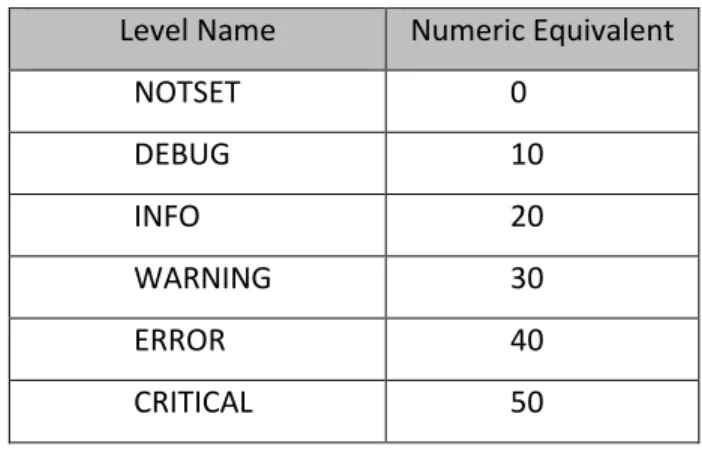
The Python logging module can log events at different importance levels. There are six predefined logging levels. Each logging level corresponds to a numeric value. The numeric values determine the relative importance of the levels, and are used in deciding which events propagate to which loggers. The six predefined logging levels and their numeric equivalents are listed in Table 1 [67].
31
Table 1: Predefined Logging Levels in Python's logging Module
Level Name Numeric Equivalent
NOTSET 0 DEBUG 10 INFO 20 WARNING 30 ERROR 40 CRITICAL 50
3.7.3 The YAML Data Format
“YAML Ain't Markup Language” (YAML) is a data-serialization format used to describe data. It uses an indented layout structure and is similar to plain text, making it useful for generating
configuration files [21]. Configuration files are easily modifiable by administrators who may not have experience with the actual programming language. YAML is a format that allows for the easy
understandability and modification of configuration files. An example of a YAML file is:
1) --- 2) invoice : 34843 3) date : 2001-01-23 4) bill-to: 5) given : Jane 6) family : Doe 7) address:
8) road : Foo bar road
9) city : Worcester
10) state : MA
11) postal : 01010
12) total: 4443.52
Code Fragment 5: Sample YAML File
32 The “---” at the top of the file is used to indicate the start of a file stream. The relationships between data are preserved using indentation: “invoice”, “date”, “bill-to”, and “total” are top level elements, and “bill-to” contains another structure as its value. As observed on line 8, string values do not need to be enclosed in quotes.
3.8
Statistics
A product’s development cycle is measured in various ways, all of which determine how much progress has been made. Project Managers (PMs) use progress reports to view the progress made in a project, usually through visual displays, such as charts and graphs. PMs are able to share this
information with other PMs, employees on their teams, and upper management, to help convey the status of a project.
3.8.1 ChromeOS Statistics
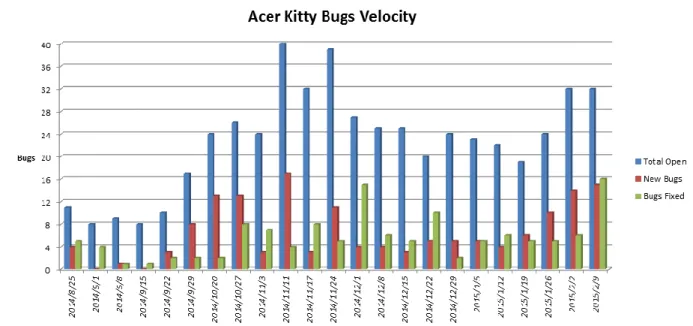
The Project Managers (PMs) of the ChromeOS team use bug trends to track the progress of the team. The fewer open bugs the team has, the closer the product is to being ready. PMs compare the rate at which new bugs are found against the rate at which the bugs are fixed to determine the stability of the product.
Before our project, the PMs viewed bugs in the NVBugs database using the web server API. The PMs would manually look through the modules and projects to find information on relevant bugs, and would then translate the information into statistics that could be shared. The three most common charts the PMs used are:
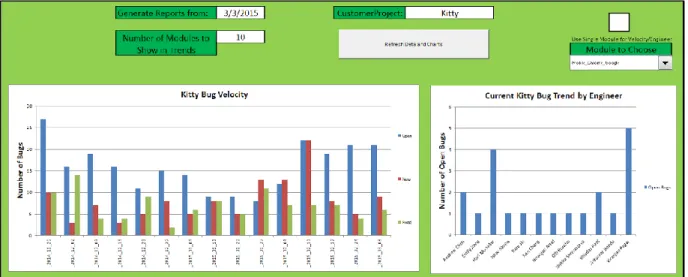
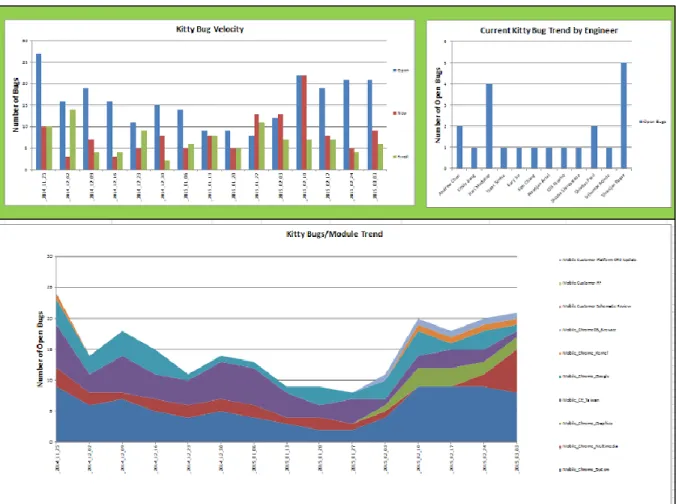
Project Bug Velocity
Project Bug Trend by Modules Project Bug Trend by Engineers
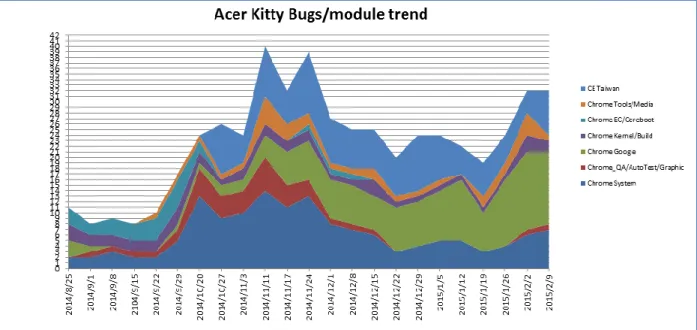
The charts can be observed in the figures on the following pages. Figure 2, Figure 3, and Figure 4 are charts that were used in a presentation by a PM of the ChromeOS project. Figure 2 and Figure 3 use the ChromeOS project ‘Acer Kitty’ as the target project, and Figure 4 uses the ChromeOS project ‘HP/Bailey’.
33 Figure 2 shows the Project Bug Velocity chart. The chart’s columns display the number of open bugs, the number of new bugs, and the number of fixed bugs for a single project over multiple weeks. The chart shows the open/new/fixed levels for up to fifteen weeks in the past. This chart is used to show the velocity of the bugs for a single project: how many bugs are being created against how many are being fixed. This information allows PMs to make a rough prediction about when the number of bugs in the project will approach zero.
Figure 2: Project Bug Velocity Chart
Figure 3 shows the Project Bug Trend by Modules chart. The chart displays the number of open bugs per module for a single project over time. The numbers of open bugs for each module are stacked on one another, summing to the total number of open bugs. Each different module relating to the project is assigned a color, which is used to show the different amounts of open bugs. The graph shows the stacked modules for up to fifteen weeks in the past, allowing the viewer to see the differing number of open bugs for each module. This chart is used to compare the number of open bugs per module against other modules. This allows PMs to gain insight into how the different modules are tracking against each other with respect to reaching a state where the code can be released.
34
Figure 3: Project Bug Trend by Modules
Figure 4 shows the Project Bug Trend by Engineers. The chart shows the number of open bugs per engineer for a single project. The columns represent the number of bugs that are currently open and assigned to a specific engineer. This chart allows the viewer to see which engineers have the most number of bugs to fix for a particular project. This allows the PMs to make decisions about reassigning bugs to different engineers to ensure that workloads per engineer are roughly balanced.
35 The PMs need to generate the above three charts for every project they are working with. Generating each chart takes a long time, as searching the bugs and recording the data is time intensive. A PM must search every module that they are interested in, and manually record each bug’s info, such as request date, fixed date, days open, etc. The PM then uses this manually recorded data and generates a chart with the data using Microsoft Excel. This approach takes an enormous amount of time.
The web client of NVBugs does have several embedded charts. The embedded charts are limited in what they can display. The web client can also only display a single chart at a time. An example can be found in Appendix B.
3.8.2 Generating Dynamic Charts with Microsoft Excel
The PMs currently generate the required charts by manually entering data into tables within Excel. This process is quite time-intensive and not the best use of managerial time.
Converting this process to be automatic would drastically reduce the time involved in generating the charts. This would have multiple benefits:
PMs could better allocate their time.
Charts could be generated at the click of a button, allowing PMs to access the latest statistics quickly and frequently.
Excel provides different methods of automating chart creation, one of which is Visual Basic for Applications.
3.8.2.1 Visual Basic for Applications
Microsoft Excel allows code to be run from a programming language called Visual Basic for Applications (VBA). VBA enables many Excel processes to be automated [50]. A user can use VBA to create a small series of instructions that Excel runs, called a macroinstruction (macro). These macros are able to be integrated into the Excel spreadsheets, and can be triggered through a user’s input. Macros are able to automate table generation, mathematical formulas, and even document saving.
3.8.2.2 Gremlins
The Gremlins database is a backup database for NVBugs. The name “Gremlins” comes from an NVIDIA joke: “It is not in the best interests of a company to hire developers to create bugs. Because everything we do at NVIDIA is for the best interests of the company, the only logical explanation for why there are bugs is gremlins.” [63].
36 Gremlins is a database that takes a snapshot of the NVBugs database every 15 minutes, and backs the data up. The difference between Gremlins and NVBugs is the API associated with these two services. NVBugs provides SOAP APIs that can modify bugs, as well as providing a web-client front end. Gremlins is used solely for information gathering, allowing SQL connections and queries. Gremlins allows users to programmatically pull specific information from NVBugs that the user would otherwise have to manually pull from the NVBugs web client.
37
4
Methodology
4.1
Integration with Google
We explored two different implementations for retrieving data from Google Partner Bugs: Email Scraping, and Web Scraping. After a partial implementation of both options, we chose to fully
implement the Web Scraping strategy.
4.1.1 Email Scraping
We chose to utilize the email subscription service offered by Google Project Hosting (Section 3.1.2.1.1.3) in our initial strategy for retrieving data from Google Partner Bugs. Google Project Hosting emails all project subscribers when a new bug is created or an existing bug is updated. Our bug
synchronization service would act as a subscriber to the ChromeOS project, receive emails from Google Project Hosting, and parse those emails for useful information.
4.1.1.1 Setting up the Mailbox
An email account, “[email protected]”, was created and added to the list of subscribers for the ChromeOS partner project on Google Project Hosting. We set up the email account to automatically filter all emails received from “[email protected]” to an exclusive folder named “Google Bugs”. It was useful to separate the subscription emails from the inbox with an initial filter, since the “[email protected]” email address could receive emails from outside the subscription service.
4.1.1.2 Accessing the Mailbox
To access the “[email protected]” mailbox, we chose to use the Internet Message Access Protocol (IMAP) discussed in Section 3.2.3. This protocol best suited our needs due to its persistence of mailbox changes to the server. If an administrator logged in to the mailbox using an web client such as Microsoft Exchange, it was important that the mailbox seen by the administrator reflect the state seen by the bug synchronization service. In addition, we used the state of the mailbox to determine the behavior of the bug synchronization service, so it was necessary to use a protocol that would allow us to make changes to the mailbox that would persist to the next time that the bug synchronization service ran. Post Office Protocol – Version 3 (POP3), discussed in Section 3.2.2, does not persist mailbox changes
38 to the server. In addition POP3 has no concept of folders or complex queries, meaning that we would be unable to retrieve only emails that had been filtered to the ‘Google Bugs’ folder.
Emails received from the subscription service were marked with an ‘UNSEEN’ flag in the ‘Google Bugs’ folder. When the bug synchronization service ran, it connected to the Exchange mailbox using the “imaplib” module offered in Python [66]. The service retrieved all emails with ‘UNSEEN’ flags from the ‘Google Bug’ folder, changing the ‘UNSEEN’ flags to ‘SEEN’. These emails were then parsed to extract the necessary data to perform an update on the corresponding NVIDIA bug. If the update executed
successfully, the email would be deleted from the mailbox. However, if the update was unsuccessful, the email would remain in the mailbox with the ‘SEEN’ flag.
Emails in the folder with the ‘SEEN’ flag would be ignored by the bug synchronization service on future runs. However, because the synchronization service does not delete those emails, an
administrator could check the mailbox later and retrieve the data from the emails manually. A proposal for a future feature of this service was to be able to run the bug synchronization service in a mode where the service tries to update NVBugs using emails with the ‘SEEN’ flag as well as those with the ‘UNSEEN’ flag. This feature could be useful in a situation where the email format sent by the Google Project Hosting subscription service changes. A change in email format could cause the bug
synchronization service to be unable to extract the necessary data from the emails, and cause updates from that synchronization attempt to fail. An administrator could be notified of this problem, adjust the program to account for the new email format, and run the synchronization service in the mode that includes emails with the ‘SEEN’ flag to retry those updates. A change in email format was expected to be very rare, making this feature a low priority.
4.1.1.3 Parsing the Emails
Emails from the subscription service come in two formats, New Issue, and Update. An email in the New Issue format is sent by the Google Project Hosting subscription service when a user creates a new bug in the Google Partner Bugs project. The New Issue email format provided the following fields:
Status Owner
CC
Labels
39 Author
Synopsis Description
Link to bug in Google Project Hosting
An email in the Update format is sent by the Google Project Hosting subscription service when an existing bug in Google Partner Bugs has a new comment, updates to the fields, or both. The Update email format provided the following fields:
Updates, if present Issue Number Comment, if present
Comment Number, if a comment is present Author
Synopsis
Link to bug in Google Project Hosting
Many of the data fields are unstructured text fields that are entered by a user when updating or creating a bug on Google Project Hosting. This lack of structure made it very important to choose a parsing strategy which relied as little as possible on formatting and would not be affected by special characters.
Both email formats shared a structure for the fields Issue Number, Author, Synopsis, and Link. This structure was prepended by ‘New issue’ for the New Issue format and ‘Comment # [Comment Number] on issue’ for the Update format. We used this structure as an identifying string to determine the email format:
[Issue Number] by [Author]: [Synopsis] [Link to bug in Google Project Hosting]
We found the identifying string using a Regular Expression with the “re” module in Python, but avoided using Regular Expressions anywhere else due to their fragility [69]. Regular Expressions are used to search text for a pattern that you provide and return the location of that pattern. Some comments could contain information, such as commit logs, that included special characters that could cause a Regular Expression search to fail.
40 The identifying string was first followed by the Comment for an Update email, or the Description for a New Issue email, and finally the email footer which was the same for all email formats. We
extracted the Comment/Description fields by taking a substring of the email from the end of the Link to the beginning of the email footer. The remaining fields on New Issue and Update were formatted in both emails as key-value pairs preceding the identifying string. Each key-value pair was formatted on its own line as ‘Key: Value’. We were able to parse these pairs by separating each line as a pair and using the colon as the delimiter between keys and values.
4.1.2 Web Scraping
The Google Project Hosting Web interface provided another possible source for Google Partner Bugs information. Bug information on the website is displayed in two ways: a list of all bugs in the project, and a page of detailed information for each individual bug. Our bug synchronization service used web scraping techniques to utilize both data formats. More information about web scraping techniques can be found in Section 3.3.
4.1.2.1 Google Authentication
The chrome-os-partner project on Google Project Hosting is a private project with a specific list of users who have permission to view it. Our bug synchronization service provided user credentials in order to retrieve information from the site. The bug synchronization service email address, “[email protected]”, was added to the list of permitted users for the chrome-os-partner project. When the service ran, it used the Requests module [78] to start a session and get the Google Login page. The service then filled in the Email and Password fields and submitted the login form. The “Session” object in the Requests module allows certain parameters to be persisted across requests [77]. We used the Session object to create an authenticated session that persisted our login credentials. All requests made to Google during bug synchronization used the authenticated session.
4.1.2.2 Retrieving Comma Separated Value Files
The Google Project Hosting interface provided a view of a list of all bugs in the project, which could be filtered based on search criteria. The interface also provided a request URL to retrieve Comma Separated Value (CSV) files of all bugs in the list. The request URL contained two major parts: the query string, and the specified columns string. The query string specifies search criteria entered by the user. Only bugs that meet the search criteria are included in the CSV. The specified columns string specifies
41 which fields to include in the CSV. All CSVs included the following values by default: ID, Pri, M,
ReleaseBlock, Cr, Status, Owner, Summary, AllLabels. We could customize this request URL and use it to request the CSV files directly from our bug synchronization service. Our service queried for all open bugs in the chrome-os-partner project. In addition to the default columns, we included the ‘TimeModified’ field, which provided the last time the bug had been modified. We also included the ‘Proj’ field, which provided the project the bug corresponded with.
Google Partner Bugs truncated each CSV file to 100 bugs. The ‘start’ parameter could be provided to the request URL to specify at which row to start in the CSV. If the parameter was omitted, the default value was 1. The first CSV would contain bugs numbered 1 to 100. To retrieve the next set of 100 bugs, we set the ‘start’ value equal to 101, and so on. We continued this process until we retrieved all bugs matching the given search criteria.
This process was used to retrieve a CSV file of all recently closed bugs in the chrome-os-partner project as well. We looked specifically for any bugs in the project that had been closed within the last two days. By including recently closed bugs, we ensured that any final changes up until being closed were captured and shown on the corresponding NVIDIA bug.
4.1.2.3 Synchronizing the Bugs
Once we retrieved the list of all open bugs in addition to the recently closed bugs in the chrome-os-partner project, we needed to determine which bugs had been modified since the last time they had been synchronized. A simple option would have been to run the service on a specified interval and use that interval to determine our assumed last modified time, for example once every hour. If the bug synchronization service runs once per hour, it would look for bugs that were modified in the past hour. However, this approach would not suffice for our system. Each bug that has new updates gets saved individually. Therefore, some bugs could successfully be saved, while others may fail, all within the same synchronization period. The service needed to know when each individual bug had last been successfully synced. The GetSyncAudit method in the Partner Integration API was made available for this purpose (Section 4.2.3.3). It provided an audit of all changes to a bug made specifically by our bug
synchronization service.
Using the GetSyncAudit method, we could get the last time our synchronization service successfully updated an NVIDIA bug. If the bug had never been synchronized, we would create a new NVIDIA bug. If the bug had previously been synchronized, we compared the last time it had been
![Figure 1: “NVIDIA ChromeOS Bugs” Custom View on NVBugs Reference: [81]](https://thumb-us.123doks.com/thumbv2/123dok_us/9721894.2853782/17.918.112.806.546.910/figure-nvidia-chromeos-bugs-custom-view-nvbugs-reference.webp)
![Figure 5: Example WSBug XML Object Reference: [55]](https://thumb-us.123doks.com/thumbv2/123dok_us/9721894.2853782/46.918.136.779.101.775/figure-example-wsbug-xml-object-reference.webp)
![Figure 6: Sample mapping of NVIDIA Bug to Google Bug using Synopsis field Reference: [53]](https://thumb-us.123doks.com/thumbv2/123dok_us/9721894.2853782/51.918.113.813.106.375/figure-sample-mapping-nvidia-google-using-synopsis-reference.webp)
![Figure 7: Customer Information Section for an NVIDIA Bug Reference: [52]](https://thumb-us.123doks.com/thumbv2/123dok_us/9721894.2853782/55.918.138.776.355.681/figure-customer-information-section-nvidia-bug-reference.webp)