
Available online at www.ijiere.com
International Journal of Innovative and Emerging
Research in Engineering
e-ISSN: 2394 – 3343 p-ISSN: 2394 – 5494
Design and Development of Android Based BLE Mobile Gateway
Amit Rander
School of Computing Science and Engineering, Vellore Institute of Technology, Chennai, Tamil Nadu, India 6000127, [email protected]
ABSTRACT:
This paper based on IOT device low power usages like Bluetooth Low Energy (BLE) With the help of low powered BLE (Bluetooth-Low-Energy) devices the sensor data like temperature, body temperature, humidity, accelerometer and magnetometer gets fed in the cloud with a help of standalone android application connected to the internet. The application was built using IBM Bluemix cloud and USB BLE (Bluetooth Low Energy) for connection between android application and TSP BLE device. The data of BLE Sensor was visualized in real time on the cloud. The theoretical part of the work explores the sensor implementation and cloud services.
Keywords: TSP, BLE, Android Studio, IBM Bluemix, MQTT.
I. INTRODUCTION
Bluetooth Low Energy is one of the new technologies feeding this emerging market. It provides the tools and abilities to design and implement environmental friendly and low-cost applications which can operate and communicate in mobile environments, in the optimal case using only a single chip. It is resistant to interferences from other radio signals and can go through other objects, along with its support for encrypted data packages it is more than just comparable to previously existing standards such as Infrared Waves or IEEE-802.11 WiFi and a meaningful extension to the Bluetooth standard.[1]
The motivation behind this paper is to investigate TSP BLE sensor information and the sensors utilized as a part of BLE framework. The point is to portray how a TSP BLE was executed on an Android stage for the open source group. The goal was to make a remain solitary application that transfers sensor information on the cloud. In view of this topical presentation, following up a short layout of the proposition structure is given. The following chapter is giving the important foundation data to comprehend the choices taken later on. It is concentrating on presenting the TSP Bluetooth 4.0 standard and its augmentation Bluetooth Low Energy, clarifying the working android application should be created which indicates pictured sensor information continuously over a system on the cloud in this project. In addition to that, the hardware used in this project is given a short introduction.
A. Background
The TSP BLE device is centered around remote sensor applications, and the TSP is frequently utilized by the cell phone application developers. TSP utilized BLE innovation is building up a TSP BLE hardware platform, where by all available sensors are on a single board for quick evaluation and demonstration. The sensor drivers are on a GATT server. The server contains all the primary administrations for each sensor accessible on the BLE stack. The TSP BLE device has sensors which can be viewed on the development board. The sensor which were utilized as a part of the project.
The sensors used for this project include IR temperature Sensor (ambient and objective), Humidity Sensor (relative and humidity temperature), Barometer Sensor (pressure and temperature), Accelerometer 3axis, Magnetometer 3 axis, Gyroscope axis.
B. GAP
GAP is an acronym for the Generic Access Prole, and it controls connections and advertising in Bluetooth. GAP is the thing that makes your device noticeable to the outside world, and decides how two devices can (or cant) interact with each other. GAP denes different parts for devices, however the two key ideas to remember are Central devices and Peripheral devices.
1. Peripheral devices are small, low power, resource contrained devices that associate with a substantially more capable central device. Peripheral devices are things like a heart rate monitor, a BLE enabled proximity tag, etc.
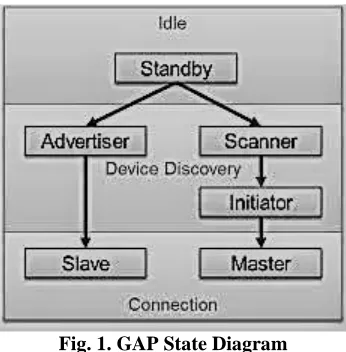
the TSP BLE and TSP Application, initiating security features and device conguration. Figure 1 shows the possible device states.
Fig. 1. GAP State Diagram
C.GATT
GATT is an acronym for the Generic Attribute Prole, and it denes the way that two Bluetooth Low Energy devices transfer data back and forth using concepts called Services and Characteristics. It makes use of a generic data protocol called the Attribute Protocol (ATT), which is used to store Services, Characteristics and related data in a simple look up table using 16-bit IDs for each entry in the table. TSP designed the GATT layer for the low energy Bluetooth protocol stack. This protocol enables the client and the server to connect. When connected, they exchange data using services and characteristics. The server stores data from the sensors written by GATT. The client requests the data so that it can be viewed and converted to human readable form by the client. Figure 2 shows the request and response between the client and the server.[1]
Fig. 2. GATT Client and Server Diagram
II. EXISTING SYSTEM
The present systems generally Bluetooth Smart BLE gadgets are improved and worked with little coin battery. This gadget expends low power and ease. It is fit for exchanging sensor and attenuator data. Bluetooth Smart Ready BLE gadgets are for low vitality with support of exemplary bluetooth operations. Gadgets like cell phones, tablets, and PCs are utilized as passage to match with BLE gadgets. Bluetooth low vitality utilizes a Client-Server display. The Central(client) associates and gets to one or a few Peripheral(server). Focal hope to get the sensor data, pass control data and the Peripheral, which has association with sensor and attenuators, gathers sensor data and transmit it to focal. The entry way ordinarily goes up against the Client/Central part. There are four phases for data exchanges [4]. Figure 3. Shows the BLE scanner application.
Fig. 3. BLE Scanner Application
III. PROPOSED SYSTEM
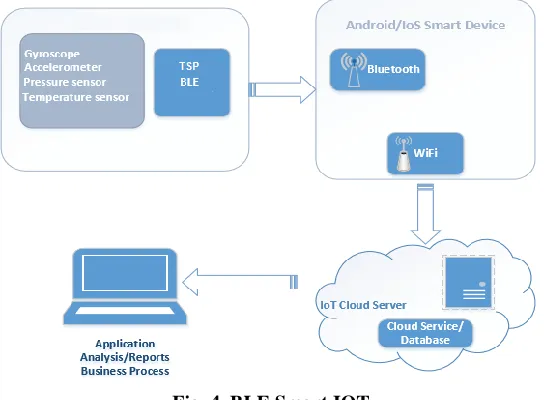
The aim of proposed system is to build up an arrangement of enhanced facilities. The proposed framework can over come every one of the confinements of the current system. The framework gives appropriate security and lessens the manual work. Figure-4 clarifies the test set-up for IoT advancement. TSP BLE Device is worked by Technosphere Labs. supports Bluetooth low vitality with charging and incorporated sensors: gyrator, accelerometer, weight and stickiness/temperature. TSP BLE gadget match with smart device and transmit constant time data to paired gadget. Figure 4. Shows the BLE Smart IoT .
Fig. 4. BLE Smart IOT
TSP Android application, sends sequence bytes of sensor data. Smart phone Connect to the IoT Watson Cloud using Client application which passes URL, Port number and Client ID. The server is identied by client host name, port number and register itself. Once connection is established with IoT server register with the callback function, notication messages intimates data processing. Sensor messages packetized and published to IoT server. MQTT uploaded to IoT server continuously with xed interval of time. During message transaction disconnect information receives via callback notification. Android application connects to IoT Watson serve, MQTT library provides MQTT services, Message Queue, Telemetry Transport, light weight messaging protocol. MQTT client is open source libraries support for different platforms. Android application do IoT service conguration and registration as MQTT device. The payload message is encoded in JSON format and published to IoT server in axed interval of time. A working application which shows visualized sensor data in real time over a network on the cloud was created.[7]
A. System Architecture
marketplace for wearable devices continues to grow, so will the need to transmit this data to other services. This architectural approach represents only one of several methods that you can use to get sensor data from wearables into the cloud for processing.[5]
Fig. 5. System Architecture
IV. IMPLEMENTATION OF SYSTEM
TSP Android application deployed on Android phone for connecting to the TSP BLE device. The appearance of the kit is a small form factor, cheaper cost and easy choice for experimentation of IoT. Application has an algorithm to extract the sensor byte streams and displays on phone in table.1 It displays the current value of temperature, accelerometer, gyroscope and movement of device. The Android application was built using the Android Studio to view data. After the application was built, the next step was to test it in different areas of such as health temperature, living room, kitchen, bathroom and bed room. Table shows an example of TSP BLE data from Android application, giving information about the devices, Health temperature (C) and acceelrometer measured.[3]
Table: BLE data
A. MQTT
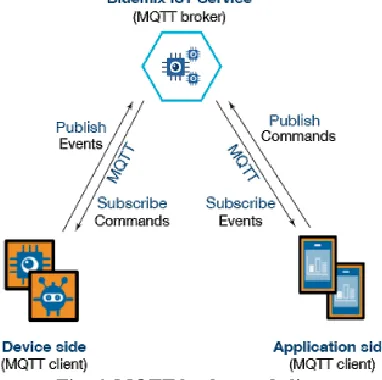
MQTT, a simple, lightweight, publish/subscribe messaging protocol on top of the TCP/IP protocol, is the ideal protocol for the emerging IoT world. MQTT client is a publisher or a subscriber of the messages. The same device can publish and subscribe at the same time. In this project the MQTT client is TSP Android application which has a MQTT library installed and running. The client is connected to an MQTT broker which is Bluemix Watson IoT. The connection is done through Wi-Fi . The MQTT broker receives messages from the clients. In this project the broker is Bluemix Watson IoT. Bluemix Watson IoT receives all messages from the client which is TSP android application.Figure6 below shows the MQTT broker and clients sending and receiving messages.[8]
Fig. 6. MQTT broker and clients
Temperature Humidity Pressure Living Room 21.9 41.5 1010.1
B. IBM Bluemix
IBM Bluemix is IBMs solution for the cloud. Bluemix is a platform as a service solution, as well as Infrastructure as a Service. In PaaS (Platform as a Service) Bluemix it is possible to develop, build, test, deploy, run and manage the application in the cloud. In IaaS (Infrastructure as a Service) the hardware, storage and network can be managed on the cloud. The procedures in the nal year project for using the IBM Bluemix were creating an account, choosing the IoT starter platform, ling in the necessary credentials such as name of the application, organization id, choosing the region where the services are available, creating an application, registering the gateway device, adding the registered device to the application and dally testing the device [6]. Figure 7. Shows the gateway of Device
Fig. 7. Gateway of Device [6]
C. Performance monitoring
{ "iotf-service": [ { "credentials":
{ "iotCredentialsIdentifier": "xxxxxxxx", "mqtt_host":"aa7asp.msg.iot.ibmcloud.com", "mqtt_u_port": 1883,
"mqtt_s_port": 8883,
"http_host":"aa7asp.iot.ibmcloud.com", "org": "aa7asp",
"apiKey": "xxxxxxxx", "apiToken": "xxxxxxxx" },
"syslog_drain_url": null, "label": "iotf-service",
"provider": null, "plan": "iotf-service-free", "name": "ThesisIoT-iotf-service",
"tags": [ "internet_of_things", "Internet of Things", "ibm_created", "ibm_dedicated_public" ]
} ] }
V. CONCLUSION
development starts supplementary activity for each message data, send an SMS alert, write data to huge database, or Display the movement of Sensor data.
VI. RESULT AND DISCUSSION
The aim of the project was to make a android application which shows visualized sensor data on the cloud in real time [3].The standalone application was built, but it did not meet all the expectations. Android application connects to IoT Watson server, MQTT library provides MQTT services, Message Queue, Telemetry Transport, light weight messaging protocol shows the Cloud data in JSON. Figure 8. Shows the visual sensor data on cloud.
Fig. 8. Visualized Sensor Data on Cloud
REFERENCES
[1] Adafruit.2014.https://learn.adafruit.com/introduction-to-bluetoothlowenergy/gatt.Available at: https://learn.adafruit.com/introductiontobluetooth-low-energy/gatt,22 June 2016.
[2] CC2541 SensorTag Development Kit-CC2541DK-SENSOR-TI Tool Folder (Obsolete).Available at: http://www.ti.com/tool/cc2541dksensor. 01 April 2016.
[3] DeveloperWorksOpen.2016.DeveloperWorks Open NodeRED. Available at:https://developer.ibm.com/open/node-red/.18May2016.
[4] GitHub.iot-sensor-tag/sensor-tag.jpg at master. IBMBluemix/iotsensor-tag Available
at:https://github.com/IBMBluemix/iotsensortag/blob/master/subscribe/public/sensor-tag.jpg.8 Junel 2016. [5] Gubbi, Jayavardhana and Buyya, Internet of Things (IoT):A vision, architectural elements, and future directions
Future generation computer systems,vol 29,7. 2014.
[6] IBM Bluemix - IoT watson Development Platform. 2016.Available at: https://console.ng.bluemix.net/.2 November 2016.
[7] Mats Andersson, Use case possibilities with Bluetooth low energy in IoT applications-white paper in UBX-14054580 -R01 5 Dec. 2014.
![Fig. 7. Gateway of Device [6]](https://thumb-us.123doks.com/thumbv2/123dok_us/8876530.1817194/5.612.114.498.171.377/fig-gateway-of-device.webp)
