University of New Orleans Theses and
Dissertations Dissertations and Theses
5-20-2005
Location Based Authentication
Location Based Authentication
Seema Sharma
University of New Orleans
Follow this and additional works at: https://scholarworks.uno.edu/td
Recommended Citation Recommended Citation
Sharma, Seema, "Location Based Authentication" (2005). University of New Orleans Theses and Dissertations. 141.
https://scholarworks.uno.edu/td/141
This Thesis is protected by copyright and/or related rights. It has been brought to you by ScholarWorks@UNO with permission from the rights-holder(s). You are free to use this Thesis in any way that is permitted by the copyright and related rights legislation that applies to your use. For other uses you need to obtain permission from the rights-holder(s) directly, unless additional rights are indicated by a Creative Commons license in the record and/or on the work itself.
LOCATION BASED AUTHENTICATION
A Thesis
Submitted to the Graduate Faculty of the University of New Orleans in partial fulfillment of the requirements for the degree of
Master of Science in
The Department of Computer Science
by
Seema Rani Sharma
B.E. University of Pune, India, 2002
ACKNOWLEDGEMENTS
No Herculean task is consummated without the support and contribution from a number of
individuals and that is the very essence of any colossal scheme. These few paragraphs are an
effort to optimize my gratitude towards all those who helped me complete my thesis
successfully.
If it were not my helpful professors I would never have had this unique opportunity and
experience. I am so thankful to all my professors for their guidance throughout the course of my
study at the University of New Orleans.
I was fortunate to get every sort of assistance and encouragement from my advisor Dr. Golden
G. Richard III, who helped me congeal an ideal in its incipient, inchoate, amorphous form into
a successful model. He is one of the most amicable persons I have ever come across. I would like
to express my deepest appreciation towards him.
I am eminently grateful to Dr. Ming-Hsing Chiu and Dr. Vassil Roussev for being on my thesis
committee. It was a great honor having them both.
I would like to thank my friends Ms. Kristy Karcher and Ms. Renu Shete for being so supportive
and understanding. I also thank Mr. Mohit Garg and Ms. Supasiri Kulawonganunchai for
providing me valuable inputs. My immense appreciation is to Mr. Arun Tatiparthi and Mr.
An unlimited gratitude is to my parents and brothers who believed in me as I slogged along and
motivated me to bring forth the peerless from me.
Without the prompt and able guidance from all these individuals, I could not have overcome the
This thesis is dedicated to
my loving parents
Mr. H.L. Sharma and Mrs. Geeta Sharma
and
my beloved brothers
LIST OF FIGURES ... vii
ABSTRACT... ix
Chapter 1. INTRODUCTION...1
1.1 Background and Motivation ...1
1.2 Objective...2
1.3 Overview...3
Chapter 2. AUTHENTICATION...4
2.1 Why do we need it? ...4
2.2 The Need and Use of Strong Authentication...4
2.3 Authentication Factors...7
2.3.1 Something you know: a password ...7
2.3.2 Something you have: a token...10
2.3.3 Something you are: a biometric ...12
2.4 Summary...15
Chapter 3. LOCATION BASED AUTHENTICATION ...17
3.1 Need of Location Based Authentication...17
3.2 Use and Benefits ...18
3.3 Drawbacks ...21
3.4 Travel Plan...22
3.5 Summary...25
4.1 Creating a Travel Plan ...27
4.1.1 Using Mouse buttons ...36
4.1.2 Using Keyboard buttons ...37
4.2 Querying randomized location-based questions...42
4.2.1 Server ...43
4.2.2 Protocol...46
4.2.3 Client...49
4.2.4 ClientProtocol ...50
4.3 Implementation Limitations...52
4.4 Summary...52
Chapter 5. CONCLUSION ...53
Chapter 6. FUTURE WORK ...55
Chapter 7. REFERENCES...56
Figure 2.1 Authentication factors ...8
Figure 2.2 Tokens ...10
Figure 2.3 Biometric Devices ...13
Figure 3.1 GPS Receivers ...18
Figure 3.2 Travel Plan...23
Figure 3.3 Sequence Diagram of Client Server Interaction...24
Figure 4.1 Code snippet- ‘Show Route’ button ...28
Figure 4.2 GPSDrive application screen shot...29
Figure 4.3 Code snippet- seemaShowRoute function ...31
Figure 4.4 Code snippet- ‘Store Lat Long Value’ button ...32
Figure 4.5 Code snippet- seemaClicked function ...34
Figure 4.6 ‘Store Lat Long value’ button screen shot ...35
Figure 4.7 Code snippet- seemamapclick_cb function ...37
Figure 4.8 Code snippet- seemakey_cb function ...38
Figure 4.9 Adding location information to the Travel Plan...39
Figure 4.10 GPSDrive Activity diagram ...41
Figure 4.11 Travel Plan screenshot...42
Figure 4.12 Code snippet- server creating a server socket ...44
Figure 4.13 Code snippet- server creating a client socket ...44
Figure 4.14 Code snippet- client server communication ...45
Figure 4.16 Code snippet- generating random numbers and storing in array. The server asks
random question based on the generated random point CREATEPOINT ...47
Figure 4.17 Distance between two locations on the earth ...48
Figure 4.18 Code snippet- client creating a client socket ...49
Figure 4.19 Code snippet- client keeps track of the random point to answer relevant question
...50
Figure 4.20 Class Diagram of Client Server Interaction...51
With the growth of wireless technologies in sectors like the military, aviation, etc, there is a need
to determine the authenticity of a genuine user. Today’s conventional authentication mechanisms
are based on three factors: knowledge, possession and biometrics. These factors are prone to
theft, hardware failure, expensive, etc.
Consequently, there is a need of a stronger solution. One such solution is Location Based
Authentication that considers the location information of a user. The location information is time
based and thus hard to steal. However, accuracy of the GPS, signal strength inside the building,
etc, affects its potential. Consequently, there is a need to address alternatives. One such
alternative is to implement a puzzle-based authentication scheme based on the location
information. In the proposed scheme, the server asks dynamic location-based questions and the
client answers them based on the proposed route of travel. This scheme strengthens the current
Chapter 1. Introduction
1.1
Background and Motivation
Wireless technologies have become increasingly popular in burgeoning military affairs and so is
security, where the identity of an individual on the other side of the network has become
challenging to determine. Thus, authenticating the identity of this individual to access the private
resources is a foremost concern and strong authentication between two parties (end-to-end) in a
wireless data environment where one or more parties is moving or mobile needs to be
implemented.
Advances in signal strength and throughput of wireless data networks, coupled with a significant
reduction in size and cost, will cause the mobile computing and communication environment to
grow dramatically in the immediate future. Today’s conventional security systems rely upon
three credentials (“something you have”, “something you know”, and “something you are”),
coupled with device name and IP address restrictions, for the authentication of a person or device
at the other end of a point-to-point connection (such as over the Internet). Unfortunately, it is not
a very difficult matter to break the security of a wireless communication system since its very
success depends on relatively free and easily accessible radio frequency signals. Consequently,
these signals can be intercepted and then used by other wireless parties to “masquerade” as
legitimate users.
In a highly fluid environment such as that experienced by war fighters, or between two moving
extend beyond conventional security layers: username-password, tokens like SIM cards, and,
biometrics like fingerprints, iris scanning etc, to include location-specific signatures that attest to
the veracity of a user. These location specific signatures’ includes fetching latitude, longitude
and altitude values that can be acquired by conventional geo-location technologies (such as
global positioning systems).
The growth of wireless applications is inhibited today by concerns about security, fears of
interception or eavesdropping, and an inability to authenticate sufficiently for purposes of
non-repudiation. This thesis provides a more secured wireless communication between mobile parties
by increasing the sophistication of authentication thereby assuring that the identity of the other
party is truly trusted. Sectors that seek this assurance include, but are not limited to, military,
critical infrastructure (e.g. aviation), and confidential corporate communications. Each of these
sectors will be benefited directly from the strong authentication later that this project is uniquely
capable of providing.
1.2
Objective
This project should seek to address the security holes present in a wireless environment so that
two entities attempting to communicate with one another through wireless means can
authenticate themselves using conventional security protocols. These protocols should be
strengthened with signatures that are related to their geo-location history (for example, “where
have you been” and “where are you now”). It should enable strong authentication of users so
assurance for purposes of access control, non-repudiation etc. This information should also
enable the wireless network system to securely obtain, if desired, complete information
awareness regarding the real-time geo-location of the network’s users. To enable strong
authentication, the user should create a prototype known as a travel plan. The travel plan should
contain the location information, that is, a set of latitude, longitude and the name of the location.
The user should be able to feed this prototype in the server ensuring that only the user and the
server know the authorized locations making it harder for the hacker to masquerade as the
legitimate user.
1.3
Overview
This paper is organized into seven chapters as follows:
• Chapter 1 includes background and motivation, project objective and thesis outline.
• Chapter 2 talks about Authentication and its various factors.
• Chapter 3 describes Location Based Authentication and its significance.
• Chapter 4 explains the implementation details along with screenshots and code
snippets.
• Chapter 5 shows the conclusion of the thesis work.
• Chapter 6 discusses the avenues for future work on this application.
Authentication is the verification of an entity's identification. That is the host, to whom the entity
must prove his identity, trusts (through an authentication process) that the entity is in fact who he
claims to be.
2.1 Why do we need it?
In a wireless network environment, there is a need to [1]:
• Control access to the network,
• Control access to the resources and services provided by the network, and,
• Be able to verify that the mechanisms used to control that access are providing proper
protection.
Network access control is provided by an authentication service. This service is pivotal in
providing last two points stated above. Until and unless the network user is properly identified
and authenticated, there is no point in trusting and granting access to the resources.
2.2 The Need and Use of Strong Authentication
The password authentication model is the most prevalent authentication model and has been used
for decades. It is still widely used by the operating system manufacturers. In order to
authenticate, the user has to provide a username-password duo to the server. The server then
has stored and associates with the user. If server finds a match, it deems that the user is who he
avouches to be else he is not a legitimate user.
For many standalone systems, this password model is sufficient where the user provided
password traverses a small distance from the user workstation to the server. Vulnerabilities that
exist in this model in a standalone environment include:
• Host receiving a plaintext password.
• Easy to predict, user generated passwords.
On the other hand, in today’s extremely networked and distributed domain, such a paradigm does
not offer strong, reliable and legitimate authentication. The most common targets of menacing
attacks are such networked domains with alarming consequences.
The client server model is such an example. People use machines by remotely logging in and
accessing their services like files, printers etc. Therefore, in this networked environment, there is
a necessity of strong authentication that goes beyond providing a simple password model to the
machine.
There is a requirement of a lot more sophisticated authentication technique than that of a simple
password when the authentication of the user to the remote host (or service) and also
authentication of the remote host (or service) to the user is needed. When transmitting passwords
for every machine.
People used a variety of distinctive features long before computers in order to authenticate each
other. Nowadays, the computer systems have applied these aspects whenever people have found
a cost effective way to implement them digitally [2]. Consequently, four authentication
techniques have been categorized in accordance to the unique characteristic. Each of these
techniques relies on a different kind of distinguishing characteristic to authenticate people. When
a user authenticates to an access control system, the user presents an identity along with evidence
of this identity. This evidence is either something the user knows (e.g., a password), has (e.g., a
token or smart card), is (a biometric), or geo-location (latitude, longitude, altitude). Each of these
is considered an authentication factor. If only one of these factors is used to verify an identity, it
is called single-factor authentication. Similarly if four factors are used, it is four-factor
authentication.
There are few systems that combine the above stated approaches. As an example, a smart card
that is something you have, requires the user to enter a personal identification number (PIN) that
is something you know to unlock it, makes a good combination. Presumably, it is considered
better to merge at least two characteristics, because an attacker can filch either one: the entity
you have is vulnerable to ordinary pilfering, and the entity you know is compromised by sniffing
if it moves over the network but it's unusual for anyone to acquire both at the same time. This is
called strong authentication wherein a user is authenticated using at least two factors. Automatic
teller machines (ATMs) use this approach; however, it is a relatively effortless affair for an
standing by the machine trying to authenticate your identity, he can obtain your PIN and steal
your card after use. Thus the attacker knows: what you have, card, and what you know, PIN.
2.3 Authentication Factors
There are varieties of distinctive aspects available to authenticate a particular user. Today’s
authentication procedures are categorized according to the distinguishing characteristic they use
and are classified in terms of three factors described below and summarized in Figure 2.1 [2].
Each factor relies on a different kind of discrete feature to authenticate individuals.
2.3.1 Something you know: a password
Confidential information is a unique attribute that is known only to genuine users. Even before
computers came into existence, this information was shared either through a spoken password or
a memorized combination or a lock. But in the computer world, it is a password, a paraphrase, or
a PIN.
Authentication that is based on something you know depends on the fact that something is hard to
guess and is a secret [3]. You need to know the secret reliably if you have to authenticate
reliably. A lot of people are not good at making up and memorizing not easily guessable things,
and they are worst at confiding secrets. A password is a sequence of characters that is a mutual
secret between the user and host. It is relatively easy to guess if you are using short passwords
but it is comparatively taxing to commit to memory if you are using long passwords. A person
will end up converting one type of authentication to another if writes it down somewhere, that is,
A lot of system administrators who advise their users not to jot down passwords most likely have
a few stockpiled in their wallets anyway; which brings together something you know and
something you have. Something you know is how to comprehend your own handwriting, and the
slip of paper containing the passwords is something you have.
Factor Benefits Weaknesses Examples
Something you know: password
Cheap to implement Sniffing attacks, can’t detect sniffing attacks, passwords are either easy to guess or hard to remember, cost of handling forgotten passwords
Password, PIN, Safe combination
Something you have: token
Hardest to abuse Expensive, can be lost or stolen, risk of hardware failure, not always portable
Token, smart card, Secret data embedded in a file or device, Mechanical key
Something you are:
biometric Easiest to authenticate with, portable Expensive, replay threats, privacy risks, characteristic can’t be changed, false
rejection of legitimate users, characteristic can be injured
Fingerprint, Eye scan, Voice recognition, Photo ID
Figure 2.1: Authentication Factors [2]
The major advantage of using a password is that it is fast, cheap, not so intricate to implement,
and, in practice, people don't forget them or lose the pieces of paper all that often. For people
who connect to the server from unpredictable remote locations, a memorized combination of a
However, it is absolutely impractical to pass this combination across the Internet in any form that
can be used safely. This authentication type is weak for two reasons. Firstly, it is a relatively easy
matter to intercept them or sniff, as there are a number of ways available like freely available
password hacking online tools etc. Its very success depends on confidentiality and it is
challenging to keep it a secret. If there is a successful sniffing attack, then there is generally no
way to detect it unless some sort of damage is done. Secondly, growing threats on passwords
have made it comparatively trouble-free for attackers to figure out the passwords that people are
most likely to choose and remember. People tend to forget hard-to-guess passwords or are
compelled to pen down somewhere in order to remember. The trouble comes with a written
password, as it is more susceptible to theft rather than the memorized password. Regardless of all
the hazards of something you know systems, it is still feasible to use such systems, provided that
you are not revealing the secret to anyone in the near surrounding area whenever you
authenticate.
The flaws associated with this authentication model can be summarized below:
• Passwords can be shared, written, forgotten or guessed.
• It is a relatively easy affair to steal it by observation.
• Mostly encrypted passwords are readable publicly, which makes them vulnerable to
cryptographic analysis.
• It is straightforward to guess the short passwords by means of brute force method or
2.3.2 Something you have: a token
The unique attribute of “something you have” systems is that legitimate individuals possess
some particular thing. Way before computers came in existence; this particular thing was a seal
with a private insignia or a key for a lock. But in the computer world it is a device like a smart
card, or a magnetic strip card. Such items are called tokens. A token is an object whose features
are in some way confidential, and that is difficult to duplicate. Some examples are shown in
Figure 2.2 below and discussed subsequently.
• A hardware device that attaches to an I/O channel (e.g., a serial line with an RS-232
connector), which can be interrogated by the system, and which must be present to
execute certain programs.
• A SIM card or a smart card having non-volatile memory to store information and a
CPU for processing.
This authentication model is so far the most challenging technique to exploit because of the fact
that it depends on a distinct physical object that the user should possess to log on. It is extremely
backbreaking to determine if a password has been stolen; on the contrary it is relatively
trouble-free for the owner to find out if a token has been stolen or got lost. It is impractical to share the
token with someone and still be able to log on.
The major flaws associated with this model are summarized below:
• The danger of keys getting lost, broken, borrowed, lent, or hardware failure.
• Keys and tokens can be stolen.
• It is comparatively expensive to replace the keys and compromised locks.
• It can be difficult or impossible to automatically or remotely revise authorizations
associated with a particular token.
• It is extremely important to physically manage the tokens, that is, stored, logged, kept
A physical feature or behavior is another distinct aspect, which is exclusive to an individual
being authenticated. Before computers, this might have been a personal signature, a portrait, a
fingerprint, or a written description of the person’s physical appearance. But nowadays, an
individual’s distinct features are calculated, stored digitally, and compared against an already
stored pattern. Precisely, it consists of comparing some easily accessible and reliably distinct
physical attribute of a human user against the system's stored values for that attribute. Well
known techniques use a person’s voice, fingerprints, written signature, hand shape, or eye
features for authentication. Such things are called biometrics. Biometrics that are being used
frequently are shown in Figure 2.3 and are summarized as follows:
• Hand geometry.
• Facial image.
• Iris scans.
• Finger prints.
• Voice recognition.
This authentication model serves as the most convenient method for individuals. A finely
designed biometric system accepts readings from an individual and precisely carries out the
authentication. Obviously, it overcomes the flaw of portability of something you have model, as
Figure 2.3: Biometric Devices [5, 6, 7 and 8]
Biometrics supports two basic core processes that together provide organizations the ability to
verify claims of identity [4]:
• Enrollment– the preliminary correlation of an identity with a biometric feature.
• Verification– the comparison of data captured during enrollment process to the
functions. If the user cannot show his biometric feature may be due to injury or physical change,
there should be a fallback process to take care of authentication.
People have two views of biometric authentication. According to some, this model is a
replacement for authentication relative to the first two factors since it provides a level of
handiness, which is nonexistent in the other models. However, some believe that biometric is a
supplement and, thus is augmenting the present authentication techniques.
In spite of possessing many benefits, a few shortcomings are very obvious. The cost of the
device plays an important role. It is comparatively expensive than the one used for something
you have model. In addition, there is an overhead of installation and operation that is so unlike
other authentication models. Besides, if it’s a remote user then there is a danger of interception.
It is relatively straightforward for an attacker to repeat the reading to disguise as its owner. As
biometric aspect is impossible to modify, the owner has no way to reverse the damage if attacker
steals the biometric readings. In reality, it is challenging to construct a system precise enough to
deny illicit users without sporadically denying legitimate users. Physiological changes and
injuries can also invalidate biometric readings: in one case a woman working at a high-security
installation was denied entrance by the biometric device at the front door because her pregnancy
had caused changes in her retinal blood vessels.
Various flaws linked with biometric authentication are summed up below:
• For hand geometry scan and finger printing, the user should have a computable hand,
that is, the hand should be ungloved and clean.
• Iris scan necessitates the user to have a computable retina. The contact lens or
spectacles should not interfere.
• Voice recognition greatly depends on the clarity of throat and the surrounding
environment.
• A person’s appearance should not change to a large extent for facial geometry scan.
Conclusively, all the three authentication factors discussed have some shortcomings. This
necessitates the requirement of a more difficult factor. One such factor is geo-location and the
technique is called the location-based authentication. It takes the location information, that is, the
latitude and the longitude (and maybe the altitude) into consideration making it very hard for the
hacker to masquerade as the legitimate user. It is discussed in the next chapter.
2.4 Summary
Authentication is the process of verifying the identity and determining the genuineness of an
individual. It is required to control the access to the network, its resources and the services.
Usually, it is based on the username and password combination. However, it is vulnerable to
theft. Therefore, there is a need of strong authentication. The three authentication techniques
have been identified based on something the user knows like a password, something the user has
like a token, something the user is like a biometric. All these authentication techniques possess
some flaws that make it harder for the military personnel to authenticate truly the identity of the
Chapter 3. Location Based Authentication
3.1 Need of Location Based Authentication
As discussed in the previous chapter, existing authentication mechanisms are not totally reliable.
They fundamentally depend on the information that is either:
• known to a user like a password, which is not very difficult to guess, or
• a token, which is susceptible to theft, or
• a biometric, which is relatively harder but is still prone to pilfering. For example, a
gummy finger, which is an artificial finger made of gelatin, to steal the fingerprints,
etc.
Thus, it is still not backbreaking to know everything with a security breach that the wireless
application developer has been working for. These existing wireless security controls are
insufficient to provide the levels of security that the growing wireless computing in military
affairs want.
Consequently, there is a necessity to develop another solution that addresses the new and
intricate challenges of mobile computing in military operations, and is highly impregnable to let
only an authorized individual gain access to secured information. The solution is Location
Based Authentication that takes into account the physical location- typically; it includes
latitude, longitude and sometimes altitude, of a person who is trying to authenticate his identity.
Location information is captured along with time at that particular moment. Location is most
can be used to ameliorate the efficiency of authentication and access controls.
Figure 3.1: GPS receivers [15, 16]
3.2 Use and Benefits
This solution adds a strong new layer of wireless security by permitting organizations to ensure
that only authorized users are allowed to access the network and use secured resources. These
The location based authentication solution is directly targeted at preventing so-called drive-by
hacking of enterprise networks, where hackers try to spoof mobile device credentials while
seated in a parked car or other building at a safe distance from the target enterprise [12]. Besides,
a location-based strategy allows distinguished service specifications in different geo areas of a
building.
People log into computers and transact business electronically without regard to their own
geographic location or the locations of the systems they use [14]. As a result, a lot of malicious
activities can take place across the network without anyone knowing the origin of these
activities. It has become challenging to prevent access to prohibited information and access to
unauthorized resources. It is extremely hard to find the location of an intruder if he hops through
a lot of computers over a network that is spread across the world.
The location signature, that is, latitude, longitude (and sometimes altitude) adds a fourth feature
to authentication factors and complements the current security methods. It is used to ascertain if
an individual is trying to log on to the server from a permitted location, that is, his home, school
or office. For a mobile user, the permitted locations will be a set of extensive geographical areas
like counties, towns, cities, countries, etc. Thus, it is necessary to identify a user’s location and
authenticate his identity so that he can retrieve the secured information. Location information
provides extra assurance in a wireless domain to the users who need to carry out secure
transactions or gain confidential access to resources. It is not so difficult to locate the origin of
malicious activity back to the location of the intruder.
Location-based authentication has the effect of grounding cyberspace in the physical world so
that the physical locations of network entities can be reliably determined. It will be impossible
for an intruder based in London to access any secured bank server in Los Angeles while
pretending to come from a trusted bank branch in New York.
This technique can be done transparently to the user and be performed continuously so that it
becomes impossible to intercept the connection. This means that unlike most other types of
authentication information, location information can be used as a common authenticator for all
systems the user accesses [13]. Besides, it provides a method for employing an electronic notary
function. This function attaches location information to the document as a proof that the
document existed at a particular location and time.
A location record cannot be stolen and used somewhere else to acquire prohibited access, as it is
almost impossible to replicate it. The GPS receiver that captures the physical location of the user
gives the location information to the server that gets stored in the server’s database along with
the time stamp. To authenticate, the server compares the location information provided by the
user with this stored information. If it finds a match then it grants access to the secured
information else denies it. Stealing the location signature of the authorized user will not allow the
intruder to replay that data as it changes with time. It is hard to spoof the location and gain
record is captured during communication, a hacker cannot replicate that data from some other
location. Location information is from a continuously generated real-time basis and is unique to
a particular place and time that becomes invalid after a short time period [13]. Thus, it is easy to
reveal if an individual is a legitimate user, or masquerading as a legitimate user.
The location details guarantees that the user performs administrative functions only from
authorized locations. These functions can be accessing files as root user, modifying system files,
controlling sub-user’s access to resources, transfer of funds and transactions across the network,
downloading confidential files from secured web server, uploading the current location
information etc.
Concisely, addition of location information in security mechanisms helps in making sure that
only the authorized individual accesses secured information, prevents unauthorized access, and
ensures that only devices positioned in specific areas can receive secured information.
3.3 Drawbacks
Although location based technique has many benefits, it still suffers from few shortcomings as
discussed below:
• The accuracy of the GPS is critical to this scheme.
• It will not work in the basements or inside of a big building where GPS signal
strength is not good.
• If the GPS is in a vicinity of tall buildings then signals might get delayed due to
very important.
• There is no GPS system integrity, that is, inability to inform users when the system is
not reliable [19].
• Orbital errors occur when satellites provide inaccurate information [20].
• Cloudy sky and stormy weather adversely affects the potential of this technique.
Consequently, there is a need to address alternatives in order to make location-based
authentication a robust authentication technique. One of the alternatives includes creating a
travel plan, discussed subsequently.
3.4 Travel Plan
We propose a location-based authentication mechanism based on travel plans. Travel plans
essentially create location-based authentication puzzles. A travel plan is a projected route of
travel that contains the location information, that is, latitude, longitude, and location name of
selected points. It has been shown in Figure 3.1 on the next page.
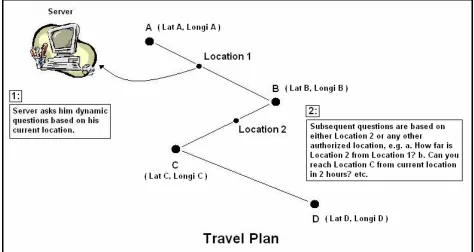
It can be seen from the diagram below that the locations A, B, C and D are the set of authorized
locations along with the latitude and the longitude values. Location 1 shows the current position
of the user that has been captured by a GPS receiver and Location 2 is the random position
Figure 3.2: Travel Plan
Whenever a user wants to access the server, he establishes the connection from his current
location, that is, Location 1. In order to grant access to the user, the server asks him dynamic
questions based on either authorized locations, that is, Location A, B, C or D, or Location 2. The
location-based questions can be:
• How far is your next destination?
• Can you reach Location 2 in two hours?
• How much time you need to reach Location 2?
• How far are you from Location 2?
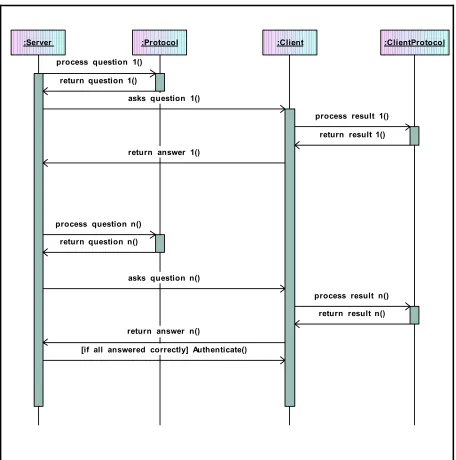
been demonstrated in the sequence diagram as shown below:
:Server :Protocol :Client :ClientProtocol process question 1()
return question 1()
asks question 1()
process result 1() return result 1() return answer 1()
process question n() return question n()
asks question n()
process result n() return result n() return answer n()
[if all answered correctly] Authenticate()
The Server asks random location based questions to the client using the Protocol and the Client
answers them using the Client protocol. The user is a legitimate user if the Client answers all the
questions correctly and granted access to secured information else he is masquerading as a
genuine user. In the prototype, the accuracy of calculations is in the range of ±0.001 miles. The
user keeps connecting to the server whenever required and updates his information as he
traverses along the path. The travel plan approach is highly robust and makes it harder for the
hacker to get unauthorized access because of the following reasons:
• Only the user knows the name of the travel plan file.
• The user stores it in the server. Thus, only the server, which is inside a secured
location, knows it apart from the user.
Consequently, the location-based authentication integrated with the travel plan approach makes it
very difficult for the intruder to pretend as the true user.
3.5 Summary
The three authentication factors, that is, something you know, something you have and
something you are, do not provide very strong authentication techniques. Thus, there is a
necessity of a more robust technique that takes location information into consideration, as it is
very hard to steal it. The location information includes the latitude, the longitude and may be the
altitude value of a location. This data is captured by the GPS and stored in the server’s database
along with a time stamp. The user trying to access the resources provides his current location
information to the server. The server performs an authentication check and lets the user access
from few shortcomings like the accuracy of the GPS, the signal strength inside the buildings, etc.
Consequently, there is a need to address alternatives to make this technique more strong. One of
the alternatives is creating a travel plan that takes into account the latitude, the longitude and the
name of the location. The travel plan is created by the user and contains the location information
of the authorized locations. The user feeds this plan in the server and thus is known only to the
user and the server, making this alternative the most robust solution. The server asks the location
based questions like how far is your next destination, how much time you need to reach location
abc, etc. If the user answers all the questions correctly then he is authenticated as a true user.
Thus, the location-based authentication technique integrated with the travel plan approach proves
Chapter 4. Implementation
This chapter discusses a prototype implementation detail of a travel plan-based Location Based
Authentication model. Implementation has been divided into two parts:
• Creating a travel plan using Garmin Etrex GPS receiver, and
• Querying randomized location based question in order to authenticate a user.
4.1
Creating a Travel Plan
A travel plan is a proposed route of travel that a user will follow. This route includes legitimate
locations known only to the server, client program and the user. The user can log on to the server
while in transit and use the resources after authenticating his identity.
To create a travel plan, Linux Fedora Core 2 and “GpsDrive” [17] software have been used.
“GpsDrive” is an open source navigation system written in C that displays the current location of
the user provided by a NMEA capable GPS receiver on a zoomable map. This software requires
‘gcc’ compiler version 3.0 or higher and the following development packages:
1. GTK-+2.x (better >=2.2.x): GTK+ is a multi-platform toolkit for creating graphical
user interfaces that offers a complete set of widgets. GTK+ is free software and a part of
GNU project.
2. Pango: It is a library for layout and rendering of text, with an emphasis on
the ATK interfaces, an application or toolkit can be used with such tools as screen
readers, magnifiers, and alternative input devices.
4. Glibc: Glib is the low-level core library that forms the basis of GTK+ and GNOME.
It provides data structure handling for C, portability wrappers, and interfaces for such
runtime functionality as an event loop, threads, dynamic loading, and an object system.
In addition to these developmental packages I also used: pcre (Perl Compatible Regular
Expressions) header files, gettext, libcrypt, and xdevel (X11 development) packages.
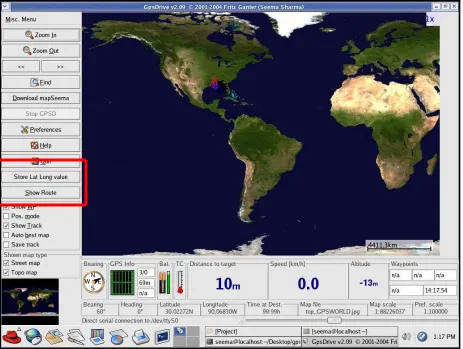
Two buttons have been added to increase the functionality of the software as shown in Figure 4.2
on the next page and are discussed below:
1. Show Route: displays the complete travel plan of the user. A new button (or a widget) named
as Show Route is first created using gtk_button_new_from_stock() function. As shown in the
code snippet below:
ShowRouteButton = gtk_button_new_from_stock(_("_Show Route")); gtk_signal_connect (GTK_OBJECT(ShowRouteButton), "clicked", GTK_SIGNAL_FUNC(seemaShowRoute), (gpointer) 1); gtk_box_pack_start (GTK_BOX (vbox), ShowRouteButton, FALSE, FALSE, 1 * PADDING);
Figure 4.1: Code snippet- ‘Show Route’ button.
gtk_signal_connect() attaches a function pointer seemaShowRoute() to the signal for object
gtk_box_pack_start() puts together all the widgets in one place. This means that
ShowRouteButton widget will be on the same parent window as the other widgets.
Figure 4.2: GPSDrive application screen shot.
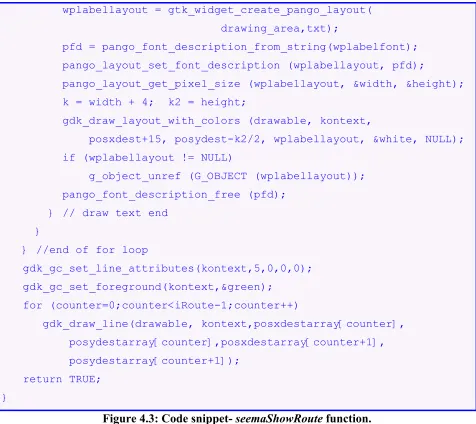
Whenever the user clicks Show Route button, seemaShowRoute() function is called. This
function first converts the latitude and longitude values into the screen coordinates “posxdest”
and “posydest”. It then checks to make sure if the points are on the map and not outside. Later, it
drawing the lines as the user enters the points. It is shown in the code snippet below:
// It displays the travel plan on the zoomable map.
gint seemaShowRoute (GtkWidget *widget, guint *datum) { gdouble posxdest=0, posydest=0;
gchar txt[200];
gint k, k2, shownwp = 0, j, counter = 0; for (counter=0;counter<iRoute;counter++) {
calcxy(&posxdest, &posydest, storeLongi[counter], storeLat[counter], zoom);
posxdestarray[counter] = posxdest; posydestarray[counter] = posydest;
if ((posxdest>=0) && (posxdest<SCREEN_X) && (shownwp<MAXSHOWNWP)) { gdk_gc_set_line_attributes(kontext,3,0,0,0); if ((posydest>=0) && (posxdest<SCREEN_Y)) { shownwp++;
g_strlcpy(txt, storeName[counter], sizeof(txt)); gdk_gc_set_foreground(kontext,&red);
gdk_draw_line(drawable, kontext, posxdest+1, posydest+1-5, posxdest+1, posydest+1+5); gdk_draw_line(drawable, kontext, posxdest+1+5, posydest+1, posxdest+1-5, posydest+1); }
// draw text {
PangoFontDescription *pfd; PangoLayout *wplabellayout; gint width, height;
gdk_gc_set_function(kontext,GDK_COPY); gdk_gc_set_function(kontext,GDK_AND);
wplabellayout = gtk_widget_create_pango_layout( drawing_area,txt);
pfd = pango_font_description_from_string(wplabelfont); pango_layout_set_font_description (wplabellayout, pfd);
pango_layout_get_pixel_size (wplabellayout, &width, &height); k = width + 4; k2 = height;
gdk_draw_layout_with_colors (drawable, kontext,
posxdest+15, posydest-k2/2, wplabellayout, &white, NULL); if (wplabellayout != NULL)
g_object_unref (G_OBJECT (wplabellayout)); pango_font_description_free (pfd);
} // draw text end }
} //end of for loop
gdk_gc_set_line_attributes(kontext,5,0,0,0); gdk_gc_set_foreground(kontext,&green); for (counter=0;counter<iRoute-1;counter++) gdk_draw_line(drawable, kontext,posxdestarray[counter], posydestarray[counter],posxdestarray[counter+1], posydestarray[counter+1]); return TRUE; }
Figure 4.3: Code snippet- seemaShowRoute function.
2. Store Lat Long value: stores the current location of the user in a text file SeemaLatLong.txt.
A new button named Store Lat Long value is first created using
gtk_button_new_with_label() function. Even this is placed on the same parent window as
Show Route button using the function gtk_box_pack_start(). It is shown in the code snippet
gtk_signal_connect (GTK_OBJECT (LatLongButton), "clicked", GTK_SIGNAL_FUNC (seemaClicked), (gpointer) 2); gtk_box_pack_start (GTK_BOX (vbox), LatLongButton, FALSE, FALSE, 1 * PADDING);
Figure 4.4: Code snippet- ‘Store Lat Long Value’ button.
gtk_signal_connect() attaches a function pointer, seemaClicked() to the signal for object
LatLongButton, that is, it attaches the “clicked” event to the signal handler.
Whenever the user clicks Store Lat Long value button, seemaClicked function is called. This
function initially opens the file in write mode. When the user clicks this button, the program
opens up another window called “Storing these Lat and Long values” and sets border attributes.
This window contains the text boxes named Latitude, Longitude and Comment, and OK button.
The user can write the comments here and store the latitude and the longitude values as displayed
in the text boxes in a text file by clicking the OK button. It is shown in the code snippet below:
// It stores the current location of the user.
void seemaClicked (GtkWidget *widget, gpointer *data) { GtkWidget *LatLabel, *LongLabel, *table, *Comment, *vbox, *knopfSeema;
gchar buff[300];
G_CONST_RETURN gchar *s; time_t now;
time(&now);
fp = fopen ("SeemaLatLong.txt", "w+"); vbox = gtk_vbox_new (TRUE, 20 * PADDING); LatLongWindow = gtk_dialog_new ();
gtk_window_set_title (GTK_WINDOW(LatLongWindow), _("Storing these Lat and Long Values"));
gtk_container_set_border_width(GTK_CONTAINER(LatLongWindow), 150);
knopfSeema = gtk_button_new_from_stock (GTK_STOCK_OK);
gtk_signal_connect_object (GTK_OBJECT(knopfSeema), "clicked", GTK_SIGNAL_FUNC (seemaOk), GTK_OBJECT (LatLongWindow)); gtk_signal_connect_object (GTK_OBJECT (LatLongWindow),
"delete_event", GTK_SIGNAL_FUNC (seemaOk), GTK_OBJECT (LatLongWindow));
gtk_box_pack_start(GTK_BOX(GTK_DIALOG (LatLongWindow)->action_area) ,knopfSeema,TRUE,TRUE,2); GTK_WIDGET_SET_FLAGS (knopfSeema, GTK_CAN_DEFAULT);
table = gtk_table_new (3, 2, FALSE);
gtk_table_set_row_spacings (GTK_TABLE(table), 4); gtk_table_set_col_spacings (GTK_TABLE(table), 8); gtk_container_border_width (GTK_CONTAINER(table), 4);
gtk_box_pack_start (GTK_BOX(GTK_DIALOG(LatLongWindow)->vbox), table, TRUE, TRUE, 2);
LatLabel = gtk_label_new (_("Latitude"));
gtk_table_attach_defaults (GTK_TABLE (table),LatLabel, 0, 1, 0, 1);
LongLabel = gtk_label_new (_("Longitude"));
gtk_table_attach_defaults (GTK_TABLE (table),LongLabel, 0, 1, 1, 2);
Comment = gtk_label_new (_("Comment"));
gtk_table_attach_defaults (GTK_TABLE (table), Comment, 0, 1, 2, 3);
g_snprintf (buff, sizeof (buff), "%.5f", current_lat);
if (minsecmode) decimaltomin (buff, 1); gtk_entry_set_text (GTK_ENTRY (LatText), buff);
LongText = gtk_entry_new ();
gtk_table_attach_defaults (GTK_TABLE (table), LongText, 1, 2, 1, 2); g_snprintf (buff, sizeof (buff), "%.5f", current_long);
if (minsecmode) decimaltomin (buff, 0); gtk_entry_set_text (GTK_ENTRY (LongText), buff);
CommentText = gtk_entry_new ();
gtk_editable_set_editable(GTK_EDITABLE(CommentText), TRUE);
gtk_table_attach_defaults (GTK_TABLE (table), CommentText,1,2,2,3); s = gtk_entry_get_text (GTK_ENTRY (CommentText));
gtk_signal_connect (GTK_OBJECT (CommentText), "changed", GTK_SIGNAL_FUNC(seemaGetComment),(gpointer) 0);
gtk_label_set_justify (GTK_LABEL (LatLabel), GTK_JUSTIFY_RIGHT); gtk_label_set_justify (GTK_LABEL (LongLabel), GTK_JUSTIFY_RIGHT); gtk_label_set_justify (GTK_LABEL (Comment), GTK_JUSTIFY_RIGHT);
gtk_window_set_position (GTK_WINDOW(LatLongWindow), GTK_WIN_POS_CENTER); gtk_widget_show_all (LatLongWindow);
fprintf (fp, "%8.5f %8.5f %.24s", current_lat, current_long, ctime(&now)); fclose (fp);
}
These buttons have been shown in the following screen shots:
Figure 4.6: ‘Store Lat and Long value’ button screen shot.
To create a travel plan, user can use either:
• Mouse buttons, or
In order to generate the travel plan, the user needs to hold the CONTROL KEY and click the left
mouse button. To capture the current location on the generated travel plan, the user clicks the
right mouse button holding down the CONTROL KEY. This functionality has been implemented
using seemamapclick_cb() function. This function first converts the screen coordinates into the
latitude and longitude values. It then stores the complete travel plan location information and the
current location information in the text files accordingly. It is shown in the code snippet below:
// It generates the travel plan using mouse click.
gint seemapclick_cb (GtkWidget * widget, GdkEventMotion * event) { gint x;
gint y; gdouble lon; gdouble lat;
GdkModifierType state;
if (event->is_hint)
gdk_window_get_pointer (event->window, &x, &y, &state);
else {
x = event->x; y = event->y;
state = event->state; }
if (state == 0) return 0;
calcxytopos (x, y, &lat, &lon, zoom);
/* Left mouse button + control key */ //this add points to file Waypoint.txt
if ((state & (GDK_BUTTON1_MASK | GDK_CONTROL_MASK)) == (GDK_BUTTON1_MASK | GDK_CONTROL_MASK)) {
seemawplat = lat; seemawplon = lon;
seemaaddwaypoint_cb (NULL, 0); return TRUE;
}
/* Add current position as waypoint */ /* Right mouse button + control key */ // this adds point to file TravelPlan.txt
if ((state & (GDK_BUTTON3_MASK | GDK_CONTROL_MASK)) == (GDK_BUTTON3_MASK | GDK_CONTROL_MASK)) {
seemawplatPlan = lat; seemawplonPlan = lon;
seemaaddwaypointPlan_cb (NULL, 0); return TRUE;
}
return TRUE; }
Figure 4.7: Code snippet- seemamapclick_cb function.
4.1.2 Using Keyboard buttons
In order to generate the travel plan, user needs to press number '2' key. To capture current
location on the generated travel plan, user presses number ‘1’ key. To implement this
functionality, seemakey_cb() function has been used. This function first converts the screen
code snippet below:
// It generates the travel plan using keyboard.
gint seemakey_cb (GtkWidget *widget, GdkEventKey *event) { gdouble lat;
gdouble lon; gint x; gint y;
GdkModifierType state;
gdk_window_get_pointer (drawing_area->window, &x, &y, &state); calcxytopos (x, y, &lat, &lon, zoom);
// Add mouse position to TravePlan.txt file. if ((toupper(event->keyval)) == '1')
seemawplatPlan = lat; //current_lat seemawplonPlan = lon; //current_long seemaaddwaypointPlan_cb(NULL, NULL); }
if ((toupper (event->keyval)) == '2') {
/* Add mouse position as waypoint to Waypoint.txt file*/ seemawplat = lat;
seemawplon = lon;
seemaaddwaypoint_cb (NULL, 0); }
return 0; }
The mouse button functionality and the keyboard button functionality is shown in the following
screen shot:
seemakey_cb()
* User can use keyboard. seemamapclick_cb()
* User can use mouse.
seemaaddwaypointPlan_cb()
* Opens TravelPlan.txt text file in w+ mode.
seemaaddwaypoint_cb()
* Opens wayppoint.txt text file in w+ mode.
seemaaddwaypoint()
* Opens Waypoint.txt in a+ mode.
seemaaddwaypointchange_cb()
* User can change location values. Start
If mouse clicked?
Control + Left
Yes No
Control + Right Key '2' Key '1' APPLY CANCEL CHANGE seemaaddwaypointdestroy_cb()
* Destroys the widget.
seemaShowRoute()
* Display the travel plan on the map.
seemaaddwaypointPlan()
* Opens TravelPlan.txt text file in a+ mode.
seemaaddwaypointdestroyPlan_cb()
* Destroys the widget.
seemaaddwaypointchangePlan_cb()
* User can change location values.
seemaShowRoute()
* Display the travel plan on the map.
End
APPLY
CANCEL
CHANGE
The final travel plan is shown in the following screen shot:
Figure 4.11: Travel Plan screenshot.
4.2
Querying randomized location-based questions
This section consists of two independently running client and server programs and is divided into
four modules as follows:
• Server.java,
• Client.java,
• Protocol.java, and
Two classes implement the server program: Server and Protocol. Server contains the main
method for server program and carries out the following functions:
• listens to the dedicated port,
• make connections with the client, and
• read from and write to the server socket.
Protocol serves up the randomized questions. It keeps track of the total number of questions
being asked and randomizing their order. This class shows a chronological sequence of states
that client and server need to follow in order to communicate.
To implement the client program, two classes have been used: Client and ClientProtocol. Client
contains the main method for the client program. It establishes a connection with a server using
client socket. It receives the data from and sends the data to the server through this socket. It
works in conjunction with ClientProtocol class. ClientProtocol is used for automated answering
of randomized questions that the server class asks.
4.2.1 Server
The server class creates a server socket and listens on port 5555 as shown in Figure 4.8 below:
// Server.java – creates server socket
ServerSocket serverSocket = null; try {
serverSocket = new ServerSocket(5555); } catch (IOException e) {
}
Figure 4.12: Code snippet- server creating a server socket
After a successful connection to the port, the server accepts the connection from the client. The
server waits for the client until it starts as shown in Figure 4.9 below:
// Server.java – creates client socket Socket clientSocket = null;
try {
clientSocket = serverSocket.accept(); } catch (IOException e) {
System.err.println("Accept failed...."); System.exit(1);
}
Figure 4.13: Code snippet- server creating a client socket
Concurrently, the client requests connection on server’s host and port. When the connection is
established successfully, the server starts communicating with the client through the client
socket. This is shown in the code fragment below:
// Server.java – server communicates with client
PrintWriter out = new PrintWriter(clientSocket.getOutputStream(), true); BufferedReader in = new BufferedReader( new InputStreamReader( clientSocket.getInputStream())); String inputLine, outputLine;
Protocol chatP = new Protocol();
while ((inputLine = in.readLine()) != null) { outputLine = chatP.processInput(inputLine); out.println(outputLine);
if (outputLine.equals("Authenticated.")) break;
else if (outputLine.equals("Not Authenticated.")) { System.out.println(" ");
System.out.println("You are not a genuine user…"); System.out.println(" ");
break; }
}
Figure 4.14: Code snippet- client server communication
The server first gets the client socket’s input and output stream, and opens buffered reader and
printer writer on them respectively. Then it starts the communication by writing to the client
socket. It creates a protocol object and calls its processInput method to get the first message:
“Please Enter Travel Plan Filename: “, as shown in the screen shot below:
Figure 4.15: User input screen shot.
The server program then sends this message to client through client socket where it accepts the
based questions like:
• How far is your next destination?
• Can you reach xyz location in pqr hours?
• How much time you need to reach abc location?
The client and server programs keep communicating until server either authenticates the client or
denies it.
4.2.2 Protocol
Server program uses Protocol class, which implements the protocol used between client and
server to communicate. Protocol makes sure that the communication between client and server is
coherent. This class randomizes the questions by creating a random number whenever server
calls Protocol’s processInput method. This is shown in the code fragment below:
// Protocol.java – manages communication between client and server.
Random rand = new Random(); Hashtable ht = new Hashtable(); int kp1 = 0;
while (true) {
if (ht.size()==subsetQues) break;
Integer ip = new Integer(rand.nextInt(totalQues)); Integer ip1 = new Integer(kp1);
kp1++;
Enumeration en = ht.elements(); array = new int[ht.size()]; int np = 0;
while (en.hasMoreElements()) {
int kp = ((Integer)en.nextElement()).intValue(); array[np] = kp;
np++;
} //end of while
for (int ip = 0;ip<array.length;ip++) { System.err.print(array[ip]+" "); }
for (int pp=0;pp<array.length;pp++) { if (array[pp]>0&array[pp]<10) {
System.out.println("array[pp]: "+array[pp]); CREATEPOINT = array[pp]*0.10;
break; }
}
Figure 4.16: Code snippet- generating random numbers and storing in array. The server
asks random question based on the generated random point CREATEPOINT.
After creating the random number, Protocol opens Waypoint.txt text file that contains the
complete travel plan. This file contains latitude, longitude and location-name fields. In order to
compute the distances between the consecutive locations on earth, the following distance
Lat B, and Long A, Long B as Latitudes and Longitudes respectively.
cos(AOB) = cos(Lat A) * cos(Lat B) * cos(Long B- Longi A) + sin(Lat A) * sin(Lat B) = x
AOB = acos(x)
Distance = Radius of earth * AOB in radians. UNIT: Miles where, Radius of earth = 3959 miles.
Figure 4.17: Distance between two locations on the earth [18]
Protocol class contains the following set of questions:
• What is your next destination?
• Can you reach your next destination in 2 hrs?
• How far is your next destination?
• How much time you took to reach current location?
• How much time you need to reach location xyz?
• What was your previous destination?
• How far are you from you previous destination?
• Did you reach your current location from previous destination in 1 hr?
• How many miles is location abc from current location?
This class makes sure that there is no repetition of questions and keeps track of where server and
4.2.3 Client
Client class implements the client program. Client starts after the server starts running. Server
waits for the client connection to connect. The client program then creates a socket at the
specified host and port as shown in the code snippet below:
// Client.java – creates client socket.
try {
ChatSocket = new Socket(args[0], 5555);
out = new PrintWriter(ChatSocket.getOutputStream(), true); in = new BufferedReader(new InputStreamReader(
ChatSocket.getInputStream())); } catch (UnknownHostException e) {
System.err.println("Don't know about host: " + args[0]); System.exit(1);
} catch (IOException e) {
System.err.println("Couldn't get I/O for the connection to: " +args[0]); System.exit(1);
}
Figure 4.18: Code snippet- client creating a client socket
The server program listens and accepts connection on port number 5555.After establishing the
connections the Client enters a finite loop, which is a backbone of the client-server
communication. The server first connects and asks questions to the client. The client program
works in conjunction with the ClientProtocol class to answer the specific questions. User
answers the first question, which is to enter the name of the Travel Plan in order to proceed.
program comes out of the loop when server either authenticates or denies the user.
4.2.4 ClientProtocol
This class is used by the client program and is deployed to compute the answers to the
randomized server’s question. This program uses the same random point generated by Protocol
class and answers the relevant question as shown in the code fragment below:
// ClientProtocol.java – uses same random point to compute answers. try {
File randPoint = new File("RandomPoint.txt");
FileReader randPointFile = new FileReader (randPoint); BufferedReader randPt = new BufferedReader(randPointFile); rnd = randPt.readLine();
} catch (IOException e)
System.err.println("Caught IOException: " + e.getMessage()); rdpt = Integer.valueOf(rnd);
RANDOMPOINT = rdpt.intValue();
Figure 4.19: Code snippet- client keeps track of the random point to answer relevant
question.
ClientProtocol is consistent with Protocol in the sense that it computes the answer to the
question asked by the server at one particular moment. It ensures coherent communication
between client and server programs.
The sequence of events is demonstrated in the sequence diagram as shown in Figure 3.3 in the
last chapter. The server class, client class, protocol class and client protocol class have been
- in p u tL in e : S tr in g - o u tp u tL in e : S tr in g
Se rv e r - f r o m S e r v e r : S tr in g - f r o m U s e r : S tr in g - f r o m U s e r 1 : S tr in g - S ta te : in t
C lie n t -s e rv e r
*
-c lie n t
*
+ p r o c e s s In p u t( ) : S tr in g - th e O u tp u t : S tr in g - G O ES : in t - lo o p O n c e : in t - c o s a n g le : d o u b le - la t1 : d o u b le - lo n g i1 : d o u b le - r e a c h T im e : S tr in g
P r o t o c o l
+ p r o c e s s In p u t( ) : S tr in g - PD is t : d o u b le
- Ptim e 1 : d o u b le - c o s a n g le : d o u b le - d is t : d o u b le
- p r e v D e s tiL a t : d o u b le - p r e v D e s tiL o n g i : d o u b le - n e x tD e s tiL a t : d o u b le - n e x tD e s tiL o n g i : d o u b le - PN a m e : S tr in g
C lie n t P r o t o c o l -s e rv e r
*
-p ro t o c o l
* ** -c lie n t-c lie n t P ro t o c o l
Figure 4.20: Class Diagram of Client Server Interaction.
The following screen shot shows the question answer session in between the client and the
4.3
Implementation limitations
The limitations of the prototype are discussed below:
• Calculations consider a constant speed of 60 miles/hr.
• It considers a broad geographic area like a city and is not implemented on a street
level.
• Should the user need to change route then this scheme fails.
• It considers only the straight lines and not curves.
• The places with location values over zero degree North and zero degree West are
taken into consideration. Precisely, it is implemented on the North America continent
and not on the entire globe.
4.4
Summary
In this chapter, we presented a prototype implementation of a travel plan based Location Based
Authentication model. The implementation was divided into two parts, that is, creating a travel
plan and asking randomized location based questions to the client to authenticate a user. The
travel plan was created using GTK toolkit on the Linux platform and second part was
implemented in Java on the same platform. The limitations are constant speed, straight lines, etc
but the prototype verifies the basic strategy behind travel-plan based location based
Chapter 5. Conclusion
The three authentication factors, that is, “something you know”, “something you have”,
“something you are”, are irrefutably fine features in authenticating the identity of an individual
but they still do not suffice for very strong authentication. One cannot completely rely upon these
aspects when authenticating an individual.
Location based authentication is an additional factor in providing strong authentication as a
location characteristic can never be stolen or spoofed. It has provided a supplementary dimension
in network security. It gives the owner the complete control of the information that only he has
access to.
It is a strong deterrent to the hackers hiding behind surreptitious locations trying to access remote
secured systems. It is very difficult for an intruder to gain control by pretending to be at the right
location because the location data cannot be duplicated. GPS captures and stores the location
information and is known to the authorized user only. An illegitimate user is oblivious of the
respective locations and can only guess them to a certain extent. Consequently, he cannot answer
precisely all the location specific questions thereby disclosing his fake identity. Location based
questions make sure that only the genuine user is granted access to the confidential resources.
In spite of many advantages, location based authentication has a few flaws. Firstly, the accuracy
of GPS is very critical to the success of this scheme. Secondly, the GPS signals are weak inside
![Figure 2.1: Authentication Factors [2]](https://thumb-us.123doks.com/thumbv2/123dok_us/8930736.1846569/18.612.67.547.233.521/figure-authentication-factors.webp)
![Figure 2.2: Tokens [9, 10 and 11]](https://thumb-us.123doks.com/thumbv2/123dok_us/8930736.1846569/20.612.137.474.314.616/figure-tokens-and.webp)
![Figure 2.3: Biometric Devices [5, 6, 7 and 8]](https://thumb-us.123doks.com/thumbv2/123dok_us/8930736.1846569/23.612.77.544.74.411/figure-biometric-devices-and.webp)
![Figure 3.1: GPS receivers [15, 16]](https://thumb-us.123doks.com/thumbv2/123dok_us/8930736.1846569/28.612.80.535.153.496/figure-gps-receivers.webp)