University of New Orleans University of New Orleans
ScholarWorks@UNO
ScholarWorks@UNO
University of New Orleans Theses and
Dissertations Dissertations and Theses
Fall 12-18-2015
Extracting Windows event logs using memory forensics
Extracting Windows event logs using memory forensics
Matthew Veca
University of New Orleans, [email protected]
Follow this and additional works at: https://scholarworks.uno.edu/td
Part of the Information Security Commons
Recommended Citation Recommended Citation
Veca, Matthew, "Extracting Windows event logs using memory forensics" (2015). University of New Orleans Theses and Dissertations. 2119.
https://scholarworks.uno.edu/td/2119
This Thesis-Restricted is protected by copyright and/or related rights. It has been brought to you by
Plugin for Volatility advanced memory analysis framework:
Extracting Windows event logs (Windows Vista, 7 and 8)
A Thesis
Submitted to the Graduate Faculty of the University of New Orleans
in partial fulfillment of the requirements for the degree of
Master of Science in
Computer Science
by
Matthew Veca
© Matthew Veca, 2015 University of New Orleans
Acknowledgments
Golden Jared
Table of Contents
List of Tables iv
List of Figures v
Abstract vi
Chapter 1: Windows Event Logs
1.1 What are they? 1
1.2 What is in them? 1
Chapter 2: The Forensic Value of Windows Event Logs
2.1 Why are they important? 6
Chapter 3: Hasta la Vista, XP!
3.1 Volatility 7
3.2 Windows Xp to Vista 7
3.3 XML structure 9
3.4 Log File Structure 11
Chapter 4: Finding .evtx in Memory 15
4.1 Volatility and evtx 16
4.2 evtx.py 16
Vita 28
List of Tables
Table 1 3-4
Table 2 5
List of Figures
Figure 1 10
Figure 2 12
Figure 3 13
Abstract
Microsoft’s Windows Operating System provides a logging service
that collects, filters and stores event messages from the kernel and applications into log files (.evt and .evtx). Volatility, the leading open
source advanced memory forensic suite, currently allows users to extract these events from memory dumps of Windows XP and Windows 2003 machines. Currently there is no support for users to extract the event logs
(.evtx) from Vista, Win7, Win8 or Win10 memory dumps, and Volatility users have to rely on outside software in order to do this. This thesis discusses a newly developed evtxlogs.py plugin for Volatility, which allows
users the same functionality with Vista, Win7, Win8 and Win10 that they had with Windows XP and Win 2003’s evtlogs.py plugin. The plugin is
based on existing mechanisms for parsing Windows Vista-format event
logs, but adds fully integrated support for these logs to Volatility.
Chapter 1: Windows Event Logs
1.1 What are they?
Windows events logs are “special files that record significant events on
your computer, such as when a user logs on to the computer or when a
program encounters an error. Whenever these types of events occur,
Windows records the event in an event log” (Microsoft Corporation, 2014a).
1.2 What is in them?
Any event that Microsoft has deemed as “significant” enough to generate
an alert or notification to a user is potentially written into one of the logs.
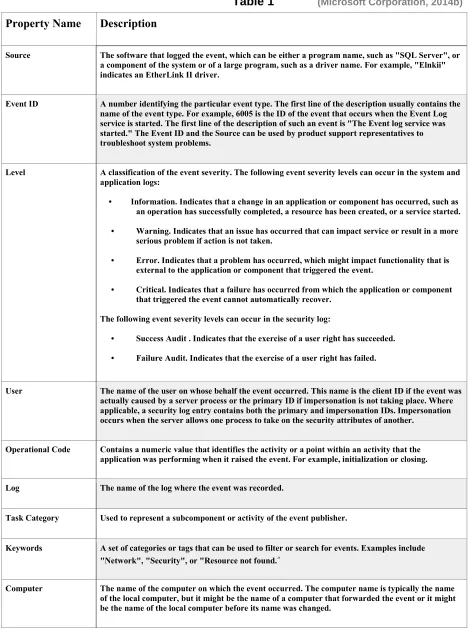
These logs differ by the type of the events that they record (table 1.1). The
following are some examples of system and application events by severity level. An information event indicates that a change in an application or component has occurred, such as an operation has completed
that a problem has occurred, which might impact functionality, that is
external to the application or component that triggered the event. A critical event indicates that a failure has occurred from which the application or
component that triggered the event cannot automatically recover. These last two examples are possible events in the security log. A success audit
event indicates an audited security event that was completed successfully, such as a user being granted access by providing proper credentials or password. A failure audit event indicates an audited security event that did
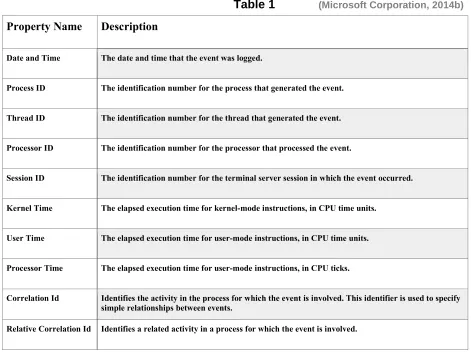
not complete successfully, such as a user being denied access by not providing proper credentials or password. Also included for each event are the computer name, user account, date and time, process ID, thread ID,
processor ID, session ID, kernel time, user time and processor time. All of this information can be used to diagnose behavior, performance and
security issues. As important as this information can be for an
Table 1 (Microsoft Corporation, 2014b)
Property Name Description
Source The software that logged the event, which can be either a program name, such as "SQL Server", or a component of the system or of a large program, such as a driver name. For example, "Elnkii" indicates an EtherLink II driver.
Event ID A number identifying the particular event type. The first line of the description usually contains the name of the event type. For example, 6005 is the ID of the event that occurs when the Event Log service is started. The first line of the description of such an event is "The Event log service was started." The Event ID and the Source can be used by product support representatives to troubleshoot system problems.
Level A classification of the event severity. The following event severity levels can occur in the system and application logs:
• Information. Indicates that a change in an application or component has occurred, such as an operation has successfully completed, a resource has been created, or a service started. • Warning. Indicates that an issue has occurred that can impact service or result in a more
serious problem if action is not taken.
• Error. Indicates that a problem has occurred, which might impact functionality that is external to the application or component that triggered the event.
• Critical. Indicates that a failure has occurred from which the application or component that triggered the event cannot automatically recover.
The following event severity levels can occur in the security log:
• Success Audit . Indicates that the exercise of a user right has succeeded.
• Failure Audit. Indicates that the exercise of a user right has failed.
User The name of the user on whose behalf the event occurred. This name is the client ID if the event was actually caused by a server process or the primary ID if impersonation is not taking place. Where applicable, a security log entry contains both the primary and impersonation IDs. Impersonation occurs when the server allows one process to take on the security attributes of another.
Operational Code Contains a numeric value that identifies the activity or a point within an activity that the application was performing when it raised the event. For example, initialization or closing.
Log The name of the log where the event was recorded.
Task Category Used to represent a subcomponent or activity of the event publisher.
Keywords A set of categories or tags that can be used to filter or search for events. Examples include "Network", "Security", or "Resource not found.”
Table 1 (Microsoft Corporation, 2014b)
Property Name Description
Date and Time The date and time that the event was logged.
Process ID The identification number for the process that generated the event.
Thread ID The identification number for the thread that generated the event.
Processor ID The identification number for the processor that processed the event.
Session ID The identification number for the terminal server session in which the event occurred.
Kernel Time The elapsed execution time for kernel-mode instructions, in CPU time units.
User Time The elapsed execution time for user-mode instructions, in CPU time units.
Processor Time The elapsed execution time for user-mode instructions, in CPU ticks.
Correlation Id Identifies the activity in the process for which the event is involved. This identifier is used to specify simple relationships between events.
Relative Correlation Id Identifies a related activity in a process for which the event is involved.
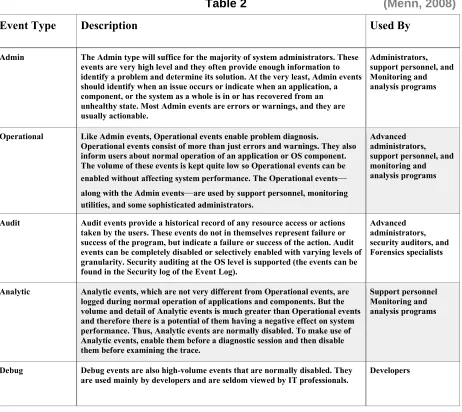
These events are categorized into different types Admin, Operational,
Audit, Analytic and Debug. By separating the events in such a way, it provides a way for certain user types to be able to focus on the stuff pertinent to there needs. The following table (Table 2) shows these
Table 2 (Menn, 2008)
Event Type Description Used By
Admin The Admin type will suffice for the majority of system administrators. These events are very high level and they often provide enough information to identify a problem and determine its solution. At the very least, Admin events should identify when an issue occurs or indicate when an application, a component, or the system as a whole is in or has recovered from an unhealthy state. Most Admin events are errors or warnings, and they are usually actionable.
Administrators, support personnel, and Monitoring and analysis programs
Operational Like Admin events, Operational events enable problem diagnosis.
Operational events consist of more than just errors and warnings. They also inform users about normal operation of an application or OS component. The volume of these events is kept quite low so Operational events can be enabled without affecting system performance. The Operational events—
along with the Admin events—are used by support personnel, monitoring utilities, and some sophisticated administrators.
Advanced administrators, support personnel, and monitoring and analysis programs
Audit Audit events provide a historical record of any resource access or actions taken by the users. These events do not in themselves represent failure or success of the program, but indicate a failure or success of the action. Audit events can be completely disabled or selectively enabled with varying levels of granularity. Security auditing at the OS level is supported (the events can be found in the Security log of the Event Log).
Advanced administrators, security auditors, and Forensics specialists
Analytic Analytic events, which are not very different from Operational events, are logged during normal operation of applications and components. But the volume and detail of Analytic events is much greater than Operational events and therefore there is a potential of them having a negative effect on system performance. Thus, Analytic events are normally disabled. To make use of Analytic events, enable them before a diagnostic session and then disable them before examining the trace.
Support personnel Monitoring and analysis programs
Debug Debug events are also high-volume events that are normally disabled. They are used mainly by developers and are seldom viewed by IT professionals.
Developers
Chapter 2: The Forensic Value of Windows Event Logs
2.1 Why are they important?
Windows events logs, in general, are very helpful in determining what has taken place on any given Windows machine. However, these logs prove
essential in the realm of digital forensics as they can provide a who, what, where, when, why and how. All of this stored information can tell you what user account logged in or failed to log in, what machine was used, what
time and duration the account and machine were used, what applications (malware, keyloggers) were installed and/or removed (e.g., in the case of intellectual property (IP) theft, etc.), if possible malware or viruses are
responsible for undesirable behavior (false logins and crashes ), what type of hardware and when it was added (possibly temporarily) or removed, reasons for system crashes (possible vulnerability exploit attempts) and the
Chapter 3: Hasta La Vista, XP!
3.1 Volatility
Volatility is the leading open source advanced memory forensic suite. It is heavily used and relied upon in the digital forensics and memory analysis
communities. The Volatility framework, having been written in Python, allows for cross platform usability. The modular design (plugins) provides flexibility and allows for faster updates. Also, this design helps prevent total
loss of functionality when operating systems are changed or updated. Some plugins may be broken, but others won’t be, which will still allow for
some level of functionality until appropriate changes to the framework can
be made.
3.2 Windows XP to Vista
When Microsoft upgraded Windows XP to Vista, many things were
changed which had everyone trying to figure out what would still work and what would need attention. One thing that did change was the way in
which Windows Vista dealt with event logs. Some of the first things noticed
were that these event logs were no longer stored in the
had the extension .evt. Now it was time to figure out what things were
changed and how those changes affect event logging.
The Windows Event Log service was redesigned because of scalability restrictions of the Event Log (which limited the total size of all logs to the
amount of available memory) and event publishing performance restrictions (which limited the number of events that could be published on an active Domain Controller) that earlier versions of Windows had experienced. By
publishing events in an asynchronous manner, the event publishing
application doesn’t have to wait for the logging service to store the event,
which increases performance (Menn, 2008).
With the completely new event logging service of Windows Vista, the first thing is to find how and where the new events logs are stored. With very
little publicly available information regarding the handling and storage of the event logs, Andreas Schuster dedicated many, many hours in order to
understand the new system behavior of system event logging in Windows Vista and how they are stored. Fortunately, Schuster was able to answer
First, the old .evt files were renamed to .evtx and stored in
C:\Windows\System32\winevt\Logs. Having located the files, it was
determined that the logs were stored using a proprietary binary XML (Extensible Markup Language) format. Using XML provides a more
structured format then the previous .evt logs. This new XML log format will
provide more granularity and flexibility in output customization and queries. Templates can be designed, specific to each forensic case, in order to
target desired information. While this is an improvement, unfortunately
there is always cost. XML can be very wasteful because of the high amount computational resources, CPU cycles and memory, which are necessary in order to parse this file format (Schuster, 2007).
3.3 XML Structure
Events in an event log are XML fragments that can be validated against the Event Schema. The XML fragment is divided into seven elements:
<System>, <EventData>, <UserData>, <DebugData>, <BinaryEventData>, <ProcessingErrorData>, and <RenderingInfo>. All the elements are
The event depicted in Figure 1 contains a <System> element, and a
<UserData> element. The <System> element defines information about the event, such as the event's level, the name of the event publisher that
published the event, the time the event was published, the channel the
Figure 1
Microsoft Corporation, 2014
<Event xmlns="http://schemas.microsoft.com/win/2004/08/events/event"> <System> <Provider Name="Microsoft-Windows-TaskScheduler" Guid="{de7b24ea-73c8-4a09-985d-5bdadcfa9017}" /> <EventID>310</EventID> <Version>0</Version> <Level>4</Level> <Task>310</Task> <Opcode>0</Opcode> <Keywords>8000000000000000</Keywords>
<TimeCreated SystemTime="2006-02-28T21:51:44.754Z" /> <EventRecordID>7664</EventRecordID>
<Correlation />
<Execution ProcessID="1068" ThreadID="1496" /> <Channel>Microsoft-Windows-TaskScheduler</Channel> <Computer>MyComputerName</Computer>
<Security UserID="S-1-5-18" /> </System>
<UserData>
<TaskEngineProcessStarted
xmlns:auto-ns2="http://schemas.microsoft.com/win/2004/08/events" xmlns="http://manifests.microsoft.com/win/2004/08/windows/eventlog">
contains the reason the event was published. This information is defined
through a custom event template (custom XML elements) defined by the event publisher. This particular event contains a
<TaskEngineProcessStarted> element, which gives an event consumer information about the event. This event occurred because the Task
Scheduler service raised an informational event when the taskeng.exe process was started. This is conveyed through the elements in the <UserData> element (Microsoft Corporation, 2014).
3.4 Log File Structure
File Header
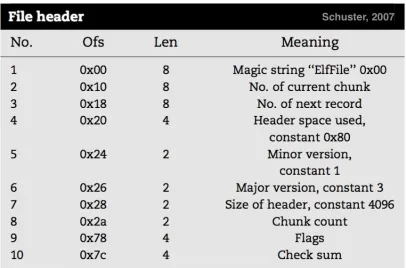
The log file consists of a file header and a chunk or chunks. Chunks are blocks of space (memory or hard disk) where the log file records are
stored. The file header is 4096 bytes, but only 128 bytes are actually used.
The reason for having the extra space preallocated is that some logs, such as Application, Security and System, tend to be used more often and will need this space to grow because as the new events are stored, more chunks will be needed to house them. The file header is protected using a 32-bit checksum. Also, inside the file header is the string “ElfFile” (0x45,
string and when it is paired with a version number of 3.1, is indicative of a
Windows event log file (Figure 2). The number assigned to the chunk that is currently being used will also be stored in the file header. These chunk numbers are zero based and if the current chunk is not the last chunk, then the retention policy calls for the oldest records to be overwritten.
Figure 2
Chunks
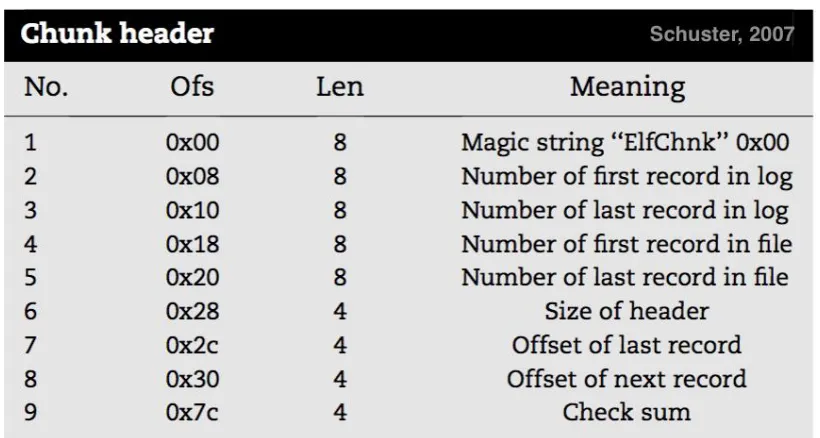
Every chunk will include a small header, a hash table of strings and XML templates, and a series of event records. The chunk header is 128 bytes
and is protected by a 32-bit check sum. As with the file header, the chunk header has it’s own magic string “ElfChnk” (0x45, 0x6C, 0x66, 0x43, 0x68,
0x6E, 0x6B, 0x00) (Figure 3). This magic string will make it easy to
Figure 3
Event Record
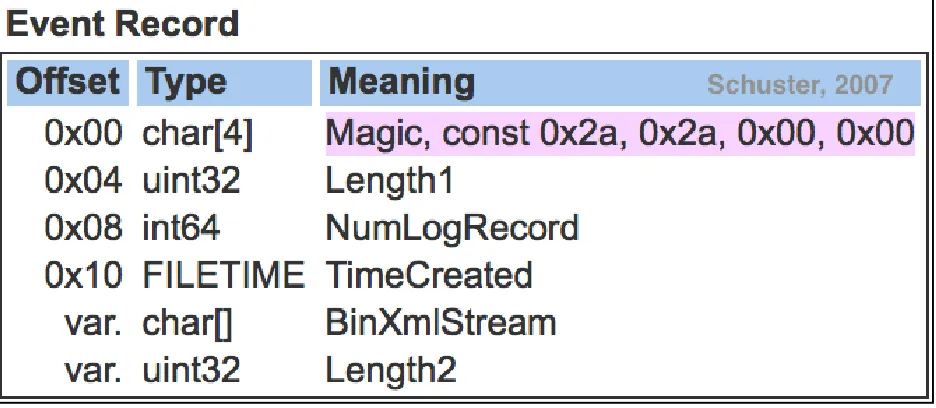
The event record always starts off with the magic string “**00”(0x2A, 0x2A,
0x00, 0x00) and is followed by the record size. It also includes the number of the record, a timestamp and the binary XML stream, which is the logged
Figure 4
Chapter 4: Finding .evtx in Memory
Since each file header is exactly 4096 bytes in size (a page) and always starts with the magic string “ElfFile” and each chunk is 64KB, including the
header which contains the magic string “ElfChnk” and each event record contains its individual size and the magic string “**00”, data carving can be
knowing their size, we are able to find and extract each log file as a whole
or even each event record individually. Because of the binary XML format, the use of templates makes it possible to retrieve files which weren’t closed
properly and sometimes corrupted. There are a few tools available that are capable of extracting or viewing evtx log files, but they require using
different modules to do different things. EVTXtract and python-evtx are tools written in Python and were created by Willi Ballenthin. They were modeled after Andreas Schuster’s EvxtParser tool that was implemented in
Perl.
4.1 Volatility and evtx
Since Volatility’s support for extracting Windows event log information was
interrupted due to the new format and storage, users were forced to look to other tools in order to get the very important information stored in these log files, hindering the ease of use that Volatility users have become
accustomed to. Volatility is written in Python and is designed to be
provides the ability to update and add to the functionality very easily.
Simply, a user can just drop a plugin into Volatility and it will be able to do the task it was created to do.
4.2 Evtxlogs.py
While Volatility is still chugging along after the many Windows operating systems updates, there is a need to return the functionality for extracting Windows event log files to Windows Vista and beyond. EVTXtract and
python-evtx have already proved to be extremely useful. Having the
commonality of being implemented in Python, consolidating and integrating all the necessary modules within EVTXtract and evtx-python into a single
file that would be compatible with volatility, seemed like the logical choice. EVTXtract consists of many different Python scripts that are designed to be called in different sequences depending on the desired results. Trying to
automate the process required removing some of the redundancies that were present in many of the scripts. This was due to the fact that, no matter the number or combinations of scripts used, it still had to be able to save the output on termination. EVTXtract can recover and reconstruct
space and memory images (Ballenthin, 2014). Unfortunately, due to
dependencies, it is not a standalone tool.
Since EVTXtract is dependent on python-evtx in order to execute, the inclusion of the modules from python-evtx are essential in creation of this plugin. Python-evtx consists of four modules, BinaryParser.py, Evtx.py,
Nodes.py and Views.py. Python-evtx is a standalone package, also
created by Willi Ballenthin, that parses Windows log files with the .evtx file extension. It allows access to both the file and chunk headers, record
templates and the event entries. Because of the dependency above, very little modification is necessary for these two to interact within the same file space.
After following the workflow of EVTXtract and following some recommendations from Ballenthin,
https://github.com/williballenthin/EVTXtract, the next step was to add the
necessary code Volatility requires for integration.
“Volatility requires all plugins to conform to certain criteria and format. This
not only guarantees seamless performance, but also allows for stability and uniformity of its product. The Base Class: “Plugins should inherit from the
help, execute and calculate.
The help function should return a short string describing the plugin, by default this returns the plugin class docstring, and generally will not require overriding.
The execute function firsts calls the plugin's calculate function and then
returns the results of calculate to an appropriate render function (based on the output command line parameter). Again, this function should in general not be overridden.”
The calculate function should carry out the main operation against any memory images being analyzed. This function takes no arguments and returns a single "data" variable, which can be of any form as long as it is then successfully processed by the plugin's render_<type> functions.”
(Volatility, Plugin Interface,2012).
Using a terminal, typing the following commands, within the ~/volatility directory will execute the evtxlogs.py plugin.
python vol.py -f
~/Desktop/memDumps/WIN-TTUMF6EI3O3-20140203-123134\(Win7SP1x86\).raw --profile=Win7SP1x86 evtxlogs -D evtxoutput
python - denotes Python is being used
-f - filename of the image to open
~/Desktop/memDumps/WIN-TTUMF6EI3O3-20140203-123134\(Win7SP1x86\).raw - the path and actual image to open
—profile=Win7SP1x86 - the matching image profile to use
evtxlogs - the name of the plugin being used
-D - the name of the directory for storing the evtx-output.txt
evtxoutput - the actual name of the directory for storing the evtx-output.txt file * this directory can be named whatever the user chooses, but must be
created and located in the ~/volatility directory prior to execution*.
The following code is the class EvtxLogs.
class EvtxLogs(common.AbstractWindowsCommand):
"""Extract Windows Event Logs (Vista/7/8/10 only)"""
def __init__(self, config, *args, **kwargs):
common.AbstractWindowsCommand.__init__(self, config, *args, **kwargs)
config.add_option('DUMP-DIR', short_option = 'D', default = None,
cache_invalidator = False,
help = 'Directory in which to dump log files’)
self.files_to_remove = []
def is_valid_profile(profile):
"""This plugin is valid on Vista/7/8/10"""
return (profile.metadata.get('os', 'unknown') == 'windows' and
profile.metadata.get('major', 0) == 6)
Inheriting from the commands.command base class gives access to Volatility and its default features including help, execute and calculate. This code adds the option to assign a directory ”Dump-Dir”, denoted by the ‘D’. It also adds the text, “Directory in which to dump log files”, explaining
the usage of the option -D. This plugin is for the profiles of Windows Vista, 7 and 8 (not tested on Windows 10, but it should work because the
structure wasn’t changed), so there is a need to check that the profile being
used is compatible with this address space. The @staticmethod decorator
for def is_valid_profile(profile): starts the check for the ensure
the appropriate profile is currently being used.
The calculate method below, will start retrieving all the data that is being generated from python-evtx and EVTXtract. The chunks (possibly partial
def calculate(self): records = []
image_path = (config.LOCATION).replace('file://', '') image_path = image_path.replace('%28', '(')
image_path = image_path.replace('%29', ')')
with State("default") as state:
self.files_to_remove.append(os.path.realpath(state._filename)) with Mmap(image_path) as buf:
num_chunks_found = self.find_evtx_chunks(state, buf) print("# Found %d valid chunks." % num_chunks_found)
with State("default") as state:
with TemplateDatabase("default.db") as templates:
self.files_to_remove.append(os.path.realpath(templates._filename)) with Mmap(image_path) as buf:
num_templates_before = templates.get_number_of_templates() num_valid_records_before = len(state.get_valid_records())
self.extract_valid_evtx_records_and_templates(state, templates, buf) num_templates_after = templates.get_number_of_templates()
num_valid_records_after = len(state.get_valid_records())
print("# Found %d new templates." % (num_templates_after - num_templates_before))
print("# Found %d new valid records." % (num_valid_records_after - num_valid_records_before))
with State("default") as state: ranges = []
range_start = 0
for chunk_offset in state.get_valid_chunk_offsets(): ranges.append((range_start, chunk_offset)) range_start = chunk_offset + 0x10000
ranges.append((range_start, os.stat(image_path).st_size)) # from here to end of file
with Mmap(image_path) as buf: num_potential_records_before =
len(state.get_potential_record_offsets())
for offset in self.find_lost_evtx_records(buf, ranges): state.add_potential_record_offset(offset)
num_potential_records_after = len(state.get_potential_record_offsets()) print("# Found %d potential EVTX records." %
(num_potential_records_after -
with State("default") as state:
if len(state.get_valid_records()) == 0: print ("# No valid records found.")
for event in state.get_valid_records(): records.append(event["xml"])
return records
Once the data and template computations are complete, the render_text
method will start creating a file, evtx-output.txt, to store into the predetermined directory (see below).
def render_text(self, outfd, data): name = 'evtx-output.txt'
fh = open(os.path.join(self._config.DUMP_DIR, name), 'wb') for record in data:
fh.write(str(record)) fh.close()
outfd.write('Parsed data sent to {0}\n’.format(name))
#Removes/deletes temporary files default and default.db created during #the extraction process. Fixes bug caused by switching memory images. #Also fixes the inflated number of return results when running the same #image multiple times.
The following from an actual evtx-output.txt file produced by the evtxlogs.py
plugin on Windows 7.
<Event xmlns="http://schemas.microsoft.com/win/2004/08/events/event"><System><Provider Name="Microsoft-Windows-WindowsBackup" Guid="01979c6a-42fa-414c-b8aa-eee2c8202018"></Provider> <EventID Qualifiers="">100</EventID> <Version>0</Version> <Level>4</Level> <Task>0</Task> <Opcode>0</Opcode> <Keywords>0x8000000000000000</Keywords>
<TimeCreated SystemTime="2014-02-03 03:09:18.457090"></TimeCreated> <EventRecordID>1</EventRecordID>
<Correlation ActivityID="" RelatedActivityID=""></Correlation> <Execution ProcessID="1696" ThreadID="2400"></Execution>
<Channel>Microsoft-Windows-WindowsBackup/ActionCenter</Channel> <Computer>WIN-TTUMF6EI3O3</Computer> <Security UserID="S-1-5-19"></Security> </System> <EventData><Data Name="hc_stateid">1</Data> <Data Name="pwszTimeStamp"></Data> </EventData> </Event> <Event xmlns="http://schemas.microsoft.com/win/2004/08/events/event"><System><Provider Name="ThinPrint AutoConnect"></Provider> <EventID Qualifiers="0">4001</EventID> <Level>4</Level> <Task>1</Task> <Keywords>0x0080000000000000</Keywords>
<TimeCreated SystemTime="2014-02-03 08:45:36"></TimeCreated> <EventRecordID>1</EventRecordID>
<Channel>ThinPrint Diagnostics</Channel> <Computer>WIN-TTUMF6EI3O3</Computer> <Security UserID=""></Security>
</System>
The following is from an actual evtx-output.txt file produced by the evtxlogs.py plugin on Windows Vista.
<Event xmlns="http://schemas.microsoft.com/win/2004/08/events/event"><System><Provider Name="Microsoft-Windows-WindowsUpdateClient" Guid="{945a8954-c147-4acd-923f-40c45405a658}"></Provider> <EventID Qualifiers="">39</EventID> <Version>0</Version> <Level>4</Level> <Task>1</Task> <Opcode>17</Opcode> <Keywords>0x4000000000000280</Keywords>
<TimeCreated SystemTime="2006-05-26 20:43:46.327250"></TimeCreated> <EventRecordID>3</EventRecordID>
<Correlation ActivityID="" RelatedActivityID=""></Correlation> <Execution ProcessID="856" ThreadID="428"></Execution>
<Channel>Microsoft-Windows-WindowsUpdateClient/Operational</Channel> <Computer>26L2233C6-05</Computer> <Security UserID="S-1-5-18"></Security> </System> <EventData></EventData> </Event> <Event xmlns="http://schemas.microsoft.com/win/2004/08/events/event"><System><Provider Name="Microsoft-Windows-WindowsUpdateClient" Guid="{945a8954-c147-4acd-923f-40c45405a658}"></Provider> <EventID Qualifiers="">29</EventID> <Version>0</Version> <Level>3</Level> <Task>1</Task> <Opcode>17</Opcode> <Keywords>0x4000000000000001</Keywords>
<TimeCreated SystemTime="2006-05-26 18:09:51.490128"></TimeCreated> <EventRecordID>4</EventRecordID>
<Correlation ActivityID="" RelatedActivityID=""></Correlation> <Execution ProcessID="928" ThreadID="1780"></Execution>
Windows Vista and its predecessors were released many, many years ago.
While Volatility has still been providing support for those operating systems since Windows XP, there has been a disruption in the framework for
retrieving the event logs and the information that they hold. Even though there are other ways to get this information, Volatility takes pride in being
an all-in-one solution for memory analysis. Restoring the functionality of retrieving the information residing in the Windows event logs in the more recent releases (Windows Vista, Windows 7 and Windows 8), will alleviate
the burden of having to rely on software outside of the Volatility framework. By combining some existing open-source software, it is possible for
Volatility to resume the retrieval of Windows event logs in Windows Vista
References
Microsoft Corporation, 2014a
http://windows.microsoft.com/en-us/windows/what-information-event-logs-event-viewer#1TC=windows-7
Microsoft Corporation, Event Properties, 2014b
https://technet.microsoft.com/en-us/library/cc765981.aspx
Val Menn, New Tools for Event Management in Windows Vista, 2008
https://technet.microsoft.com/en-us/magazine/2006.11.eventmanagement.aspx
Microsoft Corporation, Event Representation for Event Consumers, 2009 https://msdn.microsoft.com/en-us/library/aa385229.aspx
Willi Ballenthin, EVTXtract, 2014
https://github.com/williballenthin/EVTXtract
Willi Ballenthin, Python-Evtx, 2014
https://github.com/williballenthin/python-evtx
Volatility, Plugin interface, 2012
https://code.google.com/p/volatility/wiki/Vol20PluginInterface
Volatility Foundation, 2015
https://github.com/volatilityfoundation
VITA
The author was born in New Orleans, Louisiana. He obtained his