ptg
The Python
ptg
T
heDeveloper’s Library Series from Addison-Wesley provides practicing programmers with unique, high-quality references and tutorials on the latest programming languages and technologies they use in their daily work. All books in the Developer’s Library are written by expert technology practitioners who are exceptionally skilled at organizing and presenting information in a way that’s useful for other programmers.Developer’s Library books cover a wide range of topics, from open-source programming languages and databases, Linux programming, Microsoft, and Java, to Web development, social networking platforms, Mac/iPhone programming, and Android programming.
Visit developers-library.com for a complete list of available products
ptg
The Python
Standard Library
by Example
Doug Hellmann
Upper Saddle River, NJ • Boston • Indianapolis • San Francisco New York • Toronto • Montreal • London • Munich • Paris • Madrid
ptg been printed with initial capital letters or in all capitals.
The author and publisher have taken care in the preparation of this book, but make no expressed or implied warranty of any kind and assume no responsibility for errors or omissions. No liability is assumed for incidental or
consequential damages in connection with or arising out of the use of the information or programs contained herein. The publisher offers excellent discounts on this book when ordered in quantity for bulk purchases or special sales, which may include electronic versions and/or custom covers and content particular to your business, training goals, marketing focus, and branding interests. For more information, please contact:
U.S. Corporate and Government Sales (800) 382-3419
For sales outside the United States, please contact: International Sales
[email protected] Visit us on the Web: informit.com/aw
Library of Congress Cataloging-in-Publication Data Hellmann, Doug.
The Python standard library by example / Doug Hellmann. p. cm.
Includes index.
ISBN 978-0-321-76734-9 (pbk. : alk. paper) 1. Python (Computer program language) I. Title.
QA76.73.P98H446 2011
005.13'3—dc22
2011006256
Copyright © 2011 Pearson Education, Inc.
All rights reserved. Printed in the United States of America. This publication is protected by copyright, and permission must be obtained from the publisher prior to any prohibited reproduction, storage in a retrieval system, or transmission in any form or by any means, electronic, mechanical, photocopying, recording, or likewise. For information regarding permissions, write to:
Pearson Education, Inc. Rights and Contracts Department 501 Boylston Street, Suite 900 Boston, MA 02116
Fax: (617) 671-3447 ISBN-13: 978-0-321-76734-9 ISBN-10: 0-321-76734-9
ptg
This book is dedicated to my wife, Theresa,
ptg
CONTENTS AT A GLANCE
Contents ix
Tables xxxi
Foreword xxxiii
Acknowledgments xxxvii
About the Author xxxix
INTRODUCTION 1
1 TEXT 3
2 DATA STRUCTURES 69
3 ALGORITHMS 129
4 DATES AND TIMES 173
5 MATHEMATICS 197
6 THE FILE SYSTEM 247
7 DATA PERSISTENCE AND EXCHANGE 333
8 DATA COMPRESSION AND ARCHIVING 421
9 CRYPTOGRAPHY 469
ptg
10 PROCESSES AND THREADS 481
11 NETWORKING 561
12 THE INTERNET 637
13 EMAIL 727
14 APPLICATION BUILDING BLOCKS 769
15 INTERNATIONALIZATION AND LOCALIZATION 899
16 DEVELOPER TOOLS 919
17 RUNTIME FEATURES 1045
18 LANGUAGE TOOLS 1169
19 MODULES AND PACKAGES 1235
Index of Python Modules 1259
ptg
CONTENTS
Tables xxxi
Foreword xxxiii
Acknowledgments xxxvii
About the Author xxxix
INTRODUCTION 1
1 TEXT 3
1.1 string—Text Constants and Templates 4
1.1.1 Functions 4
1.1.2 Templates 5
1.1.3 Advanced Templates 7
1.2 textwrap—Formatting Text Paragraphs 9
1.2.1 Example Data 9
1.2.2 Filling Paragraphs 10
1.2.3 Removing Existing Indentation 10
1.2.4 Combining Dedent and Fill 11
1.2.5 Hanging Indents 12
1.3 re—Regular Expressions 13
1.3.1 Finding Patterns in Text 14
1.3.2 Compiling Expressions 14
1.3.3 Multiple Matches 15
1.3.4 Pattern Syntax 16
1.3.5 Constraining the Search 28
1.3.6 Dissecting Matches with Groups 30
ptg
1.3.7 Search Options 37
1.3.8 Looking Ahead or Behind 45
1.3.9 Self-Referencing Expressions 50
1.3.10 Modifying Strings with Patterns 56
1.3.11 Splitting with Patterns 58
1.4 difflib—Compare Sequences 61
1.4.1 Comparing Bodies of Text 62
1.4.2 Junk Data 65
1.4.3 Comparing Arbitrary Types 66
2 DATA STRUCTURES 69
2.1 collections—Container Data Types 70
2.1.1 Counter 70
2.1.2 defaultdict 74
2.1.3 Deque 75
2.1.4 namedtuple 79
2.1.5 OrderedDict 82
2.2 array—Sequence of Fixed-Type Data 84
2.2.1 Initialization 84
2.2.2 Manipulating Arrays 85
2.2.3 Arrays and Files 85
2.2.4 Alternate Byte Ordering 86
2.3 heapq—Heap Sort Algorithm 87
2.3.1 Example Data 88
2.3.2 Creating a Heap 89
2.3.3 Accessing Contents of a Heap 90
2.3.4 Data Extremes from a Heap 92
2.4 bisect—Maintain Lists in Sorted Order 93
2.4.1 Inserting in Sorted Order 93
2.4.2 Handling Duplicates 95
2.5 Queue—Thread-Safe FIFO Implementation 96
2.5.1 Basic FIFO Queue 96
2.5.2 LIFO Queue 97
2.5.3 Priority Queue 98
2.5.4 Building a Threaded Podcast Client 99
2.6 struct—Binary Data Structures 102
2.6.1 Functions vs. Struct Class 102
ptg Contents xi
2.6.3 Endianness 103
2.6.4 Buffers 105
2.7 weakref—Impermanent References to Objects 106
2.7.1 References 107
2.7.2 Reference Callbacks 108
2.7.3 Proxies 108
2.7.4 Cyclic References 109
2.7.5 Caching Objects 114
2.8 copy—Duplicate Objects 117
2.8.1 Shallow Copies 118
2.8.2 Deep Copies 118
2.8.3 Customizing Copy Behavior 119
2.8.4 Recursion in Deep Copy 120
2.9 pprint—Pretty-Print Data Structures 123
2.9.1 Printing 123
2.9.2 Formatting 124
2.9.3 Arbitrary Classes 125
2.9.4 Recursion 125
2.9.5 Limiting Nested Output 126
2.9.6 Controlling Output Width 126
3 ALGORITHMS 129
3.1 functools—Tools for Manipulating Functions 129
3.1.1 Decorators 130
3.1.2 Comparison 138
3.2 itertools—Iterator Functions 141
3.2.1 Merging and Splitting Iterators 142
3.2.2 Converting Inputs 145
3.2.3 Producing New Values 146
3.2.4 Filtering 148
3.2.5 Grouping Data 151
3.3 operator—Functional Interface to Built-in Operators 153
3.3.1 Logical Operations 154
3.3.2 Comparison Operators 154
3.3.3 Arithmetic Operators 155
3.3.4 Sequence Operators 157
3.3.5 In-Place Operators 158
3.3.6 Attribute and Item “Getters” 159
ptg
3.3.8 Type Checking 162
3.4 contextlib—Context Manager Utilities 163
3.4.1 Context Manager API 164
3.4.2 From Generator to Context Manager 167
3.4.3 Nesting Contexts 168
3.4.4 Closing Open Handles 169
4 DATES AND TIMES 173
4.1 time—Clock Time 173
4.1.1 Wall Clock Time 174
4.1.2 Processor Clock Time 174
4.1.3 Time Components 176
4.1.4 Working with Time Zones 177
4.1.5 Parsing and Formatting Times 179
4.2 datetime—Date and Time Value Manipulation 180
4.2.1 Times 181
4.2.2 Dates 182
4.2.3 timedeltas 185
4.2.4 Date Arithmetic 186
4.2.5 Comparing Values 187
4.2.6 Combining Dates and Times 188
4.2.7 Formatting and Parsing 189
4.2.8 Time Zones 190
4.3 calendar—Work with Dates 191
4.3.1 Formatting Examples 191
4.3.2 Calculating Dates 194
5 MATHEMATICS 197
5.1 decimal—Fixed and Floating-Point Math 197
5.1.1 Decimal 198
5.1.2 Arithmetic 199
5.1.3 Special Values 200
5.1.4 Context 201
5.2 fractions—Rational Numbers 207
5.2.1 Creating Fraction Instances 207
5.2.2 Arithmetic 210
5.2.3 Approximating Values 210
5.3 random—Pseudorandom Number Generators 211
ptg Contents xiii
5.3.2 Seeding 212
5.3.3 Saving State 213
5.3.4 Random Integers 214
5.3.5 Picking Random Items 215
5.3.6 Permutations 216
5.3.7 Sampling 218
5.3.8 Multiple Simultaneous Generators 219
5.3.9 SystemRandom 221
5.3.10 Nonuniform Distributions 222
5.4 math—Mathematical Functions 223
5.4.1 Special Constants 223
5.4.2 Testing for Exceptional Values 224
5.4.3 Converting to Integers 226
5.4.4 Alternate Representations 227
5.4.5 Positive and Negative Signs 229
5.4.6 Commonly Used Calculations 230
5.4.7 Exponents and Logarithms 234
5.4.8 Angles 238
5.4.9 Trigonometry 240
5.4.10 Hyperbolic Functions 243
5.4.11 Special Functions 244
6 THE FILE SYSTEM 247
6.1 os.path—Platform-Independent Manipulation of Filenames 248
6.1.1 Parsing Paths 248
6.1.2 Building Paths 252
6.1.3 Normalizing Paths 253
6.1.4 File Times 254
6.1.5 Testing Files 255
6.1.6 Traversing a Directory Tree 256
6.2 glob—Filename Pattern Matching 257
6.2.1 Example Data 258
6.2.2 Wildcards 258
6.2.3 Single Character Wildcard 259
6.2.4 Character Ranges 260
6.3 linecache—Read Text Files Efficiently 261
6.3.1 Test Data 261
6.3.2 Reading Specific Lines 262
ptg
6.3.4 Error Handling 263
6.3.5 Reading Python Source Files 264
6.4 tempfile—Temporary File System Objects 265
6.4.1 Temporary Files 265
6.4.2 Named Files 268
6.4.3 Temporary Directories 268
6.4.4 Predicting Names 269
6.4.5 Temporary File Location 270
6.5 shutil—High-Level File Operations 271
6.5.1 Copying Files 271
6.5.2 Copying File Metadata 274
6.5.3 Working with Directory Trees 276
6.6 mmap—Memory-Map Files 279
6.6.1 Reading 279
6.6.2 Writing 280
6.6.3 Regular Expressions 283
6.7 codecs—String Encoding and Decoding 284
6.7.1 Unicode Primer 284
6.7.2 Working with Files 287
6.7.3 Byte Order 289
6.7.4 Error Handling 291
6.7.5 Standard Input and Output Streams 295
6.7.6 Encoding Translation 298
6.7.7 Non-Unicode Encodings 300
6.7.8 Incremental Encoding 301
6.7.9 Unicode Data and Network Communication 303
6.7.10 Defining a Custom Encoding 307
6.8 StringIO—Text Buffers with a File-like API 314
6.8.1 Examples 314
6.9 fnmatch—UNIX-Style Glob Pattern Matching 315
6.9.1 Simple Matching 315
6.9.2 Filtering 317
6.9.3 Translating Patterns 318
6.10 dircache—Cache Directory Listings 319
6.10.1 Listing Directory Contents 319
6.10.2 Annotated Listings 321
6.11 filecmp—Compare Files 322
6.11.1 Example Data 323
ptg Contents xv
6.11.3 Comparing Directories 327
6.11.4 Using Differences in a Program 328
7 DATA PERSISTENCE AND EXCHANGE 333
7.1 pickle—Object Serialization 334
7.1.1 Importing 335
7.1.2 Encoding and Decoding Data in Strings 335
7.1.3 Working with Streams 336
7.1.4 Problems Reconstructing Objects 338
7.1.5 Unpicklable Objects 340
7.1.6 Circular References 340
7.2 shelve—Persistent Storage of Objects 343
7.2.1 Creating a New Shelf 343
7.2.2 Writeback 344
7.2.3 Specific Shelf Types 346
7.3 anydbm—DBM-Style Databases 347
7.3.1 Database Types 347
7.3.2 Creating a New Database 348
7.3.3 Opening an Existing Database 349
7.3.4 Error Cases 349
7.4 whichdb—Identify DBM-Style Database Formats 350
7.5 sqlite3—Embedded Relational Database 351
7.5.1 Creating a Database 352
7.5.2 Retrieving Data 355
7.5.3 Query Metadata 357
7.5.4 Row Objects 358
7.5.5 Using Variables with Queries 359
7.5.6 Bulk Loading 362
7.5.7 Defining New Column Types 363
7.5.8 Determining Types for Columns 366
7.5.9 Transactions 368
7.5.10 Isolation Levels 372
7.5.11 In-Memory Databases 376
7.5.12 Exporting the Contents of a Database 376
7.5.13 Using Python Functions in SQL 378
7.5.14 Custom Aggregation 380
7.5.15 Custom Sorting 381
7.5.16 Threading and Connection Sharing 383
ptg
7.6 xml.etree.ElementTree—XML Manipulation API 387
7.6.1 Parsing an XML Document 387
7.6.2 Traversing the Parsed Tree 388
7.6.3 Finding Nodes in a Document 390
7.6.4 Parsed Node Attributes 391
7.6.5 Watching Events While Parsing 393
7.6.6 Creating a Custom Tree Builder 396
7.6.7 Parsing Strings 398
7.6.8 Building Documents with Element Nodes 400
7.6.9 Pretty-Printing XML 401
7.6.10 Setting Element Properties 403
7.6.11 Building Trees from Lists of Nodes 405
7.6.12 Serializing XML to a Stream 408
7.7 csv—Comma-Separated Value Files 411
7.7.1 Reading 411
7.7.2 Writing 412
7.7.3 Dialects 413
7.7.4 Using Field Names 418
8 DATA COMPRESSION AND ARCHIVING 421
8.1 zlib—GNU zlib Compression 421
8.1.1 Working with Data in Memory 422
8.1.2 Incremental Compression and Decompression 423
8.1.3 Mixed Content Streams 424
8.1.4 Checksums 425
8.1.5 Compressing Network Data 426
8.2 gzip—Read and Write GNU Zip Files 430
8.2.1 Writing Compressed Files 431
8.2.2 Reading Compressed Data 433
8.2.3 Working with Streams 434
8.3 bz2—bzip2 Compression 436
8.3.1 One-Shot Operations in Memory 436
8.3.2 Incremental Compression and Decompression 438
8.3.3 Mixed Content Streams 439
8.3.4 Writing Compressed Files 440
8.3.5 Reading Compressed Files 442
8.3.6 Compressing Network Data 443
8.4 tarfile—Tar Archive Access 448
ptg Contents xvii
8.4.2 Reading Metadata from an Archive 449
8.4.3 Extracting Files from an Archive 450
8.4.4 Creating New Archives 453
8.4.5 Using Alternate Archive Member Names 453
8.4.6 Writing Data from Sources Other than Files 454
8.4.7 Appending to Archives 455
8.4.8 Working with Compressed Archives 456
8.5 zipfile—ZIP Archive Access 457
8.5.1 Testing ZIP Files 457
8.5.2 Reading Metadata from an Archive 457
8.5.3 Extracting Archived Files from an Archive 459
8.5.4 Creating New Archives 460
8.5.5 Using Alternate Archive Member Names 462
8.5.6 Writing Data from Sources Other than Files 462
8.5.7 Writing with a ZipInfo Instance 463
8.5.8 Appending to Files 464
8.5.9 Python ZIP Archives 466
8.5.10 Limitations 467
9 CRYPTOGRAPHY 469
9.1 hashlib—Cryptographic Hashing 469
9.1.1 Sample Data 470
9.1.2 MD5 Example 470
9.1.3 SHA-1 Example 470
9.1.4 Creating a Hash by Name 471
9.1.5 Incremental Updates 472
9.2 hmac—Cryptographic Message Signing and Verification 473
9.2.1 Signing Messages 474
9.2.2 SHA vs. MD5 474
9.2.3 Binary Digests 475
9.2.4 Applications of Message Signatures 476
10 PROCESSES AND THREADS 481
10.1 subprocess—Spawning Additional Processes 481
10.1.1 Running External Commands 482
10.1.2 Working with Pipes Directly 486
10.1.3 Connecting Segments of a Pipe 489
10.1.4 Interacting with Another Command 490
ptg
10.2 signal—Asynchronous System Events 497
10.2.1 Receiving Signals 498
10.2.2 Retrieving Registered Handlers 499
10.2.3 Sending Signals 501
10.2.4 Alarms 501
10.2.5 Ignoring Signals 502
10.2.6 Signals and Threads 502
10.3 threading—Manage Concurrent Operations 505
10.3.1 Thread Objects 505
10.3.2 Determining the Current Thread 507
10.3.3 Daemon vs. Non-Daemon Threads 509
10.3.4 Enumerating All Threads 512
10.3.5 Subclassing Thread 513
10.3.6 Timer Threads 515
10.3.7 Signaling between Threads 516
10.3.8 Controlling Access to Resources 517
10.3.9 Synchronizing Threads 523
10.3.10 Limiting Concurrent Access to Resources 524
10.3.11 Thread-Specific Data 526
10.4 multiprocessing—Manage Processes like Threads 529
10.4.1 Multiprocessing Basics 529
10.4.2 Importable Target Functions 530
10.4.3 Determining the Current Process 531
10.4.4 Daemon Processes 532
10.4.5 Waiting for Processes 534
10.4.6 Terminating Processes 536
10.4.7 Process Exit Status 537
10.4.8 Logging 539
10.4.9 Subclassing Process 540
10.4.10 Passing Messages to Processes 541
10.4.11 Signaling between Processes 545
10.4.12 Controlling Access to Resources 546
10.4.13 Synchronizing Operations 547
10.4.14 Controlling Concurrent Access to Resources 548
10.4.15 Managing Shared State 550
10.4.16 Shared Namespaces 551
10.4.17 Process Pools 553
ptg Contents xix
11 NETWORKING 561
11.1 socket—Network Communication 561
11.1.1 Addressing, Protocol Families, and Socket Types 562
11.1.2 TCP/IP Client and Server 572
11.1.3 User Datagram Client and Server 580
11.1.4 UNIX Domain Sockets 583
11.1.5 Multicast 587
11.1.6 Sending Binary Data 591
11.1.7 Nonblocking Communication and Timeouts 593
11.2 select—Wait for I/O Efficiently 594
11.2.1 Using select() 595
11.2.2 Nonblocking I/O with Timeouts 601
11.2.3 Using poll() 603
11.2.4 Platform-Specific Options 608
11.3 SocketServer—Creating Network Servers 609
11.3.1 Server Types 609
11.3.2 Server Objects 609
11.3.3 Implementing a Server 610
11.3.4 Request Handlers 610
11.3.5 Echo Example 610
11.3.6 Threading and Forking 616
11.4 asyncore—Asynchronous I/O 619
11.4.1 Servers 619
11.4.2 Clients 621
11.4.3 The Event Loop 623
11.4.4 Working with Other Event Loops 625
11.4.5 Working with Files 628
11.5 asynchat—Asynchronous Protocol Handler 629
11.5.1 Message Terminators 629
11.5.2 Server and Handler 630
11.5.3 Client 632
11.5.4 Putting It All Together 634
12 THE INTERNET 637
12.1 urlparse—Split URLs into Components 638
12.1.1 Parsing 638
12.1.2 Unparsing 641
ptg 12.2 BaseHTTPServer—Base Classes for Implementing Web Servers 644
12.2.1 HTTP GET 644
12.2.2 HTTP POST 646
12.2.3 Threading and Forking 648
12.2.4 Handling Errors 649
12.2.5 Setting Headers 650
12.3 urllib—Network Resource Access 651
12.3.1 Simple Retrieval with Cache 651
12.3.2 Encoding Arguments 653
12.3.3 Paths vs. URLs 655
12.4 urllib2—Network Resource Access 657
12.4.1 HTTP GET 657
12.4.2 Encoding Arguments 660
12.4.3 HTTP POST 661
12.4.4 Adding Outgoing Headers 661
12.4.5 Posting Form Data from a Request 663
12.4.6 Uploading Files 664
12.4.7 Creating Custom Protocol Handlers 667
12.5 base64—Encode Binary Data with ASCII 670
12.5.1 Base64 Encoding 670
12.5.2 Base64 Decoding 671
12.5.3 URL-Safe Variations 672
12.5.4 Other Encodings 673
12.6 robotparser—Internet Spider Access Control 674
12.6.1 robots.txt 674
12.6.2 Testing Access Permissions 675
12.6.3 Long-Lived Spiders 676
12.7 Cookie—HTTP Cookies 677
12.7.1 Creating and Setting a Cookie 678
12.7.2 Morsels 678
12.7.3 Encoded Values 680
12.7.4 Receiving and Parsing Cookie Headers 681
12.7.5 Alternative Output Formats 682
12.7.6 Deprecated Classes 683
12.8 uuid—Universally Unique Identifiers 684
12.8.1 UUID 1—IEEE 802 MAC Address 684
12.8.2 UUID 3 and 5—Name-Based Values 686
12.8.3 UUID 4—Random Values 688
ptg Contents xxi
12.9 json—JavaScript Object Notation 690
12.9.1 Encoding and Decoding Simple Data Types 690
12.9.2 Human-Consumable vs. Compact Output 692
12.9.3 Encoding Dictionaries 694
12.9.4 Working with Custom Types 695
12.9.5 Encoder and Decoder Classes 697
12.9.6 Working with Streams and Files 700
12.9.7 Mixed Data Streams 701
12.10 xmlrpclib—Client Library for XML-RPC 702
12.10.1 Connecting to a Server 704
12.10.2 Data Types 706
12.10.3 Passing Objects 709
12.10.4 Binary Data 710
12.10.5 Exception Handling 712
12.10.6 Combining Calls into One Message 712
12.11 SimpleXMLRPCServer—An XML-RPC Server 714
12.11.1 A Simple Server 714
12.11.2 Alternate API Names 716
12.11.3 Dotted API Names 718
12.11.4 Arbitrary API Names 719
12.11.5 Exposing Methods of Objects 720
12.11.6 Dispatching Calls 722
12.11.7 Introspection API 724
13 EMAIL 727
13.1 smtplib—Simple Mail Transfer Protocol Client 727
13.1.1 Sending an Email Message 728
13.1.2 Authentication and Encryption 730
13.1.3 Verifying an Email Address 732
13.2 smtpd—Sample Mail Servers 734
13.2.1 Mail Server Base Class 734
13.2.2 Debugging Server 737
13.2.3 Proxy Server 737
13.3 imaplib—IMAP4 Client Library 738
13.3.1 Variations 739
13.3.2 Connecting to a Server 739
13.3.3 Example Configuration 741
13.3.4 Listing Mailboxes 741
ptg
13.3.6 Selecting a Mailbox 745
13.3.7 Searching for Messages 746
13.3.8 Search Criteria 747
13.3.9 Fetching Messages 749
13.3.10 Whole Messages 752
13.3.11 Uploading Messages 753
13.3.12 Moving and Copying Messages 755
13.3.13 Deleting Messages 756
13.4 mailbox—Manipulate Email Archives 758
13.4.1 mbox 759
13.4.2 Maildir 762
13.4.3 Other Formats 768
14 APPLICATION BUILDING BLOCKS 769
14.1 getopt—Command-Line Option Parsing 770
14.1.1 Function Arguments 771
14.1.2 Short-Form Options 771
14.1.3 Long-Form Options 772
14.1.4 A Complete Example 772
14.1.5 Abbreviating Long-Form Options 775
14.1.6 GNU-Style Option Parsing 775
14.1.7 Ending Argument Processing 777
14.2 optparse—Command-Line Option Parser 777
14.2.1 Creating an OptionParser 777
14.2.2 Short- and Long-Form Options 778
14.2.3 Comparing with getopt 779
14.2.4 Option Values 781
14.2.5 Option Actions 784
14.2.6 Help Messages 790
14.3 argparse—Command-Line Option and Argument Parsing 795
14.3.1 Comparing with optparse 796
14.3.2 Setting Up a Parser 796
14.3.3 Defining Arguments 796
14.3.4 Parsing a Command Line 796
14.3.5 Simple Examples 797
14.3.6 Automatically Generated Options 805
14.3.7 Parser Organization 807
ptg Contents xxiii
14.4 readline—The GNU Readline Library 823
14.4.1 Configuring 823
14.4.2 Completing Text 824
14.4.3 Accessing the Completion Buffer 828
14.4.4 Input History 832
14.4.5 Hooks 834
14.5 getpass—Secure Password Prompt 836
14.5.1 Example 836
14.5.2 Using getpass without a Terminal 837
14.6 cmd—Line-Oriented Command Processors 839
14.6.1 Processing Commands 839
14.6.2 Command Arguments 840
14.6.3 Live Help 842
14.6.4 Auto-Completion 843
14.6.5 Overriding Base Class Methods 845
14.6.6 Configuring Cmd through Attributes 847
14.6.7 Running Shell Commands 848
14.6.8 Alternative Inputs 849
14.6.9 Commands from sys.argv 851
14.7 shlex—Parse Shell-Style Syntaxes 852
14.7.1 Quoted Strings 852
14.7.2 Embedded Comments 854
14.7.3 Split 855
14.7.4 Including Other Sources of Tokens 855
14.7.5 Controlling the Parser 856
14.7.6 Error Handling 858
14.7.7 POSIX vs. Non-POSIX Parsing 859
14.8 ConfigParser—Work with Configuration Files 861
14.8.1 Configuration File Format 862
14.8.2 Reading Configuration Files 862
14.8.3 Accessing Configuration Settings 864
14.8.4 Modifying Settings 869
14.8.5 Saving Configuration Files 871
14.8.6 Option Search Path 872
14.8.7 Combining Values with Interpolation 875
14.9 logging—Report Status, Error, and Informational Messages 878
14.9.1 Logging in Applications vs. Libraries 878
14.9.2 Logging to a File 879
ptg
14.9.4 Verbosity Levels 880
14.9.5 Naming Logger Instances 882
14.10 fileinput—Command-Line Filter Framework 883
14.10.1 Converting M3U Files to RSS 883
14.10.2 Progress Metadata 886
14.10.3 In-Place Filtering 887
14.11 atexit—Program Shutdown Callbacks 890
14.11.1 Examples 890
14.11.2 When Are atexit Functions Not Called? 891
14.11.3 Handling Exceptions 893
14.12 sched—Timed Event Scheduler 894
14.12.1 Running Events with a Delay 895
14.12.2 Overlapping Events 896
14.12.3 Event Priorities 897
14.12.4 Canceling Events 897
15 INTERNATIONALIZATION AND LOCALIZATION 899
15.1 gettext—Message Catalogs 899
15.1.1 Translation Workflow Overview 900
15.1.2 Creating Message Catalogs from Source Code 900
15.1.3 Finding Message Catalogs at Runtime 903
15.1.4 Plural Values 905
15.1.5 Application vs. Module Localization 907
15.1.6 Switching Translations 908
15.2 locale—Cultural Localization API 909
15.2.1 Probing the Current Locale 909
15.2.2 Currency 915
15.2.3 Formatting Numbers 916
15.2.4 Parsing Numbers 917
15.2.5 Dates and Times 917
16 DEVELOPER TOOLS 919
16.1 pydoc—Online Help for Modules 920
16.1.1 Plain-Text Help 920
16.1.2 HTML Help 920
16.1.3 Interactive Help 921
16.2 doctest—Testing through Documentation 921
16.2.1 Getting Started 922
ptg Contents xxv
16.2.3 Tracebacks 928
16.2.4 Working around Whitespace 930
16.2.5 Test Locations 936
16.2.6 External Documentation 939
16.2.7 Running Tests 942
16.2.8 Test Context 945
16.3 unittest—Automated Testing Framework 949
16.3.1 Basic Test Structure 949
16.3.2 Running Tests 949
16.3.3 Test Outcomes 950
16.3.4 Asserting Truth 952
16.3.5 Testing Equality 953
16.3.6 Almost Equal? 954
16.3.7 Testing for Exceptions 955
16.3.8 Test Fixtures 956
16.3.9 Test Suites 957
16.4 traceback—Exceptions and Stack Traces 958
16.4.1 Supporting Functions 958
16.4.2 Working with Exceptions 959
16.4.3 Working with the Stack 963
16.5 cgitb—Detailed Traceback Reports 965
16.5.1 Standard Traceback Dumps 966
16.5.2 Enabling Detailed Tracebacks 966
16.5.3 Local Variables in Tracebacks 968
16.5.4 Exception Properties 971
16.5.5 HTML Output 972
16.5.6 Logging Tracebacks 972
16.6 pdb—Interactive Debugger 975
16.6.1 Starting the Debugger 976
16.6.2 Controlling the Debugger 979
16.6.3 Breakpoints 990
16.6.4 Changing Execution Flow 1002
16.6.5 Customizing the Debugger with Aliases 1009
16.6.6 Saving Configuration Settings 1011
16.7 trace—Follow Program Flow 1012
16.7.1 Example Program 1013
16.7.2 Tracing Execution 1013
16.7.3 Code Coverage 1014
ptg
16.7.5 Programming Interface 1018
16.7.6 Saving Result Data 1020
16.7.7 Options 1022
16.8 profile and pstats—Performance Analysis 1022
16.8.1 Running the Profiler 1023
16.8.2 Running in a Context 1026
16.8.3 pstats: Saving and Working with Statistics 1027
16.8.4 Limiting Report Contents 1028
16.8.5 Caller / Callee Graphs 1029
16.9 timeit—Time the Execution of Small Bits of Python Code 1031
16.9.1 Module Contents 1031
16.9.2 Basic Example 1032
16.9.3 Storing Values in a Dictionary 1033
16.9.4 From the Command Line 1035
16.10 compileall—Byte-Compile Source Files 1037
16.10.1 Compiling One Directory 1037
16.10.2 Compiling sys.path 1038
16.10.3 From the Command Line 1039
16.11 pyclbr—Class Browser 1039
16.11.1 Scanning for Classes 1041
16.11.2 Scanning for Functions 1042
17 RUNTIME FEATURES 1045
17.1 site—Site-Wide Configuration 1046
17.1.1 Import Path 1046
17.1.2 User Directories 1047
17.1.3 Path Configuration Files 1049
17.1.4 Customizing Site Configuration 1051
17.1.5 Customizing User Configuration 1053
17.1.6 Disabling the site Module 1054
17.2 sys—System-Specific Configuration 1055
17.2.1 Interpreter Settings 1055
17.2.2 Runtime Environment 1062
17.2.3 Memory Management and Limits 1065
17.2.4 Exception Handling 1071
17.2.5 Low-Level Thread Support 1074
17.2.6 Modules and Imports 1080
ptg Contents xxvii
17.3 os—Portable Access to Operating System Specific Features 1108
17.3.1 Process Owner 1108
17.3.2 Process Environment 1111
17.3.3 Process Working Directory 1112
17.3.4 Pipes 1112
17.3.5 File Descriptors 1116
17.3.6 File System Permissions 1116
17.3.7 Directories 1118
17.3.8 Symbolic Links 1119
17.3.9 Walking a Directory Tree 1120
17.3.10 Running External Commands 1121
17.3.11 Creating Processes with os.fork() 1122
17.3.12 Waiting for a Child 1125
17.3.13 Spawn 1127
17.3.14 File System Permissions 1127
17.4 platform—System Version Information 1129
17.4.1 Interpreter 1129
17.4.2 Platform 1130
17.4.3 Operating System and Hardware Info 1131
17.4.4 Executable Architecture 1133
17.5 resource—System Resource Management 1134
17.5.1 Current Usage 1134
17.5.2 Resource Limits 1135
17.6 gc—Garbage Collector 1138
17.6.1 Tracing References 1138
17.6.2 Forcing Garbage Collection 1141
17.6.3 Finding References to Objects that Cannot Be Collected 1146
17.6.4 Collection Thresholds and Generations 1148
17.6.5 Debugging 1151
17.7 sysconfig—Interpreter Compile-Time Configuration 1160
17.7.1 Configuration Variables 1160
17.7.2 Installation Paths 1163
17.7.3 Python Version and Platform 1167
18 LANGUAGE TOOLS 1169
18.1 warnings—Nonfatal Alerts 1170
18.1.1 Categories and Filtering 1170
ptg
18.1.3 Filtering with Patterns 1172
18.1.4 Repeated Warnings 1174
18.1.5 Alternate Message Delivery Functions 1175
18.1.6 Formatting 1176
18.1.7 Stack Level in Warnings 1177
18.2 abc—Abstract Base Classes 1178
18.2.1 Why Use Abstract Base Classes? 1178
18.2.2 How Abstract Base Classes Work 1178
18.2.3 Registering a Concrete Class 1179
18.2.4 Implementation through Subclassing 1179
18.2.5 Concrete Methods in ABCs 1181
18.2.6 Abstract Properties 1182
18.3 dis—Python Bytecode Disassembler 1186
18.3.1 Basic Disassembly 1187
18.3.2 Disassembling Functions 1187
18.3.3 Classes 1189
18.3.4 Using Disassembly to Debug 1190
18.3.5 Performance Analysis of Loops 1192
18.3.6 Compiler Optimizations 1198
18.4 inspect—Inspect Live Objects 1200
18.4.1 Example Module 1200
18.4.2 Module Information 1201
18.4.3 Inspecting Modules 1203
18.4.4 Inspecting Classes 1204
18.4.5 Documentation Strings 1206
18.4.6 Retrieving Source 1207
18.4.7 Method and Function Arguments 1209
18.4.8 Class Hierarchies 1210
18.4.9 Method Resolution Order 1212
18.4.10 The Stack and Frames 1213
18.5 exceptions—Built-in Exception Classes 1216
18.5.1 Base Classes 1216
18.5.2 Raised Exceptions 1217
18.5.3 Warning Categories 1233
19 MODULES AND PACKAGES 1235
19.1 imp—Python’s Import Mechanism 1235
19.1.1 Example Package 1236
ptg Contents xxix
19.1.3 Finding Modules 1237
19.1.4 Loading Modules 1238
19.2 zipimport—Load Python Code from ZIP Archives 1240
19.2.1 Example 1240
19.2.2 Finding a Module 1241
19.2.3 Accessing Code 1242
19.2.4 Source 1243
19.2.5 Packages 1244
19.2.6 Data 1244
19.3 pkgutil—Package Utilities 1247
19.3.1 Package Import Paths 1247
19.3.2 Development Versions of Packages 1249
19.3.3 Managing Paths with PKG Files 1251
19.3.4 Nested Packages 1253
19.3.5 Package Data 1255
Index of Python Modules 1259
ptg
TABLES
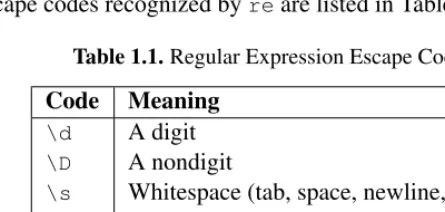
1.1 Regular Expression Escape Codes 24
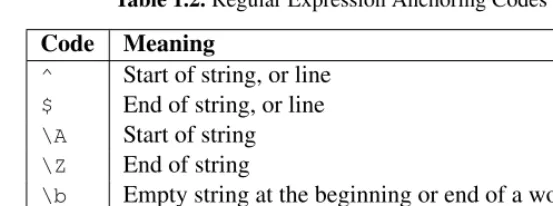
1.2 Regular Expression Anchoring Codes 27
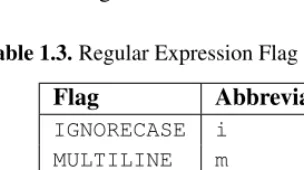
1.3 Regular Expression Flag Abbreviations 45
2.1 Byte Order Specifiers forstruct 104
6.1 Codec Error Handling Modes 292
7.1 The “project” Table 353
7.2 The “task” Table 353
7.3 CSV Dialect Parameters 415
10.1 Multiprocessing Exit Codes 537
11.1 Event Flags for poll() 604
13.1 IMAP 4 Mailbox Status Conditions 744
14.1 Flags for Variable Argument Definitions in argparse 815
14.2 Logging Levels 881
16.1 Test Case Outcomes 950
17.1 CPython Command-Line Option Flags 1057
17.2 Event Hooks for settrace() 1101
17.3 Platform Information Functions 1132
17.4 Path Names Used in sysconfig 1164
18.1 Warning Filter Actions 1171
ptg
FOREWORD
It’s Thanksgiving Day, 2010. For those outside of the United States, and for many of those within it, it might just seem like a holiday where people eat a ton of food, watch some football, and otherwise hang out.
For me, and many others, it’s a time to take a look back and think about the things that have enriched our lives and give thanks for them. Sure, we should be doing that every day, but having a single day that’s focused on just saying thanks sometimes makes us think a bit more broadly and a bit more deeply.
I’m sitting here writing the foreward to this book, something I’m very thankful for having the opportunity to do—but I’m not just thinking about the content of the book, or the author, who is a fantastic community member. I’m thinking about the subject matter itself—Python—and specifically, its standard library.
Every version of Python shipped today contains hundreds of modules spanning many years, many developers, many subjects, and many tasks. It contains modules for everything from sending and receiving email, to GUI development, to a built-in HTTP server. By itself, the standard library is a massive work. Without the people who have maintained it throughout the years, and the hundreds of people who have submitted patches, documentation, and feedback, it would not be what it is today.
It’s an astounding accomplishment, and something that has been the critical com-ponent in the rise of Python’s popularity as a language and ecosystem. Without the standard library, without the “batteries included” motto of the core team and others, Python would never have come as far. It has been downloaded by hundreds of thou-sands of people and companies, and has been installed on millions of servers, desktops, and other devices.
Without the standard library, Python would still be a fantastic language, built on solid concepts of teaching, learning, and readability. It might have gotten far enough
ptg on its own, based on those merits. But the standard library turns it from an interesting
experiment into a powerful and effective tool.
Every day, developers across the world build tools and entire applications based on nothing but the core language and the standard library. You not only get the ability to conceptualize what a car is (the language), but you also get enough parts and tools to put together a basic car yourself. It might not be the perfect car, but it gets you from A to B, and that’s incredibly empowering and rewarding. Time and time again, I speak to people who look at me proudly and say, “Look what I built with nothing except what came with Python!”
It is not, however, afait accompli. The standard library has its warts. Given its size and breadth, and its age, it’s no real surprise that some of the modules have varying levels of quality, API clarity, and coverage. Some of the modules have suffered “feature creep,” or have failed to keep up with modern advances in the areas they cover. Python continues to evolve, grow, and improve over time through the help and hard work of many, many unpaid volunteers.
Some argue, though, that due to the shortcomings and because the standard library doesn’t necessarily comprise the “best of breed” solutions for the areas its modules cover (“best of” is a continually moving and adapting target, after all), that it should be killed or sent out to pasture, despite continual improvement. These people miss the fact that not only is the standard library a critical piece of what makes Python continually successful, but also, despite its warts, it is still an excellent resource.
But I’ve intentionally ignored one giant area: documentation. The standard li-brary’s documentation is good and is constantly improving and evolving. Given the size and breadth of the standard library, the documentation is amazing for what it is. It’s awesome that we have hundreds of pages of documentation contributed by hundreds of developers and users. The documentation is used every single day by hundreds of thou-sands of people to create things—things as simple as one-off scripts and as complex as the software that controls giant robotic arms.
The documentation is why we are here, though. All good documentation and code starts with an idea—a kernel of a concept about what something is, or will be. Outward from that kernel come the characters (the APIs) and the storyline (the modules). In the case of code, sometimes it starts with a simple idea: “I want to parse a string and look for a date.” But when you reach the end—when you’re looking at the few hun-dred unit tests, functions, and other bits you’ve made—you sit back and realize you’ve built something much, much more vast than originally intended. The same goes for documentation, especially the documentation of code.
ptg Foreword xxxv
cases. But it all falls flat if a user approaching it for the first time can’t glue those pretty words, thoughtful use cases, and API signatures together into something that makes sense and solves their problems.
Examples are the gateway by which people make the critical connections—those logical jumps from an abstract concept into something concrete. It’s one thing to “know” the ideas and API; it’s another to see it used. It helps jump the void when you’re not only trying to learn something, but also trying to improve existing things.
Which brings us back to Python. Doug Hellmann, the author of this book, started a blog in 2007 called thePython Module of the Week. In the blog, he walked through various modules of the standard library, taking an example-first approach to showing how each one worked and why. From the first day I read it, it had a place right next to the core Python documentation. His writing has become an indispensable resource for me and many other people in the Python community.
Doug’s writings fill a critical gap in the Python documentation I see today: the need for examples. Showing how and why something works in a functional, simple manner is no easy task. And, as we’ve seen, it’s a critical and valuable body of work that helps people every single day. People send me emails with alarming regularity saying things like, “Did you see this post by Doug? This is awesome!” or “Why isn’t this in the core documentation? It helped me understand how things really work!”
When I heard Doug was going to take the time to further flesh out his existing work, to turn it into a book I could keep on my desk to dog-ear and wear out from near constant use, I was more than a little excited. Doug is a fantastic technical writer with a great eye for detail. Having an entire book dedicated to real examples of how over a hundred modules in the standard library work, written by him, blows my mind.
You see, I’m thankful for Python. I’m thankful for the standard library—warts and all. I’m thankful for the massive, vibrant, yet sometimes dysfunctional community we have. I’m thankful for the tireless work of the core development team, past, present and future. I’m thankful for the resources, the time, and the effort so many community members—of which Doug Hellmann is an exemplary example—have put into making this community and ecosystem such an amazing place.
Lastly, I’m thankful for this book. Its author will continue to be well respected and the book well used in the years to come.
— Jesse Noller
Python Core Developer PSF Board Member
ptg
ACKNOWLEDGMENTS
This book would not have come into being without the contributions and support of many people.
I was first introduced to Python around 1997 by Dick Wall, while we were working together on GIS software at ERDAS. I remember being simultaneously happy that I had found a new tool language that was so easy to use, and sad that the company did not let us use it for “real work.” I have used Python extensively at all of my subsequent jobs, and I have Dick to thank for the many happy hours I have spent working on software since then.
The Python core development team has created a robust ecosystem of language, tools, and libraries that continue to grow in popularity and find new application areas. Without the amazing investment in time and resources they have given us, we would all still be spending our time reinventing wheel after wheel.
As described in the Introduction, the material in this book started out as a series of blog posts. Each of those posts has been reviewed and commented on by members of the Python community, with corrections, suggestions, and questions that led to changes in the version you find here. Thank you all for reading along week after week, and contributing your time and attention.
The technical reviewers for the book—Matt Culbreth, Katie Cunningham, Jeff McNeil, and Keyton Weissinger—spent many hours looking for issues with the ex-ample code and accompanying explanations. The result is stronger than I could have produced on my own. I also received advice from Jesse Noller on the multiprocessing module and Brett Cannon on creating custom importers.
A special thanks goes to the editors and production staff at Pearson for all their hard work and assistance in helping me realize my vision for this book.
ptg Finally, I want to thank my wife, Theresa Flynn, who has always given me
ptg
ABOUT THE AUTHOR
Doug Hellmannis currently a senior developer with Racemi, Inc., and communica-tions director of the Python Software Foundation. He has been programming in Python since version 1.4 and has worked on a variety of UNIX and non-UNIX platforms for projects in fields such as mapping, medical news publishing, banking, and data cen-ter automation. Afcen-ter a year as a regular columnist forPython Magazine, he served as editor-in-chief from 2008–2009. Since 2007, Doug has published the popularPython Module of the Weekseries on his blog. He lives in Athens, Georgia.
ptg
INTRODUCTION
Distributed with every copy of Python, the standard library contains hundreds of modules that provide tools for interacting with the operating system, interpreter, and Internet. All of them are tested and ready to be used to jump start the development of your applications. This book presents selected examples demonstrating how to use the most commonly used features of the modules that give Python its “batteries included” slogan, taken from the popularPython Module of the Week(PyMOTW) blog series.
This Book’s Target Audience
The audience for this book is an intermediate Python programmer, so although all the source code is presented with discussion, only a few cases include line-by-line expla-nations. Every section focuses on the features of the modules, illustrated by the source code and output from fully independent example programs. Each feature is presented as concisely as possible, so the reader can focus on the module or function being demon-strated without being distracted by the supporting code.
An experienced programmer familiar with other languages may be able to learn Python from this book, but it is not intended to be an introduction to the language. Some prior experience writing Python programs will be useful when studying the examples.
Several sections, such as the description of network programming with sockets or hmac encryption, require domain-specific knowledge. The basic information needed to explain the examples is included here, but the range of topics covered by the modules in the standard library makes it impossible to cover every topic comprehensively in a single volume. The discussion of each module is followed by a list of suggested sources for more information and further reading. These include online resources, RFC standards documents, and related books.
ptg to come because of the large amount of legacy Python 2 source code available and
the slow transition rate to Python 3. All the source code for the examples has been updated from the original online versions and tested with Python 2.7, the final release of the 2.x series. Many of the example programs can be readily adapted to work with Python 3, but others cover modules that have been renamed or deprecated.
How This Book Is Organized
The modules are grouped into chapters to make it easy to find an individual module for reference and browse by subject for more leisurely exploration. The book supplements the comprehensive reference guide available on http://docs.python.org, providing fully functional example programs to demonstrate the features described there.
Downloading the Example Code
ptg
Chapter 1
TEXT
Thestringclass is the most obvious text-processing tool available to Python program-mers, but plenty of other tools in the standard library are available to make advanced text manipulation simple.
Older code, written before Python 2.0, uses functions from thestringmodule, instead of methods ofstringobjects. There is an equivalent method for each function from the module, and use of the functions is deprecated for new code.
Programs using Python 2.4 or later may usestring.Templateas a simple way to parameterize strings beyond the features of thestringorunicodeclasses. While not as feature-rich as templates defined by many of the Web frameworks or extension modules available from the Python Package Index,string.Templateis a good mid-dle ground for user-modifiable templates where dynamic values need to be inserted into otherwise static text.
The textwrapmodule includes tools for formatting text taken from paragraphs by limiting the width of output, adding indentation, and inserting line breaks to wrap lines consistently.
The standard library includes two modules related to comparing text values beyond the built-in equality and sort comparison supported by string objects. re provides a complete regular expression library, implemented in C for speed. Regular expressions are well-suited to finding substrings within a larger data set, comparing strings against a pattern more complex than another fixed string, and performing mild parsing.
difflib, on the other hand, computes the actual differences between sequences of text in terms of the parts added, removed, or changed. The output of the comparison functions in difflibcan be used to provide more detailed feedback to users about where changes occur in two inputs, how a document has changed over time, etc.
ptg
1.1
string—Text Constants and Templates
Purpose Contains constants and classes for working with text. Python Version 1.4 and later
The stringmodule dates from the earliest versions of Python. In version 2.0, many of the functions previously implemented only in the module were moved to methods ofstrandunicodeobjects. Legacy versions of those functions are still available, but their use is deprecated and they will be dropped in Python 3.0. The stringmodule retains several useful constants and classes for working with string andunicode objects, and this discussion will concentrate on them.
1.1.1 Functions
The two functions capwords()and maketrans()are not moving from the string module.capwords()capitalizes all words in a string.
import string
s = ’The quick brown fox jumped over the lazy dog.’
print s
print string.capwords(s)
The results are the same as callingsplit(), capitalizing the words in the resulting list, and then callingjoin()to combine the results.
$ python string_capwords.py
The quick brown fox jumped over the lazy dog. The Quick Brown Fox Jumped Over The Lazy Dog.
The maketrans()function creates translation tables that can be used with the translate()method to change one set of characters to another more efficiently than with repeated calls toreplace().
import string
ptg 1.1. string—Text Constants and Templates 5
s = ’The quick brown fox jumped over the lazy dog.’
print s
print s.translate(leet)
In this example, some letters are replaced by their l33t number alternatives.
$ python string_maketrans.py
The quick brown fox jumped over the lazy dog. Th3 qu1ck 620wn f0x jum93d 0v32 7h3 142y d06.
1.1.2 Templates
String templates were added in Python 2.4 as part of PEP 292 and are intended as an alternative to the built-in interpolation syntax. Withstring.Templateinterpolation, variables are identified by prefixing the name with$ (e.g., $var) or, if necessary to set them off from surrounding text, they can also be wrapped with curly braces (e.g., ${var}).
This example compares a simple template with a similar string interpolation using the%operator.
import string
values = { ’var’:’foo’ }
t = string.Template("""
Variable : $var
Escape : $$
Variable in text: ${var}iable """)
print ’TEMPLATE:’, t.substitute(values)
s = """
Variable : %(var)s
Escape : %%
Variable in text: %(var)siable """
ptg In both cases, the trigger character ($or%) is escaped by repeating it twice.
$ python string_template.py
TEMPLATE:
Variable : foo
Escape : $
Variable in text: fooiable
INTERPOLATION:
Variable : foo
Escape : %
Variable in text: fooiable
One key difference between templates and standard string interpolation is that the argument type is not considered. The values are converted to strings, and the strings are inserted into the result. No formatting options are available. For exam-ple, there is no way to control the number of digits used to represent a floating-point value.
A benefit, though, is that by using thesafe_substitute()method, it is possible to avoid exceptions if not all values the template needs are provided as arguments.
import string
values = { ’var’:’foo’ }
t = string.Template("$var is here but $missing is not provided")
try:
print ’substitute() :’, t.substitute(values) except KeyError, err:
print ’ERROR:’, str(err)
print ’safe_substitute():’, t.safe_substitute(values)
Since there is no value formissingin the values dictionary, aKeyErroris raised bysubstitute(). Instead of raising the error,safe_substitute()catches it and leaves the variable expression alone in the text.
ptg 1.1. string—Text Constants and Templates 7
substitute() : ERROR: ’missing’
safe_substitute(): foo is here but $missing is not provided
1.1.3 Advanced Templates
The default syntax for string.Template can be changed by adjusting the regular expression patterns it uses to find the variable names in the template body. A simple way to do that is to change thedelimiterandidpatternclass attributes.
import string
template_text = ’’’
Delimiter : %%
Replaced : %with_underscore
Ignored : %notunderscored
’’’
d = { ’with_underscore’:’replaced’,
’notunderscored’:’not replaced’, }
class MyTemplate(string.Template): delimiter = ’%’
idpattern = ’[a-z]+_[a-z]+’
t = MyTemplate(template_text) print ’Modified ID pattern:’
print t.safe_substitute(d)
In this example, the substitution rules are changed so that the delimiter is%instead of$and variable names must include an underscore. The pattern%notunderscored is not replaced by anything because it does not include an underscore character.
$ python string_template_advanced.py
Modified ID pattern:
Delimiter : %
Replaced : replaced
ptg For more complex changes, override thepatternattribute and define an entirely
new regular expression. The pattern provided must contain four named groups for cap-turing the escaped delimiter, the named variable, a braced version of the variable name, and any invalid delimiter patterns.
import string
t = string.Template(’$var’) print t.pattern.pattern
The value oft.patternis a compiled regular expression, but the original string is available via itspatternattribute.
\$(?:
(?P<escaped>\$) | # two delimiters
(?P<named>[_a-z][_a-z0-9]*) | # identifier
{(?P<braced>[_a-z][_a-z0-9]*)} | # braced identifier
(?P<invalid>) # ill-formed delimiter exprs
)
This example defines a new pattern to create a new type of template using {{var}}as the variable syntax.
import re import string
class MyTemplate(string.Template): delimiter = ’{{’
pattern = r’’’ \{\{(?:
(?P<escaped>\{\{)|
(?P<named>[_a-z][_a-z0-9]*)\}\}| (?P<braced>[_a-z][_a-z0-9]*)\}\}| (?P<invalid>)
) ’’’
t = MyTemplate(’’’ {{{{
ptg 1.2. textwrap—Formatting Text Paragraphs 9
print ’MATCHES:’, t.pattern.findall(t.template)
print ’SUBSTITUTED:’, t.safe_substitute(var=’replacement’)
Both the namedandbracedpatterns must be provided separately, even though they are the same. Running the sample program generates:
$ python string_template_newsyntax.py
MATCHES: [(’{{’, ’’, ’’, ’’), (’’, ’var’, ’’, ’’)] SUBSTITUTED:
{{
replacement
See Also:
string (http://docs.python.org/lib/module-string.html) Standard library documenta-tion for this module.
String Methods (http://docs.python.org/lib/string-methods.html#string-methods) Methods ofstrobjects that replace the deprecated functions instring. PEP 292 (www.python.org/dev/peps/pep-0292) A proposal for a simpler string
sub-stitution syntax.
l33t (http://en.wikipedia.org/wiki/Leet) “Leetspeak” alternative alphabet.
1.2
textwrap—Formatting Text Paragraphs
Purpose Formatting text by adjusting where line breaks occur in a paragraph.
Python Version 2.5 and later
The textwrapmodule can be used to format text for output when pretty-printing is desired. It offers programmatic functionality similar to the paragraph wrapping or filling features found in many text editors and word processors.
1.2.1 Example Data
The examples in this section use the moduletextwrap_example.py, which contains a stringsample_text.
sample_text = ’’’
The textwrap module can be used to format text for output in
ptg
programmatic functionality similar to the paragraph wrapping or filling features found in many text editors.
’’’
1.2.2 Filling Paragraphs
Thefill()function takes text as input and produces formatted text as output.
import textwrap
from textwrap_example import sample_text
print ’No dedent:\n’
print textwrap.fill(sample_text, width=50)
The results are something less than desirable. The text is now left justified, but the first line retains its indent and the spaces from the front of each subsequent line are embedded in the paragraph.
$ python textwrap_fill.py
No dedent:
The textwrap module can be used to format text for output in situations where pretty-printing is desired. It offers programmatic functionality similar to the paragraph wrapping or filling features found in many text editors.
1.2.3 Removing Existing Indentation
The previous example has embedded tabs and extra spaces mixed into the output, so it is not formatted very cleanly. Removing the common whitespace prefix from all lines in the sample text produces better results and allows the use of docstrings or embedded multiline strings straight from Python code while removing the code formatting itself. The sample string has an artificial indent level introduced for illustrating this feature.
import textwrap
from textwrap_example import sample_text
dedented_text = textwrap.dedent(sample_text) print ’Dedented:’
ptg 1.2. textwrap—Formatting Text Paragraphs 11
The results are starting to look better:
$ python textwrap_dedent.py
Dedented:
The textwrap module can be used to format text for output in situations where pretty-printing is desired. It offers programmatic functionality similar to the paragraph wrapping or filling features found in many text editors.
Since “dedent” is the opposite of “indent,” the result is a block of text with the common initial whitespace from each line removed. If one line is already indented more than another, some of the whitespace will not be removed.
Input like
Line one. Line two. Line three.
becomes
Line one. Line two. Line three.
1.2.4 Combining Dedent and Fill
Next, the dedented text can be passed through fill() with a few different width
values.
import textwrap
from textwrap_example import sample_text
dedented_text = textwrap.dedent(sample_text).strip() for width in [ 45, 70 ]:
print ’%d Columns:\n’ % width
ptg This produces outputs in the specified widths.
$ python textwrap_fill_width.py
45 Columns:
The textwrap module can be used to format text for output in situations where pretty-printing is desired. It offers programmatic functionality similar to the paragraph wrapping or filling features found in many text editors.
70 Columns:
The textwrap module can be used to format text for output in
situations where pretty-printing is desired. It offers programmatic functionality similar to the paragraph wrapping or filling features found in many text editors.
1.2.5 Hanging Indents
Just as the width of the output can be set, the indent of the first line can be controlled independently of subsequent lines.
import textwrap
from textwrap_example import sample_text
dedented_text = textwrap.dedent(sample_text).strip() print textwrap.fill(dedented_text,
initial_indent=’’,
subsequent_indent=’ ’ * 4, width=50,
)
This makes it possible to produce a hanging indent, where the first line is indented less than the other lines.
$ python textwrap_hanging_indent.py
ptg 1.3. re—Regular Expressions 13
similar to the paragraph wrapping or filling features found in many text editors.
The indent values can include nonwhitespace characters, too. The hanging indent can be prefixed with*to produce bullet points, etc.
See Also:
textwrap (http://docs.python.org/lib/module-textwrap.html) Standard library doc-umentation for this module.
1.3
re—Regular Expressions
Purpose Searching within and changing text using formal patterns. Python Version 1.5 and later
Regular expressions are text-matching patterns described with a formal syntax. The patterns are interpreted as a set of instructions, which are then executed with a string as input to produce a matching subset or modified version of the original. The term “regular expressions” is frequently shortened to “regex” or “regexp” in conversation. Expressions can include literal text matching, repetition, pattern composition, branch-ing, and other sophisticated rules. Many parsing problems are easier to solve using a regular expression than by creating a special-purpose lexer and parser.
Regular expressions are typically used in applications that involve a lot of text processing. For example, they are commonly used as search patterns in text-editing programs used by developers, including vi, emacs, and modern IDEs. They are also an integral part of UNIX command line utilities, such as sed, grep, and awk. Many programming languages include support for regular expressions in the language syntax (Perl, Ruby, Awk, and Tcl). Other languages, such as C, C++, and Python, support regular expressions through extension libraries.
There are multiple open source implementations of regular expressions, each shar-ing a common core syntax but havshar-ing different extensions or modifications to their advanced features. The syntax used in Python’sremodule is based on the syntax used for regular expressions in Perl, with a few Python-specific enhancements.
ptg
1.3.1 Finding Patterns in Text
The most common use forreis to search for patterns in text. Thesearch()function takes the pattern and text to scan, and returns aMatchobject when the pattern is found. If the pattern is not found,search()returnsNone.
EachMatchobject holds information about the nature of the match, including the original input string, the regular expression used, and the location within the original string where the pattern occurs.
import re
pattern = ’this’
text = ’Does this text match the pattern?’
match = re.search(pattern, text)
s = match.start() e = match.end()
print ’Found "%s"\nin "%s"\nfrom %d to %d ("%s")’ % \ (match.re.pattern, match.string, s, e, text[s:e])
Thestart()andend()methods give the indexes into the string showing where the text matched by the pattern occurs.
$ python re_simple_match.py
Found "this"
in "Does this text match the pattern?" from 5 to 9 ("this")
1.3.2 Compiling Expressions
reincludes module-level functions for working with regular expressions as text strings, but it is more efficient tocompilethe expressions a program uses frequently. The com-pile()function converts an expression string into aRegexObject.
import re
# Precompile the patterns
ptg 1.3. re—Regular Expressions 15
for p in [ ’this’, ’that’ ] ]
text = ’Does this text match the pattern?’
print ’Text: %r\n’ % text
for regex in regexes:
print ’Seeking "%s" ->’ % regex.pattern,
if regex.search(text): print ’match!’
else:
print ’no match’
The module-level functions maintain a cache of compiled expressions. However, the size of the cache is limited, and using compiled expressions directly avoids the cache lookup overhead. Another advantage of using compiled expressions is that by precompiling all expressions when the module is loaded, the compilation work is shifted to application start time, instead of to a point when the program may be responding to a user action.
$ python re_simple_compiled.py
Text: ’Does this text match the pattern?’
Seeking "this" -> match! Seeking "that" -> no match
1.3.3 Multiple Matches
So far, the example patterns have all usedsearch() to look for single instances of literal text strings. The findall() function returns all substrings of the input that match the pattern without overlapping.
import re
text = ’abbaaabbbbaaaaa’
pattern = ’ab’
ptg There are two instances ofabin the input string.
$ python re_findall.py
Found "ab" Found "ab"
finditer() returns an iterator that produces Match instances instead of the strings returned byfindall().
import re
text = ’abbaaabbbbaaaaa’
pattern = ’ab’
for match in re.finditer(pattern, text): s = match.start()
e = match.end()
print ’Found "%s" at %d:%d’ % (text[s:e], s, e)
This example finds the same two occurrences ofab, and theMatchinstance shows where they are in the original input.
$ python re_finditer.py
Found "ab" at 0:2 Found "ab" at 5:7
1.3.4 Pattern Syntax
Regular expressions support more powerful patterns than simple literal text strings. Patterns can repeat, can be anchored to different logical locations within the input, and can be expressed in compact forms that do not require every literal character to be present in the pattern. All of these features are used by combining literal text values withmetacharactersthat are part of the regular expression pattern syntax implemented byre.
import re
ptg 1.3. re—Regular Expressions 17
"""Given source text and a list of patterns, look for matches for each pattern within the text and print them to stdout.
"""
# Look for each pattern in the text and print the results
for pattern, desc in patterns:
print ’Pattern %r (%s)\n’ % (pattern, desc) print ’ %r’ % text
for match in re.finditer(pattern, text): s = match.start()
e = match.end() substr = text[s:e]
n_backslashes = text[:s].count(’\\’) prefix = ’.’ * (s + n_backslashes)
print ’ %s%r’ % (prefix, substr) print
return
if __name__ == ’__main__’:
test_patterns(’abbaaabbbbaaaaa’,
[(’ab’, "’a’ followed by ’b’"), ])
The following examples will use test_patterns()to explore how variations in patterns change the way they match the same input text. The output shows the input text and the substring range from each portion of the input that matches the pattern.
$ python re_test_patterns.py
Pattern ’ab’ (’a’ followed by ’b’)
’abbaaabbbbaaaaa’ ’ab’
...’ab’
Repetition
ptg number of times the pattern should repeat. And, finally, to allow a variable but limited
number of repetitions, use{m,n}wheremis the minimum number of repetitions andn
is the maximum. Leaving outn({m,}) means the value appears at leastmtimes, with no maximum.
from re_test_patterns import test_patterns
test_patterns(
’abbaabbba’,
[ (’ab*’, ’a followed by zero or more b’),
(’ab+’, ’a followed by one or more b’),
(’ab?’, ’a followed by zero or one b’),
(’ab{3}’, ’a followed by three b’),
(’ab{2,3}’, ’a followed by two to three b’), ])
There are more matches forab*andab?thanab+.
$ python re_repetition.py
Pattern ’ab*’ (a followed by zero or more b)
’abbaabbba’ ’abb’ ...’a’ ....’abbb’ ...’a’
Pattern ’ab+’ (a followed by one or more b)
’abbaabbba’ ’abb’ ....’abbb’
Pattern ’ab?’ (a followed by zero or one b)
’abbaabbba’ ’ab’
ptg 1.3. re—Regular Expressions 19
Pattern ’ab{3}’ (a followed by three b)
’abbaabbba’ ....’abbb’
Pattern ’ab{2,3}’ (a followed by two to three b)
’abbaabbba’ ’abb’ ....’abbb’
Normally, when processing a repetition instruction, re will consume as much of the input as possible while matching the pattern. This so-called greedy behavior may result in fewer individual matches, or the matches may include more of the input text than intended. Greediness can be turned off by following the repetition instruction with?.
from re_test_patterns import test_patterns
test_patterns(
’abbaabbba’,
[ (’ab*?’, ’a followed by zero or more b’),
(’ab+?’, ’a followed by one or more b’),
(’ab??’, ’a followed by zero or one b’),
(’ab{3}?’, ’a followed by three b’),
(’ab{2,3}?’, ’a followed by two to thre