A Study of Various Windows Task Bar from
Evolution
Vaishali J. Desai1, Dr. Kishor H. Atkotiya2
Assistant Professor, Department of Computer Science, Saurashtra University, Rajkot, India1
Head, Department of Computer Science, J. H. Bhalodia Women's College, Rajkot, India2
ABSTRACT: Software applications continue to develop in terms of thenumber of features they offer, making personalization increasinglyimportant.Research has showndifferent types of Operating system taskbar working patterns and all so defining various windows version taskbar designing.first taskbar to latest Windows OS all taskbar are described in detail with an image(windows 95 to windows 10 all taskbar).
KEYWORDS: Windows Taskbar,behaviors, icon,TrayIcon,Pin to the taskbar
I .INTRODUCTION
The Windows Taskbar is the long horizontal bar at the base(bottom) of the computer screen this one is the default position, the position can be altered by the client and it was first introduced in the Microsoft Windows 95 OS. The Windows Taskbar containsup of a button to access the launching computer programs, buttons for all open windows and this one is only Microsoft windows related task.early year Microsoft version(95 and 2000) both are same notification provide for taskbar menu and other related work.
Simply all the task bar filling from left to right, the taskbar is almost always visible. It has three main sections:
1. The Start button Picture of the Start button, which opens the Start menuThe middle part, it shows you which programs and files you have open and allows you to quickly switch between them.
2. The notification area, they have includes a clock and icons (small pictures) that communicate the status of certain programs and computer settings.
II. MICROSOFT WINDOWS XO TASKBAR
Now Microsoft windows XP taskbar is introduced new facility, this all are given in the list.this functionality is not provided by previous OS.
ISSN(Online): 2320-9801
ISSN (Print) : 2320-9798
I
nternational
J
ournal of
I
nnovative
R
esearch in
C
omputer
and
C
ommunication
E
ngineering
(An ISO 3297: 2007 Certified Organization)
Vol. 4, Issue 3, March 2016
Lock the taskbar
Auto - hides the taskbar
Keep the taskbar on top of other windows
Group similar taskbar button
Show quick notification
Fig 2: XP grouping Taskbar
Above given two image first one is display running all application,grouping cause windows of the same application to always be next each on the taskbar.but this one is like drawback of os.they have providedone new thing “Setlike taskbar button” means same application name are grouped and manage space to the taskbar. The Second image is displays collapsed, means if user open two internet explorer then click group similar taskbar button that time both icons is displayed same space and the 2 number is displayed with the application icon.which can group the taskbar buttons of several windows from the same application into a single button?
By default windows, XP does not display any type of application icon inthe taskbar.if user clicksShow Quick Notification option any application icon at the same time this apps display on the taskbar.belowgiven one image.
Fig 3: XP Taskbar Quick notification.
III.MICROSOFT WINDOWS VISTA TASKBAR
The taskbar’s main work is to play host to a set of buttons that represent the open windows on the desktop. We can switch to any window by clicking the taskbar button.it should be easy to choose the taskbar button for the window you want to activate because each button displays the window title and the symbol associated with the program. In practice, however, picking out the correct taskbar button is often filled with problems because many window titles don’t fit completely inside the button.
Fig 4: Vista Taskbar open multiple Windows.
Now in this case, user needs to know what inside each window, Windows Vistaintroduced window previews it shows thumbnail views of the application in real-time.
If the user move mouse pointer over a taskbar button in vista that only windows title,also display small screen image of the windows.Windows Vista keeps this feature, but with a slight twist. But any time user hover mouse pointer over a button representing a group of windows thumbnail display,one drawback is stack can not navigate.
IV. MICROSOFT WINDOWS 7 TASKBAR
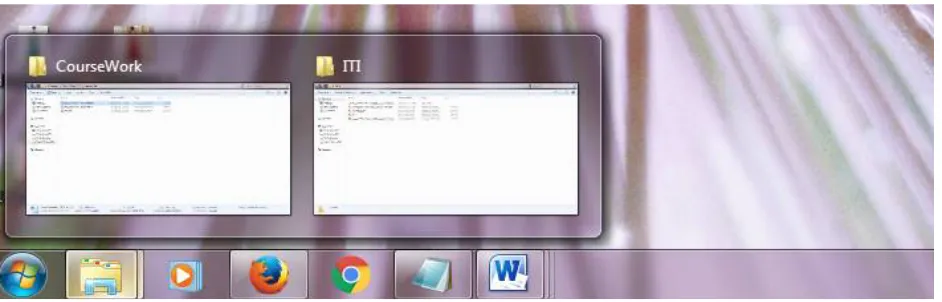
The Microsoft Windows 7 taskbar visit and check how it’s work? This taskbar is 10 pixels taller then in Windows Vista to accommodate touch screen input and the new look with larger default icon size.and also denoted by a border frame around the icon.
One new is Quick lunch toolbar has been removed. They have doesn’t show windows titles,if there are multiple windows at that time user mouse hovered over at that time application title is display.
Fig 5: Windows 7 Taskbar open multiple Windows.
ISSN(Online): 2320-9801
ISSN (Print) : 2320-9798
I
nternational
J
ournal of
I
nnovative
R
esearch in
C
omputer
and
C
ommunication
E
ngineering
(An ISO 3297: 2007 Certified Organization)
Vol. 4, Issue 3, March 2016
Windows 7 provide jump list menu options available from right clicking any of the open application icon on the taskbar and click appropriate required application. that provide shortcuts to lately opened documents, regularly opened documents, folders paths.All the icon have unique jump list with previous visited some application list display.
You click jump list any application they open if this application available. The notification area has been developed in windows 7 with a new icons like standard volume,network,power and time icon is display and no any other icon are shown unless the user wishes to change.
This version also introduced the ability to pin the application to the taskbar so that buttons forlaunching them appear when they are not running. Previously, the Quick launch was used to pin applications to the taskbar, Windows 7 removed several classic taskbar features.
It would appear that the maximum number of recent programs you can display is 30 and the maximum number of items
to display in the jump lists is 60.
V.
MICROSOFT WINDOWS 8.1 TASKBARWindows 8 and windows 8.1 both are same work nothing to large change in both operating systems. First lunched windows 8 replaced the traditional Start menu with the Start screen and removed the Start button from the Desktop. but this one is a drawback of windows 8 because the userdoesn't find out easily start menu form the taskbar that views in all previousos.sotheycan't accept this new feature.
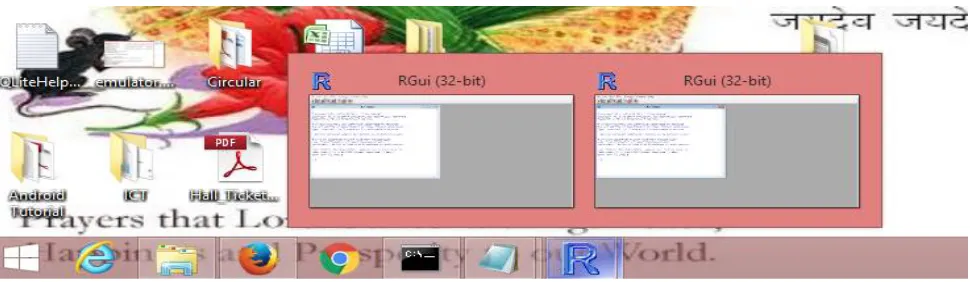
Fig 6 : Windows 8.1 Taskbar open with group windows
Windows 8.1 adds the Start button back to the Desktop. Clicking the Start button on the Desktop will launch the Start screen, which you'll use to open programs and search for files. A user like Windows 8 but 8.1 is certainly an improvement. A start button included on the taskbar, but doesn't open the menu. It will take users to the start screen when clicked.
All so same featureprovides like pins to taskbar and pin to start menu, with multiple icon pin to the taskbar and jump list display if the user right click particular application. itworks same as the other windows taskbar and the number of application open thumbnail displays.windows 8 and 8.1 both provide the jump list it display previous visited application user set maximum 60 application in jump list.
VI. MICROSOFT WINDOWS 10 TASKBAR
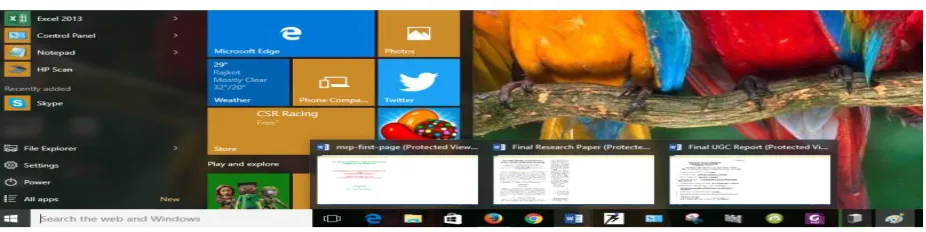
Fig 7 : Windows 10 Taskbar open with group windows
The basics, of course, are the same. The taskbar is anchored to the lowest of the screen by default, but can be moved to any screen side, and contains the Start button, buttons for pinned and running applications, and a system tray area that contains notification icons and a clock. You can still pin items to the taskbar, including applications and web sites. Here’s a comparison of the taskbars from Windows 7, 8.1 and 10.
Fig 8 : Windows 10 ,8.1 and 7 Taskbar compaire
Cortana and Task View are new.The most obvious major changes from previous versions are the two controls to the right of the Start menu: the Cortana search box and the Task View button. If you’re not a fan of these buttons you can remove them (right-click the taskbar and choose accordingly) or, in the case of Cortana, change it from a search box to a less obtrusive button. I generally remove both, since the features they represent continue to work fine without those buttons. Here’s Cortana as a button.
Fig 9 : Windows 10 Quick view Taskbar
Windows 10 also given thumbnail view same as previous versions display icon, apps name, and preview of running application.SoWindows 10 is all most newest look with brilliant work.
VII.CONCLUSION
Within some years technology is powerful and very useful to all factors. this paper is related to windows five different operating systems taskbar. this five different OS is Windows XP, Windows Vista, Windows 7, Windows 8.1 and Windows 10 with the all OS taskbar design and working patterns defined in this paper.
This research through compares first OS taskbar to the last updated OS taskbar. theyhave been working totally differently and provide multiple option to user friendlyenvironment. So finally this paper is provide some help full task.
REFERENCES
[1] https://en.wikipedia.org/wiki/Taskbar
[2] http://windows.microsoft.com/en-in/windows/taskbar-overview#1TC=windows7
ISSN(Online): 2320-9801
ISSN (Print) : 2320-9798
I
nternational
J
ournal of
I
nnovative
R
esearch in
C
omputer
and
C
ommunication
E
ngineering
(An ISO 3297: 2007 Certified Organization)
Vol. 4, Issue 3, March 2016
[4] Robertson, G., et al. Scalable Fabric: flexible task management.Proc. CHI 2000: ACM Press. pp. 494-501, 2000. [5]Smith, G., et al. GroupBar: The TaskBar Evolved. Proc.OZCHI 2003. 2003.
[6]Stumpf, S., et al. Predicting user tasks: I know what you'redoing! Proc. AAAI 2005: AIII Press. 2005. [7]Tashman, C. WindowScape: A Task Oriented Window
[8] Manager. Proc. UIST 2006: ACM Press. pp. 77-80, 2006.
[9]Windows Taskbar.Microsoft. http://www.microsoft.com
[10] Hutchings, D., G. Smith, B. Meyers, M. Czerwinski, and G. Robertson (2004).Display space usage and window management operation comparisons betweensingle monitor and multiple monitor users. In Proc. of AVI’04, pp. 32–39.ACM Press.
[11] K¨arkk¨ainen, L. and J. Laarni (2002). Designing for small display screens.In Proc.ofNordiCHI ’02, pp. 227–230.ACM. [12] Tashman, C. (2006). Windowscape: A task oriented window manager. In Proc.
of UIST ’06, pp. 77–80. ACM Press.
BIOGRAPHY
Desai Vaishali J. :Post-graduated student for doctor degree for computer science in Suarastra University.And working as assistance professor in MCA Department of Saurastra University.