© 2017, IRJET | Impact Factor value: 5.181 | ISO 9001:2008 Certified Journal
| Page 1756
WI-FI FILE EXPLORER
Kapil Hande
1, Mayank Udapurkar
2, Akash Bangadkar
3, Sanket Shahane
4, Sonu Kumar
51
Department of Computer Science & Engineering, Priyadarshani Bhagwati College of Engineering, Nagpur,
Maharashtra, India
2
Department of Computer Science & Engineering, Priyadarshani Bhagwati College of Engineering, Nagpur,
Maharashtra, India
3
Department of Computer Science & Engineering, Priyadarshani Bhagwati College of Engineering, Nagpur,
Maharashtra, India
4
Department of Computer Science & Engineering, Priyadarshani Bhagwati College of Engineering, Nagpur,
Maharashtra, India
5
Department of Computer Science & Engineering, Priyadarshani Bhagwati College of Engineering, Nagpur,
Maharashtra, India
---***---Abstract -
Connecting our Android phone to our PC via aUSB cable can often feel clunky. So, we have new way to connect phone to pc via Wi-Fi. Here we have connecting our pc with the mobile phone. For that all we need is a computer, router and obviously a working Mobile phone. In this project we are accessing our PC's hard disk in our mobile phones. So that, we can able to access all the files that are present in the computer. We can Play Video, Audio Files, view Document and Images, we can even download all the contents in mobile from pc. We are directly buffer the files store in computer in our mobile phone. It has multiple file explorer so that we can drag and drop files easily. We have included some modules such as Searching Screen, Multiple Window, Media Player, Document Reader and predefined commands. So how does this work? Let's say you wanted to transfer some pictures that you had taken with your phone. You would go to the Web page that Wi-Fi Wi-File Explorer directs you to, and go to the DCIM directory, and then to the camera subdirectory. From there you should see all the JPEG files you have taken with your phone. Then it is simply a matter of clicking on the file in question, and saving it to your computer's hard drive. You can do this with any file on your phone, not just pictures.
Key Words: Wi-Fi, Protocol, 802.11 protocol, Ethernet standard, File Transfer Protocol
1. INTRODUCTION
The connection of Android phone to our PC via a USB cable can often feel clunky. We certainly do not consider it an ideal way to exchange files between a computer and a phone. Furthermore, we’ve heard from people who have tried to connect a phone to a computer, but no icon showed up on the desktop. For anyone that has had such issues with the USB connection for their phone, we wholeheartedly recommend going the wireless route with Wi-Fi File
Explorer. Even if your USB connection is working, We think you'll want to start using this app instead.
To use Wi-Fi File Explorer, we'll need to turn on our phone's Wi-Fi and then find a network you can access. Once we have successfully done that, we can go into the app. After a few seconds, it will give you a URL that you enter into our computer's Web browser. This will take you to a Web page where you can look at the contents of our SD card. It will also helpfully display how much memory is available on our card, as well as the size of the files that you are looking at. So how does this work? Let's say we wanted to transfer some pictures that we had taken with our phone. We would go to the Web page that Wi-Fi File Explorer directs us to, and go to the DCIM, directory, and then to the camera subdirectory.
From there we should see all the JPEG files we have taken with our phone. Then it is simply a matter of clicking on the file in question, and saving it to our computer's hard drive. We can do this with any file on our phone, not just pictures.
2. LITERATURE SURVEY
As we started a work for WIFI File Explorer for that we have gone through many stages to make the program to be run successful. After that we have developed modules by the help of the books and obviously Internet. We have gone through Wikipedia and some known authors.
From Wikipedia we have took the Information about the WIFI Protocols, 802.11 x standards, WIFI Security, Ethernet and about 802.11 x standards.
At firstly we have studied about the WIFI and 802.11[1] from the source i.e. Wikipedia
© 2017, IRJET | Impact Factor value: 5.181 | ISO 9001:2008 Certified Journal
| Page 1757
the mobile. But if only both the devices must be under oneWIFI Connection. But we must need a Internet enabled in both the devices. So we got an idea how will it if it does not uses the internet. Then we have come across the Ethernet [3].
In Ethernet, we studied about the WIFI Protocols[4], and how the data streams with the help of Wikipedia and the J. Scott Haugdahl book Networking and Analysis[5] here we have learned about the protocols and started our work to develop our project i.e. WIFI FILE EXPLORER.
After the initial development of the app we found that we need security measures to protect our connection at that time came across the WIFI security [6].
As we planned the transfer of multimedia from pc to our android phone at that time we have searched for how the actual transmission is being done at that time we have took the help of Google Scholar and found some thesis of Mr. Li Deng namely.:- One step approach to deliver multimedia from local PC to mobile devices [8] and here we learned how the data is being transferred from the pc to mobiles with the help of Wi-Fi [9].
3.
MODULES
1. Searching Screen
2. Document Reader
3. Predefined Commands
4. Media Player
3.1 Searching Screen:
We have to search for the PC’s in a WIFI network. After searching for the Wi-Fi now selects the PC you want to access. After that it shows the Hard Disk, External Drives and The Devices connected to it.
3.2 Document Reader:
If you to access the documents in the PC all we have to install a Reader such as WPS Office, Microsoft Office or of any such kind. From that we can able to view the PPT Files, Text Files, Word Files, Excel Files, and PDF Etc. In this document we can able to view, modify the contents and can save it. We can also download the files in the sdcard (memory card)
3.3 Predefined Command:
Various predefined commands that are needed to handle the computer’s action via a command prompt currently default predefined command is of the shutdown, restart & hibernate.
3.4 Media Player:
Added Support for the Video. Supports various files such as mp4, mkv,avi. Streams file on the go. No need to download the file.
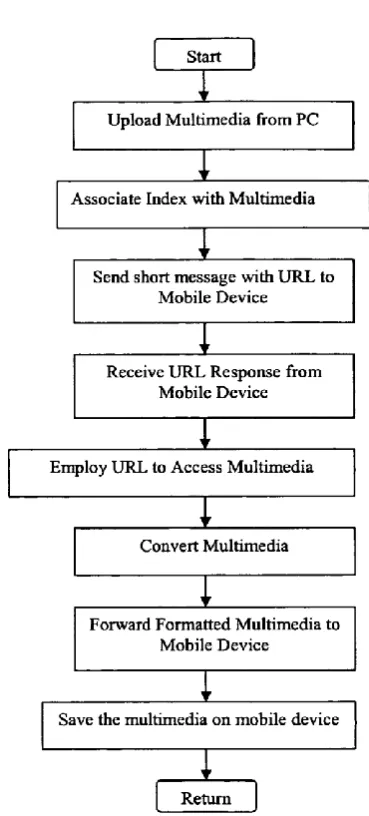
[image:2.595.316.501.173.582.2]4. FLOWCHART
© 2017, IRJET | Impact Factor value: 5.181 | ISO 9001:2008 Certified Journal
| Page 1758
5. OUTPUT
Fig-1: Searching Screen
© 2017, IRJET | Impact Factor value: 5.181 | ISO 9001:2008 Certified Journal
| Page 1759
Fig- 3: Disk Access
© 2017, IRJET | Impact Factor value: 5.181 | ISO 9001:2008 Certified Journal
| Page 1760
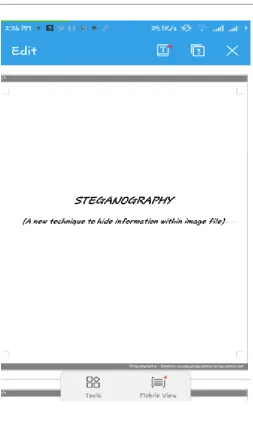
Fig -6: Document Reader
6. CONCLUSIONS
We have developed our project its first step i.e. Searching screen in which we can able to view who are in the Wi-Fi connection, So that we can able to access it.
After accessing the searching screen we can able to navigate through the Disk in our computer and can able to view and modify the files in the computer.
Main thing is that we can access it anywhere the router ranges last. All the transferring speed depends upon the Wi-Fi signals as the signals is the weak the transferring speed gets slow. We are sure we will try to recovery this error as soon as possible.
ACKNOWLEDGEMENT
Many people have contributed in bringing this report to its present form. We are the Presenter ascribe our success in this venture to our guide Prof. K.N.Hande, Assistant Professor of Computer Science & Engineering Department, P.B.C.O.E. They endeavor for perfection, indefatigable zeal, enthusiasm, foresight and innovation contributed in a big way in completing this report with considerable ease in the stipulated time.
We are also grateful to Prof. K.N.Hande, H.O.D. of Computer Science & Engineering Department, P.B.C.O.E. The enthusiastic feedback from him was instrumental improving the presentation and in establishing our confidence in the structuring of the material. We also thank to the entire teaching and the Non-teaching staff of the Department for their co-operation.
We express our admirations for Dr. (Mrs.) A.R. Chaudhari, Dean, Academics, P. B. C.O. E. for her valuable advice and support throughout this venture.
Our sincere thanks are extended to Dr. N. K. Choudhari, Principal, P.B.C.O.E. for constantly encouraging and helping us during the course.
REFERENCES
[1] ”IEEE Xplore document – support of multimedia services with the IEEE 802-11 MAC protocol,” 2016. [Online]. Available:
http://ieeexplore.ieee.org/document/996923/. Accessed: Nov. 8, 2016.
[2] S. Inc, “Remote support, access, and collaboration – best performance remote desktop,” Splashtop, 2016. [Online]. Available: http://www.splashtop.com/. Accessed: Jul. 2016.
[3] ”Ethernet,” in Wikipedia, Wikimedia Foundation, 2016.
[Online]. Available:
https://en.wikipedia.org/wiki/Ethernet. Accessed: Aug. 2016.
[4] ”Protocol,” in Wikipedia, Wikimedia Foundation, 2016.
[Online]. Available:
https://en.wikipedia.org/wiki/Protocol. Accessed: July, 2016.
[5] “ J. Scott Haugdahl, “Protocols”, “in Networking Analysis
and Troubleshooting”,Vol 1, Addison-Wesley; PAP/CDR edition,1999
[6] “RUCHIR BHATNAGAR & VINEET KUMAR BIRLA,” WI-FI SECURITY”, in A SECURITY IN WIRELESS NETWORK, Vol 2, Academic Press, 2010.
[7] I. Wi-Fi Certification, W. A. Definition, “Wi-Fi,” in Wikipedia, Wikimedia Foundation, 2016. [Online]. Available: https://en.wikipedia.org/wiki/Wi-Fi#Wi-Fi_certification. Accessed: Aug. 2016.
© 2017, IRJET | Impact Factor value: 5.181 | ISO 9001:2008 Certified Journal
| Page 1761
[9] Wi-Fi, I. 802, 11 x, W. A. Definition, “Wi-Fi,” in Wikipedia,Wikimedia Foundation, 2016. [Online].
Available:https://en.wikipedia.org/wiki/Wi-Fi#IEEE_802.11_standard. Accessed: August, 2016.
BIOGRAPHIES
The author 1 Mr. Kapil Hande Head of the Department of Computer Science Engineering, Priyadarshini College of Engineering, RTM Nagpur University
The author 2 Mr. Mayank Udapurkar student of the final year Department of Computer Science Engineering, Priyadarshini College of Engineering, RTM Nagpur University
The author 3 Mr. Sanket Shahane student of the final year Department of Computer Science Engineering, Priyadarshini College of Engineering, RTM Nagpur University
The author 4 Mr. Akash Bangadkar student of the final year Department of Computer Science Engineering, Priyadarshini College of Engineering, RTM Nagpur University