© 2017, IRJET | Impact Factor value: 5.181 | ISO 9001:2008 Certified Journal
| Page
2164
Cross-Platform GUI for Impress.js
Gurupriy Inamdar
1, Mohammed Shaarif
2, Nidhi Priya
3,
Nishant Kumar Singh
4, Dr. H.D. Phaneendra
51
Student, Dept. of Computer Science and Engineering, The National Institute of Engineering, Karnataka, India
2Student, Dept. of Computer Science and Engineering, The National Institute of Engineering, Karnataka, India
3Student, Dept. of Computer Science and Engineering, The National Institute of Engineering, Karnataka, India
4Student, Dept. of Computer Science and Engineering, The National Institute of Engineering, Karnataka, India
5Professor & Head of the Department, Dept. of Computer Science and Engineering, The National Institute of
Engineering, Karnataka, India
---***---
Abstract -
Presentations are usually created with asoftware package(e.g., Libre Impress, Microsoft
PowerPoint), which enables users to construct slides for holding text, images, videos and animations to facilitate the delivery of information. With the advent of web technologies, it is possible to use the power of WebGL and
graphics libraries and develop cross platform
presentations that are rendered within the browser.
Key Words: Presentation, information’s, web technologies, cross platform, browser.
1. INTRODUCTION
impress.js is a powerful presentational framework built upon CSS3 transformation transition on web browsers. The creator Bartek Szopka got the idea while playing with CSS transformations. CSS transform can style CSS elements into 2D or 3D space.
To provide for more advanced visualizations in modern browsers the following features are combined:
Positioning
Scaling
Rotating
Working on 3D space
impress.js framework is used for creating presentations, portfolios, sliders, single page websites.
It is worth a thought that what is the need of such a framework when we already have PowerPoint. Since impress.js is licensed under MIT and GPL, its source can be changed according to our need for the customization of the framework. It also eliminates the platform dependency of the presentation programs as it is cross-platform in nature. Also Online presentations with impress.js has an upper edge over desktop-based presentations in terms of usability. Desktop-based presentations have few drawbacks such as, they are not cross-platform compatible, they have a fixed template and hence modifications are difficult.
Presentation creation does not mean that we fill it the slides with lots of information and animations. The presentation should have limited information and the rest of it is explained by the presenter and for this purpose impress.js is the most suitable presentation software[4]
2. LITERATURE SURVEY
In [1], A. Spernjak, faculty of Natural Sciences and Mathematics proposed an informative paper on Usefulness of Prezi and PowerPoint Presentation: In everyday teaching practice great helping to the clearness and visualization of the content are presentations. Two decades ago, the blackboard notes were replaced with traditional slides and overhead projector. With the availability of computer hardware and software are traditional slides converted to electronic slides. In our area the most frequently are used PowerPoint slides, but the problem is payable package of the ́Microsoft Office ́. Users looking for free of charge and useful presentation programs.
For teachers and students Prezi is a free online presentation service provider, where the applicability in four years grow up to more than 500 million users. The article presents the results of the usefulness of PowerPoint and Prezi presentations among university biology students. They mostly use the PowerPoint presentations because generally they do not know Prezi presentations. Students also expressed the advantages and disadvantages of one and the other presentation program.
© 2017, IRJET | Impact Factor value: 5.181 | ISO 9001:2008 Certified Journal
| Page
2165
storyboard approach. Prezi, on the other hand, allows for both a linear and a free-flowing presentation of a story line. The user creates a presentation on a large blank workspace called the canvas, where all the elements of a presentation are visible. A story line is then created by arranging the elements on the canvas. Various tools are used to connect these elements in order to communicate the presenter’s message. Like traditional presentation software, Prezi has the capability of integrating text, images, animation, audio, and video seamlessly into a single presentation.
In [3], the codes have been referred from github for the purpose of binding the code to the Graphic User Interface to make the process of presentation making easier through the simple use of the GUI.
In [4], Rakhitha Nimesh Ratnayke wrote Building Impressive Presentations with impress.js: This book consists of several practical real-world examples which go beyond the conventional slide-based presentations covering each aspect of the impress library. A wide range of applications such as content sliders, image galleries, awesome presentations, and complete websites are created throughout the book explaining the techniques in a way that even a beginner can understand.
2.1 Existing system and their Drawbacks
Microsoft PowerPoint, LibreOffice Impress, Keynote are the commonly used slide presentation softwares. Prezi is cloud based platform that employs ZUI(Zoom User Interface) to create beautiful visual presentations. Frameworks such as impress.js, bespoke.js, shower.js already exist but they lack the GUI based platform. PowerPoint, Libre Impress, Keynote require installation of package suite and are not compatible. Google Slides also provide a way to create presentations but they have simple transitions.[1]
2.2 Proposed system
The GUI platform will be implemented using web technologies[HTML, CSS and JavaScript]. The platform will also enable easier ways of text formatting slide animation and integration audio, video and image files. The Android application will provide an intuitive way of controlling the movement of the presentation.
Advantages:
Cross platform compatibility.
No prerequisite knowledge of web
programming required.
Easier control of presentation.
3. VISUALIZATION EFFECT
CSS3 provides variety of different animation on 3D space, which depends on the web browser.
3.1 Positioning Effects
A web browser is a canvas to create design for the websites. A compatible layout is selected based on the different screen sizes and view ports. A 960px width grid with unlimited height is commonly used, providing a much wider range allowing us to grab the full potential of the browser window. impress.js can position elements in 3D space thus uses the x, y and z- axis.[4]
[image:2.595.327.536.247.493.2]
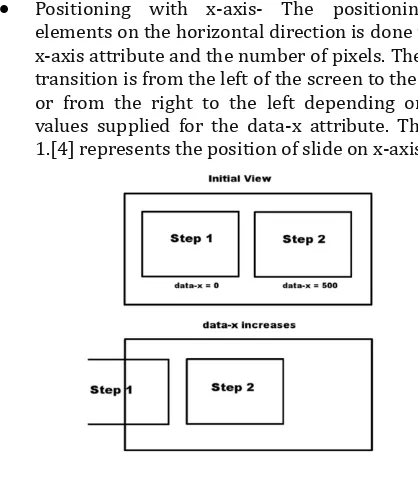
Positioning with x-axis- The positioning of elements on the horizontal direction is done using x-axis attribute and the number of pixels. The step transition is from the left of the screen to the right, or from the right to the left depending on the values supplied for the data-x attribute. The Fig 1.[4] represents the position of slide on x-axis.Fig -1: Position of slide on x-axis
© 2017, IRJET | Impact Factor value: 5.181 | ISO 9001:2008 Certified Journal
| Page
2166
Fig -2: Position of slide on y-axis
[image:3.595.95.244.183.377.2]
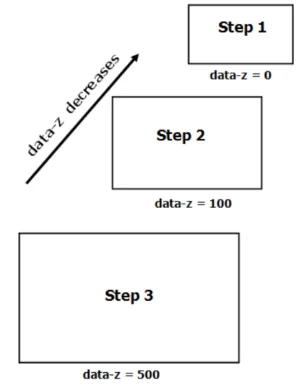
Positioning with z-axis- Positioning the elements on the z axis is a difficult task. The data-z attribute is used to define positions in the z direction. The Fig 3.[4] represents the position of slide on z-axis.Fig-3:Position of slide on z-axis
3.2 Rotating Effects
[image:3.595.353.536.312.454.2]
Rotation around the x axis- The data-rotate-x attribute is used to rotate elements around the x axis. The x axis is positioned from the left to the right of ones screen in the horizontal direction. The Fig4.[4] represents the rotation around x-axis.Fig -4: Rotation around X axis
Rotation around the y axis- The y axis is positioned from the bottom to the top of our screen. The data-rotate-y attribute is used to rotate the elements around the y axis. The Fig 5.[4] represents rotation around y-axis.Fig -5: Rotation around Y axis
Rotation around the z axis- The z axis is placed into or out of your screen and hence not visible by default. The data-rotate-z attribute is used to rotate elements around the z axis. The Fig 6.[4] represents rotation around z-axis.Fig -6: Rotation around Z axis
3.3 Scaling Effects
[image:3.595.92.233.506.652.2]Scaling up and down can be considered as zoom-out and zoom-in. Scaling is not relative to the scaling of other steps. Scaling is purely a higher or lower ratio of its original dimensions effects. A default data-scale value of each step is equal to 1. The Fig 7.[4] represents the scaling of the slide.
Fig -7: Scaling of the slide
4. IMPLEMENTATION
[image:3.595.369.499.574.666.2]© 2017, IRJET | Impact Factor value: 5.181 | ISO 9001:2008 Certified Journal
| Page
2167
simple to provide main presentation creation
functionalities
4.1 Default Configuration
Default configurations of the impress library are located in the impress.js file using the defaults variable. var defaults = {
width: 1024, height: 768, maxScale: 1, minScale: 0, perspective: 1000, transitionDuration: 1000 };
width: This controls the width of the window scaling process. This value is converted into pixels through the code. If a value higher than 1024 is used then the width of the steps are narrowed.
height: This controls the height of the window scaling process. This value is converted into pixels through the code. If a value higher than 768 is used then the height of the steps are narrowed.
maxScale: This controls the maximum scale in the
window scaling process. Decreasing this value may result in change of the look and feel of presentation on larger screens.
minScale: This controls the minimum scale in the
window scaling process. Increasing this value may change the look and feel of the presentation on smaller screens.
perspective: This defines the distance from the presentation elements with the z axis. Using a value of 0 will prevent any 3D effects in the presentation.
transitionDuration: This specifies the time
between two step transitions. The default value of 1000 means that the steps will be transferred in 1 second. The value can be increased in multiples of 1000 to increase the time duration between steps.[3]
4.2 Understanding the impress API functions
There are four useful API functions that can be used to customize the functionality of presenting information in various techniques.
var api = impress();
impress().init is used to initialize presentations.
The following list contains the impress.js API methods and their respective functionality:
api.init(): This method initializes the presentation.
api.next(): This method moves to the next step of
the presentation, once the presentation starts.
api.prev(): This method moves to the previous step of the presentation.
api.goto(id): This method moves the presentation to the step given by its index number ID or the DOM element inside the next function. The function accepts the element and duration as the two parameters. It also checks whether the presentation is initialized.[3]
4.3 Automating Presentation
Automating presentation can be used to improve ones skill. It can be useful when one is bound to deliver the presentation in a limited time period. The presentation is manually controlled as its hard to automate presentation with predefined time interval.[3]
<script>
var api = impress(); api.init();
$(document).ready(function(){ var interval = setInterval(function(){ api.next();
},5000); }); </script>
4.4 Graphical User Interface
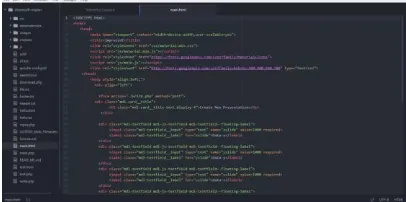
[image:4.595.326.529.539.640.2]A GUI is made for the simplicity of the users who feel difficulty in coding web technologies. Presently user needs to code to do a presentation using impress.js framework. The GUI will thus make life easier for presentation makers as it would only need a browser with an internet connection to create presentations.
Fig -8: Code for the main page of the GUI
© 2017, IRJET | Impact Factor value: 5.181 | ISO 9001:2008 Certified Journal
| Page
2168
4.5 Android Application
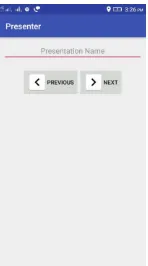
[image:5.595.125.199.163.296.2]The android based application is used to control the presentation remotely through the use of the smart phone. The application is made using android studio and Firebase. It will hence enhance the presentation effect.
Fig -10: Screenshot of the Android Application
5. COMPARISON BETWEEN impress.js AND PREZI
The table represents the comparison between the two presentational frameworks impress.js and Prezi[2].Table -1: Comparison
Impress.js Prezi
Open source Licensed
Software independent Software dependent
Free for use Free for a limited time
Better customization Limited customization
Cross-platform compatible Platform dependent
6. CONCLUSION
impress.js is hence a cross platform
presentational framework, that enables us to make simple presentations and gives a better effect compared to other presentation software. impress.js can be used to create impressive effects in the presentation and customizes the library code as per the need. Customization can be made to default configuration. The API functions helps in providing custom behaviors such as automating presentations. impress.js allows us to create presentations in full dimensions of the browser window as well as inside a container with specific dimensions.
7. FUTURE ENHANCEMENT
Addition of different types of fonts will be made available. The Preview of the presentation will be allowed at the time of creating the presentation. Editing option will be made available in the future. Addition of videos and other media will also be made available. Lastly, better GUI will be available for impress.js framework and android application.
REFERENCES
[1]
A. Spernjak, “Usefulness of Prezi and
PowerPoint presentation”,
MIPRO 2014, 26-30 May 2014
[2]
Brian E. Perron and Alyson G. Stearns, “A
Review of a Presentation Technology: Prezi”, SAGE
2010.
[3]
https://github.com/impress/impress.js/
[4]