5
X
October 2017
Web Performance Testing Tools – A Review
Shalini1, Jawahar Thakur21, 2
Department of Computer Science, Himachal Pradesh University, Shimla, India.
Abstract: Performance testing is a process of determining the system parameters in terms of responsiveness and stability under various loads. The focus of performance testing is checking speed, stability, and scalability of a software program. Performance testing is necessary before marketing any software product. There are a wide variety of performance testing tools available in the market. The tools used for testing depend on factors response time, type of testing, throughput, memory and CPU utilization, language support, browser support, etc. In this paper various performance testing tools are reviewed on the basis of their attributes, types of testing, their advantages and disadvantages.
Keywords: Performance, testing, scalability, stability, product, responsiveness, speed, tools.
I. INTRODUCTION
Web application performance testing is an emerging and important field of software engineering. As web applications become more common and complex, the need for performance testing is also increasing. Performance testing [1] is used to determine the time required to perform a task by the system and it provides stability of the system under different load conditions. It identifies bottlenecks of the system and provides good quality of service to users.Performance characteristics have many aspects such as workload, Number of users, hardware configuration, CPU utilization etc. There are various types of performance testing such as load testing, stress testing, volume testing, endurance testing, spike testing, scalability testing. Among these load testing is widely used. Most of the performance analysts rely heavily on load testing. Load testing generally refers to a process of assessing the performance of system while putting demand on system [7]. It is important to specify load requirements before testing begins. Due to exponential growth of web -applications, vast number of users, access web applications. To handle such a large number of users, it is important to monitor the performance of web applications. So a process of monitoring an testing performance of web applications under normal load and anticipated peak load condition is done by load testing .Various load testing tools are used for monitoring performance of web applications under various loads [8].
The research has been organized into different setions. Sections I give the introduction about performance testing and why it is important. Section II describes the types of performance testing. Section III discusses prior related works. In section IV, overview of web performance testing tools is given. Section V concludes the overall research work.
II. PERFORMANCETESTING
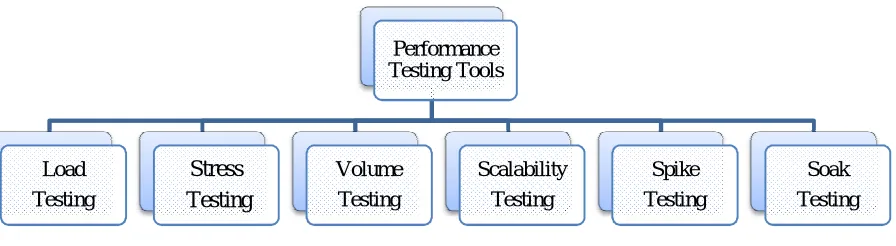
[image:2.612.74.522.570.693.2]Performance testing is important for analyzing and monitoring performance of web applications. There are various types of performance testing [2] that is used to measure performance that is how well the system performs under various load. The various types of performance testing are shown in fig 1.1.
FIGURE 1.1 Types of Performance Testing Performance
Testing Tools
Load Testing
Stress Testing
Volume Testing
Scalability Testing
Spike Testing
A. Load Testing:
It determines a system's performance under real-life load conditions and helps to determine how the application behaves when multiple users access it simultaneously.
1) Example:
a) Popular toy store Toysrus.com, could not handle the increased traffic generated by their advertising campaign resulting in loss of both marketing dollars, and potential toy sales.
b) Encyclopedia Britannica declared free access to their online database as a promotional offer. They were not able to keep up with the onslaught of traffic for weeks [16].
B. Stress Testing
It is used to test the stability & reliability of the system. This test mainly determines the system on its robustness and error handling under extremely heavy load conditions. It is done to make sure that the system would not crash under crunch situations.
1) Example: During festival time, an online shopping site may witness a spike in traffic, or when it announces a sale [17].
C. Volume Testing
Volume testing is done to analyze the system performance increasing the volume of data in the database. With the help of Volume testing, the impact on response time and system behavior can be studied when exposed to a high volume of data [20].
1) Example:
a) Testing a music website behavior when there are millions of users to download the song.
D. Scalability Testing:
Scalability testing ensures that an application can handle the projected increase in user traffic, data volume, transaction counts frequency, etc... The basic idea behind scalability testing is to measure at point the application stops scaling and identify the reason behind it [18].
1) Example:An eCommerce site may be able to handle orders for up to 1000 users at a time, but scalability testing can be
performed to check if it will be able to handle higher loads during peak shopping seasons. [21]
E. Spike Testing:
The process of increasing the load suddenly and analyzing the behavior, whether it degrade or manage the changes in load.
1) Example:
a) Consider a framework intended to deal with 1000 simultaneous clients. When one more client tries to enter the framework, it may give a message that framework is as of now full and no one can sign in right now. Another method for dealing with is to enable the client to enter the framework yet framework execution may get crumbled. The framework may give a message that there could be an execution issue when framework over-burdens.
F. Soak Testing
Refers to the testing in which, the System under Load (SUL) is tested & verified so that it can withstand a huge volume of the load for an extended period of time
1) Example:
a) In the case of banking domain when there is a large amount of data from merchants, the tester will put the system under load continuously for 70hrs to 150 hrs to check how the application behaves during this loading period [19].
III.RELATEDWORK
This section describes the background study of web performance testing tools. It is carried out using research papers, books, articles and the internet.
tool that uses a great browser automation engine. i.e. webdriver with a clean ruby API. The performance of these testing tools is evaluated and compared. Their implication and results are presented and discussed. By performance evaluation it is clear that the selenium webdriver is a better tool than water web driver.Every browser requires a different library in case of water webdriver.Watir is suitable under certain specific situation, but the selenium web driver is a better choice in various conditions like using domain specific language.
Vandana chandel et al. [10] gave a comparative study of automated tools Apache JMeter, Load Runner, QTP. These tools are compared on the basis of their performance, speed, throughput and efficiency. These tools are evaluated on the basis of different parameters, i.e. unlimited load generator, ease of installation, download, performance, result reporting, cost, technical level and stability. It is concluded that Apache JMeter is the tool to go forward with. It had simple, clean user interface that shows what is going on without trying to do too much, and offers great power and simplicity with its uniqueness. Moreover, it is free of cost and having complete portability and 100% Java purity.
Sandeep Bhatti, Raj Kumari [12] presents a comparison of different load testing tools for testing a web application. These load testing tools were compared on the basis of different measurements Language Used, Operating System, Protocol, Development Year, Language Support, Browser Support, and Tool Architecture. From this analysis, it is concluded that Neoloadis the best tool for load testing due to its script less design and visual programming. This tool has property of automatic detection and handling of application specific parameters, Drag and drop functions for if statements and loops, records HTTP traffic between server requests and response and analyzes results using real time graphs and statistics.
Khaled M. Mustafa et al. [11] gave the classification and distribution of a set of testing tools over the types of testing (testing methods) for three types of softwares. The software types are web application, application software, and network protocol. Based on their study and analysis of the testing tools, it is concluded that testing tools for the embedded and system applications are very limited, for web applications, software products, the open source testing methods are restricted, the testing tools for functional testing in both the web applications and application software product are very common and for the network software products, there is no testing tool for system, acceptance, unit, functional, and regression testing. Shariq Hussain et al. [5] Present a study of three popular open-source tools JMeter, SoapUI and Storm and compared them in terms of their features, usability, performance, and software requirements. The comparison is made on several quality factors, including response time, throughput, and usability. Tools are evaluated by collecting the web services and the test results. It is concluded that this comparison may help researchers give an informative overview with potential benefits of open-source testing tools, and also help in the promotion and development of open source testing tools.
Reenu Bhatiya, Anita Ganpati [4] evaluated performance testing tools, namely Neoload, Load Impact, Loadster, load and Webload. The basic objective of their study is to provide basic information about the tools on the basis of their properties and characteristics. An empirical study is also carried out on the basis of parameters response time, throughput, memory utilization, CPU utilization and hits per second. From this study it is concluded that these tools show different behavior under different parameters. Neoload is better in terms of both memory utilization and CPU utilization. Webload is better in terms of response time and throughput. Therefore, it is concluded that Webload has better performance from LoadUI, Load Impact, Loadster and Neoload.
Rina, Sanjay Tyagi [22] introduced three performance testing tools, namely Neoload, WAPT, Loadster and their comparison. The comparison is carried out in terms of different performance parameters, i.e. throughput, response time, number of hit pages, error rate, memory and CPU utilization. Through this evaluation, it is analyzed that these tools generate different parameter results in different browsers. It is concluded that WAPT take less average response time than loadster and Neolad, Errors are zero in all browsers, total hits are higher in WAPT than other two tools. In Neoload average response time is less, average hits value is high and average throughput is higher than Loadster in all browsers. Neoload is better than Loadster.From this discussion, it is found that WAPT performance testing tool is the best in all these three tools.
Shagun Bhardwaj and Aman Kumar Sharma[9] depict the comparison of performance testing tools. The comparison is done on the basis of response time parameter and an average response time is calculated for a website. From observing results it can be concluded that each tool has a different internal structure and different algorithm to calculate these parameters which may have resulted in the difference observed in the results which form the basis of a comparison.It is concluded that ApacheJmeter, fwptt and httprider performance testing tools can be used for load testing of web sites with multiple virtual users and load handling capacity of a website can be tested with these performance testing tools.
IV.COMPARISONOFWEBPERFORMANCETESTINGTOOLS
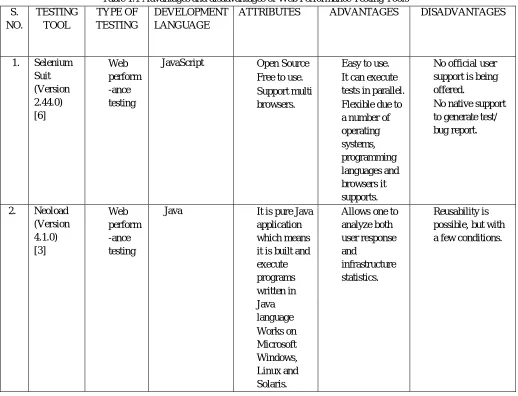
[image:5.612.48.566.239.635.2]The web performance tools on the basis of their attributes, types of testing, advantaged, disadvantages and versions of the tools are shown in table 1.1.
Table 1.1 Advantages and disadvantages of Web Performance Testing Tools S.
NO.
TESTING TOOL
TYPE OF TESTING
DEVELOPMENT LANGUAGE
ATTRIBUTES ADVANTAGES DISADVANTAGES
12W 1. Selenium Suit (Version 2.44.0) [6]
Web
perform -ance testing
JavaScript Open Source
Free to use.
Support multi browsers.
Easy to use.
It can execute tests in parallel.
Flexible due to a number of operating systems, programming languages and browsers it supports.
No official user support is being offered.
No native support to generate test/ bug report.
2. Neoload (Version 4.1.0) [3]
Web
perform -ance testing
Java It is pure Java application which means it is built and execute programs written in Java language
Works on Microsoft Windows, Linux and Solaris.
Allows one to analyze both user response and
infrastructure statistics.
3. WAPT (Version 8.5) [3]
Load testing
Stress testing
Perform -ance testing
- Quick, efficient and frequent.
Provides detailed information about the virtual users and output to users during load testing.
Advanced error reporting
Fast test record and design.
Simulation of real users and conditions.
Missing features of changing the website addresses to reuse recorded scenarios on different environments that run on different URLs.
4. Loadster (ver 3.0) [3]
Load testing
Stress testing
HTML Supports only html
language.
Provide multi browser support
Works on Microsoft windows
Effectively used to identify performance bottlenecks in web
applications
It takes more response time.
5. JMeter (ver 3.0) [14]
Perform ance testing
Load testing
Java Friendly GUI.
Easy Installation.
Platform independent.
Performance is tested on both static and dynamic resources
In this tool GUI is used for faster test plan and debugging
Cannot record
HTTPS Communication.
Reporting
framework has very limited features.
6. Load Runner (ver 12.50) [14]
Load testing
Perform ance testing
C No need to install it on the server under test
It uses native monitors.
An Excellent monitoring and analysis interface.
Automatically
records the performance of the
client/server during the test.
Monitor the
network and server resource to help improve the performance.
The only
disadvantage is the prohibitive cost associated with the tool.
Additional
investments needed to procure licenses for new protocol support
7. Load Impact [4]
Load testing
Java Supports XML and java
applications.
Compatible with Firefox, IE, Chrome
It generates traffic to the website by simulating users so as to find the stress and maximum load
and Safari. it can work.
8. LoadUI (ver 2.6.8) [4]
Load testing
Java Supports multi browsers.
Compatible with cross platform OS.
Supports many
technologies.
Easy-to-reach
customer support.
Automatic
bottleneck detection.
Can only run on windows operating system.
9. Webload (ver 10.3.1) [4]
Load testing
Java Pure JAVA application
Supports XML and JAVA.
Compatible with Firefox, IE, Chrome, Safari.
Supports large
scale performance testing with heavy load.
Does not support RDP
and RTE
10. Load Storm [12]
Load testing
- No need of Scripting Language.
Used for measuring performance of web applications in which own load test plan, testing criteria and scenarios
can be generated.
Compatible with windows operating system only.
11. Httperf [12]
Perform ance testing
Ruby Compatible with Windows and Linux.
Supports HTTP protocols.
Language used and support is Ruby.
Widely used in http servers.The goal of this tool is to identify how many responses a particular server can generate.
Efficiency depends upon the response rate.
V. CONCLUSIONANDFUTUREWORK
applications according to performance requirement. It is difficult to compare tools because many parameter values are not considered in all tools. JMeter is easy to install, has friendly GUI and it is platform independent, while other tools don’t provide the same features. Loadster and LoadUI provide automatic bottleneck detection, while other testing tools don’t have this particular feature. So it is concluded that testing tools can be selected according to the requirements.
This research work can be extended to more tools with new versions of the tools and different parameters to provide more information about the web performance testing tools.
REFERENCES
[1] AgileloadBlog (2012), Application Performance testing basics [Online] Available:
http://www.agileload.com/agileload//blog/2012/11/09/application-performance-testing-basics
[2] Ms. Sharmila S., E Ramadevi., “Analysis of performance testing on web applications”, International Journal of Advanced Research in Computer and Communication Engineering, Vol 3, March 2014.
[3] Rina, Sanjay Tyagi, “A Comparative Study of Performance Testing Tools”, International Journal of advanced Research in Computer Science and Software Engineering (IJARCSSE), Volume 3, Issue 5, May 2013.
[4] Bhatia Reenu, Anita Ganpati, “In Depth Analysis of Web Performance Testing Tools”,IRACST Engineering Science and Technology: An Internationa Journal (ESTIJ), Vol.6, no. 5, Sept-Oct 2016.
[5] Hussain Antawan, Mark Kellogg, “Automating Functional Tests Using Selenium”, Proceeding of AGILE Conference IEEE. 2006. [6] Angmo Rigzin, Monika Sharma," Performance Evaluation of Web Based Automation Testing Tools" IEEE 2014.
[7] Jiang Ahmed Z.M., E Hassan., G. Hamann and P Flora., “Automatic Identification of Load Testing Problems”, IEEE 2008. [8] Dhiauddin M., M. Suffian, F. Rizal Fahrurazi, “Performance testing: Analyzing the difference of Response time between performance testing tools”,
International Conference on Ccomputer and Information Science (ICCIS), 2012.
[9] Bhardwaj Shagun, Aman Sharma, “Performance Testing Tools: A Comparative Analysis”, International Journal of Engineering Technology, Management and Applied Sciences, April 2015, Volume 3, Issue 4.
[10] Chandel Vandana, Shilpa Patial and Sonal Guleria, “Comparative Study of Testing Tool ApacheJMeter and Load Runner”, International Journal of Computing and Corporate Research (IJCCR), Volume 3 Issue 3May, 2013.
[11] Mustafa M Khalid, Rafa E Al-Qutaish,Mohamad I Muhairat, “Classification of Software Testing Tools Based on the Software Testing Methods ”, Second International Conference on Computer and Electrical Engineering IEEE 2009.
[12] Bhatti Sandeep, Raj Kumari, “Comparative Study of Load Testing Tool”, International Journal of Innovative Research in Computer and Communication Engineering (IJIRCCE), Volume 3, Issue 3, March 2015.
[13] Sharma Jagdish, Monika Sharma, “A Comprehensive review of web-based Automation Testing Tools”, International Journal of Innovative Research in Computer and Communication Engineering (IJIRCCE),Volume 3, issue 10, October 2015.
[14] Kumar Kiran, Anupama Saha, Dharmendra Chahar, Niranjan Murthy, “Comparative Study on Performance Testing with JMeter”, International Journal of Advanced Research in Computer and Communication Engineering (IJARCCE), Volume 5, Special Issue 2, October 2016.
[15] Singh Inderjeet, Bindia Tarika, “Comparative Analysis of Open Source Automated Software Testing Tools: Selenium, Sikuli, Watir ”, International Journal of Information and Computation Technology, Volume 4, Issue 15,2014
[16] https://www.guru99.com/load-testing-tutorial.html
[17] https://www.guru99.com/stress-testing-tutorial.html [18] https://www.guru99.com/scalability-testing.html [19] https://www.guru99.com/soak-testing.html
[20] https://www.guru99.com/volume-testing.html