TITLE
COMPARISON ON CORRECTNESS, TIME TAKEN AND MEMORY USED IN WEB APPLICATIONS USING UNIT AND INTEGRATION TESTING
ELHADI ELFITORY ALGARAI
A thesis submitted in
fulfillment of the requirements for the award of the Degree of Master of Computer Science (Software Engineering)
The Department of Software Engineering
Faculty of Computer Science and Information Technology Universiti Tun Hussein Onn Malaysia
ABSTRACT
vi
ABSTRAK
CONTENTS
TITLE i
DECLARATION ii
DEDICATION iii
ACKNOWLEDGEMENT iv
ABSTRACT v
ABSTRAK vi
CONTENTS vii
LIST OF TABLE x
LIST OF FIGURES xii
LIST OF SYMBOLS AND ABBREVIATIONS xii
CHAPTER 1 INTRODUCTION 1
1.1 Background of Study 1
1.2 Problem Statement 3
1.3 Project Objectives 4
1.4 Scope of Project 4
1.5 Thesis Outline 4
CHAPTER 2 LITERATURE REVIEW 5
2.1 Introduction 5
2.2 Software Testing 5
2.2.1 Web Application Testing 5
2.2.2 Automated Testing 6
2.2.3 Unit Testing 6
2.2.4 Integration Testing 7
2.3 Selenium Tool 9
2.3.1 Selenium components 9
viii
2.4 Testing Challenges 11
2.4.1 Inconsistent Infrastructure and Environment 11 2.4.2 Inconsistent Interaction Models 12 2.4.3 Distributed Nature of Systems 12 2.4.4 Performance and Reliability Issues to Heterogeneity 12
2.4.5 Interoperability 13
2.5 Performance Parameters for Testing 13 2.6 Magnitude of Relative Error for Performance Parameters 14
2.7 Related Work 15
2.8 Summary 16
CHAPTER 3 METHODOLOGY 18
3.1 Introduction 18
3.2 Flow Chart of the Project Work 19
3.3 Creating two Case Studies 20
3.4 Application Unit and Integration Testing in Two Case Study 120 3.4.1 Test Cases for Integration Testing in SISPEK System20 3.4.2 Test Cases for Unit Testing in SISPEK System 25 3.5 Application Unit and Integration Testing in Two Case Study 26 3.5.1 Test cases for Integration Testing in Woodman 27 3.5.2 Test cases for Unit Testing in Woodman 31
3.6 Results Analysis 33
3.7 Summary 33
CHAPTER 4 IMPLEMENTATION & RESULTS ANALYSIS 34
4.1 Introduction 34
4.4 Summary 82
CHAPTER 5 CONCLUSIONS 83
5.1 Objectives Achievement 83
5.2 Conclusion 84
5.3 Future Work 83
REFERENCES 85
x
LIST OF TABLE
4.28 Test cases in Woodman using Integration testing 51 4.29 Experiment results for Test Login using Integration testing in Woodman 53 4.30 Experiment results for Test View User using Integration in Woodman 53 4.31 Experiment results for Test Creating User using Integration in Woodman 54 4.32 Experiment results for Test Update User using Integration in Woodman 54 4.33 Experiment results for Test Deleting User using Integration in Woodman 55 4.34 Results for Test Creating Supervisor using Integration in Woodman 55 4.35 Experiment results to Updating Supervisor using Integration in Woodman 56 4.36 Experiment results to Deleting Supervisor using Integration in Woodman 56 4.37 Experiment results in terms of Correctness using Unit testing in SISPEK 57 4.38 Experiment results in terms of Correctness using Integration in SISPEK 59 4.39 Experiment results in terms of Time Taken using Unit testing in SISPEK 61 4.40 Experiment results in terms of Time Taken using Integration in SISPEK 63 4.41 Experiment results in terms of Memory used using Unit in SISPEK 65 4.42 Experiment results in terms of Memory using Integration in SISPEK 67
4.43 Criteria in SISPEK System 69
4.44 Experiment results in terms of Correctness using Unit in Woodman 70 4.45 Experiment results in terms of Correctness using Integration in Woodman 72 4.46 Experiment results in terms of Time Taken using Unit in Woodman 74 4.47 Experiment results in terms of Time Taken using Integration in Woodman 76 4.48 Experiment results in terms of Memory used using Unit in Woodman 78 4.49 Experiment results in terms of Memory using Integration in Woodman 80
xii
LIST OF FIGURES
LIST OF SYMBOLS AND ABBREVIATIONS
SISPEK – SistemPendaftaranPerkakasanElektrikPelajar Woodman – SistemPemantauanPekerjaAsing
CHAPTER 1
INTRODUCTION
1.1 Background of Study
Testing is a major component of any software engineering process meant to produce high quality applications. The testing aims at finding errors in the tested object and give confidence in its accurate performance by executing the tested object with input values. Web applications are the fastest growing classes of software systems today. They are being used to support a wide range of important activities: business transaction, scientific activities (information sharing), and medical systems (an expert system-based diagnoses). Web applications have been deployed at a fast pace and have helped in fast adoption, but have also decreased the quality of the software. Therefore, all the entities of web application must be tested. In order to make a web based application widely and successfully adopted, the testing methodologies must be flexible, automatic, and able to handle their dynamic nature (Arora & Sinha, 2012).
Unit testing is a method by which the individual units of source code, the sets of one or more computer program modules, together with the associated control data, usage procedures, and operating procedures are tested to determine if they are fit for use (William & Nathaniel, 2011).
Ultimately, this helps to identify failures in the algorithms and/or logic to help improve the quality of the code that composes a certain function. As more and more tests were being written, it ended up creating a suite of tests that can run at any time during development to continually verify the quality of the work.
A second advantage to approaching development from a unit testing perspective is that, a code that is easy to test will be written. Since the unit testing requires that the code is easily testable, it means that the code must support this particular type of evaluation. As such, it is more likely to have a higher number of smaller, more focused functions that provide a single operation on a set of data rather than having large functions that perform a number of different operations.
A third advantage for writing solid unit tests and well-tested code is that future changes from the breaking functionality can be prevented. Since the code is being tested as the functionality is being introduced, a suite of test cases will start to develop that can be run each time the logic is being worked on. When a failure happens, it is known that there is something used to address the Integration test (Zhiyong et al., 2012).
Integration testing (sometimes called integration and testing, abbreviated I&T) is the phase in software testing where individual software modules are combined and tested as a group. It occurs after unit testing, before validation testing. Integration testing takes as its input modules that have been unit tested and teamed in larger aggregates, then the defined tests are applied in an integration test plan on those aggregates, and the integrated system is delivered as its output that is ready for system testing (Sacha et al., 2010).
Integration testing is a logical extension of unit testing. In it‟s the simplest form; two units that have already been tested are combined into a component and the interface between them is tested. A component, in this sense, refers to an integrated aggregate of more than one unit. In a realistic scenario, many units are combined into components, which in turn, aggregated into even larger parts of the program. The idea is to test combinations of pieces and eventually expand the process to test the modules with other groups. Eventually, all the modules making up a process are tested together. Beyond that, if the program is composed of more than one process, they should be tested in pairs rather than all at once (Sebastian, 2009).
3
before combining units. Any errors that are discovered when combining units are likely related to the interface between units. This method reduces the number of possibilities to a far simpler level of analysis (Giuseppe & Di, 2012).
1.2 Problem Statement
1.3 Project Objectives
The objectives of this research are:
(i) To generate test cases for web application using integration technique in two case studies; Sistem Pemantauan Pekerja Asing Woodman Estate Sarawak and Sistem Pendaftaran Perkakasan Elektrik Pelajar KKTDT (SISPEK). (ii) To generate test cases for web application using Unit technique in two case
studies; Sistem Pemantauan PekerjaAsing Woodman Estate Sarawak and Sistem Pendaftaran Perkakasan ElektrikPelajar KKTDT (SISPEK).
(iii) To compare the results are using performance parameters (Correctness, Memory Used and Time Taken) in web application using unit and integration testing for the two case studies.
1.4 Scope of Project
This study focuses on the problem of web application testing. Therefore, various methodologies are proposed to Web application testing. The integration and Unit techniques are used to test a Web application. These two testing techniques (Correctness, Memory Used and Time Taken) of Web application testing will be compared using integration and unit for the two case studies.
1.5 Thesis Outline
5
2 CHAPTER 2
LITERATURE REVIEW
2.1 INTRODUCTION
The overall goals of this chapter are establishing the significance of the general field of study. The greater part of this chapter is about critical evaluation of different methodologies used in this field so as to identify the appropriate approach for investigating objectives of the project.
2.2 Software Testing
Software testing is a costly and time-consuming process but is essential if a high quality product is to be produced. The importance of software testing and establishment of good testing skills must begin as early as possible in computing curricula complementing programming skills. Various techniques exist for test design and execution, Some tests do not involve running the system at all, some require inside knowledge of how the system works, some run step by step by the tester, while in other cases, a computer does the test execution, though skilled test engineers must perform the test design and results interpretation, automated testing or testing using simulators (Jim & Kalpana, 2005).
2.2.1 Web Application Testing
enhance the efficiency and effectiveness of traditional search-based techniques, which exploit both static and dynamic analysis. The combined approach yields a 54% increase in branch coverage and a 30% reduction in test effort. Each improvement is separately evaluated in an empirical study on 6 real world web applications (Nadia, 2011).
Models are considered essential steps in capturing different system behaviours and simplifying the analysis that is required to check or improve the quality of software. The verification and testing of web software require effective modelling techniques that address the specific challenges of web applications. In this study, 24 different modelling methods were used in web site verification and testing was measured. Based on a short catalogue of desirable properties of web applications that require analysis, two different views of the methods are presented: a general categorization by modelling level, and a detailed comparison based on property coverage (Nadia, 2011).
2.2.2 Automated Testing
Trends are in an automated testing for enterprise systems. The results of an industry market research survey commissioned by Work soft Inc. were presented and performed by an independent third party to study the state of test automation in operating companies. The results include responses from 699 respondents at 504 companies, primarily located in North America and Europe, and most with annual revenues greater than $500 million USD. The overwhelming majority (93.4%) are companies that use SAP, although a small number use other packaged software as their primary ERP system (Reiner, 2013).
2.2.3 Unit Testing
Unit testing is defined as the testing of a single unit, separated from other units of the program (Eklun Fernlund, 1 ).
7
In object-oriented development process, a unit is normally a class or an interdependent cluster of classes, i.e. it‟s not just a snapshot or a script of code that does some specific work ( inder Robert, 1 ).
The testing of the lower levels of a system (i.e. the unit testing) will require highly technical testers. Also, low-level testing is a difficult, time-consuming and expensive task to be accomplished (Hutcheson Marnie, 2003). Less and less low-level testing is done in top-down approaches to software development, arguing that “if the system seems to give the correct response to the user, why look any further in favor of unit testing. It has been recognised that “the problem is that the really tough, expensive faults often reside in the lower-level areas (Hutcheson Marnie, 2003).
Another argument for performing unit testing for the software verification is that the unit testing will localize the faults found to the unit tested. If unit testing is not performed, faults found later during integration testing of the system may lead to time-consuming work because there are too many places to look for the faults (Patton Ron, 2001).
Unit testing will help in removing local faults, but does not exercise the interactions among different units, whereas Integration testing is the activity of exercising such interactions by pulling together the different modules composing a system. It is characterized by involving different interacting units, which have been, in general, developed by different programmers. In this case the code is still visible, but with higher granularity (Alessandro, 2006).
2.2.4 Integration Testing
A technique defined (regarding both the unit testing and the integration testing test cases) for reducing the combinatorial explosion of the number of test cases for covering all combinations of polymorphic caller, , parameters, and related states. The technique is based on squares: a set of specific orthogonal arrays used to identify the subset of combinations of the state of each object and its dynamic type to be tested. The method ensures coverage of all pairwise combinations. It applies to single calls, but does not consider the combined effects of different calls (McGregor Korson, 1 4).
the states of objects. The method allows for identifying some infeasible combinations, and hence, limiting the number of generated test cases for integration testing, focusing on the integration order (Paradkar, 1 6).
The notion of method-message path (MM-path) has been introduced, and defined as a sequence of method executions linked by messages. For each identified MM-path, integration is performed by pulling together classes involved in the path and exercising the corresponding message sequence. More precisely, Jorgensen and Erickson identify two different levels for integration testing:
(i) Message quiescence: This level involves testing a method together with all methods it invokes, either directly or transitivly (McGregor & Korson, 1994). (ii) Event quiescence: This level is analogous to the message quiescence level, with difference that it is driven by the system level events. Testing at this level means exercising message chains (threads), such as the invocation of the first message of the chain is generated at the system interface level (i.e., the user interface) and, analogously, the invocation of the last message results in event that can be observed at the system interface level. An end-to-end thread is called an atomic system function Jorgensen Erickson,1 4).
The main drawback of this method is the difficulty in the identification of ASFs, which requires either the understanding of the whole system or an analysis of the source code (Jorgensen Erickson, 1 4).
9
2.3 Selenium Tool
Selenium is a portable software testing framework for web applications. It provides a record/playback tool for authoring tests without learning a test scripting language (Selenium IDE). It also provides a test domain-specific language (Selenese) to write tests in a number of popular programming languages including Java, C#, Groovy, Perl, PHP, Python and Ruby. The tests can then be run against most modern web browsers. Selenium deploys on Windows, Linux, and Macintosh platforms (Alan, 2010).
2.3.1 Selenium components
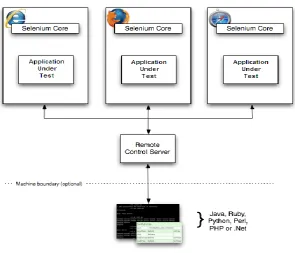
[image:19.595.171.467.456.709.2]The Selenium Server, which launches and kills browsers, interprets and runs the Selenese commands passed from the test program, and acts as a HTTP proxy, intercepting and verifying HTTP messages passed between the browser and the AUT Client libraries provide the interface between each programming language and the Selenium Server. Figure 3.1 displays a simplified architecture diagram.
The diagram shows that the client libraries communicate with the server passing each Selenium command for execution. Then the server passes the Selenium command to the browser using Selenium-Core JavaScript commands. The browser, using its JavaScript interpreter, executes the Selenium command. This runs the selenese action or verification specified in test script (Roy, 2012).
2.3.2 Performing the Unit and Integration Testing with Selenium
The generation of the test cases to unit testing is by writing the code compiler inside the first case study, as well as generation of the test cases to unit testing by writing the code compiler inside the second case study. Generation of test cases to integration testing is also by writing the code compiled inside first case study, and generation of the test cases to integration testing by writing the code compiled inside the second case study. All test cases executed are as follow:
(i) The Client driver will first establish a connection with the Selenium server. (ii) The Selenium Server will do the following:
It will create a session for that particular request.
It will launch the desired browser (specified in the code IE, FF, Chrome).
Loads the Selenium cores JavaScript file into specified browser (So as the selenium server will have to handle with the webpage for performing the Selenese action).
(iii) Now the Client driver will send the program that have been written in eclipse IDE as selenese (by making conversion) and send it to Selenium server. (iv) The Selenium server is intelligent enough to understand the selenese
command and triggers the corresponding JavaScript execution in the web browser.
(v) Here the Selenium Server act as a “Proxy Server” between the AUT (Application under Test) and actual browser, due to the restriction of “Same origin policy”. Selenium server performs “Proxy Injection”. eing a proxy gives the Selenium Server the capability of “lying” about the AUT‟s real URL.
11
(vii) Now, any operation or request that the browser makes will eventually pass through Selenium RC server to the actual webserver and vice versa.
At the end of the testing process, the selenium tool will display the following on the screen: correctness, time taken and memory (Alan, 2010).
Figure 2.2: Display Output of test Case (Alan, 2010)
2.4 Testing Challenges
The integration testing challenges are described, as the size of Web applications are growing due to the involvement of new emerging process like business processes and highly secure requirements from customers. The existing integrated solutions are the cheapest and the fastest way to develop such kinds of large Web-based applications. But testing of such application is a complex task due to its large size, integration of multilingual components, and use of different operating systems. The most important and commonly known challenges during integration testing are:
2.4.1 Inconsistent Infrastructure and Environment
2.4.2 Inconsistent Interaction Models
Web-based applications are based on number of different Web components, which are developed by a different group of teams with the use of different methods and approaches; in complex Web-based applications, control protocols and data models play key role in the reliable communication and interaction among different integrated subsystems. Control protocols are responsible for defining the rules on how integrated components interact to each other. Data models define the contents and format of communication between them. Since Web-based applications can be based on a number of different components, most of the time, different groups of developers are involved in development process (Jerry et al 2003).
2.4.3 Distributed Nature of Systems
Web-based applications are mostly developed under distributed environments, so the issues related to distributed systems, such as race condition and dead lock can be inherited. The distributed nature of systems can have a great impact on the working of Web-based applications, these issues can be solved during the integration testing. The existence of more than one version of the same software component generates multi version issues in the system (Jerry et al 2003).
2.4.4 Performance and Reliability Issues due to Heterogeneity
13
2.4.5 Interoperability
Interoperability is the ability of two or more systems, applications or components to exchange information and to use the information that has been exchanged. Interoperability itself is a critical testing challenge, which has further challenging factors and characteristics (Jerry et al 2003).
2.5 Performance Parameters for Testing
When a program is implemented to provide a concrete representation of an algorithm, the developers of this program are naturally concerned with the correctness and performance of the implementation. Software engineers must ensure that their software systems achieve an appropriate level of quality. Software verification is the process of ensuring that a program meets its intended specification. One technique that can assist during the specification, design, and implementation of a software system is software verification through correctness proof. Software testing, or the process of assessing the functionality and correctness of a program through execution or analysis, is another alternative for verifying a software system (Gregory, 2008).
practice helps in saving time and effort when executing test cases with higher probability of finding more failures, the test execution process involves allocating test time and resources, running tests, collecting execution information and measurements and observing results (Wasif, 2007).
There are two major groups of experimental evaluations for Memory Used: performance evaluation and semantic evaluation (debugging/testing/verification). The biggest challenge for performance evaluation of memories used is to propose benchmarks that are precise enough to emphasize Memory characteristics, but also realistic enough to match the behavior of common applications, Performance tests are generally longer than unit tests since they execute complex schedules to measure the performance of a Memory. More precisely, they use randomization and loops to test a large set of schedules (Derinet et al., 2008).
2.6 Magnitude of Relative Error (MRE) for Performance Parameters
To illustrate the problem of MRE, let us consider two prediction models A and B, respectively. If MRE of model B is significantly lower than MRE of model A, one would conclude that model is better than model A ( is “more accurate” than A in current software engineering terminology). To be able to draw the correct conclusion with regard to whether model A or model B is the best, it is crucial that the model evaluation metric selects the model that is closest to the true, Consider MRE ≤ 0.25 as acceptable for prediction models, and to get MRE follow the equation (Tron et al., 2002).
∑
where
N: Number of Values.
Y: Predicted Value.
15
2.7 Related Work
Several researchers have investigated many topics on the effectiveness and the efficiency of the regression testing (for both integration and unit testing) as summarized in the recent survey. While there is a large amount of work related to our thesis, only the most related topics on generated automated testing have been reviewed and discussed (Yoo Harman, 2010).
An automated approach for testing JavaScript web applications has been described and implemented in the tool . It combines the use of random test generation to explore the application‟s event space (i.e., the possible sequences of user-interface actions) with the use of symbolic execution for systematically exploring an application‟s value space (i.e., how the execution of control flow paths depends on input values). The main goal of their work is to find code injection vulnerabilities that result from untrusted data provided as arguments to, for example, eval. The symbolic execution part relies on an elaborated model for reasoning about string values and string operations (Saxena Akhawe, 2010).
The dynamic analysis has been described to construct a state-flow graph that models the states of an AJAX application‟s user-interface and transitions between these states. From this model, a set of equivalent static pages can be generated that can be used for various applications (e.g., applying search engines to their content, performing state-based testing). rawljax relied on a heuristically-based approach for detecting “ ”, i.e., elements of the DOM that may correspond to active user-interface components, and crawls the application by exercising these in some random order (Mesbah ozdag, 200 ).
A framework for Automated Testing of JavaScript Web Applications is introduced. The framework was aimed for feedback directed testing of JavaScript applications. The framework in a tool called Artemis has been implemented and it created several effective test generation algorithms by instantiating the framework with different prioritization functions and input generators that employ simple feedback mechanisms, the experimental results described stated that the basic algorithm, events, produces good coverage (69% on average) if enough tests are generated. However, if test generation is directed by coverage information and read-write sets, a slightly better level of coverage (72% on average) can be achieved, and sometimes with lesser tests (Shay Julian, 2011).
2.8 Summary
3 CHAPTER 3
METHODOLOGY
3.1 INTRODUCTION
3.2 Flow Chart of the Project Work
Figure 3.1: Flow Chart the Steps of the Project Work
Based on Figure 3.1, four phases are needed for applying Unit and Integration testing in two Case studies. They are 4 phases in the creating of two web application using the Yii Framework then using Unit testing and Integration testing in two Case studies. These phases are further discussed in the following sections.
Using Integration testing in Case Study 2
Using Unit testing in Case Study 2
Analysis and comparison of results
End Start
Using Integration testing in Case Study 1
Using Unit testing in Case Study 1
20
3.3 Creating two Case Studies
The case studies are the building of two web applications using the Yii framework (Student Registration System, and Woodman Estate System).
(i) First Case Study
The first system is the SISPEK (Hamiza, 2013) is mainly aimed to register the students‟ and the assets‟ information, in order to be used later to track the assets of the students.
(ii) Second Case Study
The second system, Woodman Estate (Nor, 2013), is mainly aimed to register the users, supervisors and workers‟ information, in order to be used to track the workers expiration date.
3.4 Application of Unit and Integration Testing in Two Case Study 1
In this section, the steps applied to the automated Integration and Unit testing by Selenium is explained in SISPEK.
3.4.1 Test Cases for Integration Testing in SISPEK System
3.4.1.1 Login Test
The integration test case steps are as the following:
(i) Open the web application and click the login link.
(ii) Ensure that the login page is opened by ensuring that the text “Login Admin/Staff” is available in the page.
(iii) Ensure that the login page contains an input field for the username. (iv) Type “admin” in the username field.
(v) Try to login by pressing on the login submit button.
(vi) Ensure that the web application showed an error that the password can‟t be blank.
(vii) Type “admin123” in the password field.
(viii) Try to login again by pressing on the login submit button. (ix) Ensure that the message “Password cannot be blank” has gone.
(x) Ensure that the web application has redirected the user to the home page that contains the logout link.
(xi) Run test case above with Selenium.
(xii) After applying the correct case, the errors in this test scenario were created (e.g. rename the field to ).
3.4.1.2 Create Students Test
The integration test case steps are as the following:
(i) Open the web application and click the login link. (ii) Type “admin” in the username field.
(iii) Type “admin123” in the password field.
(iv) Try to login by pressing on the login submit button. (v) lick on the link “ reate Student”.
(vi) Ensure that the creation form includes the appropriate elements and then fill them.
(vii) lick on the submit button “ reate”.
22
(ix) Run test case above with Selenium.
(x) After applying the correct case, the errors in this test scenario were created (e.g. rename the field full_name to fullname).
3.4.1.3 Updating Students Test
The integration test case steps are as the following:
(i) Open the web application and click the login link. (ii) Type “admin” in the username field.
(iii) Type “admin123” in the password field.
(iv) Try to login by pressing on the login submit button. (v) lick on the link “List Students”.
(vi) lick on the link “Update” link. (vii) Enter some new values.
(viii) Click on the “Save” button.
(ix) Ensure that the system updated the student correctly and has redirected to the view student page.
(x) Run test case above with Selenium.
(xi) After applying the correct case, the errors in this test scenario were created (e.g. rename the field to ).
3.4.1.4 Deleting Students Test
The integration test case steps are as the following:
(i) Open the web application and click the login link. (ii) Types “admin” in the username field.
(iii) Types “admin123” in the password field.
(iv) Try to login by pressing on the login submit button. (v) lick on the link “List Students”.
(vi) Ensure that the student 'Muhammad Rabeeh Saeed' is existed. (vii) Click on the first delete link.
(x) After applying the correct case, the errors in this test scenario were created (e.g. rename the link Delete to delete student).
3.4.1.5 Create Asset Test
The integration test case steps are as the following:
(i) Open the web application and click the login link. (ii) Type “staff” in the username field.
(iii) Type “staff123” in the password field.
(iv) Try to login by pressing on the login submit button. (v) lick on the link “ reate Asset”.
(vi) Ensure that the creation form includes the appropriate elements and then fill them.
(vii) Click on the submit button “ reate”.
(viii) Ensure that the system created the asset correctly and has redirected to the view asset page.
(ix) Run test case above with Selenium.
(x) After applying the correct case, the errors in this test scenario were created (e.g. rename the field to asset cateogry ).
3.4.1.6 Updating Asset Test
The integration test case steps are as the following:
(i) Open the web application and clicks the login link. (ii) Type “staff” in the username field.
(iii) Type “staff123” in the password field.
(iv) Try to login by pressing on the login submit button. (v) lick on the link “List Assets”.
(vi) lick on the link “Update” link. (vii) Enter some new values.
(viii) lick on the “Save” button.
(ix) Ensure that the system updated the asset correctly and has redirected to the view asset page.
24
(xi) After applying the correct case, the errors in this test scenario were created (e.g. rename the field cateogry to asset cateogry ).
3.4.1.7 Deleting Asset Test
The integration test case steps are as the following:
(i) Open the web application and click the login link. (ii) Type “staff” in the username field.
(iii) Type “staff123” in the password field.
(iv) Try to login by pressing on the login submit button. (v) lick on the link “List Assets”.
(vi) Ensure that the asset 'US Flash‟ is existed. (vii) Click on the first delete link.
(viii) Ensure that the asset 'USB Flash' is no longer existed. (ix) Run test case above with Selenium.
(x) After applying the correct case, the errors in this test scenario were created (e.g. rename the link to delete asset).
3.4.1.8 View Student Test
The integration test case steps are as the following:
(i) Open the web application and click the login link. (ii) Type “admin” in the username field.
(iii) Type “admin123” in the password field.
(iv) Try to login by pressing on the login submit button. (v) lick on the link “List Students”.
(vi) lick on the link “view” link. (vii) Enter some new values. (viii) lick on the “View” button.
(ix) Ensure that the system updated the student correctly and has redirected to the view student page.
(x) Run test case above with Selenium.
6 REFERENCES
Alessandro Orso. (2006). Integration Testing of Object-Oriented Software. College of Computing Georgia Institute of Technology.
Alan Richardson. (2010). Selenium Simplified A tutorial guide to using the Selenium API in Java with JUnit. http://www.compendiumdev.co.uk/selenium. Arora A., Sinha M. (2012). Web Application Testing. International Journal of
Scientific & Engineering Research, 3(2), ISSN 2229-5518.
Atif M. Memon. (2011). A Comprehensive Framework for Testing Graphical User Interfaces, University of Karachi.
Binder, Robert V. (1999). Testing object-oriented systems – models, patterns and tools Addison-Wesley. www.awl.com/cseng/.
Dorota Huizinga, Adam Kolawa. (2007). Automated Defect Prevention: Best Practices in Software Management. ISBN: 978-0-470-04212-0.
Derin Harmanci Pascal, Vincent Gramoli, Christof Fetzer. (2008). Testing Software Transactional Memories. University of Neuchâtel Switzerland, Dresden University of Technology Germany.
Edward Hieatt and Robert Mee. (2011). Going Faster: Testing The Web Application. http://computer.org/publications/dlib.
Giuseppe A. Di Lucca. (2012). Testing Web-based applications: The state of the art and future trends. Research Centre on Software Technology, University of Sannio, Via Traiano, 1, 82100 Benevento, Italy.
Giuseppe Antonio Di Lucca, Anna Rita Fasolino, Francesco Faralli, Ugo De Carlini. (2002). Testing Web Applications. Dipartimento di Informatica Sistemistica, Universita di Napoli Federico II ViaClaudio, Napoli, Italy.
86
Hong Zhu, Xudong He. (2001). A Study of Integration Testing and Software Regression at the Integration Level. Department of Computer Engineering and Science Case Westem Reserve University Cleveland, Ohio 44106.
Jim Collofello and Kalpana Vehathiri. (2005). An Environment for Training Computer Science Students on Software Testing. Department of Computer Science and Engineering, Arizona State University Tempe.
Jerry Zeyu Gao. (2003). Testing and Quality Assurance for Component-Based Software. www.artechhouse.com.
John Watkins. (2004). Testing IT an Off-the-Shelf Software Testing Process. ISBN 0-521-79546-X paperback.
Jorgensen and Erickson. (1994). Object-oriented integration testing. Grand Valley State Univ., Allendale, MI.
Manar H. Alalfi, James R. Cordy. (2010). Modelling methods for web application verification and testing: state of the art. School of omputing Queen’ University Kingston, Ontario, K7L 3N6, Canada.
McGregor and Korson. (1994). Testing of the polymorphic interactions of classes. Department of Computer Science Clemson University.
Mesbah A. and Van Deursen. (2009). Invariant-based automatic testing of AJAX User interfaces. Department of Software Technology Faculty of Electrical Engineering, Mathematics and Computer Science Delft University of
Technology.
Mesbah A. (2008). Crawling AJAX by inferring user interface state changes. Department of Software Technology Faculty of Electrical Engineering,
Mathematics and Computer Science Delft University of Technology.
Paradkar. (1996). Inter-Class Testing of O-O Software in the Presence of Polymorphism. Department of Computer Science North Carolina State University Raleigh, NC 27695-8206, USA.
Patton, Ron. (2001). Software testing. 800 E. 96th St., Indianapolis, Indiana, 46240 USA.
Prateek Saxena, Devdatta Akhawe, Steve Hanna, Feng Mao, Stephen McCamant, Dawn Song. (2010). A symbolic execution framework for JavaScript. Computer Science Division, EECS Department University of California,
Ramamoorthy C.V., Chandra C. (2005). System integration problems and approaches. Computer Science Division University of California, USA. Reiner Musier. (2013). Trends in Automated Testing For Enterprise Systems.
http://www.worksoft.com/.
Roy de Kleijn. (2012). Learning Selenium. http://leanpb.com/LearningSelenium. Sacha Reis, Andreas Metzger, and Klaus Poh. (2010). Integration Testing in Software Product Line Engineering: A Model-Based Technique. Software Systems Engineering, University of Duisburg-Essen,
Schutzenbahn 70,45117 Essen, Germany.
Sebastian Benz. (2009). Combining Test Case Generation for Component and Integration Testing. BMW Car IT GmbH Petuelring 116 80809 Munich, Germany.
Sanjeev Patwa and Anil Kumar Malviya. (2012). Reusability Metrics and Effect of Reusability on Testing of Object Oriented Systems. FASC, MITS (Deemed University), Lakshmangarh,Sikar, Raj., India.
Shay Artzi, Julian Dolby, Simon Holm Jensen, Anders Møller, Frank Tip. (2011). A Framework for Automated Testing of JavaScript Web Applications. IBM Research, Aarhus University.
Shay Artzi, Adam Kiezun, Julian Dolby, Frank Tip, Danny Dig, Amit Paradkar, Michael D. Ernst. (2008). Finding Bugs In Dynamic Web Applications. MIT Computer Science and Artificial Intelligence Lab, IBM T.J.Watson Research Center.
William Pugh, Nathaniel Ayewah. (2011). Unit Testing Concurrent Software. Dept. of Computer Science Univ. of Maryland College Park, MD.
Wasif Afzal. (2007). Metrics in Software Test Planning and Test Design Processes. School of Engineering Blekinge Institute of Technology.
Ye Wu. (2011). Modeling and Testing Web-based Applications. Information and Software Engineering Department George Mason University.