http://dx.doi.org/10.4236/ce.2014.517175
Managing Learning Evidence Using
ePortfolio
Shang Gao, Jo Coldwell-Neilson, Andrzej Goscinski
School of Information Technology, Deakin University, Waurn Ponds, Australia
Email: [email protected], [email protected], [email protected]
Received 22 August 2014; revised 18 September 2014; accepted 24 September 2014
Copyright © 2014 by authors and Scientific Research Publishing Inc.
This work is licensed under the Creative Commons Attribution International License (CC BY). http://creativecommons.org/licenses/by/4.0/
Abstract
This paper introduces ePortfolio and its use of managing learning evidence in an eLearning envi- ronment. The paper uses the outcomes of a recent project sponsored by Deakin University, Aus- tralia and examples from IT teaching practice based on CloudDeakin to explore how ePortfolios add value to personalized and reflective models of eLearning. ePortfolios are proved to be an ef- fective tool for discussion, information collection and reflection, and new ways of thinking about learning evidence management.
Keywords
eLearning, ePortfolio, Deakin University, CloudDeakin, Learning Evidence, Artefact
1. Introduction
eLearning tools and technologies have been widely used to support learner centered and personalized learning. Usually these eLearning tools extend traditional learning paradigms into new dynamic learning models through computer and web technologies. Features provided in an eLearning system normally include hypermedia-based learning resource authoring, assessment submission and result management, online forum and live consultation, adaptive/personalized instruction, learning progress monitoring, and lecture recordings, etc. However, there is one important feature which might have been undervalued or overlooked: learning evidence management and establishment of personal ePortfolio.
S. Gao et al.
all prompted interest in the benefits that electronic portfolios may bring to personal development planning (PDP) and to 21st century models of learning, teaching and assessment (Khan, 2008).
Cutting-edge research and development projects funded by Joint Information Systems Committee—JISC (Jisc, 2014) and other agencies also suggest the most pressing reason for taking a closer look at ePortfolios is the in- dication that use of these tools can promote more profound forms of eLearning.
This paper uses the outcomes of a recent project sponsored by Deakin University, Australia and examples from IT teaching practice based on CloudDeakin eLearning system to explore how ePortfolios can add value to personalized and reflective models of learning. Hope the experience inspires a wider variety of ePortfolio use across further, higher and continuing education.
In the following sections, we first introduce the concept of ePortfolio and an eLearning environment Cloud- Deakin, then take a year-one IT unit as an example describing our practice of using ePortfolio to manage learn- ing evidence within CloudDeakin, followed by a discussion on lessons learned through the practice. A conclu- sion is made at the end of this paper.
2. Background
A few key definitions and terms are to be clarified. The first is ePortfolio.
2.1. ePortfolio
According to Wikipedia, “An electronic portfolio (also known as an ePortfolio, e-portfolio, digital portfolio, or online portfolio) is a collection of electronic evidence assembled and managed by a user, usually on the Web.” (Wikipedia, 2014). If approaching ePortfolio specifically in an eLearning environment, the definition introduced in (Sutherland & Powell, 2007) might be more appropriate: “An ePortfolio is a purposeful aggregation of digital items—ideas, evidence, reflections, feedback etc, which ‘presents’ a selected audience with evidence of a per- son’s learning and/or ability.”
Actually the ideas of what an ePorfolio is are complex. The definitions might vary depending on the perspec- tive from which a person is referring to the concept. It can be a product created by learners, a collection of learning evidence, such as digital artefacts, or personal reflections. It can also be a tool or system used to create this kind of product, with which, learners collect, select, share and present learning evidence in ePortfolio re- lated processes.
In this paper, we adopt both of two meanings of ePortfolio. It is easy to differentiate ePortfolio product from ePortfolio process depending on the context.
Figure 1reveals the relationship between ePortfolio products and processes. Learners create ePortfolios for different purposes and use them to develop a greater awareness of their learning experiences and history, in or- der to better articulate their skills to gain entry to the professional sphere.
Research and case studies in (Khan, 2008; Jisc, 2014) have also shown that it is important that besides of the common eLearning tools, such as virtual classroom, personalized instruction, an eLearning system support ef- fective ePortfolio processes to produce and manage ePortfolio products which can be of any kind of digital arte- facts and valuable learning evidence produced by learners.
2.2. CloudDeakin Learning Environment
EPortfolio, as a process/tool, is supported by CloudDeakin (CloudDeakin, 2014). CloudDeakin is Deakin Uni- versity’s cloud learning environment. It incorporates a range of spaces and tools to enable interactive and en- gaging learning. Every unit has a site established in CloudDeakin. Within each unit site, there is a range of tools available to students:
● Access units and courses including assessment items using tools such as discussions, quizzes and the ability to submit assignments online;
● Manage and present their learning achievements (using the CloudDeakin Portfolio); ● View all readings in a contained list within the resources tool;
● Engage with Unit Chairs, Tutors and other students in a virtual classrooms (using BlackBoard Collaborate); ● Listen and watch recorded lectures from their desktop or via a tablet or mobile device (EchoSystem); ● Create and manage blogs (using Drupal) and wikis (using MediaWiki);
Figure 1. Understanding how ePortfolios work—Impact of ePortfolios on learn- ing (Hartnell-Young et al., 2007).
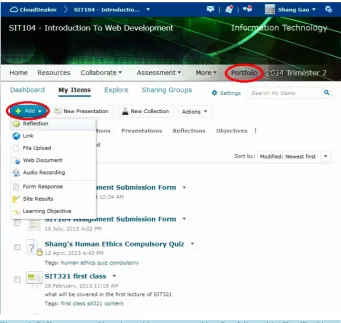
As one of the key features supported by CloudDeakin, Portfolio tool integrates facilities to create different types of digital artefacts, such as new Web pages, links, multimedia artefacts, form response, reflection, collec- tion, and presentations, etc. Any type of files, such as assessment results, learning objectives can also be up- loaded to Portfolio for record, as shown inFigure 2.
3. ePortfolio and Learning Evidence Management
The School of Information Technology of Deakin has been implementing ePortfolio use progressively since Year 2013 through the DUPPP funded project “Develop academic literacies in Information Technology course curricula”. Academics of year-one core units in the School tailor assessment tasks to ensure students are pro- gressively creating artefacts in ePortfolios which record evidence of skills and knowledge developed, and help- ing students understand how assignments relate to the unit, course and Deakin Graduate Learning Outcomes.
As one of the year-one IT core units, SIT104 Introduction to Web Development introduces techniques of creat- ing Web content using HTML, CSS, client side and server side scripting languages. It has two assignments: 1st create a website using HTML & CSS; 2nd implement client side (Javascript) and server side (PHP) scripting to validate web forms and generate dynamic information retrieved from Oracle database. Both assignments require students to provide website URL, scripting source code, references, and self-reflection.
The self-reflection is one of the important learning evidence to collect during the study. Instead of creating unstructured reflection artefacts with Portfolio reflection tool, forms are designed to capture all the information while considering the “What? So what? Now what?” reflection format in a more effective way.
The “What? So what? Now what?” reflection format (Elicia et al., 2012) helps students reflect what they have learned progressively by asking:
● What: reflecting on what students have created and the processes they have used as individuals or in groups; ● So what: reflecting to understand how practice relates to unit content, research undertaken or previous learn-
ing;
● Now what: reflecting to progressively improve against course and graduate learning outcomes. Figure 3andFigure 4 illustrate the form structure.
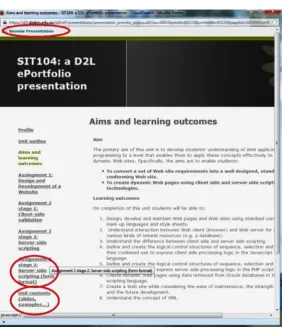
Different types of relevant learning evidence can be organized together in a presentation as an “archive” for future reference, as shown inFigure 5.
S. Gao et al.
Figure 2. Different types of learning evidence supported by ePortfolio tool in CloudDeakin.
[image:4.595.142.484.83.406.2]Figure 4. Form Structure Part 2—What, so what, now what reflection questions.
[image:5.595.172.455.366.698.2]S. Gao et al.
enhanced throughout the whole trimester. The ePortofilio form designed with the self-reflection questions is re- quired as part of the submission for the two assignments of SIT104. Its use in assessment tasks is observed to be well adopted by the students on the whole.
4. Discussion and Conclusion
Lessons we learn from the ePortfolio practice include:
● ePortfolio files are private, need to be attached/shared for marking and comments; ● Students and academics are to be trained to the technology;
● Explicit instructions/examples to be provided to students for guidance, e.g. how to organize different types of learning evidence in ePortfolio;
● Evidence/artefacts tagging is to be encouraged for searching and future reference.
Outcome from this practice also suggests that enthusiasm and willingness to learn are important attributes of ePortfolio users.
Through the pilot project, ePortfolios are proved to add value to personalized and reflective models of eLearning. To implement it widely, more students and academics are to be introduced to the ePortfolio technol- ogy, its uses as a tool for discussion, information collection and reflection, and new ways of thinking about learning evidence management.
Acknowledgements
The ePortfolio pilot is part of “Developing Academic Literacies in IT” project supported by Deakin University Participation and Partnerships Program (DUPPP).
References
CloudDeakin (2014). Deakin University’s Cloud Learning Environment.
http://www.deakin.edu.au/students/clouddeakin
Elicia, L., Sophie, M., Shang, G., & Jo, C. (2012). Developing Academic Literacies in IT Course Curricula: Reflection for Learning in ePortfolios. In Deakin Teaching and Learning Conference 2012. Waurn Ponds: Deakin University.
http://www.deakin.edu.au/learning/events-and-news/events/conference2012/workshop-videos
Hartnell-Young, E., Harrison, C., Crook, C., Pemberton, R., Joyes, G., Fisher, T., & Davies, L. (2007). The Impact of ePort- folios on Learning. British Educational Communications and Technology Agency (BECTA). University of Nottingham, Corp Creators. http://dera.ioe.ac.uk/1468/
Jisc Website (2014). http://www.jisc.ac.uk/
Khan, B. H. (2008). A Framework for Web-Based Learning. Higher Education Funding Council for England (HEFCE).
http://www.jisc.ac.uk/media/documents/publications/effectivepracticeeportfolios.pdf
Sutherland, S., & Powell, A. (2007). CETIS SIG Mailing List Discussions.
https://www.jiscmail.ac.uk/cgi-bin/webadmin?A1=ind0707&L=CETIS-PORTFOLIO#3
Wikipedia (2014). Electronic Portfolio Definition.