A Biometric Approach to Encrypt a File with the Help of
Session Key
Sougata Das
IBM India Pvt. LtdKolkata India
Rahul Das
Indian Institute of Information Technology
Allahabad, India
Ayan Mukherjee
Brainware Group of InstitutionsBarasat, Kolkata, India
ABSTRACT
In this paper, we have employed “Face Recognition” technique with conventional session based authentication to provide a two layer security. Different features of a human face are used for authentication. Since this scheme uses biological characteristics, this is very difficult to forge. Additionally we will be using conventional session based authentication to provide a two layer security. This method of authentication can be used to grant access to a network, important files and documents.
The main objective of this work is to provide a two layer authentication system through biometric (face) and conventional session based password authentication. The encryption key for this authentication will be generated with the combination of the biometric key [7] and session based password.
Keywords
Encryption, Decryption, Face Recognition, Biometrics, Genetic Crossover, Genetic Mutation, Evolutionary Algorithms.
1.
INTRODUCTION
Network Security is an important feature in today’s computing world because of the following reasons:
I. To ensure accountability [1], confidentiality [1], integrity [1], and above all protection [1] against many external and internal threats such as email based network security problems, denial of service network security attacks, worms and trojans, and wireless network security attacks.
II. To monitor unauthorized access[1]
Face recognition [8] captures and analyzes the features of a human face like distance between eyeball, distance between nostrils, distance between lips, eyebrows, etc. These features of a human face remain identical irrespective of the circumstances.
The session based authentication uses a password, like a conventional authentication techniques. A key is generated using the password. Evolutionary operators like “Genetic Crossover” and “Genetic Mutation” are used to generate the key from the password. This key is used for encryption/decryption of the document(s).
The image of the individual must be taken in a closed environment. The environment used in the image for encryption must be same as that of the image used during decryption.
1.1
Genetic Crossover
This operator is generally used in evolutionary computing where the bits 0 and 1 store genetic information. In this type, a
single point is selected, and the strings are exchanged on either side of it. However, the generated offspring will definitely suffer if the selected site does not exchange the genetic information.[5]
Before crossover
String 1: 0100 | 011
String 2: 1101 | 111
After crossover
String 3: 0100 111
String 4: 1101 011
1.2
Genetic Mutation
According to the building block hypothesis, the order of genes is important. The purpose of mutation is to reorder the genes, in order to find chromosomes which have better evolutionary potential.[5] This mutation method simply changes (flips) a randomly selected bit:
Before mutation: 0111010101
After mutation: 0111000101
1.3
Image Processing
Image Processing is a form of signal processing for which the input is an image (photograph or frame). The image is treated as a two-dimensional image and the output of the image is either an image or a set of parameters or characteristics of the image. [13]
Image processing involves changing the nature of an image in order to either
a. improve its pictorial information for human interpretation,
b. render it more suitable for autonomous machine perception.
1.4
Types of Images
When we click a photo from a camera, we get an image. This can be imagined as a two- dimensional function f(x, y). We may assume that in such case image brightness can be in the range 0 (black) to 1(white). It can take up any real values from 0 to 1. Digital image differs in such a way that all the f(x, y) values are discrete in nature. Each f(x, y) are integer numbers ranging from 0-256.[13]
Primarily, there are 4 different types of digital images:
a. Binary [13]: Each pixel is just black or white. So, it needs only 1 bit for every pixel of the picture. The bit 0 indicates black and 1 indicates white.
b. Greyscale [13]: Each pixel is a shadow of grey normally from 0(from black) to 255 (to white).
c. True Color or RGB [13]: Here each pixel has a color; that color being described by the amount of red, green and blue in it. If each of these components has a range from 0-255, then a total of 2553 = 16, 777,216 different colors. This is enough for any image. Since the total number of bits required for any image is 24, this is also known as 24-bit color image.
d. Indexed [13]: Most color image have only a small subset of the more than 16 million possible colors. For the ease of file handling and storage the image has an associated color map or color palette, which is nothing but a list of colors used in that image. Each pixel has a value which does not give its color but is an index to the color to the map.
1.5
Aspects of Image Processing
It is convenient to subdivide the different image processing algorithms into following broad subclasses:
a. Image Enhancement [13]: Processing of the image so that the result is more suitable for a particular application. Examples include:
Sharpening or de-bluring an out of focus image.
Highlighting edges.
Improving brightness of an image or the contrast
Eliminating noise
b. Image Restoration [13]: This is reversing of the damages done to an image by a known cause. Examples include:
Removing of blur by linear motion Removal of optical distortion Removing of periodic interference
c. Image Segmentation [13]: This involves subdividing an image into constituent parts or
We used edge filters [17] provided by MATLAB to pre-process an image. These filters implement edge detection algorithms. The important filters are as follows:
1.6
Sobel Filter
Sobel operator calculates the gradient of the image intensity at each point, giving the direction of the largest possible increase from light to dark and the rate of change in that direction. The result therefore shows how "abruptly" or "smoothly" the image changes at that point and therefore how likely it is that that part of the image represents an edge. Mathematically, the operator uses two 3×3 kernels which are convolved with the original image to calculate approximations of the derivatives - one for horizontal changes, and one for vertical. [17]
If we define A as the source image, and Gx and Gy are two images which at each point contain the horizontal and vertical derivative approximations, the computations are as follows:
and
Here, * here denotes the 2-dimensional convolution operation.
1.7
Prewitt Filter
The Prewitt operator is used in image processing, particularly within edge detection algorithms. Technically, it is a discrete differentiation operator, computing an approximation of the gradient of the image intensity function. At each point in the image, the result of the Prewitt operator is either the corresponding gradient vector or the norm of this vector. Mathematically, the operator uses two 3×3 kernels which are convolved with the original image to calculate approximations of the derivatives - one for horizontal changes, and one for vertical. If we define A as the source image and Gx and Gy are two images which at each point contain the horizontal and vertical derivative approximations, the latter are computed as:
and
Here, * here denotes the 2-dimensional convolution operation.
1.8
Roberts Cross
criteria in mind and based on then prevailing psychophysical theory Roberts proposed the following equations:
where x is the initial intensity value in the image, z is the computed derivative and i,j represent the location in the image.
In order to perform edge detection with the Roberts operator we first convolve the original image, with the following two kernels:
and
2.
PROPOSED ALGORITHM
Following are the main steps of the Encryption algorithm:
A. Biometric Key Generation
Step 1: Image Acquisition
Step 2: Pre-processing of the Image
Step 3: Feature Extraction
Step 4: Biometric Key Generation from the Average Threshold Feature
B. Session Key Generation
C. Combine the Biometric Key with the Session Key D. Encryption of the Document using the Key
Following are the main steps of the Decryption algorithm:
A. Biometric Key Generation
Step 1: Image Acquisition
Step 2: Pre-processing of the Image
Step 3: Feature Extraction
Step 4: Biometric Key Generation from the Average Threshold Feature
B. Session Key Generation
C. Combine the Biometric Key with the Session Key D. Decryption of the Document using the Key
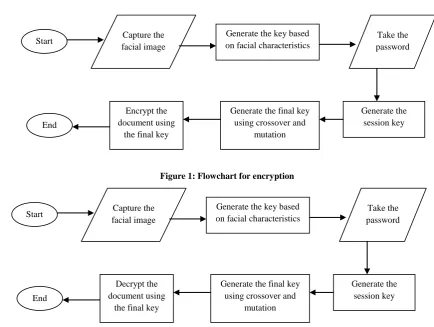
[image:3.595.71.523.66.694.2]The basic flowchart of the algorithms is shown below:
Figure 1: Flowchart for encryption
Figure 2: Flowchart for decryption
Start Capture the
facial image
Generate the key based on facial characteristics
Take the password
Generate the session key Generate the final key
using crossover and mutation Encrypt the
document using the final key End
Start Capture the
facial image
Generate the key based on facial characteristics
Take the password
Generate the session key Generate the final key
using crossover and mutation Decrypt the
[image:3.595.79.514.324.651.2]3.
EXPLANATION OF THE
ALGORITHM
3.1
Image Acquisition and Pre-processing
Step 1: Use a camera to capture the face image.Step 2: The image is pre-processed to capture the minimum face area and then the feature points are extracted.
3.2
Encryption/Decryption Key Generation
This process consists of the following steps:A. Biometric Key Generation
[image:4.595.104.246.269.346.2]Step 1: From the feature points of the face, average biometric value is generated. In this paper feature points are taken as distance between two eyes, nose trails, lip-ends, eyebrows.
Figure 3: Feature points of the face
Step 2: From a number of sample images, different average values are generated.
Step 3: With this, we generate an upper and lower threshold value minimizing the FAR and FRR.
Step 4: The test face image is verified, if the average value lies within range we accept it and then generate a biometric key, say k1 of 24 bits.
Session Key Generation
Step 1: Take the user password as input from the user.
Step 2: The password should be at least 6 characters.
Step 3: Read the password and generate 8 bit binary number, say k2.
Step 4: Generate a number, say n, within the range of 3 to 5 from k2 using modulo 6 operation.
B. Final key Generation This consists of two steps: a. Genetic Crossover Process
Step 1: Divide k1 into 2 parts of length (2*n) and (24-(2*n)). We call the substrings as keystr1 and keystr2 respectively.
Step 2: Divide k2 into 2 parts of length (n) and (8-n). We call the substrings as keystr3 and keystr4respectively.
Step 3: We used the 4 substrings for genetic crossover to obtain an intermediate final key, say k
b. Genetic Mutation Process
Step 1: Flip the bits of k at n bit position and multiple of n bit position (upto 32 bits) to obtain the final key (say fk).
3.3
Encrypt the Document using Final key
Step 1: Divide the binarized document text file of size m into m/32 segments and store them in matrix T.Step 2: Encrypt each module with the final key fk.
Step 3: Flip the remaining m%32 bits.
Step 4: Take a transpose of matrix T to T1.
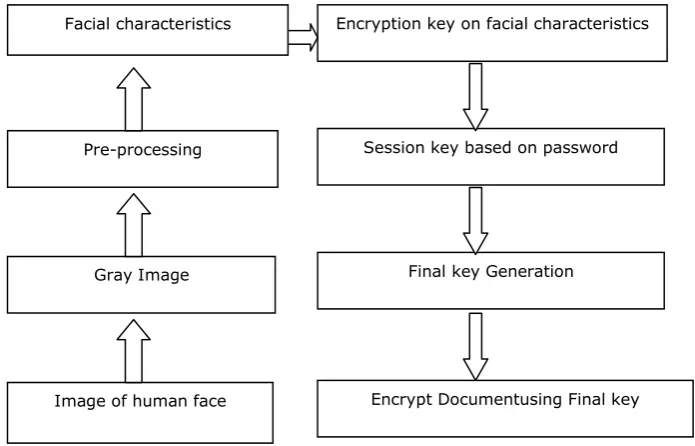
A schematic diagram of the encryption process is shown below:
Gray Image Pre-processing
Encryption key on facial characteristics
Session key based on password
[image:4.595.90.438.492.715.2]Image of human face Gray Image Pre-processing
Decryption key on facial characteristics
Session key based on password
Final key Generation
Decrypt Documentusing Final key Facial characteristics
3.4
Decrypt the Document using Final key
Step 1: Read and store the encrypted file in a matrix T.Step 2: Take a transpose of matrix T to T1.
Step 3: Flip the remaining m%32 bits.
[image:5.595.103.443.117.275.2]Step 4: Decrypt each module with the final key fk.
Figure 5: Schematic Diagram for the decryption process
4.
RESULTS AND DISCUSSIONS
[image:5.595.315.542.308.611.2]In this section we present the experimental results of the proposed approach which was implemented in MATLAB 7.0
Figure 6: Main Menu
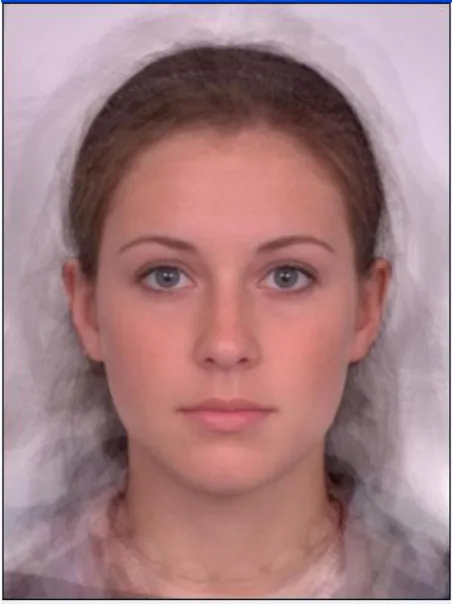
The original image as captured by the camera is shown in figure 7.
Figure 7: Original image
In figure 8, we show the image after applying the image processing filters. All the biometric features are derived from
[image:5.595.70.262.352.572.2]Figure 8: Intermediate image extracted from original image
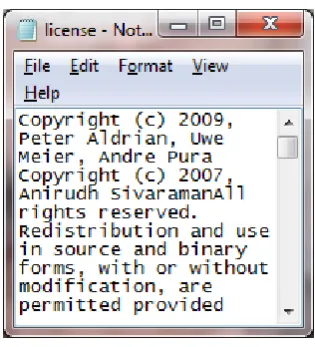
Figure 9 shows a sample file before encryption.
Figure 9: Original File before Encryption Figure 10 shows the file after encryption with biometric and genetic operators.
5.
CONCLUSION
The proposed approach provides two layer security. Encryption is symmetric. Using evolutionary concepts like crossover and mutation provide better security. This coupled with biometric security makes things very secure. The feature points which we have used are relative for example, distance between eyeballs, distance between nostrils and distance between the end points of the lips. So, these feature points are rotation (of the face) independent. The proposed approach may be further extended using more reliable and costly biometric features like retina, iris, palm print etc and also by increasing the number of bits for biometric key. The method described above is a cost effective method of encryption suitable for small and middle level organizations.
6.
REFERENCES
[1] Stallings William. Cryptography and Network Security. Pearson Education, 2006.
[2] Bruce Schneier. Applied Cryptography. Wiley Student Edition, 2nd Edition, 1996.
[3] Neal R. Wagner. The Laws of Cryptography with Java Code
[4] HosseinBidgoli. Handbook of Information Security Volume 3. John Wiley and Sons, Inc.
[5] David E. Goldberg: “Genetic Algorithms in Search, Optimization and Machine Learning”.
[6] Kalyanmoy Deb: “Multi-Objective optimization using Evolutionary Algorithm”
[7] Tanmay Bhattacharya, SirshenduHore ,Ayan Mukherjee and S. R. BhadraChaudhuri. “A Novel Data Encryption Technique by Genetic Crossover of Robust Biometric Key and Session Based Password”. International Journal of Network Security & Its Applications (IJNSA). Vol.3, No.2, March 2011.
[8] Shang-Hung Lin. “An Introduction to Face Recognition Technology”. Informing Science Special Issue on Multimedia Informing Technologies – Part 2. Volume 3, No. 1, 2000.
[9] Xiaoguang Lu. “Image Analysis for Face Recognition”.
[10]YevgeniyDodis, ShafiGoldwasser, Yael Kalai, Chris Peikert, VinodVaikuntanathan. “Public-Key Encryption Schemes with Auxiliary Inputs”.
[11]Dan Boneh, Michael Hamburg. “Generalized Identity Based and Broadcast Encryption Schemes”.
[12]Rahul Das and Ayan Mukherjee. “A Secured Biometric Approach to Prevent Unauthorised Access to a Document”.
[13]Alasdair McAndrew. “An Introduction to Digital Image Processing with MATLAB”. School of Computer Science and Mathematics, Victoria University of Technology.
[image:6.595.89.245.583.751.2]