=$=
Burroughs
XE 500
CENTIX™
Kernel
Customizer
Operations
Guide
NO WARRANTIES OF ANY NATURE ARE EXTENDED BY THIS DOCUMENT. Any product and related material disclosed herein are only furnished pursuant and subject to the terms and conditions of a duly executed Program Product license or Agree-ment to purchase or lease equipAgree-ment. The only warranties made by Burroughs, if any, with respect to the products described in this document are set forth in such license or Agreement. Burroughs cannot accept any financial or other responsibility that !1lay be the result of your use of the information or software material, including direct, indirect, special or consequential damages.
You should be very careful to ensure that the use of this information and/or software material complies with the laws, and regulations of the jurisdictions with respect 'to which it is used.
The information contained herein is subject to change without notice. Revisions may be issued to advise of such changes and/or additions.
About This Guide
Purpose
This guide describes the procedures for customizing the CENTIX kernel on the XE 500 computer.
Scope
This guide presents information necessary to customize the CENTIX kernel on the XE 500 computer. For information on programming in the CENTIX system, see your CENTIX
Programming Guide.
Audience
This guide is intended for the experienced CENTIX system administrator.
Prerequisites
The system administrator who uses this guide should be very familiar with the XE 500 operating system. The administrator should also have a good understanding of programming on the XE 500 computer.
How to Use This Document
vi About This Guide
Organization
This guide contains the following sections:
Section 1, Overview, briefly discusses the XE 500 CENTIX kernel customizer, the customizer shell script, the /etc/master file, and the CENTIX File System Server.
Section 2, Tuning Parameters, discusses how tunable CENTIX kernel parameters are modified, how the CENTIX File System Server is affected, and how the new,
"customizedn
kernel is created and compiled.
Section 3, Tunable Parameter Descriptions, describes in detail the tunable parameters in the CENTIX kernel.
Section 4, Adding Device Drivers, describes how to use the kernel customizer to add device drivers to your system. This section assumes that you have already developed a device driver for CENTIX.
A glossary and index follow Section 4.
Related Product Information
XE 500 CENTIX Administration Guide
This guide discusses how to administer the XE 500 CENTIX operating system.
XE 500 CENT IX Programming Guide
This guide discusses how to program on the XE 500 CENTIX system.
XE 500 CENTIX C Language Programming Reference Manual This manual describes C, the programming language on which the CENTIX operating system is structured.
XE 500 CENTIX Software Installation Guide
This guide presents the procedures for installing your CENTIX operating system.
XE 500 CENTIX Operations Reference Manual
Conventions Used in This Guide
D All commands within text are shown in boldface.
D Variables are shown in italics. For example, in the following
command, oldfile and newfile are both variables:
# cp oldtlle newtlle
When you enter the actual command, you substitute the names of the file that you are copying and the file to which you are copying for oldfile and newfile.
D In command lines, optional fields are enclosed in brackets.
D Tunable parameters are in upper case (for example,
Contents
About This Guide
Purpose ... . Scope ... . Audience ... . Prerequisites ... . How to Use This Document ... . Organization ... . Related Product Information ... . Conventions Used in This Guide ... .
Section 1: Overview ... . The CENTIX Kernel Customizer ... . The /etc/master File ... . The CENTIX File System Server ... .
Section 2: Tuning Parameters ... . Modifying Tunable Parameters ... ... . Modifying CENTIX File System Server Parameters ... ... . Running the CENTIX Kernel Customizer Script ... ... . Recovering from an Invalid Customized Kernel ... ... .
Section 3: Tunable Parameter Descriptions ... . System Resource Parameters ... ... . MAXFS ... . MAXUP ... . NANODE ... . NBUF ... . NCllST ... . NFllE .; ... . NFlOCKS ... . NHBUF ... . NlRGBlOCKS ... . NPROC ... . NSWAP ... . NSWBUF ... . NTEXT ... . SMAPSIZ ... .
x Contents
Shared Memory Parameters ... 3-16 SHMEM ... 3-16 SHMALL ... 3-17 SHMBRK ... 3-17 SHMMAPSIZE ... 3-17 SHMMAX ... 3-17 SHMMIN ... 3-17 SHMMNI ... ~-17
SHMSEG ... 3-18 Message Parameters ... 3-19 MESG ... 3-19 MSGMAX ... 3-20 MSGMNB ... 3-20 MSGMNI ... 3-20 MSGTOL ... 3-20 Semaphore Parameters ... 3-22 SEMMAP ... 3-22 SEMMNI ... 3-23 SEMMNS ... 3-23 SEMMNU ... . .. 3-23 SEMUME ... 3-24 SEMMSL ... 3-24 SEMOPM ... 3-24 SEMVMX ... 3-24 SEMAEM ... 3-24 A Sample CENTIX Kernel Customization Session ... . .. 3-26
Illustrations
3-1 3-2 3-3
Shared Memory Implementation ... ... . IPC Message Implementation ... . IPC Semaphore Implementation ... .
Tables
2-1 3-1
CENTIX File System Server Parameters ... . Recommended Values for NBUF and NHBUF ... .
- 3-18 . -- 3-21 __ 3-25
Overview
The CENTIX Kernel Customizer
The XE 500 CENTIX Kernel Customizer allows you to customize the CENTIX kernel by adding already-developed device drivers to your system, and by tuning parameters that control system resources. Some of these system resources are the number of files the kernel can open, the number of buffers in the buffer cache, and the number of file systems the kernel can mount.
The kernel maintains information used to manage system resources in tables that are fixed in size. Changing the sizes of these tables (and the size of the kernel) can increase the performance of your CENTIX system.
You can increase the memory of your kernel up to a maximum of 420 K-bytes.
Note: Your kernel customizer matches the version of the kernel that you have on your system (8 or 16 users). If your system has a maximum of 8 users, your customizer will not allow the operating system to be generated beyond 8 users.
The customizer software is located in the /usr/sys/oslib and /usr/sys/cf directories. The customizer also uses the
/etc/master and /etc/config files.
In the /usr/sys/oslib directory:
o Five kernel libraries.
o Two object modules.
In the /usr/sys/cf directory:
o The configuration file dfile.normal.
1-2 Overview
eustseript performs the following operations:
Runs the /etc/config program.
/etc/config first reads input from the file dfile.normal, which you specify (see Section 2). If information is not supplied in this file, then /etc/config defaults to the file /etc/master for its input.
/etc/config then generates the information from these two files (with information from dfile.normal overriding that in /etc/master) into conf.c, a C program that defines the configuration tables for the various devices on the system.
2 Runs ee, the C compiler.
conf.c is compiled, creating the object file conf.o.
3 Runs Id, the link utility.
eustseript takes information from conf.o, and from the five kernel libraries, and generates it into the new kernel.
Note: When you run custscript the Id utility produces the following warning message: "Id warning; resultant object marking: 'cpu = 68020, fpu = 68881,' incompatable with CENVIRON: 'cpu = 68020, fpu = software. '" This message should be ignored.
The previous kernel, /unix, is saved off to a new file, /oldunix, and the new kernel is linked to /unix.
4 Runs a mkboot operation.
Because the CENTIX kernel actually lives in the BTOS system, mkboot takes a copy of /unix and creates a BTOS file, [Sys]<sys>Centix.sys, which BTOS recognizes as the CENTIX kernel.
The / etc / master File
The customizer package also includes the file /etc/master, which is the configuration file used to create the CENTIX kernel. The /etc/master file contains the master device information. This file itself should be modified only when adding device drivers.
Changing parameters should be done through the description file dfile.normal (which is described in Section 2). Values specified in dfile.normal override those in the /etc/master file.
See Section 4 for a more detailed explanation of the /etc/master file.
The CENTIX File System Server
When tuning certain parameters in the CENTIX kernel, some parameters in the CENTIX File System Server require
corresponding changes. The process for modifying CENTIX File System Server parameters is described in Section 2.
The CENTIX File System Server is a BTOS-based system service that controls all CENTIX disk I/O. All disk requests must be processed through the CENTIX File System Server. Increasing the amount of memory allocated to the CENTIX File System Server, along with changing parameters in the kernel, can help improve your system's performance. The CENTIX File System Server can be configured by making entries in [Sys]<sys>ConfigUFS.sys.
Tuning Parameters
Built into the CENTIX system kernel are parameters that control system resources. This section describes how these parameters are modified, how the CENTIX File System Server is affected, and how the new "customized" CENTIX kernel is created and compiled.
Section 3 describes the tunable parameters and provides a sample CENTIX kernel customization session.
Modifying Tunable Parameters
The tunable parameters, along with their default values, are listed in the /etc/master file (described in Section 4).
Caution: The /etc/master file contains the master device information. It should be modified only when adding device drivers (see Section 4).
Parameter changes are made through the file
/usr/sys/cf/dfile.normal. These changes override, but do not change, the parameter values specified in the /etc/masterfile.
Note: dfile.normal is a default file that is used by the CENTIX Kernel Customizer to tune parameters. It is supplied with your XE 500 CENTIX System. You can, however, create a file other than dfile.normal to be used by the customizer (this is described under the subsection "Running the CENTIX Kernel Customizer Script," later in this section). This "1e should have the same characteristics as dfile.normal, as described below.
The dfile.normal file is divided into three parts. The first part contains a list of devices that are present on the system. This part of the file is modified to add device drivers to your system (see Section 4, Adding Device Drivers).
2-2 Tuning Parameters
The third part is used to specify values for the tunable parameters that will override the default values defined in /etc/master (more on this later).
The following is a sample dfile.normal file. Lines that begin with an asterisk (*) are comments, which do not affect the file.
• 0 e v Ice d r I ve r I abe Is. The f 0 I I ow I n gel g h t
• I abe I s are r e qui red. DO NOT R EMOV E I I I I
bdlsk cdlsk prf console tape Ip tap tsy
• Add user device driver labels here • example:
• mx25
• Do NOT modi fy the following four entries
root swap arg pipe
bdlsk bdlsk bdlsk bdlsk
00 376 376
01
• add tunable parameters here
parameter #
2500
Following the pipe entry is the third part (preceded in this example by the comment "add tunable parameters here"), ,in which you can add tunable parameters. To do this:
o Edit your dfile.normal file (using vi or ed).
o Append whatever parameter values you wish to specify.
Use the format given above, where parameter is the parameter name and # is the value of the parameter, separated from each other by one or more spaces. If
parameter values are not specified in this part of the file, the default values, as they appear in the /etc/masterfile, are used.
Modifying CENTIX File System Server Parameters
Changes in certain parameters in the CENTIX kernel require corresponding changes in the CENTIX File System Server parameters. Specific kernel parameters that correspond to CENTIX File System Server parameters are described in Section 3, "Tunable Parameter Descriptions."
There are three CENTIX File System Server parameters that are configurable: MESSAGE, BUFFER, and INODE.
Table 2-1 lists the defaults, ranges, and memory
requirements of the three configurable parameters for the CENTIX File System Server.
Table 2-1 CENTIX File System Server Parameters
Parameter
MESSAGE
BUFFER INODE
Default
40
15
200
Range
32-128
10-62
20-400
Size (bytes)
64
1080
2-4 Tuning Parameters
The above parameters can be defined by making entries in the BTOS file [Sys]<sys>ConfigUFS.sys. This is a text file, and it can be edited using the ofvi or ofed editor.
In the following segment from ConfigUFS.sys, the first three entries show the root and swap specifications for the system. The next five entries list the CENTIX File System Server parameters. The first and second fields show the parameter names and their values, respectively. The third field shows the processors for which those parameters are specified. This list can be changed or expanded upon as long as each duplicate parameter specification corresponds to a unique processor.
Note: The parameters specified are not processor parameters, but server parameters. The processors listed below refer to the processors on which servers happen to be running.
Root [d2)<sys>partltlon.0 FPOO 255
Swap [d1]<sys>swap.AP.00 APOO 254
Swap [d3]<sys>swap.AP.01 AP01 253
BUFFER 30 FPOO
INODE 300 FPOO
MESSAGE 100 FPOO
BUFFER 35 FP01
I NODE 400 DPOO
Use care when setting the CENTIX File System Server parameters. When attempting to match kernel resources with CENTIX File System Server resources, remember that the total system-wide set-up must match. This is important when dealing with multiple copies of CENTIX File System Server and multiple APs. For example, if NANODES (a kernel parameter) is set to 500 and there are two APs in the system, the total number of potential open inodes in the kernel is 1000. Hence, the total CENTIX File System Server inode potential should be 1000 (possibly three FPs running CENTIX File System Server with 335 inodes each).
Running the CENTIX Kernel Customizer Script
Note: To allow you to recover from possible errors during customization, you should save the original unix kernel that is supplied with the standard release. For example, before customizing the kernel for the first time, enter "ep /unix /unix.save ". If you are not certain whether your system was previously customized, check with your system administrator or search for the file /oldunix. If /oldunix exists, chances are that the original kernel has been customized.Once you have modified the desired tunable parameters and changed any corresponding CENTIX File System Server parameters, do the following to bring your customized CENTIX kernel up and running:
1 Execute the halt command to bring your system down to single-user mode.
2 Edit the file dfile.normal (or the file that you specify).
3 Compile and link the new, customized kernel.
To create the new kernel, change the directory (using cd) to /usr/sys/cf and execute the customizer script
# custscrlpt [filename)
where filename is an optional file name. If filename is not specified, custscript uses the default file
2-6 Tuning Parameters
The customizer script saves a copy of the old kernel, /unix, to /oldunix. The new kernel is then linked (via the Id
utility) to /unix. The script then runs a mkboot operation to incorporate /unix into the BTOS file [Sys]<sys>Centix.sys.
4 Execute the following:
# sync; sync; sync
and wait for· 1 5 seconds.
This flushes the buffers and updates the superblock on disk with the modified kernel's superblock. With both superblocks identical, no discrepancies should occur when the file system is checked with fsck.
5 Reboot your system.
Recovering from an Invalid Customized Kernel
If your customized kernel is too big for physical memory, the XE 500 will become deadlocked in its boot routine and the front panel status display will cycle at code 13 or 14.Also, if the CENTIX File System Server does not have enough physical memory to load your customized kernel, the system may either freeze at status display code 15 or crash.
Use the following procedure to restore the system to its original kernel.
1 Reboot the system in REMOTE.
2 Mount the NORMAL root partition.
3 Change your directory to the NORMAL root.
4 Execute the following command:
5 Execute the following command:
# mkboot -y unix '[Sys]<sys>centlx.sys'
6 Change your directory back to the REMOTE root.
7 Unmount the NORMAL root partition.
S Execute exit.
9 Enter the option in the menu for SHUTDOWN.
Tunable Parameter Descriptions
The CENTIX kernel contains four sets of tunable parameters: system resource, shared memory, message, and semaphore parameters.
The following section describes the tunable parameters. They can be modified as described in Section 2. Where applicable, changes in CENTIX kernel parameters that require corresponding changes in the CENTIX file system
configuration file are discussed.
All parameters will function properly if the default values are used.
System Resource Parameters
The following parameters control system resources such as buffer sizes, system table allocations, and memory
allocations.
MAXFS
The MAXFS parameter defines the maximum upper limit file size. Its default value is 2113674 bytes. All files are created in 512 byte blocks. However, two blocks are always
allocated for a file at a time.
For example, a file containing 1 byte of data will be allocated two blocks (1024 bytes); a file containing 1024 bytes of data will be allocated four blocks (2048 bytes).
3-2 Tunable Parameter Descriptions
MAXUP
The MAXUP parameter defines the maximum number of processes that a non-root user can execute at one time. There is, of course, a limit to this number.
If a new process is created and the user has exceeded the limit, an error message, Hmessage fork: too many
processes," may be displayed. The user can resolve this problem by increasing the size of the parameter MAXUP. Its default value is 25. Changing the value of MAXUP does not change the kernel size.
NANODE
The NANODE parameter controls allocation of the system anode (inode) table. The system uses an anode (inode) to store file attributes.
Anodes are allocated for every open file, every directory file being used by the system, and every directory being used as a current user directory.
An anode is the CENTIX system data structure that contains all the information about a file except its name and its contents. Included are the file type, size, number of links, owner, permissions, time of last access, time of last . modification, and time of last anode change (an anode could be changed by modifying any of the other attributes, such as permissions) .
The default value of NANODE is 200. Because more than one file can reference the same anode (for example, two files linked together, or the same file opened by two programs), the configured NANODE value is usually less than the configured value for NFILE (explained below).
Because the NANODE parameter causes allocation of anode structures in the anode (inode) table, each additional unit of NANODE adds approximately 64 bytes to the kernel. A formula for estimating your inode table value is to have 70 entries
+
9 entries for each expected user.Whenever the kernel NANODE parameter is modified, there is a corresponding parameter in the
'[d 1 ]<sys>ConfigUFSosys' BTOS file that must also be modified. This is the INODE parameter.
The INODE parameter allocates entries in the CENTIX File System Server inode table. Note that the total AP potential should agree with the total CENTIX File System Server potential. The CENTIX File System Server can be loaded in both the FP and DP with the run file, [sys]<sys>UFS.run.
The INODE parameter on a particular processor sets the size of the INODE table for that processor only. It is best to distribute the inodes in the CENTIX File System Server so that the server controlling the largest number of commonly accessed files has slightly more inodes than other servers.
Also, the inodes in the CENTIX File System Server are cached (anodes in the kernel are not). As a result,
performance can increase by allocating more inodes for the CENTIX File System Server. Use the fpsar command to gauge the effect on the inode hit ratio.
3-4 Tunable Parameter Descriptions
NBUF
The NBUF parameter can significantly improve system performance when configured properly, in conjunction with the tunable parameter NHBUF.
The CENTIX kernel utilizes system buffers for temporary storage of data while data is transferred to and from disk. This pool of block buffers is known as the buffer cache. . Because the data resides in this buffer cache, the number of disk accesses can be greatly reduced when accessing information.
The kernel searches through the buffer cache for a block containing the desired data for every read or write request. If the desired block is located in the buffer cache, the process can use that block immediately. Otherwise, the process must wait until the data is read into the cache, which requires disk I/O. The kernel determines the buffer to be replaced from memory by using a "least recently used" algorithm. This keeps the.. most heavily used buffers in memory.
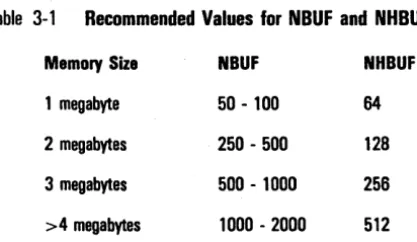
The size of each block buffer is 1 K-byte, which is the same as the system-wide blocksize. Therefore, there is a trade-off between the kernel and user memory. For example, each additional block buffer reduces the user memory by 1 K -byte. The number of block buffers configured is dependent on the available size of memory. Refer to Table 3-1 for
recommended values.
Table 3-1 Recommended Values for NBUF and NHBUF
Memory Size NBUF NHBUF
1 megabyte 50 - 100 64
2 megabytes 250 - 500 128
3 megabytes 500 - 1000 256
>4 megabytes 1000 - 2000 512
The more block buffers, the greater the chance the desired block will be found in the cache. This also means that less swapping activity is required. However, resource allocation cannot be increased without limit.
For example, dedicating additional memory to the kernel's buffer cache makes this memory unavailable to the user. Reducing available user memory may increase disk traffic due to increased paging. A large buffer cache also takes more CPU cycles to search and these CPU cycles are no longer available to user programs.
A smaller buffer cache decreases paging disk traffic and takes less CPU time to search. However, a smaller buffer cache has less probability of containing a desired disk block and hence, an increased probability of having to perform I/O to bring the block into the buffer cache.
To optimize the size of the buffer cache, you must balance paging traffic, buffer search CPU time, and buffer cache I/O. If you choose a cache that is too large or too small,
performance will suffer. Fortunately, overall system performance is relatively insensitive to buffer cache sizes within a relatively large range.
[image:28.401.79.288.50.171.2]3-6 Tunable Parameter Descriptions
Whenever the kernel NBUF parameter is increased, there is a corresponding parameter in the '[d 1 ]<sys>configufs.sys' . BTOS file that should be increased to handle the added load.
This is the BUFFER parameter.
The BUFFER parameter allocates entries in the CENTIX File System Server buffer cache. Because each buffer requires 1 K-byte of memory, increases in the BUFFER parameter'cause a corresponding increase in the CENTIX File System Server memory requirements. If possible, the CENTIX File System Server should run in the primary partition of the FP lOP. The Ipsar command can be used to measure the effectiveness of your block buffer allocation.
Nots: The kernel buffers and the CENTIX File System Server buffers are separate and serve different purposes.
The Kernel buffers are used for storing:
o Data blocks.
o Block device drivers.
o Some directory blocks.
The CENTIX File System Server buffers are used for storing:
o Superblocks.
o Inodes.
o Indirect blocks.
o Files accessed by more than one Application Processor.
o Some directory blocks.
NeLiST
The NCLIST parameter controls allocation of the system character list queue. This queue is used during I/O to character devices, such as terminals and line printers.
The value of NCLIST is actually the number of available cblocks. A cblock is the basic unit of work for character devices. Each cblock contains a pointer to the next cblock in the list (clist), an index to the array of the next character to be read from the list (clist), an index to the next character to be written to the list (clist), and the actual array containing the list of characters.
The cblock is structured as follows:
#deflne CLSIZE 64 struct cblock {
struct cblock ·c_next; char c_flrst; char c_last;
char c_data[CLSIZE);
} ;
/. pointer to next cblock . / /. next char to be read */
/. next char to be written */
/. array of CLSIZE chars ./
3-8 Tunable Parameter Descriptions
NFILE
The NFILE parameter controls allocation of the system file table. The file table is an array of file structures that reside in kernel address space. The kernel makes an entry in this table every time a process opens a file or pipe. Each entry
contains information about the file, such as open flags, reference count, a pointer into the anode table, and the current offset of the file pointer.
o The flag member indicates the open status for this entry (that is, open for read, write, and so on).
o The reference count reflects the total number of file descriptors that have been allocated by the process(es) accessing the file.
o The pointer member points to the file's corresponding inode and the next available file table entry.
o The file offset is used to reflect the current position within a file that has been opened for I/O. This member is shared by all processes that are accessing the inode through this file table entry.
The default value of NFILE is 250. Each allocated file table entry points to an entry in the inode table. However, since more than one file can reference the same inode, the configured NFILE value is usually greater than the configured value for NANODE.
NFLOCKS
The NFLOCKS parameter controls allocation of the lock table. The kernel makes an entry in the lock table for each
"Iocking" system call (used for file record locking). File record locking is essential in a multiprocess system to prevent two tasks from updating a file simultaneously, thus producing erroneous data.
Each entry in the lock table contains pertinent information about the file, such as open flags, reference count, a pointer into the anode table, and the current offset of the file pointer.
The default value for NFLOCKS is 200. Because it causes allocation of lock structures in the lock table, each additional unit of NFLOCKS adds approximately 20 bytes to the kernel.
NHBUF
The NHBUF parameter controls allocation of the system buffer hash table. This table is accessed by a method called "hashing." Hashing is a function that transforms a key into a table index that is used for data searches. This allows fast and direct access to desired information.
The buffer hash table is used when hashing into the system buffer cache during buffer searches. Also, the allocation of the system buffer hash table must be dependent on the number of buffers configured in the kernel.
Refer to Table 3-1 for recommended NHBUF values.
3-10 Tunable Parameter Descriptions
NLRGBLOCKS
The NLRGBLOCKS parameter defines the number of 4 K-byte block units of heap space to be allocated from memory at boot time.
The heap is an area on the AP in main memory used for communications. The kernel uses its heap space for a variety of purposes, including IPC (Inter-process communication) and ICC (Inter-CPU communication).
User ICC routines tend to use the heap for the majority of their data structures. The heap is used as a holding area for
the data structures for three reasons: .
1 The data placed on the heap can live past the life of the given system call.
2 The heap provides a non-virtual memory area which is contiguous. This simplifies the task of the BTOS board when it attempts to write its response or read the request from the AP's memory.
It is essential to have your system configured in such a way that the heap space will never be depleted through ICC. If user processes simultaneously send many requests to a user created server, it can tie up a lot of heap space. If in turn the server does not have time to respond quickly to the
requests, system performance may be seriously decreased; the system may even crash or deadlock whille waiting for heap for standard user I/O. Be sure that your processes will not deplete the heap space.
As the kernel starts to reach its maximum size, it attempts to compensate for lack of memory by taking memory away from the heap. Thus, a system configured with NLRGBLOCKS equal to 8 may boot and allocate only 28 K-bytes of heap (instead of 32 K-bytes).
To determine the actual size of the heap, execute the command "console -p I more". This displays the number of K-bytes that were allocated to the heap at boot time.
3-12 Tunable Parameter Descriptions
NPROC
The NPROC parameter controls allocation of the system process table. The kernel makes an entry in this process table for every active process. This is the first step during process creation.
Each entry contains pertinent information about a process, such as process id, parent process id, ownerships, CPU . status, memory status, resident time, CPU usage, priority class (the "nice" value), and priority (dynamic priority). Each time a user executes a command, the shell creates a new process with the forkO system call. It is at this point that a process entry is made into the process table.
The amount of memory available to user processes and the amount of swap space are significant factors when
determining the number of processes allowed in the system. Another factor is the size of the process table itself. The larger the process table and the more entries that exist in the process table, the longer it takes to search through it.
System time may become very expensive when there is an increased number of process entries in the process table.
Overpowering your hardware occurs when the ratio of processes in swap space to processes in memory becomes so large that most of the system time is spent copying processes in and out of memory. Since processes can execute only when they are loaded in memory, the processes waiting in the swap space must be copied into memory before they can be executed. This means that processes already in memory that will not run immediately must be copied out to free up space. When too many processes exist, "thrashing" occurs. "Thrashing" is the condition of spending more time copying processes between swap space and memory than is spent actually executing them. The NPROC parameter also affects other data structures in the kernel. These data structures include:
o The exchange table (used in ICC).
o The table used for semaphore undo operations.
o A table of pointers to attached shared memory segments.
o A table that lists the available in-memory pages used for shared memory attach points.
3-14 Tunable Parameter Descriptions
NSWAP
The NSW AP parameter defines the maximum number of swap area disk blocks (a disk block is 4 K-bytes). The swap space is actually secondary memory, which can be seen as an extension of primary memory.
The kernel uses the swap space on the system disk to store a process image when another process must use the primary memory. When primary memory is not available, the
swapper process attempts to swap out a process to make room. If the swapper is able to swap out a process, the process is stored on the swap device until primary memory is available.
In selecting a runnable process to be swapped out, the nice value is considered. Also, a runnable process is swapped out if the process that needs to be swapped in has spent at least 2 seconds on the swap device. The reason for the 2 second wait is to avoid "thrashing. H
The kernel dynamically sizes the swap partition, then configures itself for up to this maximum at boot time. Therefore, the tunable parameter NSW AP is not necessary. This happens automatically, and it is transparent to the user. The default value for NSW AP is 2500. Changing the value of NSW AP does not change the kernel size.
NSWBUF
NSWBUF controls allocation of three system tables used by the swapper. The first is the swap I/O header table, and the other two are arrays of integers (regular and short) that are used during swap operations.
NTEXT
The NTEXT parameter controls allocation of the system text table. The system text table is used for shared text files that are active processes. Shared text files represent programs that have been separated into two pieces: the code and the data area. Several processes can share the same code area. A shared code area is called "text" or "shared text."
Implementation of shared text is through the text table.
A text table entry includes the disk inode number of the file, disk address of the page table, reference counts, and the size of the text. The swapping of a shared text is
independent of the swappping of processes executing from it. It is possible that a process is swapped out but the shared text from which it is executing remains in primary memory.
When you invoke a shared text program, the kernel makes an entry in the text table. When another user requests the same program, the kernel checks the table and notes that the program has already been loaded into primary memory. The kernel modifies the text table to designate that another user is using the text area, and it creates a new data area for the second user process. This approach makes it easy to separate the code part of a program that does not change from the data area that does change. Thus, only one
memory copy of the program code is required because many processes can use the same code area. Each program, however, maintains its own data area. This is explained in more detail in "Shared Memory Parameters," below.
3-16 Tunable Parameter Descriptions
SMAPSIZ
The SMAPSIZ parameter controls allocation of the swap map, which is a map into the swap area (secondary
memory). The swap map is used by the kernel to map into actual sections in the swap space.
The size of SMAPSIZ should be modified in proportion to NSWAP. The default value for SMAPSIZ is 75. Because it causes allocation of map structures in the swap map, each additional unit of SMAPSIZ adds approximately 8 bytes to the kernel.
Shared Memory Parameters
The shared memory parameters control inter-process shared memory resources in the kernel, which can be accessed by user processes through the shmctl, shmget, and shmop system calls.
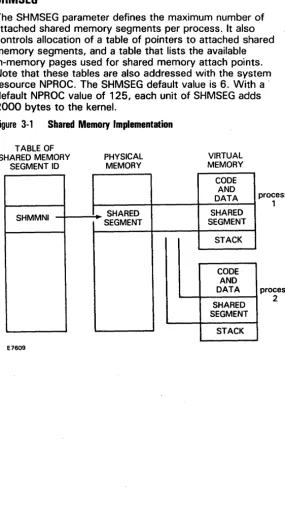
Shared memory allows communication between processes. This involves the concept of mapping virtual shared memory to an already allocated physical memory segment, rather than allocating additional physical memory.,
The shmget system call sets up a resource table, a memory map, and maps to physical memory. The shared memory segment is physically removed only after the last detach (a logical operation) is performed. This will determine that no other processes are using the shared memory segment, and the segment should be released. The following paragraphs describe the shared memory parameters.
SHMEM
The SHMEM parameter is a flag to indicate whether or not the shared memory facilities are available in the kernel.
o 1 = shared memory facilities are available.
SHMALL
The SHMALL parameter defines the maximum total system-wide shared memory. It also controls allocation of the incore memory page table entry.
The default value is 512 clicks. A click is the smallest unit of physical memory with respect to allocation.
Each unit of SHMALL ,adds 4 bytes to the kernel.
SHMBRK
The SHMBRK parameter defines the gap used between data and shared memory. The default value is 16 clicks.
SHMMAPSIZE
The SHMMAPSIZE parameter defines the size of the memory page table entry allocation map for shared memory. The default value is 32. Each unit of SHMMAPSIZE adds 8 bytes to the kernel.
SHMMAX
The SHMMAX parameter defines the maximum size of a shared memory segment in bytes. The default value is 48.
SHMMIN
The SHMMIN parameter defines the minimum size of a shared memory segment in bytes. The default value is 1.
SHMMNI
3-18 Tunable Parameter Descriptions
SHMSEG
The SHMSEG parameter defines the maximum number of attached shared memory segments per process. It also controls allocation of a table of pointers to attached shared memory segments, and a table that lists the available in-memory pages used for shared memory attach points. Note that these tables are also addressed with the system resource NPROC. The SHMSEG default value is 6. With a . default NPROC value of 125, each unit of SHMSEG adds 2000 bytes to the kernel.
Figure 3-1 Shared Memory Implementation
TABLE OF SHARED MEMORY
SEGMENT 10
SHMMNI E7609 PHYSICAL MEMORY SHARED SEGMENT VIRTUAL MEMORY CODE AND DATA SHARED SEGMENT STACK CODE AND DATA SHARED SEGMENT STACK process 1 process
[image:41.403.39.325.63.578.2]Message Parameters
The message parameters control inter-process message resources in the kernel, which can be accessed by user processes through the msgctl, msgget, and msgop system calls.
The following paragraphs describe each tunable message parameter and the resource it controls.
MESG
The MESG parameter is a flag to indicate whether or not the message facilities are available· in the kernel.
o 1 = message facilities are available.
o 0= message facilities are not available.
3-20 Tunable Parameter Descriptions
MSGMAX
The MSGMAX parameter indicates the maximum message size in bytes. The default value is 4096. This parameter does not affect the kernel size. The MSGMAX parameter cannot have a value greater than 4096.
MSGMNB
The MSGMNB parameter indicates the maximum number of bytes in a queue. This parameter should correspond to the number of bytes that are being sent by an application. The default value is 16384. This parameter does not affect the kernel size.
MSGMNI
The MSGMNI parameter controls allocation of the message queue header table. The kernel makes an entry in the message queue header table for each message in the system. The default value is 50. Each unit of MSGMNI allocates 48 bytes of kernel memory for entries in the message queue header table.
MSGTQL
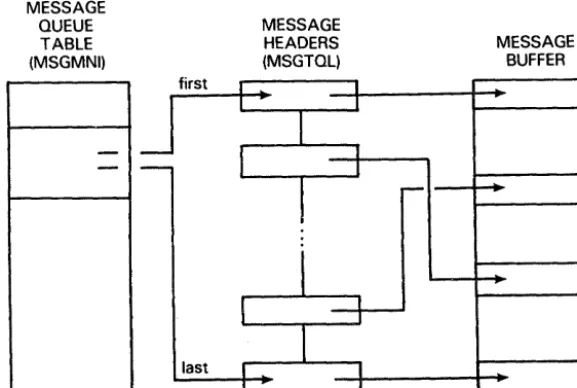
Figure 3-2 IPC Message Implementation MESSAGE QUEUE TABLE (MSGMNI) E7610
-first last I II
I
I I MESSAGE HEADERS (MSGTQL)l
!
i
I
I I I I,
I I J r--MESSAGE BUFFERMessages are implemented by using the structures shown in Figure 3-2. For every message that is in the system, there is an entry in the message queue table that points to the corresponding message headers. These message headers are linked together using a singly linked list. The message headers point to the corresponding buffers that contain the actual message.
[image:44.407.74.363.103.297.2]3-22 Tunable Parameter Descriptions
Semaphore Parameters
The semaphore parameters control inter-process semaphore resources in the kernel, which can be accessed by user processes through the semctl, semget, and semop system calls.
Semaphores implement a Uwait" and Usignal" mechanism. The following paragraphs describe the semaphore
parameters and the resources they control.
SEMA
The SEMA parameter is a flag to indicate whether or not the semaphore facilities are available in the kernel.
o 1 = semaphore facilities are available.
o 0 = semaphore facilities are not available.
SEMMAP
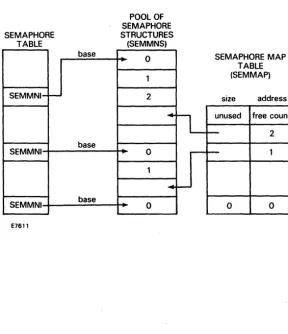
SEMMAP Identifies the map associated with the pool of semaphores. It controls allocation of the system semaphore allocation map. Allocation of a semaphore set is performed by the semget system call.
SEMMNI
The SEMMNI parameter controls allocation of the system semaphore id data structure table. The kernel makes an entry in the semaphore id data structure table for each set of semaphores in the system.
The default value for SEMMNI is 10. Each unit of SEMMNI adds 32 bytes to the kernel.
SEMMNS
The SEMMNS parameter controls allocation of the system semaphore table. The SEMMNS parameter sets the size of the semaphore pool. The kernel makes an entry in the semaphore table for each semaphore in the system.
The default value for SEMMNS is 60. Each unit of SEMMNS adds 8 bytes to the kernel.
SEMMNU
The SEMMNU parameter controls allocation of the system semaphore operation adjust-on-exit table. The kernel uses this table when undoing semaphores in the system. This adjust-on-exit table determines the total number of "undo" structures. There is only one undo structure per process, which contains a table of undo entries. The first allocation of an undo entry causes allocation of an undo structure. The structures are maintained in a singly linked list.
undo operations are implemented to ensure that a
terminating process cannot indefinitely "block other awaiting processes. On process exit, the recorded undo operations are performed on the related semaphore.
3-24 Tunable Parameter Descriptions
SEMUME
The SEMUME parameter defines the maximum number of semaphore "undo" entries per process. SEMUME determines the size of the "undo" entry table. This parameter also defines the value of the "undo" global SEMUSZ.
The size of SEMUSZ is computed by the formula:
(size of undo structure (8) • SEMUME ) + size of sem-undo structure (14)
Therefore, with the default value of SEMUME (which is 10), SEMUSZ equals 94.
SEMMSL
SEMMSL defines the maximum number of semaphores per id. This parameter also allocates an array that is used to store semaphore data. The default value is 25. Each unit of SEMMSL adds 2 bytes to the kernel.
SEMOPM
SEMOPM defines the maximum number of semaphore operations per semop call. This parameter also allocates the same array as SEMMSL, to store semaphore operations. The default value is 10. Each unit of SEMOPM adds 6 bytes to the kernel.
SEMVMX
SEMVMX defines the maximum value for a semaphore. The default value is 32767. Changing this value does not change the kernel size.
SEMAEM
Figure 3-3 IPC Semaphore Implementation
POOL OF SEMAPHORE SEMAPHORE STRUCTURES
TABLE (SEMMNS)
base
0
1
SEMMNI-r-- 2
...
base
SEMMNI 0
1
•
SEMMNI base 0
E7611
L
-~
SEMAPHORE MAP TABLE (SEMMAP)
size address unused free count
-
2-
10 0
[image:48.404.76.364.97.431.2]3-26 Tunable Parameter Descriptions
A Sample CENTIX Kernel Customization Session
In the following sample CENTIX kernel customization session, two parameters are modified:
o NBUF (a system resource parameter) is modified to increase buffers to 60 (the default is 48).
o SHMMAX (a shared memory parameter) is modified to increase the maximum allowable size of a shared memory segment to 60 (the default is 48).
To run the CENTIX Kernel Customizer:
1 Run halt to bring the system down to single-user mode.
2 Use vi or ed to edit jusrjsysjcfjdfile.normal (or another file that you specify). Add the following lines to the end of the file:
buffers 60 shnmax 60
3 Because the kernel NBUF parameter affects the CENTIX File System Server, the server's BUFFERS parameter has to be changed to correspond with the kernel. Use ofvi or
oled to append the following lines to [Sys]<sys>ConfigUFS.sys:
BUFFER BUFFER
60 60
4 Execute custscript. Unless you specify otherwise, custscript
will look in /usr/sys/cf/dfile.normal for the new parameter specifications.
5 Execute the following:
# sync; sync; sync
Adding Device Drivers
The information in this section assumes that you have
developed a device driver for CENTIX and that you now want to have the new driver incorporated into the kernel.
The procedure for adding device drivers to your kernel is as follows:
1 Obtain a major device number for the driver.
2 Add the device driver entry to the first part of the /etc/master file.
3 Append the corresponding device driver name to the /usr/sys/cf/dfile.normal file.
2 Run custscript.
Obtaining a Major Device Number
A device driver requires a major device number so that the kernel build process can place unique entries in the
appropriate device table. You include this number as part of the device driver's entry in the file /usr/sys/cf/dfile.normal (see next subsection).
To find the next available device number, look at your /etc/master file. The following paragraphs describe the /etc/master file.
The /etc/master File
The /etc/master file is divided into three sections. Each section is separated by a line with a dollar sign ($) in the first column. Section 1 contains device information. Section 2 contains names of devices that have aliases (or secondary names). Section 3 contains information on the tunable CENTIX parameters.
Section 1 of the /etc/master file contains lines consisting of at least 6 fields, with the fields delimited by tabs and/or blanks:
4-2 Adding Device Drivers
o Field 2 is an octal device mask. Each "on" bit indicates that the handler exists:
000100 initialization handler
000040 power-failure handler
000020 open handler
000010 close handler
000004 read handler
000002 write handler
000001 ioctl handler
o Field 3 is also an octal number denoting the device type indicator, with each "on" bit specifying the following:
000200 allow only one of these devices
000100 suppress count field in the conf.c file
000040 suppress interrupt vector
000020 required device
000010 block device
000004 character device
000002 floating vector
000001 fixed vector
o Field 4 is the handler prefix. The prefix can be up to four characters long.
o Field 5 is the major device number for a block-type device.
Section 2 contains lines with 2 fields each:
o Field 1 contains alias names of devices. These names can have a maximum of 8 characters.
o Field 2 contains reference names of devices. These names can have a maximum of 8 characters.
Section 3 of the /etc/master file contains lines with 2 or 3 fields each:
o Field 1 contains the parameter name as it appears in the description file dfile.normal, which is in the /usr/sys/cf directory.
o Field 2 contains the parameter name as it appears in the configuration file conf.c, which is in the /usr/sys/cf directory.
o Field 3 contains the default parameter value.
If field 3 is omitted, then parameter specification is required, which is done by modifying dfile.normal (see Section 2, "Modifying Tunable Parameters").
The following is a sample /etc/master file. Lines preceded by an asterisk (*) indicate comments that do not affect the file.
• The f 0 I I ow I n g de v Ice s are tho set hat can be specified
• I nth e s y stem des c rip t Ion f I Ie. The name • specified must agree with the name shown.
bdlsk 036 270 fpb 0 0
cdlsk 036 264 fpc 0 1
tape 036 254 tape 2 4
console 037 264 con 0 5
p r f 007 244 prf 0 6
tpcp 037 264 tp 0 0
I P 033 244 Ip 0 7
mbsc 037 244 bsc 0 8
mbsm 037 244 bsm 0 9
mbst 035 244 bst 0 10
msna 037 244 sna 0 11
mx25 037 244 x25 0 12
4-4 Adding Device Drivers
tsp 037 244 tpy 0 14
Pseudo-terminal ports
-
up to 32pts 037 045 pts 0 16 32
pte 037 245 pte 0 17
• The fol lowing devices must not be specl fled • I nth e s y stem des c rip t Ion f I Ie. The y are her eta • supply Information to the conflg program.
memory tty $$$ 006 027 324 324 mm sy o o 3 2
• The following entries form the alias table.
syq bdlsk
$$$
• The following entries form the tunable parameters table.
buffers NBUF 48
Inodes NANODE 200
f I I es NFllE 250
nf locks NFlOCKS 200
mounts NMOUNT 16
swapmap SMAPSIZ 140
nswap NSWAP 2500
ca II s NCAll 50
procs NPROC 125
texts NTEXT 40
cllsts NCLI ST 150
·
n I r g-
size of kernel heap. In 4K block units • Inlrg NLRGBLOCKS 6
power POWER 0
maxproc MAXUP 25
nswbuf NSWBUF 24
• hashbuf must be a power of 2
hashbuf NHBUF 64
• maxfs - Max ullmlt file size In 512 byte blocks .,
maxfs MAXFS 2113674
• msgmax must be msgmax MSGMAX
<- Icc.h:SlLRG. max heap block size ./
4096 msgmnb msgmn I msgtql sema semmap semmnl semmns semmnu semmsl semopm semume semvmx semaem shmem shmmax shmml n shmmnl shmseg shmbrk shma I I
MSGMNB MSGMNI MSGTQL SEMA SEMMAP SEMMNI SEMMNS SEMMNU SEMMSL SEMOPM SEMUME SEMVMX SEMAEM SHMEM SHMMAX SHMMIN SHMMNI SHMSEG SHMBRK SHMALL 16384 50 40 1 10 10 60 30 25 10 10 32767 16384 1 48 100 6 16 512
• the f 0 I I ow I n 9 a I I ow the con fig u rat Ion 0 f net wo r kin 9
network NETWORK 0 Internet INTERNET 0 debugger DEBUGGER 1 subclock SUBCLOCK 0 nrslp NRSLP 200
Using the /etc/master File to Choose a Major Device Number
The first part of the /etc/master file contains device information. The sixth (or last) field of this part of the file contains the major device numbers for the devices on the system. Find the last entry in this field, then choose the next sequential number. For example, if the last entry in the sixth field of the first part of the /etc/master file is 1 7, choose 1 8 as the major device number for your new driver.
4-6 Adding Device Drivers
Adding the Device Driver to the CENTIX Kernel
To add a device driver to the CENTIX kernel, you must add an entry for the new device to the files /etc/master and /usr/sys/cf/dfile.normal. (See "Modifying TunableParameters" in Section 2 for more on the dfile.normal file.) Then run the custscript program.
To add a new device driver to your CENTIX kernel:
1 Edit /etc/master using vi or ed.
2 Append the entry to the first part of the file (as described above). For clarity, append this entry before the
pseudo-terminal port device entries (after the tsp entry).
New device entries in the /etc/master file should follow the format of the default device entries already in the file.
A sample entry from the default /etc/master is:
console 037 264 con
o
5The device name is "console." The second field has bits set to indicate that handlers exist for open, close, read, write, and ioctl, but not for initialization or power-failure. These handlers will be prefixed with "con" (field 4), that is, conread, conioctl, conopen, and so on. The third field has bits set to indicate that only one of these devices is allowed, the interrupt vector is to be suppressed, it is a required device, and an entry should be made in the character device table, but not the block device table. The fifth field is ignored since the proper bit was not set for block device. The sixth field indicates that this device driver should be character major device number 5.
A new entry might be as follows:
The device name is "newdriver." The second field indicates that handlers exist for open, close, read, and write. The third field indicates that only one of these devices is allowed, the interrupt vector is to be suppressed, and entries should be made in the block device table and the character device table. The handler prefix is "new" (newopen, newclose, and so on). The block major device number is 2, and the character major device number is 18. 3 Add a corresponding entry to the file dfile.normal.
Although the new device driver has been added to the /etc/master file, unless a corresponding entry exists in dfile.normal, the appropriate entries will not be created in the configuration files when dfile.normal is configured (during the custscript program).
Add the device name to the first part of the dfile. normal file,. after the last entry in that section of the file. Using the above example, the name "newdriver" would be added after the tsy entry in dfile.normal.
4 Run custscript.
Glossary
anode. CENTIX system data structure that contains all the information about a file except its name and its contents.
Applications Processor (AP). Processor board in the XE 500 system that runs the CENTIX operating system.
AP. See Applications Processor.
B 20. Burroughs microcomputer from the clustered workstation series.
block. On a disk device, a 512-byte subdivision of data on the disk. Also referred to as a sector.
block device. A hardware device that handles I/O data in 1024 bytes (1 kB) blocks. The I/O size is controlled by the operating system's buffer size and is independent of the user's I/O size. Disk and tape devices can be configured as block devices.
BTOS. B 20· Operating System. All XE 500 boards except the Applications Processor run a version of BTOS.
BTOS-based processors handle all of the actual data transfers for CENTIX between the XE 500 and I/O devices (such as disk drives, tape drives, terminals, and modems).
buffer cache. System buffers that the kernel utilizes for temporary storage of data while data is transferred to and from disk.
cc. The C compiler.
cd. The change directory command.
CENTIX. Burroughs version of the System V UNIX operating system.
CENTIX C. Standard C Language adapted for use with CENTIX operating system.
CENTIX File System Server. BTOS-based system service that controls
all CENTIX disk I/O.
Glossary-2
character device. A hardware device that handles raw data streams. The size of I/O transfers in raw data streams are determined either by the software design of the device itself (for terminals and printers) or by the program controlling the device (for disks and tapes).
Cluster Processor (CP). Board in XE 500 system; runs
communications software and supports PT 1500 terminals, 820 workstations, a parallel printer, and up to three RS-232-C serial devices.
conf.c. C program that defines the configuration tables for the various devices on the system.
conl.o. Object file created when conf.c is compiled.
console. The terminal designated by the system software for use by the system administrator.
CPo See Cluster Processor.
custscript. Shell script used by the CENTIX kernel customizer to compile and link the customized kernel.
customizer. See kernel customizer.
device. A terminal, printer, disk, tape, or other input/output medium that can be attached to the system. A device can be physical or logical.
device driver. Program that controls a device.
device file. In the CENTIX file system, a file in the /dev directory that represents a terminal, printer, disk, tape, or other input/output device.
dfile.normal. File used by the CENTIX kernel customizer to tune parameters and add device drivers to the system.
directory. In CENTIX, a directory is a list of files that are assigned to the directory. A directory can also contain other directories.
Disk Processor (DP). Processor board in an XE 500 system that is formed by connecting SC to SP. The DP supports I/O to half-inch magnetic tape drives and MD3 disks.
DP. See Disk Processor.
/etc/config. Program used to configure the CENTIX operating system.
/etc/master. T ext file that contains the master device information.
File Processor (FP). Processor board in an XE 500 system that supports I/O operations to disk devices.
file system. In CENTIX, a collection of files that are all stored on the same logical disk device. A file system must be attached to, or is "subordinate to," a directory. The file system physically contains the files that are logically
contained in that directory. The term can also be used, as in "the CENTIX file system," to describe the entire hierarchy of directories, specific file systems, and files in a CENTIX system.
FP. See File Processor.
fsck. File system check.
halt. Program that cancels all running processes and brings the system to single-user mode.
inode. In a CENTIX file system, there is one inode for each file and directory in the file system. The inode contains status information for its file or directory, such as the size, its owner and permissions, its disk address list, and whether it is a directory, an ordinary file, or a special file.
inter-CPU communication (ICC). Enables a process on one processor to request a system service from a process on another processor. ICC is an extension of the Inter-Process Communications (IPC) facility.
inter-process communication (IPC). Facility that synchronizes process execution and information transmission between processes through the use of messages and exchanges.
I/O. Input/output.
kernel. Portion of the CENTIX operating system that controls system processes and allocates system resources.
Glossary-4
Id. Link program for common object files.
major device number. Unique numbers assigned to the devices listed in the /etc/master file.
message parameters. Parameters that control inter-process message resources in the kernel, which can be accessed by user processes through the msgctl, msgget, and msgop system calls.
mixed system. An XE 500 system that contains a complete BTOS operating system and a complete CENTIX operating system.
mkboot. Program that reformats the CENTIX kernel and copies it to BTOS. octal numbers. Base 8 numbering system (0 through 7).
ofed. CENTIX program that allows you to use ed to edit BTOS files.
ofvi. CENTIX program that allows you to use vi to edit BTOS files.
/oldunix. Original/unix file, created when /unix is replaced by the new customized kernel.
parameter. See tunable parameters.
partition. The name of a BTOS file that is associated with a CENTIX logical disk device.
raw device. A block device configured to accept data one character at a time, rather than in blocks.
root. The base directory of the CENTIX file system. Every ENTIX directory must either be subordinate to root, or subordinate to a directory that is subordinate to root, or subordinate to a directory that is subordinate to a directory that is subordinate to root, and so on. In a file path name, root is represented by a slash (/).
semaphore parameters. Parameters that control inter-process semaphore resources in the kernel, which can be accessed by user processes through the semctl, semget, and semop system calls.
shared memory parameters. Parameters that control
shell. The portion of the CENTIX operating system that provides a user interface to the kernel.
shell script. An executable CENTIX file that contains a program comprised of shell commands.
single user mode. An operating state defined in the /etc/inittabnn files. In single user mode, only the system console can access the system.
SP. See Storage Processor.
Storage Processor (SP). Processor board in XE 500 system; controls half-inch magnetic tape.
superblock. The portion of a CENTIX file system that contains descriptions of the file system, including the file system name, its size in blocks, the number of blocks reserved for inodes, the free inode list, and the free block list.
superuser. The name by which the system administrator is called in CENTIX documentation. To become superuser, the administrator signs onto the system as "root".
[Sys]?sys?CENTIX.sys. BTOS file that represents the CENTIX kernel.
[Sys]?sys?ConfigUFS.sys. CENTIX File System Server file.
system call. Function that causes the kernel to perform an operation for a process.
system resource parameters. Parameters that control system resources such as buffer sizes, system table allocations, and memory allocations.
terminal. A device, usually equipped with a keyboard and a display, which is capable of sending and receiving
information over a communication channel.
Glossary-6
TP. See Terminal Processor.
tunable parameters. Parameters that can be modified to customize the CENTIX kernel.
UFS.run. CENTIX File System Server run file.
undo operations. Implemented to ensure that a terminating process cannot indefinitely block other awaiting processes.
UNIX. AT&T Bell Laboratories operating system designed for application program development on various computer systems.
/unix. CENTIX file that represents the CENTIX kernel.
/usr/sys/cf. Directory that contains the configuration file dfile.normal and the shell script custscript, which are used by the CENTIX kernel customizer.
/usr/sys/cf/dfile.normal. See dfile.normal.
/usr/sys/oslib. CENTIX kernel customizer directory containing five kernel libraries and two object modules.
vi. CENTIX screen-oriented visual editor.
volume. In BTOS, the complete file system unit of information stored on a formatted disk.