I
LEVEL 68
MULTles
SYSTEM
PROGRAMMING
TOOLS
SUBJECT
Description of Multics System Programming Tools of Interest to Experienced Multics Users
SPECIAL INSTRUCTIONS
This revision supersedes Revision 1 of the manual dated February 1980. Changes made with this revision are marked by change bars in the margin; deletions are marked by an asterisk in the margin. Commands and subroutines that are entirely new do not contain change bars (see Preface for a list of the new commands and subroutines).
SOFTWARE SUPPORTED
Multics Software Release 9.0
ORDER NUMBER
This manual contains information not of general interest to most users of the Mul tics system; most users will find all the information they need in the Multics Programmers' Manual (MPM). The information documented here is used 1nfrequently and 1S 1ntended for experienced programmers who are already familiar with the Multics system. The commands, subroutines, and data bases described in this manual receive a level of support that corresponds to their usage. Listed below there are commands and subroutines that are new to the system and there are those that are new to this manual having been transferred from the Tools PLM
(Order No. AN51).
I
Changes to Multics System Programming Tools, Revision ~, Addendum AI
New Commands add pnotice copy dump display label display-pnotice display-pvtelist pnotice names
01 dump -peruse_crossref
The imormation :m~ spt!Ciflca~ions in this document are subJiect to Cha. .... lge without. notice .. T1is
docunif~,1t oonl;?ins infmmatio,l arout Ho:,eyv.'i!l~ prodt,cts ot' sern'.!es that muy no, be B'lf..ikbie outsice the United States Cons" It your Honeywell J Aarketing Repre >f:nt2tive.
@
Honeywell In formation Systems Inc., 19827/82
Fi 1 e No.: 1 L 13, 1 U 13
·Section
Section 2
Reference to Commands and Subroutines by Function • . • • . . . . • •
Command Repertoire Subroutine Repertoire
Command Descriptions
Command Description Format . add copyright . . . . .
add-pnotice . . • • . . . • . change kst attributes . change-tunIng parameters, ctp check rndcs . 7 . . . .
check-mst, ckm • . • . • • . clear-partition . . . compare configuration deck . comp dir info . . . 7 . compare dump tape
compare-dump-tape status . compare-mst -. . 7 . . . . compare-object, cob
copy dump . . . • . . .
-cop·y dump$set fdump num, copy dump$sfd n copy dump-tape . . -. .
.-copy-mst,-cpm . • . . . copyright archive
cross reference, cref date deleter . . . deactivate seg . . delete old-pdds display branch . display-ioi data . display-kst-entry display-label display-pnotice
display-psp . . . .
display-pvte . . • . • . .
do subtree . . . . do subtree$recover . . • . . . . . do-subtree$abort . • . . . . do-subtree$status . . . . . . dump partition . . . . . . . . excerpt mst. . . • . •
expand 7 . . . . fix quota used . generate rnst, gm .
FormaL of an MST Header . generate pnotice . .
get ips mask • . . .
get-library segment, gls . hp delete vtoce . . . .
hunt . . 7 . . . . hunt dec . . . .
library descriptor, Ids I ibra.ry-fetch, If
list dir info
Page 1-1 1-1 1-5 2-1 2-1 2-4 2-4. 1 2-5 2-7 2-8 2-9 2-13 2-14 2-17 2-20 2-22 2-23 2-24 2-25.1
2 -25. 1 2-26 2-28 2-29 2-31 2-37 2-39 2-40 2-41 2-42 2-44
2-44. 1
2-44.3 2-45
2-45. 1
Section 3
list sub tree, 1st . . . . mcs versIon
merge_mst . . . .
mex p . . . .
monitor log . . . .
monitor-quota . . . .
nothing~ nt . . . . . . . . .
ol_dump . • . . . • . . .
pause . . . • . . . perprocess static sw off . . . . perprocess-static-sw-on
peruse crossref, pcref • • • . . . prel inK . . . .
print apt entry, pae . . . .
print-conTiguration deck, pcd . . . . print-error message~ pem, pel, peo, peol . .
pe 1 . :- . .
peo . . • . . . . peol . . . .
print relocation info, pri prInt sample refs, psrf . print tuning parameters, ptp . priviLeged prelink . . . process id-. . •
rebuild-dir . record to sector . . . record-to-vtocx . . . reductIon-compiler, rdc repeat line, rpl . . . reset Tps mask . . . . .
reset tpd . . . . ring zero dump, rzd sampLe reTs, srf
save dir Tnfo . • . . . . . . save-history registers . . . . .
sec tor to record • . . . . send ips :- . . • . . . . send-wakeup .
set Tps mask . set-timax, stm set-tpd . . . teco . . . . •
A teco Summary . teco error . . teco-ssd . . .
test-archive • . . . .
vfile find bad nodes . . . . . . . . vfile-find-bad-nodes . . • . . . vtoc pathname -. . . . vtocx to record • . . . .
write-mst . . .
Subroutine Descriptions . abbrev . . . .
aobrev $abbrev . . . abbrev-$expanded line . • abbrev=$set_cp :- . . . ask . . . • . . . .
Clsk $ask ask-$ask-clr ask-$ask-int
ask-$ask-flo , . . . . ask-$ask-yn .
ask $ask cint • . • • • ask-$ask-cflo • .
ask-$ask-cline
ask-$ask-cyn • . • • ask-$ask-n
ask-!task-nint • ask-$ask-nflo • ask-$ask-nline ask-$ask-nyn • ask-$ask-setline
ask-$ask-prompt . . • • . copyright notice • • • •
copyrignt notice $set suffix . . . • .
copyright-notice-$tes~
create ips masK -datebin .- . . :- . • .
da~ebin $datebin datebin-$shift . • . datebin-$time . .
datebin-$wkday . . . •
datebin-$dayr clk . . . . • • . . datebin-$revert . .
datebin-$revertabs
datebin-$datofirst . . . . . datebin-$dayr mc . • • . . • . .
datebin-$clocKathr . . . . . . datebin-$last midnight . . • • . datebin-$this-midnight . .
datebin-$preceding midnight . d atebin-$followi"ng-midn ight . datebin-$next shif~ change decode definition - . . . - . . . • .
decode definition $decode cref . • . • decode-definition-$init .-.
decode-definition-$full . . display file value .- . . . • .
find incl ud e -fil e -. . . . • . . . . . . -find include-file $initiate count .
find partition - -
-get oound seg Info . . • . . . •
get-initi~l ring -. • . . . . • • • . . . .
hasn . . : - . . -. . . . . .
-hash $make . . . • • • . hash-$opt size
hash-$in -. . •
hash-$inagain • . . . • . hash-$search •
hash-$out . . • . . . • • • • • • . hcs $get page trace • • • •
hphcs $ips waKeup • . . • . hphcs-$reaa partition . • • • . . . • • hphcs-$write partition . . . . . . lex error .- . • . • •
lex-strini . • • • • . • • . . • • • • - lex s~ring $init lex delims •
lex-string-$lex:- - . • • . . • • • link unsnap - • • . • •
1 ist-d ir inTo . • • • .
mdc $pvname info • • . . . . • • • . • parse channel name
parse-file :- • • - • •
parse-file $parse file init name
parse file $parse file . . • . parse-file-$parse-file-ptr
parse-file-$parse-file-cur line •
parse-file-$parse-file-line no . • . • phcs $read-disk-label -. - • • - • • . . . •
reha~h . - . . ~ • . . • . • . • • . • • ringO get • • • • • . . .
ringTI get $segptr • • •
ringO-get-$segptr given s I t .
r in gO - get - $ n am e . -. . . -. . . . • • . . ringO-get-$name given sIt . .
ringO-get-$name~ . • -. • • .
ringO-get-$definition . . . • • . • ringO-get-$definition given s I t .
r in g ze rope e k - • • . . . -. . . . -ring-zero-peek $by name • . . . .
ring-zero-peek-$by-definition . . ring-zero-peek-$get: max lengt:' . ring-zero-peek-$get-max-length ptr so r t i t ems • -. . ~ . . -. . - . - . . . •
-sort Ttems $fixed bin . .
sort-items-$float-bin . . • • • . sort-items-$char - • . . .
sort-items-$varying char sort-i tems-$bi t • . -. . . sort-items-$general • . . sort items indirect • . • . . . .
-sort Ttems indTrect Sfixed bin . . . . sort-items-indirect-$float-bin . • • . sort-items-indirect-$char ~ . . .
sort-items-indirect-$varying char • sort-items-indirect-$bit
-sort-items-indirect-$general . . . . . sort=items=indirect=$adj_char . . . . . stu . . . • . . • . . . •
stu $decode runtime value . . stu-$find block . . -. . . . • . stu-$find-containing block stu-$find-header . ~ . • . stu-$find-runtime symbol stu-$get Dlock . -. . . . . stu-$get-implicit qualifier • stu-$get-line . • -.
stu-$get-line no stu-$get-locat:ion .
stu-$get-map index . . . . stu-$get-runt:ime address
stu-$get-runtime-block stu-$get-runtime-line no stu-$get-runtime-location stu-$get-statement map
stu-$offset to pointer . . . . . . . . stu-$pointer to offset
stu-$remote Iormat sweep disk . . . .
sweep-disk $dir list . . . . sweep-disk-$louQ
teco :set macro
-t ran sl a-t 0 r J. n fo . . . . .
trans~ator-ir.fo $get sourae info
t ran s 1 at 0 r tern !-,- • • • • ~ • • . • • • •
tr8nsTJtor-temp $get segment
transl&tor-temp-$get-next segment . cransl ator-temp-$allocate -. . . . translator=temp=$release_all segments .
3-72 3-72 3-73 3-73 3-75 3-76 3-77 3-77 3-77 3-78 3-79 3-79 3-80 3-81 3-83 3-83 3-84 3-85 3-86 3-87 3-87 3-87
3-BP
3-89 3-89 3-90 3-92 3-94 3-95 3-95 3-96 3-96 3-97 3-98 3-99 3-99 3-100 3-101 3-101 3-102 3-103 3-104 3-105 3-106 3-107 3-107 3-108 3-109 3-110 3-i i iSection 4
Index
Figure
2-1-Figure 2-2.
Figure 2-3· Figure 2-4.
Figure 2-5.
Figure 2-6.
Figure 2-7.
Figure 2-8.
Figure 2-9.
Figure 2-10.
Figure 2-11 .
Figure 2-12.
Figure 2-13.
Figure 3-1.
Figure 3-2. Figure 3-3.
Table 2-1.
Table 2-2.
Table 2-3.
Table 2-4.
Table 2-5.
translator_temp_$release_segment
whotab Data Base
ILLUSTRATIONS
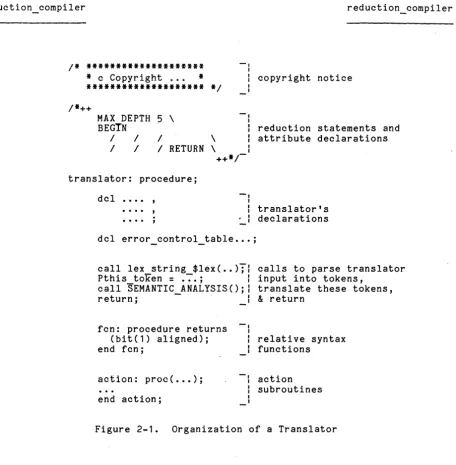
Organization of a Translator
· ·
·
·
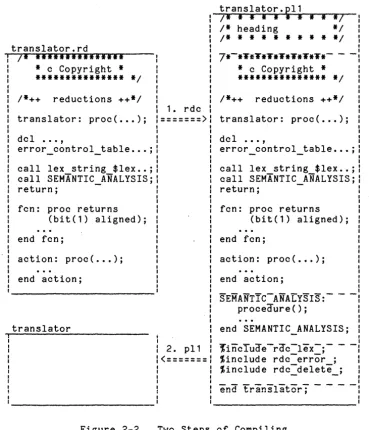
Two Steps of Compil ing·
·
· ·
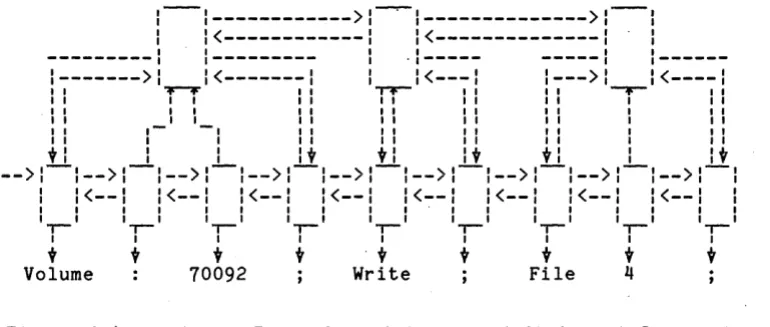
Input Tokens and Their DescriptorsTokens, Token Descriptors, and Statement Descriptors
·
·
·
·
· ·
.
·
· · ·
·
Semantically Analyzing Those Tokens, andReturning
.
·
.
·
·
· · · ·
·
· ·
·
· ·
The Current Token Phrase Used by Reductions BNF Syntax for a Tape Language
·
·
Reductions for the Tape LanguageReductions for the Tape Language
(Error-Diagnosing Actions Qnitted)
· ·
·
·
error control table for the Tape Language·
Complete Reductions for the Tape Language·
BNF Specification for the Value Language Red uc tions for the Value Language·
· ·
Sample Input to lex string. ·
·
Input Tokens and Their DescriptorsTokens, Token Descriptors, and Statement Descriptors
·
.
·
·
· · ·
·
· · ·
TABLES
·
·
· ·
·
·
Delimiting Characters Used by rdc . . . . Ignored Delimiting Characters . . . • . . . Relationship of error control table.severity no
to Error Message Prefix . . • . . . • . -SERROR CONTROL Bits Control the
error-message text • . . • Elements of the Reduction Language
COMMAND REPERTOIRE
The Mul tics commands described in this manual are organized by function into the following categories:
Administrative Utilities Debugging Facility
Directory Checking General Purpose
Object Segment Manipulation MST Maintenance
Detailed descriptions of these commands, arranged alphabetically rather than functionally, are given in Section 2 of this document.
Administrative Utilities
check mdcs
compare_configuration_deck
copy_dump_tape
compare_dump_tape_status
date deleter
display_ioi_data
fix_Quota_used
mcs version
monitor_log
prelink
performs maintenance and verification of MDC
data
•
compares the configuration deck
.running system to a second copy for the
I
verifies tape copies of an original Multics storage-system-hierarchy dump tape
generates tape copies of an original Multics storage-system-hierarchy dump tape
prints true or false
directory-housekeeping tool: deletes segments not used in a given length of time
I
I
I
deletes old copies of >process dir dir
I
created during previous bootload --displays the ring 0 data base iOi_data
repairs inconsistencies in storage system
prints version of the core image most recently loaded into a specified FNP
I
I
moni tors acti vi ty in standard
segments format log
I
I
I
privileged_prelink
reset_tpd
save history_regs
set timax
Debugging
copy_dump
deactivate_seg
display_branch
01_ dump
print_apt_entry
process_id
vfile fino bad nodes
creates a prelinked sUbsystem in lower rings
resets the transparent attribute of a segment
paging device
saves processor history registers upon each occurrence of a signal able faul t in the signaler's stack frame
adjusts schedul ing parameters of the call ing process
sets the transparent paging device attribute of a segment
modifies specialized per-initiation segment attributes
copies an fdump image taken by BOS out of the dump partition into the Multics hierarchy
causes the deactivation of a segment
displays internal system information in a directory branch wi thout attempting VTOC access
displays internal system information in the KST entry
looks at selected parts of an onl ine dump created by the BOS FDUMP command and copied into the Mul tics hierarchy by the copy dump
command
-displays the contents of specified APT entries in either octal or interpreted form.
prints the interpretation of standard Mul tics status codes
interprets the three data segments produced by the sample refs command and produces a suitable output segment
prints (or retut~ns) the process id of a specified user
samples the machine registers determine which segments a referencing
in order to process is
exaMines (1 .file keyed file to determine
Directory Checking
comp _ dir _ info
list dir info
list sub tree
rebuild dir
save dir info
General Purpose
add_pnotice
clear_partition
cross reference
d ispl ay_Iabel
display_pnotice
do subtree
dump_partition
expand
compares and reports the differences between two directory information segments
obtains system source programs from system libraries
pr ints information directory saved command
about the by the
state of a save dir info
lists the segments in a specified subtree of the hierarchy
reconstructs a directory from information saved by the save_dir_info command
saves information about the state of a directory and the segments and I inks in
it
protects source code programs by adding, at
*1
the beginning of a program, a software protection notice in a box delimited as a comment
overwrites the contents of a disk partition with zeroes or an optional user-supplied word
creates a cross-reference listing of object
programs and include files
*
prints information recorded in the physical
I
volume label for a storage system disk vol ume information installed displays software librariesabout distributed in onl ine system
displays information on software protection
I
notices contained in source programsprints information recorded in the Physical Volume Table Entry (PVTE) for a storage system disk volume
executes one or two command lines after substituting the pathname of a given directory in the command line
displays data from a moved data partition
generates copies of source programs wi th include file texts included
I
I
get_ips_mask
hp_delete vtoce
hunt list_partitions mexp monitor_quota nothing pause peruse_crossref
record to sector
record to vtocx
reduction_compiler
reset_ips_mask
sector to record
send ips
send_wakeup
teco
prints the current state of the IPS mask for the calling process
deletes a specified VTOC entry
searches portions of the hierarchy for segments with names matching a given star name
lists the locations and sizes of all partitions on a specified physical volume
displays the primary names of all protection notice templates
takes mexp source segments, expands any macros found therein, and generates as ou·tput an expanded text segment sui table as input to the ALM assembler
notifies user of record quota overflow condition
does nothing: useful for metering and command language programming
waits a specified real-time interval
displays information extracted output fil e generated cross reference command
from by
the the
converts an octal sector number to a disk sector address
finds the VTOC entries, if any, corresponding to a specified record number on a storage system vol ume
compiles a segment containing reductions and action routines into a PL/I source segment
executes a given command line repeatedly
sets the IPS mask for the current process to unmask some or all IPS signals
converts an octal sector address to a Mul tics record number
sends an IPS signal
sends an IPC wakeup
sets the IPS mask for the current process to mask some or all IPS signals
is a powerful, character-oriented, edito;,
test archive
vtocx to record
Object Segment
compare_object
hunt dec
perprocess_static sw off
teco to search when trying to find a teco macro to execute
checks an archive segment for archive format errors and other inconsistencies
converts an octal VTOCE index to a Multics record number and sector offset
details discrepancies between object segment
searches a subtree for PL/I object segments
turns off an object segment's per-process static switch
check mst
compare_mst
list mst
write mst
SUBROUTINE REPERTOIRE
produces report of contents of an MST and some cross-reference information
reports discrepancies between two MSTs
copies an MST onto a new reel of tape
extracts selected segments from an MST
creates an MST from storage-system segments and an MST header
produces brief report of the contents of an MST
creates a new MST from an storage-system segments, substitutions
old one and performing
allows writing of short MST without the use of a header file
The Multics subroutines described in this manual are organized by function into the following categories:
General Purpose
Interface to System Functions Object-Segment Manipulation Reduction-Compiler Utilities
Detailed descriptions of these subroutines, arranged alphabetically rather than functionally, are given in Section 3 of this document.
General Purpose
ask
copyright_notice
create_ips_mask
display_file value
find include file
hash
flexible terminal-input facility for numbers and strings
add (and optionally deletes) copyright
I
notices to source-program segmentsreturns a bi t string that can be used to disable specified IPS interrupts
outputs information about a file on a user-supplied switch
locates an include file include-file search rules
via system
I
ascertains information about a disk parti tion
I
located on some mounted storage-system diskis used to maintain a hash table; contains entry points that initialize a hash table
I
I
I
I
I
I
I
I
I
rehashsort items
sort items indirect
Interface to System Functions
abbrev
d atebin
get_initial_ring_
hcs_$get_page_trace
link_unsnap_
list dir info
teco error
teco_get_macro
writes words of data into a specified disk partition on some mounted physical
st~rage-system disk
gets various information about a specified storage-system physical volume
parses ASCII text into symbols and break characters
reads the label of a storage-system disk volume
reformats a hash table of the form maintained by the hash subroutine into a different size
provides a general sorting facility
provides a facility for sorting a group of data items
walks a given subroutine over a subtree of the directory hierarchy
subroutine interface to the abbrev command
decodes calendar clock values into binary integers
obtains a process' initial ring number
retrieves trace of process' page faults from the supervisor
sends a specified IPS signal to a specified process
unsnaps all links pointing to a given segment
internal interface to the list dir info command
parses a character string that is intended to be an 10M channel number
suppl ies name, segment-number, and entry-point information about ring 0 segments
prints the long form of a teco error message given the short term
called by teco to search for an external macro
decode definition
stu
translator info
Reduction Compiler Utilities
lex error
lex_string_
translator_temp_
returns information about a defini tion in the object segment
supplies structural information about a bound segment
retrieves information from the
runtime-symbol-table section of an object segment.
supplies source-segment information for use by translators building object segments
generates compiler-style error messages
parses ASCII character strings
COMMAND DESCRIPTION FORMAT
This section contains descriptions of Multics commands, presented in alphabetical order. Each description contains the name of the command (including the abbreviated form, if any), discusses the purpose of the command, and shows the correct usage. Notes and examples are included when deemed necessary for clarity. When a command may also be used as an active function, its usage and function are described near the end of the command description. The discussion below briefly describes the content of the various di visions of the command descriptions.
Name
I
I
The "Name" heading lists the full command name and its abbreviated form.
I
The name is usually followed by a discussion of the purpose and function of the command and the expected results from the invocation.I
This part of the command description first shows a single line that demonstrates
I
the proper format to use when invoking the command and then explains each element in the line. The following conventions apply in the usage line.1.
2.
Optional arguments are enclosed in braces (e.g.,
All other arguments are required. {path} , {User_ids}).
Control arguments are identified in the usage line wi th a leading hyphen (e. g., {-control args}) simply as a reminder that all control arguments must be preceded by a hyphen in the actual invocation of the command.
I
I
I
I
I
I
NOTE: Keep in mind the difference between a plural argument name that is enclosed in braces (i. e. , optional) and one that is not (i. e. , required). If the plural argument is enclosed in braces, clearly no argument of that type need be given. However, if there are no braces, at least one argument of that type must be given. Thus "paths" in a usage line could also be written as:
4.
5.
6.
pathl {path~ ..• path~}
The convention of using "paths" rather than the above is merely a method of saving space.
Different arguments that must be given in pairs are numbered (e.g., xxxl yyyl { ••• xxx~ yyy~}).
To indicate that the same generic argument must be' given in pairs, the arguments are given letters and numbers (e. g., pathA 1 pathB 1 {... pathA!!.
pathB!!.} ) . -
-To indicate one of a group of the same arguments, an "in is added to the argument name (e.g., path!, User_id!).
I
To illustrate these conventions, consider the following usage line:I
command {paths} {-control_args}I
The lines below are just a few examples of valid invocations of this command:I
commandcommand path path
command path -control arg
command -control arg =control arg
command path patK path -contr~l_a~g -control_arg -control_arg
I
In many cases, the control arguments take values.values are indicated as follows: For simplicity, common
I
I
I
I
I
I
STR N DT pathany character string. Individual command descriptions indicate any restrictions (e.g. ~ must be chosen from specified list, must not exceed a particular length, etc.).
number; individual command descriptions indicate whether it is octal or decimal and any other restrictions (e.g., cannot be greater than a certain limit).
date-time character string i~ a form acceptable to the convert_date_to_binary_ subroutine described in the MPM Subroutines.
pathname of an entry; unless otherwise indicated, it may be either a relative or an absolute pathname.
The lines below are samples of control arguments that take values:
-access name STR, -an STR -ring N7 -rg N
-date DT, -dt DT
under the "Notes" heading. Alsot where applicable, the required access modes, the defaul t cond i tion (invoking the command wi thout any arguments), and any special case information are included.
Examples
I
The examples show different valid invocations of the command. An exclamation
I
mark (!) is printed at the beginning of each user-typed line. This is done only to distinguish user-typed lines from system-typed lines. The results of each example command line are either shown or explained.Other Headings
I
Name: add_copyright
Name: add_pnotice
The add pnotice command protects source code programs by adding, at the beginning of
a
program, a software protection notice (copyright or trade secret) in a box delimited as a comment. Multiple protection notices are supported. Archives of source code programs can be protected using this command. The archive pathname convention is supported. If a particular language or suffix is not supported, an appropriate message is printed. By default, protection notice templates in )tools are used.add_pnotice path {-control arg}
where:
1 . path
is the name of a source code program or an programs that require ~rotection notices. The archive suffix must be included.
archive of source language suffix or
2. control args
Notes
can be chosen from the following:
-name STR, -nm STR
where STR specifies the name of a protection notice template to be added (see Notes below).
-trade secret
specifies that the notice to be added to the segment is the default Honeywell's trade secret notice (which has an added name of default_trade_secret.pnotice).
If no control arguments are specified, the notice added is the Honeywell's copyright notice with the name default.pnotice.
A list of available copyright and trade secret protection notice template names can be obtainec with the list pnotice names command. The -name can be used to specify any of these templates~
The change kst attributes command allows a user to change selected per-process
attributes of a-segment. tt
change_kst attributes {-control_arg} target attributes
where:
1. control arg
2. target
can be -name (or -nm) and is only used if the target is a relative pathname that looks like a segment number.
specifies the segment whose KST (known segment table) attributes are
*
to be changed. Either a relative pathname or an octal segment number may be specified.3. attributes
tpd
tms
tus
specifies those attributes that are to be· changed. One or more of the following must be given:
if set, pages of this object are not placed on the paging device on the account of the user.
if set, date-time-modified is not updated on the account of the user.
if set, date-time-u~ed is not updated on the account of the user.
allow deactivate
if set, permits explicit deactivation of the segment.
allow write
audit
Tf set, the user is not prevented from writing into the segment or directory if he has permission to do so.
I
it is not possible to meaningfully set the tpd, tms, tus, or allow_deactivate attributes for a directory.If an attribute is preceded by the circumflex character (A), then the attribute is reset. Otherwi se, the at tr ibute is set. At tr i butes not mentioned are unaffected.
•
-Name: check mdcs
The check mdcs command checks for valid format and invalid unique identifier (UID) pathnames in the master directory control segment (MDCS) for a given volume.
I
These segments are found in>
lv, and are sometimes damaged by system crashes. Any errors found are reported via the syserr log and, if possible, corrected.check mdcs volume
where volume is the name of a storage system volume.
Note
Name: check_mst, ckm
The check mst command reads a Mul tics system tape (MST) and provides information about improper combinations of attributes and missing procedures. It also provides information about the segment numbers assigned for supervisor and initialization segments, their names, attributes, and whether or not they were referenced.
check mst reel id {-control_args}
where:
1. reel id
is the reel identification number of the tape to be written. The
I
reel identification number, which is site dependent, may be up to 32characters long. The reel id may also include a density specification to indicate the density of the tape being written, as in "060341,den:1600".
2. control args
Notes
~an be seleeted from the following:
-collection, -colI
succeed ing numeric arguments define the collections after which a cross-reference check is desired. If this argument is not supplied, a cross-reference check is performed only after collections two and three.
-debug, -db
-file
sets a switch that preserves the tables constructed during checking; should not normally be used.
checks a file rather than a tape.
For normal use in checking out a new Multics system, the usage is:
check mst NNN
where NNN is the reel identification number desired.
Provision is made for up to three collections to be loaded and checked for cross-references.
A BOS tape may not be checked with this command.
I
Diagnostics and Results
Output produced is directed to the segment NNN.ckrout where NNN is the reel identification number of the specified tape.
After each collection is read, the system prints the number of words to be loaded into segments directly from the tape. When the tape is dismounted, the system prints the total number of words read from the tape, includ ing both segment contents and loading information.
If the grand total line does not immediately follow a collection total line, the ckrout segment should be examined immediately to discover the cause. Certain diagnostics relating to improper format or sequencing should occur within the first 20 to 50 lines.
The following messages can be written into the ckrout segment while processing a tape.
1. "Loading collection No.i": The system is starting to read the ith collection from the tapes, extrac£lng names and linkage information.
-2. "Collection-mark K": A collection mark with a value of K was read from the tape, completing the loading phase for the collection.
Following the "Collection-mark" message, the running count of segments processed in the various categories and the number of words used for each category are listed. The previous two messages are the only ones that normally occur; however, various other diagnostics can appear in various other cases listed below.
3.
4.
5.
6.
7.
"Illegal control word ~ after seg
1":
The format of the tape was incorrect, such that the 12-octal-digit string xxx was not valid in the context in which it was encountered; an error in-efenerating the tape or an unnoticed tape error may have been responsible. If this condition occurs, no more information is read from the tape."Possible tape format error or incorrect switch setting": The physical tape cannot be successfully read by the Mul tics tape reader package; or, the number of collections to be checked as specified in the argument list to the command does not exist on the tape.
"Name <z) also on seg No
.1":
Duplicate names appear on the tape. This occurs normally only in collection 3 for two segments that are different in ring 0 and in some outer ring."~eg
!.:
messagett : Certain checks are mad e for unusual combinations of attributes in the description of the segment, and message describes the conflict."Bad text-link sequence after z": The next segment after a text segment was not the linkage segment it should have be~n; or, a linkage segment was found not preceded by its text segment. The same actions occur as for (3) above.
"Status conflict": Wired code is referencing nonwired code. This condition is not necessarily an error, since program logic may permit it.
Cross-Reference Output
For each group of collections for which a cross-reference listing was requested, the following output appears in the ckrout segment.
1. For each collection, in sequence:
2.
Collection No.1, collection mark k
(values of i and k are as before).
For each segment for which one or more diagnostics appear: number, and all its names.
its segment
3. Diagnostic messages
a. First character is
<
the link could not be satisfied, for the reason given.
b~ "message name" .
advisory diagnostic pertaining to possible mismatching attributes be'tween the referencing and referenced segments.
Segment Summary Listing
1 •
2.
3.
For each segment on the tape(s) read, the following information appears:
Segment No.
Segment name
Acc
the system assigned segment number (in octal).
the primary name of the segment as specified on the tape (secondary names appear indented on successive lines).
the access to the segment as specified on the tape.
4. Switches (miscellaneous attributes)
Segment Status
W Wired down.
G The segment is paged.
p The segment is a per-process segment.
S The segment is to be deleted at shutdown.
B The segment is an abs segment.
T The segment is a temporary segment.
L The segment has an associated linkage segment.
C The segment's linkage section will be combined.
I
A The segment is encacheable.
*
The segment is never referenced. 5. Ring brackets6. Length (a multiple of 16 words)
7. Pathname
Notes
Between collections, the new collection number (i), is printed out. Segments
1 isted for collection 0 are those bootstrap 1 manufactures before load ing real segments.
Hame: clear_partition
The clear partition command overwrites the contents of a disk parti tion with zeroes or~n optional user-supplied pattern words. See also dump partition
and list_partitions commands in this manual.
-clear_partition pvname partname {control_args}
where:
1. pvname
is the name of the physical volume on which the parti tion to be cleared exists.
2. partname
is the name of the partition to be cleared. It must be four char:-acters or less in length.
3. control arg
Notes
may be chosen from the following:
-brief, -bf
produces brief format messages.
-long, -lg
produces longer format messages. (Default)
-pattern word
overwrites the partition with data consisting of the specified octal pattern word. The specified word is written into every location in the partition. If this control argument is not. specified, a default of all zeroes is used.
Access to the phcs_ and hphcs_ gates is required.
Name: compare_configuration_deck
The compare configuration deck command compares the configuration deck for the running system to a saved copy.
compare_configuration_deck path {-control_arg}
where:
1. path
is the pathname of a saved copy of the configuration deck.
2. control arg
may be one of the following:
-brief, -bf
suppresses the message- if the two configuration decks are identical, and suppresses printing of the identifying headers.
-long, -lg
prints all output. (Default)
Output format (-long mode)
The long output format consists of up to four sections, each of which is printed, with an identifying header, if it is not empty. The four sections are added cards, deleted cards, changed cards and MEM cards. The section for MEM cards is only printed if the order or number of MEM cards in the two decks differs; otherwise, only changed MEM cards are printed. The changed cards are listed in pairs, such as: '
Was: mem a 123. on mem a 123. off
The first line (prefaced by Was:) is the card from the saved deck, and the second line is the current card. If the two decks are different in order or number, this is announced, and both decks are printed in their entireties.
Output format (-brief mode)
The brief output format omits the section headings and the message: "The two decks are identical." Cards are identified by preface--added cards are prefaced by "New:" and deleted cards by "Old:". Changed cards are listed in pairs, in the same format as in the long output mode. If the MEM cards sectior is printed, it is the last section. The MEM cards are listed in two groups, wi th the first card in each group prefaced by "Was:" (for the first group) or "Now:" for the second group, and all the other cards in the group are lister with no preface.
Examples
Long mode output
Note that because the MEM cards have been reordered, the changed card for MEM A is not listed in the changed cards section.
Cards added in current deck: parm chwm dirw ttyb 7000. salv pdlv 1
Cards deleted from old deck: intk warm 3 star
Changed cards:
Was: cpu b 6 off cpu b 6 on
MEM cards are reordered: Was: mem a 258. on
mem c 258. on mem b 258. on Now: mem c 258. on mem a 258. off mem b 123. on
Brief mode output
This output is equi valent to the sample output for the long mode shown above.
Old: parm chwm dirw ttyb 7000. Old: salv pdlv 1
New: intk warm 3 star Was: cpu b 6 off Now: cpu b 6 on Was: mem a 258. on
mem c 258. on mem b 258. on Now: mem c 258. on mem a 258. off mem b 123. on
Usage ~ Active Function
[ccdk path]
Notes
This command attempts to be as accurate as possible when identifying "changed" cards--it knows about the cards (such as MEM, CPU, etc.) that may appear several times and specify multiple items and identifies them by their operands as well as by name. It decides that the two decks are "completely" different if there appear to be more than 32 differences between them.
comp_dir info path1 path2 {-control_arg}
where:
1. path 1
is the pathname of the old directory information segment. If the dir_info suffix is not supplied, it is assumed.
2. path2
is the pathname of the new directory information segment. _ If the dir info suffix is not supplied, it is assumed.
3. control arg
can be one of the following:
-brief, -bf
compares and prints minimum information.
-verbose, -vb
compares and prints almost all information.
-long, -lg
compares and prints all information.
Notes
If no control argument is specified, the -verbose control argument is assumed.
Output from the comp_dir _info command is written on the user_output I/O switch.
Unless the -brief control argument is specified, a form feed character is transmitted and then a heading is printed that identifies the directories being compared and the times the information was saved.
Output is in three sections:
modified entries deleted entries added entries
is printed, followed by a listing of the attributes of the deleted or added entry, in the format:
item name: value
For segments that have been modified, a heading of the form:
modified: entry entryname
is printed, followed by a line of the following formats:
item name changed from value1 to value2 item-name added: value
(The second format is used to report the addi tion or deletion of names, ACL entries, etc.)
The list below shows the output items according to the control argument and entry type. The control arguments are listed in order of their verbosity; i.e., the -brief (-bf) control argument prints out the least information, the -verbose (-vb) control argument prints out more information (including the It-bf" items), and the -long (-lg) control argument prints out all of the items listed.
segments:
-bf names
ring brackets damaged switch property list deletion of ACL truncation
-vb safety switch copy switch tpd switch
no complete dump switch· no-incremental dump switch security OOS switch
audit flag
multiclass switch access class author
bit count author ACL
date branch modified records used
max length
-lg date modified volume
bit count
ring brackets damaged switch property list deletion of ACL sons volume master dir quota
MSF indicator
-vb safety switch copy switch tpd switch
no complete dump switch no-incremental dump switch security OOS switch
audit flag
multiclass switch access class author
bit count author ACL
initial seg ACL initial dir ACL
-lg ACL
links:
-bf
-vb
-lg
date branch modified date modified
names type
link target
date link modified
link dumped
When looking for a match between the old and new dir info segments, the comp dir info command looks first for a match on the unique ID item. If no match is-found, it looks for any entry with a name matching the primary name of the old entry.
If a match is found, the comp dir info command checks a set of i terns (depending on the specified control argument) to determine whether to report the entry as modified.
The names item is always checked. The date dumped and date used items are never compared. Other checking is dependent upon the control argument.
where:
1. control args
are optional and may be one or more of the following:
-master volume STR1 ••• STRn, -mvol STR1 .•• STRn
provides a list of master tape volume names forming the master volume set used for comparison. The names are separated from one another by a blank. Up to 10 volume names may be given. If not specified, the user is queried for master tape volume names as each tape in the
v~lume set is read.
-copy volume STR1 •.. STRn, -cvol STR1 ••• STRn
provides a list of tape volume names forming the copy volume set being compared with the master volume set. The names are separated from one another by a blank. Up to 10 volume names may be given. If not specified, the user is queried for volume names as each tape in the copy volume set is compared with the master volume set.
-track N, -tk N
specified that tapes in one of the volume sets are to be mounted on a tape dri ve capable of hand ling tapes conta ining N tracks. The default track size is 9. (See "Notes" below.)
-density N, -den N
specifies that tapes in one of the volume sets are to be mounted on a tape drive capable of handling tapes written at density N. However, the actual densi ty at which the tapes were written determines the density that is used. If omitted, the default density is 1600 BPI.
(See "Notes" below.)
-abort
aborts the verification when the first tape discrepancy is found. The default is to report all discrepancies found between the master and copy tape sets.
-select
specifies that the copy set being compared is a subset of the contents of the master set being compared. The purpose of this control argument is to allow the comparison software to skip those components on the master set that do not appear on the copy set.
If the -master volume or -copy volume control argument or both are not specified, the user -is queried for the tape labels of the master or copy tape set or both.
The -track and -density arguments may only be given after the =master volume or -copy volume control arguments. Thus, if default track and density are not correct,--master_volume or -copy_volume must be given.
The -track and -density arguments apply only to the tapes composing the master or copy volume set associated with the preceding -master volume or -copy volume argument. Different -density and -track arguments can appear with each ~master volume or -copy volume control argument if the default track size and density are not appropriate for that volume set.
If the user wishes to specify nondefault track size or density, then specific values must be provided in the list of tape reels. The specification is ~ade as part of the reel label. Each specification is separated by a comma. For example:
compare_dump_tape -abort -mvol M1, 9track,den:800 M2,9track,den:800 -cvolC1 C2
Examples
compare_dump_tape -mvol M1 M2 M3 -cvol C1 C2 C3
compares master tape volumes M1, M2, and M3 with copy volumes C1, C2, and C3.
compare_dump_tape -abort -mvol M1 -cvol C1 -den 800 -tk 7
As an active function:
Name: compare_mst
The compare mst command is used to read two Multics system tapes (MSTs) and to list all differences between them. All differences in segment headers sand the starting -address of any inequalities or differing lengths of segment contents are noted. Additions, deletions, and moves of segments are handled. One can optionally save the contents of differing segments in the user's working directory for further detailed comparisons. Any number of collections can be handled, but a warning message is printed if a tape does not end in a collection mark. If the active all rings data segment is found on the first tape, a message containing the system-identifiers of both tapes is printed.
compare_mst reel id1 reel id2 {-control_arg}
where:
1. reel id 1
is the reel identific~tion number of the tape to be wri tten. The
I
reel identification number, which is site dependent, may be up to 32characters long. The reel id may also include a density specification to indicate the density of the tape being written, as in "060341,den=1600".
2. reel id2
- is the reel identification number of the new tape.
3. control arg
-Name: compare_object, cob
The compare object command compares two object segments and, optionally, prints out the changes made to the segment specified by oldpath to yield the segment specified by newpath. The assumption is that the first segment is older than the second, and that they were both produced from the same source segment but, potentially, by different versions of a language processor.
compare_object oldpath newpath {-control_args}
where:
1. oldpath
is the pathname of the first segment.
2. newpath
is the pathname of the second segment.
3. control args
may be chosen from the following:
-brief, -bf
-text
-defs
prints out by section a summary of discrepancies in the object segments, suppressing detailed listing of the discrepancies.
compares the text sections of the two segments.
compares the definition sections of the two segments.
-link, -lk
compares the linkage sections of the two segments.
-all, -a
compares the text s definition, and linkage section of the two segments. If the segments have separate static sections, these are compared also. This is the default.
-static
The copy dump command copies an fdump image taken by BOS out of the dump partition into the Multics hierarchy. It creates as many segments (up to ten) in >dumps as necessary to hold the fdump image.
copy_dump
The name of each segment has the form:
mmddyy.tttt.s.eee
where:
1- mmddyy
is the date the dump was taken.
2. tttt
is the time the dump was taken.
3· s
is a sequence number (0, 1, 2, 9) •
4. eee
is the error report form (ERF) number used in reporting this dump.
This entry sets the value of the next FDUMP to be taken by changing the value associated with the ERF number in the dump partition.
copy _ dump$set _ fdump _.num er fno
where:
1. erfno
is the ERF number for the next fdump to be taken.
Notes
This command does not allow a particular dump to be copied twice; therefore, it will return an error code if an attempt is made to recopy a dump.
Notes
If no control arguments are specified, the text, definition, and linkage sections of the two segments are compared.
The equal convention may be used.
I
I
The copy dump tape command generates tape copies of an original Mul tics storage system- hierarchy dump tape.
where:
1. control args
can be one or more of the following:
-density N, -den N
specifies that output tape volume sets are to be written at a density of N. If specified for input tape volume sets, the tapes are mounted on a tape drive capable of handling tapes written at density N. However, the actual density at which the input tapes were written determines the density that is used. If omitted, the default density is 1600 BPI. (See "Notes" below.)
-input volume STR1 ... STRn, -ivol STR1 ... STRn
provides a list of input tape volume names (STR) forming the input volume set being copied. The names are separated from one another by a blank. Up to 10 volume names can be given. If not specified, the user is queried for input tape volume names as each tape in the volume set is copied.
-map {NAME}
cont rol s the gener ation and nam ing 0 f a dump map. If -select is used, and -map is used wi thout a NAME, the map wi 11 have a name of "SELECTION FILE NAME.map". If a NAME is given, the map will have a name of "NXME.m~p". If -select is not used and -map is used without a NAME, the map will have a unique name with the .map suffix added; otherwise, the map will have a name of "NAME.map".
-output volume STR1 ... STRn, -ovol STR1 ... STRn
provides a list of tape volume names forming one of the output volume sets produced by the copy operation. Volume names are separated from one another by a blank. Up to 10 volume names can be given in each output volume set. More than one copy of the input volume set can be pro d u c E'd by s p e c i f yin g s eve r a 1 -0 u t put v 0 I urn e con t r 0 I a r gum e n t s • If not specified, only one copy of the input volume set is produced. The user is queried for output tape volume names as each tape is written.
-select STR
Notes
-track N, -tk N
specifies that tapes in one of the volume sets are to be mounted on a tape drive capable of handling tapes containing N tracks. The default track size is 9. (See "Notes" below.)
If only one copy is being made, the -output vol ume control argument is optional. The user is queried for the volume name -of each output volume as it
is written.
When several copies are made at the same time, the -output volume control argument must appear once for each copy being made, followed by-a list of tape volume names comprising that copy. The -track and -density arguments can only be given after the -input volume or -output volume control arguments, and apply only to the tapes composing the input or output volume set associated with the preceding -input volume or -output volume argument. If more than one copy is being made, difrerent -density and -track arguments can appear after each -output volume control argument if the defaul t track size and density are not appropriate for that volume set.
Pathnames in the optional selection file must contain only primary names. They must also be full pathnames; relative pathnames are not allowed.
The map generated does not denote the tape number on which an object was
I
written. Only one map is generated even though more than one output volume set may be specified.Examples
copy_dump_tape -ivol i1 i2 -ovol 01 02
copies volumes i1 and i2 onto output volumes 01 and 02.
copy_dump_tape -ivol i1 i2 -ovol 01 02 -ovol 03 04
copies volumes i1 and i2 onto two output volume sets, 01 and 02, and 03 and 04.
I
Name: copy_mst, cpm
The copy mst command is used to copy a Mu1tics system tape (either a Mu1tics or BOS boot10ad tape) onto another reel of tape.
copy_mst reel id1 reel id2
where:
1 •
2.
Note
reel id1
is the reel identi fication number of the tape to be written. The reel identification number, which is site dependent, may be up to 32 characters long. The reel id may also include a 'density specification to indicate the density of the tape being written, as in "060341,den:1600".
reel id2
is the reel identifier number of the tape onto which the copy is to be made.
The message:
"Tape tape_id1 does not end in a collection mark"
Name: copyright_archive
Name: cross_reference, cref
The cross reference command creates a cross-reference listing of any number of object programs. The listing contains information about each object module encountered, including the location of each program, its entry points and definitions, its synonyms, if any, and which other modules encountered reference each entry point or definition. It also optionally supplies a cross-reference listing of include files used by the modules encountered.
cross reference library descriptions {-control_args}
where:
1. library descriptions have three forms:
pathl path2 •.• pathN
-library library_name pathl path2 •.. pathN
-library library_name -all pathl path2 pathN
(The control argument "-library" can be abbreviated as "-lb".) Each pathi is the pathname of a segment to be examined and cross-referenced. The star convention is allowe"d. The library name can be any user-chosen identifier. All modules represented by path 1 ••• pathN are treated by the cross-referencer as if they were in
a
common library of that name. If the library description contains the control argument "-all," all the module names encountered are considered external (see "Resol ving References" below). This control argument is generally used only for cross-references of the Multics Hardcore libraries.2. control_args
are one or more consistent combinations of the following:
-input file, -if path
specifies that a'" control file describing the modules to be cross-referenced is to be used instead of the library descriptions. If the crl suffix is not part of the supplied filename, it is assumed. If this control argument is used, no library descriptions are allowed.
-output file file, -of file
specifies that the cross-reference list is to be created in a segment of the specified name. If the crossref suffix is not part of the supplied filename, it is assumed. If this control argument is not supplied, but its -input file control argument is supplied, the output file takes its name fro~ the input file, with the suffix ".crossref" replacing the suffix ". crl". Otherwise, the output file is named "crossref.crossref".
-brief, -bf
,
-first
specifies, in conjunction with the -input file control argument, that once any instance of particular module has been located, the cross-referencer need not search the remaining directories for other instances of modules with the same name. If this control argument is omitted, the cross-referencer searches all libraries in the search list for each module name supplied.
-include files, -icf
specifies that include files used by all modules examined are also to be cross-referenced.
-short, -sh
specifies that referenced modules that are not included in the scope of any 1 i brary desci should not be included in the output. This control argument -causes the output to reflect only the interrelationships among the modules in the libraries specified.
-line length N, -11 N
causes lines in the output file to be formatted to the given line length. The default is 132.
Module Examination
Module examination is performed in two passes. The first pass defines all the segment names, synonyms, and definitions. The second pass examines external references, and attempts to resolve them with existing definitions.
Segments encountered fall into four classes: stand-alone modules, and archives.
nonobject, bound segments,
When a nonobject segment is encountered, a warning message is printed to that effect, and the segment is included in the results of the cross reference.
When a bound segment is encountered, a warning message is printed to that effect, and the segment is ignoreq. Bound s"egments are of no use to the cross-referencer, since information necessary to determine which components make use of which external reference links is no longer available due to the binding process. Instead, the object archive from which it was bound should be used.
When a stand-alone segment is encountered, it is analyzed for entry pOln~s,
definitions, and external references. All additional names on the segment are entered as synonyms for the module. This information is then included in the results of the cross-reference.
Modules are also identified by the segment in which they were found (either themselves, for a stand-alone segment, or the containing archive, for an archive) and by the library_name of the directory in which they are found. If the directory is specified without a library name, the pathname of the directory is used as the library name. This makes it-possible to have multiple occurrences of segments with the same name, as long as they differ by at least one of these identification criteria.
Resolving References
When a module is examined by the cross-referencer, its name and synonyms are classified as "internal" or "external" by the following criteria:
1. If the module is stand alone, its name and synonyms are external.
2. If the module is archived, and the library description contained the "-all" control argument, its name and all its synonyms are considered external.
3. If the module is archived, and the library description did not contain the "-all" control argument, its name and each of its synonyms is external only if it appears in the "Addname:" statement of the bindfile. If no bindfile exists, the name and synonyms are considered internal.
The cross-referencer attempts to resolve external references on a best-match basis by using the following criteria:
1. If the reference can be satisfied by a definition in the same module, that definition is used.
2. If the referencing module is part of a bound segment, and it can be satisfied by a definition in' the same bound segment, that defini tion is used.
3. If the reference can be satisfied by an external definition in the same library_name, that definition is used.
4. Otherwise, the first external definition encountered that satisfies the reference is used. If more than one such defini tion exists, a warning message is printed.
Format of a Driving File