Project Crashing Using Excel Solver:
A Simple AON Network Approach
Kunpeng Li, Sam Houston State University, USA Bin Shao, West Texas A&M University, USA Pamela Zelbst, Sam Houston State University, USA
ABSTRACT
This paper introduces a new and efficient AON-Solver approach to solve project crashing problems. The new approach uses conventional critical path concepts to determine the project completion time and to define network structures in Excel. It is simple and straightforward, with less decision variables and constraints than the existing AOA-Solver approach, which relies on tracking event times of the nodes in the AOA network. Also, there is no requirement to deal with dummy variables, which are often problematic, but frequently required in many AOA networks. In addition, most of the students and business practitioners are more familiar and comfortable with AON network. It would be more appealing and accessible for them to learn and to implement a computerized approach to solve project crashing problems, and to better understand the cost-time tradeoffs in project crashing.
Keywords: Project Crashing; Excel Solver; AON Solver, AOA Solver
INTRODUCTION
he goal of project crashing is to complete a project by an earlier deadline at minimum cost. Crashing a project manually can be quite tedious, especially to projects of realistic sizes. Formulating a problem of project crashing as a linear or nonlinear programming problem, and using Excel Solver to solve the problem provides an efficient computerized approach. Ragsdale (2003) argued that the LP-Solver approach for project crashing is still the most reliable approach to analyzing cost-time tradeoffs in a project. Mantel et. al (2011) demonstrated the use of Excel Solver to facilitate choosing the activities to crash in project crashing. The network diagram in their approach is based on AOA (activity-on-arrow) networks. However, the construction of an AOA network is often very problematic, due to difficulties in identifying and applying dummy activities (Cohen & Sadeh, 2007; Kim, 2008). In addition, event time of nodes needs to be defined in an AOA network, in order to specify the precedence relationships and to determine the project completion time (Mantel et. al, 2011). It is quite tedious in setting up the corresponding constraints in Excel Solver. Thus, dummy activities and complex constraints for precedence relationships are major drawbacks in the Solver approach using AOA networks, especially as the number of activities increase. This paper shows a new and efficient way for project crashing using Excel Solver, by introducing an AON (activity-on-node) network approach. The new approach is easier to understand, to construct, and to apply.
EXAMPLE
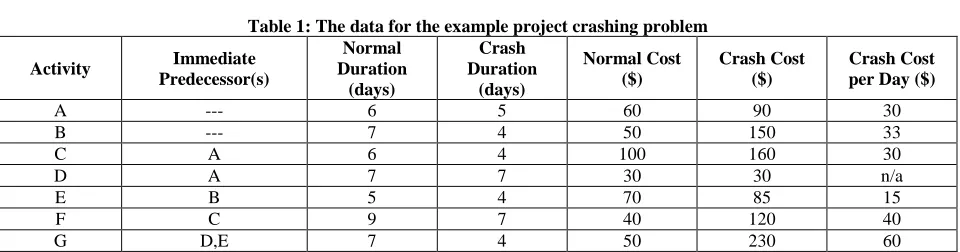
As an example, consider a project crashing problem shown in Table 1 (adapted from chapter 6 of Mantel et. al (2011)). Note that the crash cost per day in the last column is calculated by dividing the difference between crash cost and normal cost from the maximum days can be shortened, i.e., the difference between normal duration and crash duration.
Table 1: The data for the example project crashing problem
Activity Immediate Predecessor(s)
Normal Duration
(days)
Crash Duration
(days)
Normal Cost ($)
Crash Cost ($)
Crash Cost per Day ($)
A --- 6 5 60 90 30
B --- 7 4 50 150 33
C A 6 4 100 160 30
D A 7 7 30 30 n/a
E B 5 4 70 85 15
F C 9 7 40 120 40
G D,E 7 4 50 230 60
The project AON network is shown in Figure 1. Given normal duration for each activity, the critical path of the project is ACF, with project completion time 21 days. The other two paths are ADG and BEG, with path duration 20 days and 19 days respectively. We next show how to use Excel Solver to crash this project.
PROBLEM FORMULATION
To crash a project, the project needs to be completed within an earlier deadline (less than 21 days in the example problem), and at minimum cost. We first briefly describe the logic of the problem for project crashing. The problem is generally formulated according to the following guidelines.
Min total project cost Subject to:
(1) Project completion time an earlier deadline;
(2) Number of days can be shortened for each activity maximum available days for crashing for the activity; (3) Non-negative decision variables, which are the number of days each activity will be crashed.
A C F
D
EXCEL SOLVER SETUP
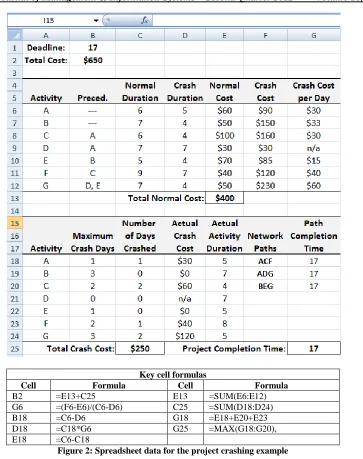
To setup Excel Solver for the example problem, we go through three steps in the spreadsheet: (1) organize and prepare the input data; (2) define the AON network shown in Figure 1; (3) setup Solver parameters and constraints. The spreadsheet in Figure 2 shows the data information for the example problem. The predecessor relationships and information for activity duration and cost from Table 1 are shown in cells A4:G12.
We first organize and prepare the input data for the convenience of setting up Excel solver. The prepared information is listed in cells B15:E24. A detailed description is given below.
“Maximum Crash Days” (cells B18:B24) is the maximum available days for crashing for each activity. It is calculated from the difference between “Normal Duration” and “Crash Duration” of each activity. Using activity A as an example, cell B18: =C6-D6.
“Number of Days Crashed” (cells C18:C24) is the decision variables. Solver tries to find the optimal number of days to crash for each activity, so that the total project cost will be minimized.
“Actual Crash Cost” (cells D18:D24) is the additional cost needed to crash each activity by a certain duration. It is the result of multiplying “Crash Cost per Day” and “Number of Days Crashed”. For example, cell D18: =C18*G6.
“Actual Activity Duration” (cells E18:E24) is the durations after the activities being crashed. Therefore, it is the difference between “Normal Duration” and “Number of Days Crashed”, i.e., cell E18: =C6-C18.
In addition, “Total Normal Cost” in cell E13: =SUM(E6:E12) is the sum of all normal cost, and “Total Crash Cost” in cell C25: =SUM(D18:D24) is the sum of actual crash cost for each activity. Adding the total normal cost and total crash cost together, we obtain the project’s total cost in cell B2: =E13+C25, which we aim to minimize in the project crashing.
Key cell formulas
Cell Formula Cell Formula
B2 =E13+C25 E13 =SUM(E6:E12)
G6 =(F6-E6)/(C6-D6) C25 =SUM(D18:D24)
B18 =C6-D6 G18 =E18+E20+E23
D18 =C18*G6 G25 =MAX(G18:G20),
E18 =C6-C18
G25 B1
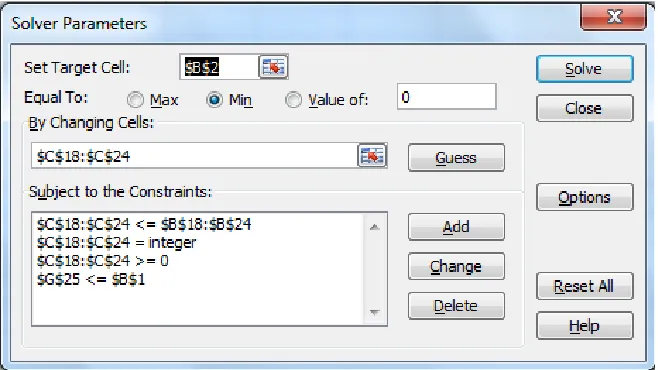
The second set of constraints restrict the number of days can be shortened for each activity should be less or equal to the maximum available days for crashing.
C18:C24 B18:B24
The last set of constraints consider project reality, where negative crashing days are not allowed in the optimization process. We require the decision variables to be non-negative.
C18:C24 ≥ 0
A set of optional constraints can reflect the preference of crashing the activities either by a whole day or by a fraction of a day. If we crash the activities by whole days, as often in the manual approach, we would add a requirement that the decision variables need to be integer numbers.
C18:C24 = integer
Otherwise, no such requirement is needed.
Having set up Solver, project crashing problems can be easily solved and evaluated in Excel. Figure 2 shows the results of the example problem, when the project deadline is set to be 17 days. It can be verified that the results are the same as those of the manual approach.
Figure 3: Excel Solver with data and constraints
SUMMARY
AUTHOR INFORMATION
Kunpeng Li is currently an Assistant Professor of Management at Sam Houston State University. She received her PhD from the University of Illinois at Urbana-Champaign. Her research interests include product design, supply chain management, and interfaces between marketing and operations management. She has published in journals such as Production and Operations Management, International Journal of Knowledge-Based Organizations,
California Journal of Operations Management, and others. E-mail: [email protected]. Corresponding author.
Bin Shao is an assistant professor in the Department of Computer Information and Decision Management at West Texas A&M University. She received her Ph.D. in Business Administration from the University of Illinois at Urbana-Champaign in 2008. Her research appears in California Journal of Operations Management, Journal of Management and Marketing Research, Academy of Information and Management Sciences Journal, and others. E-mail: [email protected].
Pamela J. Zelbst is a Ph.D. from University of Texas at Arlington and is an Associate Professor of Management at Sam Houston State University. Her research appears in the International Journal of Operations and Production Management, Journal of Behavioral and Applied Management, Industrial Management and Data Systems, Journal of Business and Industrial Marketing, Management Research Review, Journal of Computer Information Systems,
and International Journal Management in Education and is the coauthor of a book. E-mail: [email protected]. REFERENCE
1. Cohen, Y., & Sadeh, A. (2007). A new approach for constructing and generating AOA networks. Journal of Engineering, Computing and Architecture, 1(1), 1-13.
2. Kim, K. (2008). Identifying logical dummy activities in an activity-on-arrow network. Canadian Journal of Civil Engineering, 35(7), 739-743.
3. Mantel, S., Meredith, J., Shafer, S., & Sutton, M. (2011). Project management in practice. Hoboken, NJ: John Wiley & Sons Publishing.