Document no: ENS.FR.32 Yayin Tarihi: 26.03.2018 Rev no/ Date: 00/-- HAWKAR HAM ASAL IH
M
AR
CH
,
201
9
M
.S
c.
in
E
lec
tr
on
ics
an
d
Com
p
u
te
r
E
n
gi
n
ee
rin
g
HASAN KALYONCU UNIVERSITY
GRADUATE SCHOOL OF
NATURAL & APPLIED SCIENCES
DATABASE MIGRATION PROCESSES AND OPTIMIZATION
USING BSMS (BANK STAFF MANAGEMENT SYSTEM)
M. Sc. THESIS IN
ELECTRONICS AND COMPUTER ENGINEERING
BY
HAWKAR HAMASALIH MARCH 2019
Document no: ENS.FR.32 Yayin Tarihi: 26.03.2018 Rev no/ Date: 00/--
Database Migration Processes and Optimization Using BSMS (Bank Staff Management System)
M.Sc. Thesis in
Electronics and Computer Engineering Hasan Kalyoncu University
Supervisor
Asst. Prof. Dr. Mohammed MADI
by
Hawkar HAMASALIH March, 2019
Document no: ENS.FR.32 Yayin Tarihi: 26.03.2018 Rev no/ Date: 00/--
Document no: ENS.FR.32 Yayin Tarihi: 26.03.2018 Rev no/ Date: 00/--
GRADUATE SCHOOL OF NATURAL &
APPLIED SCIENCES INSTITUTE
M.Sc. ACCEPTANCE AND APPROVAL FORM
Electronics-Computer Engineering M.Sc. (Master of Science) programme student Hawkar HAMASALIH prepared and submitted the thesis titled "Database Migration Processes and Optimization Using BSMS (Bank Staff Management System)" defended successfully on the date of 22/03/2019 and accepted by the jury as a M.Sc. thesis.
This thesis is accepted by the jury members selected by the institute management board and approved by the institute management board.
Prof. Dr.Mehmet KARPUZCU
Position Title, Name and Surename
Department/University
Signature:
M.Sc. Supervisor Jury Head
Assoc. Prof. Dr. Mohammed. MADI Computer Engineering Department
Hasan Kalyoncu University
Jury Member Assoc. Prof. Dr. Ahmet Mete VURAL Electrical and Electronics Engineering
Department Gaziantep University
Jury Member Assist. Prof. Dr. Saed ALQARALEH Computer Engineering Department
Document no: ENS.FR.32 Yayin Tarihi: 26.03.2018 Rev no/ Date: 00/--
I hereby declare that all information in this document has been obtained and presented in accordance with academic rules and ethical conduct. I also declare that, as required by these rules and conduct, I have fully cited and referenced all material and results that are not original to this work.
Hawkar HAMASALIH
Document no: ENS.FR.32 Yayin Tarihi: 26.03.2018 Rev no/ Date: 00/-- ABSTRACT
DATABASE MIGRATION PROCESSES AND OPTIMIZATION USING BSMS (BANK STAFF MANAGEMENT SYSTEM)
HAMASALIH, Hawkar Kakaawla Hamasalih M.Sc. in Electronic and Computer Engineering Thesis Supervisor: Assist. Prof. Dr. Mohammed MADI
March, 2019, 59 pages
Databases are essentially a storage technology designed to handle complex data dependent tasks, and to perform these tasks, data-integrity is important. For many companies, their database is literally an electronic representation of the company’s business and records and losing any bit of data during migration is unacceptable. There are several business reasons for moving data, some of these are archiving, data-warehousing, moving to new environment, platform, or technology. Database migration is a complex, multiphase process, which usually includes assessment, database schema conversion, data migration, and functional testing. Online Transaction Processing (OLTP) databases are usually much normalised for efficiency by performing tasks like providing data Integrity, eliminating data redundancy and lowering record locking. But this database design system presents us very numerous tables, and each of these tables and its foreign-key constraints must be accounted for at the point of data migration. Also, the Acceptance criterion for a data-movement job unlike conventional tasks is purely 100% because errors are not tolerated in databases and quality is important. This thesis demonstrates the challenges and considerations during the migration of data from a slow, inefficient and obsolete database-platform called Paradox database into a much more advanced database called Oracle that has successfully migrated the data. Indexing technique was used to improve the performance of a query by retrieving the data at a rapid speed without any inconsistency and loss of data.
Document no: ENS.FR.32 Yayin Tarihi: 26.03.2018 Rev no/ Date: 00/-- ÖZET
ALMA SİSTEMLERİNE İLİŞKİN BİR KARŞILAŞTIRMA ÇALIŞMASI HAMASALIH, Hawkar Kakaawla Hamasalih
Yüksek Lisans Tezi, Elektronik ve Bilgisayar Mühendisliği Tez Yöneticisi: Yrd.Doç. Dr. Mohammed MADI
Mart, 2019, 59 sayfa
Veritabanları temel olarak karmaşık verilere bağlı görevleri yerine getirmek ve bu görevleri gerçekleştirmek için tasarlanmış bir depolama teknolojisidir, veri bütünlüğü önemlidir. Pek çok şirket için, veritabanları kelimenin tam anlamıyla şirketin işinin elektronik bir temsilidir ve göç sırasında herhangi bir veri parçasını kaybeder ve kaybeder kabul edilemez. Verilerin taşınmasının çeşitli ticari nedenleri vardır, bunlardan bazıları arşivleme, veri depolama, yeni ortama, platformlara veya teknolojiye geçmedir. Veri tabanı geçişi, genellikle değerlendirme, veri tabanı şeması dönüşümü, veri geçişi ve işlevsel testi içeren karmaşık, çok fazlı bir işlemdir. Çevrimiçi İşlem İşleme (OLTP) veritabanları genellikle veri bütünlüğü sağlama, veri fazlalığını ortadan kaldırma ve kayıt kilitlemesini azaltma gibi görevleri yerine getirerek verimlilik için çok normalize edilir. Ancak bu veritabanı tasarım sistemi bize çok sayıda tablo sunar ve bu tabloların ve yabancı anahtar kısıtlamalarının her biri veri taşıma noktasında dikkate alınmalıdır. Ayrıca, geleneksel görevlerden farklı olarak veri taşıma işi için Kabul kriteri tamamen% 100'dür, çünkü hatalar veritabanlarında tolere edilmez ve kalite önemlidir. Bu tez, verilerin Paradox veritabanı adı verilen yavaş, verimsiz ve eski bir veritabanı platformundan, verileri başarıyla geçiren Oracle adı verilen çok daha gelişmiş bir veritabanına aktarılması sırasında ortaya çıkan zorlukları ve kaygıları göstermektedir. Herhangi bir tutarsızlık ve veri kaybı olmadan verileri hızlı bir şekilde alarak, bir sorgunun performansını iyileştirmek için indeksleme tekniği kullanılmıştır.
Anahtar Kelimeler: Veri Taşıma, DBMS, Veri Entegrasyonu, Veritabanı Taşıma
Document no: ENS.FR.32 Yayin Tarihi: 26.03.2018 Rev no/ Date: 00/--
VIII
ACKNOWLEDGEMENT
My deepest gratitude goes to Asst. Prof. Dr. Mohammed Madi for his constant encouragement and guidance. He has walked me through all the stages of the writing of my thesis. Without his consistent and illuminating instructions, this thesis could not have reached its present form. I would like to thank all the lecturers in electronics and computer engineering department in Hasan Kalyoncu University.
I would also like to acknowledge Mr. Sirwan the second reader of this thesis, and I am gratefully indebted to his valuable comments on this thesis. Also, I appreciate my both dear brothers Mr. Hoshang and Mr. Hersh who were too tired and supported me in every step.
Finally, I would like to thank my family and friends to support, encouragement and contribution they have made for my research to be successful.
IX
TABLE OF CONTENTS
ABSTRACT ... VI ÖZET... VII ACKNOWLEDGEMENT ... VIII LIST OF FIURES ... VIII LIST OF ABBRIVIATIONS ... VIII
CHAPTER 1: INTRODUCTION ...1
1.1 Introduction ...1
1.2 Problem Statement ...2
1.3. Objectives of the Project ...2
1.4. Significant of the Thesis ...3
1.5. Organization of the Thesis ...3
CHAPTER 2: LITERATURE REVIEW ...4
2.1. Introduction ...4
2.2. Background of the Problem...5
2.3. Literature Related to the Problem ...5
2.3.1. Migration Strategies ...5
2.3.2. Essential Steps to Success ...7
2.4. ETL ...9
2.5. SSIS ...9
2.6. BSMS Utilities... 10
2.6.1. DATA Migration Tools and Solution Overview ... 10
2.7. Data ... 11
2.8. Databases and Database Management System (DBMS) ... 11
2.8.1. Database Management System components ... 12
2.9. Paradox Database ... 13
2.9.1. Characteristics of Paradox ... 13
2.10. Oracle database server ... 14
CHAPTER 3: METHOD OF EVALUATION ... 15
VIII
3.1.1. Scenario 1: ... 15
3.1.2. Scenario 2: ... 15
3.1.3. Scenario 3: ... 15
3.2. Set-up of Experiment ... 15
3.3. Scenarios and Experiment ... 16
3.3.1. Preparing for Primary-Key Maintenance after Data-Movement ... 16
3.3.2. Experement 1 – Moving Data with SQL-Loader ... 17
3.3.3. Experiment 2 - Migrating from Paradox to Access and Finally to Oracle . 23 3.3.4. Experiment 3 - Moving Data Microsoft Sql-Server Integration Services . 27 3.3.5. Experiment 4 - Migrating Data to Oracle Using Full Convert ... 30
CHAPTER 4: FINDINGS AND PERFORMANCE TUNING ... 35
4.1. Introduction ... 35
4.2. Performance Tuning: ... 35
4.3. Findings ... 37
4.3.1. From Paradox to Access to Oracle ... 38
4.3.2. From Paradox to Oracle Using SQL-Loader ... 39
4.3.3. From Full-Convert to Oracle ... 39
4.4. Optimization of Database in Oracle ... 40
4.4.1. Indexing Technique ... 40
4.4.2. Utilization of Views ... 41
4.4.3. Bind Variables Technique ... 41
4.5. Monitoring Execution Path with Explain Plan ... 41
CHAPTER 5: RECOMMENDATION AND CONCLUSION ... 43
5.1. Recommendation ... 43
5.2. Conclusion ... 43
5.3 Future Work ... 44
REFERENCES ... 45
VIII
LIST OF FIURES
Figure 2. 1 [12] : Big Bang Migration Principle ...6
Figure 2. 2 [12] : Phased Implementation ...7
Figure 2. 3 [13] : An effective data migration project ...8
Figure 3.1 : Database Table Moving Process. ... 17
Figure 3.2 : Moving Data with SQL-Loader ... 17
Figure 3.3 : Creating Oracle Table. ... 19
Figure 3.4 : Control File for Person Table Data Load ... 20
Figure 3.5 : Requirement Table From notepad to Oracle ... 21
Figure 3.6 : Person Table From notepad to Oracle ... 22
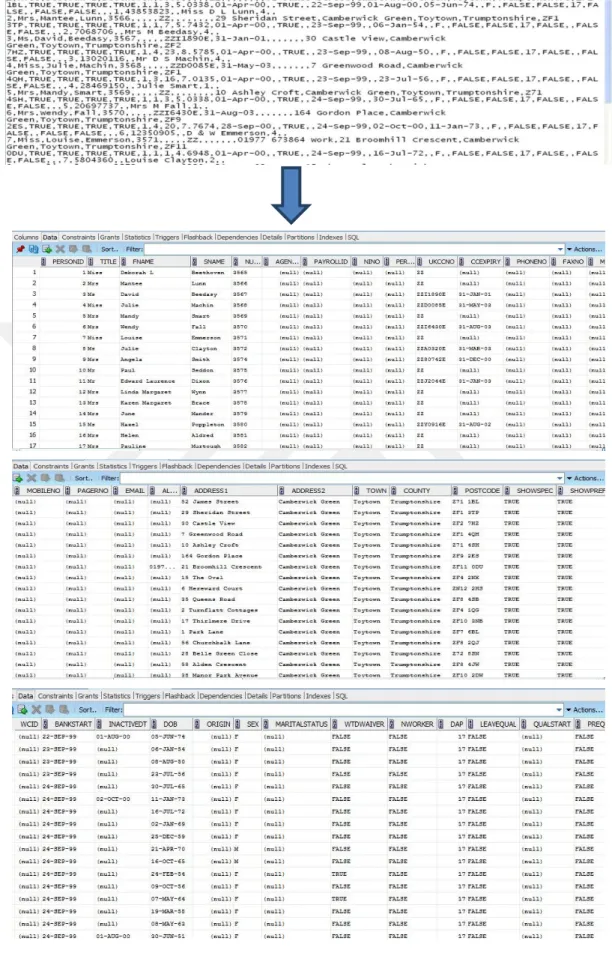
Figure 3.7 : Selecting query ... 23
Figure 3.8 : Data migration of person table from access to oracle via ODBC ... 24
Figure 3.9 : Transforms integer data types to varchar2 ... 25
Figure 3.10 : Required table data types for managing clean-up and data-quality ... 25
Figure 3.11 : Codes of required table... 26
Figure 3.12 : Transferring query code ... 26
Figure 3.13 : Person table during modification ... 28
Figure 3.14 : SSIS-BIDS Interface to perform a data movement and integration... 29
Figure 3.15 : Welcome screen for the trial version of the Full Convert tool. ... 30
Figure 3.16 : Selecting database type and location folder of the source data. ... 31
Figure 3.17: Selecting the destination database and entering the username and password for the Oracle database ... 31
Figure 3.18 : Creating tables in Oracle to hold paradox database tables. ... 32
Figure 3.19 : Displaying number of moved tables and a number of errors ... 32
Figure 3.20 : Displaying summary of migrated tables ... 33
Figure 3.21 : Checking inconsistencies of transferred data using SQL Utility ... 33
Figure 4. 1: Cost of table requirement before indexing technique ... 36
VIII
LIST OF ABBRIVIATIONS
BSMS Bank Staff Management System
CSV Comma Separated Value
DB Database
DBMS Database Management System
DDL Data Definition Language
ETL Extract Transform and Load
NHS National Health Service
ODBC Open Database Connectivity
PAL Paradox Application Language
RDBMS Relational Database Management System
SQL Structured Query Language
SSIS Server Integration Service
1
CHAPTER 1 INTRODUCTION 1.1 Introduction
Moving data which is sometimes called ETL (Extract Transform and Load) is a core area of database administration and the backbone of data-warehouses [1]. In this thesis, we will try to work with an existing commercial database system originally designed by Key-IT systems for its hospital clients. The software tool called BSMS (Bank Staff Management System) was developed by Key IT System Ltd and delivered to NHS in order to manage the availability of temporary nursing staff in cases of emergency [2]. The original database designed for this commercial software is called Paradox, the task is to transfer the hospital staff data which is stored in the form of Paradox tables from existing BSMS database to a new instance of Oracle database without loss of data. The details of the Database are attached to this project as an Appendix.
One of the Primary reasons for data movement in Databases is Business Intelligence and this is because most Organizations have both a development database and a production database that constantly need to exchange data. Like several Database vendors, Oracle has many utilities that facilitate the movement of data between environments such as data-pump and SQL-Loader. The main function of an ETL system such as SQL-Loader is to help insert a CSV (comma separated value) file into an RDBMS and catch bugs during data insertion.
The three steps in ETL process are designed to complement each other, in the extract step, we are pulling the data from the file, then during the Transform Step, the system is filtering rows to possibly discard unwanted rows, the transform stage can also attach or bind data-types, bind variables and even rename columns. The “L” in ETL stands for load; this is the final step where we insert the rows into the destination Oracle table
2
1.2 Problem Statement
Due to the heavy operational, performance and maintenance costs involved in maintaining the Paradox databases and their inflexibility to support new business creativities, the client wanted to migrate the data from these various mainframes to a common consolidated repository under Oracle Database [2]. The existing client applications then will start communicating from Oracle instead of Paradox. This thesis seeks to employ empirical epistemology in the evaluation of the claims made to the public by Oracle Corporation that its own SQL-Loader is the best tool to be used for data migration. It has decided to employ the dataset of an English-Hospital that houses its dataset in a commercial software system. The software uses Paradox as its DBMS, but in today’s time using this DBMS causes such problems of data inconsistency and inaccuracy. Furthermore, the huge cost of maintaining these legacy-systems keeps on growing [3]. Given the immense challenges of migrating over to a newer technology, the custodians of this software want to migrate to a new database-platform which is efficient, consistent and reliable.
Given the challenges inherent in the dataset, the objective of this thesis is to conduct a detailed migration experiment using the various publicly available data-migration tools, then advice ETL professionals on the benefits and sacrifices to be made in choosing one tool over the other.
1.3. Objectives of the Project
Over the years, various ETL vendors have incorporated certain common-place processes into the system of data-migration. But in this thesis, focus on sequential migration, this technique is the most commonly used technique for data migration in the retail business [4].
The objectives of this thesis can be broken into three parts.
1. Move an entire database system from a desktop RDBMS (Paradox) to a Client/Server RDBMS (Oracle).
2. Research and perform testing on the various methods of moving the database. 3. Make recommendations on the best way of carrying out this task by evaluating
3
After the project was completed, the following are the project questions that were answered:
1. What is the requirement for organizations to migrate their databases? 2. What are end profits of data migration for the owners?
3. What can be done to make all data is transferred during data migration?
4. What was the performance improvement of an application after the data migration?
5. What tools and solutions are available to do the migration process? 1.4. Significant of the Thesis
[5] Mentioned that most IT projects today worry some kind of corrective measure at the platform level, they all involve moving data from database to database or application to application due to migrating data and applications from old to modern platforms. In this thesis different tools and platforms has been tasted to do the migration after the data has been moved from the source to the destination some technics implemented to improve the performance of the data.
1.5. Organization of the Thesis
This thesis is divided into five Chapters. The First Chapter is the introductory Chapter which presents the problem of stamens and objectives of the project. The second chapter is about the background information on the Data Migration process and it shows the essential steps to success the migration and explains the different methodology’s which exist. Also the explanation of the tools and technology which used in this project has been written.
Chapter three has discussed the research methodology which starts with the logical attitudes that guided the research. It describes the research design, scenarios of the study and different experiments have been tested.
Chapter four presents result testing and performance tuning, after the migration process takes place two tools are used to see the consistency and correctness of the data and we made use of Indexing technique in order to improve the performance of a query. Chapter Five focuses on the summary of the findings, conclusion and recommendations of the research. It presents the implications of the study in accordance to theory, policy, management practice, methodology and limitations of the study.
4
CHAPTER 2
LITERATURE REVIEW 2.1. Introduction
Planning of migration methodology and implementing smooth migration for the whole project is the main task of the project. Nowadays technology is emerging rapidly and new database applications available in a more customized and organized manner. Because of the quickly improving technology for computers and changes in business requires the normal life cycle for a database application is less than 10 years [6]. After this time the ability of applications to manage data will not match the needs of the organizations or the technology on which it operates will have become out-of-date. Therefore the organizations will be required to implement a new database application which leads to data migration from legacy systems to modern applications.
The direct impact of a poor data migration procedure is usually very poor data-quality. A Survey conducted by [7], indicates that many managers and business owners are oblivious to the fact that the data in which their business decisions are based on are flawed and inaccurate. Poor data quality could be catastrophic and possibly lead to expensive lawsuits and according to the [7]. Redman; there has been an increase in operational cost in organisations with poor quality data because a lot of time and other resources are devoted to detecting and correcting errors. He states that in the business world, “Decisions are no better than the Information in which they are based”. Database correctness has to do with the integrity and consistency of stored data, and Integrity is usually expressed in terms of constraints, and these constraints are consistency rules that the database is not permitted to violate. [8] Shows that error rate of up to five percent are not unusual, with a projected immediate loss of about ten percent in revenue. Every facet of business is negatively affected by poor data
5
quality. And the trend of poor data quality is worsened in huge organisational databases with several sources of data inputs.
The importance of quality to database design is very important and [9] states that the wrong Information impedes deductive and inductive thoughts. Over the years, experience has shown that even the best decisions involve some degree of uncertainty; so, it is obvious that decisions based on the most relevant, complete, accurate and timely data have a better chance of advancing the enterprise’s goal. According to the journal by [7], Shipping and mailing Industries are some of the hardest hit businesses because of poor data quality, and this often lends itself to poor job satisfaction among the employees of these businesses. In a survey conducted in the United States, [7] concluded that a data inaccuracy of about five percent can increase the operational cost by twelve percent, increase organisational mistrust, cause gridlocks in decision making and make implementation of a data-warehouse very difficult.
2.2. Background of the Problem
The process of transferring data from one system to another is called Data migration and it varies from data movement. [5] Mentioned that due to the complexity and similarity to related techniques, data migration suffers a few myths and misconceptions, for example, Data migration is not a matter of copying data because the term migration misleads some people to think they can simply copy data from system A to system B. But the systems usually have different data models, so mapping and copying data without transforming it is rare. Moving data from one system, or domain, to another without compromising security or losing any of the data is known as domain migration, it happens when servers are upgraded and the data (including any authentication and authorization information) must be moved to a new system.
2.3. Literature Related to the Problem 2.3.1. Migration Strategies
According to [10], the Chicken Little Methodology is One of the earliest migration approaches It is a gateway-based eleven-step approach which allows both the legacy and target system operate in parallel during the migration operations. The approach is
6
also incremental as the target system though small at the onset, continues to grow as the migration progresses until it replaces the legacy system.
Another approach challenged the iterative and approach of the Chicken Little which is The Butterfly Methodology. This required the definition of a five-phase approach which involves the following steps:
Step 1: Determination of the semantics of the candidate legacy system and development of the target schema;
Step 2: Construction of a sample data store in the target system based upon target sample data;
Step 3: Migration of all the information system components while leaving out the data; Step 4: Migration of the legacy data to the target system and the training of users Step 5: Decommissioning of the legacy system and switch over to the new system Each of these steps is further broken down into sub-steps and specific activities [4]. [11] Mentioned that generally there are two principal types of migration: big bang migrations and trickle migrations. Depending on the project requirements and available processing window, any Organization wants to migrate their data should consider which style of migration is most suitable for their needs. Big bang migrations involve completing the entire migration in a small, defined processing window. In the case of a systems migration, the system interruption while the data is extracted from the source system(s), processed, and loaded to the target, followed by the transferring of processing completed to the new environment.
7
This method is more attractive it can complete the migration in the shortest possible time with carrying several risks, it is hard for organizations to wait to do the migration and see the core system’s being unavailable for long. Trickle migrations take an additional approach to migrating data instead of completing the whole process in a short period window. In this approach, the old and new system is running in parallel and the data will be migrated in parts. The system with this method never stops working and it will still be working 24/7.
Figure 2. 2 [12]: Phased Implementation
To move data with real-time processes a trickle migration can be implemented, to maintain the data these processes can also be used by passing upcoming changes to the target system.
2.3.2. Essential Steps to Success
[13] has written some essential steps to success the migration process, in the article six different phases have been mentioned which they are Planning, Understanding the Data, Designing, and Building, Executing, Testing, Follow-Up and Maintenance. After the business has given the data migration project a broad migration scope, in the planning phase the first stage is to define what is viable in terms of what the data sources will support and what is reasonable.
8
Figure 2. 3 [13]: An effective data migration project
Data migration projects are not an easy process it is too complex, the scope should be defined clearly and a timeline, resource plan, and budget can be put in place. Arrange scoping decisions in line with the importance to the organization by applying a top-down, target-driven rationale and using criteria such as region, the line of business, and product type. Times and effort could be saved by refining data outward from the core. In the third phase which is Designing and Building phase, the planning specifications and supporting documentation should be clearly agreed and signed off by the business, before writing any code. After segmenting into increments Data migration projects run more professionally, in staggered phases the source data could be audited, mapped, tested, and transferred. The budget and deadline are reduced and it will deliver better results. After converting the mapping specifications into migration code the rules could be verified independently, it helps to identify errors in the test environments and making key decisions for going live with migrated data. In the executing phase data from the source is extracted and then the process of transformation and cleansing on data are done, after that, it loaded into the target system. Before the conversion can be signed off by the business a collection application tests essential to be done, this approach benefits avoid storing up issues until too late in the development cycle. The data in the source systems is changing while the migration is in development, this could be a major risk.at the end phase of data migration data, the review can be done at any time to check whether the project is on track and still within its range.
9
2.4. ETL
These are processes that perform extract, transform and load operations on data which is called ETL in data-warehousing [14]. Recall that a Data warehouse is a repository of integrated enterprise data collected from different source systems within and possibly outside the enterprise. It consists of three main steps as indicated by its name. To extract means to pull data from a Source, to transform refers to manipulating the data as it moves from the source to the destination. In the transform step, changes are applied that make the data fit the schema of the destination database [15]. The transformation can be as simple as copying columns from one table to another or it can be more involved like removing duplicates, substituting values from look-up tables or changing the casing of strings as well as other forms of data cleansing. Loading means inserting the data into a destination store [16]. While the purpose and tasks of the ETL may sound to be well-understood and easy, the opposite is, in fact, the case. In virtually any data migration project, most of the time is spent on getting the ETL right. A lot of time is needed to understand when, where, and how to extract data from the different sources and to understand what the data from different sources mean and how the data can be successfully integrated.
2.5.
SSISSSIS which stands for SQL-Server Integration Service is one of the members of the Microsoft Business Intelligence package. It helps us move data from one place to another changing its shape along the way if desired.
"Microsoft Integration Services is a platform for building enterprise-level data integration and data transformations solutions. You use Integration Services to solve complex business problems by copying or downloading files, sending e-mail messages in response to events, updating data warehouses, cleaning and mining data, and managing SQL Server objects and data. The packages can work alone or in concert with other packages to address complex business needs. Integration Services can extract and transform data from a wide variety of sources such as XML data files, flat files, and relational data sources, and then load the data into one or more destinations" [17].
According to [14], SSIS is an enterprise-grade tool for the extraction, transformation, and loading of data. It is designed to handle the migration and manipulation of data throughout the life-cycle of a Business Intelligence operation. It also has usefulness
10
outside the Microsoft environment because it could move data between other software applications; it supports almost every popular data-storage-source and destinations including Oracle, Excel etc. SSIS is Microsoft’s tool for ETL, ETL stands for extraction, transformation, and loading. SSIS solutions typically consist of one or more packages. A typical SSIS package consists of several components, the control flow, and some number of data-flows, connection managers and configuration elements [17]. SSIS provides various drivers and configurations for many types of data sources. So almost irrespective of where the data is stored, we could use SSIS to pull it out, so we could work with data sources, data source views and connection managers to connect to those sources and pull data in various ways and we also have a lot of flexibility in the way we could configure that process. A typical SSIS-package can simultaneously extract data from various soft-wares like Oracle, excel etc.
SSIS supports a wide variety of destinations; this means we can output our data into spreadsheets, databases, flat-files etc. Although we can use SSIS to load data from external sources into a relational store, a data warehouse or an Analysis cube, we are not restricted to that intention; we can also use SSIS to move data to any type of database software [14].
2.6. BSMS Utilities
These were the tools for understanding the design of the Paradox database, and understanding the database to help make a smooth database migration project. The tools include the following
P20: This tool has great functionalities with a powerful graphical user interface. This tool can also be used to generate a ‘.CSV’ file.
SQL Launch: This tool is also used to analyze the Paradox database tables. With the help of this tool, it is possible to write SQL queries and the knowledge obtained from the queries, it helps to reverse engineer the database in the Oracle interface
2.6.1. DATA Migration Tools and Solution Overview
These were the tools employed in the migration of data from Paradox into Oracle. The processes that perform extract, transform and load operations on data is called ETL in Data-Migration. The transformation can be as simple as copying columns
11
from one table to another or it can be more involved like removing duplicates, substituting values from look-up tables or changing the casing of strings as well as other forms of data cleansing. Loading means inserting the data into a destination store [16]. The following tools played a pivotal role in our migration process.
MS Access: This tool was used as a middleware to transform the data from Paradox table to Oracle database.
SQL-Server Integrated Services: This is one of the members of the Microsoft Business Intelligence package. It helps us move data from one place to another changing its shape along the way if desired (Guy and Langit 2011).
SQL-Loader: This is Oracle’s main tool for migrating data from flat-file sources [18].
Full Convert: Full Convert will quickly and easily copy the data from source to the target database. It will create all the tables, copy all of the data, and then create indexes and foreign keys (Spectral Core 2018).
2.7. Data
[19] Mentioned that data in computing is information that can be changed into a form that has the ability to move and process, all information is converted into a binary digital system. Data represents as binary values on the computer; only two numbers 1 and 0 are used as a pattern to store video, sound, text, and images. The smallest unit of measuring data is a bit that is only a single value, the bigger unit which is eight binary digits called byte, usually, computer storages and memory are measured in megabytes and gigabytes. In mainframe systems, data can be stored in file formats but in better specialization developed a database, database management system and the relational database technology arose to organize information.
2.8. Databases and Database Management System (DBMS)
A database is a collection of information organized to provide efficient retrieval. The collected information could be in any number of formats (electronic, printed, graphics, audio, statistical, combinations). The relational database management system is a set of technologies designed to store soft copies of information in a structured and specific format. With many companies or organizations, the database holds the structure and data of the entire business. Users of the system are given facilities to perform several kinds of operations on such a system for either
12
manipulation of the data in the database or the management of the database structure itself [20]. Some examples of well-known database software are
IBM DB2 Microsoft Access Microsoft Excel Microsoft SQL Server MySQL Oracle RDBMS Paradox Database QuickBase
[21] Explains the main objectives which are used in DBMS as the following: Data availability: cost performance and the data updating are the
responsibility of the data availability. Availability functions make the database available to users helps in defining and creating a database and getting the data in and out of a database.
Data integrity-The data integrity provides protection for the existence of the database and maintaining the quality of the database.
Data independence- DBMS provides two types of data independence. First is a physical data independence program, which remains unaffected from the changes in the storage structure or access method, and the second is the logical data independence program, which remains unaffected from the changes in the schema.
2.8.1. Database Management System components
The main five components of DBMS are hardware, software, data, procedures and database access language. The first component is hardware which includes the computer, hard disks, I/O channels for data, and any other physical component involved before any data is successfully stored into the memory. And the second component is software, it is the program for contro lling everything and it will be responsible for easy-to-use interface to store, access and update data. The third component is data, DBMS was mainly created to store and manage it. Another component is procedures, it is including all instructions to use a database management system such as setup and install a DBMS, login and log out of DBMS software, manage databases, take backups, generating reports
13
etc... The last component of DBMS is database access language, it is a language designed to write commands to access, insert, and update and delete data stored in any database [22], [20].
2.9. Paradox Database
The paradox was an early desktop relational database management system (RDBMS) that was first released by Ansa Software in 1985. It was originally written in C, but later ported to C++, and was initially offered for Microsoft’s DOS operating system. Ansa Software was purchased by Borland in 1987, and today Paradox is one of the smaller RDBMS offerings, although one with a dedicated group of users and supporters.
2.9.1. Characteristics of Paradox
[21] Said that the Characteristics of Paradox are:
Connectivity- Paradox is connected virtually transparently with database and enables different ODBC databases, you can change Paradox tables in any relational database management system supported database, such as Oracle, SQL, and Microsoft.
Data Converting- Paradox fully supports data converting, but conduction is another database which supports to RDBMS. Paradox offers great compatibility with other database applications. You can open a Paradox table in any ODBC-compliant application.
Database Size- Paradox provides great flexibility; with the size of its database you can create up to two billion records per table and up to 255 fields per record.
Query Expert- SQL is a Structured Query Language, which stores and manipulates information in relational databases. Paradox creates four different methods (Select, Insert, Update and Delete). The Query Expert is easiest for new database users. It takes you through a step-by-step process to create commonly used query models.
PAL Object-PAL (Paradox Application Language Object) is an object-based event-driven and visual programming language, which can be used to completely customize applications with entirely new buttons, menus, dialog boxes, prompts, warnings, and online help. Object PAL can be
14
used to extend the regular Paradox functions or to create non-database applications.
2.10. Oracle database server
Oracle database server is a relational DBMS, the data collection is treated as a unit, it used to store and retrieve related data, it uses a server to manage its information, it can manage a huge amount of data in a connected environment which a number of users can use the same data concurrently with high-performance delivery, the server avoids unauthorized access and provides well-organized solutions for failure recovery. The first database was designed for enterprise grid computing is Oracle Database. The database has logical structures and physical structures. The physical storage of data can be managed without affecting the access to logical storage structures due to the separation of the physical and logical [23].
15
CHAPTER 3
METHOD OF EVALUATION 3.1. Data Migration
In this chapter, the intended migration path and the rationale behind the choices made have been explained.
The intention of this thesis is to take a qualitative assessment of the three different data migration techniques and ascertain which is better in a production environment. 3.1.1. Scenario 1:
The first migration is more of a manual process with a lot of human interactions and interventions in its actualization. It will involve a procedure of accessing the paradox database-tables, and after pulling the data into an Excel environment, Excel-functions are leveraged to clean the data until it conforms to desired destination constraints.
3.1.2. Scenario 2:
The second migration is also a manual process, but more sophisticated in approach than the first technique. In this technique, we leveraged an industry standard data-connector called ODBC data-connection systems to connect Access database to Oracle database.
3.1.3. Scenario 3:
The third technique is more of a data-migration automated process. In this approach, we leverage SSIS connectors both to pull and drop data to desired data-locations.
3.2. Set-up of Experiment
For this experiment, an Oracle Enterprise Class database has been installed in a test Computer. This software obtained by registering with the Oracle website and getting download permission from Oracle. Then a user account named exp1 (of elevated
16
privilege) created and granted the inbuilt HR account SYSDBA privilege for testing purposes. Also, SQL-Developer from the Oracle Website has been downloaded, SQL-developer is a free utility tool for administering the Oracle 11g Instance.
Microsoft office 2007 already installed and running on the test PC, and finally Microsoft SQL-Server 2008 RDBMS and the BSMS software installed as well. All tables are migrated in the Paradox database to Oracle successfully but we would be focusing on the three key tables in the Paradox database to avoid the repeating process in this thesis writing, these are:
Person Table Availability Table Requirement Table
3.3. Scenarios and Experiment
The primary objective of this phase of the project is to move the entire data and RDBMS configuration from PARADOX files into ORACLE without compromising data quality and avoiding data loss during the migration. And we would be exploring three different ways of doing data movement.
These are the four methods that decided to try-out and observe which of them produces an effective solution for future use.
1. Migrating from paradox to Excel, then proper cleaning and saving as CSV file format, and finally move data to Oracle with the help of SQL-LOADER. 2. Migrating from Paradox to Access and finally to Oracle via ODBC
connection between Access and Oracle, then using SQL Statements in Oracle for data cleansing and assisting error-fixes.
3. Opening the various database tables with Excel, and then using Microsoft SSIS to import data, make data-transformation and finally push the data into Oracle 11g.
4. Using a Graphical User Interface tool called Full Converter to move the database tables from the source to the destination.
3.3.1. Preparing for Primary-Key Maintenance after Data-Movement
We need to enforce the row-level uniqueness of the primary-key after the data movement into Oracle. Unlike most RDBMS, Oracle does not automatically generate
17
primary key integers, but Oracle provides us with the ability to generate our new primary-key Integers with the sequence command. Sequences are schema objects, a single sequence would never repeat an already dispensed value, and this makes it perfect for primary-keys.
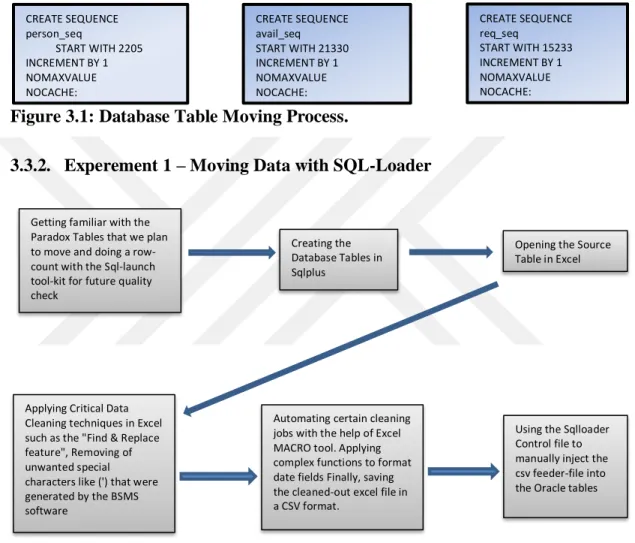
The sequence created below would be applied to the database table after it has been moved.
Figure 3.1: Database Table Moving Process.
3.3.2. Experement 1 – Moving Data with SQL-Loader
Figure 3.2: Moving Data with SQL-Loader
SQL-LOADER can be run from the Oracle Enterprise Manager or from the command line. The SQL-LOADER is our entry level bulk load utility. What this means is that we are taking data from an external source which is usually called the Feeder file. We are taking the Feeder-file and bringing its data content into an Oracle table. SQL-LOADER has two modes of operation which are known as paths, these are the conventional path and the direct path. The conventional path is basically a faster way of doing multiple insertion statements into a table. SQL-LOADER will
CREATE SEQUENCE person_seq START WITH 2205 INCREMENT BY 1 NOMAXVALUE NOCACHE; CREATE SEQUENCE avail_seq START WITH 21330 INCREMENT BY 1 NOMAXVALUE NOCACHE; CREATE SEQUENCE req_seq START WITH 15233 INCREMENT BY 1 NOMAXVALUE NOCACHE;
Getting familiar with the Paradox Tables that we plan to move and doing a row-count with the Sql-launch tool-kit for future quality check
Creating the Database Tables in Sqlplus
Opening the Source Table in Excel
Applying Critical Data Cleaning techniques in Excel such as the "Find & Replace feature", Removing of unwanted special characters like (') that were generated by the BSMS software
Using the Sqlloader Control file to manually inject the csv feeder-file into the Oracle tables Automating certain cleaning
jobs with the help of Excel MACRO tool. Applying complex functions to format date fields Finally, saving the cleaned-out excel file in a CSV format.
18
construct an insert statement and use a bind variable to read the source data and insert each row with a separate insert statement.
The Conventional path is the more stable way of achieving data insertion, but its major disadvantage is that it is much slower than the other paths. The direct path is like an injection into the source data files. When using the direct path, SQL-LOADER by-passes the database buffer cache. SQL-SQL-LOADER requires three files to succeed in its data movement, these are
a) INPUT DATA FILE: This is a standard delimited text file that contains our stored data. This is the feeder-file and is always usually a CSV file.
b) CONTROL FILE: This contains the loading instructions and sequence for the Oracle-engine. The control file is what we would likely be spending most of our time on. Because getting this right is critical because we can use the control files for subsequent SQL-LOADER jobs with similar data-set
c) LOG FILES: These are produced because of issuing the SQL-LOADER statement or running a bulk import Job. Log files might include a bad file which is a file where source data from the feeder-file that have violated some predefined constraints and the target table will be stored somewhere for debugging reasons. Log files also contain reject files which contain rows from the feeder-file that are out of scope.
There are some features or advantages of using SQL-LOADER which listed below:
1. SQL-LOADER is a data loading utility that loads records from an external text file into Oracle database tables at very high speed.
2. During the one load session, it can load the data into multiple database tables.
3. Different SQL functions can manipulate the data fields before inserting the data into database tables.
4. The user can fix the data errors quickly because it generates a report of errors during the data load.
5. It has the capability to perform the filtering operation and it can accept a different kind of input data formats during the load.
6. It can generate unique sequential key values for the specified columns such as a primary key.
19
7. It supports the client-server architecture and it can perform the data load across the network.
3.3.2.1. Creating Oracle Tables To Hold Our Proposed Tables
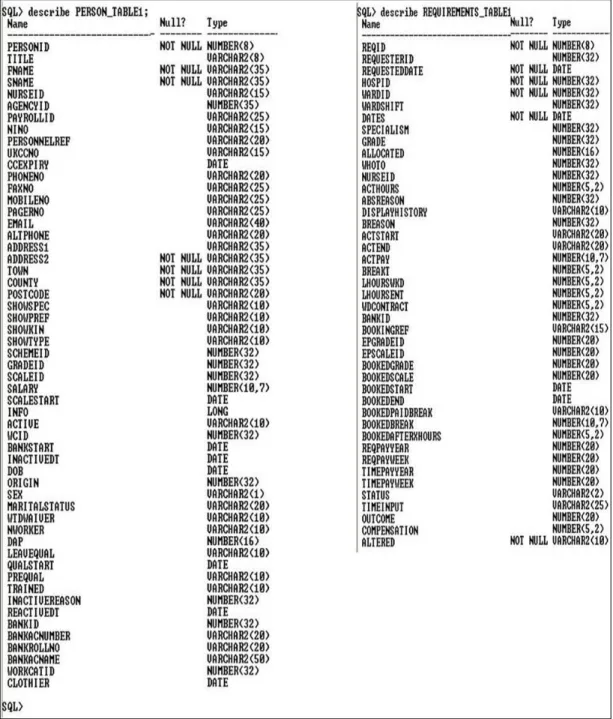
The diagram shown below are 2 different screen captures showing the describe statements on the Person table and the requirement tables. These statements were issued after table creation. This image also shows the enforced column constraints and data-type chosen to conform with the data-type previously been used in Paradox
RDBMS.
20
3.3.2.2. Preparing the CSV Files
These were the steps taken to produce an error-free CSV file from PARADOX database. This process was done with the help of Microsoft-excel 2007. Much of excel inbuilt functions were leveraged in making data cleansing possible such as "FIND & REPLACE", and I also wrote custom functions to put the date columns in the Oracle accepted format. For a continuous repetitive task of the data-cleansing same structure of paradox tables, an excel macro could be set up to automate some of the routine tasks. A macro is a recorded set of activities that can be replayed on demand.
3.3.2.3. Coding the Control File
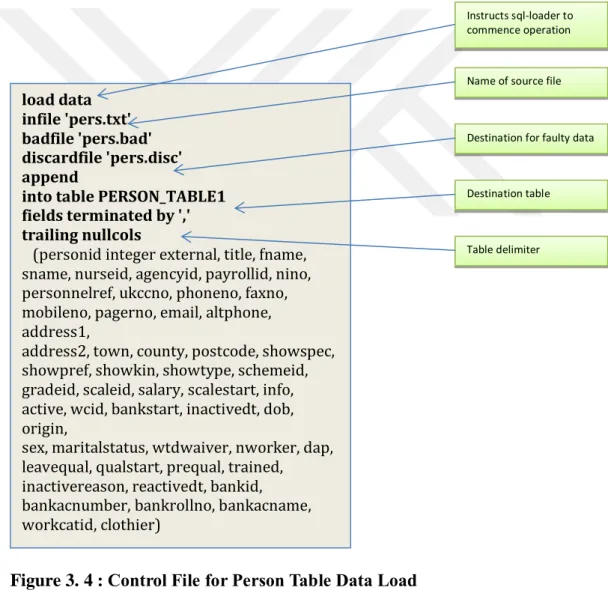
Figure 3. 4 : Control File for Person Table Data Load
The above Control file contains the DDL statements that are part of the Oracle specifications. It was created with Microsoft-WordPad and saved as "Text Document-Ms-Dos Format", and then it appended the extension of "ctl" on the file.
load data infile 'pers.txt' badfile 'pers.bad' discardfile 'pers.disc' append
into table PERSON_TABLE1 fields terminated by ',' trailing nullcols
(personid integer external, title, fname, sname, nurseid, agencyid, payrollid, nino, personnelref, ukccno, phoneno, faxno, mobileno, pagerno, email, altphone, address1,
address2, town, county, postcode, showspec, showpref, showkin, showtype, schemeid, gradeid, scaleid, salary, scalestart, info, active, wcid, bankstart, inactivedt, dob, origin,
sex, maritalstatus, wtdwaiver, nworker, dap, leavequal, qualstart, prequal, trained,
inactivereason, reactivedt, bankid, bankacnumber, bankrollno, bankacname, workcatid, clothier)
Instructs sql-loader to commence operation
Name of source file
Destination for faulty data
Destination table
21
Saving the Control file in this format is very critical because 2 days have been spent trying to resolve the problem saving the Control file in the acceptable format.
3.3.2.4.Performing the SQL-Loader Operation
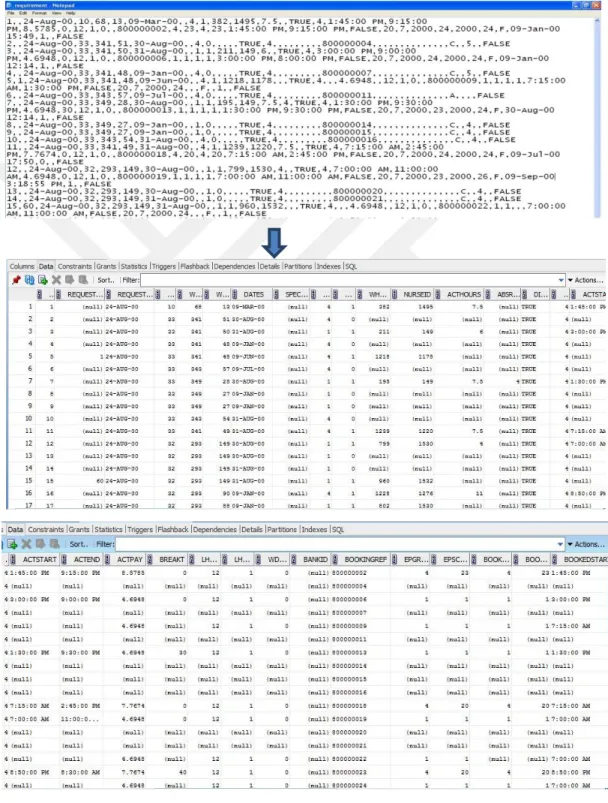
In these screen-captures, SQL-Loader used to take data from the CSV file and inserted them into an already created database table in ORACLE 11g.
22
23
3.3.2.5. Final Table Clean-up and Data-Quality Management for Experiment1 Since steps were taken to ensure absolute data cleansing and gradual data migration into Oracle with SQLLOADER, the clean-up steps necessary for Experiment1 were very minimal.
After Loading the database into Oracle, all rows counted by issuing the SQL statement of "SELECT COUNT(*) FROM PERSON_TABLE1; " and the result was compared with the record- count obtained from the SQL-launcher utility of bsms. A similar check was done on the two remaining tables to ensure that the record is complete.
Also, different SQL-query issued to compare the results obtained from destination Oracle tables to the same query that is obtained from the SQL-launcher utility database of BSMS, one of them is shown.
Figure 3.7: Selecting query
The necessary column-constraints were maintained during the data loading stage to ensure data integrity. But after data transfer was completed, to ensure that the Oracle primary-key technology is enforced in regard to future records, the sequence command displayed in the introductory section was enforced on the table. The number which begins the sequence is chosen because of the current last number of the primary key
3.3.3. Experiment 2 - Migrating from Paradox to Access and Finally to Oracle In this Scenario, the database table imported from the paradox program folder into an access database that already specifically created for this task. Next, then set up an Oracle ODBC driver to export from Access into Oracle. These steps are shown in the Screen capture below.
24
25
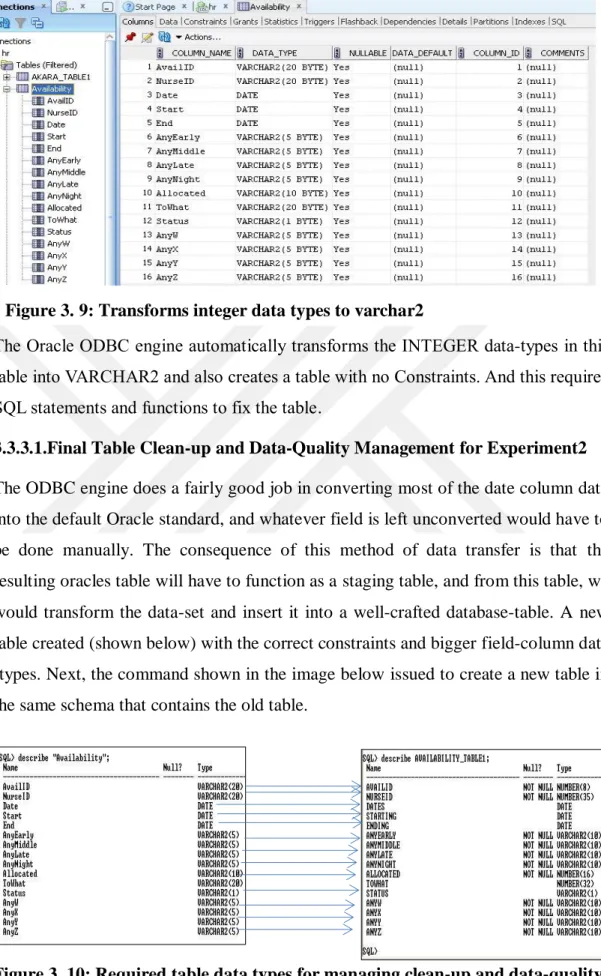
The Oracle ODBC engine automatically transforms the INTEGER data-types in this table into VARCHAR2 and also creates a table with no Constraints. And this requires SQL statements and functions to fix the table.
3.3.3.1.Final Table Clean-up and Data-Quality Management for Experiment2 The ODBC engine does a fairly good job in converting most of the date column data into the default Oracle standard, and whatever field is left unconverted would have to be done manually. The consequence of this method of data transfer is that the resulting oracles table will have to function as a staging table, and from this table, we would transform the data-set and insert it into a well-crafted database-table. A new table created (shown below) with the correct constraints and bigger field-column data -types. Next, the command shown in the image below issued to create a new table in the same schema that contains the old table.
Figure 3. 10: Required table data types for managing clean-up and data-quality Figure 3. 9: Transforms integer data types to varchar2
26
As shown in the Sqlplus image below, the data will be move from the table created by ACCESS-ODBC to the table created before with an Oracle "INSERT INTO" command that contains functions for data-type transformations. The arrows indicated in the table below clearly shows the intention on which column would be mapped into the final table columns.
As the above diagram shows, our goal is to move data from this staging data on the left to the one on the right
This type of insertion command caused a lot of problems when used in the other 2 tables because they contained a lot of faulty data that Oracle functions could not
INSERT INTO AVAILABILITY_TABLE1
SELECT to_number('AvailID', 9999999), to_number('NurseID', 99999999), Date, Start, End, AnyEarly, AnyMiddle, AnyMiddle, AnyLate, AnyNight, Allocated, ToWhat, Status, AnyW, AnyY, AnyZ ;
CREATE TABLE AVAILABILITY_TABLE1
( availid NUMBER(8,0) NOT NULL ,
nurseid NUMBER(35,0) NOT NULL ,
dates DATE,
starting DATE,
ending DATE,
anyearly VARCHAR2(10 BYTE) NOT NULL,
anymiddle VARCHAR2(10 BYTE) NOT NULL,
anylate VARCHAR2(10 BYTE) NOT NULL,
anynight VARCHAR2(10 BYTE) NOT NULL,
allocated NUMBER(16,0) NOT NULL ,
towhat NUMBER(32,0),
status VARCHAR2(1 BYTE),
anyw VARCHAR2(10 BYTE) NOT NULL,
anyx VARCHAR2(10 BYTE) NOT NULL,
anyy VARCHAR2(10 BYTE) NOT NULL,
anyz VARCHAR2(10 BYTE) NOT NULL,
CONSTRAINT REQUIREMENTS_TABLE1_PK PRIMARY KEY (availid) );
Figure 3. 11: Codes of required table
27
transform, and so the rows were only partially inserted or never inserted. But with every attempt, Oracle reveals the row that is faulty, and then manually track it down and correct it with the UPDATE command.
3.3.4. Experiment 3 - Moving Data Microsoft Sql-Server Integration Services SSIS or SQL-SERVER INTEGRATION SERVICES is robust data integration and filtering application that accompanies Microsoft SQL-server. It contains a set of functionalities that we can use to build enterprise-grade database migration and transformation solutions. This application can do very complex operations on raw data such as standardizing data, transforming and merging data into a single database file system. The most useful ability of SSIS is that it could take all these complex operations and package it as an executable file for future repetition if needed. Two techniques of data movement tried-out with SSIS technology, the first is the "SQL-server import and export wizard".
a) Import and Export Wizard: - This is the simpler method of using SSIS, but its weakness is that you cannot build a complicated package that leverages the T-SQL programming. It is a straight-forward method of getting the job done, and it only gives you some control of specifying data-type and data-sizes during the mapping-stage of the utility. After Importation into SQL-server, T-SQL functions used to modify some of the table columns, and then finally the Import and Export Wizard used again to export the database table to Oracle using the OLEDB driver provided by Microsoft.
28
This Screen-shot shows the Person table during its modification in Sql-Server 2008. In this Scenario, it’s been prepared for export to Oracle 11g
b) Using the SSIS-BIDS Interface: - This Interface allows us to engineer a data movement and integration solution. This interface requires that we specify both a data source and a destination file or RDBMS. In this project, the data source was the excel files that were obtained by opening the Paradox database in excel. The diagram below shows some of the various configuration steps we must enforce on the BIDS Interface to ensure a successful data transformation and insertion into the destination folder.
29
3.3.4.1. Final Table Clean-up and Data-Quality Management for Experiment3 During the setup process for experiment3, the platform configured to ignore any errors; it was done to prevent breaks in the process due to faulty data. So, after the data-movement, the error-report took and searched-out the faulty rows and then manually made corrections. Finally altered the Oracle tables and inserted the necessary column constraints. Data-quality checks like those carried-out on experiment1 were also done.
Setting-up the execution-path in SSIS
Using the Data conversion feature of SSIS to alter data-type
Setting-up the Connection with Oracle RDBMS
Mapping Source-columns to destination-columns
30
3.3.5. Experiment 4 - Migrating Data to Oracle Using Full Convert
This is a Graphical User Interface tool that reduces the burden of database movement. This software migrates our database tables with high efficiency, creates indexes, and maintains the foreign key relationship on the destination database. These are some unique features of Full Convert listed by its vendor (Spectral Core, 2011).
Powerful Graphical User Interface Easy to use wizard
Global data type translation rules Support for SQL expressions Command line support Error logging
Built-in Scheduler
31
Figure 3. 16: Selecting database type and location folder of the source data.
Figure 3. 17: Selecting the destination database and entering the username and password for the Oracle database
32
Figure 3. 18: Creating tables in Oracle to hold paradox database tables.
33
Figure 3. 20: Displaying summary of migrated tables
Figure 3. 21: Checking inconsistencies of transferred data using SQL Utility Figure 3.15: displays the welcome screen for the trial version of the Full Convert tool. We choose the option of new database conversion by double-clicking that option. In Figure 3. 16: we choose the type of database that holds our current database, and then choose the folder location of the source data. Figure 3. 17 here we choose the destination database, and we are prompted to enter the Username and password for the Oracle database we have chosen. Figure 3. 18 shows our software creating tables in Oracle to hold our paradox database tables. Figure 3. 19 shows Our data been migrated, it also displays the number of tables moved and a number of errors encountered. after the full migration, the Software displays a summary of tables migrated Figure 3.20 . Last Figure 3. 21 shows the checking of transferred data for inconsistencies by using SQL utility.
34
Full Convert like many graphically oriented Softwares performs well in an ideal situation of a perfectly cleansed database. It made several errors such as skipping records that had faulty data types, and it also limited our ability to make conditional choices in the event of faulty data.
35
CHAPTER 4
FINDINGS AND PERFORMANCE TUNING 4.1. Introduction
During the performance testing stage of this data migration, we made use of various tools to ensure the data was transferred without inconsistencies. For this, we adopted two testing methods which are used to test whether the transferred data is accurate and gives the appropriate results. They are
SQL Plus Keep Tool
These two tools are used to see the consistency and correctness of the data after the migration process takes place.
The tools used to export the data are Oracle SQL Plus Utility Keep’s Tool Hora Utility
SQL plus Utility helps identify the number of rows transferred to Oracle database effectively and efficiently. This could be achieved by using the following query on SQL plus Utility.
Select Count(*) from Person; 4.2. Performance Tuning:
Performance Tuning is more than making an attempt to improve the performance of a query. We made use of Indexing technique in order to improve the performance of a query by retrieving the data from Oracle database at a rapid speed without any inconsistency and loss of data.
36
Figure 4. 1: Cost of table requirement before indexing technique
Total cost on table Requirement = 9 + 9 =18 before creating Index. The cost is an estimated value proportional to the expected resource use needed to execute the statement with a particular plan. The optimizer calculates the cost of access paths and joins orders based on the estimated computer resources, which includes I/O, CPU, and memory [24].
Partitioning is useful for very large tables. By splitting a large table's rows across multiple smaller partitions, we could make the queries faster because Oracle may have to search only one partition (one part of the table) instead of the entire table to resolve a query. The table might also become easier to manage because the partitioned table's data is stored in multiple parts, it may be easier to load and delete the partitions than in a large table with no partition. From my observation, the largest table in the BSMS database is the Availability table, if we had the benefit of time, we would have tried to perform partitioning testing on the Availability table.
Indexing is a database technology that is usually applied to the columns in a database that is most used during table searches. Oracle uses indexes to decrease the amount of time we consume in finding particular information in a database. The Indexing technology would have been useful in the Person table because it will help us a query and extract nurses names very quickly. The index normally helps the Oracle-optimizer to retrieve queries very fast and efficiently, this technique prevents a full
37
table scan. Also, Oracle gives us several indexing types that will fit into the particular situation we find ourselves.
Another method of improving speed in our database is through the use of views. A View is a different way of looking at a table or tables. They are representations of the underlying tables that are generated by a query. The use of an indexed materialized view will prevent the database from doing joins every time, and this speeds up efficiency.
The figure below shows the total cost taken to retrieve data from the database after creating Indexing technique.
Figure 4. 2: Cost of table requirement after indexing technique
Total Cost for table Requirement is 7 + 7 + 1 = 15 which is less after creating Index. Hence we have seen the total cost for retrieving data from the database is less after creating an index which leads to improving the performance of the database.
4.3. Findings
The intention of this Section is to document and explain what happened during the data migration and optimization project.
The premise of the activities carried out in the Physical Database Design module is to perform ETL operations on the BSMS software, so that the database tables can be moved into an Oracle database environment. ETL means extract, transform and Load
38
operations. Oracle's centerpiece technology for moving data is called Data Pump. Migrating data using different available technologies has been examined.
4.3.1. From Paradox to Access to Oracle
Moving data into Oracle with the help of Microsoft-Access technology was a relatively comfortable operation. After carefully researching the structure of the three database tables (Person table, Availability table, and Requirement table) that we planned to migrate, we then had to build an ODBC connection between the Microsoft-Access software and the Oracle database platform. For researching the structure of the Paradox database, we made use of the Table Documenter and P20 software; these two applications enabled us to understand the table design and data-types which subsequently allowed for verification of success when the tables were inserted into the Oracle database.
The greatest fascination with this type of data migration is the very important role that the ODBC driver had to perform during the entire process. It really fascinated me that this 20-year-old API technology that was originally designed to access any type of data source still manages to perform at a highly efficient level during data migration tasks, and it seems the ODBC driver will remain a powerful ETL tool for years to come.
The most significant problem has encountered during the whole process of data movement into Oracle was the problem of data-type consistency after migration. This is a really troubling feature of ODBC driver that adds a lot of additional time to completely fix. The ODBC platform also removes any table constraint that existed in the Original Paradox tables. So this implied that manually inserted the table constraints such as primary keys on the destination tables. Getting the Paradox database tables into the Microsoft-Access software. This task required to first use two utility software named Table documenter and P20 to evaluate and document the column data-types and constraints on the source database. What discovered from this particular migration operation was the ease of moving data from one database to another could be made much simpler by simply using a basic tool like Microsoft access and sometimes using Microsoft-excel as a cleaning tool.
Retrospectively, if the process needed to be repeated, would try and reduce the very difficult task of cleaning and repairing tasks that happened in Oracle environment
![Figure 2. 1 [12] : Big Bang Migration Principle](https://thumb-us.123doks.com/thumbv2/123dok_us/9716608.2853236/19.893.185.746.423.1062/figure-big-bang-migration-principle.webp)
![Figure 2. 2 [12]: Phased Implementation](https://thumb-us.123doks.com/thumbv2/123dok_us/9716608.2853236/20.893.161.776.331.736/figure-phased-implementation.webp)
![Figure 2. 3 [13]: An effective data migration project](https://thumb-us.123doks.com/thumbv2/123dok_us/9716608.2853236/21.893.166.744.92.709/figure-effective-data-migration-project.webp)