CAI INSTRUMENT USABILITY TESTING
Sue Ellen Hansen, Marek Fuchs, Mick P. Couper, Survey Research Center, University of Michigan Sue Ellen Hansen, Survey Research Center, 426 Thompson Street, Ann Arbor, Michigan 48106-1248 Key Words: CAI, HCI, Usability, Measurement
Error, Instrument Design 1. Introduction
Instrument design is an important element in the reduction of measurement error. This has long been acknowledged in terms of question wording, structure and order (see Groves, 1989). Recent research has begun to pay attention to other aspects of design, such as layout and format, for self-administered surveys (Jenkins and Dillman, 1997), and for interviewer-administered surveys (e.g., Sanchez, 1992). The introduction of computer- assisted interviewing (CAI) raises additional questionnaire design issues, especially the many ways in which technology may affect interviewer and respondent interaction and data quality (Schaeffer, 1995).
This means that designers of CAI instruments need to go beyond traditional research on instrument design. They need also to evaluate the
usability
of their instruments, that is, how easy or difficult it is for users to interact with CAI instruments and systems. As with paper questionnaires, the interviewer is key to the successful administration of the interview. To the extent that the automated instrument facilitates the interviewer in his/her task (asking the appropriate questions as worded, providing additional information when requested by the respondent, recording the answers accurately, etc.; see Fowler and Mangione, 1990), data quality improvements may result. Interviewers are thus key users of CAI instruments, and should be considered in the design of such systems.Usability testing is a an important means of evaluating CAI instrument design. Many of the techniques available for pretesting paper-and-pencil questionnaires (Presser and Blair, 1994), such as cognitive interviewing, can be used to evaluate CAI systems and survey instruments, including the effectiveness of CAI screen layout and design. While most methods for evaluating survey instruments focus on the respondent's understanding of the questions, usability testing focuses on the interviewer's interaction with the CAI system and survey instrument. This shifts the focus of CAI research from system feasibility and functionality to design of instruments from the user's perspective, and increases the importance of usability testing.
CAI software and instruments can vary in the degree to which they are easy for interviewers and respondents to use in the performance of their role-specific tasks in the interview. Ease of use is determined in large part by the design of the computer interface--the display of
information, availability and implementation of system features and functions, and types of feedback provided following respondent and interviewer actions.
Although there are exceptions (e.g., Couper, Hansen, and Sadosky, 1997; Edwards et al., 1995), research on computer assisted data collection has tended to neglect the impact of CAI on users. The focus primarily has been on the feasibility of conducting computer-assisted interviews (Couper, 1997; de Leeuw and Collins, 1997). As CAI instruments become both more ubiquitous and more complex, a greater emphasis on human-computer interaction (HCI) in survey interviews becomes increasingly important to research that relies on survey data.
HCI or usability research emerged from a blend of cognitive psychology and computer science (Carroll, 1997). The focus in HCI is on the users of systems, and the design of computer system interfaces. While HCI has become accepted as necessary to software development and evaluation, it has had little impact on the design of CAI instruments and systems thus far (Couper, 1997).
Usability research focuses on the cognitive and interactional aspects of computer use, addressing the ease or difficulty a user has interacting with a system. Difficulty arises when design features conflict with a user's goals for or expectations of the system. Although research suggests that interviewers are positive toward the use of CAI (e.g., Weeks, 1992), there is evidence that they experience difficulty with CAI instruments and systems (e.g., Couper and Burt, 1994). There is also evidence that some mode differences reported between CAI and paper surveys can be attributed to design differences (e.g., Baker, Bradburn, and Johnston, 1995; Bergman et al.,
1994).
HCI research utilizes a wide range of methods for evaluating usability, including a set of techniques for end- user evaluation, to which usability testing belongs Couper, 1997). Usability testing can be complemented by several other approaches to end-user evaluation. They include keystroke file analysis, both for evaluation of interviewer performance and questionnaire design (e.g., Couper, Hansen, and Sadosky, 1997; Couper, Horm, and Schlegel, 1996). Similarly, behavior coding or monitoring may reveal difficulties with CAI instruments. Interviewer debriefings are also useful tools for identifying CAI design problems. However, none of these approaches offers the flexibility of observing real users (interviewers) interacting with CAI instruments in a relatively natural setting.
In this paper we: (1) describe a recently developed CAI usability testing laboratory; (2) provide an example from a usability test for a study involving evaluation of a CAI survey; and (3) discuss issues facing the application of HCI research as it applies to CAI design.
2. The Usability Testing Laboratory
Since September 1995, the Survey Research Center (SRC) at the University of Michigan has been conducting a series of usability evaluations of a variety of CAI instruments. The early work in this area led to the development of a fully-equipped laboratory for video- taping and audiotaping CAI instrument usability tests. Table 1 lists equipment now available for recording and playback, and Figures 1 and 2 show the layout of the laboratory and a photograph of the observation station, respectively. The laboratory currently allows videotaping of up to three images of interaction in the interview, and simultaneous playback of two images.
Table 1. Usability Laboratory Equipment Recordin~ v
(3) 13-inch monitors, for observation station (3) VCRs
(2) ceiling mounted cameras Camera switchbox
Camera pan/tilt/preset control Computer image scan converter Intercom observation and test rooms Microphone
Tape recorder Playback
Mobile audiovisual cart 13-inch monitor 27-inch monitor (2) VCRs
~
O~servation
Room
Career=
Observers Monitors Pan/Tilt
Control
i Shelf Tape
Recorder D , n t e r c o m ~ ~ ~ [ ~ Ceiling
Test Room
@ ~ Camera 2 J Microphone Respondent ~ InterviewerI
" Laptop One-way / Mirror / W;/la/k e r Ceiling @ ~ Camera 1Figure 1. SRC Usability Laboratory
completely understand what has occurred during a specific sequence from a single tape. For instance, in order to understand the nature of a problem, it might be necessary to see what the interviewer was doing on the keyboard when she appeared from the image of the computer screen to be having difficulty entering a response; or, perhaps a problem might not reveal itself on a tape showing respondent-interviewer interaction, but would be obvious when listening to the interview while looking at the computer screens.
In most HCI work, the focus is on a single user working at a computer. This would also be true of computer assisted self-interviewing (CASI) applications. However, in our work we are focusing on both the interviewer-computer interaction, and on the interviewer- computer-respondent interaction. To this end we have found three different types of videos to be useful: (1) a view of the interviewer and respondent as they interact during the interview; (2) a view of the interviewer's hands on the computer keyboard; and (3) a scan-converted image of the computer screens during the course of the interview. Because each video recording also contains sound, it is possible to use any one video recording for preliminary analysis of the interaction. However, they each provide different but complementary information about the interaction. Sometimes, it is not possible to
Figure 2. Monitors at Observation Station
Because there is so much information to absorb from each videotape, we have not found simultaneous playback of multiple images particularly useful. However, playing back two tapes at the same time permits keeping a second tape, at approximately the same location in the interview,
available for supplementary analysis of a particular sequence. Thus, we may be watching the respondent- interviewer interaction on one monitor while the computer screen images are simultaneously displayed on an adjacent monitor.
In the next section we present and discuss an example from a single usability test from one of several studies we have conducted in the laboratory we have just described. 3. An Example from the NHIS
This example is from a set of video recordings of approximately 55 face-to-face interviews conducted between April and August 1997 in the usability laboratory. The interviews were conducted as part of an evaluation for the National Center for Health Statistics (NCHS) of the National Health Interview Survey (NHIS) CAPI instrument, programmed in CASES Version 4.2.
Eight interviewers from the Detroit Regional Office of the U.S. Census Bureau conducted the interviews with respondents recruited from the Ann Arbor area. Care was taken to ensure that there was a reasonable distribution of respondents, taking into consideration family composition and household size, age, gender, and race. Each interviewer completed 3 CAPI interviews and one paper- and-pencil interview (PAPI) each day.
The PAPI instrument used was the last paper version of the NHIS used for field interviewing (December, 1996). The CAPI version, first implemented in July 1996, represents a complete redesign of the NHIS instrument, making direct comparisons between paper-and-pencil and CAPI versions difficult. However, there are still enough similarities between the two instruments to permit a comparison of the way respondent-interviewer interaction and interviewer-instrument interaction may differ across modes.
In addition to the three video recordings from each interview, we also have available for analysis (1) an audio recording of each interview; (2) notes from debriefings with each respondent; (3) audio recordings and notes from debriefings with interviewers at the end of each day of interviews; (4) data from each CAPI interview or the completed paper instruments, and (5) trace files for each CAPI interview.
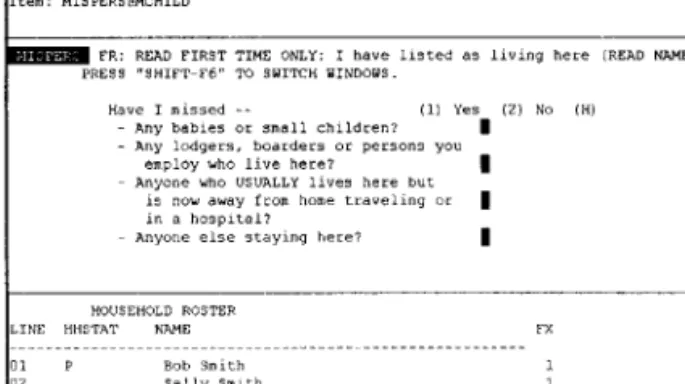
We are in the process of a detailed analysis of these materials to evaluate the design of the NHIS CAPI instrument. However, preliminary analysis of the usability tests have already revealed several problems with the instrument. One example will suffice. This involves a procedure by which interviewers confirm the household members by reading of a list of their names. Figure 3 shows a screen on which this is necessary, for a household with four members.
C a s e i d : 0 0 8 0 0 0 0 1 ~ , ~ m ~ , ~ , Item: M I S P E R S @ M C H I L D FR: R E A D F I R S T T I M E O N L Y : I h a v e l i s t e d as l i v i n g h e r e (READ N A M E S ) . P R E S S " S H I F T - F 6 " q~O S W I q ~ H W I N D O W S . H a v e I m i s s e d -- (i) Y e s ( 2 ) No (H) - A n y b a b i e s or s m a l l c h i l d r e n ? A n y l o d g e r s , b o a r d e r s or p e r s o n s y o u e m p l o y w h o l i v e h e r e ? - A n y o n e w h o U S U A L L Y l i v e s h e r e b u t is n o w a w a y f r o m h o m e t r a v e l i n g o r in a h o s p i t a l ? - A n y o n e e l s e s t a y i n g h e r e ? I H O U S E H O L D R O S T E R L I N E H H S T A T N A M E FX ... 31 P B o b S m i t h 1 32 S a l l y S m i t h 1 83 C r a i g S m i t h 1 " P g D n = BO~q2OM o f s c r e e n " for n e x t p a g e
Figure 3. Household Confirmation Screen
In this screen the interviewer is required to read out the household members names, the first three of which are listed on the current screen. If there are four or more household members, the interviewer is required to move back and forth between two screen areas, the question/answer area and the household roster area, using a combination of function keys. The function to switch to the roster area is [SHIFT-F6], and the interviewer must then use the [PAGE DOWN] key to see the rest of the roster.
Note that the instruction to switch "windows" or screen areas is on the second line of the screen area containing question text, and the instruction "PgDn = BOTTOM of Screen" appears at the very end of the screen, and is meant to tell the interviewer how to view the rest of the household roster.
When we listen to the audiotape of the interview at this point, we hear the following (I=interviewer, R=respondent):
I: I have listed, uh, Bob Smith, Sally Smith, Craig Smith, and, oo_9_p_fi.
(6.8 seconds of silence)
I: and Amanda Smith, as, as living here. Have I missed any babies or small children?
R: No.
I: Any lodgers, boarders or persons you employ who usually live here?
R: No.
[interview continues]
This transcript indicates that the interviewer has some initial difficulty trying to get to the rest of household listing, and there is 6.8 seconds of silence while she works with the computer to try to solve the problem, with apparent success. She reads the fourth person' s name, and proceeds with the interview.
A review of the videotape of the interviewer and respondent interaction, and of the videotape of the interviewer's hands on the keyboard, reveal the same apparent problem, and success in solving it. However, playing back the videotape of the computer screen images, and careful study of the sequence shows clearly that the
interviewer initially failed to invoke [SHIFT-F6]; eventually succeeded, but could not figure out how to move to the end of roster; finally gave up, and recalled (correctly) from memory the fourth household member's name.
This survey requires that the interviewer repeat a similar confirmation of household members at several points in the interview. Observation of the approximately 40 CAPI interviews suggest that many interviewers on this study routinely have some difficulty with the procedure of reviewing the household members, and frequently either do not try or fail at attempts to use the [SHIFT-F6] function. A variety of strategies have been observed for overcoming this problem, including not reading the additional names, seeking the respondent's assistance or writing the names on a piece of paper. Separate analysis of trace files supports this finding; NHIS interviewers used [SHIFT-F6] in only 7.2% of production interviews when there use of this function was required (i.e., households with 4 or more members) (Couper, Horm, and Schlegel, 1996).
We know from these tests that there are a variety of design problems with the CAPI screen in this example:
1. The task requirements for households of more than 3 members are too complex for a routine function ([SHIFT-F6], [PAGE DOWN] to view the bottom of the list, [PAGE UP] to return to top of list, [Q] to return to data entry portion of screen);
2. Instructions, error messages, and feedback from the computer appear at both the top and the bottom of the screen, and in confusing and/or inconsistent formats. On the basis of these observations, several design changes are being proposed.
It is anticipated that further analysis of data from this study and others we are conducting will lead to specific design solutions. Examples such as this demonstrate that interviewers who have difficulty with the CAI systems and instruments will do whatever they can to proceed with an interview. We know that such design problems in paper surveys can have an impact on data quality (e.g., Sanchez, 1992), and there is no reason to think that they will not in CAI surveys. CAI usability testing can assist us in understanding more fully the problems CAI design decisions cause, and in finding solutions to those problems.
There may be the additional problem in such instances. If some interviewers experience increased problems with a feature or screen design, and others do not, there may be an increase in measurement error due to interviewer effects. There is evidence in our tests that there is a wide range in variation in interviewer ability to deal with problems encountered in CAI systems. We need to understand the possible sources of this variation--such as experience with the specific CAI software, prior survey experience, prior CAI experience, training, and so on--in
order to improve CAI design and interviewer training to reduce such error.
Standard tools for detecting problems with questions, such as behavior coding, would not have identified the [SHIFT-F6] function as introducing systematic problems during the interview. However, usability testing with observation of interviewers using prototypes of screens using this household roster function, at an early stage of development of this instrument, could have led to a better design before it was released for production interviewing.
4. Issues in CAI Usability Research
The CAI usability studies we are conducting have provided the opportunity to develop procedures that make it relatively easy to set up and implement usability tests in the laboratory described. Materials developed include checklists for setting up the laboratory and tests, and labeling and secure storage of data; consent forms; instructions for briefing and debriefing respondents and interviewers; models for development of scenarios for CAI prototype instrument tests; and so on. Most of these procedures have been adapted from standard guidelines for conducting software usability tests (e.g., Dumas and Redish, 1994). However, the unique nature of survey interviews has necessitated a variety of changes and refinements to the procedures.
In addition to the NHIS example described above, we are also conducting experimental evaluations of alternative household roster designs, comparing item- based versus grid-based approaches. The work we are doing can be extended to a wide variety of other survey applications, including self-administered instruments (CASI and audio-CASI) and interviewer use of case management and transmission functions. Our work is also focused on identifying and implementing optimal procedures for the use of usability laboratories. To this end, we identify a number of issues in the evaluation of CAI instruments.
Types of usability evaluation.
Usability testing is only one approach to the evaluation of CAI instruments. Other methods include expert or heuristic evaluation and cognitive "walkthroughs." Heuristic evaluation involves having experts in usability and CAI systems evaluate CAI instruments, by working with the system and identifying what they see as problems. Cognitive walkthroughs are similar to cognitive interviews used to evaluate survey questions. An interviewer would go through a CAI instrument, "thinking aloud" and reacting to design features, and responding to researcher probes about reactions to design. In contrast, usability testing involves interviewers conducting CAI interviews, with full instruments or design prototypes.Each of these forms of evaluation tend to identify different types of problems, and can thus be viewed as complementary. Heuristic evaluation is relatively
inexpensive and may be best at identifying global design problems. Cognitive walkthroughs can assist in understanding interactional and cognitive processes involved in human-computer interaction in CAI; they are most useful for evaluating self-administered surveys, but less so for interviewer-assisted surveys. Usability tests allow observation and analysis of interaction in situ,
which, although not completely natural, gives a better sense of how CAI design decisions might affect an actual interview. Such tests tend to identify serious and recurring problems.
Usability testing methods. A major decision in
design of usability tests is whether to use observational or experimental methods. The first method, as described in this study, has the advantage of providing a more natural setting, but since it is dependent on responses unknown in advance, it runs the risk of revealing too little about design (unless a large number of observations are included). Experimental approaches provide a more artificial setting, but allow some control over interaction, generally through scripts or scenarios designed to introduce situations that are more likely to reveal problems in design.
Timing of tests. Another aspect of usability testing
concerns when in the stage of development to conduct such tests. HCI research (Dumas and Reddish, 1994) suggest usability testing should be done early, often, and iteratively. Thus, at the early stage of development of a CAI instrument, one could evaluate alternative design strategies through rapid prototyping; at each pretest one could do either observational or experimental usability testing of the full instrument; and one could evaluate an existing instrument prior to redesign. As an example of usability testing of rapid prototypes, we are conducting a series of usability tests designed to evaluate different design strategies (such as item-based or grid-based data collection) prior to the transition of a large-scale complex survey from paper to CAPI.
Types of users. Participants in usability tests can
represent a range of skill and experience, in terms of interviewing experience, computer experience, general CAI experience, specific CAI system experience (e.g., CASES, Surveycraft, or Blaise), and experience with the survey instrument, whether paper or CAI. Levels of user experience can have an impact on evaluation, and need to be considered in the design of evaluation studies. For example, more experienced CAI users makes it easier for tests to focus on design, but may produce biases toward current methods or systems used; less experienced users makes it easier to evaluate how new interviewers might react to the instrument. Users of different CAI systems help identify differences in system performance and design preferences; however, if the users are not familiar with the survey instrument under evaluation, problems may occur that are difficult to disentangle from design
problems. Our own studies have revealed some of these problems. For example, we have used interviewers with varying levels of CAI experience using Surveycraft, to evaluate alternative prototypes developed in CASES. Their previous experience allowed them to focus more clearly on design in debriefing discussions, but their lack of experience with CASES and the survey instrument sometimes made it difficult to determine whether some problems were due to design or user experience. Different system and survey experience also required incorporating training in CASES and survey objectives into each test.
Types of data. Decisions in the design of CAI
evaluation studies need to include decisions about whether the tests should involve direct observation, videotaping, or both. If restricted to direct observation, one needs a simple event coding scheme, that can be utilized real-time, designed to meet test objectives. Usability evaluation does not necessarily require videotaping, or a laboratory with a lot of technical equipment (Dumas and Redish, 1994). However, videotaping offers advantages over simple observation (Jordan and Henderson, 1995). It allows repeated analysis by multiple researchers, which assists in confirmation of findings, and may provide insights not gained through single viewings of tapes or simple observation.
If videotaping, one needs to determine whether only one videotape will meet study goals. A single videotaped image may not reveal clearly enough aspects of both the respondent-interviewer interaction and the interviewer- computer interaction of interest in such tests. For this reason, in the study described here we captured images of computer screens, the interviewer's hands on the keyboard, and the interviewer-respondent interaction.
Other sources of data include (1) interviewer and respondent debriefings; (2) keystroke and trace file data; and (3) audiotapes. Collection of these data add relatively little to the cost of the tests. Any study that collects these types of data, in addition to one or more videotapes, produces an overwhelming amount of data. It is important to recognize that not al! of these data sources are necessary for a particular type of analysis, and that different types of data provide different and sometimes complementary information.
Levels of analysis. Given the variety of data sources,
there are a variety of methods and levels of analysis to consider. The first level of analysis involves the simple identification of events or problems. This can be done through real-time coding of observations, or initial analysis of another source, such as event coding of videotapes, keystroke analysis, or behavior coding of audiotapes. For example, in the study described in this paper, we can code respondent and interviewer behavior (with a small number of additional codes related to computer use), perform keystroke analysis indicating screens interviewers frequently backed up to or requested
help on, and code events from computer screens. The goal in the latter is to capture events that do not fall within routine asking and answering of questions, such as side sequences, silences, data entry problems, and so on, with some care taken not to interpret events as positive or negative at the coding stage.
A second level of analysis involves examination of problems or events identified at the first level, in an attempt to identifying design problems, and identify potential solutions. Additional types and levels of analysis are possible. For example, in the NHIS work, the questions asked in the paper and CAPI instruments to gather household information are sufficiently parallel to allow a mode comparison. Through detailed coding of the videotapes, we are conducting an examination of interviewer and respondent behaviors in an effort to understand what aspects of the interaction in the two modes contribute to differences in interviewer efficiency and potential interview length.
Factors affecting design choices. The factors
affecting usability design choices primarily are (1) goals of the evaluation; (2) stage of instrument or system development; and (3) resources, such as equipment and facilities, funds, testing staff, and availability of users at appropriate levels of experience. As in survey design, choices involve tradeoffs in terms of cost, efficiency, and what is learned. However, none of these factors should be used as a reason to avoid usability testing. CAI design needs to be considered when evaluating and trying to reduce measurement error, which means we need to make usability testing a part of process of evaluation of CAI instruments.
Acknowledgments
This work has been partially supported by the National Center for Health Statistics through Cooperative Agreement #$278-15/15. The Research Center for Group Dynamics at the Institute for Social Research provided a significant portion of the funds used for the development of the usability laboratory described in this paper. We are also grateful to the Alexander von Humboldt Foundation of Germany for support of Fuchs.
References
Baker, R. P., N. M. Bradburn, and R. A. Johnson. (1995). Computer-Assisted Personal Interviewing: An Experimental Evaluation of Data Quality and Costs.
Journal of Official Statistics, 10(2): 181-195.
Bergman, L. R., Kristiansson, K.-E., Olofsson, A., and S~fstrOm, M. (1994). Decentralized CATI Versus Paper and Pencil Interviewing: Effects on the Results in the Swedish Labor Force Surveys. Journal of
Official Statistics, 10(2): 181-195.
Carroll, J. M. (1997). Human-Computer Interaction: Psychology as a Science of Design. Annual Review
of Psychology 48:61-83.
Couper, M. P. (1997). The Application of Cognitive Science to Computer-assisted Interviewing. Paper presented at the CASM II Seminar, June 12, 1997. Couper, M. P., and G. Burt. (1994). Interviewer Attitudes
toward Computer-Assisted Personal Interviewing (CAPI). Social Science Computer Review 12(1):38- 54.
Couper, M. P., S. E. Hansen, and S. Sadosky. (1997). Evaluating Interviewer Use of CAPI Technology. In L. Lyberg et al. (eds.), Survey Measurement and
Process Quality. New York: John Wiley & Sons.
Couper, M. P., J. Horm, and J. Schlegel. (1996). The Use of Trace Files for Evaluation of Questionnaire and Instrument Design. Paper presented at the International Conference on Computer-assisted Survey Information Collection, San Antonio, December.
de Leeuw, E., and M. Collins. (1997). Data Collection Methods and Survey Quality: An Overview. In Lyberg, Lars, et al. (eds.), Survey Measurement and
Process Quality. New York: John Wiley & Sons.
Dumas, J. S. and J.C. Redish. (1993). A Practical Guide
to Usability Testing. Norwood, NJ: Ablex.
Edwards, B., Sperry, S., and Schaeffer, N.C. (1995). CAPI Design for Improving Data Quality.
Proceedings of the International Conference on Survey Measurement and Process Quality, Bristol,
U.K., pp. 168-171.
Fowler, F.J. and T.W. Mangione. (1990). Standardized Survey Interviewing, Minimizing Interviewer-Related
Error. Newbury Park: Sage.
Groves, R. M. (1989). Survey Errors and Survey Costs.
New York: John Wiley & Sons.
Jenkins, C.R., and D.A. Dillman. (1997). Towards a theory of Self-Administered Questionnaire Design. In Lyberg, Lars, et al. (eds.), Survey Measurement and
Process Quality. New York: John Wiley & Sons.
Jordan, B., and A. Henderson. (1995). Interaction Analysis: Foundations and Practices. Journal of the
Learning Sciences, 4 ( 1 ): 39-103.
Presser, S., and J. Blair. (1994). Survey Pretesting: Do Different Methods Produce Different Results?
Sociological Methodology, 24: 73-104.
Sanchez, M. E. (1992). Effects of Questionnaire Design on the Quality of Survey Data. Public Opinion
Quarterly, 56(2): 206-217.
Schaeffer, N.C. (1995). A Decade of Questions. Journal
of Official Statistics, 11 (1): 79-92.
Weeks, M. F. (1992). Computer-Assisted Survey Information Collection: A Review of CASIC Methods and Their Implications for Survey Questions. Journal of Official Statistics, 8(4): 445- 465.