H. Fuks, S. Lukosch, and A.C. Salgado (Eds.): CRIWG 2005, LNCS 3706, pp. 341–350, 2005. © Springer-Verlag Berlin Heidelberg 2005
Handheld-Based Electronic Meeting Support
Gustavo Zurita1 and Nelson Baloian2
1 Universidad de Chile, Departamento de Sistemas de Información y Auditoría,
Diagonal Paraguay 257, Santiago de Chile, Chile
2 Universidad de Chile, Departamento de Ciencia de la Computación,
Avenida Blanco Encalada 2120, Santiago de Chile, Chile
Abstract. Many studies have reported on the problems that arise when trying to carry out successful meetings. Various authors have developed computerized tools for supporting the different stages of a meeting, but most of these have been conceived for large PCs or Notebooks, which tend to distract the partici-pants from face-to-face interaction. Also, many meetings are organized in a spontaneous manner, sometimes with no access to PCs. In this paper, we pro-pose a meeting support tool for handhelds that overcomes many of the problems inherent in the use of devices with large screens. However, the small size of handheld displays leads to other problems, especially in human-handheld and human-human interactions. The system proposed here is designed using gesture and concept-map principles that enable these problems to be resolved.
1 Introduction
Face-to-face meetings are a frequent activity in any organization [1], and as such their effectiveness and productivity is an important requirement [1], [2]. Various surveys indicate that meetings take up 40% to 50% of management’s time. One-half of meet-ing participants found them to be lackmeet-ing in productivity, with 25% of the time de-voted to irrelevant matters and the total time they take up now twice what it was 20 years ago [3]. Thus, meetings have come to be seen as time-consuming and unproduc-tive [4].
Despite the existence of procedures, rules and mechanisms designed to ensure that meetings are both effective and productive [1], [5], [6], they continue to suffer from various problems (see Section 2) such as no agenda or agenda-setting process, lack of a common workspace for participants, difficulties in the drawing up of minutes, lack of follow-up on commitments, and the absence of voting mechanisms [2], [7], [9].
To solve these problems, technological scaffolding has been developed and tested based on personal computers (PCs). Known as EMS (Electronic Meeting Support), these solutions provide procedures and mechanisms aimed at achieving effective and productive face-to-face meetings [6], [8]. Nevertheless, it has been demonstrated in [10] and [11] that the PC and notebook interfaces and screens used for meeting sup-port capture the attention and cognitive concentration of participants to such an extent that social interaction is reduced. Furthermore, if PCs are employed, meetings must be
held in specific physical spaces [9], [12], making coordination and cohesion more difficult in project scenarios that involve people from various organizations or work teams who need to meet face-to-face in a variety of locations [12]. As pointed out in [11], the ability to bring technological support to the meeting place requires the mo-bility offered by notebooks and handhelds. According to [10], handhelds are easier to use as a support tool for face-to-face meetings.
In [13], [14] and [15] it is posited that handheld portable computer devices are non-obstructive and create a feeling of belonging to the user, given that they may be em-ployed in various organizational tasks and can be carried permanently on one’s person to any place and used at any time. Handhelds are considered to be a good platform for reading brief, concrete content because their interface is simple and insensitive to content formats, thus allowing information to be read quickly, and are also felt to be suitable for providing support to diverse collaborative work groups [16]. However, their reduced screen size and use of virtual keyboards or widgets for entering and handling information introduces new complexities into the person-handheld interac-tion [17].
In this paper we propose a prototype for a face-to-face meeting support system based exclusively on the use of handhelds wirelessly connected through a peer-to-peer ad-hoc network. This system allows people to meet in any place where the handheld connection is able support the various tasks and processes, both individual and col-laborative, that arise over the life-cycle of a meeting. Its design incorporates the fol-lowing principles: a) Interaction is based exclusively on gestures for managing, orga-nizing and reviewing the notes made by meeting participants. Users are limited to employing a handheld pen and freehand text or graphics, thus minimizing the number of widgets and virtual keyboards; b) Content entered during the meeting is structured, whether it be individual or collaborative notes through three-dimensional concept aps, thereby giving “depth” to the handheld screen. In addition, the system provides the necessary support for group memory, minutes, agenda organization and various commitment and voting processes.
2 Problems of Face-to-Face Meetings
The most common problems of face-to-face meetings as found in [2], [7], [9] and [18] may be characterized in terms of the different meeting stages or life-cycle [18], which consists of an implicit sequence of activities that occur before (pre-meeting), during and after (post-meeting) any actual meeting.
− Pre-meeting: Non-existence of a work agenda or deficiencies in its construction, absence of times assigned for each agenda item. Lack of work methodologies for organizing meeting attendees’ contributions, presenting an idea to the other par-ticipants, contributing and discussing ideas and recording notes.
− During the meeting: Absence of organization and coordination of attendees’ participation due to the lack of an individual or collaborative work area where notes, points of view, ideas and opinions can be shown. Lack of follow-up closely based on the agenda. Discussion of irrelevant matters and information due to absence of agreement mechanisms and the consequent loss of time. Non-existence of records of commitments made by attendees.
− Post-meeting: Inability to carry out a follow-up due to the lack of group memory in the form of a record of notes, activities, tasks, progress and conclusions, resulting in the loss or forgetting of participants’ contributions. Deficient or non-existent fol-low-up of commitments, hindering future folfol-low-up action and between-meeting activities.
In order to ensure that meetings are effective and productive [2], the system should support the following elements: a) construction and follow-up of work agenda, b) organization and coordination of individual and collaborative work, c) negotiation for arriving at agreements, and d) follow-up and management of commitments.
3 Related Work
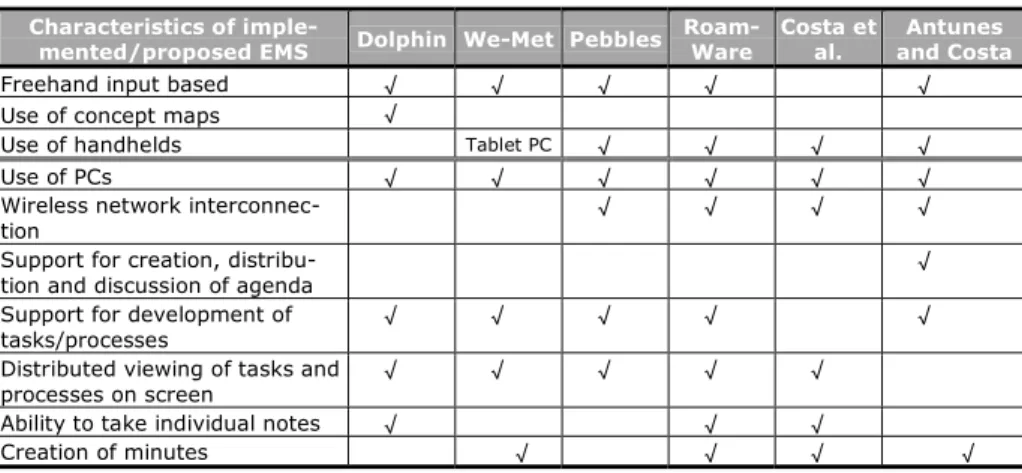
Various analyses have been carried out of both proposed and already-developed EMS systems that use freehand input, concept maps and especially handhelds, as well as the functionalities offered by handhelds for supporting face-to-face meetings: agenda creation, distribution and discussion support; task and processes development support; distributed on-screen viewing; individual note-making; and generation of minutes (see Table 1).
The Dolphin project [19] uses PCs connected to a LiveBoard to provide support for face-to-face meetings and persons distributed among different physical locations. Dolphin uses concept maps to link up the different issues dealt with at a meeting, so that a given issue can give rise to other sub-issues. Each issue and sub-issue is han-dled through a shared work area, with the option for attendees to make personal and private notes in the same system.
The We-Met project [20] supports face-to-face meetings using tablet PCs for each of the participants all of whom are interconnected through a PC. Attendees can work in the same virtual work area on their tablet screens, which is shared through the con-nection with the PC and is freehand input-based. The project’s objectives are (a) to facilitate communication between meeting participants, and (b) to facilitate documen-tation of knowledge and information generated by the meeting for easy review. Users of this system found that it was necessary to have private work areas where they can develop ideas that are not yet ready to be presented to the other attendees.
The Pebbles project [21], though not conceived to be used exclusively for meet-ings, can be used to provide support to collaborative groups in various contexts. It consists of applications that interconnect handhelds through a PC. The devices are used as though they were PC mice or keyboards. The project’s objective is to mediate social interaction techniques between persons through a shared screen.
RoamWare [10] is a handheld architecture that supports informal face-to-face reun-ions, including those held in such places as corridors. Each handheld can detect and interconnect to others located within a limited space, while the participants make notes on their devices. These notes are sent to a central computer where they are stored for later distribution.
Costa et al. [22] have developed the idea of combining handhelds and a PC to ex-plore the relationships that may exist between a meeting and these technologies. They show that the use of handhelds is neither annoying nor obstructive to the flow of the meeting, and suggest the devices be utilized as tools to generate reports, a traditional
technique for linking meeting processes to organizational ones. The authors of the study also attempt to improve meeting report generation by making use of the capacities handhelds can contribute to the EMS for managing individual and group information.
Table 1. Comparison of face-to-face meeting support systems using handhelds
Characteristics of
imple-mented/proposed EMS Dolphin We-Met Pebbles Roam-Ware Costa et al. and Costa Antunes
Freehand input based √ √ √ √ √
Use of concept maps √
Use of handhelds Tablet PC √ √ √ √
Use of PCs √ √ √ √ √ √
Wireless network
interconnec-tion √ √ √ √
Support for creation,
distribu-tion and discussion of agenda √
Support for development of
tasks/processes √ √ √ √ √
Distributed viewing of tasks and
processes on screen √ √ √ √ √
Ability to take individual notes √ √ √
Creation of minutes √ √ √ √
Antunes & Costa [23] have studied the impact of including handhelds as a support to meetings, pointing out the important role they can play in managing individual information. The authors note the following requirements: a) creation and distribution of an agenda; b) support for the development of the issues on the agenda; c) recording of decisions taken; d) inclusion of the foregoing in the minutes for later distribution; e) support for typical meeting structures; and f) support for various agenda, issue, decision, report and logistics templates.
Table 1 shows the findings of a comparative analysis of the above-described meet-ing support systems. Particularly noteworthy is that only one system uses concept maps to support collaborative work (Dolphin), while Antunes and Costa are the only ones to propose the creation, distribution and discussion of the agenda. None of the systems provides any support for negotiations aimed at reaching agreements or for commitment follow-up, and most importantly, none use gestures as a solution to the restrictions imposed by the small size of the handheld screen.
4 Design Principles
The system design principles proposed in this paper that constitute a novel contribu-tion compared to other solucontribu-tions are described below:
− Handheld screens acquire greater depth through three-dimensional concept
maps. The provision of shared visual spaces may be seen as a facilitator for vari-ous processes between persons working in groups because of the support it gives to externalization. This plays an important role in the organization and creation of knowledge in the sense that these spaces support the transition from tacit and
indi-vidual knowledge to explicit knowledge. Shared visual spaces such as concept maps have been applied in discussion groups [24], design groups and collaborative activities. We propose the use of concept mapping techniques for providing sup-port to group design of meeting agendas and meeting development as well as group memory handling. Furthermore, handheld screens can be given greater depth by virtue of the fact that the explosion of each node implies the generation of a new screen on which an aspect specified by the parent node can be worked on, thus re-sulting in the creation of three-dimensional concept maps. The third dimension af-fords the option of overcoming the disadvantage of handhelds’ reduced screen size by displaying a new screen for the development of additional aspects.
− Interface simplicity: Gestures. The design of interfaces for applications that can be built for handhelds pose a challenge due to the small size of the screen. Touch screens are an existing freehand input-based technique for facilitating communica-tion between the user and a handheld, allowing the user to create widgets (buttons for actions such as review, insertion, deletion and change of location). Note, how-ever, that these decrement the amount of useful screen space (see http://www.palmsource.com/developers), a single button using up to 10% of the device’s screen. Gestures are entered with a pen through predetermined designs, with a result that is efficient, powerful and practical [25], albeit some gestures are not easily remembered and may be difficult to recognize. Generally speaking, the design of a gesture-based interface should incorporate the following three consid-erations: (a) gestures should be easy to learn and remember, (b) they should be re-liably recognizable by the system, and (c) users should be continually informed on the available options. In addition, a zoom feature allows the user to see the struc-ture of the concept maps on the handheld and sounds can be associated as a support to the use of gestures.
5 Prototype Design of HEMS
The proposed prototype, which we will call HEMS (Handheld-Based Electronic Meeting Support), is oriented toward providing support for dealing with the problems identified at the end of Section 2. Figure 1 shows the functionalities that HEMS can support (double-line rectangles) within the meeting life-cycle, the various gesture and
concept map principles (ovals) that support the complete system, and the support
components it provides for the individual work space, the group work space, voting, and the assignment and monitoring of time periods.
Since handhelds’ reduced screen size restricts the amount of information that can be displayed, the design of the interface must be given particular attention [17]. According to [26], one solution for obtaining effective interaction between the user and screen content is to use pen-based gestures. A pen-based system facilitates the use of freehand input and is a natural method of making notes during a meeting [20]. Gestures can also support creative processes such as brainstorming, shared visual representations, collaborative publishing of graphic designs, and visual sketch displays [24]. Gestures on the screen will be automatically detected as such and interpreted semantically by HEMS. For easy retrieval and follow-up work, reusable
Gestures Mee ting life-cycle Review agenda Creation of agenda Voting
Pre-me eting Mee ting Post-me eting Betwe en-mee tings
Start of meeting Development of meeting End of me eting Group work space Individual work space Concept Maps Creation of minutes Individual note-making collaborative work Record of commitments Meeting summary Follow-up on commitments Actions to be taken Negotiation support Discussion of meeting items Distribute notes Review
meeting following stagesCommunicate
Notify agenda Agree agenda
Describe items
Time
Fig. 1. Support provided by HEMS prototype at the various stages of the system
materials are stored with the semantic structure. Seen from the users’ perspective, the final goal would be to reduce all necessary interaction with the Handheld to the moderating gestures and documentary writing on the screen
Features such as agenda creation, note-making, commitment assignment, and sup-port for voting are implemented using concept maps that allow a hierarchical nesting of any individual or group issue to be dealt with. Kristoffersen and Ljungberg [27] show that viewing graphic elements and using concept maps on which users arrive at an agreement as to their meaning through explanations help people establish effective social interaction for dealing with any given issue.
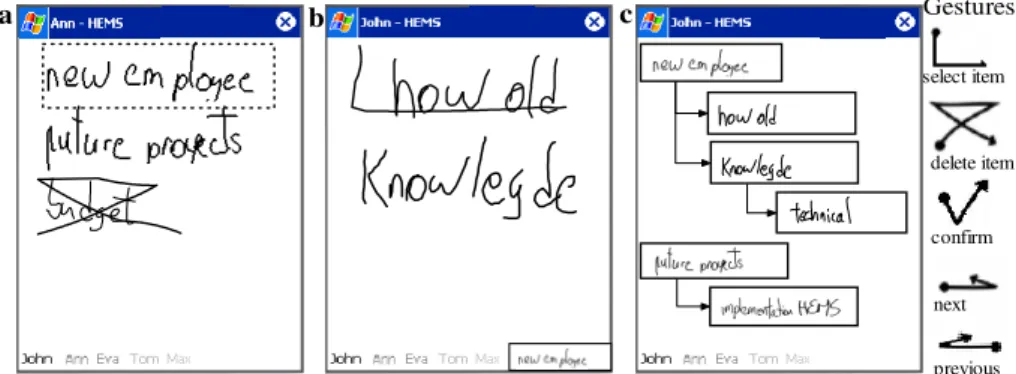
The nesting incorporated in concept maps ensures organization, ease of follow-up, and flexibility of creation, modification and management while at the same time avoiding changes in context due to the three-dimensional semantic graphs provided by the maps. As an example, consider Figure 2, in which a person named Ann puts (Figure 2a) forward three issues to be dealt with at a meeting: a new employee, a future project and the budget. Once all the participants (John, Ann, Eva, Tom and Max, as shown at the bottom of the handheld screens) are agreed on the “new em-ployee” issue, one participant (Ann again) selects it using the “select item” gesture and a new blank node appears that is dependant on the issue. If the participants are not in agreement on the “budget”, the “delete item” gesture is used. In Figure 2.b, John introduces two sub-issues (“how old” and “knowledge”), both of which are part of the “new employee” concept.
To navigate the concept maps, a chosen issue is double-clicked (for example “new employee”, Figure 2.a) and its sub-issues are displayed (in this case, “how old” and “knowledge”, Figure 2.b). A double click outside of the selected issues will display the screen shown in Figure 2.a. The gestures “previous” and “next” are used to navi-gate through a screen or node related to a given concept. The structure of the issues to be dealt with (the concept map) can be seen in Figure 2.c. For the voting process, the
Gestures a Gestures select item delete item confirm next previous Gestures Gestures b c
Fig. 2. Screenshots of HEMS and the basic gestures
gestures “confirm” (agree) and “delete item” (disagree) may be used by each partici-pant on a given issue.
The functionalities of the HEMS system (Figure 1) that facilitate the provision of support and mediation for dealing with the phenomena discussed at the end of Section 2 are described in what follows.
− Agenda construction and follow-up. These functionalities include the ability to a) facilitate the creation and description of agenda items individually (pre-meeting); b) notify agenda and review it as a group (start of meeting); c) review agenda items (start of meeting); d) agree upon the agenda based on the issues proposed by each participant in shared and collaborative fashion, propose alternative issues to be dealt with, and have a voting component for arriving at agreements (start of meeting); e) provide support for meeting follow-up through the assignment and management of estimated time periods for each issue [6], an important factor for promoting effectiveness and productivity ([2]) by supplying elapsed time alerts and progress indicators on matters being discussed at the meeting.
− Organization and coordination. The use of concept maps generates a natural
mental structure that ensures the participants remain focused on the issues to be dealt with [6]. HEMS supplies a work area for each issue that is to be developed individually or collaboratively [20]. It can be used by attendees to make hand-written notes.
In the final stage of the meeting, the deep organization of the concept maps a) en-ables the drafting of a meeting summary through the follow-up of the structure, and b) facilitates the determination of actions to be taken. Additionally, in the post-meeting stage this feature makes it possible to a) distribute each participant’s notes as well as those made by the group as a whole, b) review notes and commitments at a later time, and c) inform those involved regarding the stages to follow.
Given that the attendees’ notes were made during the processes of agreeing upon an agenda, developing the issues discussed, taking votes, etc., the minutes of the meeting will be saved by individual and group contribution for each attendee as well as by issue dealt with, including a record of the times associated with each is-sue. In this format, the minutes constitute a memory of the meeting so that the user
may consult them for information at any moment and maintain the links with the corresponding issues discussed at other meetings.
− Negotiation. HEMS includes a voting tool to support negotiations and discussions, allowing attendees to agree upon the issues to be placed on the agenda, those that are to be dealt with at the actual meeting and/or the actions to be taken (see voting component in Figure 1). The voting system may use any mode of agreement (una-nimity, simple majority, two-thirds majority, etc.). Because it works through pen-based gestures, the system provides the necessary flexibility for adapting to various “mental scenarios” that may arise.
− Commitments. If an attendee must carry out a particular activity at some later
time, a note is made in the handhelds stating that the activity must be executed by a certain deadline and by the person associated with the note. The system also en-sures the necessary functionality for sharing this information, thus allowing the commitment to be tracked by all participants.
In shared mode, the individual annotations of a given participant can be viewed by all in a single work area, and each of them may specify whether or not their notes are to be private. Commitments and minutes can be accessed by various criteria such as concept maps and issues contained in the agenda, time elapsed before dealing with a given issue, or an issue’s position relative to a given participant’s note [20].
HEMS is entirely based on a peer-to-peer ad-hoc wireless network. Note that meet-ings typically last 2 to 3 hours, which is less than the useful charge life of currently used handheld batteries. Finally, the amount of information needed to be stored is relatively small, so that the limits imposed by handhelds’ reduced memory size do not constitute a problem.
6 Conclusions
The use of handhelds would appear to be an interesting option for coordinating meet-ings that can be held at any time and in any place due to the devices’ ability to make notes and share small items of information, their ease of deployment in any collabora-tion scenario and their ad-hoc communicacollabora-tion support. Handhelds are also a good choice in that they allow brief, spontaneous notes to be expanded later into fuller contributions. In cases where large amounts of data must be inputted, solutions in-volving keyboards or other high volume input devices are required and handhelds would be less applicable.
However, even in situations where handhelds are appropriate, their reduced screen size constitutes a challenge when designing human-handheld and handheld-mediated human-human interactions. The system proposed in this paper, founded on two prin-ciples aimed at improving these two classes of interactions, implements functional-ities that help overcome what are recognized in the literature as the most frequent problems with meetings. The first principle is the use of an interface that is based wherever possible on an interaction with gestures so that widgets occupying scarce screen space are not needed. The second principle is the application of a simple struc-ture to the notes made by meeting participants. This simplifies the communication of ideas, and thanks to the tridimensionality of the structure when expanded, each node iteratively increases the depth of the screen. The structure must be kept simple to
ensure it can be easily retained by the mind, a condition that is fulfilled by a hierar-chical structure. In view of the foregoing, we believe that the tool presented here can be an effective support for spontaneous face-to-face meetings, a hypothesis we hope to confirm in experiments planned for the near future.
Acknowledgments. This paper was partially funded by Fondecyt 1050601 and DI -
Universidad de Chile Nro. I2 04/01-2. Special thanks to Lorena Quezada and Javier Martinez.
References
1. Allen, T.: Organizational Structure for Product Development. Sloan School of Management, MIT: Cambridge (2000) 1-24
2. Tropman, J.E.: Effective meetings: Improving Group Decision Making. Sage Publications (1996)
3. Matson, E.: The Seven Signs of Deadly Meetings. Fast Company. 2. April/May (1996) 122 4. Mosvick, R., Nelson, R.: We've Got to Start Meeting Like This! A Guide to Successful Business
Meeting Management. Glenview, IL: Scott, Foresman, (1992)
5. Cranes, W. T.: Effective Meetings for Busy People: Let's Decide It and Go Home. New York: McGraw-Hill Inc. (1980)
6. Hayne, S.: The facilitators’ perspective on meetings and implications for group support System. Database, 30(4) (1999) 72-91.
7. Drew, J.: The 3M Meeting management team. Mac. Graw Hill. (1994)
8. Jessup, L., Valacich, J.: Group Support Systems: A New Frontier. New York: MacMillan (1993) 9. Nunamaker, J.A., Dennis, A., Valacich J., Vogel, D., George, J.: Electronic Meeting Systems to
support group work. CACM 34(7) (1991) 40-61
10. Wiberg, M.: RoamWare: an integrated architecture for seamless interaction in between mobile meetings. Conference on Supporting Group Work archive. Proceedings of the 2001 Interna-tional ACM SIGGROUP (2001) 288-297
11. Bergqvist, J., Dahlberg, P., Kristoffersen, S., Ljungberg, F.: Moving out of the meeting room: exploring support for mobile meetings. Proceedings of the Sixth European conference on Com-puter supported cooperative work. Copenghagen, Denmark (1999) 81-98
12. Hutchins, E.: The Technology of Team Navigation. In Galegher, J., Kraut, R.E., Egido, C. (eds.): Intellec tual Teamwork: Social and Technological Foundations of Cooperative Work. Lawrence Earlbaum Associates, Hillsdale, NJ. (1990) 191-221
13. Marshall, C., Ruotolo, C.: Reading-in-the-Small: A Study of Reading on Small Form Factor Devices. JCDL’02, Portland, Oregon, USA. (2002) 13-17
14. Luff, P., Heath, C.: Mobility in Collaboration. In Proceedings of Computer Supported Collabo-rative Work, CSCW’98. ACM Press (1998) 305-314
15. Perry, M. O’hara, K., Sellen, A., Brown, B., Harper, R.: Dealing with mobility: understanding access anytime, anywhere. ACM Transactions on Computer-Human Interaction (TOCHI), 4(8) (2001) 323-347
16. Schmidt, A. Lauff, M., Beigl, M.: Handheld CSCW. Workshop on Handheld CSCW at CSCW '98, 14 November, Seattle (1998)
17. Guerrero, L., Pino, J., Collazos, C., Inostroza, A., Ochoa, S. Mobile Support for Collaborative Work. Proceedings of 10th International Workshop on Groupware, CRIWG 2004, LNCS 3198, Springer Verlag, San Carlos, Costa Rica, September (2004) 363-375
18. Bostrom, R., Anson, R., Clawson, V.: Group Facilitation and Group Support Systems. In Group Support Systems: A New Frontier. Jessup, L. Valacich, J., (Eds.) (1993) 146-168
19. Streitz, N., Geißler, J., Haake, J., Hol, J.: DOLPHIN: Integrated Meeting Support across Local and Remote Desktop Environments and LiveBoards in Proceedings of the 1994 ACM confer-ence on Computer supported cooperative work, CSCW'94, ACM (1994) 345-358
20. Wolf, C., Rhyne, J.: Communication and Information Retrieval with a Pen-Based Meeting Sup-port tool. CSCW Proceedings. ACM (1992) 322-329
21. Myers, B.A., Stiel, H., Gargiulo, R.: Collaboration using multiple PDAs connected to a PC. Proceedings of the ACM, Conference on Computer Supported Cooperative Work. (Seattle, WA) (1998) 285-294
22. Costa, C., Antunes, P., Dias, J.: The Meeting Report Process: Bridging EMS with PDA. Third International Conference on Enterprise Information Systems, ICEIS 2001. Setubal, Portugal. (2001) 821-826
23. Antunes, P., Acosta, C.: Handheld CSCW in the Meeting Environment., CRIWG 2002, LNCS 2440 (2002) 47-60
24. Hoppe, U., Gaßner K.: Integrating Collaborative Concept Mapping Tools with Group Memory and Retrieval Functions. Proceedings of the Computer Support for Collaborative Learning (CSCL) 2002 Conference (2002) 716-725
25. Long, A., Landay J., Rowe L., Michiels, J.: Visual similarity of pen Gestures. In: Proc. of the Human Factors in Computing Systems SIGCHI 2000 2(1) (2000) 360-367
26. Nicholson, M., Vickers, P.: Pen-Based Gestures: An Approach to Reducing Screen Clutter in Mobile Computing. In Proceedings of Mobile HCI 2004 (2004) 320-324
27. Kristoffersen, S., Ljungberg, F.: An Empirical Study of How People Establish Interaction: Im-plications for CSCW Sessions Management Models. Proceedings CHI 99 Conference on Hu-man Factors in Computing Systems Pittsburg (1999) 1-8