Remote control of a desktop computer through a 3G platform
based on a packet switching network
Nuno Filipe Canoilas Freire – 52208 – MEEC – IST November 2007
Abstract - The development of new data services supported by new telecommunication networks, allowed the conception of a variety of software applications over mobile communications that usually only made sense in personal computers with Internet access. Knowing this, the purpose of this work was to develop an application that allows the remote control of a desktop computer using a mobile device. Although a mobile phone is not the friendliest interface to remote control a desktop computer, it can however, become an important tool in several situations.
Considering all the limitations imposed by the mobile devices and by the data network that supports them, several tests were made to determine the viability of the project and some work was done to solve the problems related with the APIs used in this project. Also, through the development of several navigation and scaling modes, special attention was given in order to make the application work with as many different types of mobile devices as possible, both in terms of memory and processing capabilities.
Original features, like the possibility of sound transfer from the remote computer to the mobile device, giving the user a closest idea of really being sited in front of the computer, and the definition of user profiles, making the access to a specific application much easier by the mobile device, were introduced in this work.
Finally, tests were made to measure specific parameters of the mobile cellular networks services used (i.e. throughput and round trip time).
Key Words - PCremote control; Mobile phones; Mobile cellular networks; I/O interface; Communication protocol; Java
I.
Introduction
In our days, the functional differences between mobile phones and personal computers are becoming less important but they are still a reality due to the specific requisites of the mobile devices. The purpose of this project was to develop an effective system that allows a mobile device to access and control a remote computer connected to the Internet. With this in mind, it was decided to use a client – server architecture due to its simplicity, practical usage and because it does not require other non-user controllable components.
For the project development, the main limitations of the mobile cellular networks were analyzed to check if they were able to support the system requirements. It was verified that the UMTS (3G) networks have a maximum throughput between 384 kbps and 14 Mbps (using HSDPA [3]) depending on the contract the user has with the mobile operator. Since it was intended that the application could be used in the majority of mobile phones, the GPRS network was also analyzed and a throughput of 28 kbps to 64 kbps for downlink and 14 kbps for uplink traffic, shown that the bandwidth available on this network is much more limited.
Bearing in mind the network’s and mobile phone’s limitations, several possible methods to transfer the server’s desktop to the client display were considered in order to choose the best possible approach for this purpose. The selected software to use on the server is a free and open-source application known as VNC (Virtual Network Computing) [1], which is an ultra-thin client system based on a simple display protocol that is platform-independent (see Figure I.1 for illustration). This software allows its users to view and control a computer’s desktop through a remote interface. Its design assumes the minimal requisites about the client, making it easier to use in the most miscellaneous types of hardware’s (in this case, the limited mobile phone’s
hardware). The selected VNC server implementation was “WinVNC Version 3.3.3r7 with server-side scaling extensions” since it was easier to implement on it the functionalities existing in the newer versions of the software, than it was to employ the server-side scaling extensions on the latest VNC versions. On the client side it was decided to use Java (J2ME) with MIDP1.0/CLDC1.0, since the majority of mobile phones in the market support this technology. Since several applications designed in this scope already exist, one of the purposes of this project is to contribute for an existing open-source application (http://j2mevnc.sourceforge.net/), by improving it and adding new functionalities.
Figure I.1 – VNC architecture.
One of these new functionalities is the possibility to transfer sound from the server to the client (Section IV) giving the user a closest experience to really being sited in front of the remote computer. However, a large amount of mobile phones don’t support streaming over the JAVA Mobile Media API (MMAPI [12]) but only support it on audio players created on the phone’s native language. User profiles were also introduced (Section V), meaning that when a user connects, depending on what is defined for him in the server, he can access a specific application instead of having access to the entire desktop. Considering that not all mobile devices have the same processing and memory capabilities, there’s also the possibility for the user to choose if he wants the scaling made by the client or by the server (Section III), allowing the application to adapt to a variety of scenarios,. Finally, the usage of the application was made easier, intuitive and closer to what exists on computers, always considering the limitations of the mobile devices (Section II and III).
For connecting the mobile phone to the personal computer, the mobile cellular networks (GPRS and UMTS) are used on the client side. On the server side any kind of Internet access can be used. To prove the viability of this project which runs over data networks with very specific characteristics, several tools were implemented to acquire specific network parameters (Section VI).
II.
Improvements to the existing application
With the purpose of making the existing software as better as possible, improvements were made all around the application to make it a viable substitute to the existing commercial alternatives. For instance, the initial screen update was modified to give the user a whole perspective of the remote desktop instead of just a portion of it. Although this requires more initial network traffic, the following updates are smaller because only the changed portions of the desktop are sent. A Special Keys form was made to allow user access to keys that are not available on a normal mobile phone keyboard. Instead of just pressing additional keys, the user can also change the state of keys like ctrl, alt, shift, allowing the use of combinations like ctrl-shift-escape or ctrl-x. The list of existing keys is defined on the application source code but user defined key-combinations (macros) can be added to this list. In the mouse mode, the double click feature was fixed and other mouse functionalities were presented. The user can now perform left clicks, right clicks, scrolling, press-and-hold of the left button and set the cursor position to the center of the screen (call mouse). These actions are available through pre-defined hotkeys or through the mouse form. The partial screen updates were altered to full incremental screen updates, meaning that the entire screen is now refreshed during an update but only the
changed portions of the desktop are sent by the server. This reduces the amount of data transferred per update and makes the application faster (unless of course an extreme situation is considered like the visualization of a full-screen movie, where a total incremental update can be practically the same size of a non-incremental one). A clipboard implementation was made available allowing the user access, in the application, to any text copied in the server and vice-versa. To give a closer user experience to what can be achieved in the other commercial applications in the same scope, navigation across the desktop can now also be made using the mouse mode. In this manner, if the cursor gets out of the screen bounds, the screen area will automatically adjust to make the cursor viewable. Therefore, this can be used to navigate through the desktop. For mobile devices with qwerty keyboards, the remote computer can be fully controlled without the need to change modes for navigation, mouse or typing. This can all be done in only one mode using the navigation buttons to move around the desktop, the stylus to act as a mouse and the incorporated qwerty
keyboard to type. A user defined password was implemented to protect the address book. This can be turned on or off, offering access security to the server in case the mobile device gets stolen or lost. Finally, other minor practical changes were made to the application to make it more user-friendly.
III.
Navigation and scaling
This is an important issue to consider since the mobile phone’s display size is much smaller than the usual desktop resolutions to which the client connects to. Thus, alternatives to the existing navigation and scaling methods were implemented in order to make them more practical, intuitive and appealing to the user. The original application only had two zooming factors, one being 100% (zoom normal) and the other one being the necessary factor to get the entire desktop to fit in the phone’s display area (zoom out). Since only a portion of the desktop corresponding to the device’s display size was stored in memory, to cover the entire remote work environment in zoom normal, each movement in any direction implied an update request for the section corresponding to the displacement made. Although this implementation requires a small amount of memory on the mobile device, which in most cases is rather limited, for intensive navigations through the desktop, the network access is considerable and constant and it’s not very appealing to the user. In this way, a new navigation method was implemented together with a new zooming factor (zoom fifty, 50%). With this new method, the entire remote desktop is stored in the mobile phone’s memory, in all three available zooming factors, allowing the navigation and zooming to be made more fluidly without the need for constant update requests to be sent through the network. The several zooming factors can be seen on Figure III.1.
Figure III.1 – Illustration of the 3 zooming factors available on the application. From left to right: zoom out, zoom fifty e zoom normal.
The ability for the scaling to be done on the server-side was also included, requiring of course, the creation of a new type of message in the RFB protocol and that the corresponding server supports this
functionality. When the server-side scaling option is selected, the navigation is also fluid but zooming in or out on the desktop requires information exchange between the client and the server.
However, during the development of the application, some of the mobile phones available for testing couldn’t access remote desktops with large resolutions due to memory shortage. Since desktop resolutions in personal computers are getting larger as time passes by and since the new navigation method implemented requires more available memory on the mobile device, it became indispensable to present the user with a lesser memory consuming alternative, which turned out to be the original navigation method. This allows older phones to also be able to run the application. Summarizing, the resulting 4 navigation and scaling modes are:
CS (client side) Scaling with Smooth Navigation: This is the mode that requires more memory on the mobile phone but it’s probably the more appealing approach to the user for its smooth and fluid navigation.
CS Scaling without Smooth Navigation: Requires less memory then the previous mode but loses the sense of smooth and fluid navigation in zoom normal, keeping it however in zoom fifty. The navigation in zoom
normal demands constant updates requests.
SS (server side) Scaling with Smooth Navigation: This is the second most demanding mode in terms of memory consumption. It also allows a smoother navigation but information needs to be exchanged with the server for zooming in or out on the desktop. This mode requires less processing power by the mobile device.
SS Scaling without Smooth Navigation: It’s the less demanding mode for the mobile device, both in terms of processing and memory capacity. Useful for older and limited phones but implies constant update requests during navigation and scaling, which can become an annoyance to the user due to the network latency.
IV.
Sound transfer
To allow a total control over the remote computer and to have a closer perception of actually being sited in front of the PC, it’s necessary not only to visualize the remote desktop but it’s also essential to hear what’s playing on the computer. In the current VNC versions, the only sound played on the client is the beep referred to, for instance, an error occurring in the command prompt. This means that this particular feature is event driven and only serves to inform the user that something went wrong. Since the RFB protocol itself doesn’t support sound transfer between server and client, two possible solutions where identified to mend this gap:
An extension to the protocol could be made to accommodate an event driven sound transfer. A collection of sounds could be associated with predefined events and in case such event occurred, the server would send a message to the client containing a string that identifies it. If the client recognizes such event it would play the appropriate sound and if not, it would send a message to the server requesting the corresponding audio file to reproduce (this would create a sort of cache system in the client). This solution, however, has the major flaw of only allowing the playback of sounds associated with events and not the whole audio available on the server (like music or outside sounds captured by the microphone).
A connection could be used, parallel to the RFB session, specifically created for sound transfer. The idea would be to stream all the audio that gets to the sound driver through a dedicated session from the server to the client. There are, however, restrictions imposed by the APIs accessible on the mobile devices. So, to maintain the compatibility with has much devices as possible, it was decided not to use any streaming protocol like RTP/RTSP (RFC 3550/2326), because they are only supported in the native players of most mobile phones and only more recent and state of the art models support streaming over the J2ME API’s (MMAPI). This means that most mobile devices only allow the reproduction of media in blocks of data after loading them fully into memory and so, another solution had to be thought of to
reproduce the streaming effect. Both TCP and UDP protocols were analyzed to figure out which one better adjusts to the specific characteristics of this project and an implementation of this functionality was made over both communication protocols for comparison purposes.
This new functionality required changes in both server and client’s applications. The mechanisms to create a separated session were introduced to allow the existence of a VNC session with or without sound transfer. This gives the user the ability to establish and break a connection to transfer sound from the server, whenever he wants. Once the sound transfer session is established the server sends a WAVE format header to the client which uses this information to create its internal buffers. The header is then granted to the sound players which need this information to play the audio samples sent next in PCM, 8000 bytes per second, mono, in an attempt to consume as less bandwidth as possible. The header format was selected to provide as much device compatibility as possible. Each audio packet sent can be compressed using a symbol repetition suppression algorithm which allows a simple silence suppression to be accomplished. Both this methods were implemented to reduce the network bandwidth used, taking in consideration that a lot of the existing algorithms are proprietaries solutions and that more complex compressions would required more complex decompressions on the limited hardware of the mobile phones.
A double buffering system is used in the server so an audio sample can be compressed and sent to the client while the other is being filled with new data. The size of the sound packet sent over TCP is of 4 seconds (32000 bytes or less if compressed) and it’s of 62,5 ms (500 bytes or less if compressed) over UDP. This size discrepancy could not be avoided because a drawback to the maximum datagram size exists which limits its dimension to 512 bytes. Since the mobile phones available for testing only reproduce sound packets of at least 500 ms (4000 bytes), the UDP solution needs to buffer several samples before being able to play them.
On the client side, two audio players reproduce the received samples in an alternating way. This technique is used to diminish the break introduced between audio samples by the use of only one player. While one player is reproducing the audio packet, the other one is receiving and preparing the next sample and by doing so, the audio break is reduced from about 500 ms to a few milliseconds (in Nokia 6630). The 4 second’s sample size was chosen to reduce the perceptive effect of the audio break between players.
The buffering system used in UDP, although at first may seem like a good option, brings however, more downsides than advantages. The silence suppression mechanism doesn’t work the way it should and if a buffer large enough to hold 4 audio samples is used, the time interval between the instant the sound plays in the server to the moment it is reproduced in the client goes from 4 seconds without buffering to about 16 seconds with it.
V.
User Profiles
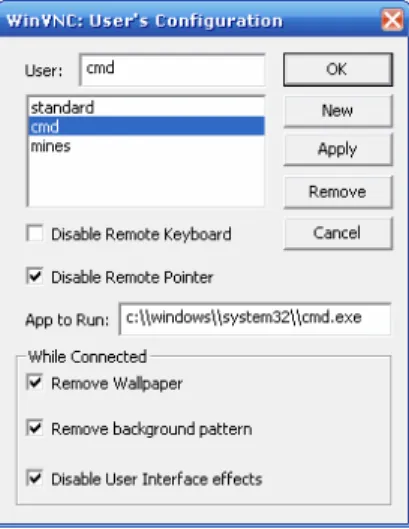
Knowing that the mobile phone’s interface is still relatively limited compared to a personal computer’s interface (keyboard + mouse) and that the complete control over the last one through a mobile device requires some skills and patience by the user, an interesting functionality implemented was a user profiles mechanism on the server side. The idea is to allow the creation of different types of users, granting them, or not, the remote control over the server’s mouse and/or keyboard, the selection, or not, of a specific application that the server should make available to the client (instead of the whole desktop) and the ability to remove, or not, the Wallpaper, background patterns and Windows effects, which are network consuming resources. This was also intended to distinguish mobile phone’s clients, where network resources are an important factor, from personal computer’s clients accessing the server from a local network or from the Internet, where network resources are not so important. Off course that changes need to be done to the existing PC’s clients to support this extension to the protocol.
The information about which application should run on the server and on which conditions, comes from a new field made available on the client side where the user can enter the username he wants to use. The configuration of each user profile and what it should do is configured on the server-side in an easy to handle graphical user interface as seen in Figure V.1.
Figure V.1 – Graphical user interface for the user profiles configuration.
For the server to identify which user is accessing it, there were two possible ways: either a new type of message was created on the RFB protocol, as was done for the server-side scaling extensions, or a new security type was introduced as an extension to the protocol.
The first option has the downside of whenever the client sends this new message to a server that doesn’t support it, the connection is closed and an error message is sent by the server. Also, this new message could only be exchanged after the VNC session was established and therefore time would be wasted until the client got to know that the server doesn’t support this new functionality.
The second option, which was implemented, has the advantage of only having to create a new security type that both the server and the client know about, so a user derived authentication can be made. Since in version 3.3 of the RFB protocol the decision of the security type to use is made by the server, a new parameter was added to the server’s properties to give the user the ability to configure which type of authentication to use. If the normal authentication is selected, regular clients can connect to the server as well as the mobile phone’s client, in which case the username field is ignored. In case the user profiles authentication is used, the server will wait for a username to be sent from the client and will adjust its properties accordingly. If the username sent by the client doesn’t exists (wasn’t previously configured on the server), this field is empty or if the server is in normal authentication mode, the standard user properties is used. If a client that doesn’t support this new security type tries to connect to the server when he’s demanding a user profile authentication, an error message will be presented and the session will not be established.
To accomplish this feature, a data structure was created on the server to store the different user profile properties. This information is also stored in a text file, in a simple format, and efforts are made to maintain the consistence between what exists in memory and what is stored on disk.
VI.
Performance Tests and tools
For the purpose of the application performance testing and the acquisition of network parameters, a log file was created to store values corresponding to each individual data/sound transfer made, and a statistical form was produced to present the user with the memory consumed by the application and the total, minimum, average and maximum values relative to past data/sound transfers. To allow an easy access to the
information stored in the log file, the ability to send it to the server through a TCP connection was introduced. The server then sends all the information received to a file, and with the aid of a special elaborated script, the relevant information is converted to a “.CSV” file (comma-separated values) that can be interpreted by a spreadsheet application like Microsoft Excel.
A third form was made to allow the client to Ping the server and to show the resulting round-trip time (RTT) estimations. Since J2ME doesn’t support ICMP packets like Ping, other options had to be considered to estimate the round-trip time. For instance, using an echo server over UDP it’s possible to compute the time interval between the instant a packet is sent and the instant the same packet is received. A spin-off of the aforementioned idea is using the same echo server but over TCP. This option introduces additional delays as a consequence of the intrinsic segment reconstruction of the TCP protocol and the need to acknowledge the received segments before echoing the whole packet. Although this implementation could give the user a better estimation off the real delay existing in the application which runs entirely over TCP, this idea became difficult to implement because of the setbacks introduced by the need to configure the Network Address Translations (NAT) tables on the routers, to redirect the outside information to the dedicated TCP sockets on random port numbers. Another possible solution was to measure the round-trip time through the TCP headers exchanged during the beginning of a session. If a client sends a TCP SYN segment to a predefined port on the server which is known not to be in use, the server will respond with a TCP RST segment and the time difference between the two can be estimated. This last method was implemented to compare values with the UDP process.
Since the round-trip time varies during the session, 5 packets are exchanged between both parties to gather enough information to present the user with a minimum, average and maximum value, in both implementations. This also shows that the jitter is an important factor over these networks. However, very few information about this parameter can be retrieved from the small amount of samples taken.
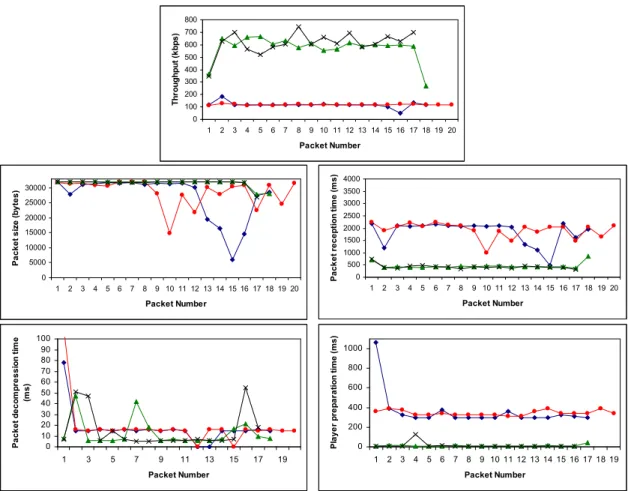
Therefore, to obtain network parameters and to analyze how the application works under different networks, several tests were made using the in-built functionalities and the tools conceived for that purpose. The first analysis made was how the sound transfer implementation works under UMTS and HSDPA (GPRS doesn’t offer enough bandwidth for this) both over UDP and TCP. The achieved results vote in favor of the TCP method as it is more reliable and turned out to be a more robust solution then the UDP method. The obtained values, which can be seen in the Figure VI.1, were: the network throughput variation, the size of the compressed sound packets transferred and how that information can be used for the silence suppression functionality, the time a packet takes to compress and decompress and how long the audio players take to prepare the samples. As expected in theory, the silence suppression method didn’t work well with the buffering used in the UDP implementation, since, besides removing the data transferred corresponding to the silent moments it also removed the silence time interval. As no better performance was obtained with the UDP method, the TCP implementation was chosen to support the sound transfer in the final version of the VNC client. Another factor in favor of this choice was that not all mobile phones support UDP datagrams over J2ME.
Figure VI.1- Graphics relative to the transfer of about 1 minute of sound over TCP (two distinct sessions over UMTS and two more over HSPDA).
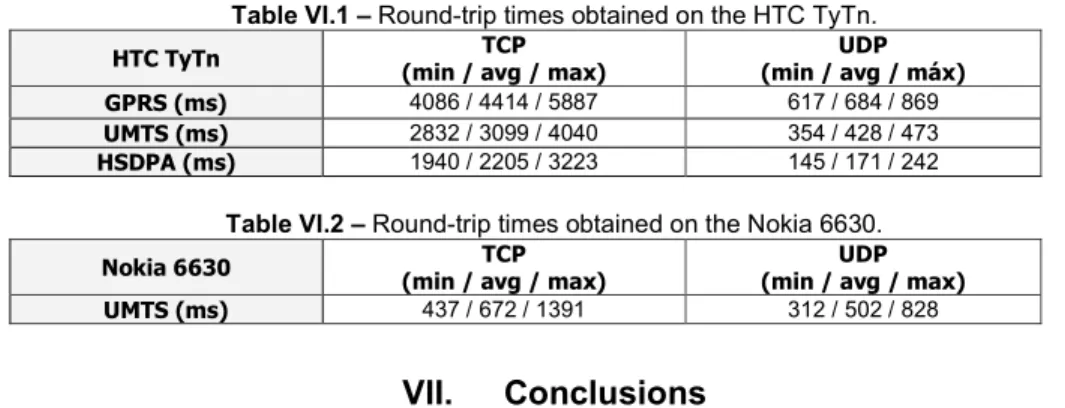
To see how the application works under the different navigation and scaling modes implemented, extremely detailed images covering the desktops were transferred over a GPRS network and a couple of tests were made to see how the application behaves in a possible and real application scenario. One of the achieved conclusions was that the different modes influence the memory required by the mobile devices but they don’t influence the duration of the updates, except when the scaling is done by the server and a zooming factor below 100% is used. Another interesting fact is that the data transferred through the network during an update using the RFB encodings is twice the size of the image in the server. Also, the duration of the updates depend on the device the application is working on, as it turned out to be much faster to update the screen in a Nokia 6630 (RISC 32-bits processor at 220 MHz) then on a HTC TyTN (Samsung processor at 400 MHz). This may be explained as the Java virtual machine is an integrated part of the Symbian operating system in Nokia 6630 but in the HTC TyTn the Java MIDlets are managed by an application running over Windows Mobile 6®, much like and emulator, making the data processing slower. For a typical scenario usage of the application, it was considered that the user accessed the remote computer, opened a simple document, analyzed it, made several changes, saved and closed it, opened Thunderbird, created a new e-mail message with a subject and destination, attached the referred document and sent it. This was all done in about 9 minutes on a Nokia 6630. As for the round-trip time, the estimated values are shown in Table VI.1 and Table VI.2. These values revealed that the Ping method using an UDP echo server is more accurate then the TCP SYN/RST method as the obtained values are closer to what was expected in theory. An interesting fact is that the TCP SYN/RST method doesn’t work correctly on the HTC TyTn mobile device. This may be due to the TCP/IP protocol implementation on this device.
0 100 200 300 400 500 600 700 800 1 2 3 4 5 6 7 8 9 10 11 12 13 14 15 16 17 18 19 20 Packet Number T h ro u g h p u t (k b p s ) 0 5000 10000 15000 20000 25000 30000 1 2 3 4 5 6 7 8 9 10 11 12 13 14 15 16 17 18 19 20 Packet Number P a c k e t s iz e ( b y te s ) 0 500 1000 1500 2000 2500 3000 3500 4000 1 2 3 4 5 6 7 8 9 10 11 12 13 14 15 16 17 18 19 20 Packet Number P a c k e t re c e p ti o n t im e ( m s ) 0 10 20 30 40 50 60 70 80 90 100 1 3 5 7 9 11 13 15 17 19 Packet Number P a c k e t d e c o m p re s s io n t im e (m s ) 0 200 400 600 800 1000 1 2 3 4 5 6 7 8 9 10 11 12 13 14 15 16 17 18 19 Packet Number P la y e r p re p a ra ti o n t im e ( m s )
Table VI.1 – Round-trip times obtained on the HTC TyTn.
HTC TyTn (min / avg / max) TCP (min / avg / máx) UDP
GPRS (ms) 4086 / 4414 / 5887 617 / 684 / 869
UMTS (ms) 2832 / 3099 / 4040 354 / 428 / 473
HSDPA (ms) 1940 / 2205 / 3223 145 / 171 / 242
Table VI.2 – Round-trip times obtained on the Nokia 6630.
Nokia 6630 TCP
(min / avg / max)
UDP (min / avg / max)
UMTS (ms) 437 / 672 / 1391 312 / 502 / 828
VII.
Conclusions
The present work approached the problem of remote controlling a personal computer through a mobile device in a vast way. Analyses of the existent proprietary solutions in the market were made and several ways off improving their functionalities were carefully thought off and implemented in a free, open-source version. The main functionalities introduced in this work were: alternative navigation and scaling methods, sound transfer ability, user profile mechanisms, performance tests and tools and an all around makeover of the application making it more user friendly and similar to other commercial solutions, turning this into a viable alternative to them.
During the entire project one of the main concerns was to keep the resulting application compatible with as much mobile devices as possible and with the existing VNC servers.
From the performance test results, the mobile cellular networks revealed able to cope with the needs of the application for a smooth working. However, for the sound transfer functionality, a network throughput of above 64 kbps is needed which is only achieved in UMTS and HSDPA. Hopefully, in the next years the mobile phone interface will be more mature for such advanced applications, with bigger and better resolution screens and simpler input mechanisms.
VIII.
Future work
In about every part of this project there are new functionalities that can be integrated to produce a more robust and appealing system. For example, a feature could be added to allow the user to associate key combinations, or events, to their preferred keys.
Another interesting feature would be the ability to transfer files between client and server, so a user could download an important document that he left at home or simply transfer a song from his home computer that he feels like listening at the time. However, this revealed hard to implement as the mobile phone’s file system access raises security issues. Proprietary APIs were created by the mobile phones manufacturers to access the local file system, however, in almost all cases it’s required that the application is signed, because like any other Java application, a MIDlet runs in a secure sandbox and it can’t simply access any private information. Therefore, if the device supports the FileConnection API, the file system is accessible to the programmer. However, this API is available under Nokia 6630 but not under Nokia 6600 and since this would limit the use of the application to several devices, other options have to be considered.
At the sound transfer level, it would be interesting to implement it on the VNC principles. This means that, one should assume the minimal about the data network that supports the communication and about the available audio players on the client, but allowing the negotiation for better audio quality and even different codecs. Since several of the more recent mobile devices already support RTP/RTSP streaming over J2ME APIs, one could also implement this solution and provide the user the ability to select the more adequate sound transfer method for his device. One other interesting characteristic would be the ability to have
bi-directional sound transfer, which would allow the communication between both ends in a remote assistance scenario.
The available RFB encodings could be better analyzed to understand which one better adjusts to the mobile devices in terms of required processing power and network traffic.
The new functionalities introduced to the WinVNC server should be made available to other platforms (Linux, Mac, etc.).
The support for streaming should be made available for mobile phones that support it, improving the performance of the application in newer phones.
Finally, the data transferred during the VNC session could be encrypted to protect any sensitive information exchanged. An encryption method could be implemented to protect the data sent through the network, or a SSH or VPN session could be used to add an extra layer of security to the application. At the moment, only the client password verification is made in a secure way.
IX.
References
[1] Tristan Richardson, "Virtual Network Computing", IEEE Internet Computing, Jan/Feb 1998. [2] Tristan Richardson, “The RFB Protocol” version 3.8, PDF, June 2007.
[3] V. Rivoira and F. Pascali, “HSDPA: High-speed internet over your mobile phone”, IEC newsletter, June 2007. http://www.answers.com/topic/gprs?cat=technology. Last access in 28/08/2007.
[4]“General Packet Radio Service (GPRS)”, Wikipédia article, August 2007
http://en.wikipedia.org/wiki/General_Packet_Radio_Service. Last access in 28/08/2007. [5] John W. Muchow, “CORE J2ME - TECNOLOGIA E MIDP”, Makron Books, 2004
[6] Microsoft corporation, “Windows Server 2003 Remote Access Overview”, White Paper, 1-2, March 2003. [7] Microsoft, “INFO: UDP Datagram Can Be Silently Discarded if Larger than MTU”
http://support.microsoft.com/kb/233401. Last access in 10/08/2007
[8] Oliveira, J., Kamienski, C. A., Kelner, J., Sadok, D., "Análise de Desempenho de TCP sobre GPRS em um Ambiente Fim a Fim", Workshop de Comunicação Sem Fios (WCSF 2004), Fortaleza/CE, October 2004.
[9] R. Chakravorty, J. Cartwright and I. Pratt, “Practical Experience with TCP over GPRS”, Proc. of IEEE GLOBECOM 2002, November 2002
[10] “TCP over second (2,5G) and third (3G) Generation Mobile Networks”, RFC 3481, February 2003
[11] Antonis Alexiou, Christos Bouras, Vaggelis Igglesis, “Performance Evaluation of TCP over UMTS Transport Channels”, Whitepaper
[12] Sun J2ME, “Mobile Media API (MMAPI); JSR 135 Specification”, June 2006 http://java.sun.com/products/mmapi/. Last access in 28/08/2007.
[13] Sun J2ME, “Mobile Information Device Profile (MIDP1.0); JSR 37 Specification”, December 2000. http://java.sun.com/products/midp/ Last access in 28/08/2007.
[14] Eduardo Tude, “Tutorial de GPRS“, (www.teleco.com.br), April 2003 [15] Eduardo Tude, “Tutorial de UMTS“, (www.teleco.com.br), January 2004 [16] Eduardo Tude, “Tutorial de HSDPA“, (www.teleco.com.br), February 2005 [17] Michael Lloyd Lee, “J2ME VNC”, código fonte, February 2005.
http://j2mevnc.cvs.sourceforge.net/j2mevnc/VNC/. Last access in 10/08/2007.
[18] AT&T, Harakan Software, “WinVNC v3.3.3 r7 with Server Scaling Extensions”, source code, January 2001. http://www.btinternet.com/~harakan/PalmVNC/ Last access in 10/08/2007.
[19] Microsoft, “Microsoft Developer Network (MSDN)”, http://msdn2.microsoft.com/en-us/default.aspx [20] GNU General Public License, http://www.gnu.org/licenses/gpl.html
[21] Sun, Java Platform, Micro Edition (Java ME), http://java.sun.com/javame/index.jsp
[22] Eric Giguere, “Databases and MIDP, Part 1: Understanding the Record Management System“, Sun article, February 2004. http://developers.sun.com/mobility/midp/articles/databaserms/index.html