
Arbitrary Display Environments
Vom Fachbereich Informatik
der Technischen Universit¨at Kaiserslautern zur Erlangung des akademischen Grades
Doktor der Ingenieurswissenschaften (Dr. -Ing.)
genehmigte Dissertation von
Dipl. -Ing. Peter Scott Olech
Datum der wissenschaftlichen Aussprache: 23. Juli 2013
Dekan: Prof. Dr. Arnd Poetzsch-Heffter
Vorsitzender des Pr¨ufungsausschusses: Prof. Dr. Karsten Berns 1. Berichterstatter: apl. Prof. Dr. Achim Ebert 2. Berichterstatter: Prof. Dr. Jan Aurich
Achim Ebert for giving me the opportunity, of being part in a highly interesting and professional research environment. I enjoyed most of my time at theComputer Graphics and HCI Group. I highly appreciate the experiences I have been able to make, both interdisciplinary, as well as internationally.
Furthermore I thank Prof. Dr. Jan Aurich for providing for an highly interesting research environment and the opportunity to ”think outside the box”. I want to extend my gratitude to Prof. Dr. Didier Stricker, who joined the board of examiners on short notice. I also would like to thank Prof. Dr. Karsten Berns for being the head of the board of examiners. In addition I would like to thank Prof. Dr. Hans Hagen.
I also would like to thank my colleagues Sebastian Thelen, for the fruitful collabo-ration and intellectual exchange and the great time during our research visit at UC Irvine. My thanks go to Daniel Cernea for the excellent collaboration, for handling the hardware during my defence and the fun times at the range.
I also thank all people affiliated with the University of Kaiserslautern for their help and support: Helge Meyer, Carsten Amrhein, Matthias Deller, Christian Lauer, Xiang Yang, Pascal Winkes, and Florian H¨opel.
Finally, and most importantly, I thank my family; especially my mother, for her continuous support, the patience and the endurance in bearing my moods, and the love she gave and still gives me. I also thank my grandmother for her support. Last but for sure not least I thank my fiancee for her love, for her care and for pushing me forward. Without them, this thesis would not have been possible. I will never be able to return their sacrifices.
extraneous, they are its mere clothing, and clothing can wear out, become ragged, cease to be comfortable, cease to protect the body from winter, disease, and death. To be loyal to rags, to shout for rags, to worship rags, to die for rags–this is loyalty to unreason, it is pure animal; it belongs to monarchy, was invented by monarchy; let monarchy keep it.
Recent progresses and advances in the field of consumer electronics, driven by display technologies and also the sector of mobile, hand-held devices, enable new ways in presenting information to users, as well as new ways of user interaction, therefore providing a basis for user-centered applications and work environments.
My thesis focuses on how arbitrary display environments can be utilized to improve both the user experience, regarding perception of information, and also to provide intuitive interaction possibilities. On the one hand advances in display technologies provide the basis for new ways of visualizing content and collaborative work, on the other hand forward-pressing developments in the consumer market, especially the market of smart phones, offer potential to enhance usability in terms of interaction and therefore can provide additional benefit for users.
Tiled display setups, combining both large screen real estate and high resolution, provide new possibilities and chances to visualize large datasets and to facilitate col-laboration in front of a large screen area. Furthermore these display setups present several advantages over the traditional single-user-workspace environments: con-trary to single-user-workspaces, multiple users are able to explore a dataset displayed on a tiled display system, at the same time, thus allowing new forms of collabora-tive work. Based on that, face-to-face discussions are enabled, an additional value is added. Large displays also allow the utilization of the user’s spatial memory, al-lowing physical navigation without the need of switching between different windows to explore information.
WithTiled++ I contributed a versatile approach to address the bezel problem. The
bezel problem is one of the Top Ten research challenges in the research field of LCD-based tiled wall setups. By applying the Tiled++ approach a large high resolution
Focus & Context screen is created, combining high resolution focus areas with low resolution context information, projected onto the bezel area.
Additionally the field of user interaction poses an important challenge, especially regarding the utilization of large tiled displays, since traditional keyboard & mouse interaction devices reached their limits. My focus in this thesis is on Mobile HCI.
able new ways of handling information, displaying content, and user interaction. Utilized in hot spots, Digital Interactive Public Pinboards can provide an adequate answer to questions like how to approach pressing issues like disaster and crisis man-agement for both responders as well as citizens and also new ways of how to handle information flow (contribution & distribution & accession). My contribution to the research field of public display environments was the conception and implementa-tion of an easy-to-use and easy-to-set-up architecture to overcome shortcomings of current approaches and to cover the needs of aid personnel.
Although being a niche, Virtual Reality (VR) environments can provide additional value for visualizing specific content. Disciplines like earth sciences & geology, me-chanical engineering, design, and architecture can benefit from VR environments. In order to consider the variety of users, I introduce a more intuitive and user friendly interaction metaphor, theARC metaphor.
Visualization challenges base on being able to cope with more and more complex datasets and to bridge the gap between comprehensibility and loss of information. Furthermore the visualization approach has to be reasonable, which is a crucial factor when working in interdisciplinary teams, where the standard of knowledge is diverse. Users have to be able to conceive the visualized content in a fast and reliable way. My contribution are visualization approaches in the field ofsupportive visualization.
Finally, my work illuminates how the synthesis of visualization, interaction and dis-play technologies enhance the user experience. I promote a holistic view. The user is brought back into the focus of attention, provided with a tool-set to support him, without overextending the abilities of, for example, non-expert users, a crucial factor in the more and more interdisciplinary field of computer science.
ich der Bildschirmtechnologien und auch im Bereich der mobilen Endger¨ate (smart phones), er¨offnen neue Wege dem Nutzer Inhalte zu pr¨asentieren, und auch neue Formen der Interaktion.
In der vorliegenden Arbeit wird untersucht, wie verschiedene Bildschirm-Umgebungen genutzt werden k¨onnen, um den Anwender hinsichtlich der Wahrnehmung von In-formation und auch der intuitiven Interation mit dieser zu unterst¨utzen. Einerseits bilden neue Display-Technologien das Fundament f¨ur neue Visualisierungsans¨atze und auch kollaborative Arbeitstechniken, andererseits er¨offnen die stetigen Neuerun-gen im Bereich der Unterhaltungselektronik, allem voran der Bereich der mobilen Endger¨ate (z.B. Smart Phones, Handy, Tablet-PC), ein großes Potential die Be-nutzbarkeit und auch die Benutzerfreundlichkeit zu verbessern.
Sogenannte Tiled display setups, d.h. aus mehreren Einzelbildschirmen bestehende Monitormw¨ande, vereinen eine große Bildschirmfl¨ache und auch eine hohe Bildschir-maufl¨osung. Dadurch wird es erleichtert sehr große Datens¨atze anzuzeigen und auch die Zusammenarbeit von mehreren Benutzern zu erm¨oglichen. Die Vorteile dieser Bildschirmumgebungen gegen¨uber herk¨ommlichen Desktop-Arbeitsumgebungen, die f¨ur einen Anwender konzipiert sind: mehrere Nutzer k¨onnen gleichzeitig Inhalte erfassen, neue Formen des kollaborativen Arbeitens werden erm¨oglicht. Inhalte k¨onnen sofort diskutiert werden, diese soziale Komponente ist ein deutlicher Mehrw-ert gegen¨uber klassischen Desktop-Arbeitspl¨atzen. Auch das r¨aumliche Ged¨achtnis kann bei großen Bildschirmen genutzt werden, durch physikalische Navigation. Der Anwender muss also nicht mehr, wie bei Desktop-Systemen ¨ublich, zwischen ver-schiedenen Ansichten wechseln, wenn er bestimmte Inhalte erfassen m¨ochte, vielmehr kann er den human zoom metaphor nutzen.
DerTiled++Ansatz bietet eine skalierbare L¨osung um das sogenanntebezel problem
zu minimieren. Diesesbezel problem ist vergleichbar mit dem Effekt eines Stulpfen-sters: der Fensterrahmen beschneidet die Aussicht und verdeckt somit einen Teil des Bildes. Dieser Effekt ist bei bisherigen Fl¨ussigkristallbildschirmen (Liquid Crys-tal Display, LCD) unvermeidbar, da die Ansteuerungselektronik in den Rahmen der
bilden die Monitorrahmen, auf die mit Hilfe eines herk¨ommlichen Projektors Kon-textinhalte, mit einer niedrigeren Aufl¨osung, projiziert werden.
Zus¨atzlich ist der Bereich der Mensch-Maschine-Interaktion eine wichtige Heraus-forderung, gerade im Bezug auf große Monitorw¨ande, da eine klassische Tastatur & Maus-Interaktion ihre Grenzen erreicht hat und die bereits angef¨uhrten Vorteile torpedieren w¨urde. Der Fokus liegt hierbei auf mobilen Endger¨aten, da sie sowohl ¨
uber verschiedene Interaktionmodalit¨aten verf¨ugen und gleichzeitig die Mobilit¨at des Anwenders nicht einschr¨anken.
Große, ¨offentliche Bildschirme, eine modernisierte Variante von Pinnw¨anden, bieten neue Wege mit Informationen umzugehen, Inhalte anzuzeigen und auch neue Wege der Mensch-Maschine-Interaktion. Eingesetzt inHotspots bieten diese Digitalen In-teraktiven ¨Offentlichen Pinnw¨ande (Digital Interactive Public Pinboards) eine ade-quate Antwort auf die Frage wie man dringlichen Fragen, beispielsweise dem bereit-stellen von wichtigen Informationen f¨ur Ersthelfer und B¨urger in Katastrophen- und Krisengebieten, begegnen kann. Weiterhin bieten ¨offentliche Bildschirme innovative Wege des Informationsflusses (Information hinzuf¨ugen & Information verbreiten & Information zug¨anglich machen)in B¨uroumgebungen.
Virtuelle Realit¨at (VR) ist eine Nische im Bereich der Visualisierungsans¨atze. Die Nutzung der VR kann jedoch, je nach Anwendungsbereich, einen gewissen Mehrwert f¨ur die Anwender darstellen. Im Rahmen dieser Arbeit wird anhand eines Anwen-dungsbeispiels aus dem Bereich der Geowissenschaften/Geologie aufgezeigt, in wie weit diese Fachrichtung von der VR profitieren kann.
Die Herausforderungen im Bereich der Visualisierung basieren auf der F¨ahigkeit komplexe Inhalte so abzubilden, dass die L¨ucke zwischen Verst¨andlichkeit der Infor-mation und InforInfor-mationsverlust m¨oglichst gering ist. Die verst¨andliche Darstellung von Inhalten ist besonders wichtig in interdisziplin¨aren Gruppen, in denen ein un-terschiedlicher Wissensstand herrscht. Die Anwender m¨ussen in der Lage sein, die visuell aufbereiteten Informationen schnell und sicher erfassen zu k¨onnen.
nutzerfreundlichkeit. Der Anwender r¨uckt wieder in den Fokus der Aufmerksamkeit, ausgestattet mit Werkzeugen die ihn bei seinen Aufgaben unterst¨utzen, ohne ihn zu ¨
uberfordern. Mit dieser Vision kann Anwendern anderer Fachrichtungen, ein essen-tieller Faktor im stetig interdisziplin¨arer werdenden Bereich der Informatik, Rech-nung getragen werden.
List of Figures v
List of Tables viii
List of Abbreviations ix
1 INTRODUCTION 1
1.1 Motivation . . . 1
1.2 Distinction of focus . . . 2
1.3 Thesis structure and Methodology . . . 4
1.4 Contribution . . . 5
2 ENHANCING NEW DISPLAY ENVIRONMENTS 8 2.1 Introduction . . . 8
2.2 State of the Art . . . 10
2.3 LCD-based Tiled Display Systems . . . 16
2.3.1 Semantic Loss - ”Visualization behind bars” . . . 19
2.3.2 The Tiled++ approach . . . 21
2.3.2.1 The Tiled++ approach - Creating a high-resolution Focus & Context Display . . . 22
2.3.2.2 Calibration of the Tiled++ System . . . 22
2.4.1.1 Digital Interactive Pinboard Functionality . . . 30
2.4.1.2 Implementation Details . . . 31
2.4.2 Digital Interactive Public Pinboards for Disaster and Crisis Management . . . 33
2.4.2.1 Conceptional Design . . . 36
2.4.2.2 The DIPP Prototype . . . 39
2.5 Virtual Reality Environments . . . 42
2.6 Summary . . . 45
3 EVALUATIONS AND USER STUDIES IN THE FIELD OF HUMAN-COMPUTER INTERACTION 47 3.1 Introduction . . . 47
3.2 State of the Art . . . 49
3.3 Evaluating the Tiled ++ approach . . . 52
3.3.1 Goal of the evaluation and Experimental Design . . . 52
3.3.2 Results of the Evaluation . . . 60
3.4 Evaluation for Design . . . 66
3.4.1 Goal of the evaluation and Experimental Design . . . 67
3.4.2 Results of the Evaluation . . . 71
3.5 Improving objectivity by measuring subjectivity: utilizing a commer-cial EEG-headset for evaluation support . . . 74
4.2 State of the Art . . . 79
4.3 Interaction principles for large display environments . . . 86
4.3.1 Interacting with the Tiled ++ Focus & Context setup - The Human Zoom metaphor . . . 88
4.3.2 Tag-based interaction featuring mobile devices . . . 90
4.4 User Interaction with Public Displays . . . 92
4.4.1 Digital Interactive Pinboard Interaction . . . 93
4.4.2 Digital Interactive Public Pinboard - Exploiting mobile smart device interaction modalities for first responders . . . 96
4.5 Interaction in Virtual Reality environments . . . 99
4.6 Summary . . . 105
5 VISUALIZATION APPROACHES ON ARBITRARY DISPLAY ENVIRONMENTS 107 5.1 Introduction . . . 107
5.2 State of the Art . . . 108
5.3 Visualization approaches in the field of Urban Planning . . . 113
5.3.1 Google Earth as a planning support tool . . . 114
5.3.1.1 Visualization of planning relevant databases . . . 115
5.3.1.2 Visualization of policies - Building Code violations . 117 5.3.1.3 Visualization of Urban Heat Islands (UHI) . . . 121
5.3.2 Visualization using figurative visualization metaphors . . . 123
5.4 Visualization approaches for a Disaster and Crisis management system124 5.5 Visualization in Virtual Reality (VR) environments . . . 129
6.1 User-centered aspects . . . 134
6.2 Tiled display walls as collaborative work environments for Public Par-ticipation . . . 136
6.3 Public Display Systems . . . 139
6.4 Virtual Reality Environments . . . 140
6.5 Summary . . . 141
7 CONCLUSION & FUTURE WORK 143 7.1 Conclusion . . . 143
7.2 Future work . . . 148
References 150
Biographical Information 176
2.1 LCD-based tiled wall. . . 18
2.2 HIPerWall. . . 19
2.3 Schematic representation and comparison of rendering approaches on LCD-based tiled walls. . . 20
2.4 Schematic representation of the Tiled++ cluster. . . 23
2.5 Mounting rack. . . 24
2.6 The keystone effect. . . 25
2.7 Actual examples showing the quality of the Tiled++ approach. . . 27
2.8 Bulletin board. . . 29
2.9 DIP, system architecture. . . 32
2.10 World Wind Java framework overview. . . 40
2.11 DIPP prototype, accommodation class. . . 42
2.12 Cave Automatic Virtual Environment (CAVE). . . 43
3.1 Usability (ISO 9241). . . 48
3.2 The User-Centered Design Cycle. . . 50
3.3 Tiled++ evaluation: the two dynamic navigation tasks. . . 54
3.4 The Poggendorff Illusion. . . 56
3.5 The Poggendorff Illusion in regard to monitor crossings. . . 57
3.6 Tiled++ evaluation: the two static perception tasks. . . 58
3.10 Findings from the Poggendorff perception task. . . 64
3.11 Tiled++ evaluation: user perception animation. . . 65
3.12 Texture. . . 68
3.13 The two interaction tasks. . . 70
3.14 Test results per individual test candidate for thenavigation and GUI task. . . 71
3.15 The average results conducted during the interaction task: navigation. 72 3.16 The average results conducted during the interaction task: GUI. . . . 73
3.17 Measuring subjectivity with an EEG headset. . . 75
4.1 VirtuSphere. . . 85
4.2 Comparison of pan & zoom operations on large display versus small display environment. . . 87
4.3 Large tiled display walls enable collaborative work and face-to-face discussion. . . 88
4.4 The human zoom metaphor. . . 89
4.5 Two kinds of tags. . . 90
4.6 The MS Tag-based interaction. . . 92
4.7 The Digital Interactive Pinboard (DIP) Windows Mobile GUI. . . 94
4.8 The DIP prototype. . . 95
4.9 The DIPP prototype. . . 98
4.10 User tracking in the CAVE. . . 100
4.11 ARC. Scalable menu structures for arbitrary display environments. . . 102
5.2 Using simple geometric objects to convey information. . . 117
5.3 Building code policies (Form Based Code) are visualized. . . 118
5.4 Visualization of building mass and building code violations. . . 119
5.5 The policy visualization framework. . . 120
5.6 Visualization of the correlation of green structures and cooling impact.121 5.7 Fever. A figurative metaphor to convey information. . . 123
5.8 The DIPP prototype application. . . 125
5.9 Icons used in the disaster management prototype for Digital Interac-tive Public Pinboards. . . 126
5.10 Additional icons used in the disaster management prototype for Dig-ital Interactive Public Pinboards. . . 127
5.11 News feed functionality. . . 128
5.12 Aerial LIDAR data visualized in the LIDAR simulation tool for the VRUI middleware. . . 129
5.13 Testing different shaders to enhance user perception in VR. . . 130
5.14 The LIDAR simulation tool. . . 131
2.1 Display type versatility. . . 46
3.1 Tiled++ evaluation results Pong. . . 60
3.2 Tiled++ evaluation results HotWire. . . 63
3.3 Comparison of evaluation stages. . . 67
4.1 Versatility of display types for user interaction. . . 106
API . . . Programming Interface ARC . . . VR Radial Menu (derived from arc geometry) BauGB . . . Baugesetzbuch CAVE . . . Cave Automated Virtual Environment CPU . . . Central Processing Unit DIN . . . Deutsche Institut f¨ur Normung e. V. DIP . . . Digital Interactive Pinboard DIPP . . . .Digital Interactive Public Pinboard FBC . . . Form-Based Code GeoRSS . . . Web feed GIS . . . Geographic Information System GPS . . . Global Positioning System GPU . . . Graphics Processing Unit GUI . . . Graphical User Interface HCI . . . .Human-Computer Interaction HD . . . High Definition IEEE . . . Institute of Electrical and Electronics Engineers ISO . . . International Organization for Standardization LAN . . . Local Area Network LCD . . . Liquid Crystal Display LIDAR . . . Light Detection and Ranging mHCI . . . mobile Human-Computer Interaction MS Code . . . Microsoft Code Tag
PC . . . Personal Computer PRD . . . Product Requirement Document QR Code . . . Quick Response Code Tag SDK . . . Software Development Kit SRS . . . Software Requirement Specification THW . . . Technisches Hilfswerk UHI . . . Urban Heat Island USAID . . . US Agency for International Development USGS . . . United States Geological Survey VIP . . . Visualization, Interaction, Presentation VRUI . . . Virtual Reality User Interface VR . . . Virtual Reality WAN . . . .Wide Area Network (Internet) WIFI . . . Wireless Local Area Network (WLAN)
INTRODUCTION
1.1
Motivation
Advances in both hardware technologies and application driven approaches provide computer scientists as well as users from other disciplines with new powerful tool-kits, apt to enhance usability and therefore the user experience. Multi-core central processing units (CPUs) as well as powerful graphic processing units (GPUs) fa-cilitate the processing of large datasets and provide the computational power to visualize and display them on the display device of choice.
In addition to advances have not been limited to CPU and GPU developments, also the fields of display technologies as well as the fast growing field of mobile devices, namely smart phones, tablets has been pressing forward in recent years. Prices for both projector hardware and Liquid Crystal Displays (LCDs) have dropped signif-icantly, the market for 3D technology advanced, making 3D television technology available to the commercial market, at reasonable prices. Mobile phones also have become more versatile, offering more interaction modalities and more extensive func-tionality, making them suitable for utilization as interaction devices.
The application field of Urban Planning is an interdisciplinary field, incorporating multifaceted operational aspects. Alongside traditional planning aspects, both so-cial aspects and environmental aspects are becoming more important and have to be taken into consideration. Therefore classic planning instruments have reached their
limits in terms of processing the multi-dimensional information and utilization of it in today’s complex planning processes. In this context the adequate visualization and representation of data is crucial. Computer Science can provide both applica-tions and work environments, capable of supporting planners in crucial tasks, for example data mining, spotting correlations within large data sets, conveying com-plex information to stakeholders and collaboration between stakeholders.
Considering typical planning workspace environments, namely single user workspaces, serious limitations become obvious: single user environments (e.g. desktop PCs) fail to display all the required information simultaneously, without losing context. Lim-ited resolution and restricted screen real estate on single user workplaces render them unsuitable for collaborative work, therefore making new display technologies an appealing option. Emerging new display technologies, such as tiled display se-tups, are designed to overcome these shortcomings. They combine large screen real estate with high resolution screens, room for establishing a collaborative workspace environment, and additionally are a cost-efficient solution.
Other disciplines and application fields, like earth sciences also are demanding user friendly systems in order to efficiently process information and get support to com-plete tasks.
In order to create applications as well as suitable work environments, evolving around the user’s needs, it is up to the field of computer science to collaborate with users from the specific disciplines to formulate, design, evaluate and imple-ment user-centered applications and work environimple-ments.
1.2
Distinction of focus
Regarding the technical basis, the emphasis of this thesis is on three display environ-ments. Display technologies provide the basis for both new interaction metaphors as well as collaborative work environments. In addition they also provide for new ways of information visualization and also can enhance the user’s perception.
(b) Public Displays.
(c) Virtual Reality Environments (CAVE).
On the one hand this choice has been influenced by the technologies being available for research. On the other hand the display environments offer a variety of possi-bilities, especially regarding visualization and interaction metaphors. Furthermore they offer the possibility to demonstrate the versatility to suit the different needs of users from various disciplines. The choice of display environment should be made accordingly to suit the user’s needs in order to provide a maximum of benefits for task completion.
The visualization metaphors introduced and implemented in this doctoral thesis have one thing in common: easy comprehensibility. A good visualization should transport the important information in a straight forward and understandable way, bridging the gap of comprehensibility and information content. By doing so, the diversity of user groups is taken into consideration. Interdisciplinary teams gain importance, therefore visualization approaches have to consider different fields of expertise as well as diverse levels of knowledge. The visualization should help users in perceiving the represented content, support analysis tasks, data mining, shortly said: make the user’s life more convenient and reliably convey the needed information.
Human-Computer Interaction principles focus on user interaction, the way of how an user can interact with digital content. Interaction should be fluid, intuitive, easy to learn (short training period) and not overwhelming the user by designing cumber-some interaction interfaces or interaction metaphors [Mil55]. Having the needs and the tasks of users in mind, as well as considering the work environment, the link be-tween user and machine can be designed. The focus is on mobile interaction devices, also accommodating the common availability and popularity of these devices. Basic knowledge on how to operate mobile devices (e.g. smart phones, tablets) can be presumed, so basic interaction tasks can be performed by the majority of potential users, using their own interaction and storage device. In addition hand-held devices facilitate the user’s mobility, a crucial factor of collaborative work environments. With the careful choice of display technology, visualization and interaction, user-centered applications and work environments can be developed. In summary: users
have to benefit from all aspects of the approaches. The approaches should support the users in accomplishing the intended tasks, not hinder them by making things even more complex and cumbersome. The user should be in focus of design, and the design should consider aspects of usability, as well as common sense.
1.3
Thesis structure and Methodology
This thesis deals with the synthesis of the aspects display technologies, visualization and human-computer interaction. The combination of these elements in a meaning-ful way, namely in order to support users in specific tasks and provide for adequate work environments, will lead to an enhanced user experience and therefore improved usability. In this thesis I strongly promote a holistic view, in order to enhance the user experience and to create user-centered applications and work environments. The focus of Chapter 2 is on display technologies. In this chapter an overview of recent developments in the field of display technologies is provided and three display technologies are introduced in detail, in particular LCD-based tiled display environments, public displays and Virtual Reality environments.
Chapter 3 deals with the important (but often neglected) field of user studies and evaluations. My contributions to the important field of user studies are two evalu-ation approaches, conducted during this thesis. The first evaluevalu-ation approach has been conducted after the implementation of the Tiled++ prototype, in order to gain insight on both the perception effects of the approach, as well as the effects on user interaction. A second evaluation has been conducted during the concept & design phase for creating an user-centered Graphical User Interface (GUI) for Vir-tual Reality (VR) environments. Furthermore a method to measure subjectivity, in order get a deeper understanding of the user’s experience during evaluation tasks, is introduced.
My new ideas of interaction principles and techniques are presented in Chapter 4. Interaction metaphors and approaches out of the field of mobile Human-Computer Interaction (mHCI) are applied to large tiled display environments, as well as Public Display environments. mHCI offers the advantages of maintaining bothuser mobility
and multi-user interaction. In addition, I introduce a new concept of an user-centered, scalable and intuitive GUI for Virtual Reality environments.
In Chapter 5 I introduce visualization metaphors, developed to suit the needs of users from the application fields of Earth Sciences, Urban Planning and Disaster management. Supportive visualization approaches are presented in detail and are used to clarify the requirements, which users from different disciplines have.
In Chapter 6 I present three user-centered applications/approaches, fusing the as-pects display technologies, visualization metaphors and interaction techniques. Each approach is tailored to suit the needs of a specific user group, in order to ensure usability. The holistic view, promoted by me, is an essential approach to develop user-centered applications and work environments.
With Chapter 7 I conclude this thesis by outlining the core findings and also pro-viding an outlook about future research possibilities & open challenges.
1.4
Contribution
My contributions presented in this thesis are:
With theTiled ++approach, I introduce a seamless LCD-based tiled display setup. Seamless in the sense ofsemantic loss, by addressing the french window effect, also known as the bezel problem. Users are now able to perceive a seamless picture without the typical problems of information loss (overlay) or deformed picture ( off-set). In addition, the evaluation I conducted after the implementation of Tiled ++
proved how useful the added information is, especially during navigation and per-ception tasks. Tiled high-resolution display walls also proved to be a fruitful option for collaborative work scenarios. They offer enough physical space, in order to let multiple users explore content, as well as interacting with the displayed content. The utilization of tag codes, makes a contribution to the field of interaction with large display environments. My contribution features the utilization of mobile de-vices to interact with large, wall sized displays, enabling multiple users to interact with content and also enabling immediate face-to-face discussions. This is a crucial factor in the field of urban planning (just to name one example), where
stakehold-ers with divstakehold-erse backgrounds have to be integrated into complex planning processes. Stakeholders can benefit from the synthesis of large display, intuitive user interaction and user friendly, easy accessible visualization during public participation processes, decision making and planning support.
In the field of public displays, capturing and enhancing the idea of traditional bill-boards, I demonstrate new ways of deploying public displays in public spaces, hot spots. In office environments public displays can be an alternative to paper and email notifications, providing ecological value and reducing network traffic by avoidance of sending out mass emails. With a public display, a so called Digital Interactive
Pinboard (DIP) users are able to share content in an office environment and pick up the information of interest, whenever they feel to. My approach returns the gift of self determination to users. With the DIP approach users can decide which infor-mation they want to share, save and download. Furthermore the hot spot location of the DIP can be a meeting point for social interaction. The Digital Interactive
Public Pinboard (DIPP) is an advanced version of a public display, enhancing the basic principles of the DIP and offering an application tailored to suit the needs of first responders and citizens after natural or man-made disasters. My idea of deploying interactive public displays for disaster management, derived from the fact that many first responders, especially after the Haiti and Japan earthquakes did find themselves lost, after arrival in the airport. No one did coordinate and provide information to arriving helpers. With the DIPP system, users are able to obtain ba-sic information and interact with the public screens, using their own mobile devices and a wireless connection. The DIPP approach combines the elements of deploying a display technology with elements of intuitive, straight forward user interaction (dual screen) and the icon-based visualization approach, considering the needs of the diverse group of users.
My contribution to the field of Virtual Reality (VR) environments is a tool to simu-late terrestrial Light detection and ranging (LIDAR) scans, using the VRUI frame-work, therefore being scalable and not limited to VR environments, only. Terrestrial LIDAR scans are time consuming since the laser scanners have to be set up in the field, accurately. If not set up correctly, the problem of shadowing can occur: the scanner’s view is obstructed and therefore no point cloud data of the blocked area
can be recorded. Contrary to the problem of insufficient point cloud data, with
oversampling, meaning to obtain more than needed samples (scan tasks) of a cer-tain area, also this issue is addressed. With the LIDAR simulation tool I address both problems (shadowing & oversampling) by providing a tool to simulate the ter-restrial scans in a virtual environment, based on lower resolution aerial LIDAR data, which is commonly available. Users can choose from terrestrial scanner presets and simulate the scans, therefore saving time and being able to get maximum benefits out of their actual field-trip time in the real world environment. Furthermore the GUI of the VRUI framework has been re-designed, based on the findings of a infor-mal evaluation, to spot deficits, during the design process. My ARC GUI concept offers better scalability on arbitrary display environments and also addresses pre-cision issues, especially when using the flightstick device for interaction in Virtual Reality environments. Furthermore the ARC concept considers the human field of view and in addition contributes to the design of ergonomic virtual work place environments.
My thesis emphasizes the importance of a holistic view, when designing user-centered applications and user-user-centered environments. By careful choice of dis-play technology, visualization and interaction metaphor, as well as consideration both user and task requirements, real user-centered applications and environments can be developed. With the increased importance of interdisciplinary approaches a holistic view becomes crucial. Considering only partial aspects of applications or environments (e.g. focussing solely on visualization aspects), can’t be considered contemporary, since only one aspect is taken into consideration.
ENHANCING NEW DISPLAY
ENVIRONMENTS
2.1
Introduction
With continuous advances in the field of display technologies as well as graphic accelerators, computer science has been able to address one of the core problems of information and scientific visualization. Visualization approaches always have been limited by both resolution and screen size, but with the common availability of projector technologies, LiquidCrystalDisplays (LCDs) and advances in both CPU (central processing unit) and GPU (graphic processing unit), making the technolo-gies available at reasonable prices, the development of building high-resolution tiled display walls has been fostered.
Both projector-based, as well as LCD-based tiled display approaches combine large screen real estate with a moderate (projector-based) to high (LCD-based) resolution. The pixel density 1 of common LCDs is higher, compared to common projectors. With the upcoming of HighDefinition (HD) projectors (1080p, offering a resolution of 1920 x 1080) the gap to LCDs is reduced, but not closed.
When setting up a projector-based tiled display, users have to be aware of the cal-ibration issues coming along with this specific kind of tiled display. Not only in the sense of geometric calibration, the users also have to calibrate them regarding luminance and color uniformity. The projectors have to be calibrated very carefully, in order to achieve a basic geometric calibration (lens distortion, key stone effect). Luminance and color calibration is a demanding task, especially if the goal is an uniform, seamless projection. Generally speaking, projector-based approaches are more expensive, regarding price of projectors, limited operational life span of pro-jector lamps (all propro-jector lamps should be replaced at once, if one reaches the end of the life cycle), as well as overall maintenance efforts (setting up a proper rack, geometric calibration). At CeBIT 2012, BenQ 2 introduced laser-based projectors
(BlueCore light engine), extending the maintenance free life span up to 20000 hours of operation.
Liquid Crystal Displays offer a more convenient way to set up a high-resolution tiled display wall. A basic geometric calibration can be achieved by choosing a proper rack to mount the displays. LCD prices dropped and are now commonly available at reasonable prices. Achieving a basic luminance and color calibration is not that demanding, if directly compared to projector-based approaches.
Public displays also have become very popular. In cities public displays are utilized for advertisement and signage purposes, in airports news and flight plans are dis-played for visitor information and guidance. Some public displays also invite users to interact with them, but these displays are rare and usually serve as an information kiosk with limited interaction possibilities.
With the rise of mobile human-computer interaction the possibilities of utilizing public displays has increased. Users are able to interact with their own mobile devices on the fly, if they pass a public display and spot something of interest.
VirtualReality (VR) environments always have been a very specialized niche. Com-mercial applications of 3D display technologies are gaining attention in the area of both cinema and home cinema, making the 3D technology known to a broad public. Attempts to make 3D hardware tempting to the gaming community have not been
crowned with success. Current problems with 3D hardware is, that 3D perception snaps off in the border areas of the screens and that some display types demand special viewing angles or even additional hardware (e.g. shutter glasses).
The utilization of Virtual Reality environments for scientific purposes also has to be observed critically. Not every discipline can benefit from the visualization and inter-action possibilities VR environments, e.g. a Cave Automatic VirtualEnvironment (CAVE), can offer. Designated application fields, e.g. Earth Sciences, profit from the visualization and interaction capabilities; since some of the data is native 3D data, the rehashing of it is readily comprehensible. In other fields, like architectural visualization the rehashing of 2D CAD plans or even 3D geometry is more time con-suming, due to file compatibility. In addition the visualization has to meet certain visual standards (key word: photorealism), which VR, in most cases, is not able to provide. Furthermore users have to struggle with interaction in VR as well as the limited availability of CAVEs.
2.2
State of the Art
Display devices always have been a crucial part of computer hardware. On displays the information is displayed and therefore it is the direct link between visualization and the user’s perception. Some display technologies can support user perception, depending on the task.
An overview of various display technologies supporting user perception is provided in the work of Baudisch et al. [BDDG03]. The focus & context screen approach of Baudisch et al. is described in detail in [BGS01] and evaluated in [BGBS02]. The
focus & context approach consist of two display technologies: a large projector based display, with a cut-out space for a regular computer screen. The projector image is providing low resolution context information where the display is providing focus information at a higher resolution. The advantage of this approach is that the user can utilize his peripheral vision and can keep the things in context, which usually would be outside his vision.
Ebert at al. enhance the original idea of thefocus & contextscreen in their approach. They introduce a 2D+3D Focus+Context screen [EDD+08].
WithPileus an uncommon display device is presented [HMO07], [MH09]. The au-thors propose an umbrella display for augmenting reality. The concept ofPileus can be transferred to other tangible everyday-life objects, creating new ways for Aug-mented Reality (AR). Lee et al. [LHT08] take up the umbrella idea and extending the amount of foldable displays. 4 types of foldable displays are presented, each one suiting specific needs of the user, regarding display size and display shape. The problem of users being bound to more or less static, rectangular displays is addressed with this approach.
The field of tiled displays has been a very popular field, since tiled display setups offer various advantages to the users. Czerwinski et al. provide a general overview of large display research [CRM+06]. Cognitive benefits of large display environments
are pointed out, but also open research questions regarding usability issues with large display environments are presented.
Hereld et al. provide a tutorial on how to build a projector based tiled display wall [HJS00]. Hereld et al. also introduce CupHolder, a tiled display approach to suit the needs of high-resolution, large screen surface and collaborative & interactive work environments [HPBS06]. A guide on how to create cost-efficient LCD-based tiled display walls is provided by Navr´atil et al. [NWJ+09].
The work of Ni et al. [NSS+06] expose the ten major research challenges in the field of tiled display environments, with the creation of really seamless tiled display walls ranking as thenumber one research challenge.
The work of Ball [Bal10] provides a trenchant insight on how large displays are the determining factor in improving productivity. Bi and Balakrishnan [BB09] also have been focusing on the impact of large displays compared to traditional single or dual display environments.
Already mentioned as thenumber one research challenge [NSS+06], the bezel
prob-lem also is topic in the work of Bi et al. [BBB10]. The bezel probprob-lem also is ad-dressed by Mackinlay and Heer [MH04]. They present seam-aware applications, enhancing user perception when facing the visual gap of the display seams. Mouse
Ether [BCHG04] also addresses the warping effects when the mouse cursor is crossing from one display to another.
Frameworks to drive tiled display environments are presented by Bierbaum et al. [BJH+01]. The authors introduce VR Juggler, which is used as a common basis for
application development and prototyping on arbitrary display environments similar to the VRUI framework3, developed at UC Davis, CA, USA.SAGE, a framework to
drive tiled display setups is presented as a learning and collaboration environment by Delgado et al. [DJS+09]. Humphreys et al. [HBEH00] introduce WireGL, a
scalable system that allows applications to be rendered on tiled display setups. WireGL was preceded by the work done by Humphreys and Hanrahan [HH99] were a distributed rendering system driving a 6 x 2 projector based tiled display has been created in order to support collaboration within work groups. 2002 Humphreys et al. introduced Chromium [HHN+], which has been very popular in driving tiled
display setups. With JuxtaView an application to distribute and display very high-resolution datasets on tiled display setups is presented [KVV+04].
Jaynes is giving insight on the future of easy-to-assemble large, high-resolution dis-plays. He is pointing out the advances for the field of computer graphics as well as the human-computer interaction community arising from these new display systems, offering nearly unlimited scalability in terms of size and resolution [Jay07].
An Approach to synchronize LCD-based tiled display environments is introduced by Deshpande [Des09].
Ponto et al. introduceVideoBlaster a low bandwidth network method for displaying multimedia content on tiled wall system [PWD+09].
There are various ways to create tiled display environments. Projector-based tiled displays have to be considered as the more intricate display environments, regarding calibration and also cost-efficiency (pixel per $ formula). Schikore et al. [SFF+00]
and Brown and Seales [BS02] present approaches to projector based tiled display environments. Another projector-based approach to tiled displays is shown in the work of Chen et al. [CCL+01]. The aspects of data distribution on high-resolution displays are shown in the work of Chen et al. [CCF+01]. The method of
turing and using projector-based tiled displays is explained in the work of Bordes and Pailthorpe [BP04]. Multiple displays are used to create a VR environment by Chiba et al. [CIS08]. Calbration of projector-based tiled wall systems is more complex than calibrating LCD-based tiled walls. An automatic alignment of multi projector displays using un-calibrated cameras is presented by Chen et al. [CCF+00]. Chen et al. [CSWL02] are using Homgraphic Trees for a basic geometric alignment of projector-based tiled wall displays. Lee et al. [LDMA+04] present an approach
to automatically calibrate projectors by using embedded light sensors. Wallace et al. [WCL03] also dispute the problem of calibrating projector based tiled display setups and offer an algorithm for color calibration. They designate three major issues with calibrating projector based environments: calibration of geometry, cal-ibration of luminance and color calcal-ibration. The distinction of problems regarding color and brightness also was done in the work of Stone [Sto01]. Majumder and Brown provide an overview of all important aspects of multi-projector display se-tups. Topics like alignment, geometric calibration, and seamlessness regarding color calibration are covered in detail [MB07]. The main problem of projector based tiled display systems, achieving a photometric seamless display, has been addressed in the work of Majumder and Stevens [MS04], [MS05]. Jaynes et al. present an approach to remove shadows, caused by users interacting with front-projection tiled display systems [JWS+01]. Bhasker et al. present advances in the field of multi-projector
display environments [BJM07].
Displays, set up in public places for art, entertainment or serving as information kiosk, have been popular for years.
Antonaki [Ant08] describes how technologies will become a part of our everyday life. The main question in this connection, how these technologies change our life and influence our vision.
Chahine et al. [CCDY09] visualize user interaction with a public map, and displaying it on a public screen, in this way creatingPublic Art. BlogWall is another innovative approach to make use of public displays in an artistic way. Users can communicate with the display by sending short message service content to the display by using a given number, and the message text then is displayed in an animated way, creating public poem art.
eCell [BI05], meant for collaborative work in a school environment, offers two dis-plays: a private display and a public display, facilitating collaborative work and social contacts between the pupils .
In the work of Vogel and Balakrishnan [VB04] a public display environment is de-veloped for sharing information, featuring gesture interaction.
A Interactive Electronic Wireless Billboard is implemented by Lui et al. [LHC04]. The focus of the featured system product advertisement and electronic purchase options via a Blue tooth connection, which enables interaction possibilities with the billboard.
Haritaoglu and Flickner [HF01] developed a system for advertisement billboards which captures the attention users are giving the billboard. This information then is used to be able to show advertisements in a more effective way, by determining user groups and target audience.
Although not being a public display in the traditional sense, the Rotating Compass
approach of Rukio et al. is related to the wide field of public displays. Their approach features a novel display type, providing navigation support to users, in combination with the user’s mobile phone [RMH09]. M¨uller et al. [MJKK08] also propose the combination of public displays and mobile technologies for pedestrian navigation.
Info Canvas, developed by Miller and Stasko [MS01] is an ambient display for use in office environments to paint and save interesting information. One can describe the approach as a ambient bookmark in order to remind the user in an unobtrusive way.
Kaviani et al. [KFF+09] propose a public display featuring mobile phone interaction, combining both large screen real estate and smaller display of the mobile phone. They try to address the problems of user interaction resulting from large screen surfaces by shifting parts of the screen to the mobile phone display, therefore creating an interactive dual display.
Kimono [HPR05], a public display is used for sharing information. The authors not only provide a static source of information and knowledge, they also give the
user the ability to interact with the information provided, by adding and saving information with a mobile smart device, such as a PDA or a mobile phone.
Dalsgaard et al. [DDE08] propose the usage of public displays in public knowledge institutions, like museums. Visitors actively can participate with the system and therefore experience knowledge in a different way. Info Gallery [GRSBP06] is an information support system for visitors of physical libraries. The web based infras-tructure features streams and recent information, like background information on recent exhibitions, to enrich the experience visitors have in the library.
Plasma Posters, introduced by Churchill et al. [CND+04], feature interactive public displays showing information content in an office environment. The authors show, that the public, digital poster have become part of the regular email or web-based sharing of information. WitheyeCanvas Churchill et al. enhance thePlasma Poster
approach by adding user interaction and setting up the public display in a real world environment: a caf´e. Guests are able to sign up for newsletter (advertisement) and also can interact with the menu of the caf´e and leave remarks (guest book) [CNH06].
Virtual Reality (VR) environments and the related fields ofAugmented Reality and
Immersive Scenarios are still fields of great interest for both the computer graphics as well as the human-computer interaction community. Also users out of various disciplines are interested in possible application areas of VR, AR and Immersive Scenarios.
Cruz-Neira et al. did lay the fundamental basis for Cave Automatic Virtual Envi-ronment (CAVE) display systems [CNSD+92], [CNSD93]. The user is surrounded by walls on which images are projected. TheViewer-Centered Perspectivesimulates the view from user perspective. This is achieved by constantly tracking the position of the user and adjusting the projected images.
Raffin and Soares [RS06] rate the hardware advances (Graphic Processing Units, GPU) as the milestones for tracking and visualizing high quality content in VR environments.
Schaeffer and Goudeseune introduce the Syzygy software library, providing users with the necessary tools for implementing for PC clusters and driving VR applica-tions on them [SG03].
2.3
LCD-based Tiled Display Systems
LCD-based tiled display systems have several advantages over projector-based sys-tems. The most obvious advantages are: LCD-tiled display systems are
(a) more cost-efficient (considering the pixel per $ formula).
(b) capable of a higher resolution (pixel-per-inch).
(c) more convenient to calibrate (geometric calibration/color calibration).
(d) not high-maintenance (no limited life cycle of projector lamps).
(e) not prone to the shadow problem like front-projector tiled display walls.
(f) space-efficient (no space for projection needed).
(g) combining high-resolution and large screen real estate.
(h) enabling user collaboration and social interaction in front of a large screen.
(i) not that vulnerable to environment lighting conditions.
In the following the advantages will be described in detail.
(a) A 30” LCD with a native resolution of 2560 x 1600 pixels is more cost-efficient than a similar XHD projector, capable of equal resolution.
(b) When defining resolution by ppi (pixel-per-inch, pixel density), LCDs have an advantage since the resolution is fixed to a certain screen size. In theory one can increase the pixel density of projectors, but that is not very applicable, since projection space has to be shortened dramatically, therefore limiting interaction possibilities with front-projection systems.
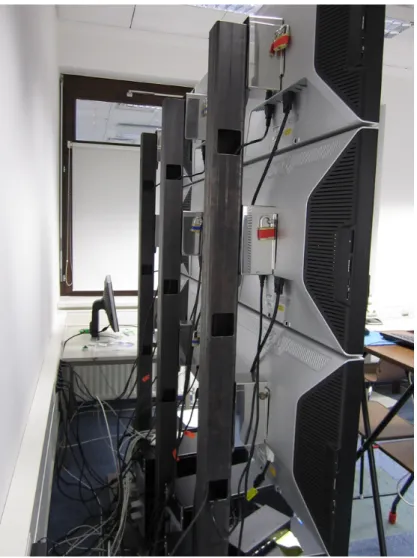
(c) A basic geometric calibration can be achieved by carefully adjusting the LCDs, mounted in a proper rack (Figure: 2.5), by using a water level. Colour calibra-tion can be achieved easily, but that has not been subject of this thesis.
(d) LCDs are not high-maintenance. Projector lamps only have a limited life cycle and if one projector lamp breaks, one should change all, since there will be color & brightness differences. This leads to increased maintenance as well as follow up costs of projector-based approaches.
(e) The space in front of the LCD-based tiled wall systems can be used for inter-action and collaboration, one major contribution of large display environments in general. There are no shadow issues like one has with front-projection walls, seriously limiting the user interaction in front of the display wall.
(f) The space required to set up a LCD-based tiled wall is manageable and therefore even suitable for smaller work environments with limited space.
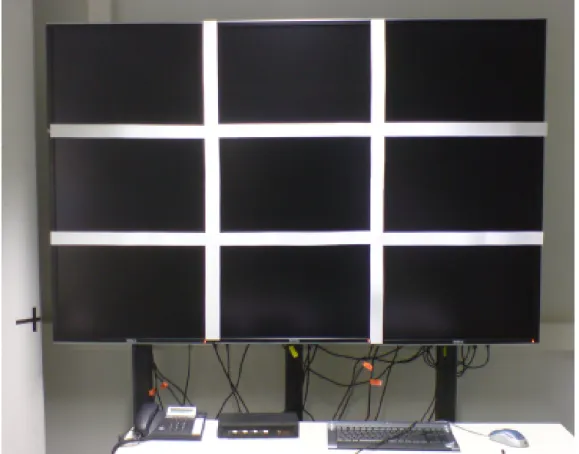
(g) LCD-based tiled walls combine high-resolution and large screen real estate. The setup at University of Kaiserslautern (3 x 3 30”) (Figure: 2.1) has a combined screen surface of almost 3 m2 and a combined resolution of 7680 x 4800 pixels. (h) Users can exploit the open space in front of LCD-based tiled display walls to facilitate human-computer interaction as well as human-human interaction with collaborators/colleagues. Content can be discussed immediately. Physical nav-igation and spatial memory can be utilized.
(i) When using projectors the light conditions of the demo-room have to be taken into consideration. When using LCD-based systems this fact is not as crucial as with projector-based systems.
The LCD-based tiled display wall at the University of Kaiserslautern (Computer Science and HCI Group), Germany (Figure: 2.1) consists of 5 render nodes (using off-the-shelf, commercial hardware) driving a 3 x 3 display wall configuration. The 30” LCDs used for this setup, Dell UltraSharp 3007WFP, feature a screen resolution of 2560 x 1600 pixels. This leads to a combined resolution of 7680 x 4800 pixels and a screen real estate of almost 3 m2, enabling users to collaborate in front of the tiled
wall configuration.
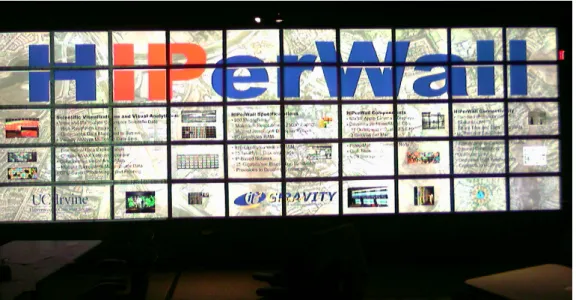
A 5 x 10 display configuration is set up at the University of California, Irvine (Figure: 2.2). 25 Apple Power Mac G5 nodes drive the 50 30” Apple Cinema LCDs (2560 x
Figure 2.1: A 3 x 3 LCD-based tiled wall system, set up with non-reflective card-board for the Tiled++ approach, University of Kaiserslautern, Computer Graphics and HCI Group, Germany.
1600 pixels). This leads to a combined screen resolution of 25600 x 8000 pixels and a screen surface of about 18 m2. Larger groups of users can collaborate in front of
this display configuration.
With tiled display configurations collaborative work environments are provided. Multiple users can access information, multiple users can interact with the display, large datasets can be visualized on screen without the need of permanent pan & zoom operations.
With tiled display environments both the visualization and human-computer inter-action communities have a scalable tool-set to facilitate developments in both areas. It is now up to them to exploit the emerging possibilities to create collaborative
Figure 2.2: HIPerWall, a 200 mega-pixel, 5 x 50 LCD tiled wall setup, UC Irvine, CA, USA.
work environments. One of the biggest challenges is finding areas of application, not reducing tiled display walls to static information kiosks.
Commercial manufacturers of tiled display environments, like Planar4, also promote tiled displays as architectural accessories (Planar Mosaic) and for digital signage purposes in public space.
2.3.1
Semantic Loss - ”Visualization behind bars”
When creating tiled display environments, multiple devices (be it projectors or LCDs) are joined together to create one large, high-resolution screen.
Today’s LCDs feature a display frame, not only the display area is visible to the user, in fact the display surface is ”framed”. When setting up a LCD-based tiled display wall, the user has to deal with the fact that the large display surface is punctuated with the frames/bezels of the LCDs, resulting in an effect similar to a
French window/porte-fenˆetre, causing a semantic gap.
(a) Original image (b) Offset (c) Overlay (d) Tiled++
Figure 2.3: Schematic representation of the the two traditional approaches on how to display content on a LCD based tiled wall. The Tiled++ approach is offering benefits in avoiding both deformation and loss of information [ETO+10]. (a) is showing the
original image, (b) is using the Offset approach, leading to image deformation in the bezel crossing area, (c) is showing the Overlay approach with missing image content and (d) is showing the Tiled++ approach, adding the missing image information by projection.
There are basically two traditional approaches in how to deal with visualization content and the monitor crossings. Figure 2.3 provides a schematic overview of these two approaches: Figure 2.3(a) provides the original image, Figure 2.3(b) shows the
Offset approach leading to a deformation of the original image (stretched, since the image is continued on the neighbouring screen), In Figure 2.3(c) the Overlay
approach is shown, leading to missing image information, since the bezel area is treated as display area and therefore occludes the image, ”displayed” beneath it. Figure 2.3(d) shows the Tiled++ approach, introduced in the next subsection. The schematic overview clearly demonstrates the issues using the traditional ap-proaches regarding visualization on LCD-based tiled wall systems. The user has to deal with semantic loss, by both the Offset and the Overlay approach, resulting in a distorted user perception or even a loss of image information.
The bezel problem is specific to LCD-based tiled walls, but also projector-based tiled walls have issues regarding the allocation of a real seamless display surface (due to color & brightness issues).
Software solutions to address the problem ofsemantic loss, e.g. the work of Mackin-ley and Heer [MH04], only provide a workaround, not really addressing the bottom of the problem.
Ni et al. [NSS+06] state that the number one research challenge, among others, is
the implementation of truly seamless tiled display environments.
2.3.2
The Tiled++ approach
Unlike with projector-based tiled wall systems, suffering from a non-seamless image caused by color and brightness differences, LCD-based tiled wall environments suffer from a hardware issue. In consequence of the construction of recent LCDs, the bezels are a necessity because they host the control electronics to drive the LCD panel. Contrary to the problems projector-based approaches face, a solution to the bezel problem can not be a software-based solution. With LCD-based approaches a software solution only can reduce the symptoms, not provide cure for the actual disease: the bezel effect, caused by the display frames.
With the Tiled++ approach ( [ETOH08], [ETO+10]) the bezel problem itself is
addressed. The basic idea behind Tiled++ is to utilize the bezel area as additional screen area.
Tiled++ uses the Overlay approach as a general mode to display information on the 3 x 3 prototype. The high-resolution content is displayed on the LCDs, there-fore omitting the image information occluded by the display frames. With regular LCD-based tiled walls the image information will be missing, resulting in loss of information and therefore in a semantic gap. With Tiled++ the usually omitted in-formation is projected onto the bezel area. Since the Dell UltraSharp LCDs feature black frames, the bezel area carefully was prepared with non-reflective cardboard to allow for projection. In order the eliminate interference of projection with the LCD surfaces, black projection was used on the LCD areas. Figure 2.4 provides a schematic representation of the 3 x 3 Tiled++ prototype.
Tiled ++ features two display areas:
(a) high-resolution area (LCD screens). (b) low-resolution area (bezel area).
2.3.2.1 The Tiled++ approach - Creating a high-resolution Focus & Context Display
By utilizing the bezel area and providing the missing image information to the user’s eye as context information, a focus & context like display is created. The user has access to high-resolution display areas (the LCD screens) where one can perceive detailedfocus information. The bezel areas, with low resolution content projected onto them, provide context information, thus minimizing the semantic gap. Unlike to traditional focus & context environments, the focus area of Tiled++ is quite large and occupies the majority of the display configuration.
Since the context information is projected in a significant lower resolution onto the bezel area, the difference of focus & context areas are obvious. One can not speak of a true seamless display and therefore one has to be more precise in defining seamlessness.
Tiled++ directly addresses the hardware problem and therefore offers a solution for the problem of semantic gaps, resulting from the non-display areas, hiding or distorting image information. With Tiled++ a seamless LCD-based tiled wall is presented, seamless in the sense of semantic seamless. Tiled++ combines an inno-vative approach, providing both hardware and software aspects to address the most pressing issue with LCD-based tiled wall environments: the bezel problem.
2.3.2.2 Calibration of the Tiled++ System
Basic alignment of the 3 x 3 prototype is achieved by a special rack (Figure 2.5), allowing the alignment of the LCDs. The basic alignment is crucial in order to re-ceive an as-seamless-as-possible image, and also to provide for an optimal (planar) mounting platform for the cardboard, used as projection space for the Tiled++ ap-proach.
System Calibration using the calibration tool
Figure 2.4: Schematic representation of the Tiled++ cluster. The render nodes drive the displays, the projector and render & distribute the content [Ole12].
1. Determining the basic geometry of the tiled display. This information is stored in a configuration file, containing measured size, location, as well as bezel size of each screen. The configuration file later is parsed to the render framework.
2. Basic projector calibration. The projection has to cover the total tiled display screen area and has to get aligned with it, seamlessly.
The underlying render library of Tiled++ has been designed to be highly config-urable as well as flexible, making the Tiled++ approach scalable and user friendly. One aspect of scalability is the configuration file, providing basic information about the LC panel setup to the render framework. The determined values tell the library the position of each LC screen, size of screen, as well as the bezel size. Based on this information the system knows where a projection is needed and where not. Since the projection is of significant lower resolution, projecting onto the LCDs would inter-fere with their higher resolution. Therefore only the bezel area is used as projection canvas, the LC panels are cut-out (blacked out, black projection on LC screens). Besides the advantage of being able to deal with inaccuracies of the rack, this ap-proach also offers real scalability in creating arbitrary display environments. The
Figure 2.5: Mounting rack of a LCD tiled display wall, University of Kaiserslautern, Computer Graphics and HCI Group, Germany.
users are not bound to traditional rectangular tiled wall systems, similar to the work of Baudisch et al. [BGS01].
The major issues for projector alignment within the Tiled++ environment are geo-metric alignment, luminance alignment and color alignment. Basically every tech-nique known from projector-based tiled display environments alignment can be ap-plied to Tiled++. Focussing on the feasibility of the Tiled++ approach, calibration has been restricted togeometric alignment, only. By applying additional calibration techniques the overall quality of the Tiled++ approach can be improved.
Figure 2.6: The keystone effect, a trapezoidal distortion of the projected image, caused by the angled projection [Ole12].
To provide physical interaction possibilities in front of the screens, without compro-mising the projected context information, the projector is set up on the side of the tiled wall, thus projecting in an angle. By placing projectors in non-perpendicular positions to the tiled display wall, the projected image is trapezoidally distorted (keystone effect) (compare Figure 2.6). To compensate the keystone effect a ho-mography is computed in order to eliminate the unwanted distortion caused by the angled projection, since the built-in keystone correction of modern projectors is not sufficient to achieve satisfying results. This keystone calibration is achieved by using the calibration tool, allowing semi-automatic calibration of the Tiled++ system. A homography is a mapping that preserves the collinearity of points and the con-currence of lines in two-dimensional projection space.
It is defined by four two dimensional point pair correspondences:
{Li ↔Ri}i
The homography is computed by determination of the coefficients
{hij}i,j
of a 3×3 homography matrix H. It follows:
Ri =H·Li.
A homography maps points of one quadrilateral to corresponding points of another quadrilateral, therefore providing the basic principle for keystone correction.
With the determination of correspondences, by using a regular web camera and solving the system of linear equations, the entries of a homography matrix H are obtained. H is multiplied with OpenGL’s projection matrix in order to distort the projector image to get proper geometric alignment, eliminating the unwanted key-stone effect.
Driving Arbitrary Display Setups - AnyScreen
AnyScreen[DTS+09] is a platform-independent, robust and versatile rendering frame-work, capable of driving arbitrary display setups. The AnyScreen framework derived from the Tiled++ framework, extending the functionality in order to increase scal-ability and fields of application.
One example of such an arbitrary display environment using the AnyScreen frame-work is introduced by Steffen et al. [SEDD09]. With five, a 2D + 3D projector approach is presented. By adding a designated 2D projection area in a stereoscopic projector wall environment (PowerWall) the problem of textual visualization and bad readability in 3D environments is addressed.
2.3.2.3 Tiled++ - Quality
Tiled++ is offering good image quality. The difference between focus area and context area is obvious but there is no semantic loss. Perception-wise users benefit from the Tiled++ approach.
Figure 2.6 is providing two examples of the quality of Tiled++. In Figure 2.7(a) the rim and interior of the Audi R8 are enhanced with context information, providing a complete picture without semantic loss. In example 2 (Figure 2.7(b)) a Virtual Globe, featuring the NASA Blue Marble textures, is shown. The user perceives the content without a semantic gap, although the bezel area still can be distinguished easily.
(a) Tiled++ result example 1 (b) Tiled++ result example 2
Figure 2.7: Actual examples of the image quality of the Tiled++ approach. Clearly visible is the lower resolution on the non-reflective cardboard area [Ole12]. (a) Tiled++ is offering the image information concealed under the bezel area of the LCDs. (b) A virtual globe with the NASA blue marble high-resolution texture is shown. The user can notice brightness differences, since the projector used in the prototype could not match the brightness of the LCDs.
Where there is sunlight, there are also shadows: the problems of the Tiled++ ap-proach can be identified, as follows:
(a) protruded projection area.
(b) low resolution.
(c) color and brightness calibration.
The protruded projection area is caused by the LCD frames being not on a plane with the display panels itself. Depending on the viewpoint, the users notice that the projection area is protruding the screen, causing a small gap.
The issues of low resolution projection onto the bezels can be addressed by us-ing a projector capable of higher resolution or usus-ing multiple projectors, a feature supported by the AnyScreen rendering framework.
As a proof-of-concept prototype, the focus on calibrating Tiled++ has been on a basic geometric calibration. Both brightness (luminance) and color calibration have not been conducted but can be addressed in future, to further enhance the user experience, when working with Tiled++.
An evaluation of the Tiled++ approach, comparing and analysing its effect on user perception, is found in Chapter 3.3 of this dissertation.
2.4
Going public - Large Public Displays
Large public displays are well known for signage and advertisement purposes in urban & public environments. However, user interaction is not intended for these display configurations or at least interaction is very limited. On the other hand, traditional information terminals, which can be found at airports or train stations, allow for user interaction. But they are not suited to accommodate multiple users and interaction can be described as mediocre (keyboard and trackball interaction), basically providing a desktop computer replacement in public spaces to suit the very basic needs of browsing the internet or writing emails.
Traditional bulletin boards, also known as black boards, offer public wall space to attach pen & paper notes, e.g. for selling goods, renting apartments, searching for runaway cats/dogs (Figure 2.8). Information is shared with the public in a very efficient way. The major shortcoming of these bulletin boards is the lack of orga-nization. They can become messy and amorphous very fast, the displayed content usually has no date stamp and therefore no expiration date. The information pro-vided by traditional bulletin boards often is outdated.
In the following two public display environments are introduced, addressing the shortcomings of existing public displays as well as traditional bulletin boards.
2.4.1
Digital Interactive Pinboards
An alternative approach to share multimedia files on large public displays is the
Digital InteractivePinboard (DIP) architecture [TCO+10]. Users can share multi-media content by using their own mobile phone for interaction with public digital pinboards.
The basic idea behind the DIP approach originates from traditional bulletin boards, which also are set up in well-frequented places, so called hotspots (Figure 2.8).
![Figure 2.6: The keystone effect, a trapezoidal distortion of the projected image, caused by the angled projection [Ole12].](https://thumb-us.123doks.com/thumbv2/123dok_us/9958876.2488394/47.892.279.669.240.475/figure-keystone-effect-trapezoidal-distortion-projected-caused-projection.webp)

![Figure 2.11: Prototype implementation. The accommodation class [OCM + 12].](https://thumb-us.123doks.com/thumbv2/123dok_us/9958876.2488394/64.892.144.705.217.582/figure-prototype-implementation-accommodation-class-ocm.webp)
![Figure 3.7: Excerpt of the questionnaire which the test candidates completed after the tasks [Ole12].](https://thumb-us.123doks.com/thumbv2/123dok_us/9958876.2488394/81.892.355.585.228.569/figure-excerpt-questionnaire-test-candidates-completed-tasks-ole.webp)
