© 2019, IRJET | Impact Factor value: 7.211 | ISO 9001:2008 Certified Journal
| Page 1535
Technical Graphic Showcase
Avi Elasangi
1, Hemant Mishra
2, Nilesh Pal
3,
Siddhant Chatterjee
41,2,3,4
Student, Department of Computer Engineering, Thakur Polytechnic, Mahrashtra, India
---***---Abstract –
Inspired by the immersive experience that gamesgives to people; this research describes how such an experience will work while giving zero input in terms of cost input. The approach is to create every asset from the ground up and therefore no need of outsourcing assets to be used. The animation framework, light design, environment and the AI design and logic resulted in realistic life-like surroundings and characters so that the user could immerse them-selves into this experience.
Key Words: Development, Unreal Engine 4, Developers,
Blender, Animation, Sound, Lighting, Environment.
1. INTRODUCTION
Based on the concept of game development, this project has been developed in zero cost and provides this with latest graphical technology using Unreal Engine 4.The game has a unique user interaction with the objects and the interface of the game which has been programmed in such manner that the result of the interaction with the programmed objects appears in real time.[3] The game has been designed in a way where the user can create and extent the game according to his/her needs and desires .This modularity has been achieved using Unreal Engine 4, Blueprint, Blender, C++.The game is provided in the PC platform and also can be played in the Android platform with the same Graphical technology and user experience. Addressing about the scope of this game, it has been designed & developed in a way that it can also be played in Virtual reality (VR). [4]
1.1 Related Work
There have been multiple AAA games built upon the amazing technology of Unreal Engine 4.
Games like: Days Gone
Final Fantasy 7 Remake Fortnite
Gears of War 4 and 5 Kingdom Hearts 3
PlayerUnknown’s Battlegrounds (PUBG) Tekken 7
SC6
All the above listed games are made with a very high Production Value and Marketing Cost in mind.
These games are some of the best to showcase the power of the tool we are using to create our own ideas and bring them to life i.e., Unreal Engine 4. The difference however
stands is that we had a team of 4 young adults, who set out to create a similar quality of game but not using a single penny and being non-profitable in its infancy.
1.2 Objective
• To create a cost free but a quality gaming experience.
• To use the latest technologies possible by us. • To create not only a fully complete game product
but also make it a Foundation for what could be done with it in Future.
• Providing a beautiful and highly efficient post-production pipeline.
• Creating and implementing the richest Materials to make the world come more to life.
• Programming a very compact and efficient but highly effective code.
2. DEVELOPMENT TOOLS
2.1 Blender
Blender may be a totally integrated 3D content creation suite, providing a broad vary of essential tools, as well as Modeling, Rendering, Animation, Video piece of writing, VFX, Compositing, Texturing, Rigging, many varieties of Simulations, and Game Creation. Cross platform, with AN OpenGL interface that's uniform on all major platforms (and customizable with Python scripts). [4] High-quality 3D design, quick and economical creation progress. Excellent community support from forums and IRC. Small executable size, optionally portable. [2]
One of the most important community forums is Blender Artists, wherever Blender users gather to indicate off their creations, get feedback, ask and offer help and, in general, discuss Blender. [5]
2.2 Unreal Engine 4
© 2019, IRJET | Impact Factor value: 7.211 | ISO 9001:2008 Certified Journal
| Page 1536
in the Unreal Engine 4 community the liberty tochange and extend engine options. [1]
3. ARCHITECTURE
3.1
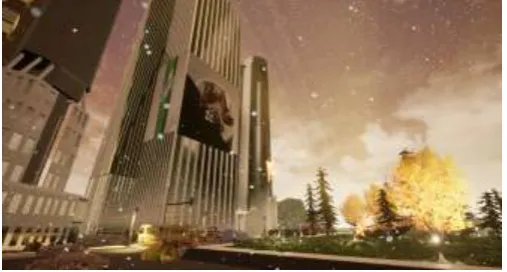
EnvironmentThe environment of the game has been created with custom landscape importers. It has been created with our own heightmap and weight map formats and for importing landscape data is accomplished by using a plugin. The plugin will adds your new format to the engine, as well as importing the data from your files. The Foliage Instanced Mesh system gives us the capability to quickly paint or erase sets of Static Meshes on Landscape Actors, other Static Mesh Actors, and BSP geometry. These meshes are automatically grouped together into batches that are rendered using hardware instancing, meaning that many instances can be rendered with a single draw call. [6]
Fig -1: Environment Design(1)
Collision Responses form the basis for how our project handles collision and ray casting during run time.
Every object can {that may} collide
gets associate Object sort and a series of responses that outline however it interacts will all alternative object sorts. When a collision or overlap event happens, both (or all) objects involved can be set to affect or be affected by blocking, overlapping, or ignoring each other. [7]
Fig -2: Environment Design(2)
Blocking occurs naturally between two (or more) Actors set to Block.
However, Simulation Generates Hit Events has to be enabled to execute Event Hit that is employed in Blueprints, destroyable Actors, Triggers, etc...
3.2 Menu and UI design
We created all our Menu and UI by using a tool called UMG. Unreal Motion Graphics UI Designer (UMG) may be a visual UI authoring tool which might be wont to produce UI components like in-game HUDs, menus or other interface related you wish to present to your users graphics. [8]
At the core of UMG area unit Widgets, that area unit a series of pre-made functions that may be wont to construct your interface (things like buttons, checkboxes, sliders, progress bars, etc.). [10]
These devices unit of measurement is altered during a special Widget Blueprint that uses 2 tabs for construction: the Designer tab permits for the visual layout of the interface and basic functions while the Graph tab provides the practicality behind the Widgets used. [9]
Fig -3: Menu Design
3.3 Modeling
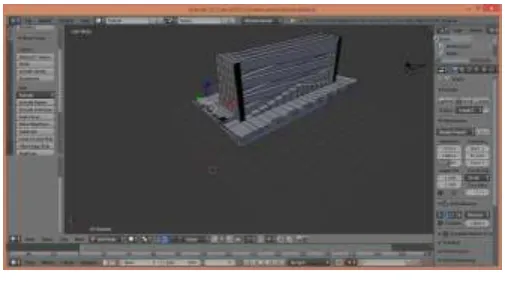
Blender’s modeling tools include:
Keyboard shortcuts for a fast workflow N-Gon support
Edge slide, collapse and dissolve Grid and Bridge fill
Python scripting for custom tools and add-ons
[image:2.595.37.288.319.453.2] [image:2.595.308.561.395.556.2] [image:2.595.35.289.607.743.2]© 2019, IRJET | Impact Factor value: 7.211 | ISO 9001:2008 Certified Journal
| Page 1537
Fig -4: Modelling
Sculpting in Blender includes:
20 different brush types Multi-res sculpting support Dynamic Topology sculpting Mirrored sculpting
Blender comes with internal tools and brushes like Crease, Clay Strips, Pinch, Grab, Smooth, Mask and many more. It is also possible to customize your own. [12]
Dynamic topologies (aka dyntopo) provides us dynamic tessellation sculpting ways , adds and removes details on the fly, whereas regular sculpting only affects the shape of a mesh.
Masking to regulate what part of the mesh a is influenced by sculpting.
Easily expose your mesh right within Blender, and use image textures or paint your own directly onto the model. Blender allows for:
Fast Cube, Cylinder, Sphere and Camera projections Conformal and Angle primarily based on unwrapping (with edge seams and vertex pinning) Painting directly onto the mesh
Multiple UV layers
UV layout image exporting
The Sculpting “mode” allows you to grab, pinch and smooth UVs, just like Sculpt Mode.
3.4 Animation
The animation system in Unreal Engine 4 (UE4) is comprised of the many Animation Tools and Editors that mixes skeletal-based deformation of meshes with morph-skeletal-based vertex deformation that gives us the capability to create compelled animations. [13][15] This system is made to build basic player movement seem far more realistic by taking part in and mixing between canned Animation Sequences, produce bespoken special moves like scaling ledges and walls victimization Anim Montages, apply harm effects or facial expressions through Morph
Targets, directly management the transformations of bones victimization Skeletal Controls, or create logic based State Machines that confirm that animation a personality ought to use during a given state of affairs. [14]
3.5 AI
We created our entire enemy and other living and non-living things AI using the Behavior Trees in Unreal. These AI’s allowed us to give the NPC(Non-Playable Characters) a mind of their own so that they can take their own decisions in the game world created by us. [16]
3.6 Lighting
Whether you are making the best sci-fi shooter or associate journey game, lighting ought to play a vital role within the game development method.
Setting the proper mood for your game is set by the lighting selections you create. [18]
Lighting has the foremost prestigious role in your game's world and might build or break the visuals.
This article covers how lighting is different in games versus other mediums and the vital effect it has on your game environment, so you can make the right lighting choices for your next project. Many of the same lighting principles that apply to movies and other pre-rendered projects can be used for games. However, the nature of games makes how the principles are approached and implemented drastically different. Games are interactive, and the lighting can often change based on the character's actions. For instance, the player may have the ability to shoot out a light and completely alter the game world instantaneously. The lighting in a scene can also change simply based on the player's current position and perspective in the game. If the player moved to a different spot, they'd see reflections and light rays very differently. In a movie, or anything pre-rendered, those challenges aren't really present. The light is determined by the camera angle and designed to look perfect for that one situation. A viewer watching a film doesn't have the ability to move the camera to get a different angle. [17]
3.7 Gameplay
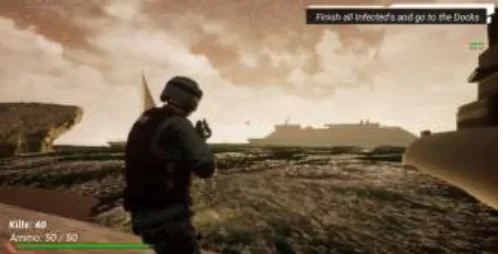
This projects also contain levels. Levels are referred to as maps, and are stored as .umapfiles within the Content folder. Within Unreal Editor, we work on one level at a time, and the level is displayed in the Viewport. At our main level, the Actor is a gameplay entity that (usually) contains one or more components, Spawned in during gameplay. [19]
[image:3.595.35.288.77.218.2]© 2019, IRJET | Impact Factor value: 7.211 | ISO 9001:2008 Certified Journal
| Page 1538
Different types of parts are wont
to management however Actors move, how they are rendered, and many other parts of their functionality.
All Objects, including Components, extend from the UObject class, which is the base class of all gameplay Objects.
This means they can't be directly instanced into the world; they need to belong to associate Actor.
Each Actor or Object could be a single instance of a category. The class sets up the guide for the Actor or Object.
It defines the variables that may be set for that Actor or Object, and the functions that can be carried out within that Actor or Object. [20]
Fig -5: A look at the Gameplay
You can produce new categories, or types of Objects and Actors, with C++ code.
Blueprint categories primarily permit you to from categories that started new Actors, although you can extend a few Objects with Blueprint Classes as well.
3.8 Sound Design
Unreal Engine 4 streamlines the method by that you'll be able to turn out or modify close sounds through the utilization of the close Sound Actor.
When a Wave or Sound Cue is placed inside a level, a Sound Actor with that particular sound cue is created. The close Sound Actor has many properties that area unit coated on this page that may permit you to switch however players receive the sound. [21]
The close Sound Actor (icons pictured at left) is used for several functions like close process sounds likewise as non-looping sounds.
Generally, the close Sound Actor conforms to the important world wherever the nearer you're to a sound, the louder it'll seem.
By comparison, a sound that is normally loud may appear soft if it is further away.
If the close Sound Actor is ready to motorcar Activate, it will immediately begin to play once it is created (at the beginning of play or on spawn), even if the player isn't during a position to listen to it. [22]
The sound quality the close Sound Actor points
to can solely play once per trigger
unless nominative as process with in the undulation or outlined as a part of a Sound Cue asset.
3.9 Performance Optimizations
Performance is a constantly encountered topic in developing 3D games. In order to form the illusion of moving pictures, we need a frame rate of at least 15 frames per second. Depending on the platform and game, 30, 60, or maybe additional frames per second which may also be the target. [23][24][25]
There are multiple parameters we thought of while optimizing this game:
CPU Profiling GPU Profiling
Adjusting Engine Feature Levels Reducing Packaged Game Size Scalability
System Settings Rendering Visualizers Out of Bounds Pixels
3.10 Development Components Used
Software:
Windows10(Home,64-bit) Blender(2.7.2)
Unreal Engine(4.20.3)
Hardware:
CPU: Inteli5(6600K)@3.9GHz
GPU: NvidiaGeForceGTX1060(3GB)
HDD: 1TB
RAM: 16GBDDR4@2133MHz
Motherboard: GigabyteZ170-M
Input Method: DualShock4 Controller
4. CONCLUSION
[image:4.595.37.289.278.405.2]© 2019, IRJET | Impact Factor value: 7.211 | ISO 9001:2008 Certified Journal
| Page 1539
interact with objects which was a very important feature forus to implement.
ACKNOWLEDGEMENT
We thank our Project Guide, Mrs. Vinita Chaudhary for guiding us throughout the development cycle of this project. We would also like to express our gratitude to our Principal, Dr. S. M. Ganechari for providing us the full support and encouragement to move forward with this project. We would also like to thank our Teaching and Non-Teaching Staff Members at Thakur Polytechnic. This wouldn’t have been possible without their support.
REFERENCES
1) Epic Games 2004-2019, Unreal Engine, Unreal Engine 4 created by Epic
2) https://en.wikipedia.org/wiki/Unreal_Engine
3) Blender, Open-Source modeling and rendering software, created by Blender Institute
4) https://www.blender.org/
5) https://www.unrealengine.com/en-US/features
6) https://www.blenderguru.com/
7) https://cgcookie.com/learn-blender
8) https://docs.unrealengine.com/en-us/Engine/Landscape/Creation
9) https://www.worldofleveldesign.com/categories/c at-ue4.php
10)https://api.unrealengine.com/INT/Engine/UMG/Q uickStart/3/index.html
11) https://docs.unrealengine.com/en-us/Engine/UMG/QuickStart
12) https://unrealtutorials.com/unreal-engine- tutorials/unreal-engine-4-tutorials/umg/ui-user-interface/
13)https://docs.blender.org/manual/en/latest/modeli ng/index.html
14)https://www.blender.org/features/modeling/
15) https://docs.unrealengine.com/en-us/Engine/Animation
16) https://docs.unrealengine.com/en-us/Engine/Animation/Overview
17) https://www.skillshare.com/classes/Introduction- To-Character-Animation-In-Unreal-Engine-4/782042167
18)https://docs.unrealengine.com/en-us/Gameplay/AI
19)
https://docs.unrealengine.com/en-us/Engine/Rendering/LightingAndShadows
20) https://www.tomlooman.com/lighting-with-unreal-engine-jerome/
21)https://docs.unrealengine.com/en-us/Gameplay
22) https://docs.unrealengine.com/en-us/Gameplay/Framework
23)https://forums.unrealengine.com/community/gene ral-discussion/24488-teaching-sound-design-in-unreal
24) https://docs.unrealengine.com/en-us/Engine/Audio
25) https://docs.unrealengine.com/en-us/Engine/Performance
26)https://www.reddit.com/r/unrealengine/comment s/83k87a/what_general_tips_for_performance_opti mization/