A Stitch in Time: Supporting Android Developers in Writing
Secure Code
Duc Cuong Nguyen
CISPA, Saarland University [email protected]Dominik Wermke
Leibniz University Hannover [email protected]Yasemin Acar
Leibniz University HannoverMichael Backes
CISPA, Saarland UniversityCharles Weir
Security Lancaster, LancasterUniversity [email protected]
Sascha Fahl
Leibniz University HannoverABSTRACT
Despite security advice in the official documentation and an exten-sive body of security research about vulnerabilities and exploits, many developers still fail to write secure Android applications. Frequently, Android developers fail to adhere to security best prac-tices, leaving applications vulnerable to a multitude of attacks. We point out the advantage of a low-time-cost tool both to teach better secure coding and to improve app security. Using the FixDroid™ IDE plug-in, we show that professional and hobby app developers can work with and learn from an in-environment tool without it impacting their normal work; and by performing studies with both students and professional developers, we identify key UI require-ments and demonstrate that code delivered with such a tool by developers previously inexperienced in security contains signif-icantly less security problems. Perfecting and adding such tools to the Android development environment is an essential step in getting both security and privacy for the next generation of apps.
KEYWORDS
Usable Security; Support Developers; Android Security; Crypto-graphic API
1
INTRODUCTION
The introduction of Android to the mobile operating system market led to the development of new paradigms and open standards on mobile systems. Today, Google’s operating system is among the most used mobile operating systems with the largest installed base of any operating system. A major contributor to this success is the Google Play market with its free and paid apps for any and all cir-cumstances, from ordering food to playing card games. The market currently allows Android users to install over 2.9 million apps from third-party developers and, when installed, run the apps on their mobile system. The benefits of a large Android app environment
Permission to make digital or hard copies of all or part of this work for personal or classroom use is granted without fee provided that copies are not made or distributed for profit or commercial advantage and that copies bear this notice and the full citation on the first page. Copyrights for components of this work owned by others than the author(s) must be honored. Abstracting with credit is permitted. To copy otherwise, or republish, to post on servers or to redistribute to lists, requires prior specific permission and/or a fee. Request permissions from [email protected].
CCS ’17, October 30-November 3, 2017, Dallas, TX, USA
© 2017 Copyright held by the owner/author(s). Publication rights licensed to Associa-tion for Computing Machinery.
ACM ISBN 978-1-4503-4946-8/17/10. . . $15.00 https://doi.org/10.1145/3133956.3133977
thus come with a number of security and privacy related risks for a user, especially due to errors by app developers. Therefore, it is especially important to secure third-party apps, by encouraging and enabling third-party developers to write secure code1.
Many available mobile apps have poorly implemented privacy and security mechanisms, possibly resulting from developers who are inexperienced, distracted, or overwhelmed [2]. Risk-factors lead-ing to insecure code include general inexperience of developers, a sole focus on code functionality while ignoring security implica-tions, and careless adopting of code parts from unverified online information sources [2]. Even worse, some developers just copy and paste code they find when searching for a solution to their security related issues [22]. Even in the absence of these security-neglecting actions by developers, benign failure to write privacy preserving or secure code can lead to applications that leave user data vulnerable to leaks and attacks. Developers have been found to risk users’ privacy and security by requesting more permissions than actually needed [30, 31], by not using TLS [12, 13], by failing to use cryptographic APIs correctly [9], by using dangerous options for Inter-Component Communication [6], and by failing to store sensitive information in private areas [11].
Although the Android environment provides users with a num-ber of tools and policies to counter security problems and manage privacy risks, the issues above prove that these are not sufficient to prevent insecure Android apps. We propose that supporting App developers in a developer-friendly and compelling manner in mak-ing choices will result in improved security and privacy for the app users. Teaching a developer about secure coding practices will not only help the developer, but will also result in increased security and privacy for every user that runs apps by that developer.
To support Android developers in writing secure code, we de-veloped the FixDroid tool. As plugin for the officially supported Integrated Development Environment (IDE) of Android, Android Studio, FixDroid highlights security and privacy related code prob-lems, provides an explanation to developers, and suggests ‘quick fix’ options. Similar to a spellchecker in a modern word-processor, FixDroid highlights code snippets that impact the security or pri-vacy of the app. FixDroid builds upon the concept of Android Lint, a tool included in the official Android Software Development Kit (SDK), but avoids certain limitations and improves the support for developers.
To evaluate the usability and acceptance of a FixDroid prototype, we performed a pilot study with 9 developers. With knowledge from this pilot study, we improved FixDroid and performed a remote user study with Android developers and students (n=39) to evaluate the security benefits of FixDroid.
The study proved the effectiveness of this approach by reducing the number of security errors in resulting code. It also validated the approach of using remote IDE telemetrics as a means for evaluating developer behaviour and showed the importance of having very clear visible indicators for security errors.
The main contributions of this work are:
•Proving the effectiveness of an interactive IDE-based security review tool in improving the security and privacy aspects of code written by third party developers,
•Identifying new UI requirements for such a tool based on feedback from developers,
•Delivering evaluations of the effectiveness of such a tool with both experienced professional developers and less ex-perienced student developers, and
•Validating the use of telemetry in an IDE to determine pro-grammer behavior.
The remainder of the paper is organized as follows. Section 2 dis-cusses related work; Section 3 gives an overview of Android app development and the Android Lint tool; Section 4 describes the functionality and design of FixDroid; Section 5 describes the initial pilot study and its conclusions; Section 6 describes the design and implementation of the evaluation studies we carried out; and Sec-tion 7 describes the findings from the main study. Finally, SecSec-tion 8 discusses limitations; Section 9 discusses possible future work; and Section 10 provides a conclusion.
2
RELATED WORK
We found related work in two key areas: investigations of security issues in Android development, and studies of tools that support developers in writing code.
2.1
Security Issues in Android Development
Several research teams have used analysis tools to investigate An-droid app security. With CryptoLint, a lightweight static analysis tool, Egele et al. [9] showed that 88% of Android applications us-ing cryptographic APIs include at least one mistake. Balebako et al. [3] found that developers can make these mistakes due to lack of security knowledge;Georgiev et al. [15] also identified bad API im-plementations as a cause. Fahl et al. [12] implemented MalloDroid, a static code analysis tool that detects potential vulnerabilities against SSL Man-In-The-Middle (MITM) attacks in Android and iOS appli-cations, and found that many developers accept insecure practices (such as SSL certificate validation that accepts all certificates) to achieve functional code.
Poeplau et al. [29] investigated dynamic code loading in Android applications, using a static code analysis tool. Their results revealed that many applications load additional code in insecure ways.
The integration of web content into mobile apps also exposes Android applications to multiple types of attacks [26, 27]. Wang et al. [40] studied the cross origin risks inherent in mobile applications and found that lack of origin-based protection enables many types
of cross-origin attacks. Luo et al. [24] also demonstrated different at-tacks on benign Android and iOS applications that misuse webview customization.
Felt et al. [30] investigated app permissions, and identified sev-eral reasons why developers tend to request more permissions than their apps actually need, including insufficient API documentation, confusing permission names, copy and paste code snippets, and testing artifacts. In another investigation concerning ‘permission re-delegation’, Felt et al. [31] concluded that not all developers are security experts and they are not motivated enough to prevent permission re-delegation because the consequences do not affect their applications directly.
Acar et al. [2] examined the impact of the information sources used by Android developers on their security related decisions, and found that developers often use informal sources such as Stack-Overflow, resulting in functional code but often also vulnerabilities in their apps.
2.2
Tools that Support Developers
Kim et al. [22] ethnographically studied copy and paste (C&P) pro-gramming practices in object oriented propro-gramming languages by observing programmers using an instrumented Eclipse IDE, and proposed a set of tools to reduce software maintenance problems incurred by C&P and support the intents of common C&P situa-tions.
Several research teams have developed tools that support secure coding, typically focusing on finding application vulnerabilities after the program has been written. This results in these tools find-ing vulnerabilities at the end of the development cycle [23, 35]. Furthermore, though valuable, these tools all have one thing in common: developers need to have certain levels of security exper-tise to use them. Chin et al. [8] proposed platform-level, API-level, and level solutions to help developers and platform design-ers build secure applications and systems. They also developed ComDroid [7] to detect and warn developers of exploitable inter-application communication errors. However, ComDroid works only on compiled code and can thus not help developers while they are writing source code. Jovanovic at el. developed Pixy to help devel-opers avoid cross-site scripting vulnerabilities in PHP scripts [20]. Pixy uses flow-sensitive, inter-procedural and context-sensitive data flow analysis to discover vulnerable points in a web applica-tion, but provides no IDE-based feedback to developers. Recently, Tabassum at el. conducted a study comparing the effect of secure programming tool support (ESIDE) versus teaching assistants [25]. The results showed that ESIDE provided more insights to students about the security flaws. Tyler et al. [37] examined how developers understand the support of an interactive static analysis tool using a plugin for Eclipse that helps web developers detect and mitigate security vulnerabilities as they write code.
None of this work, however, has investigated providing feedback on code security to Android developers as they write their code. This paper aims to fill this gap.
3
ANDROID APPLICATION DEVELOPMENT
early days of Android app development, developers either relied on the Eclipse IDE with the Android Development Tools (ADT) plugin or the NetBeans IDE with plugin for writing apps. In December 2014 Google released the Android Studio IDE based on JetBrains’ IntelliJ IDEA, which functions together with the SDK as officially supported Android IDE. Features of Android Studio include a Gradle-based build system, and an Android Device emulator for testing apps.
3.1
Android Lint Tool
App Source Files
lint.xml config
lint tool Usability
Correctness
Security
Performance
Accessibility
i18n
[image:3.612.320.556.87.284.2]Output
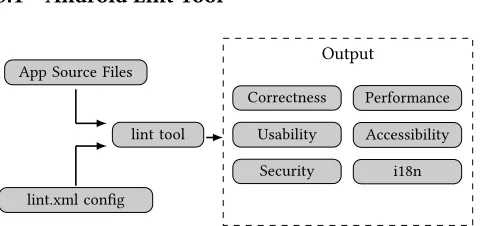
Figure 1: Code scanning work flow with Lint tool
In addition to functional checks, the Android SDK includes the Android Lint code scanning tool to detect problems with the struc-tural quality of code. The lint tool takes a configuration file and the source files of an app, performs static code analysis, and high-lights over 200 problems2in the categories of correctness, security, performance, usability, accessibility, and internationalization, (cf. Figure 1). Examples of the problems lint highlights include missing permissions for requested APIs, using a mock location provider in production, and initializing a random number generator with a fixed seed.
3.2
Lint Shortcomings
Though Lint is a very useful tool that helps developers to improve code quality in general and some aspects of software security in particular, its current implementation does not support the app de-veloper optimally. The following sections identify a couple of draw-backs that limit its effectiveness, and suggest actionable changes for each to make Lint security more effective.
Figure 2: A vague highlighted code.
3.2.1 Limited User Interface.Lint security uses ‘vague highlighting’ for detected security issues (e.g. ECB mode for cryptography) -cf. Figure 2. This way of highlighting insecure code snippets has two drawbacks:
•Lint uses the same highlighting for all kinds of warnings, i.e. non-security related bad code smells are highlighted in the same way as security related bad code smells.
2https://sites.google.com/a/android.com/tools/tips/lint-checks
• Using the same highlighting for all sorts of coding prob-lems may lead to habituation and even to overlooking the highlighting entirely.
Proposed Action:
[image:3.612.56.296.180.293.2]To attract the developer’s attention, the user interface should consider insights from previous usable security and privacy research [10, 32, 34].
Figure 3: Lint does not provide help in term of quick-fixes for security bad practices .
3.2.2 No Way Out.While Lint highlights security problems and
even provides textual information in the form of tool tips (cf. Fig-ure 3), it does not guide developers through the process of turning insecure code into secure code. Although this is not possible in all cases (in particular in cases that spread insecurities across many different methods, classes and packages), in many cases develop-ers could be instructed to apply secure coding practices. Examples might be not using an empty TrustManager implementation, or replacing an insecure mode of operation such as ECB for symmetric cryptography.
Proposed Action:
Provide easy-to-use code snippets to turn insecure code into secure code in as many cases as possible [14].
3.2.3 Limited Data Flow Analysis.Lint has a lightweight data
flow analysis to detect programming issues [19, 36]. It is able to detect obvious security issues such as using ECB for symmetric encryption or a HostNameVerifier that returns true (cf. Figure 4).
Figure 4: Android Lint is able to detect an insecure Host-NameVerifier that returns true.
Figure 5: Android Lint fails to detect a simple insecure Host-NameVerifier.
While we are aware that comprehensive data flow analysis is an ongoing branch of research in the field of static code analysis [18, 28], we feel that covering some more complex cases is crucial to provide a good user experience, since it confuses users to detect one instance of a problem but not another, more complex one.
Proposed Action:
Improve data flow analysis to cover more complex cases
4
FIXDROID
Given these limitations in Android Lint, we believe the tool has only limited impact in helping developers to improve app security. We hypothesized that an enhanced version might achieve better security results. To test this hypothesis, we implemented a further plug-in for Android Studio, tailored towards teaching developers about app security. We call this tool ‘FixDroid’.
FixDroid addresses the Lint tool’s limitations, and adds function-ality to learn about developer behavior, while supporting developers in making security related decisions.
FixDroid aims to give its users unobtrusive feedback about the privacy and security impact of the code, as they write it. FixDroid scans a developers’ code for ‘pitfalls’: constructs with less-than-ideal privacy and security. Additionally, FixDroid detects whenever a developer pastes a code snippet and attempts to match it against an online database of known insecure code snippets (from StackOver-flow). FixDroid is available as an Intellij IDEA plugin for Android Studio. It had had more than 500 downloads by August 20173.
4.1
Addressed Pitfalls
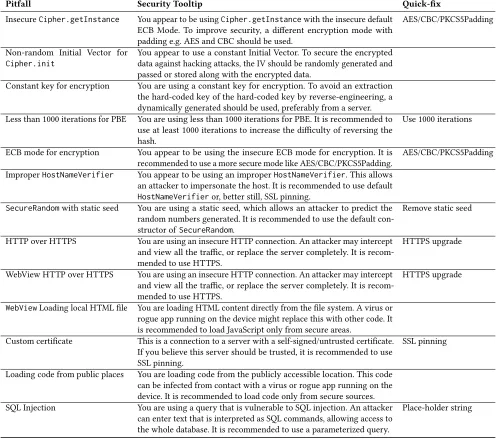
FixDroid currently covers 13 security pitfalls taken from the An-droid Official documentation and from the existing research de-scribed in Section 2. It indicates these problems on the appropriate lines of code, using a ‘security indicator’ to catch developers’ atten-tion. For some of those pitfalls, FixDroid offers quick-fixes; when a quick-fix is not available, FixDroid provide a warning message that describes the pitfall. The list of addressed security pitfalls is in Table 1.
4.2
Learning Support
FixDroid ships with a sample ‘study project’ and instructions to help developers learn how to use it. The sample project challenges a developer to avoid many of the possible pitfalls, specifically those related to secure network connections, SQL injection, and encryp-tion.
3https://plugins.jetbrains.com/plugin/9497-fixdroid
4.3
Research Support
Fixdroid also includes three features to support research, as follows.
4.3.1 Uploading Source Code.When participants complete a
security task in the study project, FixDroid sends their completed implementation to our server.
4.3.2 Telemetry.FixDroid contains a telemetry feature to quan-tify its usability and helpfulness, as well as the failures and limita-tions of FixDroid. Its aim is to gain a better understanding of how developers interact with FixDroid. Specifically, FixDroid’s telemetry feature measures:
• Security bad practice events, including the time, the type of bad practice (pitfall), and whether the code in question was copied/pasted.
• Security good practice events, code that avoids a pitfall, to help measure if participants’ security programming skills improve from using FixDroid.
• Security tooltip events record whether a particular warning message has been read by developers, how long developers spend to read it.
• Quickfix events, indicating whether an offered quickfix was used by developers, when it was used, and whether the devel-oper used the default shortcut of Android Studio or clicked on security indicator.
4.3.3 Experience Sampling.In our pilot study we found from
the exit survey that some participants could not recall the causes of the issues detected, nor distinguish Fixdroid functionality from existing Android Studio features. So we added functionality to sample programmers’ experience as they interact with different components of FixDroid. This functionality includes:
• Copy & Paste event: When FixDroid detects a pasted insecure code snippet, it asks the programmer for the source of that snippet, preferably as a URL.
• Quick-Fix applied event: When the programmer applies a suggested quick-fix, FixDroid asks how useful they found the quick-fix, on a five point Likert scale.
4.4
How FixDroid Works
FixDroid leverages the inspecting mechanism in IntelliJ IDEA4. By default, FixDroid analyzes all open files of Java and Xml source code. It highlights all security bad practices as the developer writes code, using both Intellij’s default highlighting and more visible ‘security indicators’ on the insecure code’s line numbers. Furthermore, In-tellij also supports developers running FixDroid inspection in bulk mode where all source files will be inspected: thus the developer can choose to inspect an entire project, or any scope within it.
When the developer moves the mouse over the highlighted code or over the security indicator, the corresponding warning message will be displayed. The developer can enable the available quick-fix by using the default short-cut of Android Studio or by simply clicking on the security indicator (cf. Figure 6).
Pitfall Security Tooltip Quick-fix
InsecureCipher.getInstance You appear to be usingCipher.getInstancewith the insecure default ECB Mode. To improve security, a different encryption mode with padding e.g. AES and CBC should be used.
AES/CBC/PKCS5Padding
Non-random Initial Vector for Cipher.init
You appear to use a constant Initial Vector. To secure the encrypted data against hacking attacks, the IV should be randomly generated and passed or stored along with the encrypted data.
Constant key for encryption You are using a constant key for encryption. To avoid an extraction the hard-coded key of the hard-coded key by reverse-engineering, a dynamically generated should be used, preferably from a server. Less than 1000 iterations for PBE You are using less than 1000 iterations for PBE. It is recommended to
use at least 1000 iterations to increase the difficulty of reversing the hash.
Use 1000 iterations
ECB mode for encryption You appear to be using the insecure ECB mode for encryption. It is recommended to use a more secure mode like AES/CBC/PKCS5Padding.
AES/CBC/PKCS5Padding
ImproperHostNameVerifier You appear to be using an improperHostNameVerifier. This allows an attacker to impersonate the host. It is recommended to use default HostNameVerifieror, better still, SSL pinning.
SecureRandomwith static seed You are using a static seed, which allows an attacker to predict the random numbers generated. It is recommended to use the default con-structor ofSecureRandom.
Remove static seed
HTTP over HTTPS You are using an insecure HTTP connection. An attacker may intercept and view all the traffic, or replace the server completely. It is recom-mended to use HTTPS.
HTTPS upgrade
WebView HTTP over HTTPS You are using an insecure HTTP connection. An attacker may intercept and view all the traffic, or replace the server completely. It is recom-mended to use HTTPS.
HTTPS upgrade
WebViewLoading local HTML file You are loading HTML content directly from the file system. A virus or rogue app running on the device might replace this with other code. It is recommended to load JavaScript only from secure areas.
Custom certificate This is a connection to a server with a self-signed/untrusted certificate. If you believe this server should be trusted, it is recommended to use SSL pinning.
SSL pinning
Loading code from public places You are loading code from the publicly accessible location. This code can be infected from contact with a virus or rogue app running on the device. It is recommended to load code only from secure sources. SQL Injection You are using a query that is vulnerable to SQL injection. An attacker
can enter text that is interpreted as SQL commands, allowing access to the whole database. It is recommended to use a parameterized query.
[image:5.612.58.556.88.527.2]Place-holder string
Table 1: Security tooltips and corresponding quick-fixes displayed by FixDroid.
4.5
Example of Use
Figures 6 through 8 show an Insecure Network Connection example. Here FixDroid observes that developers are writing code to connect to a given URL with the HTTP protocol – which is insecure. Fix-Droid finds a quick-fix using the same URL but replacing HTTP by HTTPS. Given this option is available, developers are informed by highlighting the insecure code and marking the corresponding code lines as insecure with a security warning icon. When developers move their mouse over the highlighted code or the warning icon, a corresponding message is shown, telling them what the problem is and how to resolve it. Developers can fix the insecure code by
clicking on the warning icon or by using the built-in shortcut of An-droid Studio (cf. Figure 7). When a quick-fix is applied (cf. Figure 8), the previous warning message and security indicator disappear.
Figure 7: FixDroid suggests a quick fix.
Figure 8: HTTPS Upgrade quick-fix has been applied.
Android Source Files
Config file
Inspectors
Code Editor Line Marker
Security Resolver
Telemetry
Manager Web Service
Database
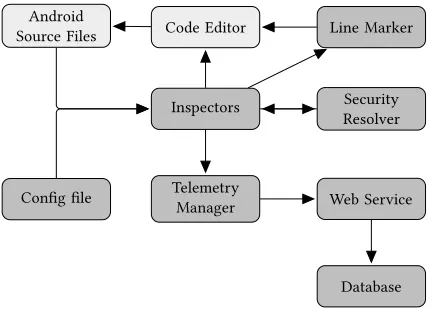
Figure 9: FixDroid’s Architecture
4.6
FixDroid Implementation
The different components of FixDroid are illustrated in Figure 9. Inspectors are the center components that watch developer’s code. Whenever the developer finishes writing a line of code, a method or a class implementation, the appropriate Inspector invokes Security Resolver to check if that given code snippet is secure or not. If the code snippet is insecure, the Inspector forwards the information to Telemetry Manager. At the same time the Inspector also informs de-velopers via Code Editor by highlighting the insecure code snippet as well as marking the insecure code with a security indicator.
When the developer invokes a quick-fix, this invokes Line Marker to make the code change.
Web Service supports FixDroid’s communication with our back-end database. Config File contains the mapping of which Inspector is responsible for which security pitfall.
4.7
Static code analysis
FixDroid leverages the IntelliJ IDEA static analysis techniques to performs static code analysis at method, class and project levels. Hence, FixDroid can statistically resolve variables that are computed from different code locations. This eliminates mistakes similar to the example of HostNameVerifier (c.f Section 3.2.3).
5
PILOT STUDY
In the developer review sections and the pilot study, we have the same 3 programming tasks: network connection, SQL query, and data encryption. They will be described in details in section 6.2
5.1
Initial User Interface Evaluation
First, we conducted three developer review sessions to gain a first insight into how developers might use FixDroid in real world situa-tions. The reviews were conducted with three Android developers within the lead author’s organization, CISPA. These three devel-opers were asked to solve three programming tasks with FixDroid installed on their Android Studio. To closely observe the developers’ interaction with FixDroid, a researcher sat beside them while they were solving the tasks. Developers expressed their feelings and expectations during the study.
From the reviews, we observed:
• All the observations of programmer behavior could be au-tomated by the tool, so we did not need to invite future participants into our lab to watch them solve programming tasks. This could help avoid the biases that lab studies often face [16, 17].
• Highlighting insecure code is not enough. None of the three developers noticed the highlighted code.
Therefore as a next step we redesigned the field study to be con-ducted automatically and remotely. We invited later participants to join in our study online, by installing FixDroid over the web. We added functionality to gather and observe developers’ inter-action and send anonymous details to FixDroid’s server. We also added an additional security indicator (cf. Figure 6 and 7) to inform developers of insecure practices.
5.2
Remote Pilot Study
We conducted a second pilot study with 9 participants, recruited from our industry contacts. All were experienced professional de-velopers; Table 2 shows the participant demographics.
Age
Mean = 26.11 Median = 26 Standard Deviation = 1.36
Professional Android Experience
Yes = 5 No = 4
Table 2: Pilot study participant demographics.
All participants reported that they noticed the security indicator from FixDroid while only 3 participants noticed the highlighted code. This indicates the effectiveness of the security indicator in informing developers about their insecure code snippet.
6
USER STUDY
6.1
Study Design
For our main study, we wanted to evaluate the effectiveness of the FixDroid approach with professional Android developers. We therefore recruited Android developers who submitted apps to the Google Play store.
Our hypothesis H1 was that developers using FixDroid would deliver more secure Android code; the corresponding null hypothe-sis H0 that they would not. We therefore divided participants into two groups: developers in one group had all the functionality of FixDroid (FixDroid enabled); developers in the other did not have FixDroid fully enabled (no warning messages or quick-fixes). Both groups had the Lint tool enabled. To balance the group sizes the FixDroid server assigned participants based on the number of valid participants so far received in each group.
Each participant carried out the ‘study project’. Our analysis only considers participants who completed writing code for at least 1 code snippet and filled out our exit survey.
6.2
Study Tasks
In the ‘study project’, participants were provided a skeleton An-droid application and asked to solve three different security related programming tasks. Each participant received the same three pro-gramming tasks, although the task ordering was randomized. For each task, a corresponding unit test was provided that participants could run to check if their solution is functional. Note that the test cases do not check if the solution is secure.
The following sections describe the three tasks. While these do not encompass the entire space of security relevant problems encountered by Android developers, previous studies [1, 2] have found that even simple problems similar or identical to those used in the study lead to problems in production code.
Network Connection.This provides a code snippet to be com-pleted to establish a connection to a server. Participants were given the domain and query path of the URL, then requested to add a protocol to make this URL valid and establish the connection and get a return code status (i.e 200, 400 or 500). The goal of this task was to check if participants used a secure connection (HTTPS) to connect to the given host. The host supported both HTTP and HTTPS protocols.
A corresponding test case was provided, which passes when the method connect returns the value of 200.
Data Encryption.In this task, participants were asked to en-crypt a given plain-text. Participants were expected to enen-crypt a string and return an array of bytes. The goal of this task is to see how knowledgeable developers are about cryptographic APIs.
A corresponding test case was provided, which passes when the returned array ofencryptionmethod is not null and has a length greater than 16.
SQLite Query.In this task, participants were asked to build a SQL query to retrieve the age of a given user name. In the skeleton app, we have already created a SQLite database with a predefined table named "users". Table "users" has 4 columns: id, name, age,
password. The goal of this task is to see if participants are aware of SQL injection attacks.
A corresponding test case was provided, which passes when this test case returns the correct age of a predefined user which has been inserted into the attached SQLite database.
6.3
Participant Journey
After each participant finished installing FixDroid and its depen-dencies5, the installer requested a restart of their Android Studio to commission the newly installed plugin (FixDroid). FixDroid then offered the participant to join our Android Research Study with a reminder that all of the listed dependencies must be installed in advance.
If the participant decided to join our study, FixDroid then pro-vided instructions on how to navigate between tasks, test cases and how to reset a solution back to the original version of the code; then invited them to click start to get the first task. Every time the participant built the Android application, the solution was sent to FixDroid’s web service for later analysis.
Since the second group did not have FixDroid enabled for the study, when a participant in this group had filled in our exit sur-vey, FixDroid then enabled its full functionality. It also opened a file containing example insecure code, allowing the participant to see how the full-functionality FixDroid worked by examining the warning message or applying the provided quick-fix. Thus each participant in the second group received the benefit of the FixDroid tool for later use without a biasing effect on our study results.
6.4
Exit Survey
While a participant was still completing the tasks, FixDroid showed an "Open Survey" button, encouraging participation in our the survey. When a participant had written code that passed all of the three test cases, FixDroid prompted explicitly for participation in the survey. FixDroid also asked for survey participation when a participant closed or quitted Android Studio without completing all the tasks.
For the group with FixDroid enabled the survey included ques-tions about the participant’s interaction with FixDroid together with demographic questions. For the group without FixDroid, the survey asked only demographic questions. Appendix Section A has details of the questions.
We considered including System Usability Scale (SUS) questions [4] in our exit survey, but decided not for the following reasons:
• FixDroid is not a standalone system.
• Participants would be likely to think of the study project as FixDroid’s functionality and rate that, which wouldn’t be a useful measure.
6.5
Evaluating Participant Solutions
We invoked each sample of code submitted by our participants, built into a suitable framework. For each task, we also manually evaluated their security and functional correctness, creating a score to reflect each outcome based on the properties of each task. Two researchers were assigned to score the participants’ solutions, with
a third coder providing a casting vote in cases of disagreement. The scores were assigned as follows:
Functionality.For each programming task, a participant received score 1 for their functionality if the code passed the test, otherwise 0 is given.
Security.Only functional solutions received a security score. De-pending on the task, we evaluated different security considerations, coding each as secure (1) or not (0) as follows.
6.6
Security Evaluation
For the Connection task, if a participant usedhttpsprotocol for their connection, their solution was considered secure;httpwas considered insecure.
S t r i n g q u e r y = " s e l e c t a g e from u s e r s where name = ? "; C u r s o r c u r s o r = d a t a b a s e . rawQuery ( query ,new
/ / o r
C u r s o r c u r s o r 2 = d a t a b a s e . q u e r y (" u s e r s ",new S t r i n g [ ] {" a g e "} ," name =? ",new S t r i n g [ ] { userName } , n u l l, n u l l, n u l l
) ;
Listing 1: Parameterized query string
For the SQLite task, if a participant used question mark?as string placeholder and putuserNameas parameter of their rawQuery method call; or if they used thequerymethod specifying the col-umn’s name, table’s name, and arguments as parameters, the solu-tions was considered secure. See Listing 1, for example. However, if a participant concatenated the variableuserNameto their query string, the solutions was coded as insecure.
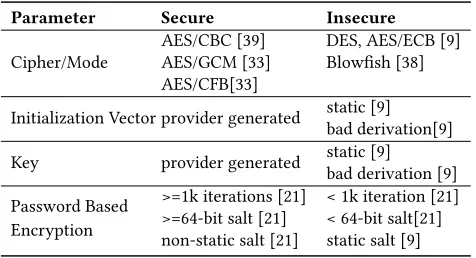
For the Encryption task, we captured how different parameters affect a solution’s security as described in Table 3; that table only lists options that were found in one or more participants’ solutions.
Parameter Secure Insecure
Cipher/Mode
AES/CBC [39] DES, AES/ECB [9] AES/GCM [33] Blowfish [38] AES/CFB[33]
Initialization Vector provider generated static [9] bad derivation[9]
Key provider generated static [9] bad derivation [9]
Password Based Encryption
[image:8.612.56.294.439.568.2]>=1k iterations [21] < 1k iteration [21] >=64-bit salt [21] < 64-bit salt[21] non-static salt [21] static salt [9]
Table 3: Encryption security parameters
6.7
Recruitment
To maintain the validity of our study, we wanted only to recruit experienced Android developers. Therefore, we extracted develop-ers’ emails from the Google Play Store, since any such developer will have completed at least one working app. We sent emails in batches, asking Google Play developers to participate in a study on how to support Android developers in writing code. We did not mention security in the recruitment email. However, this approach
did not scale well since participants wanted to know what FixDroid does before installing it as an Android Studio plugin. We received a number of emails asking for this information. We also provided participants the option to stop receiving invitation emails from us. To encourage more participants, we added more details to our later emails, specifying that FixDroid helps developers write more secure code with possible quick-fixes. After this change we had a higher response rate. In all, we sent invitation emails to 210,854 developers and got 16 participants who volunteered to participate in our study and finished both writing code and filling in our exit survey.
We also recruited students to join in our study. As compensation they received 25 Euros either in cash or as an Amazon voucher. We sent invitation emails to five universities in Germany.
Our email linked to the FixDroid plugin in the Android Studio plugins repository, allowing participants to download FixDroid directly from their Android Studio.
To verify students’ Android programming experience we gave them a set of 5 Android programming related questions to an-swer. We only invited students who answered at least 3 questions correctly. 65 students participated in our pre-study quiz; 59 were invited. We stopped recruiting when we had 24 students, due to budget constraints.
6.8
Ethical Concerns
All the telemetry data was gathered pseudonymously, with per-sonally identifiable information removed before sending it to the server. All data was sent securely to FixDroid’s web service using HTTPS. Our study was approved by our institution’s ethics review board.
We have concerns about researchers sending emails to large numbers of developers, and are working with StackOverflow to deliver an opt-in list for developers interested in working with academic researchers.
7
STUDY RESULTS
7.1
Participants
In total, 409 participants downloaded FixDroid. Table 4 shows how many from each group completed the exit survey. This includes some participants who did not write any code.
Mode Started Completed
Full functionality 45 22 Only telemetry 70 35
Table 4: Number of participants who started and completed surveys
Mode 0 Task 1 Task 2 Tasks 3 Tasks
[image:9.612.61.286.85.122.2]Full functionality 33 9 3 19 Only telemetry 55 5 3 19
Table 5: Number of participants who completed tasks
Our participants in the developers group were aged between 21 and 47 (see Table 7) while participants in students groups were aged between 19 and 30.
Country Count Country Count
Moldova 1 Poland 1
UK 1 Colombia 1
Germany 3 India 3
Vietnam 2 Turkey 1
Czech Republic 1 Greece 1
[image:9.612.323.552.89.202.2]Kenya 1
Table 6: Country of origin of developers
All the students come from Germany; the developers included participants from nearly all over the world (Table 6).
Full functionality Only Telemetry
Age
Mean 25.32 27.45
Median 25.00 25.00
Standard Deviation 4.60 5.88
Information Security Background
Yes 7 12
No 6 14
Apps Submitted
Mean 4.89 6.95
Median 3.00 3.00
Standard Deviation 4.42 7.05
Table 7: Participant Background
Almost all participants have been programming in Android for at least 6 months (see Figure 10). The exception was two students who had only taken Android programming related courses.
7.2
Findings from Participants’ Experience
This section explores our findings from the exit survey, telemetry features and experience sampling. This analysis considers only participants who completed both at least one task and the exit survey.
7.2.1 Sources of Information.Figure 11 shows participants’ de-scriptions of where they looked for coding support. The results are consistent with Acar et al.’s earlier research [2], suggesting that these developers are typical in their use of development resources.
0 2 4 6 8 10 12 14 16
Not at all < 6 months 1 year - 2 years > 2 years
[image:9.612.318.552.148.375.2]Only Telemetry Full Functionality
Figure 10: Android programming experience
0 2 4 6 8 10 12
Search engine StackOverflow Commonsware Official Documentation Stackexchange Other
[image:9.612.81.266.217.298.2]Only Telemetry Full functionality
Figure 11: Where do you usually look for security related coding questions?
7.2.2 Perceived use of FixDroid features.Moving on to consider survey information from the participants using FixDroid, Figure 12 shows which features of FixDroid users believed they used. Con-sistently the students used more features; and the warning icon and quick-fix were used most. This is consistent with the telemetry recorded by FixDroid (see Section 7.2.4)
0 1 2 3 4 5 6 7 8 9
Warning Icon Warning Message Highlighted code Quick-fix
FixDroid Interaction reported in exit survey
Developers Student
Figure 12: FixDroid features reported by participants
[image:9.612.54.293.372.513.2] [image:9.612.321.552.509.622.2]“Strongly Agree”. Figure 13 summarises the responses; a majority of quick-fix users agreed or strongly agreed that their provided quick-fixes were useful.
3% 5%
79% 85%
17% 10%
The provided quickfix was useful
100 50 0 50 100
Developers Students
[image:10.612.321.553.88.222.2]Strongly disagree Disagree Neutral Agree Strongly agree
Figure 13: Reported value of each quickfix applied
On the exit survey, nearly two third of the participants (63.15%) in the FixDroid group reported that they used at least one provided quick-fix; they all reported that the provided quick-fix was useful (n=19). Interestingly only half of participants in this group reported having used IDE-provided quick-fixes prior to our study, although quick-fixes are generally available for non-security related issues.
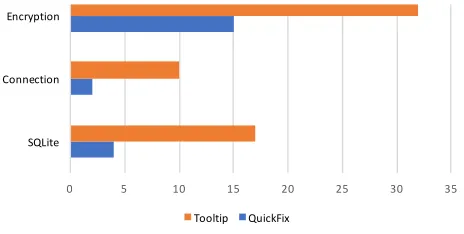
7.2.4 Actual Use of FixDroid Features. Figure 14 shows the
ac-tual use of FixDroid’s features during each of the tasks, as measured by FixDroid’s telemetry functionality. The Encryption task gener-ated significantly more activities than the other two, suggesting that that this is particularly difficult for developers.
0 5 10 15 20 25 30 35
SQLite Connection Encryption
[image:10.612.61.295.130.182.2]Tooltip QuickFix
Figure 14: Actual use of FixDroid features
7.2.5 Use of copy/paste. Figure 15 shows the developer use of
copy/paste during each of the tasks. Again, the Encryption task gen-erated significantly than the other two, suggesting that it required much more online research on the part of developers. Whenever participants copied and pasted an insecure code snippet to their solution, FixDroid asked them to provide us the URL of the website from which they copied the code. The most common source was StackOverflow; this supports the reported information sources in our exit survey. We manually examined the links, and found that, for encryption related questions, every link contained at least one insecure code snippet.
Other participants reported that they copied code from other projects or from their notepad.
7.3
Regression Model
The following sections show the results of applying a regression model to analyze the results in detail. Table 8 shows the factors analyzed. Since we are only interested in binary outcomes (e.g., se-cure vs. insese-cure), we used logistic regression. When we considered
0 5 10 15 20 25 30 35 40
Encryption Connection SQLite
[image:10.612.319.554.263.458.2]Only telemetry Full functionality
Figure 15: Number of copied and pasted insecure code events
Factor Description Baseline
Required factors
Mode FixDroid or Default Only telemetry feature Task One of the three tasks
described in Section 6.2
Connection
Optional factors
Group Developer or student Developer Experienced True if participant has
submitted more than 5 apps or has more than 3 years of experience otherwise False. Self-reported.
False
Security background True or False, self re-ported
False
Table 8: Factors used in regression analysis
results on a per-task rather than a per-participant basis, we used a mixed model that adds a random intercept to account for multiple tasks from the same participant.
For the regression analysis, we considered a set of candidate models and selected the model with the lowest Akaike Information Criterion (AIC) [5]. The included factors are described in Table 8. We considered candidate models consisting of the required factors
modeandtask, the participant random intercept, plus every possible combination of the optional variables.
We report the outcome of our regressions in Table 9. Each row measures the change in the analyzed outcome related to changing from thebaselinevalue for a given factor to a different value for that factor (such as changing from not having access to FixDroid functionality to having FixDroid activated). Logistic regressions produce an odds ratio (O.R.) that measures the change in likelihood of the targeted outcome; baseline factors by construction have O.R.=1. In each row, we also give a 95% confidence interval (C.I.) and a p-value indicating statistical significance.
[image:10.612.57.289.353.470.2]used the connection task as the baseline, as this seems like a likely task for developers to encounter in real life and has been done before by Acar et al. [2]. All baseline values are given in Table 8.
7.4
Functional Correctness Results
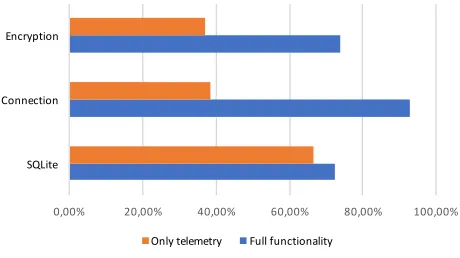
We observed no statistically significant difference in the number of functional solutions between each task, and between groups (cf. Figure 16). Developers and students with FixDroid’s support do not perform significantly better compared to participants with only the telemetry features, in terms of functional correctness.
0,00% 20,00% 40,00% 60,00% 80,00% 100,00% SQLite
Connection Encryption
Only telemetry Full functionality
Figure 16: Funtionality results for each task
[image:11.612.58.288.211.345.2]7.5
Security Correctness Results
Figure 17 shows the proportion of developers and students achiev-ing a secure solution in each of the tasks. We were pleased to see a dramatic difference in security success, with more than twice the proportion achieving a secure solution in the Encryption and Con-nection tasks. Interestingly there was little difference in security success for the SQLite task.
0,00% 20,00% 40,00% 60,00% 80,00% 100,00%
SQLite Connection Encryption
Only telemetry Full functionality
Figure 17: Security results for each task
Table 9 shows the analysis for these figures, considering factors contributing to task security, performed on functionally correct tasks. Statistically significant values are indicated with *.
Since we used the group of participants with no security quick-fixes or warning messages available as our baseline, our hypothesis
Factor O.R. C.I. p.value
FixDroid 19.55 [2.42, 157.84] 0.005* Encryption 0.37 [0.13, 1.06] 0.065 SQLite 0.99 [0.34, 2.88] 0.993
Table 9: Mixed logistic regression on factors contributing to task security
H1 (that FixDroid has an impact on security) is represented by the factor ‘FixDroid’ in the analysis. We can therefore reject the null hypothesis, H0, that FixDroid has no impact, with the p value of 0.005.
8
LIMITATIONS
We can identify the following limitations to our sampling process. First, since the participants are in effect self-selecting, we have an opt-in bias. There is the possibility that these results won’t extend to the full set of programmers. We also have a relatively small sample set, though we have addressed that using appropriate statistical methods.
As we wanted to have more participants, we had to compen-sate students to join our study while professional developers were not paid. However, we observed only one significant difference: professional developers were more likely to drop out.
There is an issue with acquiescence bias or the Hawthorne ef-fect, especially in the reported value of quick-fixes in section 7.2.3: participants are more likely to report liking a new system.
As we describe in Section 6.7, we had to briefly mention what FixDroid does in order to recruit more professional developers. This could possibly introduce bias into our study. It is not an easy task to convince developers to install a third party plugin without telling them what it does.
Though we believe it is important, we did not focus on improving data flow analysis except for leveraging the existing features of IntelliJ IDEA previously ignored by Lint (see Section 4.7).
9
FUTURE WORK
We have identified several areas for further work:
• FixDroid provides a good platform for the analysis of pro-grammer coding behaviour with regards to security. Clearly there is scope for exercises covering further kinds of defect and using FixDroid to analyse how developers address them.
• Improved data flow analysis will help developers detect more kinds of defect; work on this will improve the usefulness of FixDroid app still more.
• FixDroid continuously measures security good practices and
security bad practices. This has the potential to support a fu-ture longitudinal study to see if people actually use FixDroid and get better at writing secure code over time.
[image:11.612.57.287.490.619.2]10
CONCLUSION
This paper explored the possibility of supporting Android develop-ers to write secure code. Section 3 showed the limitations of the existing Android Lint tool, and suggests improvements. These im-provements motivated the creation of a new IDE plug-in, FixDroid, as described in Section 4.
A series of studies evaluated this approach, as described in Sec-tion 6, and analyzed in SecSec-tion 7. Early studies discovered the im-portance of a more visible signal of security issues than the existing Lint indicators. The later studies also validated the approach of using telematics in an IDE to determine programmer behavior.
Finally, the studies conclusively proved the effectiveness of such a tool in improving the security of code produced.
These findings suggest that it will significantly improve the secu-rity of developed apps if future Android IDEs contain functionality similar to the FixDroid tool, with a clear indication of security errors and offers of security ‘quick-fixes’.
We conclude that, to improve app security, it’s vital that future versions of the Android development environments incorporate similar features.
ACKNOWLEDGMENTS
We would like to thank the GP3S group for providing us the industry contacts to carry out our pilot study, and the anonymous reviewers for their valuable feedback. This work was supported by the Ger-man Federal Ministry of Education and Research (BMBF) through funding for the Center for IT-Security, Privacy and Accountability (CISPA) (FKZ: 16KIS0656).
REFERENCES
[1] Yasemin Acar, Michael Backes, Sven Bugiel, Sascha Fahl, Patrick McDaniel, and Matthew Smith. 2016. SoK: Lessons Learned From Android Security Research For Appified Software Platforms. InProceedings of the 2016 IEEE Symposium on Security and Privacy (SP ’16).
[2] Yasemin Acar, Michael Backes, Sascha Fahl, Doowon Kim, Michelle L. Mazurek, and Christian Stransky. 2016. You Get Where You’re Looking For: The Impact Of Information Sources On Code Security. InProceedings of the 2016 IEEE Symposium on Security and Privacy (SP ’16).
[3] R Balebako, A Marsh, J Lin, and J Hong. 2014. The Privacy and Security Behaviors of Smartphone App Developers. InWorkshop on Usable Security (USEC’14). http://www.mathcs.richmond.edu/~dszajda/classes/cs334/Fall_2014/papers/ Balebako_privacy_security_behaviors_smartphone_app_developers.pdf [4] John Brooke. 1996."SUS-A quick and dirty usability scale." Usability evaluation
in industry. CRC Press. https://www.crcpress.com/product/isbn/9780748404605 ISBN: 9780748404605.
[5] K. P. Burnham. 2004. Multimodel Inference: Understanding AIC and BIC in Model Selection.Sociological Methods & Research33, 2 (2004), 261–304. https: //doi.org/10.1177/0049124104268644
[6] Erika Chin, Adrienne Porter Felt, Kate Greenwood, and David Wagner. 2011. Analyzing Inter-application Communication in Android. InProc. 9th International Conference on Mobile Systems, Applications, and Services (MobiSys’11). ACM. https: //doi.org/10.1145/1999995.2000018
[7] Erika Chin, Adrienne Porter Felt, Kate Greenwood, and David Wagner. 2011. Analyzing inter-application communication in Android. InProc. 9th International Conference on Mobile Systems, Applications, and Services (MobiSys’11). ACM. [8] Erika Michelle Chin. 2013. Helping Developers Construct Secure Mobile
Applica-tions. UC Berkeley: Computer Science. http://escholarship.org/uc/item/4x48p6rz [9] Manuel Egele, David Brumley, Yanick Fratantonio, and Christopher Kruegel. 2013. An Empirical Study of Cryptographic Misuse in Android Applications. InProc. 20th ACM Conference on Computer and Communication Security (CCS’13). ACM. https://doi.org/10.1145/2508859.2516693
[10] Serge Egelman, Lorrie Faith Cranor, and Jason Hong. 2008. You’ve been warned: an empirical study of the effectiveness of web browser phishing warnings. In Proceedings of the SIGCHI Conference on Human Factors in Computing Systems. ACM, 1065–1074.
[11] William Enck, Damien Octeau, Patrick McDaniel, and Swarat Chaudhuri. 2011. A Study of Android Application Security. InProc. 20th Usenix Security Symposium (SEC’11). USENIX Association. http://www.enck.org/pubs/enck-sec11.pdf [12] Sascha Fahl, Marian Harbach, Thomas Muders, Lars Baumgärtner, Bernd
Freisleben, and Matthew Smith. 2012. Why Eve and Mallory Love Android: An Analysis of Android SSL (in)Security. InProc. 19th ACM Conference on Computer and Communication Security (CCS’12). ACM. https://doi.org/10.1145/2382196. 2382205
[13] Sascha Fahl, Marian Harbach, Henning Perl, Markus Koetter, and Matthew Smith. 2013. Rethinking SSL Development in an Appified World. InProc. 20th ACM Conference on Computer and Communication Security (CCS’13). ACM. https: //doi.org/10.1145/2508859.2516655
[14] Felix Fischer, Konstantin Böttinger, Huang Xiao, Christian Stransky, Yasemin Acar, Michael Backes, and Sascha Fahl. 2017. Stack Overflow Considered Harmful? The Impact of Copy&Paste on Android Application Security. InSymposium on Security and Privacy (Oakland’17). IEEE.
[15] Martin Georgiev, Subodh Iyengar, Suman Jana, Rishita Anubhai, Dan Boneh, and Vitaly Shmatikov. 2012. The Most Dangerous Code in the World: Validating SSL Certificates in Non-browser Software. InProc. 19th ACM Conference on Computer and Communication Security (CCS’12). ACM. https://doi.org/10.1145/2382196. 2382204
[16] Randall A Gordon and Richard D Arvey. 2004. Age Bias in Laboratory and Field Settings: A Meta-Analytic Investigation1.Journal of applied social psychology34, 3 (2004), 468–492.
[17] Nielsen Norman Group. [n. d.]. Field Studies. https://www.nngroup.com/articles/ field-studies/. ([n. d.]). Last visited: 12/09/2016.
[18] Gerard J Holzmann. 2016. Cobra: a light-weight tool for static and dynamic program analysis.Innovations in Systems and Software Engineering(2016), 1–15. [19] S. C. Johnson. 1978. Lint, a C Program Checker. InCOMP. SCI. TECH. REP.
78–1273.
[20] Nenad Jovanovic, Christopher Kruegel, and Engin Kirda. 2006. Pixy: A static analysis tool for detecting web application vulnerabilities. InSecurity and Privacy, 2006 IEEE Symposium on. IEEE, 6–pp.
[21] B. Kaliski. 2000. PKCS #5: Password-Based Cryptography Specification Version 2.0. (2000).
[22] Miryung Kim, Lawrence Bergman, Tessa Lau, and David Notkin. 2004. An ethno-graphic study of copy and paste programming practices in OOPL. InEmpirical Software Engineering, 2004. ISESE’04. Proceedings. 2004 International Symposium on. IEEE, 83–92.
[23] Long Lu, Zhichun Li, Zhenyu Wu, Wenke Lee, and Guofei Jiang. 2012. Chex: statically vetting android apps for component hijacking vulnerabilities. In Pro-ceedings of the 2012 ACM conference on Computer and communications security. ACM, 229–240.
[24] Tongbo Luo, Hao Hao, Wenliang Du, Yifei Wang, and Heng Yin. 2011. Attacks on WebView in the Android system. InProc. 27th Annual Computer Security Applications Conference (ACSAC’11). ACM.
[25] Stacey Watson Madiha Tabassum and Heather Richter Lipford. 2017. Comparing Educational Approaches to Secure programming: Tool vs. TA. InThirteenth Sym-posium on Usable Privacy and Security (SOUPS 2017). USENIX Association, Santa Clara, CA. https://www.usenix.org/conference/soups2017/workshop-program/ wsiw2017/tabassum
[26] Vitaly Shmatikov Martin Georgiev, Suman Jana. 2014. Breaking and Fixing Origin-Based Access Control in Hybrid Web/Mobile Application Frameworks. In Proc. 21st Annual Network and Distributed System Security Symposium (NDSS’14). The Internet Society.
[27] Patrick Mutchler, Adam Doupé, John Mitchell, Christopher Kruegel, and Giovanni Vigna. 2015. A Large-Scale Study of Mobile Web App Security. InProc. 2015 Mobile Security Technologies Workshop (MoST’15). IEEE.
[28] Marco Pistoia, Omer Tripp, and David Lubensky. 2016. Combining Static Code Analysis and Machine Learning for Automatic Detection of Security Vulnera-bilities in Mobile Apps.Mobile Application Development, Usability, and Security (2016), 68.
[29] Sebastian Poeplau, Yanick Fratantonio, Antonio Bianchi, Christopher Kruegel, and Giovanni Vigna. 2014. Execute This! Analyzing Unsafe and Malicious Dy-namic Code Loading in Android Applications. InProc. 21st Annual Network and Distributed System Security Symposium (NDSS’14). The Internet Society. [30] A. Porter Felt, E. Chin, S. Hanna, D. Song, and D. Wagner. 2011. Android
Permis-sions Demystified. InProc. 18th ACM Conference on Computer and Communication Security (CCS’11). ACM.
[31] Adrienne Porter Felt, Helen J. Wang, Alexander Moshchuk, Steve Hanna, and Erika Chin. 2011. Permission Re-Delegation: Attacks and Defenses. InProc. 20th Usenix Security Symposium (SEC’11). USENIX Association.
[32] S. E. Schechter, R. Dhamija, A. Ozment, and I. Fischer. 2007. The Emperor’s New Security Indicators. In2007 IEEE Symposium on Security and Privacy (SP ’07). 51–65. https://doi.org/10.1109/SP.2007.35
[34] Pan Shi, Heng Xu, and Xiaolong (Luke) Zhang. 2011. Informing Security Indicator Design in Web Browsers. InProceedings of the 2011 iConference (iConference ’11). ACM, New York, NY, USA, 569–575. https://doi.org/10.1145/1940761.1940839 [35] Sooel Son, Kathryn S McKinley, and Vitaly Shmatikov. 2011. Rolecast: finding
missing security checks when you do not know what checks are.ACM SIGPLAN Notices46, 10 (2011), 1069–1084.
[36] Android Team. 2017. Android Lint tool. https://developer.android.com/studio/ write/lint.html. (2017). Last visited: 17/05/2017.
[37] Tyler W. Thomas, Heather Lipford, Bill Chu, Justin Smith, and Emerson Murphy-Hill. 2016. What Questions Remain? An Examination of How Developers Under-stand an Interactive Static Analysis Tool. InTwelfth Symposium on Usable Privacy and Security (SOUPS 2016). USENIX Association, Denver, CO. https://www.usenix. org/conference/soups2016/workshop-program/wsiw16/presentation/thomas [38] Serge Vaudenay. 1996.On the weak keys of blowfish. Springer Berlin Heidelberg,
Berlin, Heidelberg, 27–32. https://doi.org/10.1007/3-540-60865-6_39 [39] Serge Vaudenay. 2002. Security Flaws Induced by CBC Padding - Applications
to SSL, IPSEC, WTLS .... InProceedings of the International Conference on the Theory and Applications of Cryptographic Techniques: Advances in Cryptology (EUROCRYPT ’02). Springer-Verlag, London, UK, UK, 534–546. http://dl.acm.org/ citation.cfm?id=647087.715705
[40] Rui Wang, Luyi Xing, XiaoFeng Wang, and Shuo Chen. 2013. Unauthorized Origin Crossing on Mobile Platforms: Threats and Mitigation. InProc. 20th ACM Conference on Computer and Communication Security (CCS’13). ACM.
A
EXIT SURVEY
A.1
FixDroid specific questions
•During the study, did you notice any interaction from Fix-Droid while performing the tasks? If yes:
– What interaction did you see from FixDroid? Warning messages, Highlighted code, warning icon, quick-fixes, other
•Did the plugin provide you any additional information?
• Did you use any provided quick-fix in our lab study? If yes:
– Did the inserted code FixDroid work?
– Do you feel it was helpful?
A.2
General questions
• What is your age?• What is your gender?
• Where are you from?
• For how many years have been programming in Android?
• What is your highest degree of education?
• Is programming your primary job? If yes: Is writing Android code part of your primary job?. If no: Was programming part of your job in the last 5 years?
• Do you have information security background?
• How many Android applications you have developed?
• Where do you usually look for security related coding ques-tions? (website)
• Are you familiar with Android Studio (or IntelliJ IDE in general)?
B
EXPERIENCE SAMPLING SURVEY
• How do you think this quick-fix is useful? (Strongly agree; agree; neutral; disagree; strongly disagree)