GernEdiT: A Graphical Tool for GermaNet Development
Verena Henrich
University of Tübingen
Tübingen, Germany.
[email protected]
Erhard Hinrichs
University of Tübingen
Tübingen, Germany.
[email protected]
Abstract
GernEdiT (short for: GermaNet Editing Tool) offers a graphical interface for the lexicogra-phers and developers of GermaNet to access and modify the underlying GermaNet re-source. GermaNet is a lexical-semantic word-net that is modeled after the Princeton Word-Net for English. The traditional lexicographic development of GermaNet was error prone and time-consuming, mainly due to a complex underlying data format and no opportunity of automatic consistency checks. GernEdiT re-places the earlier development by a more user-friendly tool, which facilitates automatic checking of internal consistency and correct-ness of the linguistic resource. This paper pre-sents all these core functionalities of GernEdiT along with details about its usage and usabil-ity.
1
Introduction
The main purpose of the GermaNet Editing Tool GernEdiT tool is to support lexicographers in accessing, modifying, and extending the Ger-maNet data (Kunze and Lemnitzer, 2002; Hen-rich and HinHen-richs, 2010) in an easy and adaptive way and to aid in the navigation through the GermaNet word class hierarchies, so as to find the appropriate place in the hierarchy for new synsets (short for: synonymy set) and lexical units. GernEdiT replaces the traditional Ger-maNet development based on lexicographer files (Fellbaum, 1998) by a more user-friendly visual tool that supports versioning and collaborative annotation by several lexicographers working in parallel.
Furthermore, GernEdiT facilitates internal consistency of the GermaNet data such as appro-priate linking of lexical units with synsets, connectedness of the synset graph, and automatic
closure among relations and their inverse coun-terparts.
All these functionalities along with the main aspects of GernEdiT’s usage and usability are presented in this paper.
2
The Structure of GermaNet
GermaNet is a lexical-semantic wordnet that is modeled after the Princeton WordNet for English (Fellbaum, 1998). It covers the three word cate-gories of adjectives, nouns, and verbs and parti-tions the lexical space into a set of concepts that are interlinked by semantic relations. A semantic concept is modeled by a synset. A synset is a set of words (called lexical units) where all the words are taken to have (almost) the same mean-ing. Thus a synset is a set-representation of the semantic relation of synonymy, which means that it consists of a list of lexical units.
There are two types of semantic relations in GermaNet: conceptual and lexical relations. Conceptual relations hold between two semantic concepts, i.e. synsets. They include relations such as hyperonymy, part-whole relations, en-tailment, or causation. GermaNet is hierarchi-cally structured in terms of the hyperonymy rela-tion. Lexical relations hold between two individ-ual lexical units. Antonymy, a pair of opposites, is an example of a lexical relation.
3
The GermaNet Editing Tool
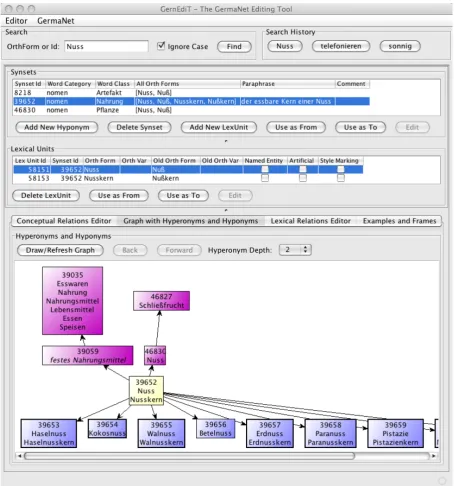
Figure 1. The main view of GernEdiT.
3.1 Motivation
The traditional lexicographic development of GermaNet was error prone and time-consuming, mainly due to a complex underlying data format and no opportunity of automatic consistency checks. This is exactly why GernEdiT was de-veloped: It supports lexicographers who need to access, modify, and extend GermaNet data by providing these functions through simple button-clicks, searches, and form editing. There are sev-eral ways to search data and browse through the GermaNet graph. These functionalities allow lexicographers, among other things, to find the
appropriate place in the hierarchy for the inser-tion of new synsets and lexical units. Last but not least, GernEdiT facilitates internal consistency and correctness of the linguistic resource and supports versioning and collaborative annotation of GermaNet by several lexicographers working in parallel.
3.2 The Main User Interface
Figure 1 illustrates the main user panel of Gern-EdiT. It shows a Search panel above, two panels for Synsets and Lexical Units in the middle, and four tabs below: a Conceptual Relations Editor, a
Lexi-Figure 2: Filtered list of lexical units.
cal Relations Editor, and an Examples and Frames tab.
In Figure 1, a search for synsets consisting of lexical units with the word Nuss (German noun for: nut) has been executed. Accordingly, the
Synsets panel displays the three resulting synsets that match the search item. The Synset Id is the unique database ID that unambiguously identi-fies a synset, and which can also be used to search for exactly that synset. Word Category
specifies whether a synset is an adjective (adj), a noun (nomen), or a verb (verben), whereas Word Class classifies the synsets into semantic fields. The word class of the selected synset in Figure 1 is Nahrung (German noun for: food). The Para-phrase column contains a description of a synset, e.g., for the selected synset the paraphrase is: der essbare Kern einer Nuss (German phrase for: the edible kernel of a nut). The column All Orth Forms simply lists all orthographical variants of all its lexical units.
Which lexical units are listed in the Lexical Units panel depends on the selected synset in the
Synsets panel. Here, Lex Unit Id and Synset Id
again reflect the corresponding unique database IDs. Orth Form (short for: orthographic form) represents the correct spelling of a word accord-ing to the rules of the spellaccord-ing reform Neue Deutsche Rechtschreibung (Rat für deutsche Rechtschreibung, 2006), a recently adopted spelling reform. In our example, the main ortho-graphic form is Nuss. Orth Var may contain an
alternative spelling that is admissible according to the Neue Deutsche Rechtschreibung.1 Old Orth Form represents the main orthographic form prior to the Neue Deutsche Recht-schreibung. This means that Nuß was the correct spelling instead of Nuss before the German spell-ing reform. Old Orth Var contains any accepted variant prior to the Neue Deutsche Recht-schreibung. The Old Orth Var field is filled only if it is no longer allowed in the new orthography.
The Boolean values Named Entity, Artificial, and Style Marking express further properties of a lexical unit, whether the lexical unit is a named entity, an artificial concept node, or a stylistic variant.
For both the lexical units and the synsets, there are two buttons Use as From and Use as To, which help to add new relations (see the explana-tion of Figure 3 in secexplana-tion 3.6 below which ex-plains the creation of new relations).
3.3 Search Functionalities
It is possible to search for words or synset data-base IDs via the search panel (see Figure 1 at the top). The check box Ignore Case offers the pos-sibility of searching without distinguishing be-tween upper and lower case.
1 An example of this kind is the German word Delfin
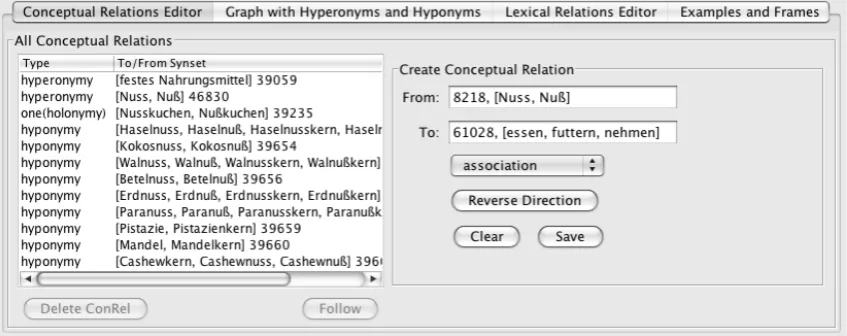
[image:3.595.71.527.72.336.2]Figure 3. Conceptual Relations Editor tab.
Via the file menu, lists of all synsets or lexical units with their properties can be accessed. To these lists, very detailed filters can be applied: e.g., filtering the lexical units or synsets by parts of their orthographical forms. Figure 2 shows a list of lexical units to which a detailed filter has been applied: verbs have been chosen (see the chosen tab) whose orthographical forms start with an a- (see starts with check box and corre-sponding text field) and end with the suffix -ten
(see ends with check box and corresponding text field). Only verbs that have a frame that contains
NN are chosen (see Frame contains check box and corresponding text field). Furthermore, the resulting filtered list is sorted in descending or-der by their examples (see the little triangle in the Examples header of the result table). The number in the brackets behind the word category in the tab title indicates the count of the filtered lexical units (in this example 193 verbs pass the filter).
3.4 Visualization of the Graph Hierarchy There is the possibility to display a graph with all hyperonyms and hyponyms of a selected synset. This is shown in the bottom half of Figure 1 in the tab Graph with Hyperonyms and Hyponyms. The graph in Figure 1 visualizes a part of the hi-erarchical structure of GermaNet centered around the synset containing Nuss and displays the hyperonyms and hyponyms of this synset up to a certain parameterized depth (in this case depth 2 has been chosen). The Hyperonym Depth
chooser allows unfolding the graph to the top up to the preselected depth. As it is not possible to visualize the whole GermaNet contents at once, the graph can be seen as a window to GermaNet.
A click on any synset node within the graph, navigates to that synset. This functionality sup-ports lexicographers especially in finding the appropriate place in the hierarchy for the inser-tion of new synsets.
3.5 Modifications of Existing Items
If the lexicographers’ task is to modify existing synsets or lexical units, this is done by selecting a synset or lexical unit displayed in the Synsets
and the Lexical Units panels shown in Figure 1. The properties of such selected items can be ed-ited by a click in the corresponding table cell. For example by clicking in the cell Orth Form
the spelling of a lexical unit can be corrected in case of an earlier typo was made.
If lexicographers want to edit examples, frames, conceptual, or lexical relations this is done by choosing the appropriate tab indicated at the bottom of Figure 1. By clicking one of these tabs, the corresponding panel appears below these tabs. In Figure 1 the panel for Graph with Hyperonyms and Hyponyms is displayed.
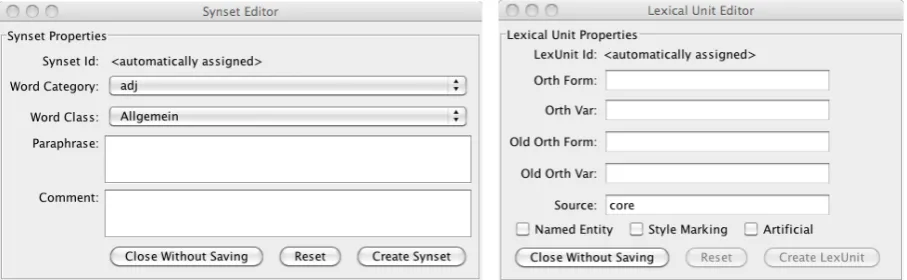
Figure 4. Synset Editor (left). Lexical Units Editor (right).
3.6 Editing of Relations
[image:5.595.72.526.71.211.2]If lexicographers want to add new conceptual or lexical relations to a synset or a lexical unit this is done by clicking on the Conceptual Relations Editor or the Lexical Relations Editor shown in Figure 1.
Figure 3 shows the panel that appears if the
Conceptual Relations Editor has been chosen for the synset containing Nuss. To create a new rela-tion, the lexicographer needs to use the buttons
Use as From and Use as To shown in Figure 1. This will insert the ID of the selected synsets from the Synsets panel in the corresponding
From or To field in Figure 3. The button Delete ConRel allows deletion of a conceptual relation, if all consistency checks are passed.
The Lexical Relations Editor tab supports edit-ing all lexical relations. It is not displayed sepa-rately for reasons of space, but it is analogue to the Conceptual Relations Editor tab for editing conceptual relations.
3.7 Adding Synsets and Lexical Units The buttons Add New Hyponym and Add New LexUnit in the Synsets panel (see Figure 1) can be used to insert a new synset or lexical unit at the selected place in the GermaNet graph, and the buttons Delete Synset and Delete LexUnit
remove the selected entry, respectively.
The Synset Editor in Figure 4 (on the left) shows the window which appears after a click on
Add New Hyponym. When clicking on the button
Create Synset, the Lexical Unit Editor (shown in Figure 4, right) pops up. This workflow forces the parallel creation of a lexical unit while creat-ing a synset.
3.8 Consistency Checks
GernEdiT facilitates internal consistency of the GermaNet data. This is achieved by the
workflow-oriented design of the editor. It is not possible to create a synset without creating a lexical unit in parallel (as described in section 3.7). Furthermore, it is not possible to insert a new synset without specifying the place in the GermaNet hierarchy where the new synset should be added. This is achieved by the button
Add New Hyponym (see Figure 1) which forces the user to identify the appropriate hyperonym for the new synset to be added. Furthermore, it is not possible to insert a lexical unit without speci-fying the corresponding synset. On deletion of a synset, all corresponding data such as conceptual relations, lexical units with their lexical relations, frames, and examples, are deleted automatically.
Consistency checks also take effect for the ta-ble cell editing in the Synsets and Lexical Units
panels of the main user interface (see Figure 1), e.g., the main orthographic form of a lexical unit may never be empty.
All buttons in GernEdiT are enabled only if the corresponding functionalities meet the con-sistency requirements, e.g., if a synset consists only of one lexical unit, it is not possible to de-lete that lexical unit and thus the button Delete LexUnit is disabled. Also, if the deletion of a synset or a relation would violate the complete connectedness of the GermaNet graph, it is not possible to delete that synset.
3.9 Further Functionalities
There are further functionalities available through the file menu. Besides retrieving the up-to-date statistics of GermaNet, an editing history makes it possible to list all modifications on the GermaNet data, with the information about who made the change and how the modified item looked before.
export a list of all verbs with their corresponding frames and examples.
4
Tool Evaluation
In order to assess the usefulness of GernEdiT, we conducted in depth interviews with the Germa-Net lexicographers and with the senior researcher who oversees all lexicographic development. At the time of the interview all of these researchers had worked with the tool for about eight months. The present section summarizes the feedback about GernEdiT that was obtained in this way.
The initial learning curve for getting familiar with GernEdiT is considerably lower compared to the learning curve required for the traditional development based on lexicographer files. Moreover, the GermaNet development with GernEdiT is both more efficient and accurate compared to the traditional development along the following dimensions:
1. The menu-driven and graphics-based navigation through the GermaNet graph is much easier compared to finding the cor-rect entry point in the purely text-based format of lexicographer files.
2. Lexicographers no longer need to learn the complex specification syntax of the lexi-cographer files. Thereby, syntax errors in the specification language – a frequent source of errors prior to development with GernEdiT – are entirely eliminated. 3. GernEdiT facilitates automatic checking
of internal consistency and correctness of the GermaNet data such as appropriate linking of lexical units with synsets, con-nectedness of the synset graph, and auto-matic closure among relations and their inverse counterparts.
4. It is now even possible to perform further queries, which were not possible before, e.g., listing all hyponyms of a synset. 5. Especially for the senior researcher who is
responsible for coordinating the GermaNet lexicographers, it is now much easier to trace back changes and to verify who was responsible for them.
6. The collaborative annotation by several lexicographers working in parallel is now easily possible and does not cause any management overhead as before.
In sum, the lexicographers of GermaNet gave very positive feedback about the use of Gern-EdiT and also made smaller suggestions for im-proving its user-friendliness further. This under-scores the utility of GernEdiT from a practical point of view.
5
Conclusion and Future Work
In this paper we have described the functionality of GernEdiT. The extremely positive feedback of the GermaNet lexicographers underscores the practical benefits gained by using the GernEdiT tool in practice.
At the moment, GernEdiT is customized for maintaining the GermaNet data. In future work, we plan to adapt the tool so that it can be used with wordnets for other languages as well. This would mean that the wordnet data for a given language would have to be stored in a relational database and that the tool itself can handle the language specific data structures of the wordnet in question.
Acknowledgements
We would like to thank all GermaNet lexicogra-phers for their willingness to experiment with GernEdiT and to be interviewed about their ex-periences with the tool.
Special thanks go to Reinhild Barkey for her valuable input on both the features and user-friendliness of GernEdiT and to Alexander Kis-lev for his contributions to the underlying data-base format.
References
Claudia Kunze and Lothar Lemnitzer. 2002. Ger-maNet – representation, visualization, appli-cation. Proceedings of LREC 2002, Main Confer-ence, Vol V. pp. 1485-1491, 2002.
Christiane Fellbaum (ed.). 1998. WordNet – An Electronic Lexical Database. Cambridge, MA: MIT Press.
Verena Henrich and Erhard Hinrichs. 2010. GernEdiT – The GermaNet Editing Tool. Proceedings of LREC 2010, Main Conference, Valletta, Malta. Rat für deutsche Rechtschreibung (eds.) (2006).