Abstract—As many today’s applications are accessible via mobile devices, mobile applications mostly have to be designed to cater for a wide range of users. Usability is hence among the most important quality attributes that mobile developers need to consider. To evaluate usability, heuristic evaluation is one of the commonly used methods since it is relatively easy to conduct an evaluation of the software under development against a number of design principles. This paper targets at the development of Android applications on mobile devices and compiles a checklist of user interface design heuristics. Specifically, we enhance the compiled list by a number of additional guidelines that are aimed to refine the list and make it easier to conduct heuristic evaluation. The enhanced checklist is first evaluated by Android mobile developers with usability experience. Then, it is used in an experiment on two Android mobile applications of different domains to compare its efficiency to that of the traditional design principles. The result shows that the enhanced checklist has better problem detection rate at the significance level of 0.05.
Index Terms—usability, heuristic evaluation, Android, mobile applications
I. INTRODUCTION
S many today’s applications are accessible by mobile devices, mobile applications mostly have to be designed to cater for a wide range of users. Due to the fast growth rate of mobile applications available for mobile users to download, mobile developers need to consider not only functional requirements but also quality attributes of their applications in order to remain competitive with others. Usability is one of the top quality attributes that are of concern by developers of interactive applications like mobile applications and the design has to be user-centered. ISO 9124-11:1998 [1] defines usability as “the extent to which a product can be used with effectiveness, efficiency, and satisfaction in a specified context of use.” Focusing on user interfaces, J. Nielsen [2] refers to usability in simpler terms as “how easy user interfaces are to use” and categorizes it into five quality components: 1) Learnability refers to “How easy is it for users to accomplish basic tasks the first time they encounter the design?,” 2) Efficiency refers to “Once
Manuscript received June 25, 2016; revised July 29, 2016.
K. Thitichaimongkhol was with the Department of Computer Engineering, Faculty of Engineering, Chulalongkorn University, and is currently with GIS Soft Company Limited, Bangkok 10500, Thailand (e-mail: [email protected]).
T. Senivongse is with the Department of Computer Engineering, Faculty of Engineering, Chulalongkorn University, Bangkok 10330, Thailand (corresponding author phone: +66 2 2186996; fax: +66 2 2186955; e-mail: [email protected]).
users have learned the design, how quickly can they perform tasks?,” 3) Memorability refers to “When users return to the design after a period of not using it, how easily can they reestablish proficiency?,” 4) Errors refers to “How many errors do users make, how severe are these errors, and how easily can they recover from the errors?,” and 5) Satisfaction refers to “How pleasant is it to use the design?.” Usability of applications on mobile devices has been a challenging issue due to specific characteristics of mobile devices including limitation on screen size, resolution, and resources, touch and gesture-based interaction, touchless interaction such as speech, and varying context of use.
To evaluate usability of real or prototype applications, heuristic evaluation is a widely used inspection method in which “reviewers, preferably experts, compare a software product to a list of design principles (or heuristics) and identify where the product does not follow those principles” [3]. This method has several advantages as it is relatively easy and cheap to conduct, and in many cases, developers or technical people with basic usability knowledge, not necessarily usability experts, can be reviewers or evaluators. By nature, however, the inspection cannot be performed automatically, and the design principles are often broad and subject to personal interpretation of the evaluators. Hence, a number of design problems that are detected may be large or small depending on the evaluators’ interpretation, experience, and interaction with the software. Sometimes more minor problems are identified than major problems [4] and sometimes domain specific problems are missed [5].
This paper aims to enhance usability heuristics to facilitate evaluators in performing heuristic evaluation of Android applications on mobile devices. We first study existing UI design principles, including general UI design principles, mobile UI design principles, and design principles for Android and other mobile platform. We compile a list of UI design checklist and introduce additional guidelines that are aimed to refine the list to make it easier to conduct heuristic evaluation. That is, non-expert evaluators having basic usability knowledge should be able to use the enhanced checklist with less personal interpretation of the heuristics. We also present an experiment on two Android mobile applications of different domains to compare the efficiency of the enhanced Android UI design checklist and that of the traditional design principles in terms of problem detection rate.
Section II of the paper presents theoretical background and related work. Section III describes the methodology to construct the enhanced Android UI design checklist and how to use it in heuristic evaluation. Section IV presents the
Enhancing Usability Heuristics for Android
Applications on Mobile Devices
Kritpapon Thitichaimongkhol and Twittie Senivongse
enhanced checklist itself. An experiment to test the efficiency of the enhanced checklist is discussed in Section V. Section VI concludes the paper.
II. BACKGROUND AND RELATED WORK
A. Background on UI Design Principles for Usability
On general UI design principles, one of the most well-known list is the one suggested by J. Nielsen [6]. There are ten rules: 1) Visibility of system status, 2) Match between system and the real world, 3) User control and freedom, 4) Consistency and standards, 5) Error prevention, 6) Recognition rather than recall, 7) Flexibility and efficiency of use, 8) Aesthetic and minimalist design, 9) Help users recognize, diagnose, and recover from errors, and 10) Help and documentation. Another well-known set of rules are the eight rules by B. Schneiderman et al. [7] which include 1) Strive for consistency, 2) Cater to universal usability, 3) Offer informative feedback, 4) Design dialogs to yield closure, 5) Prevent errors, 6) Permit easy reversal of actions, 7) Support internal locus of control, and 8) Reduce short-term memory load. On the opposite side of the design principles, there are anti-patterns that UI designer should avoid. J. Nielsen [8] gives a list of common mistakes which are 1) Non-standard GUI controls, 2) Inconsistency, 3) No perceived affordance, 4) No feedback, 5) Bad error messages, 6) Ask for the same info twice, 7) No default values, 8) Dumping users into the app, 9) Not indicating how info will be used, and 10) System-centric features.
On mobile UI design principles in particular, Google lists Android design principles [9]. They are 1) Delight me in surprising ways, 2) Real objects are more fun than buttons and menus, 3) Let me make it mine, 4) Get to know me, 5) Keep it brief, 6) Pictures are faster than words, 7) Decide for me but let me have the final say, 8) Only show what I need when I need it, 9) I should always know where I am, 10) Never lose my stuff, 11) If it looks the same, it should act the same, 12) Only interrupt me if it's important, 13) Give me tricks that work everywhere, 14) It's not my fault, 15) Sprinkle encouragement, 16) Do the heavy lifting for me, and 17) Make important things fast. Similarly, Apple gives design principles for iOS which include 1) Aesthetic integrity, 2) Consistency, 3) Direct manipulation, 4) Feedback, 5) Metaphors, and 6) User control.
These design heuristics are broad rules and the relatively short lists make them useful for heuristic evaluation in general design contexts. However, as they are not specific usability guidelines, each rule leaves room for individual evaluator’s interpretation of its definition, and less experienced evaluators might not be able to find as many design problems as the more experienced ones.
B. Background on Heuristic Evaluation
As mentioned earlier, heuristic evaluation is a convenient method to evaluate UI usability against design principles or heuristics. Compared to other methods, it is relatively inexpensive, evaluators do not need formal usability training, and it can be used in every phase of software development life cycle. Evaluators will look at the user interface of a software product and identify the design
aspects that violate design principles and how serious the violations are. It is possible that the evaluators are assisted by an observer, e.g. a development team member, during the evaluation in the case of unstable prototype or the evaluators having limited domain expertise. As individual evaluators tend to find different UI problems, the evaluation is normally conducted by a team of evaluators and aggregate their evaluation results. A team of 3-5 evaluators is recommended [2] as they can find 75% of the design problems. Adding more evaluators is possible depending on cost-benefit analysis.
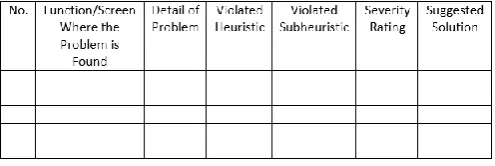
In each evaluation session, one evaluator examines the UI. The session usually lasts 1-2 hours. First, the evaluator will use the software to get the feel of the whole application and the flow of interaction. After that, the evaluator will examine specific parts of the application to identify design problems. The evaluation results are recorded in an evaluation form specifying the problems, their location, the principles that they violate, and how severe they are. J. Nielsen [2] suggests the following problem severity rating scale: 0 = Not a usability problem, 1 = Cosmetic problem only, 2 = Minor usability problem, 3 = Major usability problem, and 4 = Usability catastrophe. To ensure unbiased evaluation, evaluators are not allowed to communicate during evaluation sessions.
C. Related Work
Several researches address usability heuristics of mobile application design. An example is the work by Inostroza et al. [5]. They focus on touchscreen-based mobile devices and present 10 design heuristics that are comparable to those by J. Nielsen [6], plus an additional heuristic that concerns physical interaction and ergonomics. Each heuristic is described using a specification template and is particularized for touchscreens. They also conduct a statistical test to evaluate the efficiency of the heuristics. Nayebi et al. [11] study a number of usability heuristics and application design guidelines, including iOS human interface guidelines, and propose 23 usability evaluation criteria for iOS applications. The criteria are used to evaluate a number of applications available on Apple’s App Store and their experiment shows that the evaluation results statistically correlate with user rating on App Store. Gómez et al. [12] study heuristic evaluation checklists in the literature and adapt them to mobile UI. The result is a comprehensive checklist that comprises 10 design heuristics comparable to those by J. Nielsen [6], plus 3 more heuristics that concern Skills, Pleasurable and respectful interaction with the user, and Privacy. They further divide each heuristic into a number of subheuristics that are listed as evaluation questions. There are 158 general questions and 72 mobile-specific, mostly taken from [13][14][15]. Their statistical experiments show that the checklist is useful even for untrained developers who perform heuristic evaluation.
experience.
III. METHODOLOGY
The methodology to construct the enhanced Android UI design checklist is as follows.
A. Review Existing Usability Heuristics
First, we study existing usability heuristics described in Section II. J. Nielsen’s and B. Schneiderman’s general design principles, Android and iOS design principles, and J. Nielsen’s UI anti-patterns are compared to identify similarities and differences. Design heuristics and specific guidelines proposed by related work are considered.
B. Construct Checklist for Android Usability Evaluation
Based on the literature review, we construct a checklist of yes/no questions that can be used to judge compliance with usability design heuristics in the context of Android mobile applications. The classification of heuristics and subheuristics in [12] is adopted. In addition, based on our experience in Android mobile development, we introduce a number of evaluation questions as additional guidelines. At this stage, there are 167 evaluation questions in total, 127 taken from the literature and 40 newly introduced.
C. Validate Checklist
We have the checklist validated by 5 Android mobile developers, 4 of them having 3-year experience in design for usability and 1 of them having 1-year experience. They evaluate each question in the checklist and record the result in a validation form such as one in Fig. 1. The results Totally agree, Quite agree, and Disagree are given the scores of 3, 2, and 1 respectively. We calculate the average of the scores given by all developers to each question. All questions with the average score greater than 2 are kept. Those with the average score less than 2 are considered whether they should be removed from the checklist or merged with other questions. Some comments from the developers yield additional questions. At this stage, there are 146 evaluation questions left, 94 from the literature and 52 newly introduced.
D. Define Use of Checklist
[image:3.595.306.554.52.135.2]As described in Section II.B, the checklist can be used in different phases of application development by UI designers or developers, from prototype to finished product evaluation. In particular, early evaluation in the development could get the UI design problems detected and fixed early. Evaluators first use the application under evaluation to get the feel of it before examining specific parts of the application closely. Each of them record the evaluation result in an evaluation form as in Fig. 2.
Fig. 1. Checklist validation form.
Fig. 2. Heuristic evaluation form.
All evaluation results are aggregated, and design problems and their severity are reviewed. The developers can then fix the problems accordingly.
IV. USABILITY CHECKLIST FOR ANDROID MOBILE APPLICATIONS
The enhanced usability checklist comprises 12 heuristics and 146 evaluation questions as subheuristics. Among the questions, 94 of them are taken from the literature and cited by their source [13]. Those without the cited source are 52 questions that we introduce. Due to space limitation, we leave out most of the questions taken from the literature in order to fully cover all 52 newly introduced questions.
1. Visibility of system status System status feedback:
(1) Does every display begin with a title or a header that describes screen contents? [13]
…
(4) If the user is scrolling to the boundary of an element (e.g., listview), is there some visual cue?
(5) If the system contains splash screens, does it provide what the system is doing while the splash screens are displayed?
(6) If the system receives important information from background actions (e.g., sms, cloud messaging), does the system respond (e.g., vibrate, sound) by alerting users?
(7) Does the system provide informative progress disclosure when performing an action that the user needs to wait (percentage of completion or time to wait to complete the task)?
Location information:
(8) Is the logo meaningful, identifiable, and sufficiently visible? [13]
…
(13) Are operating system’s status bars mostly (or always) visible, except for multimedia content?
(14) Are operating system’s buttons (e.g., back button, home button) mostly (or always) visible, except for multimedia content?
(15) Does the system utilize screen space appropriately when displaying information?
a. Not anchor the article title when the content is long and needs scrolling.
b. Not use too much or too little padding or margin between elements.
c. Provide an expand-collapse element for sub-content (to save scrolling time).
(17) Is response time appropriate for the users’ cognitive processing? [13]
…
(19) If there are observable delays (greater than five seconds) in the system’s response time, is the user kept informed of the system progress?
Selection/input of data:
(20) Is there visual feedback in menus or dialog boxes about which choices are selectable? [13]
…
(22) If expandable menus are used, do menu labels clearly indicate that they expand to a set of options?
2. Match between system and the real world Metaphors/mental models:
(23) Are metaphors (e.g., icons that match actions) used? [13]
… Menus:
(27) Are menu choices ordered in the most logical way, given the user, the item names, and the task variables? [13]
… Simplicity:
(29) Do related and interdependent fields appear on the same screen? [13]
…
(32) Is terminology consistent with the user’s task domain?
a. Use the same language as what the users speak. b. Use nomenclature on specific domain.
c. Employ user jargon and avoid system jargon. Output of numeric information:
(33) Does the system automatically align format for numeric values? (e.g., trailing spaces, enter leading, enter commas, enter currency symbol) [13]
…
3. User control and freedom
(35) Can the user interact with the system continuously (without system hang or freeze)?
(36) Can the user move forward and backward between fields or dialog box options? [13]
…
(43) Is virtual keyboard displayed only when necessary? (44) Can user hide virtual keyboard when not used? (45) Do screens move forward and backward step by step sequentially?
(46) Can operating system’s buttons (e.g., back button, home button) be used without blocking by the system?
(47) Does the system use transitions to show relationships among screens?
(48) If a dialog is showing, is the location of positive button (e.g., OK button, next button) on the right and negative button (e.g., cancel button, back button) on the left? (Placing positive buttons on the right gives a sense of continuing and progressing the task whereas placing negative buttons on the left gives a sense of reversing the task. This is also easier to comprehend at a glance.)
(49) If a dialog is showing, can the user be dismissed by touching any area outside the dialog?
(50) Does the system avoid design element that looks like it can interact (e.g., GUI control) when actually it cannot
interact or provide feedback to users? 4. Consistency and standard Design consistency:
(51) Is every screen in the system displayed consistently with all devices of the same device type (smartphone, tablet)?
(52) Is there consistent location of menu across the system?
(53) If the system has multipage data entry screens, do all pages have the same title? [13]
…
(56) Is there a consistent design scheme and stylistic treatment across the system? (Use of flat design or skeuomorphic design.)
(57) Is there consistent typography across the system? (58) Is there consistent design on input element (e.g., textbox, dropdown)?
(59) Is there consistent design on physical size (font size, element size) across the screen size, and screen density?
(60) Does the same input element and the same state have the same interaction?
(61) Is the input element style modified too much? Can the user recognize how to interact with the element?
…
(67) Does the system font appearance (size, typeface) can be changed to be consistent with operating system font appearance?
Naming convention consistency:
(68) Is the structure of a data entry value consistent from screen to screen? [13]
…
5. Error prevention
(75) Are menu choices logical, distinctive, and mutually exclusive? [13]
…
(78) Do objects on the screen have the size that is easy to touch (about 1 x 1 centimeter or 48 x 48 density-independent pixels)?
(79) Are touchable objects (e.g., buttons) in the screen placed too close?
(80) Are data input types appropriate for information types (e.g., use number input type for numeric information)?
(81) Are there visual differences between interaction objects (e.g., buttons) and information objects (e.g, labels, images)
6. Recognition rather than recall Memory load reduction:
(82) Are all data a user needs on display at each step in a transaction sequence? [13]
…
(85) Are required data entry fields clearly marked? (86) Does the system provide an example input for format-specific or complex information?
General visual cues:
(87) For question and answer interfaces, are visual cues and white space used to distinguish questions, prompts, instructions, and user input? [13]
…
waves refer to low sound or mute) Menus:
(97) Is the first word of each menu choice the most important? [13]
…
7. Flexibility and efficiency of use
(100) Have splash screens that do nothing (no background task, only show the image or video) been avoided?
(101) Are the most frequently used menus in the most accessible positions? [13]
…
(103) Does the system support both orientations (horizontal and vertical)?
(104) Does the system keep location of the content on the screen when users switch orientation?
…
(107) Does the system use device information such as date and time, geolocation as input data?
(108) Does the system provide speech-to-text to support searching?
(109) In a data entry form, can the user move focus from one textbox to another textbox by pressing next on virtual keyboard?
(110) Does the system enable users to interact with elements by swiping, gesturing, or pinching instead of only touching the elements (e.g., users can pinch the image element to zoom-in and zoom-out, users can swipe left to go to the previous page)
(111) If the list is too long, does the system provide tools for filtering items or scrolling faster?
8. Aesthetic and minimalist design
(112) Is only information essential to decision making displayed on the screen? [13]
…
(117) Does the system not use too many typefaces? (Typefaces can be used to emphasize the content but many typefaces may make users confused.)
(118) Do information elements (e.g., images, labels) stand out from the background?
…
(121) Are unnecessary moving animations of information (e.g., zoom in, zoom out) avoided?
…
9. Help users recognize, diagnose and recover from errors
(127) Are prompts brief and unambiguous? [13] …
(134) For data entry screens, are there signals on error elements in a form, and marks on the elements that need to be changed?
10. Help and documentation
(135) Do the instructions follow the sequence of user actions? [13]
…
(139) When users start using the system for the first time, does the system provide instructions (or tips)?
(140) If instructions for first time user are provided, can they be characterized as follows?
a. Being simple and clear
b. Focusing on a few feature (e.g., frequently used feature) c. Being necessary for users to get started
11. Pleasurable and respectful interaction
(141) For data entry screens with many fields or incomplete information to fill in, can users save a partially filled screen? [13]
…
(143) Do the typefaces used in the system suitable for reading? (Not contain homoglyphs, e.g., 1, I, and L; Zero and O)
12. Privacy
(144) Can the system be protected or confidential areas be accessed with certain passwords? [13]
…
(146) If the system collected user input information, can user clear information that has been input (search history)?
V. EXPERIMENT
An experiment to test the efficiency of the enhanced usability checklist was conducted on two Android applications on Google Play Store. Both applications can be downloaded free of charge. App 1 is a Thai TV news application and App 2 is a Thai business search application. The profile of 9 evaluators, grouped into 3 groups, is shown in Table I. We gave basic training on usability and heuristic evaluation to all 3 groups. Specifically, Group 2 were assigned to evaluate against a traditional benchmark which, like related work, was the design heuristics by J. Nielsen [6], whereas Group 3 were trained to evaluate against our enhanced usability checklist. We offered no specific training to Group 1 as they were to evaluate using their own UI design experience. We gave the evaluators 5 days during which they filled in the evaluation form and recorded the time spent in the evaluation. After all evaluation forms were turned in, we aggregated the results, removed false-positive problems, and gathered all non-duplicate problems reported by all groups. For App 1, Fig. 3 depicts the number of problems detected by each evaluator in each group. It can be seen that, using our checklist, more problems were detected by Group 3 and the problems they found were also common, meaning that the enhanced refined checklist can facilitate the evaluators (non-usability experts) in spotting the problems.
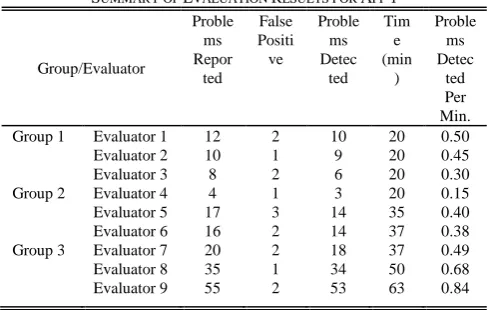
Then, we counted the number of problems reported by each evaluator and the total time spent, and computed the efficiency in terms of problem detection rate, i.e. the number of problems detected per minute. The results for App 1 are in Table II.
TABLEI
PROFILE OF EVALUATORS
Group/Evaluator Position Experience in UI Design (years)
Fig. 3. Number of problems detected by each evaluator for App 1.
TABLEII
SUMMARY OF EVALUATION RESULTS FOR APP 1
Group/Evaluator
Proble ms Repor
ted
False Positi ve
Proble ms Detec
ted Tim
e (min
)
Proble ms Detec
ted Per Min. Group 1 Evaluator 1 12 2 10 20 0.50 Evaluator 2 10 1 9 20 0.45 Evaluator 3 8 2 6 20 0.30 Group 2 Evaluator 4 4 1 3 20 0.15 Evaluator 5 17 3 14 35 0.40 Evaluator 6 16 2 14 37 0.38 Group 3 Evaluator 7 20 2 18 37 0.49 Evaluator 8 35 1 34 50 0.68 Evaluator 9 55 2 53 63 0.84
We were particularly interested in the problem detection rate of the enhanced checklist compared to that of the traditional heuristics. Therefore, we conducted an independent samples t-test to test the difference between means of their problem detection rate. The hypotheses are
H0: μ2-μ3 ≥ 0 (mean problems detected per min. of Group 2 is not less than that of Group 3)
Ha: μ2-μ3 < 0 (mean problems detected per min. of Group 2 is less than that of Group 3)
We obtained the t statistic = -2.7885, degree of freedom = 4, and P-value P(t < -2.7885) = 0.0247. Given the significance level α = 0.05, since the P-value is less than the significance level, we reject H0 and accept Ha. The mean problems detected per minute of Group 2 for App 1 is less than that of Group 3 at the significance level of 0.05.
For App 2, we aggregated evaluation results and conducted the test for difference between means in the same manner. Again, the mean problems detected per minute of Group 2 for App 2 is also less than that of Group 3 at the significance level of 0.05. We conclude that the enhanced checklist is efficient for heuristic evaluations in different domains of applications.
VI. CONCLUSION
In this paper, we propose a usability checklist for heuristic evaluation of Android mobile applications. The checklist enhances existing heuristics and UI design guidelines by combining existing evaluation questions and the newly introduced ones in order to refine evaluation criteria. The resulting checklist comprises 12 heuristics and 146 evaluation questions as subheuristics, and is statistically more efficient than traditional heuristics in terms of design problems detection rate.
The future work includes particularizing the checklist for domain-specific applications, such as map and navigation and entertainment. We also see that some of the evaluation questions might be able to get evaluated automatically, and that would greatly help the evaluation process, considering the long checklist.
REFERENCES
[1] ISO, ISO 9241-11:1998 Ergonomic Requirements for Office Work with Visual Display Terminals (VDTs)-Part 11: Guidance on Usability, 1998.
[2] J. Nielsen, Usability Engineering. San Diego: Academic Press, 1994. [3] Usability Professionals Association (2012), Usability Body of
Knowledge [Online]. Available: http://www.usabilitybok.org/ [4] C.-M. Karat, R. Campbell, and T. Fiegel, “Comparison of empirical
testing and walkthrough methods in user interface evaluation,” in
Proc. SIGCHI Conf. Human Factors in Computing Systems (CHI ’92), New York, 1992, pp. 397-404.
[5] R. Inostroza, C. Rusu, S. Roncagliolo, C. Jiménez, and V. Rusu, “Usability heuristics for touchscreen-based mobile devices,” in Proc. Ninth Int. Conf. Information Technology – New Generations, 2012, pp. 662-667.
[6] J. Nielsen (1995, January 1). 10 Usability Heuristics for User Interface Design [Online]. Available: https://www.nngroup.com/articles/ten-usability-heuristics/.
[7] B. Shneiderman, C. Plaisant, M. Cohen, and S. Jacob, Designing the User Interface: Strategies for Effective Human-Computer Interaction, 5th edition. Prentice Hall, 2009.
[8] J. Nielsen (2008, February 19). Top 10 Application-Design Mistakes [Online]. Available: https://www.nngroup.com/articles/top-10-application-design-mistakes/
[9] Google. Android Design Principles [Online]. Available: https://developer.android.com/design/get-started/principles.html. [10] Apple. iOS Human Interface Guidelines: Design Principles [Online].
Available:
https://developer.apple.com/library/ios/documentation/UserExperienc e/Conceptual/MobileHIG/Principles.html
[11] F. Nayebi, J.-M. Desharnais, and A. Abran, “An expert-based framework for evaluating iOS application usability,” in Proc. 2013 Joint Conf. of 23rd Int. Workshop Software Measurement (IWSM) and 8th Int. Conf. Software Process and Product Measurement (Mensura), 2013, pp. 147-155.
[12] R. Y. Gómez, D. C. Caballero, and J-L. Sevillano, “Heuristic evaluation on mobile interfaces: A new checklist,” The Scientific World Journal, vol. 2014, 19 pp., 2014.
[13] D. Pierotti, “Heuristic evaluation—a system checklist,” Tech. Rep., Xerox Corporation, Society for Technical Communication, 2005. [14] R. Budiu and J. Nielsen, “Usability of mobile websites: 85 design
guidelines for improving access to web-based content and services through mobile devices, Nielsen Norman Group, 2008.
[15] R. Budiu and J. Nielsen, Usability of iPad Apps and Websites, 2nd edition, Nielsen Norman Group, 2011.
Group 1
Group 2 Group 3