An Overview of File Service
Using Functional Multiprocessing
Auspex Engineering
Technical Report 10
Version 4.0
May 1998
Abstract
This report discusses a computer architecture that delivers the reliability, scalability, availability and performance required of consolidated network file servers. The essential components of this architecture and their impact on the success of corporate IT strategies are presented in the main body of text. The details of the components are given in Appendix A. This brief begins with the I/O performance gap, a widespread performance problem that has arisen because surges in workstation performance have not been balanced by similar increases in file server I/O capability. Auspex’s Functional Multiprocessing (FMP)® architecture removes network I/O bottlenecks, enables the reliable consolidation of data, and eases administration burdens.
FMP is a unique, patented multiprocessor server architecture that removes the critical network protocol, file, and disk I/O functions from the general-purpose operating system and instead executes them on dedicated, high-throughput I/O processors. Complete user-level transparency and compatibility are maintained by executing UNIX on a separate, general-purpose, peer processor.
Using FMP, Auspex has built a family of NetServers, which have been used in heterogeneous client, mainframe, and super computing networks. Concurrent random disk access, which the NFS protocol demands for these environments, is delivered by multiple storage processors with as many as 30 fully concurrent SCSI storage channels.
Auspex has also incorporated CIFS support into its product line with the addition of NeTservices™ software enabling bilingual support of UNIX/NFS and NT/CIFS clients. This allows both types of clients—UNIX and NT— to access a common set of file data with their native protocol and user interface without the need for additional client software. Auspex also supports standard NT administrative tools to provide ease of management for NT personnel.
NetServers are complemented by a number of unique, optional software products, including DataGuard™, which allows data service to continue when UNIX fails; ServerGuard™, a patented, high-availability solution that allows filesystems to be mirrored between independent servers on the network; DriveGuard™, a RAID 5 solution that leverages the hardware acceleration of the Auspex storage processor; and FastBackup, which takes advantage of the parallelism of FMP to accelerate backup. These products enhance the NetServer hardware to provide the reliability and functionality required by even the most demanding environments.
With over 2,200 Auspex servers in production use worldwide, the FMP architecture has proven to be exceptionally reliable and scalable. Typical systems range between 12 to 18 Ethernets, 4 to 8 100BaseTs, 4 to 8 FDDIs or 2 to 4 ATMS with 50 to 750 GB of disk storage, supporting 40 to 400 active workstations and personal computers. Larger servers with almost 2 TB of disk space and serving 1,000 to 2,000 clients are frequently deployed as well. Systems of this capacity, throughput, and reliability represent a new class of network data server.
Document 300-TC052, V4.0, 980616.
Auspex Systems Inc. 2300 Central Expressway
Santa Clara, California 95050 USA Phone: 408/566–2000 Fax: 408/566–2020 Email: [email protected]
www.auspex.com
Table of Contents
1 BACKGROUND... 1
1.1 THE I/O PERFORMANCE GAP... 1
1.2 WORKSTATION CONFIGURATION AND NFS TRAFFIC CHARACTERISTICS... 2
1.3 NETWORK ARCHITECTURE EVOLUTION... 5
1.4 RESIDUAL PROBLEMS... 7
1.5 CAMPUS NETWORKING... 7
1.6 THE NEED FOR I/O INNOVATION... 8
2 NETSERVER ARCHITECTURAL OBJECTIVES ... 10
2.1 SCALABILITY... 10
2.2 RELIABILITY... 10
2.3 SOFTWARE COMPATIBILITY... 10
2.4 PERFORMANCE... 10
3 HIGH AVAILABILITY... 12
3.1 DRIVEGUARD... 12
3.2 DATAGUARD... 12
3.3 SERVERGUARD... 13
4 PERFORMANCE TUNING, SPECIFICATIONS, AND EVALUATION ... 14
4.1 PERFORMANCE TUNING... 14
4.2 COMPUTE SERVERS WITH REAL PRICE/PERFORMANCE... 15
5 CONCLUSION... 17
5.1 THE FUTURE OF FUNCTIONAL MULTIPROCESSING... 17
5.2 OPERATIONAL EXPERIENCE... 18
APPENDIX A: FUNCTIONAL MULTIPROCESSING ARCHITECTURE... 20
FMP ARCHITECTURE... 20
Elimination of UNIX from the Critical NFS Path... 20
Loose Coupling of Processors ... 21
Local Filesystem ... 21
No Instructions... 21
Support for Filesystem Intercept Extensions ... 21
RAID... 21
Virtual Partitions ... 21
FastBackup ... 22
Filesystem Cloning... 22
Optional Write Accelerator ... 22
Host Processor ... 23
NFS VERSION 3 IMPLEMENTATION... 24
FMP HARDWARE IMPLEMENTATION... 25
Network Processor Board... 26
Storage Processor Board... 26
Tape Libraries... 27
Host Processor ... 27
I/O Cache (Primary) Memory ... 27
FMP I/O Backplane ... 27
APPENDIX B: GLOSSARY... 29
1
B
ACKGROUNDOver the past fifteen years, remarkable improvements in hardware price-performance have caused a startling shift in technical and office computing environments. Networks of PCS, workstations, and servers have rapidly displaced alphanumeric terminals attached to mainframes or minicomputers.
However, client-server computing in the nineties is experiencing growing pains. Client workstation power and productivity is severely constrained by file server I/O limitations. Dramatic jumps in microprocessor performance have not been matched by similar boosts in server I/O performance and reliability. At the same time, new and emerging applications are creating a need for ever-greater amounts of storage— storage that must be uniformly accessible and secure from disaster and security breaches.
Server reliability has become more critical than ever, with many enterprises evolving to 24-hour operations to improve time-to-market in the face of expanding global competition.
1.1 THE I/O PERFORMANCE GAP
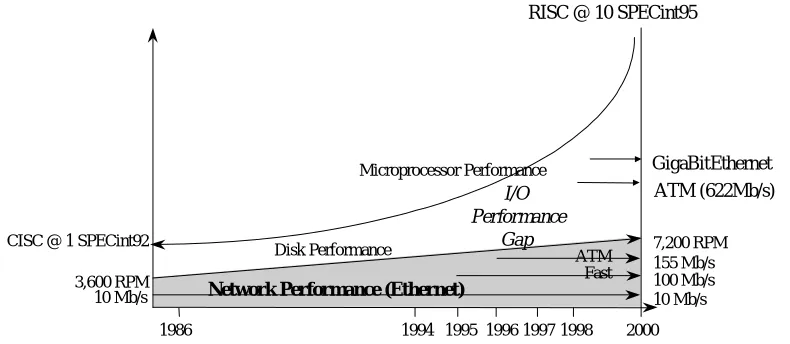
[image:5.612.128.523.401.573.2]Driven by RISC and CISC microprocessor developments, client workstation performance has increased more than ten-fold in the last few years. These extremely fast clients have an appetite for data that conventional servers are unable to satisfy. The dramatic increase in workstation computational power has not been matched by a comparable increase in individual-disk performance or server disk-to-network I/O throughput. The emergence of 100 MB/s FDDI backbones, the adoption of Fast Ethernet and 155 Mb/s ATM, and the promise of Gigabit Ethernet and 622Mb/s ATM do not close the I/O gap. This disparity is illustrated in Figure 1 below.
Figure 1: The I/O performance gap that results from mismatched advances in client processor
performance and server storage and connectivity performance. This gap has grown so wide that some
file servers can be overloaded by as few as ten contemporary client workstations.
In most UNIX environments, clients and servers exchange file data using the Network File System (NFS) [Sandberg 85], a standard distributed file system promulgated by Sun Microsystems and now widely adopted by the entire computer industry. Analysts estimate over 10 million computers are currently NFS-capable, and NFS products are sold by over 100 computer system companies, making NFS almost ubiquitous.
RISC @ 10 SPECint95
Network Performance (Ethernet)
7,200 RPM 155 Mb/s 100 Mb/s 10 Mb/s
1986 1994 1995 1996 1997 1998 2000 CISC @ 1 SPECint92
3,600 RPM
ATM Fast
I/O Performance
Gap
Disk Performance
Microprocessor Performance
10 Mb/s
GigaBitEthernet
Despite its simplicity and reliability, clients using NFS place considerable demands upon both networks and the servers feeding data to them. To understand the I/O performance gap in the context of NFS, it is necessary to examine the impact of client configuration and NFS network traffic patterns on server performance.
The recent emergence of Windows NT™ as a force in the client/server arena has also resulted in the increased appearance of the Common Internet File System (CIFS) protocol, previously known as Server Message Block (SMB), in many high-performance client/server networks. The CIFS/SMB protocol, part of the LAN Manager suite, has performance characteristics similar to NFS, although it places an
additional burden on the server by utilizing connection-oriented transport protocols and maintaining state information. The following discussion will focus on NFS with the understanding that much of what is stated about the use of the FMP architecture for NFS is also applicable to CIFS/SMB.
1.2 WORKSTATION CONFIGURATION AND NFS TRAFFIC CHARACTERISTICS
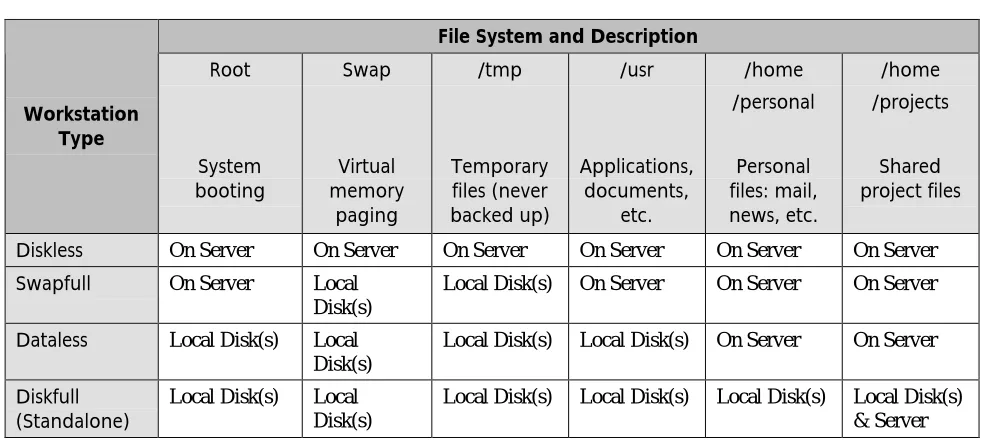
The two most common types of clients found in NFS implementations today are those containing small local disks for booting and/or paging—swapfull or dataless clients, see Table 1. The trend towards these client types has been driven by the rapid decrease in disk prices. The swapfull client obtains its boot image and all binaries from the server, but performs paging and stores temporary files on local disk to improve performance.
The dataless client boots and pages from its local disk, but accesses the server for all shared data and, in most implementations, any data that requires frequent backup. Both swapfull and dataless clients may choose to take advantage of cachefs, a client-side feature that provides an on-disk cache of data from the server. The use of cachefs can substantially reduce loads on both the network and the server, particularly for read-mostly data.
File System and Description
Workstation Type Root System booting Swap Virtual memory paging /tmp Temporary files (never backed up) /usr Applications, documents, etc. /home /personal Personal files: mail, news, etc. /home /projects Shared project files
Diskless On Server On Server On Server On Server On Server On Server
Swapfull On Server Local
Disk(s)
Local Disk(s) On Server On Server On Server
Dataless Local Disk(s) Local
Disk(s)
Local Disk(s) Local Disk(s) On Server On Server
Diskfull
(Standalone) Local Disk(s) LocalDisk(s)
[image:6.612.56.554.393.613.2]Local Disk(s) Local Disk(s) Local Disk(s) Local Disk(s) & Server
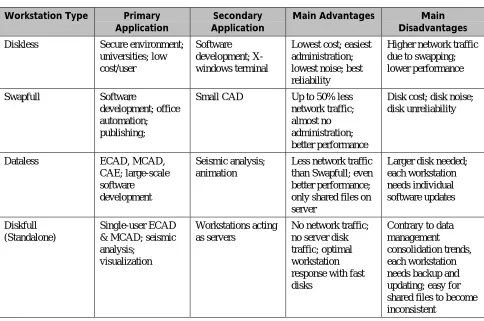
Table 2 shows typical primary and secondary applications for the various client configurations.
Workstation Type Primary Application
Secondary Application
Main Advantages Main Disadvantages
Diskless Secure environment;
universities; low cost/user
Software development; X-windows terminal
Lowest cost; easiest administration; lowest noise; best reliability
Higher network traffic due to swapping; lower performance
Swapfull Software
development; office automation; publishing;
Small CAD Up to 50% less
network traffic; almost no administration; better performance
Disk cost; disk noise; disk unreliability
Dataless ECAD, MCAD,
CAE; large-scale software
development
Seismic analysis; animation
Less network traffic than Swapfull; even better performance; only shared files on server
Larger disk needed; each workstation needs individual software updates Diskfull (Standalone) Single-user ECAD & MCAD; seismic analysis;
visualization
Workstations acting as servers
No network traffic; no server disk traffic; optimal workstation response with fast disks
Contrary to data management consolidation trends, each workstation needs backup and updating; easy for shared files to become inconsistent
Table 2: Typical workstation applications and tradeoffs. The primary and secondary applications are typical, not
fixed or comprehensive. Diskless workstation load on the server will decrease as primary memory is increased. The advantages and disadvantages columns are considered from several viewpoints: user, system administrator, and purchaser.
The most demanding NFS clients are diskless workstations with no local disks. Diskless clients, defined in Table 1, depend on a file server for application binaries and virtual memory paging as well as data. Because of the decrease in disk prices in recent years, this client type has become substantially less common. However, diskless clients may still be mandated by secure sites that don’t allow data to be stored locally, and they continue to be used at some other sites for ease of administration.
Diskfull configurations, in which all necessary data is stored on local disk, are typically applied to the most demanding application types, particularly when there is little shared data among users. They’re also encountered in networks where legacy NFS servers have not met performance expectations. This
configuration, along with the distributed fileserver, is declining rapidly in shared data environments. Duplicated, inconsistent copies of shared data increase the risk of design errors and lost information. This has a negative impact on product quality, cost and profitability and highlights the need for reliable consolidated fileservers.
It provides rules of thumb for practical client-per-Ethernet ranges, taking into account both client and application type.
Application Client Type Large E/MCAD and
Seismic
Medium E/MCAD and Software Development
OA & Doc
Sun Ultra2, HP J210,
IBM 3CT 100/100 Switched 10/100 Switched NotRecommended
SS20, HP 735, IBM 390,
P6-NT 10/100 Switched 10-15 Shared
Not
Recommended
SS2, HP 715, IBM 390,
P5-NT 10-15 Shared 15-20 Shared ~25 Shared
X Terminals (ASCII
terminals) NotRecommended
[image:8.612.188.451.415.543.2]25-50 Shared ~75 Shared
Table 3: Recommended clients per Ethernet. The right number of clients per Ethernet depends on workstation
power and application demand. For the fastest workstations and most demanding applications switched Ethernet (either 10BaseT or 100BaseT as required) is the most appropriate choice, aggregated into one or more Fast Ethernet, FDDI, or ATM server connections. In this table, appropriate matches appear in bold text and user access is network intensive.
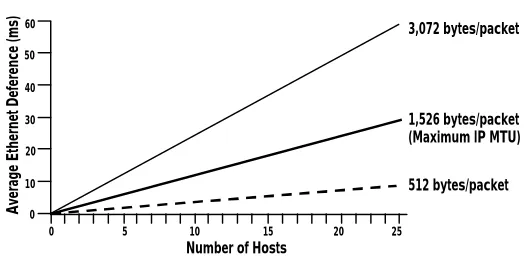
Figure 2: Average-peak Ethernet utilization. On an Ethernet loaded with 15 workstations doing
Ethernet-IP-MTU-sized (1,536-byte) transfers, the 15 ms of deference causes a GetAttr operation to take 15 ms + 15 ms + 2 ms, or 32 ms total—16 times GetAttr’s usual 2 ms round-trip. Since GetAttr can be 50% of a software
development server’s operation load, the negative impact of deference becomes apparent. To reduce this unnecessary queuing delay, keep average-peak Ethernet utilization below 25-30% and the number of clients low. Average peak traffic is the average of all traffic over a 2–3 minute interval—it’s not the instantaneous peak utilization, where 100% is fine.
In addition, Ethernet load plays a strong but little-understood role in minimizing NFS response times. Many network administrators consider Ethernet usage of 40–70% acceptable. This assumption is true with respect to fair, round robin Ethernet access by the attached workstations. It is false if response times are also assumed to be low at high load. David Boggs, co-inventor of Ethernet, extensively studied hardware-level latencies for packet transmissions on loaded Ethernets [Boggs 88]. His study permits the conclusion
Number of Hosts 60
50
40
30
20
10
0
3,072 bytes/packet
512 bytes/packet 1,526 bytes/packet (Maximum IP MTU)
Average Ethernet Deference (ms)
that for NFS transfers in a data-intensive 15-workstation network, there is a hidden extra average response time delay of about 10 milliseconds (each way) as each workstation waits for all the other
workstations’ big packets to fly by (Boggs’ Figure I-4, paraphrased in Figure 2). This latency-causing CSMA/CD deference occurs in hardware and is invisible to software and various Ethernet analyzers. This 10-ms delay is significant because some frequent NFS operations (e.g., GetAttributes) take only 2 ms on an unloaded Ethernet. Boggs’ recommendation for reducing hidden Ethernet delays is simple: Keep unswitched Ethernet utilization to a 25–30% maximum so workstations never wait to transmit. For contemporary networks this recommendation often boils down to private (switched) 10BaseT or 100BaseT as Table 3indicates.
With the deployment of Microsoft Windows NT and Windows-95 in workgroup, department, and even enterprise environments, it is common to see dataless or diskful client configurations. Issues that apply to NFS workstations also apply to CIFS/SMB clients.
In summary, purchasers of high performance clients and servers must make careful choices regarding the network infrastructure to realize the full value of their investment.
1.3 NETWORK ARCHITECTURE EVOLUTION
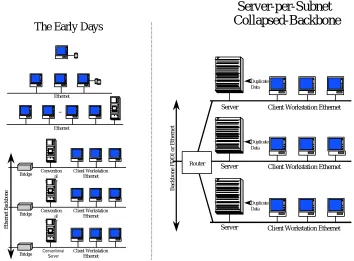
Contemporary networks, with their mix of clients, servers, bridges, hubs, routers and switches may leave the casual onlooker in a state of bewilderment. A look at history (refer to Figure 3) can help clarify.
• Every man for himself
In the earliest days, experimenters had little or no need to network their workstations together. Many sites implemented a stand-alone model. The casual communications of the day were more than satisfied by a single 10-Mb/s Ethernet.
• The good Samaritan
When files had to be shared within the workgroup, one or more generous users might volunteer their workstations’ excess processing and storage capacity to the community: Their workstations thus became part-time data servers.
• We need a server
When NFS load on these good-Samaritan workstations grew, and their users’ productivity dropped, early-generation servers were installed. Though no more than rack-mounted workstations with some additional disks and controllers, these low-I/O-power servers would suffice if (1) clients remained first-generation machines with small network appetites or if (2) single-Ethernet contention rose enough to preclude the presentation of inordinately high loads to the servers. In effect, the inability of a single Ethernet to transport much data might hide a server’s inherent inability to generate it.
• Speak softly, but carry a big disk
When client workstations were added or upgraded and/or more data had to be shared more frequently, Ethernet utilization would rise to the point of stalling the network. Work could simply not get done in reasonable time. On the surface, a sensible approach to reducing contention was to reduce
conversations with the server(s) by augmenting each workstation’s local disk configuration. The expedient solution to an overloaded Ethernet was to limit its usage.
• Segmenting with bridges
• Server-per-segment
With Ethernet contention dramatically lower, network analysis revealed a residual problem. The single server was too weak or too many bridge “hops” away to serve the entire active-user community. The next expedient step (see lower left hand corner of figure 3) was to install additional servers on each of the newly created segments. This not only provided more aggregate server power, but also increased the likelihood of achieving locality of reference. The desire was for clients to obtain their data from the server attached to their own segment. The motive to go through the bridge from clients on segment A to servers on segment B was greatly reduced. From a performance point of view, things seemed to be back on track. The administrator would simply accept a new server for every so many workstations on the segment—typical ratios of the day were one server per 10–20 active clients on a segment.
• Crossing the bridge to routers—server-per-subnet at its best
[image:10.612.138.492.327.588.2]Having “solved” the server problem by deploying them in greater numbers, problems attributed to low-cost, low-function bridging attracted the network administrator’s focus. Administrators would often abandon a flat-net bridged environment, replacing it with a collapsed-backbone router and numerous servers (right side of figure 3).
Figure 3: Network architecture evolution. On the left, top to bottom, standalone workstations are
grouped onto a single and then multiple Ethernet segments. Initially, NFS service is provided by a “good Samaritan” workstation equipped with extra disks. This gives way to a dedicated server, and as Ethernet contention drives the topology to segmentation, multiple servers are configured to handle the NFS load on their particular segment. In more contemporary installations bridged, segmented topologies have given way to the topology on the right, in which a dedicated router handles the inevitable subnet-to-subnet traffic. In such topologies—often called the server-per-subnet model—each client network is limited to 10– 20 workstations by server performance, necessitating a complex multiserver configuration. In addition, 15– 30% of each server’s disk storage usually contains replicated common files, an expensive redundancy, but one that reduces IP routing load and delays. See the text for more explanation.
Server-per-Subnet
Collapsed-Backbone
The Early Days
Backbone FDDI or Ethernet
Client Workstation Ethernet Server
Duplicate Data
Client Workstation Ethernet Server
Duplicate Data
1.4 RESIDUAL PROBLEMS
Though more refined than the topologies from which it evolved, the network depicted on the right side of Figure 3 is not trouble-free. Attempts to extend this architecture by converting it from shared to switched Ethernet, do not fix the fundamental problems. Informal surveys taken by Auspex at hundreds of sites around the globe have reported all or some of the following problems associated with this topology:
• Sharing
Development groups of more than 10–20 people overpower any single small server, cannot readily share the same server, and thus cannot easily share files without multiserver file replication and/or NFS crossmounting.
• Reliability
A commonly held notion is that multiple, small servers increase overall NFS availability. This belief stems from the unrealistic assumption that a given server will never be responsible for more than a small fraction of the entire client community. Thus it is hoped the effect of a single server outage will be mostly contained. In practice, the inevitable crossmounting found in contemporary networks destroys any such hope. Every client’s dependency on multiple crossmounted file systems actually
reduces the reliability of the NFS service clients receive overall.
• Performance
With minimal or no sharing, so long as locality of reference and a low client-to-server ratio can be maintained, performance from any given server may be acceptable, but overall performance drops when sharing begins and this delicate balance is disrupted. Individual servers become network performance bottlenecks when hot spots develop on widely shared file systems. These hot spots may “travel” from server to server during the workday. Additionally, inevitable crossmounting adds router latency to average NFS response time.
• Administration
System administrators must maintain many limited-capacity servers rather than one or a few powerful servers. This burden encompasses performance monitoring and tuning, free-disk-space management, hardware maintenance, and user account administration. A classic problem is the treatment of an imbalance in Ethernet subnet utilization. To restore the overloaded subnet to a healthy state, the administrator is motivated to move a certain number of clients from it to another under-loaded subnet. This movement has the effect of perturbing client-server locality of reference, motivating a
corresponding movement of data from servers on the overloaded subnet to other servers on the under-loaded subnet. The target servers may lack space on their existing disks or the spare slots to handle disks the administrator is prepared to physically transfer from server to server.
• File system backup
System administrators or operators must conduct multiple file server backups, a time consuming task. It is also expensive to duplicate backup peripherals on each server (or every few servers if slower network backup is used).
1.5 CAMPUS NETWORKING
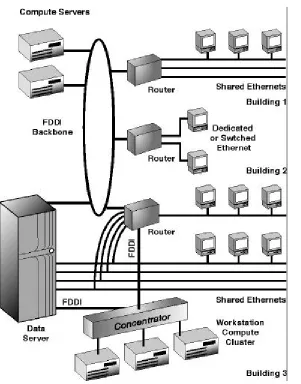
A combination of factors (starting with those of section 1.4) has driven “large-installation system and network administrators” to implement topologies such as depicted in figure 4 over the past several years and is leading many sites to implement configurations like that shown in figure 5. These factors include:
• Availability of affordable high-performance 100Mb/s to 10Mb/s switches to provide private Ethernet service to desktops where needed
• Availability of 100Mb/s to 100Mb/s switches to provide high bandwidth to the most demanding desktops, between servers, and to server-room compute clusters
• Accelerated migration of interconnections to new technologies as they mature: —Shared Ethernet —> switched Ethernet (major trend)
—10BaseT —> 100BaseT (major trend) —FDDI —> 100BaseT (frequent) —FDDI backbone —> ATM (limited)
—100BaseT —> Ether-channel/Ethernet trunking (emerging technology) —Gigabit Ethernet (pre-standard in 1997, standard in 1998)
• Rapid growth in amount of data storage required and the desire to consolidate storage
1.6 THE NEED FOR I/O INNOVATION
The widening I/O performance gap, in conjunction with the administrative and economic considerations of section 1.4 and the special challenges of campus networking, demonstrates a need for
higher-performance, larger-capacity file servers with superior reliability. The workstation vendors’ traditional approach to server design, repackaging a workstation in a rack as a retrofitted compute server, is inadequate for large networks at current client performance levels.
Conversion of a display-less workstation into a server may address disk capacity issues, but it does nothing to address fundamental I/O limitations. As a file server, the retrofitted workstation must sustain 10–20 or more times the network, disk, backplane, and file system throughput than it was designed to support as a client. The addition of larger disks, more network controllers, extra primary memory, or even a faster processor does not resolve basic architectural I/O constraints. They do not substantially increase overall I/O throughput nor are they designed to achieve high reliability. Even today’s general-purpose SMP servers are optimized for compute and not I/O; they fail to achieve the real world performance and reliability required of a consolidated data server.
Closing the I/O performance gap and providing high levels of reliability requires a network data delivery-specific architecture that can flexibly balance client data demand with network data server I/O throughput. The new I/O architecture must scale in throughput and capacity just as easily as client workstations scale in performance. The new architecture must focus on optimizing a network data server’s most common actions, network file protocol and disk operations, just as router architectures optimize IP routing and RISC processors optimize a CPU’s most common instructions.
Figure 4. Consolidated server with FDDI and Ethernet ports (typical top 15% network topology,
1994-1995). Combined FDDI and Ethernet internetworking for large installations spread over distances
2
N
ETS
ERVERA
RCHITECTURALO
BJECTIVESThe Auspex NetServer was designed with the four objectives in mind: scalability, reliability, software compatibility, and performance. By meeting these four primary design goals, Auspex has created a consolidated network filesystem that plays a major role in today’s global IT infrastructures. The end result is a data management platform that helps the corporation achieve its business goals.
2.1 SCALABILITY
The server architecture had to support a system that was both flexible and scalable. Flexibility was desired so that FDDI, ATM, 100baseT networks, optical and tape storage media, and multivendor UNIX host processors could be included as appropriate. Scalability was important to accommodate server
configurations with not just 2 or 4 networks, but 8, 12, 24, 30 or more networks; not just 5 or 10 disks, but 50, 100, 200, or more disks; and not just one or a few usable CPUs, but multiple usable CPUs.
A scaleable architecture allows and encourages the consolidation of many individual server-per-subnet workgroups onto a single server that is more cost-effective, reliable, and easily administered.
Significantly, scalability implies more than configurability. To meet the growing data demand of an expanding client population, a server’s ability to attach a large complement of networks, disks, and processors must be supported by an architecture facilitating the effective, collective utilization of these resources. The important distinction being drawn here is between theoretical configurability and
practical, real-world configurability and usability.
2.2 RELIABILITY
Recognizing that the trend toward larger, consolidated servers must be accompanied by increased server reliability, Auspex set the base configuration (excluding peripherals) Mean Time Between Failure
(MTBF) goal to 5,000 hours for the original NetServer. MTBF goals for current NetServers exceed 14,000 hours, less than one base system failure every 18 months. Data is collected on a continuing basis to confirm that this goal is regularly exceeded.
2.3 SOFTWARE COMPATIBILITY
For comprehensive software compatibility, the NetServer needed to be compliant with CIFS/SMB, NFS, other Open Network Computing (ONC) services such as NIS and automounter, and SunOS UNIX. Moving into the future the NetServer architecture provides the framework to accelerate a wide variety of network protocols beyond CIFS/SMB, NFS version 2, NFS version 3, and FTP and to provide full compatibility with those environments. These include WebNFS and other internet-related protocols.
2.4 PERFORMANCE
Ten years ago, in 1987, Auspex designers set the target performance level for their first server to be 1,000 NFS 8 KB read operations/second. Of the 22 NFS operations defined, NFS read operations usually occur less than 25% of the time, but Auspex’s performance goal was made more difficult by restricting the load to NFS read operations. This was a difficult, data-intensive goal for I/O hardware because it required driving 8 Ethernets at 90% utilization each, achieving a total transfer rate of 72 Mb/s. Of course, excellent performance on the remaining NFS operations is important as well. In benchmark tests using an average
NFS operation mixture, the NetServer’s actual peak performance today exceeds 10,000 NFS LADDIS ops/s. It is important to note that while other vendors claim to deliver higher performance, Auspex is the only vendor willing and able to provide mission critical reference sites with multi-terabyte
Figure 5: Consolidated server (1996 and beyond). Compared with Figure 4, current networks have a greater emphasis on switching technology with switched 10BaseT or even 100BaseT to the most demanding desktops. Redundant paths are provided between all buildings for greater reliability and to limit the need for the NetServer to act as a router. 100BaseT may replace FDDI where distance is not a constraint. Shared Ethernet is still used where appropriate for lower powered desktops and less demanding applications.
3
H
IGHA
VAILABILITYTo extend the availability of its base file server offerings, Auspex has developed a portfolio of high-availability software products. These products include DriveGuard™, which provides economical RAID 5 storage protection; DataGuard™, which protects against UNIX failures; and ServerGuard™, a unique product that protects against loss of data access in the event of a catastrophic server failure or other disaster. When combined with the highly reliable FMP architecture, these software solutions meet the needs of even the most demanding environments.
3.1 DRIVEGUARD
The use of Redundant Array of Independent Disks (RAID) has become among the most common ways of improving data availability. Along with disk mirroring and striping, Auspex provides the ability to configure RAID 5 disk arrays as an optional feature of the storage processor. DriveGuard allows
customers to configure the appropriate number of filesystems (large or small) with the appropriate level of protection—mirroring for maximum data redundancy and protection, striping for maximum performance without redundancy, or RAID 5 to balance cost-effective data redundancy with performance.
The storage processor transfers data in and out of I/O cache memory using a patented ASIC called the Auspex FIFO Controller (AFC). The AFC incorporates the ability to calculate parity as data is being transferred, providing a simple and efficient mechanism for generating RAID parity blocks while placing minimal additional burden on the storage processor CPU and no burden on other system CPUs.
Figure 12 in Appendix A illustrates how RAID fits into the storage processor block diagram. An incoming write request is first processed by the virtual partition code if appropriate (virtual partitions may be constructed on top of RAID arrays if desired) and is then passed to the write cache module. The write is then cached and is subject to coalescing and inode collapsing as described previously. When the block is scheduled to be written, parity is generated by reading the appropriate parity and data blocks from cache or disk. Both parity blocks and data are cached whenever possible to accelerate operations.
RAID arrays can be flexibly configured from the disks managed by each storage processor. Each RAID array optimally consists of from 3 to 6 disk drives. Larger partitions, if required, can be created by concatenating two or more RAID arrays. Spare disks can be configured on a per-array or per-SP basis. An attached 8 MB write accelerator daughter board and Storage Processor 5 (SP5) are required to ensure optimal performance, but no other hardware additions or changes are required.
3.2 DATAGUARD
Operating system failures cause up to 50% of all server disruptions, the biggest single source of disruptions. Realizing this, Auspex developed DataGuard™, a product that allows UNIX to come to a complete halt without affecting NFS operations. Leveraging the FMP architecture that removes UNIX from the NFS data path, DataGuard builds a logical firewall between the host processor and the data control and delivery path managed by the rest of the system.
With DataGuard, NetServer availability is independent of operating system reliability. Users can run important applications on the host processor, such as backup applications or system administrator scripts, without fear that application instability will interrupt NFS data service. If a UNIX hang or panic occurs, the host processor reboots automatically, independent from the rest of the system, in approximately 2 minutes. Ongoing NFS service continues uninterrupted. The host processor may also be rebooted
DataGuard host-processor-only reboots do not interrupt NFS operations or cause NFS timeouts on the clients. This allows administrators to perform activities during working hours that previously would have had to wait for a planned downtime window. For organizations that require 24x7 operations, these downtime windows scarce. DataGuard provides administrators with the scheduling freedom to install and configure third-party software, modify UNIX kernel parameters, attach hardware to the host processor SCSI port, or simply reboot immediately, as soon as a problem arises. A common example of the latter would be a reboot to kill and restart a set of misbehaving application processes not involved in data service.
Although the initial motivation for developing DataGuard was primarily to reduce unplanned downtime, DataGuard, as exemplified above, impacts planned downtime even more favorably.
3.3 SERVERGUARD
ServerGuard is a unique software product that provides an NFS server solution for environments requiring high availability and disaster recovery. ServerGuard creates and maintains consistent copies of file systems on independent servers. No change is required to the clients or client applications; they simply mount the ServerGuard file system.
A key component of ServerGuard, the fault-tolerant NFS (FTNFS) protocol, is used between servers to ensure consistency. The FTNFS approach differs from traditional two-phase commit algorithms in having lower overhead, and differs from shared-disk solutions by allowing the servers to be physically distributed.
FTNFS performs on-line transaction-consistent duplication of data by using network multicasting to send each client’s NFS request to two servers. The requests are processed simultaneously by the pair of servers. A lightweight acknowledgment mechanism between the two servers provides a guarantee of data
redundancy and consistency.
Figure 6: Typical ServerGuard configuration. Server P acts as the primary server for filesystem A and the secondary server for filesystem B, while server Q is secondary for A and primary for B. Each server maintains a complete and consistent copy of requests for each filesystem at all times. Clients mount filesystems from a virtual server consisting of both P and Q and multicast all NFS requests so that both servers receive them simultaneously. The servers respond to NFS requests according to Auspex’s FTNFS protocol. Primary and secondary actions differ depending on whether the request is reading or writing data or creating files. Should one of the servers suffer a failure, the other is able to take over the workload almost
instantaneously. Recovery is fully automatic and occurs on-line after the failure has been corrected.
4
P
ERFORMANCET
UNING, S
PECIFICATIONS,
ANDE
VALUATION4.1 PERFORMANCE TUNING
Since NetServers support as many as five network processors and five storage processors, multiple network connections (10BaseT, 100BaseT, ATM and FDDI), and 210 disk drives in a single system, a concise display of server I/O performance data is vital for system managers and administrators.
NetServers come with a performance monitor that enables detailed investigation of site- and application-specific server performance behavior. This is possible because the monitor gives a clear and precise view of statistics not normally available to system administrators, and rarely viewed even by system
programmers. Such a thorough view is especially important in a functional multiprocessor, where there is considerably more latitude for network, file, disk, and processor cache adjustment and load balancing than in conventional servers.
The NetServer’s performance monitoring tool has an extensive view into each NetServer processor type and provides both real-time display and fast-motion replays of significant server performance events. Figure 7 shows a sample performance monitor summary screen. The event-generated statistics include: per-processor CPU utilizations; network and disk I/O rates and I/O types; file system operation loads, mixes, and rates; and individual cache hit rates and age distributions for the network, file, and disk subsystems. The performance monitor’s results are reported in two-dimensional windows at user-selected update times. The results can also be written to log files over a extended time base for trend analysis.
- 1.0 System Summary mlab Wed Jun 12 15:20:54 1996 CPU Utilization Ethernet/FDDI: Bytes/sec SP0:OPs/sec HP usr 1% NP0[ 6481518] NP2[ 7232494] NP4[ 7392942] (0~ 80 in bar) sys 1% f0[ 6481518] f0[ 7232494] f0[ 7392942] R1[ ] idle 98% [ ] [ ] [ ] [ ] [ ] [ ] [ ] [ ] [ ] [ ] [ ] [RRWWWWWW ] NP0 97%[========] [ ] [ ] [ ] [RRWWWWWW ] NP1 82%[======= ] [ ] [ ] [ ] [RRWWWWWWW ] NP2 82%[======= ] [RRWWWWWW ] NP3 83%[======= ] NP1[ 7314628] NP3[ 7226578] R2[ ] NP4 84%[======= ] f0[ 7314628] f0[ 7226578] [ ] [ ] [ ]Total NP Bytes/sec[ ] FP0 70%[====== ] [ ] [ ] [ 35648160] [RRWWWWWW ] FP1 60%[===== ] [ ] [ ] [RRWWWW ] FP2 59%[===== ] [ ] [ ] [RRWWWWWW ] FP3 60%[===== ] [ ] [ ] [RRWWWWWW ] FP4 60%[===== ] FP: LFS OPs/s(0~1500) DataCacheAge R3[ ] FP0:2049[GGLLLLLRRR] [AAAAAAABBBI] [ ] SP0 50%[==== ] FP1:2322[GGLLLLLRRR] [AAAAAABBBI ] [ ] SP1 83%[======= ] FP2:2174[GGLLLLLRRR] [AAAAAAABBBC] [RRWWWWW ] SP2 61%[===== ] FP3:2256[GGLLLLLRRR] [AAAAAABBBCI] [RRWWWWW ] SP3 98%[========] FP4:2280[GGLLLLLRRR] [AAAAAABBBCH] [RRWWWWWW ] SP4 68%[===== ] [---] Total LFS OPs/s [RRWWWWWW ]
Figure 7: The Performance Monitor’s System Summary screen. Thisscreen summarizes the most
important performance information about a NetServer.
The performance monitor allows system administrators to accomplish tuning that has heretofore been extremely difficult in UNIX (as opposed to proprietary minicomputers or mainframe) environments. It encourages maximum use of existing hardware before any upgrade purchases. The Auspex System Manager’s Guide discusses the performance monitor in depth.
4.2 COMPUTE SERVERS WITH REAL PRICE/PERFORMANCE
As mentioned in section 1.2, for optimal response time, contention on Ethernets supporting many
concurrently active clients should be kept low; utilization should be restrained to 30% or less. However, in point-to-point connections, collisions and contention are much smaller issues—high Ethernet utilization is both safe and achievable. This fact has inspired an extremely cost-effective means for running
computationally intensive jobs on CIFS/SMB or NFS data (see Figure 9). Rather than temporarily copying a bulk of NetServer data to some costly compute server’s local disks for the sake of running a job, remote mounting the data from a RAM-rich dataless headless workstation (incorporating the very same RISC CPU) results in virtually the same job execution time for many applications. This seemingly counter-intuitive result is plausible when one considers the following:
• Auspex NetServers are powerful enough to deliver data at 60 to 120 Mb/s (7 to 15 MB/S) over 100BaseT, ATM and FDDI. Compute servers whose main-memory data working set is on the order of hundreds of megabytes rarely have to wait more than a few seconds for fresh data upon which to compute. When job execution time is dominated by computational time, the fraction of time spent waiting for disk data or storing results is essentially negligible.
/ax_perfmon_data/godzilla/fp_cpu_data.dat
0 10 20 30 40 50 60 70 80 90 100
File Processor CPU Utilization (%) between 14:00 and 17:00
Time (Days)
[image:20.612.210.444.93.304.2]Sept. Oct. Nov. Dec.
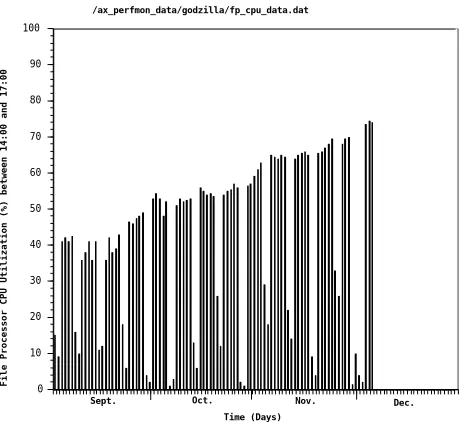
Figure 8: Histogram display of performance monitor statistics. As an example, this histogram displays a
log of file-processing CPU data from the performance monitor. Each vertical bar shows average CPU utilization between 2 and 5 p.m., rather than a single instantaneous sample. This 3-hour high-use period was selected, rather than 24 hours, to avoid deflating the values with low nighttime traffic. (Note how utilization drops substantially on weekends and holidays). The histogram shows that adding NFS
Figure 9: Compute servers with real price/performance. NetServers have the spare power and
connectivity to satisfy the data appetite of powerful workstations direct-connected over dedicated Ethernet or FDDI networks. As experiments indicate (even with today’s most powerful workstations), compute-intensive jobs can finish as fast or faster accessing data on a NetServer than when relying on local disk. Compute server cost is thus contained and flexibility gained, since the workstation implementation of a vendor’s fastest RISC chip is less costly per SPECint than the general-purpose server version. For best results, the compute node should have 128 MB to 1 GB of memory and a 1 to 4 GB local disk. Jobs demanding data at >1 MB/s may be run on FDDI-connected headless compute nodes.
5
C
ONCLUSIONThe I/O performance gap is a tangible, daily problem for workstation users. The NetServer’s functional multiprocessor architecture breaks this bottleneck for NFS clients. FMP eliminates the cost, performance, reliability, and administrative problems of the traditional, server-per-subnet NFS network. FMP is a demonstrably scalable network-server architecture with exceptional throughput and low latency.
The NetServer can be further enhanced with DataGuard software to prevent UNIX failures from affecting client data access, and ServerGuard to provide the greatest degree of data availability and disaster avoidance for environments that require it.
5.1 THE FUTURE OF FUNCTIONAL MULTIPROCESSING
Because of its unprecedented scalability and efficiency, FMP achieves far greater I/O throughput per unit of processing power than conventional, general purpose, compute-oriented architectures. This provides great flexibility for future development. While conventional architectures depend on the latest, hottest CPUs to achieve good results, Auspex can choose to migrate FMP to commodity CPUs, decreasing system cost, while still maintaining the clear advantages in real-world performance that the FMP architecture provides.
Additionally, since FMP is fundamentally independent of the operating system running on the host processor, additional host environments, such as Windows NT, can be implemented in the future without impacting the inherent strengths of the underlying architecture.
The consequence is simple. Auspex has done the hard part—mainframe class I/O at UNIX price/performance—and is quite happy to let the giants battle it out for MIPS.
Workstation Net 1
Workstation Net 2
Workstation Net 3
Workstation Net 4 Headless-Workstation
Compute Nodes
Consolidated Data Server
Headless-Workstation Compute Nodes Dedicated
FDDI or Ethernet compute-server networks.
Ethernet
FDDI, MLT-3 or Fast Ethernet
5.2 OPERATIONAL EXPERIENCE
While this overview report focuses mainly on architecture, Auspex’s customers say that the NetServer’s high reliability and simplified system administration are just as important. The features and functions of the NetServer that contribute to high reliability and easy administration are:
• Support of both CIFS/SMB and NFS protocols with one server and one copy of data
• CIFS/SMB and NFS bulletproofing through FMP
• DriveGuard, DataGuard, and ServerGuard
• Hot-pluggable disks, CD-ROMs, and tapes
• Disk striping and mirroring
• File system cloning and expansion
• File system fault isolation
• NFS crossmount elimination by consolidating servers
• Single-point file-system backup
• 15-minute replacement time of any component
• N+1 power supplies
• The performance monitor and histogram tool.
Our customers’ actual operating experience with NetServers has been extremely gratifying. With over 2,200 systems installed as of this printing, customer response is universally enthusiastic, as the following items illustrate:
• Many customers, especially those in the Fortune 500, have multiple machines both throughout their companies and at single sites. One Fortune 100, semiconductor customer has a NetServer volume purchase agreement that essentially makes Auspex its exclusive worldwide corporate NFS server. This pattern in the United States has repeated itself in Japan and is doing so in Europe.
• NetServer application environments are similar for both large and small customers in industries such as software development, VLSI and PCB design, mechanical CAD, strategic Web site deployment, oil exploration, securities trading, feature-film animation, multimedia, and scientific research (at national laboratories and supercomputer centers).
• NetServer network environments are highly heterogeneous. Equipment from Sun, DEC, HP, IBM, Intergraph, NeXT, and Silicon Graphics appears frequently, often in combination with large numbers of increasingly capable PC clients.
• Typical installations have four to six 100 Mb/s network connections and average >200 GB of disk capacity. Many are configured with eight 100 Mb/s connections and over 400 GB of disk, with high capacity DLT tape libraries for backup. Numerous systems have >1 TB of storage.
• Some power users report that their workstations run faster during the day (sharing a NetServer with 40 other users) than they did previously in the middle of the night (accessing a conventional server as the only user).
• One uptime-conscious customer relocated his NetServer and its user community to a new building in record time. “In just two hours, versus two days. While our servers from other vendors were lying about in pieces on the floor, the NetServer was powered down, transported, reinstalled, and rebooted. Our engineers were up and operating in record time. Consolidating NFS service onto one NetServer meant there was just one server to move, not ten or fifteen. We had even tested our expansion from two to four Ethernets prior to teardown and transported the hot-pluggable disks by hand. We moved the NetServer ourselves. Auspex system engineers were on call, but everything went smoothly without their help.” The speed and smoothness of the move earned the system administrator a standing ovation from his executive staff, as well as a performance bonus.
• A major automotive vehicle design center uses seven Auspex servers, each with DataGuard, 8 FDDI connections, and a total combined mirrored storage capacity of 2 TB (4 TB of total disk). These servers support a user community of over 1,200 engineers doing mechanical CAD. Despite the fact that the entire operation is 24x7, the servers are supported by fewer than 4 administrators.
• In a data-intensive seismic interpretation operation,the customer replaced 4 existing conventional servers with a single NS 7000 NetServer with 350 GB of storage. The customer reports the system, “has eliminated our bottlenecks, our users are satisfied, and everybody is more productive.”
• At a leading Internet service provider, all network News and Web data is consolidated on a single Auspex NetServer, currently with 90 GB of storage. This single server provides all data to a large number of front-end servers that process HTTP and other client requests. The machines are interconnected with FDDI and 100BaseT for redundancy. [Chua 96]
• Some system administrators report that they now lead “normal” lives, working 8 to 5 because they’re no longer fighting multiple-server crossmounts, backups, and updates. They tell us, “I don’t even know the server’s there.”
• Auspex’s well-known dedication to “total customer satisfaction” is proving itself in practice. Especially among Fortune 500 customers, Auspex continues to win business because decision-maker reference checks with Auspex’s existing customers show that Auspex’s customer support, from sales, service, engineering, and manufacturing, is “better than the support we’ve received from any of the UNIX vendors we’ve dealt with.”
A
PPENDIXA: F
UNCTIONALM
ULTIPROCESSINGA
RCHITECTUREThe NetServer achieves its design objectives with a unique, patented functional multiprocessing (FMP) architecture that maximizes performance by coupling storage devices to networks as directly as possible. A key FMP notion is that protocol, file, and storage software components are not run on general purpose UNIX or NTCPUs. This strategy further boosts performance by cutting unnecessary software overhead to a minimum and dramatically reducing outages that, on a conventional server, are typically ascribed to an overly complex general-purpose operating system. Because processing components have local memories and are loosely coupled via functional multiprocessing kernel (FMK) control messages, system scaling is predictably linear.
FMP ARCHITECTURE
The lifecycle of a read operation will serve as a tutorial on the operation of FMP. For purposes of this discussion, NFS version 2 (NFSv2) is used. However, with the exception of a few minor particulars, the discussion here also applies to the NFS version 3 (NFSv3) protocol and to WebNFS. More details are provided in the following section, “NFS Version 3 Implementation.”
The CIFS/SMB protocol, now implemented under FMP, uses a largely identical process. CIFS/SMB does not require that writes be committed to stable storage before acknowledgment, so all writes are allowed to occur asynchronously.
Although the FTP protocol differs substantially from the protocols mentioned above, FMP has also provides substantial acceleration for the FTP protocol and can provide the basis for a highly parallel FTP server.
Let us begin with an 8 KB NFSv2 read request entering the system via a network connected to the protocol-processing CPU (refer to Figure 10). Running FMK, the protocol CPU processes the read operation through the IP, UDP, RPC, XDR, and NFS layers. It then constructs a control message to send to the file-processing CPU, passing a file handle and data offset. Upon receipt of this control message, if the file-processing CPU’s hash tables indicate the read block is already in I/O cache memory, it responds immediately with the address of the requested data. Otherwise, it navigates its locally cached UFS metadata to further refine the file handle request into a disk I/O control message for passage to the storage-processing CPU.
This second, and final, control message also contains the I/O cache memory location reserved by the file-processing CPU for the block. The storage-file-processing CPU translates the request first to a physical partition request (only necessary when the data resides in a virtual partition) so that it can then drive the appropriate SCSI channel to action. In a single direct memory access, the 8-KB block flows through the storage processor to I/O cache memory. The storage-processing CPU then replies to the file processing CPU that its original request for a direct-memory-access (DMA) transfer has completed. This
acknowledgment in turn triggers a reply from the file processing to the protocol-processing CPU. Since the reply contains the I/O cache memory location of the user’s requested data, the protocol-processing CPU can initiate a second and final DMA transfer of data, IP-fragmenting it as necessary onto the network. Further elaboration is given in the following subsections.
ELIMINATION OF UNIX FROM THE CRITICAL NFS PATH
performance and enhanced reliability. FMK is further described in a separate Usenix conference paper [Hitz 90].
LOOSE COUPLING OF PROCESSORS
The control path is subtly different from the data path, which does not include the file-processing CPU itself. Furthermore, control is achieved with interprocessor messages, not shared memory. Such loose coupling of processors significantly contributes to linear scaling when additional protocol-, file-, and storage-processing CPUs are added to the NetServer. Because each processor is functionally specialized and autonomous, there is no need to burden the system buses by requiring full cache coherence between processors as is required on SMP machines.
LOCAL FILESYSTEM
For efficient file-system processing within the NetServer, Auspex designed the local file system
(LFS), a new, internal filesystem interface. LFS is used for file communication between protocol-processing CPUs and file-protocol-processing CPUs, and also between the host-protocol-processing and file-protocol-processing CPUs. The set of LFS operations is a superset of NFS operations, and these common operations share many semantic properties. LFS has been a strong unifying influence on the NetServer software architecture. But it is important to note that LFS is used only within the system; the external network protocol is precisely standard NFS. LFS is described in a separate IEEE conference paper [Schwartz 90].
NO INSTRUCTIONS
The NetServer’s I/O cache memory contains no instructions; it is exclusively dedicated to NFS data and transient IP packets being routed between networks under control of the protocol-processing CPUs. Additionally, no instructions flow across the NetServer backplane (except for the minimal amount needed by the Host Processor), reserving this pathway almost entirely for data moving. Although SMP systems may boast impressive speeds on their internal buses, much of this bandwidth is consumed moving instructions rather than data and maintaining cache coherence between CPUs.
SUPPORT FOR FILESYSTEM INTERCEPT EXTENSIONS
To better support Auspex and third party data management products for backup/restore, file migration, compression, and file encryption, the file-processing CPU supports Filesystem Intercept extensions (FIX). This API is functionally similar to the Data Management Interfaces Group (DMIG) API specification. To illustrate the use of FIX, if the file-processing CPU determines that a particular data block is on tertiary, not secondary storage, it sends its request-for-data control message to the host-processing CPU, which is responsible for management of tertiary devices such as optical and tape libraries. The data is then migrated back to primary storage for rapid access.
RAID
RAID is supported on all disks attached to the storage processor. The RAID subsystem is described in greater detail in section 3.
VIRTUAL PARTITIONS
capacity).Larger partition sizes can be achieved using RAID arrays as the building blocks of concatenated virtual partitions.
Striping interleaves disk blocks across multiple physical disks, easily alleviating hot spots in busy file systems or databases. Mirroring duplicates file systems onto two striped or concatenated virtual partitions on two sets of disks, permitting transparent recovery from drive or media failure (in conjunction with file system fault isolation and hot pluggability). Implementing virtual partitions on the storage processor, as close as possible to the disks themselves, injects lower overhead than conventional kernel driver-level approaches and allows benefits to be applied to all disk processing, not just NFS. This is a cursory description of virtual partitions; they are described in more detail in
The Auspex System Manager’s Guide.
FASTBACKUP
In order to better support accelerated backup, the storage processor provides the optional FastBackup API, which takes advantage of the FMP architecture to accelerate and parallelize the backup process. Each storage processor can stream data directly from disk to attached tape devices without the data ever traversing the FMP backplane. With applications written to the FastBackup API, an
administrator can quickly create consistent, online image backups of active filesystems while retaining the ability to rapidly locate and restore individual files.
FILESYSTEM CLONING
Filesystem cloning, a feature analogous to virtual partition mirroring, permits metadata-consistent “snapshots” of online file systems to be taken, typically to a spare disk partition. Once the data-replication portion of the cloning process is complete, the cloned snapshot is automatically detached from the online file system. The offline snapshot may then be backed up from disk to tape, for which administrators often use an unattended-backup application driving a tape library. After the tape copy is complete, the spare disk partition may be reused to clone-backup the next partition.
OPTIONAL WRITE ACCELERATOR
NFS version 2 normally requires that all writes be synchronous (completed to a stable storage medium before sending an acknowledgment to a client). Servers that routinely perform asynchronous writes sacrifice data integrity for the sake of performance. The storage processor’s optional write accelerator provides asynchronous performance with synchronous data integrity. It accomplishes this in three ways:
• Write caching
Not having to wait for completion of a physical disk write cuts the write operation from 20 ms to under 1 ms (see Figure 12).
• Data coalescing
As mentioned above, NFS version 2 fractures a single client’s write operations into successive, 8-KB blocks. When several clients access the same file system in this manner, the data presented to the storage processor takes on a random, not sequential, traffic pattern. By coalescing the 8 KB blocks in the write cache, the accelerator can reorder the eventual disk writes to be physically more sequential, thus greatly reducing disk arm movement and wasted time.
• Inode collapsing
data is written to the end of a file with an append write, because each new append would
normally write an inode to disk. Instead, the inode update is caught in the write cache—avoiding a disk operation. About 90% of all UNIX file write operations are append writes, so inode collapsing is truly valuable.
For an average NFS version 2 operation mix, the system delivers 20% more throughput and 50% faster response time. This means that typical write-intensive applications complete 3 to 5 times faster. The write accelerator is easy to administer. Write acceleration is selected on a file system, per-storage processor basis and its behavior is indicated in one of the performance monitor’s display screens (see section 4.1).
HOST PROCESSOR
Figure 10: The NetServer functional multiprocessing I/O architecture. All protocol, file system, and storage processing is completely removed from the UNIX host processor. The UNIX host processor, a SPARC-based design, is responsible for system booting, ONC functions, error logging and reporting, performance monitoring, SNMP agent coordination, backup and restore, and virtual partition and file system cloning administration.
NFS VERSION 3 IMPLEMENTATION
Most of the details discussed in the previous section also pertain to the NFS version 3 implementation on the NetServer platform. However, NFS version 3 does differ in some important details. NFS version 3 includes a number of significant performance improvements that can provide real benefit to many NFS environments.
Version 3 includes a safe asynchronous write protocol. NetServers using NFS version 3 demonstrate twice the write throughput versus the same configurations using NFS version 2. This enhancement mitigates the benefits of the non-volatile write cache (discussed above) to some extent, although early studies show that write caching still provides substantial performance benefits by caching metadata writes (which occur synchronously) [Pawlowski 94].
NFS version 3 also implements fewer on-the-wire operations between clients and servers for improved performance. Version 2 clients check to make sure that their cached data does not become invalid by periodically acquiring the file’s attributes, including the date and time of last modification. This requires frequent “Get Attribute” (getattr) requests, which can make up a large percentage of NFS version 2 traffic. NFS version 3 minimizes the number of these requests by returning attribute information with all
operations.
– NFS protocol processing - CIFS – FTP processing – TCP support – UDP support – IP routing
I/O Cache Memory
File Processing FMK CPU Data Flow Parallel SCSI Channels Tape or Optical Disk Library SCSI Write Cache Memory – UFS metadata Memory Protocol Processing FMK CPU
– UFS File System – DMIG API (HSM) - NT ACL’s
Control
Flow ControlFlow
Storage Processing FMK CPU – Write Acceleration – Virtual Partitions (RAID 0,1,5) – FastBackup Internal SCSI Disks and Devices
Memory Host
Processing FMK CPU
NFS version 2 has an 8-KB maximum buffer size limitation, which restricts the amount of data that can be sent over the network in a single read or write operation. In NFS version 3, this restriction is relaxed, enabling NFS to construct and send much larger amounts of data for improved throughput. The Auspex NFS version 3 implementation uses a maximum buffer size of 32 KB.
FMP HARDWARE IMPLEMENTATION
[image:29.612.163.497.291.515.2]As discussed above, Auspex’s FMP architecture distributes performance—limiting I/O functions to multiple dedicated CPUs. Although the architecture calls for four kinds of functional processors (protocol, file, storage, and host) and I/O cache memory, the current generation NetServer implements these five functions on three board types. Each FMP board incorporates 32-bit microprocessors and has multiple internal buses and memories. By storing function-specific instructions and data in local memories, FMP dramatically reduces bus traffic and completely avoids the classic SMP cache-miss bus-contention problem. A base NetServer configuration includes one each of the three board types, along with a rack for the initial SCSI devices. Further details are given in the following subsections.
Figure 11: FMP hardware implementation (refer also to Figure 10). Today’s NetServer, which
evolved from and is backplane-compatible with five previous generations, coalesces the I/O cache memory, protocol processing, and file processing functions onto a single, dual-SPARC CPU network processor.The storage processor handles virtual-partition and SCSI-channel management with 6 independent SCSI-2 channels supporting 42 disks per storage processor. The storage processor may be optionally equipped with a nonvolatile-RAM write accelerator, which reduces write latency and improves overall throughput by deferring, coalescing, and collapsing disk writes. Disk arrays are discussed in section 3.2; SCSI devices are hot pluggable (disks, CD-ROMs, and tapes can be added or replaced while NFS and UNIX are running). The local-memory-equipped network, storage, and host processors communicate over a 100 MB/s FMP I/O backplane whose full bandwidth is reserved for user data and lightweight interprocessor control messages. The largest production NetServer can contain 11 boards: 5 network processors (30 Ethernets 10/100BaseT, 15 FDDI or ATM interfaces; or combinations), 5 storage processors (210 disks), and 1 host processor.
Network Processor
64-256 MB
CPU
I/O Cache Memory
Protocols Files CPU
SBus
Network Processor
FMP I/O Backplane
Network Connection: Ethernet, Fast Ethernet, FDDI, ATM
6 Independent SCSI Channels SBus
CPU
CPU CPU
I/O Cache Memory
Write Cache (optional) Network Processor 64-256 MB CPU
I/O Cache Memory
NETWORK PROCESSOR BOARD
On one of its two SPARC CPUs, the network processor board performs full protocol processing up to and including the CIFS/SMB or NFS level. This processing includes IP, UDP, RPC, XDR,
CIFS/SMB, and NFS. The protocol-processing CPU passes the resulting CIFS/SMB or NFS requests directly to the appropriate file-processing CPU (on the same or different network processor board) through the local file system (LFS) interface.
The file-processing CPU runs the Berkeley 4.3 UNIX Tahoe file system, which has been completely removed from the UNIX kernel. The binary representation of file systems on NetServer disks is identical to the representation in other 4.3 BSD (or SunOS) systems. Each file-processing CPU can manage multiple, independent filesystems, allowing data to be partitioned into the optimal number of filesystems for any environment. Standard BSD quotas are supported for sites that require further disk space management. Filesystems can be expanded on-line, when required.
Every network processor board is equipped with 64 to 256 MB of local memory. The memory is partitioned to contain:
• The network processor kernel
• User data en route to/from the storage processors
• IP packets traveling between networks
• Metadata—file system structural information like directories, inodes, and indirect blocks that are cached to enable the file-processing CPU to make instant searches without consuming any backplane bandwidth
With four SBus slots for connection of network interfaces, each network processor can be easily configured with various combinations of 10BaseT, 100BaseT, FDDI (fiber or MLT-3, SAS or DAS), and ATM (155 Mb/s). A maximally configured system with five network processors can support up to 15 high-speed connections (FDDI at 100 Mb/s or ATM at 155 Mb/s) or 30 Ethernet (10/100BaseT) connections.
Complete IP routing is performed between all connected networks without intervention by the host processor. The latest generations of network processor are able to multiplex the data and address lines of existing NetServer backplanes, utilizing 64-bit paths for data movement to and from the latest storage processors. This doubles the bandwidth of the system backplane, while maintaining full backward compatibility with previous system models for investment protection.
STORAGE PROCESSOR BOARD
The storage processor is responsible for virtual partition management [Cheng 91], RAID array management, file system cloning, file system expansion, write acceleration, SCSI channel
management, SCSI disk and tape device control, and disk seek optimization. All I/O channels in a storage processor board may simultaneously perform DMA data transfers to I/O cache memory. These channels are attached to disk arrays (described below). For backup, SCSI tape options include 8-mm helical drives and Digital Linear Tape (DLT) drives in single tape and library configurations. CD-ROM drives are also supported: Auspex distributes its software releases on CD-CD-ROM.
Refer to Figure 12 for a graphical description of the storage processor motherboard.
DRIVEGUARD™ SOFTWARE