Advisor: Denise Anthony
Advances in technology and the increasingly widespread use of the Internet have led archives to publish information for researchers and digital collections on their websites. While this increases the number of people who can access their materials, it does not mean that their online resources are accessible to those with hearing and visual impairments. Many studies have been conducted on the accessibility of library websites, but the archival field has been lagging in this area. This paper examines the extent to which the digital resources that archives publish online comply with Amended Section 508 of the Rehabilitation Act of 1973 and W3C’s Web Content Accessibility Guidelines 2.1. An analysis of archives websites in the United States using the WAVE tool and survey responses from members of the Society of American Archivists convey that electronic resources provided by archives are only partially accessible for users with hearing and visual impairments.
Headings:
Accessible websites for people with disabilities Archives
HEARING AND VISUAL IMPAIRMENTS
by
MeredithH. Campbell
A Master’s paper submitted to the faculty of the School of Information and Library Science of the University of North Carolina at Chapel Hill
in partial fulfillment of the requirements for the degree of Master of Science in
Library Science.
Chapel Hill, North Carolina November 2018
Approved by
Table of Contents
INTRODUCTION ... 2
LITERATURE REVIEW ... 7
DEFINITIONS ... 7
WEB ACCESSIBILITY RESEARCH ... 8
ACCESSIBILITY RESEARCH CONDUCTED BY LIBRARIANS ... 10
ACCESSIBILITY RESEARCH CONDUCTED BY ARCHIVISTS... 16
METHODS ... 19
EVALUATING WEBSITES USING WAVE ... 19
EVALUATING ACCESSIBILITY POLICIES ... 23
SURVEY ... 23
RESULTS ... 25
WAVEEVALUATION ... 25
Errors ... 25
Alerts ... 27
Features, Structural Elements, HTML5 and ARIA ... 29
ACCESSIBILITY STATEMENTS ... 30
SURVEY RESULTS ... 32
DISCUSSION ... 35
CONCLUSIONS... 44
LIMITATIONS ... 46
BIBLIOGRAPHY ... 48
APPENDIX A: ERRORS AND CONTRAST ERRORS BY INSTITUTION ... 56
APPENDIX B: ALERTS AND FEATURES BY INSTITUTION ... 61
APPENDIX C: STRUCTURAL ELEMENTS AND HTML5 AND ARIA BY INSTITUTION ... 66
APPENDIX D: ACCESSIBILITY STATEMENTS PRESENT ON WEBSITES AND THEIR COVERAGE ... 70
INTRODUCTION
The development of the World Wide Web and digital technologies has facilitated new opportunities for cultural heritage institutions and has expanded the scope of their collections. The Internet has been heralded as a tool for providing universal access to information. For libraries and archives, advancements in technology have led to the provision of electronic resources and the digitization of collections, which allows the public to access their materials without ever having to step into their physical buildings. Though the web was intended to be universally accessible, it is not always because websites are often designed without consideration of the diversity among people
(Aizpurua, Harper, & Vigo, 2016). The praise of the possibilities of the Internet has often overlooked a subset of the population that is possibly disadvantaged by the prevalence of electronic resources. Websites and digital resources that are not created utilizing
accessible design put those with hearing impairments and visual impairments at a disadvantage.
Internet users with visual impairments are more disadvantaged than both sighted users and users with other disabilities despite assistive technologies (Aizpurua et al., 2016). The evolution of Web 2.0 has caused even greater problems. Whereas webpages used to remain static once published, they are now dynamic and interactive. In addition to screen readers needing to relate different sections of a page, they now need to understand whether updates have been made to the page (Brown, Jay, Chen, & Harper, 2012). Internet users with hearing impairments also are disadvantaged when videos and other audio materials do not include closed captioning or transcriptions.
The World Wide Web Consortium’s (W3C) Web Accessibility Initiative (WAI) works with participants from various industries, disability organizations, educational and research institutions, and government to develop strategies, guidelines, and resources to ensure that the Web is accessible to people with disabilities. W3C formulates common protocols such as HyperText Markup Language (HTML) and Cascading Style Sheets (CSS) that promote and ensure the interoperability of the World Wide Web (“Web Accessibility Initiative (WAI),” 2017). The WAI has created Web Content Accessibility Guidelines (WCAG) to assist web content developers, web authoring tool developers, and web accessibility tool developers in producing content that is accessible for users with a wide range of disabilities. These disabilities include blindness, low vision, deafness, hearing loss, learning disabilities, cognitive limitations, limited movement, speech disabilities, and photosensitivity. Now up to version 2.1., WCAG guidelines make web content more usable to everyone (Kirkpatrick et al., 2017).
majority of studies have focused on libraries, especially academic libraries at public universities as they have to abide by federal laws. The Americans with Disabilities Act of 1990 requires that education programs and services are accessible to those with
disabilities. Academic libraries that receive federal funding are obligated to make their websites accessible under the Amended Section 508 of the Rehabilitation Act of 1973. Researchers have examined the extent to which libraries and libraries’ websites provide accessible electronic materials for patrons with hearing impairments and visual
impairments. They have tested various aspects, including the compatibility of digital offerings with assistive technology, e.g., screen readers, and institutions’ websites’ compliance with the widely accepted WCAG guidelines. There is very little research that examines whether archives are making their electronic resources and collections
accessible for users with hearing impairments and visual impairments. Just like libraries, archives seek to provide widespread access to information. Students, researchers, and the public regardless of disabilities should be able to access archival material. The Society of American Archivists (SAA), a professional association, holds “Access and Use” as one of its core values. In their official statement, SAA states that “archivists promote and
provide the widest possible accessibility of materials, consistent with any mandatory access restrictions…” (“SAA Core Values Statement and Code of Ethics,” 2011). There is no mention of making materials available to people of all abilities in this statement.
Working with Archives Employees with Physical Disabilities” and “Best Practices for Working with Archives Researchers with Physical Disabilities” (SAA AMRT/RMRT Joint Working Group on Accessibility in Archives and Records Management, 2010a, 2010b). Unfortunately, the working group did not publish the survey widely. On SAA’s website, the provided link points to the November/December 2008 issue of Archival Outlook, which briefly discusses the survey (Ganz, 2008). To find the actual survey questions and results, one has to find the November 2008 issue of the discontinued The Records Manager newsletter of the SAA Records Management Roundtable. The accessibility of digital materials is only inquired about in one question that asks which types of accommodations are provided for researchers with disabilities. One of the choices was “assistive computer software.” The results for that question are not included in the newsletter (Kimok, 2008).
and visual impairments. Prior research regarding libraries conveys that the digital materials they provide are not one hundred percent accessible yet despite federal laws and best practices within the field. Therefore, it is worthwhile to study how archives fare with accessibility in light of SAA’s best practices.
The paper seeks to answer the following questions: Are archives actively making their electronic resources and collections available for patrons with hearing impairments and visual impairments? Do they (1) have formal accessibility policies published on their websites, (2) produce websites that comply with Section 508 and the Web Content
LITERATURE REVIEW
Definitions
Before further discussion, a definition of web accessibility is needed. While accessibility can refer to technical access (e.g. hardware, software), the definition goes beyond that for this paper. Web accessibility includes the provision of add-on
technologies (e.g. screen readers, screen magnification, voice input) and interfaces designed according to standards and presented in a manner in which it can be interpreted by as many users as possible and by assistive technology (Craven & Nietzio, 2007). Archivist Brenda Kepley has stated that for people with disabilities, accessibility means that “all things available to all other people should be available to those with disabilities” (Kepley, 1983).
The Assistive Technology Industry Association defines assistive technology as “any piece of equipment, software program, or product system that is used to increase, maintain, or improve the functional capabilities of persons with disabilities” (“What is AT?,” 2015).
Web Accessibility Research
There have been substantial research initiatives to address web accessibility problems faced by users with visual impairments (Sahib, Tombros, & Stockman, 2012), e.g. the European Internet Accessibility Observatory’s (EIAO) project endeavors to show how task-based approaches and statistical measures can be used to assess the accessibility of websites. Though others (Craven & Nietzio, 2007; Davis, 2012) have lamented the usefulness of WCAG to produce accessible websites, these guidelines are what the EIAO’s accessibility measurement tool is based on (Craven & Nietzio, 2007). Aizpurua, Harper, and Vigo (2016) also challenged the effectiveness of WCAG guidelines when studying the relationship between web accessibility and user experience.
Andy Brown, Caroline Jay, Alex Q. Chen, and Simon Harper studied the challenges that Web 2.0 technologies pose for screen readers. One of the biggest challenges users with visual impairments face is not being notified of updates made to dynamic web pages. Updates can occur so frequently that they do not allow the content to be read by screen readers. While assistive technologies are constantly improving, the web is evolving at the same time. Unfortunately, visually impaired users do not benefit greatly from dynamic webpages because of the manner in which screen readers currently access, recognize, and understand information (Brown, Jay, Chen, & Harper, 2012).
information provided by the Assembly to be made accessible, including electronic content. Following WCAG guidelines, a database indexer made the necessary coding changes and then the information architecture coordinator tested the changes for
compliance. A number of studies in the early 2000s evaluated the accessibility of federal e-government websites in the U.S. with automated testing software (Condit Fagan & Fagan, 2004; Ellison, 2004; Potter, 2002). While these studies found slightly better accessibility compliance than those discussed below which analyze library websites, 100% accessibility had not been achieved. Paul T. Jaeger, a leading researcher on the accessibility of e-government, argued that the methodologies used by these studies are insufficient because they do not provide insight into the reasons for low accessibility, e.g. cost or lack of understanding. As a result, Jaeger assessed e-government websites using policy analysis, user testing, automated testing, and webmaster questionnaires in 2006. The analysis of his data showed:
• compliance with Section 508 varied largely among websites,
• the level of importance given to website accessibility differed between agencies, • agencies oriented towards disability issues are more likely to have accessible
websites,
• no standardized approach to Section 508 among agencies exists,
• agencies do not possess accurate perceptions about the accessibility of their websites,
• and fully accessible e-government websites have not yet been realized (Jaeger, 2006).
The accessibility of e-government continues to be of interest (Galvez & Youngblood, 2016; King & Youngblood, 2016; Lazar, Williams, Gunderson, & Foltz, 2017), which makes it even more surprising that the archival field, which serves government
institutions, has scarcely addressed the accessibility of their websites and digital collections. With research from other fields producing similar results, it is possible that archivists do not feel the need to spend resources on similar studies. However, if this topic is not showing up in archival literature, then the awareness among practitioners and students of accessibility challenges is unclear.
Accessibility Research Conducted by Librarians
Despite the concerns over relying on standards to evaluate accessibility mentioned above and empirical research that reveals that WCAG 2.0 guidelines only address about half of the challenges blind web users face (Power, Freire, Petrie, & Swallow, 2012), many researchers studying library websites have used WCAG guidelines as criteria. While there has been a lack of research in the archival field, many studies have examined how well libraries are making their digital content accessible. Much of the literature written on the accessibility of electronic library resources has focused on the
Kristina Southwell and Jacquelyn Slater have studied the extent to which screen readers are compatible with electronic library materials. The researchers explored whether screen readers were able to properly access digitized materials from special collections libraries (Southwell & Slater, 2012). In their study, Southwell and Slater tested textual materials from digitized special collections of 69 U.S. academic library websites from the Association of Research Libraries (ARL). They found that the majority (58%) of sampled digital collection items were not screen-readable. Southwell and Slater also sampled from ARL universities in their 2013 study on screen reader compatibility with special collections finding aids (Southwell & Slater, 2013). They evaluated one finding aid from 68 schools using WAVE 5.0, an automated web-accessibility checker, to evaluate compliance with Section 508 and WCAG 2.0 guidelines. The researchers’ data suggests that the special collections’ finding aids comply with baseline guidelines, but the interpretation of them by screen readers is occasionally hindered because of faulty
fifteen blind participants revealed design problems in the five following categories as stated by Babu and Xie (2017): “(1) Lack of meaningful text descriptions for multimedia content and format, (2) Lack of meaningful labels or instructions for digital library features, (3) Lack of meaningful labels for hyperlinks, (4) Lack of descriptive section headers in organizing content, (5) Lack of an explanation mechanism for jargon, e.g. ‘ephemera’.”
Some studies brought in the help of users to create and ensure accessible content, which is moving closer towards the usability studies and holistic approaches advocated by Aizpura et al. (2016), Craven and Nietzo (2007), and Davis (2012). One such study was conducted in 2015 and recruited students with learning disabilities to complete a usability test on a biology tutorial in a LibGuide format created by librarians (Webb & Hoover, 2015). Their study shows that user testing is very important because many changes were made based on the comments of the student participants. Webb and Hoover concluded that librarians should use a Universal Design for Learning mapping technique to ensure that their online tutorials are accessible to everyone.
In addition to testing content created in-house by librarians, researchers have examined how accessible vendor-created databases and tutorials are. Cheryl Riley,
Suzanne L. Byerly, and Mary Beth Chambers analyzed popular databases in their studies. To evaluate ProQuest’s Periodical Abstracts and Gale Group’s Expanded Academic Index ASAP, Byerly and Chambers used JAWS for Window 3.7 and WindowEyes screen-reading programs (Byerley & Chambers, 2002). In a separate study, Riley evaluated EBSCOhost, InfoTrack Web Business & Company Profile ASAP, and
Access Initiative (WAI) design guidelines and using the following screen-reading technology: JAWS for Windows 3.7, ZoomText 7.0, OpenBook 5.0, L&H Kurzweil 1000, and L&H Kurzweil 3000 (Riley, 2004). Both studies found accessibility errors that prevented all of the databases from being compatible with assistive technology.
Additionally, Jane Oud (2016) evaluated 460 tutorials created by twenty-five different vendors. She found that tutorials produced in a webinar format were completely inaccessible based on WCAG 2.0. Findings for the rest of the tutorials were mixed, leading Oud to conclude that librarians cannot assume or trust that vendor-created content will be accessible for their patrons and therefore they are not a viable alternative for creating instructional material in-house.
The need for improvement of the accessibility of vendor-created content was also found by Wendy Walker and Teressa Keenan (2015) when evaluating content
management systems. They studied Berkley Electronic Press’s Digital Commons and OCLC’s CONTENTdm. The methodology only involved one visually impaired participant and the results are therefore based on subjective feedback from one person. However, the findings are similar to other research on vendor products despite being based on feedback from one person. The participant faced problems resulting from “inconsistent or repetitive use of headings, poorly described links, and inadequately marked page elements.” The participant found CONTENTdm to be less accessible than Digital Commons. This result has strong implications for archives, which frequently use CONTENTdm or other vendor-produced content management systems.
functions as WAVE, but the tool is no longer available. Overall, it has been found that the compatibility of library websites with assistive technologies could be improved. Instead of solely testing accessibility, Erica Lilly and Connie Van Fleet also looked for a relationship between the accessibility of the library homepages and indicators of
institutions’ resources as conveyed by Yahoo!’s ranking of computer resources, ARL’s ranking of libraries resources, and Carnegie Classification’s range and extent of academic and research resources (Lilly & Fleet, 2000). The researchers, using Bobby, found that forty from Yahoo!’s list of the “100 Most Wired Colleges” in 2000 were accessible and that no relationship between accessibility and institutional resources existed.
Succeeding studies produced similar results. In 2006, Julia Huprich and Ravonne Green (2006) found that only 14% (three websites) of the Council on Public Liberal Arts Colleges (COPLAC) libraries’ websites had no accessibility errors based on an
assessment using the WebXACT validator. However, 86% of the websites had an average of 1.24 errors signifying that COPLAC institutions may be generally aware of
also made the authors question the extent to which these schools are addressing accessibility design in their curriculum. Little coverage of the topic will not produce graduates who initiate or improve upon policies to create barrier-free electronic resources at their institutions. While Mary Cassner, Charlene Maxey-Harris, and Tonya Anaya (2011) also studied academic libraries in the U.S., they focused more on the elements of websites rather than their technical structure. In their sample of 99 ARL members’ websites, the researchers found that 64% had a mission statement specific to patrons with disabilities, 88% had a dedicated webpage for people with disabilities, and 87% of those listed the assistive software and hardware provided by the libraries.
Academic library websites have received a large amount of attention from researchers, but there have been studies concerning public community libraries. Most recently, a study used the WAVE tool to check the websites of the members of the Urban Libraries Council for compliance with Section 508 and, like other studies, found that the majority of homepages on library websites have coding errors that prevent full
Lastly, some researchers have begun exploring how metadata associated with digital collections can be used to increase accessibility rather than just discoverability (Beyene, 2017; Beyene & Godwin, 2018; Cheetham et al., 2014; Keenan & Walker, 2018). Research is starting to move beyond solely evaluating the homepages of websites. The studies conducted by librarians have demonstrated that adhering to accessibility guidelines will improve electronic content and websites for all users, not only those with disabilities.
Accessibility Research Conducted by Archivists
Twenty-nine years later, Lora Davis (2012) expressed a similar sentiment to Kepley: archivists still have a lot to learn about making their resources accessible to those with disabilities. Davis had trouble finding literature on archival website accessibility and had to rely on research from other fields for her 2012 article about the accessibility of websites created by the Philadelphia Area Consortium of Special Collection Libraries. The lack of discussion regarding this topic in the archival profession did not despair Davis because of the increasing focus on usability studies, user-centered design, and archival metrics tools created to collect user-based evaluation data. However, unlike many of the researchers in the library field, Davis does not consider automated tools that review website accessibility to be effective and labor efficient. It is for this reason that Davis believes that projects still in development will benefit more from the latest
advancements in accessibility guidelines and usability testing. Her concluding comments suggest that she does not foresee content previously published on websites being
transformed into accessible content (Davis, 2012). Others outside the field have echoed Davis’ sentiments that website accessibility should be tested in a more holistic manner and with usability studies rather than with automated tools (Aizpurua, Harper, & Vigo, 2016; Craven & Nietzio, 2007).
providing wider access to digital collections. In the presentation published on the Digital Repository of the University of Maryland’s website, she asserts that digitization does not mean that “we are addressing the needs of the 253 million visually impaired and 360 million hearing impaired people worldwide” and points out that federal funding sources, e.g. the National Endowment for the Humanities (NEH), do not require accessibility measures for digitization projects. Tkacz was assured that developers were going to follow WCAG guidelines for their NEH funded project to digitize the Lillian Thomas Pratt archives. However, when testing the digital collection with the WAVE tool that checks for accessibility errors and features, she learned the developers did not do so. One of the biggest problems was the lack of alternative text for digitized documents. To increase the accessibility of digital collections, Tkacz suggested manual transcription (either in-house or outsourced), full text indexing (OCR), and summaries/verbal
METHODS
The inspiration for this study came from previous research studies that have evaluated the accessibility of library websites. These studies, many of which are
discussed in the literature review, have informed aspects of the methodology. This study seeks to provide results that can be compared to those of the library website studies. WAVE was one of the most popular accessibility checker tools used by researchers to examine library websites. Therefore, WAVE was chosen as the evaluation tool in this study. Many studies in the past have only tested the homepages on websites. The websites in this study were tested in greater depth as a random sample of all webpages that provided information about conducting archival research were tested. Some of these webpages contained digital collections, which Tkacz (2017) suggested should be studied. The presence of institutional accessibility policies on the sampled websites was
documented, too. Lastly a survey was disseminated among archivists to collect data that cannot be collected by examining websites.
Evaluating Websites using WAVE
official website for WAVE (https://wave.webaim.org/) reiterates that the tool cannot be used to determine “true accessibility” and that a report with no errors does not mean that a webpage is truly accessible. Only people can determine whether webpages are
completely accessible and WAVE is more effective when used by those with knowledge about web accessibility. Despite these limitations, it is a useful tool to create awareness about and highlight accessibility problems with websites.
The sample of websites to be tested with WAVE was determined using the
The websites were tested from May-October 2018. For each website, the WAVE tool was run on every page that pertained to conducting archival research and digital materials. For example, the websites of government archives are frequently a collection of webpages on the main state government website. Therefore, only webpages that provided information about an archive’s collections and facilities were sampled from. The researcher acknowledges that this could be subjective. The WAVE settings were selected to find elements that fall under Section 508 and WCAG 2.0 guidelines.
Only pages published by the institution were tested. Many archives host digital objects on websites powered by vendor-created content management systems, which were out of the scope of this research. Every website comprised of a different number of webpages. Some websites only had four relevant pages, while others had over fifty. There was no efficient way to determine how many pages a website contained before beginning the analysis. For testing, the researcher decided not to set a page minimum or maximum in order to capture data that fully represented each website. The number of pages tested for each website is disclosed in the results tables in the appendices. Another challenge was that the amount of digitized collections, finding aids, and resources provided varied greatly among websites. As well, some institutions had multiple websites for different digital collections. To create some order and equivalence, the researcher used the following guidelines:
there were 50 linked pages, 25 of them were tested. When there were 80 linked pages, 20 of them were tested.
• When lists of links to other pages were alphabetized, the first item under each letter was tested.
• Archives occasionally linked to a search in their database that the archivists had already performed. In these situations, the search results page and the page that the first result linked to were tested.
• Collections that were featured on homepages were tested because the researcher assumed that featured collections would receive a relatively high amount of web traffic.
• Websites with different URLs, but clearly published by the institution under study were tested. The copyright at the bottom of webpages was used as the indicator.
For websites containing less than 10 pages, no random selection took place and all of the webpages were tested. This methodology was by no means perfect, but provided a way to randomly select pages from among hundreds; the final number of pages examined was 3,572. PDFs, a popular format for finding aids and policy documents among the websites studied, were unable to be tested by WAVE because the software lacks the function to do so.
Structural Elements, HTML5 and ARIA, and Contrast Errors. Errors are problems that need to be fixed, features indicate elements that aid accessibility, alerts are elements that could potentially hinder accessibility, and contrast errors signal problems for color blind users. ARIA elements are “hooks” that screen readers need to work with JavaScript (“WAI-ARIA,” 2015). The overall numbers of items in each of the six categories as well a list of specific items and their frequency are provided in the findings and appendices. For example, there may be five errors on a webpage consisting of three missing alternative text and two empty headings. Measures of central tendency as well as range were calculated for each category for each website.
Evaluating Accessibility Policies
For each website, the presence of a published accessibility policy was recorded on a spreadsheet. Whether an archive had its own accessibility policy, provided a link to their parent organization’s policy, or if both were present was recorded. When an accessibility policy was present, a checklist was used to record its contents. The researcher documented whether the policy addressed accommodations for physical disabilities, accommodations for researchers with hearing impairments and visual impairments, or both.
Survey
respondents was protected. No personal information was collected and Qualtrics
anonymized responses. Respondents were asked the name of the institution at which they work in order to determine if their institutions’ websites had been tested, which would provide context for the WAVE results of those websites. The informed consent letter and the survey questionnaire can be found in Appendix E.
RESULTS
WAVE Evaluation
Errors
% of Pages Number of Websites
Empty Link (42.36%) Empty Link (69)
Missing Form Label (40.79%) Linked Image Missing Alternative Text (63) Document Language Missing (31.58) Missing Form Label (57)
Linked Image Missing Alternative Text (29.25%) Missing Alternative Text (46)
Empty Button (24.08%) Empty Heading (45)
Missing Alternative Text (23.51%) Empty Button (42)
Empty Heading (10.36%) Document Language Missing (38)
Image Button Missing Alternative Text (5.12%) Empty Table Header (14)
Broken ARIA Reference (3.42%) Image Map Area Missing Alternative Text (10) Empty Table Header (2.46%) Image Map Missing Alt Attribute (10)
Broken Skip Link (2.21%) Multiple Form Labels (8) Image Map Area Missing Alternative Text
(1.96%)
Spacer Image Missing Alternative Text (7)
Image Map Missing Alt Attribute (1.88%) Broken ARIA Reference (7)
Spacer Image Missing Alternative Text (1.62%) Image Button Missing Alternative Text (6) Missing or Uninformative Page Title (0.76%) Missing or Uninformative Page Title (5) Multiple Form Labels (0.39%) Broken Skip Link (5)
Invalid Longdesc (0.06%) Invalid Longdesc (1)
Table 1: Frequency of errors across pages and frequency of errors across websites.
Errors
Overall, the majority of websites tested with the WAVE tool contained errors and alerts that would affect users navigating with screen readers and users with visual
impairments. These errors convey that Section 508 and WCAG guidelines are not being implemented. Only eight of the ninety-two websites contained zero errors on all pages or an average of less than one error across pages. These institutions were: American
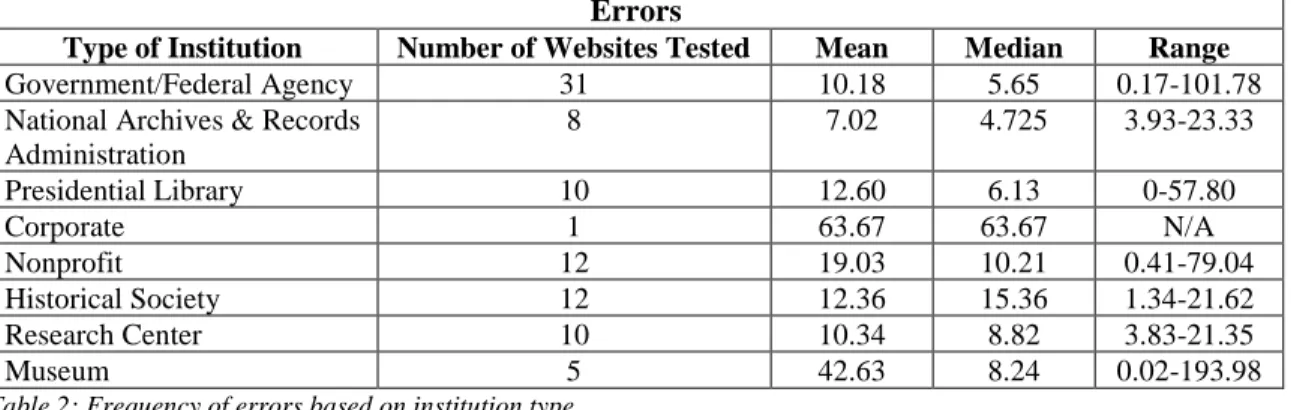
types of errors were found on more than 25% of the 3,572 pages that were tested. The top five errors across pages were: empty link (42.36%), missing form label (40.79%),
document language missing (31.58%), linked image missing alternative text (29.25%), and empty button (24.08%). Calculating errors based on the number of websites they appeared on resulted in a slightly different top five: empty link (69), linked image missing alternative text (63), missing form label (57), missing alternative text (46), and empty heading (44). See Appendix A for the prevalence of errors for each website tested.
Errors
Type of Institution Number of Websites Tested Mean Median Range
Government/Federal Agency 31 10.18 5.65 0.17-101.78
National Archives & Records Administration
8 7.02 4.725 3.93-23.33
Presidential Library 10 12.60 6.13 0-57.80
Corporate 1 63.67 63.67 N/A
Nonprofit 12 19.03 10.21 0.41-79.04
Historical Society 12 12.36 15.36 1.34-21.62
Research Center 10 10.34 8.82 3.83-21.35
Museum 5 42.63 8.24 0.02-193.98
Table 2: Frequency of errors based on institution type.
The archives-related webpages of corporations, governments of all
Research Center (10.34). Table 2 provides additional information on the number of websites per category and their medians and ranges.
Of the 3,572 pages tested, 71.12% had one or more contrast errors. This means that there is not enough contrast between the colors used on the webpages to facilitate easy readability by those with color blindness or other visual impairments. Only ten websites possessed no contrast errors or had an average of less than one contrast error. These ten were: California State Archives, Clinton Digital Library, Getty Research Institute, Jimmy Carter Presidential Library, Lesbian Herstory Archives, NARA Chicago, NARA Philadelphia, NARA Riverside, NARA St. Louis, and Williamson County
Archives. Contrast error data for each website tested can be found in Appendix A.
Alerts
Alerts
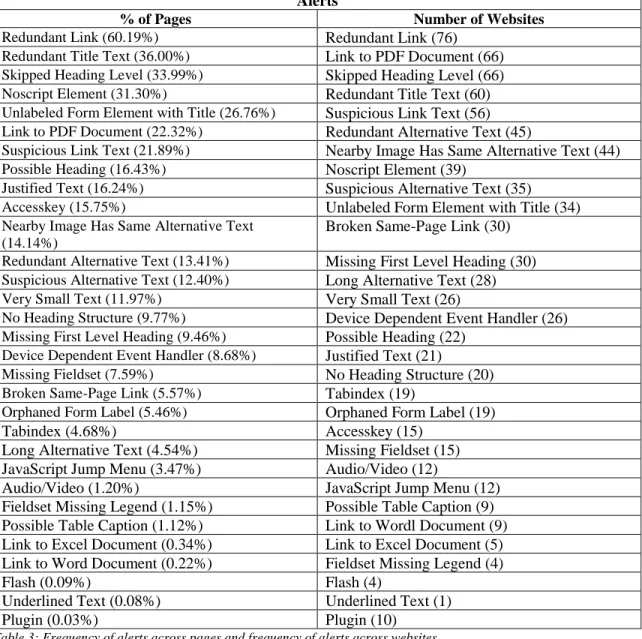
% of Pages Number of Websites
Redundant Link (60.19%) Redundant Link (76)
Redundant Title Text (36.00%) Link to PDF Document (66)
Skipped Heading Level (33.99%) Skipped Heading Level (66)
Noscript Element (31.30%) Redundant Title Text (60)
Unlabeled Form Element with Title (26.76%) Suspicious Link Text (56)
Link to PDF Document (22.32%) Redundant Alternative Text (45)
Suspicious Link Text (21.89%) Nearby Image Has Same Alternative Text (44)
Possible Heading (16.43%) Noscript Element (39)
Justified Text (16.24%) Suspicious Alternative Text (35)
Accesskey (15.75%) Unlabeled Form Element with Title (34)
Nearby Image Has Same Alternative Text (14.14%)
Broken Same-Page Link (30)
Redundant Alternative Text (13.41%) Missing First Level Heading (30)
Suspicious Alternative Text (12.40%) Long Alternative Text (28)
Very Small Text (11.97%) Very Small Text (26)
No Heading Structure (9.77%) Device Dependent Event Handler (26)
Missing First Level Heading (9.46%) Possible Heading (22)
Device Dependent Event Handler (8.68%) Justified Text (21)
Missing Fieldset (7.59%) No Heading Structure (20)
Broken Same-Page Link (5.57%) Tabindex (19)
Orphaned Form Label (5.46%) Orphaned Form Label (19) Tabindex (4.68%) Accesskey (15)
Long Alternative Text (4.54%) Missing Fieldset (15) JavaScript Jump Menu (3.47%) Audio/Video (12)
Audio/Video (1.20%) JavaScript Jump Menu (12) Fieldset Missing Legend (1.15%) Possible Table Caption (9) Possible Table Caption (1.12%) Link to Wordl Document (9) Link to Excel Document (0.34%) Link to Excel Document (5) Link to Word Document (0.22%) Fieldset Missing Legend (4)
Flash (0.09%) Flash (4)
Underlined Text (0.08%) Underlined Text (1)
Plugin (0.03%) Plugin (10)
Table 3: Frequency of alerts across pages and frequency of alerts across websites.
Alerts
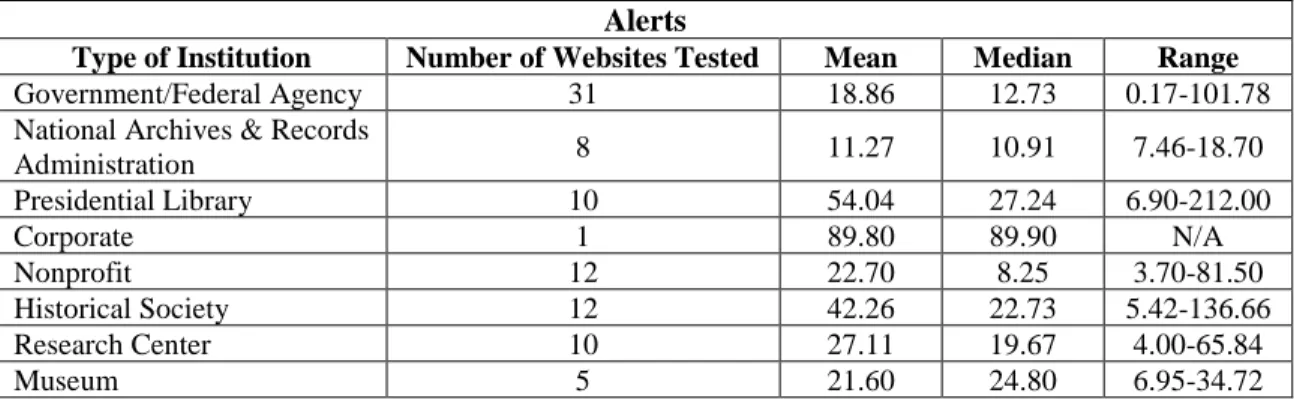
Type of Institution Number of Websites Tested Mean Median Range
Government/Federal Agency 31 18.86 12.73 0.17-101.78
National Archives & Records
Administration 8 11.27 10.91 7.46-18.70
Presidential Library 10 54.04 27.24 6.90-212.00
Corporate 1 89.80 89.90 N/A
Nonprofit 12 22.70 8.25 3.70-81.50
Historical Society 12 42.26 22.73 5.42-136.66
Research Center 10 27.11 19.67 4.00-65.84
Museum 5 21.60 24.80 6.95-34.72
Table 4: Frequency of alerts based on institution type.
There were only 12 websites that contained embedded audio and/or video files that received an Audio/Video alert. Three of those websites contained audio files without accompanying transcripts. One website had audio files with associated PDF transcripts, but those documents were not machine-readable. There was inconsistency among five websites; there were transcripts for some audio files and none for others. For embedded videos, two websites did not provide closed captioning or transcripts while one website provided both.
Features, Structural Elements, HTML5 and ARIA
for users with disabilities. However, the presence of HTML5 and ARIA elements does not always indicate a lack of accessibility problems. WAVE found HTML5 Video/Audio codes on some websites, indicating that their presence is made known to screen readers. However, no transcripts were provided for audio files in some of those cases. See Appendix B and Appendix C for further data on the features, structural elements, and HTML5 and ARIA elements found on each website.
Accessibility Statements
Thirty-five (38.04%) of the institutions had some form of an accessibility
statement, whether on their pages pertaining to the archives or a link on the bottom of the pages to the larger organizations’ accessibility statement (if they were a part of a larger organization), or both. For example, NARA College Park had an accessibility statement on its own webpage that only addressed physical disabilities, but its webpages linked to an accessibility statement on NARA’s main website that applies to all of their museums, research facilities, and Presidential Libraries. The overarching policy states that sign language interpreters are available upon request and that all of the sites are regularly monitored to ensure that they meet the requirements of Section 508 and WCAG guidelines (National Archives and Records Administration, 2018). Both the Dwight E. Eisenhower and Franklin D. Roosevelt Presidential Libraries’ websites also link to NARA’s main statement, but have their own webpage dedicated to accessibility. According to that FDR Library, they “believe that [their] web sites are compliant with Section 508 and W3C” (FDR Presidential Library & Museum, n.d.). Yet, the WAVE tests show that the NARA websites do not entirely meet these standards. Both
Not all accessibility statements addressed hearing and visual impairments. The FAQ section on The Historic New Orleans Collection’s website, mentions that the facility is wheelchair accessible and ADA compliant. There is no mention of the accessibility of their digital resources. As well, the Atlanta History Center and the NPS Olmstead Archives only mention physical accommodations on their websites. Only two archives specifically address hearing and visual impairments on their own webpages. The Austin History Center offers “Adaptive equipment: Kurzweil reader, Jaws and Magic” (Austin History Center, n.d.-b) while the Center for Jewish History offers “ASL
interpreting, Adaptive Computer Technology, Assistive Listening Devices” (Center for Jewish History, n.d.). The New York State Archives addressed accessibility on their page dedicated to research room rules. Very generally they state that “a researcher may ask a supervisor about arranging for a reasonable accommodation for a special need” (New York State Archives, n.d.). Each of their webpages also provide a link to the New York State government’s accessibility policy.
Twenty-five archives had links on the bottom of each webpage to their parent organizations’ accessibility statements. Most of the accessibility statements by
text, relative font sizing, navigation, style sheets, layout, multimedia, hypertext links, scripts, and AJAX (Utah.gov, 2018).
Yet, out of all of the archives that had an accessibility statement in some form, only the websites of the Jimmy Carter Presidential Library and the Nevada State
Archives had an average of zero and 0.29 errors, respectively. The rest had average errors of greater than one. Each of the archives with accessibility statements in some form had websites that contained at least one webpage with one or more alerts. Regarding contrast errors, six of the institutions with statements had websites with no contrast errors or with an average of less than one contrast errors. This conveys that having an accessibility policy does not ensure a website without accessibility challenges. Further, the Dwight D. Eisenhower Presidential Library and New Jersey State Archives contained websites that did not have any HTML5 and ARIA elements. Again, an accessibility policy does not necessarily guarantee that websites will have elements that assist screen reader navigation Based on the WAVE results, a published accessibility policy on a website is not a strong indicator of its degree of usability for those with visual and hearing impairments. See Appendix D for a chart conveying the instances of accessibility statements and their coverage.
Survey Results
readers, one adds closed captioning to any audiovisual materials, and another provides scanning and optical character recognition (OCR) services. See Table 6 for their exact responses. One of the respondents works in a special collections library that does not have assistive technology, but the main library has a designated station with adaptive technology. In total, seven respondents reported that their institution provides assistive technology, fifteen reported that theirs does not, and one was unsure.
Respondents Yes (%)
No (%) Not Sure (%)
Provide Reference Services 24 87.50 12.50 -
Finding Aids Published on Website 23 82.61 17.39 0.00
Digital Collections Published on Website 23 86.96 13.04 0.00 Accessible Delivery of Electronic Materials &
Accessible Website Design Discussed in Graduate Programs
23 17.39 82.61 0.00
Assisted Researcher with Hearing or Visual Impairments
23 47.83 43.48 8.70 Researchers with Hearing or Visual Impairments
Needed to Use Digital Collections
20 45.00 35.00 20.00
Knows American Sign Language 23 13.04 86.96 -
Other Employees Know ASL 23 30.43 17.39 52.17
Institution has Forma Policy for Working with Researchers with Hearing and Visual Impairments
23 21.74 30.43 47.83
Policy is Published on Website 5 60.00 20.00 20.00
Institution Provides Assistive Technology 23 30.43 65.22 4.35 Archives Staff Develops its Own Website or
Webpages
23 39.13 60.87 0.00
Institution’s Website or Electronic Content Has Been Checked for Compatibility with Screen Readers
23 43.48 17.39 39.13
Compatibility Errors Were Found 10 40.00 20.00 40.00
Received Formal Education on HTML 23 34.78 65.22 0.00
Coworkers Received Formal Education on HTML 23 56.52 8.70 34.78 Table 5: Survey responses.
belonging to the respondents’ institutions. Of the twenty institutions that have digital collections online, ten have tested their electronic content. Nine out of the nineteen institutions with online finding aids have tested their electronic content. Of the ten
respondents whose institutions tested electronic content, four of them found compatibility errors while four respondents were unsure of the testing results. Nine respondents
confirmed that their archives staff is involved in the development of their webpages. Out of those nine respondents, four have received formal education on HTML and seven have coworkers who have received electronic content. Accessible delivery of electronic
materials and/or accessible website design was discussed in only 17.39% of the
respondents’ graduate programs. None of the respondents were affiliated with any of the institutions whose websites were tested with WAVE.
Respondents Answers to Type of Assistive Technology Institutions Provide to Researchers
“Computer program”
“scanning and ocr services, document preparation, sound recording duplication” “screen reader”
“We have screen readers. We also CC any audiovisual. We have a robust DSS department”
“I have a grad assistant that is legally blind and she uses features on Word to flip the black and white of documents and increase text size. The main library has a designated station with adaptive technology, but the special library I work in does not.”
DISCUSSION
The survey results align with results of the WAVE testing. While archives’ digital resources are not completely inaccessible, there is room for improvement. The errors found by WAVE across the 92 websites can impede usability and hinder the
interpretation of digital objects that archives put online. Errors arise when a webpage’s source code is flawed or essential code is absent. Whether looking at individual
occurrences of errors across webpages or the frequency across websites, the most numerous error was empty link. This error means that a link contains no text to describe its functionality or target. Therefore, a screen reader will not be able to inform its users of the purpose of the link. Similarly, empty buttons on webpages prevent users from
knowing the purpose of the button because there is no descriptive text for the screen reader to deliver.
Empty heading was another widespread error among the websites that affects the interpretation of pages. This error was reported when no content was found in a heading. Many screen reader users navigate webpages using heading elements and therefore, a lack of heading information would decrease their ability to efficiently do so. Ensuring that the language used to write the content of the webpages is identified is another way to help screen readers interpret webpages. Yet, the document language was missing from nearly a third of the webpages tested.
Missing form labels should be a concern for archives because they frequently have “Ask an Archivist” forms and search boxes on their websites. It is likely that the purpose of the form control, e.g. “enter your name” will not be conveyed to screen readers. All of these errors prevent screen readers from gathering essential context and navigation information to relay to their users.
The alerts found by WAVE do not make websites inaccessible, but it is still important to be aware of them and remedy them. Alerts signify elements that may cause difficulty interacting with websites or that have the potential to render content
WAVE alerted to nearby images with the same alternative text. This is not helpful as it does not distinguish between images for those using screen readers and implies that the content of all the images is the same. However, WCAG guidelines suggest that
alternative text should not be too long, which was a problem on 28 websites. Alternative text should be a concise description of the content and function of an image. Long alternative text might indicate extraneous content or that content unavailable to sighted users is being presented. For example, alternative text for a photograph on the Austin History Center’s website that WAVE determined to be too long was, “William Sydney Porter, photo taken soon after his arrival in Austin. PICB 07214, Austin History Center, Austin Public Library” (Austin History Center, n.d.-a). None of that information is provided to sighted users in the text accompanying the image.
An alert that signifies a similar problem is suspicious alternative text. WAVE reported this alert when alternative text was insufficient or contained extraneous information. For example, screen readers inform their users when objects are images, which makes the use of alternative text like “image of…” unnecessary and redundant.
should also adjust the color balance of the document to increase readability for those with low vision. Elements within the PDF document should be tagged, alternative text for charts, figures, graphs, and images should be added, and a read order should be manually assigned to aid screen readers. However, HTML is better suited for complex graphs and charts (Browder, 2018). Making PDF documents machine-readable adds time to scanning projects, but it is essential to ensuring the most widespread access to the documents. It appears that most archives included in this study are at least character encoding their PDF documents. Fifty-five websites contained PDF documents that featured text searching, while twelve websites contained some with that functionality and others without it; two did not contain any machine-readable PDF documents.
Many people need to be involved in ensuring widespread accessibility of digital resources because of the interconnectedness of the Internet. Some institutions, e.g. Ohio History, have multiple websites for their different digital collections. It is imperative that all of the websites are being reviewed for compliance and not only the main websites. A fair amount of archives included in the study use third-party systems to host their digital content. Frequent hosting platforms were CONTENTdm, ArchiveGrid, PastPerfect, Achron, the Internet Archive, Flickr, Online Archive of California (OAC), YouTube, and local universities. Archivists should advocate for vendors to develop their products following Section 508 and WCAG standards. This means having conversations with people in IT development. Similarly, archivists who are not responsible for the
acknowledged that their archives staff does not develop their own websites or webpages. When problems are discovered, archivists should not feel hesitant to make the website creators aware of them. Many of the accessibility statements on the tested websites had forms asking for feedback on usability and encouraging the reporting of issues.
Missing alternative text was one of the most prevalent errors found by WAVE in this study. This is a situation where archivists might be better at coding webpages than IT staff because they are more familiar with the material. Many of the errors and alerts found could be remedied with basic coding. However, archivists might not possess the knowledge to develop their own websites or assist in editing webpages because they have not received education on relevant topics. Of the 23 survey respondents, 82.61% do not recall the accessible delivery of electronic materials or accessible website design being discussed in their graduate programs. Further, 34.78% of respondents have not received any formal education on HTML and only 56.52% of their coworkers have. The positions their coworkers hold were not disclosed, however. It is unclear whether the coworkers accounted for work with technology services. Regardless, the survey results convey that archivists are not receiving formal education on website accessibility and website creation. Also unknown is what years the respondents attended graduate programs. Therefore, the results may not be an accurate representation of library science graduate programs within the past five years. Current graduate students need to be learning about this topic in order to help improve the accessibility of the digital resources of the
access could discuss how access involves making sure materials are usable in addition to ensuring material is available to the public.
The types of errors and alerts were fairly consistent across websites. This is most likely because pages within a website adhere to the same template. For this reason, the researcher does not believe that the variance in the number of pages tested across websites posed a significant problem. Even websites that are a part of a larger
organization, such as NARA, use the same website template. To be proactive, compliance with Section 508 and WCAG should be evaluated when the template is in development. The colors used in templates should also be tested to ensure high contrast for users with visual impairments. However, many institutions already have websites. These websites need to be reviewed more than once as most websites are not static. The varying presence of audio file transcripts within websites is an example of inconsistency that may occur over time. Verification of compatibility for those using assistive technology should be checked each time a webpage is updated and new materials are published. This is another reason archivists should be involved in the coding of their webpages. The WAVE tool may not catch every error or potential problem, but it is very user-friendly and it is not time-consuming to create accessibility reports. It is a good gateway for archivists to start checking their digital resources. It is also better than not doing anything to check for compliance with Section 508 and WCAG.
alternative text, and document language were the most recurring errors found in this study and in the research conducted by Liu and McKay (2017), Matta Smith (2014), and Southwell and Slater (2013). As well, the testing conducted for this study found all of the errors that the aforementioned studies uncovered except for page refreshes or redirects. In Southwell and Slater’s (2013) study of 68 finding aids from members of the Association of Research Libraries, only 10.29% produced WAVE reports with zero error codes. Out the 92 websites tested in this study, only two websites had webpages with zero error codes. However, 8.70% of the websites had an average of less than one error code across their websites. The results between the studies, though with different scopes, are
comparable and show that library and archive websites need accessibility improvement. For previous studies that used the WebExact and Bobby compatibility checkers, results were also similar to this study. The most frequent errors concerned missing alternative text and missing form labels (Huprich & Green, 2006; Ingle et al., 2009; Spindler, 2002).
them inaccessible for users with hearing impairments. Other archives hosted their videos on YouTube, which does provide the option for closed captioning. It is still worthwhile for archivists to create transcripts regardless of closed caption options because captions on YouTube videos frequently have errors (Tatman & Kasten, 2017). Despite the greater prevalence of accessibility issues concerning visually impaired users, archivists should remain vigilant about ensuring their audio and video content has accessible transcripts and closed captioning.
Southwell and Slater concluded, as of 2013, that ARIA landmarks, which aid screen readers, had not yet been incorporated into special collection libraries’ finding aids. A greater prevalence of HTML5 and ARIA elements were found on archives websites. Only four websites contained pages with zero HTML5 and ARIA elements while the pages of only seven websites had an average of less than one element, meaning that some pages contained elements while others did not. Southwell and Slater (2013) believed the use of ARIA elements would increase over time as they become more widespread across the Internet in general. This study supports that proposition.
Libraries appear to be ahead of archives in providing assistive technology, such as screen readers, or at least stating their availability on their websites. Out of the 92
websites examined for this study, only ten (10.87%) had accessibility statements published online regarding their archives facilities and only two (2.17%) of those
CONCLUSIONS
Archives websites are not in complete compliance with Section 508 and WCAG standards. Only federal agencies need to comply with Section 508, but it is best practice that everyone does. Federal agencies and local governments did have the lowest averages of errors and alerts compared to other institution types, but their websites are not meeting all of the requirements. The accessibility problems on websites can be remedied, albeit with knowledge, time, and resources. However, this is an investment archives should make to ensure that their materials can be utilized by the largest amount of people possible. Archives websites are not far away from reaching full compliance with Section 508 and WCAG. The majority of webpages and digital materials were coded with
features, structural elements, and HTML5 and ARIA elements that improve accessibility. Some websites had instances where pages had both the “image with alternative text” feature and the “image missing alternative text” error. Webpage developers need to remain consistent, especially when new content is being added. It is not enough to have a compliant webpage when it is first created. Accessibility measures and verification need to be taken each time webpages are updated.
Archivists can work towards accessible electronic content by participating in the development of their institutions’ websites and advocating for accessible vendor-created products. Including accessible website design in the curriculum of library and
Archivists should be testing their digital resources with tools like WAVE, screen reading software, and human users. Providing assistive technology in reading rooms will allow researchers with hearing impairments and visual impairments to access digital
collections. Archivists should be encouraged to learn American Sign Language in order to better assist hard of hearing researchers in using both analog and digital materials. Lastly, the majority of archives included in this study did not have their own accessibility policies, or do not have them published online. Establishing policies could create more awareness and responsibility.
LIMITATIONS
WAVE is not a perfect tool and it is not a complete substitute for testing websites with actual assistive technology and human users. However, WAVE was a suitable choice for the amount of time and resources available for this research. There were times when a WAVE report would indicate a certain number of linked PDF documents, but the same amount could not be manually found by the researcher. Reports could lead to false assumptions. For example, looking only at the average number of errors per page for the Century Association Archives could lead to the conclusion that each page had over twenty errors. However, nine of the eleven pages tested only had one error, linked image missing alternative text. The one hundred and seventeen instances of missing alternative text on one page and one hundred and thirty-two instances of empty table headers on another page skewed the data. Even on websites that used the same template for each page, the number of errors, alerts, features, structural elements, HTML5 and ARIA elements, may be different because of the varying amount of content on the pages. It was for these reasons that median, mode, and range data were also provided. Each website had a different amount of content tested. However, every website has varying amounts of pages and content.
have been tested. This was not possible due to time constraints. Therefore, websites with the least amount of pages had all of their pages and content that the researcher could find tested while larger websites only had a sample tested. However, because the same types of errors and alerts were common across the webpages of a website (most likely due to template use), the researcher does not believe this significantly compromised the results. A few archives had multiple websites each with different digital resources. Sometimes these websites were developed with other organizations. Only the websites under the sole ownership of the institution included in the sample was tested and the results were
calculated as if all of the webpages were under one domain name.
BIBLIOGRAPHY
Aizpurua, A., Harper, S., & Vigo, M. (2016). Exploring the relationship between web accessibility and user experience. International Journal of Human-Computer Studies, 91, 13–23. https://doi.org/10.1016/j.ijhcs.2016.03.008
Austin History Center. (n.d.-a). O. Henry Biography. Retrieved October 27, 2018, from http://library.austintexas.gov/ahc/o-henry-biography-352976
Austin History Center. (n.d.-b). Visit Us. Retrieved October 27, 2018, from http://library.austintexas.gov/ahc/visit-us
Babu, R., & Xie, I. (2017). Haze in the digital library: design issues hampering accessibility for blind users. The Electronic Library, 35(5), 1052–1065. https://doi.org/10.1108/EL-10-2016-0209
Beyene, W. M. (2017). Metadata and universal access in digital library environments.
Library Hi Tech; Bradford, 35(2), 210–221.
Beyene, W. M., & Godwin, T. (2018). Accessible search and the role of metadata.
Library Hi Tech, 36(1), 2–17. https://doi.org/10.1108/LHT-08-2017-0170 Brobst, J. (2009). Evaluating the Accessibility of Florida’s Public Library Home Pages.
Libri: International Journal of Libraries & Information Services, 59(2), 88–103. https://doi.org/10.1515/libr.2009.009
Brown, A., Jay, C., Chen, A. Q., & Harper, S. (2012). The uptake of Web 2.0
technologies, and its impact on visually disabled users. Universal Access in the Information Society, 11(2), 185–199. https://doi.org/10.1007/s10209-011-0251-y Byerley, S. L., & Chambers, M. B. (2002). Accessibility and usability of Web‐based
library databases for non‐visual users. Library Hi Tech, 20(2), 169–178. https://doi.org/10.1108/07378830220432534
Caballero, C., & Guldner, R. (2017). Accessible web indexes: design for those with disabilities. The Indexer, 35(1), 30–32.
Cassner, M., Maxey-Harris, C., & Anaya, T. (2011). Differently Able: A Review of Academic Library Websites for People With Disabilities. Behavioral & Social Sciences Librarian, 30(1), 33–51. https://doi.org/10.1080/01639269.2011.548722 Center for Jewish History. (n.d.). Accessibility. Retrieved October 27, 2018, from
https://www.cjh.org/about/accessibility
Cheetham, A., Ayotte, D., Hung, J., Vass, J., Clark, C., Mitchell, J., & Treviranus, J. (2014). Accessible Metadata Generation. In Universal Access in
Human-Computer Interaction. Universal Access to Information and Knowledge (pp. 101– 110). Springer, Cham. https://doi.org/10.1007/978-3-319-07440-5_10
Condit Fagan, J., & Fagan, B. (2004). An accessibility study of state legislative Web sites. Government Information Quarterly, 21, 65–85.
https://doi.org/10.1016/j.giq.2003.12.010
Craven, J., & Nietzio, A. (2007). A task‐based approach to assessing the accessibility of web sites. Performance Measurement and Metrics, 8(2), 98–109.
Davis, L. (2012). Providing Virtual Services to All: A Mixed-Method Analysis of the Website Accessibility of Philadelphia Area Consortium of Special Collections Libraries (PACSCL) Member Repositories. The American Archivist, 75(1), 35– 55. https://doi.org/10.17723/aarc.75.1.a716w067468262h5
Ellison, J. (2004). Assessing the accessibility of fifty United States government Web pages: Using Bobby to check on Uncle Sam. First Monday, 9(7). Retrieved from https://journals.uic.edu/ojs/index.php/fm/article/view/1161
FDR Presidential Library & Museum. (n.d.). Access. Retrieved October 27, 2018, from https://fdrlibrary.org/access
Galvez, R. A., & Youngblood, N. E. (2016). e-Government in Rhode Island: what effects do templates have on usability, accessibility, and mobile readiness? Universal Access in the Information Society, 15(2), 281–296.
https://doi.org/10.1007/s10209-014-0384-x
Ganz, M. (2008). Survey Conducted on “Accessibility in Archives.” Archival Outlook,
November/December 2008. Retrieved from
http://files.archivists.org/periodicals/Archival-Outlook/Back-Issues/2008-6-AO.pdf
Huprich, J., & Green, R. (2006). Assessing the Library Homepages of COPLAC
Ingle, E., Green, R. A., & Huprich, J. (2009). How Accessible Are Public Libraries’ Web Sites? A Study of Georgia Public Libraries. Journal of Access Services, 6(1–2), 101–115. https://doi.org/10.1080/15367960802247841
Jaeger, P. T. (2006). Assessing Section 508 compliance on federal e-government Web sites: A multi-method, user-centered evaluation of accessibility for persons with disabilities. Government Information Quarterly, 23(2), 169–190.
https://doi.org/10.1016/j.giq.2006.03.002
Keenan, T., & Walker, W. (2018). Considerations and Challenges for Describing
Historical Research Data: A Case Study. Journal of Library Metadata, 0(0), 1–12. https://doi.org/10.1080/19386389.2018.1440919
Kepley, B. (1983). Archives: Accessibility for the Disabled. The American Archivist,
46(1), 42–51. https://doi.org/10.17723/aarc.46.1.7275k33t7817w00u Key Definitions of Statistical Terms. (2018). Retrieved January 16, 2018, from
http://www.afb.org/info/blindness-statistics/key-definitions-of-statistical-terms/25 Kimok, D. (2008, November). RMRT/AMRT Joint Working Group on Diversity in
Archives and Records Management. The Records Manager, 3(1). Retrieved from https://www2.archivists.org/sites/all/files/TRM_200811.pdf
King, B. A., & Youngblood, N. E. (2016). E-government in Alabama: An analysis of county voting and election website content, usability, accessibility, and mobile readiness. Government Information Quarterly, 33(4), 715–726.
Kirkpatrick, A., O’Connor, J., Cooper, M., Caldwell, B., Reid, L. G., Vanderheiden, G., … White, J. (Eds.). (2017, December 7). Web Content Accessibility Guidelines (WCAG) 2.1. Retrieved from https://www.w3.org/TR/WCAG21/
Lazar, J., Williams, V., Gunderson, J., & Foltz, T. (2017). Investigating the Potential of a Dashboard for Monitoring U.S. Federal Website Accessibility.
https://doi.org/10.24251/HICSS.2017.294
Lilly, E. B., & Fleet, C. V. (2000). Wired But Not Connected. The Reference Librarian,
32(67–68), 5–28. https://doi.org/10.1300/J120v32n67_02
Liu, Y. Q., Bielefield, A., & McKay, P. (2017). Are urban public libraries websites accessible to Americans with Disabilities? Universal Access in the Information Society, 1–16. https://doi.org/10.1007/s10209-017-0571-7
Maatta Smith, S. L. (2014). Web Accessibility of Urban Public Library Websites. Public Library Quarterly, 33(3), 187–204.
National Archives and Records Administration. (2018, October 18). Accessibility. Retrieved October 27, 2018, from
https://www.archives.gov/global-pages/accessibility
New York State Archives. (n.d.). Research Room Rules. Retrieved October 27, 2018, from http://www.archives.nysed.gov/research/research-room-rules
Potter, A. (2002). Accessibility of Alabama government Web sites. Journal of Government Information, 29(5), 303–317. https://doi.org/10.1016/S1352-0237(03)00053-4
Power, C., Freire, A., Petrie, H., & Swallow, D. (2012). Guidelines Are Only Half of the Story: Accessibility Problems Encountered by Blind Users on the Web. In
Proceedings of the SIGCHI Conference on Human Factors in Computing Systems
(pp. 433–442). New York, NY, USA: ACM. https://doi.org/10.1145/2207676.2207736
Riley, C. (2004). Electronic Content. The Serials Librarian, 46(3–4), 233–240. https://doi.org/10.1300/J123v46n03_06
SAA AMRT/RMRT Joint Working Group on Accessibility in Archives and Records Management. (2010a, August). Best Practices for Working with Archives Employees with Physical Disabilities. Retrieved from
https://www2.archivists.org/sites/all/files/BestPract-Disabilities_Employees_0.pdf SAA AMRT/RMRT Joint Working Group on Accessibility in Archives and Records
Management. (2010b, August 9). Best Practices for Working with Archives Researchers with Physical Disabilities. Society of American Archivists. Retrieved from https://www2.archivists.org/standards/best-practices-for-working-with-archives-employees-with-physical-disabilities
SAA Task Force to Revise Best Practices on Accessibility. (2018, October 1). Society of American Archivists Guidelines for Accessible Archives for People with
Disabilities - Draft for Open Comment. Retrieved from
https://www2.archivists.org/sites/all/files/Guidelines%20for%20Accessible%20A
rchives%20for%20People%20with%20Disabilities%20-%20DRAFT%20for%20review.pdf
Sahib, N. G., Tombros, A., & Stockman, T. (2012). A comparative analysis of the information-seeking behavior of visually impaired and sighted searchers. Journal of the American Society for Information Science and Technology, 63(2), 377–391. https://doi.org/10.1002/asi.21696
Schmetzke, A., & Comeaux, D. (2009). Accessibility Trends among Academic Library and Library School Web Sites in the USA and Canada. Journal of Access Services, 6(1–2), 137–152. https://doi.org/10.1080/15367960802286286 Southwell, K. L., & Slater, J. (2012). Accessibility of digital special collections using
screen readers. Library Hi Tech, 30(3), 457–471. https://doi.org/10.1108/07378831211266609
Southwell, K. L., & Slater, J. (2013). An Evaluation of Finding Aid Accessibility for Screen Readers. Information Technology and Libraries (Online); Chicago, 32(3), 34–46.
Spindler, T. (2002). The Accessibility of Web Pages for Mid-Sized College and University Libraries. Reference & User Services Quarterly, 42(2), 149–154. Tatman, R., & Kasten, C. (2017). Effects of Talker Dialect, Gender & Race on Accuracy