Ketan S. Palshikar. Representation of Collaborative Search Results Using Faceted Search. A Master's paper for the M.S. in I.S. degree. December, 2010. 71 pages. Advisor: Robert Capra.
This paper describes the design and implementation of a web-based, faceted interface for searching and displaying web pages saved from collaborative information seeking using the Results Space framework. Results Space project is part of Interaction Design Lab at the School of Information and Library Science at the University of North Carolina at Chapel Hill. The Results Space project focuses on managing search results across multiple sessions and multiple collaborators. This paper describes the implementation of the web-interface that enables presentation of these collaborative results using faceted search.
Once a user has worked on any collaborative project she needs to view and interact with the results. An ability to view the results across multiple facets like projects, collaborators and sources provides the user with a better depiction of the search efforts. This functionality can be further enhanced using different representations in which the user can view the search results. This paper discusses the process of developing a web application that provides such faceted search interface and representation of the search results using timeline and table view.
Headings:
Results Space
Collaborative search
Faceted Search
Graphical representation
REPRESENTATION OF COLLABORATIVE SEARCH RESULTS USING FACETED SEARCH
by
Ketan S. Palshikar
A Master’s paper submitted to the faculty of the School of Information and Library Science of the University of North Carolina at Chapel Hill
in partial fulfillment of the requirements for the degree of Master of Science in
Information Science.
Chapel Hill, North Carolina
December 2010
Approved by
_______________________________________
Table of Contents
1. Introduction ... 5
2. Results Space project ... 8
3. Use Cases ... 10
3.1 Use Case 1 – filters on Project(s) and Collaborator(s) ... 10
3.2 Use case 2 – filters on Project(s) and Source(s) ... 11
3.3 Use Case 3 – filters on source(s) and collaborator(s) ... 12
4. Backend Details ... 13
5. Faceted Search Interface – Overview ... 16
6. Implementation Details ... 20
6.1 Implementation of Facets ... 26
6.1.1 Implementation of Projects Facet... 26
6.1.2 Implementation of Collaborators/Sources Facet ... 29
6.2 Implementation of List View ... 32
6.3 Implementation of Graph View ... 33
6.3.1 Plotting of Coordinate Axes ... 34
6.3.2 Plotting of Result Points ... 36
6.3.3 Displaying the Details of the Result ... 36
6.3.4 Connector line ... 38
7. Similar Efforts ... 40
8. Future Scope ... 44
Table of Figures
Figure 1: Faceted Search Example – UNC Libraries ... 7
Figure 2: Partial Entity-Relationship diagram representing the key entities, attributes and relationships ... 13
Figure 3: Faceted Search Interface – List View ... 16
Figure 4: Activity Diagram to update facets and results asynchronously ... 18
Figure 5: Block diagram of the implementation details ... 20
Figure 6: Flow chart for the implementation of Projects facet ... 27
Figure 7: Flow chart for the implementation of Collaborators facet ... 30
Figure 8: Faceted Search Interface – Graph View ... 33
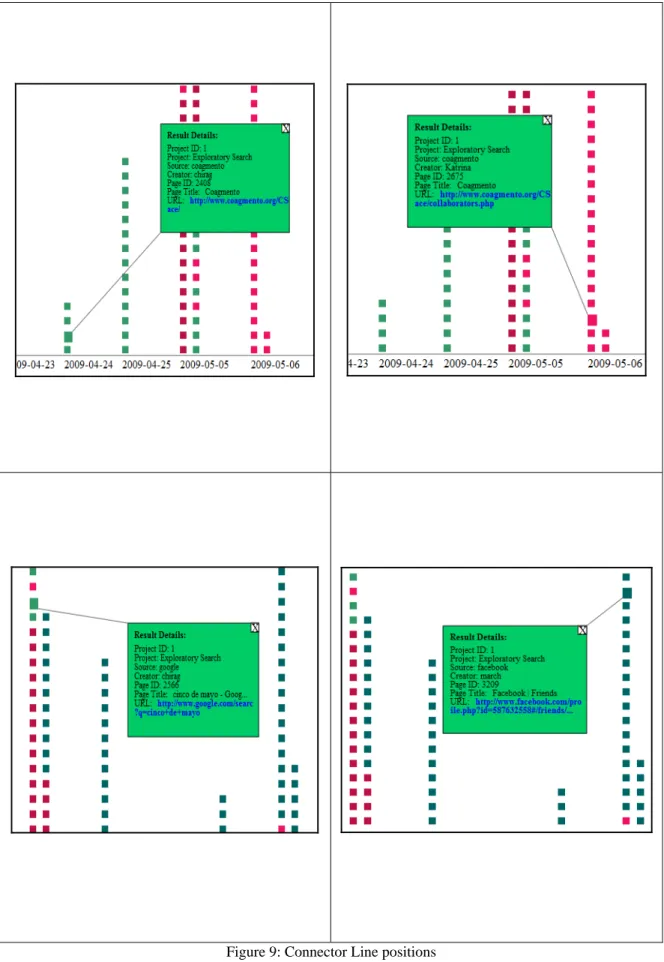
Figure 9: Connector Line positions ... 39
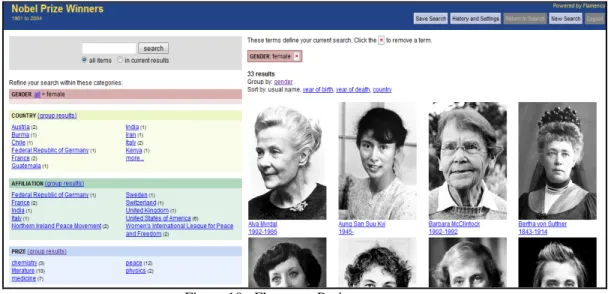
Figure 10: Flamenco Project ... 41
Table of Code Segments
Code Segment 1: HTML frame of the main page ... 21
Code Segment 2: AJAX calls using jQuery ... 23
Code Segment 3: Extracting the selected facets ... 25
Code Segment 4: Building a where clause for collaborators ... 32
1.
Introduction
This project, Representation of Collaborative Search Results Using Faceted Search, is
focused on designing and implementing a faceted search interface to an existing set of
collaborative search results saved using the Results Space framework and allowing a user
to search and view multiple representations of the results. Collaborative information
seeking provides new dimensions for information search over the Web and enables new
opportunities for information seekers. The information collected from a collaborative
search needs to be stored and revisited later to make it useful for all the collaborators
involved. Results Space initiative aims at investigating such collaborative efforts of
information seeking. This project attempts to further the capability of the collaborative
information seekers by providing them with a faceted search interface and representing
the results in a tabular as well as graphical mode.
Faceted search is a method for searching the information by filtering it
effectively. La Barre defines Facets as “the categories, properties, attributes,
characteristics, relations, functions or concepts that are central to the set of documents or
entities being organized and which are of particular interest to the user group” (2007,
p.82). As Tunkelang describes, faceted navigation guides the user through the collection
that is being considered (2009). Instead of asking the user to express her search query in
the form of text, faceted navigation lets the user progressively develop the query by
among many e-commerce companies as it can navigate users through the products very
effectively. A few examples that implement faceted search are:
fancast - http://www.fancast.com/movies
google shopping -
http://www.google.com/products?hl=en&q=ipad&um=1&ie=UTF-8&sa=N&tab=wf
bluenile - http://www.bluenile.com/diamond-search?filter_id=0&track=head
at&t -
http://www.wireless.att.com/cell-phone-service/cell-phones/cell-phones.jsp?wtSlotClick=1-003ZVV-0-1&WT.svl=graphic
Though faceted search proves efficient in general, its application to a complex system
like a library catalog may need further investigation (Fagan, 2010). In spite of this, many
libraries have started increasingly relying on the faceted browsing. A typical faceted
Figure 1: Faceted Search Example – UNC Libraries
A faceted browsing enabled on the library website of the UNC-Chapel Hill lets
the user refine her search by letting her choose a set of particular libraries where the book
is available or the format of the book or by letting the user put the publication year range.
Change in each of these facet values make the other facets to get updated thus navigating
the users though the collection more effectively.
In this project, I designed and built a faceted search interface to display results of
collaborative searches. The interface includes three main facets: a. Projects – the projects
on which the user has worked, b. Collaborators – the collaborators with whom the user
has worked and, c. Sources – the web sources which the user has used. Selection of one
or more values from the facets updates the facets and generates a set of results which can
2.
Results Space project
Results Space project is an initiative of the Interaction Design Lab at the School
of Information and Library Science. This project investigates how users collaboratively
search, manage, and synthesize information found from the web searches. Because the
information is sought and collected collaboratively, the task of sense-making of this
information has new dimensions. Results Space focuses on this results management over
multiple search sessions and with multiple collaborators. To investigate such
multi-session collaborative information seeking, Results Space project provides the Coagmento
framework. This framework enables the users to easily collect the information over the
Web and communicate this information with the collaborators. Coagmento lets the user
to share, re-find and reuse the information thus supporting the task of sense-making of
the collaborative information more effective (Shah, 2010). To achieve this goal
Coagmento allows users to create various projects under which various searches can be
performed and results stored. It also lets the users to invite other users to work on these
projects. Thus Coagmento successfully builds an environment for collaborative
information seeking. Searches performed and the results obtained are stored in the
database thus preserving multiple sessions of the users.
After achieving a framework that enables multi-session collaborative information
information. It is also necessary to represent the search results in such a way that will
help examining and interpreting these results. This project attempts to achieve these two
objectives: 1) searching through the results using different filters and, 2) providing
different representations of the results (e.g. tabular and graphical). To search through the
results the project uses faceted browsing. As the Coagmento framework enables each
search to fall under a particular project, the first and the most important facet in the
faceted search is project. As the Results Space project aims at studying collaborative
information seeking, the second facet in the faceted search is collaborators. To further
narrow down the results, the third facet provided is source (e.g. the website where the
information was found). Using these three facets a user can filter the results. A set of
results after putting the filters can be displayed in two views: List View and Graph View.
List View displays the results in the tabular form while Graph View attempts to capture
the multiple sessions from which the results are obtained and plots a graph of results
3.
Use Cases
3.1
Use Case 1 – filters on Project(s) and Collaborator(s)
Mark, Chung and Sindhu are planning a trip to India. They have decided to use
Coagmento to make their searches for gathering the information for the trip. They have
created three projects on Coagmento for this trip: Travelling in India, Flights to India, and
Hotels in India. For all these projects each of them have searched and now Mark, who is
expected to plan the outline of the trip, has logged into Coagmento and wants to find the
most useful searches for each project. For reviewing all the searches and information
found, Mark can use the interface that is the topic of this project. As Mark, Chung and
Sindhu have worked on these projects collaboratively, Mark can see all the three projects
in his Projects facet. At the same time he can see all his other projects which are not
necessarily collaborated with Chung and Sindhu. Similarly, he can see Chung and Sindhu
in his Collaborators facet along with other collaborators who are not related to his India
Trip projects. He can filter the results by selecting any of the projects and any of the
collaborators. While working on the project “Travelling in India”, Mark trusts Sindhu’s
search results more as she is from India. Thus he selects the project “Travelling to India”.
Once he selected this project all the collaborators who have not contributed to this project
disappear from the collaborators facet. He can thus see only Sindhu and Chung in the
collaborator facet and he selects “Sindhu”. This way he will be able to see only those
hotels in India, Mark believes that both Sindhu and Chung are good at finding good
flights and hotels. Thus he decides to see the results for these two projects together. To do
this, Mark can select both projects “Flights to India” and “Hotels in India” and select both
collaborators “Chung” and “Sindhu”. He will then be able to retrieve the results retrieved
by Chung for the projects “Flights to India” and “Hotels in India” along with the results
retrieved by Sindhu for the same projects.
3.2
Use case 2 – filters on Project(s) and Source(s)
Dr. D’Souza is a professor of political science at Goa University, India who is
planning to organize a conference on “Effects of Globalization on Democracy”. For
gathering the information on the subject and preparing the topics for the conference, Dr.
D’Souza has decided to use Coagmento and has created projects as “Democracy in
Developing Countries”, “Democracy in Developed Countries” and “History of
Globalization”. During last few months she has gathered enough information and now
she wants to browse through the results to finalize the topics for the conference. Thus she
logs into Coagmento and sees the above mentioned projects displayed under the facet
Project. She has used various sources while searching the information on these projects.
The sources she has visited include “Wikipedia”, “unc”, “uchicago” and “jnu”. She
remembers that she has got some useful information about democracy using the source
“uchicago”. Thus she selects projects “Democracy in Developed Countries” and
“Democracy in Developing Countries” and selects the source “uchicago” to find the
result. Also she knows that the source “unc” has some useful information on
globalization. Thus she selects project “History of Globalization” and selects source
D’Souza can see number of other sources which are not related with her searches about
the conference. However when she selects these projects, the source facet gets updated to
show only those sources that are related to them.
3.3
Use Case 3 – filters on source(s) and collaborator(s)
Astrophysicist Dr. Narlikar is studying the Venus Transit that is going to occur on
5th June 2012. As a part of this study he has decided to collaborate with two other
astrophysicists, Dr. Lightman and Dr. Ni. Each of them has gathered various information
using different sources. They have divided this information into different projects like
“Planet Transits”, “Venus”, and “Occultation”. The sources used by all of them include
“Wikipedia”, “NASA”, and “TransitOfVenus”. Now, when Dr. Narlikar wants to revisit
the information collected, the projects under which this information is categorized are not
important to him. Thus he chooses to select collaborators as himself and Dr. Lightman.
Once he selects these collaborators, the projects and sources facets get updated to show
only the projects on which Dr. Narlikar and Dr. Lightman have worked together and the
sources each of them have used for those projects. Dr. Narlikar then selects sources
“NASA” and “TransitOfVenus” to view the results obtained by him and by Dr. Lightman
4.
Backend Details
To make the results of the searches made over multiple sessions available it is
required to store these results. The results are thus stored in a relational database. Results
Space projects (e.g. Coagmento) use a MySQL database for this purpose. The
Entity-Relationship diagram in Figure 2 depicts some of the important entities in the database
along with their relationship with each other.
lists all the projects created on Coagmento and USERS table has all the users
registered on Coagmento.
2. Every result from the PAGES table is associated with a single project and is
created by a single user, thus creating a ternary relationship between the project,
the collaborator and the pages.
3. Each project can have one or more users associated with it and each user can be
involved with one or more projects. This kind of many-to-many relationship
necessitates creation of a relationship table for the relationship “memberships”.
Thus the table MEMBERSHIPS has IDs of projects and users which indicates the
projects and the collaborators (users) working on those projects.
Sample queries:
To update the facets and the results, SQL queries can be performed on the database
design described above. Below are some examples of queries that are performed to
update the faceted search interface.
1. Display all the projects for the logged in user “mark” (userID = 1).
SELECT projects.title
FROM projects, memberships
WHERE memberships.projectid=projects.projectid AND memberships.userid=1 GROUP BY projects.title
2. Logged in user “mark” wants to see all the collaborators for the projects “Flights
SELECT DISTINCT username FROM memberships, users
WHERE users.userid=memberships.userid
AND (memberships.projectid=1 OR memberships.projectid=2)
3. Logged is user “mark” wants to see the results for the source “Wikipedia” for all
his projects (projectIDs 1, 2, and 3)
SELECT pages.date, projects.title prTitle, users.username, pages.source, pages.url FROM projects, users, pages
WHERE pages.userid=users.userid AND pages.projectid=projects.projectid AND (pages.source = 'wikipedia') AND
( projects.projectid=1 OR projects.projectid=2 OR projects.projectid=3)
As the sample query (3) shows, a query can be built to filter the values within the
facet as well as across the facets. While building such queries an SQL operator AND is
used to filter the results across two facets but an operator OR is used to filter the values
within the same facets. Thus, when the query (3) is translated to English language it can
be expressed as:
5. Faceted Search Interface – Overview
This project builds a web application for faceted search that enables each facet to be
updated by the changes in one facet as well as updating the results according to the
selected facets. The faceted search interface is shown below:
Figure 3: Faceted Search Interface – List View
The left panel contains the facets Projects, Collaborators and Sources. This
panel also provides buttons to switch to the Graph View and the List View. Each facet
displays the results of that facet for the logged in user and the checkbox enables the user
to select a particular value from the facet. For example, in the above depiction, the project
Exploratory Search is selected as well as the source google is selected. The projects
Default, Ducks and Ducklings, Exploratory Search and Wedding. Similarly, collaborators
for the project Exploratory Search and the source google are rcapra, Katrina and march.
The logged in user always appears as one of the collaborators so as to find the search
results collected only by the logged in user. This logged in user appears in the list of
collaborators as me. The sources for the selected project Exploratory Search are listed in
the source facet. As Figure 3 shows, among the list of the sources, the source google is
checked to display only the results collected using the source google. This front-end of
the web based interface functions by interacting with the MySQL database in which the
data of the search results reside. The connection to the database and fetching and
displaying the results is achieved using server-side scripting language, PHP. Along with
the JQuery framework, AJAX is used to partially refresh the page instead of refreshing
the complete page each time when the combination of the selected facets is changed.
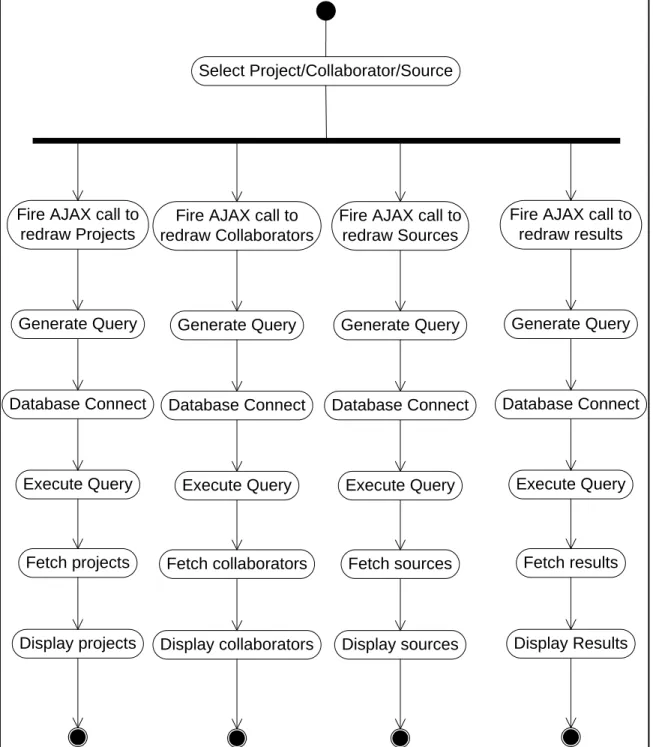
Thus four AJAX calls are implemented – one for each facet panel and one for the results
panel. Each facet panel as well as the results panel is refreshed asynchronously. Use of
AJAX has also enabled segregation of the code that controls each facet panel and the
Select Project/Collaborator/Source
Display projects Fetch projects Execute Query Database Connect
Generate Query Fire AJAX call to
redraw Projects
Display collaborators Fetch collaborators
Execute Query Database Connect
Generate Query Fire AJAX call to redraw Collaborators
Display sources Fetch sources Execute Query Database Connect
Generate Query Fire AJAX call to redraw Sources
Display Results Fetch results Execute Query Database Connect
Generate Query Fire AJAX call to
redraw results
Figure 4: Activity Diagram to update facets and results asynchronously
As the activity diagram depicts, when the user clicks a facet value in any of the facet
panels (e.g. selecting a specific project to filter the results), this causes four different
independent processing activities to start: refresh project panel, refresh collaborator
are independent of each other and do not wait for the other activities to complete. Each
thread of activity involves generating a query according to the selection made by the user,
making a connection to the database, executing the generated query in the MySQL
database, fetching the results from the database to the web front-end and using the results
6. Implementation Details
As the interface is implemented using AJAX, the whole page does not get reloaded
when user interface elements are clicked and the user is not navigated away from the
main page. Instead, the processes described above update the panels on the page. A
block diagram of the implementation schema of the project is shown in Figure 5:
Figure 5: Block diagram of the implementation details
Once the user is logged in, mainPage.php page gets loaded. This page contains
which in turn, load the facet information in the facets and the results in the results section
of the page. This is achieved using AJAX calls which get fired by the onload event when
the body of mainPage.php gets loaded. The Code Segment 1 depicts the basic structure of
the main page that loads all the facets and the results. The elements <p> with ids
“projects”, “collaborators”, “sources” and “results” are used to load the facets and results.
<form method="POST" id="controller">
<input type="hidden" name="username" value=<?php echo $username ?> />
<div class="bucket top scrollable box"><div
class="facetHeading smallBox" id="projectsDiv">Projects</div>
<p id="projects"> </p> </div>
<div class="bucket center scrollable box"><div class="facetHeading smallBox"
id="collaboratorsDiv">Collaborators</div>
<p id="collaborators"> </p>
</div>
<div class="bucket bottom scrollable box"><div
class="facetHeading smallBox" id="sourcesDiv">Sources</div>
<p id="sources"> </p>
</div>
<p><input type="button" id="list" value="List View" onClick="fnListView()"/>
<input type="button" id="graph" value="Graph View" onClick="fnGraphView()"/>
</p>
<p class="scrollable mainView box" id="results"
style="width:70%"></p>
<p class="scrollable mainView" id="resultsGraph" style="display:none">
<iframe
src="http://idl63.ils.unc.edu/ketan/revised/new/final/<?php echo $username.'.svg'; ?>" height="450" id="iframe">
</iframe> </p>
</form>
facets and results when AJAX call is fired and completed. As mentioned before, AJAX is
implemented using jQuery which is a cross-browser JavaScript library. The Code
Segment 2 below shows the four identical AJAX calls which serialize the data obtained
from the <form> with id “controller” and sends it to the correct php file. The
serialization() function of jQuery is used to get ALL the user entered data and to send it
to the php file. This php file returns the results which are loaded in the elements with the
ids “projects”, “collaborators”, “sources” and “results” respectively.
$.post(
"redrawProjects.php",
$("#controller").serialize(), function(data){
$("#projects").html(data);
document.getElementById("projectsDiv").innerHTML = "Projects";
} ); $.post(
"redrawCollaborators.php",
$("#controller").serialize(), function(data){
$("#collaborators").html(data);
document.getElementById("collaboratorsDiv").innerHTML = "Collaborators";
} ); $.post(
"redrawSources.php",
$("#controller").serialize(), function(data){
$("#sources").html(data);
document.getElementById("sourcesDiv").innerHTML = "Sources";
} ); $.post(
$("#controller").serialize(), function(data){
$("#results").html(data); }
);
Code Segment 2: AJAX calls using jQuery
$.post is a higher level abstraction of $.ajax method which uses HTTP POST
request to exchange the data with the server and unlike $.ajax, it allows only one callback
function that will be executed when the request is completed and the response has a
successful response code.
This $.post function has three parameters. The first parameter is the URL of the
page to load. This function loads redrawProjects.php page which will generate and
execute the SQL query to fetch list of projects.
Second parameter is the data to be sent to the server. This can be a key-value pair
if a single value is to be sent to the server. However in our case, we use it to send ALL
the selected values of ALL the facets along with information identifying the logged in
user. This is achieved by creating an html form element with id as controller and loading
all the facets inside this form element. When user selects any value from any facet, an
onClick event is fired which invokes a JavaScript function containing all the $.post
methods, each loading a php page for one facet and one for the results area. As the form
is submitted it needs to send all the selected values of the facets and the username to the
php page. This can be done by using .serialize() method to send the ALL the data fields
of the form to the server. Serialization creates a text string in the form of
when the request is complete and the response is successful. The response obtained from
redrawProjects.php is stored in a variable data and this response replaces the contents of
the element with id projects.
Thus mainPage.php fires five $.post methods, three to update the facets –
Projects, Collaborators and Sources – and two to update the results in List View and
Graph View. Each $.post method calls a different php page as shown in the block
diagram. This approach of separating control of each facet improves the maintainability
of the code and helps adding or removing of the facets in the future. Although this
structure does not confirm with the conventional MVC architecture, this structure offers
many of the advantages of the MVC structure.
As Figure 5 shows, each php page which is called from the main page further
calls another php page ‘checkedFacets.php’. This intermediate page is implemented to
create three separate arrays; one containing all the selected projects, one containing all
the selected collaborators and one containing all the selected sources. The page
checkedFacets.php contains three different functions each one extracting the list of
selected values from the facets Projects, Collaborators and Sources. As mentioned above,
$.post sends all the selected values to the server using .serialize() method. Thus the array
$_POST looks like this:
Array([username] => loggedInUserName [proj0] => 1 [collab1] => 6
[collab2] => 7 [collab3] => 8 [source0] => coagmento [source2] =>
These values in the array are to be used to build the SQL query to find the values of the
facet. Thus it is necessary to separate the values of projects, collaborators, sources and
the logged in user to build the query with the correct input. Each function in the page
checkedFacets.php receives this $_POST array as an input parameter and depending on
the key of the array it separates this single array into three different arrays: projArray,
collabArray and sourceArray. redrawProjects.php then stores these arrays into the session
variables: $_SESSION['qproj'], $_SESSION['qcollab'] and $_SESSION['qsource']. These
session variables then can be used across the session in all the pages just by starting the
session.
function extractCheckedProjects($postProj) {
$j=0;
/* -- Runs the loop to store current element in the array into $current variable -- */
while($current = current($postProj)) {
/* -- Stores the key of the array into the variable $key -- */
$key = key($postProj);
/* -- stores the current element of the array into an array $projArray when the key of the array has word 'proj' -- */
if (strstr($key,'proj') != false) $projArray[$j++] = $current; next($postProj);
}
return $projArray; }
Code Segment 3: Extracting the selected facets
Code Segment 3 extracts the array for the selected project when the input array of
$_POST is passed to it. Similarly functions extractCheckedCollaborators($array) and
values of the facets from the database.
6.1
Implementation of Facets
The Coagmento framework, which collects the data of the collaborative searches
and stores it in the database, has Projects as a key unit. As the user works on a particular
project while using Coagmento, her results, sources for that result, collaborators related
with that work are linked to the project. For example, when user Sindhu is logged in and
wants see all the sources for her collaborative work with another user Mark, the query
that needs to be submitted to the database will be: “Find all the sources for the user
Sindhu and user Mark for the projects on which they have worked together.” Thus the
easiest way to retrieve the list of all the sources is to get the displayed list of projects after
selecting the user Mark as the collaborator and build a query for the sources with those
projects. This approach of building queries makes the implementation details of the
collaborators facets and sources facets different from the projects facets.
6.1.1 Implementation of Projects Facet
Building a query for retrieving the list of projects depends on the logged in user,
selected collaborators and selected sources. It also depends on the selected project(s) as
the projects that are already selected should remain in the list of projects irrespective of
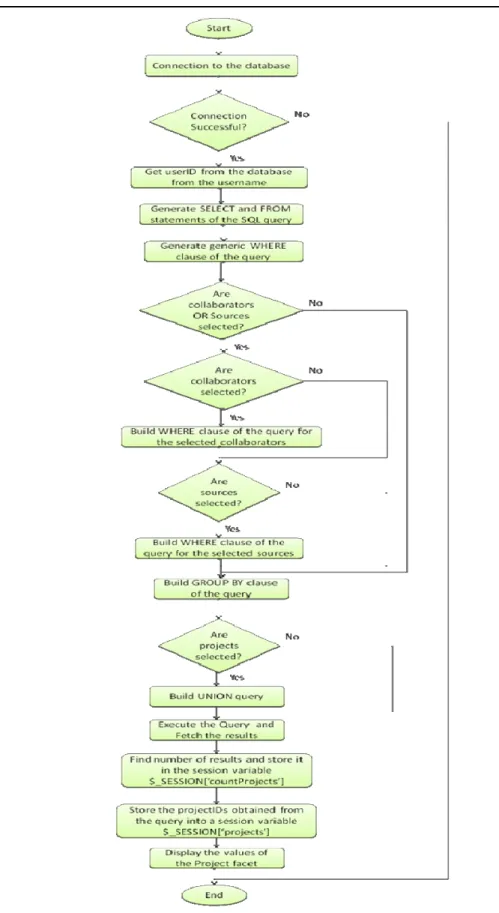
the selection of the collaborators and sources. Thus the flow chart of the facet Project
redrawProjects.php calculates number of projects returned by the query and puts this
value in the session variable $_SESSION['countProjects']. Similarly, it also stores the
projectIDs returned by the query in the session variable array $_SESSION['projects'][$j].
These two session variables are then used while retrieving the list of collaborators and the
list of sources as these facets depend on the projects.
The query submitted by the logged in user (userID=1) to the database when two
sources (‘google’ and ‘unc’) and three collaborators (userID=6, userID=7, userID=8) are
selected with one project pre-selected (projectID=1) looks like this:
SELECT projects.title, projects.projectid FROM projects, memberships, pages
WHERE memberships.projectid=projects.projectid AND memberships.userid=1 AND projects.projectid IN
(SELECT projectid FROM memberships WHERE userid=6 AND projectid IN
(SELECT projectid FROM memberships WHERE userid=7 AND projectid IN
(SELECT projectid FROM memberships WHERE userid=8
) )
)
AND pages.projectid IN
(SELECT DISTINCT projects.projectid FROM projects, pages WHERE pages.projectid=projects.projectid AND pages.userid=1) AND pages.projectid=projects.projectid
AND (source='unc' or source='google') GROUP BY projects.title
UNION
SELECT projects.title, projects.projectid FROM projects, memberships
6.1.2 Implementation of Collaborators/Sources Facet
As mentioned above, implementation of the facets Collaborators and Sources is
very similar to each other but varies from that of the facet Project. Similar to building a
query for retrieving the list of projects, building the query for facets sources or
collaborators depends on the logged in user, selected projects and selected
sources/collaborators. However, if no projects are selected then also the query building
depends on the list of projects present for the given selection of collaborators and source.
And finally the query also depends on the selected collaborator(s)/source(s) as they
should remain in the list irrespective of the selection of the collaborators, sources and
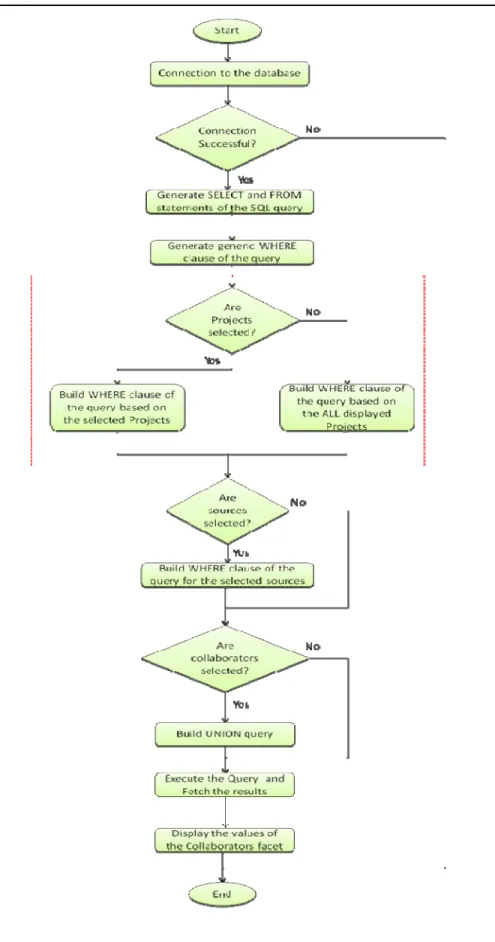
projects. The flow chart for the implementation of the facet collaborators is shown in
Figure 7 which is very similar to that of the implementation of the facet sources. As can
be seen, the flow chart in Figure 7 varies slightly from the flow chart of the
The dotted rectangle in Figure 7 highlights the dependency of the query on the
facet Projects. If values from facet project are selected then the query is built using the
selected values of the projects and if the values are not selected then the query is built
based on all the displayed projects. This can be further explained by the sample queries
that the php page generates as shown in the Table 1.
Projects selected Projects not selected
Selections:
Sources: google, unc
Projects : 1, 8
Selections:
Sources:google, unc
Projects: none
Query:
SELECT DISTINCT username,
users.userid
FROM memberships, users, pages
WHERE users.userid=memberships.userid
AND ( memberships.projectid=8
OR
memberships.projectid=1)
AND pages.userid=users.userid
AND ( source='unc'
OR source='google')
Query:
SELECT DISTINCT username,
users.userid
FROM memberships, users, pages
WHERE users.userid=memberships.userid
AND ( memberships.projectid=9
OR memberships.projectid=17 OR memberships.projectid=8 OR memberships.projectid=1 OR memberships.projectid=7 OR memberships.projectid=86) AND pages.userid=users.userid
AND ( source='unc'
OR source='google')
of the projects, collaborators and the sources. Implementation of the List View is very
similar to that of any of the facets. Once the user selects Projects, Collaborators and
Sources from the facets they are stored in the session variable arrays
$_SESSION['qproj'], $_SESSION['qcollab'] and $_SESSION['qsource'] respectively. To
build the SQL query for the list view it is first checked that at least one of these arrays is
not empty. A generic query including the select statement and the from clause are then
built and then, for the session variable arrays which are not empty, a loop is run through
the length of the array which builds the where clause of the query as shown in the Code
Segment 4.
/* -- Where clause for the selected collaborators -- */ if(count($_SESSION['qcollab']) != 0)
{
$collabClause = " AND (";
/* -- Loop runs for the number of times equal to the number of collaborators selected -- */
for($i=0; $i<count($_SESSION['qcollab']); $i++) {
$collabClause.=" users.userid =".$_SESSION['qcollab'][$i]; if(($i+1) != count($_SESSION['qcollab']))
/* -- OR operation is performed only up to last but one collaborator -- */
$collabClause.=" OR"; }
$collabClause.=" )"; $query.=$collabClause; }
Code Segment 4: Building a where clause for collaborators
Similar code generates a where clause for the selected projects and the selected
format. Additional checks are also provided to notify the user if the query returns zero
results or if no value from any of the facets is selected.
6.3
Implementation of Graph View
The web-interface of the faceted search results provides two views: the List View
and the Graph View. Section 6.2 describes the details of the implementation of the List
View. Implementation of the Graph View is similar to that of the List View as far as
building the SQL query, connecting to the database and retrieving the results are
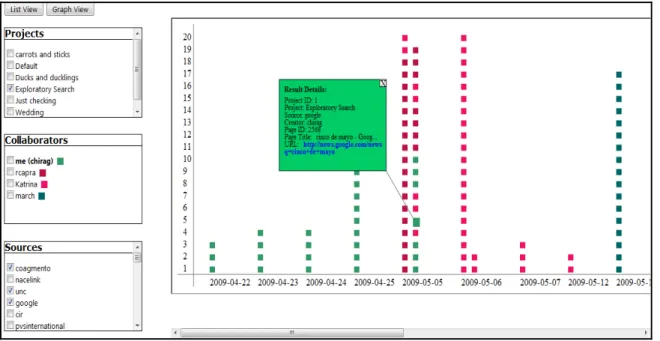
concerned. However, the List View displays the results in a tabular form whereas the
Graph View presents the same results on a timeline graph to display the number of
searches performed across time. Each result is displayed on the graph in the form of small
rectangular blocks. Further functionality is provided to click on the rectangular block to
display the details of that result. The results are also color coded to know the user to
whom the result belongs. This is shown in Figure 8.
redrawResultsGraph.php creates an SVG file which is embedded in the main page using
an HTML iframe tag.
6.3.1 Plotting of Coordinate Axes
SVG offers various shape elements like line, rectangle, text, circle, etc. that can be
directly used. Thus the axes of the graph can be plotted using elements line and text.
Y-axis of the graph is a static one as it always displays the numbers from 1 to 20 as the
number of results. However, dates that are plotted on the X-axis vary depending upon the
range of the dates for the given set of results obtained from the SQL query. Also, while
plotting any SVG element its position must be given. This is achieved for x-axis using
$x1=-20; $y1=407;
$previousDate="";
while ($results = mysql_fetch_array($graphQuery, MYSQL_BOTH)) { $id = uniqid ();
if($previousDate == $results['date']){ $y1=$y1-20;
}
/*-- Plot X-Axis --*/ else{
$x1=$x1+90; $y1=407;
$date = $results['date'];
$text = $parser->addChild('text',$date); $text->addAttribute('x',$x1);
$text->addAttribute('y','438'); }
/*-- Only 20 results can be plotted along Y-axis in one column --*/
if($y1 < 20){
$x1 = $x1+20; $y1 = 407; }
$colorCode =
substr(sha1($results['username']),strlen(sha1($results['use rname']))-7,3);
/*-- Plot points representing the results --*/ $smallRect = $parser->addChild('rect');
$smallRect->addAttribute('x',$x1); $smallRect->addAttribute('y',$y1); $smallRect->addAttribute('width','10'); $smallRect->addAttribute('height','10'); $smallRect->addAttribute('id','small_'.$id); $smallRect->addAttribute('style','cursor:pointer; fill:#'.$colorCode);
$smallRect->addAttribute('onclick','displayRect("'.$id.'")');
$previousDate=$results['date']; }
the while loop, the date is changed. As the date changes, the x-coordinate is also
incremented and the date is plotted on the x-axis scale.
6.3.2 Plotting of Result Points
Code segment 5 also displays code to display the rectangular block which
represent the results on the graph. While the date in the result set does not change the ‘Y’
value increases and the results are plotted on the top of each other using the SVG shape
element ‘rect’. However, as mentioned already, the iframe tag can fit only 20 such
rectangular element in one column. Thus for the dates which have more than 20 results,
another column of rectangular blocks is created immediately next to the first column. As
the date changes a new column of results is plotted by shifting the x-coordinate of the
‘rect’ element. Each rectangular block representing a result has a color corresponding to
the user associated with that result. This color coding is implemented by encrypting the
username of each result using Secure Hash Algorithm-1 (SHA1) and then using last three
characters of the encrypted string as the color code.
6.3.3 Displaying the Details of the Result
The Graph View gives the additional information about the results by capturing
the frequency of the searches performed. However each rectangular block on the timeline
graph represents one result and thus contains lots of related data regarding the result. To
enable the user to view this data and to make the Graph View more useful, functionality
is provided to display the data related to a result by clicking on the rectangular block.
As shown in Figure 8, after clicking small rectangular block a bigger rectangle
clicked. This is achieved by generating big rectangles along with the small ones but
hiding them by changing the ‘display’ attribute of these elements. It means when the
graph is generated, equal number of big rectangles as that of small rectangles get
generated. But these big rectangles are hidden by default. Thus for each small rectangle,
one big rectangle, one connector line and related text elements are all created in SVG. All
these big rectangle elements have the same y-coordinate but the x-coordinate varies
depending upon the location of the small rectangle. The x-coordinates of all the big
rectangles are generated in such a way that these rectangles will be positioned to the left
side of the small rectangle. However this poses a problem for the small rectangles which
are near to the y-axis as the big rectangles corresponding to these small rectangles will go
out of the graph space. To avoid this big rectangles corresponding to the results of the
first three dates are plotted to the right of the small rectangles representing those results
and for the rest of the results, big rectangle is plotted to the left of the result. These big
rectangles have the same size and are linked to the small rectangles by assigning them an
id which matches with the id of the small rectangles. These elements are not visible when
the SVG file is loaded due the attribute that is set for these elements:
$bigRect->addAttribute('display','none');
Each small rectangle has an onClick event set as an attribute. When user clicks on the
small rectangle a javascript function, displayRect is fired to which an id of that element is
passed. This javascript function changes the display property of the elements with that id
to make it visible.
a small ‘X’ symbol at the top-right corner of the big rectangle. This function ‘closes’ the
big rectangle by changing the attribute display back to ‘none’. The function displayRect
also checks if there is already one big rectangle that is ‘open’. If it is open and user tries
to open another big rectangle by clicking on a small rectangle, the function displays alert
message requesting the user to close the opened rectangle first.
6.3.4 Connector line
The last challenging functionality in building the Graph View was building a
connector line using SVG element ‘line’ which will join the big rectangle giving the
information of the result to which small rectangle corresponds. Although the y-coordinate
of the big rectangle is fixed, the position of the big rectangle across x-axis is changing.
Also the position of the small rectangle with respect to the corresponding big rectangle
can be variable for each result. Thus a connector line with hard-coded values of end point
coordinators cannot be used. Coordinates of the connector line are decided by the
parametric input where the input values depend upon the location of the big rectangle and
the location of the small rectangle. Thus the connector line joins the two rectangles in the
7. Similar Efforts
As the faceted search addresses many weaknesses of the conventional search it is
attracting the attention of both the academic and commercial worlds. Many academic
projects and researches are focusing on effective and efficient use of faceted search.
Efforts are being made to improve the use of the faceted search by adding it with various
other features such as different visualization and representation of the data retrieved from
the faceted search.
One of such early efforts was initiated by the Human-Computer Interaction Lab of the
University of Maryland. The project FilmFinder uses dynamic queries to explore the
movie database. It lets the user filter the results with various facets such as the title of the
movie, actor, actress, director, etc. and generate queries dynamically according to the
selection a user had made (Ahlberg & Shneiderman, 1994). The project enables these
facets by providing a sliding bar for each of the facets. However, the length of the sliding
bar does not change dynamically depending upon the result sets available. Nevertheless
this search interface proves useful to find the dense and non-dense sections of the
multidimensional search space (Tunklang, 2009). FilmFinder project also displays the
movies in the form of a color-coded dot in a graph of Popularity versus Year of
Production. Our project adopts a similar approach of color coding the data in the
graphical representation to make the sense-making task easy. FilmFinder project is
The Flamenco project is one of the foundation works in the field of faceted search
undertaken at the University of California, Berkeley. This project interface is shown
Figure 10:
Figure 10: Flamenco Project
Flamenco lets the user select a single value from any of the facets and filters the
results accordingly. In addition to the faceted search, it also provides a search text box
for performing the text search within whole set of results as well as within the current
selection. This text searching feature strengthens the faceted search. As Hearst (2006)
describes, Flamenco limits the length of the facets by restricting the number of facet
values shown for each facet and gives an option to the user to see more facet values
only if necessary. One of the limitations of the Flamenco project is that it does not
allow the users to select more than one facet values from the same facet.
Another example of a faceted interface is the project mSpace. This project was led
by schraefel m.c. at the University of Southampton. Unlike the aforementioned
projects, mSpace allows selecting multiple values from the same facet. Another
power to navigate through the results more effectively. As Tunklang (2009)
describes, this project has a greater focus on user interface issues than on the faceted
interface issues. mSpace enables easy access to the information and lets the user
explore the information in a structured way (schraefel, m. c., Karam, M., and Zhao, S.
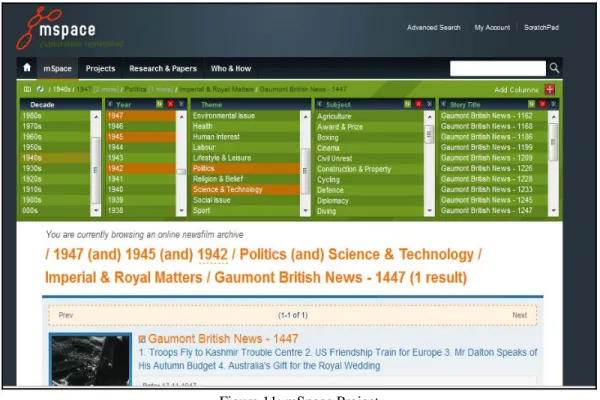
2003). The screenshot of the mSpace project is shown below:
Figure 11: mSpace Project
Mspace project displays the results only in a list form and does not provide any
other representation of the results to the users. In this aspect our project differs by
providing multiple views including the graph view which can give the overview of the
results displayed across the time line.
Relation Browser project at the School of Information and Library Science, UNC
presentation of the number of results available for each facet value. It also lets the users
to explore the results by hovering mouse over the facets. As Capra et al (2007) note,
Relation Browser project focuses on the usefulness of the faceted search while noting the
need for further investigating the effectiveness of the search process based on the
8.
Future Scope
Our project successfully builds a web-application to retrieve collaborative search
results using a faceted search. The project also enables the user to view her own as well
as her collaborators’ results in a graphical form. Currently, the project interface, although
it fetches the results from the database of Coagmento, is not fully integrated with
Coagmento system (e.g. website and toolbar). This interface will prove more useful when
integrated with the “live” Coagmento collaborative information seeking system.
The project uses SVG to plot the graph of the results on the timeline. It is worthwhile
to investigate a framework such as Google API for charts which may provide a simpler
and more elegant way to develop a graph. Such framework, if used, could support greater
functionality for the Graph View. In the current functionality, the x-axis of the graph
displays all dates one after the other. This can potentially increase the width of the graph
unpredictably. This can be avoided by building a user-specified dynamic time line view.
In a dynamic time line view a user can select the interval of the dates. For example, if the
dates are ranging from 1st Jan 2009 to 5th September 2010 then the user can have an
option to display the results for each day or user can ‘zoom out’ the results and choose to
display the results for each week or each month.
Use of the Google API could also eliminate cross-browser incompatibility issues. The
for Internet Explorer. None of the versions of Internet Explorer except for IE9 (which is
yet to be launched as of this writing in the fall of 2010) support SVG. Although Google
API uses SVG as an underlying technology, it does work with Internet Explorer by
converting the SVG into PNG format. This however, is a minor issue as the Coagmento
framework, so far, works only with the Firefox browser and thus the faceted search
interface built on top of this framework may be used primarily with the Firefox browser.
Another addition to the existing interface would be that of search functionality. As
mentioned in the use cases, if a user Mark remembers a word from his search results then
having search functionality can help him find the results more effectively. Faceted search
along with an advanced search can help users to interact with the results more effectively.
While developing this project a great emphasis was placed on implementing the
required functionality. Much work needs to be done to improve the interface from
usability perspective. The interface can further be improved so that the user can interact
References
Ajax: http://www.w3schools.com/Ajax/Default.Asp Accessed on 2010, August 26.
Ajax Programming: http://en.wikipedia.org/wiki/Ajax_%28programming%29 Accessed on 2010,
August 28.
Ahlberg, C., and Shneiderman, B. (1994). Visual information seeking: tight coupling of dynamic
query filters with starfield displays. In Proceedings of the SIGCHI Conference on Human
Factors in Computing Systems: Celebrating Interdependence (Boston, MA, USA, April 24–
28, 1994). B. Adelson, S. Dumais, and J. Olson (Eds.), CHI ’94. pp. 313–317. NewYork:
ACM.
Capra, R., Marchionini, G., Oh, J. S., Stutzman, F., and Zhang, Y. (2007). Effects of structure and
interaction style on distinct search tasks. In Proceedings of the 2007 Conference on Digital
Libraries (Vancouver, BC, Canada, June 18 - 23, 2007). JCDL '07. ACM Press, New York,
NY, 442-451. DOI= http://doi.acm.org/10.1145/1255175.1255267
Fagan J. C. (2010). Usability studies of faceted browsing: a literature review. Information
Technology & Libraries, 29 (2), 58-66.
Hearst, M. (2006). Design recommendations for hierarchical faceted search interfaces. ACM
SIGIR Workshop on Faceted Search.
La Barre K. (2007). Faceted Navigation and Browsing Features in New OPACS: Robust Support
for Scholarly Information Seeking? Knowledge Organization, 34(2), 82
Post: http://docs.jquery.com/Post Accessed on 2010, July 28.
schraefel, m. c., Karam, M., and Zhao, S. (2003). mSpace: Interaction Design for User
Determined, Adaptable Domain Exploration in Hypermedia. In: AH 2003: Workshop on
AdaptiveHypermedia and Adaptive Web Based Systems, August 26, Nottingham, UK.
Serialize: http://api.jquery.com/serialize/ Accessed on 2010, August 5.
Shah, C. 2010. Coagmento - A Collaborative Information Seeking, Synthesis and Sense-Making
Framework. Integrated demo at CSCW 2010. February 6-11, 2010. Savannah, Georgia.
Tunkelang, D. (2009). Faceted Search. In G. Marchionini (Ed.) Synthesis Lectures on
Information Concepts, Retrieval, and Services. Morgan & Claypool. Retrieved from
Acknowledgement
I would like to thank Dr. Robert Capra for his support and encouragement to
complete this project. I wish to thank him for helping me understand the Results
Space project, providing assistance by providing database and web space, enabling
access to the Coagmento database, and helping me produce well-designed report.
Without his guidance and direction I could not have completed this project.
I would also like to thank the Results Space team including Dr. Gary Marchionini,
Chirag Shah and Garnett Matney at the School of Information and Library Science
whose valuable inputs at various stages of the project helped me developing the
project.
I would specially like to express my gratitude towards my colleagues and friends
Amol Bapat, Lina Huang and Rahul Deshmukh, discussions with whom proved very
constructive while working on this project.
And finally I wish to express my gratitude to the faculty and staff of the School of
Information and Library Science for helping me in every possible way and
Appendix
1. Code for mainPage.php
<?php
Header('Cache-Control: no-cache'); Header('Pragma: no-cache');
?>
<!DOCTYPE html PUBLIC "-//W3C//DTD XHTML 1.0 Strict//EN" " http://www.w3.org/TR/xhtml1/DTD/xhtml1-strict.dtd">
<html xmlns="http://www.w3.org/1999/xhtml" xml:lang="en" lang="en"> <head>
<title>Multi-faceted Results</title>
<link rel="stylesheet" type="text/css" href="style.css" />
<meta http-equiv="Content-type" content="text/html; charset=utf-8" /> <script type="text/javascript" src="jquery.js"></script>
<script type="text/javascript">
// window.displayMode = "list";
function fillPage() {
redraw(); }
function redraw() {
var value = $("#username").val();
document.getElementById("results").innerHTML = "<img src='loading.gif'/>";
document.getElementById("projectsDiv").innerHTML = "<img src='loading.gif'/>";
document.getElementById("collaboratorsDiv").innerHTML = "<img src='loading.gif'/>";
document.getElementById("sourcesDiv").innerHTML = "<img src='loading.gif'/>";
$.post(
"redrawProjects.php",
$("#controller").serialize(), function(data)
{
$("#projects").html(data);
document.getElementById("projectsDiv").innerHTML = "Projects";
} );
$.post(
"redrawCollaborators.php",
$("#controller").serialize(), function(data)
{
$("#collaborators").html(data);
document.getElementById("collaboratorsDiv").innerHTML = "Collaborators";
function(data) {
$("#sources").html(data);
document.getElementById("sourcesDiv").innerHTML = "Sources"; }
);
$.post(
"redrawResultsList.php",
$("#controller").serialize(), function(data)
{
$("#results").html(data); }
);
if (window.displayMode == "graph") {
fnGraphView(); }
}
function fnGraphView (){
window.displayMode = "graph";
$.post(
"redrawResultsGraph.php",
$("mainView").serialize(), function (data){
data = data + "px";
// alert(data);
document.getElementById("results").style.display="none";
document.getElementById("resultsGraph").style.display="";
document.getElementsByTagName("iframe")[0].src += "?i=" + (new Date()).
getTime();
document.getElementById("iframe").style.width = data; }
); }
function fnListView(){
window.displayMode = "list";
document.getElementById("results").style.display="";
document.getElementById("resultsGraph").style.display="none"; }
</script> </head>
<body onload="fillPage()"> <?php
session_start();
$username = $_GET['username']; $_SESSION['username']=$username;
echo ("<input type='hidden' id='username' name='username'
value='$username' />");
?>
<form method="POST" id="controller">
<input type="hidden" name="username" value=<?php echo $username ?> /> <div class="bucket top scrollable box"><div class="facetHeading
<p id="projects"> </p></div>
<div class="bucket center scrollable box"><div class="facetHeading smallBox" id=
"collaboratorsDiv">Collaborators</div> <p id="collaborators"> </p></div>
<div class="bucket bottom scrollable box"><div class="facetHeading smallBox" id=
"sourcesDiv">Sources</div> <p id="sources"> </p></div>
<p><input type="button" id="list" value="List View"
onClick="fnListView()"/>
<input type="button" id="graph" value="Graph View"
onClick="fnGraphView()"/> </p>
<p class="scrollable mainView box" id="results" style="width:70%"></p> <p class="scrollable mainView" id="resultsGraph" style="display:none"> <iframe src="http://idl63.ils.unc.edu/ketan/revised/new/final/<?php
echo
$username.'.svg'; ?>" height="450" id="iframe"> </iframe>
</p> </form> </body> </html>
2. Code for redrawProjects.php
<?php
$username=$_POST['username']; session_start();
require ("connection.php");
include ("checkedFacets.php");
$_SESSION['qproj'] = extractCheckedProjects($_POST);
$_SESSION['qcollab'] = extractCheckedCollaborators($_POST);
$_SESSION['qsource'] = extractCheckedSources($_POST);
$user=mysql_query ("SELECT userid FROM users WHERE
username='$username';");
/* -- Fetches userid from the username -- */
$users=mysql_fetch_array($user, MYSQL_BOTH);
$userid=$users['userid'];
/* -- Basic query structure -- */
$query="SELECT projects.title, projects.projectid FROM projects, memberships, pages
WHERE memberships.projectid=projects.projectid";
/* -- No collaborators or sources selected -- */
if(count($_SESSION['qcollab']) == 0 && count($_SESSION['qsource']) ==
0){
/* -- Sample query: SELECT projects.title, projects.projectid FROM projects,
memberships, pages WHERE memberships.projectid=projects.projectid AND memberships.userid=1 GROUP BY projects.title -- */
/* -- Either collaborators or source or both are selected -- */
else{
/* -- Collaborators are selected -- */
if(count($_SESSION['qcollab']) != 0){
/* -- Sample query: SELECT projects.title, projects.projectid FROM projects,
memberships, pages WHERE memberships.projectid=projects.projectid AND memberships.userid=1 AND projects.projectid IN (SELECT projectid FROM
memberships WHERE userid=6) -- */
/* -- English language query: Display project titles which are common between the
logged in user (userid=1) and selected user (userid=6) -- */
/* -- where clause for the query for the selected collaborator(s) -- */
$collabClause = " AND memberships.userid=$userid AND projects.projectid
IN";
for($i=0; $i<count($_SESSION['qcollab']); $i++){
/* -- Depending upon the selected collaborators, number of subqueries will get
written to find the common projects between all the selected collaborators -- */
$collabClauseLoop.=" (SELECT projectid FROM memberships WHERE userid=".$_SESSION
['qcollab'][$i];
if(($i+1) != count($_SESSION['qcollab']))
/* -- Innermost subquery will get executed only up to last but one collaborator -- */
$collabClauseLoop.=" AND projectid IN"; }
/* -- Closing braces for all the subqueries -- */
for($i=0; $i<count($_SESSION['qcollab']); $i++){
$collabClauseLoop.=")"; }
/* -- Appends where clause to the general query structure -- */
$query.=$collabClause.$collabClauseLoop; }
if(count($_SESSION['qsource']) != 0){
/* -- Sample query: SELECT projects.title, projects.projectid FROM projects,
memberships, pages WHERE memberships.projectid=projects.projectid AND memberships.projectid IN (SELECT DISTINCT projects.projectid FROM projects,
memberships WHERE memberships.projectid=projects.projectid AND pages.userid=1) AND projects.projectid=pages.projectid AND ( source='coagmento'
OR source='nacelink') GROUP BY projects.title -- */
/* -- English language query: Display project title and project ID when projectid
from the pages table is in the diplayed list of projects -- */ /* -- where clause for the query for the selected source(s) -- */
$sourceClause = " AND pages.projectid IN (SELECT DISTINCT projects.projectid FROM
projects, pages
pages.projectid=projects.projectid AND ("; for($i=0;$i<count($_SESSION['qsource']); $i++){
/* -- Depending upon the number of selected sources, "logical 'or' operation"
will be performed -- */
$sourceClauseLoop.=" source='".$_SESSION['qsource'][$i]."'";
if(($i+1) != count($_SESSION['qsource']))
/* -- 'OR' operation is performed only up to last but one source -- */
$sourceClauseLoop.= " or"; }
$sourceClauseLoop.=")";
/* -- Appends where clauses to the general query structure -- */
$query.=$sourceClause.$sourceClauseLoop; }
}
/* -- Final group by clause of the query -- */
$groupBy=" GROUP BY projects.title";
/* -- Final query -- */
/* -- Sample query: SELECT projects.title, projects.projectid FROM projects, memberships,
pages WHERE memberships.projectid=projects.projectid
AND memberships.userid=1 AND projects.projectid IN (SELECT projectid FROM memberships
WHERE userid=1 AND projectid IN
(SELECT projectid FROM memberships WHERE userid=6)) AND pages.projectid IN (SELECT
DISTINCT projects.projectid FROM projects, pages
WHERE pages.projectid=projects.projectid AND pages.userid=1) AND pages.projectid=projects.projectid AND
( source='coagmento' or source='unc') GROUP BY projects.title -- */ /* -- English language query: Display all the project titles on which logged in user
(userid=1) and userid=6 have worked and have sources 'coagmento' and 'unc' -- */
$query.=$groupBy;
/* -- Query to maintain the selected project throughout the session */
for($i=0; $i<count($_SESSION['qproj']); $i++){ $sessionProj[$i]=$_SESSION['qproj'][$i];
$sessionProj[$i]=str_replace('@',' ',$sessionProj[$i]);
/* -- Sample query: UNION SELECT projects.title, projects.projectid FROM projects,
pages WHERE projects.projectid=pages.projectid AND projects.projectid='9' -- */
$union=" UNION SELECT projects.title, projects.projectid FROM projects, memberships
WHERE projects.projectid=memberships.projectid AND projects.projectid='
$sessionProj[$i]'";
/* -- Appending the query with the other query -- */
$query.=$union; }
/* -- Echoing SQL queries for the test purpose -- */ // echo $query."<br>";
$userProjects=mysql_query($query);
/* -- Number of rows of the result of $quertCount are stored in a session variable to use
across the session -- */