Microsoft Office 365 for G Cloud
G-Cloud Service Definition Document in response to G-Cloud
ITT tender –
Microsoft Office 365 G Cloud Response
The names of actual companies and products mentioned herein may be the trademarks of their respective owners.
The information contained in this document represents the current view of Microsoft Corporation on the issues discussed as of the date of publication and is subject to change at any time without notice to you. This document is provided “as-is.” Information and views expressed in this document, including URL and other Internet Web site references, may change without notice. You bear the risk of using it. MICROSOFT MAKES NO WARRANTIES, EXPRESS OR IMPLIED, IN THIS DOCUMENT.
This document does not provide you with any legal rights to any intellectual property in any Microsoft product. You may copy and use this document for your internal, reference purposes. This document is confidential and proprietary to Microsoft. It is disclosed and can be used only pursuant to a non-disclosure agreement.
The descriptions of other companies’ products in this document, if any, are provided only as a convenience to you. Any such references should not be considered an endorsement or support by Microsoft. Microsoft cannot guarantee their accuracy, and the products may change over time. Also, the descriptions are intended as brief highlights to aid understanding, rather than as thorough coverage. For authoritative descriptions of these products, please consult their respective manufacturers.
Microsoft may have patents, patent applications, trademarks, copyrights, or other intellectual property rights covering subject matter in this document. Except as expressly provided in any written license agreement from Microsoft, the furnishing of this document does not give you any license to these patents, trademarks, copyrights, or other intellectual property.
All trademarks are the property of their respective companies. ©2013 Microsoft Corporation. All rights reserved.
Microsoft, Access, Active Directory, Backstage, Excel, InfoPath, Internet Explorer, Lync, OneNote, Outlook, PowerPoint, PowerShell, SharePoint, Silverlight, Windows Live, Windows Mobile, Windows Server, Windows Vista, and Windows are either registered trademarks or trademarks of Microsoft Corporation in the United States and/or other countries.
Microsoft Office 365 G Cloud Response
Contents
1. G-Cloud Service Definition for Microsoft Office 365 ... 4
1.1 An overview of Microsoft Office365 ... 5
Office 365 - Exchange Online... 5
Office 365 - SharePoint Online ... 5
Office 365 - Lync Online ... 5
Office 365 – Office Web Apps ... 6
Office 365 – Microsoft Office Professional Plus ... 6
1.2 Information assurance ... 7
2. Microsoft Office 365 Service Management ... 8
2.1 Ensuring Data Availability ... 8
Data Storage and Redundancy ... 8
Data Monitoring and Maintenance ... 8
2.2 Backup/restore and Disaster Recovery... 10
2.3 On-boarding and Off-boarding - Provisioning ... 11
Data extraction/removal: ... 11
The Office 365 Privacy Statement: ... 13
Data storage and processing locations ... 13
Microsoft Trust Centre ... 14
2.4 Data Centre Tier ... 14
See also Microsoft Global Foundation Services... 14
3. Microsoft Office 365 Support ... 16
3.1 Roadmap & Service maintenance ... 16
3.2 Service Levels (e.g. performance, availability, support hours, severity definitions etc.) ... 18
See also Service Level Agreement ... 18
Availability SLA ... 18
Financial recompense model ... 18
3.3 Severity Definitions for Support Services ... 18
3.4 Support Hours ... 20
Support Included with Office 365 for Enterprises ... 20
Technical Support Descriptions ... 21
Support Availability and Languages ... 21
Telephone Support Details... 22
Online/Web Support ... 22
4. Trials, Training & Purchasing ... 24
4.1 Trials ... 24
4.2 Training ... 24
5. Office 365 Operating System and Software Requirements ... 25
Published API’s ... 27
Microsoft Office 365 G Cloud Response
1.
G-Cloud Service Definition for Microsoft Office 365
This G-Cloud Service Definition document is to be read in conjunction with Microsoft’s standard Service Description documentation for Office 365 found at:
http://technet.microsoft.com/en-us/library/jj819284.aspx
A tour of Office 365 can be found here :
http://office.microsoft.com/en-gb/videos/office-365-a-tour-for-users-HA102657904.aspx
If there is a conflict between this document and the Microsoft Standard Service Description documentation for Office 365, the Mirosoft Standard Service Description document shall take precedence.
The Office 365 Service enables customers optionally to access and use a variety of additional resources, applications, or services provided by Microsoft or third party providers (for convenience, “add-ons”), as described in services documentation and/or in the portal through which customer organizations manage and configure their Office 365 service. Customers must determine for themselves whether use of these add-ons is appropriate in their individual circumstances.
Add-ons, including but not limited to additional resources, applications, or services that are (i) provided by third parties, or (ii) are provided by Microsoft subject to their own terms of use or privacy policies, are not offered subject to the Framework Agreement.
Microsoft Office 365 G Cloud Response
1.1
An overview of Microsoft Office365
Microsoft® Office365 is a hosted communication and collaboration solution that delivers the capabilities of Microsoft Exchange Server, Sharepoint Server and Lync Server as cloud-based services
Microsoft® Office 365 simplifies IT management, while raising the bar on enterprise productivity. Backed by powerful security features and performance reliability, Office 365 combines familiar Microsoft
productivity, collaboration, and communication tools through Exchange , SharePoint and Lync online to support workers virtually wherever they are, on almost any device. With a choice of deployment options, IT can continue to run some applications on-premises while moving others to the cloud, or migrate entirely to the cloud.
Microsoft Office 365 consists of:
Office 365 - Exchange Online
Exchange Online is a hosted messaging solution that delivers the capabilities of Microsoft Exchange Server as a cloud-based service. It gives users rich and familiar access to email, calendar, contacts, and tasks across PCs, the web, and mobile devices. With Exchange Online, organizations can take advantage of sophisticated messaging capabilities without the operational burden of on-premises server software. Full functional and non-functional details of Microsoft Exchange Online can be found in the following Service Description
Microsoft Exchange Online - Service Description
Office 365 - SharePoint Online
SharePoint Online is a Microsoft Office 365 service for businesses of all sizes. Instead of installing and deploying Microsoft SharePoint Server on-premises, any business can now simply subscribe to SharePoint Online to provide their employees with an enterprise-grade solution for creating sites to share documents and information with colleagues and customers.
SharePoint Online helps businesses of all sizes to:
Work together effectively. Share your team’s documents and track project milestones to keep everyone in
sync.
Keep documents up to date. Manage your team’s important documents online so the latest versions are
always at hand.
Microsoft SharePoint Online - Service Description
Office 365 - Lync Online
Lync Online is a next-generation cloud communications service that connects people in new ways, anytime, from virtually anywhere. Lync Online provides intuitive communications capabilities across presence, instant messaging, audio/video calling and a rich online meeting experience including PC-audio, video and web conferencing. Transform your interactions with colleagues, customers and partners from today’s hit-and-miss communication to a more collaborative, engaging, and effective experience.
Microsoft Office 365 G Cloud Response
Office 365 – Office Web Apps
Office Web Apps allows you to view, share and edit your Microsoft Office documents on the web with Microsoft Office Web Apps. Using virtually any device connected to the internet*, view your Microsoft Word, Microsoft Excel, Microsoft PowerPoint, and Microsoft OneNote documents online and make basic edits on the go. Share your documents with others, and make simultaneous edits to Excel and OneNote files in real time with great document fidelity and consistent formatting even when team members are working on a PC with a different version of Office installed, or on a Mac or slate device. And because Office Web Apps work with the Office applications you already know, your documents always look the way you want – from your PC to the web, and back again.
* Access from mobile devices requires Wi-Fi capability or depends on carrier network availability.
Microsoft Office Web Apps - Service Description
Features
View, edit and share content created in the Word, Excel, PowerPoint, and OneNote desktop applications online, from almost any device with an Internet connection.
Provide a common set of online viewing and editing tools to people who use different platforms and different versions of Microsoft Office, including those who do not have Microsoft Office on their computers.
Ensure a familiar experience by providing an environment that uses many of the same editing and formatting features users already know from Microsoft Office.
Need a feature you don’t see in the Web Apps? Open documents in the applicable Office desktop application with one click from Office Web Apps to access rich editing features (requires Office Professional Plus 2007 Service Pack 2 or later, Office for Mac 2008 with Entourage 2008 Web Services Edition, or Office for Mac 2011 and Outlook for Mac 2011).
Access and view Office documents from supported mobile browsers.
Simultaneously edit shared Excel spreadsheets and OneNote Shared Notebooks with co-authoring support in the Office Web Apps. See the areas colleagues are editing in real-time
Office 365 – Microsoft Office Professional Plus
Office 365 ProPlus is a subscription service that provides you with the latest version of the Office desktop applications that you’re already familiar with, such as Word, Excel, and PowerPoint. Office 365 ProPlus is included in most Office 365 plans, but is also available as an individual service.
Even though Office 365 ProPlus is a cloud-based service, these Office applications aren’t running up in the cloud. Instead, users can download Office 365 ProPlus from the Office 365 portal and install it on their local computers. Microsoft uses Click-to-Run technology to make the download and installation of Office 365 ProPlus fast and simple. Click-to-Run uses virtualization technology to run Office 365 in a
self-Microsoft Office 365 G Cloud Response
contained environment on the local computer, which allows users to run Office 365 ProPlus side-by-side with an earlier version of Office.
Office 365 ProPlus is available in 32-bit and 64-bit editions.
Microsoft Office Pro Plus – Service Description
Office 365 – Dedicated
Office 365 provides a Dedicated option in its service which enables customers to run their own tenant on physically separate servers, separate from our standard multi-tenant infrastructure. The minimum order to qualify for this service is 30,000 seats.
The Service Description of Microsoft Office 365 Dedicated services can be find at:
http://technet.microsoft.com/en-us/library/jj879309.aspx
For Office365 Exchange Online Kiosk and Office365 Exchange Online P1D,
please select the ‘Exchange Online Service Description_Office 365 Dedicated Plans’ document.
For Office365 E1D which is a licensing package that includes Office365 Exchange Online P1D + Office365 Lync Online P2D + Office365 Sharepoint Online P1D,
please select the 3 service related document meaning ‘Exchange Online Service Description_Office 365
Dedicated Plans’ + ‘Lync Online Service Description_Office 365 Dedicated Plans’ + ‘SharePoint Online
Service Description_Office 365 Dedicated Plans’ documents
Office365 Dedicated services have specific technical, operation and setup timing. You must engage a Microsoft technical and sales representatives before ordering Office 365 Dedicated SKUs.
1.2
Information assurance
Microsoft Office 365 has undergone accreditation as part of the the UK Government's G-Cloud Pan Government Accreditation process.
Microsoft Office 365 G Cloud Response
2.
Microsoft Office 365 Service Management
This section describes the common approach to service management that is taken by Office 365 across all of its services. It also explains how Office 365 ensures data availability and service reliability to customers.
Office 365 Security & Service Continuity Service Description
Service management also focuses on the ability to restore services for Office 365 customers in a predetermined timeframe during a critical service outage. Achieving restored services requires
preparation, planning, technical implementation, exercises that simulate outages, and execution at the time of an incident.
2.1
Ensuring Data Availability
Microsoft ensures customer data is available whenever it is needed, with the help of the following features of Office 365 services.
Data Storage and Redundancy
Customers’ data is stored in a redundant environment with robust backup, restore, and failover capabilities to enable availability, business continuity, and rapid recovery. Multiple levels of data redundancy are implemented, ranging from redundant disks to guard against local disk failure to continuous, full data replication to a geographically diverse data centre.
Data Monitoring and Maintenance
Along with avoiding data loss, Office 365 helps maintain data performance.
Monitoring databases: Databases are regularly checked for: Blocked processes.
Packet loss. Queued processes. Query latency.
Preventative maintenance: Maintenance includes database consistency checks, periodic data compression, and error log reviews.
Microsoft Office 365 G Cloud Response
Service Health Dashboard
The Microsoft Online Service Health Dashboard, shown below, provides customers with visibility into the availability and historical status of all Services and Tools offered through Office 365. Customers seeking details about the current availability or past status of these services or tools can easily access the Service Health Dashboard from the Administration view on the Microsoft Online Portal.
Microsoft’s commitment to continuous improvement involves analysis of every Service Impacting Event (SIE) in order to minimize future recurrence. In some situations, identifying the root cause can be hindered by incomplete forensic data. Even when the root cause is unknown, Microsoft is committed to providing the information that is known about the impact of the event, and the corrective actions being taken, in a descriptive document called a Post-incident Review.
For events that are categorised as either Catastrophic or Severity A, and which affect a broad number of customer organisations, a customer may request a Post Incident Review (PIR). This detailed report includes:
• An incident summary and event timeline. • Broad customer impact and root cause analysis. • Actions being taken for continuous improvement.
Due to the time and resources required to conduct the subsequent analysis, the time to dispatch the PIR is a minimum of 7 working days following the resolution of the SIE. Administrators can request a PIR using a standard online service request submission through the Microsoft Online Portal or a phone call to Microsoft Customer Service and Support. The Dashboard is available through the Administrator Portal, allowing organisations to define which users have access.
Microsoft Office 365 G Cloud Response
2.2
Backup/restore and Disaster Recovery
The backup, restore and disaster recovery details differ slightly for each of the component offerings within Office 365:
Exchange:
Exchange Online mailboxes are replicated to multiple database copies, in geographically dispersed Microsoft datacentres, to provide data restoration capability in the event of a messaging infrastructure failure. For large-scale failures, service continuity management is initiated.
Exchange Online is hosted in Microsoft-managed, enterprise-level data centres that are designed to operate highly available online services. Exchange Online provides a financially-backed Service Level Agreement (SLA) with a 99.9% uptime guarantee.
Hardware failures, natural disasters, and human error all have the potential to affect service availability. To address this, Exchange Online offers service continuity management, a process for managing risks to ensure that the Exchange Online infrastructure is capable of providing continuing services if unexpected events occur. Service continuity management for Exchange Online includes provisions to quickly recover from these events.
Two metrics commonly used in service continuity management to evaluate disaster recovery solutions are a recovery time objective (RTO), which measures the time between a system disaster and the time when the system is again operational, and a recovery point objective (RPO), which is a time representation of the possible data loss that occurred as a result of the recovery from the unexpected event.
Exchange Online has set an RPO and RTO for client messaging services in the event of a disaster:
• Nearly instantaneous RPO: Microsoft protects your Exchange Online data and makes a nearly instantaneous copy of your data.
• 1 hour RTO: Organizations will be able to resume service within 60 minutes after service
disruption if a disaster incapacitates a hosting datacentre.
SharePoint
Data backup services are provided to prevent the loss of SharePoint Online data. Backups are performed every 12 hours and retained for 14 days.
SharePoint Online is hosted in Microsoft-managed datacentres that are designed to operate highly available online services. SharePoint Online provides a financially-backed Service Level Agreement (SLA) with a 99.9% uptime guarantee.
Hardware failures, natural disasters, and human error all have the potential to affect service availability. To address this, SharePoint Online offers service continuity management, a process for managing risks to ensure that the SharePoint Online infrastructure is capable of continuing service if unexpected events occur. Service continuity management for SharePoint Online includes provisions to quickly recover from these events.
Two metrics commonly used in service continuity management to evaluate disaster recovery solutions are a Recovery Time Objective (RTO), which is the target time between a system disaster and the time when the system is again operational, and a Recovery Point Objective (RPO), is a time representation of the possible data loss that occurred as a result of the recovery from the unexpected event.
Microsoft Office 365 G Cloud Response
SharePoint Online has set an RPO and RTO in the event of a disaster:
• 1 hour RPO: Microsoft protects your SharePoint Online data and has a copy of that data that is equal to or less than 1 hour old.
• 6 hour RTO: Organizations will be able to resume service within 6 hours after service disruption if a disaster incapacitates a hosting data centre.
Lync Online
Lync Online is hosted in Microsoft-managed data centres that are designed to operate highly available online services. Lync Online provides a financially-backed Service Level Agreement (SLA) with a 99.9 percent uptime guarantee.
Hardware failures, natural disasters, and human error all have the potential to affect service availability. To address this, Lync Online offers service continuity management, a process for managing risks to ensure that the Lync Online infrastructure is capable of continuing service if unexpected events occur. Service continuity management for Lync Online includes provisions to quickly recover from these events.
Two metrics commonly used in service continuity management to evaluate disaster recovery solutions are a Recovery Time Objective (RTO), which is the target time between a system disaster and the time when the system is again operational, and a Recovery Point Objective (RPO), is a time representation of the possible data loss that occurred as a result of the recovery from the unexpected event.
Lync Online has set an RPO and RTO for client messaging services in the event of a disaster:
• 30 minutes RPO: Microsoft protects your Lync Online data and makes a nearly instantaneous copy of your data locally. Data replicated across data centres may experience delay of up to 30 minutes.
• 3 hours RTO: Organizations will be able to resume service within 3 hours after service disruption if a disaster incapacitates a data centre.
2.3
On-boarding and Off-boarding - Provisioning
Data extraction/removal:
In offering Office 365 services, Microsoft acts as the “Data Processor” acting on the customer’s behalf, and the Customer remains the “data controller”. As data processor, Microsoft will only act upon customer instructions.
As the data controller, the customer has the ability to extract their Data from the service at any time. Upon termination or expiration of the customer’s subscription to the Office 365 services, the customer may contact Microsoft and request that:
1. Their account be disabled and all data deleted; or
Microsoft Office 365 G Cloud Response
Data standards in use within the service.
There are numerous options available to customers who wish to remove their data from Office 365. These options differ depending on the specific Service in question.
Exchange Online
Exchange data can be removed in the following ways:
o Mailbox Move – if the customer wishes to migrate the data to another Exchange Environment
(on premises or hosted) they may enable a hybrid environment between Office 365 and the new Exchange environment. This will allow them to use a full-fidelity mailbox migration approach, moving all users’ mailboxes out of Office 365 individually, in staged batches, or in a single batch.
o Connections – Exchange Online Supports access via IMAP/POP/RPC over HTTPS/Exchange Web
Services. Customers can therefor utilise migration tools which support these data standards to connect to Office 365 and export/migrate their data to alternative solutions or services.
o Manual Download – Customers also have the ability to manually “drag and drop” content within
Outlook from their Mailbox into a PST file which is located on the users’ PC. This PST content can then be stored on-premises, or “drag and dropped” into alternative services.
SharePoint Online
SharePoint Online data can also be exported in various ways:
o WebDAV – SharePoint libraries can be opened in Windows Explorer using WebDAV protocols.
This allows SharePoint administrators to “drag and drop” content from SharePoint into other repositories.
o SharePoint Web Services and Client Object Model – SharePoint Online supports content access
via both web services and the Client object model. This allows migration tools to connect to SharePoint and access/migrate all content from the SharePoint sites. There are already a number of 3rd party migration tools available which use this approach.
o Connect to Outlook/SharePoint Workspace – Individual users also have the ability to
back-up/migrate their SharePoint data by sync’ing the content offline using Outlook or SharePoint Workspace applications on their PC.
Lync Online
Lync Online manages transient data. The information that Lync uses is stored in the Customers Active Directory (on-premises) and therefore there is typically no information which needs to be extracted from Office 365.
Extraction and Return of Customer Data
Microsoft Office 365 G Cloud Response
Data at any time, up to 90 days following the termination of the service agreement. As the Customer remains the “data controller” at all times, they are responsible for ensuring that they remove the content which they wish to retain.
As the customer is responsible for the extraction of their data, there is no additional price required by Microsoft. If the customer wishes to hire a Consultancy firm, or purchase 3rd party tools to assist with any
data migration, then appropriate charges may apply with those partner entities.
Following the termination of the agreement with Microsoft, all customer data will be disposed of using industry standard processes. Microsoft provides multiple notices prior to deletion of customer data, so that customers are informed and reminded of the upcoming deletion of the data if they don't act within the stipulated time frame.
The Office 365 Privacy Statement:
http://www.microsoft.com/online/legal/v2/?docid=22&langid=en-us Data storage and processing locations
All servers/storage will be allocated a ‘locale’. Each locale is a physically separate set of infrastructure, such that a failure in one locale will not affect another locale, nor can any information pass from one locale to another (without the customer choosing to do so). Any one particular data-centre location will contain at least one locale, but is likely to have more. Each locale will have a security classification (i.e. security impact level) identified.
For Customers located within Europe, their Office 365 services will be delivered from Microsoft’s EMEA Datacentres (located in Ireland and The Netherlands). As a general rule, customer data will not be transferred to datacentres outside the EEA. There are, however, some limited circumstances where customer data might be accessed by Microsoft personnel or subcontractors from outside the specified region (e.g., for technical support, troubleshooting, or in response to a valid legal subpoena). Microsoft stores Office 365 customer support information on customer support systems in the United States. These systems are used when providing phone, email, and web customer support for Office 365. The support information stored on the Office 365 customer support systems includes any information submitted by customers through support request systems, and may also include information from the Office 365 service that is used to provide support such as directory information and relevant service logs. Currently,
Microsoft uses support personnel in Bulgaria, Ireland, and the United States to provide customer support. In addition, the ForeFront Online Protection for Exchange service also uses support personnel in Canada. Microsoft has designed security, data protection, reliability, and privacy of Office 365 services around high industry standards Office 365 and the infrastructure on which it relies (Microsoft Global Foundation Services) employ security frameworks based on the International Standards Organization (ISO/IEC 27001:2005) family of standards and are ISO 27001 certified by independent auditors. Our ISO 27001 certifications enable customers to evaluate how Microsoft meets or exceeds the standards and implementation guidance against which we are certified. BSI auditing professionals are bound by professional ethics to provide an unbiased, third-party analysis of Office 365 compliance. To make this evaluation, they observe routine operations, interview relevant personnel, and review documentation in each of the areas covered in the Statement of Applicability (SOA). ISO 27001 defines how to implement, monitor, maintain, and continually improve the Information Security Management System (ISMS). In addition, both the services and the infrastructure undergo a yearly SAS 70 (or successor SSAE16)
Microsoft Office 365 G Cloud Response
More information regarding Security, Audits and Certifications can be found here:
http://www.microsoft.com/online/legal/v2/?docid=27 Microsoft Trust Centre
Microsoft consider protecting customer data to be one of the most important responsibilities our customers have bestowed on us. With that in mind, Microsoft need to take a leadership position in communicating our principles, policies and details on how we handle and secure their data and what are the standards and practices we follow. The Trust Centre is designed to provide clear, direct messages without legal jargons. At the same time, it provides details that customer’s security and privacy experts would appreciate.
The Trust centre is a single location for all information relating to privacy, certifications, data location and transfer, who has access to customer data, and much more.
As well as being EU Safe Harbor Certified, Microsoft also offers the Office 365 Data Processing Agreement and the EU Standard Contractual Clauses. The EU Standard Contractual Clauses are sometimes referred to as the "Model Contract" or the "Model Clauses". These terms are designed for customers who require additional provisions under European data protection law and under the European Commission's Decision of 5 February 2010 on standard contractual clauses for the transfer of personal data to processors
established in third countries.
The Trust Centre site and full details can be found here:
http://trust.office365.com
2.4
Data Centre Tier
See also Microsoft Global Foundation Services
While Microsoft supports the spirit of the Uptime Institute’s Availability classifications, which are prescriptive-based for easy adoption by the industry as a whole, we have chosen to use a more
performance-based approach that uses science to match the SLAs to the customer need. Microsoft’s data centers are engineered to provide 99.999% availability to meet our customer’s SLAs and service needs. Microsoft invests significantly in the global operations, management, networks, and sustainability of our facilities that deliver over 200 online services 24 x 7 x 365. Some of those services you may already know and use today like Bing, Hotmail, MSN, Office 365, Xbox Live and Windows Live, which hosts more than half a billion active IDs each day, in 59 markets and is localized in 36 languages.
As most data center operators know, the physical design of the facility is only part of the equation; Microsoft has invested over $3 billion in building our global facilities and networks and over $9 billion in research and development to continue to build innovation and efficiency in our IT solutions. As a result, Microsoft’s data centers are evolving at a more rapid pace than many facilities in the industry and thus do not follow the guidelines outlined by Uptime Institute’s tier classifications. Therefore, we do not pursue Uptime certification of our facilities. In addition to the wealth of operational insight that comes with running one of the world’s largest data center portfolios, Microsoft uses IEEE Gold Book data and third party reliability simulation software to continuously improve our data center design standards. Microsoft’s
Microsoft Office 365 G Cloud Response
global data center portfolio enables us to deliver the right data center capability at the right time to match the specific service needs of our every day.
Generation 1, 2 and 3 facilities are designed to deliver 99.999% availability to meet our customer’s SLAs and service needs. These facilities are fault tolerant and currently maintainable – meaning that while critical components are being maintained, we can still absorb an outage of another critical component. These data centers include:
Amsterdam (Generation 2)
Chicago Colocation Rooms (Generation 3) Dublin 3 (Generation 3)
Japan (Generation 1)
San Antonio 1&2 (Generation 2) Quincy 1&2 (Generation 2)
Generation 4 facilities are designed to deliver 99.999% availability. They significantly reduce infrastructure and IT complexity, and allow us to compartmentalize risk depending on application priorities. If an outage occurs simultaneously with maintenance, we have built capabilities into the
distribution that limit potential server failure to a subset of one colocation area. Considerable engineering effort has gone into our Generation 4 facilities to simplify operation and minimize opportunities for human error. These data centers include:
Microsoft Office 365 G Cloud Response
3.
Microsoft Office 365 Support
The Office 365 development and operations teams are complemented by a dedicated Office 365 support organization, which plays an important role in providing customers with business continuity. Support staff has a deep knowledge of the service and its associated applications as well as direct access to Microsoft experts in architecture, development, and testing.
Microsoft Office 365 Support
The support organization closely aligns with operations and product development, offers fast resolution times and provides a channel for customers’ voices to be heard. Feedback from customers provides input to the planning, development, and operations processes.
Online issue tracking: Customers need to know that their issues are being addressed, and they need to be able to track timely resolution. The Office 365 Portal provides a single web-based interface for support. Customers can use the portal to add and monitor service requests and receive feedback from Microsoft support teams.
Self-help, backed by continuous staff support: Office 365 offers a wide range of self-help resources and tools that can help customers to resolve service-related issues without requiring Microsoft support.
http://community.office365.com
Before customers enter service requests, they can access knowledge base articles and FAQs that provide immediate help with the most common problems. These resources are continually updated with the latest information, which helps avoid delays by providing solutions to known issues. However, when an issue arises that needs the help of a support professional; staff members are available for immediate assistance by telephone and via the administration portal 24 hours a day, 7 days a week.
Technical support videos. The English language–only instructional troubleshooting videos have been developed based on the most commonly asked questions from customers. With more than 35
individual videos and more coming every week, the topics range from an overview of the Blackberry Administration Center to activating and migrating directory synchronization. To view these videos, go to the Microsoft Office 365 Community site and search for videos. Customers are encouraged to submit a request for a video through the community portal. Customers can also navigate to the
Microsoft Office 365 YouTube and Showcase channels.
Social media. Following Microsoft Office 365 on Facebook, Twitter, and LinkedIn provides a way for customers and partners to become more educated about Microsoft Office 365. This fast and easy way of learning about Microsoft Office 365 allows customers to listen to what others are saying and be able to add their own comments.
3.1
Roadmap & Service maintenance
One of the Benefits of Office 365 is that it is an “Evergreen” service, meaning that it is always kept up to date with security patches, updates and upgrades.
Microsoft typically makes features/functionality updates to Office 365 every 90 days, as described in the diagram below. For any changes to Office 365 which may be disruptive to a customer (e.g. deprecation of
Microsoft Office 365 G Cloud Response
support for a particular version of Internet Explorer) a customer will typically be given 12 months’ notice. Another great benefits of the service is that there is a clear roadmap towards feature parity with on-premises solutions, meaning that features which are currently available within the On-on-premises versions of Microsoft Software (e.g. FAST search technology delivered through SharePoint) will be available in the cloud in the foreseeable future.
Microsoft Office 365 G Cloud Response
3.2
Service Levels (e.g. performance, availability, support hours, severity
definitions etc.)
See also Service Level Agreement
Availability SLA
Microsoft provides financial backing to our commitment to achieve and maintain the Service Levels for each Service. If we do not achieve and maintain the Service Levels for each Service as described in this SLA, then you may be eligible for a credit towards a portion of your monthly service fees.
How we calculate the SLA:
Service Level Commitment. The minimum “Monthly Uptime Percentage” for a Service is calculated by the following formula:
If the Monthly Uptime Percentage falls below 99.9% for any given month, you may be eligible for the following Service Credit:
Financial recompense model
Monthly Uptime Percentage Service Credit
< 99.9% 25%
< 99% 50%
< 95% 100%
3.3
Severity Definitions for Support Services
Office 365 offerings are delivered by highly resilient systems that help to ensure high levels of service. Office 365 capitalizes on the experience that Microsoft has in hosting services as well as close ties to Microsoft product groups and support services to create a service that meets the high standards that customers demand.
Service continuity provisions are part of the Office 365 system design. These provisions enable Office 365 to recover quickly from unexpected events such as hardware or application failure, data corruption, or other incidents that affect users. These service continuity solutions also apply during catastrophic outages (for example, natural disasters or a fire within a Microsoft data centre that renders the entire data centre inoperable).
Incident Classification
Service outages may be caused by hardware or software failure in the Microsoft data centre, a faulty network connection between the customer and Microsoft, or a major data centre challenge such as fire, flood, or regional catastrophe. Most service outage incidents can be addressed using Microsoft
Microsoft Office 365 G Cloud Response
technology and process solutions and are resolved within a short time. However, some incidents are more serious and can lead to long-term outages.
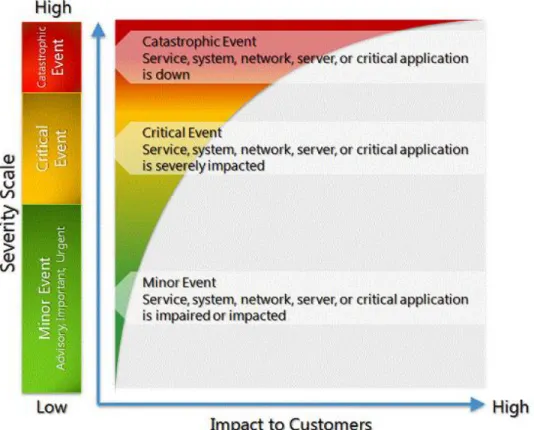
Office 365 uses the Service Interruption Scale (see Figure 1), which classifies outage incidents as minor, critical, and catastrophic events based on their impact to customers.
Figure 1. Service Interruption Scale
Catastrophic Outage Response
Office 365 analyzes each incident that affects service availability to determine scope and possible solutions. Outages that cause customer work to stop may be considered catastrophic outages. In the event of a catastrophic outage, the Office 365 incident management team sends the initial outage notification to the customer via email unless the customer’s email service is not functional; in that case, a phone call is made to an agreed-on customer telephone number. Status updates are provided to the customer every hour or as appropriate for the particular incident.
Disaster Declaration
Outages that are classified as a critical or catastrophic event based on the Service Interruption Scale may be declared disasters. When an outage is declared a disaster, regular customer notifications are provided by the Office 365 incident management organization until a solution is found.
Declaration of a disaster does not automatically result in failover of the customer’s redundant secondary site.
Microsoft Office 365 G Cloud Response
Customer Responsibilities
Provide contact information: Provide a single email group alias and phone number so that Microsoft can engage appropriate personnel at the time of an event to review the current status of the outage, disaster declaration criteria, and approval or disapproval of failing over to the secondary site.
Provide declaration support: Provide an executive-level contact to the Microsoft declaration authority to help determine if failover to the customer secondary site is necessary.
Microsoft Responsibilities
Provide contact information: Provide a single email group alias and phone number so that the customer can engage appropriate personnel at the time of an event to review current status of the outage, disaster declaration criteria, and approval or disapproval of failing over to the secondary site.
Decide whether failover is required: Incorporate feedback from the customer to decide whether to fail over to the customer secondary site.
3.4
Support Hours
Support Included with Office 365 for Enterprises
If a customer organization encounters problems with Office 365 for enterprises, Microsoft is ready to help. The Microsoft Customer Service and Support team’s goal is to help customer organizations resolve technical and nontechnical problems rapidly and efficiently. If service is interrupted, Microsoft’s support team will help restore normal operations as quickly as possible and attempt to minimize adverse effects on business operations.
Support for Office 365 for enterprises provides a wide array of self-service options in addition to the global, around-the-clock, assisted technical and nontechnical support included with every subscription. An Office 365 for enterprises subscription includes three basic support services:
Technical support (installation and setup as well as break/fix) Community and self-help
Customer care Technical Support
The Microsoft Customer Service and Support team consists of support engineers who are trained and certified in all Office 365 for enterprises services. Administrators who are unable to resolve issues with the available self-service support and community resources can contact Microsoft Customer Service and Support.
Technical support that is included in the subscription fee for Office 365 for enterprises is primarily focused on providing customers with both phone and online assisted support in two key areas: installation and setup and break/fix. Common technical support issues included in the subscription fee are listed in Technical Support Descriptions Table.
Microsoft Office 365 G Cloud Response
Technical Support Descriptions
Support Description
Installation and setup Exchange Online:
Mailbox migration to Office 365 for enterprises Rudimentary coexistence
SharePoint Online:
Permissions and user groups Lync Online:
Installation and creating contacts Microsoft Office Professional Plus: Installation and setup assistance
Break/fix Configuration failure issues: Domain setup and re-delegation
Microsoft Office Professional Plus application Installation
Feature or functionality failure of Office 365 for enterprises core services: Exchange Online, Microsoft Office Professional Plus, SharePoint Online, Lync Online
Synchronization of on-premises mailboxes Configuration of services:
Single sign-on (SSO)
Active Directory® Domain Services synchronization Domain setup and re-delegation
Service-interrupting events (SIEs)
Support Availability and Languages
With every Office 365 for enterprises subscription fee, Microsoft Customer Service and Support provides global technical support both online through the Microsoft Office 365 Portal and by phone. Depending on the location and language support, trained technical support engineers are available during most regional business hours and, in several cases, on a 24-hour basis (see Table 2).
Microsoft Office 365 G Cloud Response
Table 2. Technical Support
Languages Hours available in country Days available in country Bilingual support* Additional resources**
English 24 hours/day 7 days/week English N/A
French 08:00 to 18:00 Monday–Friday French/English Translator 24×7
German 08:00 to 18:00 Monday–Friday German/English Translator 24×7
Italian 08:00 to 18:00 Monday–Friday Italian/English Translator 24×7
Japanese 24 hours/day 7 days/week Japanese/English N/A
Korean 09:00 to 17:00 Monday–Friday Korean/English Translator 24×7
Mandarin 09:00 to 18:00 Monday–Friday Mandarin/English Translator 24×7
Russian 08:00 to 18:00 Monday–Friday Russian/English Translator 24×7
Spanish 24 hours/day 7 days/week Spanish/English N/A
* Bilingual support will be provided for local/regional business hours. ** For after-hours language support
An additional 13 languages available through professional language translation services are Bahasa Melayu, Cantonese, Czech, Danish, Dutch, Finnish, Greek, Hungarian, Norwegian, Polish, Portuguese, Romanian, and Swedish.
Telephone Support Details
When an administrator contacts Microsoft Customer Service and Support by phone, the caller is initially asked to self-select the type of issue through an automated phone system. This automated process ensures that the caller is quickly routed to the appropriate support engineer, who confirms whether the caller is authorized to receive support. The support engineer on the call then determines the issue, validates the severity with the administrator, and either transfers or escalates it if further assistance is required.
If the administrator requires additional translation support, the support engineer will remain on the line and arrange for a translator to join the call. To locate the local phone numbers available in each region, see International Phone Numbers.
During the process, the live support engineer opens a service request, provides a tracking number, and offers regular updates to the administrator via the Microsoft Office 365 Portal. When contacting Microsoft about an active service request, the administrator must provide the service request tracking number.
Online/Web Support
Authorized administrators can submit a technical service request by going to the lower left navigation bar on the Admin Overview page in the Microsoft Office 365 Portal. After clicking Service Requests, the administrator can select New Request, Close a Request, or Reopen a Request. From this location, the administrator is able to easily view all open and closed requests.
Microsoft Office 365 G Cloud Response
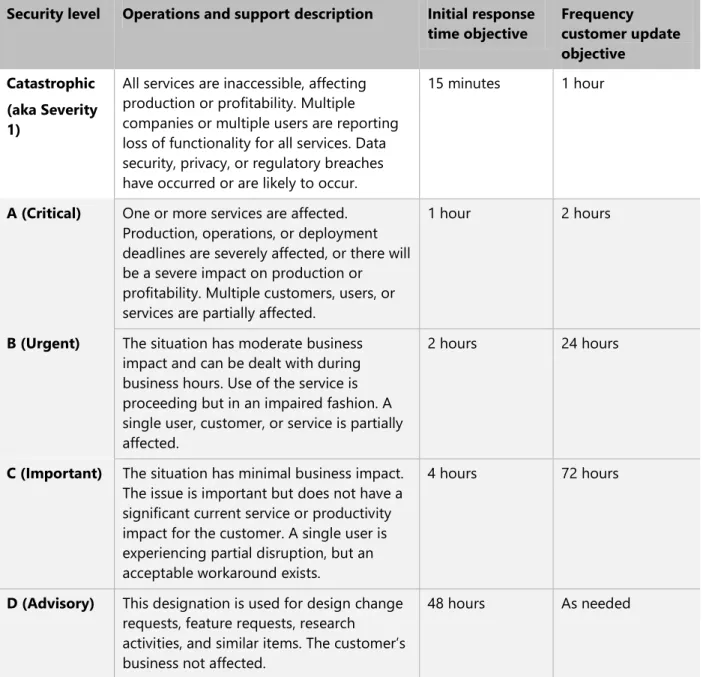
Microsoft prioritizes initial response times so that they are consistent with a service request’s severity level, as specified in Table 3. Microsoft Customer Service and Support strives to meet its response time objectives using commercially reasonable efforts given the conditions and severity of the situation. It is important to note that the times listed are objectives for both initial response and frequency of updating customers and do not indicate the time required to resolve an incident.
Table 3. Technical Support Response Time Objectives
Security level Operations and support description Initial response time objective Frequency customer update objective Catastrophic (aka Severity 1)
All services are inaccessible, affecting production or profitability. Multiple companies or multiple users are reporting loss of functionality for all services. Data security, privacy, or regulatory breaches have occurred or are likely to occur.
15 minutes 1 hour
A (Critical) One or more services are affected. Production, operations, or deployment deadlines are severely affected, or there will be a severe impact on production or profitability. Multiple customers, users, or services are partially affected.
1 hour 2 hours
B (Urgent) The situation has moderate business impact and can be dealt with during business hours. Use of the service is proceeding but in an impaired fashion. A single user, customer, or service is partially affected.
2 hours 24 hours
C (Important) The situation has minimal business impact. The issue is important but does not have a significant current service or productivity impact for the customer. A single user is experiencing partial disruption, but an acceptable workaround exists.
4 hours 72 hours
D (Advisory) This designation is used for design change requests, feature requests, research activities, and similar items. The customer’s business not affected.
Microsoft Office 365 G Cloud Response
4.
Trials, Training & Purchasing
4.1
Trials
The Office 365 for enterprises (Plan E3) 30-day trial allows customers to experience Office 365 for enterprises first hand prior to converting to a paid subscription. Identical in functionality to the paid subscription, the 30-day trial can be set up by going to http://office365.com. Microsoft will advise customers before any data is deleted after the 30-day trial ends.
Online and phone support is available for all trial subscriptions, whether during sign-up or for converting. Additional support can be obtained from the Microsoft Office 365 Trial Guide
4.2
Training
Many Online training materials can be found on the following site:
http://onlinehelp.microsoft.com/en-us/Office365-enterprises/ff637580.aspx
There are many support forums and technical support areas to help support our customers in a move to Office 365. Microsoft realises the importance of continuity of service for our current and future customers. Please review the support options available at the following url http://onlinehelp.microsoft.com/en-us/office365-enterprises/ff637580.aspx Alternatively, migration support services from Microsoft and Microsoft partners.
Detailed at the url are details for:
Hybrid deployment scenarios. Customers may wish to keep on premises users as well as transfer user to the cloud
Desktop overview. Utilisation of current software and introduction to Office Web Apps
Migration toolset. Tools and readiness material to support migration and coexistence scenarios Microsoft Deployment Guide for Enterprise Customers
Microsoft Office 365 G Cloud Response
5.
Office 365 Operating System and Software Requirements
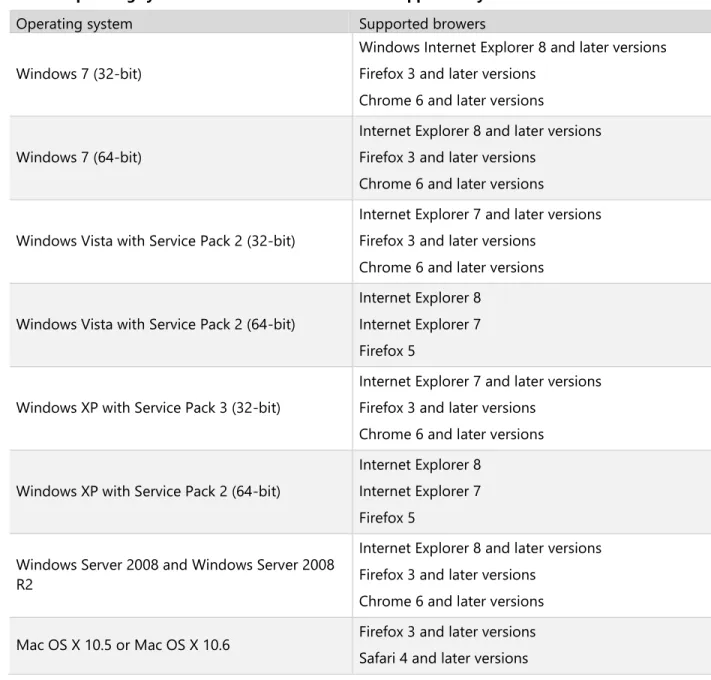
Table 1 shows the operating system and browser combinations that are required to access Microsoft Office 365 services—including SharePoint Online at the time of writing this document.
For up to date software requirements, see here: http://office.microsoft.com/en-us/office365-suite-help/software-requirements-for-office-365-for-business-HA102817357.aspx
Table 1: Operating systems and browser combinations supported by Microsoft Office 365
Operating system Supported browers
Windows 7 (32-bit)
Windows Internet Explorer 8 and later versions Firefox 3 and later versions
Chrome 6 and later versions
Windows 7 (64-bit)
Internet Explorer 8 and later versions Firefox 3 and later versions
Chrome 6 and later versions
Windows Vista with Service Pack 2 (32-bit)
Internet Explorer 7 and later versions Firefox 3 and later versions
Chrome 6 and later versions
Windows Vista with Service Pack 2 (64-bit)
Internet Explorer 8 Internet Explorer 7 Firefox 5
Windows XP with Service Pack 3 (32-bit)
Internet Explorer 7 and later versions Firefox 3 and later versions
Chrome 6 and later versions
Windows XP with Service Pack 2 (64-bit)
Internet Explorer 8 Internet Explorer 7 Firefox 5
Windows Server 2008 and Windows Server 2008 R2
Internet Explorer 8 and later versions Firefox 3 and later versions
Chrome 6 and later versions Mac OS X 10.5 or Mac OS X 10.6 Firefox 3 and later versions
Microsoft Office 365 G Cloud Response
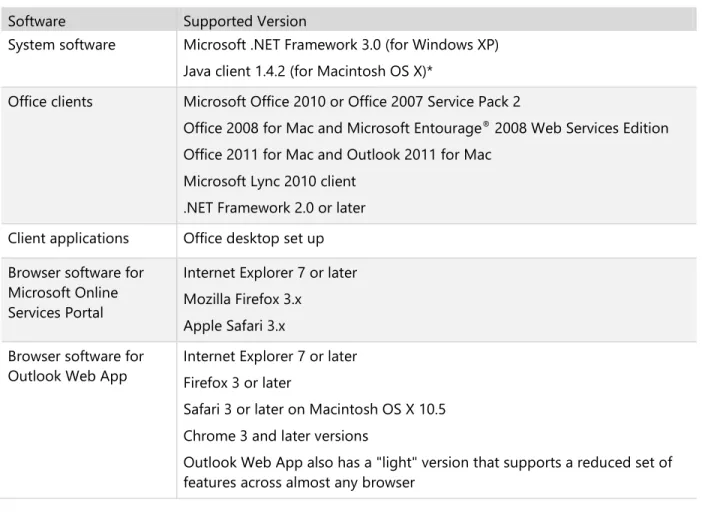
Table 2 identifies other software required for using Office 365 services.
Table 2: Software supported by Microsoft Office 365
Software Supported Version
System software Microsoft .NET Framework 3.0 (for Windows XP) Java client 1.4.2 (for Macintosh OS X)*
Office clients Microsoft Office 2010 or Office 2007 Service Pack 2
Office 2008 for Mac and Microsoft Entourage® 2008 Web Services Edition
Office 2011 for Mac and Outlook 2011 for Mac Microsoft Lync 2010 client
.NET Framework 2.0 or later Client applications Office desktop set up Browser software for
Microsoft Online Services Portal
Internet Explorer 7 or later Mozilla Firefox 3.x
Apple Safari 3.x Browser software for
Outlook Web App
Internet Explorer 7 or later Firefox 3 or later
Safari 3 or later on Macintosh OS X 10.5 Chrome 3 and later versions
Outlook Web App also has a "light" version that supports a reduced set of features across almost any browser
Microsoft Office 365 G Cloud Response
Published API’s
Sharepoint published API’s
http://msdn.microsoft.com/en-us/library/ee557253.aspx
Exchange Published API’s
http://msdn.microsoft.com/en-us/library/dd877012(v=EXCHG.140).aspx
Lync Published API’s
http://msdn.microsoft.com/en-us/library/gg421054.aspx
Open Standards Support
Microsoft supports OpenDocument Formats, so OpenSource software can be used with Microsoft products.