Translating XML Update Language
into SQL
Pensri Amornsinlaphachai , Nick Rossiter and M. Akhtar Ali
School of Computing, Engineering & Information Sciences, Northumbria University, Newcastle upon Tyne, UK
Several techniques for translating XML query languages into SQL have been proposed, but no work to date trans-lates XML update languages into SQL since XQuery has not provided any update statements. However, there is a suggestion from W3C indicating that an update version of XQuery will be proposed in the near future. Furthermore, one major advantage of updating XML documents via a relational database is that the preser-vation of constraints can be transferred to the database engine; thus our main contributions are translating the XML update language, extending XQuery into SQL and translating recursive updates into PL/SQL. XQuery is a functional language whereas SQL is a declarative language; therefore, translation cannot be performed directly, so several techniques such as rewriting rules and graph mapping are used in our work.
Keywords: XML update language, SQL, XQuery, trans-lation, recursive function.
1. Introduction
The emergence of XML as an effective standard for representation of(semi-)structured data on
the Web has motivated a host of researches in the area related to XML such as storing
6, 15, 22], querying 24, 25, 3] and updating 13, 19, 31] XML documents. In the area of
querying XML documents, several query lan-guages such as Lorel 1], XPath 32],
XML-QL5], XQL23] and XQuery 33] have been
proposed while several translation techniques have been presented for translating these lan-guages into SQL. For example, 28] translates
Lorel, 16] translates XPath, 12, 35] translate
XML-QL,29, 10]translate XQL and9, 7, 27]
translate XQuery. In the area of updating XML documents, several researchers pay attention to
designing XML update languages such as XUp-date34], SiXDML26], XML-RL Update
Lan-guage19]and XML Update Extension30], but
none of the published work has proposed trans-lating these languages into SQL.
Our motivation comes from three reasons as follows. Firstly, none of the published work has presented the translation of XML update language into SQL although many researchers have proposed a number of XML update lan-guages. Secondly, translating recursive query-ing in XQuery is still an open problem. How-ever, in our research we focus on translating the update language. Thus, instead of translat-ing recursive querytranslat-ing, we translate recursive updating in the XML update language, an ex-tension to XQuery. Nevertheless, it is still pos-sible to apply our technique to translate recur-sive querying in XQuery. Finally, if updating is performed directly on an XML document in the manner of the native XML database, much work must be handled such as preserving constraints, while updating XML documents via a relational database has the advantage of using the database engine to preserve constraints. This is because before updating XML documents, both struc-ture and constraints of XML will be mapped to the schema of the relational database, while the XML update language will be translated into SQL and this SQL is used to update data in the database.
In this paper, we will express how to translate the XML update language into SQL, including translating a recursive function into PL/SQL
since XQuery has not provided statements for
querying data recursively. For this task, the re-cursive function is needed. In order to demon-strate our translation techniques, a database rep-resenting XML documents and an update lan-guage are necessary. In this respect we adapt ex-isting researches to our work because our main contribution is elsewhere.
The rest of this paper is organized as follows. Related work is discussed in section 2. A database and a language for updating are de-scribed in section 3. Section 4 presents tech-niques for translating XML update language into SQL commands and section 5 presents how to translate the recursive function into PL/SQL.
Finally, conclusion and further work are dis-cussed in section 6.
2. Related Work
Several techniques 8, 11, 20] for translating
XML query languages have been proposed and these techniques may be classified according to the method for representing XML in the database. There are three methods for repre-senting XML to the database: by the edge ap-proach, by the shredding approach and as a view created from the database.
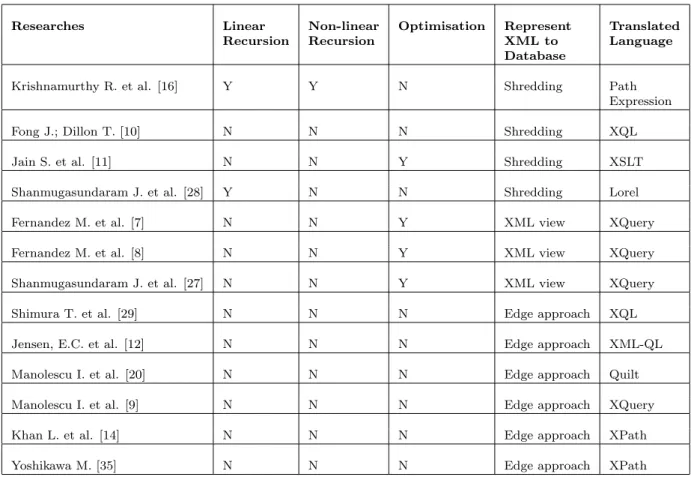
There are several ways in which XML query languages are translated into SQL; however, we will describe only the general approach of trans-lating XPath into SOL based on representing XML by the edge and shredding approaches since XPath is used as a part of other XML query languages. Until now, for translation based on representing XML as view, we see only the translation of XQuery into SQL. Because XQuery is a functional language whereas SQL is a declarative language, translation cannot be performed straightforwardly: there is no gen-eral approach for translating it and thus we will describe each technique for translating XQuery that we have found.
The general approach 35, 14] for translating
XPath into SQL based on representing XML by the edge approach is as follows. In storing XML by the edge approach, elements and paths of elements are kept in one table and attributes and path of attributes are kept in another table. Thus, to translate XPath to SQL, PathIDs from
XPath are created and then an SQL statement is used to retrieve rows in tables, based on the condition that the PathIDs derived from XPath are the same as the path-IDs kept in the tables. The path-IDs are used to join the tables.
The general approach16]for translating XPath
into SQL by the shredding approach is as fol-lows. In storing XML by the shredding ap-proach, complex elements are converted to ta-bles while simple elements and attributes are converted to fields; thus, to translate XPath into SQL, relations and fields can be identified from their path expressions and the relations are then joined together.
In the case of translation based on representing XML as a view created from the database, Fer-nandez M. et al. 8]translate XQuery to SQL by
using a view forest. Semantically, a view forest defines a mapping from a relational database to an XML document. Any XQuery expression can be rewritten as a forest view. The SQL fragments are stored in each node of the view forest. The internal nodes will contain FROM and WHERE clauses, whereas the leaf nodes contain only SELECT clause. Another transla-tion method proposed by Fernandez M. et al. 7]
is translating XQuery into SQL by decompos-ing an XML view definition into smaller SQL queries and submitting the decomposed SQL queries to the database.
Shanmugasundaram J. et al.27]translate
XQue-ry into SQL as follows. Firstly, the XQueXQue-ry query is parsed and converted to an internal query representation called XML Query Graph Model (XQGM). Secondly, the query is
com-posed with XML views to which it refers. Fi-nally, optimizations are performed to elimi-nate the construction of intermediate XML frag-ments and predicates are pushed down.
Researches Linear Recursion
Non-linear Recursion
Optimisation Represent XML to Database
Translated Language
Krishnamurthy R. et al. [16] Y Y N Shredding Path
Expression
Fong J.; Dillon T. [10] N N N Shredding XQL
Jain S. et al. [11] N N Y Shredding XSLT
Shanmugasundaram J. et al. [28] Y N N Shredding Lorel
Fernandez M. et al. [7] N N Y XML view XQuery
Fernandez M. et al. [8] N N Y XML view XQuery
Shanmugasundaram J. et al. [27] N N Y XML view XQuery
Shimura T. et al. [29] N N N Edge approach XQL
Jensen, E.C. et al. [12] N N N Edge approach XML-QL
Manolescu I. et al. [20] N N N Edge approach Quilt
Manolescu I. et al. [9] N N N Edge approach XQuery
Khan L. et al. [14] N N N Edge approach XPath
Yoshikawa M. [35] N N N Edge approach XPath
Table 1.Comparison of Techniques for Translating XML Query Languages into SQL.
3. A Database and a Language for Updating
To demonstrate how to translate the XML date language into SQL, a database and an up-date language are necessary. In this section, we apply and adapt existing work so that we can express our translation techniques in the next section. In this section firstly, we will describe representing XML in a relational database and secondly, we will present an XML update lan-guage used for updating.
3.1. Mapping XML to Relational Database
To map XML to a relational database, we fol-low the technique presented in work16]since
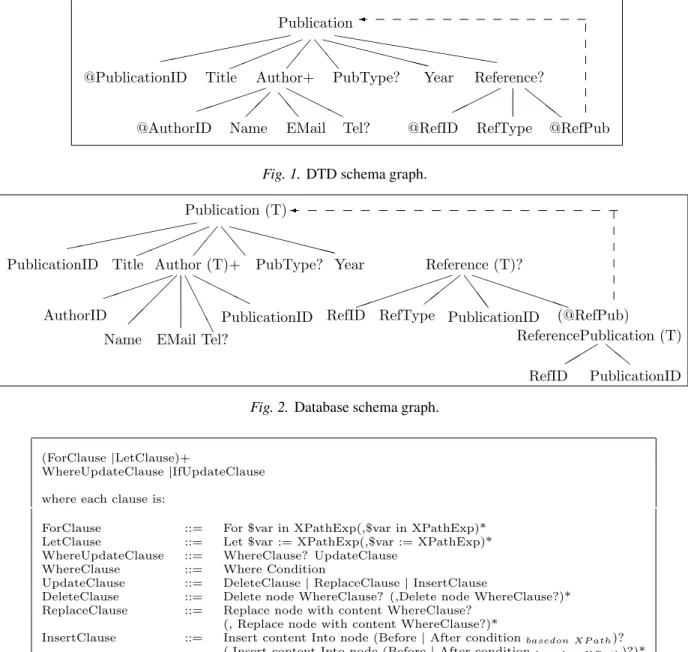
it is compact and easy to understand. The re-searchers of this work represent mapping via annotations on the DTD schema graph; how-ever, we adjust the rules in the part for mapping the recursive form and naming key fields. The DTD schema graph is shown in Figure 1.
The annotations on the graph correspond to the following decomposition. Each non-leaf node is mapped to a table name and each leaf node is mapped to a column name. Each table has an id as the primary key, while each table which is not the root has parent-id as a foreign key for preserving document structure. The name of the primary key is the table-name followed by ‘id’ while the name of a foreign key is the same as the name of the primary key of the parent-table. When an element has an attribute whose type is ID, this ID will be used as the primary key. For IDREF(s)and the recursive structure,
a separate table is created to hold the primary keys of tables of the referencing element and the referenced element. The name of the separate table is the name of the referencing element fol-lowed by the name of the referenced element. The database derived from mapping the graph shown in Figure 1 is given in Figure 2 in the form of a database schema graph. In the graph, the symbol(T)stands for table while the arrow
c cc
HHHH
ee
! ! ! !
! %%eXXXXXehhhhhhhXXX hhhh
@RefPub RefType
@RefID Tel?
EMail Name
@AuthorID
@PublicationID Title Author+ PubType? Year Reference? Publication
Fig. 1.DTD schema graph.
ll " " " PPPPPPP S
SS # # #
A A
A A HHHH
! ! ! !
! %%eXXXXXe XXX
PublicationID RefID
(@RefPub) PublicationID
Reference (T)?
RefType RefID
Year
PublicationID Author (T)+
Publication (T)
AuthorID PublicationID
Tel? EMail Name
Title PubType?
ReferencePublication (T)
Fig. 2.Database schema graph.
(ForClause|LetClause)+
WhereUpdateClause|IfUpdateClause
where each clause is:
ForClause ::= For $var in XPathExp(,$var in XPathExp)* LetClause ::= Let $var := XPathExp(,$var := XPathExp)* WhereUpdateClause ::= WhereClause? UpdateClause
WhereClause ::= Where Condition
UpdateClause ::= DeleteClause|ReplaceClause|InsertClause
DeleteClause ::= Delete node WhereClause? (,Delete node WhereClause?)* ReplaceClause ::= Replace node with content WhereClause?
(, Replace node with content WhereClause?)*
InsertClause ::= Insert content Into node (Before|After conditionbasedon XP ath)?
(,Insert content Into node (Before|After conditionbasedon XP ath)?)*
IfUpdateClause ::= If Condition Then UpdateClause (ElseIf Condition Then UpdateClause)* (Else UpdateClause)?
Fig. 3.Syntax of XML Update Language.
For propagating the constraints of XML to the relational database, the rules proposed in work
18, 17, 31] can be applied. By applying these
rules, preserving the constraints of XML is pushed to the database engine.
3.2. An XML Update Language
For the update language, we adapt the syntax proposed by Tatarinov, I. et al. 30] and the
syntax of XQuery 33]. The syntax after this
adaptation is shown in Figure 3. The seman-tics of the update language is the same as that presented in30].
4. Translating XML Update Language into SQL
When compared with existing XML query lan-guages, XQuery is the most powerful, provid-ing many features 21, 4, 33]. In this
into SQL: FLW(R|I|D), an abbreviation for a
For-Let-Where-(Replace|Insert|Delete)
expres-sion, conditional expresexpres-sion, quantifier, aggre-gate functions and(non-recursive)user-defined
function. XQuery is a functional language whereas SQL is a declarative language; there-fore translating the XML update language, an extension to XQuery, into SQL is not straight-forward; thereby several techniques such as rewriting rules will be used during the trans-lation. In this section, firstly, four techniques for translating the update language will be de-scribed. Secondly, the steps for translating the update language into SQL will be proposed and finally an example will be presented.
4.1. Four Techniques for Translating XML Update Language
Our translation uses four main techniques: up-date/delete join commands(joins in update/
de-lete commands), rewriting rules, graph mapping
and optimization rules for translating XML up-date language into SQL. These four techniques are as follows.
4.1.1. Update/Delete Join Commands
In the SQL standard, update/delete join
com-mands cannot be performed; however the trans-lation of XML update commands can produce joins of several tables. Therefore, it is necessary that we translate XML update commands into update/delete join commands and then rewrite
them to SQL with sub-query commands. The syntax of update/delete join commands is as
follows:
Syntax of joins in update command Update table whose fields will be updated from all related tables
Set field1=value1, field2=value2, ...
Where Condition;
Syntax of joins in delete command Delete table whose data will be deleted from all related tables
Where Condition;
Note: Insert ... select-joins can already be per-formed in the SQL standard.
4.1.2. Rewriting Rules
There are six categories of rewriting rules: FLW
(R|I|D) expression, aggregate function,
quan-tifier, conditional expression, (non-recursive)
user-defined function and SQL rewriting rules. The first five categories are classified according to features of the update language and these fea-tures will be rewritten as SQL functions while the last category of rewriting rules: SQL rewrit-ing rules is used to rewrite update/delete join
commands as SQL commands. In this section, we explain the SQL function and then describe the six categories of rewriting rules.
SQL Functions. To translate XML update commands, all clauses of XML update com-mands must be rewritten as SQL functions. SQL functions are conceptual functions repre-senting the operations of SQL commands. The SQL functions are used to group XML update clauses and their conditions together since one XML update command can consist of several update clauses and each update clause can have its own condition. Thus, these update clauses are grouped by using function number(funcNo)
which is a parameter of every SQL function. The funcNo 0 will be assigned to ForClause, LetClause and WhereClause of the XML update command. These clauses will be shared clauses for the UpdateClause. Each update clause will have its own funcNo, a running number starting from 1. The update clause and its own condition will have the same funcNo. The SQL functions are as follows:
1. bindF(path, $var, funcNo)
2. bindL(path, $var, funcNo)
3. insert(node, value |funcNo, funcNo)
4. delete(node, funcNo)
5. update(node, value |funcNo, funcNo)
6. where|LogicalOper(node,
ComparisonOper, value |funcNo, funcNo)
7. aggFunc(node, funcNo)
where aggFunc ::=max |min |count |avg
|sum
8. group by(node, funcNo)
9. having(aggFunc(node),
ComparisonOper, value |funcNo, funcNo)
Four SQL functions, where|Logical(), having(),
insert()and update(), have the parameter value
| funcNo since sometimes the value in the pred-icate, in inserting or in updating, is not the con-stant value, but it may come from selecting a value from other nodes. Hence in this case, funcNo has the same number as that for the funcNo of the select()function.
Rewriting rules for FLW(R|I|D). The ex-pression FLW(R|I|D) will be rewritten as SQL
functions as follows:
1. For $var in XPathExp is rewritten as: bindF(XPathExp, $var, funcNo)
2. Let $var :=XPathExp is rewritten as:
bindL(XPathExp,$var, funcNo)
3. Where predicate is rewritten as: where(node, ComparisonOper,
value |funcNo, funcNo)
4. LogicalOper predicate is rewritten as: LogicalOper(node, ComparisonOper,
value |funcNo, funcNo)
5. For $var in XPathExppredicate is translated into:
For $var in XPathExp Where predicate Then this clause is rewritten as SQL func-tions according to rules 1, 3, 4.
6. Let $var := XPathExppredicateis translated
into:
Let $var :=XPathExp Where predicate
Then this clause is rewritten as SQL func-tions according to rules 2-4.
7. Selectnode|Returnnode is rewritten as: select(node, funcNo)
8. Replacenodewithcontent is rewritten as: update(node, content’s value, funcNo)
9. Deletenode is rewritten as:
delete(node, funcNo)
10. Insertsimple contentintonode is rewritten as:
Insert(node, content’s value, funcNo)
11. Insertcomplex contentIntonode
The complex content is shredded into many simple contents. The Insert command is rewritten in the form of the commands based on the simple contents which are in turn rewritten as SQL functions as follows:
Define: complex content ec = fe1, e2,...,
ei;1, ei, a1, a2, ...ai
g where e1, e2,...,ei ;1,
ei are elements, a1, a2,..., ai are attributes, ei=fei1fei2..feiig..g, ai1, ai2,..., aiig.
ve1, ve2,..., vei;1, va1, va2,..., vai are values
of e1, e2,..., ei;1, a1, a2,.., ai and veii, vai1,
vai2,..., vaii are values of eii, ai1, ai2,..., aii respectively.
Insert ecIntonode is rewritten as: insert(node/ec, , funcNo)
insert(node/ec/e1, ve1, funcNo)
insert(node/ec/e2, ve2, funcNo)
...
insert(node/ec/ei
;1, vi;1, funcNo )
insert(node/ec@a1, va1, funcNo)
insert(node/ec@a2, va2, funcNo)
...
insert(node/ec@ai, vai, funcNo)
insert(node/ec/ei, , funcNo)
insert(node/ec/ei/ei1, , funcNo)
insert(node/ec/ei/ei1/ei2, , funcNo)
...
insert(node/ec/ei/ei1/ei2/.../eii
;1, , funcNo )
insert(node/ec/ei/ei1/ei2/.../eii, veii, funcNo)
insert(node/ec/ei@ai1, vai1, funcNo)
insert(node/ec/ei@ai2, vai2, funcNo)
...
insert(node/ec/ei@aii, vaii, funcNo)
Rewriting rules for aggregate functions.
1. Define: For $var1 in XPathExp1
Let $var2 :=$var1/XPathExp2
Then: aggFunc($var2) is rewritten as:
aggFunc($var2, funcNo)
group by($var1, funcNo)
2. Define: Let $var :=XPathExp
Then: aggFunc($var) is rewritten as:
aggFunc($var, funcNo)
3. Define: For $var1 in XPathExp1
Let $var2 :=$var1/XPathExp2
Then:
Where aggFunc($var2)ComparisonOper
value is rewritten as:
group by($var1, funcNo)
having(aggFunc($var2),ComparisonOper,
Rewriting rules for quantifier. In XQuery, there are two quantifiers: existential quantifier
(some)and universal quantifier (every). Both
quantifiers can be translated into a count()
func-tion since the existential quantifier is used to test whether at least one item in the sequence satisfies the condition while the universal quan-tifier is used to test whether every item in the sequence satisfies the condition; thus, before rewriting these quantifiers to SQL functions, their meanings will first be translated and then rewritten as SQL functions as follows:
1. For $var1 in XPathExp1
Where some $var2 in $var1/XPathExp2
Satisfies(Condition) is translated into:
For $var1 in XPathExp1
Let $var2 :=$var1/XPathExp2
Where count($var2)> 0
And Condition is rewritten as:
$var1=bindF(XPathExp1, funcNo)
$var2=bindL($var1/XPathExp2,
funcNo)
where(node, ComparisonOperator,
value |:funcNo, funcNo)
(LogicalOper(node,ComparisonOperator,
value |:funcNo, funcNo))*
group by($var1, funcNo)
having(count($var2), >, 0, funcNo)
2. For $var1 in XPathExp1
Where every $var2 in $var1/XPathExp2
Satisfies(Condition1)
And Condition2] is translated into:
For $var1 in XPathExp1
Let $var2 :=$var1/XPathExp2
Where Condition1
And Condition2]
And count($var2)=
(For $var3 in XPathExp1
Let $var4 :=$var3/XPathExp2
Where $var3=$var1
And Condition2]
Return count($var4)
) is rewritten as:
$var1=bindF(XPathExp1, funcNo)
$var2=bindL($var1/XPathExp2,
funcNo)
where(node,ComparisonOper,
value |:funcNo, funcNo)
(LogicalOper(node, ComparisonOper,
value |:funcNo, funcNo))*
and(node,ComparisonOper,
value |:funcNo, funcNo)
(LogicalOper(node,ComparisonOper,
value |:funcNo, funcNo))*
]
group by($var1, funcNo)
having(count($var2),=, :1, funcNo)
$var3=bindF(XPathExp1, :1)
$var4=bindL($var3/XPathExp2, :1)
select(count($var4), :1)
where($var3,=, $var1, :1)
and(node,ComparisonOperator,value, :1) (logical operator(node,
ComparisonOperator, value, :1))*
]
group by($var3, :1)
Besides ‘some’ and ‘every’ quantifiers, there are two functions: empty()and exists()which
can be rewritten as count() functions. These
functions and quantifiers can be used along with ‘not’. To summarise, the meaning of these func-tions and quantifiers can be translated before rewriting as follows:
some is translated into count > 0
not(some) is translated into count=0
every is translated into
countpredicate =countwithout predicate
not(every) is translated into
countpredicate < countwithout predicate
and countpredicate> 0
empty is translated into count=0
not(empty) is translated into count > 0
exists is translated into count > 0
not(exists) is translated into count=0
Rewriting rule for conditional expression. The construction
(ForClause|LetClause)+
If(Condition1)then
UpdateStm1
Else If(Condition2)then
UpdateStm2
...
UpdateStmn
]
is translated into a series of commands as follows:
(ForClause|LetClause)+
Where Condition1
UpdateStm1
(ForClause|LetClause)+
Where Condition2
And not(Condition1)
UpdateStm2
...
(ForClause|LetClause)+ Where conditionn ]
Where |And not(condition1)
And not(condition2)
...
And not(conditionn ;1
)
UpdateStmn
]
The series of commands are then rewritten as SQL functions according to the category of ex-pressions. The number of commands in the series corresponds to the number of conditions if-then-else.
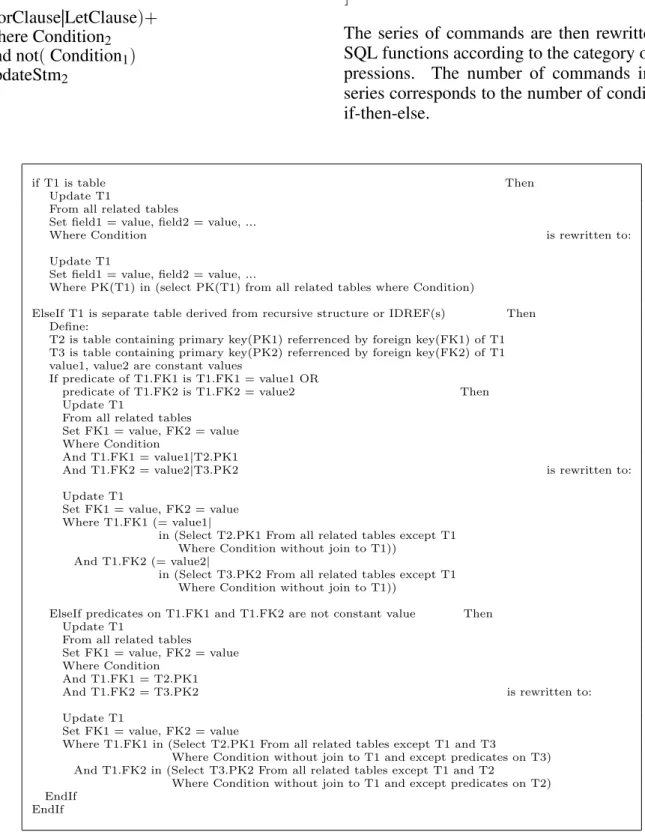
if T1 is table Then
Update T1
From all related tables
Set field1 = value, field2 = value, ...
Where Condition is rewritten to:
Update T1
Set field1 = value, field2 = value, ...
Where PK(T1) in (select PK(T1) from all related tables where Condition)
ElseIf T1 is separate table derived from recursive structure or IDREF(s) Then Define:
T2 is table containing primary key(PK1) referrenced by foreign key(FK1) of T1 T3 is table containing primary key(PK2) referrenced by foreign key(FK2) of T1 value1, value2 are constant values
If predicate of T1.FK1 is T1.FK1 = value1 OR
predicate of T1.FK2 is T1.FK2 = value2 Then Update T1
From all related tables Set FK1 = value, FK2 = value Where Condition
And T1.FK1 = value1|T2.PK1
And T1.FK2 = value2|T3.PK2 is rewritten to:
Update T1
Set FK1 = value, FK2 = value Where T1.FK1 (= value1|
in (Select T2.PK1 From all related tables except T1 Where Condition without join to T1))
And T1.FK2 (= value2|
in (Select T3.PK2 From all related tables except T1 Where Condition without join to T1))
ElseIf predicates on T1.FK1 and T1.FK2 are not constant value Then Update T1
From all related tables Set FK1 = value, FK2 = value Where Condition
And T1.FK1 = T2.PK1
And T1.FK2 = T3.PK2 is rewritten to:
Update T1
Set FK1 = value, FK2 = value
Where T1.FK1 in (Select T2.PK1 From all related tables except T1 and T3
Where Condition without join to T1 and except predicates on T3) And T1.FK2 in (Select T3.PK2 From all related tables except T1 and T2
Where Condition without join to T1 and except predicates on T2) EndIf
EndIf
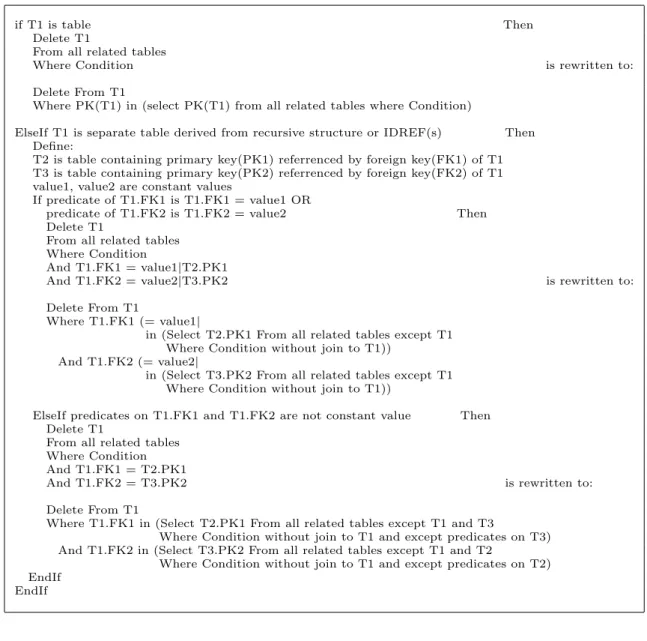
if T1 is table Then Delete T1
From all related tables
Where Condition is rewritten to:
Delete From T1
Where PK(T1) in (select PK(T1) from all related tables where Condition)
ElseIf T1 is separate table derived from recursive structure or IDREF(s) Then Define:
T2 is table containing primary key(PK1) referrenced by foreign key(FK1) of T1 T3 is table containing primary key(PK2) referrenced by foreign key(FK2) of T1 value1, value2 are constant values
If predicate of T1.FK1 is T1.FK1 = value1 OR
predicate of T1.FK2 is T1.FK2 = value2 Then Delete T1
From all related tables Where Condition
And T1.FK1 = value1|T2.PK1
And T1.FK2 = value2|T3.PK2 is rewritten to:
Delete From T1
Where T1.FK1 (= value1|
in (Select T2.PK1 From all related tables except T1 Where Condition without join to T1))
And T1.FK2 (= value2|
in (Select T3.PK2 From all related tables except T1 Where Condition without join to T1))
ElseIf predicates on T1.FK1 and T1.FK2 are not constant value Then Delete T1
From all related tables Where Condition And T1.FK1 = T2.PK1
And T1.FK2 = T3.PK2 is rewritten to:
Delete From T1
Where T1.FK1 in (Select T2.PK1 From all related tables except T1 and T3
Where Condition without join to T1 and except predicates on T3) And T1.FK2 in (Select T3.PK2 From all related tables except T1 and T2
Where Condition without join to T1 and except predicates on T2) EndIf
EndIf
Fig. 5.Rewriting rules for joins in delete command.
Rewriting rules for non-recursive user-de-fined function. Calls to non-recursive tions are replaced with the body of such func-tions and parameters are replaced with proper values. After such replacements, the update command is rewritten as SQL functions accord-ing to the category of expressions in the com-mand.
SQL rewriting rules (rewriting rules for up-date and delete join commands). These rules are used to rewrite update and delete join com-mands as SQL comcom-mands. Rewriting rules for update join commands are shown in Figure 4 and rewriting rules for delete join commands are shown in Figure 5.
4.1.3. Graph Mapping
The purpose of graph mapping is to indicate the SQL functions performed on tables or fields of the database, so that SQL commands can be correctly generated from the graph.
are mapped to the graph. Next pushing the func-tion down to proper nodes of the graph may be performed depending on which function is per-formed on which node. The graph may then be split into several sub-graphs. The number of sub-graphs corresponds to the number of up-date operations performed on different tables. Finally, optimization rules are applied to the graph or the sub-graphs and SQL commands or update/delete join commands are generated
from the graph or the sub-graphs.
4.1.4. Optimization Rules
There are three techniques for optimization as follows:
1. Eliminate unnecessary previous nodes: this technique is performed by traversing from the root node of the graph until it finds the first predicate or update operation on a ta-ble or a field. Then nodes which are prior to the table or the table of the field can be eliminated from the graph.
2. Eliminate join of any two contiguous tables:
Define: T1 and T2 are two contiguous ta-bles starting from the root of the graph. PK stands for primary key and FK stands for foreign key.
On the graph, if T1 consists of only one field which is PK/FK linking to FK/PK of T2
and P is a predicate on PK/FK of T1, then P
can be moved to FK/PK of T2 and T1 and
its PK/FK can be eliminated from the graph.
3. Eliminate join of any three contiguous tables:
Define: T1, T2 and T3 are three contiguous tables starting from the root of the graph. On the graph, if T2 consists of only one field which is PK/FK linking to FK/PK of T1 and
FK/PK of T3 then T1 and T3 can be joined
together directly and T2 and its PK/FK can
be eliminated from the graph. If there is a predicate on PK/FK of T2 then the predicate
will be moved to FK/PK of T3.
Note: If a graph is already in optimized form, the optimization will not be applied.
4.2. Steps for Translating XML Update Language
The steps for translating XML update language into SQL are given below:
1. Rewrite the update command to SQL func-tions according to the rewriting rules.
2. Create a graph whose paths correspond to paths in the functions.
3. Map the graph into the database schema graph to identify which node is a table or field.
4. Add key fields(PK and FK)which are used
to join tables. However, in the case of recur-sion on the path of the command (keys of
elements referring back to ancestors in the path of the command)key fields will not be
added. Then add the join symbols by using the capital L followed by numbers(L1, L2,
:::, Ln)to indicate which pair of the keys
is used to join the tables.
5. Map the functions to the graph
If an insert function is performed on a node converted to the primary key of a table, this insert function must be copied to the foreign key of child-tables to maintain parent-child relationships.
If a delete or insert function is performed on nodes converted to fields, without a delete or insert function on an ancestor-node verted to a table, the function will be con-verted to an update function.
If an insert or delete function is performed on a node converted to a table, this indicates that the function will insert or delete a row of the table. In this case the function will not be converted to an update function.
If an update, where or group by function is performed on a node converted to a ta-ble, the function will be pushed down to the appropriate primary key of the table.
7. For each sub-graph, some join symbols can be eliminated when
only one table is involved in the updating. an update statement and all of its where clauses are in the same table.
a select statement and all of its where clauses are in the same table.
8. Optimize each(sub-)graph according to
op-timization rules.
9. Generate SQL commands or update/delete
join commands from each(sub-)graph. The
insert functions, omitting the second param-eter (value |:funcNo)and the bindF/bindL
functions, will be ignored in generating the commands.
10. If the generated commands are in the form of update/delete join commands, the
com-mands are rewritten according to the SQL rewriting rules.
4.3. An example of Translating XML Update Language into SQL
For $p in doc(“Library.xml")/Publication,
$a in $p/Author
Where $p/Title=“Java"
Delete $p/PubType, Delete $a
Where $a/Name=‘John S.’
1. Parse the command and rewrite it to SQL functions as follows
bindF(/Publication, $p, 0)
bindF($p/Author, $a, 0)
where($p/Title,=, ‘Java’, 0)
delete($p/PubType, 1)delete($a, 2)
where($a/Name,=, ‘JohnS.’, 2)
2. Create a graph whose nodes correspond to paths in the functions, map the graph to the database schema graph, add key fields(PK
bindF(., $p, 0)
where(., =, ‘Java’, 0) L1
L1
database schema graph Graph after mapping (a)
! !
! ...... bbb ...
....
A A
A " " " ZZ
Publication(T)
PublicationID
Title Author(T) PubType
Name PublicationID
L1
bindF(., $p, 0)
where(., =, ‘Java’, 0)
L1 PublicationID
bindF(., $a, 0) delete(., 2)
where(., =, ‘John S.’, 2)
! ! ! !
Author(T)
Name
Title
Publication(T)
PublicationID
(c) Two sub-graphs of updating Publication table and Author table respectively L1
L1
and after delete function is changed to update function Graph after mapping SQL function
(b) where(., =, ‘Java’, 0)
delete(., 1)
?
update(., null, 1) bindF(., $p, 0)
delete(., 2) bindF(., $a, 0)
where(., =, ‘John S.’, 2)
! ! ! ......
... ... ..
@ @@ @@
PubType PublicationID
Publication(T)
Title
PublicationID Name Author(T)
B B
B BB Z
ZZ
update(., null, 1)
Title PubType Publication(T)
and FK)which are used to join tables and
fi-nally add the join symbols to indicate which pair of keys is used to perform the join be-tween tables. The result is shown in Figure 6(a).
3. Map the SQL functions to the graph. Since the delete function is performed on the node ‘PubType’ converted to a field and there is no delete function on the ancestor of this node converted to a table, then the function is changed to an update function The result is shown in Figure 6(b).
4. Split the graph into sub-graphs. There are two updated target tables: Publication and Author. Therefore the graph is split into two sub-graphs as shown in Figure 6(c).
5. Each sub-graph is already in optimized form. So commands can be generated from each graph as follows: For the first sub-graph, only one table is involved in the up-date; thus, there is no join in the update op-eration so the SQL command is generated as follows:
Update Publication P Set P.PubType=null
Where P.Title=‘Java’;
For the second sub-graph, a delete join com-mand is generated as follows:
Delete Author A From A, Publication P Where P.Title=‘Java’
And P.PublicationID=A.PublicationID
And A.Name=‘John S.’;
The delete join command is rewritten as an SQL command with a sub-query by using the SQL rewriting rules as follows:
Delete Author A Where A.AuthorID in
(Select A.AuthorID
From Author A, Publication P Where P.Title=‘Java’
And P.PublicationID=A.PublicationD
And A.Name=‘John S.’);
5. Translating the Recursive Function into PL/SQL
The recursive function is processed in the man-ner of loop processing, whereas a loop structure cannot be translated into pure SQL commands. Thus a possible way is translating the function
into some SQL forms such as persistent stored modules(standard SQL)or PL/SQL(Oracle).
In our research, the recursive function will be translated into PL/SQL because it is a very well
designed tool in Oracle.
In our translation, we apply the concept of vari-ables to the concept of tvari-ables since only the tables can be directly manipulated by SQL com-mands. In this section, firstly, the mechanism for passing a variable’s value is described. Sec-ondly, the rewriting rules for translating the re-cursive function are proposed. Thirdly, steps translating the recursive function into PL/SQL
are presented and finally an example is ex-pressed.
5.1. The Mechanism for Passing a Variable’s Value
The mechanism for passing a variable’s value is applied to selecting and inserting data from/into
tables as follows.
1. The concept of passing a value of a variable to another variable is applied to the concept of selecting data from a table and then in-serting this data into another table.
2. The notion of passing a variable’s value is that the old value in a variable will be over-written with the new value passed by another variable. To use tables instead of variables means that before inserting the data into a ta-ble, the old data in the table must be deleted.
5.2. Rewriting Rules for Translating the Recursive Function
The clauses of the XML update command will be rewritten as SQL functions or SQL-syntax commands subject to the following rules. 1. In the rewriting rules for FLW(R|I|D)
depending on the result derived from the pre-vious loop processing. Thus the number of binding variables cannot be determined in advance and hence the rule is as follows. For $var in XPathExp |
Let $var :=XPathExp
is rewritten as: Insert into $var
select(XPathExp, funcNo)
2. The variable which passes value in the call-ing function is called ‘argument’ while the variable which receives the value from the argument is called ‘parameter’. Thus In function call, passing $argument to $pa-rameter
is rewritten as:
Insert into $parameter Select * from $argu-ment
3. Replace the variables(parameter, argument)
in SQL functions or SQL-syntax commands derived from rules 1 and 2 with their corre-sponding tables and/or elements. The
ables are categorized into two types: vari-ables which are not a part of XPathExp(
in-dependent variables)and variables which are
a part of XPathExp. Thus the rules for re-placing variables are as follows:
The independent variableswill be replaced with tables. Here we define that the argu-ment will be superseded by table ‘Array’, whereas the parameter will be substituted with table ‘ProcessingArr’; thus
If $var is argument then
$var is rewritten as:
table ‘Array’
ElseIf $var is parameter then
$var is rewritten as:
table ‘ProcessingArr’ EndIf
The variable which is a part of XPathExp cannot be replaced with tables directly. There are two cases for these variables: variables in a where function and variables in other SQL functions which are not where func-tions. In both cases, the variables will be replaced with their corresponding elements. In the case of the function which is not a where function, besides replacing the vari-able with its corresponding element, the fol-lowing condition must be specified: the value in the element must be the same as the value held in the variable. The variable must
be replaced with table Array/ProcessingArr
depending on whether the variable is an ar-gument or a parameter; thus it means that the value in the element must be the same as the data kept in the table. Therefore, the rules are as follows.
Suppose that E1 is the element correspond-ing to the variable $var; ergo
where($var/XPath, funcNo)is rewritten as:
where(E1/XPath, funcNo)
Suppose that E1 is the element correspond-ing to the variable $var and SQLFunct is any SQL function which is not the function ‘where’; ergo
SQLFunct($var/XPath, funcNo)
is rewritten as:
SQLFunct(E1/XPath, funcNo)
where(E1, in, , funcNo)
(select * from Array/ProcessingArr)
5.3. Steps for Translating the Recursive Function into a PL/SQL Command
1. Rewrite each clause of the update command until the first calling function in the body of function is found by using the rules 1-2. The first calling function will not be rewritten in this step.
2. Create a loop structure when the first call-ing function in the body of the function is found. In the loop, the first calling function and each clause in the body of function is rewritten by using the rules 1-2. The second calling function will not be rewritten.
3. Replace the variables in SQL functions and SQL-syntax commands derived from steps 1-2 by using rule 3.
4. Follow the concept of passing a variable’s value; therefore before inserting data into tables, the old value in such tables must be deleted; thereby each clause for insertion of data is preceded by a clause for deleting old data in the table.
5. Translate SQL functions embedded in PL/
5.4. An Example of Translating the Recursive Function into PL/SQL
In this example we want to update the year of both direct and indirect references of the pub-lication whose title is ‘XQuery’. The recursive function and the command calling the function are as follows. (This function follows the
syn-tax of XQuery)
1 define function allRef($pub as element()*)
2f
3 For $rp in
$pub/Reference/@RefPub –>Publication
4 Replace $rp/Year with <Year>2004</Year>
5 allRef($rp)
6g
7 For $p in doc(“Library.xml")/Publication
8 Where $p/Title=“XQuery"
9 allRef($p)
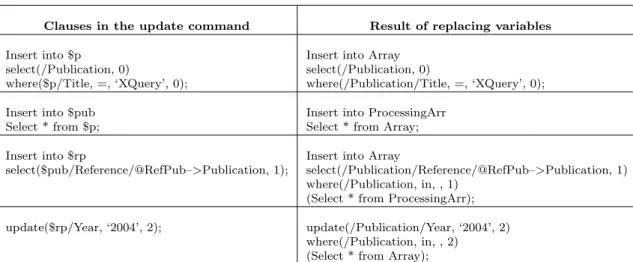
The process starts from the clause in line 7. Then it is translated into PL/SQL as follows.
Clauses in the update command Result of rewriting
7 For $p in doc(“Library.xml”)/Publication Insert into $p 8 Where $p/Title = “XQuery” select(/Publication, 0)
where($p/Title, =, ‘XQuery’, 0);
9 allRef($p) Insert into $pub
1 define function allRef($pub as element()*) Select * from $p;
3 For $rp in $pub/Reference/@RefPub–>Publication Insert into $rp
select($pub/Reference/@RefPub–>Publication, 1); 4 Replace $rp/Year with<Year>2004</Year> update($rp/Year, ‘2004’, 2);
Fig. 7. Result of rewriting clauses in the update command.
Clauses in loop Result of rewriting
5 allRef($rp) Insert into $pub
1 define function allRef($pub as element()*) select * from $rp;
3 For $rp in $pub/Reference/@RefPub–>Publication Insert into $rp
select($pub/Reference/@RefPub–>Publication, 3); 4 Replace $rp/Year with<Year>2004</Year> update($rp/Year, ‘2004’, 4);
Fig. 8.Result of rewriting clauses in the body of the function which are processed in loop.
Clauses in the update command Result of replacing variables
Insert into $p Insert into Array
select(/Publication, 0) select(/Publication, 0)
where($p/Title, =, ‘XQuery’, 0); where(/Publication/Title, =, ‘XQuery’, 0);
Insert into $pub Insert into ProcessingArr
Select * from $p; Select * from Array;
Insert into $rp Insert into Array
select($pub/Reference/@RefPub–>Publication, 1); select(/Publication/Reference/@RefPub–>Publication, 1) where(/Publication, in, , 1)
(Select * from ProcessingArr);
update($rp/Year, ‘2004’, 2); update(/Publication/Year, ‘2004’, 2) where(/Publication, in, , 2)
(Select * from Array);
Clauses in loop Result of replacing variables
Insert into $pub Insert into ProcessingArr
select * from $rp; Select * from Array;
Insert into $rp Insert into Array
select($pub/Reference/@RefPub–>Publication, 3); select(/Publication/Reference/@RefPub–>Publication, 3) where(/Publication, in, ,3)
(Select * from ProcessingArr);
update($rp/Year, ‘2004’, 4); update(/Publication, ‘2004’, 4) where(/Publication, in, ,4) (Select * from Array);
Fig. 10. Result of replacing variables in clauses which are inside loop.
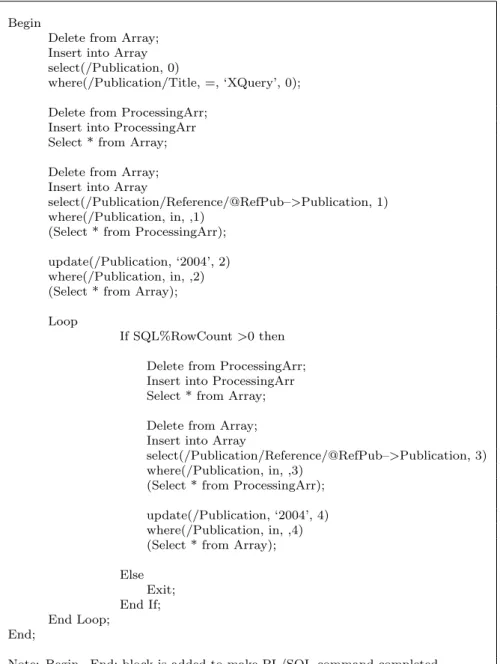
Delete from Array; Insert into Array select(/Publication, 0)
where(/Publication/Title, =, ‘XQuery’, 0);
Delete from ProcessingArr; Insert into ProcessingArr Select * from Array;
Delete from Array; Insert into Array
select(/Publication/Reference/@RefPub–>Publication, 1) where(/Publication, in, ,1)
(Select * from ProcessingArr);
update(/Publication, ‘2004’, 2) where(/Publication, in, ,2) (Select * from Array);
Loop
If SQL%RowCount>0 then
Delete from ProcessingArr; Insert into ProcessingArr Select * from Array;
Delete from Array; Insert into Array
select(/Publication/Reference/@RefPub–>Publication, 3) where(/Publication, in, ,3)
(Select * from ProcessingArr);
update(/Publication, ‘2004’, 4) where(/Publication, in, ,4) (Select * from Array);
Else Exit; End If; End Loop;
Note: If SQL%RowCount>0 then...Else Exit; EndIf; is added since looping will continue until no more data can be updated.
1. Rewrite each clause until the first calling function in the body of function is found. The clauses in the update command and the result of rewriting these clauses by using rewriting rules 1-2 are shown in Figure 7. 2. Create loop structure (Loop:::EndLoop)
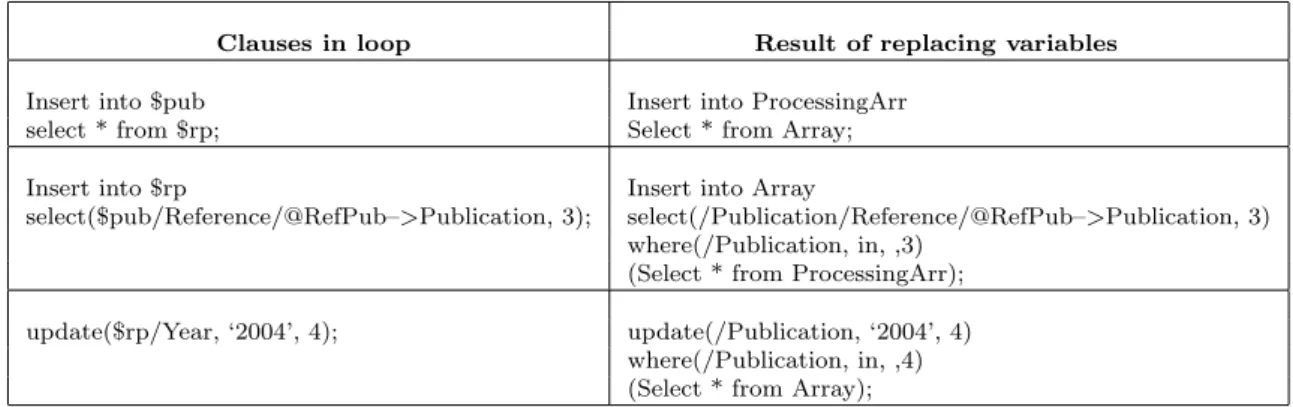
when the first calling function in the body of function is found. Clauses in the loop which are rewritten by using rewriting rules 1-2 are shown in Figure 8.
3. Replace the variables by using rule 3. The results after replacing variables are shown in Figures 9 and 10.
4. Follow the concept of passing a variable’s value; thus each clause for insertion of data is preceded by a clause for deleting old data in the table. The result which is a PL/SQL
command is shown in Figure 11.
5. Translate SQL functions embedded in PL/
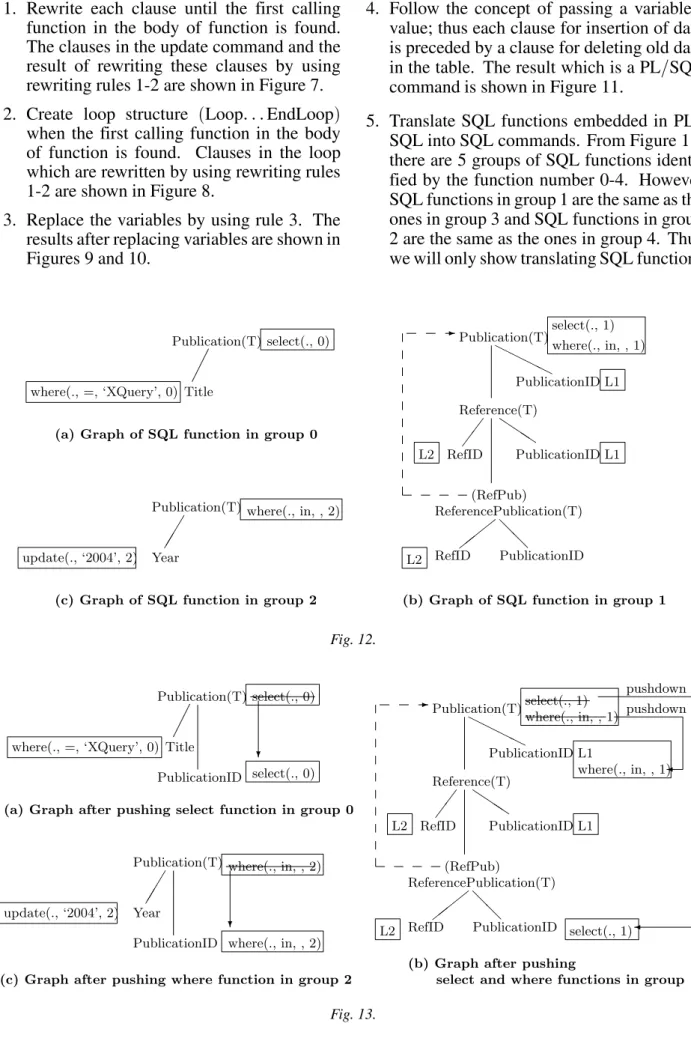
SQL into SQL commands. From Figure 11, there are 5 groups of SQL functions identi-fied by the function number 0-4. However SQL functions in group 1 are the same as the ones in group 3 and SQL functions in group 2 are the same as the ones in group 4. Thus we will only show translating SQL functions
update(., ‘2004’, 2)
L1 L1 select(., 1) where(., in, , 1)
QQQ
# #
# @@
-HHHH
Publication(T)
PublicationID
RefID PublicationID
(RefPub)
RefID PublicationID ReferencePublication(T)
Reference(T)
L2
L2
(b) Graph of SQL function in group 1
... ... ... ...
where(., in, , 2)
Year
Publication(T) where(., =, ‘XQuery’, 0)
select(., 0)
Title Publication(T)
(c) Graph of SQL function in group 2 (a) Graph of SQL function in group 0
Fig. 12.
L1
update(., ‘2004’, 2)
select(., 0)
select(., 0)
where(., in, , 2)
where(., in, , 2)
HHHH
-@ @ # # #
Q QQ
... ... ... ...
?
? L2
L2
Reference(T)
ReferencePublication(T)
PublicationID RefID
(RefPub)
PublicationID RefID
PublicationID Publication(T)
where(., in, , 1) select(., 1)
where(., in, , 1)
select(., 1) L1
pushdown pushdown
select and where functions in group 1 (b) Graph after pushing
Year
Publication(T) where(., =, ‘XQuery’, 0) Title
Publication(T)
PublicationID
(a) Graph after pushing select function in group 0
PublicationID
(c) Graph after pushing where function in group 2
SQL functions SQL commands
select(/Publication, 0) Select P.PublicationID
where(/Publication/Title, =, ‘XQuery’, 0); From Publication P Where P.Title = ‘XQuery’;
select(/Publication/Reference/@RefPub–>Publication, 1) Select RP.PublicationID
where(/Publication, in, , 1) From Publication P, Reference R, ReferencePublication RP Where RP.RefID = R.RefID
And R.PublicationID = P.PublicationID And P.PublicationID in
update(/Publication/Year, ‘2004’, 2) Update Publication P
where(/Publication, in, , 2) Set P.Year = ‘2004’
Where P.PublicationID in
select(/Publication/Reference/@RefPub–>Publication, 3) Select RP.PublicationID
where(/Publication, in, , 3) From Publication P, Reference R, ReferencePublication RP Where RP.RefID = R.RefID
And R.PublicationID = P.PublicationID And P.PublicationID in
update(/Publication/Year, ‘2004’, 4) Update Publication P
where(/Publication, in, , 4) Set P.Year = ‘2004’
Where P.PublicationID in
Fig. 14. SQL commands generated from the graphs.
in groups 0, 1 and 2. SQL commands will be generated from each group of SQL functions independently as follows:
(a)Graphs of SQL functions in groups 0, 1
and 2 are created according to paths in SQL functions.
(b)The graphs are mapped to the database
schema graph, join keys and join sym-bols are added to the graphs and finally each group of SQL functions is mapped to its corresponding graph. The results of mapping SQL functions in groups 0, 1 and 2 are shown in Figures 12(a), 12(b)
and 12(c)respectively.
(c)The select function in group 1 acting on
Publication element is pushed down to the field linking to this element since this function is performed on the node which is on the recursive path. The select func-tion in group 0, where funcfunc-tion in group 1 and where function in group 2 acting on Publication element converted to table are pushed down to the primary key of this table. The results of pushing SQL functions in groups 0, 1 and 2 are shown in Figures 13(a), 13(b)and 13(c)
respec-tively.
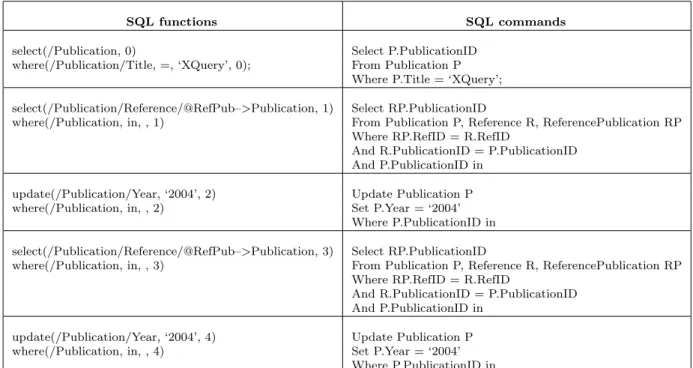
(d)SQL commands generated from the
graphs are shown in Figure 14. The SQL functions in groups 3 and 4 are the same as the ones in groups 1 and 2 respectively; hence the generated SQL commands from the functions in groups 3 and 4 will be the same as the generated SQL commands from the functions in groups 1 and 2 re-spectively.
(e)SQL functions in the PL/SQL command
are replaced with the SQL commands generated from the graphs. The result is shown in Figure 15.
6. Conclusion and Further Work
Our work translates five important features of the XML update language inherited from XQue-ry into SQL: FLW(R|I|D), conditional
expres-sion, quantifier, aggregate functions and(
non-recursive) user-defined function. Four
tech-niques are used: rewriting rules, graph map-ping, optimization and update/delete join
com-mands. The recursive function is translated into PL/SQL by applying the concept of
Begin
Delete from Array; Insert into Array select(/Publication, 0)
where(/Publication/Title, =, ‘XQuery’, 0);
Delete from ProcessingArr; Insert into ProcessingArr Select * from Array;
Delete from Array; Insert into Array
select(/Publication/Reference/@RefPub–>Publication, 1) where(/Publication, in, ,1)
(Select * from ProcessingArr);
update(/Publication, ‘2004’, 2) where(/Publication, in, ,2) (Select * from Array);
Loop
If SQL%RowCount>0 then
Delete from ProcessingArr; Insert into ProcessingArr Select * from Array;
Delete from Array; Insert into Array
select(/Publication/Reference/@RefPub–>Publication, 3) where(/Publication, in, ,3)
(Select * from ProcessingArr);
update(/Publication, ‘2004’, 4) where(/Publication, in, ,4) (Select * from Array);
Else Exit; End If; End Loop;
End;
Note: Begin...End; block is added to make PL/SQL command completed.
Fig. 15.PL/SQL command after replacing SQL functions.
from SQL functions. One major benefit of up-dating XML documents through the database is that presevering constraints can be pushed to the database engine. Our translating ap-proach can apply to updating other(object)
re-lational databases whose schemas are derived from mapping XML documents by the shred-ding approach. Examples of translating XML update language into SQL to update object-relational database are presented on our website
2].
In our further work, we will propose how to
han-dle the order of elements in XML documents when elements are inserted or deleted and we will present a mechanism for propagating the change in the database to the XML documents.
References
1] S. ABITEBOUL, D. QUASS, J. MCHUGE, J. WIDOM
ANDJ. L. WINER, The Lorel query language for
2] P. AMORNSINLAPHACHAI, N. ROSSITER ANDA. ALI, Translating XML update language into SQL based upon object relational database. 2005: http://computing.unn.ac.uk/pgrs/cgpa2/.
3] S. CERI, S. COMAI, E. DAMIANI, P. FRATERNALI, S. PARABOSCHI ANDL. TANCA, XML-GL: a Graphical Language for Querying and Restructuring WWW Data.Computer Networks: The International Jour-nal of Computer and Telecommunications Network-ing, 31(1999), pp. 1171–1187.
4] D. CHAMBERLIN,XQuery from experts: A Guide to the W3C XML Query Language. Addison-Wesley, (2003).
5] A. DEUTSCH, M. FERNANDEZ, D. FLORESCU, A. LEVY ANDD. SUCIU, A query language for XML. Proceedings of the 8th International World Wide Web Conference (WWW8), Toronto. Canada, (1999).
6] A. DEUTSCH, M. FERNANDEZ ANDD. SUCIU, Stor-ing Semistructured Data with STORED.SIGMOD Conference, Pennsylvania, United States, (1999), pp. 431–442.
7] M. FERNANDEZ, Y. KADIYSKA, D. SUCIU, A. MOR
-ISHIMA ANDW. TAN, SILKROUTE, A Framework for
Publishing Relational Data in XML.ACM Transac-tions on Database Systems(2002), pp. 1–55.
8] M. FERNANDEZ, A. MORISHIMA ANDD. SUCIU, Ef-ficient Evaluation of XML Middle-ware Queries. ACM SIGMOD, Santa Barbara, California, USA, (2001).
9] D. FLORESCU, I. MANOLESCU ANDD. KOSSMANN, Answering XML Queries over Heterogeneous Data Sources.Proceedings of the 27th VLDB Conference, Roma, Italy,(2001).
10] J. FONG ANDT. DILLON, Towards Query Translation From XQL to SQL.Proceedings of the 9th IFIP 2.6 working conference on database semantics(DS9), Hong Kong,(2001), pp. 113–129.
11] S. JAIN, R. MAHAJAN ANDD. SUCIU, Translating XSLT Programs to Efficient SQL Queries. Pro-ceedings of the eleventh international conference on World Wide, ACM Press New York, NY, USA, Honolulu, Hawaii, USA,(2002), pp. 616–626.
12] E. C. JENSEN, S. M. BEITZEL ANDD. A. GROSSMAN, Using a Relational Database Management System to Implement XML-QL. Proceedings of the 17th International Conference on Advanced Science and Technology(ICAST’2001), Chicago,(2001).
13] B. KANE, Consistently Updating XML Documents using Incremental Constraint Check with XQueries. Worchester Polytechnic Institute,(2003).
14] L. KHAN ANDY. RAO, A Performance Evaluation of Storing XML Data in Relational Database Man-agement Systems. ACM(2001).
15] M. KLETTKE ANDH. MEYER,Managing XML Doc-uments in object-relational databases. Computer Science Department, University of Rostock, Ros-tock, Germany,(1999).
16] R. KRISHNAMURTHY, V. T. CHAKARAVARTHY, R. KAUSHIK AND J. F. NAUGHTON, Recursive XML
Schema, Recursive XML Queries, and Relational Storage: XML-toSQL Query Translation. ICDE 2004(2004).
17] D. LEE AND W. W. CHU, Constraints-preserving Transformation from XML Document Type Def-inition to Relational Schema. 19th International Conference on Conceptual Modeling, Salt Lake City, Utah, USA,(2000), pp. 323–338.
18] D. LEE AND W. W. CHU, CPI: Constraints-Preserving Inlining Algorithm for Mapping XML DTD to Relational Schema. Data & Knowledge Engineering, 39(2001), pp. 3–25.
19] M. LIU, L. LU ANDG. WANG, A Declarative XML-RL Update Language.Proceedings of 22nd Inter-national Conference on Conceptual Modeling(ER 2003), Springer-Verlag, Chicago, Illinois, USA, (2003), pp. 506–519.
20] I. MANOLESCU, D. FLORESCU ANDD. KOSSMANN, Pushing XML Queries inside Relational Databases. INRIA Technical Report No. 4112,(2001).
21] J. MCGOVERAN, P. BOTHNER, K. CAGEL, J. LINN
ANDV. NAGARAJAN,XQuery Kick Start. Sams
Pub-lishing,(2003).
22] Y. MO ANDL. T. WANG, Storing and Maintain-ing Semistructured Data Efficiently in an Object-Relational Database.The Third International Con-ference on Web Information Systems Engineering, Singapore,(2002), pp. 247–256.
23] J. ROBIE, The Design of XQL. 1999:http://www. ibiblio.org/xql/xql-design.html.
24] T. SCHLIEDER, Querying and ranking XML doc-uments. Journal of the American Society for In-formation Science and Technology, 53(2002), pp. 489–503.
25] A. SCHMIDT, M. KERSTEN, M. WINDHOUWER AND F. WASS, Efficient Relational Storage and Retrieval
of XML documents.International Workshop on the Web and Databases, Dallas, TX, USA,(2000), pp. 47–52.
26] SHAMKANTEB. NAVATHE, A Proposal for an XML Data Definition and Manipulation Language.VLDB Conference, Hong Kong China,(2002).
27] J. SHANMUGASUNDARAM, J. KIERNAN, E. SHEKITA, C. FAN ANDJ. FUNDERBURK, Querying XML Views of Relational Data.Proceedings of the 27th VLDB Conference, Roma. Italy,(2001).
28] J. SHANMUGASUNDARAM, K. TUFTE, G. HE, C. ZHANG, D. J. DEWITT ANDJ. F. NAUGHTON,
Rela-tional Databases for Querying XML Documents: Limitations and Opportunities. Proceedings of the 25th VLDB Conference, Edinburgh, Scotland, (1999), pp. 302–314.
30] I. TATARINOV, Z. IVES, A. Y. HALEVY AND D. S. WELD, Updating XML.Proceedings of 2001
SIG-MOD Conference, Santa Barbara, CA, USA., (2001), pp. 413–424.
31] I. VARLAMIS AND M. VAZIRGIANNIS, Bridging XML-Schema and relational databases. A system for generating and manipulating relational databases using valid documents.ACM Symposium on Docu-ment Engineering(2001), pp. 105–114.
32] W3C: XQuery 1.0 and XPath 2.0 Data Model. W3C working draft. 2003: http://www.w3.org/ TR/query-datamodel.
33] W3C: XQuery 1.0: An XML Query Language. 2003: http://www.w3c.org/TR/xquery.
34] XML:DB working group: XUpdate. 2002. http://www.xmldb.org/xupdate/xupdate-wd.html: http://www.xmldb.org/xupdate /xupdate-wd.html.
35] M. YOSHIKAWA, T. AMAGASA, T. SHIMURA ANDS. UEMURA, XREL: A Path-Based Approach to Stor-age and Retrieval of XML documents using Re-lational Databases. ACM Transactions on Internet Technology, 1(2001).
Received:October, 2004
Revised:July, 2005
Accepted:September, 2005
Contact address:
Pensri Amornsinlaphachai School of Computing, Engineering & Information Sciences Northumbria University Pandon Building(Room 113), Camden Street,
Newcastle upon Tyne, NE2 1XE, UK e-mail:[email protected]
PENSRIAMORNSINLAPHACHAI is a Ph.D. student at School of Com-puting, Engineering & Information Sciences, Northumbria University, Newcastle, UK. She received her MSc. with Distinction in 2001 and Sun Certified Programmer For THE JAVA 2 in 2002.
DRNICKROSSITERis a reader at School of Computing, Engineering and Information Sciences, Northumbria University, Newcastle, UK. He is interested in interoperability of information systems.