Consolidating Web Applications
Using VMware Infrastructure
VMware® Infrastructure 3
Enterprises continue to move their technologies and services onto the Web. Today, the Web servers that provide these services are distributed across multiple systems. As the number of Web applications increases, it is very common for the number of physical systems in the data center hosting these Web applications to increase along with them. Studies from IDC, among others, describe the challenges IT managers face administering the proliferation of servers used to run Web applications.
Virtualization can help businesses to consolidate their Web computing needs onto fewer high‐performance servers. This approach can simplify management, save operating costs, and increase the efficiency of delivering Web services.
In this paper we explore the configuration and testing of VMware® Infrastructure 3 as a consolidation platform for multiple Apache Web servers. It describes the processes and methodologies we used in the consolidation study. In addition, we describe the results of our performance testing using the industry standard SPECweb2005 workload to determine the effectiveness of this consolidation approach. This paper covers the following topics:
“Technologies Used” on page 1
“Consolidation Using VMware Infrastructure 3” on page 2
“System Tuning” on page 5
“Performance and Scalability” on page 7
“Conclusions” on page 10
“References” on page 10
“Appendix: Detailed SPECweb2005 Results” on page 11
Technologies Used
The key technologies we used in these tests were VMware® Infrastructure 3, the Apache Web server, the PHP scripting language, and the SPECweb2005 workload.
VMware Infrastructure 3
VMware Infrastructure 3 is the industry‐leading infrastructure software suite that virtualizes servers, storage, and networking, allowing multiple unmodified operating systems and their applications to run
independently in virtual machines while sharing physical resources. The software suite consists of VMware ESX (hypervisor) and several other products that work together not only to provide the benefits of
consolidation but also to foster flexibility by featuring unique technologies such as VMware VMotion that enables moving an entire running virtual machine from one physical server to another and VMware HA that
provides cost‐effective failover protection by eliminating the need for dedicated standby servers or additional software, and VMware DRS that dynamically allocates and balances available computing resources among the virtual machines.
In essence, VMware Infrastructure 3 enables organizations to decouple the entire software environment from their underlying hardware infrastructure. This virtualization approach provides an ideal platform for consolidating multiple Web server deployments onto fewer hardware systems.
Web Server Software
The choice of Web serving application and software depends greatly on customer requirements. Studies from the Netcraft show the Apache Web server has the largest market share today among all Web servers. In our performance evaluation tests, we used the widely deployed Apache/PHP as the Web serving platform. PHP is a scripting language. Before the code is executed, it is parsed and converted to low‐level binary instructions called opcodes. In the absence of any opcode cache, the opcodes generated are flushed from memory after execution. Deploying an opcode cache avoids this flushing and improves PHP performance. In our testing configuration, we employed APC cache as the opcode cache.
SPECweb2005
SPECweb2005 is the SPEC benchmark for measuring a system’s ability to act as a Web server. In response to rapidly advancing Web technology, the SPECweb2005 benchmark includes many sophisticated and state‐of‐the‐art enhancements to meet the demands of modern Web users.
SPECweb2005 is designed with three workloads: banking, e‐commerce, and support. The banking component emulates a banking site that transfers encrypted information using HTTPS. The e‐commerce component emulates an e‐commerce site that uses unencrypted HTTP when browsing and secure HTTPS when the user enters the shopping cart. The support component emulates a vendor support site that provides
downloads—such as driver updates and documentation—over HTTP.
The SPECweb2005 architecture represents a typical Web architecture that consists of the clients, Web server software, and a back‐end application and database server. The benchmark drivers that generate the HTTP requests run on one or more client machines. The back‐end simulator (BeSim) emulates a back‐end application and database server. To process the SPECweb2005 requests, the Web server software needs to communicate with the BeSim in order to retrieve specific information that needs to be included in the HTTP response. Because the HTTP response is dynamically constructed, the Web server software should include the PHP or JSP support needed to generate the dynamic Web content.
The performance score of each of three workloads (banking, e‐commerce, and support) indicates the number of simultaneous user sessions the system under test can support while meeting the quality of service requirements of the benchmark workload. The aggregate metric reported by the SPECweb2005 benchmark is a normalized metric based on performance scores obtained on all three workloads. For more information
about the benchmark, see the SPEC Web site (see “References” on page 10 for a link).
Consolidation Using VMware Infrastructure 3
VMware ESX provides an ideal platform for consolidating multiple Web server deployments by enabling each Web server to run in a different virtual machine. ESX implements abstractions that allow each virtual machine to have its own virtual CPU, memory, disk, and network interfaces. In addition, each virtual machine runs a unique guest operating system. This kernel‐level isolation provides maximum security and independence for the Web server deployments. In addition, our testing discussed in this paper demonstrates that such a consolidation approach makes effective use of the underlying compute and memory resources available in today’s powerful multicore machines and yields better performance than using a single kernel image and a single Web server deployment.
This paper describes a methodology to consolidate multiple Web servers onto a single physical server. For this consolidation project, we created six virtual machines. This section describes the configuration of the physical machine and the virtual machines.
CPU and Memory
In our test configuration, the system under test was an HP ProLiant DL380 G5 server with dual‐socket, quad‐core Intel Xeon E5345 2.3GHz processors and 32GB memory. We configured the system under test with VMware ESX 3.5. Each virtual machine was configured with one virtual CPU, 4GB of memory, running a 64‐bit Red Hat Enterprise Linux 5 Update 1 operating system. The Web server software consisted of Apache 2.2.6, PHP 5.2.5, and APC 3.0.15.Network Configuration
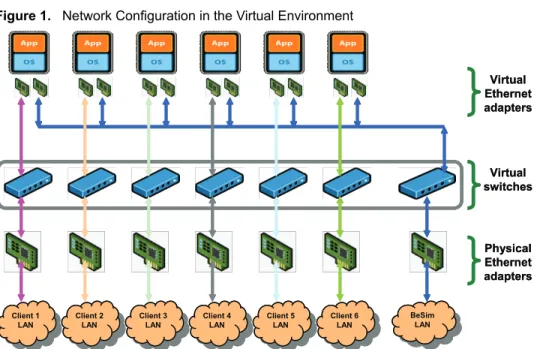
The SPECweb2005 workload is quite network intensive. We therefore configured the system under test seven physical 1Gbps Ethernet adapters, each associated with a unique subnet. We used six client systems, each of which was connected to the server over a separate private subnet using crossover cables. These six systems carried the client traffic. We also connected the BeSim (back‐end database simulator) to the server on a private subnet using a crossover cable. In the virtual environment, ESX supports up to four virtual network adapters within each virtual machine. Each virtual network adapter is connected to a physical network adapter through a virtual switch interface. A virtual adapter is given its own unique MAC address and a unique IP address, so from the client’s networking standpoint, the virtual network adapter of a virtual machine appears the same as the physical network adapter of a physical machine. In our test configuration, we configured each virtual machine with two virtual network interfaces. We used one interface for the client network traffic and the second interface for the BeSim (back‐end database simulator) traffic. All the virtual machines used the same virtual switch, and so shared the same physical network interface to communicate with the BeSim server. Each of the virtual machines used a unique virtual switch for client traffic and, in essence, used a unique physical network interface to communicate with its client. In other words, the test configuration consisted of six virtual machines, each of which was communicating with a different client on a unique physical network interface. Figure 1 shows the networking configuration in the virtual environment.Figure 1. Network Configuration in the Virtual Environment
VMware Infrastructure 3 provides various choices for virtual network adapters. In our tests, we used enhanced vmxnet, a virtual network adapter that is designed for high performance. This is a paravirtualized device that can be used only if VMware Tools is installed in the virtual machine. BeSim LAN BeSim LAN Virtual Ethernet adapters Client 1 LAN Client 1
LAN Client 2
LAN
Client 2
LAN Client 3
LAN
Client 3
LAN Client 4
LAN
Client 4
LAN Client 5
LAN
Client 5
LAN Client 6
LAN Client 6 LAN Virtual switches Physical Ethernet adapters BeSim LAN BeSim LAN Virtual Ethernet adapters Client 1 LAN Client 1
LAN Client 2
LAN
Client 2
LAN Client 3
LAN
Client 3
LAN Client 4
LAN
Client 4
LAN Client 5
LAN
Client 5
LAN Client 6
LAN Client 6 LAN Virtual switches Physical Ethernet adapters
Storage Configuration
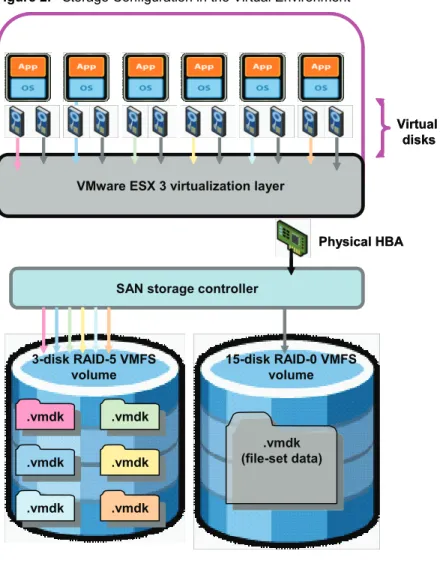
VMware Infrastructure 3 storage configuration completely hides the physical storage infrastructure from the virtual machines. The virtual machines access the underlying physical storage as though it were SCSI disks
within the virtual machine. ESX stores the virtual disks as files (files in virtual machine disk format with .vmdk
extensions) stored on a high‐speed VMware Virtual Machine File System (VMFS) volume. The VMFS volumes can reside either on a locally attached RAID controller or a remote storage area network (SAN) device. In our testing configuration, we connected the server to a remote Fibre Channel SAN. Each virtual machine used two virtual disks. The first virtual disk held the guest operating system image and the application (Apache/PHP) binaries and associated log files. The second virtual disk held the file‐set data used by the Apache Web server.
Each of the virtual machines used an independent virtual disk (.vmdk file) for its guest operating system
image. We stored all these .vmdk files on a three‐disk highly‐available RAID‐5 VMFS volume hosted on a SAN.
For the file‐set data, all the virtual machines shared the same base image (.vmdk file), which we stored on a
15‐disk RAID‐0 VMFS volume hosted on the same SAN. To share the base image, we set the mode of the virtual disk that was used for file‐set data as independent and nonpersistent. When the file‐set data is very large, sharing a single base image can save time and disk space.
Figure 2 shows how we configured the storage in the virtual environment.
Figure 2. Storage Configuration in the Virtual Environment
VMware ESX 3 virtualization layer
SAN storage controller
15-disk RAID-0 VMFS volume 3-disk RAID-5 VMFS
volume
.vmdk
.vmdk
.vmdk
.vmdk
.vmdk
.vmdk
.vmdk
.vmdk
.vmdk
.vmdk .vmdk.vmdk
Physical HBA Virtual
disks
.vmdk (file-set data)
.vmdk (file-set data) VMware ESX 3 virtualization layer
SAN storage controller
15-disk RAID-0 VMFS volume 3-disk RAID-5 VMFS
volume
.vmdk
.vmdk
.vmdk
.vmdk
.vmdk
.vmdk
.vmdk
.vmdk
.vmdk
.vmdk .vmdk.vmdk
Physical HBA Virtual
disks
.vmdk (file-set data)
.vmdk (file-set data)
System Tuning
In general, the default configuration of the Apache Web server performs well and does not need much tuning. The only tuning that applies in most environments is to increase the number of Web server processes available
to process the HTTP requests. To do this, increase the values for MaxClients and the ServerLimit in the
httpd.conf file. In our tests, we increased the values of both of these variables from the default 256 to 10000.
For more information, on these variables, refer to the Apache documentation (see “References” on page 10 for
a link).
We applied some minimal tunings to the Red Hat Enterprise Linux 5 operating system, notably increasing the default number of open file descriptors available to the Apache Web server and also increasing the range of
TCP/IP ports available to user processes. The tunings are listed in the “Appendix: Detailed SPECweb2005
Results” on page 11.
In our virtualized tests, we increased transmit coalescing size in the vmxnet virtual NIC to meet the high network throughput demands of the support workload. Most customer workloads are latency sensitive, so the default dynamic tuning works well. However, if the network throughput demands of the workload are very high (close to or exceeding 1Gbps), this parameter can be tuned to favor throughput over latency.
In our virtualized environment, we also used the manual processor affinity feature to assign the virtual machines to different physical cores on the system under test. We did this to better understand and track the CPU usage of the individual virtual machines. With eight cores on the dual‐socket system under test, we assigned three virtual machines to three cores of the CPU in one socket and the remaining three virtual machines to three cores of the CPU in the second socket.
In our virtualized environment, we also pinned the network interrupts. The network interrupts of the physical NICs associated with each virtual machine were pinned to the idle core on the corresponding CPU. For instance, we assigned virtual machine‐1, virtual machine‐2, and virtual machine‐3 to core‐1, core‐2, and core‐3 of the first socket, and the network interrupts of the physical NICs associated with each of these three virtual machines were pinned to core‐0 of the same socket. This configuration enabled us to make slightly better use of the shared memory caches on the chip, and yielded about 5 percent to 8 percent improvement in
performance.
Increasing Transmit Coalescing
To increase transmit coalescing size, perform the following steps:
1 Using VI Client (VMware Infrastructure Client) choose the ESX host where the virtual machine is
deployed.
2 Select the Configuration tab.
3 Click Advanced Settings in the Software panel.
4 Click the Net tab.
5 Edit the value of Net.vmxnetThroughputWeight, changing it from the default of 0 to128, then click OK.
6 Reboot the virtual machine.
Setting Processor Affinity
To set processor affinity, perform the following steps:
1 Using VI Client, right‐click a virtual machine and choose Edit Settings.
2 In the Virtual Machine Properties dialog box, click the Configuration tab and choose Advanced CPU.
3 In the Scheduling Affinity panel, set the processor affinity.
NOTE This configuration change applies to all the vmxnet devices on the server.
NOTE Setting processor affinity manually can interfere with some advanced VMware Infrastructure features,
Pinning Network Interrupts
To pin the network interrupts, perform the following steps:
1 Check the core usage for interrupt processing by typing the following command in the service console.
cat /proc/vmware/intr-tracker
2 Unload the USB driver if the previous task shows all the interrupt processing is occurring on core‐0.
By default, VMkernel dynamically distributes interrupt processing among the cores. However, this behavior might not be observed when the devices managed by VMkernel (such as physical network controllers) and the devices managed by the service console (such as the USB controller) share the
interrupt lines (see “References” on page 10 for a link to VMware knowledge base article “ESX Server 3.5
Might Display Performance Issues Due to IRQ Sharing“). Because the service console is bound to core‐0, you might notice that most interrupt processing occurs on core‐0. You can avoid this behavior by disabling the unused controllers (usually USB) sharing the interrupt lines, as described in the next step.
3 Unload the USB driver by typing the following commands in the service console.
rmmod usb-uhci rmmod ehci-hcd
4 Obtain the interrupt vector information of the physical network controllers by typing the following
command in the service console. cat /proc/vmware/interrupts
5 Enter the command to pin the vector to the intended core.
echo move <vector> <core> > /proc/vmware/intr-tracker
For example, if the interrupt line of a physical network controller is at vector 0x71, type the following
command in the service console to pin the vector to core‐2. echo move 0x71 2 > /proc/vmware/intr-tracker
NOTE Pinning network interrupts manually can interfere with some advanced VMware Infrastructure
Performance and Scalability
VMware has already documented performance of the SPECweb2005 workload on a single virtual machine
running on ESX 3.5 (see “References” on page 10 for a link to the earlier paper). We carried out extensive tests
to characterize various aspects of performance, such as latency, throughput, and CPU resource utilization when running a highly network intensive SPECweb2005 workload in a virtualized data center environment. We published the results of that study in January 2008. The focus of this paper is to understand the scaling aspects of the widely used Apache/PHP Web serving configuration in both native and virtual environments using the SPECweb2005 workload.
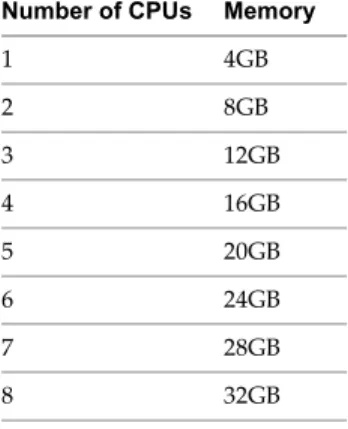
We first evaluated the scaling aspects of SPECweb2005 workload in the native environment without any virtualization. We tested various configurations in the native environment by varying the number of CPUs and the amount of memory at boot time. We tested the native configurations shown in Table 1.
In all the native configurations, we used a conventional, single operating environment that consisted of one Red Hat Enterprise Linux 5 kernel system image and one Apache/PHP deployment. In the native
environment, the file‐set data was on a 15‐disk RAID‐0 LUN formatted with the ext2 file system. The LUN was on the same Fibre Channel SAN that we used in the virtualized tests. We configured the Apache Web server to listen on all the network interfaces. We applied all the well documented performance tunings to
Apache/PHP configuration—for example, increasing the number of Apache worker processes and using an opcode cache to improve PHP performance. We also tried different Apache models including multiprocess and multithreaded models.
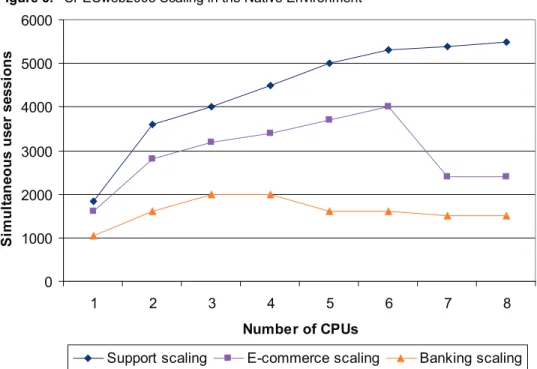
Figure 3 shows the scaling results of the SPECweb2005 workload in the native environment. The three scaling curves in the figure correspond to the three SPECweb2005 workloads: banking, e‐commerce, and support. The three workloads have vastly different characteristics, and we thus look at results from all three. Each scaling curve plots the maximum throughput (number of simultaneous user sessions) as we increased the number of processors. In our test configuration, there were no bottlenecks in the hardware environment. The utilizations we observed on the network and disk I/O subsystems were well below saturation levels.
Table 1. Native Configurations Tested Number of CPUs Memory
1 4GB
2 8GB
3 12GB
4 16GB
5 20GB
6 24GB
7 28GB
Figure 3. SPECweb2005 Scaling in the Native Environment
As shown in Figure 3, for all the three workloads the scalability was severely limited as we increased the number of processors. In a single CPU configuration, we achieved processor utilizations above 95 percent for all three workloads. But as we increased the number of processors, we failed to achieve such high processor utilizations for all the three workloads. The performance was severely limited by some intrinsic software serialization points present in the Apache/PHP/SPECweb2005 operating environment. Serialization points (the number of operations that must be performed sequentially) limit the processor utilization achievable. Although each of the three SPECweb2005 workloads exhibited different serialization penalties, the support workload suffered the least. This may be a result of the fact that the support workload lacks any session state. Both the banking and e‐commerce workloads have a session state, possibly resulting in higher serialization, compared to the support workload. In our tests, the banking workload performance degraded at five CPUs after reaching its peak performance at three CPUs. The e‐commerce workload exhibited similar negative scaling, albeit the negative scaling occurred much later—at seven CPUs. Even when there were ample compute resources available on the system, a slight increase in the load contributed to unacceptable increase in application latency and the test runs failed to meet the quality of service requirements specified by the SPECweb2005 benchmark.
SPECweb2005/PHP performance issues caused by serialization, such as those seen in our test environment,
were also observed in tests conducted by Intel and IBM using the IIS Web server (see “References” on page 10
for a link). Thus the scaling behavior shown in Figure 3 is not unique to our environment using Red Hat Enterprise Linux, Apache, PHP, APC‐Cache, and SPECweb2005. Similar behavior is exhibited by many operating environments that have a large instance of a single monolithic application deployed within a single operating system. Amdahlʹs law (see “Validity of the single‐processor approach to achieving large‐scale
computing capabilities” and “Chip Level Multiprocessing” in “References” on page 10) clearly explains the
severe penalty imposed by serialization code on the speed‐up. According to this law, even 10 percent of serialization code in an application reduces the scalability or speedup of the application to just 4.76 when the processor count increases to eight. In our testing, using eight CPUs we found the speedup to be just about 2.89 for the support workload and a meager 1.5 with the e‐commerce and banking workloads, indicating a very large serialization component.
To identify and fix such serialization points in complex operating environments such as one using Red Hat Enterprise Linux, Apache, PHP, APC‐Cache, and SPECweb2005 is not trivial. The points are hard to identify without good profiling tools or proper instrumentation. In our tests, using the Intel VTune performance analyzer we observed increasing hot spot contention as we increased the number of CPUs. For the same size workload—1,800 banking sessions—the CPI (clocks per instructions) jumped by a factor of four or so as we increased the number of CPUs from three to eight, clearly indicating software scaling issues. As we observed
0 1000 2000 3000 4000 5000 6000
1 2 3 4 5 6 7 8
Number of CPUs
S
im
u
lt
an
eo
u
s
u
ser
sessi
o
n
s
in our test configuration, such software scaling issues often show up as unacceptable latency times even when there are plenty of compute resources available on the system. More often than not, diagnosing and fixing these issues is not practical in the time available.
Virtualization offers an easier alternative to avoid such scaling issues and make the best use of the compute resources available on the system. Virtualization enables several complex operating environments that are not easily scalable—and sometimes several unoptimized operating environments—to run concurrently on a single physical machine and exploit the vast compute resources offered by today’s powerful multicore systems. To determine the effectiveness of this approach we measured SPECweb2005 performance by deploying multiple Apache/PHP configurations in a virtual environment. We have submitted our test results to the SPEC committee and they are under review.
In our virtualized tests, we configured the virtual machines in accordance with the general performance best practices recommended in the paper “Performance Tuning Best Practices for ESX Server 3” (for a link, see “References” on page 10). We did not overcommit processor and memory resources for the virtual machines. We assigned one virtual CPU and 4GB of memory to each virtual machine. We varied the number of virtual machines from one to six, thereby ensuring the ESX host had enough resources to handle virtual machine scheduling, network processing, and other housekeeping tasks. In other words, we tested a single virtual machine, two virtual machines in parallel, three virtual machines in parallel, and so on, up to six virtual machines in parallel. We chose these configurations to simulate the resources available to the single native node in the native tests.
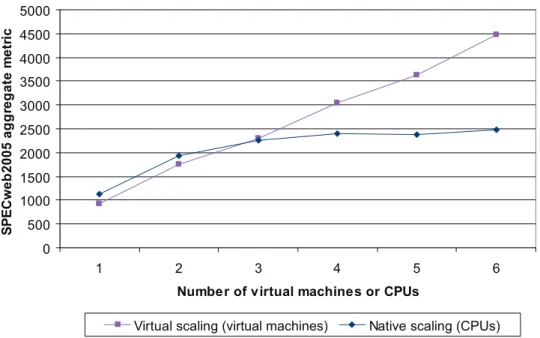
Figure 4 compares the SPECweb2005 scaling results from the native and virtual environments. In our virtual tests, we observed very similar throughput scaling for all three SPECweb2005 workloads. So, for easier comparison, we plotted the aggregate SPECweb2005 metric, which is a normalized metric based on the throughput scores obtained on all the three workloads—banking, e‐commerce, and support.
Figure 4. Comparison of SPECweb2005 Native and Virtual Scaling
As shown in Figure 4, we observed good scaling in the virtual environment as we increased the number of virtual machines. The aggregate SPECweb2005 performance obtained in the test with a single virtual machine was about 16 percent lower than the performance observed in a one‐CPU native configuration. This difference in performance is caused by the virtualization overhead. Although virtualization overhead varies depending on the workload, the observed 16 percent performance degradation is an expected result when running the highly I/O‐intensive SPECweb2005 workload. But when we added the second processor, the performance difference between the two‐CPU native configuration and the virtual configuration that consisted of two virtual machines running in parallel quickly diminished to 9 percent. As we further increased the number of processors, the configuration using multiple virtual machines did not exhibit the scalability bottlenecks observed on the single native node, and the cumulative performance of the configuration with multiple virtual machines well exceeded the performance of a single native node.
0 500 1000 1500 2000 2500 3000 3500 4000 4500 5000
1 2 3 4 5 6
Number of virtual machines or CPUs
S
P
E
C
w
eb
2005 ag
g
reg
at
e m
e
tr
ic
This result is not very surprising given that the multiple virtual machines behave as though they were a cluster of single‐processor nodes. In such a configuration, the penalty imposed by serialization points is alleviated. For instance, a large session lock protecting all the sessions in a large SMP native configuration is implicitly broken down to a number of smaller session locks corresponding to the number of virtual machines. Such a configuration, in essence, leads to fine‐grained locking, with each lock protecting a smaller region, resulting in reduced contention and better scalability. Thus, while the performance of each single‐VCPU virtual machine is slightly lower than that of a one‐CPU native machine (because of virtualization overhead), the cumulative performance of the multiple virtual machines well exceeds the performance of a large SMP native machine (because serialization penalties are reduced).
These results clearly demonstrate the benefit of using VMware Infrastructure to bypass the software deficiencies exhibited in native systems with multiple CPUs and improve the scalability of real‐life workloads.
Conclusions
Reduced complexity and improved efficiency in power and space usage are well‐understood benefits of consolidation. In this paper, we focused on evaluating the performance and scalability benefits of server consolidation.
We used the industry standard SPECweb2005 workload to compare the performance and scalability of Apache/PHP Web server software in a conventional, single‐system native environment with performance and scalability in a VMware Infrastructure 3 environment.
Using the VMware Infrastructure software enabled us to consolidate multiple Apache/PHP Web server operating environments in separate virtual machines running on the same physical system. Our performance testing shows that such a consolidation approach does not suffer the software scalability issues faced in the native environment and provides very good system‐level throughput performance. With added benefits such as higher availability and fault tolerance, VMware Infrastructure can serve as an ideal Web services
consolidation platform.
References
“Apache Performance Tuning”
see the documentation for your version of Apache at http://httpd.apache.org/
“Chip Level Multiprocessing”
http://www.solarisintenrals.com/wiki/index.php/Chip_Level_Multiprocessing
“ESX Server 3.5 Might Display Performance Issues Due to IRQ Sharing“
http://kb.vmware.com/kb/1003710
“Performance Tuning Best Practices for ESX Server 3”
http://www.vmware.com/resources/techresources/707
“Server and Storage Consolidation 2004: Executive Interview Summary Reports,” IDC, March 2004
SPECweb2005 Web site
http://www.spec.org/web2005
“SPECweb2005 Performance on VMware ESX Server 3.5”
http://www.vmware.com/resources/techresources/1031
“SPECweb2005 in the Real World: Using Internet Information Server (IIS) and PHP”
http://www.spec.org/workshops/2008/sanfrancisco/papers/Warner.doc
“Validity of the single‐processor approach to achieving large‐scale computing capabilities,” G. M.
Amdahl, 1967, Proceedings of AFIPS Conference
http://www.ieee.org/portal/site/sscs/menuitem.f07ee9e3b2a01d06bb9305765bac26c8/index.jsp?&pName =sscs_level1_article&TheCat=2171&path=sscs/07Summer&file=Amdahl67.xml
Web Server Survey Report 2006: “Apache Now the Leader in SSL Servers”
Appendix: Detailed SPECweb2005 Results
This appendix presents the full results of the SPECweb2005 tests in the virtual environment.
SPECweb2005 Result
Copyright © 2007 Standard Performance Evaluation Corporation
Performance Banking
Ecommerce
Support
Configuration Availability Dates
Hewlett‐Packard: HP ProLiant DL 380 G5 (with VMware ESX Server 3.5)
Apache Source Foundation: Apache 2.2.6 PHP Net: PHP 5.2.5
SPECweb2005 = 4466
SPECweb2005_Banking = 4900 SPECweb2005_Ecommerce = 6200 SPECweb2005_Support = 6500
Tested By: VMware Inc., USA SPEC License #: 2933 Test Date: Apr‐2008
Simultaneous User Sessions Test Iteration Aggregate QOS Compliance Validation Errors Good Tolerable Fail
4900 1 98.1% 99.6% 0.4% 0
2 98.1% 99.5% 0.5% 0
3 98.0% 99.5% 0.5% 1
Simultaneous User Sessions Test Iteration Aggregate QOS Compliance Validation Errors Good Tolerable Fail
6200 1 97.9% 99.1% 0.9% 0
2 97.8% 99.1% 0.9% 2
3 97.9% 99.1% 0.9% 2
Simultaneous User Sessions Test Iteration Aggregate QOS Compliance Validation Errors Good Tolerable Fail
6500 1 98.8% 99.7% 0.3% 0
2 98.9% 99.7% 0.3% 0
3 98.9% 99.7% 0.3% 0
SUT Hardware Jan‐2007
Backend Simulator Jan‐2007
Web Server Software Jan‐2007
Jan‐2007
Operating System Mar‐2008
System Under Test (SUT)
SUT Network
HTTP Software # of SUTs 1
Vendor Hewlett‐Packard
Model HP ProLiant DL 380 G5 (with VMware ESX Server 3.5)
Processor Intel Xeon E5345
Processor Speed
(MHz)
2333
# Processors 8 (8 cores, 2 chips, 4 cores/chip)
Primary Cache 32KB(I) + 32KB(D) on chip, per core
Secondary Cache 8 MB I+D on chip per chip, 4 MB shared / 2 cores
Other Cache N/A
Memory 32 GB SDRAM
Disk Subsystem 1 x 73GB SCSI (VMware ESX 3.5), 3*133.68GB SCSI RAID‐5 volume(RHEL5 VMs), 15*133.68GB
SCSI RAID‐0 volume(fileset data)
Disk Controllers Onboard Smart Array P400 controller, QLogic Corp. QLA2432 Fibre Channel Adapter
Operating System RedHat Enterprise Linux 5 Update 1 (2.6.18‐53.1.4.el5) as Guest OS, VMware ESX Server 3.5
(Hypervisor)
File System ext2
Other Hardware Network and Storage virtualization do not require additional hardware
Other Software JDK‐1.6.0_01‐linux‐amd64
# of Controllers 7
Network Controllers Intel PRO/1000 PT Quad Port PCIe Gigabit Ethernet Controller, Broadcom NetXtreme II
BCM5708 1000Base‐T, Intel 82571EB Gigabit Ethernet Controller
# of Networks 7
Network Type Fast Ethernet
Network Speed 1 Gb/s
MSL (sec) 30 (Non RFC1122)
Time‐Wait (sec) 60 (Non RFC1122)
MTU Size 1500
Vendor Apache Source Foundation
Name/Version Apache 2.2.6
Dynamic Scripts null
Server Cache N/A
Script Engine
Clients
Backend Simulator (BESIM)
Common Workload Notes SUT Notes
VMware ESX 3.5 used as the hypervisor. There were six Virtual Machines running, each Virtual Machine
(VM) used one vCPU configured with 4GB memory running RHEL 5 up1 64bit. Each VM ran its own instance of Apache/PHP Web server
Of the 8 cores on the systems, 2 cores (core‐0 and core‐4) were used for interrupt processing.
Vendor PHP Net
Name/Version PHP 5.2.5
Dynamic Scripts PHP
Server Cache APC 3.0.15
Log Mode Common Log Format
# of Clients 6
Model Dell Poweredge 1950
Processor Intel Xeon 5160
Processor Speed (MHz) 3000
# Processors 2
Memory 8192 MB SDRAM
Network Controller Broadcom Corporation NetXtreme II BCM5708 Gigabit Ethernet
Operating System RedHat Enterprise Linux Update 4 (2.6.9‐42.ELsmp)
JVM Version Java(TM) SE Runtime Environment (build 1.6.0_01‐b06)
JIT Version Java HotSpot(TM) 64‐Bit Server VM (build 1.6.0_01‐b06, mixed mode)
Other Hardware N/A
Other Software N/A
# of Simulators 1
Model Dell Poweredge 1950
Processor Intel Xeon 5160
Processor Speed (MHz) 3000
# of Processors 2
Memory 8192 MB SDRAM
Network Controller Broadcom Corporation NetXtreme II BCM5708 Gigabit Ethernet
Operating System RedHat Enterprise Linux 5 Update 1 (2.6.18‐8.el5xen)
File System ext2
Web Server Rock Web Server v1.4.2
Server Scripts ISAPI
Other Hardware N/A
Each of the six VMs were pinned to different cores: core‐1, core‐2, core‐3, core‐5, core‐6, core‐7
ESX had all eight cores to its disposal, but each of the VMs was configured with one vCPU only
Each of VMs was configured with three virtual network adapters. The first adapter is used to talk to
master client, the second is used to talk to Besim Server, and the third used for client traffic. Each virtual adapter was connected to a physical network adapter through a virtual switch interface
All the VMs used the same virtual switch, and so the same physical network interface (vmnic7) to talk to
Besim
Each of the VMs used a unique virtual switch, and thereby used unique physical network interface to talk
to its client
VM1 used vmnic2, VM2 used vmnic3, VM3 used vmnic9, VM4 used vmnic4, VM5 used vmnic8, VM6
used vmnic5 for client traffic
The interrupt vectors of vmnic2,vmnic4 and vmnic8 were pinned to core 4
The interrupt vectors of vmnic3,vmnic5,vmnic7 and vmnic9 were pinned to core 0
vmxnet is used as the virtual network adapter (available as part of VMware Tools)
The Net.vmxnetThroughputWeight was increased from the default 0 to 128, to favor the throughput in
the vmxnet behaviour
All the VMs had two virtual disks configured. One disk contained the RHEL5 image, and the other fileset
data
The actual physical (.vmdk) files that correspond to virtual disks are located on one EMC Clarion SAN
Array
All the virtual disks that contained the RHEL5 os images, Apache images, access logfiles were stored on
a 3‐disk RAID‐5 VMFS LUN
All the VMs shared the same fileset data, that is the same physical .vmdk file which was located on 15‐disk
RAID‐0 VMFS LUN
Each of the VMs were configured with the default virtual LSI Logic SCSI adapter
Operating System Notes
Guest OS: Used following tunings on RHEL5
net.ipv4.tcp_timestamps = 0
net.ipv4.tcp_timestamps = 0 # default 1
net.ipv4.tcp_max_tw_buckets = 1500000 # sets TCP time‐wait buckets pool size, default 180000
net.ipv4.tcp_rmem = 5000000 5000000 5000000 # maximum receive socket buffer size, default 131071
net.ipv4.tcp_wmem = 5000000 5000000 5000000 # maximum TCP write‐buffer space allocatable, default
4096 16384 131072
net.ipv4.tcp_mem = 5000000 5000000 5000000 # maximum TCP buffer space allocatable, default 392192
392704 393216
net.ipv4.tcp_window_scaling = 0 # turns TCP window scaling support off, default on
net.ipv4.tcp_tso_win_divisor = 8
net.core.rmem_max = 1048576 # maximum receive socket buffer size, default 131071
net.core.wmem_max = 1048576 # maximum send socket buffer size, default 131071
net.core.rmem_default = 1048576 # default receive socket buffer size, default 135168
net.core.optmem_max = 5000000 # default 10240, maximum amount of option memory buffers, default 20480
net.core.netdev_max_backlog = 81920 # maximum length of the input queues for the processors, default
300
net.ipv4.tcp_max_syn_backlog = 8192
net.ipv4.conf.all.arp_filter=1 # enables source route verification, default 0
net.ipv4.ip_local_port_range = 4096 63000 # enables more local ports
ulimit ‐n 102400, increases the number of open file descriptors, default 1024
changed the guest timer interrupts to 100Hz using divider=10 in the boot options #default is 1000Hz
HTTP Software Notes
The following tunes made in webserver.conf:
MaxKeepAliveRequests 0
ServerLimit 4000
StartServers 64
MinSpareServers 32
MaxSpareServers 32
MaxClients 4000
MaxRequestsPerChild 4000
HTTP Script Notes
SPEC‐provided PHP scripts used without modification
Smarty v2.6.7 used
Client Notes
Following tunings were used on the client system
ulimit ‐n 102400, increase the file descriptors
net.ipv4.ip_local_port_range = 1024 65535, increase the local TCP/IP ports
java ‐Xms768m ‐Xmx768m ‐XX:+UseParNewGC ‐XX:+UseConcMarkSweepGC, options used for client
driver processes
BESIM Notes
Operating System Notes: No non‐default tunings
validate_static ‐1
validate_httpmod ‐1
header_etag_on 0
header_server_on 0
log_buf_size 1048576
tcp_send_buf_size 102400
keepalive_max 10000000
connection_timeout 36000
host:81
access_log access.log
error_log error.log
cgi_type isapi
cgi_where internal
Other Notes
Result prepared by Sreekanth Setty
Banking Run Details Test results for each iteration Iteration Request Type
Total
Reqs QOS
Weighted ABR
Avg Resp Time (sec)
Average Bytes/Req Good Tolerable Fail
1 login 284056 278302 4389 1365 14,968.6 0.708 35258
account_summary 200040 196806 2433 801 8,567.6 0.404 28656
check_detail_html 112069 110003 1591 475 4,283.0 0.381 25570
bill_pay 182289 179335 2223 731 7,296.6 0.383 26781
add_payee 14650 14409 180 61 603.6 0.388 27567
payee_info 10500 10316 129 55 710.1 0.571 45246
quick_pay 87340 85659 1273 408 4,540.7 0.477 34785
billpay_status 29085 28597 376 112 1,491.9 0.454 34319
chg_profile 16039 15794 190 55 1,065.1 0.545 44431
post_profile 11562 11380 133 49 652.2 0.488 37741
req_checks 15970 15556 329 85 2,142.8 1.083 89773
post_chk_order 11551 11369 141 41 592.9 0.450 34343
req_xfer_form 22824 22465 263 96 797.3 0.348 23371
post_fund_xfer 16519 16227 211 81 634.9 0.381 25716
logout 81202 79729 1074 399 9,194.1 1.061 75757
check_image 224172 219453 3863 856 3,585.4 0.314 10701
Notes for Banking Workload
None
2 login 283548 277952 4238 1358 14,778.1 0.707 35235
account_summary 199381 196051 2424 906 8,449.3 0.411 28650
check_detail_html 111807 109794 1475 538 4,229.6 0.388 25575
bill_pay 182312 179290 2156 866 7,222.8 0.389 26784
add_payee 14786 14581 152 53 602.7 0.383 27557
payee_info 10626 10446 131 49 711.1 0.576 45240
quick_pay 87050 85392 1223 435 4,479.3 0.485 34787
billpay_status 29118 28630 359 129 1,478.7 0.458 34332
chg_profile 16080 15783 231 66 1,057.1 0.560 44444
post_profile 11581 11399 132 50 647.0 0.491 37770
req_checks 15988 15567 304 117 2,122.7 1.100 89759
post_chk_order 11536 11349 147 40 586.1 0.466 34349
req_xfer_form 22938 22607 234 97 792.2 0.348 23347
post_fund_xfer 16548 16266 221 61 629.6 0.381 25721
logout 80876 79442 1068 366 9,066.8 1.060 75791
check_image 223622 218765 3886 971 3,540.2 0.329 10702
Total 1317797 1293314 18381 6102 60,393.3 0.512 30,982 3 login 284061 278248 4218 1595 14,656.2 0.713 35242
account_summary 199241 195890 2454 897 8,357.6 0.412 28652
check_detail_html 111614 109453 1599 562 4,179.5 0.392 25577
bill_pay 182692 179600 2210 882 7,163.1 0.390 26781
add_payee 14869 14651 162 56 599.9 0.387 27559
payee_info 10659 10458 137 64 706.1 0.582 45251
quick_pay 87243 85440 1288 515 4,443.3 0.493 34787
billpay_status 29191 28680 375 136 1,467. 2 0.463 34331
chg_profile 16030 15717 233 80 1,043.0 0.566 44444
post_profile 11570 11378 141 51 639.6 0.494 37761
req_checks 15984 15533 319 132 2,100.7 1.106 89771
post_chk_order 11555 11362 138 55 581.1 0.463 34352
req_xfer_form 22962 22570 283 109 785.2 0.362 23356
post_fund_xfer 16526 16235 204 87 622.2 0.389 25718
logout 80858 79334 1085 439 8,968.0 1.065 75757
check_image 223296 217850 4278 1167 3,497.5 0.339 10698
Total 1318351 1292399 19124 6827 59,810.5 0.518 30,987 Iteration Request Type
Total
Reqs QOS
Weighted ABR
Avg Resp Time (sec)
Average Bytes/Req Good Tolerable Fail
Errors for Banking Workload Quality of Service Errors
No QOS Errors Found
Validation Errors
1 Validation Errors for Iteration 3 : turpan02:1097 ‐ check_image
Ecommerce Run Details Test results for each iteration Iteration Request Type
Total
Reqs QOS
Weighted ABR
Avg Resp Time (sec)
Average Bytes/Req Good Tolerable Fail
1 index 134799 131817 1679 1303 11,520.7 1.651 140138
search 67098 66384 431 283 7,674.5 1.952 187545
browse 120895 117998 1641 1256 11,569.4 1.788 156916
browse_productline 102997 101153 1047 797 12,634.2 2.154 201136
productdetail 82407 78131 2797 1479 2,734.2 1.345 54403
customize1 174693 172637 1185 871 17,703.9 1.751 166172
customize2 92490 91427 612 451 9,326.6 1.743 165346
customize3 63542 61133 1461 948 6,973.4 2.022 179948
cart 54635 53304 760 571 2,527.7 1.039 75862
login 38967 38278 421 268 1,179.4 0.727 49627
shipping 36702 36350 182 170 962.2 0.605 42988
billing 34869 34359 287 223 739.1 0.574 34754
confirm 26228 25903 181 144 537.0 0.531 33568
Total 1030322 1008874 12684 8764 86,082.4 1.591 136,995 2 index 134931 131919 1581 1429 11,460.5 1.660 140205
search 67241 66514 389 338 7,639.6 1.960 187548
browse 120940 117981 1529 1430 11,493.2 1.802 156872
browse_productline 103212 101297 1130 785 12,575.4 2.158 201125
productdetail 82488 77976 2906 1606 2,726.0 1.362 54551
customize1 174714 172622 1165 927 17,588.3 1.756 166176
customize2 92471 91370 597 504 9,262.3 1.749 165343
customize3 63450 61062 1354 1034 6,917.2 2.036 179959
cart 54450 53015 761 674 2,497.3 1.061 75708
login 38907 38166 417 324 1,166.3 0.742 49481
shipping 36614 36226 188 200 953.5 0.617 42988
billing 34756 34216 247 293 731.8 0.590 34755
confirm 26073 25721 170 182 530.2 0.540 33568
Notes for Ecommerce Workload
None
Errors for Ecommerce Workload Quality of Service Errors
No QOS Errors Found
Validation Errors
2 Validation Errors for Iteration 2 : turpan02:1090 ‐ index
1 Validation Errors for Iteration 3 : turpan02:1095 ‐ customize1
1 Validation Errors for Iteration 3 : turpan02:1095 ‐ customize2
Support Run Details
Test results for each iteration
3 index 134835 131867 1724 1244 11,509.2 1.649 140201
search 67290 66592 414 284 7,683.4 1.953 187548
browse 121096 118287 1598 1211 11,565.2 1.788 156867
browse_productline 103319 101381 1163 775 12,652.5 2.156 201144
productdetail 82604 78105 2800 1699 2,741.9 1.364 54521
customize1 174625 172569 1191 864 17,666.7 1.753 166172
customize2 92496 91478 606 411 9,311.1 1.741 165343
customize3 63378 61083 1356 939 6,943.6 2.023 179950
cart 54365 53092 707 566 2,503.6 1.038 75641
login 38849 38168 412 269 1,172.6 0.726 49579
shipping 36608 36244 201 163 958.1 0.611 42988
billing 34820 34316 266 238 736.8 0.575 34754
confirm 26091 25778 146 167 533.2 0.537 33568
Total 1030376 1008960 12584 8830 85,978.1 1.594 137,056
Iteration
Request
Type Total Reqs QOS
Weighted ABR
Avg Resp Time (sec)
Average Bytes/Req Good Tolerable Fail
1 home 93550 92958 441 151 895.8 0.696 60229
search 145662 145013 445 204 625.3 0.353 27000
catalog 134671 134132 386 153 721.1 0.413 33680
product 285536 281390 3010 1136 3,075.7 0.834 67753
fileCatalog 260102 255794 3079 1229 4,405.9 1.213 106544
file 156131 153288 2033 810 3,094.8 1.393 124674
download 77966 77774 16 176 84,987.3 68.566 6856296
Total 1153618 1140349 9410 3859 97,806.0 5.452 533,265 Iteration Request Type
Total
Reqs QOS
Weighted ABR
Avg Resp Time (sec)
Average Bytes/Req Good Tolerable Fail
If you have comments about this documentation, submit your feedback to: [email protected]
VMware, Inc. 3401 Hillview Ave., Palo Alto, CA 94304 www.vmware.com
Copyright © 2008 VMware, Inc. All rights reserved. Protected by one or more of U.S. Patent Nos. 6,397,242, 6,496,847, 6,704,925, 6,711,672, 6,725,289, 6,735,601, 6,785,886, 6,789,156, 6,795,966, 6,880,022, 6,944,699, 6,961,806, 6,961,941, 7,069,413, 7,082,598, 7,089,377, 7,111,086, 7,111,145, 7,117,481, 7,149, 843, 7,155,558, 7,222,221, 7,260,815, 7,260,820, 7,269,683, 7,275,136, 7,277,998, 7,277,999, 7,278,030, 7,281,102, 7,290,253, and 7,356,679; patents pending. VMware, the VMware “boxes” logo and design, Virtual SMP and VMotion are registered trademarks or trademarks of VMware, Inc. in the United States and/or other jurisdictions. All other marks and names mentioned herein may be trademarks of their respective companies.
Revision 20080528 Item: PS-058-PRD-01-01
Notes for Support Workload
None
Errors for Support Workload Quality of Service Errors
No QOS Errors Found
Validation Errors
No Validation Errors Found
For questions about this result, please contact the submitter: VMware Inc., USA Copyright © 2007 Standard Performance Evaluation Corporation
2 home 93593 92989 422 182 889.3 0.699 60245
search 146060 145407 452 201 622.0 0.354 27003
catalog 134681 134164 352 165 715.3 0.415 33675
product 285136 281028 2920 1188 3,047.5 0.836 67765
fileCatalog 259673 255716 2758 1199 4,364.0 1.210 106557
file 156000 153333 1882 785 3,067.6 1.391 124678
download 77982 77810 15 157 85,120.9 69.212 6920941
Total 1153125 1140447 8801 3877 97,826.6 5.498 537,902 3 home 93478 92880 435 163 890.2 0.704 60248
search 146097 145475 427 195 623.5 0.354 26999
catalog 134605 134084 376 145 716.4 0.414 33673
product 285019 281089 2754 1176 3,052.8 0.837 67766
fileCatalog 259621 255642 2820 1159 4,372.3 1.213 106551
file 156002 153341 1930 731 3,074.2 1.393 124679
download 77869 77666 27 176 85,068.2 69.120 6911827
Total 1152691 1140177 8769 3745 97,797.6 5.488 536,790 Iteration
Request
Type Total Reqs QOS
Weighted ABR
Avg Resp Time (sec)
Average Bytes/Req Good Tolerable Fail