Touchpaper Vega HelpDesk
Summary
Touchpaper Vega HelpDesk is a call and problem management product that can be expanded for
enterprisewide service management thanks to its integration with the other products in Touchpaper’s
ITSM suite.
Table of Contents
Overview Analysis Pricing Competitors Strengths LimitationsRecommended Gartner Research Insight
List Of Tables
Table 1: Overview: Touchpaper Vega HelpDesk
Table 2: Features and Functions: Touchpaper HelpDesk
Table 3: Optional Features and Functions: Touchpaper Vega HelpDesk Table 4: Price List: Touchpaper Vega HelpDesk
Corporate Headquarters
European Headquarters
Touchpaper
Dukes Court
Duke Street
Woking, Surrey GU 21 5RT, U.K.
Tel: +44 1483 74 4400
Fax: +44 1483 74 4432
Internet: www.touchpaper.com
U.S. Headquarters
Touchpaper Corporation
440 Ninth Avenue, 8th Floor
New York, NY 10001, U.S.A.
Tel: +1 646 205 3400; +1 800 956 1301
Fax: +1 646 205 3499
Overview
Now under the Vega brand name, Touchpaper’s Vega HelpDesk is the call and problem management
module of the vendor’s Vega suite of Information Technology Service Management (ITSM) products.
Vega HelpDesk was conceived in the late 1980s and has evolved to the current full ITSM suite, which
also includes Vega ChangeManager for change, configuration and asset management; AQuire (an
original equipment manufacturer version of LANDesk’s LANDesk Management Suite) for systems
management; and either AUtoserve or Network & Infrastructure Management for availability and
performance management. The Vega ChangeManager product was also created to control change
requests, manage configurations, monitor problems and analyze how the problems will affect the network
and workflow.
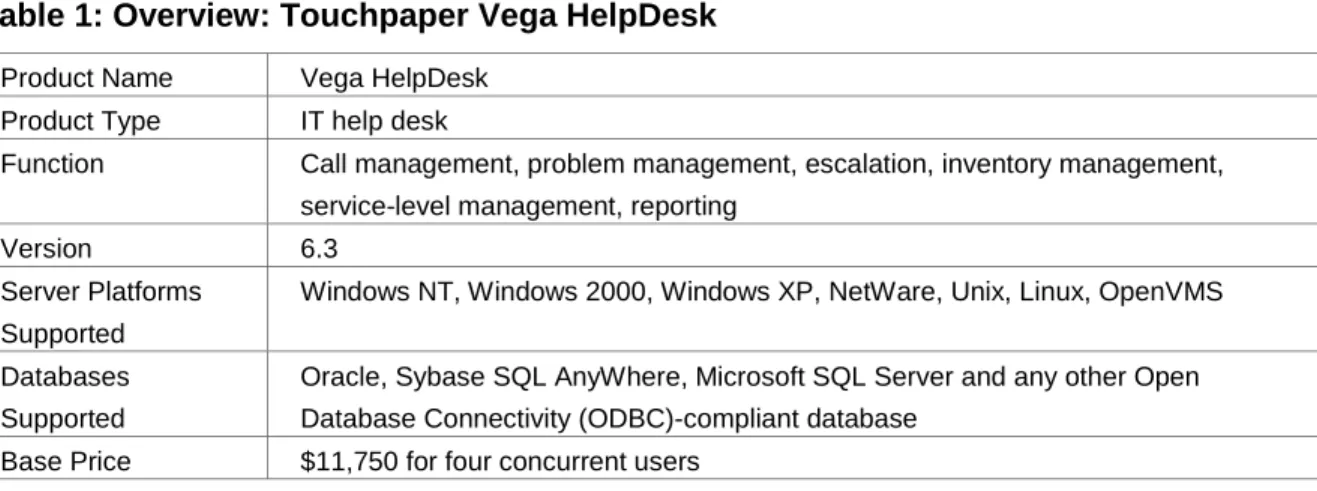
Table 1: Overview: Touchpaper Vega HelpDesk
Product Name Vega HelpDeskProduct Type IT help desk
Function Call management, problem management, escalation, inventory management, service-level management, reporting
Version 6.3
Server Platforms Supported
Windows NT, Windows 2000, Windows XP, NetWare, Unix, Linux, OpenVMS
Databases Supported
Oracle, Sybase SQL AnyWhere, Microsoft SQL Server and any other Open Database Connectivity (ODBC)-compliant database
Table 1: Overview: Touchpaper Vega HelpDesk
Target Market Companies with midsize IT help desks of approximately 15 to 150 analysts supporting 1,500 to 15,000 users
Table 2: Features and Functions: Touchpaper HelpDesk
Call Management Much of the call-logging process is automated. By entering only partial information in many of the fields, drop-down menus enable the user to fill in the rest. Once the caller’s name is entered, the system will display the rest of the required information (department, location, e-mail address, associated inventory information), freeing the help desk operator to address the caller’s problem. The optional Caller Line Interface (CLI) will identify the caller (much like a caller ID box) and fill in all of the caller’s information while optionally launching a new help-desk call.
The operator can gain access to the information of any call by searching on its reference number, caller identification, problem reported, inventory involved and so on. All calls are tracked to their completion and stored, along with all of their associated information, in the customer’s database.
For the most repetitive issues that are called in (such as forgotten passwords), each group of operators can define up to 10 Hot Topics buttons that will set up a call record for a pre-defined issue. There can also be 10 system-wide Hot Topics for all groups to access. From a single button, the call record will be filled in as much as possible, including escalations, notifications and any other actions that are associated with that particular issue.
Common calls that require several actions before they are resolved are automated through the software’s ActionTracks feature. Once the operator selects the type of call from a user-defined pull-down menu, the required actions and escalations are associated with the call. Once the call is submitted, the software processes it according to the defined steps. The call cannot be closed until all of the ActionTracks associated with it have been resolved.
Problem Management
Calls can be escalated to the proper specialists once the logging process is complete. This includes any escalation routines that are defined in the
ActionTracks feature. Specified personnel can be notified by e-mail, pager and desktop messages. A module called Listener will run in the background and notify the operator of any alarms. This also works when the operator is not logged in to the help desk product but is on the network.
A two-step closure feature prohibits a call from being closed until a quality control person has reviewed it. This would ensure that each caller’s problem was resolved completely and correctly. This authentication process can be turned on or off by anyone with the proper authorization.
Inventory Management
It maintains a record of the network inventory in the customer’s database that can be populated manually or with imported records from any ODBC-based auto discovery tool. By licensing additional modular options from the vendor, such as Network & Infrastructure Management (NMS), AQuire (Systems Management) or AUtoserve (Server and Application Management), or using established suites, such as Microsoft Systems Management Server (SMS) or LANDesk’s LANDesk, the software will discover the devices attached to a particular caller based on the basic information entered about the caller (for example, name or department).
Table 2: Features and Functions: Touchpaper HelpDesk
KnowledgeManagement
Delivers appropriate knowledge sets to its analysts and customers. Segregating knowledge by inventory class, location, complexity and security class increases the chance of first-line resolutions by offering the correct knowledge to the most appropriate analyst.
There are three methods of searching for information in HelpDesk. Two are included with the basic software package, and one is an add-on module. The three methods are as follows:
• Free-text search — the software will search on text entered in any selected field (that is, customer name, location, call descriptions, reference numbers).
• InfoMine — searches through the database for the symptoms entered and for all related call records. A user can search on “printer not working,” and the module will return the information from previously logged calls detailing the various symptoms and solutions of the printer problem.
• Knowledge Base (optional) — this resolution repository is populated by the user with common problem symptoms and their proven answers. This gives the user the best answers to inquiries without sorting through entire lists of results. Recurring queries can be added to the Knowledge Base. It can also be set to query third-party or homegrown ODBC-compliant knowledge bases.
Service-Level Agreement Support
Service-level rules can be set by the operator or administrator and will trigger alerts at any point in the life of the call, even after the call is closed. Calls that require the most urgent attention are highlighted on the HelpDesk screen in various colors pertaining to their severity.
Reporting The main reporting engine is Crystal Enterprise from Crystal Decisions. It enables reports to be run as stand-alone reports from the help desk’s front end and also provides facilities for creating new reports. The Report Writer interface enables them to amend the existing reports and create new ones without having to learn Crystal Enterprise. The Real-Time Reports feature can update HelpDesk performance and management statistics on a workstation.
Its Ticker feature installs a color-coded scrolling information ticker on the desktop. The ticker may be configured to auto display HelpDesk statistics (open calls by group, critical call count, calls breaching service level, customer systems down) and may be set to broadcast system or service messages.
An optional Query Tool is available to provide online management reports and queries. The Query Tool is independent of Crystal Enterprise.
Table 2: Features and Functions: Touchpaper HelpDesk
Customer Self-Help End users can submit queries to the resolution database and search for answers to technical questions without needing to involve the help-desk operator. These queries can be submitted in a variety of ways. E-mails from the end user can be manually entered into the system by an operator or logged when sent to a specified e-mail address.
An optional Internet edition enables end users to access the calllogging and -tracking features from a standard Web browser. Administrators can set permissions for each end user to control what call information can be altered and accessed. Even certain fields can be hidden from the end user.
The optional End User Toolbar is a small application that runs on all end-users’ desktops connected to the network. It is a small icon bar that allows users to log and track calls and request services or supplies (for example, toner cartridge). It also allows single-click access to HelpDesk’s Hot Topics feature, a set of pre-defined requests (for example, password resets) that are defined by the help desk administrator as being the most common or most critical call subjects for the day. The Notify feature enables end users within an organization to log their own routine support calls from any desktop. Notify lets end users log issues that can trigger standard processes or automated resolutions, for example, printer toner out or, password change request.
Web Interface All of the operator-oriented features are accessible via the Internet through the included analyst interface. This enables operators on any platform supporting MS Internet Explorer or Netscape Navigator to access the product’s information base, call records and logging screens and to use them to control the full call life cycle just as if they were on an attached client. The view that the Web user sees is exactly the same view as that of the client version. All screens look the same on the Web as they would on the client, according to each user’s preferences.
An end-user version of this interface is available as an optional module. This enables callers to log their queries from the Internet using simplified call-logging pages rather than making a telephone call to the help desk.
E-Mail Support Building on the existing manually initiated inbound and outbound e-mail processes, this feature provides a range of inbound functions for mail addressed to the help desk, for example, Auto-Launch a call, Auto-Update a call, Auto-Resolve a call, Auto-Close a call. Outbound mail automation may be configured to include
notification by mail on new call, assigned call, updated call, resolved call and closed call.
Customization The software includes the Designer customization tool. With proper authorization, the operator can drag and drop fields and buttons, add or delete fields and buttons, change data sources while invoking the rules of the old association, change the terminology (that is, names of records) and change menu item names. Operators can also create new or custom tables and define table relationships via Designer’s drag-and-drop functionality. All related changes are reflected in the reporting feature, so there is no confusion with new field names being left out of reports. Designer stores all customization and configuration information in the database. When an operator starts up a client system, Vega HelpDesk reads the configuration information from the database and renders the operator’s screens and terminology, regardless of physical location.
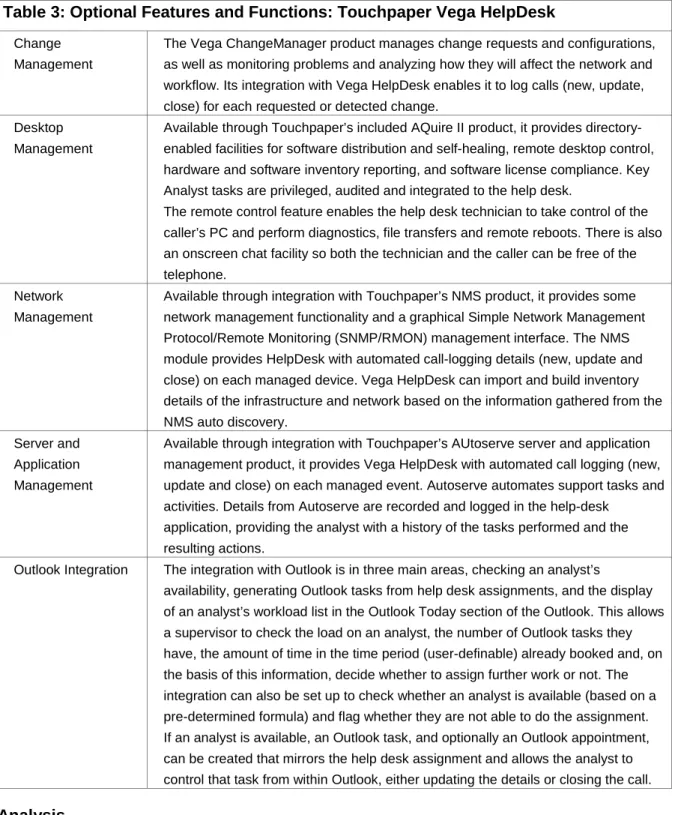
Table 3: Optional Features and Functions: Touchpaper Vega HelpDesk
ChangeManagement
The Vega ChangeManager product manages change requests and configurations, as well as monitoring problems and analyzing how they will affect the network and workflow. Its integration with Vega HelpDesk enables it to log calls (new, update, close) for each requested or detected change.
Desktop Management
Available through Touchpaper’s included AQuire II product, it provides directory-enabled facilities for software distribution and self-healing, remote desktop control, hardware and software inventory reporting, and software license compliance. Key Analyst tasks are privileged, audited and integrated to the help desk.
The remote control feature enables the help desk technician to take control of the caller’s PC and perform diagnostics, file transfers and remote reboots. There is also an onscreen chat facility so both the technician and the caller can be free of the telephone.
Network Management
Available through integration with Touchpaper’s NMS product, it provides some network management functionality and a graphical Simple Network Management Protocol/Remote Monitoring (SNMP/RMON) management interface. The NMS module provides HelpDesk with automated call-logging details (new, update and close) on each managed device. Vega HelpDesk can import and build inventory details of the infrastructure and network based on the information gathered from the NMS auto discovery.
Server and Application Management
Available through integration with Touchpaper’s AUtoserve server and application management product, it provides Vega HelpDesk with automated call logging (new, update and close) on each managed event. Autoserve automates support tasks and activities. Details from Autoserve are recorded and logged in the help-desk
application, providing the analyst with a history of the tasks performed and the resulting actions.
Outlook Integration The integration with Outlook is in three main areas, checking an analyst’s
availability, generating Outlook tasks from help desk assignments, and the display of an analyst’s workload list in the Outlook Today section of the Outlook. This allows a supervisor to check the load on an analyst, the number of Outlook tasks they have, the amount of time in the time period (user-definable) already booked and, on the basis of this information, decide whether to assign further work or not. The integration can also be set up to check whether an analyst is available (based on a pre-determined formula) and flag whether they are not able to do the assignment. If an analyst is available, an Outlook task, and optionally an Outlook appointment, can be created that mirrors the help desk assignment and allows the analyst to control that task from within Outlook, either updating the details or closing the call.
Analysis
Touchpaper Vega HelpDesk is built on an n-tier architecture, which means that the product’s modules and
features can be divided into multiple tiers and positioned where each is best suited. For example, if there
is a dedicated e-mail server, then the business application logic pertaining to e-mail rules can be placed
on it. The visual presentation layer can be relegated to the desktop while the data management layer can
reside on the network. This is meant to reduce the amount of traffic across the network and to free up
resources that would otherwise be loaded down with help desk information.
Microsoft Foundation Classes (MFCs) as Microsoft. The developers built it to look and act just like
Microsoft’s menu-driven interfaces to reduce the training time needed on the customer’s end. Close
attention has been paid to reflecting the button bars and menu features so that, aside from the selections
that are specific to Vega HelpDesk, the Windows user will be presented with a familiar environment. For
example, on the main call entry screen, there is a section on the left side that is reserved for the help
desk’s “call tree.” Set up like Windows Explorer with descending folders and files, the call tree enables the
user to access any feature or record (for example, user information, assignments, escalations, notes)
without sifting through complex search queries. As a result of its following Microsoft, Vega HelpDesk will
only support Windows 98/NT/2000 clients. However, the Internet version that is included in the package
provides access to all of the features of the product in a .NET-compliant manner.
Vega HelpDesk can be purchased as a stand-alone product or combined with Vega ChangeManager,
AQuire, AUtoserve or NMS, should the customer desire the additional functionality.
Pricing
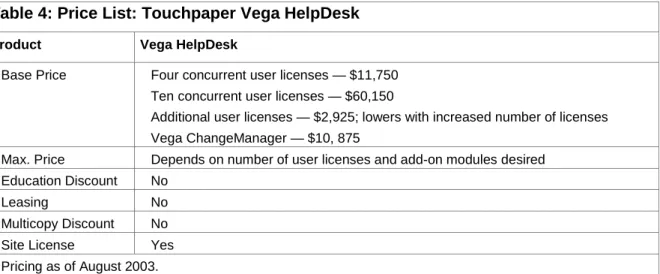
Table 4: Price List: Touchpaper Vega HelpDesk
Product Vega HelpDesk
Base Price Four concurrent user licenses — $11,750 Ten concurrent user licenses — $60,150
Additional user licenses — $2,925; lowers with increased number of licenses Vega ChangeManager — $10, 875
Max. Price Depends on number of user licenses and add-on modules desired Education Discount No
Leasing No
Multicopy Discount No Site License Yes Pricing as of August 2003. GSA Pricing
Yes.
Competitors
•
BMC Remedy Help Desk
•
FrontRange Heat
•
Marval Software Marval Service Management
•
Network Associates TotalServiceDesk
Strengths
Customization
The Designer tool provides a deep level of customization options. Vega HelpDesk users can change field
names, rename records and menu selections, create new tables, define table relationships, map to
external data sources and set up the main screen to best fit the needs of that particular company. This is
useful for those companies in different industries that have their own industry language (for example, the
medical industry). By tailoring the interface to familiar terms and options, the training time for each help
desk user can be reduced.
Well-Organized GUI
By adopting the Microsoft look and feel, customers do not have to train their new help-desk users from
scratch. Given Microsoft’s widespread penetration into several different markets, a growing number of
people are becoming familiar with that interface model. This — coupled with the fact that Vega
HelpDesk’s front end offers the Explorer-like call tree as well as single-button access to its search,
reporting, and various call and process information — reduces the amount of time it will take to learn and
operate the product on a daily basis.
Automated Common Routines
The Hot Topics feature can be used to reduce the amount of time it takes for help-desk operators to
physically log calls. This not only frees them to address the resolution itself, but also provides for better
tracking of all calls to the help desk. In the case of a forgotten password, help-desk operators who know
the resolution may not take the time to log the call when they can tell the caller what to do. By clicking on
the Forgotten Password Hot Topics button, an entire call ticket is generated, requiring the operator to type
only the caller’s name. This allows the administrators to keep better track of all of the issues affecting the
company’s network and its users.
Limitations
Client Limited to Some Microsoft Windows Environments
The vendor is planning to expand the client piece beyond the Windows environment (for example, Unix)
by using Windows .Net as the go-between. However, it does not support non-Windows platforms or
Windows 95.
Small U.S. Presence