RMFT Event Viewer
Messages
Software Version 2.4.3
March 6, 2011
RepliWeb, Inc., 6441 Lyons Road, Coconut Creek, FL 33073
Tel: (954) 946-2274, Fax: (954) 337-6424
RepliWeb, Inc. ii
March 6, 2011
Copyright © 2000-2011 by RepliWeb, Inc.
The information in this document has been compiled with care, but RepliWeb makes no warranties as to accurateness or completeness, as the software described herein may be changed or enhanced from time to time. This information does not constitute commitments or representations by RepliWeb, and is subject to change without notice. The software described in this document is furnished under license and may be used or copied only in accordance with the terms of this license.
No part of this document may be reproduced or transmitted in any form or by any means, electronic or mechanical, for any purpose, without the express written consent of RepliWeb Ltd.
Any trademarks, trade names, service marks, or service names owned or registered by any other company and used in this document are proprietary to that company.
Please direct correspondence or inquiries to: RepliWeb, Inc. 6441 Lyons Road Coconut Creek FL 33073 Phone: (954) 946-2274 Fax: (954) 337-6424 E-Mail: Support: Web Site:
RepliWeb, Inc. 3
Table of Contents
Introduction ... 4 Transfer Events ... 5 Pull Failure ... 5 Sorting Failure ... 5 Delivery Failure ... 6Hot Directory Failure ... 6
Scheduler Events ... 7
Scanning Paused ... 7
Scanning Resumed... 7
Load Control Events ... 8
Heavy Load Control Activated ... 8
Heavy Load Control Deactivated ... 9
DMZ Events ... 9
DMZ Synchronization Failure ... 9
Inspection Policy Events ... 9
Failed to Run ... 9
Rejected Package ... 10
Backup and Restore Events ... 11
Backup Failure ... 11
Backup Success ... 11
Restore Failure ... 12
RepliWeb, Inc. 4
Introduction
During normal operation, RMFT Server reports certain events to Windows Event Viewer. The following document provides a list of events that RMFT reports to Windows Event viewer and suggests ways to resolve them where applicable.
Figure 1: RMFT Sorting and Delivery Errors Reported to Windows Event Viewer
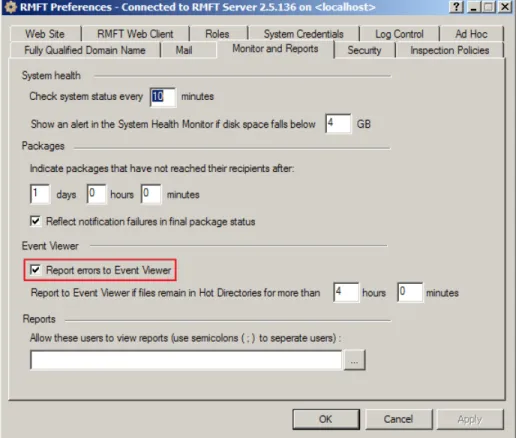
To ensure that all transfer-related errors are reported to Event Viewer, open the
Site Preferences dialog box and verify that the Report errors to Event Viewer
check box is selected. Events that are not transfer related (such as Backup and Restore events) are always written to Event Viewer regardless of whether or not the check box is selected.
RepliWeb, Inc. 5
Transfer Events
Pull Failure
Description RMFT Pull Job Did Not Finish Successfully
Event ID 6300
Type Error/Warning
Summary A Pull Job is a job that pulls files from a specified host.
Causes Possible reasons for Pull Job failure are as follows:
Incorrect configuration (e.g. user name and password are incorrect).
Source folder does not exist.
Source folder does not have read permission.
Unable to establish a connection with the source host.
Resolution To find the exact cause of failure, locate the Job in the Active/Completed Jobs pane and refer to its log file.
Sorting Failure
Description RMFT Sorting Job Did Not Finish Successfully
Event ID 6100
Type Error/Warning
Summary The Sorting Job performs various tasks including:
Validating the package structure
Verifying digitally signed packages
Distributing the package to recipient inboxes.
Packaging files pulled from hosts
Delivering packages to users via e-mail.
Running inspection policies
Running the Delivery Job (to hosts)
Causes The Sorting Job may not finish successfully if it fails to perform any of its tasks and/or if one of its child job fails.
Resolution Locate the Sorting Job in the Active/Completed Jobs pane and refer to its log file to find the exact cause of the failure. It may not be the parent Sorting Job that failed, but one of its child jobs. If this is the case, refer to the child job's log file.
RepliWeb, Inc. 6
Delivery Failure
Description RMFT Delivery Job Did Not Finish Successfully
Event ID 6200
Type Error/Warning
Summary The Delivery Job transfers files to designated hosts.
Causes Possible reasons for a Delivery Job failure are as follows:
Incorrect configuration (e.g. user name and password are incorrect).
Target folder does not exist.
Target folder does not have write permission.
Unable to establish a connection with the target host.
Resolution To find the exact cause of failure, locate the Job in the Active/Completed Jobs pane and refer to its log file.
Hot Directory Failure
Description RMFT FEST Files Were Not Taken From The Hot Directory
Event ID 2015
Type Warning
Summary The RMFT FEST Server service is responsible for
automatically picking up files dropped into predefined "Hot Directories". Hot Directories can be configured using "SMB - Hot Folder" protocol and may reside on RMFT Server or on a remote host.
Causes The files or file types may be excluded by one or more Pull Filters e.g. the "File Specification" or "File List" filters. (A Pull Filter may have been configured for the SMB Hot Folder protocol).
Resolution Check that the files are not excluded by a Pull Filters.
RepliWeb, Inc. 7
Scheduler Events
Scanning Paused
Description Scheduler Scanning Has Been Paused
Event ID 8101
Type Warning
Summary No new jobs will be started until the scan is resumed.
Causes Scanning is paused during an Upgrade operation or a Restore job.
Resolution If the scanning was not resumed automatically (event 8102), restart the Scheduler service.
Scanning Resumed
Description Scheduler Scanning Has Been Resumed
Event ID 8102
Type Information
Summary N/A
Causes Upgrade finished
Restore job finished
Resolution N/A
RepliWeb, Inc. 8
Load Control Events
Heavy Load Control Activated
Description Heavy Load Control Has Been Active For <Number> Minute(s)
Event ID 8103
Type Warning
Summary The message indicates that RMFT's Heavy Load
Mechanism has been active for the last <number> minutes. RMFT's Heavy Load Mechanism prevents the RMFT Server machine from exhausting all of its resources during times of heavy load.
Causes Any of the following:
Sudden influx of files
Low disk space
Inability to communicate with the RMFT database for an extended period.
Resolution Open RMFT Manager. The system health icon in the right lower corner should indicate a warning or error. Click the icon to open the Health Monitor. Check if there are any disk space or database connection issues. If there is insufficient disk space, either free up some disk space or change the minimum disk space setting (ManageÆPreferencesÆ Monitor and Reports). If there is a database connectivity issue, refer the problem to your network/database
administrators (the RMFT Health Monitor may be able to provide a specific error code that can help resolve the issue). If there are no disk space or database issues, then there are too many RMFT processes running at the same time. Check the RMFT Package Monitor and
Active/Completed Job View to see if there is a significant increase in the number of packages/jobs. If so, determine whether the jobs are accumulating because they are failing or because there was a one-time surge of files. If the former, check the package/job logs for details. If the latter, either wait for the one-time surge to end, or abort unnecessary packages.
RepliWeb, Inc. 9
Heavy Load Control Deactivated
Description RMFT Server Has Deactivated Heavy Load Control And Resumed Normal Processing
Event ID 8104
Type Information
Summary The message indicates that the Heavy Load Mechanism has been automatically deactivated (as it is no longer required).
Causes N/A
Resolution N/A
DMZ Events
DMZ Synchronization Failure
Description RMFT DMZ Front-End Synchronization Process Failed
Event ID 6600
Type Error
Summary The DMZ Synchronization process is responsible for
synchronizing the databases of the internal and DMZ RMFT Servers.
Causes Synchronization failure may be caused by a loss of connection to the DMZ RMFT Server.
Resolution Check that the internal RMFT Server machine is able to establish a connection with the DMZ RMFT Server machine. Also check that the RMFT GQS Service is running and that the credentials for accessing the DMZ RMFT Server are correct.
Inspection Policy Events
Failed to Run
Description RMFT Inspection Policy Failed To Run
Event ID 6701
RepliWeb, Inc. 10 Summary RMFT inspection policies can be configured to inspect every
package uploaded to RMFT Server and/or only packages uploaded by specific users, hostsand groups. Depending on the inspection policy, packages can be inspected for
viruses, content type, and so on.
Causes The exact cause of the failure is written in the log file of the package Inspection Policies and the package's Audit Trail tab. Possible causes include:
A mistake in the inspection policy configuration.
Missing inspection policy file.
Coding error in the inspection policy file.
Resolution Check that the inspection policy file resides in the specified location. Check that the configuration is correct in the Inspection Policy General tab (typos, correct path, correct file type specified). Lastly, check for coding errors in the inspection policy file.
Rejected Package
Description RMFT Inspection Policy Rejected Package
Event ID 6700
Type Error
Summary RMFT inspection policies can be configured to inspect every package uploaded to RMFT Server and/or only packages uploaded by specific users, hosts or groups. Depending on the inspection policy, packages can be inspected for viruses, content type, and so on.
Causes A package is rejected if it does not meet the inspection policy's acceptance conditions. For example, if an inspection policy that scans packages for viruses finds a virus, it will reject the package.
Resolution Find out why the package was rejected and ask the sender to resend the package after making sure that it meets the inspection policy's acceptance criteria.
RepliWeb, Inc. 11
Backup and Restore Events
Backup Failure
Description RMFT Backup Ended With Failure
Event ID 6400
Type Error/Warning/Information
Summary RMFT Server can be configured to perform immediate or scheduled backups of settings and packages.
Causes The exact cause of the failure is written in the backup job's log file. There may be two separate backup jobs - Settings Backup or Packages and Settings Backup, depending on the backup configuration. Backup failure may be caused by the following reasons:
Incorrect configuration
Incorrect network access share credentials (when the backup target resides on a shared network resource)
Target directory does not exist
Target directory does not have write permissions
Resolution Check the job's log file and correct the settings/permissions as required.
Backup Success
Description RMFT Backup Ended With Success
Event ID 6400
Type N/A
Summary RMFT Server can be configured to perform immediate or scheduled backups of settings and packages.
Causes N/A
RepliWeb, Inc. 12
Restore Failure
Description RMFT Restore Ended with Failure
Event ID 6500
Type Error/Warning/Information
Summary The restore of backed up items to RMFT Server ended in failure.
Causes The exact cause of the failure is written in the restore job's log file. Restore failure may be caused by the following reasons:
Incorrect network access share credentials (when the backup target resides on a shared network resource).
Backup directory does not exist.
Backup directory does not have read permissions.
Resolution Check the job's log file and correct the settings/permissions as required.
Restore Success
Description RMFT Restore Ended with Success
Event ID 6500
Type Error/Warning/Information
Summary The restoration of backed up items to RMFT Server ended successfully.
Causes N/A
Resolution N/A