Shared Files – The Retrieval Perspective
Ofer Bergman1 Bar-Ilan University, Israel
Dept. of Information Science, Bar-Ilan University, 52900, Israel Tel: 972-52-358-3842, Fax: 972-3- 7384027
Email: [email protected]
Steve Whittaker
University of California at Santa Cruz
Psychology Dept.,University of California at Santa Cruz ,CA 95064, USA Tel: 1-831-459-2390
Email: [email protected]
Noa Falk
Bar-Ilan University, Israel
Dept. of Information Science, Bar-Ilan University, 52900, Israel Tel: 972-52-607-1995
Email: [email protected]
This is a preprint of an article accepted for publication in Journal of the American Society for Information Science and Technology copyright © 2013 (American Society for Information Science and Technology).
1
Abstract
People who are collaborating can share files in two main ways:
performing Group Information Management (GIM) using a common repository
or performing Personal Information Management (PIM) by distributing files as
email attachments and storing them in personal repositories. There is a trend
towards using common repositories with many organizations encouraging workers to use GIM to avoid duplication of files and management. So far, PIM and GIM have been studied by different research communities so their
effectiveness for file retrieval has not yet been systematically compared. We
compared PIM and GIM in a large scale elicited personal information retrieval
study. We asked 275 users to retrieve 860 of their own shared files, testing the effect of sharing method on success and efficiency of retrieval. Participants preferred PIM over GIM. More importantly, PIM retrieval was more successful: participants using GIM failed to find 22% of their files compared with 13% failures using PIM. This may be because active organization aids retrieval: when using personally-created folders, failure percentage was 65% lower than when using default folders (e.g. My Documents), and more than 5 times lower than when using folders created by others for GIM. Theoretical reasons for this are discussed.
When a group of two or more people start collaborating they typically face a dilemma of how to share the files they create together. Groups need to choose between storing the shared files in a common repository (e.g. using cloud based services such as Google Drive and Dropbox) or distributing the files as email
repository, the group first needs to agree on the files' organization: therefore we refer to it as Group Information Management (GIM), (Erickson, 2006). If they choose email distribution and personal repositories each person in the group can organize the files in his/her own way. We therefore refer to it as PIM (Personal Information Management)2. Although there is a vast amount of literature on PIM (e.g. Bergman, Boardman, Gwizdka, & Jones, 2004; Jones & Teevan, 2007; Whittaker, 2011) and some initial studies of GIM (Berlin, Jeffries, O'Day, Paepcke, & Wharton, 1993; Rader, 2009; A. Voida, Olson, & Olson, 2013) to the best of our knowledge their effectiveness for file retrieval has not yet been systematically compared.
There are excellent theoretical arguments for using GIM rather than PIM. PIM requires additional work: each collaborator has to independently manage their own personal collection of shared files, thus duplicating files, time and cognitive effort. Furthermore, there may be significant problems involved in retrieving, managing, and reconciling different versions of a document when multiple versions are distributed through email to multiple participants (Ducheneaut & Bellotti, 2001; Whittaker, Bellotti, & Gwizdka, 2007). Many organizations therefore have a policy of
encouraging their teams to use a common repository when sharing files (Matthews et al., 2013).
Our study compared retrieval using GIM and PIM for file sharing: We asked 275 users to retrieve 860 of their shared files and tested the effect of sharing method (PIM vs GIM) on different retrieval measures (success and efficiency). We also tested the effect on retrieval success and efficiency of different storage options (storing files
2 PIM is defined as Personal Management of Information. The information itself (e.g. the content of
in default folders vs. storing them in specific user-created ones), as well as folder depth and other independent variables.
Theoretical Background
Our research relates to two distinct research domains: PIM and Computer Supported Cooperative Work (CSCW) which includes GIM as a subdomain. These domains are traditionally studied by two separate research communities, and are substantially different from each other. In CSCW a group of people need to
coordinate in order to cooperate. In contrast, PIM is, by definition, a solitary activity in which the individual stores the information for his/her own retrieval. In GIM, users need to agree how to categorize their shared files (Berlin et al., 1993), while in PIM users’ organization is subjective (user-dependent) (Bergman, Beyth-Marom, & Nachmias, 2003). We review each literature separately.
Personal Information Management
In this section we review PIM literature regarding: (a) folder hierarchies and their main alternatives – tags and search, (b) evaluation of folders' efficiency, (c) file sharing through email, and (d) a recently developed PIM research method called elicited personal information retrieval.
Folder hierarchies. The traditional way to manage personal information items such as files or emails is to store them in user-created folders and then navigate to these folders to retrieve them. Throughout most of its long history, the hierarchical retrieval method has met with criticism. One disadvantage is that foldering hides the information from the user, and therefore reduces the chances of quick retrieval or reminding (Kidd, 1994; Malone, 1983; Whittaker & Sidner, 1996). Categorization is also difficult because it requires that people anticipate future usage, and furthermore, that usage may change over time (Kidd, 1994; Whittaker & Hirschberg, 2001;
Whittaker & Sidner, 1996). Another problem is that folder hierarchies require that users place the file in a single folder when several options are possible, and “Placing a document into a filing system under one category places the information out of reach if retrieval is required for some other reason” (Lansdale, 1988). Criticism of single classification in the hierarchical method is widespread in the PIM literature (Bloehdorn & Völkel, 2006; Dourish et al., 2000; Heckner, Heilemann, & Wolff, 2009; Hsieh, Chen, Lin, & Sun, 2008; Lansdale, 1988; Marsden & Cairns, 2003; Quan, Bakshi, Huynh, & Karger, 2003). To overcome these limitations, two
alternatives have been suggested to replace folder hierarchies: multiple-classification (tags) and search.
The tags alternative to folders. Tags have been suggested as a substitute for folders. Tags are a kind of metadata that describe the information item through a keyword or a term. Unlike folders, tags are non-hierarchical and users can assign as many tags as they want to an information item. This apparent advantage has led to extensive development of many tag-related PIM prototypes, including: Phlat (Cutrell, Robbins, Dumais, & Sarin, 2006), TagFS (Bloehdorn & Völkel, 2006), Gnowsis (Sauermann et al., 2006), ConTag (Adrian, Sauermann, & Roth-Berghofer, 2007), TapGlance (Robbins, 2008), Zotero (Ma & Wiedenbeck, 2009), TAGtivity (Oleksik et al., 2009), BlueMail (Tang et al., 2008; Whittaker, Matthews, Cerruti, Badenes, & Tang, 2011) and TagStore (Voit, Andrews, & Slany, 2012).
However, when folders and tags are compared for efficiency, cognitive load and frustration level in eight independent studies, the results are inconclusive across all measures and there is no clear indication that tags are superior to folders
(Bergman, Gradovitch, Bar-Ilan, & Beyth-Marom, 2013). Moreover, informed participants using systems that allow for both options prefer folders to tags. In the
minority of cases where tags were used for storage, participants typically use a single tag per information item and even when multiple classification was used for storage, it is only occasionally used for retrieval (Bergman, Gradovitch et al., 2013).
The search alternative to folders.An alternative to using folders is search
(search engine based retrieval). Search promises to be more flexible and efficient for retrieval; it does not depend on remembering the correct storage location; instead, users can specify in their query any file attribute they happen to remember (Lansdale, 1988). Users can also retrieve information via a single query instead of using multiple incremental operations to laboriously navigate to the relevant part of their folder hierarchy. Search also potentially finesses the organizational problem; users don’t have to engage in complex organizational strategies that exhaustively anticipate their future retrieval requirements. This logic led to the development of experimental PIM search engines such as SIS (Dumais et al., 2003), Haystack (Adar, Karger, & Stein, 1999 ), and Raton Laveur (Bellotti & Smith, 2000). More radical search based
systems such as Lifestreams (Freeman & Gelernter, 1996), Canon Cat (Raskin, 2000), Presto (Dourish, Edwards, LaMarca, & Salisbury, 1999), Placeless Documents
(Dourish et al., 2000) and MyLifeBits (Gemmell, Bell, Lueder, Drucker, & Wong, 2002) eliminated folders altogether.
However despite these theoretical arguments for the benefits of search, research has consistently shown that users store their files in folders and prefer navigation to search (Barreau & Nardi, 1995; Boardman & Sasse, 2004; Capra & Pérez-Quiñones, 2005; Kirk, Sellen, Rother, & Wood, 2006; Teevan, Alvarado, Ackerman, & Karger, 2004). This preference for folders and navigation is
independent of search engine quality: improving the search engine has no effect on this preference, and search is used only as a last resort when participants do not
remember the location of their files (Bergman, Beyth-Marom, Nachmias, Gradovitch, & Whittaker, 2008). One reason for this is that search requires more cognitive effort than navigation (Bergman, Tene-Rubinstein, & Shalom, 2013).
Do folders pay off? It seems therefore that users are willing to invest time and cognitive effort in creating folders and categorizing information items into them. But do these efforts pay off in terms of retrieval? Surprisingly, there is very little research on this topic. Malone (1983), in one of the first PIM studies conducted in the physical office environment, found two kinds of keeping behaviors: /files/ (collections of physical files in which semantically related papers were grouped together under a single title) and /piles/ (heterogeneous collections ordered only by recency of
acquisition). In qualitative research, Malone observed that filers are better at finding their documents than pilers, although piles have the benefit of reminding people of documents when they encounter them. On the other hand, Whittaker et al. (2011) studied email retrieval using logs, finding that retrieval from folders was less efficient than from the Inbox.
Sharing files using email. A number of studies have documented how email is used as a mechanism for distributing and sharing collaborative documents.
Whittaker and Sidner (1996) first identified this usage, with Dabbish et al. (2005) documenting that 36% of email messages contain attachments. People ‘live in’ their
email because it serves as task manager, file system, contact list, and alerting mechanism. This use of email as ‘habitat’ makes it a natural way to share
collaborative documents (Bellotti, Ducheneaut, Howard, & Smith, 2003). However, email studies show disadvantages of using email for collaboration, e.g., related messages get scattered throughout the inbox making it hard to collate, track, and monitor all of the materials related to a specific task (Bellotti et al., 2003; Whittaker
& Sidner, 1996). And because messages are distributed to explicitly named email recipients, senders may forget to include relevant people, so documents are not shared across the team (Tang, Lin, Pierce, Whittaker, & Drews, 2007). Nevertheless, email is still a prevalent method for file sharing (Whittaker, 2011, Whittaker et al., 2011).
Elicited personal information retrieval. The main goal for PIM is to retrieve stored information. However systematically measuring retrieval success and
efficiency is hard. Many studies have collected data about PIM organization. One qualitative method is the guided tour, which is a semi-structured interview in which participants show an interviewer the organization of their personal computer (e.g. Boardman & Sasse, 2004; Kwasnik, 1991; Malone, 1983). Organization has also been studied using dedicated software that automatically analyzes folder hierarchies (e.g. Goncalves & Jorge, 2003; Henderson & Srinivasan, 2009). However both methods are focused on characterizing organization. Neither method has directly observed the effect of such organization on spontaneous PIM retrievals as they occur throughout the participant’s day.
One way to study the effects of organization on retrieval is to give participants ‘artificial’ information items and then observe retrieval (e.g., Civan, Jones, Klasnja, & Bruce, 2008; Fitchett, Cockburn, & Gutwin, in print; Gao, 2011; Pak, Pautz, & Iden, 2007). This procedure has the advantages of a controlled task: the experimenter determines when and how information items are retrieved (instead of waiting for them to occur). Furthermore, the experiment typically takes place in a lab, so all relevant variables can be recorded and measured. However, this method may lack ecological validity: in PIM users typically are intimately familiar with their own information items (Bergman et al., 2003; Jones, Phuwanartnurak, Gill, & Bruce, 2005), therefore
retrieving ‘artificial’ information items may be unrepresentative of authentic retrievals.
We previously addressed this problem by using a method called Elicited Personal Information Retrieval (EPIR) (Bergman, Gradovitch et al., 2013; Bergman, Komninos, Liarokapis, & Clarke, 2012; Bergman, Tene-Rubinstein et al., 2013; Bergman, Whittaker, Sanderson, Nachmias, & Ramamoorthy, 2010, 2012; Whittaker, Bergman, & Clough, 2009). In EPIR to increase ecological validity, the tester asks participants to retrieve sample files from their own personal information item collection using their own computers. EPIR also has the advantages of a controlled experiment as the tester initiates the retrievals and measures relevant variables by videorecording the participants’ computer screens.
EPIR does not exactly replicate real-life retrieval because retrieval is prompted by specifying the target file name rather than the broader context of work in which files are typically retrieved. Two more naturalistic alternatives to this problem use dairies (Teevan et al., 2004) and logfiles (Whittaker et al., 2011) to record
participants’ spontaneous retrievals. However, diaries can be problematic: they are typically used in small-scale qualitative studies with limited external validity: participants report on their retrieval behavior after the event and they may omit important information (e.g. retrieval time). Logs are difficult to collect (both technically and because of privacy issues) and are typically used only when a new prototype is tested. In addition, there may be issues involved in interpreting user intentions from complex logfile data.
CSCW and GIM
This section will start with a short review of CSCW and will then focus on its GIM subdomain.
Computer supported cooperative work. CSCW is the study of the social and work-based processes involved in collaboration, along with the design of tools that are intended to support effective collaboration. The domain covers a broad range of topics and important reviews are provided by (Koch & Gross, 2006; Olson & Olson, 2008). General findings from CSCW have direct implications for the adoption of GIM technologies. Studies of early collaborative tools for information sharing showed that users are resistant to adopting new collaborative tools, for multiple reasons including: the additional workload these tools demand (Grudin, 1989), incentives and concerns about credit (Orlikowski, 2000), privacy (Karat, Karat, & Brodie, 2007), competition with established email sharing practices (Whittaker, 1996), and lack of attention to social processes (Ackerman, 2000).
Group information management.GIM is an important subarea of CSCW,
addressing social processes and design of tools to support collaborative information sharing. In GIM, two or more collaborators share files using a common repository. Typically, collaborators develop these files together. The common repository can be located on an intranet server (if the group is in the same organization), or in the cloud, giving collaborators ubiquitous access to shared files using any device with Internet access.
Berlin et al. (1993) is written by five co-authors who report their personal experiences in developing a common repository for long-term files they commonly used including: meeting notes, design documents and bug work-arounds. They began optimistically: “We expected to sit down, agree on a single, simple classification, and be done. Given our similar project goals, computing environment, and research interests, our only concern was that we were too homogeneous to have interesting differences in personal styles. We were wrong. Very wrong” (p. 25). They
experienced many problems in structuring their shared document space, resulting from multifaceted individual differences in organizational style. Among the individual differences they found were between:
(a) purists who preferred to store each file in a single location vs. proliferators who preferred to store files in all possible locations;
(b) syntactists who based their structure on episodic clues and the context in which the information was used vs. semanticists who base their organization on document meaning;
(c) scruffies who wanted ‘only five’ top level categories vs. neatniks who wanted ‘three hundred fine-grained’ folders; and
(d) savers who wanted to keep all possibly relevant documents vs. deleters who thought that this would create clutter so wanted to keep a minimal set of documents.
Berlin et al. report that when attempting to retrieve a document, members of the group tried to guess other members’ idiosyncratic organizational style but often failed to do so. This problem was also described by Lutters, Ackerman, & Zhou (2007) as
follows: “People adding and retrieving information in group information systems must mash their often idiosyncratic categories, indices, schema and information routines” (p. 243). A possible reason for this mismatch is that people are experienced
at naming folders for their own use but not in order to cooperate with others. We found no prior research that tested the effect of such attempts at collaborative organization on the success and efficiency of group retrieval.
Another early study by Whittaker (1996) identified different types of problems with common repositories. He conducted interviews and analysis of logfile data with long-term users of Lotus Notes, a work-based common repository that allowed
participants to share files, post comments and engage in structured online
conversations. Participants in that study were reluctant to adopt Notes, observing that their collaborators were often unaware when new materials had been added to the common repository. To alert others about new content, they therefore sent emails alerting others about repository changes, sometimes including those new documents as attachments in those emails. This undermined the common repository leading some group members to abandon it and rely solely on email for sharing documents. More recent work on enterprise sharing tools reveals similar alerting issues (Mahmud, Matthews, Whittaker, Moran, & Lau, 2011; S. Voida, Edwards, Newman, Grinter, & Ducheneaut, 2006). Two systems TeleNotes (Whittaker, Swanson, Kucan, & Sidner, 1997) and Topika (Mahmud et al., 2011) attempted to remedy this by incorporating user configurable email alerting as the repository is updated. Another prototype that addresses the problem of alerting is Sharing Palette (S. Voida et al., 2006). However effective alerting remains a difficult problem. On the one hand collaborators need systematic alerting to avoid overlooking relevant updates to the repository. On the other hand, sending too many alerts leads to information overload, making it difficult to determine which alerts are important.
Rader (2009), in a qualitative study, found that there is little feeling of common ownership in shared repositories. In a paper titled “Yours, mine and (not) ours” she described how her participants restricted activities to their own files in a common repository and were careful not to delete files that might possibly be useful to others. As a result, the repository became cluttered and poorly organized with participants wasting time and effort when attempting to find information, especially that created by others. One of her participants said that “Probably the biggest problem we have with CTools is that people tend to organize information [in] different ways”
(p. 2096). Similar failures to agree on a common organizational structure are reported in recent enterprise sharing tools (Muller, Millen, & Feinberg, 2010; Shami, Muller, & Millen, 2011).
Another problem with file sharing relates to version control: If two (or more) collaborators make synchronous changes to different versions of the file then the two (or more) versions need to be merged into a third version. To avoid this complication, it is important that each of the collaborators work on the latest version of the file. To do that collaborators need to agree on a common versioning method, but often fail to do so because each of the collaborators has his/her own versioning scheme (e.g. one collaborator uses numbers while another uses dates) (Karlson, Smith, & Lee, 2011). This seems to be more problematic with common repositories than email, as
articulated by one of their participants: “The idea of having two [versions of]
organizing schemes being applied to the same folder at the same time is disturbing to me. So I wouldn’t do it. I’d email it to him and say: put it where you want it to be” (p.
2674). On the other hand, current cloud based sharing applications such as Google Drive may eliminate the need of creating different versions of the files (and the need to co-ordinate edits) by allowing multiple collaborators to co-edit the file
simultaneously. Our study does not address the file sharing versioning problem. We do however return to this issue when we discuss future research in the Conclusions section.
In another qualitative study, Voida et al. (2013) report their participants’ misconceptions between three elements of common repositories: (a) different cloud-based services with different affordances, (b) different digital identifiers that reflect different facets of individual identity, and (c) different collaborators with different work practices. These differences and the interactions between them made
cloud-based management so complex that one of their participants commented that “When I try to wrap my head around all my different documents… It kind of makes my head hurt to think about it” (p1).
Regardless of these problems, cloud-based storage and sharing applications such as Google Drive, Dropbox, Amazon Cloud Drive, Apple’s iCloud and
Microsoft’s SkyDrive are showing rapid adoption. Cloud-based computing is
projected to overtake local storage by 2020 (Anderson & Rainie, 2012) with pervasive network access and support for concurrent editing being positive reasons for adoption (Park & Ryoo, 2012). The main aim of the current study is to systematically compare the effectiveness of common versus personal repositories for supporting retrieval.
Research Questions Sharing Methods
(a) Which sharing method (PIM or GIM) do participants prefer when sharing files? And what are the reasons for their preferences? Previous research indicates problems in agreeing common organizational structures (Berlin et al., 1993; Rader, 2009), and alerting when new content is posted (S. Voida et al., 2006; Whittaker, 1996; Whittaker et al., 1997). We therefore expect participants to prefer email sharing and thus practice PIM not GIM.
(b) Which sharing method is more efficient and successful for retrieval - PIM or GIM? To the best of our knowledge this has never been studied. However prior work indicates that people have better memories for materials that they have actively organized themselves (Kalnikait & Whittaker, 2007, 2008), and general theories of memory suggest that the act of semantic categorization enhances recall (Craik & Lockhart, 1972). Our expectation was first that PIM would be more efficient and
successful than GIM. Second, within GIM, files stored personally created folders will be easier to find than those stored in folders created by others.
Retrieval Methods
Which retrieval method (navigation or search) do participants prefer?And do people prefer to retrieve their PIM files from their file collection or from the email to which the file was attached? Previous studies clearly indicate a preference for
navigation over search (e.g. Barreau & Nardi, 1995). Storage Methods
Are retrievals more efficient and successful from specific folders that users
personally create than from default folders (such as Downloads and My Documents)?
In other words, does the effort of actively imposing personal organization on shared files when storing them pay off? Previous studies showed contradictory results regarding this question as indicated in the theoretical background section.
Research Method
Following (Bergman, Gradovitch et al., 2013; Bergman, Tene-Rubinstein et al., 2013; Bergman et al., 2010) we examined retrieval using the Elicited Personal Information Retrieval (EPIR) method. Participants retrieved files that other users had shared with them during naturally occurring collaborations. Thus participants were free to choose their sharing, storage and retrieval methods, when retrieving files from their own computers. This increased the ecological validity of the research compared with more lab based techniques (Civan et al., 2008; Fitchett, Cockburn, & Gutwin, 2013; Gao, 2011; Pak et al., 2007). Although we gathered data from each participant individually, it was important for us to gather it from a large number of participants. This required considerable effort. However, our large scale data collection has the advantage of decreasing the effect of random individual behaviors and increasing
external validity. Our experiment took 10 minutes per participant and included as many EPIR sessions as time allowed (M = 2.93, SD = 1.45). It was followed by a short questionnaire
Participants
We recruited 275 Israeli participants. Of the participants 152 (55%) were females. Their age ranged from 20 to 77 (M = 28.93, SD = 8.63). To induce heterogeneity, participants were recruited by 7 different testers (RAs) of various demographic backgrounds. 161 (58%) participants were students, 68 (25%) were corporate workers and 23 (8%) were self-employed. Two participants selected the "other" profession option, and 21 did not answer this question. Participants’ mean self-reported computer literacy on a 1-5 Likert scale was 3.55 (SD = 1.05). Seventeen (6%) participants used a Mac and the rest used a PC running Windows 7.
Procedure
Preparation for the retrieval tasks. The testers explained the study to potential participants. Participants then signed an informed consent form and answered a short questionnaire. Our procedure required us to generate a list of files that other collaborators had shared with each participant. The testers therefore used the participant’s computer desktop search engine to search each participant’s computer for files where the file author's name was different from the participant’s
user name. As many cloud storage services keep a local copy of the shared folder on the computer of each of the people who share that folder (e.g. Dropbox does it by default and Google Drive upon request), the desktop search engine captured (and our lists included) both GIM files and PIM files. The search engine was not able to find files located on an organizational server or files located on the Web (such as Web based Google Drive files) because such files are not stored on the user's computer.
Therefore they were not tested in the study. The search results were sorted by 'date accessed'. The tester started the retrieval list with the most recently accessed shared file and continued to older ones, as prior work has shown that naturalistic personal file retrieval is recency based, with participants being far more likely to retrieve recent than older files (Dumais et al., 2003). The tester looked at the path of each candidate file and excluded it from the retrieval list if it was in the same folder as previously searched for files. Such files were excluded because pilot results showed that path duplication primed retrievals, which could bias our results. Other file exclusions made by the participants are detailed in the 'retrieval task' section below. Using the method described above, we looked for document files (rather than music or picture files) because people typically collaborate using documents. The formats of the entire set of retrieved files were – Word (788 files), PDF (156 files), Excel (105 files), PowerPoint (103 files), and a small number of other formats (14 Files). The testers recorded the list for each participant to prepare for the retrieval task.
The retrieval task. In each retrieval task, the tester asked the participant to retrieve a single shared file by specifying its name. Participants were instructed to retrieve the target file and click on it once, but not open it to retain their privacy. Each retrieval attempt continued until the file was successfully found, or the participant said they could not find it. If participants abandoned retrieval, we noted this fact along with the time taken in retrieval.
Retrieval was video recorded using software resident on a USB memory stick which did not require installation. Participants were asked to turn off their mobile phones and the testers did not talk to the participants during the retrievals to avoid any disturbance. We asked our participants to inform the tester and abandon the retrieval in the following circumstances: (a) the target was not a shared file (e.g. it was stored
by another user of the computer, or was a form downloaded from an external website, such as an employer or university form); or (b) the file was unimportant and they were unlikely to retrieve it again (e.g. a joke document sent via email). Participants were not confined to a specific retrieval method; they could choose how to retrieve the file (e.g. they might choose to navigate or search). However participants were not allowed to directly copy the file name into their desktop search box because this would not have been a realistic simulation of retrieval; real-life search processes are clearly cognitive in nature requiring participants to actively generate search terms (Ingwersen, 1996).
After the retrieval tasks. After the retrieval task, we administered a survey that addressed participants’ sharing preferences. We asked participants to estimate the frequency of their strategies for sharing (email, organizational repository or cloud), deduced from these percentages their main method of sharing and asked for their reasons for choosing this particular strategy. At the end of the experiment, the testers thanked participants and rewarded them with candy. Videos were later analyzed by the tester who conducted the original test.
Retrieval Success and Efficiency Measures
Retrieval was considered successful when the name of the file that the participant clicked on exactly matched the target file name given by the tester.
However we did not insist that the path of the target file (known to us from the search query results) matched that of the actual file found. This was because a given file might be stored in multiple locations. For example users might retrieve the file from the email it was attached to, or from the file folder it was saved in, and both were considered successful retrievals.
Percent Failed Retrievals: is the percentage of all retrievals in which the participant did not find the target file.
Percent of Successful Retrievals with Misstep/s: is the percentage of retrievals in which the participant made at least one mistake during the retrieval but eventually found the target file. For example, the participant navigated down the folder
hierarchy to an incorrect folder, noticed that the file was not there but then successfully navigated to a different correct folder.
Retrieval time – the time (in seconds) that elapsed from when the tester instructed participants to begin retrieving a specific file until the moment they either (a) clicked on the correct file (successful retrievals, with, or without missteps) or (b) announced that they could not find it (failed retrievals).
Research Limitations
Using a semi-naturalistic EPIR approach meant that we did not attempt to control the number of retrievals in each category (PIM or GIM). This had the advantage of informing us about how shared files actually distribute between these categories, thus validating users' estimations of PIM vs GIM frequency in the
questionnaire. However, it also had the disadvantage of not collecting results from all participants in all conditions and consequently comparing between categories of different sample size. Nevertheless, we believe that the comparison is statistically sound, because our study is large scale: although the categories are not equal in size (250 GIM retrievals compared to 610 PIM retrievals), each of them is clearly large enough to conduct the necessary tests.
Another limitation is that our study did not test retrieval of files stored on an organizational server or on the Web without local caching. However we learned from the questionnaire that our participants made little use of organizational repositories
(an average of 5-6%) and we did examine 250 GIM shared file retrievals.
Nevertheless, our procedure may not represent the entire population of GIM files. Results
General Results: Success and Efficiency
Participants performed 860 retrievals overall. The failed retrieval percent was 16% and percent of successful retrievals with misstep/s was 22%. The average retrieval time was 44.84 sec. (SD = 54.92). The average retrieval time for successful retrievals with no missteps was 19.59 sec. (SD = 15.84 sec.), for successful retrievals with missteps was 73.86 (SD = 65.05 sec.) and for failed retrievals was 107.18 sec. (SD = 70.9 sec.). The average number of days that had passed since the file was last retrieved was 33.01 (SD = 176.71). However the median was much smaller (7 days) indicating a long tail distribution with positive skew.
Sharing Methods: PIM vs. GIM
We were focused on two main sharing methods: PIM (sharing via email) and GIM (sharing via a cloud based folder). When shared files authored by another user were found on the participant's hard drive we inferred that they were email
attachments, although some of them may have been manually transported there using a memory stick. Attachments could either be detached and filed on the hard drive manually by the user or automatically by the system (the Chrome and Firefox browsers automatically store opened attachment files into a default 'Downloads' folder).
We first report on the results of our survey which asked about the estimated frequency of file sharing and about the participants’ reasons for choosing their preferred sharing strategy. Then we compare the effect of the two sharing strategies on retrieval success and efficiency.
Relative Frequency of Different Sharing Strategies. We asked participants in the questionnaire to estimate the relative frequency with which they used each of the sharing methods (percentages had to accumulate to 100%). Survey questions about relative frequency were based on (Bergman, Beyth-Marom, Nachmias et al., 2008), and these types of estimates were found to be highly reliable in that prior study.
Participants’ average estimations regarding files they share with other people were: email 75% (SD = 29%), organizational repository 6% (SD = 15%) and cloud 19% (SD = 27%). The average estimations regarding files participants receive from other people were: email 65% (SD = 32%), organizational repository 5% (SD = 14%) and cloud 30% (SD = 33%). These results indicate a preference for PIM sharing over GIM sharing. However this preference for PIM was not because participants were unaware of cloud storage; survey responses indicated that 92% of participants had heard of cloud based sharing method and 75% of them had tried it.
These user estimates of sharing frequency are also highly consistent with our objective retrieval task data which also indicated cloud-based storage was not the preferred sharing strategy: of our 860 retrievals only 250 (29%) were shared via cloud based applications (227 by using Dropbox, 21 using Google Drive stored on a local drive, and two files from a Facebook discussion group).
Reasons for preferred sharing strategy. We then looked at the reasons that participants gave for choosing each sharing strategy. We asked participants to explain their sharing preference. We asked them "why do you prefer to share files using x?" where x was the sharing method that received the highest percentage for that
Reasons for preferring email. Of the 275 participants, 76% stated in the survey that they mainly used email to share their files (an additional 6% estimated that they used email as often as one of the other methods). Of participants who preferred email, 46% used emails exclusively and the remaining 30% estimated that they also used other methods (sharing via cloud or organizational repository). This 'mixed' group used other sharing methods for just 21% of their files on average (SD = 13%). The 76% who preferred sharing files via email gave multiple reasons for their decision:
(a) reliability: they were more confident that their collaborators would receive the file ("it is efficient and reliable, it never gets lost, always reaches its target" participant269, “I want my friends to get specific files that will not get lost in all their many Dropbox folders" participant117).
(b) alerting: because users constantly check their email during and after their working day ("I'm working with my mail all the time anyway" participant123).
(c) reduced co-ordination effort: it does not require coordination between the collaborators ("it does not require any previous preparation and no need for
coordination" participant73).
(d) commenting: it allows participants to add orienting comments and metadata information regarding the file ("I can add comments" participant63).
(e) simplicity: it is straightforward ("it’s the simplest way of doing it" participant208, "editing in the cloud always includes problems with links and predefined stuff, so it's getting complicated" participant152).
(f) it is not dependent on other people installing a new application ("most of my friends either don’t have Dropbox or don't have Google Drive" participant198).
(g) the feeling of control (“in mail I have better awareness of other users” participant212), as well as more trivial explanations regarding ease of use, familiarity and ubiquity.
Reasons for preferring an organizational repository. Just 3% of participants
mainly shared their files by placing them in a common organizational directory. They usually did so because this was the organizational policy (“I work at an accountancy firm and that is the method of work there” participant79).
Reasons for Preferring Cloud Storage. Another 15% of participants used the
cloud as their main way of sharing files. Their main reasons were (a) organizational policy (“that’s how my company works” participant228) or group decisions (“the guys at the [university] department opened a Dropbox folder, and that’s where all the [lecture] summaries are” participant161), (b) the ability to share large files (“[it’s] easier for [sharing] big files" participant195), (c) the ability to perform simultaneous work (“more than one person can make changes” also participant195 who uses
Google Drive), and (d) globally sharing files with the entire organization ("that allows all workers to see the relevant files" p193).
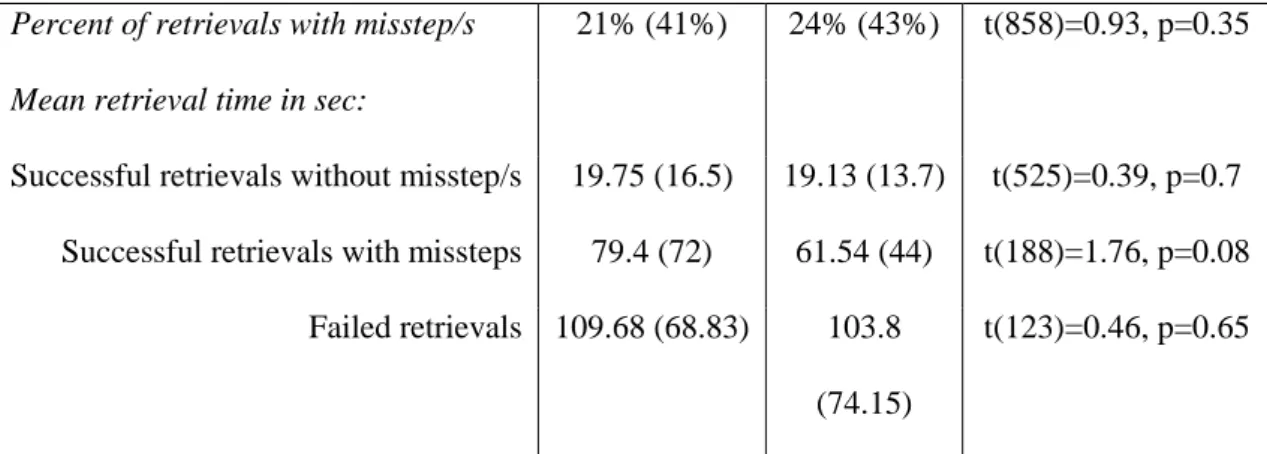
Sharing method success and efficiency. We compared the efficiency of PIM vs. GIM sharing methods, testing differences between percent failed retrievals and percent of retrievals with misstep/s using independent-samples t tests (see Table 1).
Table 1: The success and efficiency of GIM retrievals (N = 250) vs. PIM
retrievals (N = 610) showing that GIM sharing resulted in significantly more
failures than PIM sharing retrievals.
PIM (SD) GIM (SD) t-test
Failed retrievals percentage 13% (34%) 22% (41%) t(858)=3.2,
Percent of retrievals with misstep/s 21% (41%) 24% (43%) t(858)=0.93, p=0.35
Mean retrieval time in sec:
Successful retrievals without misstep/s 19.75 (16.5) 19.13 (13.7) t(525)=0.39, p=0.7 Successful retrievals with missteps 79.4 (72) 61.54 (44) t(188)=1.76, p=0.08
Failed retrievals 109.68 (68.83) 103.8 (74.15)
t(123)=0.46, p=0.65
Because folder depth is a possible confound (as detailed later) we also
conducted an ANCOVA testing the effect of sharing method (PIM or GIM) on failed retrieval percentage with folder depth controlled as covariate. The results were still significant F(1,848)=8.88,p=0.003**.
A possible reason for poorer performance at retrieving GIM files is that people are worse at retrieving from folders that others have created, because they are less certain of folder organization imposed by others (Berlin et al., 1993; Rader, 2009). We therefore asked participants "who created this folder?", and with regard to
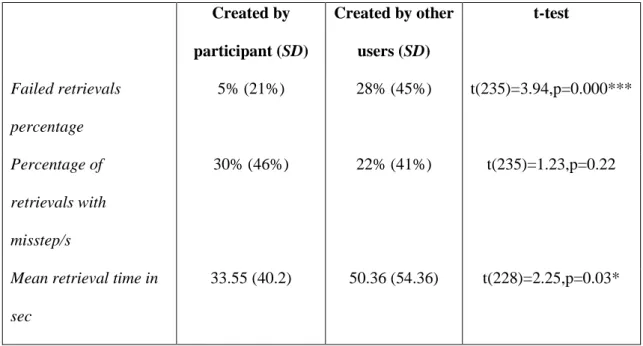
Dropbox folders (which constitute the majority of GIM retrievals) - we were also able to independently validate these responses, as the person who creates the Dropbox folder is marked as "owner" of the folder. Of the GIM retrievals, 64 folders were created by the owner, 173 folders were created by other users, and in 13 cases the participant failed to remember who originally created the folder. Table 2 compares retrieval efficiency for folders created by participants themselves with retrieval efficiency for folders created by others.
Table 2: Retrieval success and efficiency from GIM folders created by the
participant (N = 64) versus GIM folders created by other users (N = 173). The
Created by participant(SD) Created by other users (SD) t-test Failed retrievals percentage 5% (21%) 28% (45%) t(235)=3.94,p=0.000*** Percentage of retrievals with misstep/s 30% (46%) 22% (41%) t(235)=1.23,p=0.22
Mean retrieval time in sec
33.55 (40.2) 50.36 (54.36) t(228)=2.25,p=0.03*
Table 2 indicates that when participants retrieved from folders created by others, retrievals were less successful and less efficient than when they retrieved from shared folders they had created themselves. The failure rate was more than 5 times higher and the retrieval time increased significantly (by around 50%). Participants who failed to retrieve the target file from a GIM folder that other users had created pointed out: "in multi-shared folders there is no communication between people, it’s everyone for himself" (participant194) and "I can't follow the associative thinking of other people" (participant212).
Retrieval Methods
Participants were not instructed how to retrieve the target file and were free choose their retrieval method. Of the 860 retrievals, participants used folder navigation for 86% of retrievals (85.5% from file folders and 0.5% from mailbox folders), 2% used search, 1% used Inbox scroll, 0.5% used the recent documents list, and 0.5% used a shortcut. In the remaining 10% of the retrievals participants
attempted to retrieve file using two or more methods sequentially (9% contained navigation and only 1% did not). These results confirm prior work showing an overall
preference for navigation over search (e.g. Bergman, Beyth-Marom, Nachmias et al., 2008; Teevan et al., 2004) and a strong preference for retrieving files rather than emails when retrieving from their own computer. We could not compare the efficiency of the different retrieval methods because of file navigation dominance – there were not enough retrievals using other retrieval methods (apart from the mixed retrievals which are trivially less efficient) to make reliable statistical comparisons. Storage Methods
Default vs. user-created folders. Creating folders and categorizing files require both time and cognitive effort (Dumais et al., 2003; Malone, 1983; Whittaker & Hirschberg, 2001). In contrast, storing a file in a default location does not. This contrast between an active user-created location versus passive use of a default location can be drawn within: (a) the file system (where users can create their own folders or rely on default locations such as Downloads and My Documents root directory), (b) the email system (where users can organize messages using
folders/labels or retain them in the Inbox) or (c) GIM (where users can exploit folders they created themselves or use the default root cloud directory).
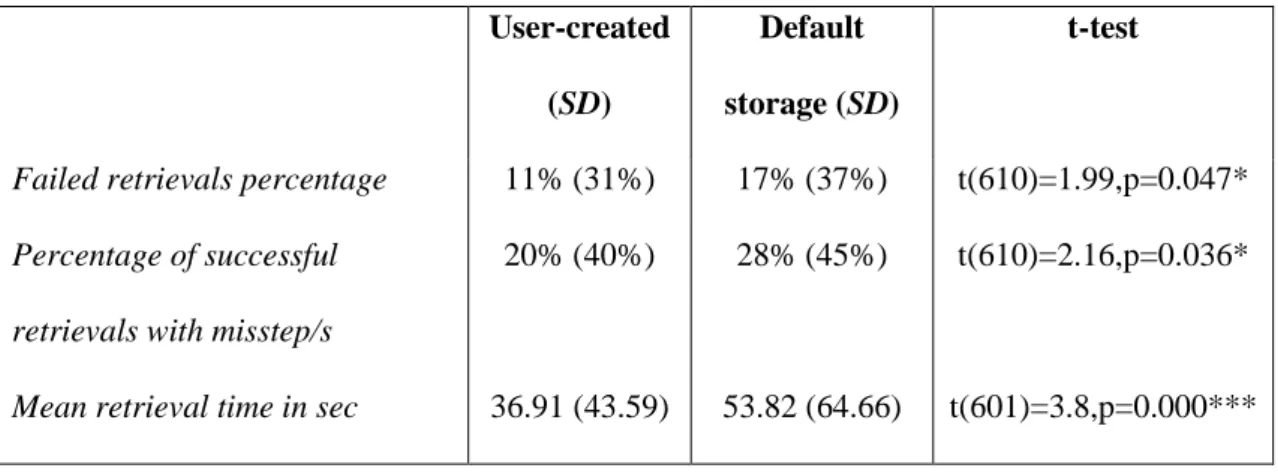
Our next research question was whether participants invest efforts to store shared files in user-created folders. And more importantly – do these efforts pay off in terms of retrieval success and efficiency? Of the retrievals, 406 were user-created folders (47% of all retrievals). A further 206 (24% of all retrievals) were from default storage folders (146 from the Downloads folder, 28 from My Documents with no subfolder, 17 Inbox with no subfolder, and 15 from Dropbox root directory owned by the user). The rest of the retrievals were from the desktop (56 retrievals) or from folders created by other users (173 retrievals) or unknown type (19 retrievals). Table 3
compares the retrieval efficiency and success with user-created folders versus default storage folders, again using an independent t test.
Table 3: Retrieval efficiency and success for user-created folders (N = 406)
versus default storage folders (N = 206), showing that people are more efficient
and more successful when they have exploited personally created folders.
User-created (SD)
Default storage (SD)
t-test
Failed retrievals percentage 11% (31%) 17% (37%) t(610)=1.99,p=0.047*
Percentage of successful retrievals with misstep/s
20% (40%) 28% (45%) t(610)=2.16,p=0.036*
Mean retrieval time in sec 36.91 (43.59) 53.82 (64.66) t(601)=3.8,p=0.000***
Table 3 indicates that retrievals from user-created folders are superior to default storage folders for all three measures: failed retrievals percent, percent of retrievals with misstep/s and retrieval time.
Interestingly, the failure rate of retrievals from default storage folders (17%) is substantially lower than of retrievals from folders created by other users (28%, see Table 2). An independent-sample t test showed that the difference is significant t(396)=2.81, p=0.005**, possibly because default locations are a predictable place to look for shared documents.
Folder Depth and Additional Results
Hierarchical folder depth (folder depth for short) is the number of steps in the folder path that participants traverse when navigating directly to the folder containing the target file (Bergman et al., 2010). The folder depth of the desktop is 0, and the folder depth of the root folder (e.g., My Documents) is 1. The average folder depth of
al., 2010), a Pearson test showed a positive correlation between folder depth and retrieval time for these folders r=0.125, p=0.013*. The mean folder depth for GIM files (M = 3.13, SD = 1.36) was significantly deeper than that of PIM files (M= 1.81, SD = 1.8), t(849)=10.42, p=0.000***. Because of this, we used depth as a covariate in testing the significance of the efficiency between GIM and PIM, reported earlier.
Interestingly, the number of days that had passed since last retrieval of a file had no effect on retrieval efficiency: Two independent t tests show no significant difference between the days since last retrieval of successful retrievals (M = 28.47, SD = 153.79) and failed ones (M = 56.68, SD = 265.68), t(813)=1.69, p=0.09; and between the days since last retrieval of retrievals with misstep/s (M = 37.41, SD = 198.61) and successful retrievals no missteps (M = 37.41, SD = 198.61) t(813)=1.35, p=0.18. In addition there was no correlation between days since a file was last retrieved and retrieval time (r=0.03, p=0.34). These results are even more surprising because of the large variance of days since last retrieval (SD = 176.71 days).
Regarding participant age effects: an independent t test showed no significant difference in age between successful retrievals (M = 28.67, SD = 7.33) and failed ones (M = 28.2, SD = 9.1), t(760)=0.63, p=0.53. However there was a significant difference in age between successful retrievals with no missteps (M = 28.27, SD = 7.35) and retrievals with misstep/s (M = 29.82, SD = 8.62), and there was a significant positive correlation between age and retrieval time r=0.12, p=0.001**. We looked into the data of (Bergman et al., 2010) regarding personal files and found a similar correlation indicating that older participants were slower to retrieve their shared files.
Discussion
As far as we are aware, this is the first research to test the effects of file sharing on retrieval. We examined this by measuring how 275 participants retrieve
860 of their own personal files using their own computers. We now discuss our results and suggest possible explanations regarding sharing, retrieving and storage methods. Sharing Methods: Reasons Why PIM is Preferred and More Efficient
There are excellent theoretical arguments for using common repositories and GIM. Using email for PIM means that each collaborator has to individually manage the same collection of shared files duplicating files, time and cognitive effort.
Furthermore, there may be significant problems involved in retrieving, managing and tracking different versions of a document when multiple versions have been
distributed through email to multiple participants (Whittaker et al., 2007). Many organizations therefore have a policy of encouraging their teams to use a common repository when sharing files (Matthews et al., 2003). Despite these putative arguments, our study found a strong preference to share files via email (thus
performing PIM) rather than using a cloud-based or organizational shared repository (GIM). Participants estimated that on average they use email to share 86% of their files with others and to receive 65% of files created by other users. Preference for email attachments over using a shared repository was also reported previously (Rader, 2007; S. Voida et al., 2006; Whittaker, 1996).
Interestingly, our novel findings indicate that from the retrieval perspective, users' preference for email sharing and PIM over cloud-based sharing and GIM seems rational. When using GIM, their chance of failing to find the file (22%) was
significantly higher than when using PIM (13%). Using PIM instead of GIM makes sense: although each person in the collaboration needs to classify and manage the shared file individually, this additional effort substantially increases the chances of finding that shared file.
When we explored this result more deeply we identified a possible explanation for these GIM failures. We compared retrieval efficiency of cloud based shared files stored in folders created by the participants with these created by others: the failure rate from folders created by others (28%) is more than five times higher than that of retrievals from folders created by participants themselves (5%), and the retrieval time from other-created folders is also significantly higher. It therefore seems that problem is not cloud storage and GIM itself but the fact that other people created the folder. Moreover, the failure rate for folders created by others is also significantly higher than retrievals from default folders (17%), indicating that using other people’s organization
leads to worse results than using no organization at all.
Why do people remember the location of their files better using PIM than using GIM? We suggest four possible reasons:
The Subjectivity of Classification: The category that an information item belongs to (i.e. the folder where it is placed) is not directly derivable from the information item itself. Our data indicates that there is a substantial amount of subjectivity (user dependence) in categorization as users were substantially less successful in finding files other people had categorized. In the words of
participant212 "I can't follow the associative thinking of other people". Similar results were obtained in (Berlin et al., 1993; Lutters et al., 2007; Rader, 2009; A. Voida et al., 2013).
Constructivism – Constructivism is a well-established theory in the field of education, which argues against older accounts of learning as passive absorption of information. Instead it suggests that the learners actively reconstruct the information using their own cognitive abilities and previous knowledge. It also suggests that active learning is more effective (Twomey & Maarten, 1996). The benefits of active
information processing to facilitate later memory is also shown in educational settings. When students actively summarise educational videos (Bergman, Beyth-Marom, Hadar, & Dekel, 2000), or lectures (Kalnikait & Whittaker, 2007), their memories improve, and the retrieval of information is more efficient. Active
classification has also been shown to promote recall in many memory studies (Craik & Lockhart, 1972). In the PIM context, we observed that the act of creating folders and actively organizing information items into them, engages thinking about these information items and this in turn aids retrieval (Bergman et al., 2003; Jones et al., 2005). In GIM on the other hand, most of the 'pain' of categorization is omitted because it is done by other collaborators. The consequence however with common repositories is that participants lose the 'gain' of familiarity with information and its organization. As a result retrieval is more error-prone and less efficient in GIM settings.
Episodic Memory - Cognitive psychology distinguishes two types of explicit memories. Semantic memory which is our long term knowledge of the world and is independent of the way it was acquired (e.g. I know that Paris is the capital of France even if I don't remember where I had learned this information), and Episodic memory which is memories of our own experiences (e.g. I was in Paris last spring). Episodic cues have been shown to benefit retrieval (Linton, 1982; Wagenaar, 1994). When retrieving PIM information, people can rely not only on semantic memory but also on episodic memory (i.e. memory of the occasion in which the document was stored, e.g. I was working on this document over the holidays). However episodic memory often cannot assist GIM retrieval, and potentially important episodic cues are lost.
Locus of Control: In PIM, people control the way in which they organize their information. However in GIM this control is necessarily limited, because organization
is generated in part by others. In GIM, people also need to consider other peoples' requirements and group decisions even when organizing files themselves. It is well known in experimental psychology that reduced control over a situation decreases both motivation and task performance (Ajzen, 2002).
Storage Methods: Personal Storage Effort Pays Off
The notion of "no pain – no gain" is also strongly supported by our findings regarding storage methods. If a person does not actively categorize the information themselves, then the chances of finding it reduce significantly. Retrievals from user-created folders were significantly better than retrievals from general default folders as assessed by failure percent, percent of misstep/s and retrieval time. To successfully and efficiently find files, it is not enough to share those files via email. Instead one must make the additional effort of categorizing the information. Malone (1983) in his research on physical offices found qualitative evidence that ‘filers’ (well-organized participants who place their documents in physical files with specific titles, and with semantic relations between items) were more efficient at retrieving their documents than pilers (less organized participants who place their documents in general piles with no titles and more heterogeneous relations between items). In contrast, Whittaker, Matthews, Cerruti, Badenes, & Tang (2011) did not find that emails in folders were retrieved more efficiently or successfully than emails stored in their general default location, which is the Inbox. Our findings agree with Malone and not with Whittaker et al, as they indicate that organizing personal information pays off. This reduced success of email filing may result from the fact that search and sorting are more straightforward because emails contain salient metadata (sender, reply to..) than is available for personal files.
In the current study, the mean hierarchical depth of shared files stored in specific user-created folders (2.2 folders deep) was similar to that found in (Bergman et al., 2010) for personal files. Consistent with (Bergman et al., 2010) we also found a positive correlation between a file’s depth and retrieval time. This correlation makes
sense as each step down the hierarchy tree takes time. However in our current study, we found that GIM files were stored deeper in the folder hierarchy than PIM files stored on the local drive. Why should people store GIM files deeper in their hierarchies? One possible reason is that when creating GIM structures, people are more elaborate (e.g. dividing a folder to subfolders to create a clearer organization), because they are worried that others may not be able to find information. However one consequence is that this increases GIM retrieval time. Future research could explore reasons for greater depth of GIM files.
Retrieval: Preference for File Hierarchy Navigation
If we compare retrieval for shared files in this study with that of personal files observed in (Bergman et al., 2010), it seems that shared file retrieval is worse in the three aspects tested: the average failure percent for shared files was 16% compared to 6% for personal files; the average percent of retrievals with misstep/s was 22% for shared files compared to 15% for personal files, and the average retrieval time for shared files was 44.84 seconds for shared files compared to 16.61 seconds for personal files.
What is the reason for these differences? One possibility is a difference in research method between the two studies. In (Bergman et al., 2010) we asked participants to retrieve files taken from their Recent Documents list and thus they were last retrieved a few days before the experiment. In this study the files were less recently accessed, being last retrieved 33 days on average before study. However, we
did not find that access recency increased retrieval success and efficiency
significantly, so this doesn’t seem a likely explanation. An alternative is that in the current study, the percentage of shared files stored in general default folders (24%) is twice as high as the percentage of personal files found in general default folders (12%) reported in (Bergman et al., 2010). Indeed when examining only shared files stored in specific user-created folders the retrieval, results are close to (Bergman et al., 2010)’s results for personal files.
As in prior work, we found a strong preference for navigation over all other retrieval methods: navigation alone was used in 86% of retrievals and, combined with other retrieval methods, in an additional 9% of retrievals. Navigation preference is a well-known phenomenon for personal information management (Barreau & Nardi, 1995; Boardman & Sasse, 2004; Capra & Pérez-Quiñones, 2005; Kirk et al., 2006; Teevan et al., 2004). Moreover, Bergman, Beyth-Marom, Nachmias, Gradovitch, & Whittaker (2008) found that the quality of the search engine used had no effect on this preference.
Another strong, but more surprising, preference was for retrieving shared files using the file system over using the email system. This was counterintuitive: although the large majority of files were shared via email, participants used the email system only in 5.5% of retrievals (1% scanning the Inbox, 0.5% using an email folder, and additional 4% in combination with other retrieval methods). Using the file system in contrast accounted for 95% of the retrievals (86% navigation only and 9% mixed with other retrieval methods). Participants were aware of the possibility of accessing the file via email as we specifically explained this option in our instructions. This finding was rather surprising because personally we often refind our shared files using our
email system, especially when we are unsure whether we have detached the file into our file system.
There are technical design implications to our findings. One possible design implication is to maintain a link between the saved attached file and its corresponding email (which often contains information regarding the shared file) in order to maintain the context of the file, as suggested by the user-subjective approach to PIM systems design (Bergman, 2012; Bergman et al., 2003; Bergman, Beyth-Marom, & Nachmias, 2008). Some software development environments, such as MS Studio and IBM Rationale concert support this. Similar systems such as Topika (Mahmud et al., 2011) are intended to bridge the worlds of PIM and GIM by allowing users to ‘publish’ a document to a common repository, while still retaining the text of the original email.
Conclusions
Cloud storage is being rapidly adopted, because it allows for ubiquitous retrieval and device-independent backup. However the fact that cloud-based file sharing is more modern and trendy than using email attachments does not necessarily mean that it is better in terms of retrieval. Our results justify users' preference for PIM based methods of sharing files via email attachments over GIM cloud-based file sharing. A PIM strategy significantly increases their chances of finding their files, in particular if each user stores the file in his/her own user-created folder. Thus from the retrieval perspective, the redundancy of each person performing their own PIM
involving different versions of the same shared files is not a waste of time and energy. We will now discuss other advantages of PIM over GIM:
Agreement on a collaborative tool: Our qualitative data indicates other possible advantages of email sharing over cloud-based sharing. Email is a reliable lowest common denominator system: sharing via email does not require all
collaborators to use the same email application, and an MS Outlook user has no problems sharing file attachments with a Gmail user. In contrast sharing files in the cloud requires agreement to use a shared system: Dropbox users cannot share files with Google Drive users.
Agreement on organization scheme: Cloud-based sharing also requires
agreement and coordination regarding the way the files are organized (see also Berlin et al., 1993), while email file sharing does not.
Control: PIM participants felt more in control of their files. This makes sense – while in a shared repository other participants can make unwanted changes to the
file or even delete it accidentally (Rader, 2009). In contrast, in email the sender always has the original version of the file.
Alerting: Some participants found email sharing to be more reliable because of alerting: they knew that their recipients will be checking their email regularly. Many participants also found email sharing to be simpler, others liked the fact that they could add contextual information to the file in the message. Another more subtle point concerns alerting, i.e. when users receive notice that a file has been updated by other collaborators. Rader’s participants stressed the need to be informed of updates in the shared repository (Rader, 2009). However, Voida et al. (2013), consistent with much prior work (Gutwin & Greenberg, 2002; Gutwin, Roseman, & Greenberg, 1996; Hudson & Smith, 1996; Wiberg & Whittaker, 2005) note that alerting is a complex design issue: some cloud designs provide insufficient alerting information, while others provide too much. Solving the alerting problem automatically is extremely hard – how can an application determine whether the update is meaningful to a specific person? In email there is no such problem - users send their collaborators a version when they feel that it is significantly better than the previous one.
However GIM has also some advantages over PIM:
Simultaneous work: collaborators using email need to take turns when working on a file, while some cloud based facilities such as Google Drive allow for several collaborators to simultaneously work on the same file.
Email overload: Computer users complain about email overload (Dabbish et al., 2005; Whittaker, 2011; Whittaker & Sidner, 1996), and PIM sharing clearly contributes to this by increasing the number of messages.
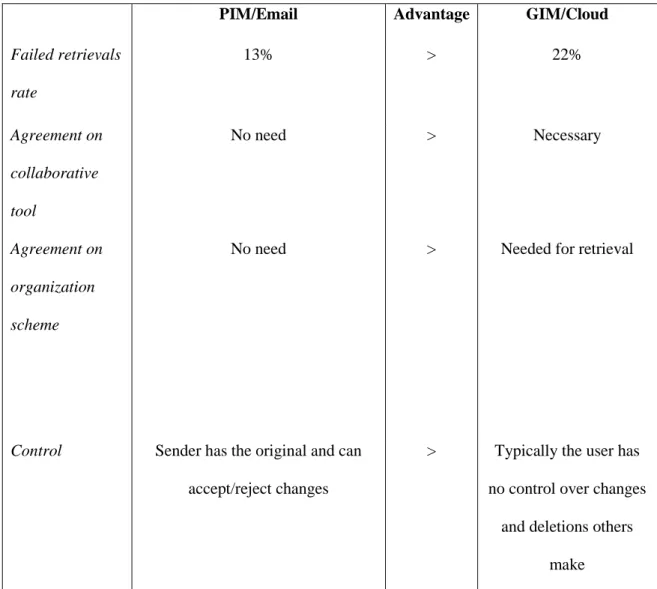
Table 4 summarizes comparisons between PIM (email-based) and GIM (cloud-based file sharing).
Table 4: Comparison between PIM and GIM file sharing showing advantages of PIM for almost all dimensions (a>b means a is better than b).
PIM/Email Advantage GIM/Cloud
Failed retrievals rate 13% > 22% Agreement on collaborative tool No need > Necessary Agreement on organization scheme
No need > Needed for retrieval
Control Sender has the original and can
accept/reject changes
> Typically the user has no control over changes
and deletions others make
Alert User-controlled, the notification is noticeable because users check their email constantly; Perceived as
more reliable, simple and contextualized
> Too often, too weak, too technical; Perceived as
less reliable and more complicated
Simultaneous work
Not possible < Allows simultaneous work (in Google Drive) Email overload Collaborations involving many
document updates may overload email
< New versions posted directly to common
repository
From an organizational point of view, one implication of our findings might be to stop encouraging groups of workers to share files in the cloud, or to limit cloud sharing to a few files that are being constantly updated in parallel by the group workers (e.g. a bug list).
Implications for design may be to allow simultaneous work but preserve personal organization. The shared file would be stored in the cloud allowing simultaneous work but each participant would organize it in their own folder according to their individual categorization scheme. This solution is possible in Google Drive. However its design does not encourage folder categorization: Typically the Mac/Windows interface encourages users to store their files in a folder. If users attempt to close a file without categorizing it, than the system suggests that they do so. However in Google Drive files are stored automatically when they are created and there is no point in time when the user is required to categorize them. Moreover, even if users want to categorize the file from within the editor this is impossible. It can only be done by leaving the file context and working in the 'My Drive' interface. Therefore,
collaborators receiving a Google Drive link are not encouraged by the design to change the given categorization of the file (if there is one in the first place). Future research should develop cloud storage that allows for simultaneous editing on the one hand, but encourages personal management of the file by each of the collaborators on the other. As in the current study, this design should be tested for preference and efficiency against current cloud-based sharing application designs and compared to email-based file sharing.
Another idea for future research relates to version management. In this study we asked participants to retrieve specific files. However collaborators usually create different versions of the same file, which were termed versionsets in (Karlson et al., 2011). In such cases, it is important that collaborators retrieve the latest version of the file to avoid the possibility of ignoring new edits by collaborators. Future research could compare between PIM and GIM for retrieving the latest version of a versionset, using similar research methods and parameters as we did here.
Despite the increasing popularity of GIM based methods for common cloud based storage, we have documented some of their limitations. Although there are intuitive benefits for GIM methods, people are less successful at finding files from common repositories than personal folders. Consistent with this, participants showed a preference for more traditional methods of file sharing using email. Our data also suggest the reasons for better PIM retrieval: in PIM people actively organize personal files by applying personal classifications which promotes enhanced recall. Such active organization is less likely with cloud-based systems.