IT 12 039
Examensarbete 30 hp
September 2012
mJeliot
An interactive smartphone-based learning
tool for programming lectures
Moritz Rogalli
Teknisk- naturvetenskaplig fakultet UTH-enheten Besöksadress: Ångströmlaboratoriet Lägerhyddsvägen 1 Hus 4, Plan 0 Postadress: Box 536 751 21 Uppsala Telefon: 018 – 471 30 03 Telefax: 018 – 471 30 00 Hemsida: http://www.teknat.uu.se/student
Abstract
mJeliot
Moritz Rogalli
Many students struggle when learning how to program. Research shows that lab sessions where students collaboratively solve assignments can improve the novices' learning outcome. Using algorithm visualization to make abstract concepts behind computer programs more visible and to help students explore dynamic algorithmic behaviour have also proven to be a valueable learning aid when students can interact with and influence the visualization. However, many programming courses consist of frontal lectures which do not allow students to actively interact and engage with an algorithm or its visualization. A teacher can not easily utilize the advantages of collaborative programming and visualization engagement in a lecture with the tools available.
mJeliot bridges this gap and enables teachers to engage students by providing the means to solve small programming assignments during a lecture and to interact and collaborate in the classroom by utilizing the students' smartphones. Students can solve and share the solution to an assignment and can present it to the class by controlling the resulting visualization.
IT 12 039
Examinator: Lisa Kaati
Ämnesgranskare: Anna Eckerdahl Handledare: Arnold Pears
Contents
1 Introduction 5 2 Preliminaries 7 2.1 Jeliot . . . 7 2.1.1 mJeliot so far . . . 8 2.2 Android . . . 9 2.2.1 Other platforms . . . 9 2.2.2 Phones vs. Tablets . . . 10 3 Background 11 3.1 The problem . . . 11 3.2 Causes . . . 113.2.1 Understanding dynamic program flow . . . 11
3.2.2 Students focus on syntax . . . 12
3.2.3 Debugging . . . 12
3.3 Solutions? . . . 12
3.3.1 Collaborative learning and pair programming . . . 12
3.3.2 The role of visualization . . . 12
3.3.3 Extended Engagement Taxonomy . . . 13
3.3.4 Jeliot . . . 13
3.4 Conclusions for mJeliot . . . 15
3.4.1 Collaboration and interaction . . . 15
3.4.2 Small overhead . . . 16 3.4.3 User pseudonymity . . . 16 3.4.4 Constructing . . . 16 4 Related work 17 4.1 JeCo . . . 17 4.2 Clickers . . . 17
4.3 Mobile Lecture Interaction tool . . . 18
5 Coding Workflow 19 6 System description 21 6.1 Server . . . 21 6.1.1 Unicast . . . 22 6.1.2 Roaming . . . 23 6.2 Android client . . . 23 6.2.1 Coding activity . . . 25
6.2.2 Remote activity . . . 26
6.3 Jeliot . . . 26
6.3.1 User selection pane . . . 26
6.4 Client library . . . 27
6.5 Connection handling . . . 28
6.5.1 Ping and keep-alive . . . 28
6.5.2 Roaming . . . 28 6.5.3 Reconnect mechanism . . . 29 6.5.4 User timeout . . . 29 6.6 Protocol . . . 29 7 Development 33 7.1 Process . . . 33 7.2 Development tools . . . 34 7.2.1 git . . . 34 7.2.2 Eclipse . . . 34
8 Testing and Evaluation 35 8.1 Testing . . . 35
8.1.1 Android . . . 35
8.2 Evaluation . . . 36
9 Conclusion 37 9.1 Testing and evaluation required . . . 37
9.2 Connectivity and data traffic . . . 37
9.3 Performance . . . 38
10 Proposed Future work 39
A Evaluation form 45
Chapter 1
Introduction
Learning and teaching to program has been a computing education research topic for many years. Studies show that the underlying concepts are hard to grasp and even ad-vanced students continue to display shortcomings in understanding them [2, 21]. A study with students who had completed a course in introductory computer science showed that only 17 % of students displayed an understanding of reference assign-ments and one third of the students had misconceptions about value assignassign-ments [19].
Programming is a crucial skill in many disciplines. Many courses in mathematics, physics, biology and engineering require students to have a certain grade of proficiency in programming to solve problems in their field. Many high schools offer programming lectures as part of their curriculum, sometimes even mandatory for all students.
However, programming lectures have shown to have little effect on students’ learn-ing success. Frontal lectures are a teacher-centric and passive way of learnlearn-ing that does not engage students. Visualization with diagrams and animations as a tool to support students and to help to create a more concrete picture of programming concepts are seen as crucial in teaching programming by many teachers, however there is no proof supporting the claim that visualization itself improves learning. The same teachers that believe that visualization is a very important key to learning success have not used as extensive as they would like to, mainly due to the time overhead required to research and construct examples and visualize them [26].
Lab sessions, where students program themselves and where they communicate with teachers and other students can be more effective. Students who interact with visualization tools in lab sessions and programming assignments have had better learn-ing outcomes then students who solved their assignments without the help of such tools [12, 25, 26]. Jeliot, on which this project is based has, when used correctly, im-proved student results measurable [17, 18, 29].
But what to do in big classes? The number of lab sessions can not be increased indefinitely. Some novice programming courses have several hundred students attend-ing, offering lab sessions to such a number of students is usually beyond the available resources and time of the teaching staff. Increasing the number of lab sessions to encourage self-learning and interaction between teaching staff and students is often simply impossible.
Transferring the positive effects that interacting with a visual representation of a program has on lab sessions and assignments to frontal lectures is to the best of the author’s knowledge a so far unsolved problem. This is what mJeliot tries to achieve.
Chapter 2
Preliminaries
2.1
Jeliot
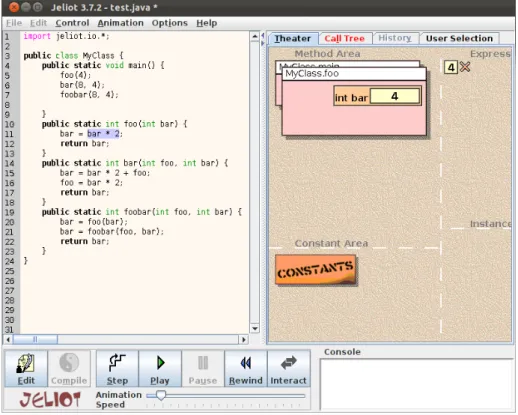
Figure 2.1: Jeliot 3
Jeliot1is an open-source interactive program visualisation environment. It visu-alises program execution and data structures of Java programs [1, 18] It was developed by the Joensuu university in Finland (now: University of Eastern Finland) and the Weizmann Institute of Science in Israel.
Jeliot creates animations based on Java source code on the fly and does not require the use of special constructs or classes. It supports most features of the Java program-ming language and visualises execution stack, control flow and memory allocation in an animation window called theatre as shown in Figure 2.1. The animation is controlled by the user through a VCR-like interface in the lower left part of the screen.
The code being executed is shown to the left of the theatre. It can be edited and progress is highlighted in the code during execution. Console output is displayed in the text area under the theatre.
Jeliot uses a Java interpreter to generate an intermediate code called mCode that supports most of the features of Java [7]. It is published under the General Public License (GPL)2and can therefore be modified and adapted to support new tasks.
Jeliot has been used successfully in lab sessions for novice programming students and as a visual aid in lectures. It is well documented and has been evaluated in several studies, t.ex. [17, 18, 29]. It is used in Java courses for novice programmers in several secondary schools and universities.
2.1.1
mJeliot so far
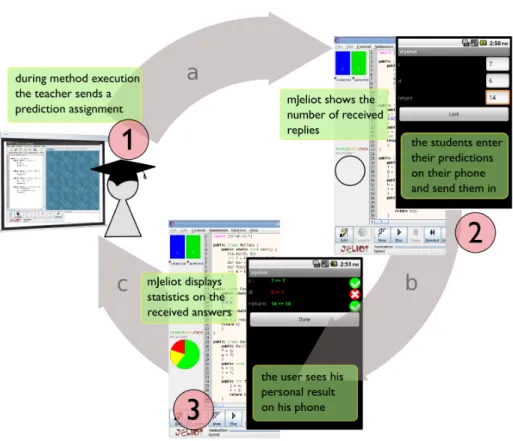
Figure 2.2: mJeliot prediction workflow
The first version of mJeliot was developed as part of a Bachelor thesis by the same author [28, 30]. As a result of the thesis project mJeliot supported smartphone based
parameter and return value prediction. The basic workflow is shown in Figure 2.2. A teacher can ask students to predict the current function call’s parameters and its return value during program execution (step 1). Students can answer by entering their prediction on their smartphone (step 2). While still executing the function mJeliot shows the number of connected clients as well as the number of answers it has received. When the function returns, the collected answers are evaluated and presented in the form of a pie chart (step 3). It shows the percentage of correct answers (all predicted values correct), of partially correct predictions (i.e. one or more predicted values in-correct), of completely wrong answers (i.e. all predicted values incorrect) and the percentage of clients that did not submit a prediction. The smartphone clients show the result, comparing the predicted values to the actual values, thereby giving every learner personal feedback.
2.2
Android
Android is a Linux-based smartphone operating system that is maintained by the Open Handset Alliance. It is mainly developed by Google and had a world-wide smartphone market share of 56.1 % in Q1 2012 [10]. Android phones are produced by a large variety of vendors and there are hundreds of different devices running Android OS. Android OS is also used for tablets. Android tablet sales have some market share in the US ,where Amazon sells a cheap Android tablet called Kindle fire, but they are far behind Apple’s iPad running Apple iOS (see section 2.2.1). Android as well as other smartphone operating systems offer a wide variety of applications, called apps, to en-hance the devices’ capabilities. Development is supported by an extensive software development kit (SDK) that offers many pre-built user interface components and sup-portive functionality to enable fast and simple application development while adhering to the platform’s user interface and usability concept.
Apps can be distributed by using Google play3 which makes it available on all devices.
2.2.1
Other platforms
There are other smartphone and tablet platforms than Android. Most platforms have however less than 5 % smartphone market share and the two biggest platforms Android and Apple iOS accounted for 80-90 % of total market share in Q1 2012 [10].
Apple iOS
IOS is a smartphone operating system developed by Apple. It runs on iPhones, iPods and iPads. iPhones had a smartphone market share around 22.9 % in Q1 2012 [10] and a tablet market share of 68 % [14]. Due to the widespread popularity of iOS devices and iOS tablets especially mJeliot will have to provide support for iOS in the future, see chapter 10.
Microsoft Windows Phone
Windows Phone is a smartphone platform developed by Microsoft. It is the youngest of the big smartphone platforms and is based on web techniques. It is a promising
platform with a growing market share but is projected to have a hard time competing with Apple’s iOS and Android [10].
There are other platforms as well, for example Blackberry by Research in Motion. Blackberry is popular in the US and the UK, however, its business-oriented approach make it unpopular for students. It had a 6.9 % smart phone market share in Q1 2012 and is projected to loose market shares [10].
Platforms like Symbian (which has lost support from many big vendors in favor of Android and Windows Phone) have lost drastically over the last few years and are usually only found in simple phones [10].
2.2.2
Phones vs. Tablets
Tablets are an up and coming market [8, 14]. They provide bigger screen sizes and higher resolution, therefore offering more opportunities for application developers. An-droid smartphones usually have a screen size around 4 inches while most tablets offer between 8 and 10 inches [13]. Most tablets either run iOS (Apple iPad) or Android The iPad is projected to be the leading tablet platform for the coming years [8, 14]. Extending smartphone applications to tablets is simple and requires just a few mod-ifications to account for the bigger screen since most tablets run the same operating systems as most smartphones. Tablets are therefore of high interest for further mJeliot development, see chapter 10.
Chapter 3
Background
3.1
The problem
Studies show that novice programmers have difficulties understanding the underlying contexts of programming [2, 19, 21]. Many students fail to solve simple assignments and explain crucial ideas and concepts after having taken an introductory course in computer science [19].
3.2
Causes
There is a wide-spread range of possible causes and explanations discussed in sev-eral studies and discussions and how and what to teach in introductory programming courses is highly controversial [4]. The introduction of object oriented languages in beginner courses has sparked a lot of discussion whether the concepts of object orien-tation improve or hinder student learning. Teaching objects-first adds to the complexity of the material and requires more careful planning [6]. The results in Bennedsen and Caspersen’s study however suggest that the choice of programming paradigm does not influence student results as much as the teaching methods [3].
There are many causes and explanations discussed amongst teachers and not all of them can be discussed here. The author rather lists a number of causes that provide evidence which is relevant to the effects of visualization and student interaction as this is the basis of mJeliot.
3.2.1
Understanding dynamic program flow
Many students do not grasp the underlying machine model and how code is being executed when being taught objects-first [29]. Tools like BlueJ1, an integrated
devel-opment environment designed specifically to provide learners with a visual representa-tion of class structures in a Java program, focus on the static structure of object oriented programs with objects and their attributes and often neglect how a program is executed dynamically. Students were not able to reason intuitively why a program is executed in a certain way. Especially when teaching object orientation early on students might concentrate on the static properties of an object oriented programming language like
classes, objects and their properties and do not understand how those objects interact dynamically when a program is executed. Ragonis et al. identified seven categories of difficulties students had during the study, all of them pointed towards that students had an underdeveloped understanding of state and how invoking methods of objects influence the state of the object itself and other objects [29].
3.2.2
Students focus on syntax
Students focus on writing syntactically correct programs instead of concentrating on programming concepts and patterns [32]. Many students’ goal is to produce code that compiles and work for a certain case, not to produce a semantically correct solution.
3.2.3
Debugging
Students’ understanding of how and why to debug code is usually underdeveloped [16, 27, 32]. In the authors in [16] conclude that “novices perceived debugging in a local manner, i.e. as a process composed of independent steps of locating mistakes and fixing them. Thus, they over-emphasized the value of locating mistakes”. This helps to make a program run for a certain case but students tend to miss “bigger” problems with their code, such as not covering all input sets. Students may in fact just test their code for one specific case which might have been given in the assignment and do not consider other cases at all [16].
3.3
Solutions?
3.3.1
Collaborative learning and pair programming
Hundhausen et al. and McDowell et al. show that collaborative learning and pair programming have significant effects on student learning success [11, 22]. Collabora-tive learning and pair programming have become a valuable tool for lab sessions and home assignments and studies have shown that combining collaborative learning and pair programming with visualization have further positive effects on learning outcomes amongst students (see subsection 3.3.2). Pair programming is so far however not appli-cable in frontal lectures. Collaborative learning in frontal lectures has to be facilitated through specific exercises and tools.
3.3.2
The role of visualization
Visualization is a natural tool to make abstract concepts behind programming more graspable [26]. Visualization shows the building blocks and interactions between them during program execution. Visualizations can be static, giving the learner a graphi-cal representation of the state of a program and its objects at a certain point of time, which can be either manually drawn diagrams or automatically generated diagrams, or dynamic. Dynamic visualization shows how states change while the program is being executed.
According to Naps et al. there is a “widespread belief that visualization technol-ogy positively impacts learning” [26]. This belief is however not funded on evidence which shows that the visualization itself does not affect students’ learning but rather
how visualization is used [12]. Furthermore, using visualization is causing a consider-able overhead in preparing and adopting curricula and in fact many educators remain sceptical or see themselves unable to include visualization into their teaching [26]. The responses to Naps et al.’s survey show that an overwhelming number of educators, 93 %, think that the time to develop examples, time spent learning new tools, creating the necessary visualizations and integrating them into their courses discourages the use of visualization [26]. 83 % of the respondents feel that the lack of appropriate tools to develop visualizations is a hinder as well, while the same educators saw improved student participation, anecdotal evidence of improved student motivation and even ev-idence, both anecdotal and objective for of improved learning.
Visualization is seen as a very powerful tool by most teachers but it is not used to its full potential due to practical shortcomings. Lack of effective tools and an uncertainty on the teacher’s side leads the author to believe that there is a need for better and easier to use tools. obstacles to address when introducing algorithm visualization. Naps et al. identified two key obstacles [26]:
• From the learner’s perspective, the visualization technology may not be educa-tionally beneficial.
• From the instructor’s perspective, the visualization technology may incur too much overhead to make it worthwhile.
Both obstacles have implications on tool design.
3.3.3
Extended Engagement Taxonomy
As motivated in subsection 3.3.2 and in [12, 25] visualization in itself does not have a big impact on learning outcome. They conclude “that learners who are actively en-gaged with the visualization technology have consistently outperformed learners who passively view visualizations” [12]. So learning success through visualization depends on how the learner engages in the visualization process. Myller et al. have therefore ex-tended the engagement theory formulated by Naps et al. to be able to categorize learn-ers’ activities and evaluate their engagement while interacting with visualization [25].
They divided student engagement in 7 levels which can be divided into three main levels: No visualization, passive levels such as viewing and active levels such as chang-ing, respondchang-ing, etc. (see Table 3.1). No viewingis the base case where there is no visual representation of an algorithm or data structure. Viewingis the case where a visual representation is viewed without interaction between the learner and the stu-dent. All other engagement levels are active, which means that a learner interacts with the animation directly (Controlled viewing,Entering input,Changing,Modifyingand
Constructing) or indirectly, using the animation as a reference point for other activi-ties (Responding,PresentingandReviewing). Their conclusion is that the higher the engagement level, the higher the impact on learning.
3.3.4
Jeliot
As Jeliot is the basis for the mJeliot system its validity as learning tool and its effect on learning outcome are summarized in this subsection.
Jeliot visualizes program flow and helps students to understand the dynamic inter-action between different objects and data structures in Java [29].
Table 3.1: Extended Engagement Taxonomy
No visualization
No viewing There is no visualization to be viewed but only material in textual format. For example, the students are reviewing the source code without modifying it or they are looking at the learning materials.
Passive engagement
Viewing The visualization is viewed with no interaction. For example, the students are looking at the visualization or the program output.
Active engagement
Controlled viewing The visualization is viewed and the students control the vi-sualization, for example by selecting objects to inspect or by changing the speed of the animation. [..]
Entering input The student enters input to a program or parameters to a method before or during their execution.
Responding The visualization is accompanied by questions which are re-lated to its content.
Changing Changing of the visualization is allowed during the visualiza-tion, for instance, by direct manipulation.
Modifying Modification of the visualization is carried out before it is viewed, for example, by changing source code or an input set.
Constructing The visualization is created interactively by the student by construction from components such as text and geometric shapes.
Presenting Visualizations are presented and explained to others for feed-back and discussion.
Reviewing Visualizations are viewed for the purpose of providing com-ments, suggestions and feedback on the visualization itself or on the program or algorithm.
Source: [25]
Jeliot has been proven to increase learning in students in experiments that showed that students improved their performance significantly when using Jeliot compared to a control group that was not using Jeliot [18]. Jeliot helps students to grasp concepts and build vocabulary to be able to explain program execution better than students that were not using Jeliot. They were able to explain new concepts like x := x+1 while the control group just came to the conclusion that the expression is mathematically incorrect. In fact, “[..] the use of Jeliot over a long period improves both understanding and transfer of knowledge. Most importantly, it primarily helps the average students who might otherwise get a low grade, by enabling them to build concrete models of how the computer works inside” [17].
To have a significant impact on learning, Jeliot has to be tightly integrated into a course and students have to interact with Jeliot directly.
Jeliot has proven to be a powerful tool for student learning in lab sessions. Using it in frontal lectures does however reduce its effect. In frontal lecture and student
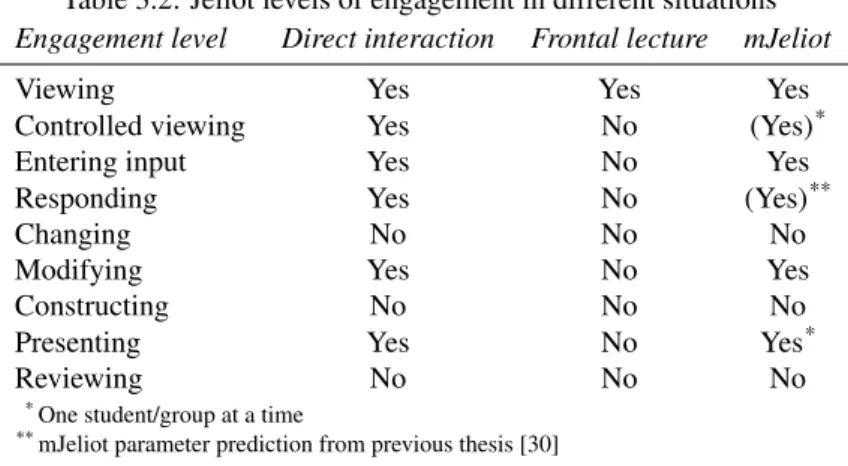
engagement with Jeliot is reduced to passive viewing. Table 3.2 shows a comparison of applicable engagement levels between lab sessions and lectures as well as engagement levels supported by mJeliot.
3.4
Conclusions for mJeliot
Table 3.2: Jeliot levels of engagement in different situations
Engagement level Direct interaction Frontal lecture mJeliot
Viewing Yes Yes Yes
Controlled viewing Yes No (Yes)*
Entering input Yes No Yes
Responding Yes No (Yes)**
Changing No No No
Modifying Yes No Yes
Constructing No No No
Presenting Yes No Yes*
Reviewing No No No
*One student/group at a time
**mJeliot parameter prediction from previous thesis [30]
Jeliot itself already visualizes the dynamics between objects, methods and data structures [23] and provides a basis to let learners interact with the visualization on higher engagement levels, which is shown in the first column of Table 3.2. The author believes that, by transferring positive effects from lab sessions with Jeliot to frontal lectures, mJeliot can be a valuable tool for teaching novice programmers.
3.4.1
Collaboration and interaction
As engagement is seen as the key to learning success (subsection 3.3.3 mJeliot has to engage the learner as much as possible on higher engagement levels. It promotes modifying of the source code on the user side in the editor. To promote collaboration this might be done in pairs.
mJeliot supportsControlled viewingfor one student/group at a time when the an-imation of their solution is controlled by their mobile device. Entering inputis sup-ported by providing students with a chance to change parameters and variables before visualizing the code. The parameter prediction functionality from the author’s earlier thesis adds support forRespondingto mJeliot, where students can predict the value of parameters and return values during function calls [30]. Changing code in the mobile editor allows students to interact on theModifyinglevel. Remote controlling the vi-sualization while explaining the solution to the class is on thePresentinglevel of the engagement taxonomy.
The remote control allows controlled viewing and presenting when a user explains his solution to the audience. It also allows a student to interact with the classroom at large, with his code and the visualization as reference point for explanation and discussion.
The user can dynamically adapt his solution to incorporate results from a discussion and user solutions can be kept and incorporated in an ongoing lecture, using a solution
as the base for the next assignment for example.
3.4.2
Small overhead
mJeliot has to have as little overhead as possible, to make the use of mJeliot efficient and to reduce the threshold for teachers to use it. This has already been a design goal during the first mJeliot project from a technical point of view and there have been no significant changes to mJeliot’s structure since then [30].
There are several examples ready and available for Jeliot2.
There is no administrative overhead for managing and distributing clients since mJeliot utilises user smartphones as clients.
mJeliot does not require user management, every user can connect to the mJeliot platform ad-hoc and join a lecture without having to register beforehand.
mJeliot has to be easily deployable and users have to be able to download and install the client without having to configure anything. The client can be distributed via Google play3for Android and a future iOS version via Apple’s appstore4.
The server runs on all Java-capable devices and does not require special libraries or settings on the server.
Collaboration in the class room does not require any special equipment except for TCP/IP connectivity and a projector to view the animation.
3.4.3
User pseudonymity
Users can connect to mJeliot without registering themselves. They choose their own alias and can remain relatively anonymous when using mJeliot. As motivated in the previous section this reduces the administrative overhead for the teacher but it also allows students to participate without having to worry to be evaluated. Shy or insecure students can propose solutions to tasks without being pointed out to the class.
3.4.4
Constructing
To prevent learners from concentrating on syntax mJeliot does by design not feature any syntax checking in the mobile app. The author’s hypothesis is that learners together with the teacher can resolve minor syntactical problems before animation when the learner is confident that his solution is semantically correct. The editor is kept as simple as possible to prevent learners from struggling with the user interface instead of the task at hand.
2http://cs.joensuu.fi/jeliot/ 3http://play.google.com
Chapter 4
Related work
There are other projects which try to achieve similar effects. However, to the best of the author’s knowledge, there is no project that offers interactive programming in a frontal lecture setting.
Projects and concepts with similar ideas and motivations include:
4.1
JeCo
JeCo is a project that is also based on Jeliot and is developed at the Jeonsuu university in Finland, the same university as Jeliot [23, 24]. The authors were involved in creating Jeliot 3.
JeCo aims to provide pair and group programming with automatic visualization support for remote education, where a pair or a group of students are able to collaborate synchronous or asynchronous by combining Jeliot’s visualization with Woven Stories’ [9] collaborative capabilities.
JeCo, similarly to mJeliot, tries to transfer the advantages Jeliot has shown in lab sessions to a different educational setting: remote collaboration.
4.2
Clickers
Clickers, small remote-control like keypads, have been used in a variety of lectures and they have proven to be helpful to involve students in lectures in a variety of sub-jects [5, 20]. They usually provide a 10-digit numerical keypad and systems usually consist of a receiver, keypads and software that provides user management and graphi-cal representation of answers.
Clickers, while useful and widely used, have disadvantages to the mJeliot approach:
• Clickers provide very limited input methods and feedback is usually only pos-sible via the teacher’s projection, as most clickers do not posses any feedback interface.
• Clickers are dedicated hardware devices that have to be bought, handed out, col-lected, managed and maintained while mJeliot facilitates students’ smartphones.
• Clickers are a universal tool that is not adapted to support programming specific problems addressed by Jeliot.
Clickers and mJeliot have in common that both technologies strive to engage dents in otherwise passive lectures and to provide teachers with feedback on the stu-dents’ learning process.
There are efforts to use smartphones as clicker devices1which can provide a more
direct individual feedback and more sophisticated input. These solutions also remove the need to buy and maintain dedicated hardware. They are a promising replacement for expensive hardware clicker systems, they are however a very general tool.
4.3
Mobile Lecture Interaction tool
The approach of the Mobile Lecture Interaction tool is similar to smartphone based clickers. It provides some other features like a question/answer mechanism that allows students to post and answer questions on the subject [15].
There are many other projects that collect some kind of feedback and present some kind of result. They are however usually not based on a sound theoretical basis and provide similar functionality to the projects discussed in this chapter.
Chapter 5
Coding Workflow
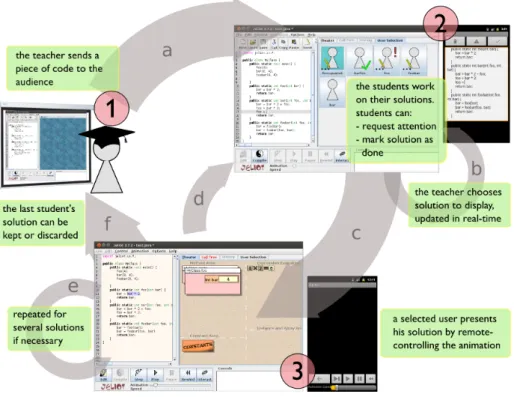
Figure 5.1: mJeliot Workflow
The workflow with mJeliot always follows the same scheme as shown in Figure 5.1. The workflow always follows three steps:
• Step 1: Building a task
– The teacher teaches a topic by conventional means or with Jeliot’s anima-tion system and develops a task for students to solve, either by program-ming the scaffolding structure live in the lecture or by opening a previously prepared file.
– As soon as the teacher has explained the task to his students he marks parts of the code and sends the marked code to all connected clients (Arrow a).
• Step 2: Solving
– Students can then start to solve the task by changing and adding code on their smartphone.
– The teacher can switch between different solutions by clicking on users in the Jeliot user interface and follow the progress in real-time (Arrow b). – Symbols in the user overview show the teacher which students have edited
their code. Students that have a question can request the teacher’s attention by clicking the request attention button in the code editor. When a user requests the teacher’s attention a symbol appears in the user overview to alert the teacher.
– The teacher can then have a look at the current user’s progress and discuss the code with the user or the general audience. This can be repeated for other users’ solutions.
• Step 3: Animation and discussion
– When the current user marks his solution as done, the Jeliot theatre pane opens and the user is presented with a remote control interface (Arrow c). The teacher can also trigger animation by pressing Jeliot’s compile button. – The user and the teacher can move through the animation step-by-step or continuous, discussing the solution and its animation. The animation can be rewound if needed and restarted.
– The teacher can select further solutions from the user overview pane in which case Jeliot either returns to step 2, if the user is not done with coding (Arrow d), or stays in step 3 otherwise (Arrow e). In that case the new code is loaded and compiled and control is handed to the newly selected user, starting the animation for the new solution.
– Both the user and the teacher can return to editing if the solution is not satisfactory by either clicking back in the remote control interface in the Android client or by clicking Edit in Jeliot (Arrow d).
– When the teacher is satisfied with a student’s solution he can keep it and return to editing mode by clicking Edit (Arrow f). By deselecting the user in the user selection pane in Jeliot the teacher can return to the original code.
Chapter 6
System description
mJeliot is a client/server based system with its own protocol. It consists of a server, an Android-based client for user input and a modified Jeliot client for animation, selection and collaboration.
Server The mJeliot server is a simple Java program that facilitates communication between connected clients. It manages available lectures, users and client con-nections. It does not keep any state on assignments and replies from the clients. It supports broad- and unicast communication between clients and manages roam-ing of clients between different connections.
Android client The Android client allows students to solve assignments on their smart-phones. It features the prediction interface from the earlier mJeliot project [30], a code editor with collaboration functions and a remote control interface to con-trol animation execution in Jeliot. The client follows Android design principles to enable students to navigate inside the application intuitively. The interface is kept as simple as possible to allow students to concentrate on their task instead of interface interaction. The user interface follows the state of Jeliot automatically, providing the user with the editor or the remote as needed.
Jeliot Jeliot is modified to allow interaction with mJeliot Android clients. It features connection and session features to connect to a server and select a lecture, the statistic feedback section from [30] and a user selection to switch between dif-ferent users and their solutions. When not connected it behaves like the original Jeliot program.
All components follow the Model-View-Controller design pattern to separate the logic from the user interface and to make them modular and extendible. Components are registered as listeners to the respective controller to react on changes and to keep dependencies as local as possible.
6.1
Server
As shown in Figure 6.1 the server consists of two main parts, connection handling and session handling. Connection handling is a Java TCP server that listens for incoming connections and starts a new thread for every new incoming connection, shown in
Figure 6.1: Schematic mJeliot server structure
the left-hand box in Figure 6.1. Connection handling is responsible for receiving and sending messages via the established connections and pinging connected clients to check on the clients’ state. When a message is received the message is forwarded to the protocol parser that parses the message and informs session handling.
Session handling acts on event handlers triggered by the protocol parser and man-ages sessions, which contain lectures and users. Session handling also tracks which connection every client is currently using for roaming purposes by mapping user ses-sions to connections. By calling the protocol parser the session handling compiles its messages and forwards them either to all connections except the source of the action when broadcasting or to a single connection when the message is unicast.
A simple user interface, shown in Figure 6.2 allows creating lectures on the server. The server does not contain any kind of state information on lectures except for logged in users. It is therefore Jeliot’s responsibility to provide newly connected clients with the current session state such as the current task if any.
6.1.1
Unicast
The server supports unicast communication. The server therefore associates the user id of every logged in user with a TCP connection. When the server receives a message which contains a target address in the ‘to’ field it forwards the message via the TCP connection associated with the user id.
Figure 6.2: mJeliot server user interface
6.1.2
Roaming
When a client receives a new address or looses connectivity to the server for other rea-sons the client can establish a new connection to the server to continue its session. The server associates the user session with the new connection and closes the old connection automatically. When the server receives a message from a user via a new connection that was not associated to the user previously the server replaces the old user session to connection mapping with the new connection. For more details see section 6.5 .
6.2
Android client
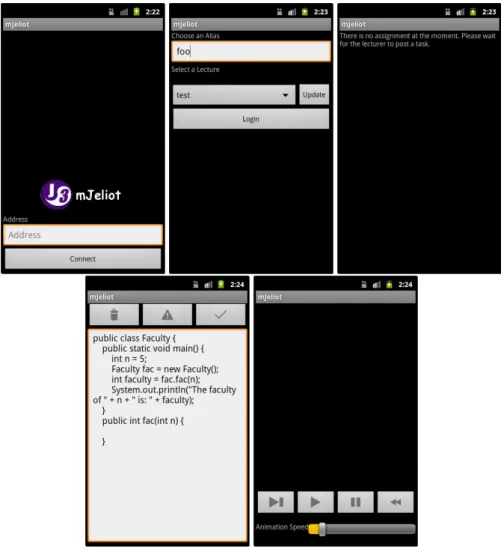
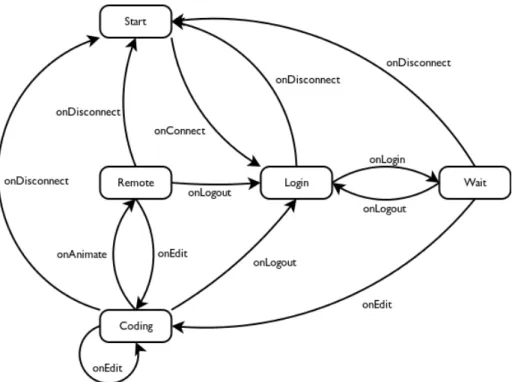
The Android client provides five different user interface views (or activities as they are called in Android terminology) used in collaborative coding. The activities are opened and closed automatically according to user interactions and the state of the lecture, thereby eliminating the need to switch between activities when the context changes. The corresponding state machine is shown in Figure 6.4.
Start activity The start activity, shown in the first picture in Figure 6.3, allows the user to connect to the mJeliot server by entering the server’s URL. When the user connects he is presented with the login activity.
Login activity The login activity, shown in the second picture in Figure 6.3, presents the user with a list of available lectures. The user can select an alias and a lecture and login into mJeliot. When logging into the lecture the user is presented with the wait activity or, if there is already an ongoing task, with the corresponding task activity.
Wait activity The wait activity, shown in the third picture in Figure 6.3, allows the user to wait for a task to be posted. The corresponding task activity is opened when a task is posted.
Coding activity The coding activity, shown in the fourth picture in Figure 6.3, pro-vides the user with a code editor and the code that was posted in the assignment. The user can program his solution and when the user deems his solution to be
Figure 6.3: The mJeliot Android client
complete he can mark it as done. If the user is not satisfied with his solution he can return to the original code from the assignment. If the user has a question he can request the teacher’s attention. When the currently selected user marks his solution as done or when the teacher selects a solution that has been marked as done, Jeliot switches to the animation view and the user that provided the solution is presented with the remote activity.
Remote activity The remote activity shown in the fifth picture in Figure 6.3 has the same VCR-like controls that mJeliot provides to allow the user to control anima-tion execuanima-tion in Jeliot. In case the code does not compile the user is returned to editing where he, together with the teacher can resolve the error and restart the animation. Jeliot switches back to editing when returning to the code editor. When the teacher returns to editing mode the mobile client returns to the code editor as well. When the teacher selects a different user the currently controlling user returns to its editor while the new user is presented with either the remote control, if he marked his solution as done as well, or continues in the code
edi-Figure 6.4: The mJeliot Android client activity state machine
tor, if the solution is not marked as done. Jeliot switches to editing accordingly if necessary.
6.2.1
Coding activity
The code editor shown in Figure 6.5 provides a simple interface to propose a solution to programming assignments. The code editor sends updates on the progress regularly to Jeliot. When a user is selected in Jeliot’s user selection the code is kept synchronised at all times.
The reset button to the left discards all changes and resets the code editor’s content to the original assignment. The attention button in the middle informs Jeliot that the user has a question which is shown in the user selection pane in Jeliot. Requesting attention causes Jeliot to mark the user in the teacher user interface, where the teacher can select and view the user’s progress to discuss the solution with the user while hav-ing access to the user’s progress. The student can thereby ask questions while referrhav-ing to a specific piece of code. The teacher can inspect the code and give solution-specific answers without having to rely on possibly incomplete descriptions of the problem. A teacher can either choose to discuss the topic with the classroom at large or can go to the student and discuss the issue in private. This is a decision a teacher has to make when using mJeliot as the tool does not provide a specific way of interacting, which would limit its use to a subset of possible problems. When a user is satisfied with his solution he can press the done button to the right which triggers Jeliot to mark the user as done and switch to animation if the user is selected.
Figure 6.5: The Android client’s coding activity
6.2.2
Remote activity
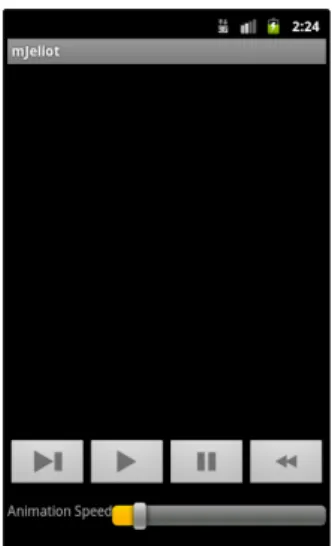
The remote controller activity, shown in Figure 6.6 allows the user to remotely control Jeliot’s animation. The user can step through the animation, play it, pause it, rewind it and change animation speed. Control is automatically given to the user who has provided the current solution when his code is marked as done. The user’s client returns to the code editor when the user presses the back button or when the teacher switches to edit mode in Jeliot.
6.3
Jeliot
Jeliot has been modified to support mJeliot. It features connecting to an mJeliot server and lecture selection from the previous mJeliot project [30]. To work with coding assignments Jeliot keeps track of all the user’s different solutions and provides the teacher with a new pane for user selection.
6.3.1
User selection pane
Figure 6.7 on shows the user selection pane. Every connected client is represented by a button that contains the user’s alias and its status. The status is a composite of several state variables. The red exclamation point is shown when the user has requested atten-tion (user foo), the writing pencil marks users that have made changes to the original code (users foosquared, foo and foobar) and users who have finished their work have a green check mark (user barfoo). The current user is highlighted by colouring the background of the button (user foosquared). User bar has neither changed his solution
Figure 6.6: The Android client’s remote activity
nor requested attention or marked his solution as done. This is the initial button for all users.
Clicking on a button will load the user’s solution and start synchronising his solu-tion for every change made to the code. Jeliot switches to animasolu-tion mode and hands animation control to the selected user if a he marks his solution as done or when a user that is already done is selected. When an error is encountered while switching to animation mode the user and Jeliot return to code editing mode.
When switching users the corresponding code is loaded into Jeliot’s code editor. When clicking on a selected user the user becomes unselected and the original code is loaded into Jeliot’s editor.
6.4
Client library
The Android client and Jeliot use a common client library, written in Java, to connect to the server. The client library handles server connection and roaming and provides the clients with a simple interface to connect and send messages. Clients can register to the client library as listeners to receive messages and get updates on network connectivity. The Client class is the central instance in the client library. It serves as Interface and manages connecting, reconnecting and disconnecting. The separate InputThread listens for incoming messages and forwards them to the client. The client also sched-ules a TimeoutTimer that disconnects the client whenever it has not received the last three ping messages.
The Client class differentiates between intentional and unintentional disconnects. An intentional disconnect is for example caused by a user action and will result in the closing of the connection. Unintentional disconnects can be caused by anything that interrupts the underlying socket or a time-out. unintentional disconnects trigger a reconnect mechanism that will try to reconnect while backing off exponentially on unsuccessful reconnect attempts. This is to reconnect fast after the connection was interrupted while not flooding a lagging or interrupted network connection with new connection attempts. The exponential back-off is inspired by TCP’s retransmission
Figure 6.7: Jeliot user selection pane
time-out and surveying the length of network interruptions when roaming between wireless and 3G networks during testing.
6.5
Connection handling
6.5.1
Ping and keep-alive
mJeliot depends on ping messages sent from the server to all connected clients to close open TCP connections if a client is not responding, to keep the user list updated and remove users that disappeared without logging out. Connections and user sessions are handled separately because user sessions might roam between different connections.
As shown in Figure 6.8 the server sends a ping message to all connected clients in a regular interval. The server closes the associated connection if the client does not reply with a pong within three ping messages.
6.5.2
Roaming
mJeliot has to accommodate for frequent IP address changes without disconnecting the user, since Android phones switch between different available networks, whenever a preferable network becomes available or the current network is no longer accessi-ble. mJeliot has a keep-alive and reconnect mechanism to allow clients to reconnect seamlessly when its IP address changes and to quickly remove users that are no longer responding.
6.5.3
Reconnect mechanism
If the client does not receive a ping message for three ping intervals it reconnects to the server. This opens a new connection, the old connection is removed. The client library also reconnects to the server if the TCP connection is closed unexpectedly. Reconnect attempts have an exponential back-off waiting period to prevent flooding the network or the server with connection requests. After four consecutive unsuccessful reconnect attempts the client gives up and disconnects.
6.5.4
User timeout
Logged in users are not removed when the corresponding connection is closed. This is due to the fact that the client might have switched to a different network and might restart the user session via a different connection. The server therefore associates ev-ery user with the last connection the user has connected to the server on. Evev-ery user is associated with a UserTimeoutTask which is scheduled to remove the user from the database when a user has not been seen on any connection for five ping intervals. When a user is removed from the database the server sends logout messages to all other connected clients to inform them that the user is no longer active and logged into the system.
Figure 6.9 shows such a situation. When the client logs in the UserTimeoutTask is scheduled. When the connection is interrupted the client starts a new connection, which resets the UserTimeoutTask. Then the client dies and the UserTimeoutTask logs the user out and removes the user from the database.
6.6
Protocol
The protocol is based on XML. This makes it human-readable and suitable for cross-platform interaction since there are XML-libraries for many programming languages and platforms. It is designed to be general, thereby making it extendible with future functionality. The mJeliot protocol format is shown in Figure 6.10.
The protocol is action-based. Every message starts with an action and has a list of action-dependent parameters. Messages are either addressed to a specific user by its id or broadcast messages when there is no target address. The server receives a message and, depending on the action and the target address, specified in the to-field, forwards it to the receiving user or all clients.
The protocol was adapted from the previous version developed as a Bachelor thesis [30] and support for unicast messages was added to accommodate for the increased number of messages due to coding tasks which generate regular update messages when users are coding and real-time update messages in live mode (when a user is selected in the Jeliot interface) to synchronise the mobile client and Jeliot at all times.
hmjeliot-messagei |= hheaderihmessage-contentihfooteri
hheaderi |= <? xml version="1.0" ?><mJeliot version="1.0" action="hactioni">
hfooteri |= </mJeliot>
hactioni |= hlecture-actioni | hsession-actioni | hpredict-actioni | hcoding-actioni | hremote-actioni
hlecture-actioni |= lecture | lectureList | lectureQuery | userList
hsession-actioni |= userLogin | userLoggedIn | userLogout | userLoggedOut
hpredict-actioni |= predictHandin | predictSendout | predictResult
hcoding-actioni |= codeUpdate | codingTask
hremote-actioni |= setLiveMode | controlAnimation
hmessage-contenti |= haddressingihidsi<<message−speci f ic>>
haddressingi |= hsourcei | hsourceihdestinationi hsourcei |= <from>hINTi</from>
hdestinationi |= <to>hINTi</to>
hidsi |= <lectureId>hINTi</lectureId> | ⊥
Chapter 7
Development
7.1
Process
The development process was inspired by agile software development methods like Scrum [31]. Since there was no team the scrum process was stripped down to the idea of sprints, which were periods of one to three weeks shown in Table 7.1 (with the exception of writing this report which is estimated at six weeks). At the start of every sprint the author set himself a sprint goal and divided the goal into smaller tasks. A working implementation of mJeliot with the current supported features was tested and debugged at the end of every sprint. By following this iterative approach components were tested and working before using them as base for other components.
Progress reports at the end of every sprint were given to the thesis supervisor when-ever possible, because of scheduling conflicts the reports were sometimes late. Since the requirements were documented in detail in the proposal for the thesis this was not a problem.
Table 7.1: Development sprints
Sprint Goal Duration in weeks
1 Code review and requirement analysis 2
2 Restructuring the old code, user interface refinement Android
2
3 Reconnect mechanism 1
4 Unicast support 1
6 User interface and controller extension code editor Android, Protocol extension
1
5 User interface and controller extension Jeliot 1
6 Remote control 2
7 Testing and evaluation preparation 3
8 Preliminary report ongoing, prel. 6
9 Presentation prel. 1
10 Final report prel. 1
11 Opposition prel. 1
7.2
Development tools
7.2.1
git
For version control and backup a git1repository was used throughout the development and documentation process. Git allowed the author to try solutions and return to defined earlier states of the program if a solution was not satisfactory.
git was also used to track progress during writing the report.
7.2.2
Eclipse
Eclipse2was used as programming IDE. Eclipse was chosen for its Java debugger and its close integration with the Android software development kit which allowed for all components of mJeliot to be developed in the same environment.
1http://git-scm.com/documentation 2http://www.eclipse.org/
Chapter 8
Testing and Evaluation
8.1
Testing
mJeliot was tested extensively at the end of every sprint. Jeliot and the server were debugged using Eclipse’s Java debugger.
8.1.1
Android
Android testing was done inside the emulator and with the help of Android’s debug-ging monitor, which prints stdout and system messages to a console in Eclipse. The debugging monitor gives a wide range of debugging output that can be easily filtered and searched. The Android client was tested on three different Android models and on various Android versions to ensure that it works on as many devices as possible.
Connection debugging and testing
To test mJeliot’s behaviour during network interruptions and when roaming the client was tested on two different Android models, a HTC Desire Z with a hardware keyboard and an older device, HTC Magic and in the Android emulator with different version of the operating system. Network interruptions were tested by blocking and unblocking the emulator’s network connection. Roaming was tested by switching between differ-ent wireless and UMTS/GSM networks and by moving around physically. Jeliot was also used to debug the common client library as it requires no emulator.
Network behaviour was analysed with conventional debugging, debugging output and on the network by inspecting communication between the different components with Wireshark1.
During testing phases the author left the client running on a phone and kept using it during every day activities to be able to analyse mJeliot’s behaviour in a more realistic testing environment for situations like unreliable or slow network connection while logging client and server behaviour.
To simulate client crashes the client was terminated on the Android device/emulator or the device or emulator killed by killing the emulator process/by removing the battery. Connection debugging and testing showed that mJeliot’s reconnect mechanism is stable and allows to resume a session reliably after interruptions, while removing no
longer active clients from the list without having to wait for possibly long TCP time-outs.
8.2
Evaluation
mJeliot was supposed to be evaluated in a simulated lecture with programming teachers to collect data on how mJeliot would be received by educators.
The author was planning to give a 15-20 minute introduction into Jeliot, followed by a programming example. The teachers were supposed to work in teams of two with one Android device per team. The example was to be followed by the pen-and-paper survey in Appendix A.
Two attempts were made, they were unsuccessful because of technical difficul-ties on location and organisational difficuldifficul-ties, further attempts where outside the time frame for this thesis.
However, discussion with teachers after the first attempt lead to several new ideas for future development discussed in chapter 10.
Chapter 9
Conclusion
9.1
Testing and evaluation required
Unfortunately the author was not able to test mJeliot with more than four phones con-currently. mJeliot was only tested on three different models which all worked fine. mJeliot will have to be tested on more devices ensure that it works on as many devices as possible. It has never been tested in a real setting either since the evaluation sessions had to be cancelled. So to draw any conclusions on mJeliot’s applicability and its effect on learning it has to be used with test subjects. Firstly to ensure that it works as ex-pected on different devices in a number of environments. For example with a series of testing sessions with potential users on both student and teacher side. Secondly to test if mJeliot can be used as planned in lectures. For example giving a full lecture with the help of mJeliot for a programming course. Thirdly to investigate its effect on learning in a scientific study.
9.2
Connectivity and data traffic
The client library has matured and ensures connectivity to the server even under chang-ing network conditions. User sessions can be resumed when the client roams between networks reliably. Even doing the laundry in a basement room, going shopping or bik-ing through the city does not interrupt the session as long as the user is not without network connectivity for too long (depending on time-out values, currently about one and a half minutes). This should suffice for a lecture, where users usually do not move too much and network coverage is generally not a problem.
Login websites to authenticate users by redirecting all websites to a login website and blocking all other traffic cause problems. Website-based network authentication systems require the user to provide authentication credentials when connecting to the network. When a client running mJeliot switches to such a network the reconnect at-tempts made by the client are blocked until the user has authenticated himself. The user is not necessarily aware that the client has roamed to a network that requires authentica-tion and might therefore not attempt to authenticate himself. mJeliot can not reconnect and will drop the session. This is a general problem with website-based login solutions and teachers have to be aware of this to be able to inform their students not to use such a network. Most universities also provide wireless network authentication based
on 802.1X1 which is preferable over web-based network authentication. Just using 3G connectivity was most reliable during tests and is therefore recommended. mJeliot does not require much transfer volume since all protocol messages are text-only. The author measured traffic produced during 6 hours of testing and mJeliot produced less than 3 MByte per client.
9.3
Performance
mJeliot does not have high requirements on processing power, memory or network speed. The author has tested mJeliot on an old HTC Magic device which was released in 2009 and which is considerably slower than almost all current Android phones. The server and Jeliot run well on older machines without noticable performance decrease.
mJeliot also works on slow wireless links. GSM Edge connectivity is sufficient to support several clients concurrently. The author used an Android phone as access point to share its Edge connection with three other phones without noticeable delays or interruptions. Volatile wireless network connections had a noticeable impact every time the network connection was lost since reconnecting can take several seconds, depending on the phone and available networks.
In summary it can be said that mJeliot works well with Android versions 2.1 and up and any kind of Java-capable presentation device that can be used to project Jeliot to a screen. There should be no noticeable impact on usability as long as there is a working network connection which delay is under a second and which data throughput is around a few kilobytes per second.
mJeliot is a tool that is capable of making lessons more interactive and to engage students. It can transfer learning activities that were limited to lab sessions to a lecture and it provides a valuable source of information on students’ learning progress. The participation threshold is low which hopefully encourages students to participate ac-tively and without hesitation. It also provides an opportunity to share and discuss ideas in the classroom and mJeliot’s visualization can be used as a reference point for the discussion.
Chapter 10
Proposed Future work
Teacher evaluation A teacher evaluation was originally planned to collect input for further development and opinions. However due to unforseen difficulties eval-uation had to be postponed and fell outside the time-frame for this thesis. The evaluation form that was going to be used can be found in Appendix A.
Evaluation in a course mJeliot has not yet been tested in a real life programming course. It provides all the necessary features to test it in courses but prepar-ing lectures and collectprepar-ing feedback from students is beyond the scope of this master thesis. Input from such an evaluation is however crucial for further devel-opment and to analyse the applicability of mJeliot. Some teachers have signalled that they are willing to try mJeliot in introductory programming courses dur-ing teacher evaluation. The author plans to work towards such a test durdur-ing the autumn term 2012.
Syntax Highlighting and checking in the mobile client The mobile client does not provide any syntax support functionality like syntax highlighting or syntax check-ing in the editor. Syntax checkcheck-ing was named several times as an important fea-ture during informal talks with programming teachers and can provide users with a fast way to check code syntax before entering animation. It should decrease the number of code solutions failing on compilation significantly, thereby max-imising the time spent on discussing working solutions instead of fixing simple syntax mistakes. However it can be argued that students are supposed to con-centrate on creating semantically correct solutions instead of spending time on writing syntactically correct code.
2-way sync mJeliot syncs the users’ solutions with Jeliot but not vice versa. Changes made to a user’s solution by the teacher in Jeliot are not reflected in the code on the smartphone. Providing the teacher with the ability to correct user solutions can increase interactivity and decrease time spent on simple syntax and runtime errors on compilation time since the teacher can resolve simple syntactical errors in Jeliot.
Tablet support mJeliot, as all Android applications runs on both smartphones and tablets. The space available on tablets however suggests that mJeliot’s user inter-face could be enhanced and extended on tablets. On-screen keyboards on tablets are faster than on-screen keyboards on smartphones which could improve cod-ing speed significantly. It might even be possible to transfer Jeliot’s animation
to tablet screens, thereby enabling students to test their programs before mark-ing them as done. However, tablets have not yet reached a market penetration that suggests that many students have tablet computers available. This could be solved by providing tablets to students, which is however expensive and probably not practical for big programming classes.
Undo/Redo The android application does not feature undo/redo functions. Allowing students to return to an earlier version of their code could help students to correct mistakes without having to manually return to a previous state or having to return to the original code to restart. This will probably improve programming speed as well.
Access control mJeliot does not feature any kind of access control. Every user can log into every lecture and choose any name he wants. Allowing teachers to restrict access to lectures in mJeliot might be a desirable feature. There are several possible solutions:
Lecture passwords access restricted by group password giving only users that know the password for a lecture access to a lecture.
User database a database with predefined aliases to allow identification of stu-dents. This could be combined with course administration systems to au-tomatically generate user credentials for all registered students in a course. Such a feature would help to track students’ progress over a whole course, it will however also remove students’ pseudonymity and will possibly re-sult in more defensive behaviour on the students’ side.
Test mode A test mode would allow teachers to create small tasks that could be collected, graded and be a part of student evaluation in a course. The value of such kinds of tests is however questionable since every student would have to have access to a mJeliot-capable device and the quality of the solutions would most probably depend a lot on factors like screen size, input method and the students’ experience with Android devices.
Global data collection Allowing teachers to collect all solutions to analyse students solutions afterwards can provide a valuable source of information on how a class is progressing in understanding the courses topics. It allows the teacher to iden-tify common misconceptions and error patterns in students’ programming.
Programming on-screen keyboard Smartphone on-screen keyboards are optimised for natural language input. Some keyboards do not allow mJeliot to disable auto-correct features like automatic capitalisation, word suggestions and spell checking. These features tend to change the programming code and undoing these changes can be cumbersome. Many symbols needed for programming are on a secondary or tertiary keyboard page and require to press modifier keys often. Some symbols may even have to be inserted from a list. Providing a keyboard optimised for programming can circumvent such problems and can provide a universal input method on different devices.
Bibliography
[1] Jeliot Homepage. Retrieved August 2012, from http://cs.joensuu.fi/
jeliot/.
[2] Piraye Bayman and Richard E. Mayer. A diagnosis of beginning programmers’ misconceptions of BASIC programming statements.Commun. ACM, 26(9):677– 679, September 1983. ISSN 0001-0782.
[3] Jens Bennedsen and Michael E. Caspersen. Failure rates in introductory program-ming. SIGCSE Bull., 39(2):32–36, June 2007. ISSN 0097-8418.
[4] Kim B. Bruce. Controversy on how to teach cs 1: a discussion on the sigcse-members mailing list. In Working group reports from ITiCSE on Innovation and technology in computer science education, ITiCSE-WGR ’04, pages 29–34. ACM, New York, NY, USA, 2004.
[5] Jane E. Caldwell. Clickers in the large classroom: Current research and best-practice tips. CBE-Life Sciences Education, 6(1):9–20, 2007.
[6] Stephen Cooper, Wanda Dann, and Randy Pausch. Teaching objects-first in intro-ductory computer science. InProceedings of the 34th SIGCSE technical sympo-sium on Computer science education, SIGCSE ’03, pages 191–195. ACM, New York, NY, USA, 2003. ISBN 1-58113-648-X.
[7] Andrés Moreno García. The design and implementation of intermediate codes for software visualization. Master’s thesis, University of Joensuu, Joensuu, Finland, Department of Computer Science, 2005.
[8] Inc. Gartner. Gartner press release: Gartner Says Worldwide Media Tablets Sales to Reach 119 Million Units in 2012. Retrieved August 2012, fromhttp://www.
gartner.com/it/page.jsp?id=1980115.
[9] Petri Gerdt, Piet Kommers, Chee-Kit Looi, and Erkki Sutinen. Woven stories as a cognitive tool. InProceedings of the 4th International Conference on Cogni-tive Technology: Instruments of Mind, CT ’01, pages 233–247. Springer-Verlag, London, UK, UK, 2001. ISBN 3-540-42406-7.
[10] Anshul Gupta, Roberta Cozza, Tuong Huy Nguyen, Carolina Milanesi, Sandy Shen, Hugues J. De La Vergne, Annette Zimmermann, CK Lu, Atsuro Sato, and David Glenn. Market Share: Mobile Devices, Worldwide, 1Q12. Gartner, Inc., May 2012.
[11] Christopher D. Hundhausen and Jonathan L. Brown. Designing, visualizing, and discussing algorithms within a cs 1 studio experience: An empirical study. Com-put. Educ., 50(1):301–326, January 2008. ISSN 0360-1315.
[12] Christopher D. Hundhausen, Sarah A. Douglas, and John T. Stasko. A Meta-Study of Algorithm Visualization Effectiveness. Journal of Visual Languages & Computing, 13(3):259 – 290, 2002. ISSN 1045-926X.
[13] Google inc. Android dashboards. Retrieved 25th August, 2012, fromhttp:
//developer.android.com/about/dashboards/index.html.
[14] International Data Corporation (IDC). IDC press release: Apple Shines, But Slumping Android Shipments Lead to Disappointing First Quarter for Media Tablets, According to IDC. Retrieved August 2012, from http://www.idc.
com/getdoc.jsp?containerId=prUS23466712.
[15] Sanna Järvelä, Piia Näykki, Jari Laru, and Tiina Luokkanen. Structuring and regulating collaborative learning in higher education with wireless networks and mobile tools. 2008.
[16] Y. Ben-David Kolikant and M. Mussai. “so my program doesn’t run!” definition, origins, and practical expressions of students’ (mis)conceptions of correctness.
Computer Science Education, 18(2):135–151, 2008.
[17] Ronit Ben-Bassat Levy and Mordechai Ben-Ar. A survey of research on the jeliot program animation system. InProceedings of the Chais conference on instruc-tional technologies research 2009: Learning in the technological era, pages 41 – 47, 2009.
[18] Ronit Ben-Bassat Levy, Mordechai Ben-Ari, and Pekka A Uronen. The jeliot 2000 program animation system. Computers & Education, 40(1):1 – 15, 2003. ISSN 0360-1315.
[19] Linxiao Ma, John Ferguson, Marc Roper, and Murray Wood. Investigating the viability of mental models held by novice programmers. InProceedings of the 38th SIGCSE technical symposium on Computer science education, SIGCSE ’07, pages 499–503. ACM, New York, NY, USA, 2007. ISBN 1-59593-361-1.
[20] Margaret A. Martyn. Clickers in the classroom: An active learning approach.
Educause Quarterly, (2):71–74, 2007.
[21] Michael McCracken, Vicki Almstrum, Danny Diaz, Mark Guzdial, Dianne Ha-gan, Yifat Ben-David Kolikant, Cary Laxer, Lynda Thomas, Ian Utting, and Tadeusz Wilusz. A multi-national, multi-institutional study of assessment of pro-gramming skills of first-year cs students. InWorking group reports from ITiCSE on Innovation and technology in computer science education, ITiCSE-WGR ’01, pages 125–180. ACM, New York, NY, USA, 2001.
[22] Charlie McDowell, Linda Werner, Heather E. Bullock, and Julian Fernald. Pair programming improves student retention, confidence, and program quality. Com-mun. ACM, 49(8):90–95, August 2006. ISSN 0001-0782.
[23] Andrés Moreno, Niko Myller, Erkki Sutinen, and Mordechai Ben-Ari. Visual-izing programs with jeliot 3. InProceedings of the working conference on Ad-vanced visual interfaces, AVI ’04, pages 373–376. ACM, New York, NY, USA, 2004. ISBN 1-58113-867-9.
[24] Andrés Moreno, Niko Myller, and Erkki Sutinen. Collaborative Program Visual-ization with Woven Stories and Jeliot 3. International Conference on Web Based Communities, pages 482–485, March 2004.
[25] Niko Myller, Roman Bednarik, Erkki Sutinen, and Mordechai Ben-Ari. Extend-ing the engagement taxonomy: Software visualization and collaborative learnExtend-ing.
Trans. Comput. Educ., 9:7:1–7:27, March 2009. ISSN 1946-6226.
[26] Thomas L. Naps, Guido Rössling, Vicki Almstrum, Wanda Dann, Rudolf Fleis-cher, Chris Hundhausen, Ari Korhonen, Lauri Malmi, Myles McNally, Susan Rodger, and J. Ángel Velázquez-Iturbide. Exploring the role of visualization and engagement in computer science education. InWorking group reports from ITiCSE on Innovation and technology in computer science education, ITiCSE-WGR ’02, pages 131–152. ACM, New York, NY, USA, 2002.
[27] Arnold Pears. Conveying conceptions of quality through instruction. In Proceed-ings of the 2010 Seventh International Conference on the Quality of Information and Communications Technology, QUATIC ’10, pages 7–14. IEEE Computer So-ciety, Washington, DC, USA, 2010. ISBN 978-0-7695-4241-6.
[28] Arnold Pears and Moritz Rogalli. mJeliot : ICT Support for Interactive Teaching of Programming. InProc. 41st ASEE/IEEE Frontiers in Education Conference, pages T1J–1–4. IEEE, 2011.
[29] Noa Ragonis and Mordechai Ben-Ari. On understanding the statics and dy-namics of object-oriented programs. InSIGCSE ’05: Proceedings of the 36th SIGCSE technical symposium on Computer science education, pages 226–230. ACM Pres