General-purpose modular hardware and software framework for
mobile outdoor augmented reality applications in engineering
Amir H. Behzadan
a,1, Brian W. Timm
b,1, Vineet R. Kamat
a,*aDepartment of Civil and Environmental Engineering, University of Michigan, 2340 G.G. Brown, 2350 Hayward Street, Ann Arbor, MI 48109-2125, USA bDepartment of Electrical Engineering and Computer Science, University of Michigan, 1301 Beal Avenue, Ann Arbor, MI 48109-2122, USA
Received 31 October 2006; received in revised form 3 August 2007; accepted 17 August 2007
Abstract
This paper presents a reusable, general-purpose, mobile augmented reality (AR) framework developed to address the critical and repetitive challenges specific to visualization in outdoor AR. In all engineering applications of AR developed thus far, basic functionality that supports accurate user registration, maximizes the range of user motion, and enables data input and output has had to be repeatedly re-implemented. This is primarily due to the fact that designed methods have been traditionally custom created for their respective appli-cations and are not generic enough to be readily shared and reused by others. The objective of this research was to remedy this situation by designing and implementing a reusable and pluggable hardware and software framework that can be used in any AR application with-out the need to re-implement low-level communication interfaces with selected hardware. The underlying methods of hardware commu-nication as well as the object-oriented design (OOD) of the reusable interface are presented. Details on the validation of framework reusability and pluggability are also described.
2007 Elsevier Ltd. All rights reserved.
1. Introduction
Augmented reality (AR) is an emerging technology which superimposes computer-generated images and infor-mation on a person’s view of the real world. Although it seems very similar in nature to virtual reality (VR), devel-oping and implementing an AR-based application requires addressing several unique challenges. AR incorporates a real-time view of the user’s environment as a background for the virtual objects, and blends virtual objects with this real background to create a composite view in which the user feels that the superimposed objects are present in the real scene. Such an augmented view can contain valuable supplemental information useful for evaluation,
perfor-mance, and inspection tasks in various scientific and engi-neering contexts.
From the point of view of a visualization application developer, AR has a comparative advantage over other forms of visualization (e.g. VR) as the existing environment provides the background for the augmented entities, and the user needs only to create the virtual objects that will be integrated into that background. This can significantly reduce the effort and time required for creating, rendering, and updating the computer-generated graphical content of the scene often referred to as CAD model engineering[1]. However, the fact that in an AR scene, virtual and real objects are both present at the same time introduces the critical challenge of precise virtual object alignment such that they are perceived as authentic by the user’s mind. This is important because the human eye is adept at notic-ing minute discrepancies in objects oriented incorrectly in 3D space. This requires continuous tracking of accurate user position and orientation as well as the user’s relative distance to each virtual object in the field of view when 1474-0346/$ - see front matter 2007 Elsevier Ltd. All rights reserved.
doi:10.1016/j.aei.2007.08.005 *
Corresponding author. Tel.: +1 734 764 4325; fax: +1 734 764 4292. E-mail addresses: [email protected] (A.H. Behzadan), bwtimm @umich.edu(B.W. Timm),[email protected](V.R. Kamat).
1 Tel.: +1 734 764 4325; fax: +1 734 764 4292.
www.elsevier.com/locate/aei Advanced Engineering Informatics 22 (2008) 90–105
ADVANCED ENGINEERING
INFORMATICS
rendering and overlaying the virtual objects at their corre-sponding real world locations.
1.1. Description of the problem
Each operational environment defines a different set of challenges for accurate user registration in mobile aug-mented reality. For indoor applications, since the dimen-sions of the environment are predefined (e.g. a laboratory room), physical restrictions on user’s movements and location can be conveniently determined by the AR system. In addition, an indoor environment can be deemed ‘‘pre-pared’’ by placing sensors, optical markers, or location tracking cameras at important locations. These fixed devices simplify the task of user registration while also serve as reference points when incorporating virtual objects into the scene. For example, Yuan et al.[2]proposed a reg-istration method for AR systems based on the coordinates of four specified points in space (e.g. four corners of an optical marker) to register augmented contents on top of real views. Kaufmann and Schmalstieg [3] designed a mobile collaborative AR system called Construct3D for mathematics and geometry education. Construct3D uses optical tracking to appropriately register the virtual geo-metric shapes on top of the live background.
Unlike indoor environments, a user operating outdoors has an unlimited number of possible locations and orienta-tions. This essentially means that most of the indoor positioning techniques that are based on preinstalled infra-structure such as trackers and markers may not be robust or scalable enough to accommodate all possible user situa-tions. Similarly, the natural variable lighting condition present in an unprepared outdoor environment makes it difficult to employ optical-based tracking methods for these types of AR applications [4]. Therefore, mobile AR systems require methods capable of obtaining non-intru-sive measurements of both physical position and viewpoint orientation, without imposing restrictions on the user’s freedom of movement[5].
As outlined in Section 2, the use of AR has been explored in several engineering and scientific domains. In addition, the idea of designing and implementing an inte-grated AR system with all the necessary components installed and secured in one platform has been introduced in a limited number of previous studies, each applicable to a specific field of engineering or scientific research[6]. How-ever, the prototypes designed and implemented in all prior studies have been custom created for the respective research projects. None of them presents a general-purpose and modular hardware and software interface in a way that can be readily shared and reused by researchers exploring AR in other fields.
In order to remedy this situation, the authors were moti-vated to design a general-purpose reusable and pluggable mobile architecture addressing both hardware and soft-ware issues in the form of an AR backpack and a modular core software framework. The designed architecture can be
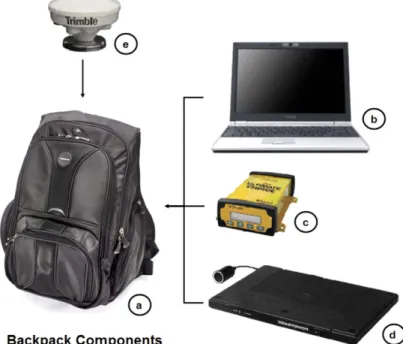
easily adapted and extended by AR application develop-ers for use in any domain that requires a similar hard-ware configuration. The presented design takes advantage of the global positioning system (GPS) and three degree-of-freedom (DOF) head orientation data in order to describe a user’s real time location and heading. Fig. 1 shows the components of the AR platform designed in this study.
A platform designed for this purpose has to be equipped with: (1) computing devices capable of rapid position cal-culation and image rendering including an interface for external input (i.e. both user commands and a video cap-turing the user’s environment); and (2) an interface to dis-play the final augmented view to the user. To ensure continuous operation without restricting user mobility, hardware components must be supported by external power which can be integrated into the backpack. The design should also take into account ergonomic factors to avoid user discomfort after long periods of operation.
Another critical component in such a mobile AR archi-tecture is a robust software interface. This interface must facilitate the acquisition of positional data from the GPS receiver (i.e. longitude, latitude, and altitude) as well as ori-entation measurements from a three DOF head tracker (i.e. yaw, pitch, and roll angles). It must also handle captured video scenes of the user’s surroundings, and include a video compositor engine that renders virtual objects onto the scenes of the real world and displays the combined image to the user in real time.
The presented architecture takes advantage of an object oriented design (OOD) by assigning a separate code mod-ule (i.e. class) to each hardware component. These individ-ual modules are interconnected by the core platform to work in parallel. This way, future replacements,
tions, and upgrades of any peripheral component will not affect the overall integrity of the system. Each code module is device independent as long as its corresponding device provides the system with output that follows a standard format.
1.2. Main contribution
The goal of the authors in the presented work was to design and implement a modular platform that is both reusable and pluggable and can be conveniently adapted for any AR-related domain. Reusability as referred to in this paper is defined as the measure of generality of the framework which allows potential AR application develop-ers to use the provided methods of the presented frame-work in their own AR application with minimum level of effort required to modify or adjust the low-level software interface. Similarly, the term pluggability in this paper describes the fact that the AR framework has been designed in a way that a potential AR application devel-oper can easily disable or enable parts of it either temporar-ily or permanently depending on the specific needs of the AR application being developed. Not all AR applications use the same set of hardware components and as a result, parts of this framework may not be applicable to some applications. However, the pluggability feature of the framework provides an AR application developer with a highly flexible architecture in which plugging or unplug-ging each hardware component does not affect the overall integrity of the framework. Since all mobile AR platforms must fulfill similar operational requirements, the design methodology outlined here can be easily modified and extended to other emerging areas of AR research.
A mobile outdoor AR platform requires a certain minimum set of hardware components and the ability to programmatically interact with them. An important con-sideration in the selection of peripheral components for an AR platform is compatibility of data transfer protocols as well as operational control. In order to address this issue, the authors also provide a software library capable of communicating with the peripheral tracking compo-nents. A user interface built based on the developed soft-ware library has been designed to accommodate several hardware component models in which the input data for-mat follows open, industry adopted standards.
The main contributions of this research are the designed methods of the AR framework that can be conveniently reused by application developers simply by importing the provided class libraries into their code, thereby saving a significant amount of time and effort that would otherwise be required to reimplement low-level hardware interfacing software.
Finally, this paper demonstrates results from two sepa-rate AR-based applications in which the methods designed in this work have been successfully deployed to achieve the applications’ objectives. The first application is an AR-based visualization platform in which the main goal is to
perform a continuous outdoor registration of virtual objects inside the user’s viewing frustum to produce real time displays augmented with virtual construction graph-ics. The second application, used to validate the results of the presented work, is a user context-aware data retrieval application in which the developed methods were inte-grated to track a user’s position and head orientation in order to retrieve and display prioritized information as the user walks on an outdoor site.
These two example applications helped the authors val-idate the interaction between the individual hardware com-ponents and the software interface from the reusability and pluggability points of view. Together, the results of this work can provide a strong foundation for future applica-tions of AR in numerous engineering disciplines.
2. Current state of knowledge
AR related research is being conducted in a growing number of scientific and engineering disciplines. Integra-tion of AR in CAD/CAM systems helps manufacturing companies (e.g. automotive, airlines, etc.) to model mechanical designs, visualize stresses or flows calculated from previous simulations, test for interferences through digital preassembly, and study the manufacturability and maintainability of subsystems[7].
Visualization of medical information projected onto a patient’s body is also one of the established applications of AR technology. Traditional magnetic resonance imaging (MRI) and computed tomography (CT) images provide physicians with information on a totally detached display from the patient. Using AR displays allow MRI and CT images to be superimposed over the patient’s anatomy which can assist in tasks such as the planning of surgical procedures[7]. In the Division of Medical and Biological Informatics at ZGDV in Germany, work is being done on a project known as ARION (Augmented Reality for Intra-Operative Navigation), using AR for image-guided surgery[8].
The Computer Graphics Center, also at ZGDV in Ger-many, in partnership with several European businesses, has been involved in the ARCHEOGUIDE Project (Aug-mented Reality Based Cultural Heritage On-site Guide). This project seeks to create a virtual tour guide for individ-uals visiting great historical and cultural sites. ARCHEO-GUIDE has been tested near the remaining foundation of Hera’s temple in Olympia, Greece, where it created an augmented view of the temple as it would have appeared in ancient Greece[9].
A similar real-time touring application has been devel-oped by a team at Columbia University. By providing wire-less internet access to the mobile AR backpack, along with a link to the University’s campus information server, the user has their display augmented with information about buildings currently in their view[10].
AR is also being studied for implementation in the military sector. The Battlefield Augmented Reality System
(BARS) was developed and tested at the Naval Research Laboratory as a mobile AR system to improve situational awareness between remote users in the field. The purpose of this project was to analyze interaction and data distribu-tion among networked users as they inspect an area[11,12]. At the same time, AR is also being investigated in realms beyond science and engineering including the creation of first-person, real-time video game simulations. The ARQuake system, being developed by researchers at the University of South Australia, applies AR technology to the first-person shooter genre, allowing the user to physi-cally roam the terrain, with the video game graphics and enemies projected as virtual images onto the background [6,13,14].
The application of visualization techniques in construc-tion is relatively new compared to other engineering and scientific fields. During recent years, visualization has gained an increasing credibility among researchers in con-struction and has been noted as one of the four main IT domains in construction [15]. Previous studies have explored the application of AR as a state-of-the-art visual-ization technique for a number of architecture and con-struction applications. For example, Webster et al. [16] presented a system that shows locations of columns behind finished walls, and rebar inside columns. Roberts et al.[17] used AR to overlay locations of subsurface electrical, tele-phone, gas, and water lines onto real world views. Both applications demonstrated the potential of AR in helping maintenance workers avoid buried infrastructure and structural elements.
Hammad et al.[18] augmented contextual information on real views of bridges to help inspectors conduct inspec-tions more effectively. Thomas et al.[19]and Klinker et al. [20] explored AR to visualize designs outdoors. Dunston et al.[21]have demonstrated the potential of mixed reality AR-CAD in collaborative design. Kamat and El-Tawil[22] also used AR to study the extent of horizontal displace-ments sustained by structural eledisplace-ments due to lateral load-ing conditions.
However, and as noted earlier in this paper, each of the abovementioned research projects was focused on develop-ing a domain specific AR platform whose methods cannot be extended and reused in other AR applications. To rem-edy this situation, this research is aimed towards designing a reusable AR hardware and software framework that can lead to significant time and effort savings by providing low-level interfaces to AR application developers in scientific and engineering domains.
3. System architecture
The design of the presented mobile AR platform is guided by two main underlying principles: reusability and pluggability. The platform is designed in a way that allows AR users to use the framework in their own AR applica-tions and avoid low-level reimplementation effort. At the same time, AR users can easily incorporate new methods
or technologies that emerge during the course of their research as well as any changes in their requirements and objectives. In order to design such a reusable and pluggable AR framework, hardware and software modularity has been of particular interest to the authors. A modular design can take advantage of constantly improving technology, permitting new hardware components or software libraries to be easily integrated into the system without requiring a major change in the overall design.
The authors have classified the main requirements of an outdoor mobile AR platform into four critical areas: (1) accurate user registration with minimal constraints on user motion in an unprepared environment, (2) robust user interface for operation control and augmented environ-ment visualization, (3) external power source for extended continuous runtime, (4) and backpack apparatus to enclose and distribute the weight of hardware components.
Several alternative hardware configurations were considered in the design of the current mobile backpack prototype to compare and evaluate factors such as size, weight, and operational capability. The final presented configuration is a combination that is intended to maxi-mize both operating functionality and design efficiency. With the selection of each hardware component, the corresponding object-oriented software interface which guaranteed the underlying principles of reusability and pluggability was also implemented.
3.1. Selection of peripheral components
As shown inFig. 1, all mobile computing systems used in AR research are generally equipped with the same major components: a head-mounted display (HMD), user regis-tration and tracking peripherals, and a mobile computer typically a laptop, to control and facilitate system opera-tion. The following subsections will discuss the necessary tasks a mobile outdoor AR system should be capable of doing together with the need for and the rational in select-ing each component, and their role in fulfillselect-ing the critical requirements for successful mobile outdoor AR operation. They will also provide analyses of various products as well as important technical specifications considered by the authors in the selection process. Fig. 2 is a more detailed illustration of the hardware components used to create the AR platform in the presented work.
3.1.1. Accurate alignment of virtual and real worlds: registration devices
Registration in the context of AR is defined as the proper alignment of the existing objects in the real world and virtual superimposed CAD objects with respect to each other inside the user’s viewing frustum[5]. The problem of accurate user registration requires two distinct sets of data to be measured continuously during the simulation. The first critical record that must be maintained is the user’s global position. These measurements are taken in the form of longitude, latitude, and altitude, which can be extracted
using standard GPS equipment. The second important set of data is that of the user’s head orientation which is usu-ally recorded in the form of roll, pitch, and yaw angles and can be taken with a three DOF orientation tracker. These six measurements together are used to calculate the relative distance and heading of each virtual CAD object with respect to the user, given its predetermined coordinates, and render it accurately in the final augmented view[5,23]. Several factors were deemed important in the selection of a GPS receiver for this prototype. Different GPS receiver and antenna models are compatible with certain GPS ser-vices, which in turn provide varying levels of measurement accuracy. Since an accurate augmented image is necessary and slight errors in virtual object position are noticeable to the user, a very accurate service was desired. However, the fact that different AR applications may demand differ-ent level of accuracy led the authors to design a generic data communication interface based on a standard data transmission protocol that could be used to acquire data from different GPS models. As a result, GPS data acquisi-tion methods provided in this research were all based on the National Marine Electronics Association (NMEA)
pro-tocol, a widely accepted standard for GPS data communi-cation[24].
Initially and for prototyping purposes, a Garmin ETrex GPS receiver was selected to acquire user’s global position in the AR platform. This was followed by a DeLorme Earthmate LT-20 receiver. These two devices mainly served as convenient means for proof-of-concept phase in which the main concern was to assure that the platform can func-tion properly at an acceptable integrafunc-tion level between all the peripheral devices.
However, for final validation stage, and to take into account the accuracy requirements and equip the AR platform with a highly reliable positioning tool, a Trimble AgGPS 332 Receiver with a Combo L1/L2 Antenna was ultimately selected.Table 1summarizes the important tech-nical specifications of the three GPS devices used in the development of the presented AR platform.
The GPS receiver transmits several data fields to the laptop computer over a standard RS-232 interface using NMEA format. Under NMEA, incoming GPS data follows certain sentence formats with each sentence containing several information fields such as positioning,
accuracy level, and number of satellites observed. For the purpose of this research, incoming sentences starting with $GPGGA are extracted to obtain longitude, latitude, and altitude data of the user. The L1/L2 antenna allows for Differential GPS (DGPS) accuracy within approximately 10–20 cm of actual position, when using the OmniSTAR XP or HP subscriptions. Real time kinematics (RTK) tech-nique can also be integrated into the framework which allows for accuracies up to 1 cm.
The GPS antenna was mounted on a segment of pipe, which is secured to the interior of the backpack to prevent lateral movement. To take into account the small difference between the actual position of the user’s head and the one for the GPS antenna, a one-time calibration is done as soon as the AR platform starts receiving data.
Just as with the GPS receiver, the orientation accuracy and resolution provided by various head tracker models was a critical factor. In order to limit restrictions imposed on the user’s motion, it was deemed important to maximize the range in which accurate measurements could be obtained. For prototyping purposes, an Intersense InterT-rax 2 orientation tracker was used. Although the quality of orientation data obtained from this tracker was quite satis-factory, it lacked an internal compass. Without this fea-ture, it would be necessary to calibrate the device to due north at the start of each session. Such manual calibration could introduce potential accumulating error that would affect all subsequent measurements during operations and diminish the accuracy of the final augmented images. In addition, when using inertial trackers, rapid motion or long tracking periods lead to drift error accumulation. It was thus decided that the orientation tracker should include a built-in compass which led to the selection of a TCM5 magnetic orientation tracker.Table 2shows a comparison between the three DOF orientation tracking modules.
The TCM5 orientation tracker employs solid-state mag-netic field sensors which measure compass heading through a full 360of rotation. The tracking device is placed at the highest point inside the user’s helmet, directly above the top of their head, and parallel to their forward line of sight. This module also uses an RS-232 protocol to transmit data
at speeds which facilitate real-time position and orientation calculation.
3.1.2. User interactivity: input/output devices
3.1.2.1. Live input: video camera. The first required inter-face that must be implemented exists between the comput-ing system and external environment. There must be a method of obtaining continuous visual images of the user’s environment, which is ultimately integrated with the virtual images to produce the final, augmented view. While a cam-corder was used by the authors in the initial stages of the research [25], it was decided that a digital video camera could be effectively incorporated into the platform. The two most critical factors in the selection of a video camera were the resolution of the video images, and the speed with which the images are transmitted to the video compositor engine, so that they can be augmented and displayed to the user in real-time.
A Fire-i Digital Firewire camera has been mounted on the front side of the HMD, directly in line with the user’s eyes. Firewire protocol was chosen for its relatively higher speed in transmitting captured images, in comparison with a serial or USB connection. It captures video of the user’s surroundings at a 640·480 resolution, transmitting to the laptop at approximately 400 Mbps. This camera captures scenes from the landscape within a 42 horizontal and a 32vertical view angle.
3.1.2.2. Augmented output: head mounted display (HMD).
In order to meet the goal of real time response to the changes in the environment, the augmented view must be made available to the user as soon as the video compositor engine operating on the laptop integrates the virtual images into the video of the landscape. Thus, the final component necessary for the AR platform interface is an HMD. HMD devices are mainly divided into two categories: Video See-Through and Optical See-See-Through. A video see-through HMD is opaque, preventing the wearer from actually view-ing their surroundview-ings. Instead, they are able to see only what is being captured as input by the video camera. How-ever, an optical see-through HMD is transparent, allowing
Table 1
Comparison of GPS receiver models used in this study
Model GPS Accuracy External interface Data format Dimensions (in.)
Garmin eTrex <3 m (WAAS) RS-232 NMEA 0183 4.4·2.0·1.2
DeLorme Earthmate LT-20 <3 m (WAAS) USBS NMEA 0183 1.9·2.6·0.6
Trimble AgGPS332 <10–20 cm (OmniStar XP) RS-232 NMEA 0183 5.2·2.2·8.6
Table 2
Comparison of 3DOF orientation tracking models used in this study
Model Accuracy Angular resolution Angular range Built-in compass Dimensions (mm)
Pitch Roll Yaw
Intersense InterTrax 2 – 0.02 ±80 ±90 ±180 No 94·27·27
the user to see their surroundings firsthand, with only the virtual images being displayed by the device.
The fact that in a video-see-through HMD, the captured views from the real environment and the virtual CAD objects can be processed and combined by the computer facilitate the analysis and correct alignment and coordina-tion of the final composite visualized scene with respect to time[7]. Hence, the i-Glasses SVGA Pro video see-through HMD was selected for the presented AR platform. This HMD connects to the laptop via a standard 15-pin VGA port, providing 800·600 video resolution on two separate viewing screens.
3.1.2.3. User command input: keyboard and mouse. The
mobile computing backpack, while being self-contained, should be capable of continuously obtaining both instruc-tions from the user and information from the outdoor envi-ronment. During regular site operation, it may often be necessary for the user to change computer or component settings, or to select a new mode of operation after one task is complete. It is desirable to allow the user to do this with-out having to temporarily halt operation and remove the backpack to physically access the laptop.
In selecting components to accommodate user input, the decision was made to include both a keyboard and a touch-pad for full laptop capability, even though the user will not be physically accessing the laptop. The primary factors in the evaluation of these components were ergonomic in nat-ure, including their size, layout, and potential placement or accessibility to the user while operating in the field. The components also needed to have an intuitive interface, so that configuration and operation settings can be adjusted easily without impeding operational efficiency.
The WristPC wearable keyboard and the Cirque Smart Cat touchpad were finally selected. These two devices can both be integrated into the mobile AR platform through a USB port, and together provide the necessary interface functionality to the laptop. While the touchpad can be clipped to the shoulder strap of the backpack, the minia-ture keyboard can be worn on the user’s forearm with both components placed opposite the user’s dexterous hand. The necessary visual interface can then be overlaid onto the augmented landscape being displayed to the user on the screen of the HMD.
3.1.3. Guaranteed uninterrupted operation: external power source
The fully integrated mobile AR platform must be capa-ble of uninterrupted operation for a reasonacapa-ble period of time. While individual component batteries provide ade-quate power, each device has a different estimated battery life, and all parts must be operational for the platform to operate. It would be very inefficient for the user to halt their operation to replace or recharge individual compo-nents. To take this into account, external power sources had to be included to provide additional operation time for both the laptop computer and peripheral components.
However, the process of selecting an external power source must balance a gain in operation time with the added phys-ical burden that must be borne by the user, as general-pur-pose batteries typically increase in both weight and volume as the available power increases.
One reasonable method to provide additional power is the use of external, component-specific batteries, usually sold as an optional accessory by the manufacturer. The i-Glasses SVGA Pro HMD offers a 6 oz. external Lithium Polymer battery and charger, which can be used exclusively by the HMD unit. When fully charged, this battery will power the HMD for up to 4 h. Also, the TCM5 orientation tracker provides a case for three AAA batteries, which can be stored in the backpack and plugged into the module’s connection cable.
After studying the individual components and selecting a target time for continuous operation, the individual power requirements and operating times for each of the devices were used to estimate the necessary capability of an external power supply.Table 3displays the components that need an external power source to assure desired oper-ation time.
Several external power packs with special concern given to physical dimensions and power supplying capability were considered. For supplying external power to the final prototype, the Powerbase NiMh High-Power External Por-table Power Pack was selected.
This battery has slightly smaller dimensions than that of a typical laptop, allowing it to be stored easily in the back-pack, adjacent to the laptop. This 12 V power pack is rated at 7.5 A h, able to provide approximately 4–6 h of addi-tional laptop operation. In addition, a cigarette lighter out-let was found to be convenient since it is a plug-and-play (P&P) device that can also be used in a car. It also simpli-fies the process of splitting the single outlet into multiple outlets to accommodate several components. Since the power pack offers only one cigarette lighter outlet, a split-ting adaptor was added to provide a total of three outlets. Two of these three ports provide dedicated power to the Trimble GPS Receiver and the Fire-i Digital Firewire Cam-era, with a slot remaining free for the laptop computer, when necessary.
3.1.4. System mobility and ergonomics: carrying harness
The final issue for the presented AR mobile comput-ing prototype was the selection of a frame and backpack
Table 3
Power schedule for the mobile AR platform
Component Requires external power Power (W)
Head-mounted display Yes 14.000–15.000
Orientation tracker AAA batteries 0.7000–01.000 Firewire digital camera Yes 0.9000–01.000
GPS receiver Yes 03.500
Keyboard No (through USB) 00.035
Touchpad No (through USB) 02.500
apparatus. This device is worn by the user, with the laptop and hardware components stored securely within. Ergo-nomic considerations played a significant role in the selec-tion of an initial backpack model, since user comfort is a critical factor in the design of any outdoor mobile AR plat-form. Compact design, component security, and proper weight distribution were all analyzed during this selection process. While the creation of a customized configuration was considered, it was determined that a commercial-off-the-shelf (COTS) component would be used for the initial design to demonstrate mobile operation, with the intent to revisit this option in the future.
The Kensington Contour Laptop Backpack was ulti-mately chosen as the first-generation backpack for the mobile computing platform. This particular model pro-vides adequate internal space for the GPS receiver, laptop computer, power pack, and additional cords traveling between the AR components. The backpack design also provides easy access to the components being carried in the main compartments, allowing hardware connections to be quickly checked when necessary. This product has been endorsed by the American Chiropractic Association and equipped with an adjustable lumbar support near the lower back, allowing weight to be distributed down to the hips instead of the shoulders or back.
3.2. Software interface
In order to communicate with the input devices throughout a core platform and provide appropriate aug-mented output to the user, an object-oriented design (OOD) approach was adopted. The software interface design process in this research followed a cyclic pattern as shown in Fig. 3. The process started with module data structure design during which the structure of each individ-ual communication module (i.e. future C++ class) was designed. The output of this process were algorithms and pseudo code to perform specific tasks such as creating a communication handle to a hardware device, and extract-ing data via that handle. Based on the output of this step,
the actual C++ implementation of each module was cre-ated. The developed C++ modules were then individually validated to assure proper functionality and data acquisi-tion from the registraacquisi-tion devices. Once the modules were validated, they were integrated into a prototype application (e.g. an application that requires some or all of the same peripheral components to run) to verify their reusability and pluggability. The details of this process are presented in Sections 4 and 5. The prototype application was then run and the results were validated again. The overall per-formance of the system always served as an effective feed-back to continuously improve the initial design and optimize the functionality of individual modules. The dashed arrow in Fig. 3 represents possible refinements to the original module designs.
To make the code as reusable as possible, the output of the implementation stage for each individual module was exported as a dynamic link library (DLL) file. Having done so, the means and methods of each module while being organized in a class structure, can be later imported by any potential AR user to be applied to their specific appli-cation. As described earlier, the two most important issues that have been taken into account in order to allow for such a modular design were reusability and pluggability.
A very distinctive feature of the current software archi-tecture which highlights the importance of reusability is that it uses ASCII as well as binary data acquisition mech-anisms to communicate with the positioning and orienta-tion devices through serial port connecorienta-tions. The main advantage of having such a relatively low level communica-tion interface is that the established methods are generic and can easily be reused and reapplied to other registration devices provided that it outputs data following a standard format.
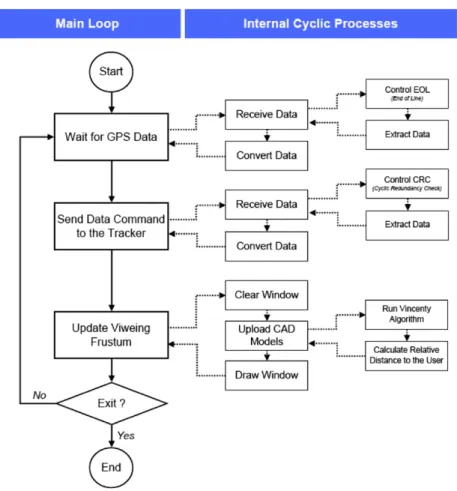
Fig. 4shows the current class structure of the presented AR platform using BOOCH OOD terminology[26]. In this figure, a solid line with a black circle at one end connecting two classes represents an ‘‘aggregation’’ relationship between them in which one class has an instance of the other as a member variable. Likewise, a solid line with a white circle at one end represents a ‘‘using’’ relationship between two classes in which one class uses methods and functions of the other to perform certain operations. All the individual components are pieced together in a wrapper class which provides methods and functions to open ports, initialize the peripheral devices, communicate with them, extract real time data from them, display appropriate aug-mented graphical output, update the output in a real time basis and as the user is moving around freely, and finally close ports by the end of the operation. Fig. 5depicts the main loop of the application in terms of events happening at each frame. At the beginning of each loop run, posi-tional and orientation data are obtained from the registra-tion devices (i.e. GPS receiver and head orientaregistra-tion tracker), checked for validity, extracted, and converted to numerical values. Based on these values, the coordinates of the user’s viewing frustum are updated. The virtual
contents of the viewing frustum (i.e. CAD objects) are then refreshed by recalculating the relative distance between each CAD object and the user, and appropriately placing each CAD object inside the viewing frustum to reflect the
effect of the latest changes in user’s position and head ori-entation in the final augmented view. The details of this step are presented in Section3.2.2. The loop continues as long as it is not interrupted by a user exit command. The
Fig. 4. Class structure of the AR framework.
dotted arrows indicate the internal processes performed at each step of the main loop.
3.2.1. Communication with position and orientation devices
To communicate with the GPS receiver and the orienta-tion tracker, serial port communicaorienta-tion libraries are used. In order to extract data in the form of NMEA format from the GPS receiver, an off-the-shelf library called PortCon-troller.NET was used which provides method for serial port communication such as opening and closing the port, as well as sending and receiving data packets through the port. Two more specific classes were derived from this library to establish port communication with the GPS receiver and orientation tracker respectively. As described earlier, the incoming data from the GPS device are in the format of sentences starting with $GPGGA indicator which include the three main position components (i.e. lon-gitude, latitude, and altitude). After the GPS port is opened successfully, the incoming data sentence is acquired in real time and further broken into parts to extract the positional data. Head orientation from the tracker is received through another serial port in the form of data packets. The compo-nents of each packet follow a binary format which needs to be read and verified for possible noise and other distur-bances before the main data (i.e. payload) can be converted to their equivalent numerical values and used inside the AR application.Fig. 6shows a sample data stream from a GPS receiver as well as a data packet coming through an orien-tation tracker.
3.2.2. Superimposition of CAD objects over real scenes
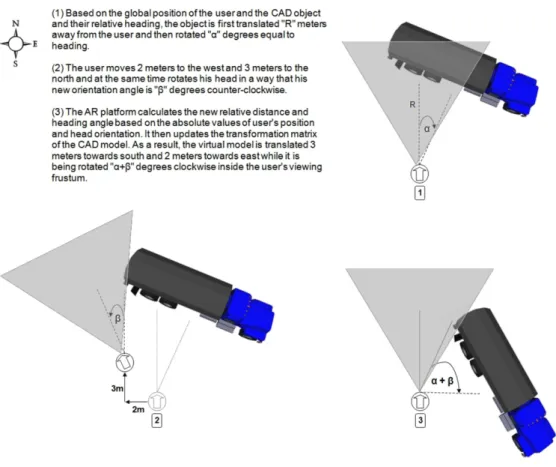
Having acquired the position and head orientation of the user in real time from the tracking devices, the relative distance and heading between the user and each of the virtual objects in the field of view are calculated in each frame using an iterative procedure based on the Vincenty algorithm [5,27]. The basic Vincenty algorithm as found in the literature has been adapted by the authors to convert the difference in the geographical position of the user and the CAD objects in form of longitude, latitude, and
altitude to a relative distance expressed in meters, and at the same time calculate the relative heading angle between the user and each of the virtual CAD objects[5]. As soon as the relative distance and heading are obtained, a set of transformation matrices (i.e. translation and rotation) are applied to each individual CAD object in the OpenGL-based viewing frustum to place it in the augmented scene. This procedure is often referred to as the ‘‘registration’’ of CAD objects.
Position and orientation data acquisition and superim-position of CAD objects are continuously done in each frame and what the AR user really observes through the HMD is a smooth augmented scene. The corresponding transformation matrix to each CAD object is recalculated at each frame to take into account the most recent change in the user’s position and orientation. The position and ori-entation of the virtual contents of the augmented display are then adjusted based on these updated transformation matrices. If a CAD object is subject to movement or rota-tion independent of the user, its corresponding transforma-tion matrix is modified accordingly to reflect the motransforma-tion.
Fig. 7shows the registration procedure and the superim-position of virtual viewing frustum on top of the real back-ground in more detail as it is being done inside the AR platform in real time. Fig. 8shows the steps taken in the registration process in more detail. First, the positional and head orientation data are obtained from the tracking devices using the framework methods developed in this research. The global position of each CAD object is then read from a text file previously created. The Vincenty algo-rithm is then applied to these values and the ones of the user obtained at the beginning of the process to calculate relative distance and heading angle between the user and each CAD object. The next step is to calculate the transfor-mation matrices and is done automatically using OpenGL methods provided inside the AR application. These matrices are then applied to each CAD object to place it correctly inside the user’s viewing frustum. This entire pro-cess is repeated at each frame to guarantee real time update of the augmented viewing frustum.
3.3. Uniqueness of the view update approach in the designed framework interface
In the realm of graphical user interface (GUI) design, an architecture called model-view-controller (MVC) is often used by the application developers for data abstraction, processing, and presentation. MVC is a way to break down an application (or components of it) into three parts: (1) model which contains the underlying data and methods of the application; (2) view which contains a representation of the data in the model and displays the user interface components that receive input from the user; and (3) the controller which connects the model and view, coordinates activities between them, determines which methods on the model should be invoked based on the user’s input, and
which view should display the updated data in the model[28].
An input event such as pushing a button on the key-board or clicking on the mouse triggers the controller
Fig. 7. Real time registration of CAD objects inside the user’s viewing frustum.
which in turns causes changes in the model or the view or both. Whenever the controller changes the model’s data or properties, all dependent views are automatically updated. Similarly, whenever the controller changes a view (e.g. changing the viewpoint inside an animation), the view gets data from the underlying model to refresh itself. The rela-tionship between model, view, and controller is shown in Fig. 9.
In a purely virtual environment (VR), a controller event which involves user’s movements in the scene is typically modeled by a change in the viewpoint. From a user’s point of view, a change in viewpoint affects the view of all the objects in the virtual world. This essentially means that when it comes to the change of view as a result of user’s movement, the entire virtual scene is manipulated as one meta-object over which the change of view is applied. Every time the controller senses a change in the user’s state, it automatically updates the view component of the scene (e.g. by modifying the model view matrix inside an OpenGL based application) without changing the proper-ties of individual virtual models.
In contrast, an augmented environment (as implemented in this research) is a mixed world of virtual and real objects and hence the concept of a single meta-object can rarely be applied in AR. Hence, in the event the view needs to be updated, each virtual object has to be treated as a stand-alone entity inside the viewing frustum of the user. This means that as the user changes position or orientation, the controller has to go over each of the virtual objects, modify its transformation matrices (i.e. object’s proper-ties), and update the scene (view) accordingly. The control-ler is thus in direct interaction with the model component of the visual simulation as opposed to the view component. In a typical case, the AR-based visualization application needs to track and handle two separate events simulta-neously. The first event is any change in the user’s position and orientation which leads to a change of view and as a direct result change of internal parameters (i.e.
transforma-tion matrices) of each of the CAD objects inside the aug-mented display. The second event is the change of position and/or orientation of one or more CAD objects according to the simulation scenario the visualization is based on. The latter is totally independent of whether or not the user is moving in the scene. So, an AR-based visu-alization platform constantly updates the model compo-nent in real time to refresh the view whereas in a VR-based visualization scene, the model only needs to be updated if a direct change occurs for an individual CAD object (e.g. a change in position of a moving CAD object in the scene). The user’s movement in a VR-based visuali-zation scene only leads to change in view without affecting the model component.
This is a significant difference between the use of MVC in a traditional animation framework and the presented AR framework in this research which makes this work unique from the software architecture design point of view.
4. Validation of reusability
As stated in previous sections, one of the main features of the presented framework is reusability of the designed methods of the core framework in almost any AR applica-tion that uses the same set of hardware components. This essentially saves a significant amount of time and effort by allowing application developers to simply reuse the methods provided herein in their AR application and avoiding all the low-level implementation effort.
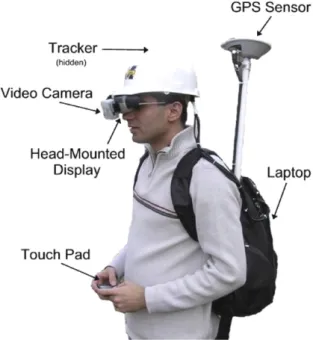
The reusability of the presented AR framework was val-idated by deploying the communication methods together with their corresponding hardware components (i.e. GPS and orientation tracker) in two separate applications. The first application used for validation was an AR-based visu-alization platform called UM-AR-GPS-ROVER [5]. In particular, communication methods of the presented framework were integrated into UM-AR-GPS-ROVER to allow for GPS and orientation tracker data transmission and obtain six DOF user data. These pieces of data were used to place 3D CAD models in outdoor augmented space while allowing the user to walk around freely and observe the final augmented view through the HMD. The proto-type was successfully tested in a number of outdoor loca-tions at the University of Michigan north campus using 3D construction models (e.g. buildings, structural frames, pieces of equipment, etc.).Fig. 10shows an AR user wear-ing the final backpack prototype.
The CAD objects were superimposed and registered continuously inside the user’s viewing frustum (captured by a video camera installed in front of the user’s eye). The global coordinates (i.e. initial global position and orientation) of CAD objects were made accessible to the application through a text file. To register each object in real time, relative distance and heading angle between the user and each CAD object was calculated using a modified version of the Vincenty algorithm [5,27], and at each time
Fig. 9. Relationship between model, view, and controller in MVC architecture.
instant the local origin of the object was transformed and placed in the user’s global space of the viewing frustum.
Fig. 11is a snapshot of a virtual model of a steel struc-ture registered and superimposed in an outdoor test using the AR platform developed in this research. In this figure,
the user is first located at a distance from the CAD model and then eventually starts moving towards the structure to look at the inside from different angles. While the CAD model of the steel structure stayed fixed in the user’s filed of view (as a direct result of the registration algorithm), the user had complete freedom of movement in the site to observe the augmented scene from different locations.
In another validation test, the developed methods were applied inside a context-aware data retrieval application. The goal of this experiment was to simulate an inspector surveying the building, and evaluate whether the different sections of the building can be automatically identified based on the user’s spatial context. During the experiment, the user’s position and orientation were continuously obtained from GPS and a three DOF magnetic tracker using the communication methods developed in this research. The reusability of the presented AR framework allowed the authors to apply them directly with minimum implementation effort inside the application and success-fully track a mobile user on the site while displaying related contextual information as shown in Fig. 12. This second validation experiment was a data retrieval application and not an AR application per se. However, it used the
Fig. 10. AR user wearing the mobile backpack prototype.
same set of hardware components and software interface to track the user’s position and orientation for determining spatial context. This allowed a critical validation of the reusability of the methods in the developed framework, and demonstrated the degree of flexibility it offers to devel-opers of mobile computing applications in engineering.
5. Validation of pluggability
It is possible that an AR application developer decides to use a different set of hardware components and software libraries in their specific domain. A good example is replac-ing a GPS receiver with a more accurate positionreplac-ing device for an application that requires more precise position tracking (e.g. medical operation). Although the goal of the authors was to design an AR framework which pro-vides application developers with the most commonly used methods to set up and implement a hardware and software configuration, an important consideration of the research was the maintenance of a pluggable design.
A pluggable AR framework allows for temporarily or permanently enabling or disabling one or more units (i.e. modules) any time inside a specific AR application. This objective was successfully achieved in the presented frame-work as a direct result of the adopted object oriented design. Although all modules (i.e. classes) are intercon-nected, the functionality of each class, when implemented inside a specific AR application, is totally independent of whether or not other classes are present and used within that application.
To validate the pluggability of the framework design, two separate tests were conducted. In the first experiment, the GPS unit was temporarily disabled inside an indoor AR application since the GPS is typically not a good choice for indoor positioning purposes. The orientation tracker was successfully used to track user’s head movements and
the augmented view was continuously updated based on the changes in yaw, pitch, and roll angles. In another exper-iment, the tracker was disabled and GPS was used as the only user tracking device in the field. As the user was walk-ing on the site, the position was constantly tracked by an AR application and reported on the screen. Additional snapshots and videos of all conducted validation exercises are provided for the readers’ review on the authors’ research webpage[29].
6. Future work
The authors’ ongoing research addresses two main areas of potential improvement: hardware design efficiency, and OOD improvement. Considering the hardware issues, pro-totype weight is an important ergonomic consideration for the backpack design, as extended periods of operation must not cause user discomfort. Therefore, the minimiza-tion of the size and weight of physical hardware compo-nents is a task which will be continuously addressed as research progresses.
One such area where ergonomic improvements could be made is in the design of a custom-made harness to support the backpack components while being worn by the user. For the initial prototype of this research, a laptop back-pack produced sufficient result, as the authors seek to dem-onstrate functionality and mobility. But as more progress is made in the course of this research, it may be desirable to create a custom carrying unit designed specifically to fit the final hardware configuration and distribute weight efficiently.
Another task identified for future work is the integration of wireless technology for the peripheral components and the laptop. The current hardware setup requires numerous cords running between the backpack and the user’s helmet, as well as inside the backpack, to facilitate data transfer
between components. The use of wireless technology would reduce the overall weight of the apparatus, and the elimina-tion of unsightly accumulaelimina-tions of cords is desirable to improve the configuration of the mobile backpack. Impor-tant issues that will be addressed in this stage will be wire-less data transfer speed, data accuracy, and continuity of wireless signal between peripheral components and the computer.
7. Summary and conclusions
AR is a valuable tool with potential applications in many scientific and engineering disciplines. However, mobile AR computing platforms, when developed for use in any field, must all be created to fulfill similar require-ments. All the AR applications and prototypes previously designed and implemented have been custom created for the respective research projects. None of them presents a general-purpose and modular hardware and software inter-face that can be readily shared and reused by researchers exploring AR in other fields. This makes the design of a reconfigurable and extensible AR platform a critical phase in the progress of AR technology. A reconfigurable and extensible platform facilitates future component replace-ments and code improvement as it allows potential AR users to make modular modifications to necessary applica-tion components instead of exploring and developing an entirely new AR application in response to new technolo-gies and scientific improvements. Such an AR platform must coordinate operations of the hardware and software components, and interface with the user and their environ-ment simultaneously, with the ultimate goal of seamlessly integrating virtual objects into the real world surroundings. This paper presented a prototype for a mobile outdoor AR platform and a hardware and software framework with validation to show its successful operation and completion of AR tasks. While the authors’ primary scientific domain of interest is construction, the principles and components described in this paper can be extended to developing any AR or location-aware application in other engineering and scientific domains. The modular design of this plat-form allows for reusability and pluggability of methods within different AR domains, and allows for continual modernization of equipment to incorporate new technolo-gies and procedures that emerge as AR research continues. As a result, the designed methods of the presented AR framework can be conveniently reused by other AR appli-cation developers simply by importing the provided class libraries into their code thereby saving a significant amount of time and effort that would be otherwise required to reim-plement low-level software interfaces to perform registra-tion and data acquisiregistra-tion tasks.
Acknowledgements
The presented work has been supported by the United States National Science Foundation (NSF) through Grant
CMS-0448762. The authors gratefully acknowledge NSF’s support. The authors would also like to acknowledge the Undergraduate Research Opportunities Program (UROP) at the University of Michigan, which fosters collaboration between undergraduate students and faculty by presenting research opportunities to gain valuable experience outside the classroom. The authors are also grateful to Ph.D. can-didate Ms. Hiam Khoury for helping conduct some of the presented experiments. Any opinions, findings, conclu-sions, and recommendations expressed by the authors in this paper do not necessarily reflect the views of the NSF, UROP, or the individual mentioned here.
References
[1] F.P. Brooks Jr., What’s real about virtual reality, IEEE Journal of Computer Graphics and Applications 19 (6) (1999) 16–27.
[2] M.L. Yuan, S.K. Ong, A.Y.C. Nee, A generalized registration method for augmented reality systems, Computer and Graphics 29 (6) (2005) 980–997.
[3] H. Kaufmann, D. Schmalstieg, Mathematics and geometry education with collaborative augmented reality, Computer and Graphics 27 (3) (2003) 339–345.
[4] R. Azuma, J.W. Lee, B. Jiang, J. Park, S. You, U. Neumann, Tracking in unprepared environments for augmented reality systems, Computer and Graphics 23 (6) (1999) 787–793.
[5] A.H. Behzadan, V.R. Kamat, Georeferenced registration of con-struction graphics in mobile outdoor augmented reality, ASCE Journal of Computing in Civil Engineering 21 (4) (2007) 247–258. [6] W. Piekarski, R. Smith, B. Thomas, Designing backpacks for high
fidelity mobile outdoor augmented reality, in: Proceedings of the 3rd IEEE and ACM international symposium on mixed and augmented reality (ISMAR04), 2–5 November 2004, Arlington, Virginia, 2004. [7] W. Barfield, T. Caudell, Fundamentals of Wearable Computers and
Augmented Reality, first ed., Lawrence Erlbaum Associates, 2001, ISBN 0805829024.
[8] T. Suthau, M. Vetter, P. Hassenpflug, H. Meinzer, O. Hellwich, A Concept Work for Augmented Reality Visualization Based on a Medical Application in Liver Surgery, Technical University Berlin, Commission V, WG V/3, 2002.
[9] T. Gleue, P. Da¨hne, Design and implementation of a mobile device for outdoor augmented reality in the archeoguide project, in: Proceedings of the 2001 Conference on Virtual Reality, Archeology, and Cultural Heritage, Glyfada, Greece, 28–30 November 2001, ACM Press, 2001, pp. 161–168.
[10] S. Feiner, B. MacIntyre, T. Hollerer, A. Webster, A touring machine: prototyping 3D mobile augmented reality systems for exploring the urban environment, in: Proceedings of the International Symposium on Wearable Computing (ISWC ’97), Cambridge, Massachusetts, 13– 14 October 1997, pp. 74–81.
[11] D. Brown, S. Julier, Y. Baillot, M. Livingston, An event-based data distribution mechanism for collaborative mobile augmented reality and virtual environments, in: Proceedings of the IEEE Virtual Reality 2003, Los Angeles, California, 22–26 March 2003, IEEE Computer Society, 2003, pp. 23–29.
[12] M. Livingston, L. Rosenblum, S. Julier, D. Brown, Y. Baillot, J. Swan II, et al., An augmented reality system for military operations in urban terrain, in: Proceedings of the Interservice/Industry Training, Simulation, and Education Conference (I/ITSEC ‘02), Orlando, Florida, 2–5 December 2002, pp. 1–8.
[13] W. Piekarski, B.H. Thomas, ARQuake – Modifications and hardware for outdoor augmented reality gaming (LINUX03), in: Proceedings of the 4th Australian Linux Conference, Perth, Australia, 22–25 January 2003. [14] B. Thomas, B. Close, J. Donoghue, J. Squires, P. Bondi, M. Morris, W. Piekarski, ARQuake: An outdoor/indoor first person augmented
reality application, in: Proceedings of the 4th International Sympo-sium on Wearable Computers (ISWC2000), Atlanta, Georgia, Octo-ber 2000, IEEE, pp. 149–146.
[15] Z. Turk, Construction informatics: definition and ontology, Advanced Engineering Informatics 20 (2) (2006) 187–199.
[16] A. Webster, S. Feiner, B. MacIntyre, W. Massie, T. Krueger, Augmented reality in architectural construction, inspection and renovation, in: Proceedings of 3rd Congress on Computing in Civil Engineering, Reston, Virginia, 17–19 June 1996, ASCE, 1996, pp. 913–919.
[17] G.W. Roberts, A. Evans, A. Dodson, B. Denby, S. Cooper, R. Hollands, The use of augmented reality, GPS, and INS for subsurface data visualization, in: Proceedings of the FIG XXII International Congress, Washington, DC, 19–26 April 2002.
[18] A. Hammad, J.H. Garrett, H.A. Karimi, Location-based computing for infrastructure field tasks, in: A. Hammand, H.A. Karimi (Eds.), Telegeoinformatics: Location-Based Computing and Services, CRC Press, 2004, ISBN 0415369762, pp. 287–314.
[19] B. Thomas, W. Piekarski, B. Gunther, Using augmented reality to visualize architecture designs in an outdoor environment, in: Design Computing on the Net (DCNET1999), Sydney, Australia, November 1999.
[20] G. Klinker, D. Stricker, D. Reiners, Augmented reality for exterior construction applications, in: W. Barfield, T. Caudell (Eds.), Funda-mentals of Wearable Computers and Augmented Reality, Lawrence Erlbaum Associates, 2001, ISBN 0805829024.
[21] P. Dunston, X. Wang, M. Billinghusrt, B. Hampson, Mixed reality benefits for design perception, in: Proceedings of 19th International Symposium on Automation and Robotics Construction (ISARC 2002), Gaithersburg, Maryland, 23–25 September 2002, NIST, 2002, pp. 191–196.
[22] V.R. Kamat, S. El-Tawil, Evaluation of augmented reality for rapid assessment of earthquake-induced building damage, ASCE Journal of Computing in Civil Engineering 21 (5) (2007).
[23] V.R. Kamat, A.H. Behzadan, GPS and 3DOF angular tracking for georeferenced registration of construction graphics in outdoor aug-mented reality, in: Ian F.C. Smith (Ed.), Lecture Notes in Computer Science (Intelligent Computing in Engineering and Architecture), Springer, 2006, ISSN 0302–9743, pp. 368–375.
[24] A. El-Rabbany, Introduction to GPS: The Global Positioning System, Artech House Inc., 2002, ISBN 1580531830.
[25] A.H. Behzadan, V.R. Kamat, Animation of construction activities in outdoor augmented reality, in: Proceedings of the 11th Joint International Conference on Computing and Decision Making in Civil and Building Engineering (ICCCBE-XI), Montreal, Canada, 14–16 June 2006.
[26] G. Booch, R.A. Maksimchuk, M.W. Engel, A. Brown, J. Conallen, K.A. Houston, et al., Object-Oriented Analysis and Design with Applications, third ed., Addison Wesley Longman, 1994, ISBN 0201352222.
[27] T. Vincenty, Direct and inverse solutions of geodesics on the ellipsoid with application of nested equations, Survey Review (176) (1975) 88– 93.
[28] S.F. Morse, C.L. Anderson, Introducing application design and software engineering principles in introductory CS courses: model-view-controller java application framework, Journal of Computer Sciences in Colleges 20 (2) (2004) 190–201.
[29] Pathfinder research website:http://pathfinder.engin.umich.edu.
Amir H. Behzadanis a Ph.D. Candidate in the Department of Civil and Environmental Engineering at the University of Michigan. He earned his Master’s degree in Construction Engineering and Management from the same university in 2005. He also holds a BE degree in Civil Engineering from Sharif University of Technology (Tehran, Iran). His current research interests are Augmented Reality visualization of construction operations, discrete-event simulation and Information Technology. He is an associate member of ASCE Construction Institute and a student member of CMAA and PMI. His e-mail address is <abehzada@ umich.edu> and his web address is<http://www-personal.umich.edu/~abehzada>.
Brian W. Timmis a third-year Undergraduate student pursuing a dual degree in Computer Science and Mathematics at the University of Michigan. Following the completion of his Undergraduate degree, he intends to pursue a Ph.D. His current research interests include algo-rithms, cryptography, and computer security. His e-mail address is <[email protected]>.
Vineet R. Kamatis an Assistant Professor in the Department of Civil and Environmental Engineering at the University of Michigan. He received a Ph.D. in Civil Engineering at Virginia Tech in 2003; a M.S. in Civil Engineering at Virginia Tech in 2000; and a B.E. degree in Civil Engi-neering from Goa University (Goa, India) in 1998. His primary research interests include virtual and augmented reality, simulation, information technology, and their applications in Civil Engineering. He designed and implemented the VITASCOPE visualization system with J. Martinez as part of his doctoral research and is currently supervising the design and implementation of the ARVISCOPE augmented reality system as part of A. Behzadan’s doctoral research. His email and web addresses are <[email protected]> and<http://pathfinder.engin.umich.edu>.
![Fig. 4 shows the current class structure of the presented AR platform using BOOCH OOD terminology [26]](https://thumb-us.123doks.com/thumbv2/123dok_us/1409775.2688679/8.892.70.434.851.1091/shows-current-class-structure-presented-platform-booch-terminology.webp)