A Comparison of Queueing, Cluster and
Distributed Computing Systems
Joseph A. Kaplan
([email protected])Michael L. Nelson
([email protected])NASA Langley Research Center
June, 1994
Abstract
Using workstations clusters for distributed computing has become popular with the proliferation of inexpensive, powerful workstations. Workstation clusters offer both a cost effective alternative to batch processing and an easy entry into parallel computing. However, a number of worksta-tions on a network does not constitute a cluster. Cluster management software is necessary to har-ness the collective computing power. In this paper, we compare a variety of cluster management and queueing systems: COmputing in DIstributed Networked Environments (CODINE), Condor, CONNECT:Queue (formerly NQS/Exec), Distributed Job Manager (DJM), Distributed Queueing System (DQS), Load Balancer, LoadLeveler, Load Sharing Facility (LSF), NC TOOLSET, Net-work Queueing Environment (NQE), Portable Batch System (PBS), and Task Broker. The systems differ in their design philosophy and implementation. Based on published reports on the different systems and conversations with the developers and vendors, a comparison of the systems is made on the integral issues of clustered computing.
Introduction
Recently, there has been much interest in using inexpensive, powerful workstations to form work-station clusters (31,41,42). Workwork-station clusters offer many benefits over traditional central site computing. High performance workstation clusters can off-load jobs from saturated vector super-computers, often providing comparable turn around time at a fraction of the cost. If workstations within clusters have a high speed interconnect, they may also serve as an inexpensive parallel computer. Several popular message passing systems such as PVM (35), Express (40), Linda (38) and P4 (39) enable users to tap the latent power of idle workstations by distributing their applica-tions across the network.
However, a loose collection of workstations on the network (which may cross physical and politi-cal boundaries) does not constitute a cluster. Several terms have been used to define such activity: “cluster” (8), “farm” (41) and even “kluster” (37). Although cluster is an overloaded term, we prefer it to the alternatives. To avoid ambiguity, we define a “cluster” to be a collection of com-puters on a network that can function as a single computing resource through the use of additional system management software. The nature of the “additional system management software” and the expectations of its functionality are the focus of this report.
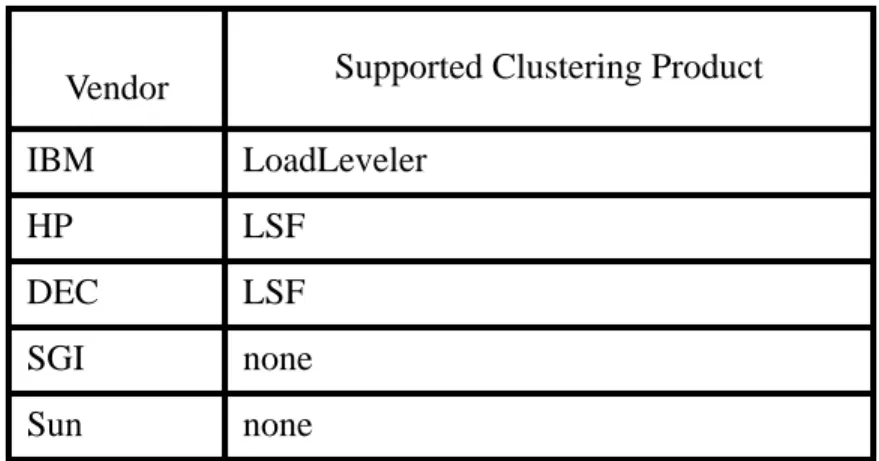
If workstation clustering is to be a real supplement to large scale computing, a cluster manage-ment system must be employed so that the total aggregate power of the cluster can be efficiently distributed across a wide user base. Workstation clusters are successfully in production at a num-ber of sites serving both as a mid-range compute resource and as a parallel computer (31, 37, 41, 42). However, a clear “winner” has not emerged as a standard for cluster management. While some of the cluster management systems can concurrently co-exist on the same machines, at least for an initial evaluation period, this is not an acceptable long term solution. The needs of the clus-ter users must be evaluated, and then an appropriate clusclus-ter management system installed. Since the introduction of clustering, some vendors are including cluster software with their worksta-tions. Table 1 shows the popular workstation vendors and the (possible value-added) clustering software they offer.
We compare twelve popular distributed queueing and clustering systems. They are: COmputing in DIstributed Networked Environments (CODINE), Condor, CONNECT:Queue (formally NQS/ Exec), Distributed Job Manager (DJM), Distributed Queueing System (DQS), Load Balancer, LoadLeveler, Load Sharing Facility (LSF), NC TOOLSET, Network Queueing Environment (NQE), Portable Batch System (PBS), and Task Broker. These systems, while not an exhaustive list, represent a broad spectrum of functionality, and not all features map from one system to another. A set of criteria was constructed to facilitate the comparison of these systems. The list of criteria is intended to be general, but it cannot be expected to cover the concerns of every user community.
Table 1: Vendors and Software
Vendor Supported Clustering Product
IBM LoadLeveler
HP LSF
DEC LSF
SGI none
Evaluation Criteria
Checklist Criteria
Heterogeneous Support
There are two types of cluster environments, homogeneous and heterogeneous. A homogeneous computing environment consists of a number of computers of the same architecture running the same operating system. A heterogeneous computing environment consists of a number
of computers with dissimilar architectures and different operating systems. Many locations have a large number of different computers for varying resource and performance considerations (i.e. graphics, computation, input/output operation, etc.).
Batch Support
A popular use of clusters is off-loading batch jobs from saturated supercomputers. Clusters can often provide better turn around time than supercomputers for small (in terms of memory and CPU requirements) batch jobs.
Parallel Support
There is interest in moving to massively parallel processing machines via heterogeneous process-ing because of the heterogeneous environment's application to a larger set of problems (30,31,32). A cluster can serve as a parallel machine because workstations are inexpensive and easier to upgrade as separate pieces may be purchased to replace older models. A number of packages, such as Parallel Virtual Machine (PVM) from Oak Ridge National Laboratories and Express from Parasoft Inc. (35,36), add parallel support for computers distributed across a network. Refer-ences 32 and 43 provide a good overview of the various tools available for parallel application development.
Interactive support
A cluster should provide users the option to execute interactive jobs on the cluster. The input, output, and error messages should all be optionally returned to the user's interactive machine.
Message Passing Support
Message passing is the ability to pass data between processes in a standardized method. This inter-process communication allows several processes to work on a single problem in parallel. A large distributed application can be split across the many different platforms that exist in a hetero-geneous environment. Some cluster management packages do not provide any explicit message passing support, choosing instead to rely on packages such as PVM and Linda to provide that fea-ture (35,36).
Checkpointing is a common method used by cluster management software to save the current state of the job (3). In the event of a system crash, the only lost computation will be from the point at which the last checkpoint file was made. Because checkpointing in a heterogeneous envi-ronment is more difficult than on a single architecture, current cluster management software that provides checkpointing does so with the following limitations:
• Only single process jobs are supported (i.e. no fork(), exec(), or similar calls are allowed). • No signals or signal handlers are supported (i.e. signal(), sigvec(), and kill() are not supported). • No interprocess communication (i.e. sockets, send(), recv(), or similar calls are not
implemented).
• All file operations must either be read only or write only. These limitations will make checkpointing unsuitable for certain applications, including parallel or distributed jobs that must communication with other processes.
Process Migration
Process migration is the ability to move a process from one machine to another machine without restarting the program, thereby balancing the load over the cluster. Process migration would ide-ally be used if the load on a machine becomes too high or someone logs on to the console, thus allowing processes to migrate to another machine and finish without impacting the workstation owner.
Load Balancing
Load balancing refers to the distribution of the computational workload across a cluster so that each workstation in the cluster is doing an equivalent amount of work. On a network, some machines may be idle while others are struggling to process their workload.
Job Run-Time Limits
A run time limit sets the amount of CPU time a job is allowed for execution. Providing a limit insures that smaller jobs complete without a prolonged delay incurred by waiting behind a job that runs for an excessive period of time. While run time limits do offer many benefits to the user, the limits must be easily configurable for the users' needs and environment.
No Relinking
Some cluster management packages require that the user relink their programs with special soft-ware libraries. This requirement is usually found in conjunction with checkpointing and process migration. While linking software libraries into existing code is not impossible, most users would prefer not to be forced into this option.
Exclusive CPU for Job
by waiting until all running jobs complete or having the jobs currently running suspend. Jobs that have special requirements might need an exclusive CPU, such as benchmarking, a real-time envi-ronment, or to provide minimum turn around time for a priority application.
No Single Point Failure
A single point failure problem can make a cluster unsuitable for some applications. A common single point failure problem for cluster management software is in the master scheduler.
Set Execution Time/Date
As users leave the office at the end of the work day and on the weekends, more resources become available for computational use. Delaying execution of computationally intensive jobs can pro-vide faster turn around for smaller jobs. Users that submit large numbers of jobs can delay execu-tion of their work until more resources become available.
GUI
A well designed Graphical User Interface (GUI) can aid in guiding users through the system. If users are frustrated, or do not understand the system due to a non-intuitive or over complicated interface, the system will be underutilized.
Command Line Parameters
The utilities supplied with most packages are meant to be invoked from a shell using command line parameters as arguments.
Job Submission File
Some packages allow users to submit a file detailing various resource requirements for the job submitted for execution. This is useful if the user plans to submit the same job several times or for helping novice users.
NFS/AFS not Required
In a networked environment, the issue of data locality becomes important(19). The file system of the user’s submitting machine cannot be guaranteed to be mirrored on every machine in the clus-ter. Most packages use some type of distributed file system, either Network File System (NFS) or Andrew File System (AFS), to provide a consistent file system on all the machines. Both NFS and AFS degrade the performance of the executing job as they must transfer information over a physical network during execution. Other packages have found solutions to this problem by using remote system calls, file staging, or by using the file transfer protocol or rcp programs found on most Unix machines.
The configuration of a cluster can change dynamically. Users might want to withdraw their machines for some particular job they are planning to run. Machines may also be added for spe-cial one time jobs. The cluster should not have to be constantly reconfigured. The primary owner of the machine should have the ability to withdraw their machine without requiring root access or help from the system manager.
Return Resources Used
If users can see the actual resources that a job uses, they will be better able to estimate the require-ments for the next time the job executes. These statistics will aid the user in providing for optimal job performance.
User Account Not Needed
Many locations have a number of different computers on their networks. This may range from a few machines to a few thousand machines. In an environment where the number of workstations extend into the hundreds or more, requiring an account on all of those machines adds unnecessary complexity. While these machines may be owned by the same organization, they often cross internal boundaries. Minimizing potential logistical and political barriers will lead to greater clus-ter participation.
Time of Day Sensitive
Workstations often become idle during non-prime hours. If the cluster can gain use of these machines automatically at the end of the work day, during the weekend, or on business holidays, these extra resources can be utilized.
Input/Output Redirection
The ability to redirect I/O files is very similar to the Unix redirection commands available from the command line (i.e. >,>>,<,<<,etc.). This feature allows users to run existing interactive jobs in a batch environment.
Access Files where Submitted
The ability of the user to access the output files from the submitting machine is a significant step in providing an easy to use system. The user should not be concerned with the details of physical file location. Files should be visible from the relevant machines or should migrate to necessary machines transparent to the user.
Query Job Status
Once users submit a job, they no longer directly control it. In order to keep them updated about the status of their job, they should have some method of monitoring the job’s status. This can be either through e-mail messages or an interactive program.
Question Criteria
Which operating systems are supported?
If the clustering system does not support popular machines at a given site, it will be of limited use. By examining the platforms supported and the existing machine base, a suitable match can be made. Given enough customer response, vendors may be willing to include support for additional platforms. A listing of release and revision numbers that are supported for each operating system is not included since this information is so dynamic.
Scheduling and Resource Allocation
As jobs are added to the system, it is important to know how, where and when the jobs will be scheduled. If the scheduling is done improperly, jobs will not be processed as efficiently as possi-ble. Scheduling and allocation configurability is desirapossi-ble.
What is the dispatching of jobs based upon?
A wide combination of system attributes must be examined before a job is dispatched in order to generate an optimal balance. These attributes can include system load, computational power of the destination machine, physical proximity, degree of owner control and organizational location. Some of the other attributes the system should look at include:
-User: The cluster system software should recognize when a cluster machine is in use and sched-ule jobs for that machine so as to minimize the impact on the current users, both console and remote. This can include suspending or migrating jobs to other available machines.
- Disk Space: Batch jobs often write large data files while executing. If the system supports a checkpointing mechanism, the executing job can consume a tremendous amount of disk space (3). A job should not be dispatched if there is insufficient disk space on the destination machine. - System Load: The goal of cluster management software is to balance the load on all of the machines in order to harvest the idle CPU cycles. Executing a job on a lightly loaded CPU will enable it to complete execution as quickly as possible. If a machine is overloaded with jobs, it will not achieve maximum performance.
- Swap Space: Swap space is the portion of the disk space that implements virtual memory. Jobs moved from supercomputers to clusters may have large memory requirements that represent a sig-nificant portion of available memory of a cluster machine. Thus, the cluster management soft-ware should not dispatch a job to a machine with insufficient swap space.
Can the user specify computing resources?
In order for each job to be executed on the machine to achieve optimal performance, user custom-izable allocation is needed. These desired resources can be specified in a GUI, a job submission
file or on a command line interface. If users specify too large a resource, their jobs will be delayed until those resources become available. These resources include the individual machine, a particular architecture, memory, swap space, operating system, and disk space.
Are priorities implemented for scheduling and resource allocation?
In addition to enabling more efficient job execution, priorities allow a cluster scheduler to respect time critical applications and political boundaries.
Is it possible to place restrictions on the users of the system?
The clustering system should allow for users to have dissimilar access to system resources. This includes limiting: CPU time, memory, swap space, disk space, ability to execute certain jobs, abil-ity to submit jobs to certain machines, queues, or architectures, and time of day access.
What conditions has the system made for fault tolerance?
The software should be able to withstand rapid changes in the availability of machines and/or communications. In order to detect whether a host is running, the master process communicates with all the cluster members by sending messages over the network. When the master process has not heard from a member after a set period of time, it assumes that the member has died. The sys-tem should no longer schedule jobs to that machine. A balance must be obtained to ensure that crashes are detected early, but without generating too much network traffic determining which machines are still alive. All lost computation represents lost productivity. If the scheduling soft-ware crashes, the rest of the cluster management package should be robust enough to continue to function. The system should be able to guarantee to the user that submitted jobs will eventually complete.
Can the system suspend/resume jobs when resources change or become unavailable?
Most systems can suspend all currently running jobs on a machine if the owner logs onto the con-sole. The suspended jobs can then be resumed when the machine becomes idle or migrated to another machine while the owner continues to use the machine. Jobs should also be able to sus-pend in the dispatch queues if their resource requirements are not met.
Can the policies and queues of the system be reconfigured on the fly?
In a dynamic heterogeneous computing environment, the make up of the cluster can change rap-idly. Machines will be taken down for maintenance. Other machines will be removed from the cluster for dedicated use. The system must be able to be changed dynamically by either the sys-tem manager or the syssys-tem itself. It must constantly adapt to the resources that are available. A cluster size can vary from a few machines to thousands of machines (17). The cluster adminis-trator should have the ability to reconfigure the cluster without restarting the processes on every machine. However, the cluster should not significantly increase network traffic attempting to determine if the configuration has changed.
How does the system address security?
Participating in a cluster should not comprise the security of users’ workstation. Cluster manage-ment software should not introduce any security holes. Some systems prefer to simply use the security features that are provided with the operating system while other implement stronger means of defeating intentional or unintentional security breaches.
What is the impact on the machine owner?
An economical approach to implementing or supplementing a cluster is to use existing machines as opposed to purchasing new machines. One method of insuring the growth of the cluster is to guarantee that workstation owners will not experience unacceptable loads on their system while they are working interactively.
Evaluations
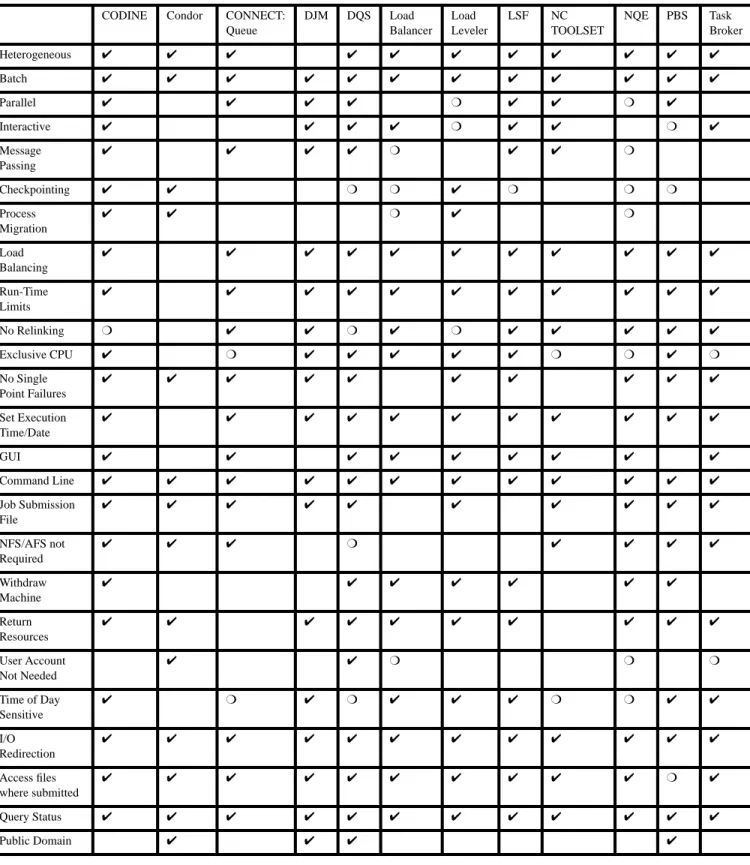
The twelve following sections contain reviews of each package with respect to the criteria described above. Each section is designed so that it stand alone. Table 2 provides a quick refer-ence chart so that the checklist criteria can be easily compared against each system.
Figure 1 provides a graphical depiction of the relationships between the different systems. The Network Queueing System (NQS) is considered to be the progenitor of all the systems. If an arrow continues outward, the system is still in production and development. If a system feeds lin-early into another, it indicates a name change. If a system branches from another’s line, it indi-cates that the new system has evolved from the former system.
Figure 1: A Pictorial Clustering System Ancestry NQS NQS/Exec DJM Utopia LSF Load Balancer CONNECT:Queue NQE PBS Task Broker NC TOOLSET Condor LoadLeveler DNQS DQS CODINE SQS UniJES
Table 2: Quick Reference Chart
CODINE Condor CONNECT: Queue DJM DQS Load Balancer Load Leveler LSF NC TOOLSET NQE PBS Task Broker Heterogeneous ✔ ✔ ✔ ✔ ✔ ✔ ✔ ✔ ✔ ✔ ✔ Batch ✔ ✔ ✔ ✔ ✔ ✔ ✔ ✔ ✔ ✔ ✔ ✔ Parallel ✔ ✔ ✔ ✔ ❍ ✔ ✔ ❍ ✔ Interactive ✔ ✔ ✔ ✔ ❍ ✔ ✔ ❍ ✔ Message Passing ✔ ✔ ✔ ✔ ❍ ✔ ✔ ❍ Checkpointing ✔ ✔ ❍ ❍ ✔ ❍ ❍ ❍ Process Migration ✔ ✔ ❍ ✔ ❍ Load Balancing ✔ ✔ ✔ ✔ ✔ ✔ ✔ ✔ ✔ ✔ ✔ Run-Time Limits ✔ ✔ ✔ ✔ ✔ ✔ ✔ ✔ ✔ ✔ ✔ No Relinking ❍ ✔ ✔ ❍ ✔ ❍ ✔ ✔ ✔ ✔ ✔ Exclusive CPU ✔ ❍ ✔ ✔ ✔ ✔ ✔ ❍ ❍ ✔ ❍ No Single Point Failures ✔ ✔ ✔ ✔ ✔ ✔ ✔ ✔ ✔ ✔ Set Execution Time/Date ✔ ✔ ✔ ✔ ✔ ✔ ✔ ✔ ✔ ✔ ✔ GUI ✔ ✔ ✔ ✔ ✔ ✔ ✔ ✔ ✔ Command Line ✔ ✔ ✔ ✔ ✔ ✔ ✔ ✔ ✔ ✔ ✔ ✔ Job Submission File ✔ ✔ ✔ ✔ ✔ ✔ ✔ ✔ ✔ ✔ NFS/AFS not Required ✔ ✔ ✔ ❍ ✔ ✔ ✔ ✔ Withdraw Machine ✔ ✔ ✔ ✔ ✔ ✔ ✔ Return Resources ✔ ✔ ✔ ✔ ✔ ✔ ✔ ✔ ✔ ✔ User Account Not Needed ✔ ✔ ❍ ❍ ❍ Time of Day Sensitive ✔ ❍ ✔ ❍ ✔ ✔ ✔ ❍ ❍ ✔ ✔ I/O Redirection ✔ ✔ ✔ ✔ ✔ ✔ ✔ ✔ ✔ ✔ ✔ ✔ Access files where submitted ✔ ✔ ✔ ✔ ✔ ✔ ✔ ✔ ✔ ✔ ❍ ✔ Query Status ✔ ✔ ✔ ✔ ✔ ✔ ✔ ✔ ✔ ✔ ✔ ✔ Public Domain ✔ ✔ ✔ ✔
Computing in Distributed Networked Environments
(CODINE)
Concept Behind Implementation
CODINE (COmputing in DIstributed Networked Environments), a merger of the queueing frame-work of DQS and the checkpointing mechanism of Condor, is targeted for optimal utilization of the compute resources in heterogeneous networked environments. In particular, large heteroge-neous workstation clusters with integrated servers like vector and parallel supercomputers.
Heterogeneous Support ✔
Batch Support ✔
Parallel Support ✔ PVM or Express
Interactive Support ✔ Uses "xterm"
Message Passing Support ✔ PVM or Express
Checkpointing ✔ User and transparent checkpointing.
Process Migration ✔
Load Balancing ✔
Job Run-Time Limits ✔
No Relinking ❍ Must be linked with CODINE library to
use checkpointing
Exclusive CPU for Job ✔
No Single Point Failures ✔ A shadow master scheduler can be
config-ured.
Set Execution Time/Date ✔
GUI ✔
Command Line Parameters ✔
Job Submission File ✔
NFS/AFS not Required ✔ Files may be stagged using RCP or FTP.
Withdraw Machine at Will ✔
Return Resources Used ✔
User Account Not Needed
Time of Day Sensitive ✔
Input/Output Redirection ✔
Access Files where Submitted ✔ NFS/RCP/FTP
Which operating systems are supported?
ConvexOS, Cray UNICOS, DEC OSF/1 Ultrix, HPUX, IBM AIX, SGI IRIX, and SunOS -Solaris.
Scheduling and Resource Allocation
There are two methods of queue selection possible. The first is to schedule jobs according to the queue sequence number (i.e. the first queue in the list receives the job for execution). The sec-ond method is to schedule by weighted load average within a group so that the least busy node is selected to run the job. The method of queue selection may be changed at any time by the clus-ter administrator. There are two alclus-ternatives for job scheduling, first-in-first-out and fair-share scheduling. A selection between the different methods can be made on the fly. The cluster administrator may also change the job scheduling mechanism at will. Jobs may be moved higher or lower in the pending jobs list by assigning them a priority number.
What is the dispatching of jobs based upon?
The master scheduler will compile a list of all the queues that meet the user’s resource request. These requests are sorted into two categories. The first is hard resources. All of these resources must be met before the job can begin execution. The second is soft resources. These should be allocated to the job if possible, but the job can still execute without them. If a job has requested a specific queue, the job will be dispatched. If the job has not requested a specific queue, the job will not be dispatched until it can be started immediately. The job will instead be spooled by the master scheduler, which will try to reschedule the job from time to time.
Can the user specify computing resources?
Yes. The user may request a specific queue, architecture, group, amount of memory, operating system, number of queues, CPU run time, checkpointing interval, migration interval and amount of disk space. CODINE will support the use of queue-complexes (see DQS review) in a future release.
Are priorities implemented for scheduling and resource allocation?
Yes. Users may request that their jobs run with a certain priority. Users may also be restricted from certain queues, thus giving other users access to more resources.
Is it possible to place restrictions on the users of the system?
Yes. Queues may be configured to deny or allow access to specific users. Queues may also be configured with different levels of resources, thus allowing or restricting users from accessing those resources.
What conditions has the system made for fault tolerance?
If the master scheduler is unable to contact a machine in a set period of time, it will no longer attempt to schedule any jobs to that node. Since CODINE supports the use of checkpointing and process migration, no job loss will occur, other than the work done between checkpointing if a machine crashes. The master scheduler can move the checkpointed job to another machine to resume execution. CODINE supports the use of a shadow master scheduler which automati-cally takes over operation of the master scheduler if it fails.
Can the system suspend/resume jobs when resources change or become unavailable?
Yes. CODINE will suspend jobs if the console becomes busy or if the load average exceeds a threshold value. If the jobs are using the checkpointing mechanism, they will be migrated to another workstation, if available, to continue execution; otherwise, they will be suspended until the load falls below the preset threshold or the console becomes idle.
Can the policies and queues of the system be reconfigured on the fly?
Yes. Queues, users, and hosts may be added, deleted, or modified while the system is in opera-tion. Furthermore, the cluster configuration (including the scheduling policies and load average report intervals, or network communication time-outs) can be configured without interruption of the system.
How does the system address security?
Global and queue specific user access lists are maintained to restrict unauthorized users. Submit hosts can be configured which do not allow for administrative CODINE operations, but only for submitting and controlling batch jobs, even for root accounts. CODINE also provides administra-tive hosts with remote configuration capabilities for CODINE manager accounts without a need to serve as batch execution for master scheduler hosts.) In addition, CODINE provides support for Kerberos-AFS and will support DCE-DFS in a future release.
What is the impact on the machine owner?
Very little. CODINE can suspend the queue if the console becomes active or the load average sur-passes a preset threshold. These jobs can then be migrated away while the owner continues to do work.
Additional Limitations
- Applications with process creation(fork, exec) and Interprocess Communication(signal, sigvec, and kill) will not checkpoint.
Additional Benefits
- CODINE provides an NQS interface for interaction with NQS processing resources.
- CODINE provides accounting resource limiting support even for those operating systems with leaking functionalities. CODINE also provides accounting and resource limiting for parallel jobs
Sites running this software: Volkswagon, Max-Planck Institutes, University of Munich Software Available from:
GENIAS Software GmbH Erzgebirgstr. 2B D-93073 Neutraubling, Germany ++49 9401 9200-0 [email protected] See References: 34,44,45
Condor
Concept Behind Implementation
Condor is built on the principle of distributing batch jobs around a loosely coupled cluster of com-puters. Condor attempts to use idle CPU cycles that exist on some machines to provide more computational power to users who need them. There are three main guiding principles that Con-dor attempts to follow while doing this. The first is that workstation owners should always have their workstation at their disposal when they want it. Users will be less willing to donate their idle CPU cycles if they cannot have instant access to their machines. The second principle is that remote execution should be easy. If the user has to go through too much trouble, they will not use
Heterogeneous Support ✔
Batch Support ✔
Parallel Support PVM support planned
Interactive Support
Message Passing Support PVM support planned
Checkpointing ✔
Process Migration ✔
Load Balancing Job Run-Time Limits
No Relinking Job must be relinked with Condor Library
Exclusive CPU for Job
No Single Point Failures ✔
Set Execution Time/Date GUI
Command Line Parameters ✔
Job Submission File ✔
NFS/AFS not Required ✔
Withdraw Machine at Will By user activity, but not permanent
Return Resources Used ✔
User Account Not Needed ✔
Time of Day Sensitive
Input/Output Redirection ✔ Job submission file
Access Files where Submitted ✔ NFS/remote system calls
the system. The last principle is that it should be portable and easy to adapt to emerging worksta-tion platforms.
Which operating systems are supported?
Dec OSF/1 - Ultrix, HP-UX, IBM AIX, Sequent Dynix, SGI IRIX, and Sun - SunOS/Solaris.
Scheduling and Resource Allocation
The condor software monitors the activity on all the participating workstations in the local net-work. Those machines which are determined to be idle are placed into a resource pool or “proces-sor bank.” Machines are then allocated from the bank for the execution of jobs by the scheduler. The bank is a dynamic entity; workstations enter the bank when they become idle, and leave again when they get busy. Priority is based on the up-down algorithm. This algorithm periodically increases the priority of those users who have been waiting for resources, and reduces the priority of those users who have received resources in the recent past. This is done by the centralized machine manager.
What is the dispatching of jobs based upon?
Condor jobs are not submitted to a machine that has an active keyboard or mouse or a machine that has a load greater than 0.3. This default load average can be configured by the system admin-istrator or by the owner of the machine. Condor will suspend jobs if the console becomes active. If the console remains active, Condor will migrate the jobs to another machine. Condor will also check to insure that there is sufficient disk space and swap space to checkpoint the job.
Can the user specify computing resources?
Yes. The user may specify the machine, the type of architecture, the amount of memory, the amount of swap space and the operating system. If the user does not specify the architecture for the job to run on, Condor defaults to the type of the submitting machine.
Are priorities implemented for scheduling and resource allocation?
Yes. The user may specify a priority for their job when they submit it.
Is it possible to place restrictions on the users of the system?
No. All jobs execute as user "condor."
What conditions has the system made for fault tolerance?
No job loss, other than the work done between checkpoints, will occur if any part of the system crashes. If the daemon dies or a machine crashes, Condor will begin running the last checkpoint of the jobs on another machine. Condor will not submit jobs to machines that it is unable to con-tact.
Can the system suspend/resume jobs when resources change or become unavailable?
Yes. Scheduling changes are based upon user activity. Condor moves jobs around the cluster as machines become idle or the owner returns to the console.
Can the policies and queues of the system be reconfigured on the fly?
are added to the Condor pool if they have the Condor software installed on them.
How does the system address security?
Condor attempts to maintain the security of the Unix system running on the hosts, but it does have a problem. The remote system calls are a weak point in the system that can be manipulated by a malicious user.
What is the impact on the machine owner?
Very little. Condor attempts to minimize any adverse effects on the machine owner. It does this by migrating away tasks as soon as the machine owner begins work at the console. Condor will also not submit jobs to the machine to run if the owner is at the console.
Additional Limitations
- Applications with process creation calls (fork, exec) and Interprocess Communication (signals(-signal,sigvec,kill)) will not checkpoint. These calls should be supported in the next version of Condor.
- All file operations must be idempotent - read-only and write-only file accesses work correctly, but programs which both read and write the same file may not work correctly when using check-pointing.
Additional Benefits
- The software is available in the public domain.
- There is a mailing list set up to offer help for Condor users and system managers.
Sites running this software: Brookhaven National Laboratory, University of Wisconsin Software Available from: ftp://ftp.cs.wisc.edu/condor
CONNECT:Queue
Concept Behind Implementation
CONNECT:Queue, formerly NQS/Exec, from Sterling Software provides a Unix batch and device queueing facility capable of supporting and tying together a diverse assortment of Unix based machines. CONNECT:Queue provides three types of queues. The first is the batch queue, which provides a mechanism to run programs. The second is the device queue, which provides for batch access to physical devices(i.e. printers, tape readers, etc.). The last type of queue is a pipe queue. A pipe queue exists to transport requests to other batch, device, or pipe queues at
pos-Heterogeneous Support ✔
Batch Support ✔
Parallel Support ✔ PVM/Linda/Built into machine’s OS
Interactive Support Planned for future release
Message Passing Support ✔ PVM & Linda
Checkpointing Planned for future release
Process Migration Planned for future release
Load Balancing ✔
Job Run-Time Limits ✔ per queue and per machine run limits
No Relinking ✔
Exclusive CPU for Job ❍ Must configure whole machine
No Single Point Failures ✔
Set Execution Time/Date ✔
GUI ✔ Submit,Delete,Cluster Status & Load
Command Line Parameters ✔
Job Submission File ✔
NFS/AFS not Required ✔ Using CONNECT:Direct (i.e. file staging)
Withdraw Machine at Will Return Resources Used User Account Not Needed
Time of Day Sensitive ❍ Done through cron job
Input/Output Redirection ✔ Job Submission File/Command Line
Access Files where Submitted ✔ NFS/RCP/NIS/DNS or
CONNECT:Direc-t(i.e. file staging)
sibly a remote machine. CONNECT:Queue adds an intelligent network batch job scheduling sys-tem that provides workload balancing across a heterogeneous Unix environment, and represents a natural progression from traditional NQS to clustered computing. This summary is based upon CONNECT:Queue.
Which platforms are supported?
The base CONNECT:Queue product has support for: Data General - DG/UX, DEC OSF/1-Ultrix, IBM AIX/ESA, HP/UX, SGI IRIX, Amdahl - UTS, Meiko Scientific - Solaris, Sun SunOS/ Solaris, and Solbroune - Solaris/SunOS.
The following platforms are supported by the base product and CONNECT:Queue for Workload Balancing Option: Sun SunOS-Solaris, HP-UX, SGI - IRIX, DG - DG/UX, and IBM AIX/6000. CONNECT:Queue is compatible with Cray, Convex and Control Data Corporation proprietary systems.
Scheduling and Resource Allocation
CONNECT:Queue uses the Network Computing Executive(NCE) for load balancing. NCE col-lects three statistics from clients to resolve its algorithm: 1) percentage of physical memory being used, 2) percentage of CPU utilization, and 3) if the queue has reached its maximum number of jobs. NCE puts the machines in an ordered list with the least utilized machine at the top of the list. CONNECT:Queue scans the list beginning with the least utilized machine and checks if the machine has reached its run limit. As soon as CONNECT:Queue finds a machine to execute the job, it is dispatched.
What is the dispatching of jobs based upon?
See above section.
Can the user specify computing resources?
The user may only specify the queue that they would like their job to run in. Queues may be set up on machines that have specific resources, but the administrator must communicate this infor-mation to the user so the user will know which queue to specify.
Are priorities implemented for scheduling and resource allocation?
Priorities may be associated on an interqueue basis (i.e. which queue gets its jobs executed first) and an intraqueue basis (i.e. which job in the queue gets executed first). Users may be allowed or disallowed into different queues, thus giving them priorities.
Is it possible to place restrictions on the users of the system?
Yes. The number of jobs per user, the number of jobs per queue, and the job run time limits may be limited depending upon the user. Users may also be excluded from groups that may access cer-tain queues, thereby restricting their jobs from running on cercer-tain compute servers.
What conditions has the system made for fault tolerance?
CONNECT:Queue will attempt to restart all previously running and queued jobs on any machine that crashes. If a machine’s daemon is no longer communicating, CONNECT:Queue will no
longer dispatch jobs to any queues residing on that machine. If the master scheduler goes down, CONNECT:Queue will automatically switch to another scheduler.
Can the system suspend/resume jobs when resources change or become unavailable?
Yes. Jobs may be suspended when resources change or become unavailable. Jobs that are bound for a queue on a machine that is no longer available will be placed in a “queued” or “wait” state. When the machine becomes available, those jobs will be dispatched.
Can the policies and queues of the system be reconfigured on the fly?
Yes. The administrator of the cluster can modify queues and their policies through several utili-ties provided with CONNECT:Queue.
How does the system address security?
CONNECT:Queue relies upon the security present in the Unix operating system.
Queues and machines may also be restricted so that only certain users may submit jobs to them.
What is the impact on the machine owner?
Owners have no control over what jobs execute on their machine. While the queue that runs on their host may be set to only accept one job at a time, they may take a performance hit depending upon what the currently executing job is. Owners of machines may also be given manager privi-leges in order to suspend or remove jobs manually or through shell scripts.
Additional Limitations
Additional Benefits
- CONNECT:Queue provides a project accounting utility. This utility will aid in tailoring reports that specify different types of usage of the cluster. The information stored by CONNECT:Queue includes: Job Id, User name, queue name, priority, time submitted, time initiated, originating machine, project name, CPU system time, and CPU user time.
Sites running this software: Los Alamos National Labs, Allied Signal, Siemens, EDS Software Available from:
Sterling Software
11050 White Rock Road Suite 100
Rancho Cordova, Ca 95670-6095 (916) 636-1359
Distributed Job Manager (DJM)
Concept Behind Implementation
Distributed Job Manager (DJM) is a drop in replacement for Network Queueing System (NQS). It was written by the Minnesota Supercomputer Center and is made available to the public under the auspices of the GNU copyright. DJM only runs on Thinking Machines Corporation’s Connec-tion Machine-2 (CM-2), and ConnecConnec-tion Machine-5 (CM5), massively parallel machines. DJM’s main design requirements are: 1) Be upwardly compatible with NQS, 2) Provide full support for interactive use, 3) Balance job load across the machine, and 4) Provide flexible controls and fault tolerance.
Heterogeneous Support
Batch Support ✔
Parallel Support ✔
Interactive Support ✔
Message Passing Support ✔
Checkpointing Support planned
Process Migration Support planned
Load Balancing ✔
Job Run-Time Limits ✔
No Relinking ✔
Exclusive CPU for Job ✔
No Single Point Failures ✔
Set Execution Time/Date ✔
GUI
Command Line Parameters ✔
Job Submission File ✔
NFS/AFS not Required Withdraw Machine at Will
Return Resources Used ✔
User Account Not Needed
Time of Day Sensitive ✔
Input/Output Redirection ✔
Access Files where Submitted ✔ NFS/AFS
Which operating systems are supported?
The jobs may be executed on a CM-2 and a CM-5. DJM can use one or more Suns (SunOS or Solaris) or SGIs as front ends.
Scheduling and Resource Allocation
DJM will dispatch a job to the least loaded partition that satisfies all of the job’s resource require-ments. DJM will dynamically monitor the load of the machine to determine the best partition for job execution.
What is the dispatching of jobs based upon?
Jobs are dispatched based upon which job as the highest score. A score is generated by the sum of a number of factors, including, but not limited to: number of seconds waiting in the queue, amount of resources requested, number of jobs the user has queued, etc. These scores are calcu-lated every minute.
Can the user specify computing resources?
Yes. The user can specify the machine, the amount of memory, and the amount of disk space. This can be done as a command line argument, in a job submission file, or the user can submit the job to a partition that has the required amount of resources.
Are priorities implemented for scheduling and resource allocation?
Yes. Priorities can be established for individual users, for groups of users, and for each queue.
Is it possible to place restrictions on the users of the system?
Yes. This is done by providing both user and group limits. Per project limits are also provided. Projects are charging categories, used mainly for accounting purposes.
What conditions has the system made for fault tolerance?
Queued jobs will be rerouted to other partitions is the partition they are using crashes.
Can the system suspend/resume jobs when resources change or become unavailable?
Jobs that were scheduled to run on a crashed partition will be scheduled to run on another parti-tion.
Can the policies and queues of the system be reconfigured on the fly?
Yes. All configuration information is stored in an ascii format that can be modified with any text editor. The system checks this file at a defined interval to determine if the configuration has changed. If a change is detected, the system reconfigures itself according to the configuration file.
How does the system address security?
DJM uses an authentication system based on the passing of encrypted credentials. Security attacks against the system result in an alarm message being sent to the system administrator.
What is the impact on the machine owner?
have a single owner.
Additional Limitations
- DJM only runs on CM-2’s and CM-5’s.
Additional Benefits
- DJM is provided free of charge.
- A mailing list exists to obtain help or answer questions should they arise.
- DJM is designed to support a massively parallel system. The source code is freely available and users are welcome to try to port it for their own use.
Sites running this software: Minnesota Supercomputer Center, NASA Ames Research Center Software Available from: ftp://ec.msc.edu/pub/LIGHTNING
Distributed Queueing System (DQS)
Concept Behind Implementation
DQS 3.X was written at the Supercomputer Computations Research Institute (SCRI) at Florida State University and represents a complete rewrite of the DQS software. DQS is popular because it is the first non-commercial clustering system that is conceptually similar to NQS. DQS pro-vides the user with different queues based upon architecture and group. All jobs are submitted to individual queues to await execution. DQS was originally called Distributed Network Queueing System (DNQS). McGill University performed a rewrite of DNQS and renamed it Dynamical
Heterogeneous Support ✔
Batch Support ✔
Parallel Support ✔ PVM/P4/P5
Interactive Support ✔ DQS socket pairs
Message Passing Support ✔ PVM/P4/P5
Checkpointing ❍ Support for hardware/user routines
Process Migration
Load Balancing ✔
Job Run-Time Limits ✔
No Relinking ❍ Must relinked to use checkpointing
Exclusive CPU for Job ✔
No Single Point Failures ✔
Set Execution Time/Date ✔
GUI ✔
Command Line Parameters ✔
Job Submission File ✔
NFS/AFS not Required ❍ Strongly recommended
Withdraw Machine at Will ✔
Return Resources Used ✔
User Account Not Needed ✔
Time of Day Sensitive ❍ Currently can be done with cron utility.
Full support planned.
Input/Output Redirection ✔
Access Files where Submitted ✔ NFS/AFS
Network Queueing System.1 Because the source code is available, many variants of DQS exist. This review is relevant only to DQS 3.X as distributed from SCRI.
Which operating systems are supported?
Dec OSF/Ultrix, Intel Linux, HP - UX, SGI - IRIX, IBM AIX, Sun - SunOs/FreeBSD. Support for Solaris is planned in a future release.
Scheduling and Resource Allocation
There are two methods of scheduling possible. The first is to schedule jobs according to the queue sequence number (i.e. the first queue in the list receives the job for execution). The second method is to schedule by weighted load average within a group so that the least busy node is selected to run the job. The actual method used is selected at compilation time.
What is the dispatching of jobs based upon?
The master scheduler will compile a list of all the queues that meet the user’s resource request. These requests are sorted into two categories. The first is hard resources. All of these resources must be met before the job can begin execution. The second is soft resources. These should be allocated to the job if possible, but the job can still execute without them. Based upon which scheduling algorithm is being used (see above section), the job is then dispatched.
Can the user specify computing resources?
Yes. Queues may have attributes, called queue complexes, associated with them which are com-pletely definable by the administrator. These may include, but are not limited to: the amount of memory, architecture, specific applications, groups for accounting purposes, etc. The user may specify these as soft or hard resource (see above section). The user may also request a hierarchi-cal list of queues.
Are priorities implemented for scheduling and resource allocation?
Yes. Queues may be set with specific priorities that detail their execution speeds. Users may be included or excluded from certain queues, thereby giving them higher and lower priority levels.
Is it possible to place restrictions on the users of the system?
Yes. Specific users may be given explicit access and/or denial to specific queues. Queues may also be set with limits on: wall clock, cpu time, file size, data size, stack size, and core size.
What conditions has the system made for fault tolerance?
A shadow master scheduler is provided to improve redundancy. If the master scheduler goes down, the system is instantly switched over to the shadow. If a machine crashes, the master scheduler will no longer submit jobs to it. When this machine comes back on-line, it will contact the master scheduler and its jobs will be rescheduled.
Can the system suspend/resume jobs when resources change or become unavailable?
Yes. A machine can be configured to suspend all currently running jobs if a user begins using the
1. Dynamical Network Queueing System is still available anonymous FTP from: ftp://ftp.physics.mcgill.ca/pub/Dnqs/ . We consider DQS to have superceded DNQS.
console. When the machine falls idle, the jobs will resume execution.
Can the policies and queues of the system be reconfigured on the fly?
Yes. This can be done either through the GUI or on the command line interface by either the root user of the system or designated DQS managers.
How does the system address security?
DQS relies on the security provided by the Unix operating system. DQS also supports AFS/Ker-beros authentication/re-authentication mechanisms.
What is the impact on the machine owner?
Very little. Each machine may be set to check for keyboard or mouse activity at the console and suspend any currently running job. The queues on the machine may also be set to restrict the number of jobs that can run on the machine.
Additional Limitations Additional Benefits
- DQS is in the public domain.
- A mailing list is provided for discussion of DQS.
- An account is provided by the authors to respond to requests for help. - Provides support for AFS/KERBEROS authentication.
- The system provides accounting features.
Sites running this software: Boeing, Apple Computer, SCRI,PSC,CHPC Software Available from: ftp://ftp.scri.fsu.edu/pub/DQS/
DQS (c/o Tom Green)
Supercomputer Computations Research Institute Florida State University, B-186
Tallahassee, Florida 32306 (904) 644-0190
Load Balancer
Concept Behind Implementation
Load Balancer automatically queues and distributes jobs across a heterogeneous network of Unix computers. It improves performance by putting idle computers to work and reducing the work-load on overwork-loaded resources. Load Balancer tries to eliminate resource contention by queueing excess jobs.
Heterogeneous Support ✔
Batch Support ✔
Parallel Support
Interactive Support ✔
Message Passing Support ❍ Support deferred to application level
Checkpointing ❍ Support for hardware/user routines
Process Migration ❍ Support for hardware/user routines
Load Balancing ✔
Job Run-Time Limits ✔
No Relinking ✔
Exclusive CPU for Job ✔
No Single Point Failures Multiple master daemons will fix this
problem in a future release
Set Execution Time/Date ✔
GUI ✔
Command Line Parameters ✔
Job Submission File NFS/AFS not Required
Withdraw Machine at Will ✔
Return Resources Used ✔ E-mail/Log File/Output File
User Account Not Needed ❍ User may specify any account.
Adminis-trator could create a special account.
Time of Day Sensitive ✔
Input/Output Redirection ✔ Command Line
Access Files where Submitted ❍ NFS/AFS
Which operating systems are supported?
DEC - Ultrix, HP - UX, IBM - AIX, SGI - IRIX, SunOS, Solaris, and Motorola 8000 series.
Scheduling and Resource Allocation
Jobs are submitted to a priority based queue. As resources become available, the jobs are sent out to the individual machines. Load Balancer attempts to keep the load of each machine at an appro-priate level. Faster machines will receive more work than slower machines, and a proportional work load should result.
What is the dispatching of jobs based upon?
Load Balancer looks at several performance related metrics when deciding on which machine to execute a job. These metrics include: CPU load average, relative machine speed differences, memory and swap space availability, number of CPUs, number of interactive sessions, and the ability to satisfy the users’ requirements.
Can the user specify computing resources?
Yes. This can be done interactively on the command line or the user may choose to accept the defaults. The user may specify a specific machine, architecture, amount of memory, and the amount of swap space. Machines may also be assigned “features” by the administrator. Features include such things as tape drives, printers, licenses, software libraries, etc. Users may specify which features their jobs require for execution.
Are priorities implemented for scheduling and resource allocation?
Yes. Load Balancer’s queuing system has 256 priority levels. Applications and users may have default and maximum priorities. Users may specify the priority that their jobs will execute at; however, the job will not execute at a priority higher than their maximum. Only the administrator may move a user or an application higher than the maximum.
Is it possible to place restrictions on the users of the system?
Yes. Users can be restricted by limiting the jobs they are allowed to execute, the hosts their jobs may execute on and the maximum number of jobs they may have in the system at any time.
What conditions has the system made for fault tolerance?
If a machine crashes, any running jobs will be rerun as soon as the master scheduler notices that the machine has gone down.
Can the system suspend/resume jobs when resources change or become unavailable?
Yes. Load Balancer will suspend or resume jobs under the following conditions: when the work-station becomes busy or falls idle, when the load goes past a certain threshold or falls under that threshold, when the machine is about to go down or it comes back up, and the administrator may suspend or resume jobs when they wish. Jobs can also be suspended and resumed according to time schedules.
Can the policies and queues of the system be reconfigured on the fly?
How does the system address security?
Load Balancer implements several security features. Programs cannot be run by root. This attempts to stop major intrusions into the cluster by someone who has gained root access on one machine. The daemons all communicate on secure port numbers. The clients that can connect to the cluster can be restricted to stop unauthorized machines from connecting.
What is the impact on the machine owner?
The impact on the machine owner can be minimized. Users may run a utility supplied with Load Balancer that will “lock” their machine. Locked machines will no longer accept jobs for execu-tion and will suspend all currently running jobs. The machines may also be set to have an idle threshold. If the machine is idle past the threshold point, jobs will begin to execute. If a user begins using the console, all currently running jobs will be suspended until the machine is idle again.
Additional Limitations Additional Benefits
- Good attention paid to security
- Site definable “features” make the system site configurable
Sites running this software: Motorola, Phillips, Sun Microsystems Software Available from:
Unison-Tymlabs 675 Almanor Avenue Sunnyvale, CA 94086 (408) 245-3000
LoadLeveler
Heterogeneous Support ✔
Batch Support ✔
Parallel Support ❍ On Scalable POWERparallel system
(SP2) using PVM/e and AIX Parallel Environment. Support for PVM on SP2 and cluster planned.
Interactive Support ❍ Only on Scalable POWERparallel system
(SP2). Support planned for cluster.
Message Passing Support ❍ On Scalable POWERparallel system
(SP2) using PVM/e and AIX Parallel Environment. Support for PVM on SP2 and cluster planned.
Checkpointing ✔
Process Migration ✔
Load Balancing ✔
Job Run-Time Limits ✔
No Relinking ❍ Must relink with LoadLeveler’s
check-point libraries to use checkcheck-pointing
Exclusive CPU for Job ✔
No Single Point Failures ✔
Set Execution Time/Date ✔
GUI ✔ Can be used for all interaction with the
system
Command Line Parameters ✔
Job Submission File ✔
NFS/AFS not Required
Withdraw Machine at Will ✔
Return Resources Used ✔
User Account Not Needed
Time of Day Sensitive ✔ Can be done by machine owner.
Input/Output Redirection ✔
Access Files where Submitted ❍ NFS/AFS
Concept Behind Implementation
LoadLeveler is a distributed, network-based, job scheduling program. LoadLeveler is a modified version of Condor that is sold by IBM, and was briefly referred to as “UniJES.” It will locate, allo-cate, and deliver resources from across the network while attempting to maintain a balanced load, fair scheduling, and an optimal usage of resources. The goal of this product is to make better use of existing resources by using idle equipment and to optimize batch throughput. LoadLeveler also supports the IBM 9076 SP2, IBM’s highly parallel machine.
Which operating systems are supported?
IBM AIX, SGI IRIX, SunOS, and HP-UX.
Scheduling and Resource Allocation
All jobs are submitted to the least loaded host that meets all the requirements specified by the user.
What is the dispatching of jobs based upon?
Jobs will be submitted to a machine based on the owner’s specifications. They may make their machine always available, never available, available during certain hours, or only available while the keyboard and mouse are idle. Machines are also checked for disk space, swap space, and sys-tem loads.
Can the user specify computing resources?
Yes. The user may specify these resources through the GUI, on the command line, or in a job sub-mission file. The user may request memory, a particular machine, architecture, operating system and amount of disk space.
Are priorities implemented for scheduling and resource allocation?
Yes. Each job submitted to LoadLeveler is assigned a priority number. The priority number is a combination of the user priority level and the class priority level of the job.
Is it possible to place restrictions on the users of the system?
Yes. The number of jobs per queue may be restricted. Users may also be assigned to particular groups, or classes, which may have additional limitations imposed upon them.
What conditions has the system made for fault tolerance?
If the master scheduler crashes, no new batch jobs will be dispatched for execution on remote machines. The jobs currently executing will run to completion. If a workstation’s daemons stop talking to the master scheduler, the master scheduler will attempt to restart them. Since pointing is supported, the only loss of data that will result will be from the time of the last check-point.
Can the system suspend/resume jobs when resources change or become unavailable?
LoadLeveler will suspend jobs currently running on the machine if the keyboard or mouse become active. These suspended jobs will be restarted when the keyboard and mouse fall idle.
Yes. This can be done through utilities supplied with LoadLeveler or through the GUI.
How does the system address security?
LoadLeveler relies on the security of the Unix Operating System. LoadLeveler can also be con-figured to only communicate to a list of trusted hosts.
What is the impact on the machine owner?
Very little. The machine owner may configure their machine however they like. The machine may always be available, never available(i.e. submit only), only available during certain hours, or available whenever the mouse and keyboard are idle.
Additional Limitations
- Applications that use checkpointing must refrain from using process creation calls (fork, exec) and Interprocess Communication (signal, sigvec, kill). File operations for checkpointing applica-tions must be idempotent (read-only or write-only).
Additional Benefits
- LoadLeveler can dispatch jobs, both LoadLeveler and NQS, to machines running NQS.
- The Graphical User Interface for Load Leveler provides a single point of access to the cluster. It provides the following functionality:
1) Build, edit, and submit a job command file.
2) Checkpoint, query the status, cancel, hold, resume, and change priority on a job. 3) View information regarding machines in the cluster.
4) Display the central manager. 5) Display public submit machines.
6) Request number of parallel nodes on an SP2.
- Documentation accompanying LoadLeveler is very comprehensive. - LoadLeveler provides job accounting features.
Sites running this software: Phillips Petroleum, Max Planck Institute, National Institutes of
Health, Cornell Theory Center
Software Available from:
Joseph S. Banas IBM Kingston NY 85B/658 Neighborhood Road Kingston, NY 12401 914-385-1556 [email protected] See References: 14,15,16
Load Sharing Facility (LSF)
Concept Behind Implementation
Load Sharing Facility (LSF) provides two daemons which handle remote execution and job scheduling in a heterogeneous UNIX environment. Batch, interactive and parallel execution functionality are built on top of these daemons. Software packages to accomplish this functional-ity are included with LSF. LSF was built with the principle of distributing the workload around one or more large heterogeneous clusters of computers. LSF operates by moving jobs around the cluster so that each machine has an even load.
Heterogeneous Support ✔
Batch Support ✔
Parallel Support ✔ PVM,P4,TCGMSG,DSM,Linda,HPF
Interactive Support ✔
Message Passing Support ✔ PVM,P4,TCGMSG,DSM,Linda
Checkpointing ❍ Support for hardware/user routines.
Sup-port for Checkpointing libraries planned.
Process Migration Future support planned.
Load Balancing ✔
Job Run-Time Limits ✔
No Relinking ✔
Exclusive CPU for Job ✔
No Single Point Failures ✔
Set Execution Time/Date ✔
GUI ✔ All batch system commands
Command Line Parameters ✔
Job Submission File
NFS/AFS not Required Future support planned for file staging.
Withdraw Machine at Will ✔
Return Resources Used ✔
User Account Not Needed Future support planned
Time of Day Sensitive ✔
Input/Output Redirection ✔
Access Files where Submitted ✔ Only through a shared file system
Which operating systems are supported?
ConvexOS, DEC OSF/1 ULTRIX, HP-UX, IBM AIX, Sun Solaris/SunOS, SGI IRIX.
Scheduling and Resource Allocation
The scheduling mechanism for LSF does two things. The first is to find a set of suitable machines based upon user requirements. The second is to select the best machines out of these possible candidates. The batch facilities use a similar mechanism, but take into account the longer run times of batch jobs.
What is the dispatching of jobs based upon?
Jobs are dispatched to the host that satisfies the job resource requirements set by the system and/or user and that has the lightest load. To determine which machine has the lightest load, LSF looks at CPU run queue lengths, CPU utilization, paging rates, number of login sessions, interactive idle time, available virtual memory, available physical memory, and available disk space in the /tmp directory. Additional load averages may be defined and used for scheduling purposes.
Can the user specify computing resources?
Yes. The specific machine, architecture, amount of memory, amount of swap space, operating system, amount of free disk space, and any site definable attributes may be specified.
Are priorities implemented for scheduling and resource allocation?
Yes. Different priorities may be placed on users for job run time, type of job, type of host, and different resources. These may be placed on specific users or on groups of users.
Is it possible to place restrictions on the users of the system?
Yes. Machines may be specified to give different users or different groups different levels of access or run-time policies.
What conditions has the system made for fault tolerance?
LSF can recover if the master job handler is lost. All of the slave job handlers have an election to determine the new master. This election takes place until one finally asserts itself as the new mas-ter job handler. As long as one slave job handler is running, jobs may continue to be submitted and processed. Jobs get rerun from the beginning on another host or restarted from the last check-point file, provided one exists.
Can the system suspend/resume jobs when resources change or become unavailable?
Yes. LSF can suspend jobs when the situation on a host changes (i.e. certain users log in, certain jobs are running, load rises past a certain level, etc.) and then restart those jobs at a later time.
Can the policies and queues of the system be reconfigured on the fly?
Yes.
How does the system address security?
LSF includes the security of the Unix operating system and can be configured to use RFC 1413 identification protocols to establish and verify the identity of remote clients. LSF also provides
Kerberos support.
What is the impact on the machine owner?
If the owner’s machines is heavily loaded, the owner’s processes will begin executing on another machine. Machines may also be configured so other processes will not begin execution if certain jobs or users are already running on the machine. LSF tries to minimize the impact on the work-station owner while presenting them with additional benefits.
Additional Limitations Additional Benefits
- LSF was designed to handle large heterogeneous clusters consisting of 100’s or 1000’s of work-stations.
- Any type of task maybe executed on the cluster.
Sites running this software: Bell Northern Research, Pratt & Whitney, Western Digitial Software Available from:
Platform Computing Corporation 203 College St., Suite 201
Toronto, Ontario M5T 1P9, Canada Tel: (416) 978-0458
E-mail: [email protected]
NC TOOLSET
Concept Behind Implementation
NC TOOLSET, from the Cummings Group, is a collection of five software tools, NCADMIN, NCSHARE, the NCSHARE API, NCPVM, and NCCACHE. These five software tools work together to give the user a cluster, either as a collection of systems that is used exclusively as a compute server or as a collection of systems that provides spare CPU cycles. These five tools pro-vide each site with a suite of functionality that can be designed to propro-vide the best solution for each particular site.
Heterogeneous Support ✔
Batch Support ✔
Parallel Support ✔ Using an implementation of PVM
Interactive Support ✔
Message Passing Support ✔ Using an implementation of PVM
Checkpointing Process Migration
Load Balancing ✔
Job Run-Time Limits ✔
No Relinking ✔
Exclusive CPU for Job ❍ Must configure machine
No Single Point Failures Future release will alleviate this problem.
Set Execution Time/Date ✔
GUI ✔
Command Line Parameters ✔
Job Submission File ✔
NFS/AFS not Required ✔
Withdraw Machine at Will Return Resources Used User Account Not Needed
Time of Day Sensitive ❍ Using cron utility
Input/Output Redirection ✔
Access Files where Submitted ✔