ABSTRACT
CASSTEVENS, RANDY MARK. Explorations in Three-Dimensional User Interfaces For Learning Environments. (Under the direction of James C. Lester.)
Computerized learning environments have the potential to dramatically improve the pedagogical effectiveness of the educational process. The computer will not replace the teacher in the classroom, but it could play a significant role in the students’ education. The computerized learning environment could provide each student an interactive,
custom lesson. This thesis examines how to develop a three-dimensional user interface that would improve the learning environment. We draw examples from two three-dimensional learning environments; the Steve and PhysViz projects.
This thesis discusses four stages of the software development cycle (analysis, design, prototyping, and evaluation) to consider when developing a three-dimensional user interface. We first describe the potential characteristics of a learning environment that benefit from a three-dimensional interface. Next we explore the use of interaction metaphors and affordances in a three-dimensional learning environment. We found that direct manipulation of the interface can be very useful for a learning environment and also saw how this can be facilitated by affordances.
PhysViz project. We also introduce some ideas about camera control, navigation of the student, and the display of text. Finally, we propose an evaluation plan for
three-dimensional user interfaces for learning environments.
This thesis provides software developers of learning environments with a guide to the advantages and disadvantages of using a three-dimensional interface. From
EXPLORATIONS IN
THREE-DIMENSIONAL USER
INTERFACES FOR LEARNING
ENVIRONMENTS
by
RANDY MARK CASSTEVENS
A thesis submitted to the Graduate Faculty of North Carolina State University
in partial fulfillment of the requirements for the Degree of
Master of Science
COMPUTER SCIENCE
Raleigh 2003 APPROVED BY:
_____________________________ ________________________________
Biography
Randy Mark Casstevens was raised in Mount Airy, North Carolina. After
graduating from North Surry High School, attended North Carolina State University for a Bachelor’s in Computer Science and a minor in Industrial Engineering. During his undergraduate career, he worked as a teaching assistant and tutor and found satisfaction in teaching others. This led him to the work of James Lester and his group, the
Acknowledgements
I would like to thank my committee members, Robert St. Amant and Patrick FitzGerald. I would especially like to thank my committee chair, James Lester. He has always been very helpful and supportive. I also want to thank the other students that worked on the PhysViz project, Charles Callaway, Seung Lee, Phillip Motley, Brad Mott, Mike Suralik, and Wei Zhang.
Finally I want to thank my family, especially my parents, brother and sister. Their support has been critical for my success in academics and everything I do.
Table of Contents
LIST OF FIGURES
vi
CHAPTER 1 INTRODUCTION
1
1.1 Overview 1
1.2 PhysViz Overview 3
1.3 Steve Overview 6
CHAPTER 2 ANALYSIS
7
2.1 Overview 7
2.2 Spatial Relationship of Objects 7
2.3 Maintaining the Student’s Attention 10
2.4 Realistic Environments 11
2.5 Data Representation 12
2.6 Conclusion 12
CHAPTER 3 DESIGN - INTERACTION METAPHORS
14
3.1 Overview 14
3.2 Conversation Metaphor 15
3.3 Declaration Metaphor 19
3.4 Model-World Metaphor 20
3.5 Collaborative Manipulation Metaphor 21
CHAPTER 4 DESIGN - AFFORDANCES
25
4.1 Overview 25
4.2 Self-Perception of the Student 26
4.3 Perception of World Objects 29
4.4 Conclusion 31
CHAPTER 5 OVERALL DESIGN AND PROTOTYPING
36
5.1 Overview 36
5.2 Graphics Implementation Limitations 36
5.3 Navigation and Camera Control 38
5.4 Display of Text 40
5.5 Conclusions 41
CHAPTER 6 EVALUATION
43
6.1 Overview 43
6.2 StEP(3D) 44
6.3 Additions to StEP(3D) 45
6.4 Conclusions 46
CHAPTER 7 CONCLUSIONS & FUTURE WORK
47
7.1 Conclusions 47
7.2 Future Work 49
List of Figures
Figure 1.1: PhysViz interface after the student clicked on the battery. 5
Figure 2.1: The three-dimensional interface helps convey the spatial
relationship of the world. 8
Figure 3.1: PhysViz interface that used the conversation mode of interaction
metaphor. 16
Figure 4.1: After the student clicks on the battery, the greenish glow gives the student a visual cue that the battery is the item that is currently
selected. 30
Figure 5.1: Popup window is given a border to make it appear as if it has
Chapter 1
Introduction
1.1 Overview
As processor speed and graphics accelerators become faster and faster, the possibilities for learning environments are rapidly expanding. This thesis focuses on three-dimensional interfaces for learning environments. Many of the ideas and concepts that are discussed can be applied to many different types of applications, but since the goals of different software domains are so varied we will limit our discussion to
pedagogical applications. Therefore, the goal of our work is to demonstrate how a three-dimensional interface can help the user learn more efficiently. We do not want the student to simply be a more effective rote learner, where the emphasis is on the memorization of facts, but to have the student gain an overall understanding of the material that is being presented. By having the student engage in active learning with the application, it is our belief that the user will be able to gain an understanding of the material and have a more meaningful learning experience (Mayer, 2001).
of development. This document will not address what software engineering method is best for any particular development group. However, it does address issues that the members of development teams may need to know before they approach each phase of the software engineering process. The four phases of the interface development cycle that will be discussed are Analysis, Design, Prototyping, and Evaluation. Iterative modification, the final step of Hix and Hartson’s interface development cycle, will not be discussed because it does not introduce any new concerns about three-dimensional interfaces (Hix & Hartson, 1993).
Our observations are taken from our work with the IntelliMedia Initiative from working with a physics tutorial program, called PhysViz. We will also be introducing observations from another three-dimensional learning environment, Steve. The remainder of this chapter will provide brief descriptions of the PhysViz and Steve projects. We will also suggest possible solutions to problems that were encountered in these projects. Furthermore, we will note contributions that were found in other three-dimensional interfaces.
The three-dimensional interface has been used extensively in some applications, such as in the gaming community, but there are more developers that would benefit from the use of an additional dimension in their user interface. If successful, this thesis will serve as a guide to developers of learning environments to determine if a
three-dimensional interface is appropriate for their interface needs and if so, help find the path to create a successful three-dimensional interface.
1.2 PhysViz Overview
through the use of a text-to-speech application. The user can also make modifications to the physics model in the three-dimensional world to see how it affects the world.
The current subject being taught by PhysViz is the mechanisms of motors. This subject matter can be richly enhanced with the introduction of a three-dimensional interface. The additional dimension makes it clear to the student the spatial relationship between all of the objects in the world. These relationships between the objects are very important for the overall understanding of how the system works. The three-dimensional model also allows us to show a visualization of invisible forces that affect the operation of the motor.
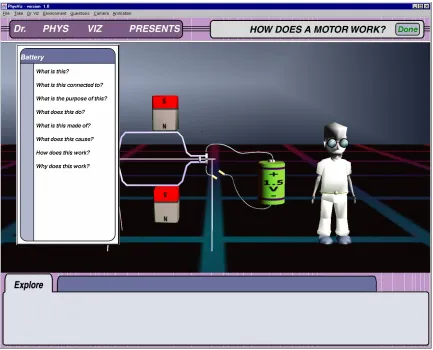
Figure 1.1 - PhysViz interface after the student clicked on the battery.
1.3 Steve Overview
The Steve project at the University of Southern California creates an
apprenticeship relationship with the user with the use of an animated pedagogical agent in a virtual reality environment. In this project, the student is immersed in the three-dimensional learning environment with the use of a head-mounted display. The view in the head-mounted display is updated as the student moves around the virtual
environment. The head-mounted display also provides Steve with information of the location of the student and the direction the student is facing. This allows Steve to use gestures and gaze to help direct the student’s attention to the relevant objects (Rickel, 1999). Through an apprenticeship relationship, Steve can teach a student how to perform a procedural task. One application of this project is to train Navy personnel on the
Chapter 2
Analysis
2.1 Overview
This chapter is intended primarily for the architects of the learning environment’s interface. It reviews some common characteristics that have led to the creation of
successful three-dimensional interfaces. The four characteristics that are discussed are spatial relationship of objects, maintaining the student’s attention, making a realistic environment, and the display of data. These characteristics were chosen for this thesis because they can be particularity helpful in creating a successful learning environment. If a learning environment has one or more of these characteristics, then it may be
appropriate to develop a three-dimensional interface for that application.
2.2 Spatial Relationship of Objects
the student to see. If the model were only in two-dimensions, the student may be unclear about the alignment of the magnets and the wire coil that rotates between them. Concepts such as these are very important for the overall understanding of how a motor works.
Figure 2.1: The three-dimensional interface helps convey the spatial relationship of the world.
Furthermore, the three-dimensional model can display objects that cannot be seen. Entities such as the magnetic field can be seen and modeled in such a way to let the student know that they are not visible in the real world. One way of letting the student know that these objects are abstract is by making the objects partially transparent. By viewing these objects in the model, we allow the student to see the spatial relationship between the visible objects and invisible forces that effect the operation of the motor. This point also illustrates a benefit of using a computer model over a real motor. When using a physical motor for teaching purposes, magnetic forces and electrical flow must be explained; in contrast, when using a three-dimensional diagrammatic model, an
If an application will also include animations of the objects in the
three-dimensional world, then another dimension may help convey the movements of objects. For example, the rotation of objects, such as the rotation of a wire coil in a motor, can accurately be displayed without any ambiguity about how the object is moving. If the rotation of a wire coil is animated with a two-dimensional interface, then it may appear that the movement of the coil is happening within a plane, so the student might think that the sides of the coil is getting closer and further apart. However, with a
three-dimensional interface, the student would clearly see that the object is rotating and, with the help of some simple navigation, can see the animation from several different viewpoints.
There are also other applications that can benefit from the use of spatial relationship in three-dimensions. Computer aided design (CAD) applications also heavily relied on the ability of the three-dimensional interface to show the spatial
relationship between objects in a model. The location of the features of an object can be very useful to manufacturing engineers that are creating processes for manufacturing the object in the CAD drawing. The three-dimensional objects not only help designers insure that they created the correct model, but also help others that need to obtain a better
2.3 Maintaining the Student’s Attention
Three-dimensional interfaces can be used to attract and maintain the attention of the student. The additional dimension adds to the visual richness of the interface and can attract the student’s attention. This can be especially important in applications where the students are children or individuals that suffer from short attention spans which many times is the case when dealing with learning environments. One potential problem with this characteristic is that as three-dimensional interfaces become more common, the novelty of three-dimensional graphics may wear off. This characteristic can become especially important in a system were an animated agent is being used. By having another dimension, it gives the animators another dimension to make the agent more entertaining and lifelike.
2.4 Realistic Environments
Realistic environments have been used extensively in the gaming community. The additional of the third dimension greatly helps to add realism to applications. This enables users to feel, for example, that they are actually driving in a racing game and more like they are engaged in battle during a fighting game. We are surrounded daily by a three-dimensional world. It is very difficult to create a two-dimensional interface that simulates the natural world. If an application is trying to simulate the real world and have students engaged in this world, then a three-dimensional interface would be useful in that application.
There have been cases where trying to create a realistic environment has not turned out as well as expected. The Microsoft Bob project was one of these cases
(Newman, 1999). The Microsoft Bob project was a three-dimensional operating system. One problem with this project was caused by navigation. The user would need to
navigate the virtual environment to gather information that they were searching for. After using Microsoft Bob everyday for a while, the novelty of the three-dimensional world wore off. The user may not want to be forced to navigate through the world to check their email everyday. One solution to this problem is to have a two-dimensional tool kit that is always accessible to the user.
world. In the case of the PhysViz project, the electric motor is something that most individuals can visualize. However, it may be much more difficult to visualize an operating system: there are typically icons and windows that come to mind, but this is merely an abstraction of the underlying operating system activities. If an application designer is trying to recreate a metaphor as a realistic environment, he must make sure that the metaphor provides a clear representation of the original objects.
2.5 Data Representation
A three-dimensional interface can be very useful in the display of data that has three variables. With the addition of textures and color, a graph can represent data that has many different variables (Healey, 1999). This could be helpful if the learning environment was teaching a lesson in science or math. Also, the learning environment could allow the student to navigate the three-dimensional display of data, thus enabling the student to gain greater insight about the meaning of the data.
2.6 Conclusion
include any of these characteristics, then it may be preferable to use only a
Chapter 3
Design - Interaction Metaphors
3.1 Overview
This chapter will explore four different modes of interaction metaphors. The modes of interaction metaphors are not application-specific, but are more concerned with the overall relationship between the user and the interface (Hutchins, 1989). The four modes of interaction metaphor are:
• Conversation metaphor: Attempts to recreate human-human interaction using a
symbolic interface language.
• Declaration metaphor: Also uses a symbolic interface language, but the user acts as
a “magician” where whatever he declares happens.
• Model-world metaphor: Consists of a model-world that facilitates the interaction
through direct manipulation.
• Collaborative manipulation metaphor: Combination of conversation and
model-world metaphors. The user interacts with a model-model-world and communicates with an agent that can also manipulate the model-world.
the PhysViz project, we initially used the conversation metaphor. The final iteration of PhysViz will use the collaborative manipulation metaphor.
When examining these metaphors in a three-dimensional context, we did need to modify the definition of the first two metaphors. The conversation and declaration metaphors do not require the world to be explicitly represented in the interface.
However, because we are discussing these metaphors in relation to a three-dimensional interface, we must have an explicitly represented world. The way that we modified the two metaphors is by introducing the restriction that all interaction must be accomplished through a symbolic interface language. For these two metaphors, the model world would only be used to respond to the user’s actions, not to execute the user’s actions.
3.2 Conversation Metaphor
The conversation metaphor attempts to recreate human-human interaction. The student is conversing with an interface intermediary, which causes operations to occur in the world. This metaphor is able to take advantage of symbolic reference. However, usually the vocabulary and language syntax are very constraining and the members of the conversation cannot repair the other’s errors (Hutchins, 1989).
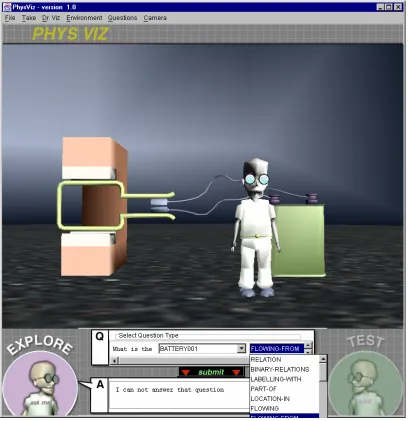
contained the possible objects and actions that could be included in the question. After the student set the combo boxes to the sequence of words that they wanted then they would submit the question to the interface intermediary. If the sentence were a valid question then the answer would be given. Otherwise, the student was told that their question could not be answered.
Figure 3.1 - PhysViz interface that used the conversation mode of interaction metaphor. The "sentence builder" can be seen at the bottom of the screen capture.
There are two ways in which the operation of creating the sentence can be handled. One is to give the user total control of the order in which the combo boxes are chosen. This is problematic because the user has a very difficult time of creating a valid sentence. Even simple questions can be asked in many different ways. Therefore, when the student creates a question, then it is very easy to create a reasonable question that cannot be answered in the format. However, it may be an answerable question if the question was phrased differently. This problem can be overcome by including more intelligence for natural language understanding into the system, but this can be very challenging.
The other way of creating a sentence would be force the student to create the sentence by selecting words from the combo boxes from left to right. After the student chose a word for the first combo box, then the second combo box would only contain words that would lead to a valid question. One problem with this technique is that if the student makes an incorrect decision on the word choice in an earlier combo box, then the object they want to refer may not be available in a later combo box.
techniques are further developed. With our application we wanted to make the interface language syntax as simple as possible because we wanted to teach physics and not spend excessive time teaching the language syntax. If the application was being used on a daily basis, then it may have been productive to spend more time teaching an interface
language. A complex interface language is a problem with learning environments because many times once a student completes a lesson or a suite of lessons they will not necessarily use the system again.
There is also an additional consideration when using a conversation metaphor with a three-dimensional interface. Since the conversation metaphor is based on symbolic reference, the student must know the name of any object that needs to be referenced. This can be accomplished with text labels, but this may deter from the overall effectiveness of the interface. By having text labels, it could detract from the realism that is being created in the three-dimensional world. If the text labels are always present, then it may also cause the world to appear cluttered in a complex world.
After exploring the conversation metaphor, we realized that we needed to explore a metaphor were we could take advantage of interacting with three-dimensional world. All future iterations of the interface took advantage of direct manipulation of the three-dimensional world. The last two metaphors, model-world and collaborative
3.3 Declaration Metaphor
The declaration metaphor is one in which whatever the student declares must happen. The student acts as a “magician” who can do anything he wishes. If the world creates error messages, then this can be harmful in maintaining this metaphor. Therefore, in other to maintain the metaphor, anything that can be said must be able to be done. If an action cannot be done, then nothing happens. To contrast this metaphor with the conversation metaphor, the declaration metaphor acts as though the student is acting directly with the system objects. But in the conversation metaphor, the student is interacting with an interface intermediary, which performs the actions on the system objects if possible (Hutchins, 1989).
Of the four metaphors discussed in this chapter, the declaration metaphor is the least useful when designing a learning environment. Using the declaration metaphor, the student may make a declaration that does not make sense with regard to the three-
dimensional world. Thus, confusing the student when the expected results do not happen. This may prevent the student from making the most out of the learning experience. This metaphor also does not take advantage of the model-world concept that is seen in the next metaphor. One example of the student becoming frustrated with this is when he is
attempting to navigate through the three-dimensional world. If the student could not longer proceed in one direction, the interface could not give the student an error message.
3.4 Model-World Metaphor
This is the first metaphor that Hutchins discusses that takes advantage of interacting with the three-dimensional world. This metaphor and the collaborative manipulation metaphor use direct manipulation (Schneiderman, 1982). This allows the student to perform actions on the world’s objects rather than create commands in a symbolic interface language. This helps reduce the amount of time needed to learn to use the interface.
There are two requirements of the model-world interface. The interface language must be composed of actions, rather than symbols (as seen in the previous two
metaphors) that have an effect on the world. Also, this metaphor is similar to the
declaration metaphor in that there must not be an interface expression that in not possible to perform. This metaphor behaves as though the student is directly manipulating the objects in the world. There is no intermediary interface that the student needs to go through and there is not another agent that is affecting the world of action (Hutchins, 1989).
in the world. If the agent could exhibit some intelligent behavior, then it would be able to communicate with the student and also cause actions on the world. This leads us to the future iteration of the PhysViz interface and to the next metaphor.
3.5 Collaborative Manipulation Metaphor
This metaphor combines the conversation and the model-world metaphors. The interface contains a world of action that the student directly manipulates. There is also an intelligent agent that can communicate with the student and also make changes to the world of action (Hutchins, 1989). The agent and the model-world are currently in place in the PhysViz interface, but the agent cannot currently make modifications to the three-dimensional world. A pedagogical planner that will control the actions of the agent is under development. The planner will control the actions of the agent and determine when suggestions should be given to the student and when actions should be performed on the world.
This metaphor takes advantage of the symbolic reference from the conversation metaphor and the model-world from the model-world metaphor. This type of multimedia presentation uses both visual and auditory information for the student. Multimedia researchers frequently make the assumption that the visual channel and the auditory channel used in combination can communicate most effectively. If a learning
these channels has a limited capacity on the amount of information that can be carried through them. From gathering information from both of these channels, the students will be able to build a better mental model of the learning environment and therefore gain more knowledge from the learning experience (Mayer, 2001).
3.6 Conclusions
This chapter has summarized the four metaphors from (Hutchins, 1989) and showed their relevance to a learning environment with a three-dimensional interface. This section will give suggestions on which metaphor someone should use for their learning environment. The conversation and declaration metaphors do not take full advantage of a three-dimensional interface. The symbolic reference that these metaphors use does not take advantage of the ability to directly manipulate the objects in the three-dimensional world. Symbolic reference is very powerful and is very familiar to students because we use it everyday when speaking to one another, but employing natural
language into an interface can be very tricky. As natural language understanding and generation develop they will play a bigger role for interfaces of learning environments in the future.
The conversation metaphor may be helpful with a learning environment that is used to represent data in a three-dimensional graph. Direct manipulation may be
manipulation available to the student, they will look for other ways to modify the data other than changing it directly.
For most learning environments, the last two metaphors, model-world and collaborative manipulation, will be most helpful when using a three-dimensional
interface. The amount of experience that the student has with an interface may also affect the metaphor used. If the application were going to be constantly exposed to new
students, it would be better to employ the collaborative manipulation metaphor. The intelligent agent in the metaphor would assist the student along to reduce the time needed to learn how to use the interface. This is especially relevant for the PhysViz project. Since the application is going to be used by students to teach physics concepts, there will be a new group of students every semester or every school year. We wanted to reduce the amount of time needed to learn to use the interface and move on to the task at hand, to teach the physics concepts.
For an interface that is used on a daily basis, then a model-world metaphor may be the best. The student may require more time to learn the interface, but there will be no risk that the intelligent agent will make the wrong decision and confuse the student. There is also the possibility to use an interface that starts with a collaborative
This chapter has discussed the four different modes of interaction metaphor from (Hutchins, 1989) and how they can be used in a three-dimensional interface for a learning environment. We have discussed the overall relationship between the student and the interface. But, we have not yet discussed the interaction between the student and
Chapter 4
Design - Affordances
4.1 Overview
This chapter discusses the theory of affordances, which was introduced by James J. Gibson, as it relates to three-dimensional interfaces. There are several different viewpoints of affordances. The different viewpoints of an affordance are summarized in (St. Amant, 1999). This chapter will only discuss the core ideas of an affordance that are common to all interpretations of an affordance.
An affordance consists of the characteristics of an object that enable someone to know the use of that object. For example, an object that has a horizontal rigid surface at about knee height affords a place to sit. Affordances can be detected through any of the student’s senses. Whether an affordance is perceived or not, is not only dependent on the individual’s perception of the object, but also his self-perception (Gibson, J., 1979). The perceived relationship between the individual and the affording object is essential to the ability of the affordance to be perceived. Therefore, this chapter discusses issues dealing with the self-perception of the student and the perception of the objects.
4.2 Self-Perception of the Student
The notion of self-perception is very important to the concept of an affordance. In order for an affordance to be realized, “an animal (user) must take into account the environmental resources presented in relation to the capabilities and dimensions of its own body” (Gibson, E., 2000). This leads to two questions:
• What is the self-perception of the student when interacting with a
three-dimensional interface?
• Can the self-perception of the student be altered?
It would not always be practical to design the interface so that all of the objects appear to have the same dimensions as the corresponding real world objects. The screen would quickly become clustered. Many times it would be helpful to reduce the size of the student’s self-perception so more things can fit on the screen at once. To help the student distance himself from his own self-perception, the interface can include a projection of the student in the interface. The mouse pointer in a two-dimensional interface can be perceived as the student’s fingertip. In (Venolia, 1993), a
This mouse pointer helps the student project their self into the three-dimension interface, but it does not affect the student’s sense of dimension. One way of adjusting the student’s sense of scale is by having an agent be the projection of the student in the world. In order for the student to realize that the agent is acting as the student, the student must be able to control the actions of the agent. The student’s self perception can be altered by having the student interact with the world through an agent of the proper scale. This agent may not be a projection of the student’s entire body. A
projection of the student’s hand may give enough information of the scaling of the world for the student to perceive the affordances in the world.
This leads to the question of “What is a reasonable range of an object’s size?” The reasonable range of the object’s size depends on what the object is. Each object may have different scaling requirements in order to maximize the number of people that perceive the affordance. For example, individuals may have stricter requirements for a chair that affords a place to sit, than a hammer that affords a tool used for hitting. If interface designers can find the reasonable range for an object’s scale, then they can aim for the center of the scale. Therefore, if the student perceived the environment to be of slightly different scale, then the affordance of the object would most likely be perceived.
The world’s consistency is another characteristic of an user interface that is important when considering affordances. The consistency of the world can be affected by a number of different attributes, such as realism, scaling, or coloring of the world’s objects. Anything out of the ordinary can draw the student’s attention to that object. For example, if one object is much more realistic then the rest of the world, then that may afford that the object is special in some way. This may or may not be a good thing. If the object is critical for the understanding of the learning environment’s lesson, then you may want to make the object stand out. Otherwise, if the object is just part of the
background, you would want to maintain consistency in order to not distract the student.
the affordance possible are depicted in the object then the student should perceive the affordance. Therefore, it is critical for interface designers of learning environments to be aware of these affordances and not clutter their user interfaces with unnecessary details that may distract the student and prevent an affordance from being perceived.
4.3 Perception of World Objects
If the interface designers want to recreate an affordance from a three-dimensional real-world object, then the use of a three-dimensional interface would make it easier to perceive the affordance. The interface designers need to be aware of the different perspectives that the objects can be perceived. For example, if a designer wants to recreate the affordance of a button in a three-dimensional world, then she needs to be concerned with the different perspectives that the button can be seen. If the button is seen from the side then the affordance may not be able to be perceived by the student.
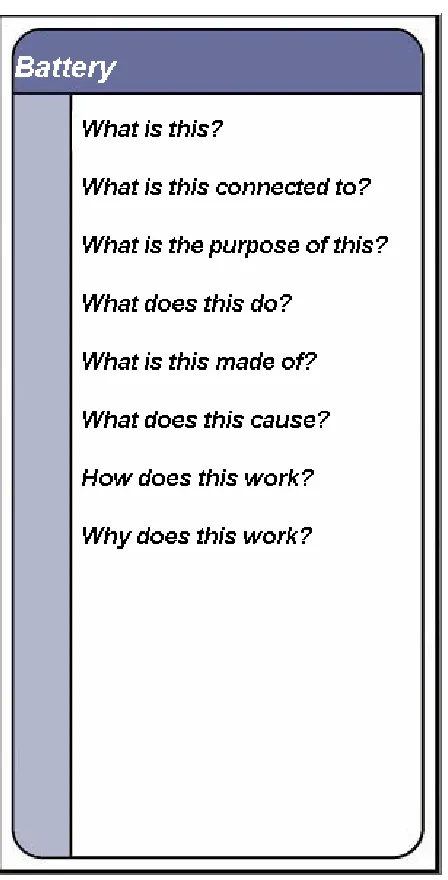
Sequential affordances can be very beneficial in an educational application. An example of using sequential affordances in a learning environment would comprise of an object lighting up when the mouse pointer rolls over it. The student could perceive that an action could be performed on the object. Therefore, the action of clicking would be a natural choice. Unfortunately, the computing resources of calculating a mouse rollover in a three-dimensional world was too great for us to efficiently implement in PhysViz. Once an object has been selected another visual cue could afford that the object is selected. In PhysViz, we gave the object a greenish glow. Once an object is selected a menu of options would be presented to the student that also affords “can be clicked.”
4.4 Conclusion
There are several characteristics that can help make affordances easier to be perceived by the student. The three characteristics that we have talked about in this chapter are scale, consistency of the world, and realism. We propose there is an acceptable range in which the object’s scale can be perceived and the majority of student’s would still perceive the affordance. This is particularity important for
interfaces that do not have a projection of the student because different individuals may perceive the scale differently. Individuals may center their sense of scale on different objects. Some students may place more importance on the more realist objects, while others may center their scale on what they relate to most. There are other factors that affect the student’s ability to perceive an affordance.
The third characteristic, realism, would play a lesser role than the object’s scale or the world’s consistency when trying to convey an affordance in a learning environment. A simple drawing can be very effective at conveying an affordance. As long as an object has the key characteristics that are essential for the affordance then a great deal of detail isn’t needed for the affordance to be perceived. Therefore, interface designers of learning environments must be careful to discover those key characteristics that make an
affordance possible. When designing the affording object, the designer must make sure those characteristics are clear and not cluttered with too many unnecessary details that may distract from the affordance.
This chapter also explored the idea of sequential affordances. This allows students to discover another affordance after acting on an initial affordance. This can be a very powerful tool when designing a learning environment. The sequential affordances can help lead the student from one part of a lesson to the next. It can help make sure that a critical concept is presented before other material is presented that depends on that concept.
objects were “clickable”. An example of a non-visual affordance is that of feeling the edge of a knife and affording that it can be used for cutting. We decided to use a “touching” affordance to show that the objects were “clickable”. When the student would “touch” an object, move the mouse over it, then the object or mouse pointer would change to afford that you could click on it. This technique would require the use of continuous picking. Java3D does not provide utilities for continuous picking. It is not available because it can severely hinder the performance of the application (Barrilleaux, 2000).
For every mouse movement, the application must check if the mouse pointer moved over an object. This constant checking can cause a drastic deterioration of
performance, especially in an application where many things are happening at once, such as in PhysViz. Therefore, continuous picking was not implemented and a less complex method was chosen, discrete picking. Discrete picking only checks if the mouse pointer is over an object when a discrete event, a mouse click, occurs. This may not seem like an affordance because the affordance is not perceived until after the afforded action occurs. Therefore, the affordance should be taught to the student during the introduction of the application. Once the affordance has been learned then the student easily perceives it. The idea of teaching affordances is not an unusual one. As children, we all learned what many objects afford.
interfaces, the student’s self-perception does not change and if it does change, then there must be a projection of the student in the interface. Therefore, the interface designers do not have to guess what the student’s self-perception is. Also, two-dimensional interface objects are perceived to be in the same plane. This removes all ambiguities of the
relative sizing of the different interface objects. The three-dimensional interface may add to the complexities of affordances, but it also adds a great deal to the power of
affordances. In three-dimensions, the interface designers can design affordances that are easier to perceive because they are more similar to their real-world equivalents.
Providing the student with a projection into the three-dimensional world can alter their self-perception. This can be done using the mouse pointer that is the projection of the student’s finger into the three-dimensional world. This is the approach used in the PhysViz project. The students could explore the model of the motor using their virtual fingertip. Without the use of a more elaborate projection of the student in the three-dimensional world, the self-projection of the student is difficult to modify. If there were an avatar in the world that represented the student, then the ability to change the student’s self-projection would be increased.
Chapter 5
Overall Design and Prototyping
5.1 Overview
This chapter reviews design issues that may be encountered when creating a three-dimensional interface. In the next section we discuss limitations of the graphics of the interface. These limitations may no longer be present as improvements occur with graphics hardware and software. Because of our experience with PhysViz, which is implemented in Java, most of these issues are discussed in relation to Java 3D. This chapter also discusses issues that arise due to navigation and camera control within a learning environment. In the final section, the display of text in a three-dimensional interface is discussed.
5.2 Graphics Implementation Limitations
AWT APIs. This makes the handling of events a bit more cumbersome. It is expected that this limitation will be overcome with future releases of the Java3D API.
For PhysViz, we use a combination of lightweight and heavyweight components for our interface. The Java Virtual Machine renders the lightweight components while the control over rendering for the heavyweight components is given to the hardware. The combination of lightweight and heavyweight components can be perplexing. The
lightweight components cannot overlap any heavyweight components. Since, the heavyweight components are rendered by the hardware, it has precedence and will be rendered on top of the lightweight component. Since the three-dimensional canvas that Java3D uses is a heavyweight component, implementers must make any popup menu that appears over the canvas a heavyweight component as well (Barilleaux, 2001).
Figure 5.1 - Popup window is given a border to make it appear as if it has rounded edges.
5.3 Navigation and Camera Control
time; the second is where the student is moving through the world. For the PhysViz project, we choose to keep the student in the same vicinity the entire time. We want to prevent the student from wandering off and being distracted from the pedagogical objective of the application. At all times, the virtual “camera” is directed at the center of the world and the student can rotate 360 degrees around the model. We also keep the degrees of freedom of the camera to a minimum; we allow the student to have only one degree of freedom—he is only allowed to move the camera along a circular horizontal path. The movement of the camera could also be controlled by the application. This can be useful when the learning environment wants to direct the student’s attention to a particular part of the world. By taking control of the camera, the learning environment can be certain that the student saw the critical part of the lesson.
If the three-dimensional world cannot be displayed on the screen at once, then this forces the student to move through the world. It is suggested that designers keep the number of degrees of freedom to a minimum to help prevent the student from becoming disoriented. This recommendation may need to be violated in applications were the user becoming disoriented is part of the application, e.g., gaming applications in which the user navigates through the world searching for another user or an object. For learning environments this can be frustrating and can waste the time of the student.
environment (Rickel, 1999). Motion tracking sensors could keep track of the student and update the student’s view in the head mounted display. Steve also had the benefit of knowing the field of view of the student. Therefore, Steve could redirect the student’s attention if the student is not looking in the correct direction for the lesson (Rickel, 1997).
5.4 Display of Text
When displaying text in a three-dimensional world, orientation issues are the biggest concern. Normally when reading text in the real world, the text plane is perpendicular, or nearly perpendicular, to the reader’s line of sight. If the text plane is not perpendicular to the line of sight, it may be cumbersome, if not impossible, for the student to read the information. Therefore, if text is being displayed in the
three-dimensional interface, the interface designers may want to use a technique called display facing. The display facing technique always orients the text to be in the same plane as
the display (Barrilleaux, 2000). Using this technique will ensure that the student will always be able to read to text.
well from a technical perspective, but this raises design issues. The interface designers must be concerned with the integration of the two-dimensional and three-dimensional areas. For the PhysViz interface, the interface designers chose to give the
two-dimensional area a rounded look to complement the mostly rounded three-two-dimensional objects. These rounded areas can be seen in Figure 5.1.
5.5 Conclusions
This chapter presented some of the major issues that were encountered during the prototyping and design phases of the PhysViz project. Many times these types of issues cause the interface developers to explore several iterations of interfaces. However, if the core design of the interface, i.e., the plan for the interaction metaphor and affordances, are well thought out, then it may prevent the developers from having to start from scratch. The issues that are discussed in this chapter will probably not force the developers to start over, but may cause them to redesign part of the interface.
the view of the student can be tracked and the student could be redirected if they become distracted during the lesson (Rickel, 1997).
Chapter 6
Evaluation
6.1 Overview
There are five different types of evaluation that can be conducted: observing and monitoring usage, collecting users’ opinions, experiments and benchmarking, interpretive evaluation, and predictive evaluation (Preece, 1994). In observing and monitoring usage, the student’s actions are recorded and then are analyzed. A survey is performed with a questionnaire or interview when collecting students’ opinions. Experiments and benchmarking generally measure the time for task completion. During interpretive evaluation, students are observed in their natural environments and an informal
evaluation of the interface is conducted. For predictive evaluation, the designers try to predict what problems the student is going to have. For all of these types of evaluation techniques, the process of evaluating a three-dimensional interface is not any different than for a two-dimensional interface. This chapter presents a procedure for evaluating a three-dimensional interface.
but for a set of applications that share characteristics. StEP(3D) is the standardized evaluation plan for three-dimensional interfaces. In the next section, a description of the StEP(3D) will be provided. Then, in the third section, we recommend some additional considerations that should be introduced into StEP(3D) when evaluating a learning environment.
6.2 StEP(3D)
For StEP(3D), the evaluation is conducted by having users perform tasks with the interface and timing them to see how much time elapses. Then, after the user is finished interacting with the interface, they are given an evaluation form to complete to obtain feedback about the interface. StEP(3D) attempts to create a set of functionality that are common to three-dimensional interfaces that should be evaluated. The functions that are evaluated are moving, sizing, rotating, and creating an object, and changing the user’s viewpoint (Grissom, 1995).
In the PhysViz interface, the only functionality that can be evaluated using StEP(3D) is that of changing the user’s viewpoint. The other functions that are evaluated
6.3 Additions to StEP(3D)
Our recommendation for the set of functionality that should be evaluated for learning environments can be grouped in the following four categories:
• Object manipulation (Currently being evaluated by StEP(3D).)
• Navigation (Currently being evaluated by StEP(3D).)
• Integration of two-dimensional and three-dimensional interface areas.
• The interface’s ability to exhibit the relevant characteristics from Chapter
Two - Analysis.
StEP(3D) currently evaluates the functionality of the first two categories. But, the
last two categories are not evaluated. StEP(3D) did not include the last two categories because the developers of StEP(3D) wanted to only include evaluations that would be common to three-dimensional interfaces. But, the additional two categories are common to learning environment interfaces.
ability to traverse from the two-dimensional area to the three-dimensional area and vice versa.
The last category, the interface’s ability to exhibit the relevant characteristics from the Analysis chapter, is also a common aspect to evaluate for three-dimensional interfaces of learning environments. If the developers are creating a three-dimensional interface, then the interface must have some characteristics that lead to the design of a three-dimensional interface, as opposed to a two-dimensional one. Therefore, the evaluators should evaluate the three-dimensional interface’s ability to exhibit those relevant characteristics.
6.4 Conclusions
StEP(3D) provides an excellent starting point for the development of a standard
evaluation plan for three-dimensional interfaces, but if the evaluation criteria is
broadened then it would be much more helpful to learning environment developers. The modified version of StEP(3D) would be much more powerful for the evaluation of PhysViz. The evaluators could not only evaluate the navigation abilities of PhysViz, but also the integration of the two-dimensional and three-dimensional interface area. During the modified standard evaluation plan we could determine the effectiveness of PhysViz at displaying the three characteristics, to show spatial relationships, maintaining the
Chapter 7
Conclusions & Future Work
7.1 Conclusions
This thesis has examined each of the phases of an interface development cycle and investigated the different issues involved in developing a three-dimensional interface for a learning environment. Three-dimensional interfaces can greatly enhance the
pedagogical effectiveness of a learning environment interface. However, not all learning environments may be suited to three-dimensional interfaces. Chapter Two’s goal was to give the reader a set of characteristics that may lead to the development of a three-dimensional interface.
The next chapter, Design – Interaction Metaphors, explored four modes of
After discussing the overall interaction of the learning environment and the student, the next chapter, Design – Affordances, explored the interaction of the student and individual objects in the model-world. The chapter explained how the use of affordances could be very helpful to the student in determining the actions that can be performed with the world’s objects. The chapter explained that whether an affordance was perceived depends on the student’s self-perception and perception of the object. We explored what the student’s self-perception was when interacting with a
three-dimensional interface and how to modify the student’s self-perception.
The Overall Design and Prototyping chapter discussed problems that we
encountered while developing the interface for PhysViz. The graphics limitations were discussed and how the interface designers went about working around these limitations. Then we discussed how limiting the degrees of freedom of navigation in a
three-dimensional world might help the student from getting disoriented. The last issue investigated was the use of text within a three-dimensional learning environment.
The standard evaluation plan (StEP) for three-dimensional interfaces was
7.2 Future Work
The study of three-dimensional interfaces for learning environments is in its infancy. There are numerous issues that still require more development before we will know the best way to address them. As there are more projects using three-dimensional interfaces, we will discover what works well for the interfaces and what does not. However, by laying a firm foundation for the development of three-dimensional interfaces we can avoid significant failures during this learning period.
This thesis has dealt with the “output” (i.e., display) side of the three-dimensional interface. There is an also much work that is being done in the “input” side of the three-dimensional interface. New input devices are being developed to make the interaction with a three-dimensional interface easier. For example, (Gregory, 2000) describes a new haptic input device to help with the coloring of three-dimensional models. This device gives users force feedback when they touch the surface of an object in the world: the users can feel when they are touching the surface of the three-dimensional model that is being displayed. Future work needs to be done on the relationship between development issues of a three-dimensional interface and new input devices that are better suited for interaction with a three-dimensional interface.
the student to wear an additional piece of hardware. There has been evidence that users may be able to perform tasks faster using a head-mounted display rather than a stationary display (Pausch, 1993). It is likely that head-mounted displays will become more popular and a source of further research.
Bibliography
Barrilleaux, J. (2000). 3D User Interfaces with Java3D. Greenwich: Manning Publication Co.
Boyd, C. (1995) Human and machine dimensions of 3D interfaces for virtual
environments; Conference companion on Human factors in computing systems, Pages 135 – 136
Cockburn, A. & McKenzie, B. (2001) 3D or not 3D? Evaluating the Effect of the Third Dimension in a Document Management System. SIGCHI, Seattle, WA
Gaver, W. W. (1991). Technology affordances. In Proceedings of CHI, ACM, New York, pp. 79-84.
Gentner, D., Nielson, J. (1996) The Anti-Mac Interface. Communications of the ACM, v. 39, n. 8, Aug. 1996.
Gibson, J. (1979). The Ecological Approach to Visual Perception. Boston, MA: Houghton Mifflin Company.
Gregory, A., Ehmann, S. and Lin, M.C. (2000) inTouch: Interactive Multiresolution Modeling and 3D Painting with a Haptic Interface. In the Proceedings of IEEE Virtual Reality Conference 2000.
Grissom, S. B & Perlman, G. (1995) StEP(3D): a standardized evaluation plan for three-dimensional interaction techniques. International Journal of Human-Computer Studies, 43, 15-41.
Healey, C.G. & Enns, J.T. (1999) Large Datasets at a Glance: Combining Textures and Colors in Scientific Visualization. IEEE Transactions on Visualization and Computer Graphics 5, 2, 145-167
Hix, D. & Hartson, H.R. (1993) Developing User Interfaces: Ensuring Usability Through Product & Process. New York, NY: John Wiley.
Lester, J., Converse, S., Kahler, S., Barlow, T., Stone, B., and Bhogal, R. (1997) The Persona Effect: Affective Impact of Animated Pedagogical Agents. Proceedings of CHI '97, pp. 359-366, Atlanta, March 1997.
Mayer, R. (2001). Multi-Media Learning Cambridge, UK: Cambridge University Press.
Mullet, K. (1995) 3D or not 3D: more is better or less is more? (panel session);
Conference companion on Human factors in computing systems, 1995, Pages 174
– 175
Nadeau, D., Grantham B., McCartney, C., Sowizral, M. and Sowizral, H. (1997) What 3D API for Java should I use and why? (panel); Proceedings of the 24th annual conference on Computer graphics & interactive techniques, Pages 452 - 453
Newman, M. (1999) Bob is dead; long live Bob; Post-Gazette.com
Norman, D. (1988) The Psychology of Everyday Things. BasicBooks – A Division of HarperCollinsPublishers
Rickel, J. & Johnson, W.L., Animated Agents for Procedural Training in Virtual Reality: Perception, Cognition, and Motor Control. Applied Artificial Intelligence 13: 343-382, 1999.
Rickel, J. & Johnson, W.L. (1997) Intelligent Tutoring in Virtual Reality: A Preliminary Report. Proceedings of Eighth World Conference on AI in Education, pp. 294-301, August 1997, IOS Press.
St. Amant, R. (1999) User interface affordances in a planning representation. Human-Computer Interaction, 14(3):317-354.
van Dam, A.. (1997) Post-WIMP User Interfaces. Communications of the ACM, 40(2), 1997, 63-67.