ISSN(Online): 2320-9801
ISSN (Print) : 2320-9798
I
nternational
J
ournal of
I
nnovative
R
esearch in
C
omputer
and
C
ommunication
E
ngineering
(An ISO 3297: 2007 Certified Organization)
Vol. 4, Issue 3, March 2016
Secured Graphical Authentication for
E-Learning
Trupti Bothara, Kanchan Kunjir, Komal More, Aruna Patil
B.E. Student, Dept. of Computer Engg., Savitribai Phule Pune University, India
ABSTRACT: Alternative solution to alphanumeric password is graphical password as it is difficult to remember alphanumeric password. When we provide user friendly authentication to any application it becomes easy to access that application. According to psychological studies human mind can easily memorize images than alphabets or digits. We are proposing a new concept in which cloud is secured by means of graphical image password. In this paper we are proposing a user defined algorithm & shoulder surfing attack removing technique. The algorithm is based on username & set of images.
KEYWORDS:Cloud Computing, Graphical Password, Shoulder Surfing Attack.
I.INTRODUCTION
Cloud Computing is a new technology in the IT industry which offers a business model to adopt various on demand resources and services. Cloud Computing provides three basic services they are Software, Platform and Infrastructure as a Service .Without any installation of software consumers can access their personal storage using internet access. This technology provide efficient centralize computation of data storage & processing. From the user point of view it is not secure and vulnerable to malicious attacks. It does not maintain all the data of clients securely and it is difficult to maintain data intact at the cloud server. For the authorization of the client there are several techniques text password, biometrics, token based, recognition based. The commonly used password technique is alphanumeric password which is not much secure authentication system because it is easy to crack it with the help of dictionary attack, timing attack, brute force etc. So, each and every techniques has some or the other drawbacks.
In our proposed scheme we are providing most secured scheme of user authentication using graphical password. The proposed system uses set of images to provide graphical password which depends on username calculation. According to the username calculation set of images is provided which are displayed for password selection. The main objective of this paper is to provide a graphical password as authentication scheme for the cloud and remove shoulder surfing attack.
OBJECTIVES:
The main objective of our work is to make a system in which only authorized user access the cloud. Security is primary objective of the cloud computing as the cloud stores the client’s sensitive data which can easily be accessed by cloud service provider. The Cloud Service Provider can easily modify the clients data. The client’s authorization is important which has to be considered mandatorily. Only use which are authorized can access the account if we have some strong authentication schemes. To get login model, secure login process is required to access the cloud. A new Graphical image as a Password scheme is introduced which can handle the security issues and new challenges in authentication. Here we are describing our work which is the solution to provide security to cloud in two ways-
First most to authenticate user connect with the services of cloud account.
Second one is prevent user from shoulder surfing attack by using color and number combination.
II. LITERATURE SURVEY
ISSN(Online): 2320-9801
ISSN (Print) : 2320-9798
I
nternational
J
ournal of
I
nnovative
R
esearch in
C
omputer
and
C
ommunication
E
ngineering
(An ISO 3297: 2007 Certified Organization)
Vol. 4, Issue 3, March 2016
1. Recognition Based Technique 2. Pure Recall Based Technique 3. Cued Recall Based Technique
1. Recognition Based Techniques:
In this techniques user is presented with a collection of image, icons or symbol. During authentication user select the set of candidate’s .Its Result is (90%) majority of user to remember the password after one or two months. Dhamija and Perrig proposed a graphical authentication scheme based on the Hash Visualization technique .In this system user have to select no of images from the set of images generated by the program.
2. Pure Recall-base Techniques:
In this method user reproduce their password without using any hint and gesture .user would remember their password just like DAS (1999) and Qualitative DAS (2007).It is provided With varying levels of usability and security features. It follows many algorithms, which include:
A] Pass doodle: -
This method is introduced in 1999. Pass doodle method is introduce by Christopher [2]. This is a graphical password which is made up of handwritten designs.
B] Syukri algorithm (pure recall):-
This method proposes a system where authentication is counted by having user drawing their signature using mouse in 2007.Advantage of this technique is that, guessing of any ones signature properly is not easy hence it is difficult to hack the system with this technique.
C] Qualitative DAS:
To overcome the drawbacks of DAS in 2007 QDAS [2] is introducing.
D] Draw a Secret:
It introduce in 1999.In this system user allow to draw a simple picture onto 2D grid. The rectangular grid consist of size G * G. Each cell in grid was denoted by discrete rectangular coordinates (x,y).
3. Cued Recall Based Techniques:
In this technique framework of reminder, gesture and hints are consider. Using this technique user reproduces their password or reproduction becomes more accurate. It follows many algorithms, which include:
A] Grid selection (pure recall):-
In 2004, Thorpe and Oorschot further studied by impact of password length and stroke count as complexity property of a DAS scheme.
B] Blonder Scheme (cued recall):-
This method was developed by Greg. E. Blonder. To begin with a determined image is presented to the user on a visual display and then the user have tap regions by pointing to one or more predefined locations on the image as a way of pointing out his or her authorization to access the resource. This method is secure since it has a million of different regions to pick from.
C] Pass point (cued recall):-
Pass point was design in order to cover the limitation of Blonder algorithm. In this method click point method is used.
III. PROBLEM IDENTIFICATION
The existing schemes for authentication over cloud suffers from many problems like-
Drawbacks of Existing Authentication System:
ISSN(Online): 2320-9801
ISSN (Print) : 2320-9798
I
nternational
J
ournal of
I
nnovative
R
esearch in
C
omputer
and
C
ommunication
E
ngineering
(An ISO 3297: 2007 Certified Organization)
Vol. 4, Issue 3, March 2016
IV. SYSTEMARCHITECTUREANDFLOWCHART
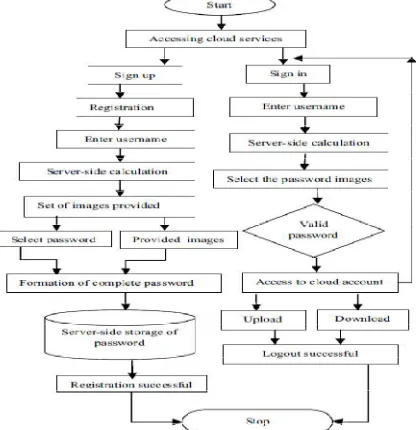
In the system architecture,we are having image database that is cloud storage(Dropbox),where 1-9 set of images are stored.The local database where the password of each user is saved.The password generation block represents the password formation process and the shoulder surfing attack prevention block represents prevention process.
Fig 1.System Architecture of the proposed system The flow chart describes the procedure of Graphical password authentication:
The user enters the username. Server checks whether the user name is present in database. If it is not present, then it displays the message as invalid username. If username is present it will display the screen of image password. Then user clicks the image password which is matched with images stored in database. If this is true it will display full image otherwise error message is displayed. Finally password is match and user is authenticated.
Here we describe the authentication steps:- 1.Cloud user request login page.
2.The server displays login screen.
3.Cloud user login with username and password.
4.The server checks if it is valid username and password by searching in database. 5.If user information not valid it displays error message.
6.Server displays graphical login screen, in which multiple images are showed. 7.The cloud user clicks his password image from multiple images.
8.Server checks whether image is valid by searching in database. If it is not valid, it displays error message else it displays the full image.
ISSN(Online): 2320-9801
ISSN (Print) : 2320-9798
I
nternational
J
ournal of
I
nnovative
R
esearch in
C
omputer
and
C
ommunication
E
ngineering
(An ISO 3297: 2007 Certified Organization)
Vol. 4, Issue 3, March 2016
V.PROPOSEDWORKPLAN
The proposed scheme for authentication consists of three phases, we are as below-
1. Registration phase-In this phase firstly user has to enter a unique username and all required details. On the
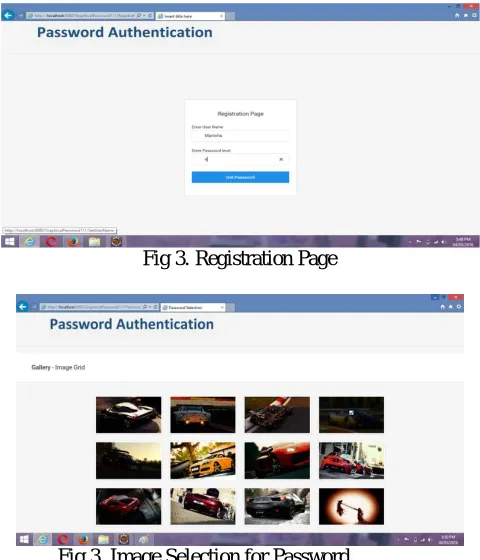
basis of username calculation a image set is presented to the user. These image set provided by the drop box which is server side. Drop box contains set of images for digits 1-9.User has to select atleast four images from the displayed images and two images will be provided by server. The calculation behind the image set which is to be provided to the user on the basis of username is explained below, if username entered is ABCD then the numbers assigned to ABCD as alphabetical position is taken into consideration for calculation. i.e. A=1, B=2, C=3,D=4 sum of that digit is 10.Hence the first digit of that answer is taken for further calculation i.e. 1 and set A is provided to user. Then you have to choose images as password and the names of images are saved in database with username and your graphical password is set. Finally you are registered.
Fig 3.Registration Page
Fig 3.Image Selection for Password
After selecting your images as a password,the server will provide to images and the random two images will be selected from your choosed images.Finally,password will be shown on the screen containing 4 images.At the time of login you have to select those four images only,then only you can access the application.
2. Login Phase- After registration user can login into his account by entering username & graphical password. If
ISSN(Online): 2320-9801
ISSN (Print) : 2320-9798
I
nternational
J
ournal of
I
nnovative
R
esearch in
C
omputer
and
C
ommunication
E
ngineering
(An ISO 3297: 2007 Certified Organization)
Vol. 4, Issue 3, March 2016
Fig 4.Login Page
3. Shoulder Surfing Attack Prevention-To prevent attacks and provide high level security we are providing shoulder
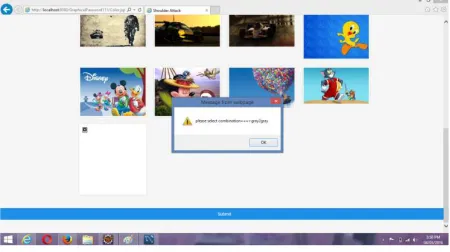
surfing attack prevention by using color number code combination. After entering username and selecting images one message will be shown every time you login.So that even if hackers try to attack they can’t, as unless and until you don’t set that color number code you can’t login successfully into your account. Basically providing two level Authentication.
The color number code is provided to the user on the screen but it is in encrypted form,the user has to add his level of password set at the time of registration to the middle number provided and then take %5 of the addition. Which is then used for setting the below shown lock system and shoulder surfing attack is prevented.
ISSN(Online): 2320-9801
ISSN (Print) : 2320-9798
I
nternational
J
ournal of
I
nnovative
R
esearch in
C
omputer
and
C
ommunication
E
ngineering
(An ISO 3297: 2007 Certified Organization)
Vol. 4, Issue 3, March 2016
VI.COMPARATIVESTUDY
VII. CONCLUSION
Thus we can say that graphical password authentication is much more secure and easy authentication system and can be used for providing security to cloud platform. This new scheme solves the many problems of existing system. The Shoulder surfing attack is also reduced using Graphical Password Authentication.Here we are providing this authentication to E-learning Portal.
ACKNOWLEDGEMENT
We would like to acknowledge and extend our heartfelt Gratitude to our guide prof. Suchita Wankhade and Prof. Rakhi Bhardwaj for encouragement and support.
REFERENCES
[1] Vijayshri D. Vaidya1 Department of Computer engineering SND COE & RC Yeola, India Imaran R. Shaikh2 Department of Computer engineering SND COE & RC Yeola, India,”Authentication Using Grid-Based Authentication Scheme and Graphical Password”,Volume 4, Issue 7, July 2015.
[2] Teshu Gaurav Singh1, Mr. Somesh Dewangan, Dhairya Kumar,”An Optimized Approach to Secure Password Graphical Images in Cloud Computing”,10-11 April 2015.
[3] Farnaz Towhidi, Imaran R. Shaikh,’’A Survey n Recognition-Based Graphical User Authentication Algorithms’’,Vol. 6, No. 2, 2009. [4] D.Aarthi, r.K.Elangovan,’’A Survey on Recall-Based Graphical User Authentic- ations Algorithms’’,Vol.2 Issue. 2, February- 2014. [5] Saranya Ramanan, Bindhu J S,’’A Survey on Different Graphical Password Authentication Techniques’’,Vol. 2, Issue 12, December 2014. [6] Susan Wiedenbeck,Jean-Camille Birget,’’Authentication Using Graphical Passwords: Effects of Tolerance and Image Choice’’, July 6, 2005.
[7] Kemal Bicakci, Mustafa Yuceel, Burak Erdeniz, Hakan Gurbaslar, Nart Bedin Atalay ,’’Graphical Passwords as Browser Extension: Implementation and Usability Study’’.
[8] Hai Tao,’’Pass-Go, a New Graphical Password Scheme, Ottawa’’,Canada, June, 2006.
[9] mar Zakaria, Toomaj Zangooei, Mohd Afizi Mohd Shukran,’’Enhancing Mixing Recognition-Based and Recall-Based Approach Graphical password Scheme’’,Volume4, Number15, September2012.
[10] Vijayshri D. Vaidya, Imaran R. Shaikh,’’Authentication Using Grid-Based Authentication Scheme and Graphical Password’’,Volume 4, Issue 7, July 2015 [11] Professor Sandeep Samleti, Chandan Kumar, Vijay Prakash, Nitin Kumar, Sunil Kumar,’’Shoulder Surfing Resistant Password Authentication Mechanism (Using