AT&T
2/12/93
PagePal
®
Copyright 1993, AT&T 0II722050-917
All Rights Resewed Issue 2, February 1993
Printed in U.S.A.
No Part of this publication may be reproduced in a retrieval system, or transmitted, in any form or by any means, electronic, mechanical, photocopying, recording, or otherwise, without the prior written permission of AT&T. The use of trademarks or other designations is for reference purposes only.
NOTICE
Every effort was made to ensure that the information in this manual was complete and accurate at the time of printing. However, information is subject to change.
COMPATIBILITY The AT&T PagePal®
is recommended for use with most AT&T telephone systems and commercial audio amplifiers used for public announcement.
WARRANTY INFORMATION
AT&T provides a limited warranty to this product. Refer to “Warranty Information” in Appendix A. ORDERING INFORMATION
To order an additional PagePal, use Part Number 722050-917. To order this document, order Part Number 0II722050-917.
PagePal is a registered trademark of HARRIS CORPORATION Dracon Division. CENTREX is a registered trademark of AT&T.
The Canadian equivalent of the RJ11C connector is CA11A. Where applicable, CA11A is to be understood for other references to RJ11 or JR11C in this manual
This product is UL Listed or CSA Certified.
“NOTICE: The Canadian Department of Communications label identifies certified equipment. This certification means that the equipment meets certain telecommunications network protective operational and safety requirements. the Department does not guarantee the equipment will operate to the user’s satisfaction.
“Before installing this equipment, users should ensure that it is permissible to be connected to the facilities of the local telecommunications company. The equipment must alSO be installed using an acceptable method of connection. In some cases, the company’s inside wiring associated with a singly line individual service may be extended by means of a certified connector assembly (telephone extension cord). The customer should be aware that compliance with the above conditions may not prevent degradation of service in some situations.
“Repairs to certified equipment should be made by an authorized Canadian maintenance facility designated by the supplier. Any repairs or alterations made by the user to this equipment, or equipment malfunctions, may give the telecommunications company cause to request the user to disconnect the equipment.
“USerS should ensure for their own protection that the electrical ground connections of the power utility, telephone lines and internal metallic water pipe system, if present, are connected together. This precaution may be particularly important in rural areas.
Caution: Users should not attempt tO make such connections themselves, should contact the appropriate electric
Contents
1
AT&T PagePal System Overview
1-1■ Description 1-2
■ Features 1-3
2
Installation
2-1■ Important Safety Instructions 2-2
■ General Information 2-4
■ Troubleshooting Guide 2-12
A
FCC Regulations and Warranty
A-1B
AT&T PagePal Functional Diagram
B-1AT&T PagePal
®System Overview
Descrption
has been designed to interface most KTS, Centrex®
) to virtually any public addition, PagePal furnishes inputs for The AT&T PagePal®
unit telephone systems (PBX, address audio system. In
customer provided background music and auxiliary inputs (such as an attendant microphone, a radio receiver, recorded
announcements, etc.) Control inputs are provided for tones generated
telephone inputs are
routed to a single output which will drive any type of audio equipment. PagePal can be placed on a desk or shelf, or mounted to a wall (see installation section).
by PagePal such as pre-announcement tones, access confirmation, siren, chime, and night bell. All automatically selected on a prioritized basis and
G S S A
LEVEL CONTROLS
L S DLAT&T MUSIC INPUT
ATTENDANT INPUT
MAIN
OUTPUT
PagePal
®
Features
The AT&T PagePal provides many useful features:
■ ■ ■ ■ ■ ■ ■ ■
Telephone Access from:
– Loop Start trunks – Ground Start trunks
Analog Station Lines, PBX or Centrex – Dry Loop page ports (4-wire).
Provides a point of clear demarcation between the telephone system and the audio system
FCC registered and UL Listed
Main output level control allows adjustment for commercial power amplifiers or consumer (home Hi-Fi) or specialized telephone paging amps
Level controls to set Attendant Input and Background Music, relative to telephone level
Balanced audio inputs and outputs eliminate hum and noise pick-up
High quality circuitry for low distortion and wide bandwidth
Simplified connections via modular telephone jack and Iugless terminal block
Inputs are routed to the output with the following priority (highest to lowest):
■ 1. 2. 3. 4. 5. 6.
Attendant Access for emergency and other important announcements
Alert Tone 1 (siren) for evacuation warning, etc.
Telephone Access for general purpose paging
Alert Tone 2 (chime) for time clock, door bell, security alert, etc.
Nightbell for incoming, after-hours calls to ring audibly over the public address system
Music input for background music
■
■
■
Call Confirmation and Pre-Announcement tones may be disabled
An optional contact closure output is provided to control auxiliary equipment (music/page switching, recorder logging, etc.)
Station access mode features:
1. VOX (Voice Operated Switch) controlled off-hook timer
2. Maximum length off-hook timer
3. Responds to forward disconnect (Calling Party Controlled Disconnect)
4. Dial tone detection and disconnect
Installation
Important Safety Instructions
When using your telephone equipment, basic safety
precautions should always be followed to reduce the risk of fire, electric shock and injury to persons, including the following:
1.
2.
3.
4.
5.
6.
7.
Read and understand all instructions.
Follow all warnings and instructions marked on the product.
Unplug this product from the wall outlet before cleaning. Do not use liquid cleaners or aerosol cleaners. Use a damp cloth for cleaning.
Do not use this product near water, for example, near a bath tub, wash bowl, kitchen sink, or laundry tub, in a wet basement, or near a swimming pool.
Do not place this product on an unstable cart, stand, or table. The product may fall, causing serious damage to the product.
Slots and openings in the cabinet and the back or
bottom are provided for ventilation, to protect the product from overheating. These openings must not be blocked or covered. The openings should never be blocked by placing the product on the bed, sofa, rug, or other similar surface. This product should never be placed near or over a radiator or heat register. This product should not be placed in a built-in installation unless proper
ventilation is provided.
8. 9. 10. 11. 12. 13. Do
WARNING:
RISK OF ELECTRICAL SHOCK —EQUIPMENT MUST BE PROPERLY GROUNDED. Your Harris equipment requires a properly grounded three-prong power receptacle for safe operation. Have the receptacle checked by a qualified electrician be-fore connecting this equipment. Do not cut or remove the third (ground) prong from the power transformer.
Do not use two-prong extension cords or adapters to defeat the safety features of this equipment. If you have a two-prong receptacle, it must be replaced with a three-prong receptacle, installed by a qualified elec-trician.
not allow anything to rest on the power cord. Do not locate this product where the cord will be abused by persons walking on it.
Do not overload wall outlets and extension cords as this can result in the risk of fire or electric shock.
Never push objects of any kind into this product through cabinet slots as they may touch dangerous voltage points or short out parts that could result in a risk of fire or electric shock. Never spill liquid of any kind on the product.
To reduce the risk of electric shock, do not disassemble this product, but take it to a qualified serviceman when service or repair work is required. Opening or removing covers may expose you to dangerous voltages or other risks. Incorrect reassembly can cause electric shock when the appliance is subsequently used.
Unplug this product from the wall outlet and refer servicing to qualified service personnel under the following conditions:
A. When the power supply cord or plug is damaged or frayed.
14.
15. C.
D.
E.
F .
If the product has been exposed to rain or water.
If the product does not operate normally by following the operating instructions. Adjust only those controls that are covered by the operating instructions.
Improper adjustment of other controls may result in damage and will often require extensive work by a qualified technician to restore the product to normal operation.
If the product has been dropped or the cabinet has been damaged.
If the product exhibits a distinct change in performance.
Avoid using a telephone (other than a cordless type) during an electrical storm. There may be a remote risk electric shock from lightning.
Do not use the telephone to report a gas leak in the vicinity of the leak.
SAVE THESE INSTRUCTIONS.
General Information
of
Please adhere to the following precautions:
1.
2.
3.
4.
Never install telephone wiring during a lightning storm.
Never install telephone jacks in wet locations unless the jack is specifically designed for wet locations.
Never touch uninsulated telephone wires or terminals unless the telephone line has been disconnected at the network interface.
Recorder Logging
A tape recording may be desirable for evidence to prove that certain announcements or warnings were made over the paging system. The normally open contacts
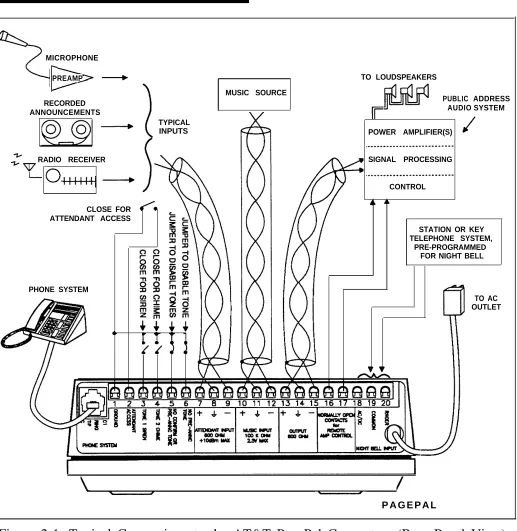
(terminals 16 & 17, see Figure 2-1) may be used to activate a tape recorder to record all tones and
announcements that were made, without the background music in between which would consume large amounts of tape.
Balanced to Unbalanced
The balanced inputs of the AT&T PagePal may be
driven by an unbalanced source. Simply connect the two wires to the + and – input terminals.
Unbalanced inputs to power amplifiers may be driven from the PagePal’s balanced output by connecting the PagePal ground (terminal 14, see Figure 2-1) to the input ground of the power amp, and the + or – output (terminal 13 and 15, see Figure 2-1) of PagePal to the “hot” input pin of the power amp. However, the output level will be 6dB less.
Connections
Modular Telephone
Jack
The PagePal provides four connectors on the unit’s back panel (see Figure 2-1). The following information describes each of the connectors and their function.
MICROPHONE
PREAMP
MUSIC SOURCE RECORDED
ANNOUNCEMENTS
POWER AMPLIFIER(S)
RADIO RECEIVER SIGNAL PROCESSING
CLOSE FOR ATTENDANT ACCESS
PHONE SYSTEM
TYPICAL INPUTS
TO LOUDSPEAKERS
CONTROL
PUBLIC AUDIO
ADDRESS SYSTEM
STATION OR KEY TELEPHONE SYSTEM,
PRE-PROGRAMMED FOR NIGHT BELL
P A G E P A L
TO AC OUTLET
Terminal Block
Connector
Table 2-1. AT&T PagePal J1 Modular Telephone Jack
Pin
Number Description
1 Not Used.
2 C1 control input for Dry Loop (Page Port) activation by closure (may also be used for Ground Start grounding point).
3 Ring (– polarity is important for Ground Start).
4 Tip (+ polarity is important for Ground Start).
5 C control input for Dry Loop (Page Port) activation by contact closure.
6 Not Used.
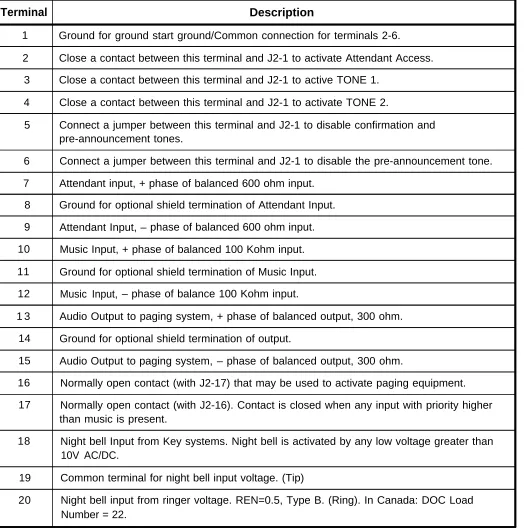
This is a 20 Pin lug less-type terminal block located at J2 (see Figure 2-1). See Table 2-2 for a contact descriptions.
Factory Test Connector
J3 - No user connectionsTable 2-2. AT&T PagePal J2 Terminal Block Connector
Terminal Description
1 Ground for ground start ground/Common connection for terminals 2-6.
2 Close a contact between this terminal and J2-1 to activate Attendant Access.
3 Close a contact between this terminal and J2-1 to active TONE 1.
4 Close a contact between this terminal and J2-1 to activate TONE 2.
5 Connect a jumper between this terminal and J2-1 to disable confirmation and pre-announcement tones.
6 Connect a jumper between this terminal and J2-1 to disable the pre-announcement tone.
7 Attendant input, + phase of balanced 600 ohm input. 8 Ground for optional shield termination of Attendant Input.
9 Attendant Input, – phase of balanced 600 ohm input.
10 Music Input, + phase of balanced 100 Kohm input.
11 Ground for optional shield termination of Music Input.
12 Music Input, – phase of balance 100 Kohm input.
1 3 Audio Output to paging system, + phase of balanced output, 300 ohm.
14 Ground for optional shield termination of output.
15 Audio Output to paging system, – phase of balanced output, 300 ohm.
16 Normally open contact (with J2-17) that may be used to activate paging equipment.
17 Normally open contact (with J2-16). Contact is closed when any input with priority higher than music is present.
18 Night bell Input from Key systems. Night bell is activated by any low voltage greater than 10V AC/DC.
19 Common terminal for night bell input voltage. (Tip)
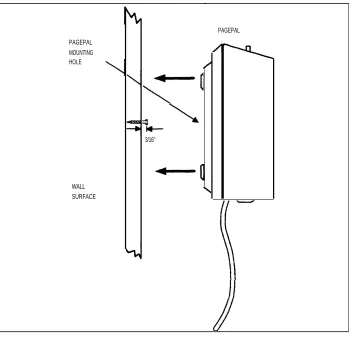
Wall Mount Instructions
1.
2.
3.
4.
Determine where the desired wall mounting location should be.
Drive the screw into the wall, leaving 3/16'' space
between the wall and the bottom of the screw head (see Figure 2-2).
Mount the PagePal keyhole slot over the screw head. Adjust the screw depth so that the rubber feet seat firmly against the wall.
Temporarily remove the PagePal while attaching wiring to the terminal block.
PAGEPAL MOUNTING HOLE
3/16''
WALL SURFACE
PAGEPAL
Adjustments
Slide Switch
This four-position switch is provided to configure the AT&T PagePal for the appropriate mode of telephone access. See Figure 1-1.LS-Loop Start PBX trunk or a dedicated phone set
Note: With the switch in this position, the PagePal is optioned to interface with a Loop Start trunk of a PBX or Line Port of Key System. In this mode, the PagePal supplies the “talk battery” on Tip and Ring.
GS-Ground Start PBX ground start trunk
Note: With the switch in this position, the PagePal is optioned to interface with a Ground Start trunk of a PBX. in this mode it is imperative that the PBX ground be connected to Pin 1 of the 20 pin connector on the PagePal or pin 2 of the RJ11 connect-or on the PagePal. In addition, the PagePal supplies the “talk battery” on Tip and Ring after the PBX has supplied a “hand shake” to the PagePal by momentarily grounding the Ring lead.
NOTE: PagePal must be con- SA-Station Access PBX station line or Central Office
nected to CWP ground at J2-1. subscriber line
Note: With the switch in this position, the PagePal is optioned to interface with a CENTREX, PBX or Key System ANALOG station. In this mode the PagePal wants to receive “talk battery”
and ring voltage from the host system that it is connected to.
DL-Dry Loop PBX page ports or auxiliary pac
Level Controls
Main Output
Adjusts level of output. Full counter-clockwise rotation provides unity gain from Telephone input to PagePal output. This is best for driving AT&T PagePals, or consumer (home Hi-Fi) type amplifiers.
Full clockwise rotation provides 14dB gain.* This will be more appropriate commercial-industrial sound equipment. Refer to the specifications of your power amplifier for the appropriate input level, or experiment with the adjustments for best results.
Set the Main Output level first using telephone input, then adjust Attendant and Music inputs for an appropriate relative level. (Telephone input signals are typically -15 to -10dBm.)
Attendant Input
Adjusts level of Attendant Input relative to the Telephone Input. Adjustment range is from 0dB to less than -30dB.
Music Input
Adjusts the level of Music Input relative to Telephone Input. Adjustment range is from 0dB to less than -30dB.
Troubleshooting
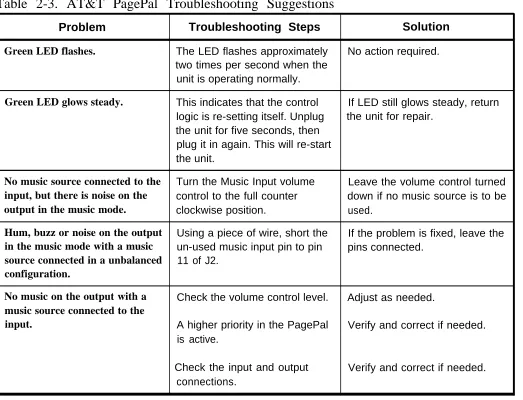
Use Table 2-3 to assist in locating possible problems.
Table 2-3. AT&T PagePal Troubleshooting Suggestions
Problem Troubleshooting Steps Solution
Green LED flashes. The LED flashes approximately No action required. two times per second when the
unit is operating normally.
Green LED glows steady. This indicates that the control If LED still glows steady, return logic is re-setting itself. Unplug the unit for repair.
the unit for five seconds, then plug it in again. This will re-start the unit.
No music source connected to the Turn the Music Input volume Leave the volume control turned
input, but there is noise on the control to the full counter down if no music source is to be
output in the music mode. clockwise position. used.
Hum, buzz or noise on the output Using a piece of wire, short the If the problem is fixed, leave the
in the music mode with a music un-used music input pin to pin pins connected.
source connected in a unbalanced 11 of J2.
configuration.
No music on the output with a Check the volume control level. Adjust as needed.
music source connected to the
input. A higher priority in the PagePal Verify and correct if needed. is active.
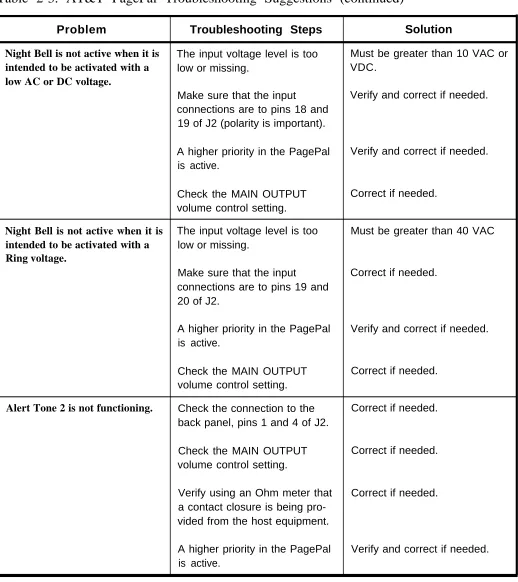
Table 2-3. AT&T PagePal Troubleshooting Suggestions (continued)
Problem Troubleshooting Steps Solution
Night Bell is not active when it is The input voltage level is too Must be greater than 10 VAC or
intended to be activated with a low or missing. VDC.
low AC or DC voltage.
Make sure that the input Verify and correct if needed. connections are to pins 18 and
19 of J2 (polarity is important).
A higher priority in the PagePal Verify and correct if needed. is active.
Check the MAIN OUTPUT Correct if needed. volume control setting.
Night Bell is not active when it is The input voltage level is too Must be greater than 40 VAC
intended to be activated with a low or missing.
Ring voltage.
Make sure that the input Correct if needed. connections are to pins 19 and
20 of J2.
A higher priority in the PagePal Verify and correct if needed. is active.
Check the MAIN OUTPUT Correct if needed. volume control setting.
Alert Tone 2 is not functioning. Check the connection to the Correct if needed. back panel, pins 1 and 4 of J2.
Check the MAIN OUTPUT Correct if needed. volume control setting.
Verify using an Ohm meter that Correct if needed. a contact closure is being
pro-vided from the host equipment.
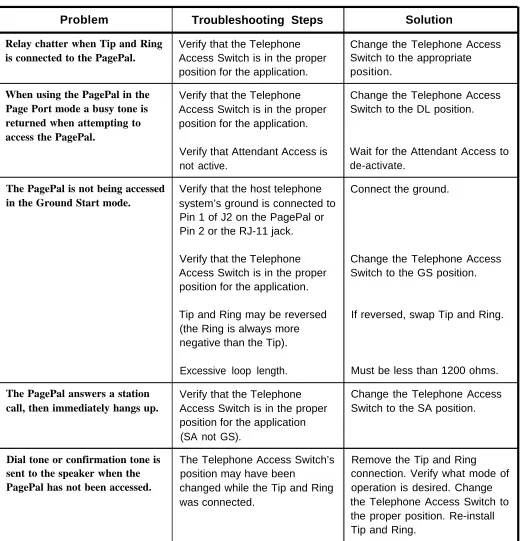
Table 2-3. PagePal Troubleshooting Suggestions (continued)
Problem Troubleshooting Steps Solution
Relay chatter when Tip and Ring Verify that the Telephone Change the Telephone Access
is connected to the PagePal. Access Switch is in the proper Switch to the appropriate position for the application. position.
When using the PagePal in the Verify that the Telephone Change the Telephone Access
Page Port mode a busy tone is Access Switch is in the proper Switch to the DL position.
returned when attempting to position for the application.
access the PagePal.
Verify that Attendant Access is Wait for the Attendant Access to not active. de-activate.
The PagePal is not being accessed Verify that the host telephone Connect the ground.
in the Ground Start mode. system’s ground is connected to Pin 1 of J2 on the PagePal or Pin 2 or the RJ-11 jack.
Verify that the Telephone Change the Telephone Access Access Switch is in the proper Switch to the GS position. position for the application.
Tip and Ring may be reversed If reversed, swap Tip and Ring. (the Ring is always more
negative than the Tip).
Excessive loop length. Must be less than 1200 ohms.
The PagePal answers a station Verify that the Telephone Change the Telephone Access
call, then immediately hangs up. Access Switch is in the proper Switch to the SA position. position for the application
(SA not GS).
Dial tone or confirmation tone is The Telephone Access Switch’s Remove the Tip and Ring
sent to the speaker when the position may have been connection. Verify what mode of
PagePal has not been accessed. changed while the Tip and Ring operation is desired. Change was connected. the Telephone Access Switch to
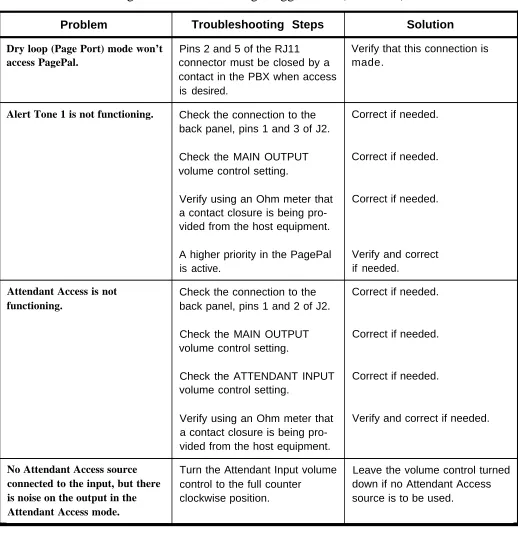
Table 2-3. AT&T PagePal Troubleshooting Suggestions (continued)
Problem Troubleshooting Steps Solution
Dry loop (Page Port) mode won’t Pins 2 and 5 of the RJ11 Verify that this connection is
access PagePal. connector must be closed by a made.
contact in the PBX when access is desired.
Alert Tone 1 is not functioning. Check the connection to the Correct if needed. back panel, pins 1 and 3 of J2.
Check the MAIN OUTPUT Correct if needed. volume control setting.
Verify using an Ohm meter that Correct if needed. a contact closure is being
pro-vided from the host equipment.
A higher priority in the PagePal Verify and correct is active. if needed.
Attendant Access is not Check the connection to the Correct if needed.
functioning. back panel, pins 1 and 2 of J2.
Check the MAIN OUTPUT Correct if needed. volume control setting.
Check the ATTENDANT INPUT Correct if needed. volume control setting.
Verify using an Ohm meter that Verify and correct if needed. a contact closure is being
pro-vided from the host equipment.
No Attendant Access source Turn the Attendant Input volume Leave the volume control turned
connected to the input, but there control to the full counter down if no Attendant Access
is noise on the output in the clockwise position. source is to be used.
Table 2-3. AT&T PagePal Troubleshooting Suggestions (continued)
Problem Troubleshooting Steps Solution
Hum, buzz or noise on the output Using a piece of wire, short the If the problem is fixed, leave the
in the Attendant Access mode un-used Attendant Access input pins connected.
with a Attendant Access source pin to pin 8 of J2.
connected in a unbalanced configuration.
No pre-announce tone is sent to A jumper has been installed on Remove the jumper.
the output, but it is desired. pins 1 and 6 of J2.
No pre-announce or confirma- A jumper has been installed on Remove the jumper.
tion tone is sent to the output or pins 1 and 5 of J2.
the telephone, but it is desired.
No power LED. Using a Voltmeter, check for AC Correct facilities problem. Voltage at the wall outlet.
Bad wall plug-in power supply Return the PagePal to the on the PagePal. proper location for repair.
Low Volume on the output. Adjust gain controls. Adjust as needed.
The wrong impedance is Ideally the PagePal would like attached to the output. to drive a 600 Ohm impedance,
Appendix A—FCC Regulations and Warranty
FCC Regulations—Part 15
Radio Frequency
The AT&T PagePal generates and uses radio frequency energyInterference
and if not installed and used in strict accordance with the manufacturer’s instructions, may cause interference to radio and television reception. Testing has been conducted for compliance with the limits for Class B device in accordance with the specifications in Subpart J of Part 15 of the FCCRules. This testing is designed to provide reasonable protection against such interference. However, there is no guarantee that interference will not occur in a particular installation. If this equipment does cause interference to radio or television reception, which can be determined by turning the unit off and on, the user is encouraged to try to correct the interference by one or more of the following measures:
● ● ● ●
Reorient the radio or TV receiving antenna.
Relocate the PagePac 6 Plus with respect to the radio or TV receiver or vice-versa.
Plug the PagePac 6 Plus into a different outlet so that it and the radio or TV receiver are on different branch circuits.
FCC Regulations—Part 68
This equipment is registered with the Federal Communications Commission (FCC) in accordance with Part 68 of its Rules. The FCC requires that the manufacturer provide you with the
following information:
1. Connection and Use with Nationwide Telephone Network
The FCC requires that you connect your telephone equipment to the nationwide telephone network through a modular
telephone outlet or jack. The modular telephone outlet or jack to which the equipment must be connected is a USOC RJ11C.
Registered equipment may not be used with Coin Telephone Lines. Equipment may be used with Party Lines in areas where state tariffs permit such connections and when equipment is adaptable for such use.
2. Information You May Need to Supply the Telephone Company
Upon request of your local telephone company, you are required to provide them with the following information:
A. The lines to which you will connect the telephone equipment.
● ● ● ●
Failure to follow AT&T's installation, operation or maintenance instructions;
Unauthorized modification or alteration of the product or its components;
Product abuse, misuse or the negligent acts of persons not under the reasonable control of AT&T;
Actions of third parties and acts of God other than power surges (e.g., lightning).
This limited warranty applies only to the product purchased directly from AT&T or purchased directly from an authorized AT&T dealer. This limited warranty does not apply to products purchased or operated outside the United States.
You may be required to provide AT&T with proof of purchase before AT&T will perform any warranty repair or provide any warranty replacements.
EXCEPT AS SPECIFICALLY SET FORTH ABOVE, AT&T, ITS AFFILIATES, SUPPLIERS AND DEALERS MAKE NO
WARRANTIES, EXPRESS OR IMPLIED, AND SPECIFICALLY DISCLAIM ANY WARRANTY OF MERCHANTABILITY OR FITNESS FOR A PARTICULAR PURPOSE.
EXCEPT FOR PERSONAL INJURY, THE LIABILITY OF AT&T, ITS AFFILIATES, SUPPLIERS AND DEALERS FOR ANY CLAIM, LOSS, DAMAGE OR EXPENSE FROM ANY CAUSE WHATSOEVER, REGARDLESS OF THE FORM OF THE ACTION, WHETHER IN CONTRACT, TORT OR OTHERWISE, SHALL NOT EXCEED THE LESSER OF DIRECT DAMAGES PROVEN OR THE REPAIR OR REPLACEMENT COST OF THE SYSTEM OR THE SYSTEM’S PURCHASE PRICE. IN NO EVENT SHALL AT&T, ITS AFFILIATES, SUPPLIERS AND DEALERS BE LIABLE FOR INCIDENTAL, RELIANCE,
In Canada, the DOC registration number and Load Number appear on the maple-leaf label, and the Load Number is under the maple-leaf label.
Warranty Information
Limited Warranty and Limitation of Liability
AT&T warrants to you that the product will be free from defects in material and workmanship when title passes to you. If you notify AT&T that the product has failed to operate as warranted within one year of the date title passes to you, AT&T will, at its option, repair or replace the component or components of the product that failed to operate as warranted. Any repair or replacement components may be new or refurbished and will be provided on an exchange basis. If AT&T determines that the product cannot be replaced, AT&T will refund the purchase price to you.
If you purchased the product directly from AT&T, AT&T will perform warranty repair on your premises in accordance with the terms and conditions of AT&T’s “Business Day” or
“Around-the-Clock” warranty plans. The details of AT&T’s warranty plans may be obtained from AT&T. If you purchased the product from an authorized dealer, you will be covered by AT&T’s authorized dealer warranty plan during the warranty period. Contact your authorized dealer for details of AT&T’s authorized dealer warranty plan. AT&T’s obligation to repair,
replace or refund as set forth above is your exclusive remedy.
Installation and Maintenance Information
There are several types of installation and maintenance plans available from AT&T and/or your dealer. Please call your AT&T sales representative or authorized dealer for details.
Appendix B—AT&T PagePal Functional Diagram
PAGING EQUIPMENT INTERFACE
(PagePal)
I
— — — — — — — — — — — — — — — — — — — — — — — — — — — — — — — — —
I
DRY LINE LEVEL INPUT WITH CONTACT CLOSURE FROM AMPLIFIED MIC, RECORDED
I
I
I
I
I
I
I
I
I
I
I
I
I
I
I
I
I
I
I
I
I
I
P1 CONTACTS ANNOUNCEMENTS, RADIO, ETC. P1 ATTENDANT INPUT LEVEL600 OHM 0dB
MUSIC SOURCE 100K OHM 0dB
TELEPHONE INTERFACE
P6 MUSIC INPUT LEVEL
300 OHMS
20dB
TIP LOOP START or GROUND START 300 OHMS
I
I
I
I
I
I
I
I
I
I
I
I
I
I
I
I
I
I
I
I
I
RING -24VDC TALK BATTERY
P3
STATION or CENTREX CLOSED @ P1 THROUGH P5
VOX TIMEOUT MAX. TIMEOUT
C
C 1 DRY LOOP (PAGE PORT)
CONTACT CLOSURE TONE 1
CONTACT CLOSURE TONE 2 TONE GEN P2, 4, or 5
CONTACT CLOSURE OPTION JUMPERS NIGHT BELL
RING DETECT & OTHER TONES
NIGHT SELL AC/DC DETECT
POWER SUPPLY 115 VAC OUTPUT TO POWER AMP(s) REMOTE AMP CONTROL
I
— — — — — — — — — — — — — — — — — — — — — — — — — — — — — —Appendix C—Secondary Circuit Protection
Important Information
This equipment is for use on telephone wiring containing a secondary circuit protector. This paging equipment requires
a Harris Dracon model 22060-930 PageGuard Secondary Circuit Protector where applicable (see Figure C-1).
Each PagePac unit is supplied with a PageGuard protector factory-installed on the principal Tip-Ring pair. Each terminal pair on Terminal Strip “B” (see Figure C-2 of the PagePac manual) that is to be connected to any wires that go off premises must be supplied with an additional PageGuard protector.
The secondary circuit protector must be located between the primary protector and the paging equipment. Refer to the Safety Information and Installation Steps below.
Safety Information
■
■ ■
■
■
The PageGuard is used when connecting paging equipment directly to telephone lines that maybe exposed to high voltage power lines.
Never install telephone wiring during a lightning storm.
Never install telephone jacks in wet locations unless the jack is specifically designed for wet locations.
Never touch uninsulated telephone wires or terminals unless the telephone line has been disconnected at the network interface.
TELCO PROVIDED
DEMARCATION BY
TELCO
MAIN BUILDING BUILDING #2
PAGING PAGING
A B EQUIP. B A A B EQUIP.
PAGING
CO LINES EQUIP.
PROVIDED
BY PROTECTION LOCATIONS U.L. SPECS
T E L C O A = PRIMARY CIRCUIT PROTECTOR 497
B = SECONDARY CIRCUIT PROTECTOR 497A
Figure C-1. Example Configurations Requiring Secondary Protection When Paging Equipment is Connected Directly to the Telephone Network
Installation Steps
Save these instructions. 1.
To un-install the PageGuard 2 .
reverse order of these steps.
3.
Connect the green wire on PageGuard to earth ground.
Plug a modular connector from the paging equipment telephone line interface to the modular connector on the
PageGuard.
TELEPHONE EQUIPMENT CONNECTED TO NETWORK
CONNECT MODULAR PLUG TO TELEPHONE LINES (i.e., PBX/KTS/CENTREX)
CONNECT GREEN WIRE TO EARTH GROUND
PAGEGUARD (P/N 22060-930) NOT INCLUDED
TO INPUT SIDE OF PAGING EQUIPMENT
OUT TO SPEAKERS
PAGING EQUIPMENT (POWERMATE)
PGEGRD.DRW 10/22/91
SELECT CODE 468-248-101
©1993 AT&T
All Rights Reserved Printed in U.S.A.
0II722050-917 Issue 2, February 1993