A
BSTRACTD’MELLO, WARREN JOHN. A Study on Selective Ahead-of-Time Compilation for Embedded
Java. (Under the direction of Dr. Edward F. Gehringer.)
In recent years, Java has been making tremendous inroads into the world of embedded
devices and systems. Thus, it is increasingly important to study the performance characteristics of
the Java Virtual Machines (JVMs), and different optimization strategies that can help boost
application performance.
Usually, embedded systems are very constrained in memory and processor speed, and hence
it is imperative to extract maximum performance without having to incur a high memory cost.
Just-in-time (JIT) compilers give high performance improvements, but they come at a memory
cost (code size, data and code cache requirements) which many embedded systems cannot afford.
A viable alternative is to ahead-of-time (AOT) compile into native code the few hottest – i.e.
most used, most CPU-intensive, and/or time-critical – methods of the application. This results in
a performance boost anywhere from around 88 to 98 percent, while increasing the application
size only marginally.
This thesis presents our research work in performance and analysis of embedded Java
systems. Our work has been divided into two phases. During the first phase, we ran a number of
Java benchmarks on Embedded JVMs. This was mainly to understand the embedded systems, and
their characteristics and performance aspects that made them differ from their desktop
counterparts. The second phase involved executing the aforementioned benchmarks without any
optimization techniques, and then selectively ahead-of-time compiling different methods and
classes of these Java benchmarks and measuring the resulting performance benefits. We
performed an in-depth analysis and study on how to go about profiling the Java application,
selecting the methods that fit the “hot” criteria, AOT-compiling those methods, and subsequently
A
S
TUDY ONS
ELECTIVEA
HEAD-
OF-T
IMEC
OMPILATION FORE
MBEDDEDJ
AVABy
Warren John D’mello
A thesis submitted to the Graduate Faculty of North Carolina State University
in partial fulfillment of the requirements for the Degree of
Master of Science
Department of Computer Science
Raleigh 2002
Approved by:
_____________________________ _____________________________
D
EDICATIONI would like to sincerely dedicate this thesis to my parents, Bruno and Eleanor D’mello. They
have been my guiding light and have always been there for me. I am the man that I am today
because of their love, hard work, and sacrifice. Words cannot express the gratitude, love, and
respect that I have for them. I can never ever repay you both for all that you have done for me,
and continue to do. Thank you is just a small word in comparison, but that is all that I can say
B
IOGRAPHYWarren D’mello was born in Bombay, India, and lived most of his life in that beautiful city.
Having achieved his undergraduate degree in Computer Engineering from the University of
Bombay, he decided to gain some professional work experience. He worked for nearly two years
in a multinational Information Technology company, IMRglobal Inc., in Bombay. His job
responsibilities entailed developing client-server applications in Visual Basic, which interfaced
with a variety of databases, such as Oracle, MS SQL Server, and MS Access. During the latter
stages of his employment with that company, he worked on a number of web-development
projects, mainly using Active Server Pages, JavaScript and VBScript. In between, he was sent
overseas for three months, to Sydney, Australia, on a project for Australia Mutual Provident
(AMP). Working for the IT division of the world’s third largest insurance company – Australia’s
largest – was an amazing experience, one never to be forgotten.
Having gained some professional experience, he decided it was time to head back to school
and attain his Master’s degree. During his study, he got a chance to work on a number of
extremely interesting projects, ranging from web-development applications (part-time job with
the nice people at the Crop Science department of NC State, and Dr. Williams’ CSC 591
e-commerce class), Java applications (Dr. Gehringer’s CSC 517 and Dr. Savage’s CSC 505
courses), lower level operating system projects (thanks to Dr. Mueller’s CSC 501 class), and of
course, embedded Java applications (thanks to the good folks at OTI Inc. who gave him so much
advice, support and help). It was thanks to many people, but he must especially mention Dr.
Edward Gehringer, without whom he would never have got such wonderful opportunities.
Now, he looks forward to working here in the US, and gaining some invaluable experience
that will always hold him in good stead. He will always cherish deep in his heart all the memories
A
CKNOWLEDGMENTSWords cannot express the gratitude and indebtedness I feel towards Dr. Edward Gehringer.
He has been my mentor throughout these past two years, and has always given me so much of
advice, support and friendship. Without him, this thesis and research work would not have been
possible. He guided me and motivated me, especially when I faltered, never allowing me to doubt
in myself or my capabilities. Thank you so much Dr. Gehringer.
In addition, I would like to sincerely thank Object Technology, Inc. for funding my education
and research work, and for providing me with all the technology and equipment. I would also like
to expressly thank Jim Mickelson, who has been instrumental in guiding and advising me. He has
always been there for me, giving me his invaluable suggestions and comments, which played
such an important role in the accomplishment of this thesis. His unending enthusiasm never
ceased to amaze me, inspite of all my constant questions and doubts. I must have disturbed him
on numerous occasions, especially when this thesis was being drafted, but he still reviewed all
those numerous drafts without even a word of complaint. Thank you Jim; I will never forget all
that you have done for me, and will forever be in your debt.
I am also grateful to Pat Mueller and Scott deDeugd, who arranged for the funding of this
research work, and who assisted me during my course of work. Bruce Hyre, Patrick Dempsey,
Charlie Surface, and Ryan Sciampacone, whose help in setting up the embedded devices and
environments were absolutely invaluable. Tim Wolf and Simon Archer, who helped me
tremendously in my work, and who reviewed a draft of this thesis. DeLoy Bitner and Aldo Eisma
who gave me so much of advice and help in the Ahead-of-Time compilation area. Dave Lavin
and James Branigan, who explained to me the functionality of a few embedded applications.
Andrew Low, for reviewing a draft of this thesis. Finally, my sincere thanks to everybody in the
OTI Raleigh office, for welcoming me with open arms into their wonderful OTI family.
T
ABLE OFC
ONTENTSLIST OF TABLES... vi
LIST OF FIGURES... vii
CHAPTER 1: INTRODUCTION... 1
1.1. Advantages of Java in Embedded Systems... 1
1.2. Considerations in choosing embedded Java... 2
1.3. Thesis Outline ... 4
CHAPTER 2: OPTIMIZATION TECHNIQUES... 5
CHAPTER 3: STUDIES ON CURRENT PLATFORMS... 9
3.1. Platform Configurations... 9
3.2. Embedded Java VMs ... 10
3.3. Existing Java Benchmarks ... 11
CHAPTER 4: INTRODUCTION TO AHEAD-OF-TIME COMPILATION... 16
4.1. Need for Optimization ... 16
4.2. Related Work ... 17
CHAPTER 5: PROFILING THE JAVA APPLICATION... 19
CHAPTER 6: SELECTIVE AHEAD OF TIME COMPILATION... 23
6.1. SmartLinker Options... 23
6.2. Benchmarks and Platforms used for AOT compilation analysis ... 25
6.3. Selective AOT compilation analysis... 26
CHAPTER 7: SUMMARY AND CONCLUSION... 41
Future Research work ... 44
REFERENCES... 45
L
IST OFT
ABLESL
IST OFF
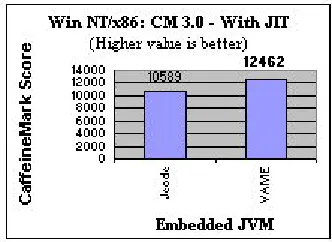
IGURESFigure 1: CaffeineMark 3.0, Win NT/x86: No JIT... 12
Figure 2: CaffeineMark 3.0, Win NT/x86: With JIT... 12
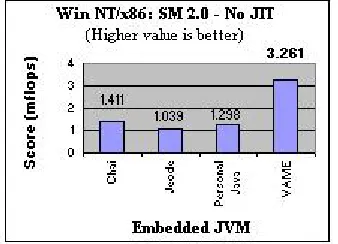
Figure 3: SciMark 2.0, Win NT/x86: No JIT ... 13
Figure 4: SciMark 2.0, Win NT/x86: With JIT ... 13
Figure 5: SpecJVM 98, Win NT/x86: No JIT ... 13
Figure 6: SpecJVM98, Win NT/x86: With JIT ... 13
Figure 7: Complete graph of Memory size vs. number of methods AOT’ed - CaffeineMark 3.0 on Neutrino/x86... 28
Figure 8: Partial graph of Memory size vs. number of methods AOT’ed - CaffeineMark 3.0 on Neutrino/x86... 28
Figure 9: Partial graph of Performance vs. number of methods AOT’ed - CaffeineMark 3.0 on Neutrino/x86... 29
Figure 10: Complete graph of Performance vs. number of methods AOT’ed - CaffeineMark 3.0 on Neutrino/x86... 30
Figure 11: AOT analysis of Performance vs. Memory size - CaffeineMark 3.0 on Neutrino/x86... 31
Figure 12: Partial graph of Performance vs. Memory size - CaffeineMark 3.0 on Neutrino/x86 ... 32
Figure 13: AOT analysis of Performance vs. Memory size - SciMark 2.0 on Neutrino/x86... 36
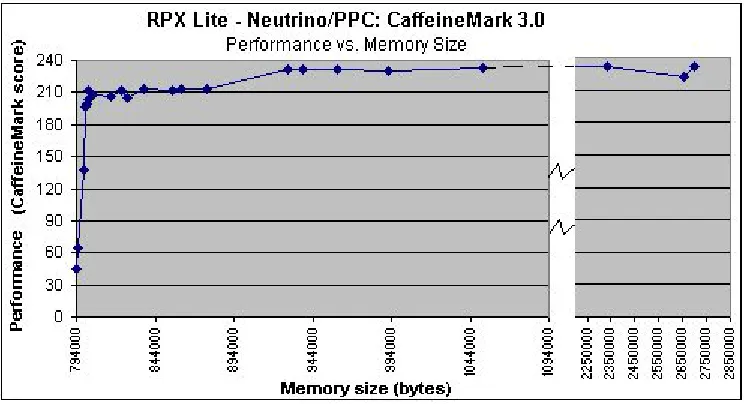
Figure 14: AOT analysis of Performance vs. Memory size - CaffeineMark 3.0 on Neutrino/PPC... 37
Figure 15: AOT analysis of Performance vs. Memory size - SciMark 2.0 on Win NT/x86... 38
Figure 16: AOT analysis of Performance vs. Memory size - CaffeineMark 3.0 on Win NT/x86... 39
Figure 17: Complete graph of Memory size vs. number of methods AOT’ed - CaffeineMark 3.0 on Neutrino/PPC... 46
Figure 18: Partial graph of Memory size vs. number of methods AOT’ed - CaffeineMark 3.0 on Neutrino/PPC... 46
Figure 19: Complete graph of Performance vs. number of methods AOT’ed - CaffeineMark 3.0 on Neutrino/PPC... 47
Figure 20: Partial graph of Performance vs. number of methods AOT’ed - CaffeineMark 3.0 on Neutrino/PPC... 47
Figure 21: Complete graph of Memory size vs. number of methods AOT’ed - SciMark 2.0 on Neutrino/x86 ... 48
Figure 22: Partial graph of Memory size vs. number of methods AOT’ed - SciMark 2.0 on Neutrino/x86 48 Figure 23: Complete graph of Performance vs. number of methods AOT’ed - SciMark 2.0 on Neutrino/x86 ... 49
Figure 24: Partial graph of Performance vs. number of methods AOT’ed - SciMark 2.0 on Neutrino/x86. 49 Figure 25: Complete graph of Memory size vs. number of methods AOT’ed - CaffeineMark 3.0 on Win NT/x86... 50
Figure 26: Partial graph of Memory size vs. number of methods AOT’ed - CaffeineMark 3.0 on Win NT/x86... 50
Figure 27: Complete graph of Performance vs. number of methods AOT’ed - CaffeineMark 3.0 on Win NT/x86... 51
Figure 28: Complete graph of Performance vs. number of methods AOT’ed - CaffeineMark 3.0 on Win NT/x86... 51
Figure 29: Complete graph of Memory size vs. number of methods AOT’ed - SciMark 2.0 on Win NT/x86 ... 52
Figure 30: Partial graph of Memory size vs. number of methods AOT’ed - SciMark 2.0 on Win NT/x86 . 52 Figure 31: Complete graph of Performance vs. number of methods AOT’ed - SciMark 2.0 on Win NT/x86 ... 53
Chapter 1:
I
NTRODUCTION1.1.
Advantages of Java in Embedded Systems
In recent years, Java has been attracting considerable interest from developers of embedded
systems and devices. Java being highly object oriented (OO), has all the benefits that OO
methodologies have to offer over traditional procedural languages. Java supports multi-threading
inherently, and this results in better responsiveness and real-time behavior. Since Java was
originally intended for use in networked/distributed environments, its capabilities in those areas
are strong and easy to use. This proves useful in embedded devices that have the need to connect
and communicate with other devices. The smaller memory footprint of Java bytecodes, as
compared to applications compiled into native code, presents an attractive option to developers of
embedded devices, where memory size and cost is a crucial issue [4]. Moreover, the inherent
portability characteristics that Java applications possess make them a very viable alternative in
the embedded world, with its myriad of platform configurations. In addition, because of Java’s
in-built safety features, untrusted code can be allowed to execute on devices such as mobile phones,
palm pilots, etc., without the worry of anything malicious occurring. However, it must be kept in
mind that Java applications cannot execute by themselves, and a Java Virtual Machine (JVM) is
needed to interpret and execute the Java bytecodes.
Embedded-system developers have taken an active interest in Java over the past few years,
because the language is abstracted from the underlying hardware, making its applications
portable. With Java, developers can target a particular platform-independent API, and migrate
their applications to different devices without recompiling them [1], unless the application itself
applications can execute from class files containing bytecodes, their memory requirements are far
smaller than that of applications stored in native code.
1.2.
Considerations in choosing embedded Java
A lot of planning and infrastructure is needed to run Java on an embedded device. The
suitability of Java depends on the application and device requirements ― for instance, resource,
integration, and real-time performance requirements [1]. One must also consider the operating
system running on the embedded device. In the embedded world, operating system and hardware
configurations go hand in hand. Moreover, the Java Virtual Machine (VM) that is needed to
execute the Java bytecodes is platform dependent, and not all VMs support the same OS/CPU
combination. A VM that supports a particular OS/CPU combination may not support the same
OS on a different CPU, or the same CPU running a different OS. This was one of the biggest
hurdles that we faced in comparing VMs, since it was very difficult to get more than one VM that
was configured for a particular OS/CPU combination.
In addition, not all the VMs support the same Java specifications, such as, Connected Limited
Device Configuration (CLDC), Mobile Information Device Profile (MIDP), Connected Device
Configuration (CDC), etc. [2], collectively referred to as the Sun Java 2 Micro Edition (J2ME)
specification. This could be due to the fact that the J2ME specification is relatively new. Since
embedded devices can be constrained in memory and CPU performance, and have different
requirements than their desktop peers, it is not practical to have the entire gamut of Sun Java 2
Standard Edition (J2SE) libraries. Instead, embedded JVMs normally follow one or more of the
However, few VMs are yet compliant with any particular J2ME specification or even support
the specification’s libraries. Fortunately, during the past few months, an increasing number of
vendors are moving toward compliance with the Sun J2ME specifications. Moreover, vendors are
developing versions of their VMs to encompass a broader range of OS/CPU combinations.
Finally, one of the biggest questions that embedded system developers face, is the
performance comparisons of embedded Java applications versus those compiled natively.
Admittedly, embedded Java does face a performance drawback against native code since the
application is stored as bytecodes, which have to be interpreted by the Java VM before they can
be executed. This does slow down the execution performance, but not by as much of a margin as
generally presumed. One of the reasons is because the VM technology has been continuously
engineered over the years to optimize and execute the code in the best possible manner. In
addition, it has been shown that in some cases, a well-written Java program could equal or exceed
the efficiency of an average quality C/C++ program [8]. Moreover, just-in-time (JIT) compilers
have been proven to generate extremely efficient and optimized code [3]. In addition, as our
studies and research will show, ahead-of-time (AOT) compilation is another, relatively new,
technique that can be used to increase the performance of embedded Java applications.
These considerations make for a number of decisions when designing and developing
embedded devices. Java hardware manufacturers and software developers have to decide which
hardware configuration to use, whether to use a software VM, accelerator or Java hardware
engine, and if a VM, then which vendor’s VM. To make intelligent decisions, they have to
understand the performance consequences of these different embedded Java solutions for their
applications. Not enough information is currently available for customers and manufacturers to
1.3.
Thesis Outline
In the following chapter, we explain the optimization techniques that are available to
embedded Java application developers. We then go on to describe the results of our work in the
execution of existing benchmarks on a few embedded JVMs, and understanding their
performance shortfalls. We make a short mention about JIT compilers and their performance
advantages, as compared to when the VM simply interprets the application’s bytecodes. We then
go on to describe in detail the study that we conducted on AOT compilation. We start by
discussing how to profile the application in order to find the hot methods and/or classes, and then
natively compile those sets of methods. Finally, we chart the performance gain and memory size
increase as we increase the number of the methods that are AOT-compiled. In conclusion, we
give a few suggestions based on our experience with AOT compiling, and leave a few open
Chapter 2:
O
PTIMIZATIONT
ECHNIQUESNormally, Java programs are compiled into class files comprising Java bytecodes, which are
machine independent, so that they are not reliant on the underlying hardware configuration.
However, this could cause Java to take a performance hit, since these bytecodes have to be
translated to machine code at run time. To overcome this, numerous Java vendors opt for
solutions such as just-in-time compilation (JIT) [4, 5], ahead-of-time compilation (AOT) [8, 9,
11, 12], or even hardware systems that directly execute the bytecodes [6].
The most common technique is an intelligent JIT, wherein the bytecodes are dynamically
translated/compiled into native code, which is then executed directly. We say here intelligent JIT
because when JIT technology was still in its infancy, some JIT implementations used to translate
every method of the Java application [4]. This used to cause quite a big memory overhead for
storing all the compiled native code in the JIT compiler’s code cache, since the cache was usually
a primitive queue (most likely FIFO), and methods could get replaced quite often. This was not
too consequential in desktop/server environments, where memory was not a scarce resource.
However, when small, memory-constrained, embedded environments were considered, memory
overhead became crucial. Hence, today, most vendors use more intelligent JIT systems, which
analyze the application at run time, and decide which compiled methods should be stored in its
cache memory for future use [5]. The JIT makes these decisions based mainly on the number of
times the method is called, after which it has to compile the method and save the resulting native
code in its cache. This number can be specified and tuned in most modern VMs. In addition,
advanced JIT compilers use runtime profiling and adaptive re-compilation techniques. Moreover,
developer to vary the level of optimization, from a fast JIT (less optimization) but slower
application, to a slower JIT (more optimization) but faster application.
Hence, developers must consider the tradeoffs between memory size and performance.
Depending on the CPU instruction set, the size of the application code expands as it is compiled
from bytecodes to machine code. Typically, we have observed that the expansion ranges from
three to ten times. Thus, more memory is required for the JIT cache as one increases the number
of methods to save. Moreover, a JIT may not be appropriate for some applications or platforms ―
for instance, if performance already meets expectations and the developers do not want the
additional complexity of a JIT compiler in their device. Or, in some cases, developers may not be
able to afford the additional memory overhead of a JIT compiler that is needed for the JIT code
itself, as well as the code cache that the JIT uses to store the compiled methods. In this case, they
may prefer to sacrifice performance instead of the incurring the cost for the additional memory.
Embedded application developers thus have great flexibility in tuning their applications and
hardware environments.
Where performance is more critical than memory, developers could opt to ahead-of-time
(AOT) compile the entire Java application [8, 9]. The application will certainly be larger than
with Java bytecodes, typically an order of magnitude expansion, as mentioned earlier, but
performance will be better. However, advanced VMs and their accompanying integrated
development environments (IDEs) allow developers to AOT-compile specific classes or methods.
For instance, CPU-intensive or time-critical methods, termed hot methods, may be compiled
ahead of time, while the rest of the application remain in bytecode. Thus, selective AOT
compilation allows the size of an application to be traded off against performance. It may allow a
methods does require quite a detailed performance analysis of the Java application. Fortunately,
advanced tools are available to aid in this analysis, as we will describe in subsequent chapters.
It must be noted here that AOT compilation is different from compiled Java. In the latter
case, there is no need for having a VM, and the Java application is compiled into machine code
and run as an executable. In case of the former, we still have the VM, along with the
AOT-specific shared object files that are needed for relocation support, native support, garbage
collection, and exception-throwing support. Moreover, since only certain specific methods are
AOT-compiled, the resulting application is a mix of bytecodes and native code. The VM handles
the transition between these different types of code formats, and allocates memory and fixes the
addresses and values such as constant pool entries, static fields, and class addresses, to name a
few.
In addition to JIT and AOT techniques, developers may use hardware Java processors and
accelerators to improve performance. Java hardware processors that directly execute the Java
bytecodes eliminate the need for an interpreter or JIT, hence avoiding the performance hit of
translating bytecodes into native code [4, 6, 7, 10]. While this seems like an attractive alternative,
it does curtail the developer’s flexibility, since only Java applications will run on these embedded
devices, precluding applications written in popular languages like C. Moreover, device drivers
would have to be written, and hardware accessed, in Java, instead of in C code accessed via the
Java Native Interface (JNI). In addition, since the Java processor directly executes the bytecodes,
the translator is not able to optimize machine code as a JIT compiler would. Another option is for
a Java hardware accelerator, such as a coprocessor, to translate the byte code to native code [6,
10]. So in this case, while a VM is required, a JIT compiler is not needed. However, coprocessors
families. Moreover, the cost of these hardware solutions is quite exorbitant, and this presents a
very real obstacle to embedded system manufacturers who have to mass-produce their devices.
In summary, while there are numerous optimization options available to embedded Java
developers, the final choice rests with the exact needs of the application, as well as the clients and
customers for whom these embedded devices and applications are being developed. Some
applications may not need a maximum performance, as long as their real-time deadlines are met.
Moreover, not many customers may be willing to bear the additional memory cost needed to
achieve a large performance gain. In contrast, some customers may demand maximum
performance at any cost. If memory cost is not a problem, then a JIT could be very suitable, but if
Chapter 3:
S
TUDIES ONC
URRENTP
LATFORMSDuring the initial phase of our research work, a number of embedded Java virtual machines
were benchmarked and analyzed on different operating systems (OS) / hardware configurations.
3.1.
Platform Configurations
The VMs were analyzed on the following OS/hardware platforms –
• Microsoft Windows™ NT/x86
• QNX Neutrino™/Power PC
• aJile’s JEM2 processor (Java microprocessor ) [6]
• QNX Neutrino™/x86
The Windows NT environment was included because although it isn’t an embedded
environment, it is used as the reference platform of choice for evaluating and studying different
VMs. Though the conclusions derived from the benchmark studies on this platform may not
reflect all of the characteristics of the VMs in a true embedded environment, they still serve to
give a general idea of how the VMs perform when compared with each other, and how they
behave when memory and resources are not that big a factor. As we mentioned earlier, it is quite
difficult to obtain versions of the VMs from the different vendors that support the same
OS/hardware configuration. One of the reasons for this is that unlike desktop systems, there are
many OS/hardware combinations available for embedded systems and there is no standard
reference platform. Another reason could also be a strategic one, with VM vendors forming
alliances with OS/hardware vendors. In addition, it could also be that the need never arose for a
vendor of a particular VM to develop a version for a given OS/hardware platform. Nonetheless,
parameters of the NT/x86 platform used for the benchmarks are – Gateway desktop PC,
Microsoft Windows NT v. 4, Intel Pentium III 550MHz, and 128MB RAM.
The second platform on which the analysis was performed was a Power PC embedded device
(RPX Lite™) from Embedded Planet. It has a Motorola Power PC 823(e) processor running at
66MHz, with 16MB Flash, 16MB RAM, and 128KB NVRAM. The operating system loaded on
it is QNX Neutrino v. 2.0. This is a true embedded device, but unfortunately, only one VM
(IBM’s VAME) could be analyzed on this configuration, since no other VM supported this
OS/CPU combination.
The third platform that has been studied deviates quite a bit from the previous two platforms.
It consists of a microprocessor that directly executes the Java bytecodes, and therefore an
interpreter/JIT is no longer needed to execute the Java application. The embedded device used in
the study was an evaluation board, aJ-PC104 system from aJile, which had a JEM2 direct
execution Java microprocessor running at a 40MHz, with 1MB SRAM, and 1MB Flash.
The final configuration that was studied only during the second phase, when we conducted
our AOT analysis, was an advanced embedded board from CP Technology, named Power IA
Service Gateway. It contained a 233MHz National Semiconductor x86 chip, along with 32MB
Flash, and 128 MB RAM. The operating system loaded was QNX Neutrino v. 6.1.0.
3.2.
Embedded Java VMs
The Embedded Java VMs/processor that were considered in the study are –
• aJile JEM chip, aJile Systems
• PersonalJava 3.1, Sun Microsystems
• Jeode 1.7, Insignia
• VisualAge Micro Edition (VAME) 1.3, IBM
• WebSphere Studio Device Developer (WSDD) 4.0, IBM
Since we studied the WSDD VM only during the second phase of our research, the results for
it will be discussed only in the subsequent chapters.
3.3.
Existing Java Benchmarks
We considered three benchmarks for our studies, namely –
• Embedded Caffeine Mark 2.0™
• SciMark 2.0™
• SPECjvm98™
Embedded Caffeine Mark 3.0 from Pendragon Software
(http://www.pendragon-software.com/pendragon/cm3/) is very widely used for benchmarking and comparing Java VMs.
It contains numerous tests such as Sieve of Eratosthenes, for finding prime numbers, sorting and
sequence generation, decision-making instructions, recursive function calls, and floating-point
tests that simulate 3D rotation of objects around a point. The scores are based on CaffeineMark’s
own scale.
The SciMark 2.0 test from the National Institute of Standards and Technology (NIST) is a
mathematically intensive test that tests the VMs’ performance in a number of mathematical
algorithms such as Fast Fourier Transform, Jacobi Successive Over-Relaxation, Monte Carlo
mflops (million of floating point operations per second). More information about this test can be
found at http://math.nist.gov/scimark2/about.html
SPECjvm 98 was the final benchmark used during the first phase of our analysis. Developed
by SPEC, it is recognized industry-wide as the most demanding Java VM benchmark. It contains
eight benchmark programs that conduct array-indexing tests, method calls, Lempel-Ziv
compression, Java Expert Shell System, multiple database functions, Java code compiling,
operations on audio files, ray-tracing, and a Java parser generator. However, this benchmark,
being large as well as very intensive and demanding, is not suitable for running on embedded
devices, and hence was not used in the second phase. It served mainly as a performance
comparison between the different Java VMs. Detailed information about this benchmark can be
found at http://www.spec.org/osg/jvm98/jvm98/doc/benchmarks/index.html
A summary of the benchmark results is displayed in the following figures and tables. Figures
1 through 6 display the benchmarking results for the different VMs on the Windows NT/x86
platforms. It can be clearly observed that using a JIT yields about a ten-fold increase in the
performance of the VM.
Unfortunately, at the time of the comparisons, Sun’s PersonalJava did not have any JIT
support, nor were we able to obtain a copy of the JIT version of HP’s Chai (TurboChai). Hence,
we could not perform any JIT analysis on those JVMs.
Figure 3: SciMark 2.0, Win NT/x86: No JIT Figure 4: SciMark 2.0, Win NT/x86: With JIT
For certain applications such as some of the SPEC benchmarks1, the default stack size was
not sufficient to run the benchmark, and had to be increased manually via the command line.
Figure 5: SpecJVM 98, Win NT/x86: No JIT Figure 6: SpecJVM98, Win NT/x86: With JIT
In addition, while the IBM VM does very well in the SPEC and CaffeineMark benchmarks
(Figures 1, 2, 5, and 6), which are more generalized benchmarks, Insignia’s Jeode seems to do
slightly better in the mathematically focused SciMark benchmark, only with the JIT compiler
switched on, as can be seen in Figure 4. While it is debatable whether in-depth mathematical
operations are typical of embedded applications, the benchmarks do indicate the strengths and
weaknesses of different VMs.
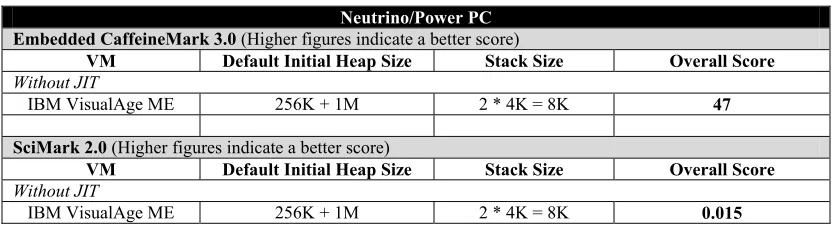
Table 1 shows results from the benchmarks that were conducted on an embedded device,
namely, the RPX Lite from Embedded Planet.
Table 1: Neutrino/Power PC VM performance results
Neutrino/Power PC Embedded CaffeineMark 3.0 (Higher figures indicate a better score)
VM Default Initial Heap Size Stack Size Overall Score
Without JIT
IBM VisualAge ME 256K + 1M 2 * 4K = 8K 47
SciMark 2.0 (Higher figures indicate a better score)
VM Default Initial Heap Size Stack Size Overall Score
Without JIT
IBM VisualAge ME 256K + 1M 2 * 4K = 8K 0.015
Since the IBM VM was the only VM available that runs on a Neutrino/Power PC platform, a
proper comparison against other VMs could not be performed. However, these figures clearly
show the differences between the desktop and embedded worlds. In the desktop environment,
resources such as memory and CPU speed are plentiful, and the VMs can execute very quickly.
However, in the embedded world, the VMs can be faced with such constrained environments and
resources, that there is a clear difference in the execution speeds of the benchmarks. Two points
should be noted here. One, the IBM VAME 1.3 version did not have JIT support for the
Neutrino/Power PC platform, and hence there are no results for the benchmarks with the JIT
turned on in this platform. The latest version, 1.5 (WSDD 4.0), does however have JIT support
for this platform, and those results are displayed in the subsequent chapters. Secondly, as
mentioned earlier, we were not able to execute the SPEC benchmark on this Neutrino platform. It
is primarily a desktop/server benchmark, and the Neutrino/Power PC embedded environment had
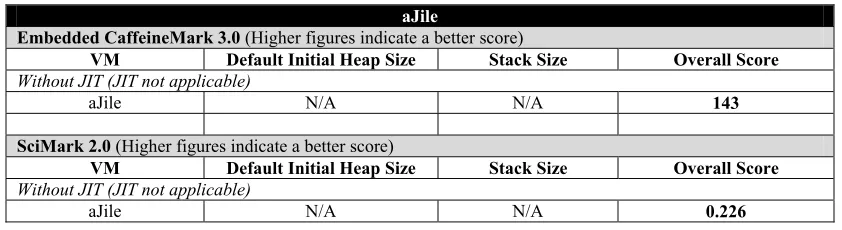
In Table 2, we observe the results of running two of the benchmarks, namely CaffeineMark
and SciMark on the aJile JEM2 processor. In this case, though we cannot make a direct
comparison between these results and those of the software VM that was used in the
Neutrino/Power PC embedded environment, we do get an estimate of how the Java
microprocessor stacks up against the software VMs.
Table 2: aJile JEM2 Java microprocessor performance results
aJile
Embedded CaffeineMark 3.0 (Higher figures indicate a better score)
VM Default Initial Heap Size Stack Size Overall Score
Without JIT (JIT not applicable)
aJile N/A N/A 143
SciMark 2.0 (Higher figures indicate a better score)
VM Default Initial Heap Size Stack Size Overall Score
Without JIT (JIT not applicable)
aJile N/A N/A 0.226
However, we must keep in mind the costs of choosing a hardware Java solution over a
software VM (see Chapter 2.) To reinforce this point, we must mention here that we had to
customize one of the benchmarks a bit in order to enable it to run on the aJile Java processor
evaluation board. No change was made in the benchmarking processes themselves, but in the way
the benchmark application handled the parsing of the command-line parameters. Moreover, the
benchmarks had to run under the supervision of one of the software environments that
accompanied the board. This environment presumably handled memory allocation and thread
creation for the Java processor, and displayed the standard input/output on a console screen.
To summarize, we conducted a performance analysis of different embedded Java virtual
machines (JVMs) on different platforms. This enabled us to gain an understanding about
embedded Java VMs, and their execution in embedded environments. We were able to study the
Chapter 4:
I
NTRODUCTION TOA
HEAD-
OF-T
IMEC
OMPILATION4.1.
Need for Optimization
The nature of embedded devices presents some imperatives that must be met. The footprint
must be kept small because memory resources, such as RAM and ROM, cost money. Many
devices respond to outside stimuli and need to react quickly, or within a fixed deadline; therefore,
performance has to remain high. Behavior must be robust and predictable, as users will not put up
with anything less. A number of applications have to be flexible and dynamically upgradable,
ideally over the net. The very nature of the emerging connected world is what is pulling Java into
embedded devices [10], because, as mentioned earlier, Java is well suited for use in networked
and distributed environments.
A typical Java system usually includes the application, Java class libraries, the Java Virtual
Machine (JVM), and often, a set of native applications or libraries. The challenge in embedded
systems is to find the size, cost, and/or performance tradeoff between these elements. While
speed, size, and predictability are interrelated, one major performance issue is the nature of Java
as an interpreted language [10]. Although Java in interesting in its own right, one factor for its
popularity stems from its “write once, run anywhere” ideal. Java's mobility is achieved by
compiling its object classes into a distribution format called a class file. A class file contains
information about the Java class, including bytecodes, an architecturally neutral representation of
the instructions associated with the class’ methods. A class file can execute on any
computer/device supporting the Java Virtual Machine. Java's code portability, therefore, depends
on both architecture-neutral class files, and the implicit assumption that the JVM is supported on
Most JVM implementations execute bytecodes via interpretation, or just-in-time (JIT)
compilation, which compiles the bytecodes into machine code at run-time. Thus, Java's
portability comes at the price of interpreting or JIT-compiling the bytecodes every time the
program is executed. These systems incur modest to severe performance penalties, as compared
to more traditional systems that compile source code directly to machine code only once. For
example, a compiled C program runs 1.5 - 2.2 times faster than the equivalent JIT-compiled Java
program and 2.6 - 4.2 times faster than an interpreted Java program [9].
Now, a number of embedded applications are real-time and cannot afford to have their
deadlines missed. They do not need to have super-fast performance, as long as their deadlines are
met. Alternatively, there are some applications that just need to be extremely fast. In both cases,
increasing the device’s resource capabilities, such as CPU speed and/or memory size, may not be
a viable option. It must be understood that most often, these embedded devices are
mass-produced; even a small increase in cost per device could result into a huge expense. This is where
we feel that our study in selective ahead-of-time compilation could prove extremely beneficial.
4.2.
Related Work
Ahead-of-time compilation is a relatively new technique that is being applied to embedded
Java applications. Most of the previous studies and articles [9, 10] have discussed AOT compiling
the entire Java application. These studies mainly apply to the desktop environment, and are
definitely not feasible in the embedded world where the constrained memory cannot support the
size of the entire natively compiled Java application. In our research work, we do not natively
compile the entire application, but only those methods and/or classes that fit the hot criteria. We
We have come across a few studies that are related to our work. The first one – Matthew
Arnold et al [11], confirms our view that sample-based profiling is accurate enough for the
methods that matter. It is not as invasive as time-based profiling which perturbs the code.
However, this study mainly considered optimizing the code of the hot methods, and not natively
compiling them as we have suggested in our research. Moreover, their study is mainly related to
desktop environments and not embedded systems per se.
The second study, conducted by Aldo Eisma [12], is very much related to our work on
ahead-of-time compilation for embedded Java systems. However, his paper talks about using an
automated tool to find the hot methods, and natively compile them according to set criteria of
desired performance gain. Our research is centered mainly on manually profiling the Java
application, studying the profile output to obtain the hot methods, and then natively compiling
those methods according to the desired level of performance gain and memory usage. We feel
that our work will enable the embedded developer to have a tighter control over which methods
are AOT-compiled, allowing him to fine-tune it according to his criteria. The developer will have
more visibility into the tradeoffs between performance gain and memory cost, and this will assist
Chapter 5:
P
ROFILING THEJ
AVAA
PPLICATIONThe first step in selectively ahead-of-time compiling a Java application is to profile it; that is,
analyze the application’s performance and find the methods where it is spending most of its time.
This enables us to find out which methods are the most used, and/or which are most
CPU-intensive (these are the criteria for being “hot”). There are quite a few tools available to profile
Java applications, but the one we used was the IBM SmartLinker™ Profiler. This tool is provided
along with the IBM WebSphere™ Studio Device Developer (WSDD) 4.0 IDE.
Once the application is imported into the IDE, then one can profile it either locally – on the
development machine – or remotely, on the target device. If the developer opts for the latter, then
certain hooks – lines of code, must be inserted in the application, at the appropriate areas that
need to be profiled. We chose the former option, since theoretically, the methods that are hot in
the development environment, should be the same in the embedded device. This was later verified
by our findings; since we obtained similar performance curves across all the three platforms that
we ran our tests on.
Once it has been decided to profile the application locally, the next step is to specify a
number of different options to the SmartLinker. One of the first options is the type of output
format that the Profiler will generate. There are two types of formats, Extensible Markup
Language (XML), and Comma Separated Values (CSV). The former is suitable for interfacing
with other tools. For example, it is used by the SmartLinker tool in the feedback-directed AOT
compilation [12], to automatically select the methods that are to be AOT-compiled, in order to
do a bit of research on the automatic feedback-directed AOT compilation, we found that it did not
give us the granularity and level of control that we had with manual AOT compilation. Moreover,
we observed that performance was not congruent with what it should have been. Therefore, we
feel that a manual analysis, though a little more painstaking, provides slightly better results, with
a finer control over memory usage and performance gain. This allows for better analysis of the
tradeoffs between memory and performance. Finally, the automatic feedback-directed AOT
compilation is specific to only one tool, namely, the IBM SmartLinker™ Profiler. Our research is
more generalized and can be implemented using other tool sets. All that is needed is a profiler, to
analyze the Java application; a compiler, which can AOT-compile the specified methods and/or
classes; and a runtime VM, which can support a mixed format of methods – bytecodes and
AOT-compiled.
The next option that is available is whether to profile the application using a sample-based
technique or instrumented profiling. As we mentioned earlier, it has been shown that a
sample-based profiling is sufficient for finding the hot methods [11]. The sampling method is efficient,
although it is fairly coarse-grained, and considering the processor speed, the sampled profile is
likely to contain some imprecision. This is especially true for short-running applications.
However, the time-based profiling is also imprecise, since, as is mentioned in the study by Arnold
et al., the instrumentation introduces overhead, increases code size, and disrupts the instruction
cache. They showed that the sample-based profiling is no worse than time-based, and at times,
even better. Therefore, it is possible that the hot methods obtained by the sample-based profile are
more accurate than those obtained by the time-based profile. Due to all these reasons, we elected
to use sample-based profiling in our research, and this proved to be sufficient and accurate
enough, as our forthcoming results will demonstrate. It must be noted that in either case, the
profiling tool is invasive, and the application’s performance, be it a benchmark score or time
The SmartLinker Profiler provides an option to specify either to profile from the start, or only
certain areas of the application. In the latter case, the developer will have to insert certain lines of
code – hooks, as we mentioned earlier, before and after the areas to be profiled. This is especially
good if the developer suspects certain problematic areas in the application, and needs to see how
long those areas take to execute. In our case, we profile the entire application, from the start until
the end, in order to obtain all the hot methods. This gives us an exact idea as to which methods
are the most CPU intensive, and which methods are called the most number of times (most used).
Finally, once all the options have been set, the application is executed, with the SmartLinker
Profiler taking samples at regular intervals. The duration of the intervals depends on the operating
system that is being used. Windows NT™ has a minimum granularity of 10 milliseconds (ms),
while real-time operating systems like QNX Neutrino™ have a much finer granularity,2 and the
tool can profile as low as 1 ms on these systems. For the two applications that we considered in
our analysis, 10 ms seemed to suffice. One reason was that the profile output was nearly the same
across multiple profile runs. The second reason that confirmed our view was that the time-based
profiling output was similar to that of the sample-based profiling for the top ten percent of the hot
methods. Once the application has completed executing, the Profiler will generate the output
profile file (CSV file in our case). This output contains a number of columns – Class Name,
Method Name, Method Signature, Interpreted Count, Interpreted CPU, to name a few. The
Interpreted Count column indicates how many times the method was interpreted, that is, how
many times during each sampling of the application, the method was found to be executing. The
Interpreted CPU column indicates the total time, in microseconds (µs), that the method took to
execute, across all the counts. We import this CSV file into a spreadsheet, and then sort the data
on these two keys, Interpreted CPU and Interpreted Count respectively, in descending order. The
top methods then obtained are the hottest methods. A partial sample of the sorted output is
displayed in Table 3.
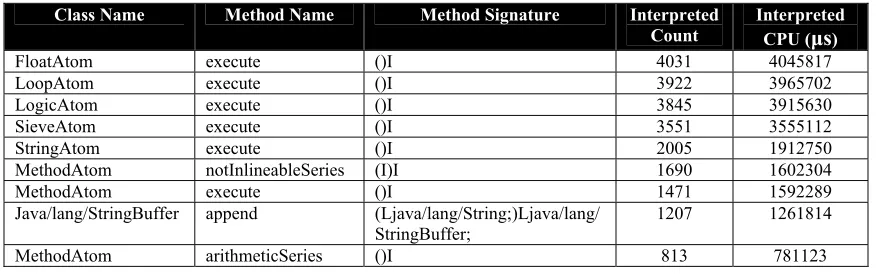
Table 3: Sample sorted Profiler output (CSV format) for the CaffeineMark benchmark
Class Name Method Name Method Signature Interpreted
Count Interpreted CPU (µs)
FloatAtom execute ()I 4031 4045817
LoopAtom execute ()I 3922 3965702
LogicAtom execute ()I 3845 3915630
SieveAtom execute ()I 3551 3555112
StringAtom execute ()I 2005 1912750
MethodAtom notInlineableSeries (I)I 1690 1602304
MethodAtom execute ()I 1471 1592289
Java/lang/StringBuffer append (Ljava/lang/String;)Ljava/lang/
StringBuffer; 1207 1261814
MethodAtom arithmeticSeries ()I 813 781123
As can be observed, the FloatAtom.execute()I method is the hottest method, followed by
the LoopAtom.execute()I, and so on. Note that the complete method signature is comprised
of the Class name, method name, and parameter/return value types (displayed under the Method
Signature column of the table above).
Therefore, by profiling the application and then sorting the resulting profile output, we were
able to obtain the most used and/or most CPU intensive methods. Having obtained these hot
methods, the next step is to ahead-of-time compile these methods. The subsequent chapter
describes in detail the steps involved in ahead-of-time compiling these methods, and then
Chapter 6:
S
ELECTIVEA
HEAD OFT
IMEC
OMPILATION6.1.
SmartLinker Options
Once the profile output has been obtained and sorted, the next step is to natively-compile the
top few methods, i.e., the hot methods. We used the IBM SmartLinker tool to natively-compile
the methods. In a typical embedded application build scenario, the embedded targets cannot
easily be used to build the application. The applications are built on development workstations,
using cross-compilers, which compile the application on one platform for execution on another
platform. The SmartLinker tool, which accompanies the WebSphere Studio Device Developer
(WSDD) 4.0 IDE, can currently compile for different operating systems (OS), but only across the
same CPU family.3 For instance, it is possible to generate code for a Neutrino/x86 platform on the
Windows NT/x86 platform itself. However, in order to compile code for the Neutrino/PPC
embedded platform, one would need a PPC platform that has larger memory resources and CPU
speed, such as Neutrino or AIX desktops.
Hence, one of the AOT-compile options in the SmartLinker tool is the specification of the
hardware and OS platform for which to generate the code – for example, “ia32- windows” for
Windows/x86, “ia32- neutrino” for QNX Neutrino/PPC, aix” for AIX/PPC, and
“ppc-neutrino” for Neutrino/PPC, to name a few. In our research, we used the Windows NT/x86
desktop to build for the x86 environments (Windows NT desktop and Power IA embedded
board), and an AIX/PPC platform for the PPC board.
It should be mentioned here that the WSDD IDE has an option to specify how the Java
JVM and its accompanying shared objects, the class libraries, and the files (classes, shared
objects, etc.) of the Java application, into the embedded device’s ROM. The other option is to
combine all these elements into one big file, called a “jxe”, which has the application’s class files,
and if opted, the required classes from the class libraries. In that case, all that that has to be loaded
onto the device is the jxe file, and the JVM with its associated files.
There are quite a few advantages to deploying the Java application as a jxe file:
Footprint reduction: Reduces the size of the deployed code by pre-linking and optionally
eliminating unused classes and methods
Execute in place (XIP): Pre-linking enables code to be run in place in ROM/Flash RAM
Accelerated application startup
Segmentation: JXE files can be segmented to support devices with limited segment sizes
Ahead-of-Time (AOT) compilation
Method Inlining
These are just some of the benefits of jxe files, as taken from the WSDD product documentation
[13]. Moreover, as noted above, building the application into a jxe file allows the developer to
AOT-compile methods and/or classes into native code. It is not permissible to natively compile
methods/classes and still deploy the application as class files. The rules laid down for Java
compliance specify that machine code cannot be interspersed with bytecodes in the Java class
files. Note that when using AOT-compiled methods in a jxe file, the file is only valid for its target
platform. If an application is required for multiple platforms, then individual jxe files will have to
be built for each platform.
For our research, we opted to include the Java class library in the jxe file, as that would give
us a correct picture of the total size of the application. Moreover, it would also enable us to
classes. If the application under study is going to reside on the target device along with other Java
applications, then it is advisable not to include the class libraries in the jxe file. This is because
those applications may most likely be accessing and sharing the class library. If, however, there is
going to be only one Java application in the target device, then the class libraries can also be
included in the analysis. This will permit the optimization (AOT compilation) of the hot methods
in the class library, and enable the removal of non-referenced classes from the library, thus saving
on storage-space requirements on the target device.
A few more options can be specified during this build phase. For one, we can strip the
bytecodes of those methods that are AOT-compiled, leaving only the machine instructions.
Keeping the bytecodes is only useful during the debug phase, and is no longer needed after that.
In addition, a few optimization options can be specified, such as making leaf classes and methods
final, making un-instantiated classes abstract, etc.
Finally, once all this is done, the last step is to specify the method(s) to be AOT-compiled. In
our analysis, we started gradually, from compiling the topmost hot method, to compiling the last
method that has an Interpreted Count and/or an Interpreted CPU value in the profile output, and
finally, to compiling all the methods. Though the last option is almost never done practically, due
to the large size of the resulting natively compiled application, we did this only so that we could
thoroughly study all the cases. Moreover, we could use this value to compare it to that which the
just-in-time (JIT) compiler generates.
6.2.
Benchmarks and Platforms used for AOT compilation analysis
earlier, the SPECjvm98 benchmark is not suitable for embedded systems, and hence we did not
consider it for our selective AOT compilation analysis. Both, the CaffeineMark and SciMark
applications, needed the Connected Device Configuration (CDC) Java specification in order to
execute, and that was what we included while building the jxe files.
For our analysis, we have considered benchmarks as the embedded applications because they
display a benchmark score, thus giving us a tangible performance figure. However, practically,
embedded applications have no benchmark score as such, and the only performance criterion is
either execution within a specific time duration, or execution such that application deadlines are
met. For applications that have a definite start and finish, and for which execution within a
time-duration is more important, system-time displays can be inserted at the start and end of the
application. For continuous running applications, or real-time applications, system-time displays
can be inserted before and after critical methods and/or sections of the application code, to
observe whether they meet their deadlines or not.
The platforms that we used for our AOT analysis were – Embedded Planet’s RPXLite (QNX
Neutrino/PPC), CP Technology’s Power IA Service Gateway (QNX Neutrino/x86), and Windows
NT/x86. The details of the platforms are mentioned in Section 3.1, Chapter 3. To build the jxe
files with the AOT-compiled methods, we used the Windows NT/x86 platform for the two x86
environments, and an AIX/PPC platform to build for the Power IA device.
6.3.
Selective AOT compilation analysis
Referring again to Table 3, on page 22, we start with the topmost methods listed in the profile
output. In the SmartLinker, the method to be AOT-compiled is specified in an options file within
topmost hot method listed in Table 3, we would use: –precompileMethod
“FloatAtom.execute()I”, in the SmartLinker options file. Note that what follows the –
precompileMethod tag is actually a method pattern, therefore, we could use
“*.execute()I” to specify methods, from all classes that contain an execute method,
having no parameters, and which return an integer. This is the reason why we specify the method
signature at the end of the method name; else, all the methods with the same name in the
particular class will be precompiled. Since full method signatures are unique, we can be assured
that the correct method is being precompiled.
Once we have built the jxe with the specified method ahead-of-time compiled, we execute it
on the particular platform and observe the performance change. We repeat this for all subsequent
hot methods in the profile output, noting down the memory size of the jxe file, the number of
methods that are AOT-compiled, and the corresponding change in performance. The following
discussion is centered on the analysis of the CaffeineMark benchmark that we performed on the
CP Technology Power IA Neutrino/x86 embedded board. However, we will also display the
graphs and analysis that we performed on the other two platforms, namely, the Neutrino/PPC and
Windows NT/x86 environments, for the CaffeineMark and SciMark benchmarks. They will serve
to prove the validity of our results and conclusions.
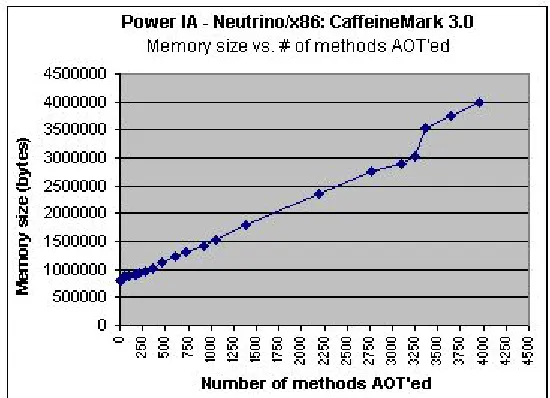
In Figure 7, we observe a complete view of the rise in memory size of the application as we
increase the number of methods that are AOT-compiled, including when we AOT-compile all the
methods of the application, in this case, 3955 methods. We can now appreciate the substantial
jump in memory size when the entire application is AOT-compiled. From an initial size of 794
This is why we mentioned that AOT compiling all the methods of the application is almost never
done practically.
Figure 7: Complete graph of Memory size vs. number of methods AOT’ed - CaffeineMark 3.0 on Neutrino/x86
Figure 8 illustrates a partial graph of the rise in memory size vs. the number of methods
compiled. For the sake of clarity, this graph illustrates data up to the point where we
AOT-compile 50 methods of the CaffeineMark application.
As we can observe, the memory size of the application increases as we increase the number
of methods that are AOT-compiled. This was expected, and serves to prove our earlier
assumption that the size of the Java application is smaller when the application is in bytecode
format, than when it is natively compiled. However, in this case, the top 2 to 3 percent of the hot
methods – 11 methods – are quite few in number as compared to the total number of methods in
the application. Therefore, there is only a marginal increase in the total memory size of the
application – of the order of ten to twenty kilobytes, when these methods are AOT-compiled.
This is a crucial point that should be kept in mind, and we will come back to this in the next few
paragraphs.
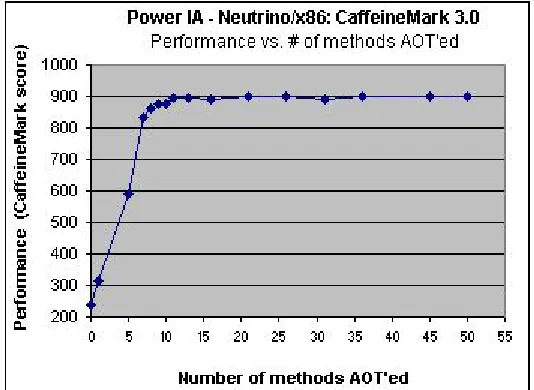
In Figure 9, we have an analysis of the change in performance as we increase the number of
methods that are AOT-compiled. Again, for the sake of clarity, we have displayed only a partial
graph, up to the point where we AOT-compile 50 methods.
Figure 9: Partial graph of Performance vs. number of methods AOT’ed - CaffeineMark 3.0 on Neutrino/x86
As can be clearly observed, there is a drastic rise in performance as we AOT-compile the top
methods. As we go on increasing the number of methods AOT-compiled, the performance keeps
on increasing until it reaches a saturation point, where the performance curve remains steady and
increases very marginally. In our case, for the figure above, this happens when we AOT-compile
11 methods onwards. We reiterate here that this saturation point is not the same for every
application, and may vary depending on the application type.
Figure 10 is a complete graph of performance change vs. number of methods AOT-compiled.
For all practical purposes, assuming that AOT compiling all the methods of the application
results in optimal, or close to optimal performance, we then obtain 983 as the optimal score of the
CaffeineMark benchmark on this platform.
Figure 10: Complete graph of Performance vs. number of methods AOT’ed - CaffeineMark 3.0 on Neutrino/x86
Hence, as we can observe in the figure above, we are able to achieve around 92% of the
optimal performance, just by AOT compiling the top 11 of the hot methods. We managed to
achieve 98.77% of the optimal performance by natively compiling around 160 methods (out of a
Finally, in Figure 11, we observe the crux of our results – change in performance as
compared to the corresponding increase in the memory size of the application. We reiterate here
the issues and difficulties that are faced in embedded environments. Embedded systems, unlike
their desktop counterparts, do not have the luxury of large memory space. Memory size is spoken
about in terms of kilobytes, rather than megabytes and gigabytes. Even a small increase in
memory could result in large monetary costs, considering that these embedded systems are
mass-produced.
Figure 11: AOT analysis of Performance vs. Memory size - CaffeineMark 3.0 on Neutrino/x86
From the figure above, we observe the steep rise in performance as we increase the number of
methods that are AOT-compiled. We were able to achieve 92% of the optimal performance at an
expense of about only 12 kilobytes, which worked out to an approximate increase of 2 percent in
the application’s memory size. This is a significant rise in performance, but the question that
remains to be asked is whether the embedded developer can afford that additional 12 KB? As we
said earlier, memory cost is usually crucial in the embedded world and even an increase as low as
It may so happen that the manufacturer of the embedded system may be entirely satisfied
with a performance score of 200. In that case, no further analysis would have to be conducted and
the application can be loaded onto the device without any changes or modifications. Similarly, for
real-time applications, it may be that all the deadlines are met and there is no need for any further
optimization.
However, if an increase in performance is imperative, then conducting an analysis like that
which we have outlined could be very useful. In Figure 12, we observe a zoomed-in view of the
change in performance as compared to the corresponding change in memory size. Embedded
system manufacturers may want a certain performance gain per kilobyte increase in memory size.
If they are able to achieve the performance gains within their tolerance for increase in memory
costs, then they might AOT-compile the additional methods. However, if the increased memory
costs are too high, they may prefer to sacrifice performance rather than incur these costs.
Figure 12: Partial graph of Performance vs. Memory size - CaffeineMark 3.0 on Neutrino/x86
Referring to Figure 12, we consider four data points as examples. The numbers adjacent to
the data points, i.e., 1, 5, 7, and 11, are the number of methods that are AOT-compiled at those
change in performance (CaffeineMark score). Calculating their respective values, we get x1 =
5792 bytes, y1 = 277 CaffeineMark points, x2 = 3232 bytes, and y2 = 61 CaffeineMark points.
For x1 and y1, the ratio of performance change to memory increase is 0.0478. For x2 and y2,
it is 0.0189. Clearly, for those developers that are interested in increasing performance, the
0.0478 ratio is well worth the investment. That is, a performance gain of 277 is obtained at a cost
of only 5792 bytes increase in memory. However, one might ask whether the 0.0189 ratio
(performance gain of 61) warrants the expenditure on the additional 3232 bytes. There is no
definite answer as to whether the 0.0189 ratio is worth the expense or not. At first glance, it
seems that we should AOT-compile 11 methods since that gives the maximum performance
benefit, and beyond that, the curve begins to level out. However, as we mentioned, the embedded
environment is different from that of the desktop, and what may seem to be the right decision
may not be the appropriate one. For example, it may so happen that the system manufacturer is
content with the performance benefit of AOT-compiling 7 methods, and may not want to bear the
additional memory cost of AOT compiling 11 methods. As we spoke about earlier, the developer
may have a certain tolerance limit for the rise in memory cost as the performance increases. The
memory cost for the performance gain in AOT compiling 7 methods may be within the
acceptable limit, but it may not be the case for AOT compiling 11 methods.
In this way, embedded developers can plot a graph of application performance versus
memory size increase. Using this, they can calculate the slope of the graph at various data points
– AOT compilation points, as we have shown in Figure 12. Finally, they can decide as to which
points are appropriate for their performance and memory size criteria. There is no clear-cut
answer as to how many methods should be precompiled for a particular application. It all depends
satisfactory. Others may prefer paying the extra cost of 3232 bytes and AOT compiling 11
methods in order to achieve even better performance. On the other hand, as we mentioned right at
the beginning, some developers may be satisfied with the initial performance of the application,
and may opt not to AOT-compile any method.
We reiterate here that the point in the curve, up to which the methods should be
AOT-compiled, will vary, depending on a few factors. One is the tolerance for the rise in memory size
that the developer is willing to incur. The developer may be faced with a fixed upper bound of
available memory space for the application. The application has to fit within this memory space,
no matter what the performance may be. The other tolerance limit is the one we spoke about
earlier; unless the ratio of performance change to memory increase is above a certain value, only
then may the cost be acceptable. Otherwise, performance may have to be sacrificed. Another
factor is the curve depicting the ratio of performance change to memory increase. In some cases,
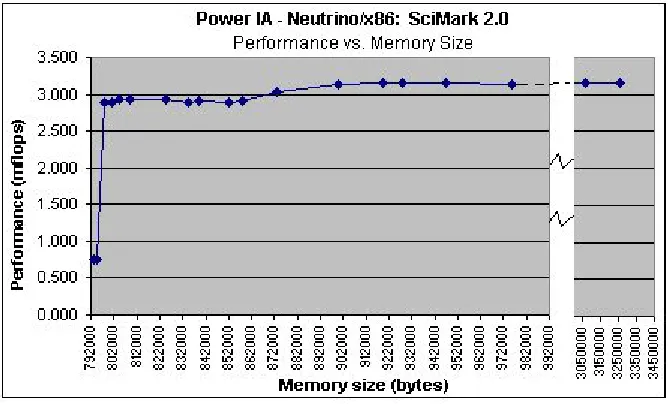
as we will show for the SciMark application, the curve increases steeply very early on, and then
begins to flatten out. In some cases, the curve may increase less sharply and take a little longer
before it begins to saturate. Finally, there are cases, as shown for the CaffeineMark application in
Figure 12, which lie somewhere in between. It all depends on the characteristics of the
application, and the requirements of the developer/embedded system manufacturer.
Now referring back to Figure 11 on page 31, we observe that the performance curve begins to
level off after some time. After a certain point (11 methods in our case), there is only a marginal
increase in performance as more methods are AOT-compiled. In most cases, developers may not
proceed beyond this point, since there is only a slight benefit to be gained. However, it could so
happen that the embedded system has a certain amount of memory available, and the developers
may prefer to use all the available memory to extract every bit of performance. In that case,