Combining Agile and Human-Centered Design approaches
for improving usability in development process from
Commercial-Off-The Shelf (COTS) software
Eric NdizihiweP
1
P
, Dr. Cheruiyot Wilson.KP
2
P
and Dr. Anthony LuvandaP
3
School of Computing and Information Technology
Jomo Kenyatta University of Agriculture and Technology,
PO Box 3373 Kigali Rwanda
Abstract
Commercial off-the-shelf (COTS) products are becoming increasingly popular in large systems. However, the COTS projects face a number of challenges in software development processes and in usability of theirs products. Moreover, the end users have as well the challenges for understanding how to use the products in order to meet their expectations, this is due to lack of software requirement. Consequently, COTS solutions do not meet the user’s requirements. In COTS, the developers did not have the benefits documents that specify user’s need for building software. Some COTS applications presented a lot of unnecessary or rarely used functions and data entry fields that make interfaces unnecessarily cluttered and confusing. The paper sought to have a good understanding of reasons why the implementation of some popular types of COTS project fail, identify critical factors for successful implementation, and determine how to help the usability specialist align skills previously combining with the custom application development to COTS. To conduct the study efficiently and successfully the survey was done in different companies include COTS developers and COTS consumers. The study results will help COTS projects to follow the whole process of software design and software implementation with more emphasis on understanding user’s requirements, improving software functions, quality and usability between users and system.
Keywords: Commercial Off-the Shelf (COTS)
software, Agile, Human Centered Design, User Experience (UX) and Usability.
1. Introduction
Software development is an organized thrives to deliver products in faster, better and cheaper ways
(Saurav, 2015). As the environment in which Commercial off-the shelf (COTS) software is profoundly changing, ways in which software systems are developed evolve over time as well. Many commercial and government organizations are now preferring to buy Commercial off The-Shelf (COTS) products rather than developing their owns software. Therefore, some IT organizations often have to make decisions to enable efficient and cost-effective business operations of COTS. Using commercial off-the-shelf (COTS) software products in large systems provides many benefits including the potential of rapid delivery to end users, shared development costs with other customers, and the opportunity to expand capacity and performance to improve products (Claire, 2007).Using COTS components can also be one way of reducing time spent, decreasing budgets and increasing competitiveness by getting products to the markets fast and inexpensively.
1.1. Aim
The aim was to investigate the impact of COTS software products on the system development process, to investigate the reasons why some types of COTS implementation project fail, and to identify critical factors that will help for successful implementations.
1.2. Objective
The objectives of this study were:
• Identify 32Tessential1T32T1T usability problems delivered from COTS software products. • Analyze the effect of a high level user
interface (UI) usability development in 1Tproviding1T proper accessibility to the intended functions of the COTS system.
• Propose techniques that enable Agile and HCD to be integrated and used to improve the effectiveness and usability of interactive in COTS software product.
• Evaluate the proposed techniques
2. Literature Review
2.1.Commercial off-The Shelf (COTS)
Software
A COTS product is usually computer hardware or software product tailored for specific uses and made available for sale, lease or license to the general public and that requires little or no unique government modifications to meet the needs of the procuring agency (Jacques & William, 2008).
The challenges faced for selecting COTS products are that organization specification aren’t matched with COTS characteristics and requirement according to features present in the product.
By considering Sage ERP as one product of COTS, the researchers (Glen, 2002) found that Sage is complex and difficult for navigating and using enterprise applications have been among the primary barriers preventing EPR systems from delivering the potential benefits. They found that help systems were difficult to use and understand. ERP systems also found that there is a confusion where on single screen has too many functions which is confusing the end users regarding what screen to go and what process to follow next.
ERP applications with the interfaces and overall usability issues generally require more time for users to learn and get used (Charles, 2011). Others researchers found that functional tests miss conditions that are not well documented; for example user’s guides and other application documentation.
Sage ERP as COTS product, its usability makes it harder for users to achieve their goals as efficiently or effectively as it is desirable. The difficulties existed in the identification and access to the right functionality, support in transaction execution, system output limitations and the overall system complexity (Lambeck et al., 2014).
Santiago et al (2004) described the COTS offer a variety of functions that can be classified in two categories:
• Horizontal: where the functionality is not
specific to domain, but can be reused across many different application domains like,
quality system databases, Graphical User Interfaces (GUIs), Web browsers, etc.
• Vertical: Where the functionality is
specified to a domain and can be reuses only in the domain for example Enterprise Resource Planning (ERP), customer relationship management solutions (CRM), complaint handling, auditing, document control etc.
2.2.Agile Software Development
Agile software development is presently an emerging discipline in Software Engineering (SE) field.The agile methods allow for software development teams to focus on the software rather than the design and documentation (Sommerville, 2011).
Agile is really a development approach, and it comprises a number of more specific methods, includes, eXtreme Programming (XP), Scrum, Crystal Methodologies, Dynamic Software Development Method, Feature driven development, lean software development(Ann et al., 2010).
Access to end users can be complex and difficult when dealing with any single service but it can be even more complex with multi service programs. Agile developers need to have a single voice for the user and one that can commit to changes for the product being developed (Ann et al., 2010).
According to Jim’s research (2014) found the main problems with agile are that its process doesn’t begin with an understanding the user requirement, does not include interaction designers and does not include any user evaluation. In the original conception of agile development, there was no user experience design role and it’s why the user interface produces a poor usability.
Glen (2002) describes the principles for managing COTS project includes ERP software in agile, those principles includes (1) Assume simplicity; (2)Embrace change when requirement evolve every time the users may change their point of view in development process of project; (3) Enabling the next effort, the project can still be considered a failure even during the team derivers the system to the users; (4) Incremental change where project development process can change the system into the small project and remove the useless requirement in incremental manner; (5) Maximize stakeholder value; (6) Manage with purpose by crating artifacts that have stakeholders value and identify who needs the
artifact; (7) Multiple project views(8) Rapid feedback from stakeholders to understand the requirements, to analyze those requirement and develop work plan which provides opportunities for feedback; (9) Working software is the primary goal, it should be examined to determine it value.
2.3.Human Centered Design
Human Centered Design is a method of developing interactive systems that emphasize ease of use from the viewpoint of the user, and was established in 1999 as ISO 13407 in ISO13407 international standard, where policies are prescribed regarding the development of systems offering high usability (Hiramatsu & Fukuzumi, 2008).
According to (Giacomin, 2012) Ergonomics of human-centered system interaction which describes human centered design as an approach to systems design and development that aims to make interactive systems more usable by focusing on the use of the system and applying human factors/ergonomics and usability knowledge and techniques.
The important when it comes to Human Centered Design and User Experience are to understand people and their needs, we need to involve them directly and from the very beginning and work with them in iterations to reach the best solution. We need trying out solutions to ensure that solutions work well for people and meet their needs. Another important aspact is to consider the entire experience hilistically and end to end( Lucie, 2015).
2.3.1. User Centered Design
User-centered design (UCD) is an approach to user interface design and development that involves users throughout the application design and development process.UCD involves designing with an understanding of the users and getting the feedback on the design at various points during an iterative design process (Jim, 2014).
The author combined the organization’s existing development process with industry standard user-centered design methods to create a detailed methodology that compared the usability of COTS products being considered for purchase. By encouraged the results of the efforts to include usability in product evaluations, the researchers now faces the challenges for how can usability specialists add value to the COTS implementation and how to the teams thinking about end users to use purchased product(Hocko, 2009).
2.3.2. User Experience
User’s experience is defined as the perceptions and responses of users that result from their experience of using a product (Garret, 2011).The benefits of usability improves productivity and raises team morale, reduces training and documentation coast; and improves user’s productivity.
Usability is still insufficient in most COTS software; the most widespread view in software engineering is that usability is chiefly related to the user’s interface. If the user’s task is not properly supported, the user’s needs are not met and the objective of building the software expectation is missed. In particular, software usability would need to take into consideration its information architecture, navigation design, iterative redesign cycle, user’s personalized function, and heuristic evaluation (Pearrow, 2007). Lazar (2006) indicated that software usability is a matter of a user-centered design approach. He emphasized that software must be designed with the user in mind in order to maximize the user experiences.
3. Methodology
To conduct the study efficiently and successfully the survey was done. This study was conducted in Kigali-RWANDA’s different companies include COTS developers and implemented for COTS consumers like Sage, SAP, Tally, and QuickBooks users. The questionnaire survey used as a tool to examine the usability of COTS product.
The participants answered the questions related to learnability, accessibility, functionality, flexibility and presentation of the COTS software listed above. The interview technique was also used in this study where the interviewees were the software developers.
3.1. Data Analysis
The survey’s response was 24 respondents from users working in different organizations of Rwanda like Rwanda Revenue Authority (RRA), King Faisal Hospital, and others. Most of them use Sage and QuickBooks. 10 of respondents use Sage, forming the highest percentage of 41.7%, 10 respondents use QuickBooks the percentage of 41.7% of respondent, There were a few Tally and Sap users where Tally has 3 of respondents with percentage of 12.50% and Sap has 1 respondent with 4.1 % of all respondents.
3.1.1. Examining system accessibilities
Based on data collected shown that accessibility of the system depends on the years of experience which the user has. Respondents which had experience of 3 to 6 years Disagree that function of the system are
hard to access, and respondents which have 1 to 2 years agree that the functionalities of the system are easy to access.
Fig. 1: System for ease to use
When we count numbers respondents who responded that the system functionalities are easy to access, 8.3% respondents responded strong agree, 37.5% respondents responded agree, 4.2% responds neutral, and 50.0% responded disagree
3.1.2. Examining system functionalities
The data collected shown that 12.5% responded that the system gives result erroneous, 50% responded that the system doesn’t give erroneous results, 16.7% responded gives erroneous result sometimes, and 20% don’t know.
Table 1: Erroneous of system result
Valid/Response Frequency Percent
Yes 3 12.5
No 12 50.0
Sometimes 4 16.7
Don’t know 5 20.8
Total 24 100.0
When we observed other users, we found that they have other tools which help them to match the result from system output and they work in parallel with other systems for example sage with excel sheet, and
others believe that the systems can’t provide some errors.
3.1.3. Examining system presentation
The result of respondents shown that the system has good presentation of interfaces. 29.2% of respondents affirmed that system interfaces are excellent, 58.3% responded that the interfaces are good, 8.3% responded that the interfaces of system are poor and 4.2% responded that the interfaces are very poor.
Table 2: Interface presentation
Valid/Response Frequency Percent
Excellent 7 29.2
Good 14 58.3
Poor 2 8.3
Very poor 1 4.2
Total 24 100.0
When we rate the COTS’ interfaces presentation, they are good presentable, good colors but on each interface there are so many label functions on one interface that can make confusion to the users.
3.1.4. Examining flexibility of the system
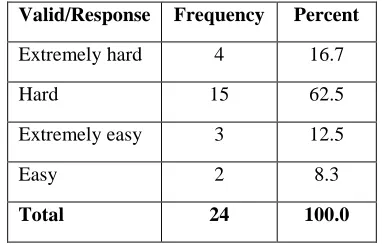
Respondents about flexibility of the system, as we can represented from the table 5 that the flexibility of the system is hard to many respondents. 62.5% of respondents stated that system is hard for flexibility, 16.7% responded that the system is extremely hard for flexibility, 12.5% responded that the system is extremely easy for flexibility and 8.3% responded that the system is easy for flexibility.
Table 3: Flexibility of the system
Valid/Response Frequency Percent
Extremely hard 4 16.7
Hard 15 62.5
Extremely easy 3 12.5
Easy 2 8.3
Total 24 100.0
The COTS product is not flexible for example to change the information on the system, even the
COTS product need users who have experience of that product to be able use it. To perform some functions on that product you may need to take a lot of time to learn how to use the software properly.
3.1.5. Examining learnability of the system
3.1.5.1. The system is easier to remember
how to use
The result of respondents shown that the system is hard to remember how to use. 29.2% of respondents affirmed that system is hard to remember, 54.2% responded that the system is extremely hard to remember how to use, 12.5% responded that the system is easier to remember and 4.2% responded that the system is extremely easy to remember
Table 4: System easy to remember how to use
Valid/Response Frequency Percent
Extremely hard 7 29.2
Hard 13 54.2
Easy 3 12.5
Extremely easy 1 4.2
Total 24 100.0
Our investigation resulted that the COTS systems are hard to remember how to use, they contain many features that may never use and we realize that some COTS product haven’t online documentations which can guide users how to use the product. COTS products are upgraded and updated every time that can cause also lack of remember the old features.
3.1.5.2. Time for training the system
Training of the user with the system takes more than two months, according to respondents 45.8% were trained more than two months, 37.5% were trained two months and 16.7% of respondents were trained in one month.
Table 5: Time for training
Valid/response Frequency Percent
One moth 4 16.7
Two months 9 37.5
More than two months 11 45.8
Total 24 100.0
The most COTS products are highly complex and contain many packages user may never use.
It is taking time to learn how to use the software properly. COTS product assays to offer a little something for everyone.
4. Evaluate usability techniques in COTS
products using HCD process
COTS products have challenges in usability of systems, after making interviews and analyze the data collection we found that ERP systems takes long time for loading the content, results of our study shown that those systems are hard to access and flexibility is hard. We also found that the learnability of those systems takes long time because of unnecessary packages and the unused features.
According to Marie and Wendy (2010) described in their research that EPR systems have the lack of usability. They identified a list of those usability problems include:
• Difficulty for users to find the next step in multi task works.
• There are some systems which give useless feedback information.
• Data entry can take too long.
• The functions of the search feature are unclear.
• It is not easy for users to change certain settings to fit their wishes.
• The visual design and placement of buttons in the interface are often unclear to users. • Interface specification of component is not
clear.
According to Brenda et al (2013) described that COTS systems has resulted in user interfaces suffering from poor usability. The poor usability makes it difficult of users to interact with the system.
After reviewed literatures of other researchers and analyzed our study results, to evaluate usability in COTS product we need to use “User Centered Development” process described in literature
HCD can help to analyze and provide with solution for existing problems, and provide test and validate of designed product to achieve planned target in real world (Elmansy, 2015). He described the six characteristic of HCD:
1. Adopting multidisciplinary skills and perspectives
2. Clear understanding to the users, tasks and environments
3. User-centered evaluation driven design
4. Considering the overall consumer experience
5. Involving the consumer in the design and production process
6. Iterative design process
HCD characteristics can help in COTS development process where it involves the customer in the design and we can use for user requirement and understanding user needs.
5. Evaluate usability techniques in COTS
products using Agile Development process
Our study shown that there are some software developers who work very closely with the customers through project and give them the priority for delivering product on time.
Palak and Amandeep (2013) explained that COTS based approach is a low risk development approach and considered also that its cost and time saving are main reasons to adopt it. However in their theological study, they identified problems and challenges risks during the COTS system development life cycle. These risks are due to the lack of system during selection, evaluation and integrating the components. They found that COTS component hasn’t available or outdated documentation during COTS selection process, architecture of the system is not being property analyzed, there are also lack of requirement about the system, the incompatibility of COTS system, lack of COTS’s training and documentation. In the development process they found that COTS based development has insufficient resources, and most time the estimation of time and cost are exceeded during development.
The risks during COTS during development process are (Rashmi & Shalini, 2012):
1. Essential quality is not met due to the lack of market
2. Unclear requirement specification
3. Lack on precision in schedule during
development and deliver product 4. Lack of contingency planning 5. Lack of vendor support 6. Lack of architecture prototype
7. Lack of software document and
documentation of the system in order to obtain knowledge about the components of system.
Selection of COTS components becomes a major challenge to match stakeholder’s requirement (Alves and Finkelstein, 2002)
Agile approach can help in reducing risk in development process of COTS product. By taking an example of SCRUM as agile methodology, it can help in some challenges.
Scrum is the most generally adapted agile process and has been adopted in software development and it has been essential used in a commercial software environment (Awad, 2005).
Scrum allow project team collaborative meeting in the beginning of the project (kickoff meeting) to provide a list of all desired work on the project by combining with story based work and task based work, the list is prioritized by the product owner.
The scrum has the product backlog which includes that list, it expresses items clearly, best achieve goals and mission optimizing the value of the work the team perform, ensuring that work is clear to all, and shows what the team will work on furthers (Schwaber and Jeff Sutherland, 2013).
The scrum team is responsible for gathering information and maximizing opportunities for make feedback to the customers early. This is can help to reduce unclear requirement risk that met in COTS based Development where there is no communication between vendors and customers.
Scrum can help to break down the complex work into the understandable tasks and the projects into sequence of short time called sprints.
The heart of Scrum is a Sprint, a time-box of a month or less during useable and potentially releasable product. Sprints have consistent durations through a development effort (Schwaber and Jeff Sutherland, 2013). Due to short sprints and constant feedback, it becomes easier to cope with the changes.
By breaking down complex work into understandable tasks, it easier to determine what needs to be done. This can help to specify the completion time of project.
Scrum makes all tasks transparent where there is no confidential information about what needs to be done.
Scrum facilitate organization to work in small teams, every teams makes it simple to stay focused because only limited time is spend in collaboration with others. The limited time allow the team to present its product to the interacting people and get feedback early, and that helps the team to improve the product. It makes it easier to deliver a quality product in a scheduled time to the market and may provide a greater income when all tasks are met.
In addition, evaluating each sprint through process before moving to the next iteration allows teams to change or update the vision of the project at any point.1T1TAlthough the deadline and budget are fixed variables (Daria, 2012). Scrum can respond easily to change or to upgrade the project.
We can use also Extreme Programming (XP) to reduce some risks in COTS Based Development where it can help to changing requirements at any point during project.
According to bruegge (2009) explained XP day to day practices:
1. Rapid feedback: confronting issues early
result in more time for resolving issues and this can applier to customer feedback and feedback from testing.
2. Simplicity: The design should focus on the
current requirements, this can help to refer on current COTS product to see how others product work and their features. Simple designs are easier to understand and change, this is can help to simplify the COTS interfaces.
3. Incremental change: this can help in
product change at the time and should be integrated with current baseline.
4. Quality work: Focus on rapid projects
where progress is demonstrated frequently and each change should be implemented carefully and completely.
XP can also help in planning where requirement are elicited by writing user stories, and developers decomposed each user story in terms of tasks. XP is decomposed the tasks into smaller tasks.
6. New Proposed COTS development
process
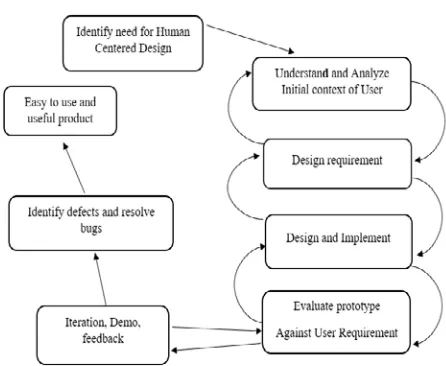
The main phases of new proposed COTS development process presented in figure below.
Fig. 2: Proposed flowchart for COTS Development Process
6.1.Identify need for Human Centered Design
Identify user need is the most important without property define it, it’s impossible to move forward in the right direction. First phase is the meeting with people involved (usability analyst, designers, project manager, and system developer), get to know each other, giving and explaining tasks to the team. The team should identify the users who they are, their roles, what they want, their objectives, what they are like, what they know, what do they think is useful, effective and efficient.
The team should consult the stakeholders, identify and plan the study by involving the users, select Human Centered method approach within the team. It is essential to involve usability analyst and one with experience of the existing system.
Requirement is statements about an intended system that specify what it should and how to do it (Justin, 2013). The team should make interviews for getting people to explore issues, understand the problem definition and information gathering by listing the system requirement, constraints and problems, data input to the system, output including the contents, level of details and timing.
6.2.Understand and analyze initial context of
user
This step helps to specify, in organized way, the features of users, the functions will implement of use. The team should takes information from stakeholders, process it in order to full understand
business process and user goal in the context of the overall organization, understand the user’s tasks and the business process that support goals.
Justin (2013) recommended four steps to understand and analyze data to user needs:
• User Groups: Combination the roles of
users according to their similar function requirements.
• Personas: are assuming users that act as real users in order to identify their motivations, expectations and goals that drive their behavior. In its role of specifying a user that falls within a user group, personas helps developers to develop a system that users need for helping them to achieve their goals rather than developing a system that the users wants.
• Scenarios: After developing the persona,
place him in a scenario which describes how that persona interacts with the system. It’s important to list all tasks and functions for each scenario to be more understandable, specific and manageable.
• Task analysis: Use each scenario to list the tasks that the user needs to perform in each. Task analysis helps to understand of how system works and reusability of user experience design.
When you analyze an existing system, you build a mental library of techniques, mechanisms that can help you to construct your own designs.
On this step the team should identify and document user’s task which perform or want to perform by users and the system. You should record all tasks users want to do, valuable data.
6.3.Design requirement
In this step state the essential characteristics that the solutions you get must meet to be successful. Based on problem statement, a successful system would use less cost and delivered on time.
The best ways to describe the design requirement for the new system is to use the related and existing product system. Investigate it in details, take pictures and take it apart if you have authorization, analyze how and why it works the way it does.
The team takes each task and functions requirement that are required by the system to make possible for user requirement.
6.4.Design and implement
This step helps to define and describe the necessary functions to achieve the objective of the system. The software allocation activities begin with the identified software functions obtained after completing the system allocation activities. The software functions are analyzed in term of feasibility. The designer team should consider the users and the system where the system functions are assigned to the operations combined with a human and machine process. The functions are identified should include every operation and activity required to meet the defined objectives. The team should also develop user training for end users by getting them up to the knowledge required to use the system and achieve their tasks. The designer team should develop prototypes for unable them to quickly test ideas and present designs to end users. Prototype is simulations of the final product. It’s like an interactive mockup that can have any degree of fidelity (Banerjee, 2014). They can use rapid prototyping methods which can be quickly replaced and changed with design feedback. To make a simple prototype, the designer has to decide what screens needed to provide. For the big systems like COTS you shouldn’t be practical to provide every possible window mockup’s user function, but you should have cover the main functions expected by users.
The team should specify the system, how use it and the user support should assign the functions and effective software standards, which will help the end users, get their daily tasks done successfully.
6.5. Evaluate prototype against user
requirement
The mockup, prototypes used as evaluations tools of functions requirement. The evaluation should be with users who have background knowledge and expectations to the system. The users should be asked to perform the representative tasks that the system has been designed to support.
During testing, you should record what the users want to do, compare between what they want to do and what you expected. You can also tell them to make other choice.
You need to recollect data using observation method when the test users are doing and thinking through the tasks. These observations tell designer what is happening and why it is happening.
You are also ask them to talk to you while ask the users to perform a test task, ask them what they are thinking, what they are trying to do.
After recollect data, the design will want to make a list of difficulties that users met in testing period and designer need to thinks why each difficult occurred.
Designer also should consider what changes needed to make to his design based on data collected from the tests.
According to (Nigel & Jonathan, 2001)described that evaluate designs against requirements has six steps includes:(1)Specify and validate context of evaluation; (2)Evaluate prototypes in order to define the requirements for the system; (3) Evaluate prototypes in order to improve the design;(4) Evaluate the system to check that the stakeholder and organizational requirements have been met; (5) Valuate the system in use in order to check that required practice has been followed;(6) Evaluate the system in use in order to ensure that it continues to meet organizational and user needs.
6.6.Iteration, demo and feedback
In development system with agile, the developer’s team should fix the duration of development process of project. The concept of iteration helps developers to focus on features that are important to users and to test these features with set of user tasks. Developers should work using iteration by selecting and implementing smaller tasks according to plan from the outstanding functions, until they have done all tasks that have been assigned to them.
Teams should hold a meeting on the last day of each iteration to discuss the work accomplished during iteration period (scrum). In that meeting the team should learn and make the feedback to the accomplished or pending work and why they are not done at time.
In Scrum the daily meeting can take fifteen minutes where the team’s member respond to basic questions like (Laurie, 2007): (1) What did you do since last scrum meeting; (2) Do you have any obstacles; and (3) What will you do before next meeting?
Team members should drive demo software ideally on customers’ machines by using their own data that will helps the teams to learn a lot more. The development team obtains feedback from users of the system at the end of each iteration and external release. This feedback drives the next iteration (Laurie, 2007).
6.7. Identify defect and resolve bugs
After improving the functions of the system done during test, the team should identify the defect and bugs that escape during the iteration time. The defect can discovered after functionality that has been
accepted by product owner. Developer should fix any broken functionality as soon as it is found in iteration it is covered. Defects should found in quality assurance testing phase. The quality assurance team should identify the defect and bugs when development system is done. All problem identified during quality assurance testing phase are created as defects because development is done. Developers should work as a team with quality assurance team to debug directly the researched defects and re-examined before going to production.
According to (Clinton, 2010) quality role shifts to take advantage of this:
1. Testers are members of teams, rather than gathered in separate Quality pools. This increases the speed of feedback on defects to the developers.
2. Stores require quality assurance action for approval before they are considered done by the development team. This creates a true place of development, which should include fixing defects and reduces the cost and added risk of fixing them at a later date.
3. Quality assurance’s voice is heard
throughout development, not just at end. This allows their valuable their valuable feedback to influence the system.
It’s very beneficial for the developers to see users interacting with their system in ways they did not anticipate. It can lead to improved interfaces and usability.
6.8.Easy and useful product
Management of change clarifies the process by clearly describing to the users all requirement steps and prompting each user through his/her tasks. Management change helps stakeholders to improve visibility, accountability, prevent them from skipping steps, and will reduce risks in the system environment. Useful product should have the user guide which helps the users for introduction of the system and how to learn to use it. The user guide engages users, motivates them for improvement. It helps the users the understanding where the system come from, train the job. Training users in COTS implementation helps them take full advantage of the system’s benefit, and the users improve their performance. The training of end users drives employment success and leads to increase business achievement. Training provides opportunity for users to learn the abilities and skills essential to the success of the system throughout the organization. The system should meet the tasks and information of each
user; it should be presentable, accessible and changeable.
7. Conclusion
After reviews how Agile can combined with HCD to improving usability in software development process, the combination of those approaches can help in iterative design to keep the requirement gathered from the stakeholders, collaboration with end users and to utility of design functionality of user needs. Iterative design can also increase usability in user experience. To improve usability of COTS systems, it is better to find some selected customers who have the representative role in the life of project. Those representative customers can then participate in development process of COTS products and give feedback to project team. The COTS project needed in breakdown to the manageable units, and the project team works toward the same goal. The users of COTS products need to be aware understand and know what the COTS project does and doesn’t do. HCD has the benefits in user interface design which helps users to understand the system easily. The user interface design can also have to serve business values and helps the team to understand what is the most important to the customers and the project team can deliver quality products on the market place. HCD can give high role in COTS product where can improve performance by reducing user errors and it can provide documentation where users can increase knowledge and learnability of the system.
Acknowledgments
I would like to thank my supervisors Dr. Wilson Cheruiyot and Dr. Anthony Luvanda for their support and encouragement throughout this study, and I would also like to thank my sisters and friends who are big important in my life.
Reference
1. Ann, L., Ray, W., Charles, H., Daniel, B., Alfred, S. (2010).Considerations for Using Agile in DoD Acquisition.CMU/SEI-2010-TN-002.pp. 46-48
2. Awad, M.A. (2005). A Comparison between Agile and Traditional Software Development Methodologies. Ms Thesis. School of Computer Science and Software Engineering. University of Western Australian. Australia.
3. Banerjee, A. (2014). What a prototype is?
.https://uxmag.com/articles/what-a-prototype-is-and-is-not. Visited on 07/07/2015.
4. Brenda, S., Andre, C., Charmain, C. (2013). Usability Evaluation of Medium-sized ERP system in higher Education.The Electronic Journal Information Systems Evaluation Volume 16 Issue 2. 2013, pp148-161
5. Clinton, K. (2010). Agile Game
Development with Scrum. The Addison Wesley Signature Series. Pp 252.
6. Charles, R. (2011). Usability and Agility of ERP Solutions.0TIFS North America. pp2-7.
7. Daria, K.U (2012). Advantages and
Disadvantages of the Scrum Project Management
Methodology.32TUhttp://smallbusiness.chron.co m/advantages-disadvantages-scrum-project-management-methodology-36099.htmlU32T. Visited on 26/08/2015.
8. Elmsnsy, R.(2015). Characteristics of
Human Centered Design. 32TUwww.designorate.com/characteristic
s-of human-centered-design.U Visited32T on 26/08/2015.
9. Giacomin, J. (2012). What is Human
Centered Design? Human Centered Design Institute, Brunel University. pp 6-8.
10. Garret, J.J. (2011). The Elements of User Experience: User-Centered Design for the Web and Beyond, Second Edition.
11. Glen, B.A (2002). Agile Management
Methods for ERP: How to apply agile processes to complex COTS projects and live to tell about it. Niwot, Colorado 80503. Pp 12-13.
12. Hiramatsu, T., & Fukuzumi, S.
(2008).Applying Human-Centered Design Process to System Director Enterprise Development Methodology. NEC TECHNICAL JOURNAL Vol.3 No.2/2008 Hocko, J. (2009).User Centered design in procedured software implementations,JUS,
Vol 6, Issue 2, pp61-65.
13. Jacques, S., & William, L. (2008). Commercial-off-the-shelf (cots): doing it right Phd thesis, University of Maryland pp5-9.
14. Justin, M. (2013).Requirement Gathering: A step by step approach for better user experience.32TUhttp://usabilitygeek.com/require ments-gathering-a-step-by-step-approach-for-a-better-user-experience-part-2. Visited on 25/06/2015U32T.
15. Jim, R. (2014).How user experience Fits in Agile.
16. Lambeck, C., Fohrholz, C., et al.
(2014).ERP Usability: Commonalities and Contrasts.Twenty Second European Conference on Information Systems, Tel Aviv.
17. Lucie, G. (2015). Human-Centered Design helps to create the best experiences.
18. Laurie, W. (2007). A survey of Agile Development Methodologies.
19. Lazar, J. (2006). Web usability: A user-centered design approach. Boston, MA: Addison Wesley.
20. Nigel,B.,Jonathan, E.(2001).Usability process improvement and capability assessment.
21. Pearrow, M. (2007). Web usability
handbook (2nd ed.). Boston, MA: Thomson. 22. Palak, A., Amandeep, K. (2013). Improving
COTS-based Software Development Process by Identification and Mitigation of Component Risks. Volume 3. ISSN 2277 128X pp 220.
23. Rashmi,G., Shalini,R. (2012) Risk
Assessment Techniques and Survey Methos for COTS Components. IJSEA, volume 3. Pp184-190.
24. Santiago, C.D, John, D.G., Lewis, E., & Morris, P. (2004).A Process for COTS Software Product Evaluation.
25. Saurav, T., Aasheesh, G. (2015). Agile
Software Development- A technique.
IJEMT volume 3,Issues 1.
26. Sommerville, I. (2011). Software
Engineering 9th Ed. Addison Wesley, 13:978-0-13-703515-1, Boston, MA.
27. Santiago, C.D, John, D.G., Lewis, E., & Morris, P. (2004).A Process for COTS Software Product Evaluation.